instrument cluster FORD EXPEDITION 2018 Owners Manual
[x] Cancel search | Manufacturer: FORD, Model Year: 2018, Model line: EXPEDITION, Model: FORD EXPEDITION 2018Pages: 571, PDF Size: 25.8 MB
Page 5 of 571
Steering Wheel
Adjusting the Steering Wheel - Vehicles
With: Manual Adjustable Steering
Column .........................................................82
Adjusting the Steering Wheel - Vehicles With: Power Adjustable Steering
Column .........................................................
82
Audio Control ..................................................
83
Voice Control ..................................................
84
Cruise Control ................................................
84
Information Display Control ......................
85
Heated Steering Wheel ..............................
85
Pedals
Adjusting the Pedals ...................................
86
Wipers and Washers
Windshield Wipers ........................................
87
Autowipers .......................................................
87
Windshield Washers ....................................
88
Rear Window Wiper and Washers .........
88
Lighting
General Information ....................................
89
Lighting Control .............................................
89
Autolamps .......................................................
90
Instrument Lighting Dimmer ....................
90
Headlamp Exit Delay ....................................
91
Daytime Running Lamps .............................
91
Automatic High Beam Control ..................
91
Front Fog Lamps ...........................................
92
Direction Indicators ......................................
93
Interior Lamps ................................................
93
Ambient Lighting ..........................................
94
Windows and Mirrors
Power Windows ............................................
96
Global Opening and Closing .....................
97
Exterior Mirrors ...............................................
98
Interior Mirror ................................................
100Childminder Mirror
.......................................
101
Sun Visors .......................................................
101
Moonroof - Vehicles With: Vista Roof Opening Panel ...........................................
101
Liftgate Window ..........................................
102
Instrument Cluster
Gauges ............................................................
104
Warning Lamps and Indicators ..............
106
Audible Warnings and Indicators ...........
110
Information Displays
General Information .....................................
111
Information Messages ...............................
123
Climate Control
Manual Climate Control ............................
139
Automatic Climate Control .....................
140
Hints on Controlling the Interior Climate ........................................................................\
.
143
Rear Passenger Climate Controls .........
145
Heated Windows and Mirrors ..................
147
Cabin Air Filter ..............................................
148
Remote Start ................................................
148
Seats
Sitting in the Correct Position .................
149
Head Restraints ...........................................
149
Manual Seats ................................................
153
Power Seats ...................................................
153
Memory Function ........................................
156
Rear Seats .......................................................
157
Heated Seats .................................................
162
Climate Controlled Seats .........................
164
Universal Garage Door Opener
Universal Garage Door Opener ..............
166
2
Expedition (TB8) Canada/United States of America, enUSA, Edition date: 201708, Third-Printing- Table of Contents
Page 8 of 571
Vehicle Care
General Information
..................................344
Cleaning Products ......................................
344
Cleaning the Exterior .................................
344
Waxing ............................................................
346
Cleaning the Engine ..................................
346
Cleaning the Windows and Wiper Blades ........................................................................\
346
Cleaning the Interior ..................................
347
Cleaning the Instrument Panel and Instrument Cluster Lens .......................
347
Cleaning Leather Seats ............................
348
Repairing Minor Paint Damage .............
349
Cleaning the Wheels .................................
349
Vehicle Storage ...........................................
349
Wheels and Tires
General Information ..................................
352
Tire Care .........................................................
354
Using Snow Chains ...................................
368
Tire Pressure Monitoring System .........
369
Changing a Road Wheel ...........................
373
Technical Specifications ..........................
378
Capacities and Specifications
Engine Specifications ...............................
380
Motorcraft Parts .........................................
380
Vehicle Identification Number ...............
382
Vehicle Certification Label ......................
383
Transmission Code Designation ...........
383
Capacities and Specifications ...............
384
Audio System
General Information ..................................
389
Audio Unit - Vehicles With: AM/FM/CD/ SYNC ..........................................................
390
Audio Unit - Vehicles With: AM/FM/CD/ SYNC/Touchscreen Display ...............
392
Digital Radio .................................................
393Satellite Radio
.............................................
395
USB Port ........................................................
398
SYNC™
General Information ..................................
399
Using Voice Recognition .........................
400
Using SYNC™ With Your Phone ...........
402
SYNC™ Applications and Services ......
403
Using SYNC™ With Your Media Player ........................................................................\
407
SYNC™ Troubleshooting ........................
408
SYNC™ 3
General Information ...................................
416
Home Screen ...............................................
429
Using Voice Recognition ..........................
430
Entertainment .............................................
436
Climate ...........................................................
447
Phone .............................................................
450
Navigation .....................................................
455
Apps ................................................................
463
Settings ..........................................................
466
SYNC™ 3 Troubleshooting ....................
480
Accessories
Accessories ...................................................
494
Ford Protect
Ford Protect .................................................
496
Scheduled Maintenance
General Maintenance Information ......
498
Normal Scheduled Maintenance ..........
501
Special Operating Conditions Scheduled Maintenance ............................................
504
Scheduled Maintenance Record ..........
506
Appendices
Electromagnetic Compatibility ...............
517
End User License Agreement .................
519
5
Expedition (TB8) Canada/United States of America, enUSA, Edition date: 201708, Third-Printing- Table of Contents
Page 18 of 571
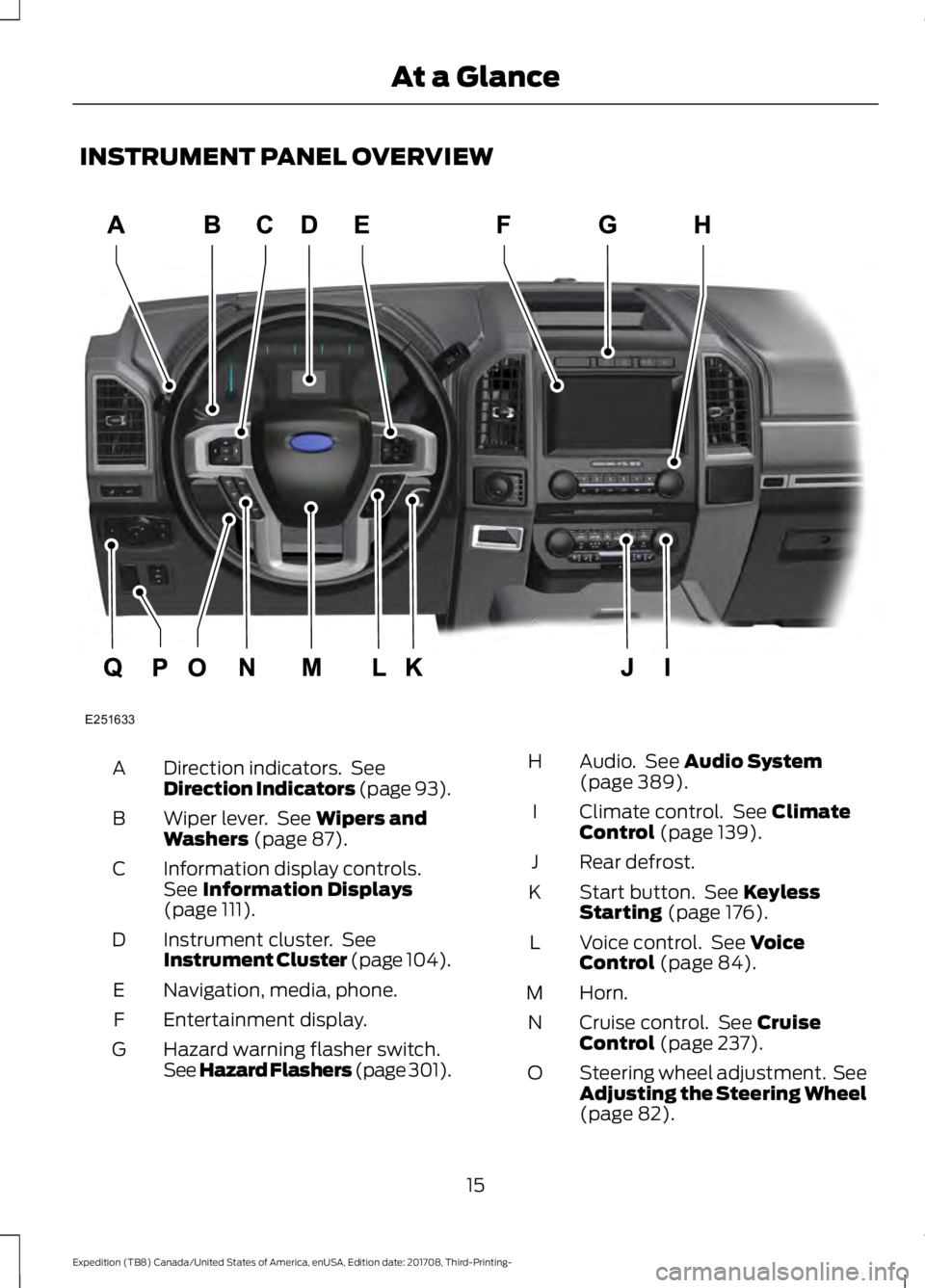
INSTRUMENT PANEL OVERVIEW
Direction indicators. See
Direction Indicators (page 93).
A
Wiper lever. See
Wipers and
Washers (page 87).
B
Information display controls.
See
Information Displays
(page 111).
C
Instrument cluster. See
Instrument Cluster (page 104).
D
Naviga
tion, media, phone.
E
Entertainment display.
F
Hazard warning flasher switch.
See Hazard Flashers (page 301).
G Audio. See
Audio System
(page 389).
H
Climate control. See
Climate
Control (page 139).
I
Rear defrost.
J
Start button. See
Keyless
Starting (page 176).
K
Voice control. See
Voice
Control (page 84).
L
Horn.
M
Cruise control. See
Cruise
Control (page 237).
N
Steering wheel adjustment. See
Adjusting the Steering Wheel
(page
82).
O
15
Expedition (TB8) Canada/United States of America, enUSA, Edition date: 201708, Third-Printing- At a GlanceE251633
Page 51 of 571
If you think that the state of the passenger
airbag status indicator lamp is incorrect,
check for the following:
•
Objects lodged underneath the seat.
• Objects between the seat cushion and
the center console.
• Objects hanging off the seat backrest.
• Objects stowed in the seat backrest
map pocket.
• Objects placed on the occupant's lap.
• Cargo interference with the seat
• Other passengers pushing or pulling on
the seat.
• Rear passenger feet and knees resting
or pushing on the seat.
The conditions listed above may cause the
weight of a properly seated occupant to
be incorrectly interpreted by the front
passenger sensing system. The person in
the front passenger seat may appear
heavier or lighter due to the conditions
described in the previous list. Make sure the front passenger
sensing system is operating
properly. See Crash Sensors
and Airbag Indicator (page 51).
If the airbag readiness light is lit, do the
following:
The driver and adult passengers should
check for objects lodged underneath the
front passenger seat or cargo interfering
with the seat.
If objects are lodged or cargo is interfering
with the seat, please take the following
steps to remove the obstruction:
• Pull your vehicle over.
• Switch your vehicle off.
• Driver or adult passengers should
check for any objects lodged
underneath the front passenger seat
or cargo interfering with the seat. •
Remove the obstruction(s) (if found).
• Restart your vehicle.
• Wait at least two minutes and verify
that the airbag readiness light in the
instrument cluster is no longer
illuminated.
• If the airbag readiness light in the
instrument cluster remains illuminated,
this may or may not be a problem due
to the front passenger sensing system.
Do not attempt to repair or service the
system. Take your vehicle immediately to
an authorized dealer.
If it is necessary to modify an advanced
front airbag system to accommodate a
person with disabilities, contact your
Customer Relationship Center.
SIDE AIRBAGS WARNING:
Do not place objects
or mount equipment on or near the
airbag cover, on the side of the seatbacks
(of the front seats), or in front seat areas
that may come into contact with a
deploying airbag. Failure to follow these
instructions may increase the risk of
personal injury in the event of a crash. WARNING:
Do not use accessory
seat covers. The use of accessory seat
covers may prevent the deployment of
the side airbags and increase the risk of
injury in an accident. WARNING:
Do not lean your head
on the door. The side airbag could injure
you as it deploys from the side of the
seatback.
48
Expedition (TB8) Canada/United States of America, enUSA, Edition date: 201708, Third-Printing- Supplementary Restraints SystemE67017
Page 54 of 571
CRASH SENSORS AND
AIRBAG INDICATOR
WARNING: Modifying or adding
equipment to the front end of your
vehicle (including hood, bumper system,
frame, front end body structure, tow
hooks and hood pins) may affect the
performance of the airbag system,
increasing the risk of injury. Do not
modify or add equipment to the front
end of your vehicle.
Your vehicle has a collection of crash and
occupant sensors which provide
information to the restraints control
module which deploys (activates) the
front seatbelt pretensioners, driver airbag,
passenger airbag, rear inflatable belts, seat
mounted side airbags, and the Safety
Canopy. Based on the type of crash, the
restraints control module will deploy the
appropriate safety devices.
The restraints control module also
monitors the readiness of the above safety
devices plus the crash and occupant
sensors. The readiness of the safety
system is indicated by a warning indicator
light in the instrument cluster or by a
backup tone if the warning light is not
working. See
Instrument Cluster (page
104). Routine maintenance of the airbag is
not required.
A difficulty with the system is indicated by
one or more of the following: The readiness light will not
illuminate immediately after you
switch the ignition on. •
The readiness light either flashes or
stays lit.
• A series of five beeps will be heard. The
tone pattern will repeat periodically
until the problem, the light or both are
repaired.
If any of these things happen, even
intermittently, have the supplemental
restraint system serviced at an authorized
dealer immediately. Unless serviced, the
system may not function properly in the
event of a crash.
The fact that the seatbelt pretensioners
or front airbags did not activate for both
front seat occupants in a crash does not
mean that something is wrong with the
system. Rather, it means the restraints
control module determined the accident
conditions (crash severity, belt usage)
were not appropriate to activate these
safety devices.
• The design of the front airbags is to
activate only in frontal and near-frontal
crashes (not rollovers, side impacts or
rear impacts) unless the crash causes
sufficient frontal deceleration.
• The design of the seatbelt
pretensioners and rear inflatable belts
is to activate in frontal, near-frontal
and side crashes, and in rollovers.
• The design of the side airbags is to
inflate in certain side impact crashes.
Side airbags may activate in other
types of crashes if the vehicle
experiences sufficient sideways motion
or deformation.
• The design of the Safety Canopy is to
inflate in certain side impact crashes
or rollover events. The Safety Canopy
may activate in other types of crashes
if the vehicle experiences sufficient
sideways motion or deformation, or a
certain likelihood of rollover.
51
Expedition (TB8) Canada/United States of America, enUSA, Edition date: 201708, Third-Printing- Supplementary Restraints SystemE67017
Page 79 of 571
Note:
Entering your vehicle when the
liftgate is closing can cause your vehicle to
bounce and activate obstacle detection. To
prevent this, let the power liftgate close
completely before you enter your vehicle.
Before driving off, check the instrument
cluster for a liftgate or door ajar message or
warning indicator. Failure to do this could
result in unintentionally leaving the liftgate
open when driving.
When Opening
The system stops when it detects an
obstacle and two short tones sound.
Remove the obstacle to operate the
liftgate.
Using the Hands-Free Liftgate (If
Equipped)
Make sure you have a passive key within
3 ft (1 m)
of the liftgate.
1. Stand behind your vehicle, and face the
liftgate.
2. Move your foot, in a single-kick motion,
without pausing, under and away from
the rear bumper detection area.
3. The liftgate power opens or closes.
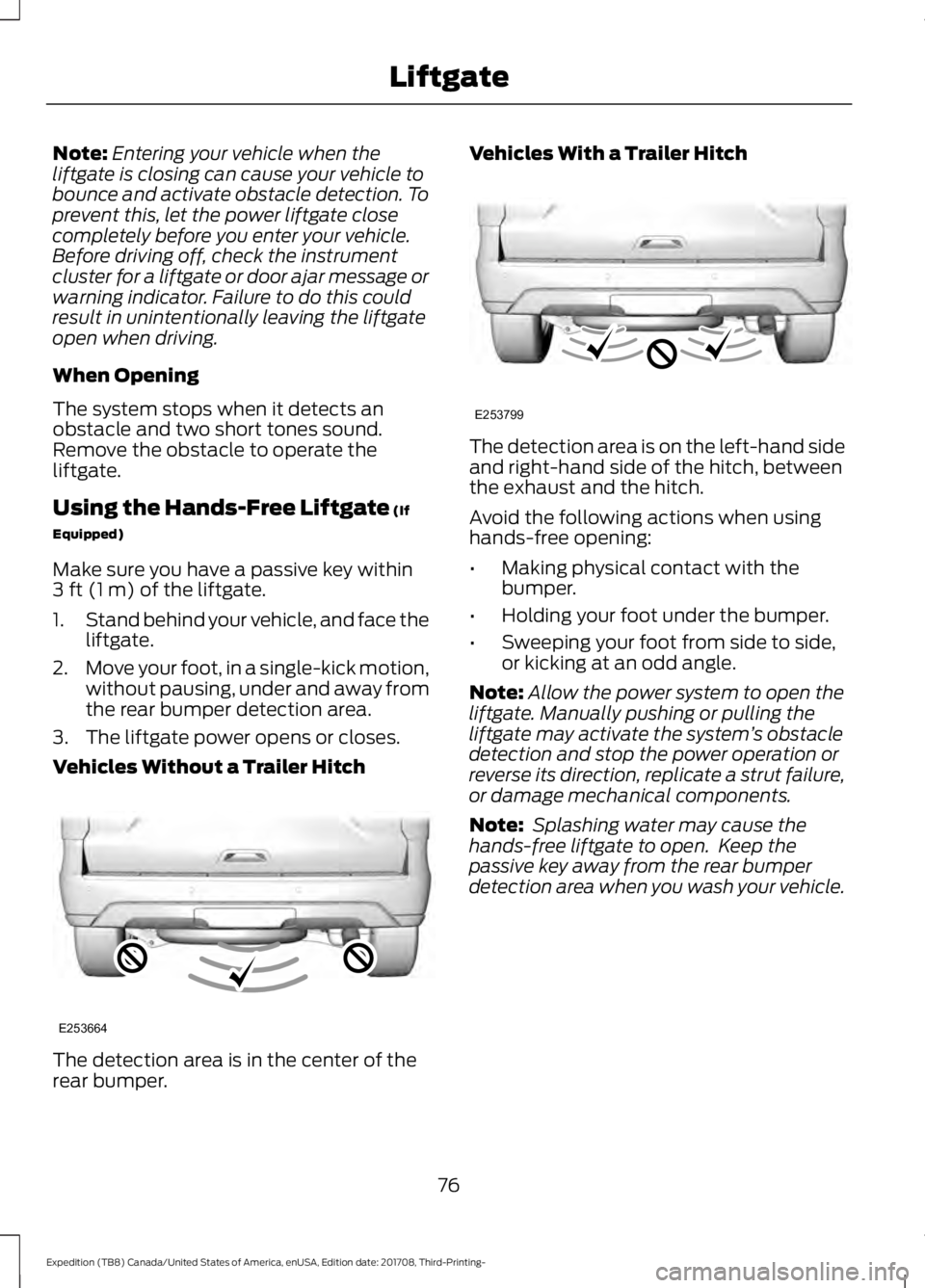
Vehicles Without a Trailer Hitch The detection area is in the center of the
rear bumper. Vehicles With a Trailer Hitch
The detection area is on the left-hand side
and right-hand side of the hitch, between
the exhaust and the hitch.
Avoid the following actions when using
hands-free opening:
•
Making physical contact with the
bumper.
• Holding your foot under the bumper.
• Sweeping your foot from side to side,
or kicking at an odd angle.
Note: Allow the power system to open the
liftgate. Manually pushing or pulling the
liftgate may activate the system ’s obstacle
detection and stop the power operation or
reverse its direction, replicate a strut failure,
or damage mechanical components.
Note: Splashing water may cause the
hands-free liftgate to open. Keep the
passive key away from the rear bumper
detection area when you wash your vehicle.
76
Expedition (TB8) Canada/United States of America, enUSA, Edition date: 201708, Third-Printing- LiftgateE253664 E253799
Page 107 of 571
GAUGES
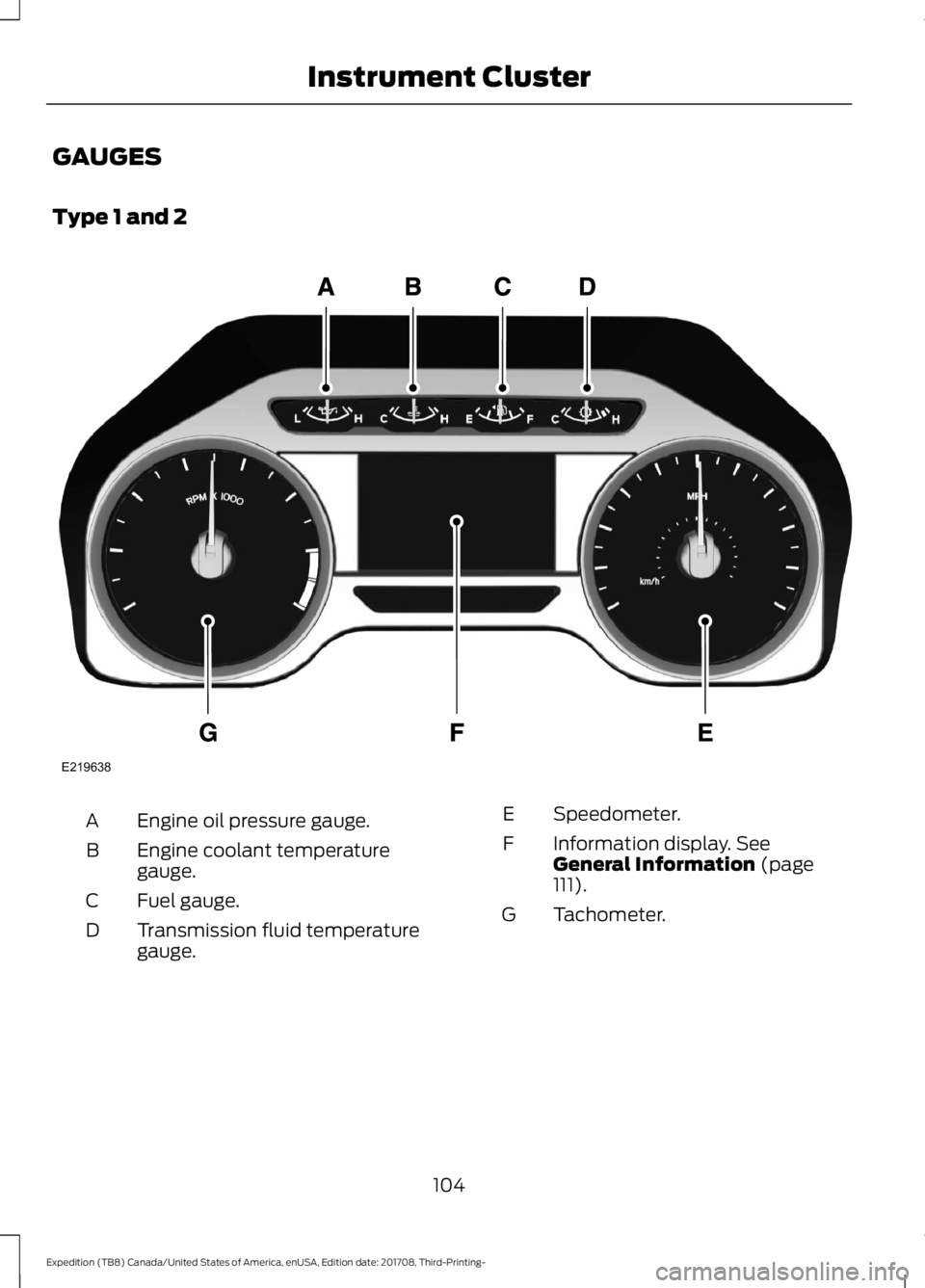
Type 1 and 2
Engine oil pressure gauge.
A
Engine coolant temperature
gauge.
B
Fuel gauge.
C
Transmission fluid temperature
gauge.
D Speedometer.
E
Information display. See
General Information (page
111).
F
Tachometer.
G
104
Expedition (TB8) Canada/United States of America, enUSA, Edition date: 201708, Third-Printing- Instrument ClusterE219638
Page 108 of 571
Type 3
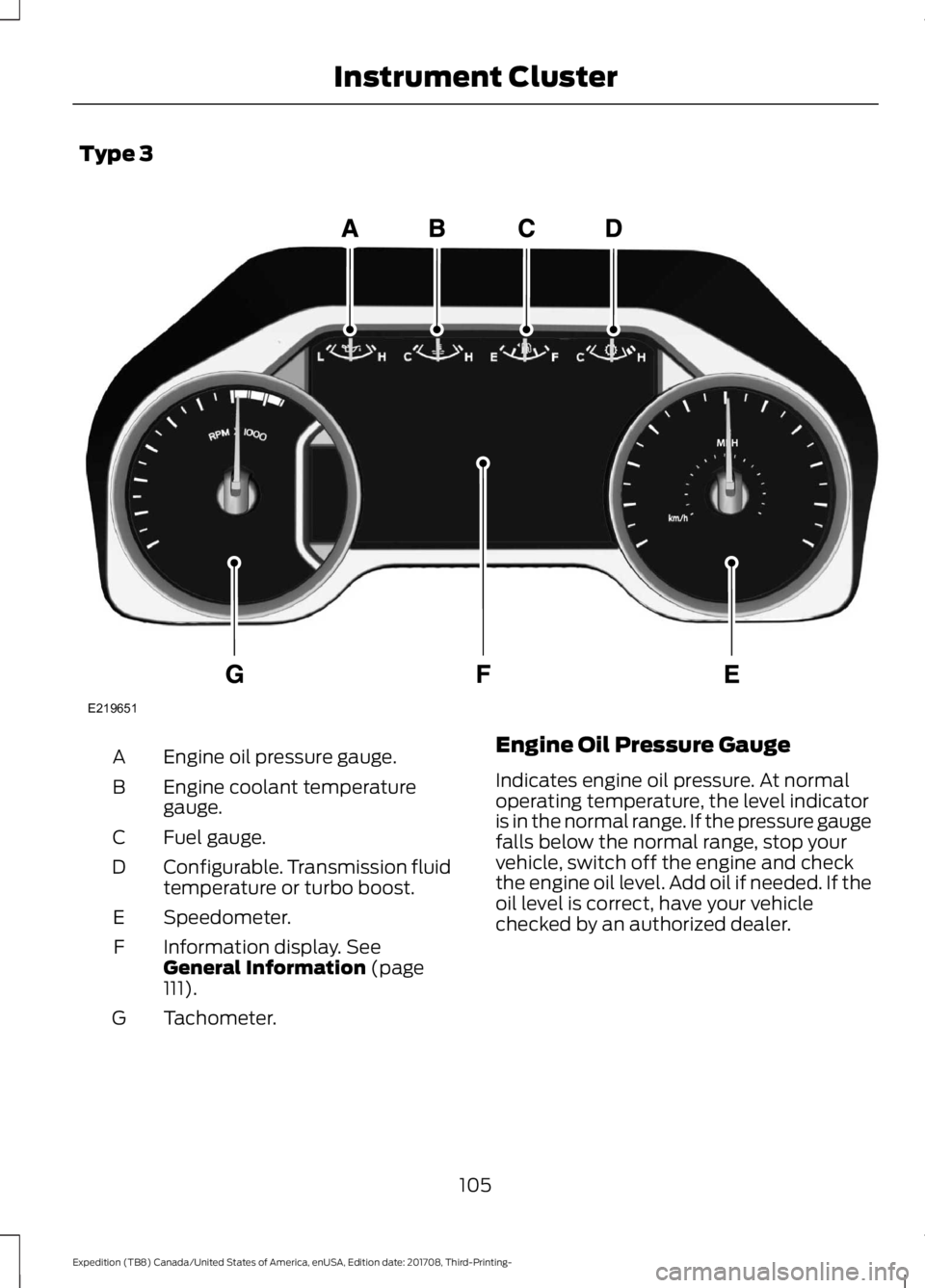
Engine oil pressure gauge.
A
Engine coolant temperature
gauge.
B
Fuel gauge.
C
Configurable. Transmission fluid
temperature or turbo boost.
D
Speedometer.
E
Information display. See
General Information (page
111).
F
Tachometer.
G Engine Oil Pressure Gauge
Indicates engine oil pressure. At normal
operating temperature, the level indicator
is in the normal range. If the pressure gauge
falls below the normal range, stop your
vehicle, switch off the engine and check
the engine oil level. Add oil if needed. If the
oil level is correct, have your vehicle
checked by an authorized dealer.
105
Expedition (TB8) Canada/United States of America, enUSA, Edition date: 201708, Third-Printing- Instrument ClusterE219651
Page 109 of 571
Engine Coolant Temperature
Gauge
WARNING: Do not remove the
coolant reservoir cap when the cooling
system is hot. Wait 10 minutes for the
cooling system to cool down. Cover the
coolant reservoir cap with a thick cloth
to prevent the possibility of scalding and
slowly remove the cap. Failure to follow
this instruction could result in personal
injury.
Indicates engine coolant temperature. At
normal operating temperature, the level
indicator is in the normal range. If the
engine coolant temperature exceeds the
normal range, stop your vehicle as soon as
possible, switch off the engine and let the
engine cool.
Fuel Gauge
The fuel gauge indicates about how much
fuel is in the fuel tank.
The arrow adjacent to the fuel pump
symbol indicates on which side of your
vehicle the fuel filler door is located.
Note: The fuel gauge may vary slightly
when your vehicle is moving or on a slope.
Low Fuel Reminder
A low fuel level reminder displays and
sounds when the distance to empty
reaches
75 mi (120 km) to empty for
MyKey, and at 50 mi (80 km), 25 mi
(40 km), 10 mi (20 km) and 0 mi (0 km)
for all vehicle keys.
Note: The low fuel reminder can appear at
different fuel gauge positions depending on
fuel economy conditions. This variation is
normal. Transmission Fluid Temperature
Gauge
Indicates transmission fluid temperature.
At normal operating temperature, the level
indicator is in the normal range. If the
transmission fluid temperature exceeds
the normal range, stop your vehicle as soon
as possible and verify the airflow is not
restricted by snow or debris blocking
airflow through the grille.
Special operating conditions such as
snowplowing, towing, or off-road use may
cause higher than normal operating
temperatures. See
Special Operating
Conditions Scheduled Maintenance
(page
504).
To lower the transmission temperature
into the normal range, alter the severity of
your driving conditions. Operating the
transmission for extended periods with the
gauge in the higher than normal area may
cause internal transmission damage. If the
gauge continues to show high
temperatures, see an authorized dealer.
Turbo Boost Gauge
(If Equipped)
Indicates the amount of manifold air
pressure in the engine.
WARNING LAMPS AND
INDICATORS
The following warning lamps and
indicators alert you to a vehicle condition
that may become serious. Some lamps
illuminate when you start your vehicle to
make sure they work. If any lamps remain
on after starting your vehicle, refer to the
respective system warning lamp for further
information.
Note: Some warning indicators appear in
the information display and operate the
same as a warning lamp but do not
illuminate when you start your vehicle.
106
Expedition (TB8) Canada/United States of America, enUSA, Edition date: 201708, Third-Printing- Instrument Cluster
Page 110 of 571
Adaptive Cruise Control Indicator
(If Equipped)
It illuminates when you switch
the system on.
It illuminates white when the
system is in standby mode. It illuminates
green when you set the adaptive cruise
speed.
See Using Adaptive Cruise Control
(page 238).
Airbag Warning Lamp If it does not illuminate when you
switch the ignition on, continues
to flash or remains on when the
engine is running, this indicates a
malfunction. Have your vehicle checked
as soon as possible.
Anti-Lock Brake System Warning
Lamp If it illuminates when you are
driving, this indicates a
malfunction. Your vehicle
continues to have normal braking without
the anti-lock brake system function. Have
your vehicle checked as soon as possible.
Automatic Headlamp High Beam
Indicator
(If Equipped) It illuminates when the system
automatically turns the
headlamp high beam on.
Auto-Start-Stop Indicator (If Equipped) It illuminates when the engine
has automatically stopped. It
flashes to inform you when the
engine needs to restart. The
indicator is shown with a
strikethrough if the system is not
available. See
Auto-Start-Stop (page 181).
Battery If it illuminates while driving, it
indicates a malfunction. Switch
off all unnecessary electrical
equipment and have the system checked
by your authorized dealer immediately.
Blind Spot Information System
Indicator
(If Equipped) It illuminates when you switch
the system off.
See
Blind Spot Information
System (page 250).
Brake System Warning Lamp WARNING:
Driving your vehicle
with the warning lamp on is dangerous.
A significant decrease in braking
performance may occur. It may take you
longer to stop your vehicle. Have your
vehicle checked as soon as possible.
Driving extended distances with the
parking brake engaged can cause brake
failure and the risk of personal injury. It illuminates when you engage
the parking brake and the
ignition is on.
If it illuminates when your vehicle is
moving, make sure the parking brake is
disengaged. If the parking brake is
disengaged, this indicates low brake fluid
level or a brake system fault. Have your
vehicle checked as soon as possible.
107
Expedition (TB8) Canada/United States of America, enUSA, Edition date: 201708, Third-Printing- Instrument ClusterE144524 E67017 E146361 E151262 E138644