brake sensor FORD EXPEDITION 2019 User Guide
[x] Cancel search | Manufacturer: FORD, Model Year: 2019, Model line: EXPEDITION, Model: FORD EXPEDITION 2019Pages: 583, PDF Size: 6.71 MB
Page 250 of 583
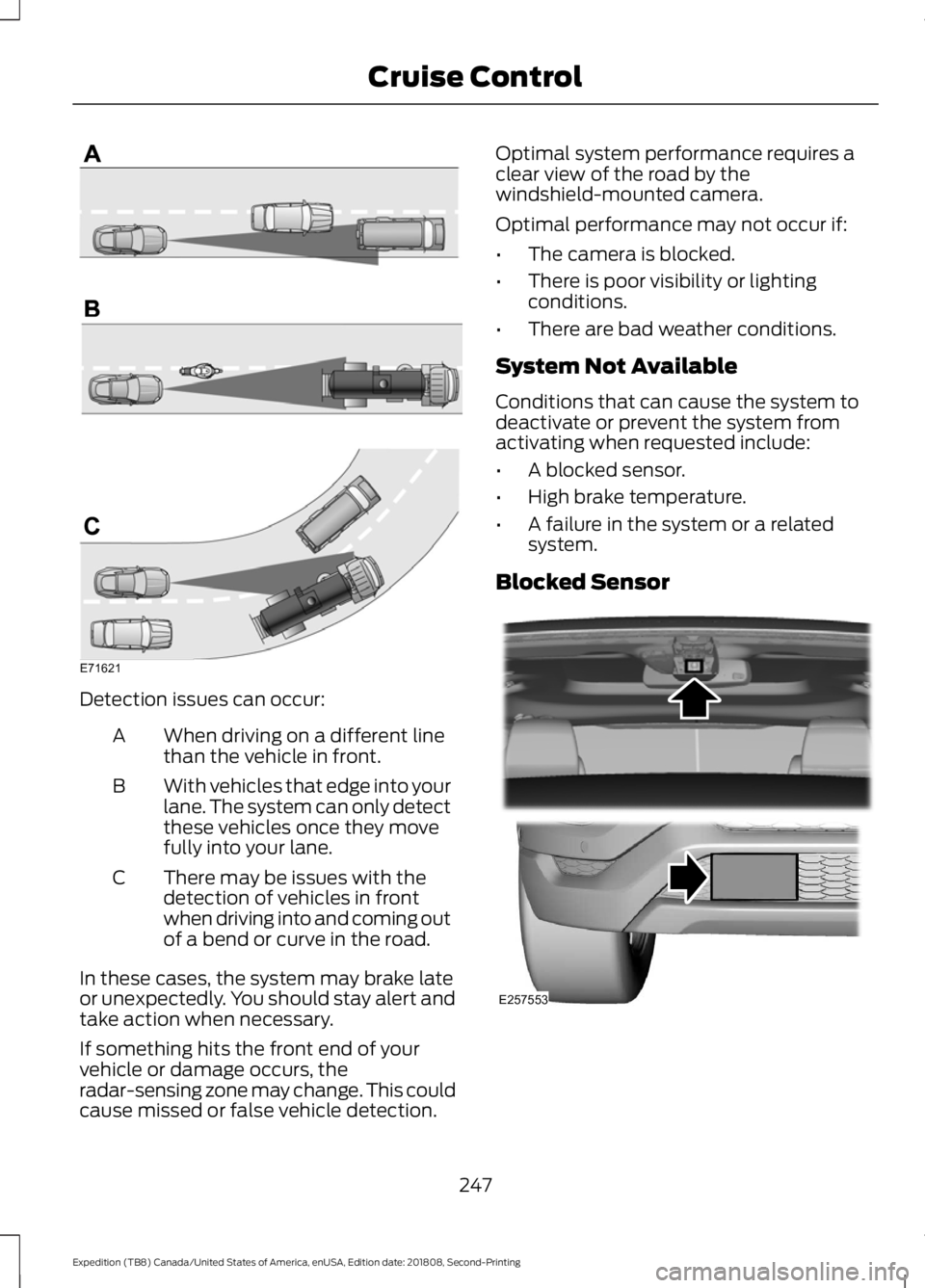
Detection issues can occur:
When driving on a different line
than the vehicle in front.
A
With vehicles that edge into your
lane. The system can only detect
these vehicles once they move
fully into your lane.
B
There may be issues with the
detection of vehicles in front
when driving into and coming out
of a bend or curve in the road.
C
In these cases, the system may brake late
or unexpectedly. You should stay alert and
take action when necessary.
If something hits the front end of your
vehicle or damage occurs, the
radar-sensing zone may change. This could
cause missed or false vehicle detection. Optimal system performance requires a
clear view of the road by the
windshield-mounted camera.
Optimal performance may not occur if:
•
The camera is blocked.
• There is poor visibility or lighting
conditions.
• There are bad weather conditions.
System Not Available
Conditions that can cause the system to
deactivate or prevent the system from
activating when requested include:
• A blocked sensor.
• High brake temperature.
• A failure in the system or a related
system.
Blocked Sensor 247
Expedition (TB8) Canada/United States of America, enUSA, Edition date: 201808, Second-Printing Cruise ControlE71621 E257553
Page 251 of 583
A message displays if something obstructs
the radar signals from the sensor. The
sensor is in the lower grille. The system
cannot detect a vehicle ahead and does
not function when something blocks the
sensor.
Note:
You cannot see the sensor. It is
behind a fascia panel.
Keep the front of your vehicle free of dirt,
metal badges or objects. Vehicle front
protectors and aftermarket lights may also
block the sensor.
Possible Causes and Actions for This Message Displaying: Action
Cause
Clean the grille surface in front of the radar
or remove the object causing the obstruc-
tion.
The surface of the radar is dirty or
obstructed.
Wait a short time. It may take several
minutes for the radar to detect that it is free
from obstruction.
The surface of the radar is clean but the
message remains in the display.
Do not use the system in these conditions
because it may not detect any vehicles
ahead.
Heavy rain or snow is interfering with the
radar signals.
Do not use the system in these conditions
because it may not detect any vehicles
ahead.
Water, snow or ice on the surface of the
road may interfere with the radar signals.
Wait a short time or switch to normal cruise
control.
You are in a desert or remote area with no
other vehicles and no roadside objects.
Due to the nature of radar technology, it is possible to get a blockage warning with no
actual block. A false blocked condition either self clears, or clears after you restart your
vehicle.
Switching to Normal Cruise
Control WARNING: Normal cruise control
will not brake when your vehicle is
approaching slower vehicles. Always be
aware of which mode you have selected
and apply the brakes when necessary. The cruise control indicator light
replaces the adaptive cruise
control indicator light if you
select normal cruise control. The gap
setting does not display, and the system
does not respond to lead vehicles.
Automatic braking remains active to
maintain set speed.
You can change from adaptive cruise
control to normal cruise control through
the information display.
248
Expedition (TB8) Canada/United States of America, enUSA, Edition date: 201808, Second-Printing Cruise ControlE71340
Page 330 of 583
Protected Component
Fuse Rating
Fuse or Relay
Number
Not used.
—
1
Driver seat switch.
7.5A 1
2
Driver door unlock.
20A 1
3
Trailer brake controller.
5A 1
4
Speaker amplifier.
20A 1
5
Not used (spare).
10A 2
6
Not used (spare).
10A 2
7
Not used.
—
8
Rear seat entertainment module.
10A 2
9
Head up display.
Wireless accessory charger module.
5A 2
10
Hands free liftgate module.
Power liftgate module.
Keypad.
5A 2
11
Combined sensor module.
Cluster.
7.5A 2
12
Electronic control panel.
Smart datalink connector logic.
Gear shift module.
7.5A 2
13
Steering column control module.
Extended power module.
10A 2
14
Brake switch.
Smart datalink connector power.
10A 2
15
Liftglass release.
15A 1
16
Telematics control unit - modem.
5A 2
17
Ignition switch.
5A 2
18
Key inhibit solenoid.
327
Expedition (TB8) Canada/United States of America, enUSA, Edition date: 201808, Second-Printing Fuses
Page 377 of 583
Compliance Certification Label (on the
door hinge pillar, door latch post or the
door edge that meets the door latch
post, next to the driver seat), or Tire
Label on the B-Pillar or the edge of the
driver door. Failure to follow the tire
pressure recommendations can cause
uneven treadwear patterns and
adversely affect the way your vehicle
handles.
Note: The suspension insulation and
bumpers will help prevent vehicle damage.
Do not remove these components from your
vehicle when using snow tires and chains.
The tires on your vehicle have all-weather
treads to provide traction in rain and snow.
However, in some climates, you may need
to use snow tires and cables. If you need
to use cables, it is recommended that steel
wheels (of the same size and
specifications) be used, as cables may chip
aluminum wheels.
Follow these guidelines when using snow
tires and chains:
• If possible, avoid fully loading your
vehicle.
• Use only cable type chains or chains
offered by Ford/Lincoln as an
accessory or equivalent. Other
conventional link type chains may
contact and cause damage to the
vehicle's wheel house and/or body.
• Do not install chains on the front tires
as this may interfere with suspension
components.
• Only certain snow cables or chains
have been approved by Ford/Lincoln
as safe for use on your vehicle with the
following tires: 265/70R17 and
275/65R18.
• You should install snow cables or
chains that have been rated as SAE
Class S. •
Install chains securely, verifying that
the chains do not touch any wiring,
brake lines, or fuel lines.
• Do not exceed 31 mph (50 km/h) or
less if recommended by the chain
manufacturer while using snow chains.
• Drive cautiously. If you hear the chains
rub or bang against your vehicle, stop
and retighten the chains. If this does
not work, remove the chains to prevent
damage to your vehicle.
• Remove the tire chains when they are
no longer needed. Do not use tire
chains on dry roads.
• Purchase chains or cables from a
manufacturer that clearly labels body
to tire dimension restrictions. The snow
chains or cables must be mounted in
pairs on the rear tires only.
If you have any questions regarding snow
chains or cables, please contact your
authorized dealer.
TIRE PRESSURE MONITORING
SYSTEM WARNING:
The tire pressure
monitoring system is not a substitute for
manually checking tire pressures. You
should periodically check tire pressures
using a pressure gauge. Failure to
correctly maintain tire pressures could
increase the risk of tire failure, loss of
control, vehicle rollover and personal
injury.
Note: You should only use tire sealants in
roadside emergencies as they could cause
damage to the tire pressure monitoring
system sensor.
Note: If the tire pressure monitoring system
sensor becomes damaged, it will not
function.
374
Expedition (TB8) Canada/United States of America, enUSA, Edition date: 201808, Second-Printing Wheels and Tires
Page 383 of 583
11.
Set all four tires to the recommended
air pressure as indicated on the
Safety Compliance Certification
Label, affixed to either the door hinge
pillar, door-latch post, or the door
edge that meets the door-latch post,
next to the driver seating position or
Tire Label located on the B-Pillar or
the edge of the driver door.
CHANGING A ROAD WHEEL WARNING: If the tire pressure
monitor sensor becomes damaged it
may not function.
Note: You should only use tire sealants in
roadside emergencies as they may cause
damage to the tire pressure monitoring
system sensor.
Note: The tire pressure monitoring system
indicator light illuminates when the spare
tire is in use. To restore the full function of
the monitoring system, all road wheels
equipped with tire pressure monitoring
sensors must be mounted on this vehicle.
If you get a flat tire when driving, do not
apply the brake heavily. Instead, gradually
decrease your speed. Hold the steering
wheel firmly and slowly move to a safe
place on the side of the road.
Have a flat serviced by an authorized
dealer in order to prevent damage to the
system sensors.
See Tire Pressure
Monitoring System (page 374). Replace
the spare tire with a road tire as soon as
possible. During repairing or replacing of
the flat tire, have the authorized dealer
inspect the system sensor for damage. Dissimilar Spare Wheel and Tire
Assembly Information WARNING:
Failure to follow these
guidelines could result in an increased
risk of loss of vehicle control, injury or
death.
If you have a dissimilar spare wheel and
tire, then it is intended for temporary use
only. This means that if you need to use it,
you should replace it as soon as possible
with a road wheel and tire assembly that
is the same size and type as the road tires
and wheels that were originally provided.
If the dissimilar spare tire or wheel is
damaged, it should be replaced rather than
repaired.
A dissimilar spare wheel and tire assembly
is defined as a spare wheel and tire
assembly that is different in brand, size or
appearance from the road tires and
wheels.
Full-size dissimilar spare
When driving with the full-size dissimilar
spare wheel and tire assembly, do not:
• Exceed
70 mph (113 km/h).
• Use more than one dissimilar spare
wheel and tire assembly at a time.
• Use snow chains on the end of the
vehicle with the dissimilar spare wheel
and tire assembly.
When driving with the full-size dissimilar
spare wheel and tire assembly, it is
recommended that you do not:
• Exceed
50 mph (80 km/h) in 4WD.
• Engage 4WD unless the vehicle is
stationary.
• Use 4WD on dry pavement.
380
Expedition (TB8) Canada/United States of America, enUSA, Edition date: 201808, Second-Printing Wheels and Tires
Page 573 of 583
Switching the Heated Exterior Mirrors On
and Off.............................................................. 457
Switching the Heated Rear Window On and Off....................................................................... 457
Switching the Heated Seats On and Off....................................................................... 457
Switching the Heated Steering Wheel On and Off.............................................................. 457
Switching the Rear Climate Controlled Seats On and Off.......................................... 458
Switching the Rear Heated Seats On and Off...................................................................... 458
Switching the Rear Ventilated Seats On and Off............................................................. 458
Switching the Ventilated Seats On and Off...................................................................... 458
Climate Control.............................................142
Climate Controlled Seats..........................167
Ventilated Seats................................................. 168
Coolant Check See: Engine Coolant Check............................ 335
Crash Sensors and Airbag Indicator.......54
Creating a MyKey
...........................................65
Programming and Changing Configurable
Settings.............................................................. 66
Cross Traffic Alert
........................................258
Blocked Sensors................................................ 260
Switching the System Off and On..............260
System Errors..................................................... 260
System Lights, Messages and Audible Alerts................................................................. 260
System Limitations........................................... 260
Using the Cross Traffic Alert System.........258
Cruise Control.................................................89 Principle of Operation....................................... 241
Cruise control See: Using Cruise Control................................ 241
Customer Assistance
..................................313
D
Data Recording
..................................................9
911 Assist Privacy Notice..................................... 13
Comfort, Convenience and Entertainment Data........................................................................\
11
Event Data................................................................. 11
Service Data............................................................ 10
Services That Third Parties Provide...............12 Services That We Provide..................................
12
Vehicles With a Modem...................................... 12
Vehicles With SYNC............................................. 12
Daytime Running Lamps
............................96
Type One - Conventional
(Non-Configurable)....................................... 96
Type Two - Configurable................................... 96
Declaration of Conformity.......................554 Radio Frequency Statement......................... 554
Digital Radio
..................................................403
HD Radio Reception and Station
Troubleshooting........................................... 404
Direction Indicators
.......................................98
Doors and Locks.............................................69
Drive Control.................................................266 Selectable Drive Modes.................................. 266
Driver Alert.....................................................249 Using Driver Alert............................................... 249
Driver and Passenger Airbags...................49 Children and Airbags.......................................... 50
Proper Driver and Front Passenger Seating Adjustment........................................................ 49
Driving Aids
....................................................249
Driving Hints..................................................303
Driving Through Water
..............................304
DRL See: Daytime Running Lamps........................ 96
E
Economical Driving
.....................................303
Electric Parking Brake.................................216 Applying the Electric Parking Brake.............216
Automatically Releasing the Electric
Parking Brake................................................... 217
Manually Releasing the Electric Parking Brake................................................................... 216
Releasing the Electric Parking Brake if the Vehicle Battery is Running Out of
Charge................................................................ 217
Electromagnetic Compatibility
..............526
Emission Law.................................................195
Noise Emissions Warranty, Prohibited
Tampering Acts and Maintenance.........196
Tampering With a Noise Control System............................................................... 195
570
Expedition (TB8) Canada/United States of America, enUSA, Edition date: 201808, Second-Printing Index
Page 581 of 583

T
Technical Specifications
See: Capacities and Specifications............387
The Better Business Bureau (BBB) Auto Line Program (U.S. Only)........................315
Tire Care..........................................................359 Glossary of Tire Terminology........................ 360
Information About Uniform Tire Quality Grading............................................................. 359
Information Contained on the Tire Sidewall............................................................ 361
Temperature A B C........................................... 360
Traction AA A B C.............................................. 359
Treadwear............................................................ 359
Tire Pressure Monitoring System...........374 Changing Tires With a Tire Pressure
Monitoring System....................................... 376
Understanding Your Tire Pressure Monitoring System ...................................... 376
Tires See: Wheels and Tires...................................... 357
Towing a Trailer.............................................279 Load Placement................................................. 279
Towing Points
..................................................311
Towing the Vehicle on Four Wheels.........................................................300
Four-wheel-down Towing............................. 300
Recreational Towing........................................ 300
Towing..............................................................279
Traction Control............................................219 Principle of Operation....................................... 219
Trailer Reversing Aids................................280 Principle of Operation..................................... 280
Pro Trailer Backup Assist™........................... 280
Setting Up Pro Trailer Backup Assist..........281
Troubleshooting................................................. 285
Using Pro Trailer Backup Assist................... 284
Trailer Sway Control...................................289
Transfer Case Fluid Check........................339
Transmission Code Designation............390
Transmission..................................................199
Transporting the Vehicle
...........................310
Type Approvals............................................554
China...................................................................... 565
Radio Frequency Certification for Keys and Remote Controls.......................................... 565Radio Frequency Certifications for Blind
Spot Information System.......................... 563
Radio Frequency Certifications for Body Control Module.............................................. 565
Radio Frequency Certifications for Cruise Control Module.............................................. 565
Radio Frequency Certifications for Mid Range Radar................................................... 557
Radio Frequency Certifications for Passive Anti-Theft System....................................... 558
Radio Frequency Certifications for Radio Transceiver Module....................................... 561
Radio Frequency Certifications for SYNC 3........................................................................\
.. 564
Radio Frequency Certifications for Tire Pressure Monitoring Sensor(s)...............554
Radio Frequency Certifications for Wireless Charging........................................................... 564
Radio Frequency Statement for Audio Unit.................................................................... 565
U
Under Hood Overview
................................332
Unique Driving Characteristics................185
Universal Garage Door Opener................170 HomeLink Wireless Control System............170
USB Port
.........................................................408
Using Adaptive Cruise Control................242 Automatic Cancellation.................................. 246
Blocked Sensor................................................... 247
Canceling the Set Speed................................ 245
Changing the Set Speed................................. 245
Detection Issues................................................ 246
Following a Vehicle........................................... 244
Following a Vehicle to a Complete Stop................................................................... 244
Hilly Condition Usage....................................... 246
Overriding the Set Speed............................... 245
Park Brake Application.................................... 246
Resuming the Set Speed................................ 245
Setting the Adaptive Cruise Speed.............243
Setting the Adaptive Cruise Speed When Your Vehicle is Stationary.......................... 243
Setting the Gap Distance............................... 244
Switching Adaptive Cruise Control Off...................................................................... 246
578
Expedition (TB8) Canada/United States of America, enUSA, Edition date: 201808, Second-Printing Index