brakes FORD EXPEDITION 2019 Service Manual
[x] Cancel search | Manufacturer: FORD, Model Year: 2019, Model line: EXPEDITION, Model: FORD EXPEDITION 2019Pages: 583, PDF Size: 6.71 MB
Page 302 of 583
Before Towing a Trailer
Practice turning, stopping and backing up
to get the feel of your vehicle-trailer
combination before starting on a trip.
When turning, make wider turns so the
trailer wheels clear curbs and other
obstacles.
When Towing a Trailer
•
Do not tow during the first 1,000 mi
(1,600 km).
• Do not make full-throttle starts.
• Check your hitch, electrical connections
and trailer wheel lug nuts thoroughly
after you have traveled 50 mi (80 km).
• When stopped in congested or heavy
traffic during hot weather, place the
transmission in park (P) to aid engine
and transmission cooling and to help
A/C performance.
• Turn off the speed control with heavy
loads or in hilly terrain. The speed
control may turn off automatically
when you are towing on long, steep
slopes.
• Shift to a lower gear when driving down
a long or steep hill. Do not apply the
brakes continuously, as they may
overheat and become less effective.
• If your transmission is equipped with a
Grade Assist or Tow/Haul feature, use
this feature when towing. This provides
engine braking and helps eliminate
excessive transmission shifting for
optimum fuel economy and
transmission cooling.
• If your vehicle is equipped with
AdvanceTrac with RSC, this system
may turn on during typical cornering
maneuvers with a heavily loaded trailer.
This is normal. Turning the corner at a
slower speed when towing may reduce
this tendency. •
If you are towing a trailer frequently in
hot weather, hilly conditions, at the
gross combined weight rating (or any
combination of these factors), consider
refilling your rear axle with synthetic
gear lubricant if the axle is not already
filled with it. See
Capacities and
Specifications (page 387).
• Allow more distance for stopping with
a trailer attached. Anticipate stops and
brake gradually.
• Avoid parking on a slope. However, if
you must park on a slope:
1. Turn the steering wheel to point your vehicle tires away from traffic flow.
2. Set your vehicle parking brake.
3. Place the transmission in park (P).
4. Place wheel chocks in front and back of the trailer wheels. Chocks are not
included with your vehicle.
Your vehicle may be equipped with a
temporary or conventional spare tire. A
temporary spare tire is different in size,
tread-type, or is from a different
manufacturer than the road tires on your
vehicle. Consult information on the tire
label or Safety Compliance label for
limitations when using these tires.
Launching or Retrieving a Boat or
Personal Watercraft (PWC)
Note: Disconnect the wiring to the trailer
before backing the trailer into the water.
Note: Reconnect the wiring to the trailer
after removing the trailer from the water.
When backing down a ramp during boat
launching or retrieval:
• Do not allow the static water level to
rise above the bottom edge of the rear
bumper.
• Do not allow waves to break higher
than
6 in (15 cm) above the bottom
edge of the rear bumper.
299
Expedition (TB8) Canada/United States of America, enUSA, Edition date: 201808, Second-Printing Towing
Page 307 of 583
•
Do not warm up your vehicle on cold
mornings.
• Reduce the use of air conditioning and
heat.
• Avoid using speed control in hilly
terrain.
• Do not rest your foot on the brake
pedal while driving.
• Avoid carrying unnecessary weight.
• Avoid adding particular accessories to
your vehicle (e.g. bug deflectors,
rollbars/light bars, running boards, ski
racks).
• Avoid driving with the wheels out of
alignment.
DRIVING THROUGH WATER WARNING: Do not drive through
flowing or deep water as you may lose
control of your vehicle.
Note: Driving through standing water can
cause vehicle damage.
Note: Engine damage can occur if water
enters the air filter.
Before driving through standing water,
check the depth. Never drive through water
that is higher than the bottom of the wheel
hubs. When driving through standing water, drive
very slowly and do not stop your vehicle.
Your brake performance and traction may
be limited. After driving through water and
as soon as it is safe to do so:
•
Lightly press the brake pedal to dry the
brakes and to check that they work.
• Check that the horn works.
• Check that the exterior lights work.
• Turn the steering wheel to check that
the steering power assist works.
FLOOR MATS WARNING:
Use a floor mat
designed to fit the footwell of your
vehicle that does not obstruct the pedal
area. Failure to follow this instruction
could result in the loss of control of your
vehicle, personal injury or death. WARNING:
Pedals that cannot
move freely can cause loss of vehicle
control and increase the risk of serious
personal injury.
304
Expedition (TB8) Canada/United States of America, enUSA, Edition date: 201808, Second-Printing Driving HintsE176913
Page 358 of 583
•
Cover interior trim to prevent fading.
• Keep all rubber parts free from oil and
solvents.
Engine
• Change the engine oil and filter prior to
storage because used engine oil
contains contaminates which may
cause engine damage.
• Start the engine every 15 days for a
minimum of 15 minutes. Run at fast idle
with the climate controls set to defrost
until the engine reaches normal
operating temperature.
• With your foot on the brake, shift
through all the gears while the engine
is running.
• We recommend that you change the
engine oil before you use your vehicle
again.
Fuel system
• Fill the fuel tank with high-quality fuel
until the first automatic shutoff of the
fuel pump nozzle.
Cooling system
• Protect against freezing temperatures.
• When removing your vehicle from
storage, check coolant fluid level.
Confirm that there are no cooling
system leaks and that fluid is at the
recommended level.
Battery
• Check and recharge as necessary. Keep
connections clean.
• If storing your vehicle for more than 30
days without recharging the battery,
we recommend that you disconnect
the battery cables to maintain battery
charge for quick starting. Note:
It is necessary to reset memory
features if battery cables are disconnected.
Brakes
• Make sure the brakes and parking brake
release fully.
Tires
• Maintain recommended air pressure.
Miscellaneous
• Make sure all linkages, cables, levers
and pins under your vehicle are covered
with grease to prevent rust.
• Move vehicles at least 25 ft (7.5 m)
every 15 days to lubricate working parts
and prevent corrosion.
Removing Vehicle From Storage
When your vehicle is ready to come out of
storage, do the following:
• Wash your vehicle to remove any dirt
or grease film build-up on window
surfaces.
• Check windshield wipers for any
deterioration.
• Check under the hood for any foreign
material that may have collected
during storage such as mice or squirrel
nests.
• Check the exhaust for any foreign
material that may have collected
during storage.
• Check tire pressures and set tire
inflation per the Tire Label.
• Check brake pedal operation. Drive
your vehicle
15 ft (4.5 m) back and
forth to remove rust build-up.
355
Expedition (TB8) Canada/United States of America, enUSA, Edition date: 201808, Second-Printing Vehicle Care
Page 370 of 583
Tire Label (affixed to either the
door hinge pillar, door-latch post,
or the door edge that meets the
door-latch post, next to the
driver's seating position), or Tire
Label located on the B-pillar or
the edge of the driver's door.
Failure to follow the tire pressure
recommendations can cause
uneven treadwear patterns and
adversely affect the way your
vehicle handles.
Note:
Do not reduce tire pressure
to change the ride characteristics
of the vehicle. If you do not
maintain the inflation pressure at
the levels specified by us, your
vehicle may experience a condition
known as shimmy. Shimmy is a
severe vibration and oscillation in
the steering wheel after the vehicle
travels over a bump or dip in the
road that does not dampen out by
itself. Shimmy may result from
significant under-inflation of the
tires, improper tires (load range,
size, or type), or vehicle
modifications such as lift-kits. In
the event that your vehicle
experiences shimmy, you should
slowly reduce speed by either lifting
off the accelerator pedal or lightly
applying the brakes. The shimmy
will cease as the vehicle speed
decreases.
Maximum Inflation Pressure is
the tire manufacturer's maximum
permissible pressure and the
pressure at which the maximum
load can be carried by the tire. This
pressure is normally higher than the manufacturer
’s recommended
cold inflation pressure which can
be found on the Safety
Compliance Certification Label
(affixed to either the door hinge
pillar, door-latch post, or the door
edge that meets the door-latch
post, next to the driver's seating
position), or Tire Label located on
the B-pillar or the edge of the
driver's door. The cold inflation
pressure should never be set lower
than the recommended pressure
on the Safety Compliance
Certification Label or Tire Label.
When weather temperature
changes occur, tire inflation
pressures also change. A 10°F
(6°C) temperature drop can
cause a corresponding drop of 1
psi (7 kPa) in inflation pressure.
Check your tire pressures
frequently and adjust them to the
proper pressure which can be
found on the Safety Compliance
Certification Label or Tire Label.
To check the pressure in your
tire(s):
1. Make sure the tires are cool,
meaning they are not hot from
driving even a mile.
367
Expedition (TB8) Canada/United States of America, enUSA, Edition date: 201808, Second-Printing Wheels and Tires
Page 570 of 583
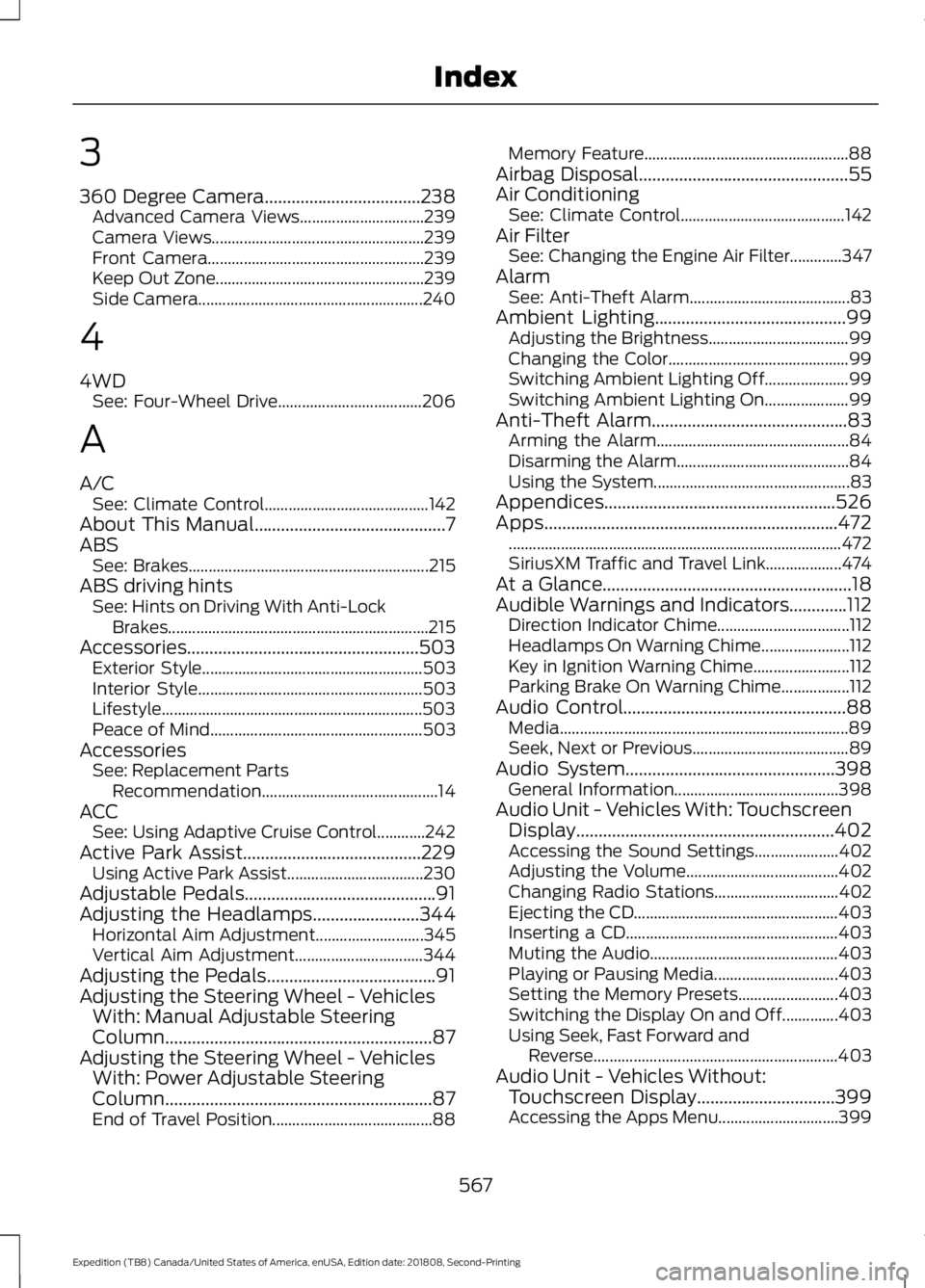
3
360 Degree Camera...................................238
Advanced Camera Views............................... 239
Camera Views..................................................... 239
Front Camera...................................................... 239
Keep Out Zone.................................................... 239
Side Camera........................................................ 240
4
4WD See: Four-Wheel Drive.................................... 206
A
A/C See: Climate Control......................................... 142
About This Manual...........................................7
ABS See: Brakes............................................................ 215
ABS driving hints See: Hints on Driving With Anti-Lock
Brakes................................................................. 215
Accessories....................................................503 Exterior Style....................................................... 503
Interior Style........................................................ 503
Lifestyle................................................................. 503
Peace of Mind..................................................... 503
Accessories See: Replacement Parts
Recommendation............................................ 14
ACC See: Using Adaptive Cruise Control............242
Active Park Assist........................................229 Using Active Park Assist.................................. 230
Adjustable Pedals...........................................91
Adjusting the Headlamps........................344 Horizontal Aim Adjustment........................... 345
Vertical Aim Adjustment................................ 344
Adjusting the Pedals......................................91
Adjusting the Steering Wheel - Vehicles With: Manual Adjustable Steering
Column............................................................87
Adjusting the Steering Wheel - Vehicles With: Power Adjustable Steering
Column............................................................87
End of Travel Position........................................ 88Memory Feature...................................................
88
Airbag Disposal...............................................55
Air Conditioning See: Climate Control......................................... 142
Air Filter See: Changing the Engine Air Filter.............347
Alarm See: Anti-Theft Alarm........................................ 83
Ambient Lighting
...........................................99
Adjusting the Brightness................................... 99
Changing the Color............................................. 99
Switching Ambient Lighting Off..................... 99
Switching Ambient Lighting On..................... 99
Anti-Theft Alarm............................................83 Arming the Alarm................................................ 84
Disarming the Alarm........................................... 84
Using the System................................................. 83
Appendices....................................................526
Apps..................................................................472 ........................................................................\
........... 472
SiriusXM Traffic and Travel Link................... 474
At a Glance........................................................18
Audible Warnings and Indicators.............112 Direction Indicator Chime................................. 112
Headlamps On Warning Chime...................... 112
Key in Ignition Warning Chime........................ 112
Parking Brake On Warning Chime.................112
Audio Control
..................................................88
Media........................................................................\
89
Seek, Next or Previous....................................... 89
Audio System
...............................................398
General Information......................................... 398
Audio Unit - Vehicles With: Touchscreen Display..........................................................402
Accessing the Sound Settings..................... 402
Adjusting the Volume...................................... 402
Changing Radio Stations............................... 402
Ejecting the CD................................................... 403
Inserting a CD..................................................... 403
Muting the Audio............................................... 403
Playing or Pausing Media............................... 403
Setting the Memory Presets......................... 403
Switching the Display On and Off..............403
Using Seek, Fast Forward and Reverse............................................................. 403
Audio Unit - Vehicles Without: Touchscreen Display
...............................399
Accessing the Apps Menu.............................. 399
567
Expedition (TB8) Canada/United States of America, enUSA, Edition date: 201808, Second-Printing Index
Page 571 of 583
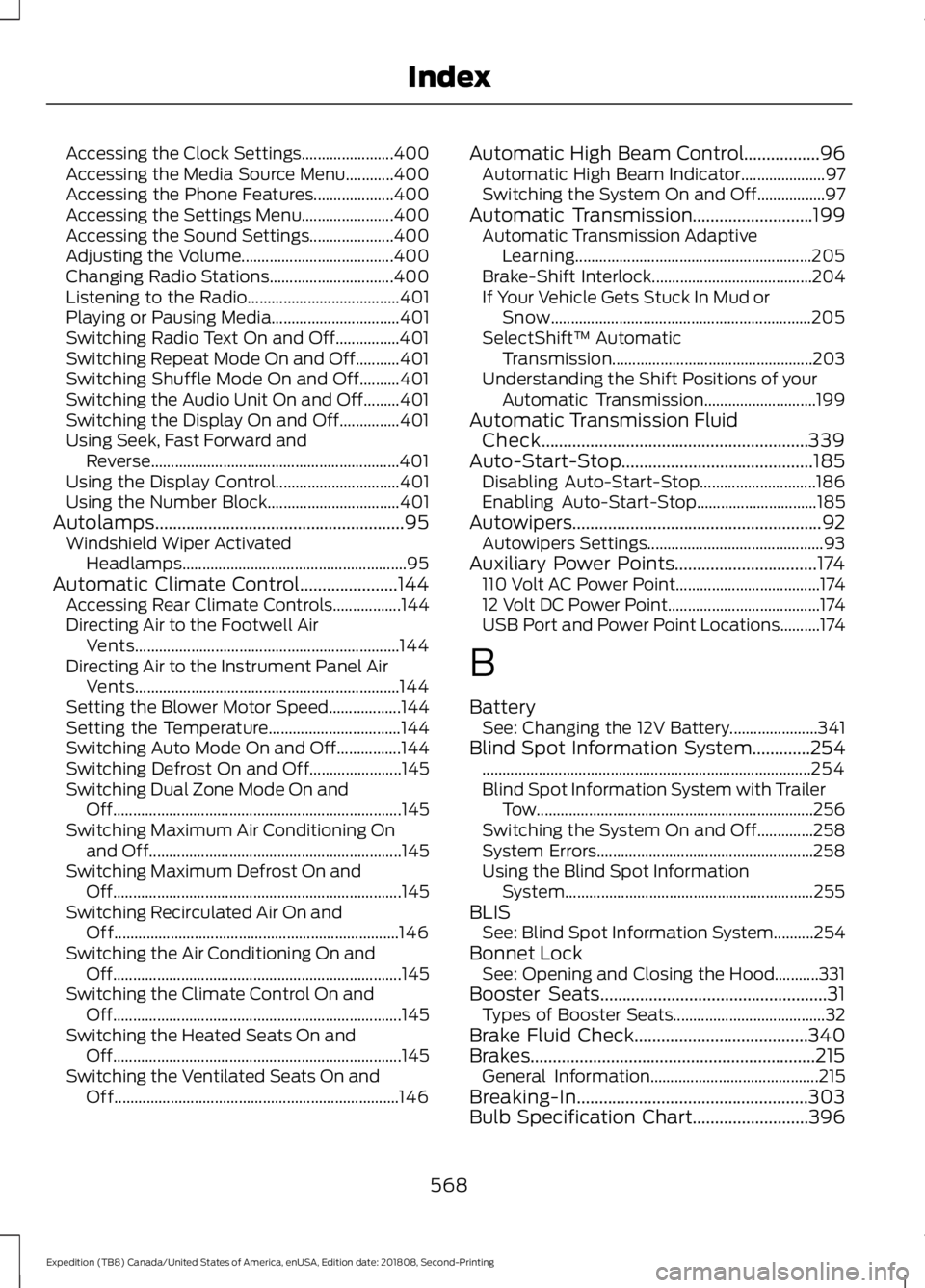
Accessing the Clock Settings.......................
400
Accessing the Media Source Menu............400
Accessing the Phone Features.................... 400
Accessing the Settings Menu....................... 400
Accessing the Sound Settings..................... 400
Adjusting the Volume...................................... 400
Changing Radio Stations............................... 400
Listening to the Radio...................................... 401
Playing or Pausing Media................................ 401
Switching Radio Text On and Off................401
Switching Repeat Mode On and Off...........401
Switching Shuffle Mode On and Off..........401
Switching the Audio Unit On and Off.........401
Switching the Display On and Off...............401
Using Seek, Fast Forward and Reverse.............................................................. 401
Using the Display Control............................... 401
Using the Number Block................................. 401
Autolamps........................................................95 Windshield Wiper Activated
Headlamps........................................................ 95
Automatic Climate Control......................144 Accessing Rear Climate Controls.................144
Directing Air to the Footwell Air
Vents.................................................................. 144
Directing Air to the Instrument Panel Air Vents.................................................................. 144
Setting the Blower Motor Speed.................. 144
Setting the Temperature................................. 144
Switching Auto Mode On and Off................144
Switching Defrost On and Off....................... 145
Switching Dual Zone Mode On and Off........................................................................\
145
Switching Maximum Air Conditioning On and Off............................................................... 145
Switching Maximum Defrost On and Off........................................................................\
145
Switching Recirculated Air On and Off....................................................................... 146
Switching the Air Conditioning On and Off........................................................................\
145
Switching the Climate Control On and Off........................................................................\
145
Switching the Heated Seats On and Off........................................................................\
145
Switching the Ventilated Seats On and Off....................................................................... 146Automatic High Beam Control.................96
Automatic High Beam Indicator..................... 97
Switching the System On and Off.................97
Automatic Transmission...........................199 Automatic Transmission Adaptive
Learning........................................................... 205
Brake-Shift Interlock........................................ 204
If Your Vehicle Gets Stuck In Mud or Snow................................................................. 205
SelectShift™ Automatic Transmission.................................................. 203
Understanding the Shift Positions of your Automatic Transmission............................ 199
Automatic Transmission Fluid Check............................................................339
Auto-Start-Stop...........................................185 Disabling Auto-Start-Stop............................. 186
Enabling Auto-Start-Stop.............................. 185
Autowipers........................................................92
Autowipers Settings............................................ 93
Auxiliary Power Points................................174 110 Volt AC Power Point.................................... 174
12 Volt DC Power Point...................................... 174
USB Port and Power Point Locations..........174
B
Battery See: Changing the 12V Battery...................... 341
Blind Spot Information System
.............254
........................................................................\
.......... 254
Blind Spot Information System with Trailer Tow..................................................................... 256
Switching the System On and Off..............258
System Errors...................................................... 258
Using the Blind Spot Information System.............................................................. 255
BLIS See: Blind Spot Information System..........254
Bonnet Lock See: Opening and Closing the Hood...........331
Booster Seats
...................................................31
Types of Booster Seats...................................... 32
Brake Fluid Check
.......................................340
Brakes................................................................215 General Information.......................................... 215
Breaking-In....................................................303
Bulb Specification Chart..........................396
568
Expedition (TB8) Canada/United States of America, enUSA, Edition date: 201808, Second-Printing Index
Page 574 of 583
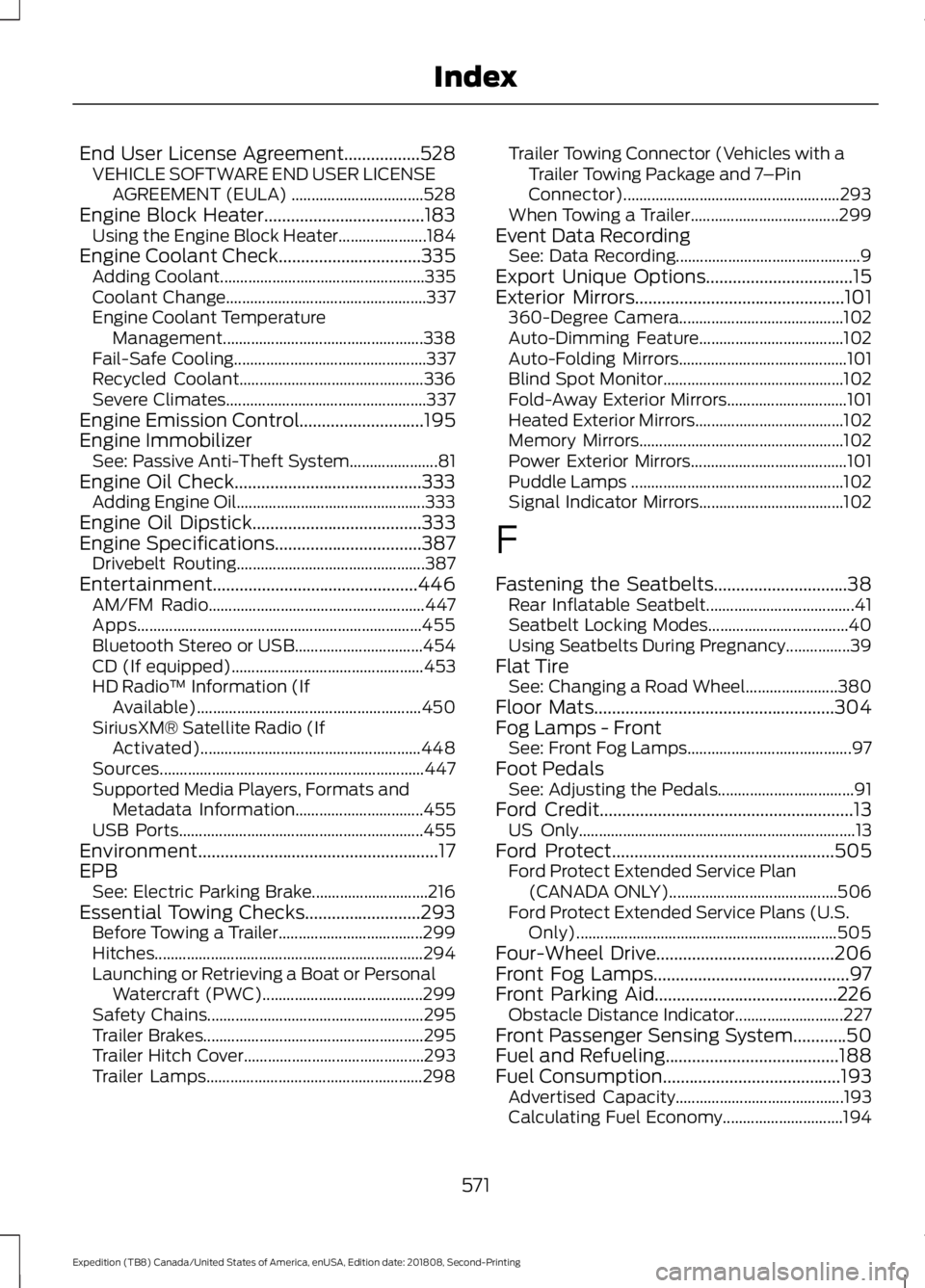
End User License Agreement.................528
VEHICLE SOFTWARE END USER LICENSE
AGREEMENT (EULA) ................................. 528
Engine Block Heater....................................183 Using the Engine Block Heater...................... 184
Engine Coolant Check................................335
Adding Coolant................................................... 335
Coolant Change.................................................. 337
Engine Coolant Temperature Management.................................................. 338
Fail-Safe Cooling................................................ 337
Recycled Coolant.............................................. 336
Severe Climates.................................................. 337
Engine Emission Control............................195
Engine Immobilizer See: Passive Anti-Theft System...................... 81
Engine Oil Check..........................................333 Adding Engine Oil...............................................333
Engine Oil Dipstick
......................................333
Engine Specifications.................................387
Drivebelt Routing............................................... 387
Entertainment..............................................446 AM/FM Radio...................................................... 447
Apps....................................................................... 455
Bluetooth Stereo or USB................................ 454
CD (If equipped)................................................ 453
HD Radio ™ Information (If
Available)........................................................ 450
SiriusXM® Satellite Radio (If Activated)....................................................... 448
Sources.................................................................. 447
Supported Media Players, Formats and Metadata Information................................ 455
USB Ports............................................................. 455
Environment......................................................17
EPB See: Electric Parking Brake............................. 216
Essential Towing Checks..........................293 Before Towing a Trailer.................................... 299
Hitches................................................................... 294
Launching or Retrieving a Boat or Personal Watercraft (PWC)........................................ 299
Safety Chains...................................................... 295
Trailer Brakes....................................................... 295
Trailer Hitch Cover............................................. 293
Trailer Lamps...................................................... 298Trailer Towing Connector (Vehicles with a
Trailer Towing Package and 7 –Pin
Connector)...................................................... 293
When Towing a Trailer..................................... 299
Event Data Recording See: Data Recording.............................................. 9
Export Unique Options.................................15
Exterior Mirrors
...............................................101
360-Degree Camera......................................... 102
Auto-Dimming Feature.................................... 102
Auto-Folding Mirrors.......................................... 101
Blind Spot Monitor............................................. 102
Fold-Away Exterior Mirrors.............................. 101
Heated Exterior Mirrors..................................... 102
Memory Mirrors................................................... 102
Power Exterior Mirrors....................................... 101
Puddle Lamps ..................................................... 102
Signal Indicator Mirrors.................................... 102
F
Fastening the Seatbelts..............................38 Rear Inflatable Seatbelt..................................... 41
Seatbelt Locking Modes................................... 40
Using Seatbelts During Pregnancy................39
Flat Tire See: Changing a Road Wheel....................... 380
Floor Mats......................................................304
Fog Lamps - Front See: Front Fog Lamps......................................... 97
Foot Pedals See: Adjusting the Pedals.................................. 91
Ford Credit
.........................................................13
US Only..................................................................... 13
Ford Protect..................................................505 Ford Protect Extended Service Plan
(CANADA ONLY).......................................... 506
Ford Protect Extended Service Plans (U.S. Only)................................................................. 505
Four-Wheel Drive........................................206
Front Fog Lamps
............................................97
Front Parking Aid.........................................226 Obstacle Distance Indicator........................... 227
Front Passenger Sensing System............50
Fuel and Refueling.......................................188
Fuel Consumption
........................................193
Advertised Capacity.......................................... 193
Calculating Fuel Economy.............................. 194
571
Expedition (TB8) Canada/United States of America, enUSA, Edition date: 201808, Second-Printing Index
Page 575 of 583
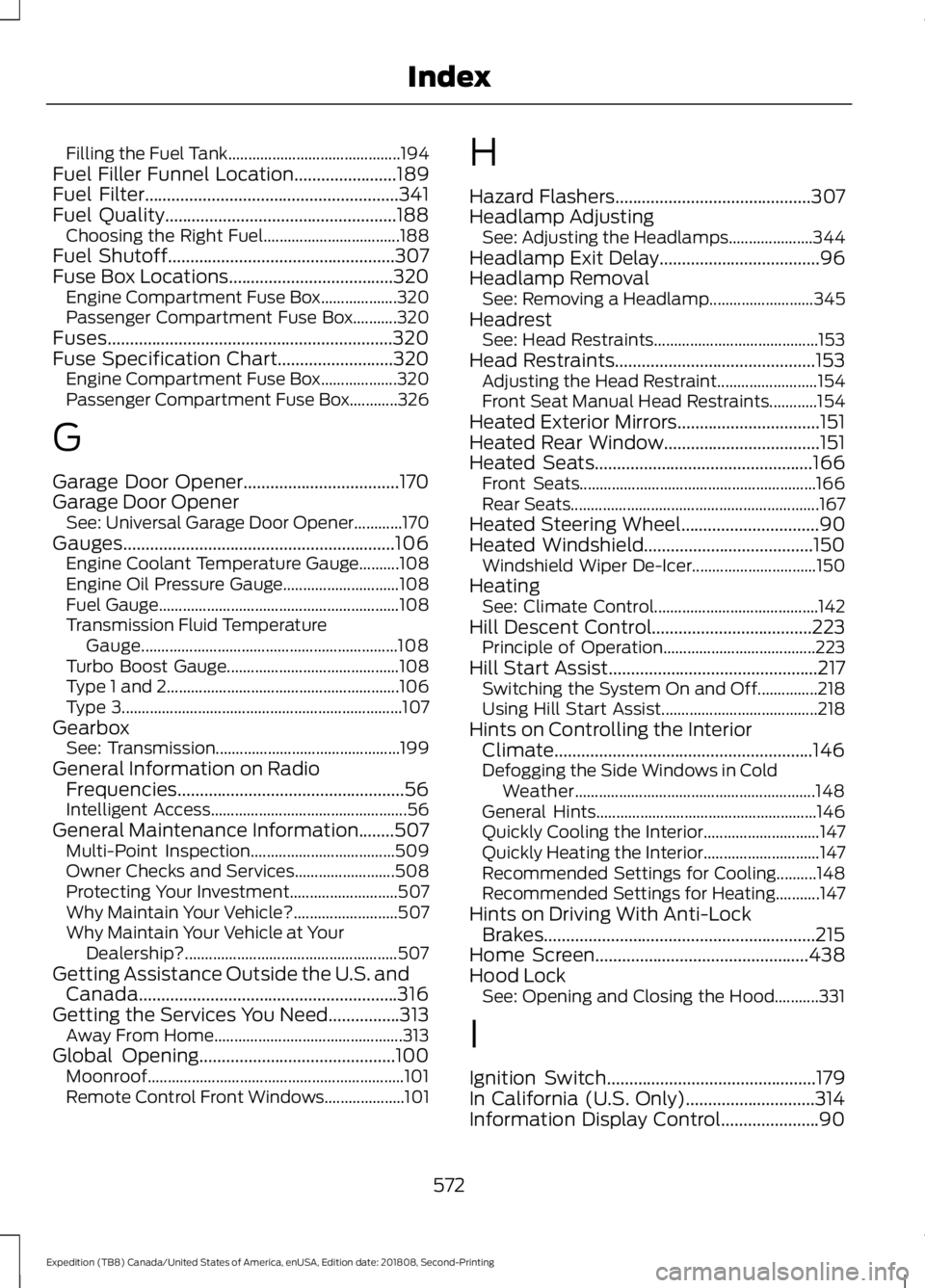
Filling the Fuel Tank...........................................
194
Fuel Filler Funnel Location.......................189
Fuel Filter.........................................................341
Fuel Quality....................................................188 Choosing the Right Fuel.................................. 188
Fuel Shutoff
...................................................307
Fuse Box Locations.....................................320 Engine Compartment Fuse Box................... 320
Passenger Compartment Fuse Box...........320
Fuses................................................................320
Fuse Specification Chart..........................320 Engine Compartment Fuse Box................... 320
Passenger Compartment Fuse Box............326
G
Garage Door Opener...................................170
Garage Door Opener See: Universal Garage Door Opener............170
Gauges.............................................................106 Engine Coolant Temperature Gauge..........108
Engine Oil Pressure Gauge............................. 108
Fuel Gauge............................................................ 108
Transmission Fluid Temperature Gauge................................................................ 108
Turbo Boost Gauge........................................... 108
Type 1 and 2.......................................................... 106
Type 3...................................................................... 107
Gearbox See: Transmission.............................................. 199
General Information on Radio Frequencies...................................................56
Intelligent Access................................................. 56
General Maintenance Information
........507
Multi-Point Inspection.................................... 509
Owner Checks and Services......................... 508
Protecting Your Investment........................... 507
Why Maintain Your Vehicle?.......................... 507
Why Maintain Your Vehicle at Your Dealership?..................................................... 507
Getting Assistance Outside the U.S. and Canada..........................................................316
Getting the Services You Need................313 Away From Home............................................... 313
Global Opening............................................100 Moonroof................................................................ 101
Remote Control Front Windows.................... 101H
Hazard Flashers
............................................307
Headlamp Adjusting See: Adjusting the Headlamps..................... 344
Headlamp Exit Delay....................................96
Headlamp Removal See: Removing a Headlamp.......................... 345
Headrest See: Head Restraints......................................... 153
Head Restraints.............................................153 Adjusting the Head Restraint......................... 154
Front Seat Manual Head Restraints............154
Heated Exterior Mirrors................................151
Heated Rear Window...................................151
Heated Seats
.................................................166
Front Seats........................................................... 166
Rear Seats.............................................................. 167
Heated Steering Wheel
...............................90
Heated Windshield......................................150 Windshield Wiper De-Icer............................... 150
Heating See: Climate Control......................................... 142
Hill Descent Control
....................................223
Principle of Operation...................................... 223
Hill Start Assist...............................................217 Switching the System On and Off...............218
Using Hill Start Assist....................................... 218
Hints on Controlling the Interior Climate..........................................................146
Defogging the Side Windows in Cold Weather............................................................ 148
General Hints....................................................... 146
Quickly Cooling the Interior............................. 147
Quickly Heating the Interior............................. 147
Recommended Settings for Cooling..........148
Recommended Settings for Heating...........147
Hints on Driving With Anti-Lock Brakes.............................................................215
Home Screen
................................................438
Hood Lock See: Opening and Closing the Hood...........331
I
Ignition Switch...............................................179
In California (U.S. Only).............................314
Information Display Control......................90
572
Expedition (TB8) Canada/United States of America, enUSA, Edition date: 201808, Second-Printing Index
Page 582 of 583
Switching Adaptive Cruise Control
On....................................................................... 243
Switching to Normal Cruise Control...........248
System Not Available....................................... 247
Using Cruise Control....................................241 Canceling the Set Speed................................ 242
Changing the Set Speed.................................. 241
Resuming the Set Speed................................ 242
Setting the Cruise Speed................................. 241
Switching Cruise Control Off......................... 242
Switching Cruise Control On.......................... 241
Using Four-Wheel Drive...........................206
4WD Switch Selections.................................. 206
4X4 Indicator Lights......................................... 206
Driving Off-Road With Truck and Utility Vehicles............................................................ 209
How Your Vehicle Differs From Other Vehicles............................................................ 208
Operating 4WD Vehicles With Spare or Mismatched Tires......................................... 208
Using Hill Descent Control.......................223 Hill Descent Modes........................................... 223
Using MyKey With Remote Start Systems...........................................................67
Using Power Running Boards
....................85
Automatic Power Deploy.................................. 85
Automatic Power Stow..................................... 85
Bounce-back......................................................... 86
Enabling and Disabling...................................... 85
Manual Power Deploy........................................ 85
Using Snow Chains
.....................................373
Using Stability Control................................221 Stability Control and Traction Control with
Roll Stability Control ™ (RSC™)..............221
Using SYNC™ With Your Media Player
..............................................................417
Audio Voice Commands................................... 417
Media Sources...................................................... 417
Using SYNC™ With Your Phone.............412 Accessing Features through the Phone
Menu................................................................... 413
Pairing a Phone................................................... 412
Phone Controls.................................................... 413
Phone Voice Commands................................. 413
Using Traction Control................................219 Switching the System Off .............................. 219
System Indicator Lights and Messages.......................................................... 219Using Voice Recognition............................410
Audio Voice Commands................................. 440
Climate Voice Commands.............................. 441
Initiating a Voice Session................................ 410
Mobile App Voice Commands..................... 444
Navigation Voice Commands....................... 443
Phone Voice Commands................................. 441
SiriusXM Traffic and Travel Link Voice Commands..................................................... 444
System Interaction and Feedback................411
Voice Settings Commands............................ 445
Utilizing the Mediation/Arbitration Program (Canada Only).........................316
V
Vehicle Care
...................................................349
General Information......................................... 349
Vehicle Certification Label......................390
Vehicle Identification Number...............389
Vehicle Storage............................................354 Battery................................................................... 355
Body........................................................................\
354
Brakes.................................................................... 355
Cooling system................................................... 355
Engine.................................................................... 355
Fuel system.......................................................... 355
General.................................................................. 354
Miscellaneous..................................................... 355
Removing Vehicle From Storage.................355
Tires........................................................................\
355
Ventilation See: Climate Control......................................... 142
VIN See: Vehicle Identification Number............389
Voice Control
...................................................89
W
Warning Lamps and Indicators
...............109
Adaptive Cruise Control Indicator................109
Airbag Warning Lamp...................................... 109
Anti-Lock Brake System Warning Lamp.................................................................. 109
Automatic Headlamp High Beam Indicator............................................................ 109
Auto-Start-Stop Indicator.............................. 109
Battery.................................................................... 109
579
Expedition (TB8) Canada/United States of America, enUSA, Edition date: 201808, Second-Printing Index