sensor FORD EXPEDITION 2019 Repair Manual
[x] Cancel search | Manufacturer: FORD, Model Year: 2019, Model line: EXPEDITION, Model: FORD EXPEDITION 2019Pages: 583, PDF Size: 6.71 MB
Page 380 of 583
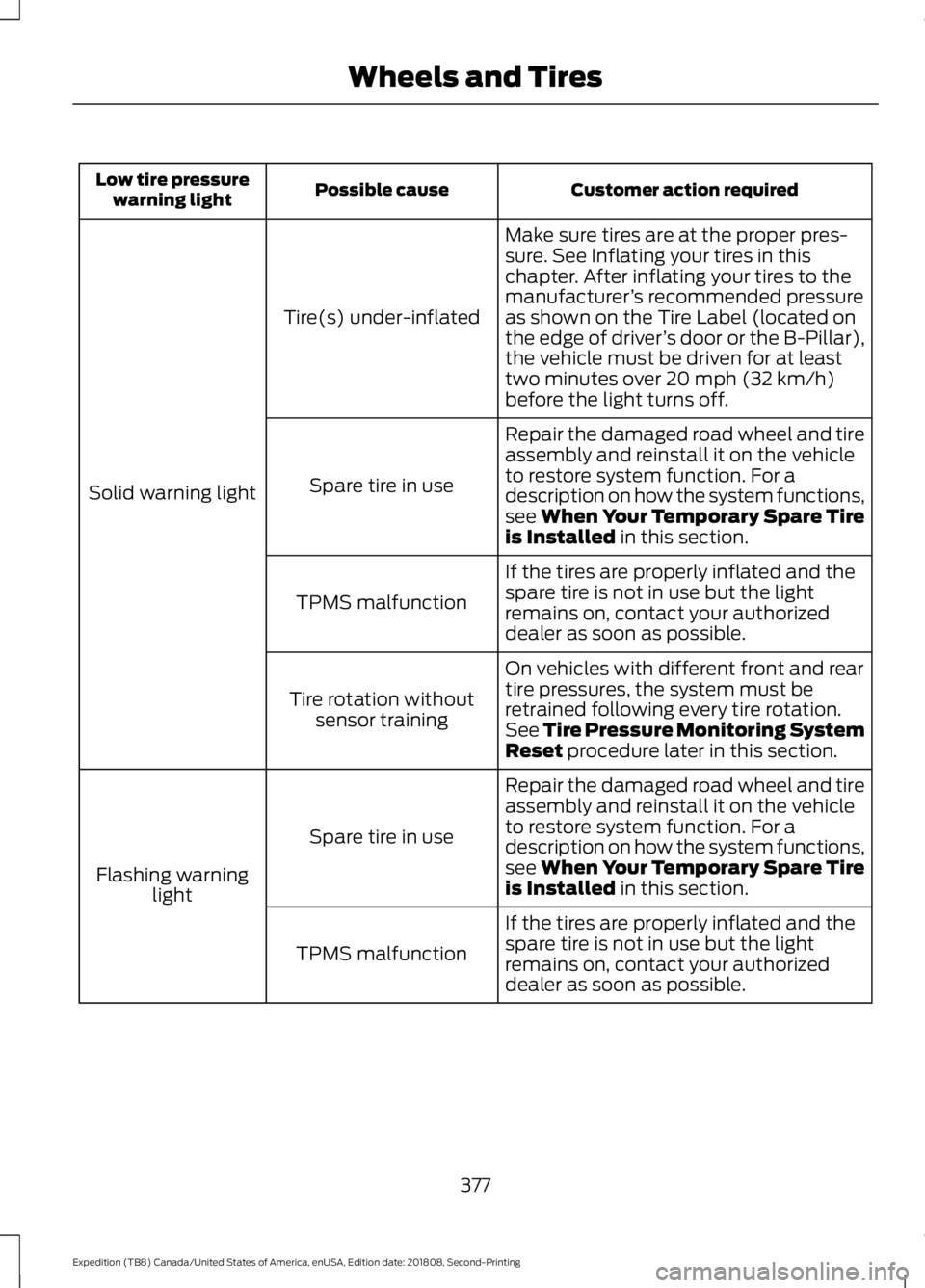
Customer action required
Possible cause
Low tire pressure
warning light
Make sure tires are at the proper pres-
sure. See Inflating your tires in this
chapter. After inflating your tires to the
manufacturer’s recommended pressure
as shown on the Tire Label (located on
the edge of driver ’s door or the B-Pillar),
the vehicle must be driven for at least
two minutes over 20 mph (32 km/h)
before the light turns off.
Tire(s) under-inflated
Solid warning light Repair the damaged road wheel and tire
assembly and reinstall it on the vehicle
to restore system function. For a
description on how the system functions,
see When Your Temporary Spare Tire
is Installed
in this section.
Spare tire in use
If the tires are properly inflated and the
spare tire is not in use but the light
remains on, contact your authorized
dealer as soon as possible.
TPMS malfunction
On vehicles with different front and rear
tire pressures, the system must be
retrained following every tire rotation.
See Tire Pressure Monitoring System
Reset
procedure later in this section.
Tire rotation without
sensor training
Repair the damaged road wheel and tire
assembly and reinstall it on the vehicle
to restore system function. For a
description on how the system functions,
see When Your Temporary Spare Tire
is Installed
in this section.
Spare tire in use
Flashing warning light
If the tires are properly inflated and the
spare tire is not in use but the light
remains on, contact your authorized
dealer as soon as possible.
TPMS malfunction
377
Expedition (TB8) Canada/United States of America, enUSA, Edition date: 201808, Second-Printing Wheels and Tires
Page 382 of 583
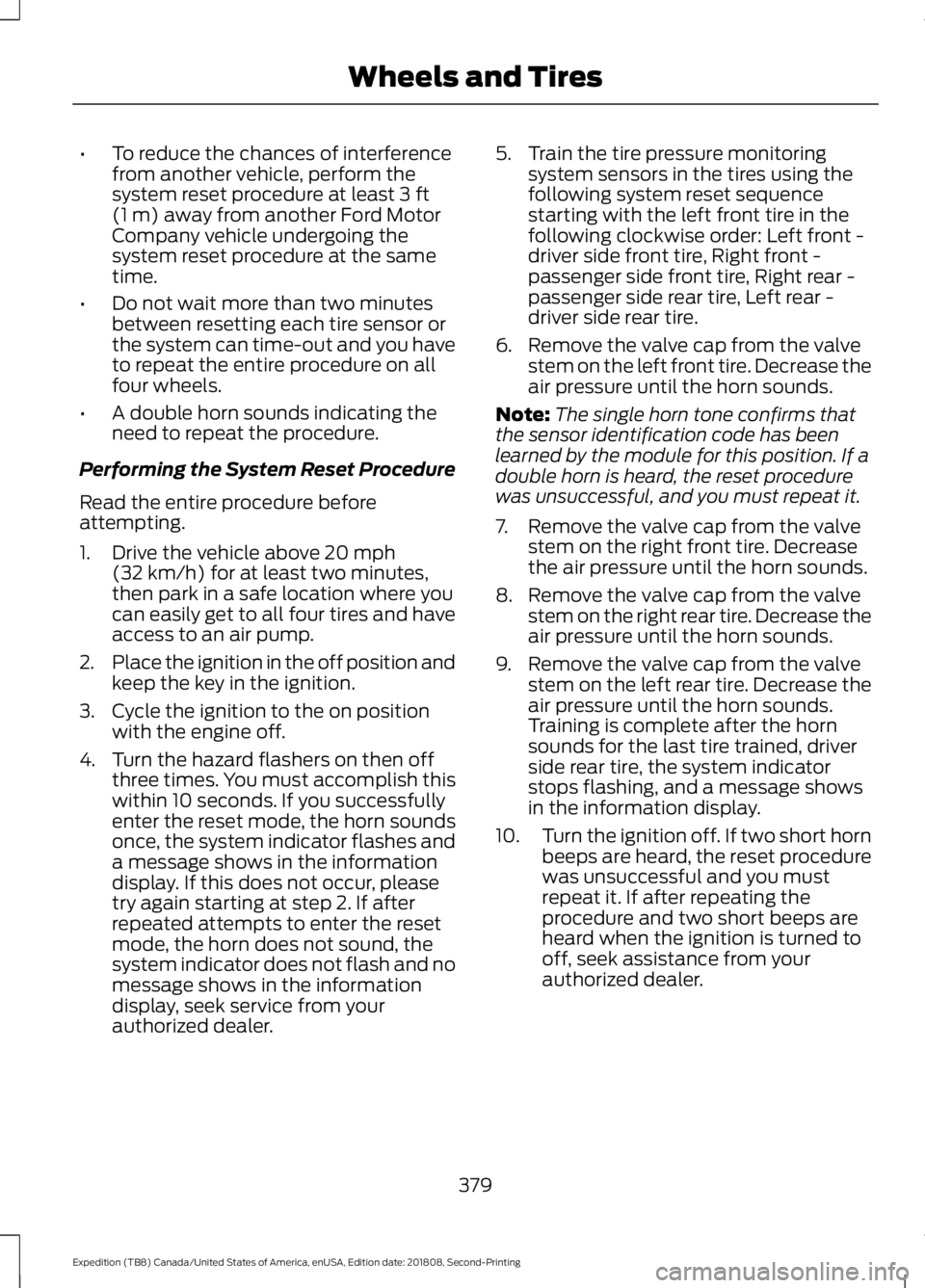
•
To reduce the chances of interference
from another vehicle, perform the
system reset procedure at least 3 ft
(1 m) away from another Ford Motor
Company vehicle undergoing the
system reset procedure at the same
time.
• Do not wait more than two minutes
between resetting each tire sensor or
the system can time-out and you have
to repeat the entire procedure on all
four wheels.
• A double horn sounds indicating the
need to repeat the procedure.
Performing the System Reset Procedure
Read the entire procedure before
attempting.
1. Drive the vehicle above
20 mph
(32 km/h) for at least two minutes,
then park in a safe location where you
can easily get to all four tires and have
access to an air pump.
2. Place the ignition in the off position and
keep the key in the ignition.
3. Cycle the ignition to the on position with the engine off.
4. Turn the hazard flashers on then off three times. You must accomplish this
within 10 seconds. If you successfully
enter the reset mode, the horn sounds
once, the system indicator flashes and
a message shows in the information
display. If this does not occur, please
try again starting at step 2. If after
repeated attempts to enter the reset
mode, the horn does not sound, the
system indicator does not flash and no
message shows in the information
display, seek service from your
authorized dealer. 5. Train the tire pressure monitoring
system sensors in the tires using the
following system reset sequence
starting with the left front tire in the
following clockwise order: Left front -
driver side front tire, Right front -
passenger side front tire, Right rear -
passenger side rear tire, Left rear -
driver side rear tire.
6. Remove the valve cap from the valve stem on the left front tire. Decrease the
air pressure until the horn sounds.
Note: The single horn tone confirms that
the sensor identification code has been
learned by the module for this position. If a
double horn is heard, the reset procedure
was unsuccessful, and you must repeat it.
7. Remove the valve cap from the valve stem on the right front tire. Decrease
the air pressure until the horn sounds.
8. Remove the valve cap from the valve stem on the right rear tire. Decrease the
air pressure until the horn sounds.
9. Remove the valve cap from the valve stem on the left rear tire. Decrease the
air pressure until the horn sounds.
Training is complete after the horn
sounds for the last tire trained, driver
side rear tire, the system indicator
stops flashing, and a message shows
in the information display.
10. Turn the ignition off. If two short horn
beeps are heard, the reset procedure
was unsuccessful and you must
repeat it. If after repeating the
procedure and two short beeps are
heard when the ignition is turned to
off, seek assistance from your
authorized dealer.
379
Expedition (TB8) Canada/United States of America, enUSA, Edition date: 201808, Second-Printing Wheels and Tires
Page 383 of 583
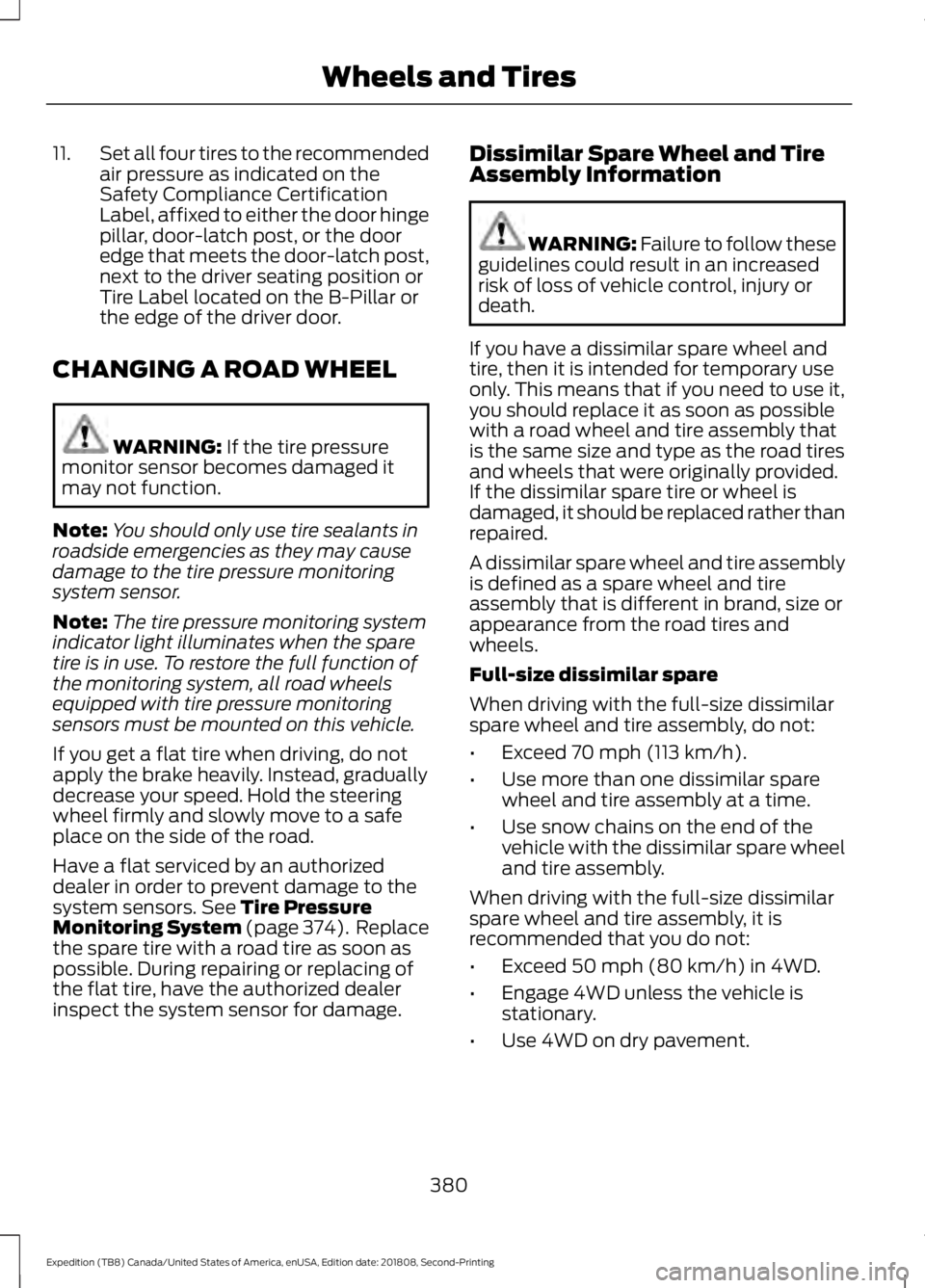
11.
Set all four tires to the recommended
air pressure as indicated on the
Safety Compliance Certification
Label, affixed to either the door hinge
pillar, door-latch post, or the door
edge that meets the door-latch post,
next to the driver seating position or
Tire Label located on the B-Pillar or
the edge of the driver door.
CHANGING A ROAD WHEEL WARNING: If the tire pressure
monitor sensor becomes damaged it
may not function.
Note: You should only use tire sealants in
roadside emergencies as they may cause
damage to the tire pressure monitoring
system sensor.
Note: The tire pressure monitoring system
indicator light illuminates when the spare
tire is in use. To restore the full function of
the monitoring system, all road wheels
equipped with tire pressure monitoring
sensors must be mounted on this vehicle.
If you get a flat tire when driving, do not
apply the brake heavily. Instead, gradually
decrease your speed. Hold the steering
wheel firmly and slowly move to a safe
place on the side of the road.
Have a flat serviced by an authorized
dealer in order to prevent damage to the
system sensors.
See Tire Pressure
Monitoring System (page 374). Replace
the spare tire with a road tire as soon as
possible. During repairing or replacing of
the flat tire, have the authorized dealer
inspect the system sensor for damage. Dissimilar Spare Wheel and Tire
Assembly Information WARNING:
Failure to follow these
guidelines could result in an increased
risk of loss of vehicle control, injury or
death.
If you have a dissimilar spare wheel and
tire, then it is intended for temporary use
only. This means that if you need to use it,
you should replace it as soon as possible
with a road wheel and tire assembly that
is the same size and type as the road tires
and wheels that were originally provided.
If the dissimilar spare tire or wheel is
damaged, it should be replaced rather than
repaired.
A dissimilar spare wheel and tire assembly
is defined as a spare wheel and tire
assembly that is different in brand, size or
appearance from the road tires and
wheels.
Full-size dissimilar spare
When driving with the full-size dissimilar
spare wheel and tire assembly, do not:
• Exceed
70 mph (113 km/h).
• Use more than one dissimilar spare
wheel and tire assembly at a time.
• Use snow chains on the end of the
vehicle with the dissimilar spare wheel
and tire assembly.
When driving with the full-size dissimilar
spare wheel and tire assembly, it is
recommended that you do not:
• Exceed
50 mph (80 km/h) in 4WD.
• Engage 4WD unless the vehicle is
stationary.
• Use 4WD on dry pavement.
380
Expedition (TB8) Canada/United States of America, enUSA, Edition date: 201808, Second-Printing Wheels and Tires
Page 419 of 583
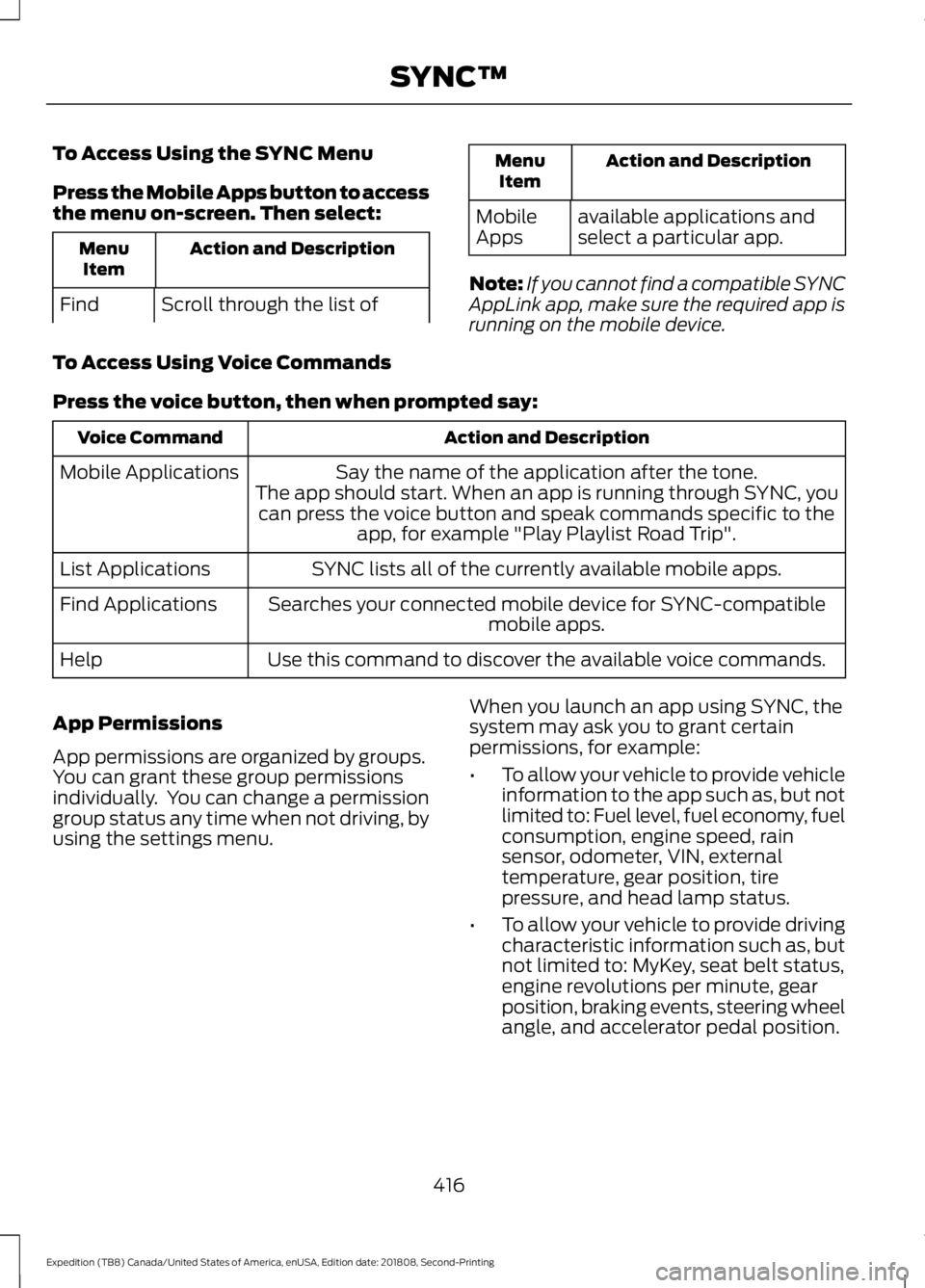
To Access Using the SYNC Menu
Press the Mobile Apps button to access
the menu on-screen. Then select:
Action and Description
Menu
Item
Scroll through the list of
Find Action and Description
Menu
Item
available applications and
select a particular app.
Mobile
Apps
Note: If you cannot find a compatible SYNC
AppLink app, make sure the required app is
running on the mobile device.
To Access Using Voice Commands
Press the voice button, then when prompted say: Action and Description
Voice Command
Say the name of the application after the tone.
The app should start. When an app is running through SYNC, you can press the voice button and speak commands specific to the app, for example "Play Playlist Road Trip".
Mobile Applications
SYNC lists all of the currently available mobile apps.
List Applications
Searches your connected mobile device for SYNC-compatible mobile apps.
Find Applications
Use this command to discover the available voice commands.
Help
App Permissions
App permissions are organized by groups.
You can grant these group permissions
individually. You can change a permission
group status any time when not driving, by
using the settings menu. When you launch an app using SYNC, the
system may ask you to grant certain
permissions, for example:
•
To allow your vehicle to provide vehicle
information to the app such as, but not
limited to: Fuel level, fuel economy, fuel
consumption, engine speed, rain
sensor, odometer, VIN, external
temperature, gear position, tire
pressure, and head lamp status.
• To allow your vehicle to provide driving
characteristic information such as, but
not limited to: MyKey, seat belt status,
engine revolutions per minute, gear
position, braking events, steering wheel
angle, and accelerator pedal position.
416
Expedition (TB8) Canada/United States of America, enUSA, Edition date: 201808, Second-Printing SYNC™
Page 506 of 583
For a complete listing of the accessories
that are available for your vehicle, please
contact your authorized dealer or visit the
online store web site:
Web Address (United States)
www.Accessories.Ford.com Web Address (Canada)
www.Accessories.Ford.ca
Ford Motor Company will repair or replace
any properly authorized dealer-installed
Ford Original Accessory found to be
defective in factory-supplied materials or
workmanship during the warranty period,
as well as any component damaged by the
defective accessories. Ford Accessories
are available for your vehicle through an
authorized Ford dealer.
Ford Motor Company will warranty your
Ford Original Accessory through the
warranty that provides the greatest
benefit:
• 24 months, unlimited mileage.
• The remainder of your new vehicle
limited warranty.
Contact an authorized dealer for details
and a copy of the warranty.
Exterior Style
• Keyless entry.
• Side window deflectors*.
• Sill plates.
• Splash guards. Interior Style
•
Floor liners.
• Rear seat entertainment system* (not
compatible with power head
restraints).
• Seat covers.
Lifestyle
• Ash cup or coin holder.
• Cargo organization and management.
• Interior light kit.
• In-vehicle safe*.
• Portable audio speaker*.
• Roof rack and carriers*.
• SUV camping tent*.
• Tablet holder.
• Trailer hitches, wiring harnesses and
accessories.
Peace of Mind
• Back-up alarm.
• Hood deflector.
• Park assist sensors.
• Remote start.
• Roadside assistance kit*.
• Vehicle security system.
• Wheel locks.
• Window sunscreen*.
*Ford Licensed Accessory. The accessory
manufacturer designs, develops and
therefore warrants Ford Licensed
Accessories, and does not design or test
these accessories to Ford Motor Company
engineering requirements. Contact an
authorized Ford dealer for the accessory
manufacturer's limited warranty details
and request a copy of the Ford Licensed
Accessories product limited warranty from
the accessory manufacturer.
503
Expedition (TB8) Canada/United States of America, enUSA, Edition date: 201808, Second-Printing Accessories
Page 557 of 583
DECLARATION OF CONFORMITY
Radio Frequency Statement
IC Identification Number
FCC Identification Number
SYNC Version
216B-SYNCG3-L
ACJ-SYNCG3-L
3.0
216B-FA170BCARHS
ACJ-FA-170-BCARHS
3.1
216B-FG185SG32MH
ACJ-FG-185-SG32MH
3.2 WARNING: Changes or
modifications not expressively approved
by the party responsible for compliance
could void the user's authority to operate
the equipment. The term "IC:" before the
radio certification number only signifies
that Industry Canada technical
specifications were met.
These devices comply with Part 15 of the
FCC Rules and with RSS-210 of Industry
Canada. Operation is subject to the
following two conditions:
1. The device does not cause harmful interference.
2. The device accepts any interference received, including interference that
could cause undesired operation. TYPE APPROVALS
Radio Frequency Certifications for
Tire Pressure Monitoring
Sensor(s)
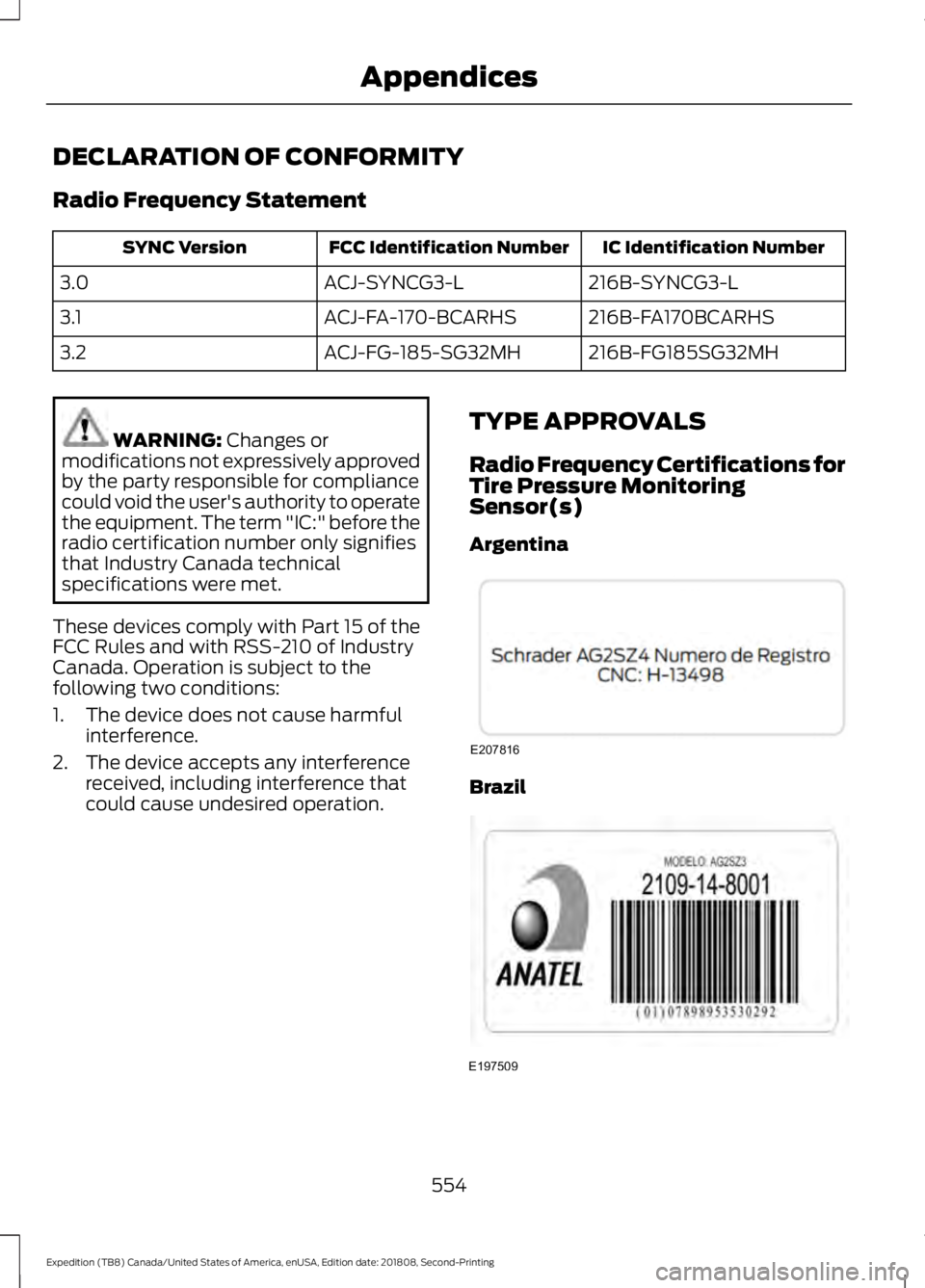
Argentina Brazil
554
Expedition (TB8) Canada/United States of America, enUSA, Edition date: 201808, Second-Printing AppendicesE207816 E197509
Page 573 of 583
Switching the Heated Exterior Mirrors On
and Off.............................................................. 457
Switching the Heated Rear Window On and Off....................................................................... 457
Switching the Heated Seats On and Off....................................................................... 457
Switching the Heated Steering Wheel On and Off.............................................................. 457
Switching the Rear Climate Controlled Seats On and Off.......................................... 458
Switching the Rear Heated Seats On and Off...................................................................... 458
Switching the Rear Ventilated Seats On and Off............................................................. 458
Switching the Ventilated Seats On and Off...................................................................... 458
Climate Control.............................................142
Climate Controlled Seats..........................167
Ventilated Seats................................................. 168
Coolant Check See: Engine Coolant Check............................ 335
Crash Sensors and Airbag Indicator.......54
Creating a MyKey
...........................................65
Programming and Changing Configurable
Settings.............................................................. 66
Cross Traffic Alert
........................................258
Blocked Sensors................................................ 260
Switching the System Off and On..............260
System Errors..................................................... 260
System Lights, Messages and Audible Alerts................................................................. 260
System Limitations........................................... 260
Using the Cross Traffic Alert System.........258
Cruise Control.................................................89 Principle of Operation....................................... 241
Cruise control See: Using Cruise Control................................ 241
Customer Assistance
..................................313
D
Data Recording
..................................................9
911 Assist Privacy Notice..................................... 13
Comfort, Convenience and Entertainment Data........................................................................\
11
Event Data................................................................. 11
Service Data............................................................ 10
Services That Third Parties Provide...............12 Services That We Provide..................................
12
Vehicles With a Modem...................................... 12
Vehicles With SYNC............................................. 12
Daytime Running Lamps
............................96
Type One - Conventional
(Non-Configurable)....................................... 96
Type Two - Configurable................................... 96
Declaration of Conformity.......................554 Radio Frequency Statement......................... 554
Digital Radio
..................................................403
HD Radio Reception and Station
Troubleshooting........................................... 404
Direction Indicators
.......................................98
Doors and Locks.............................................69
Drive Control.................................................266 Selectable Drive Modes.................................. 266
Driver Alert.....................................................249 Using Driver Alert............................................... 249
Driver and Passenger Airbags...................49 Children and Airbags.......................................... 50
Proper Driver and Front Passenger Seating Adjustment........................................................ 49
Driving Aids
....................................................249
Driving Hints..................................................303
Driving Through Water
..............................304
DRL See: Daytime Running Lamps........................ 96
E
Economical Driving
.....................................303
Electric Parking Brake.................................216 Applying the Electric Parking Brake.............216
Automatically Releasing the Electric
Parking Brake................................................... 217
Manually Releasing the Electric Parking Brake................................................................... 216
Releasing the Electric Parking Brake if the Vehicle Battery is Running Out of
Charge................................................................ 217
Electromagnetic Compatibility
..............526
Emission Law.................................................195
Noise Emissions Warranty, Prohibited
Tampering Acts and Maintenance.........196
Tampering With a Noise Control System............................................................... 195
570
Expedition (TB8) Canada/United States of America, enUSA, Edition date: 201808, Second-Printing Index
Page 578 of 583
O
Oil Change Indicator Reset......................334
Oil Check
See: Engine Oil Check...................................... 333
Opening and Closing the Hood...............331
Ordering Additional Owner's Literature......................................................318
Obtaining a French Owner ’s Manual..........318
Overhead Console........................................178
P
Parking Aids...................................................225 Principle of Operation...................................... 225
Passive Anti-Theft System
..........................81
SecuriLock ™........................................................... 81
PATS See: Passive Anti-Theft System...................... 81
Perchlorate........................................................13
Personal Safety System ™
..........................47
How Does the Personal Safety System
Work?................................................................... 47
Phone..............................................................458 During a Phone Call.......................................... 462
Making Calls......................................................... 461
Pairing Your Cell Phone for the First Time.................................................................. 458
Phone Menu........................................................ 459
Receiving Calls................................................... 462
Smartphone Connectivity.............................. 463
Text Messaging................................................... 463
Post-Crash Alert System
...........................310
Power Door Locks See: Locking and Unlocking............................. 69
Power Liftgate
..................................................77
Disabling the Liftgate Button........................... 79
Obstacle Detection.............................................. 79
Opening and Closing the Liftgate.................. 78
Opening the Liftgate Window......................... 79
Setting the Liftgate Open Height................... 79
Stopping the Liftgate Movement................... 79
Using the Hands-Free Liftgate....................... 80
Power Running Boards................................85
Power Seats....................................................157 Adjusting the Lumbar Support..................... 158
Adjusting the Multi-Contour Front Seats With Active Motion ...................................... 158Power Windows
...........................................100
Accessory.............................................................. 100
Bounce-Back....................................................... 100
One-Touch Down............................................... 100
One-Touch Up..................................................... 100
Window Lock....................................................... 100
Pre-Collision Assist
.....................................262
Adjusting the Pre-Collision Assist
Settings............................................................ 263
Blocked Sensors................................................ 264
Distance Indication and Alert........................ 263
Using the Pre-Collision Assist System.............................................................. 262
Protecting the Environment........................17
Puncture See: Changing a Road Wheel....................... 380
R
Rear Axle..........................................................214
Rear Parking Aid
...........................................226
Obstacle Distance Indicator.......................... 226
Rear Passenger Climate Controls - Vehicles With: Automatic Temperature
Control...........................................................148
Directing Air to the Overhead Air Vents.................................................................. 148
Directing Air to the Rear Footwell Air Vents.................................................................. 148
Rear Climate Control Lock Indicator...........148
Setting the Rear Blower Motor Speed................................................................. 149
Setting the Rear Temperature....................... 149
Switching Rear Auto Mode On and Off....................................................................... 149
Switching the Rear Climate Control On and Off....................................................................... 149
Switching the Rear Heated Seats On and Off....................................................................... 149
Rear Passenger Climate Controls - Vehicles With: Manual Temperature
Control...........................................................149
Directing Air to the Overhead Air Vents.................................................................. 150
Directing Air to the Rear Footwell Air Vents.................................................................. 150
Rear Climate Control Lock Indicator...........150
575
Expedition (TB8) Canada/United States of America, enUSA, Edition date: 201808, Second-Printing Index
Page 581 of 583

T
Technical Specifications
See: Capacities and Specifications............387
The Better Business Bureau (BBB) Auto Line Program (U.S. Only)........................315
Tire Care..........................................................359 Glossary of Tire Terminology........................ 360
Information About Uniform Tire Quality Grading............................................................. 359
Information Contained on the Tire Sidewall............................................................ 361
Temperature A B C........................................... 360
Traction AA A B C.............................................. 359
Treadwear............................................................ 359
Tire Pressure Monitoring System...........374 Changing Tires With a Tire Pressure
Monitoring System....................................... 376
Understanding Your Tire Pressure Monitoring System ...................................... 376
Tires See: Wheels and Tires...................................... 357
Towing a Trailer.............................................279 Load Placement................................................. 279
Towing Points
..................................................311
Towing the Vehicle on Four Wheels.........................................................300
Four-wheel-down Towing............................. 300
Recreational Towing........................................ 300
Towing..............................................................279
Traction Control............................................219 Principle of Operation....................................... 219
Trailer Reversing Aids................................280 Principle of Operation..................................... 280
Pro Trailer Backup Assist™........................... 280
Setting Up Pro Trailer Backup Assist..........281
Troubleshooting................................................. 285
Using Pro Trailer Backup Assist................... 284
Trailer Sway Control...................................289
Transfer Case Fluid Check........................339
Transmission Code Designation............390
Transmission..................................................199
Transporting the Vehicle
...........................310
Type Approvals............................................554
China...................................................................... 565
Radio Frequency Certification for Keys and Remote Controls.......................................... 565Radio Frequency Certifications for Blind
Spot Information System.......................... 563
Radio Frequency Certifications for Body Control Module.............................................. 565
Radio Frequency Certifications for Cruise Control Module.............................................. 565
Radio Frequency Certifications for Mid Range Radar................................................... 557
Radio Frequency Certifications for Passive Anti-Theft System....................................... 558
Radio Frequency Certifications for Radio Transceiver Module....................................... 561
Radio Frequency Certifications for SYNC 3........................................................................\
.. 564
Radio Frequency Certifications for Tire Pressure Monitoring Sensor(s)...............554
Radio Frequency Certifications for Wireless Charging........................................................... 564
Radio Frequency Statement for Audio Unit.................................................................... 565
U
Under Hood Overview
................................332
Unique Driving Characteristics................185
Universal Garage Door Opener................170 HomeLink Wireless Control System............170
USB Port
.........................................................408
Using Adaptive Cruise Control................242 Automatic Cancellation.................................. 246
Blocked Sensor................................................... 247
Canceling the Set Speed................................ 245
Changing the Set Speed................................. 245
Detection Issues................................................ 246
Following a Vehicle........................................... 244
Following a Vehicle to a Complete Stop................................................................... 244
Hilly Condition Usage....................................... 246
Overriding the Set Speed............................... 245
Park Brake Application.................................... 246
Resuming the Set Speed................................ 245
Setting the Adaptive Cruise Speed.............243
Setting the Adaptive Cruise Speed When Your Vehicle is Stationary.......................... 243
Setting the Gap Distance............................... 244
Switching Adaptive Cruise Control Off...................................................................... 246
578
Expedition (TB8) Canada/United States of America, enUSA, Edition date: 201808, Second-Printing Index