roof FORD EXPEDITION 2019 Owners Manual
[x] Cancel search | Manufacturer: FORD, Model Year: 2019, Model line: EXPEDITION, Model: FORD EXPEDITION 2019Pages: 583, PDF Size: 6.71 MB
Page 5 of 583
Steering Wheel
Adjusting the Steering Wheel - Vehicles
With: Manual Adjustable Steering
Column ..........................................................87
Adjusting the Steering Wheel - Vehicles With: Power Adjustable Steering
Column ..........................................................
87
Audio Control .................................................
88
Voice Control ..................................................
89
Cruise Control ................................................
89
Information Display Control .....................
90
Heated Steering Wheel ..............................
90
Adjustable Pedals
Adjusting the Pedals .....................................
91
Wipers and Washers
Windshield Wipers ........................................
92
Autowipers ......................................................
92
Windshield Washers ....................................
93
Rear Window Wiper and Washers ..........
93
Lighting
General Information ....................................
94
Lighting Control .............................................
94
Autolamps .......................................................
95
Instrument Lighting Dimmer ....................
95
Headlamp Exit Delay ...................................
96
Daytime Running Lamps ...........................
96
Automatic High Beam Control ................
96
Front Fog Lamps ...........................................
97
Direction Indicators ......................................
98
Welcome Lighting .........................................
98
Interior Lamps ................................................
98
Ambient Lighting ..........................................
99
Windows and Mirrors
Power Windows ..........................................
100
Global Opening ............................................
100
Exterior Mirrors ..............................................
101Interior Mirror
.................................................
102
Childminder Mirror ......................................
103
Sun Visors ......................................................
103
Moonroof ........................................................
104
Liftgate Window ..........................................
105
Instrument Cluster
Gauges ............................................................
106
Warning Lamps and Indicators ..............
109
Audible Warnings and Indicators ............
112
Information Displays
General Information ....................................
113
Information Messages ...............................
125
Climate Control
Manual Climate Control ............................
142
Automatic Climate Control .....................
144
Hints on Controlling the Interior Climate ........................................................................\
.
146
Rear Passenger Climate Controls - Vehicles With: Automatic
Temperature Control .............................
148
Rear Passenger Climate Controls - Vehicles With: Manual Temperature
Control ........................................................
149
Heated Windshield .....................................
150
Heated Rear Window ..................................
151
Heated Exterior Mirrors ...............................
151
Cabin Air Filter ................................................
151
Remote Start ..................................................
151
Seats
Sitting in the Correct Position .................
153
Head Restraints ............................................
153
Manual Seats .................................................
157
Power Seats ...................................................
157
Memory Function ........................................
160
Rear Seats .......................................................
161
Heated Seats ................................................
166
2
Expedition (TB8) Canada/United States of America, enUSA, Edition date: 201808, Second-Printing Table of Contents
Page 7 of 583
Driving Aids
Driver Alert
....................................................249
Lane Keeping System ...............................
250
Blind Spot Information System ............
254
Cross Traffic Alert .......................................
258
Steering ...........................................................
261
Pre-Collision Assist ....................................
262
Drive Control ................................................
266
Load Carrying
Rear Under Floor Storage ........................
269
Cargo Nets ......................................................
271
Roof Racks and Load Carriers ................
272
Load Limit ......................................................
273
Towing
Towing a Trailer ............................................
279
Trailer Reversing Aids ...............................
280
Trailer Sway Control ..................................
289
Recommended Towing Weights ..........
290
Essential Towing Checks .........................
293
Towing the Vehicle on Four Wheels ....
300
Driving Hints
Breaking-In ....................................................
303
Reduced Engine Performance ..............
303
Economical Driving ....................................
303
Driving Through Water .............................
304
Floor Mats .....................................................
304
Roadside Emergencies
Roadside Assistance ................................
306
Hazard Flashers ...........................................
307
Fuel Shutoff ..................................................
307
Jump Starting the Vehicle .......................
308
Post-Crash Alert System ..........................
310
Transporting the Vehicle ..........................
310
Towing Points .................................................
311Customer Assistance
Getting the Services You Need
...............
313
In California (U.S. Only) ............................
314
The Better Business Bureau (BBB) Auto Line Program (U.S. Only) ......................
315
Utilizing the Mediation/Arbitration Program (Canada Only) .......................
316
Getting Assistance Outside the U.S. and Canada ........................................................
316
Ordering Additional Owner's Literature ........................................................................\
.
318
Reporting Safety Defects (U.S. Only) ........................................................................\
.
318
Reporting Safety Defects (Canada Only) ........................................................................\
.
318
Fuses
Fuse Box Locations ....................................
320
Fuse Specification Chart .........................
320
Changing a Fuse .........................................
329
Maintenance
General Information ...................................
331
Opening and Closing the Hood ..............
331
Under Hood Overview ...............................
332
Engine Oil Dipstick ......................................
333
Engine Oil Check .........................................
333
Oil Change Indicator Reset .....................
334
Engine Coolant Check ...............................
335
Automatic Transmission Fluid Check ........................................................................\
339
Transfer Case Fluid Check .......................
339
Brake Fluid Check ......................................
340
Washer Fluid Check ...................................
340
Fuel Filter ........................................................
341
Changing the 12V Battery .........................
341
Checking the Wiper Blades .....................
343
Changing the Wiper Blades ....................
343
Adjusting the Headlamps .......................
344
Removing a Headlamp .............................
345
Changing a Bulb ..........................................
345
4
Expedition (TB8) Canada/United States of America, enUSA, Edition date: 201808, Second-Printing Table of Contents
Page 42 of 583
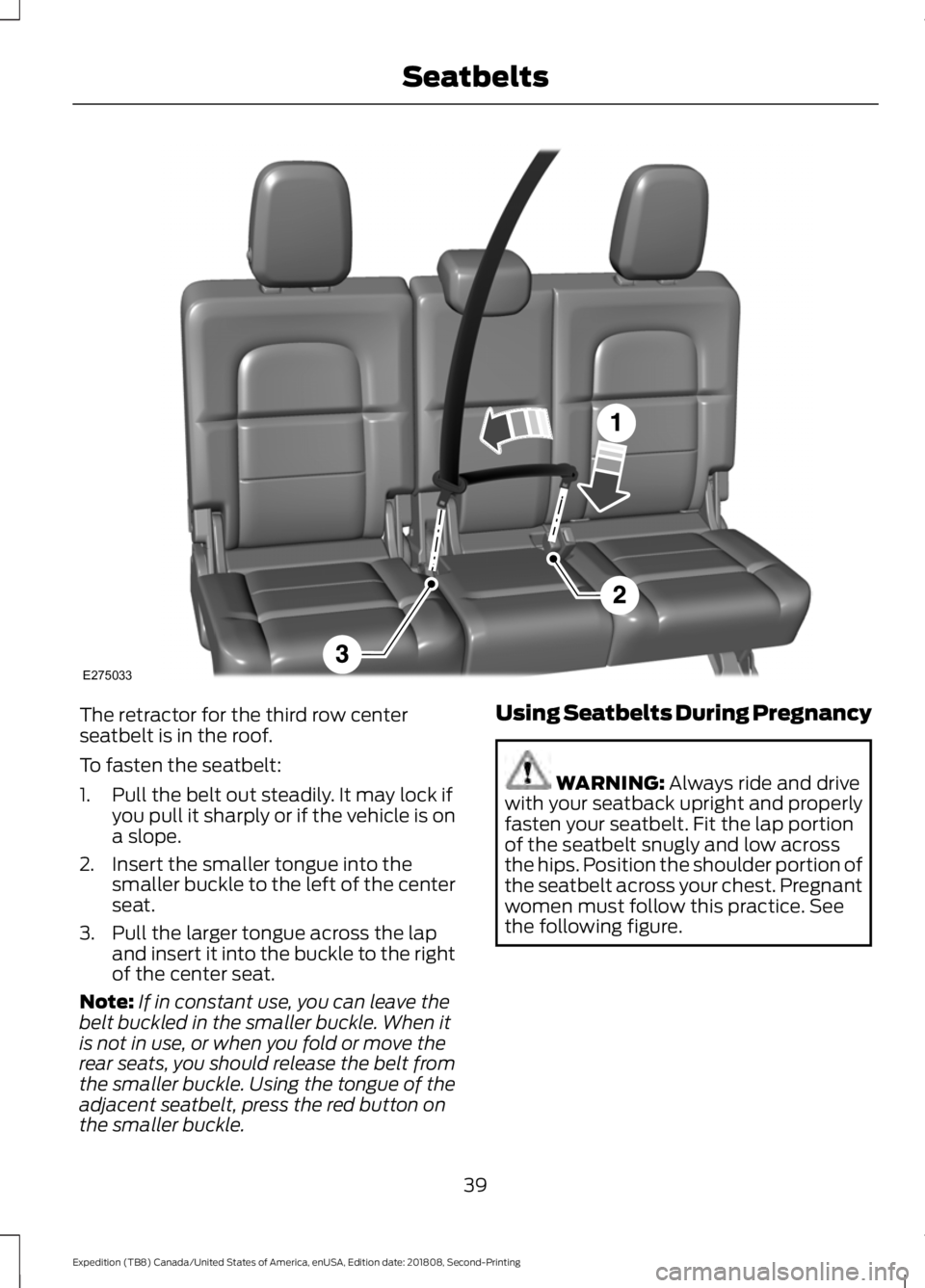
The retractor for the third row center
seatbelt is in the roof.
To fasten the seatbelt:
1. Pull the belt out steadily. It may lock if
you pull it sharply or if the vehicle is on
a slope.
2. Insert the smaller tongue into the smaller buckle to the left of the center
seat.
3. Pull the larger tongue across the lap and insert it into the buckle to the right
of the center seat.
Note: If in constant use, you can leave the
belt buckled in the smaller buckle. When it
is not in use, or when you fold or move the
rear seats, you should release the belt from
the smaller buckle. Using the tongue of the
adjacent seatbelt, press the red button on
the smaller buckle. Using Seatbelts During Pregnancy WARNING: Always ride and drive
with your seatback upright and properly
fasten your seatbelt. Fit the lap portion
of the seatbelt snugly and low across
the hips. Position the shoulder portion of
the seatbelt across your chest. Pregnant
women must follow this practice. See
the following figure.
39
Expedition (TB8) Canada/United States of America, enUSA, Edition date: 201808, Second-Printing SeatbeltsE275033
Page 57 of 583
WARNING: To reduce risk of injury,
do not obstruct or place objects in the
deployment path of the airbag. WARNING:
If a supplementary
restraint system component has
deployed, it will not function again. Have
the system and associated components
inspected as soon as possible. Failure to
follow this instruction could result in
personal injury or death.
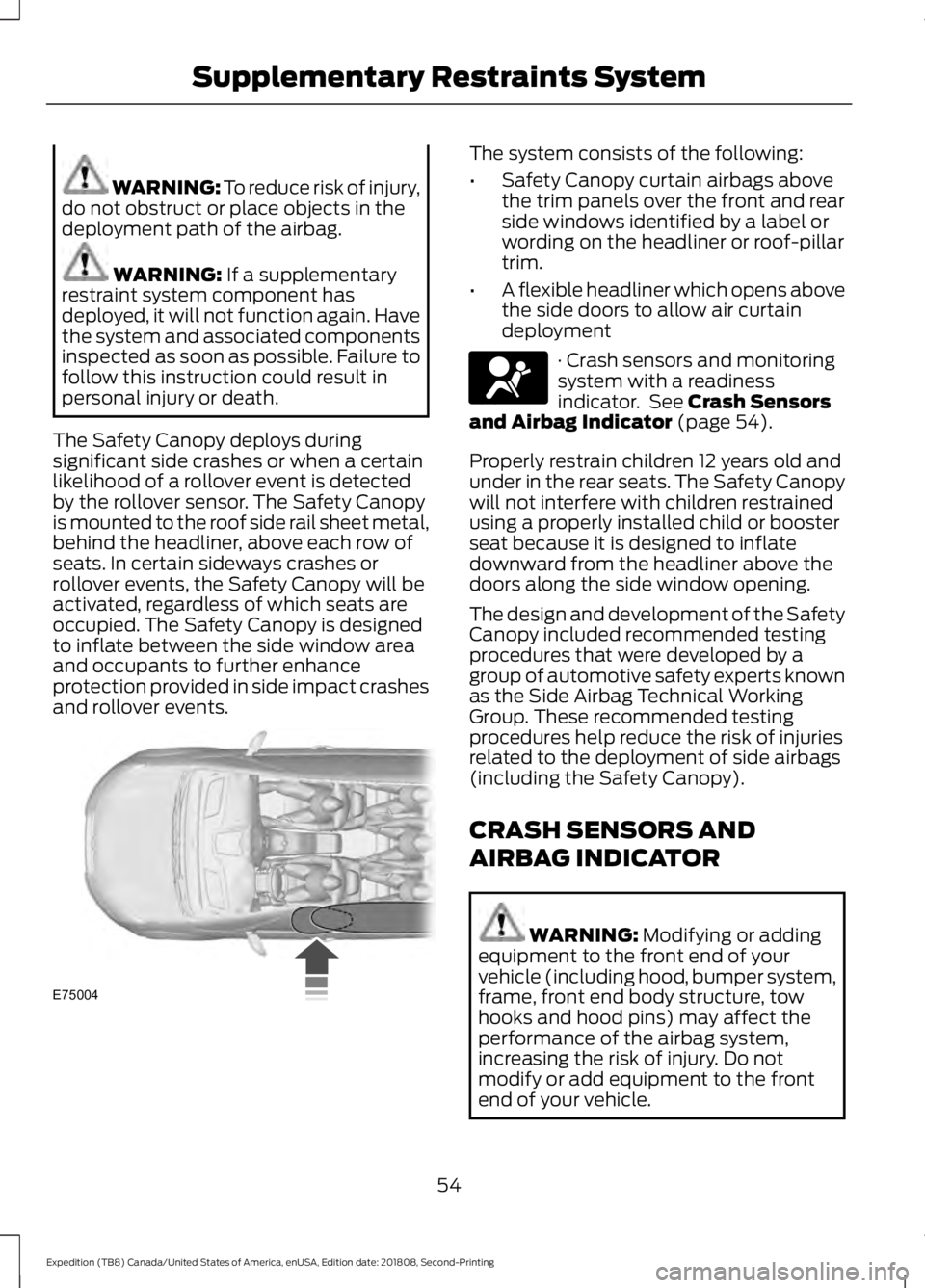
The Safety Canopy deploys during
significant side crashes or when a certain
likelihood of a rollover event is detected
by the rollover sensor. The Safety Canopy
is mounted to the roof side rail sheet metal,
behind the headliner, above each row of
seats. In certain sideways crashes or
rollover events, the Safety Canopy will be
activated, regardless of which seats are
occupied. The Safety Canopy is designed
to inflate between the side window area
and occupants to further enhance
protection provided in side impact crashes
and rollover events. The system consists of the following:
•
Safety Canopy curtain airbags above
the trim panels over the front and rear
side windows identified by a label or
wording on the headliner or roof-pillar
trim.
• A flexible headliner which opens above
the side doors to allow air curtain
deployment · Crash sensors and monitoring
system with a readiness
indicator. See
Crash Sensors
and Airbag Indicator (page 54).
Properly restrain children 12 years old and
under in the rear seats. The Safety Canopy
will not interfere with children restrained
using a properly installed child or booster
seat because it is designed to inflate
downward from the headliner above the
doors along the side window opening.
The design and development of the Safety
Canopy included recommended testing
procedures that were developed by a
group of automotive safety experts known
as the Side Airbag Technical Working
Group. These recommended testing
procedures help reduce the risk of injuries
related to the deployment of side airbags
(including the Safety Canopy).
CRASH SENSORS AND
AIRBAG INDICATOR WARNING:
Modifying or adding
equipment to the front end of your
vehicle (including hood, bumper system,
frame, front end body structure, tow
hooks and hood pins) may affect the
performance of the airbag system,
increasing the risk of injury. Do not
modify or add equipment to the front
end of your vehicle.
54
Expedition (TB8) Canada/United States of America, enUSA, Edition date: 201808, Second-Printing Supplementary Restraints SystemE75004 E67017
Page 88 of 583
USING POWER RUNNING
BOARDS
WARNING: In extreme climates,
excessive ice buildup may occur, causing
the running boards not to deploy. Make
sure that the running boards have
deployed, and have finished moving
before attempting to step on them. The
running boards will resume normal
function once the blockage is cleared. WARNING:
Turn off the running
boards before jacking or placing any
object under your vehicle. Never place
your hand between the extended running
board and your vehicle. A moving running
board may cause injury.
Note: Do not use the running boards, front
and rear hinge assemblies, running board
motors, or the running board underbody
mounts to lift your vehicle when jacking.
Always use proper jacking points.
Note: The running boards may operate
more slowly in cool temperatures.
Note: The running board mechanism may
trap debris such as mud, dirt, snow, ice and
salt. This may cause unwanted noise. If this
happens, manually set the running boards
to the deployed position. Then, wash the
system, in particular the front and rear hinge
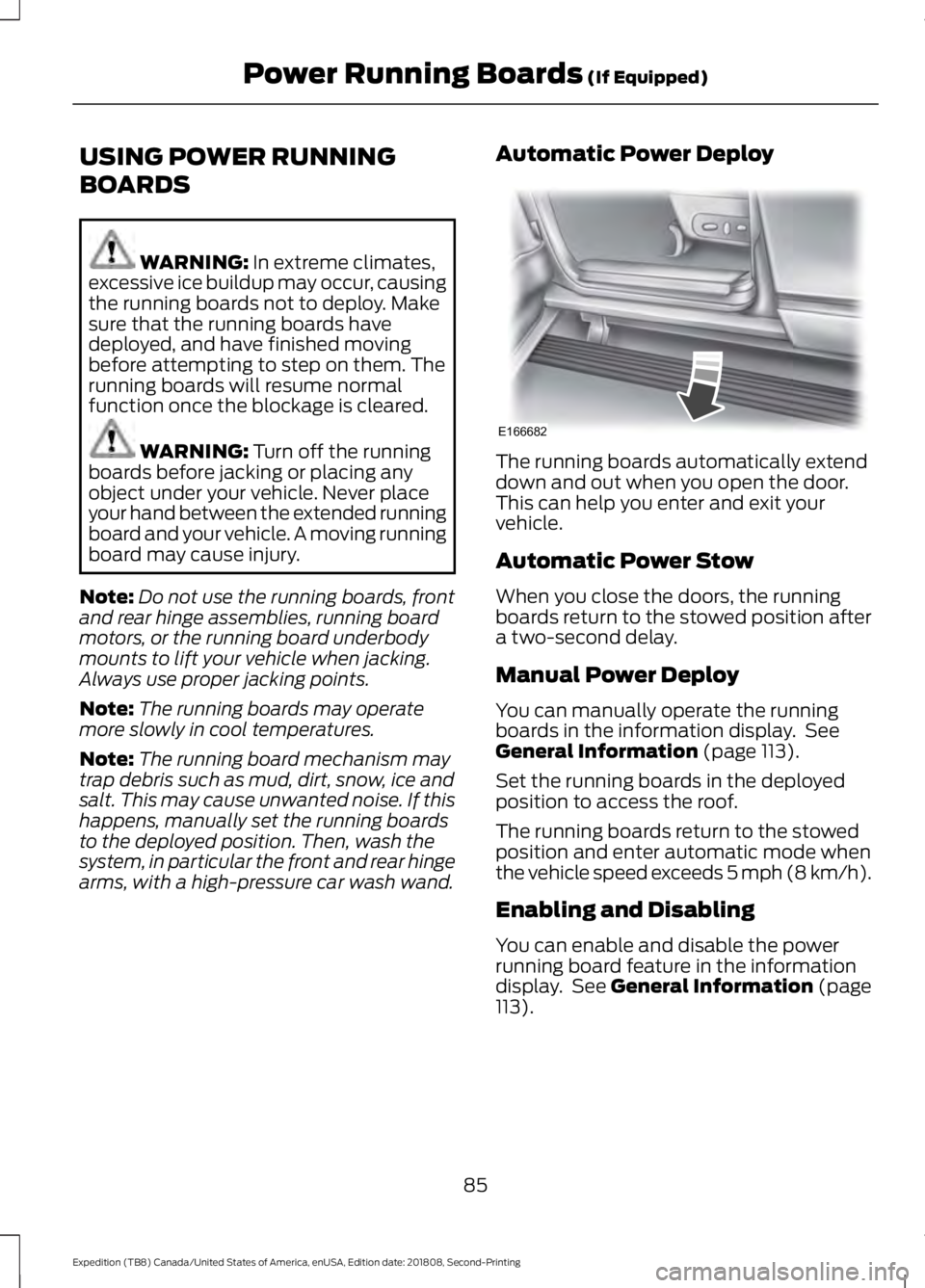
arms, with a high-pressure car wash wand. Automatic Power Deploy The running boards automatically extend
down and out when you open the door.
This can help you enter and exit your
vehicle.
Automatic Power Stow
When you close the doors, the running
boards return to the stowed position after
a two-second delay.
Manual Power Deploy
You can manually operate the running
boards in the information display. See
General Information
(page 113).
Set the running boards in the deployed
position to access the roof.
The running boards return to the stowed
position and enter automatic mode when
the vehicle speed exceeds 5 mph (8 km/h).
Enabling and Disabling
You can enable and disable the power
running board feature in the information
display. See
General Information (page
113).
85
Expedition (TB8) Canada/United States of America, enUSA, Edition date: 201808, Second-Printing Power Running Boards
(If Equipped)E166682
Page 103 of 583
POWER WINDOWS
WARNING: Do not leave children
unattended in your vehicle and do not
let them play with the power windows.
Failure to follow this instruction could
result in personal injury. WARNING:
When closing the
power windows, verify they are free of
obstruction and make sure that children
and pets are not in the proximity of the
window openings. Note:
You may hear a pulsing noise when
just one of the windows is open. Lower the
opposite window slightly to reduce this
noise.
Press the control to open the window.
Lift the control to close the window.
One-Touch Down
Press the control to open the window.
Press again or lift it to stop the window.
One-Touch Up
Lift the control fully and release it. Press
again or lift it to stop the window.
Bounce-Back
The window stops and reverses some
distance if it detects an obstacle when
closing. Overriding the Bounce-Back Feature WARNING:
If you override
bounce-back, the window does not
reverse if it detects an obstacle. Take
care when closing the windows to avoid
personal injury or damage to your
vehicle.
Pull up the window switch and hold within
a few seconds of the window reaching the
bounce-back position. The window travels
up with no bounce-back protection. The
window stops if you release the switch
before the window fully closes.
Window Lock Press the control to lock or
unlock the rear window controls.
It illuminates when you lock the
rear window controls.
Accessory
The window switches remain operational
for several minutes when you switch the
ignition off or until you open either front
door.
GLOBAL OPENING
(IF EQUIPPED)
You can use the remote control to open
the windows and vent the moonroof with
the ignition off.
Note: You can enable or disable this feature
in the information display, or see an
authorized dealer.
Note: To operate this feature, accessory
delay must not be active.
100
Expedition (TB8) Canada/United States of America, enUSA, Edition date: 201808, Second-Printing Windows and Mirrors
Page 104 of 583
Remote Control Front Windows
You can open the windows for a short time
after you unlock your vehicle with the
remote control. After you unlock your
vehicle, press and hold the remote control
unlock button to open the windows.
Release the button once movement starts.
Press the lock or unlock button to stop
movement.
Moonroof (If Equipped)
You can vent the moonroof after you
unlock your vehicle with the remote
control. After you unlock your vehicle, press
and hold the remote control unlock button
to vent the moonroof. Release the button
once movement starts. Press the lock or
unlock button to stop movement.
EXTERIOR MIRRORS
Power Exterior Mirrors WARNING:
Do not adjust the
mirrors when your vehicle is moving. This
could result in the loss of control of your
vehicle, serious personal injury or death.
Note: Do not use an ice scraper on the
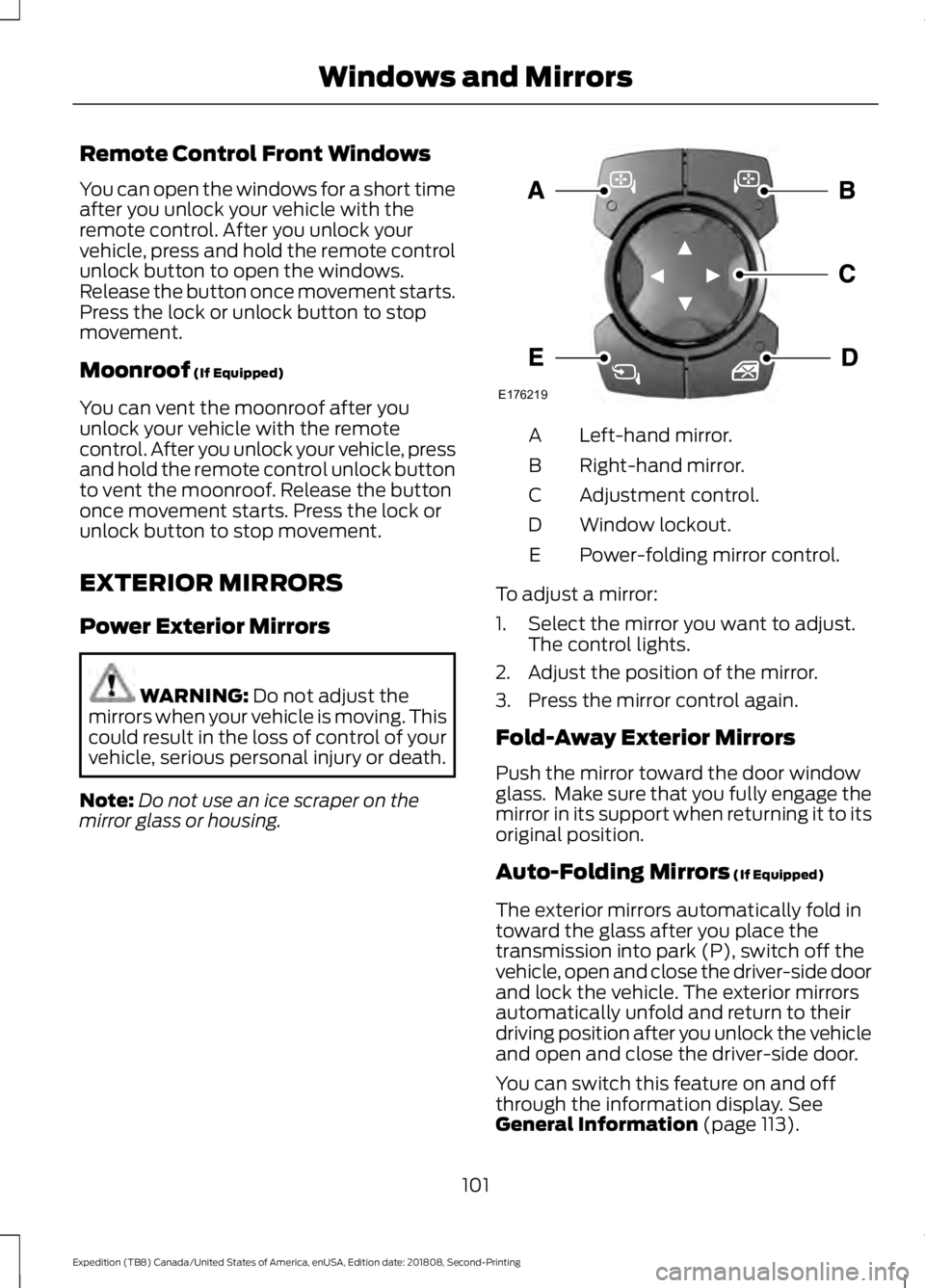
mirror glass or housing. Left-hand mirror.
A
Right-hand mirror.
B
Adjustment control.
C
Window lockout.
D
Power-folding mirror control.
E
To adjust a mirror:
1. Select the mirror you want to adjust. The control lights.
2. Adjust the position of the mirror.
3. Press the mirror control again.
Fold-Away Exterior Mirrors
Push the mirror toward the door window
glass. Make sure that you fully engage the
mirror in its support when returning it to its
original position.
Auto-Folding Mirrors
(If Equipped)
The exterior mirrors automatically fold in
toward the glass after you place the
transmission into park (P), switch off the
vehicle, open and close the driver-side door
and lock the vehicle. The exterior mirrors
automatically unfold and return to their
driving position after you unlock the vehicle
and open and close the driver-side door.
You can switch this feature on and off
through the information display.
See
General Information (page 113).
101
Expedition (TB8) Canada/United States of America, enUSA, Edition date: 201808, Second-Printing Windows and MirrorsE176219
Page 107 of 583
Illuminated Vanity Mirror
Lift the cover to switch the lamp on.
MOONROOF (IF EQUIPPED)
WARNING: Do not let children play
with the moonroof or leave them
unattended in the vehicle. They may
seriously hurt themselves. WARNING:
When closing the
moonroof, you should verify that it is free
of obstructions and make sure that
children and pets are not in the proximity
of the roof opening.
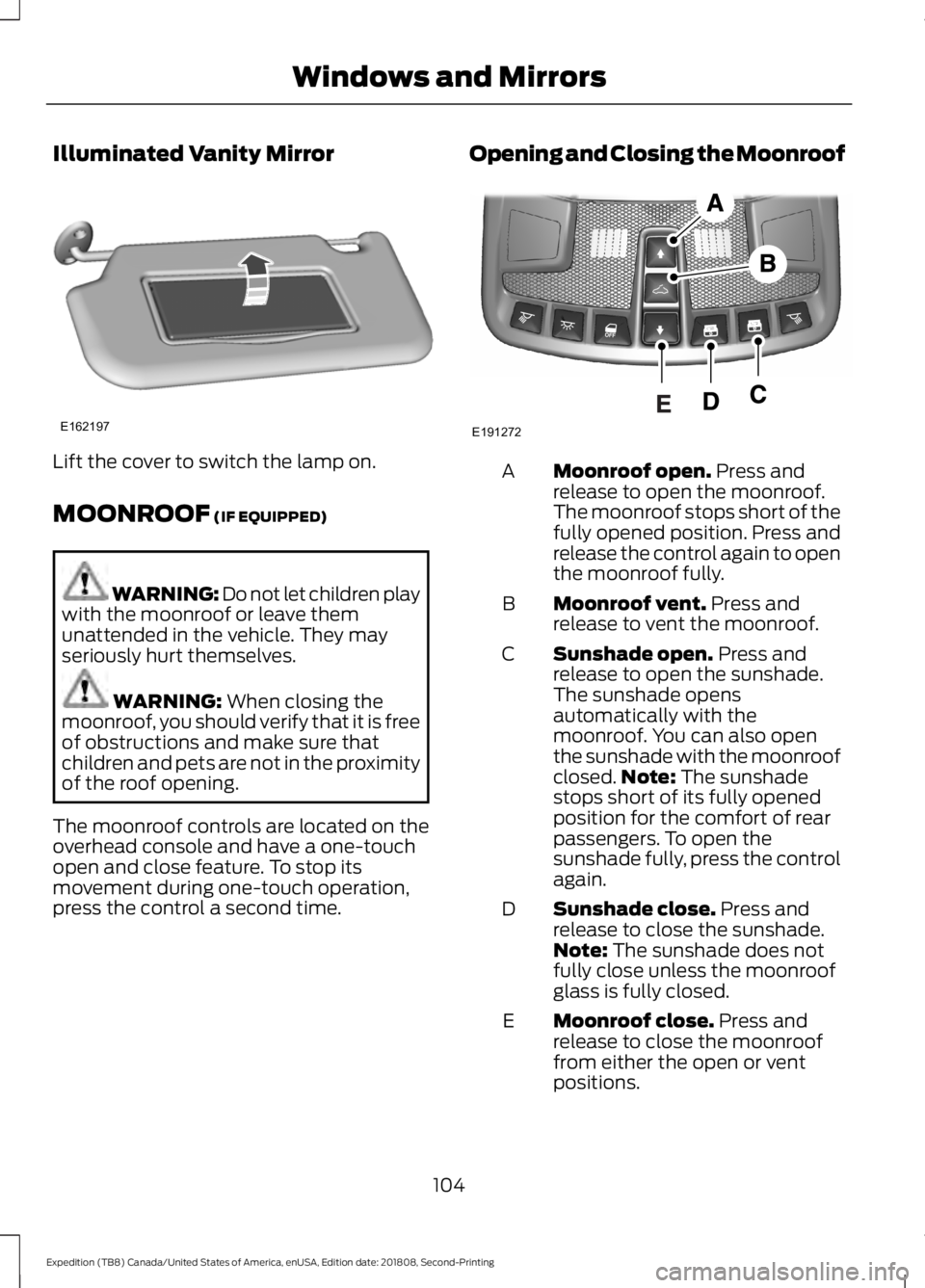
The moonroof controls are located on the
overhead console and have a one-touch
open and close feature. To stop its
movement during one-touch operation,
press the control a second time. Opening and Closing the Moonroof Moonroof open.
Press and
release to open the moonroof.
The moonroof stops short of the
fully opened position. Press and
release the control again to open
the moonroof fully.
A
Moonroof vent.
Press and
release to vent the moonroof.
B
Sunshade open.
Press and
release to open the sunshade.
The sunshade opens
automatically with the
moonroof. You can also open
the sunshade with the moonroof
C
closed. Note:
The sunshade
stops short of its fully opened
position for the comfort of rear
passengers. To open the
sunshade fully, press the control
again.
Sunshade close.
Press and
release to close the sunshade.
Note:
The sunshade does not
fully close unless the moonroof
glass is fully closed.
D
Moonroof close.
Press and
release to close the moonroof
from either the open or vent
positions.
E
104
Expedition (TB8) Canada/United States of America, enUSA, Edition date: 201808, Second-Printing Windows and MirrorsE162197 E191272
Page 108 of 583
Bounce-Back
The moonroof automatically reverses
some distance if an obstacle is detected
while closing.
To override this feature, press and hold the
moonroof close control within two
seconds after the roof comes to a stop
following a bounce-back reversal.
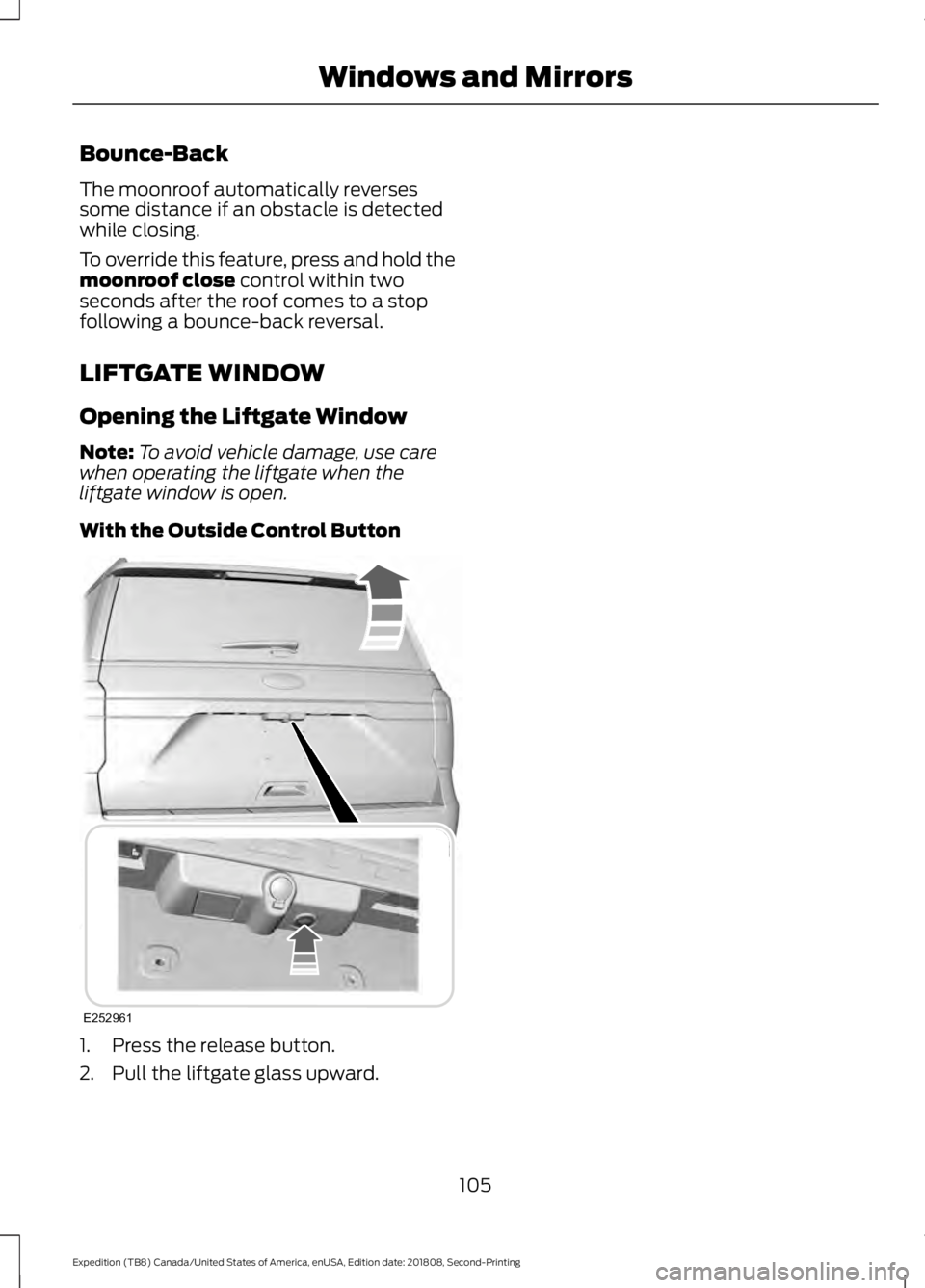
LIFTGATE WINDOW
Opening the Liftgate Window
Note: To avoid vehicle damage, use care
when operating the liftgate when the
liftgate window is open.
With the Outside Control Button 1. Press the release button.
2. Pull the liftgate glass upward.
105
Expedition (TB8) Canada/United States of America, enUSA, Edition date: 201808, Second-Printing Windows and MirrorsE252961
Page 223 of 583
PRINCIPLE OF OPERATION
WARNING: Vehicle modifications
involving braking system, aftermarket
roof racks, suspension, steering system,
tire construction and wheel and tire size
may change the handling characteristics
of your vehicle and may adversely affect
the performance of the electronic
stability control system. In addition,
installing any stereo loudspeakers may
interfere with and adversely affect the
electronic stability control system. Install
any aftermarket stereo loudspeaker as
far as possible from the front center
console, the tunnel, and the front seats
in order to minimize the risk of interfering
with the electronic stability control
sensors. Reducing the effectiveness of
the electronic stability control system
could lead to an increased risk of loss of
vehicle control, vehicle rollover, personal
injury and death. WARNING:
Remember that even
advanced technology cannot defy the
laws of physics. It’ s always possible to
lose control of a vehicle due to
inappropriate driver input for the
conditions. Aggressive driving on any
road condition can cause you to lose
control of your vehicle increasing the risk
of personal injury or property damage.
Activation of the electronic stability
control system is an indication that at
least some of the tires have exceeded
their ability to grip the road; this could
reduce the operator ’s ability to control
the vehicle potentially resulting in a loss
of vehicle control, vehicle rollover,
personal injury and death. If your
electronic stability control system
activates, SLOW DOWN.
The system automatically turns on each
time you switch the ignition on. If a fault occurs in either the stability
control or the traction control system, you
may experience the following conditions:
•
The stability and traction control light
illuminates steadily.
• The stability control and traction
control systems do not enhance your
vehicle's ability to maintain traction of
the wheels.
If a driving condition activates either the
stability control or the traction control
system you may experience the following
conditions:
• The stability and traction control light
flashes.
• Your vehicle slows down.
• Reduced engine power.
• A vibration in the brake pedal.
• The brake pedal is stiffer than usual.
• If the driving condition is severe and
your foot is not on the brake, the brake
pedal may move as the system applies
higher brake force.
The stability control system has several
features built into it to help you maintain
control of your vehicle:
Electronic Stability Control
The system enhances your vehicle ’s ability
to prevent skids or lateral slides by
applying brakes to one or more of the
wheels individually and, if necessary,
reducing engine power.
Roll Stability Control
The system enhances your vehicle ’s ability
to prevent rollovers by detecting your
vehicle ’s roll motion and the rate at which
it changes by applying the brakes to one
or more wheels individually.
220
Expedition (TB8) Canada/United States of America, enUSA, Edition date: 201808, Second-Printing Stability Control