tow FORD EXPEDITION 2020 Owners Manual
[x] Cancel search | Manufacturer: FORD, Model Year: 2020, Model line: EXPEDITION, Model: FORD EXPEDITION 2020Pages: 542, PDF Size: 6.73 MB
Page 442 of 542
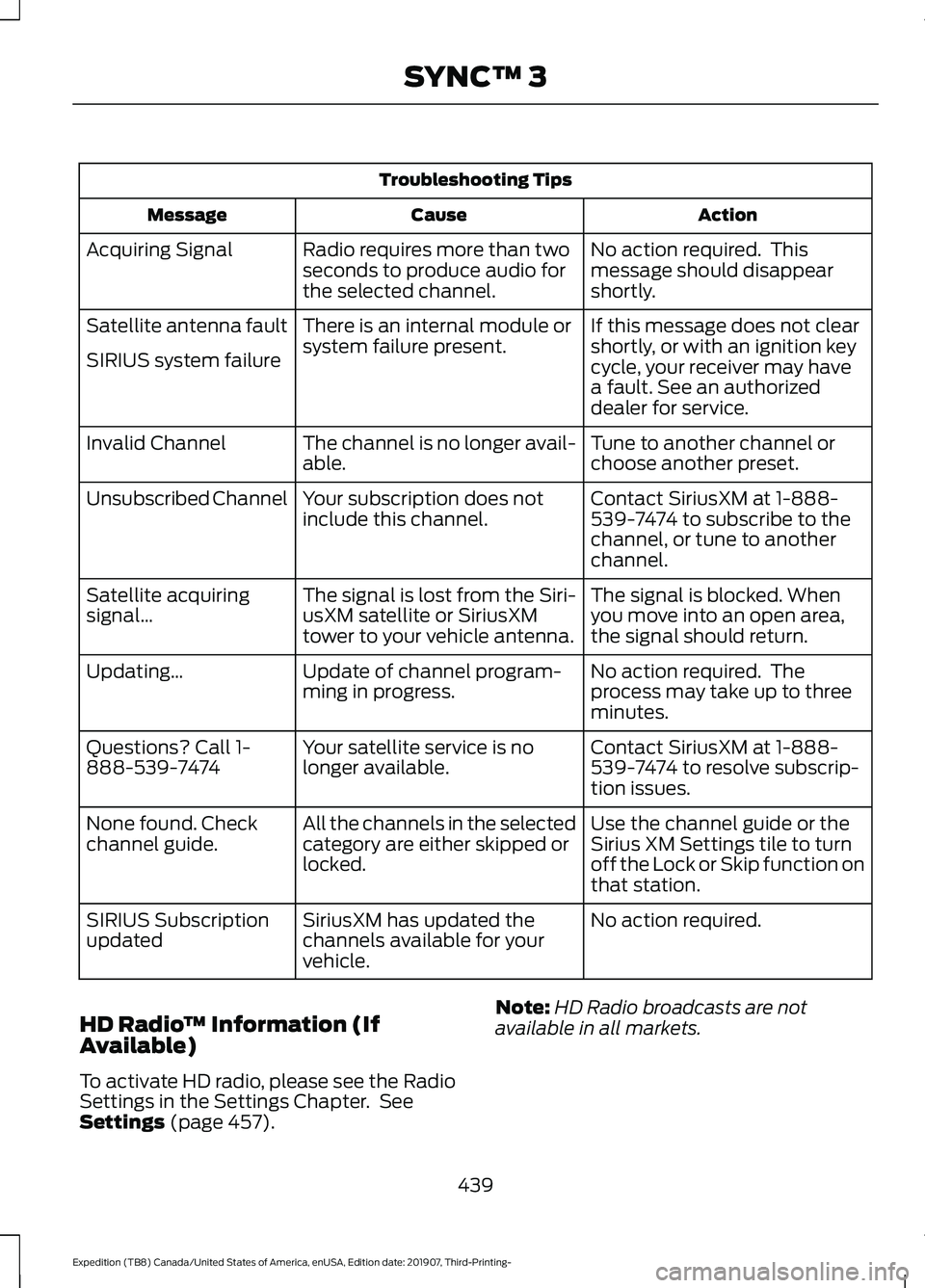
Troubleshooting Tips
Action
Cause
Message
No action required. This
message should disappear
shortly.
Radio requires more than two
seconds to produce audio for
the selected channel.
Acquiring Signal
If this message does not clear
shortly, or with an ignition key
cycle, your receiver may have
a fault. See an authorized
dealer for service.
There is an internal module or
system failure present.
Satellite antenna fault
SIRIUS system failure
Tune to another channel or
choose another preset.
The channel is no longer avail-
able.
Invalid Channel
Contact SiriusXM at 1-888-
539-7474 to subscribe to the
channel, or tune to another
channel.
Your subscription does not
include this channel.
Unsubscribed Channel
The signal is blocked. When
you move into an open area,
the signal should return.
The signal is lost from the Siri-
usXM satellite or SiriusXM
tower to your vehicle antenna.
Satellite acquiring
signal\b
No action required. The
process may take up to three
minutes.
Update of channel program-
ming in progress.
Updating\b
Contact SiriusXM at 1-888-
539-7474 to resolve subscrip-
tion issues.
Your satellite service is no
longer available.
Questions? Call 1-
888-539-7474
Use the channel guide or the
Sirius XM Settings tile to turn
off the Lock or Skip function on
that station.
All the channels in the selected
category are either skipped or
locked.
None found. Check
channel guide.
No action required.
SiriusXM has updated the
channels available for your
vehicle.
SIRIUS Subscription
updated
HD Radio ™ Information (If
Available)
To activate HD radio, please see the Radio
Settings in the Settings Chapter. See
Settings (page 457). Note:
HD Radio broadcasts are not
available in all markets.
439
Expedition (TB8) Canada/United States of America, enUSA, Edition date: 201907, Third-Printing- SYNC™ 3
Page 454 of 542
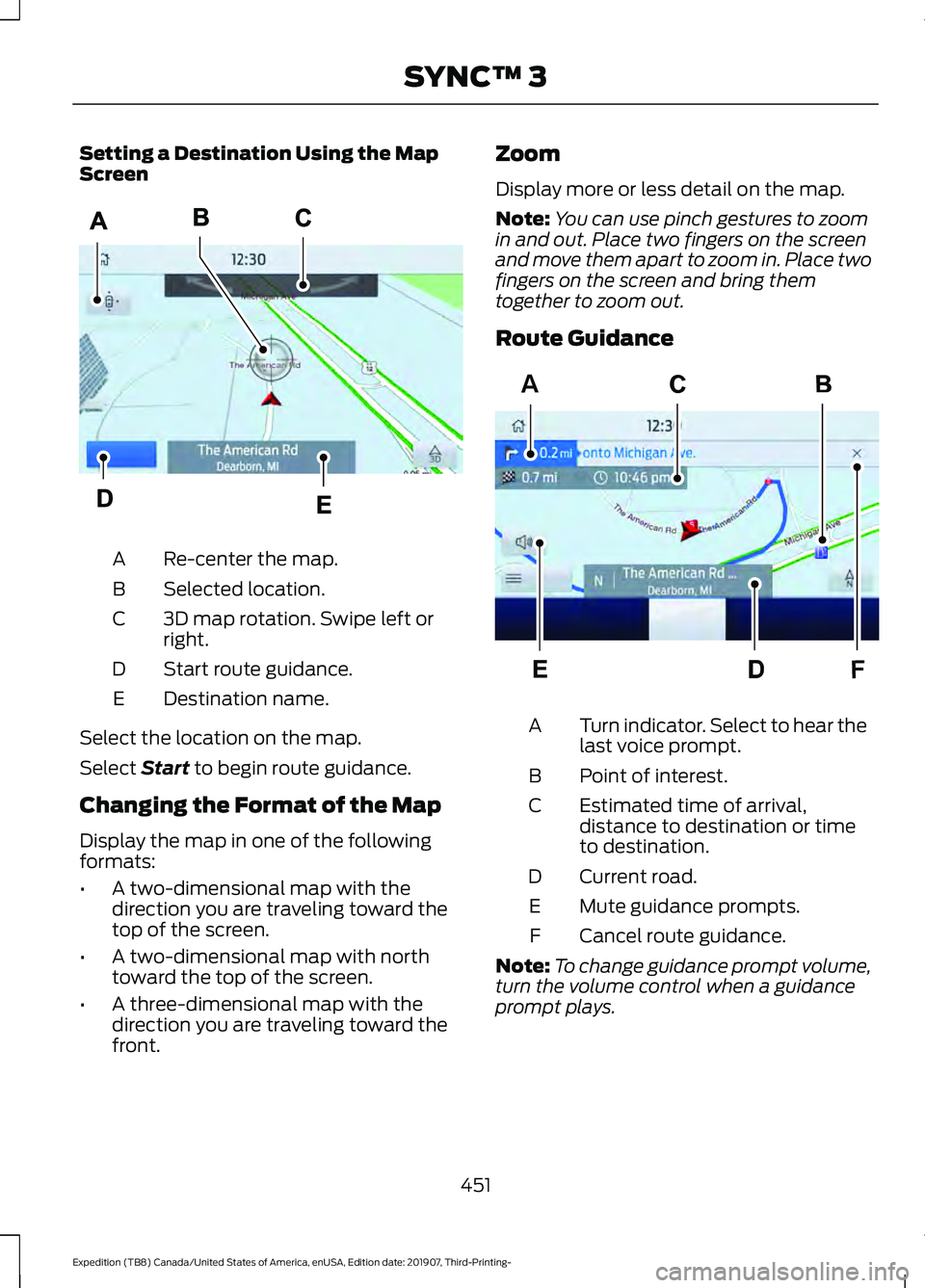
Setting a Destination Using the Map
Screen
Re-center the map.
A
Selected location.
B
3D map rotation. Swipe left or
right.
C
Start route guidance.
D
Destination name.
E
Select the location on the map.
Select Start to begin route guidance.
Changing the Format of the Map
Display the map in one of the following
formats:
• A two-dimensional map with the
direction you are traveling toward the
top of the screen.
• A two-dimensional map with north
toward the top of the screen.
• A three-dimensional map with the
direction you are traveling toward the
front. Zoom
Display more or less detail on the map.
Note:
You can use pinch gestures to zoom
in and out. Place two fingers on the screen
and move them apart to zoom in. Place two
fingers on the screen and bring them
together to zoom out.
Route Guidance Turn indicator. Select to hear the
last voice prompt.
A
Point of interest.
B
Estimated time of arrival,
distance to destination or time
to destination.
C
Current road.
D
Mute guidance prompts.
E
Cancel route guidance.
F
Note: To change guidance prompt volume,
turn the volume control when a guidance
prompt plays.
451
Expedition (TB8) Canada/United States of America, enUSA, Edition date: 201907, Third-Printing- SYNC™ 3E297559 F
AE297560
Page 476 of 542
PROTECT YOURSELF FROM THE RISING
COST OF VEHICLE REPAIRS WITH A FORD
PROTECT EXTENDED SERVICE PLAN.
Ford Protect Extended Service
Plans (U.S. Only)
Ford Protect extended service plan means
peace of mind. It’
s the extended service
plan backed by Ford Motor Company, and
provides more protection beyond the New
Vehicle Limited Warranty coverage. When
you visit your Ford Dealer, Insist on Ford
Protect extended service plans!
Ford Protect Can Quickly Pay for Itself
One trip to the Service Center could easily
exceed the price of your Ford Protect
extended service plan. With Ford Protect
extended service plan you minimize your
risk for unexpected repair bills and rising
repair costs.
Up to 1,000+ Covered Vehicle
Components
There are four mechanical Ford Protect
extended service plans with different levels
of coverage. Ask your authorized dealer for
details.
1. PremiumCARE - Our most comprehensive coverage. With over
1,000 covered components, this plan
is so complete it’ s probably easier to
list what’ s not covered.
2. ExtraCARE - Covers 113 components, and includes many high-tech items.
3. BaseCARE - Covers 84 components.
4. PowertrainCARE - Covers 29 critical components.
Ford Protect extended service plans are
honored by all authorized Ford dealers in
the U.S., Canada and Mexico. That means you get:
•
Reliable, quality service at any Ford or
Lincoln dealership.
• Repairs performed by factory trained
technicians, using genuine parts.
Rental Car Reimbursement
1st day Rental Benefit
If you bring your car into your dealer for
service, we ’ll give you a loaner to use for
the day.
Extended Rental Benefits
If your vehicle is kept overnight for covered
repairs, you are eligible for rental car
coverage, including warranty repairs, and
Field Service Actions.
Roadside Assistance
Exclusive 24/7 roadside assistance,
including:
• Towing, flat-tire change and battery
jump starts.
• Out of fuel and lock-out assistance.
• Travel expense reimbursement for
lodging, meals and rental car.
• Assistance for taxi, shuttle, rental car
coverage or other transportation.
Transferable Coverage
If you sell your vehicle before your Ford
Protect extended service plan coverage
expires, you can transfer any remaining
coverage to the new owner. Which should
give you and your potential buyer a little
more peace of mind.
473
Expedition (TB8) Canada/United States of America, enUSA, Edition date: 201907, Third-Printing- Ford Protect
Page 477 of 542
Less Cost to Properly Maintain Your
Vehicle
Ford Protect extended service plan also
offers a Premium Maintenance Plan that
covers all scheduled maintenance, and
selected wear items. The coverage is
prepaid, so you never have to worry about
the cost of your vehicle
’s maintenance.
Covered maintenance includes:
• Windshield wiper blades.
• Spark plugs.
• The clutch disc (if equipped).
• Brake pads and linings.
• Shock absorbers.
• Struts.
• Engine Belts.
• Engine coolant hoses, clamps and
o-rings.
• Diesel exhaust fluid replenishment (if
equipped).
• Cabin air filter replacement every
20,000 mi (32,000 km) (electric
vehicles only).
Interest Free Finance Options
Just a 5% down payment will provide you
with an affordable, no interest, no fee
payment program allowing you all the
security and benefits Ford Protect
extended service plan has to offer while
paying over time. You are pre-approved
with no credit check or hassles. To learn
more, call our Ford Protect extended
service plan specialists at 800-367-3377.
Ford Protect Extended Service Plan
P.O. Box 321067
Detroit, MI 48232 Ford Protect Extended Service
Plan (CANADA ONLY)
You can get more protection for your
vehicle by purchasing a Ford Protect
extended service plan. Ford Protect
extended service plan is the only service
contract backed by Ford Motor Company
of Canada, Limited. Depending on the plan
you purchase, Ford Protect extended
service plan provides benefits such as:
•
Rental reimbursement.
• Coverage for certain maintenance and
wear items.
• Protection against repair costs after
your New Vehicle Limited Warranty
Coverage expires.
• Roadside Assistance benefits.
There are several Ford Protect extended
service plans available in various time,
distance and deductible combinations.
Each plan is tailored to fit your own driving
needs, including reimbursement for towing
and rental. When you purchase Ford
Protect extended service plan, you receive
added peace-of-mind protection
throughout Canada, the United States and
Mexico, provided by a network of
participating authorized Ford Motor
Company dealers.
Note: Repairs performed outside of Canada
and the United States are not eligible for
Ford Protect extended service plan
coverage.
This information is subject to change. For
more information; visit your local Ford of
Canada dealer or www.ford.ca to find the
Ford Protect extended service plan that is
right for you.
474
Expedition (TB8) Canada/United States of America, enUSA, Edition date: 201907, Third-Printing- Ford Protect
Page 482 of 542
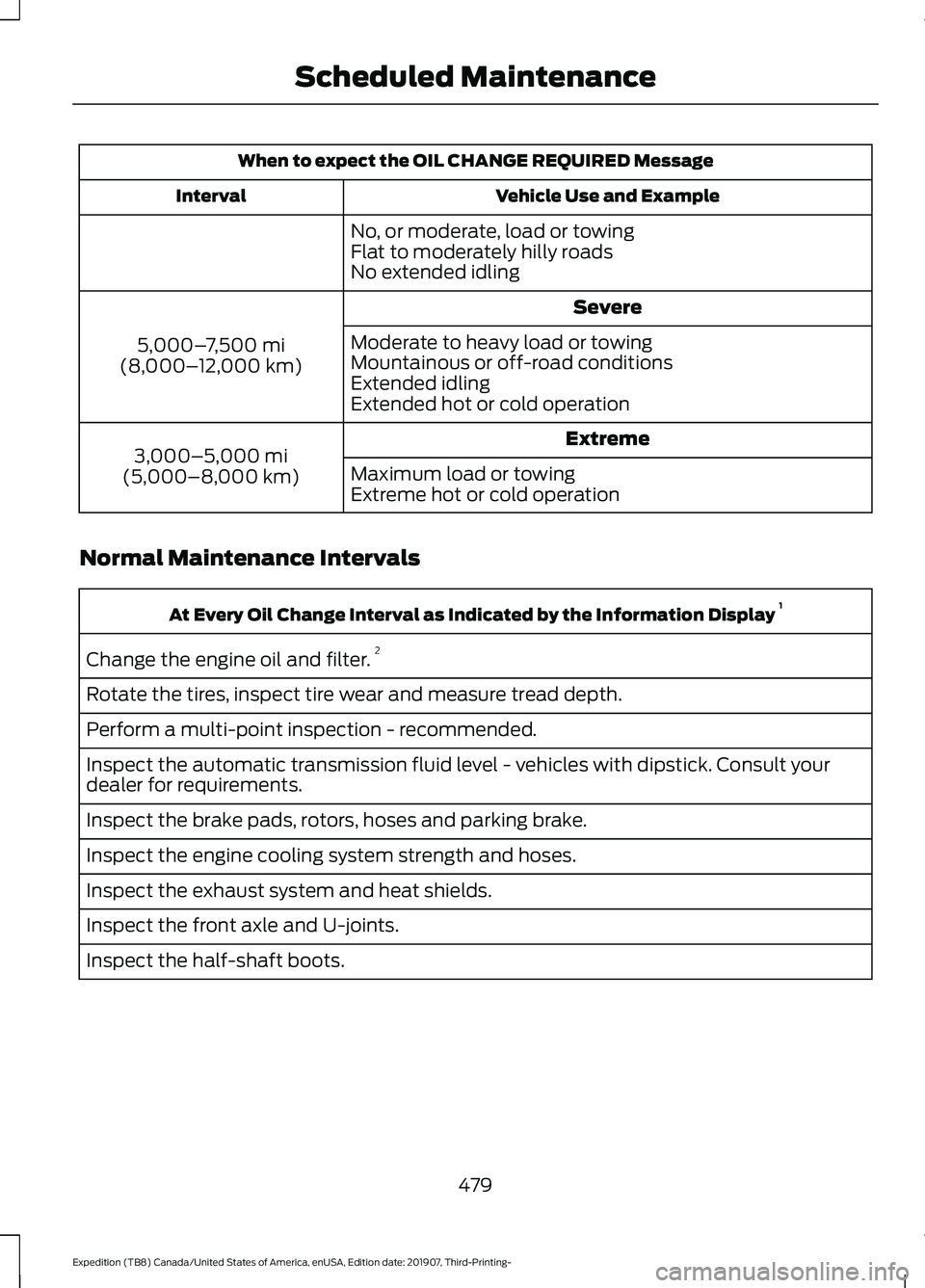
When to expect the OIL CHANGE REQUIRED Message
Vehicle Use and Example
Interval
No, or moderate, load or towing
Flat to moderately hilly roads
No extended idling Severe
5,000– 7,500 mi
(8,000– 12,000 km) Moderate to heavy load or towing
Mountainous or off-road conditions
Extended idling
Extended hot or cold operation
Extreme
3,000–5,000 mi
(5,000–8,000 km) Maximum load or towing
Extreme hot or cold operation
Normal Maintenance Intervals At Every Oil Change Interval as Indicated by the Information Display
1
Change the engine oil and filter. 2
Rotate the tires, inspect tire wear and measure tread depth.
Perform a multi-point inspection - recommended.
Inspect the automatic transmission fluid level - vehicles with dipstick. Consult your
dealer for requirements.
Inspect the brake pads, rotors, hoses and parking brake.
Inspect the engine cooling system strength and hoses.
Inspect the exhaust system and heat shields.
Inspect the front axle and U-joints.
Inspect the half-shaft boots.
479
Expedition (TB8) Canada/United States of America, enUSA, Edition date: 201907, Third-Printing- Scheduled Maintenance
Page 484 of 542
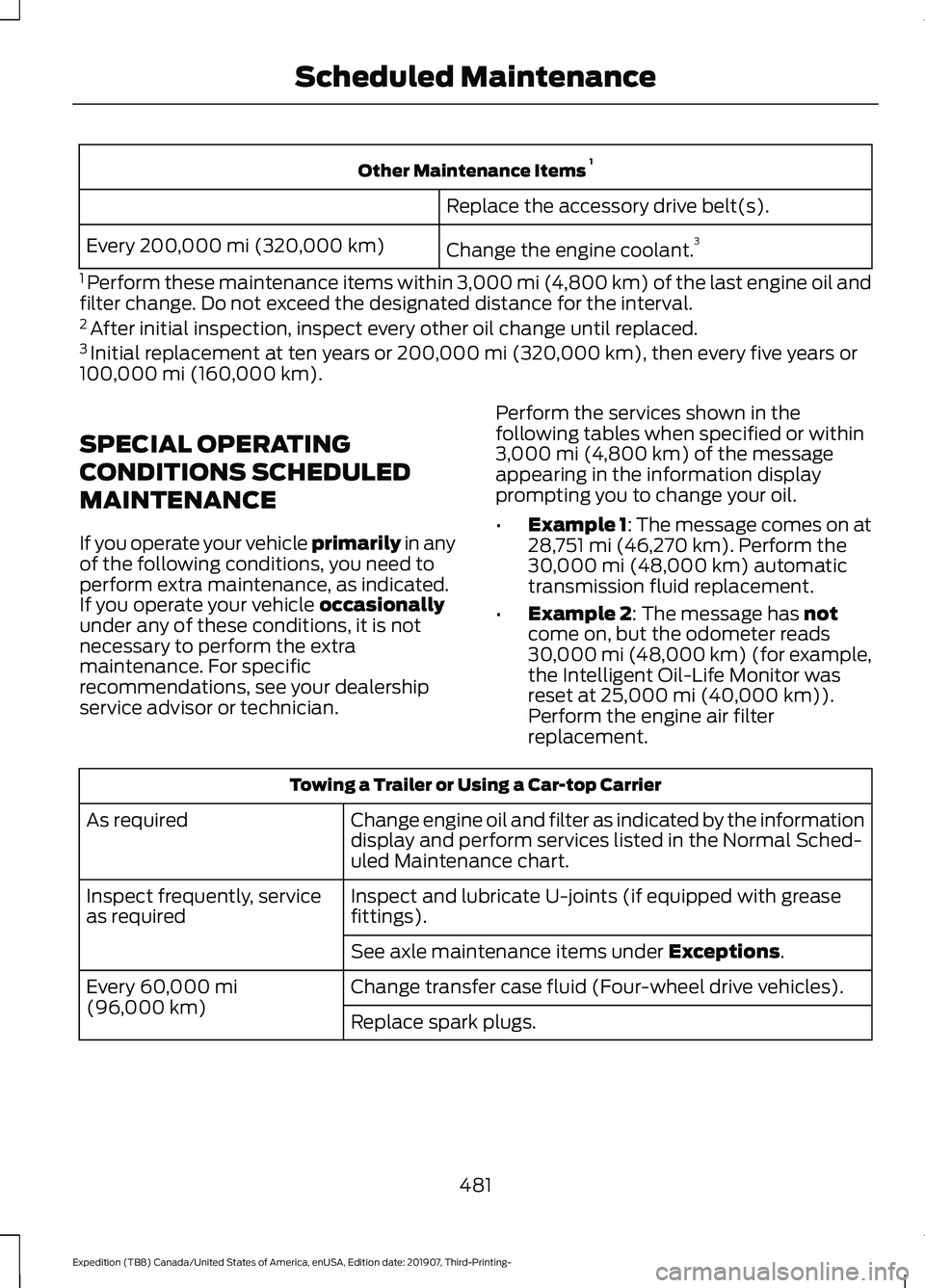
Other Maintenance Items
1
Replace the accessory drive belt(s).
Change the engine coolant. 3
Every 200,000 mi (320,000 km)
1 Perform these maintenance items within 3,000 mi (4,800 km) of the last engine oil and
filter change. Do not exceed the designated distance for the interval.
2 After initial inspection, inspect every other oil change until replaced.
3 Initial replacement at ten years or 200,000 mi (320,000 km), then every five years or
100,000 mi (160,000 km).
SPECIAL OPERATING
CONDITIONS SCHEDULED
MAINTENANCE
If you operate your vehicle primarily
in any
of the following conditions, you need to
perform extra maintenance, as indicated.
If you operate your vehicle
occasionally
under any of these conditions, it is not
necessary to perform the extra
maintenance. For specific
recommendations, see your dealership
service advisor or technician. Perform the services shown in the
following tables when specified or within
3,000 mi (4,800 km)
of the message
appearing in the information display
prompting you to change your oil.
• Example 1: The message comes on at
28,751 mi (46,270 km)
. Perform the
30,000 mi (48,000 km) automatic
transmission fluid replacement.
• Example 2
: The message has not
come on, but the odometer reads
30,000 mi (48,000 km) (for example,
the Intelligent Oil-Life Monitor was
reset at
25,000 mi (40,000 km)).
Perform the engine air filter
replacement. Towing a Trailer or Using a Car-top Carrier
Change engine oil and filter as indicated by the information
display and perform services listed in the Normal Sched-
uled Maintenance chart.
As required
Inspect and lubricate U-joints (if equipped with grease
fittings).
Inspect frequently, service
as required
See axle maintenance items under
Exceptions.
Change transfer case fluid (Four-wheel drive vehicles).
Every
60,000 mi
(96,000 km) Replace spark plugs.
481
Expedition (TB8) Canada/United States of America, enUSA, Edition date: 201907, Third-Printing- Scheduled Maintenance
Page 529 of 542
Changing Radio Stations...............................
399
Playing or Pausing Media.............................. 400
Returning to the Previous Screen...............400
Scrolling Through the Menu Options........400
Selecting a Menu Option............................... 400
Selecting Media................................................. 400
Selecting the Radio.......................................... 400
Setting a Memory Preset............................... 400
Switching the Audio Unit On and Off...................................................................... 400
Using a Cell Phone........................................... 400
Using Apps.......................................................... 400
Using Seek, Fast Forward and Reverse.............................................................. 401
Autolamps........................................................95 Windshield Wiper Activated
Headlamps........................................................ 95
Automatic Climate Control........................141 Accessing Rear Climate Controls.................. 141
Directing the Airflow........................................... 141
Setting the Blower Motor Speed................... 141
Setting the Temperature.................................. 141
Switching Auto Mode On and Off.................141
Switching Dual Zone Mode On and Off........................................................................\
142
Switching Maximum Air Conditioning On and Off............................................................... 142
Switching Maximum Defrost On and Off........................................................................\
143
Switching Recirculated Air On and Off........................................................................\
143
Switching the Air Conditioning On and Off........................................................................\
142
Switching the Climate Control On and Off........................................................................\
142
Switching the Heated Seats On and Off........................................................................\
143
Switching the Ventilated Seats On and Off........................................................................\
143
Automatic High Beam Control.................99
Automatic High Beam Control Indicators.......................................................99
Automatic Transmission............................193
Automatic Transmission Adaptive
Learning............................................................ 199
Brake-Shift Interlock (Console Shifter Only).................................................................. 198If Your Vehicle Gets Stuck in Mud or
Snow.................................................................. 199
SelectShift™ Automatic Transmission.................................................... 197
Understanding the Shift Positions of Your Automatic Transmission............................. 193
Automatic Transmission Fluid Check.............................................................333
Auto-Start-Stop............................................179 Disabling Auto-Start-Stop............................. 180
Enabling Auto-Start-Stop............................... 179
Autowipers
........................................................92
Autowipers Settings............................................ 93
Auxiliary Power Points
................................169
110 Volt AC Power Point................................... 169
12 Volt DC Power Point..................................... 169
USB Port and Power Point Locations.........169
B
Battery See: Changing the 12V Battery..................... 335
Blind Spot Information System.............249 ........................................................................\
.......... 249
Blind Spot Information System with Trailer Tow...................................................................... 251
Switching the System On and Off...............253
System Errors...................................................... 253
Using the Blind Spot Information System.............................................................. 250
BLIS See: Blind Spot Information System..........249
Bonnet Lock See: Opening and Closing the Hood..........325
Booster Seats
...................................................31
Types of Booster Seats...................................... 32
Brake Fluid Check........................................334 Brake Fluid Service Interval............................ 335
Brakes..............................................................209 General Information......................................... 209
Breaking-In
....................................................300
Bulb Specification Chart...........................392
C
Cabin Air Filter...............................................148
Canceling the Set Speed
...........................237
526
Expedition (TB8) Canada/United States of America, enUSA, Edition date: 201907, Third-Printing- Index
Page 532 of 542
Daytime Running Lamps - Vehicles With:
Daytime Running Lamps (DRL)............96
Declaration of Conformity........................522
Declaration of Conformity - Vehicles With: SYNC 3..............................................522
Radio Frequency Statement......................... 522
Digital Radio..................................................402 HD Radio Reception and Station
Troubleshooting............................................ 403
Direction Indicators........................................97
Doors and Locks.............................................69
Drive Control...................................................261 Selectable Drive Modes................................... 261
Driver Alert
.....................................................244
Using Driver Alert............................................... 244
Driver and Passenger Airbags...................49 Children and Airbags.......................................... 50
Proper Driver and Front Passenger Seating Adjustment........................................................ 49
Driving Aids....................................................244
Driving Hints
..................................................299
Driving Through Water..............................300
DRL See: Daytime Running Lamps - Vehicles With:
Configurable Daytime Running
Lamps................................................................. 96
See: Daytime Running Lamps - Vehicles With: Daytime Running Lamps (DRL)................96
E
Economical Driving.....................................299
Electric Parking Brake.................................210 Applying the Electric Parking Brake.............210
Automatically Releasing the Electric
Parking Brake.................................................... 211
Manually Releasing the Electric Parking Brake.................................................................. 210
Releasing the Electric Parking Brake if the Vehicle Battery is Running Out of
Charge................................................................. 211
Electromagnetic Compatibility
..............494
Emission Law.................................................189 Noise Emissions Warranty, Prohibited
Tampering Acts and Maintenance.........190
Tampering With a Noise Control System.............................................................. 189End User License Agreement..................497
VEHICLE SOFTWARE END USER LICENSE
AGREEMENT (EULA) ................................. 497
Engine Block Heater
.....................................177
Using the Engine Block Heater...................... 178
Engine Coolant Check...............................329 Adding Coolant.................................................. 330
Coolant Change.................................................. 332
Engine Coolant Temperature Management
.................................................. 333
Fail-Safe Cooling................................................ 332
Recycled Coolant................................................ 331
Severe Climates.................................................. 331
Engine Emission Control...........................189
Engine Immobilizer See: Passive Anti-Theft System...................... 81
Engine Oil Check...........................................327 Adding Engine Oil............................................... 327
Engine Oil Dipstick.......................................327
Engine Specifications
................................380
Drivebelt Routing.............................................. 380
Entertainment..............................................435 AM/FM Radio...................................................... 436
Apps....................................................................... 444
Bluetooth Stereo or USB................................ 443
CD........................................................................\
.... 442
HD Radio ™ Information (If
Available)........................................................ 439
SiriusXM® Satellite Radio (If Activated)........................................................ 437
Sources.................................................................. 435
Supported Media Players, Formats and Metadata Information................................ 444
USB Ports............................................................. 444
Environment......................................................17
EPB See: Electric Parking Brake............................. 210
Essential Towing Checks..........................289 Before Towing a Trailer.................................... 294
Hitches.................................................................. 290
Launching or Retrieving a Boat or Personal Watercraft (PWC)........................................ 295
Safety Chains....................................................... 291
Trailer Brakes........................................................ 291
Trailer Hitch Cover............................................. 289
Trailer Lamps...................................................... 294
529
Expedition (TB8) Canada/United States of America, enUSA, Edition date: 201907, Third-Printing- Index
Page 533 of 542
Trailer Towing Connector (Vehicles with a
Trailer Towing Package and 7 –Pin
Connector)...................................................... 289
When Towing a Trailer..................................... 295
Event Data Recording See: Data Recording.............................................. 9
Export Unique Options.................................16
Exterior Mirrors..............................................102
360-Degree Camera......................................... 103
Auto-Dimming Feature.................................... 103
Auto-Folding Mirrors......................................... 102
Blind Spot Monitor............................................. 103
Fold-Away Exterior Mirrors............................. 102
Heated Exterior Mirrors.................................... 103
Memory Mirrors................................................... 103
Power Exterior Mirrors.......................................102
Puddle Lamps .................................................... 103
Signal Indicator Mirrors.................................... 103
F
Fastening the Seatbelts..............................38 Rear Inflatable Seatbelt..................................... 41
Seatbelt Locking Modes................................... 40
Using Seatbelts During Pregnancy................39
Flat Tire See: Changing a Road Wheel........................ 372
Floor Mats......................................................300
Fog Lamps - Front See: Front Fog Lamps........................................ 96
Foot Pedals See: Adjusting the Pedals.................................. 91
Ford Credit
.........................................................13
US Only..................................................................... 13
Ford Protect...................................................473 Ford Protect Extended Service Plan
(CANADA ONLY)........................................... 474
Ford Protect Extended Service Plans (U.S. Only).................................................................. 473
Four-Wheel Drive
........................................200
Front Fog Lamps............................................96 Front Fog Lamp Indicator.................................. 97
Switching the Front Fog Lamps On or Off........................................................................\
. 96
Front Parking Aid.........................................220 Object Distance Indicator................................ 221
Front Passenger Sensing System............50
Fuel and Refueling
.......................................182 Fuel Consumption........................................187
Advertised Capacity........................................... 187
Calculating Fuel Economy.............................. 188
Filling the Fuel Tank.......................................... 188
Fuel Filler Funnel Location........................183
Fuel Filter
........................................................339
Fuel Quality.....................................................182
Choosing the Right Fuel................................... 182
Fuel Shutoff
...................................................303
Fuse Box Locations......................................315 Engine Compartment Fuse Box.................... 315
Passenger Compartment Fuse Box.............315
Fuses.................................................................315
Fuse Specification Chart
...........................315
Engine Compartment Fuse Box.................... 315
Passenger Compartment Fuse Box.............321
G
Garage Door Opener
...................................165
Garage Door Opener See: Universal Garage Door Opener...........165
Gauges..............................................................107 4 Inch Display....................................................... 107
8 Inch Display...................................................... 108
Configurable Gauge.......................................... 109
Engine Coolant Temperature Gauge..........109
Engine Oil Pressure Gauge............................. 109
Fuel Gauge............................................................ 109
Gearbox See: Transmission.............................................. 193
General Information on Radio Frequencies...................................................56
Intelligent Access................................................. 56
General Maintenance Information
........475
Multi-Point Inspection...................................... 477
Owner Checks and Services.......................... 476
Protecting Your Investment........................... 475
Why Maintain Your Vehicle?.......................... 475
Why Maintain Your Vehicle at Your Dealership?..................................................... 475
Getting Assistance Outside the U.S. and Canada...........................................................311
Getting the Services You Need..............308 Away From Home............................................. 308
Global Opening and Closing.....................101 Closing the Windows........................................ 102
Opening the Windows...................................... 102
530
Expedition (TB8) Canada/United States of America, enUSA, Edition date: 201907, Third-Printing- Index
Page 535 of 542
Combining Seatbelt and LATCH Lower
Anchors for Attaching Child Safety
Seats.................................................................... 28
Using Lap and Shoulder Belts......................... 22
Using Lower Anchors and Tethers for CHildren (LATCH)............................................ 27
Using Tether Straps............................................. 28
Instrument Cluster.......................................107
Instrument Lighting Dimmer.....................95
Instrument Panel
............................................18
Interior Lamps.................................................97
Front Interior Lamp.............................................. 97
Interior Lamp Function...................................... 98
Rear Interior Lamps............................................ 98
Switching All of the Interior Lamps Off........................................................................\
. 97
Switching All of the Interior Lamps On........97
Switching the Individual Map Lamps On and Off................................................................. 97
Interior Mirror..................................................103 Automatic Dimming Mirror............................. 104
Manual Dimming Mirror................................... 104
Introduction.........................................................7
J
Jump Starting the Vehicle........................304 Connecting the Jumper Cables.................... 304
Jump Starting..................................................... 305
Preparing Your Vehicle.................................... 304
Removing the Jumper Cables....................... 305
K
Keyless Entry
....................................................72
Displaying the Factory-Set Code.................... 74
Locking and Unlocking....................................... 74
SECURICODE™ KEYLESS ENTRY KEYPAD............................................................... 72
Keyless Starting
.............................................173
Ignition Modes...................................................... 174
Keys and Remote Controls.........................56
L
Lane Keeping System
................................245
Switching the System On and Off..............246
System Display.................................................... 247System Settings.................................................
246
Troubleshooting................................................. 248
Liftgate...............................................................76
Liftgate Window
...........................................106
Opening the Liftgate Window....................... 106
Lighting Control
..............................................94
Flashing the Headlamp High Beam..............95
Headlamp High Beam........................................ 94
Lighting..............................................................94 General Information............................................ 94
Limited Slip Differential
............................208
Locking Function............................................... 208
Spare Tire............................................................. 208
Trailer Towing..................................................... 208
Load Carriers See: Roof Racks and Load Carriers............268
Load Carrying
................................................265
Load Limit......................................................269 Special Loading Instructions for Owners of
Pick-up Trucks and Utility-type
Vehicles............................................................. 273
Vehicle Loading - with and without a Trailer................................................................ 269
Locking and Unlocking................................69 Activating Intelligent Access............................ 70
Autolock.................................................................... 71
Battery Saver.......................................................... 72
Illuminated Entry................................................... 72
Illuminated Exit...................................................... 72
Locking and Unlocking the Doors with the Key Blade............................................................. 71
Power Door Locks................................................ 69
Remote Control.................................................... 69
Smart Unlocks for Integrated Keyhead Transmitter.......................................................... 71
Smart Unlocks for Intelligent Access Keys........................................................................\
71
Lug Nuts See: Changing a Road Wheel........................ 372
M
Maintenance..................................................325 General Information......................................... 325
Manual Climate Control
.............................139
Directing the Airflow.......................................... 139
Locking the Rear Climate Control................140
Setting the Blower Motor Speed.................. 139
532
Expedition (TB8) Canada/United States of America, enUSA, Edition date: 201907, Third-Printing- Index