LATCH FORD EXPEDITION 2020 User Guide
[x] Cancel search | Manufacturer: FORD, Model Year: 2020, Model line: EXPEDITION, Model: FORD EXPEDITION 2020Pages: 542, PDF Size: 6.73 MB
Page 83 of 542
When Opening
The system stops when it detects an
obstacle and two short tones sound.
Remove the obstacle to operate the
liftgate.
Switching the Power Liftgate On
or Off
You can switch the power liftgate on or off
through the vehicle settings menu. See
General Information (page 114).
When switched off, the liftgate only
unlatches and will not power open or close.
Using the Hands-Free Liftgate
(If
Equipped)
Make sure you have a passive key within
3 ft (1 m)
of the liftgate.
1. Stand behind your vehicle, and face the
liftgate.
2. Move your foot, in a single-kick motion,
without pausing, under and away from
the rear bumper detection area.
3. The liftgate power opens or closes.
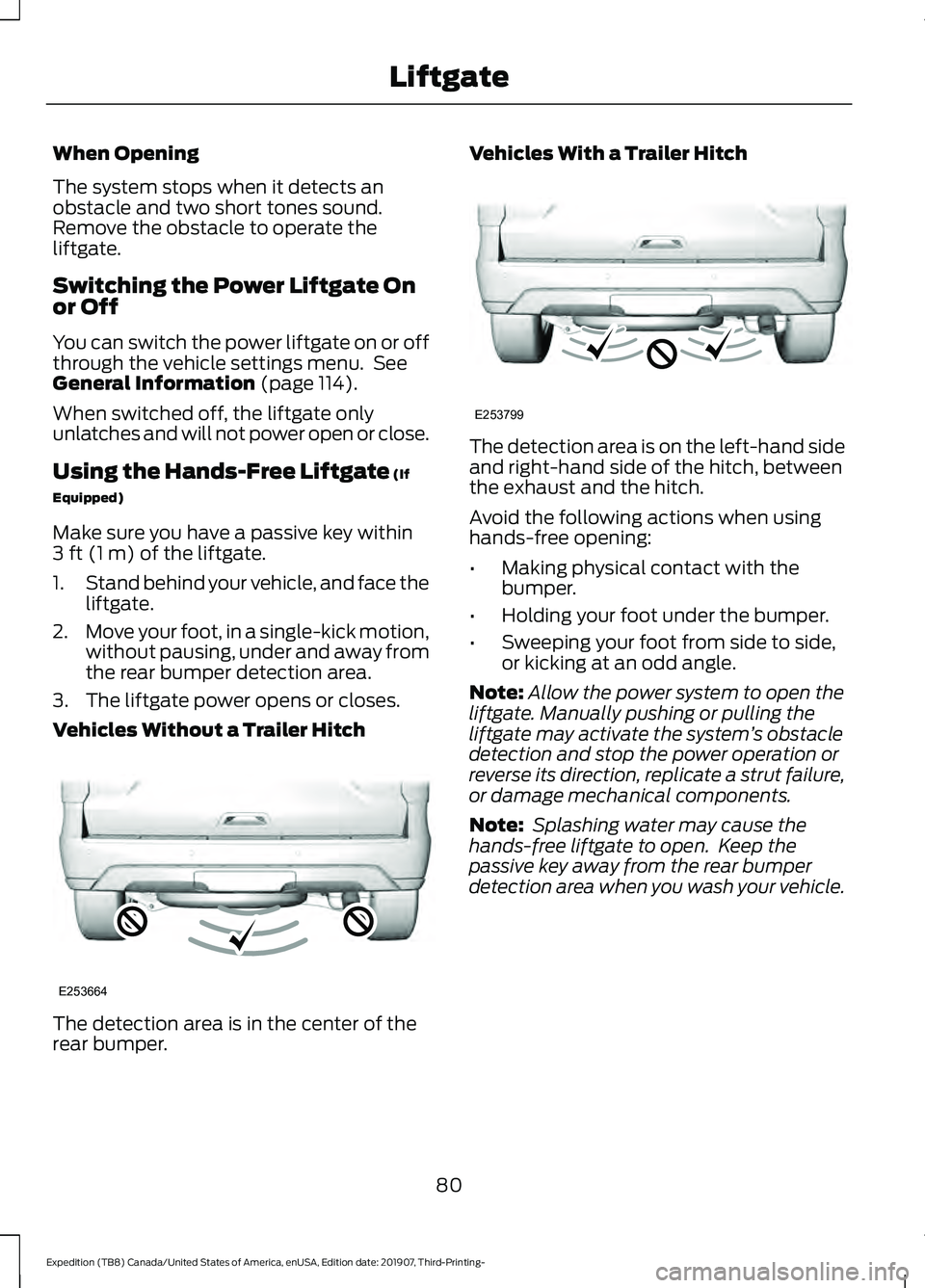
Vehicles Without a Trailer Hitch The detection area is in the center of the
rear bumper. Vehicles With a Trailer Hitch
The detection area is on the left-hand side
and right-hand side of the hitch, between
the exhaust and the hitch.
Avoid the following actions when using
hands-free opening:
•
Making physical contact with the
bumper.
• Holding your foot under the bumper.
• Sweeping your foot from side to side,
or kicking at an odd angle.
Note: Allow the power system to open the
liftgate. Manually pushing or pulling the
liftgate may activate the system ’s obstacle
detection and stop the power operation or
reverse its direction, replicate a strut failure,
or damage mechanical components.
Note: Splashing water may cause the
hands-free liftgate to open. Keep the
passive key away from the rear bumper
detection area when you wash your vehicle.
80
Expedition (TB8) Canada/United States of America, enUSA, Edition date: 201907, Third-Printing- LiftgateE253664 E253799
Page 157 of 542
MANUAL SEATS (IF EQUIPPED)
WARNING: Do not adjust the driver
seat or seat backrest when your vehicle
is moving. This may result in sudden seat
movement, causing the loss of control
of your vehicle. WARNING: Make sure the seat fully
locks into place by rocking it backward
and forward. Not securing the seat into
the locked position can be dangerous in
a crash and could cause serious personal
injury or death.
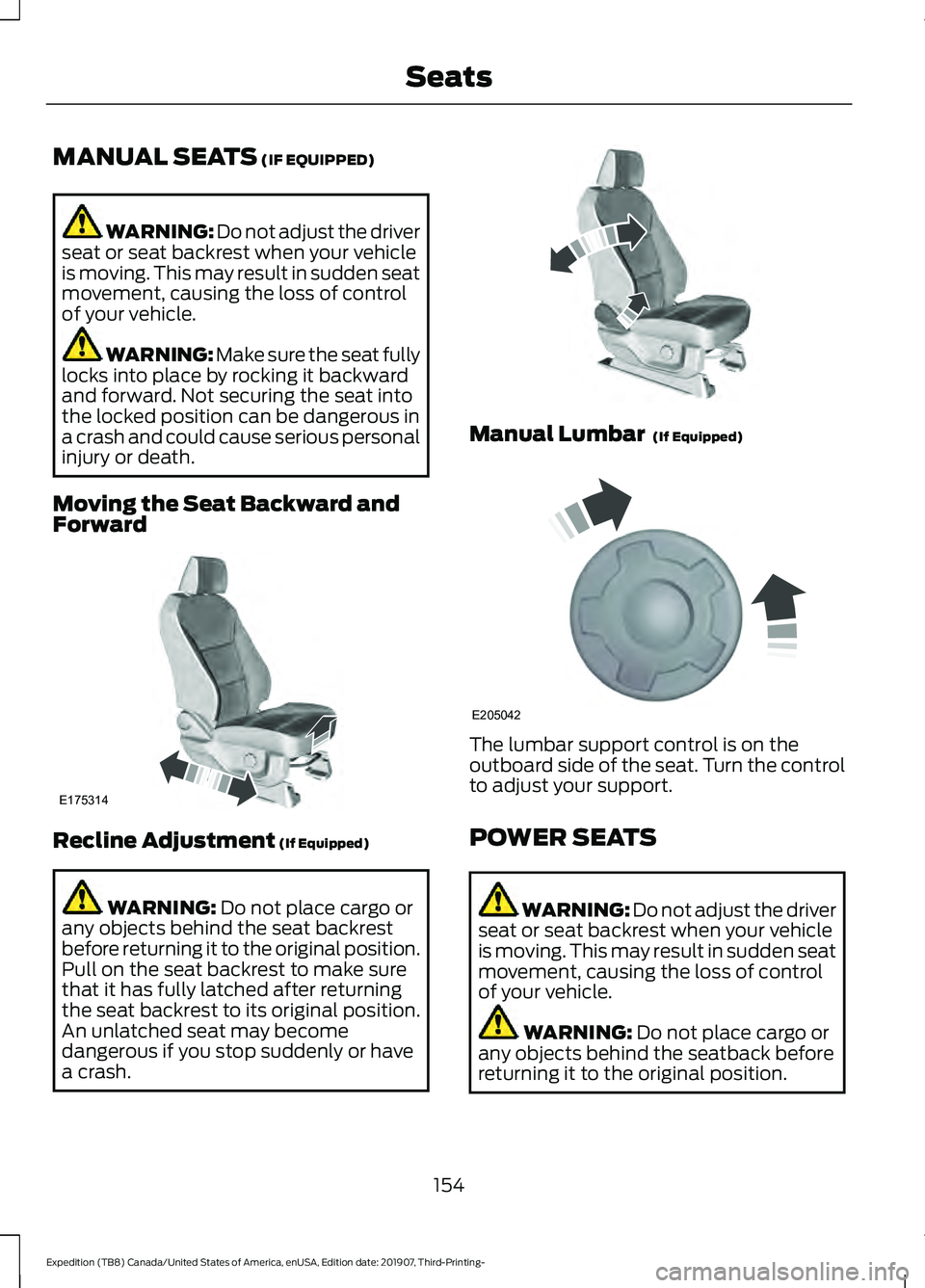
Moving the Seat Backward and
Forward Recline Adjustment
(If Equipped)
WARNING:
Do not place cargo or
any objects behind the seat backrest
before returning it to the original position.
Pull on the seat backrest to make sure
that it has fully latched after returning
the seat backrest to its original position.
An unlatched seat may become
dangerous if you stop suddenly or have
a crash. Manual Lumbar
(If Equipped)
The lumbar support control is on the
outboard side of the seat. Turn the control
to adjust your support.
POWER SEATS
WARNING: Do not adjust the driver
seat or seat backrest when your vehicle
is moving. This may result in sudden seat
movement, causing the loss of control
of your vehicle. WARNING:
Do not place cargo or
any objects behind the seatback before
returning it to the original position.
154
Expedition (TB8) Canada/United States of America, enUSA, Edition date: 201907, Third-Printing- SeatsE175314 E175315 E205042
Page 161 of 542
To unlink a remote control, follow the
same procedure – except in step 3, press
the unlock button on the remote control.
Note:
If more than one linked remote
control or intelligent access key is in range,
the memory function moves to the settings
of the first key to recall a memory position.
Easy Entry and Exit Feature
If you enable the easy entry and exit
feature, it automatically moves the driver
seat position rearward up to 2 in (5 cm)
when you switch the ignition off.
The driver seat returns to the previous
position when you switch the ignition on.
You can enable or disable this feature
through the information display. See
General Information
(page 114).
REAR SEATS
Folding the Second Row
Outermost Seats WARNING:
Do not place cargo or
any objects behind the seat backrest
before returning it to the original position.
Pull on the seat backrest to make sure
that it has fully latched after returning
the seat backrest to its original position.
An unlatched seat may become
dangerous if you stop suddenly or have
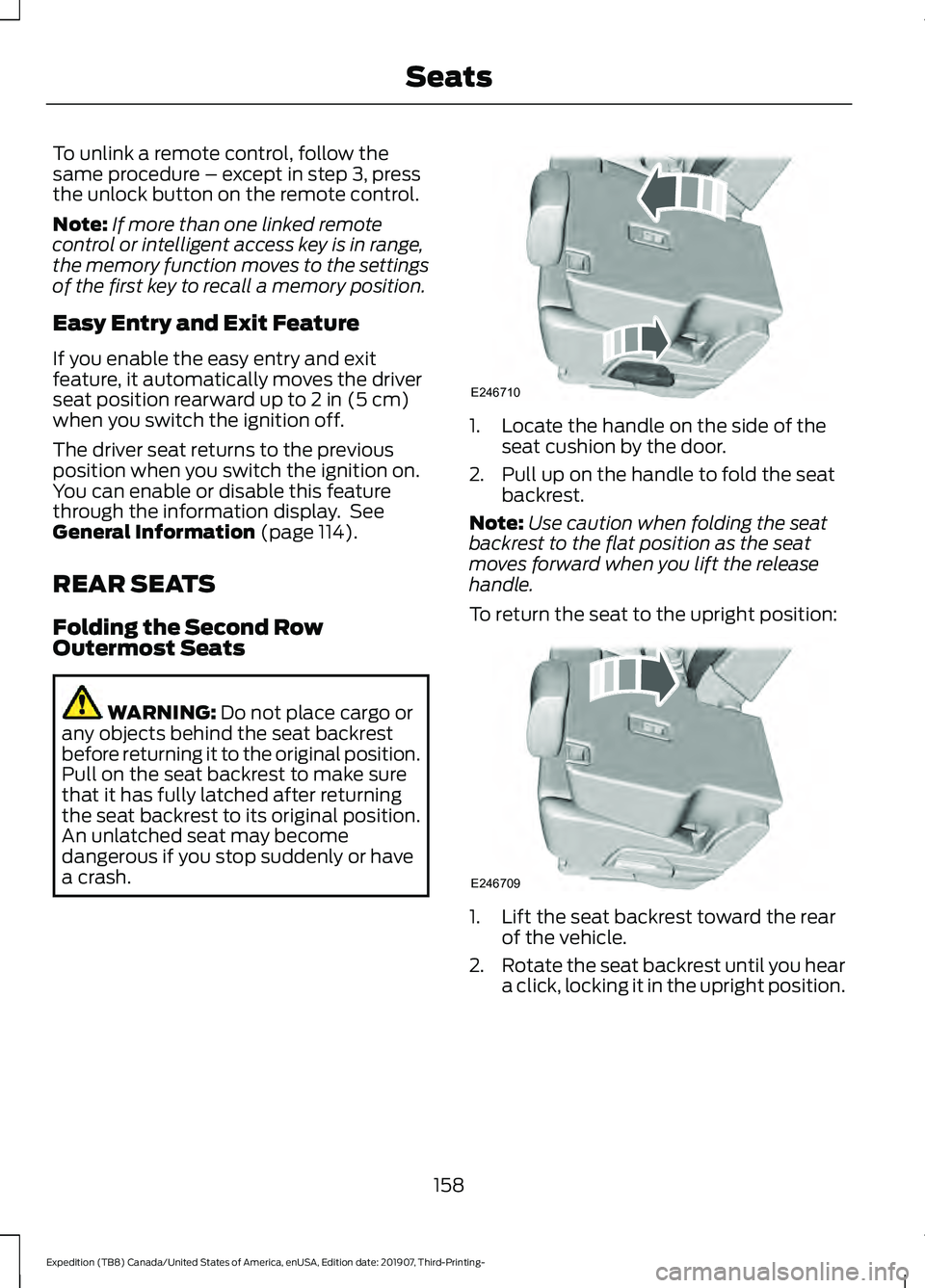
a crash. 1. Locate the handle on the side of the
seat cushion by the door.
2. Pull up on the handle to fold the seat backrest.
Note: Use caution when folding the seat
backrest to the flat position as the seat
moves forward when you lift the release
handle.
To return the seat to the upright position: 1. Lift the seat backrest toward the rear
of the vehicle.
2. Rotate the seat backrest until you hear
a click, locking it in the upright position.
158
Expedition (TB8) Canada/United States of America, enUSA, Edition date: 201907, Third-Printing- SeatsE246710 E246709
Page 162 of 542
Adjusting the Manual Second Row
Outermost Seats for Easy Entry
WARNING: Do not drive your
vehicle with a seat that is unlatched or
in the folded position. Failure to follow
this instruction could result in personal
injury or death in the event of a sudden
stop or crash. WARNING:
Check under the seat
cushion to make sure no cargo or objects
are under the seat cushion before
returning the seat cushion to its original
position, and that the seat cushion locks
into place. Failure to do so may prevent
the seat from operating properly in the
event of a crash, which could increase
the risk of serious injury. WARNING:
Do not place cargo or
any objects behind the seat backrest
before returning it to the original position.
Pull on the seat backrest to make sure
that it has fully latched after returning
the seat backrest to its original position.
An unlatched seat may become
dangerous if you stop suddenly or have
a crash.
Note: You can move the outermost seats
forward to allow access to the third row
seats.
This feature allows for easier entry and exit
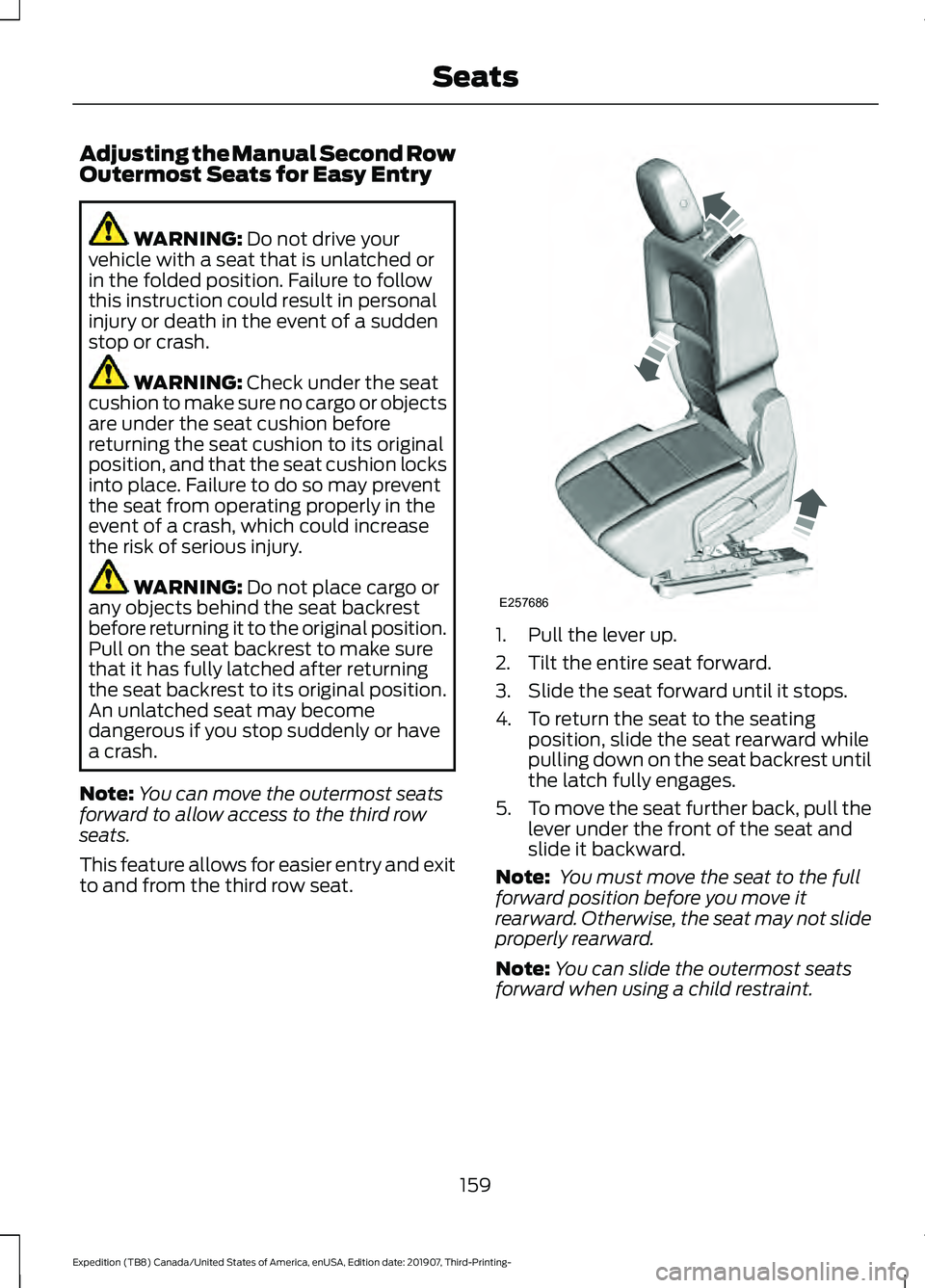
to and from the third row seat. 1. Pull the lever up.
2. Tilt the entire seat forward.
3. Slide the seat forward until it stops.
4. To return the seat to the seating
position, slide the seat rearward while
pulling down on the seat backrest until
the latch fully engages.
5. To move the seat further back, pull the
lever under the front of the seat and
slide it backward.
Note: You must move the seat to the full
forward position before you move it
rearward. Otherwise, the seat may not slide
properly rearward.
Note: You can slide the outermost seats
forward when using a child restraint.
159
Expedition (TB8) Canada/United States of America, enUSA, Edition date: 201907, Third-Printing- SeatsE257686
Page 163 of 542
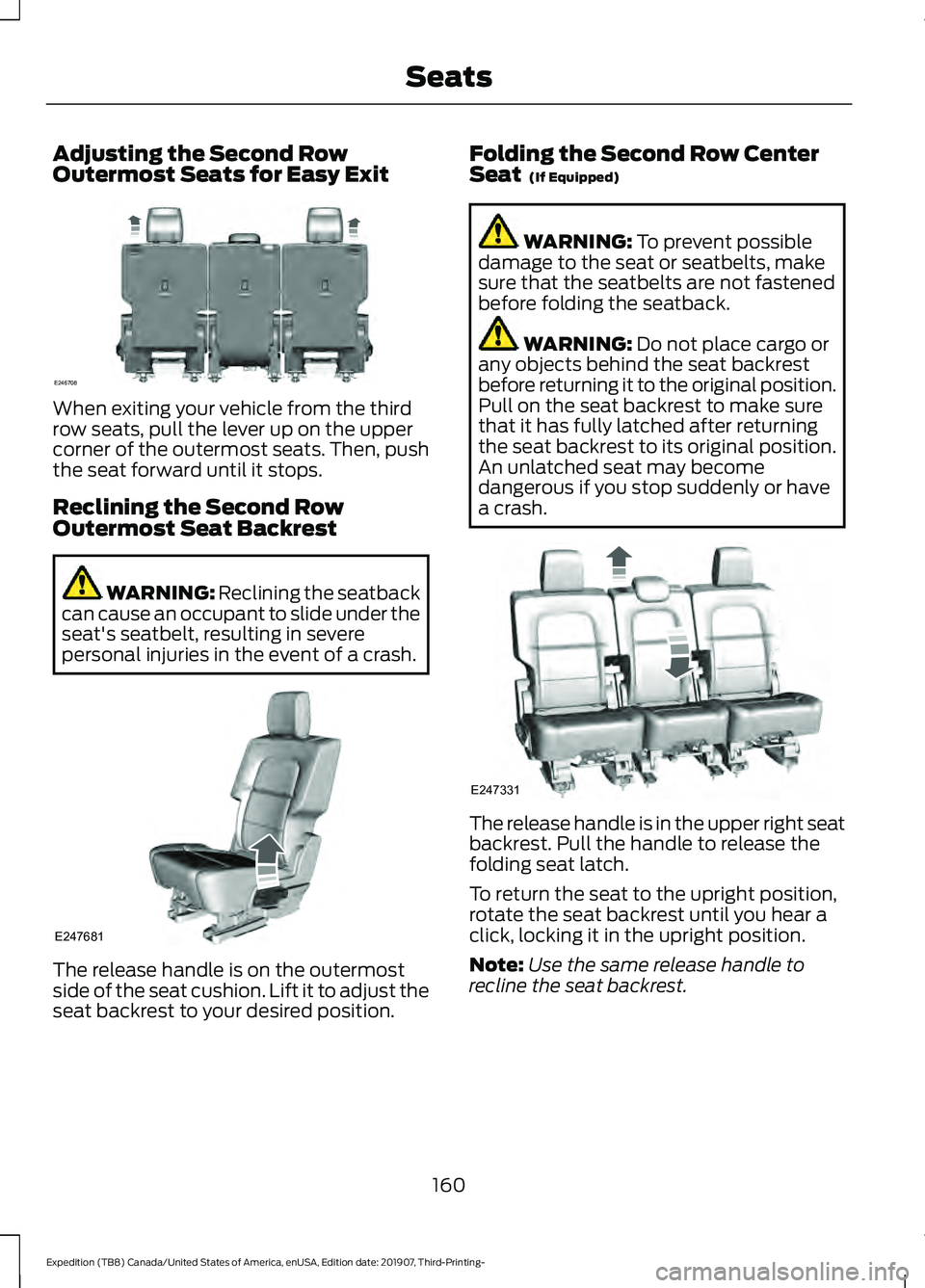
Adjusting the Second Row
Outermost Seats for Easy Exit
When exiting your vehicle from the third
row seats, pull the lever up on the upper
corner of the outermost seats. Then, push
the seat forward until it stops.
Reclining the Second Row
Outermost Seat Backrest
WARNING: Reclining the seatback
can cause an occupant to slide under the
seat's seatbelt, resulting in severe
personal injuries in the event of a crash. The release handle is on the outermost
side of the seat cushion. Lift it to adjust the
seat backrest to your desired position. Folding the Second Row Center
Seat
(If Equipped) WARNING:
To prevent possible
damage to the seat or seatbelts, make
sure that the seatbelts are not fastened
before folding the seatback. WARNING:
Do not place cargo or
any objects behind the seat backrest
before returning it to the original position.
Pull on the seat backrest to make sure
that it has fully latched after returning
the seat backrest to its original position.
An unlatched seat may become
dangerous if you stop suddenly or have
a crash. The release handle is in the upper right seat
backrest. Pull the handle to release the
folding seat latch.
To return the seat to the upright position,
rotate the seat backrest until you hear a
click, locking it in the upright position.
Note:
Use the same release handle to
recline the seat backrest.
160
Expedition (TB8) Canada/United States of America, enUSA, Edition date: 201907, Third-Printing- SeatsE246708 E247681 E247331
Page 165 of 542
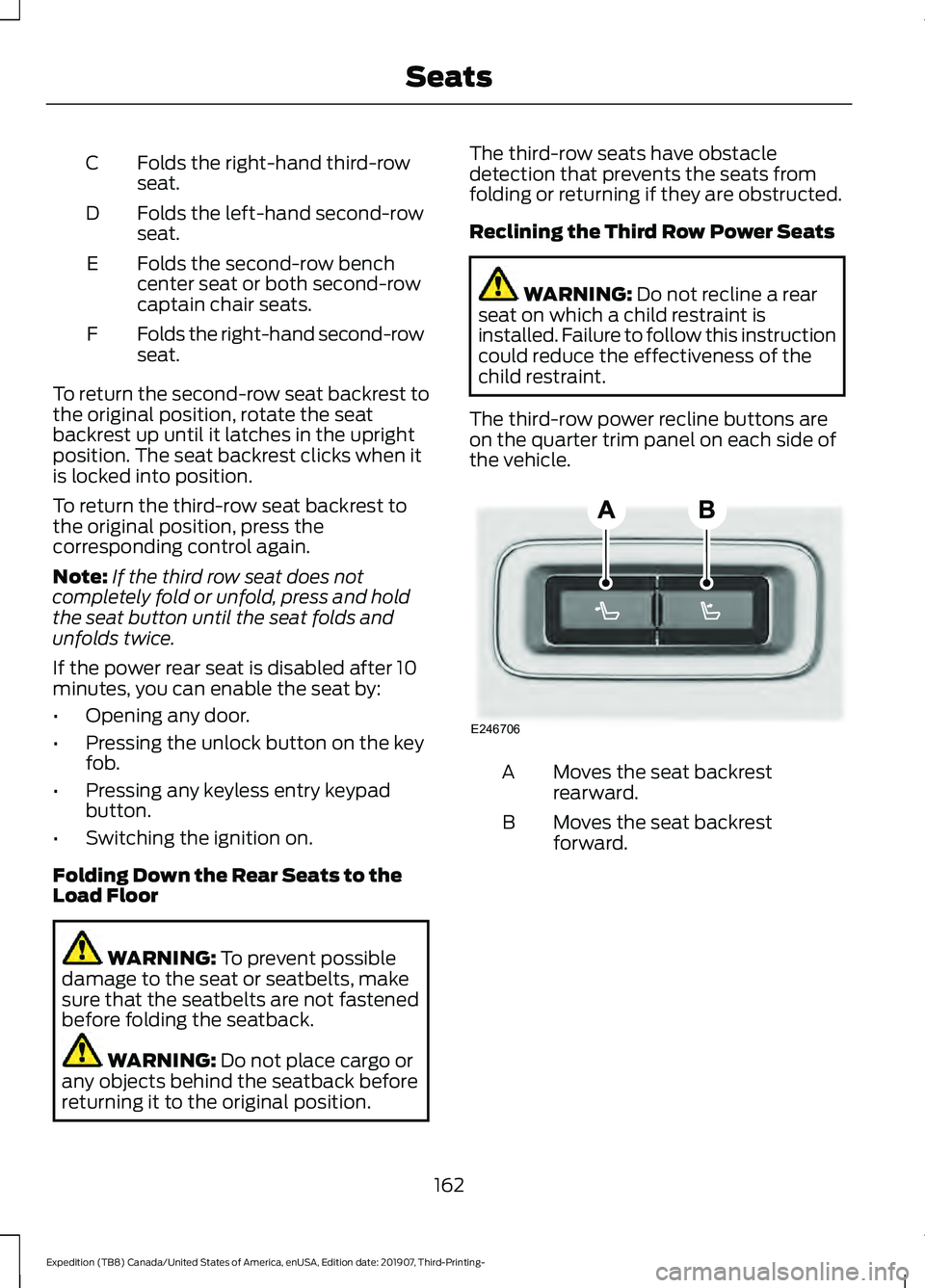
Folds the right-hand third-row
seat.
C
Folds the left-hand second-row
seat.
D
Folds the second-row bench
center seat or both second-row
captain chair seats.
E
Folds the right-hand second-row
seat.
F
To return the second-row seat backrest to
the original position, rotate the seat
backrest up until it latches in the upright
position. The seat backrest clicks when it
is locked into position.
To return the third-row seat backrest to
the original position, press the
corresponding control again.
Note: If the third row seat does not
completely fold or unfold, press and hold
the seat button until the seat folds and
unfolds twice.
If the power rear seat is disabled after 10
minutes, you can enable the seat by:
• Opening any door.
• Pressing the unlock button on the key
fob.
• Pressing any keyless entry keypad
button.
• Switching the ignition on.
Folding Down the Rear Seats to the
Load Floor WARNING: To prevent possible
damage to the seat or seatbelts, make
sure that the seatbelts are not fastened
before folding the seatback. WARNING:
Do not place cargo or
any objects behind the seatback before
returning it to the original position. The third-row seats have obstacle
detection that prevents the seats from
folding or returning if they are obstructed.
Reclining the Third Row Power Seats
WARNING:
Do not recline a rear
seat on which a child restraint is
installed. Failure to follow this instruction
could reduce the effectiveness of the
child restraint.
The third-row power recline buttons are
on the quarter trim panel on each side of
the vehicle. Moves the seat backrest
rearward.
A
Moves the seat backrest
forward.
B
162
Expedition (TB8) Canada/United States of America, enUSA, Edition date: 201907, Third-Printing- SeatsE246706
Page 197 of 542
3. When you finish driving, come to a
complete stop.
4. Move the transmission selector to park
(P).
The instrument cluster displays the current
gear.
Park (P)
With the transmission in park (P), your
vehicle locks the transmission and
prevents the wheels from turning. Always
come to a complete stop before putting
your vehicle into and out of park (P).
On a console shifter, when you switch the
ignition off, your vehicle shifts into park (P).
If you switch the ignition off when the
vehicle is moving, it first shifts into neutral
(N) until it comes to a complete stop. Your
vehicle then shifts into park (P)
automatically.
The electric parking brake may apply when
you shift to park (P) without the brake
pedal fully pressed. The electric parking
brake applies when you shift to park (P)
on large slopes. The electric parking brake
releases with the drive away release
function or manually as described in the
Releasing the Electric Parking Brake
section. See Electric Parking Brake
(page 210).
Automatic Return to Park - Console
Shifter
Note: This feature does not operate when
your vehicle is in Stay in Neutral mode or
neutral tow. Your vehicle has a feature that shifts into
park (P) when any of the following
conditions occur:
•
You turn the vehicle off.
• You open the driver door with your
seatbelt unlatched and the vehicle
stopped.
• You unlatch your seatbelt when the
driver door is open and the vehicle
stopped.
If you turn your vehicle off when moving,
your vehicle first shifts into neutral (N) until
it comes to a complete stop and then shift
into park (P) automatically.
Note: If you have waited an extended
period of time, 2-15 minutes before starting
your vehicle, unlatching your seatbelt can
cause this feature to turn on, even with the
driver door closed.
Note: This feature may not work properly
if the door ajar switch is malfunctioning. If
your door ajar indicator does not illuminate
when you open the driver door or the
indicator illuminates with the driver door
closed, see your authorized dealer.
Reverse (R)
With the selector in reverse (R), your
vehicle moves backward. Always come to
a complete stop before shifting into and
out of reverse (R).
Neutral (N)
With the selector in neutral (N), you can
start your vehicle and it is free to roll. Hold
the brake pedal down when in this position.
194
Expedition (TB8) Canada/United States of America, enUSA, Edition date: 201907, Third-Printing- Transmission
Page 273 of 542
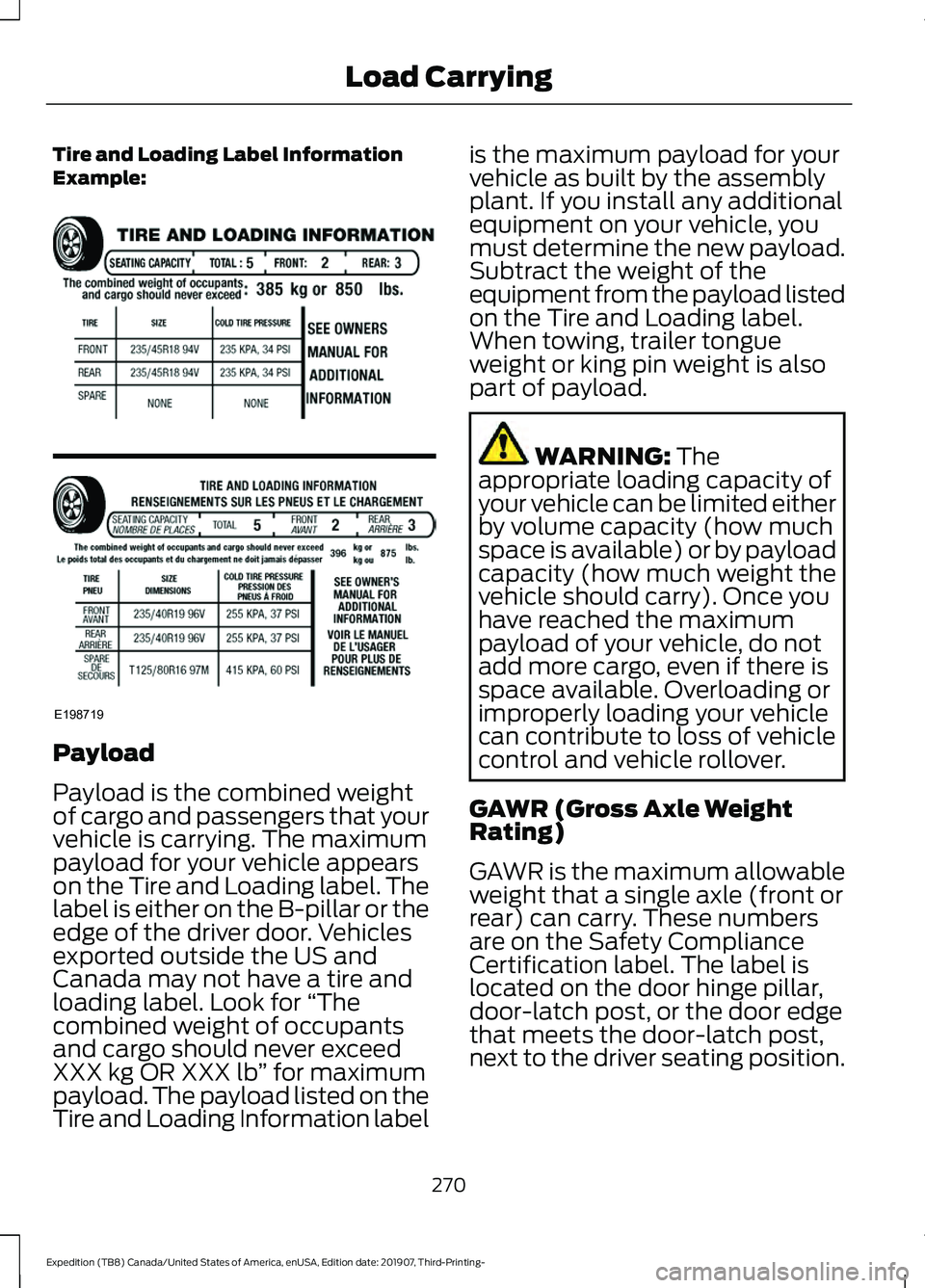
Tire and Loading Label Information
Example:
Payload
Payload is the combined weight
of cargo and passengers that your
vehicle is carrying. The maximum
payload for your vehicle appears
on the Tire and Loading label. The
label is either on the B-pillar or the
edge of the driver door. Vehicles
exported outside the US and
Canada may not have a tire and
loading label. Look for
“The
combined weight of occupants
and cargo should never exceed
XXX kg OR XXX lb ” for maximum
payload. The payload listed on the
Tire and Loading Information label is the maximum payload for your
vehicle as built by the assembly
plant. If you install any additional
equipment on your vehicle, you
must determine the new payload.
Subtract the weight of the
equipment from the payload listed
on the Tire and Loading label.
When towing, trailer tongue
weight or king pin weight is also
part of payload.
WARNING: The
appropriate loading capacity of
your vehicle can be limited either
by volume capacity (how much
space is available) or by payload
capacity (how much weight the
vehicle should carry). Once you
have reached the maximum
payload of your vehicle, do not
add more cargo, even if there is
space available. Overloading or
improperly loading your vehicle
can contribute to loss of vehicle
control and vehicle rollover.
GAWR (Gross Axle Weight
Rating)
GAWR is the maximum allowable
weight that a single axle (front or
rear) can carry. These numbers
are on the Safety Compliance
Certification label. The label is
located on the door hinge pillar,
door-latch post, or the door edge
that meets the door-latch post,
next to the driver seating position.
270
Expedition (TB8) Canada/United States of America, enUSA, Edition date: 201907, Third-Printing- Load CarryingE198719
Page 274 of 542
The total load on each axle must
never exceed its Gross Axle
Weight Rating.
GVWR (Gross Vehicle Weight
Rating)
GVWR is the maximum allowable
weight of the fully loaded vehicle.
This includes all options,
equipment, passengers and cargo.
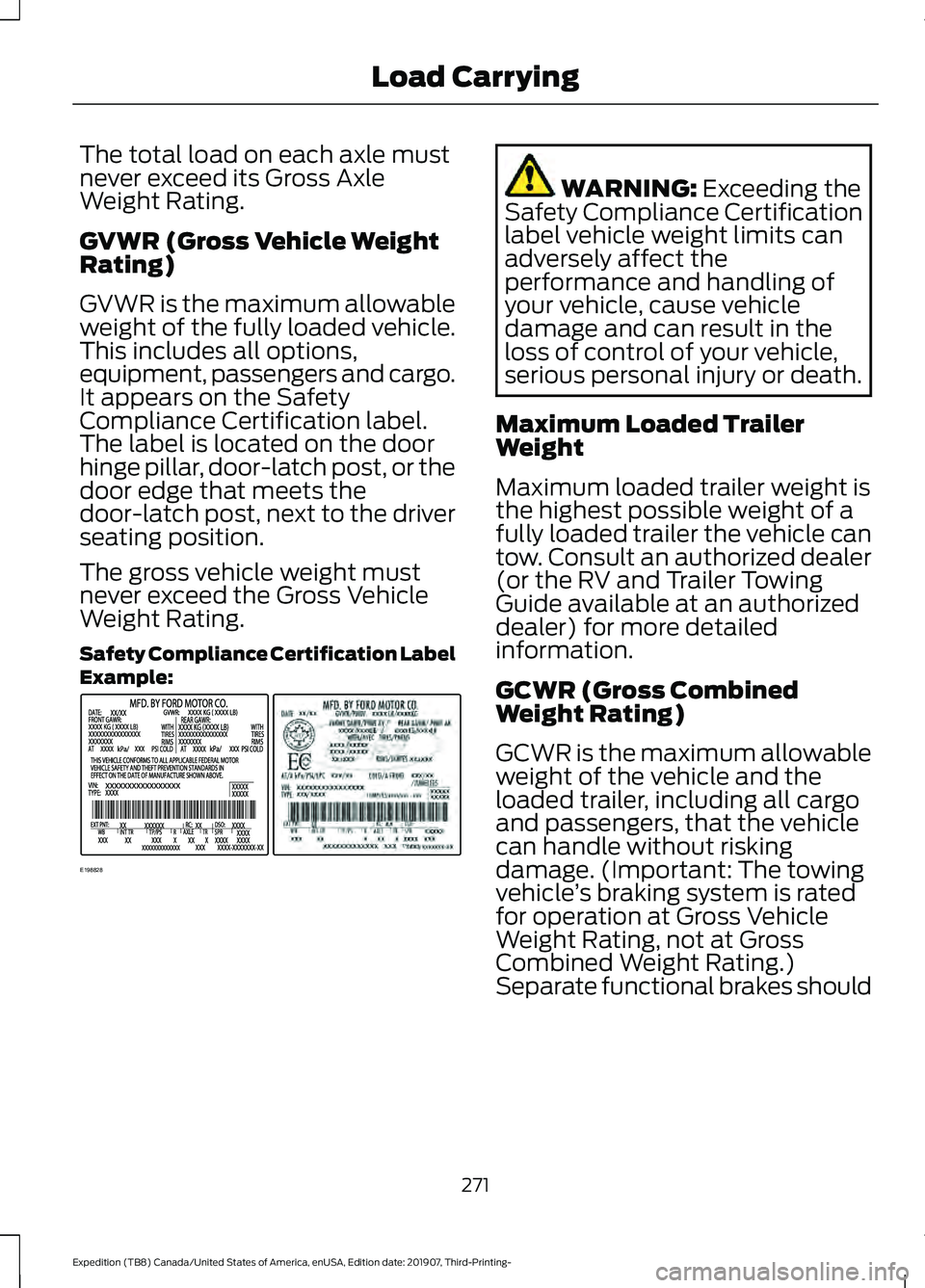
It appears on the Safety
Compliance Certification label.
The label is located on the door
hinge pillar, door-latch post, or the
door edge that meets the
door-latch post, next to the driver
seating position.
The gross vehicle weight must
never exceed the Gross Vehicle
Weight Rating.
Safety Compliance Certification Label
Example:
WARNING: Exceeding the
Safety Compliance Certification
label vehicle weight limits can
adversely affect the
performance and handling of
your vehicle, cause vehicle
damage and can result in the
loss of control of your vehicle,
serious personal injury or death.
Maximum Loaded Trailer
Weight
Maximum loaded trailer weight is
the highest possible weight of a
fully loaded trailer the vehicle can
tow. Consult an authorized dealer
(or the RV and Trailer Towing
Guide available at an authorized
dealer) for more detailed
information.
GCWR (Gross Combined
Weight Rating)
GCWR is the maximum allowable
weight of the vehicle and the
loaded trailer, including all cargo
and passengers, that the vehicle
can handle without risking
damage. (Important: The towing
vehicle ’s braking system is rated
for operation at Gross Vehicle
Weight Rating, not at Gross
Combined Weight Rating.)
Separate functional brakes should
271
Expedition (TB8) Canada/United States of America, enUSA, Edition date: 201907, Third-Printing- Load CarryingE198828
Page 294 of 542
4. Measure the height to the top of your
vehicle's front wheel opening on the
fender a second time. This is H2.
5. Install and adjust the tension in the weight-distributing bars so that the
height of your vehicle's front wheel
opening on the fender is approximately
half the way down from H2, toward H1.
6. Check that the trailer is level or slightly
nose down toward your vehicle. If not,
adjust the ball height accordingly and
repeat steps 2-6.
When the trailer is level or slightly nose
down toward the vehicle:
• Lock the bar tension adjuster in place.
• Check that the trailer tongue securely
attaches and locks onto the hitch.
• Install safety chains, lighting, and trailer
brake controls as required by law or the
trailer manufacturer.
Safety Chains
Note: Do not attach safety chains to the
bumper. Always connect the safety chains
to the frame or hook retainers of your trailer
hitch.
Install trailer safety chains to the trailer
hitch as recommended by the
manufacturer. Cross the chains under the
trailer tongue and allow enough slack for
turning tight corners. Do not allow the
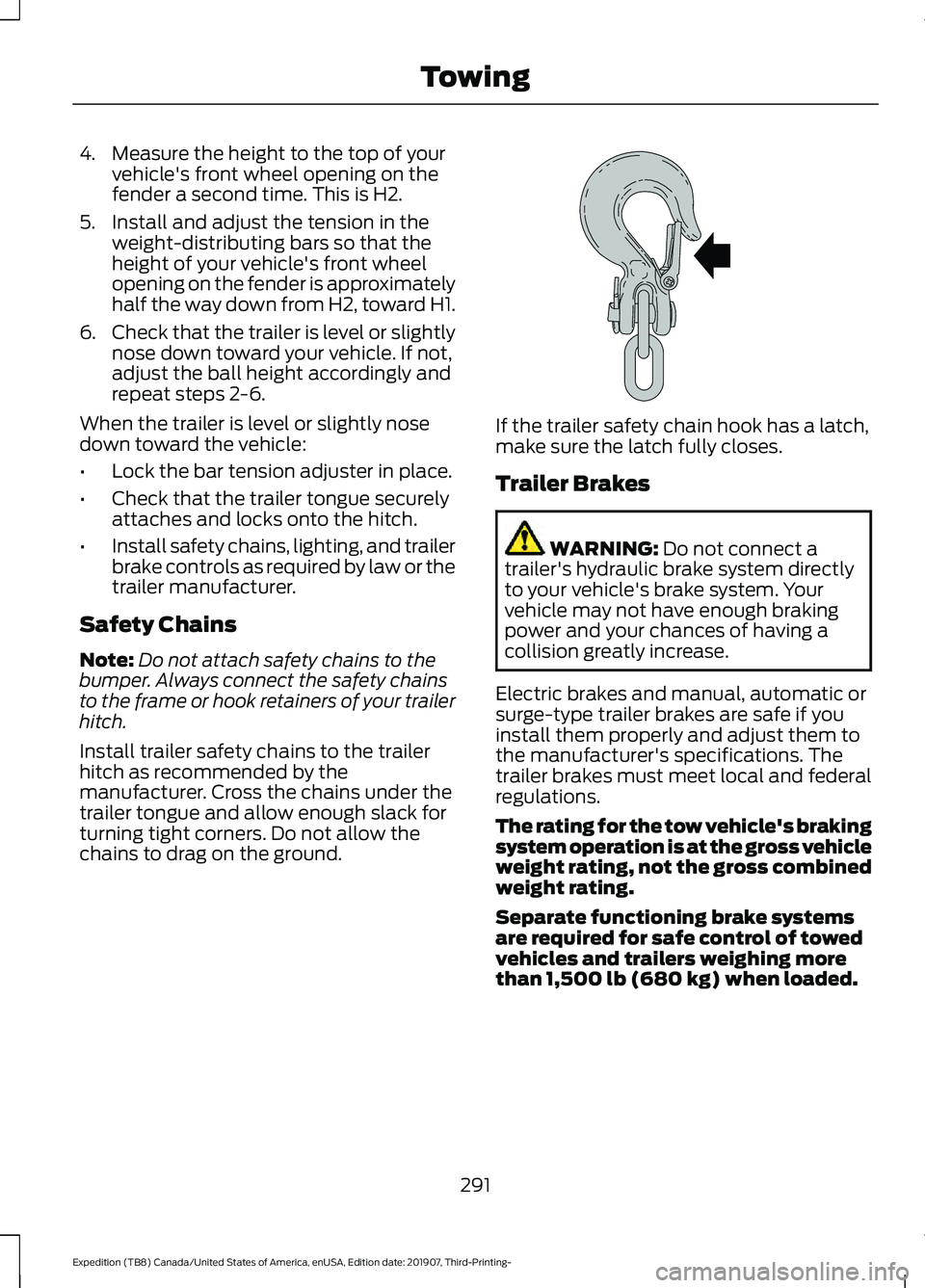
chains to drag on the ground. If the trailer safety chain hook has a latch,
make sure the latch fully closes.
Trailer Brakes
WARNING: Do not connect a
trailer's hydraulic brake system directly
to your vehicle's brake system. Your
vehicle may not have enough braking
power and your chances of having a
collision greatly increase.
Electric brakes and manual, automatic or
surge-type trailer brakes are safe if you
install them properly and adjust them to
the manufacturer's specifications. The
trailer brakes must meet local and federal
regulations.
The rating for the tow vehicle's braking
system operation is at the gross vehicle
weight rating, not the gross combined
weight rating.
Separate functioning brake systems
are required for safe control of towed
vehicles and trailers weighing more
than 1,500 lb (680 kg) when loaded.
291
Expedition (TB8) Canada/United States of America, enUSA, Edition date: 201907, Third-Printing- TowingE265060