fuel cap FORD EXPEDITION 2020 User Guide
[x] Cancel search | Manufacturer: FORD, Model Year: 2020, Model line: EXPEDITION, Model: FORD EXPEDITION 2020Pages: 542, PDF Size: 6.73 MB
Page 298 of 542
When Towing a Trailer
•
Do not tow during the first 1,000 mi
(1,600 km).
• Do not make full-throttle starts.
• Check your hitch, electrical connections
and trailer wheel lug nuts thoroughly
after you have traveled 50 mi (80 km).
• When stopped in congested or heavy
traffic during hot weather, place the
transmission in park (P) to aid engine
and transmission cooling and to help
A/C performance.
• Turn off the speed control with heavy
loads or in hilly terrain. The speed
control may turn off automatically
when you are towing on long, steep
slopes.
• Shift to a lower gear when driving down
a long or steep hill. Do not apply the
brakes continuously, as they may
overheat and become less effective.
• If your transmission is equipped with a
Grade Assist or Tow/Haul feature, use
this feature when towing. This provides
engine braking and helps eliminate
excessive transmission shifting for
optimum fuel economy and
transmission cooling.
• If your vehicle is equipped with
AdvanceTrac with RSC, this system
may turn on during typical cornering
maneuvers with a heavily loaded trailer.
This is normal. Turning the corner at a
slower speed when towing may reduce
this tendency.
• If you are towing a trailer frequently in
hot weather, hilly conditions, at the
gross combined weight rating (or any
combination of these factors), consider
refilling your rear axle with synthetic
gear lubricant if the axle is not already
filled with it. See
Capacities and
Specifications (page 380). •
Allow more distance for stopping with
a trailer attached. Anticipate stops and
brake gradually.
• Avoid parking on a slope. However, if
you must park on a slope:
1. Turn the steering wheel to point your vehicle tires away from traffic flow.
2. Set your vehicle parking brake.
3. Place the transmission in park (P).
4. Place wheel chocks in front and back of the trailer wheels. Chocks are not
included with your vehicle.
Your vehicle may be equipped with a
temporary or conventional spare tire. A
temporary spare tire is different in size,
tread-type, or is from a different
manufacturer than the road tires on your
vehicle. Consult information on the tire
label or Safety Compliance label for
limitations when using these tires.
Launching or Retrieving a Boat or
Personal Watercraft (PWC)
Note: Disconnect the wiring to the trailer
before backing the trailer into the water.
Note: Reconnect the wiring to the trailer
after removing the trailer from the water.
When backing down a ramp during boat
launching or retrieval:
• Do not allow the static water level to
rise above the bottom edge of the rear
bumper.
• Do not allow waves to break higher
than
6 in (15 cm) above the bottom
edge of the rear bumper.
Exceeding these limits may allow water to
enter vehicle components:
• Causing internal damage to the
components.
• Affecting driveability, emissions and
reliability.
295
Expedition (TB8) Canada/United States of America, enUSA, Edition date: 201907, Third-Printing- Towing
Page 331 of 542
Do not use supplemental engine oil
additives because they are unnecessary
and could lead to engine damage that may
not be covered by the vehicle Warranty.
Only use oils certified for gasoline engines
by the American Petroleum Institute (API).
An oil with this trademark symbol
conforms to the current engine and
emission system protection standards and
fuel economy requirements of the
International Lubricants Specification
Advisory Committee (ILSAC).
To top up the engine oil level do the
following:
1. Clean the area surrounding the engine
oil filler cap before you remove it.
2. Remove the engine oil filler cap. See Under Hood Overview (page 326).
Turn it counterclockwise and remove
it.
3. Add engine oil that meets our specifications. See
Capacities and
Specifications (page 384). You may
have to use a funnel to pour the engine
oil into the opening.
4. Recheck the oil level.
5. If the oil level is correct, replace the dipstick and make sure it is fully seated.
6. Replace the engine oil filler cap. Turn it clockwise until you feel a strong
resistance. Note:
Do not add oil further than the
maximum mark. Oil levels above the
maximum mark may cause engine damage.
Note: Make sure you install the oil filler cap
correctly.
Note: Soak up any spillage with an
absorbent cloth immediately.
OIL CHANGE INDICATOR
RESET
Use the information display controls on
the steering wheel to reset the oil change
indicator.
From the main menu scroll to: Action and description
Message
Press the right arrow button,
then from this menu scroll
to the following message.
Settings
Press the right arrow button,
then from this menu scroll
to the following message.
Vehicle
Press the right arrow button,
then from this menu scroll
to the following message.
Oil Life
Press and hold the
OK
button until the instrument
cluster displays the
following message.
Hold OK to
Reset
Reset Successful
When the oil change indic-
ator resets the instrument
cluster displays 100%.
Remaining Life
{00}%
328
Expedition (TB8) Canada/United States of America, enUSA, Edition date: 201907, Third-Printing- MaintenanceE142732
Page 342 of 542
Note:
The front and rear washer systems
are supplied from the same reservoir.
Add fluid to fill the reservoir if the level is
low. Only use a washer fluid that meets
our specifications. See Capacities and
Specifications (page 380).
State or local regulations on volatile
organic compounds may restrict the use
of methanol, a common windshield washer
antifreeze additive. Washer fluids
containing non-methanol antifreeze
agents should be used only if they provide
cold weather protection without damaging
the vehicle ’s paint finish, wiper blades or
washer system.
FUEL FILTER
Your vehicle is equipped with a lifetime
fuel filter that is integrated with the fuel
tank. Regular maintenance or replacement
is not needed.
CHECKING THE WIPER
BLADES Run the tip of your fingers over the edge of
the blade to check for roughness.
Clean the wiper blades with washer fluid
or water applied with a soft sponge or
cloth. CHANGING THE WIPER
BLADES
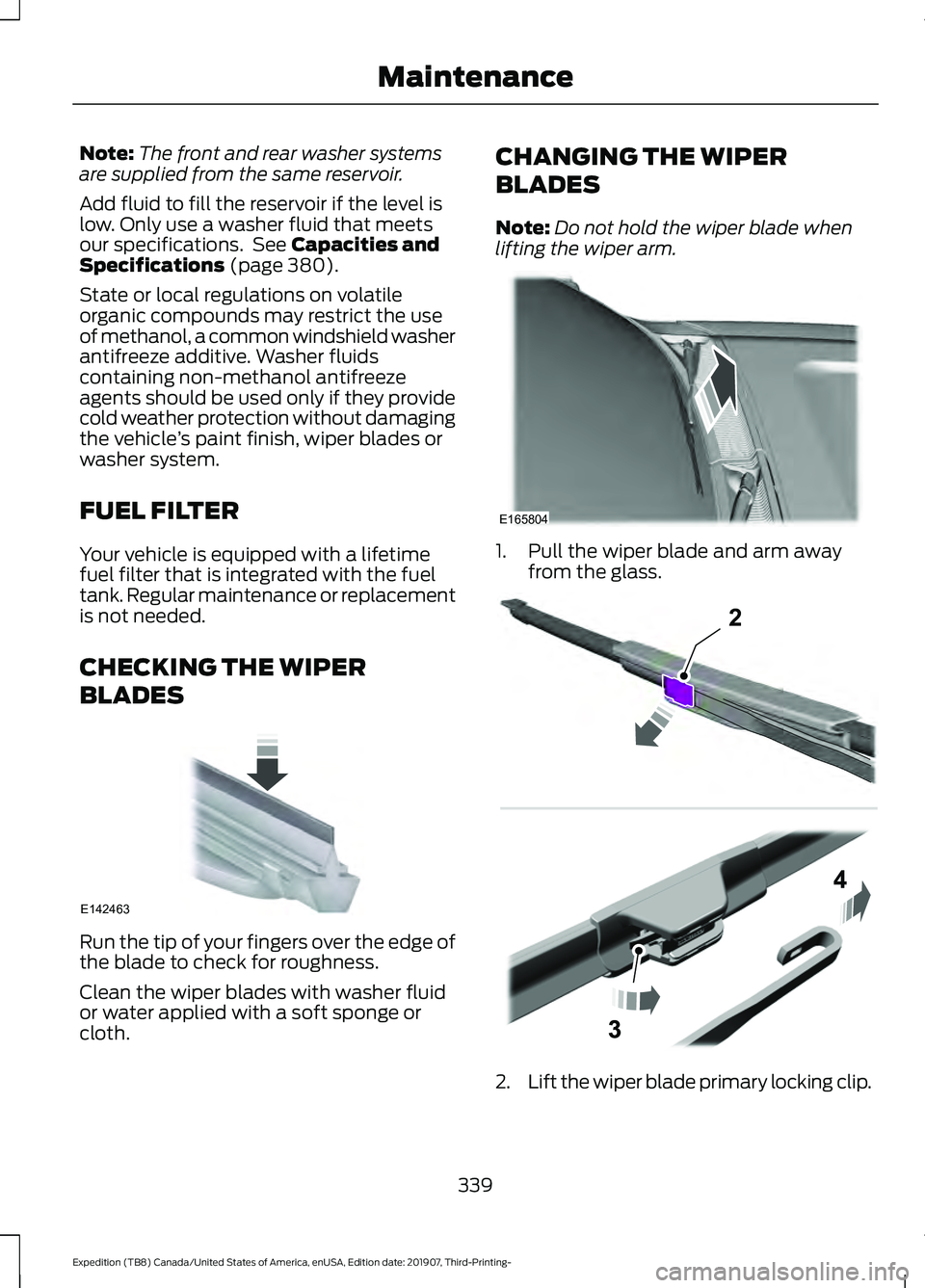
Note:
Do not hold the wiper blade when
lifting the wiper arm. 1. Pull the wiper blade and arm away
from the glass. 2.
Lift the wiper blade primary locking clip.
339
Expedition (TB8) Canada/United States of America, enUSA, Edition date: 201907, Third-Printing- MaintenanceE142463 E165804 2E295620
Page 387 of 542
CAPACITIES AND
SPECIFICATIONS
Use oil and fluid that meets the defined
specification and viscosity grade.
If you do not use oil and fluid that meets
the defined specification and viscosity
grade, it could result in:
•
Component damage that your vehicle
warranty does not cover.
• Longer engine cranking periods.
• Increased emission levels. •
Reduced engine performance.
• Reduced fuel economy.
• Reduced brake performance.
Air Conditioning System WARNING: The air conditioning
refrigerant system contains refrigerant
under high pressure. Only qualified
personnel should service the air
conditioning refrigerant system. Opening
the air conditioning refrigerant system
can cause personal injury.
Capacities Refrigerant Oil
Refrigerant
Variant
6.1 fl oz (180 ml)
37 oz (1.05 kg)
All.
Materials Specification
Name
WSS-M17B21-A
R-1234yf Refrigerant(U.S.)
R-1234yf Refrigerant / Frigorigène R-1234yf(Canada)
YN-33-A(U.S.)
HS7Z-19B519-BA(Canada)
WSS-M2C300-A2
Motorcraft® R-1234yf Refrigerant PAG Oil(U.S.)
Motorcraft® R-1234yf Refrigerant PAG Oil / Huile
PAG pour frigorigène R-1234yf Motorcraft®(Canada)
YN-35(U.S. & Canada)
Automatic Transmission
Note: Only use MERCON® ULV
transmission fluid for automatic
transmissions that require MERCON® ULV
transmission fluid. The use of any other fluid
could cause transmission damage.
384
Expedition (TB8) Canada/United States of America, enUSA, Edition date: 201907, Third-Printing- Capacities and Specifications
Page 389 of 542
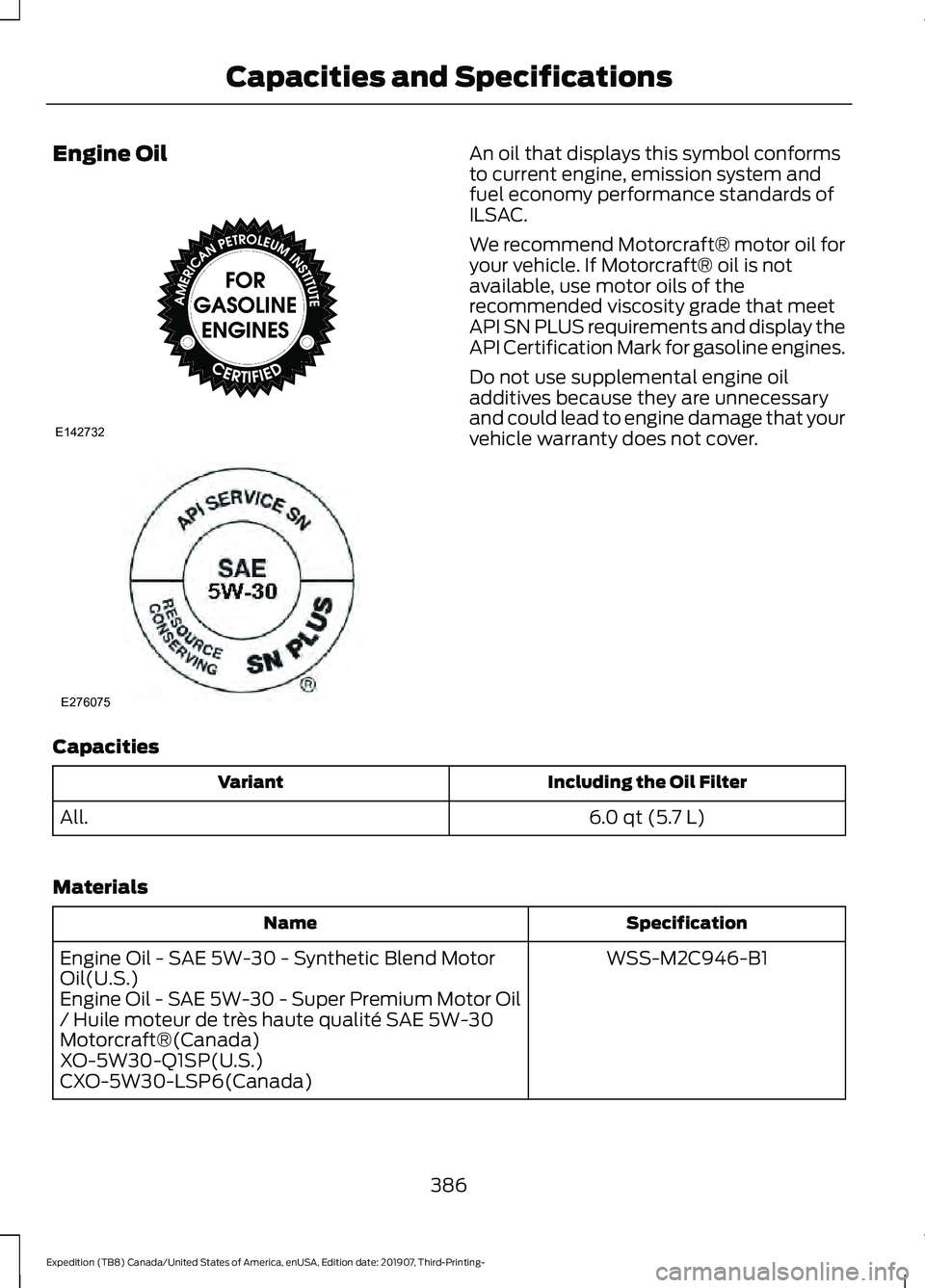
Engine Oil An oil that displays this symbol conforms
to current engine, emission system and
fuel economy performance standards of
ILSAC.
We recommend Motorcraft® motor oil for
your vehicle. If Motorcraft® oil is not
available, use motor oils of the
recommended viscosity grade that meet
API SN PLUS requirements and display the
API Certification Mark for gasoline engines.
Do not use supplemental engine oil
additives because they are unnecessary
and could lead to engine damage that your
vehicle warranty does not cover.
Capacities Including the Oil Filter
Variant
6.0 qt (5.7 L)
All.
Materials Specification
Name
WSS-M2C946-B1
Engine Oil - SAE 5W-30 - Synthetic Blend Motor
Oil(U.S.)
Engine Oil - SAE 5W-30 - Super Premium Motor Oil
/ Huile moteur de très haute qualité SAE 5W-30
Motorcraft®(Canada)
XO-5W30-Q1SP(U.S.)
CXO-5W30-LSP6(Canada)
386
Expedition (TB8) Canada/United States of America, enUSA, Edition date: 201907, Third-Printing- Capacities and SpecificationsE142732 E276075
Page 390 of 542
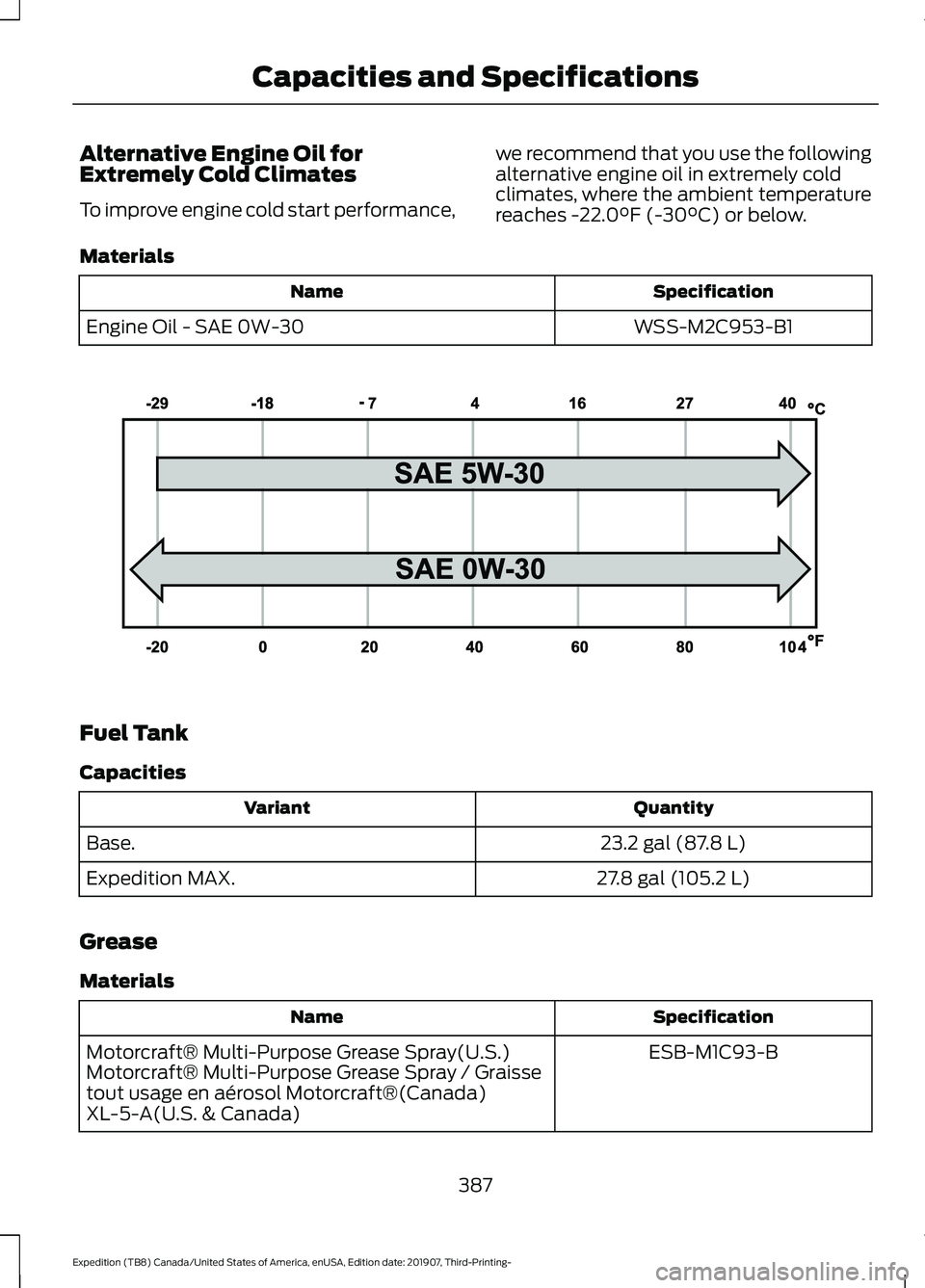
Alternative Engine Oil for
Extremely Cold Climates
To improve engine cold start performance,
we recommend that you use the following
alternative engine oil in extremely cold
climates, where the ambient temperature
reaches -22.0°F (-30°C) or below.
Materials Specification
Name
WSS-M2C953-B1
Engine Oil - SAE 0W-30 Fuel Tank
Capacities
Quantity
Variant
23.2 gal (87.8 L)
Base.
27.8 gal (105.2 L)
Expedition MAX.
Grease
Materials Specification
Name
ESB-M1C93-B
Motorcraft® Multi-Purpose Grease Spray(U.S.)
Motorcraft® Multi-Purpose Grease Spray / Graisse
tout usage en aérosol Motorcraft®(Canada)
XL-5-A(U.S. & Canada)
387
Expedition (TB8) Canada/United States of America, enUSA, Edition date: 201907, Third-Printing- Capacities and SpecificationsE240523
Page 417 of 542
![FORD EXPEDITION 2020 User Guide If a crash deploys an airbag (excluding
knee airbags and rear inflatable safety
belts [if equipped]) or activates the fuel
pump shut-off, your SYNC-equipped
vehicle may be able to contact emergency
se](/img/11/40645/w960_40645-416.png "FORD EXPEDITION 2020 User Guide If a crash deploys an airbag (excluding
knee airbags and rear inflatable safety
belts [if equipped]) or activates the fuel
pump shut-off, your SYNC-equipped
vehicle may be able to contact emergency
se")
If a crash deploys an airbag (excluding
knee airbags and rear inflatable safety
belts [if equipped]) or activates the fuel
pump shut-off, your SYNC-equipped
vehicle may be able to contact emergency
services by dialing 911 through a paired and
connected Bluetooth-enabled phone.
See Supplementary Restraints System
(page 48). Important information about
airbag deployment is in this chapter.
See Roadside Emergencies (page 302).
Important information about the fuel pump
shut-off is in this chapter.
Setting 911 Assist On or Off
Press the Settings button then select: Action and Description
Menu
Item
Select the desired option, on
or off.
911 Assist
To make sure that 911 Assist works
properly:
• SYNC must be powered and working
properly at the time of the incident and
throughout feature activation and use.
• The 911 Assist feature must be set on
before the incident.
• You must pair and connect a Bluetooth
enabled and compatible cell phone to
SYNC.
• A connected Bluetooth enabled phone
must have the ability to make and
maintain an outgoing call at the time
of the incident.
• A connected Bluetooth enabled phone
must have adequate network coverage,
battery power and signal strength.
• The vehicle must have battery power
and be located in the U.S., Canada or
in a territory in which 911 is the
emergency number. In the Event of a Crash
Not all crashes deploy an airbag or activate
the fuel pump shut-off (the triggers for 911
Assist). If a connected cell phone sustains
damage or loses its connection to SYNC
during a crash, SYNC searches for and tries
to connect to a previously paired cell
phone; SYNC then attempts to call the
emergency services.
Before making the call:
•
SYNC provides a short window of time
(about 10 seconds) to cancel the call.
If you fail to cancel the call, SYNC
attempts to dial 911.
• SYNC says the following, or a similar
message: "SYNC will attempt to call
911, to cancel the call, press Cancel on
your screen or press and hold the
phone button on your steering wheel".
If you do not cancel the call, and SYNC
makes a successful call, a pre-recorded
message plays for the 911 operator, and
then the occupant(s) in your vehicle are
able to talk with the operator. Be prepared
to provide your name, phone number and
location immediately, because not all 911
systems are capable of receiving this
information electronically.
911 Assist May Not Work If
• Your cellular phone or 911 Assist
hardware sustains damage in a crash.
• The vehicle's battery or the SYNC
system has no power.
• The phone(s) thrown from your vehicle
are the ones paired and connected to
the system.
414
Expedition (TB8) Canada/United States of America, enUSA, Edition date: 201907, Third-Printing- SYNC™
Page 418 of 542
911 Assist Privacy Notice
When you switch on 911 Assist, it may
disclose to emergency services that your
vehicle has been in a crash involving the
deployment of an airbag or activation of
the fuel pump shut-off. Certain versions or
updates to 911 Assist may also be capable
of electronically or verbally disclosing to
911 operators your vehicle location or other
details about your vehicle or crash to assist
911 operators to provide the most
appropriate emergency services. If you do
not want to disclose this information, do
not switch the feature on.
SYNC Mobile Apps
The system enables voice and steering
wheel control of SYNC AppLink enabled
smartphone apps. When an app is running
through AppLink, you can control main
features of the app through voice
commands and steering wheel controls.
Note:
You must pair and connect your
smartphone to SYNC to access AppLink.
Note: Android users need to connect the
phone to SYNC using Bluetooth. Note:
For information on available apps,
supported smartphone devices and
troubleshooting tips please visit the Ford
website
Note: Availability of SYNC AppLink enabled
Apps will vary by region.
Note: Make sure you have an active account
for the app that you have downloaded.
Some apps work automatically with no
setup. Other apps want you to configure
your personal settings and personalize your
experience by creating stations or favorites.
We recommend you do this at home or
outside of your vehicle.
To Access Using the SYNC Menu
Press the Mobile Apps button to access
the menu on-screen. Then select: Action and Description
Menu
Item
Scroll through the list of
available applications and
select a particular app.
Find
Mobile
Apps
Note: If you cannot find a compatible SYNC
AppLink app, make sure the required app is
running on the mobile device.
To Access Using Voice Commands
Press the voice button, then when prompted say: Action and Description
Voice Command
Say the name of the application after the tone.
The app should start. When an app is running through SYNC, you can press the voice button and speak commands specific to the app, for example "Play Playlist Road Trip".
Mobile Applications
SYNC lists all of the currently available mobile apps.
List Applications
Searches your connected mobile device for SYNC-compatible mobile apps.
Find Applications
Use this command to discover the available voice commands.
Help
415
Expedition (TB8) Canada/United States of America, enUSA, Edition date: 201907, Third-Printing- SYNC™
Page 419 of 542
App Permissions
App permissions are organized by groups.
You can grant these group permissions
individually. You can change a permission
group status any time when not driving, by
using the settings menu.
When you launch an app using SYNC, the
system may ask you to grant certain
permissions, for example:
•
To allow your vehicle to provide vehicle
information to the app such as, but not
limited to: Fuel level, fuel economy, fuel
consumption, engine speed, rain
sensor, odometer, VIN, external
temperature, gear position, tire
pressure, and head lamp status.
• To allow your vehicle to provide driving
characteristic information such as, but
not limited to: MyKey, seat belt status,
engine revolutions per minute, gear
position, braking events, steering wheel
angle, and accelerator pedal position.
• To allow your vehicle to provide
location information, including: GPS
and speed.
• To allow the app to send push
notifications using the vehicle display
and voice capabilities while running in
a background state. Push notifications
may be particularly useful for news or
location based apps.
Note: You only need to grant permissions
the first time you use an app with SYNC.
Note: Ford is not responsible or liable for
any damages or loss of privacy relating to
usage of an app, or dissemination of any
vehicle data that you approve Ford to
provide to an app. Enabling SYNC Mobile Apps
In order to enable mobile apps, SYNC
requires user consent to send and receive
app authorization information and updates
using the data plan associated with the
connected device.
Data is sent to Ford in the United States
through the connected device. The
information is encrypted and includes your
VIN, SYNC module number, anonymous
usage statistics and debugging
information. Updates may take place.
Note:
You must enable mobile apps for
each connected device the first time you
select a mobile app using the system.
Note: Standard data rates apply. Ford is
not responsible for any additional charges
you may receive from your service provider,
when your vehicle sends or receives data
through the connected device. This includes
any additional charges incurred due to
driving in areas when roaming out of a home
network.
USING SYNC™ WITH YOUR
MEDIA PLAYER
SYNC supports digital media sources
including: iPod, Bluetooth devices, and
most USB drives. SYNC also supports
audio formats, such as MP3, WMA, WAV
and ACC.
Media Sources
The AUX or MEDIA button allows you to
view and select available media sources.
Press the
AUX or MEDIA button to view
your sources. Use the directional arrows
and OK button to select your source. You
can also use the steering wheel audio
controls.
416
Expedition (TB8) Canada/United States of America, enUSA, Edition date: 201907, Third-Printing- SYNC™
Page 530 of 542
Capacities and Specifications...............384
8.8" Rear Axle..................................................... 389
9.75" Rear Axle with Limited-Slip................391
9.75" Rear Axle Without Limited-Slip.................................................... 390
Air Conditioning System................................. 384
Alternative Engine Oil for Extremely Cold Climates........................................................... 387
Automatic Transmission................................ 384
Engine Coolant................................................... 385
Engine Oil............................................................. 386
Front Axle............................................................. 389
Fuel Tank............................................................... 387
Grease.................................................................... 387
Hydraulic Brake System.................................. 388
Locks...................................................................... 388
Transfer Case...................................................... 388
Washer Reservoir................................................ 391
Cargo Nets......................................................267
Car Wash See: Cleaning the Exterior.............................. 344
Catalytic Converter......................................190 On-Board Diagnostics (OBD-II).................... 191
Readiness for Inspection and Maintenance (I/M) Testing.................................................... 191
Center Console...............................................172
Changing a Bulb..........................................340 Fog Lamp Bulb.................................................... 341
Front Direction Indicator Bulb...................... 340
Headlamp Bulb.................................................. 340
LED Bulbs............................................................. 342
LED Direction Indicator and Side Marker Bulbs................................................................... 341
LED Foglamp...................................................... 340
LED Headlamp................................................... 340
Rear Lamp, Brake Lamp, Rear Direction Indicator and Reverse Lamp Bulbs.........341
Changing a Fuse
...........................................323
Fuses....................................................................... 323
Changing a Road Wheel............................372 Dissimilar Spare Wheel and Tire Assembly
Information...................................................... 372
Location of the Spare Tire and Tools.........373
Tire Change Procedure.................................... 373
Changing the 12V Battery
.........................335
Battery Management System....................... 337
Changing the Engine Air Filter
................329 Changing the Vehicle Wi-Fi Hotspot
Name or Password
...................................397
Changing the Wiper Blades.....................339
Checking MyKey System Status..............66 MyKey Distance.................................................... 66
Number of Admin Keys...................................... 67
Number of MyKeys............................................... 67
Checking the Wiper Blades
.....................339
Childminder Mirror.......................................104
Child Restraint and Seatbelt Maintenance.................................................45
Child Restraint Positioning
.........................33
Child Safety......................................................20 General Information............................................ 20
Child Safety Locks
.........................................35
Left-Hand Side..................................................... 36
Right-Hand Side................................................... 36
Cleaning Leather Seats..............................347
Cleaning Products
.......................................343
Materials............................................................... 343
Cleaning the Engine....................................345
Cleaning the Exterior..................................344 Cleaning the Headlamps................................ 344
Exterior Chrome Parts..................................... 344
Exterior Plastic Parts........................................ 344
Stripes or Graphics........................................... 344
Underbody........................................................... 345
Under Hood......................................................... 345
Cleaning the Instrument Panel and Instrument Cluster Lens........................346
Cleaning the Interior
...................................346
Mirrors.................................................................... 346
Cleaning the Wheels..................................348
Cleaning the Windows and Wiper Blades...........................................................345
Clearing All MyKeys.......................................66
Climate............................................................445 Accessing Rear Climate Controls................447
Accessing the Climate Control Menu........445
Directing the Airflow......................................... 445
Rear Climate Control Lock Indicator..........447
Setting the Blower Motor Speed.................445
Setting the Temperature................................ 445
Switching Auto Mode On and Off...............445
Switching Dual Zone Mode On and Off...................................................................... 446
Switching Maximum Air Conditioning On and Off............................................................. 446
527
Expedition (TB8) Canada/United States of America, enUSA, Edition date: 201907, Third-Printing- Index