automatic transmission FORD EXPEDITION 2020 Owner's Guide
[x] Cancel search | Manufacturer: FORD, Model Year: 2020, Model line: EXPEDITION, Model: FORD EXPEDITION 2020Pages: 542, PDF Size: 6.73 MB
Page 386 of 542
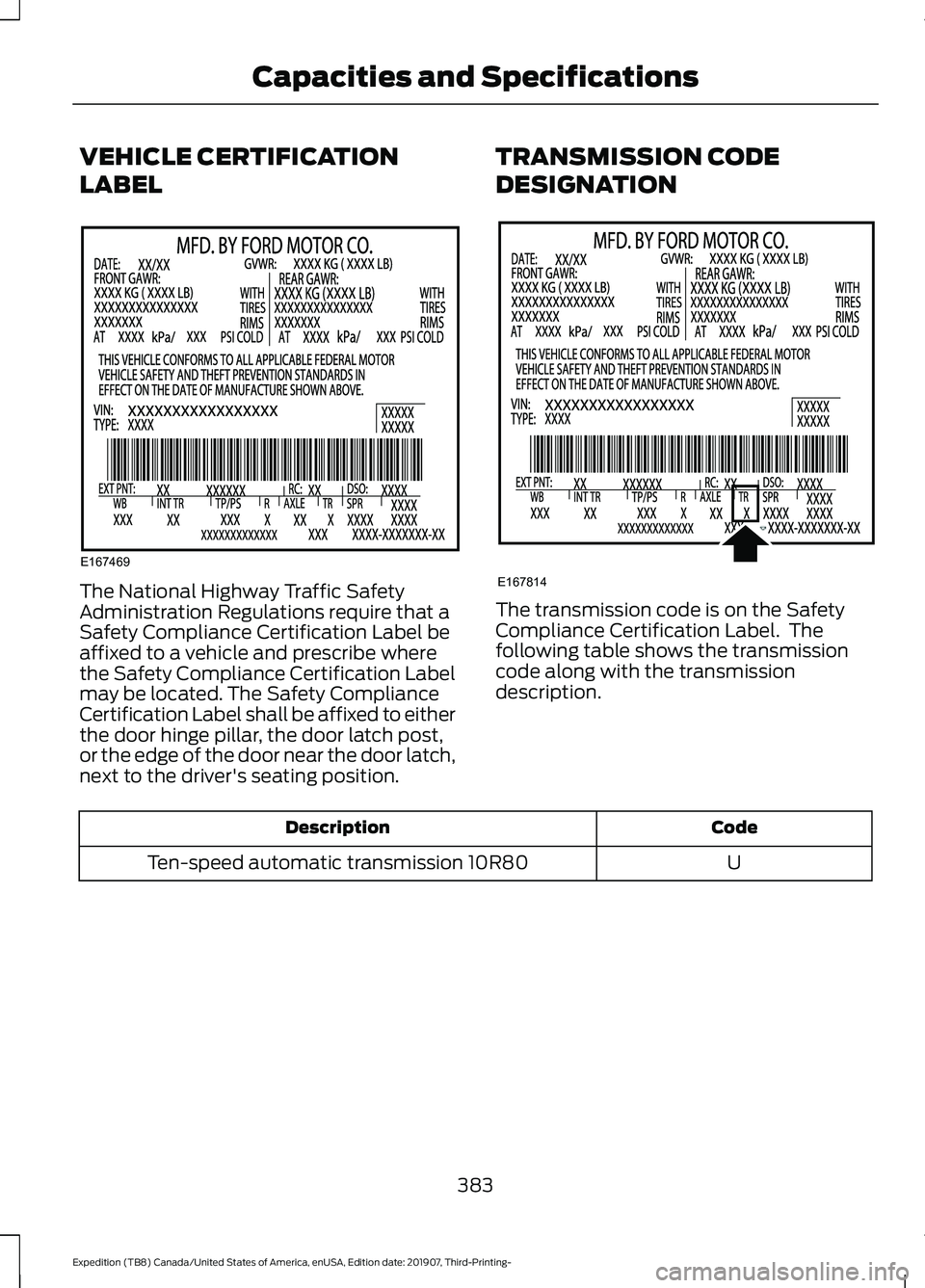
VEHICLE CERTIFICATION
LABEL
The National Highway Traffic Safety
Administration Regulations require that a
Safety Compliance Certification Label be
affixed to a vehicle and prescribe where
the Safety Compliance Certification Label
may be located. The Safety Compliance
Certification Label shall be affixed to either
the door hinge pillar, the door latch post,
or the edge of the door near the door latch,
next to the driver's seating position.
TRANSMISSION CODE
DESIGNATION The transmission code is on the Safety
Compliance Certification Label. The
following table shows the transmission
code along with the transmission
description.
Code
Description
U
Ten-speed automatic transmission 10R80
383
Expedition (TB8) Canada/United States of America, enUSA, Edition date: 201907, Third-Printing- Capacities and SpecificationsE167469 E167814
Page 387 of 542
CAPACITIES AND
SPECIFICATIONS
Use oil and fluid that meets the defined
specification and viscosity grade.
If you do not use oil and fluid that meets
the defined specification and viscosity
grade, it could result in:
•
Component damage that your vehicle
warranty does not cover.
• Longer engine cranking periods.
• Increased emission levels. •
Reduced engine performance.
• Reduced fuel economy.
• Reduced brake performance.
Air Conditioning System WARNING: The air conditioning
refrigerant system contains refrigerant
under high pressure. Only qualified
personnel should service the air
conditioning refrigerant system. Opening
the air conditioning refrigerant system
can cause personal injury.
Capacities Refrigerant Oil
Refrigerant
Variant
6.1 fl oz (180 ml)
37 oz (1.05 kg)
All.
Materials Specification
Name
WSS-M17B21-A
R-1234yf Refrigerant(U.S.)
R-1234yf Refrigerant / Frigorigène R-1234yf(Canada)
YN-33-A(U.S.)
HS7Z-19B519-BA(Canada)
WSS-M2C300-A2
Motorcraft® R-1234yf Refrigerant PAG Oil(U.S.)
Motorcraft® R-1234yf Refrigerant PAG Oil / Huile
PAG pour frigorigène R-1234yf Motorcraft®(Canada)
YN-35(U.S. & Canada)
Automatic Transmission
Note: Only use MERCON® ULV
transmission fluid for automatic
transmissions that require MERCON® ULV
transmission fluid. The use of any other fluid
could cause transmission damage.
384
Expedition (TB8) Canada/United States of America, enUSA, Edition date: 201907, Third-Printing- Capacities and Specifications
Page 392 of 542
Materials
Specification
Name
WSS-M2C938-AMERCON® LV,
Motorcraft® MERCON® LV Automatic Transmission
Fluid(U.S.)
Motorcraft® MERCON® LV Automatic Transmission
Fluid / Huile pour boîte automatique MERCON® LV
Motorcraft®(Canada)
XT-10-QLVC(U.S.)
CXT-10-LV6(Canada)
Front Axle
Capacities Quantity
Variant
1.8 qt (1.7 L)
Four-wheel drive.
Materials Specification
Name
WSS-M2C942-A
Motorcraft® SAE 75W-85 Premium Synthetic
Hypoid Gear Lubricant(U.S.)
Motorcraft® SAE 75W-85 Premium Synthetic
Hypoid Gear Lubricant / Huile synthétique de haute
qualité pour engrenages hypoïdes SAE 75W-85
Motorcraft®(Canada)
XY-75W85-QL(U.S. & Canada)
8.8" Rear Axle
Capacities Quantity
Variant
2.5 qt (2.4 L)1
All.
1 The rear axle is filled with synthetic rear axle lubricant, and is considered lubricated for
life. Do not check or change the lubricant unless you suspect a leak or submerge the axle
in water. Contact an authorized dealer.
389
Expedition (TB8) Canada/United States of America, enUSA, Edition date: 201907, Third-Printing- Capacities and Specifications
Page 415 of 542
USING SYNC™ WITH YOUR
PHONE
Hands-free calling is one of the main
features of SYNC. While the system
supports a variety of features, many are
dependent on your cellular phone's
functionality. At a minimum, most cellular
phones with Bluetooth wireless technology
support the following functions:
•
Answering an incoming call.
• Ending a call.
• Dialing a number.
• Redialing.
• Call waiting notification.
• Caller identification.
Other features, such as text messaging
using Bluetooth and automatic phonebook
download, are phone-dependent features.
Pairing a Phone
Wirelessly pairing your phone with SYNC
allows you to make and receive hands-free
calls.
Note: Make sure to switch on the ignition
and the radio. Shift the transmission into
park (P) for automatic transmission or
neutral (N) for manual transmission.
Using the Audio System
Note: To scroll through the menus, press
the up and down arrows on your audio
system.
1. Make sure to switch on your phone's Bluetooth feature before starting the
search. See your device's manual if
necessary.
2. Press the Settings button.
3. Select Bluetooth from the menu.
4. Press the
OK button.
5. Select the option to add. This starts the pairing process. 6. When a message to begin pairing
appears in the audio display, search for
SYNC on your device.
Depending on your phone's capability and
your market, the system may prompt you
with questions, such as setting the current
phone as the primary phone and
downloading your phonebook.
Using Voice Commands Make sure to switch on your
phone's Bluetooth feature
before starting the search. See
your device's manual if necessary.
Press the voice button and when
prompted say: Action and Descrip-
tion
Voice Command
Follow the instruc-
tions on the audio
display.
Pair Phone
Phone Voice Commands Press the voice button. You can
do things like place a phone call
and access text messages.
When prompted, say a command. See the
following table for examples of
commands. Voice Command
___ List of Commands
Help
Call ___
Dial ___
Text Messages
412
Expedition (TB8) Canada/United States of America, enUSA, Edition date: 201907, Third-Printing- SYNC™E142599 E142599
Page 481 of 542
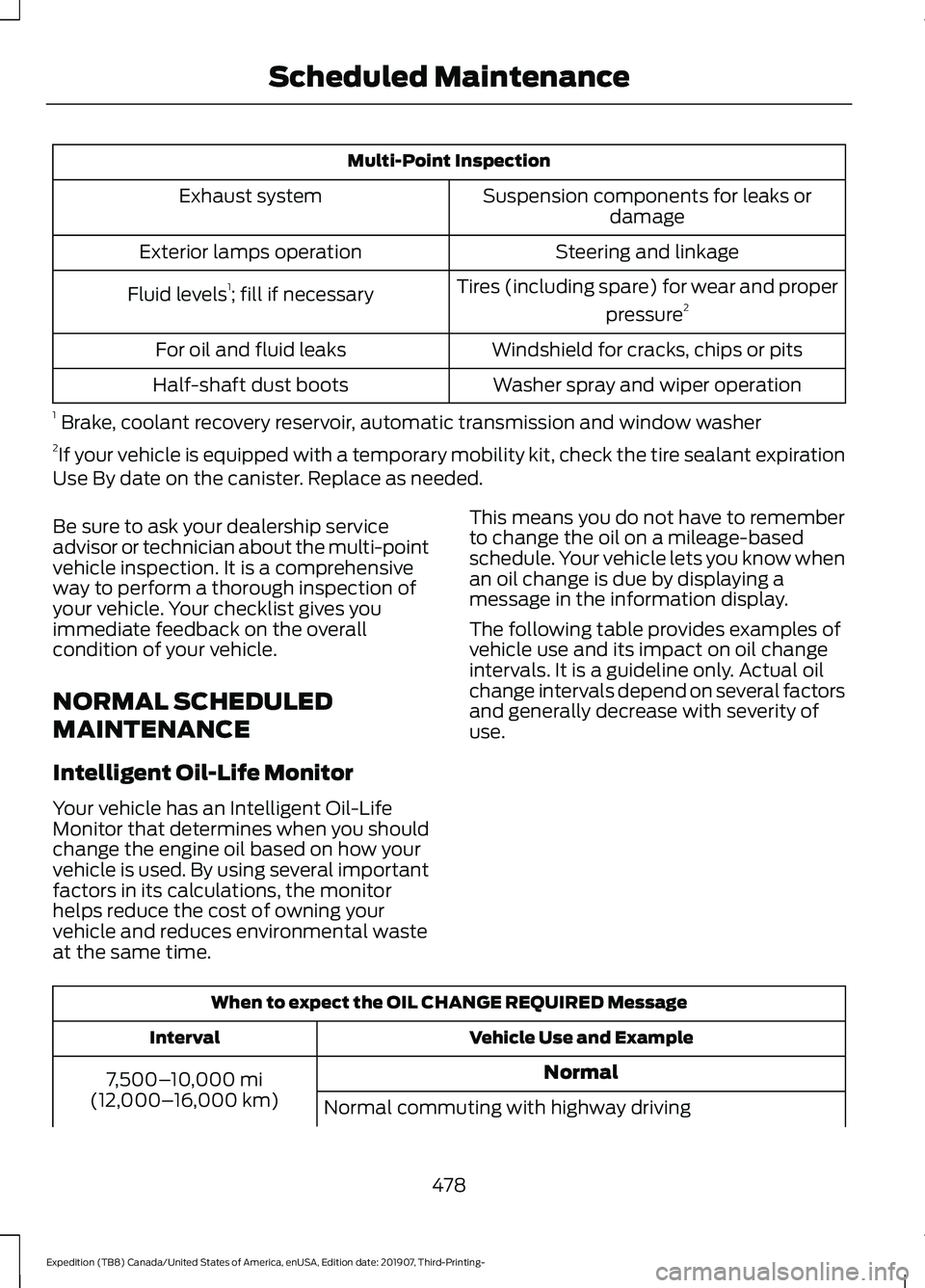
Multi-Point Inspection
Suspension components for leaks ordamage
Exhaust system
Steering and linkage
Exterior lamps operation
Tires (including spare) for wear and properpressure2
Fluid levels 1
; fill if necessary
Windshield for cracks, chips or pits
For oil and fluid leaks
Washer spray and wiper operation
Half-shaft dust boots
1 Brake, coolant recovery reservoir, automatic transmission and window washer
2 If your vehicle is equipped with a temporary mobility kit, check the tire sealant expiration
Use By date on the canister. Replace as needed.
Be sure to ask your dealership service
advisor or technician about the multi-point
vehicle inspection. It is a comprehensive
way to perform a thorough inspection of
your vehicle. Your checklist gives you
immediate feedback on the overall
condition of your vehicle.
NORMAL SCHEDULED
MAINTENANCE
Intelligent Oil-Life Monitor
Your vehicle has an Intelligent Oil-Life
Monitor that determines when you should
change the engine oil based on how your
vehicle is used. By using several important
factors in its calculations, the monitor
helps reduce the cost of owning your
vehicle and reduces environmental waste
at the same time. This means you do not have to remember
to change the oil on a mileage-based
schedule. Your vehicle lets you know when
an oil change is due by displaying a
message in the information display.
The following table provides examples of
vehicle use and its impact on oil change
intervals. It is a guideline only. Actual oil
change intervals depend on several factors
and generally decrease with severity of
use.
When to expect the OIL CHANGE REQUIRED Message
Vehicle Use and Example
Interval
Normal
7,500– 10,000 mi
(12,000– 16,000 km)
Normal commuting with highway driving
478
Expedition (TB8) Canada/United States of America, enUSA, Edition date: 201907, Third-Printing- Scheduled Maintenance
Page 482 of 542
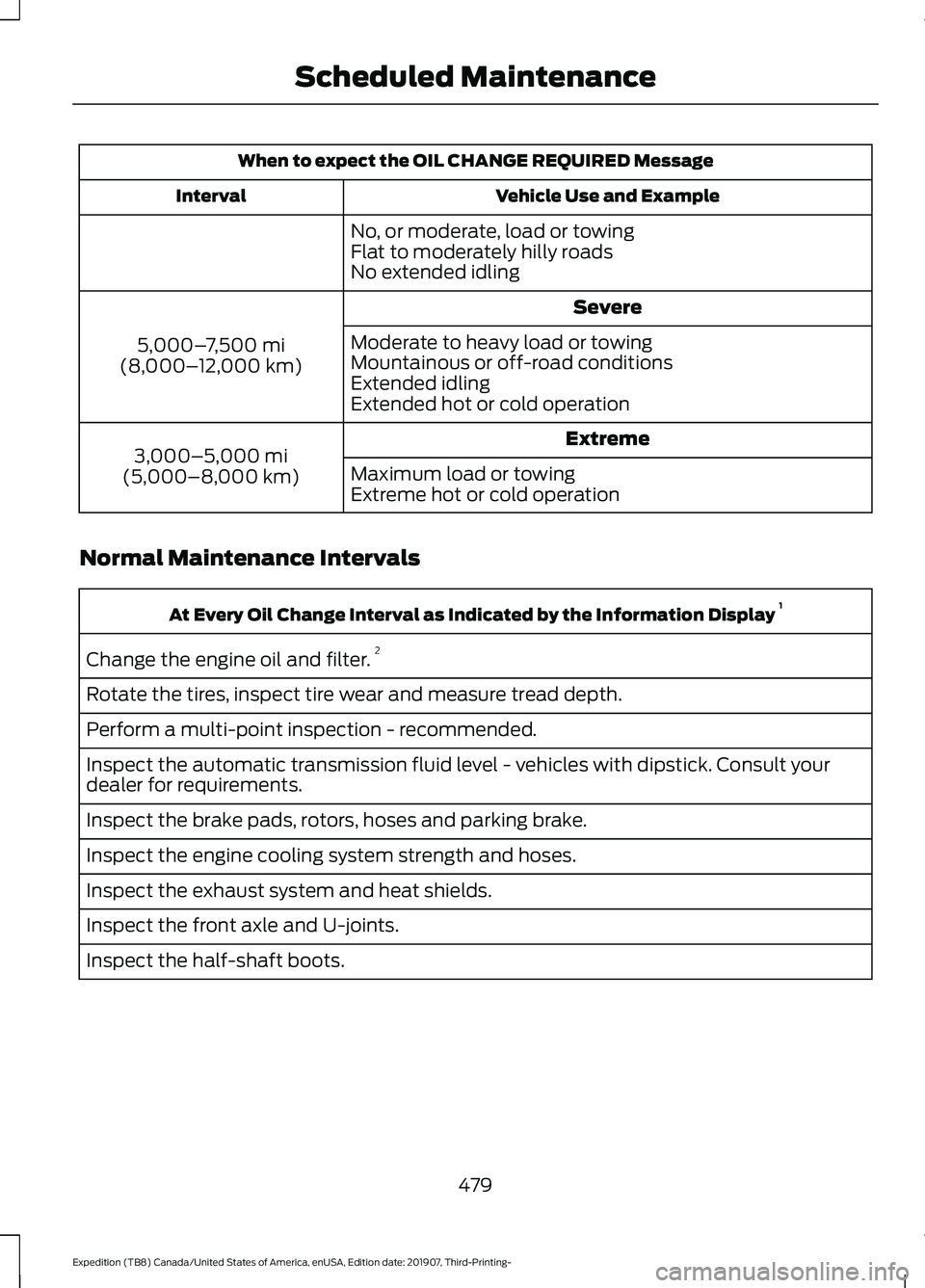
When to expect the OIL CHANGE REQUIRED Message
Vehicle Use and Example
Interval
No, or moderate, load or towing
Flat to moderately hilly roads
No extended idling Severe
5,000– 7,500 mi
(8,000– 12,000 km) Moderate to heavy load or towing
Mountainous or off-road conditions
Extended idling
Extended hot or cold operation
Extreme
3,000–5,000 mi
(5,000–8,000 km) Maximum load or towing
Extreme hot or cold operation
Normal Maintenance Intervals At Every Oil Change Interval as Indicated by the Information Display
1
Change the engine oil and filter. 2
Rotate the tires, inspect tire wear and measure tread depth.
Perform a multi-point inspection - recommended.
Inspect the automatic transmission fluid level - vehicles with dipstick. Consult your
dealer for requirements.
Inspect the brake pads, rotors, hoses and parking brake.
Inspect the engine cooling system strength and hoses.
Inspect the exhaust system and heat shields.
Inspect the front axle and U-joints.
Inspect the half-shaft boots.
479
Expedition (TB8) Canada/United States of America, enUSA, Edition date: 201907, Third-Printing- Scheduled Maintenance
Page 483 of 542
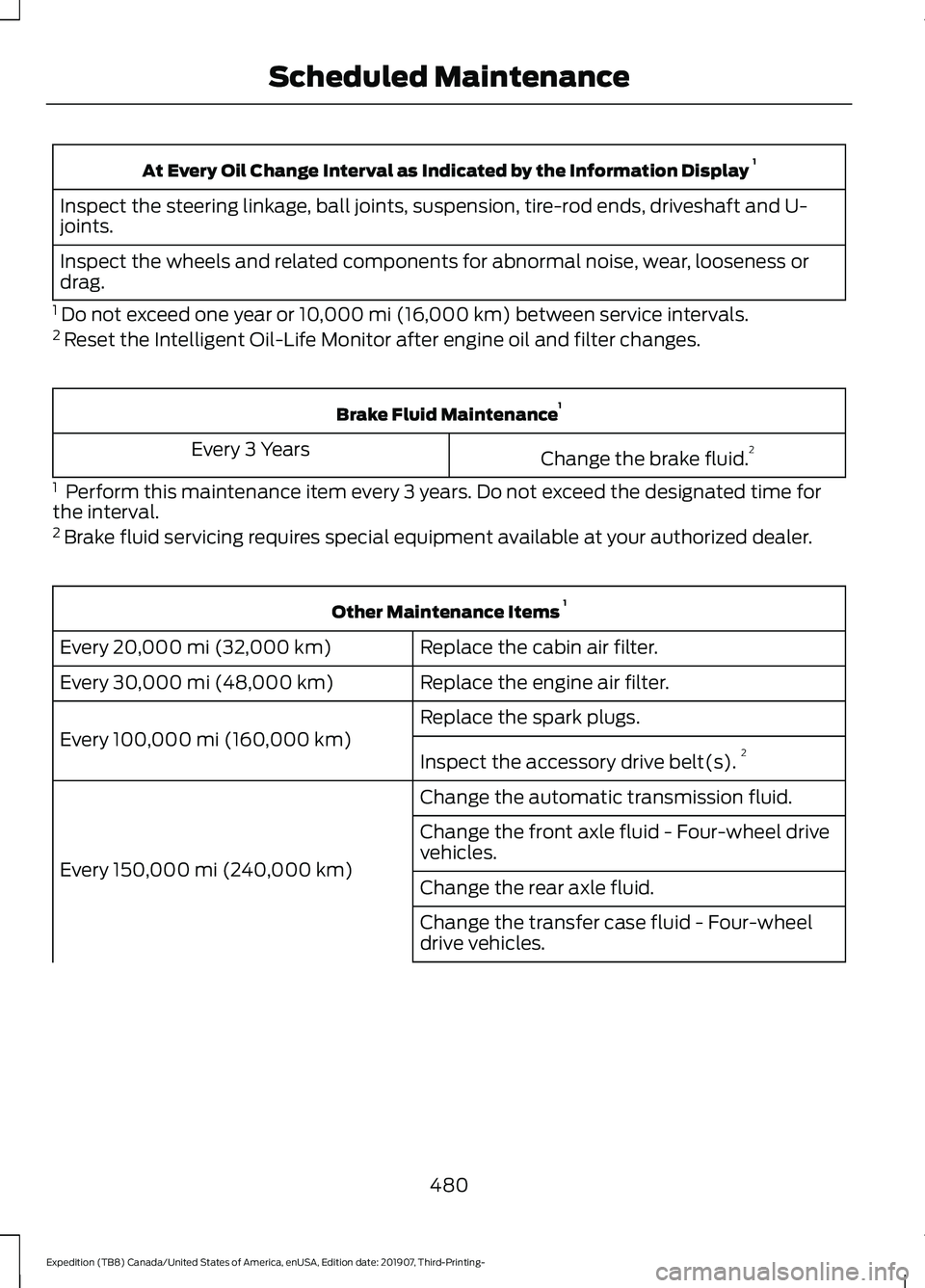
At Every Oil Change Interval as Indicated by the Information Display
1
Inspect the steering linkage, ball joints, suspension, tire-rod ends, driveshaft and U-
joints.
Inspect the wheels and related components for abnormal noise, wear, looseness or
drag.
1 Do not exceed one year or 10,000 mi (16,000 km) between service intervals.
2 Reset the Intelligent Oil-Life Monitor after engine oil and filter changes. Brake Fluid Maintenance
1
Change the brake fluid. 2
Every 3 Years
1 Perform this maintenance item every 3 years. Do not exceed the designated time for
the interval.
2 Brake fluid servicing requires special equipment available at your authorized dealer. Other Maintenance Items
1
Replace the cabin air filter.
Every 20,000 mi (32,000 km)
Replace the engine air filter.
Every
30,000 mi (48,000 km)
Replace the spark plugs.
Every
100,000 mi (160,000 km) Inspect the accessory drive belt(s). 2
Change the automatic transmission fluid.
Every
150,000 mi (240,000 km) Change the front axle fluid - Four-wheel drive
vehicles.
Change the rear axle fluid.
Change the transfer case fluid - Four-wheel
drive vehicles.
480
Expedition (TB8) Canada/United States of America, enUSA, Edition date: 201907, Third-Printing- Scheduled Maintenance
Page 484 of 542
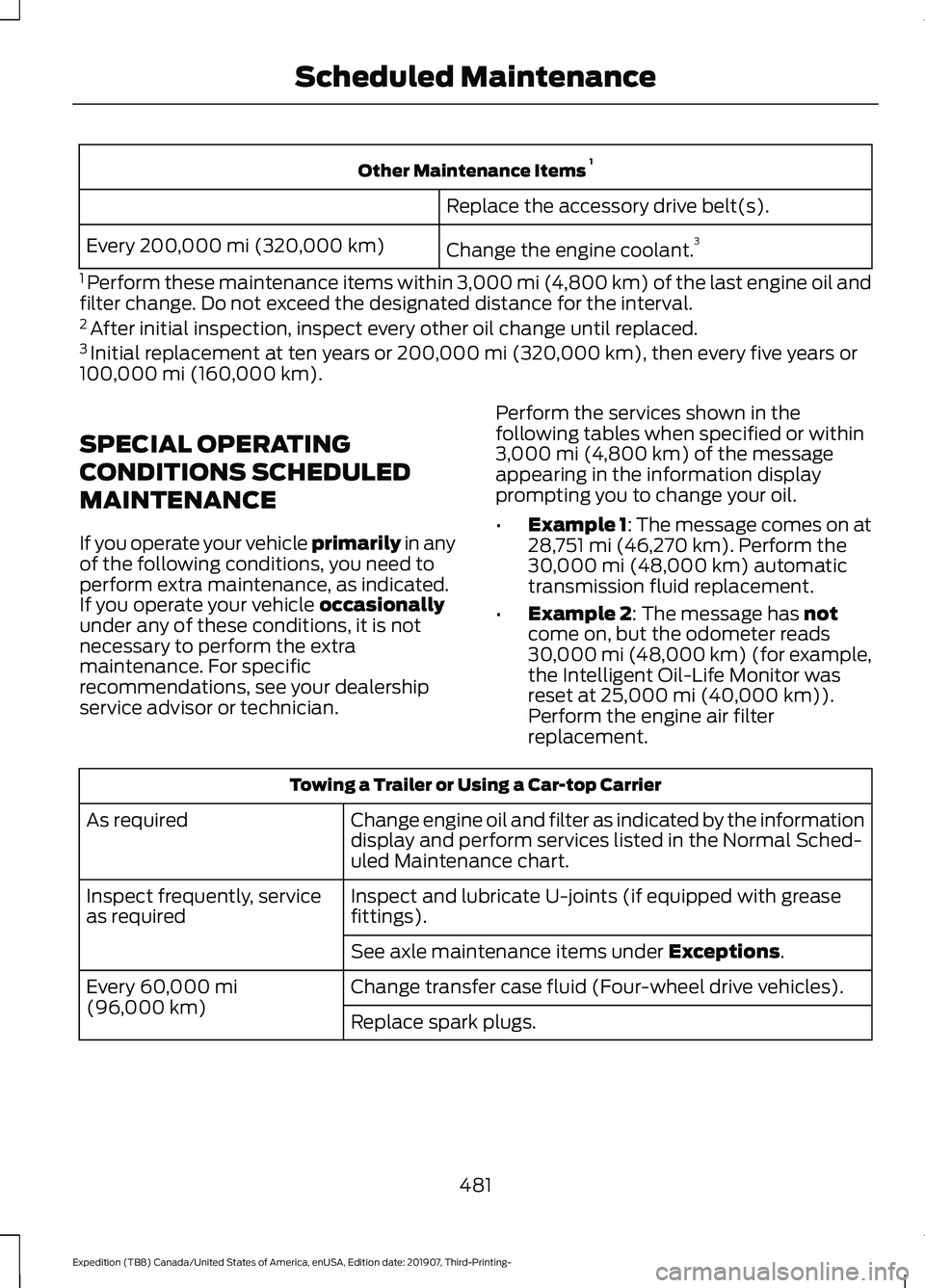
Other Maintenance Items
1
Replace the accessory drive belt(s).
Change the engine coolant. 3
Every 200,000 mi (320,000 km)
1 Perform these maintenance items within 3,000 mi (4,800 km) of the last engine oil and
filter change. Do not exceed the designated distance for the interval.
2 After initial inspection, inspect every other oil change until replaced.
3 Initial replacement at ten years or 200,000 mi (320,000 km), then every five years or
100,000 mi (160,000 km).
SPECIAL OPERATING
CONDITIONS SCHEDULED
MAINTENANCE
If you operate your vehicle primarily
in any
of the following conditions, you need to
perform extra maintenance, as indicated.
If you operate your vehicle
occasionally
under any of these conditions, it is not
necessary to perform the extra
maintenance. For specific
recommendations, see your dealership
service advisor or technician. Perform the services shown in the
following tables when specified or within
3,000 mi (4,800 km)
of the message
appearing in the information display
prompting you to change your oil.
• Example 1: The message comes on at
28,751 mi (46,270 km)
. Perform the
30,000 mi (48,000 km) automatic
transmission fluid replacement.
• Example 2
: The message has not
come on, but the odometer reads
30,000 mi (48,000 km) (for example,
the Intelligent Oil-Life Monitor was
reset at
25,000 mi (40,000 km)).
Perform the engine air filter
replacement. Towing a Trailer or Using a Car-top Carrier
Change engine oil and filter as indicated by the information
display and perform services listed in the Normal Sched-
uled Maintenance chart.
As required
Inspect and lubricate U-joints (if equipped with grease
fittings).
Inspect frequently, service
as required
See axle maintenance items under
Exceptions.
Change transfer case fluid (Four-wheel drive vehicles).
Every
60,000 mi
(96,000 km) Replace spark plugs.
481
Expedition (TB8) Canada/United States of America, enUSA, Edition date: 201907, Third-Printing- Scheduled Maintenance
Page 529 of 542
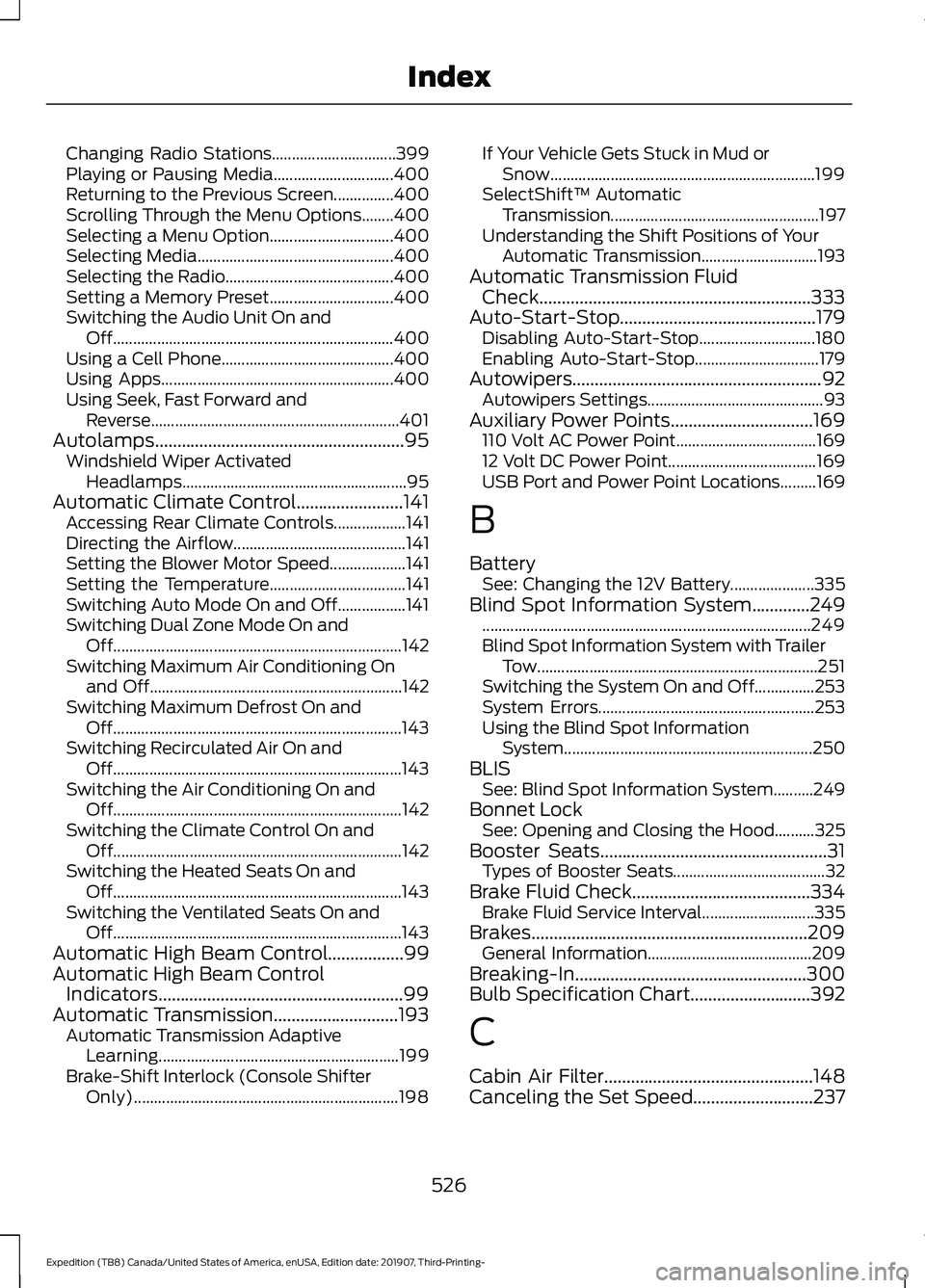
Changing Radio Stations...............................
399
Playing or Pausing Media.............................. 400
Returning to the Previous Screen...............400
Scrolling Through the Menu Options........400
Selecting a Menu Option............................... 400
Selecting Media................................................. 400
Selecting the Radio.......................................... 400
Setting a Memory Preset............................... 400
Switching the Audio Unit On and Off...................................................................... 400
Using a Cell Phone........................................... 400
Using Apps.......................................................... 400
Using Seek, Fast Forward and Reverse.............................................................. 401
Autolamps........................................................95 Windshield Wiper Activated
Headlamps........................................................ 95
Automatic Climate Control........................141 Accessing Rear Climate Controls.................. 141
Directing the Airflow........................................... 141
Setting the Blower Motor Speed................... 141
Setting the Temperature.................................. 141
Switching Auto Mode On and Off.................141
Switching Dual Zone Mode On and Off........................................................................\
142
Switching Maximum Air Conditioning On and Off............................................................... 142
Switching Maximum Defrost On and Off........................................................................\
143
Switching Recirculated Air On and Off........................................................................\
143
Switching the Air Conditioning On and Off........................................................................\
142
Switching the Climate Control On and Off........................................................................\
142
Switching the Heated Seats On and Off........................................................................\
143
Switching the Ventilated Seats On and Off........................................................................\
143
Automatic High Beam Control.................99
Automatic High Beam Control Indicators.......................................................99
Automatic Transmission............................193
Automatic Transmission Adaptive
Learning............................................................ 199
Brake-Shift Interlock (Console Shifter Only).................................................................. 198If Your Vehicle Gets Stuck in Mud or
Snow.................................................................. 199
SelectShift™ Automatic Transmission.................................................... 197
Understanding the Shift Positions of Your Automatic Transmission............................. 193
Automatic Transmission Fluid Check.............................................................333
Auto-Start-Stop............................................179 Disabling Auto-Start-Stop............................. 180
Enabling Auto-Start-Stop............................... 179
Autowipers
........................................................92
Autowipers Settings............................................ 93
Auxiliary Power Points
................................169
110 Volt AC Power Point................................... 169
12 Volt DC Power Point..................................... 169
USB Port and Power Point Locations.........169
B
Battery See: Changing the 12V Battery..................... 335
Blind Spot Information System.............249 ........................................................................\
.......... 249
Blind Spot Information System with Trailer Tow...................................................................... 251
Switching the System On and Off...............253
System Errors...................................................... 253
Using the Blind Spot Information System.............................................................. 250
BLIS See: Blind Spot Information System..........249
Bonnet Lock See: Opening and Closing the Hood..........325
Booster Seats
...................................................31
Types of Booster Seats...................................... 32
Brake Fluid Check........................................334 Brake Fluid Service Interval............................ 335
Brakes..............................................................209 General Information......................................... 209
Breaking-In
....................................................300
Bulb Specification Chart...........................392
C
Cabin Air Filter...............................................148
Canceling the Set Speed
...........................237
526
Expedition (TB8) Canada/United States of America, enUSA, Edition date: 201907, Third-Printing- Index
Page 530 of 542
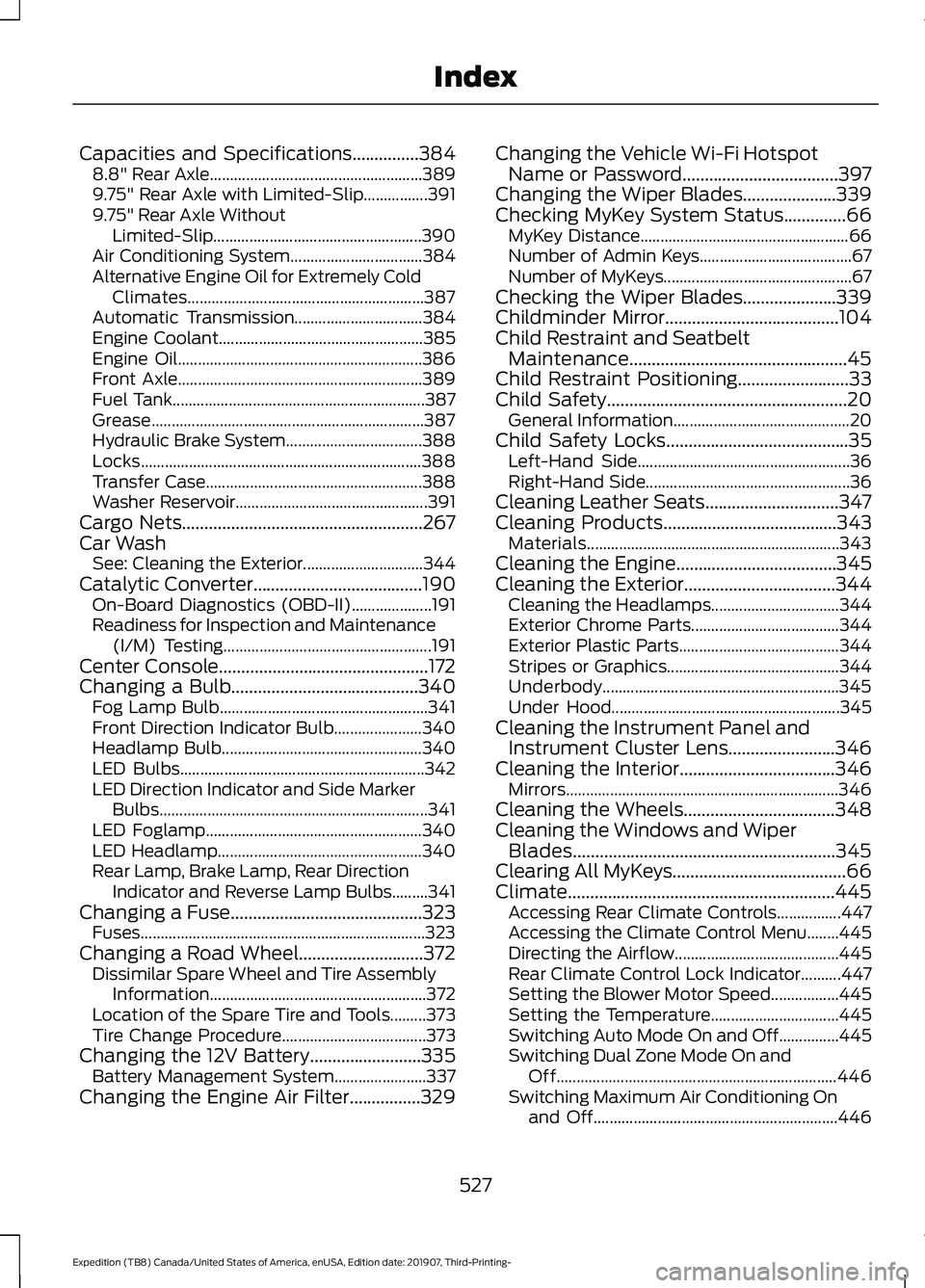
Capacities and Specifications...............384
8.8" Rear Axle..................................................... 389
9.75" Rear Axle with Limited-Slip................391
9.75" Rear Axle Without Limited-Slip.................................................... 390
Air Conditioning System................................. 384
Alternative Engine Oil for Extremely Cold Climates........................................................... 387
Automatic Transmission................................ 384
Engine Coolant................................................... 385
Engine Oil............................................................. 386
Front Axle............................................................. 389
Fuel Tank............................................................... 387
Grease.................................................................... 387
Hydraulic Brake System.................................. 388
Locks...................................................................... 388
Transfer Case...................................................... 388
Washer Reservoir................................................ 391
Cargo Nets......................................................267
Car Wash See: Cleaning the Exterior.............................. 344
Catalytic Converter......................................190 On-Board Diagnostics (OBD-II).................... 191
Readiness for Inspection and Maintenance (I/M) Testing.................................................... 191
Center Console...............................................172
Changing a Bulb..........................................340 Fog Lamp Bulb.................................................... 341
Front Direction Indicator Bulb...................... 340
Headlamp Bulb.................................................. 340
LED Bulbs............................................................. 342
LED Direction Indicator and Side Marker Bulbs................................................................... 341
LED Foglamp...................................................... 340
LED Headlamp................................................... 340
Rear Lamp, Brake Lamp, Rear Direction Indicator and Reverse Lamp Bulbs.........341
Changing a Fuse
...........................................323
Fuses....................................................................... 323
Changing a Road Wheel............................372 Dissimilar Spare Wheel and Tire Assembly
Information...................................................... 372
Location of the Spare Tire and Tools.........373
Tire Change Procedure.................................... 373
Changing the 12V Battery
.........................335
Battery Management System....................... 337
Changing the Engine Air Filter
................329 Changing the Vehicle Wi-Fi Hotspot
Name or Password
...................................397
Changing the Wiper Blades.....................339
Checking MyKey System Status..............66 MyKey Distance.................................................... 66
Number of Admin Keys...................................... 67
Number of MyKeys............................................... 67
Checking the Wiper Blades
.....................339
Childminder Mirror.......................................104
Child Restraint and Seatbelt Maintenance.................................................45
Child Restraint Positioning
.........................33
Child Safety......................................................20 General Information............................................ 20
Child Safety Locks
.........................................35
Left-Hand Side..................................................... 36
Right-Hand Side................................................... 36
Cleaning Leather Seats..............................347
Cleaning Products
.......................................343
Materials............................................................... 343
Cleaning the Engine....................................345
Cleaning the Exterior..................................344 Cleaning the Headlamps................................ 344
Exterior Chrome Parts..................................... 344
Exterior Plastic Parts........................................ 344
Stripes or Graphics........................................... 344
Underbody........................................................... 345
Under Hood......................................................... 345
Cleaning the Instrument Panel and Instrument Cluster Lens........................346
Cleaning the Interior
...................................346
Mirrors.................................................................... 346
Cleaning the Wheels..................................348
Cleaning the Windows and Wiper Blades...........................................................345
Clearing All MyKeys.......................................66
Climate............................................................445 Accessing Rear Climate Controls................447
Accessing the Climate Control Menu........445
Directing the Airflow......................................... 445
Rear Climate Control Lock Indicator..........447
Setting the Blower Motor Speed.................445
Setting the Temperature................................ 445
Switching Auto Mode On and Off...............445
Switching Dual Zone Mode On and Off...................................................................... 446
Switching Maximum Air Conditioning On and Off............................................................. 446
527
Expedition (TB8) Canada/United States of America, enUSA, Edition date: 201907, Third-Printing- Index