alarm FORD EXPEDITION 2021 User Guide
[x] Cancel search | Manufacturer: FORD, Model Year: 2021, Model line: EXPEDITION, Model: FORD EXPEDITION 2021Pages: 574, PDF Size: 8.33 MB
Page 131 of 574
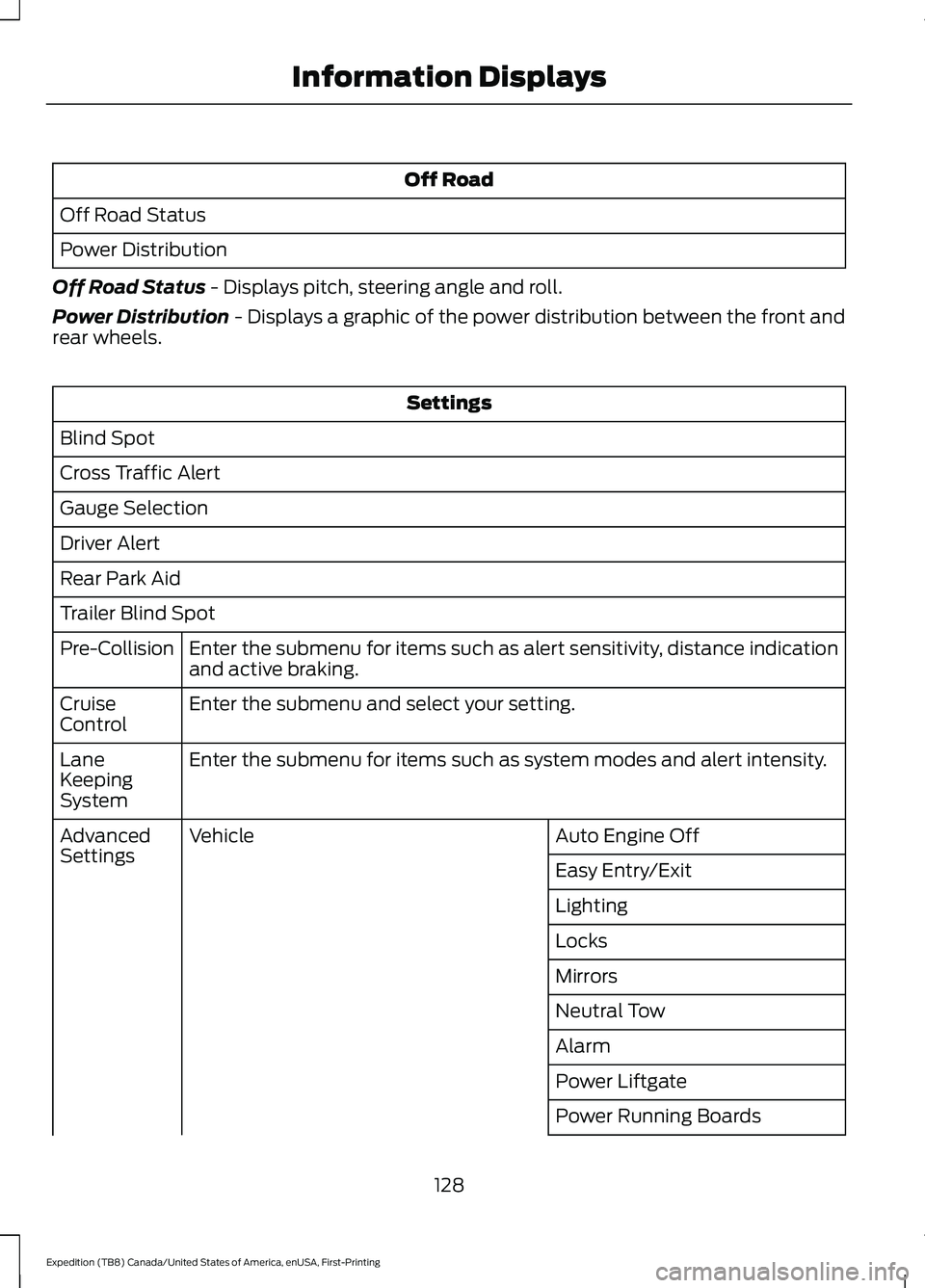
Off Road
Off Road Status
Power Distribution
Off Road Status - Displays pitch, steering angle and roll.
Power Distribution
- Displays a graphic of the power distribution between the front and
rear wheels. Settings
Blind Spot
Cross Traffic Alert
Gauge Selection
Driver Alert
Rear Park Aid
Trailer Blind Spot Enter the submenu for items such as alert sensitivity, distance indication
and active braking.
Pre-Collision
Enter the submenu and select your setting.
Cruise
Control
Enter the submenu for items such as system modes and alert intensity.
Lane
Keeping
System
Auto Engine Off
Vehicle
Advanced
Settings
Easy Entry/Exit
Lighting
Locks
Mirrors
Neutral Tow
Alarm
Power Liftgate
Power Running Boards
128
Expedition (TB8) Canada/United States of America, enUSA, First-Printing Information Displays
Page 134 of 574
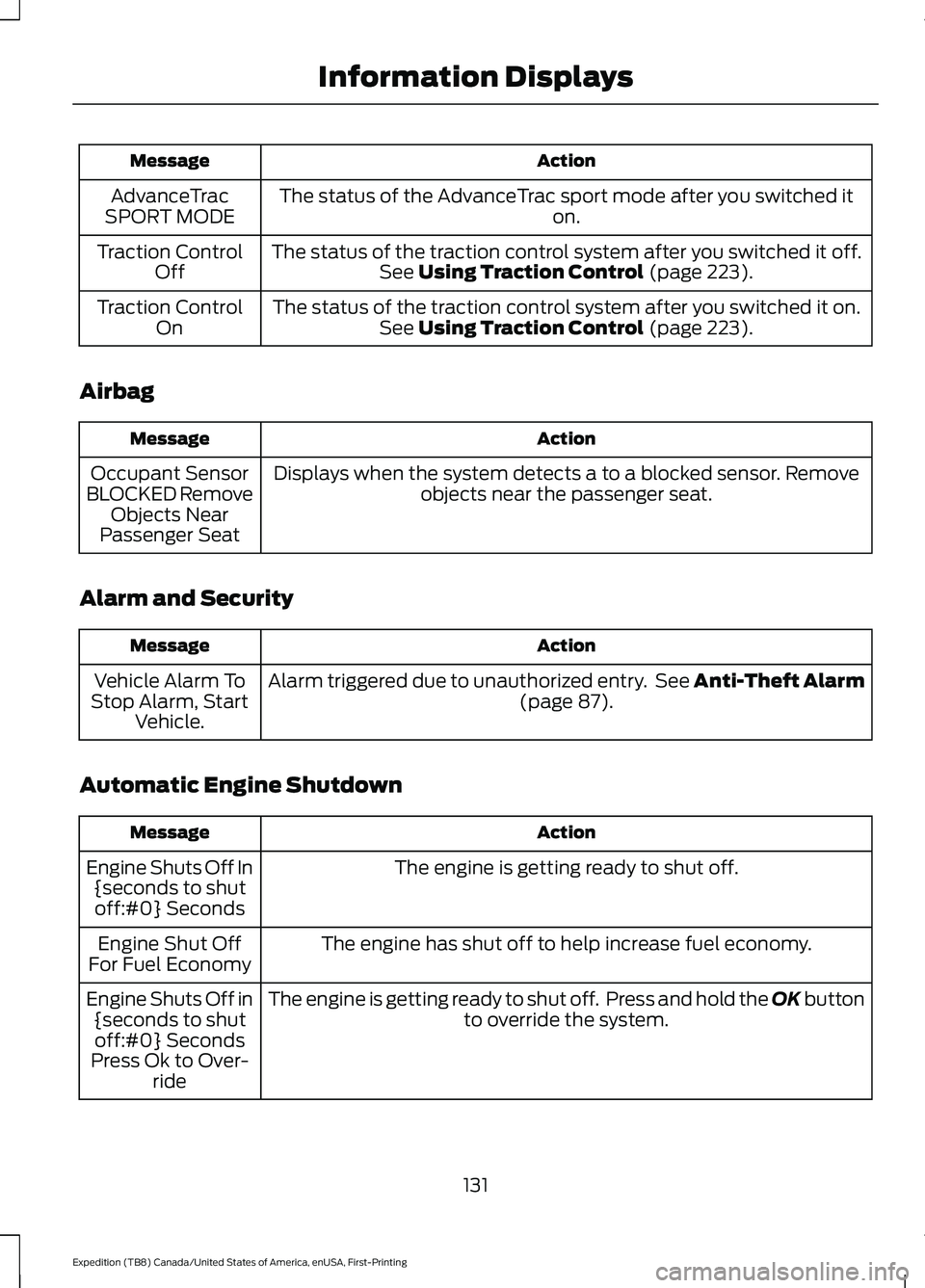
Action
Message
The status of the AdvanceTrac sport mode after you switched it on.
AdvanceTrac
SPORT MODE
The status of the traction control system after you switched it off.See Using Traction Control (page 223).
Traction Control
Off
The status of the traction control system after you switched it on.See
Using Traction Control (page 223).
Traction Control
On
Airbag Action
Message
Displays when the system detects a to a blocked sensor. Remove objects near the passenger seat.
Occupant Sensor
BLOCKED Remove Objects Near
Passenger Seat
Alarm and Security Action
Message
Alarm triggered due to unauthorized entry. See Anti-Theft Alarm (page
87).
Vehicle Alarm To
Stop Alarm, Start Vehicle.
Automatic Engine Shutdown Action
Message
The engine is getting ready to shut off.
Engine Shuts Off In
{seconds to shutoff:#0} Seconds
The engine has shut off to help increase fuel economy.
Engine Shut Off
For Fuel Economy
The engine is getting ready to shut off. Press and hold the OK button to override the system.
Engine Shuts Off in
{seconds to shutoff:#0} Seconds
Press Ok to Over- ride
131
Expedition (TB8) Canada/United States of America, enUSA, First-Printing Information Displays
Page 231 of 574
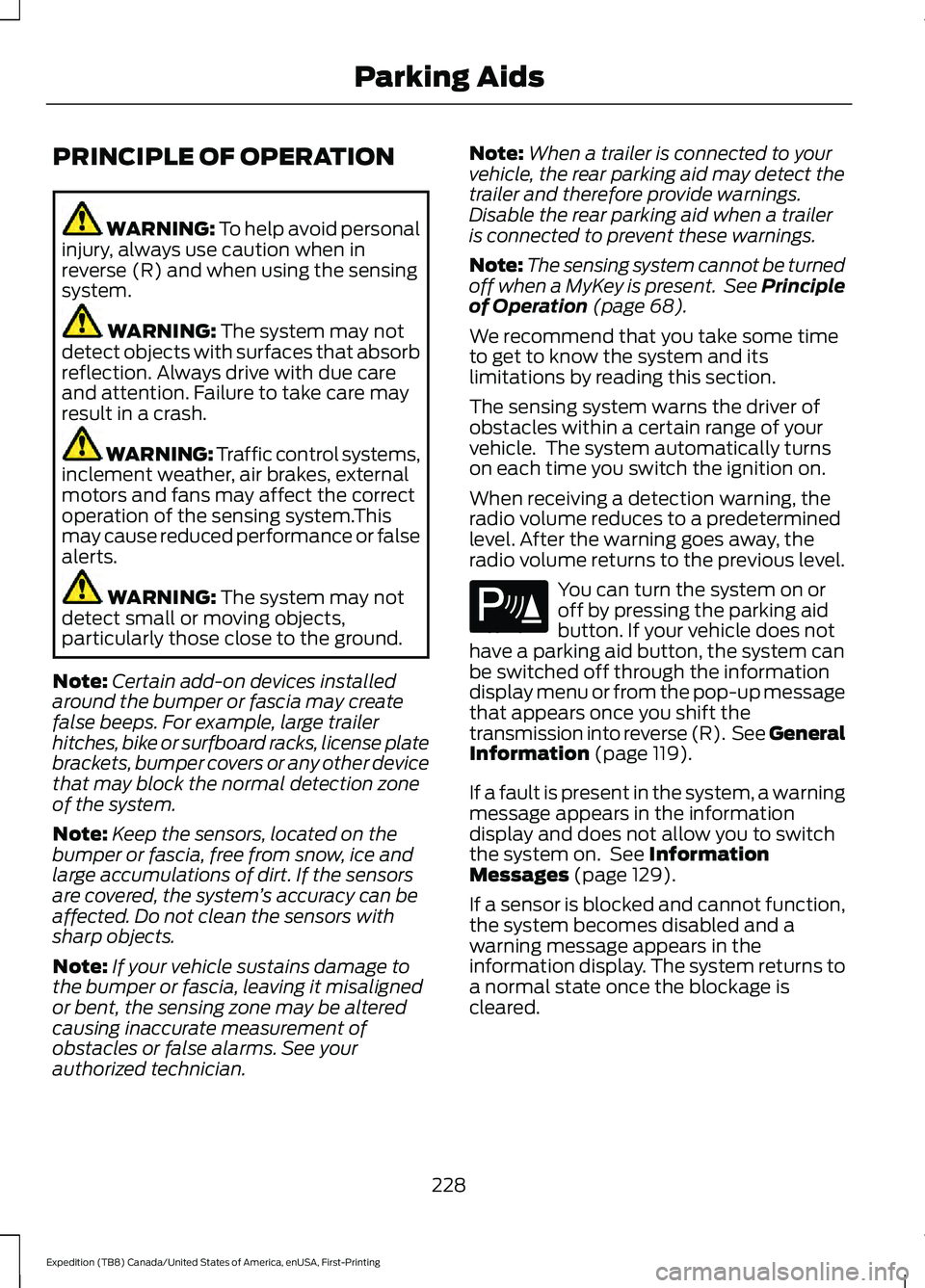
PRINCIPLE OF OPERATION
WARNING: To help avoid personal
injury, always use caution when in
reverse (R) and when using the sensing
system. WARNING:
The system may not
detect objects with surfaces that absorb
reflection. Always drive with due care
and attention. Failure to take care may
result in a crash. WARNING: Traffic control systems,
inclement weather, air brakes, external
motors and fans may affect the correct
operation of the sensing system.This
may cause reduced performance or false
alerts. WARNING:
The system may not
detect small or moving objects,
particularly those close to the ground.
Note: Certain add-on devices installed
around the bumper or fascia may create
false beeps. For example, large trailer
hitches, bike or surfboard racks, license plate
brackets, bumper covers or any other device
that may block the normal detection zone
of the system.
Note: Keep the sensors, located on the
bumper or fascia, free from snow, ice and
large accumulations of dirt. If the sensors
are covered, the system ’s accuracy can be
affected. Do not clean the sensors with
sharp objects.
Note: If your vehicle sustains damage to
the bumper or fascia, leaving it misaligned
or bent, the sensing zone may be altered
causing inaccurate measurement of
obstacles or false alarms. See your
authorized technician. Note:
When a trailer is connected to your
vehicle, the rear parking aid may detect the
trailer and therefore provide warnings.
Disable the rear parking aid when a trailer
is connected to prevent these warnings.
Note: The sensing system cannot be turned
off when a MyKey is present. See Principle
of Operation
(page 68).
We recommend that you take some time
to get to know the system and its
limitations by reading this section.
The sensing system warns the driver of
obstacles within a certain range of your
vehicle. The system automatically turns
on each time you switch the ignition on.
When receiving a detection warning, the
radio volume reduces to a predetermined
level. After the warning goes away, the
radio volume returns to the previous level. You can turn the system on or
off by pressing the parking aid
button. If your vehicle does not
have a parking aid button, the system can
be switched off through the information
display menu or from the pop-up message
that appears once you shift the
transmission into reverse (R). See General
Information
(page 119).
If a fault is present in the system, a warning
message appears in the information
display and does not allow you to switch
the system on. See
Information
Messages (page 129).
If a sensor is blocked and cannot function,
the system becomes disabled and a
warning message appears in the
information display. The system returns to
a normal state once the blockage is
cleared.
228
Expedition (TB8) Canada/United States of America, enUSA, First-Printing Parking AidsE139213
Page 254 of 574
Park Brake Application
Automatic parking brake application and
cancellation occurs if:
•
You unbuckle the seatbelt and open
the door after you stop the vehicle.
• You hold the vehicle at a stop
continuously for more than three
minutes.
Hilly Condition Usage
You should select a lower gear when the
system is active in situations such as
prolonged downhill driving on steep
grades, for example in mountainous areas.
The system needs additional engine
braking in these situations to reduce the
load on the vehicle ’s regular brake system
to prevent it from overheating.
Note: An audible alarm sounds and the
system shuts down if it applies brakes for
an extended period of time. This allows the
brakes to cool. The system functions
normally again after the brakes cool.
Switching Adaptive Cruise Control
Off Press and release the button
when the system is in standby
mode or switch the ignition off.
Note: You erase the set speed when you
switch the system off.
Detection Issues WARNING: On rare occasions,
detection issues can occur due to the
road infrastructures, for example bridges,
tunnels and safety barriers. In these
cases, the system may brake late or
unexpectedly. At all times, you are
responsible for controlling your vehicle,
supervising the system and intervening,
if required. WARNING:
If the system
malfunctions, have your vehicle checked
as soon as possible.
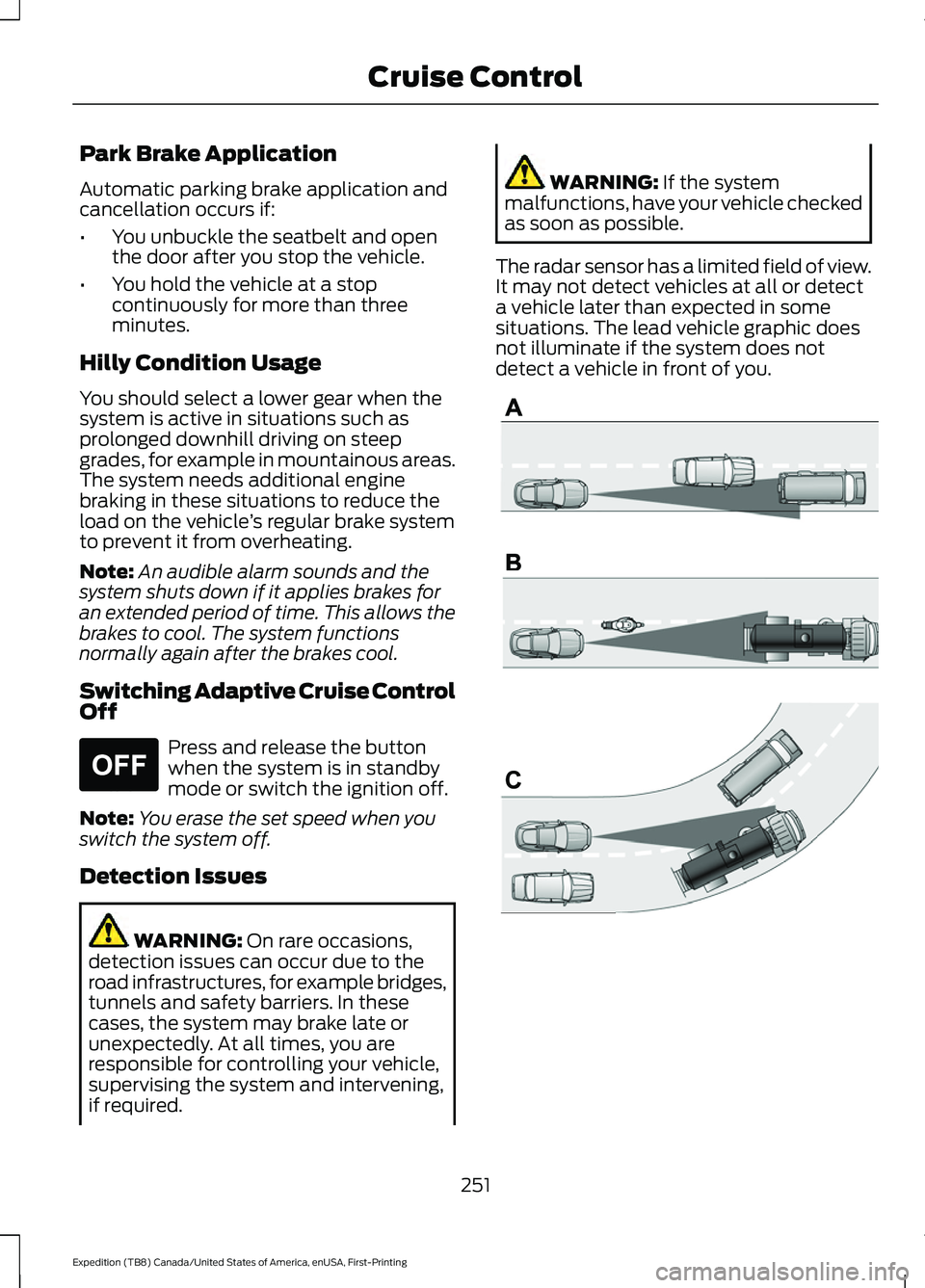
The radar sensor has a limited field of view.
It may not detect vehicles at all or detect
a vehicle later than expected in some
situations. The lead vehicle graphic does
not illuminate if the system does not
detect a vehicle in front of you. 251
Expedition (TB8) Canada/United States of America, enUSA, First-Printing Cruise ControlE265297 E71621
Page 468 of 574
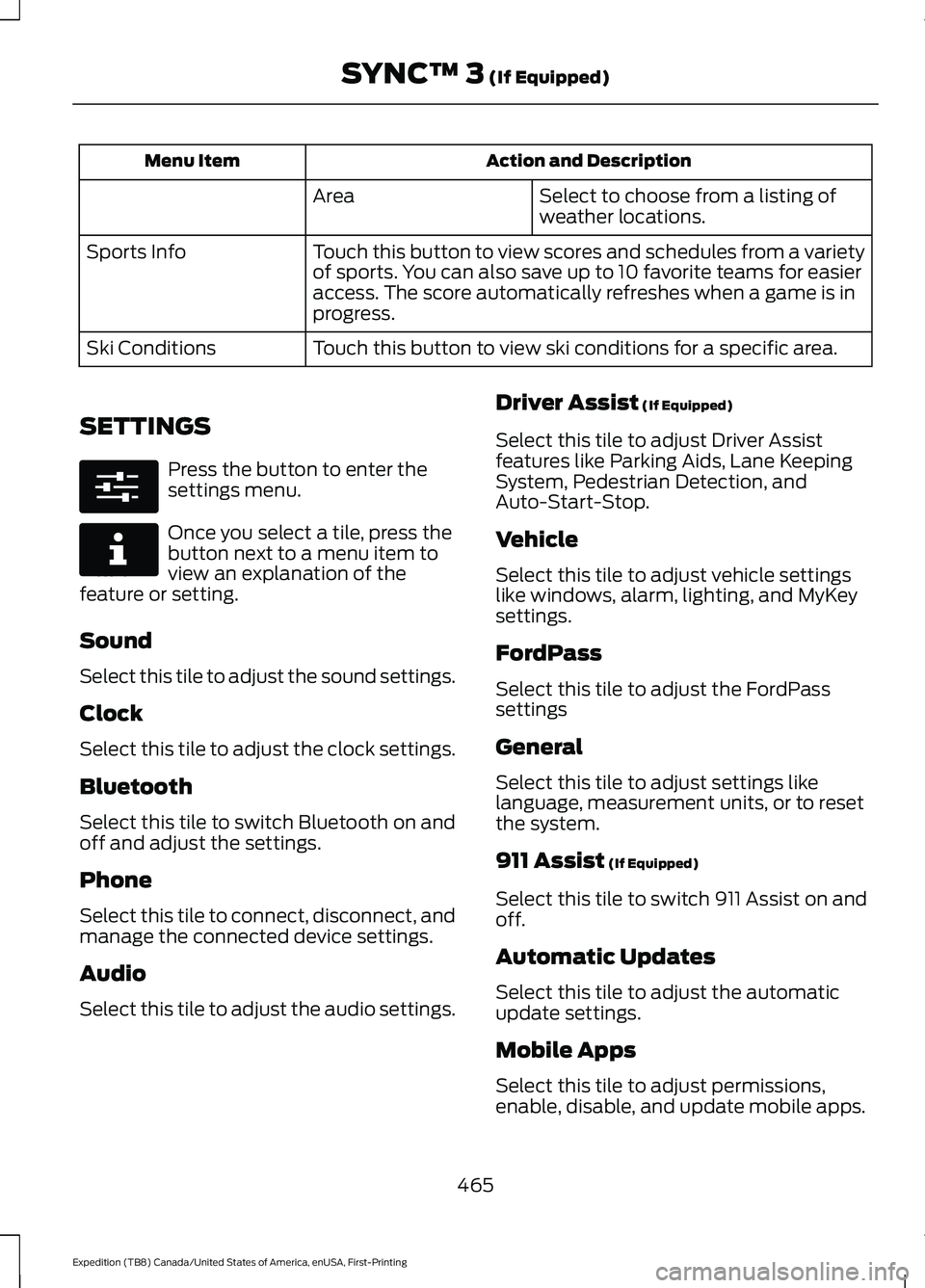
Action and Description
Menu Item
Select to choose from a listing of
weather locations.
Area
Touch this button to view scores and schedules from a variety
of sports. You can also save up to 10 favorite teams for easier
access. The score automatically refreshes when a game is in
progress.
Sports Info
Touch this button to view ski conditions for a specific area.
Ski Conditions
SETTINGS Press the button to enter the
settings menu.
Once you select a tile, press the
button next to a menu item to
view an explanation of the
feature or setting.
Sound
Select this tile to adjust the sound settings.
Clock
Select this tile to adjust the clock settings.
Bluetooth
Select this tile to switch Bluetooth on and
off and adjust the settings.
Phone
Select this tile to connect, disconnect, and
manage the connected device settings.
Audio
Select this tile to adjust the audio settings. Driver Assist (If Equipped)
Select this tile to adjust Driver Assist
features like Parking Aids, Lane Keeping
System, Pedestrian Detection, and
Auto-Start-Stop.
Vehicle
Select this tile to adjust vehicle settings
like windows, alarm, lighting, and MyKey
settings.
FordPass
Select this tile to adjust the FordPass
settings
General
Select this tile to adjust settings like
language, measurement units, or to reset
the system.
911 Assist
(If Equipped)
Select this tile to switch 911 Assist on and
off.
Automatic Updates
Select this tile to adjust the automatic
update settings.
Mobile Apps
Select this tile to adjust permissions,
enable, disable, and update mobile apps.
465
Expedition (TB8) Canada/United States of America, enUSA, First-Printing SYNC™ 3
(If Equipped)E280315 E268570
Page 483 of 574
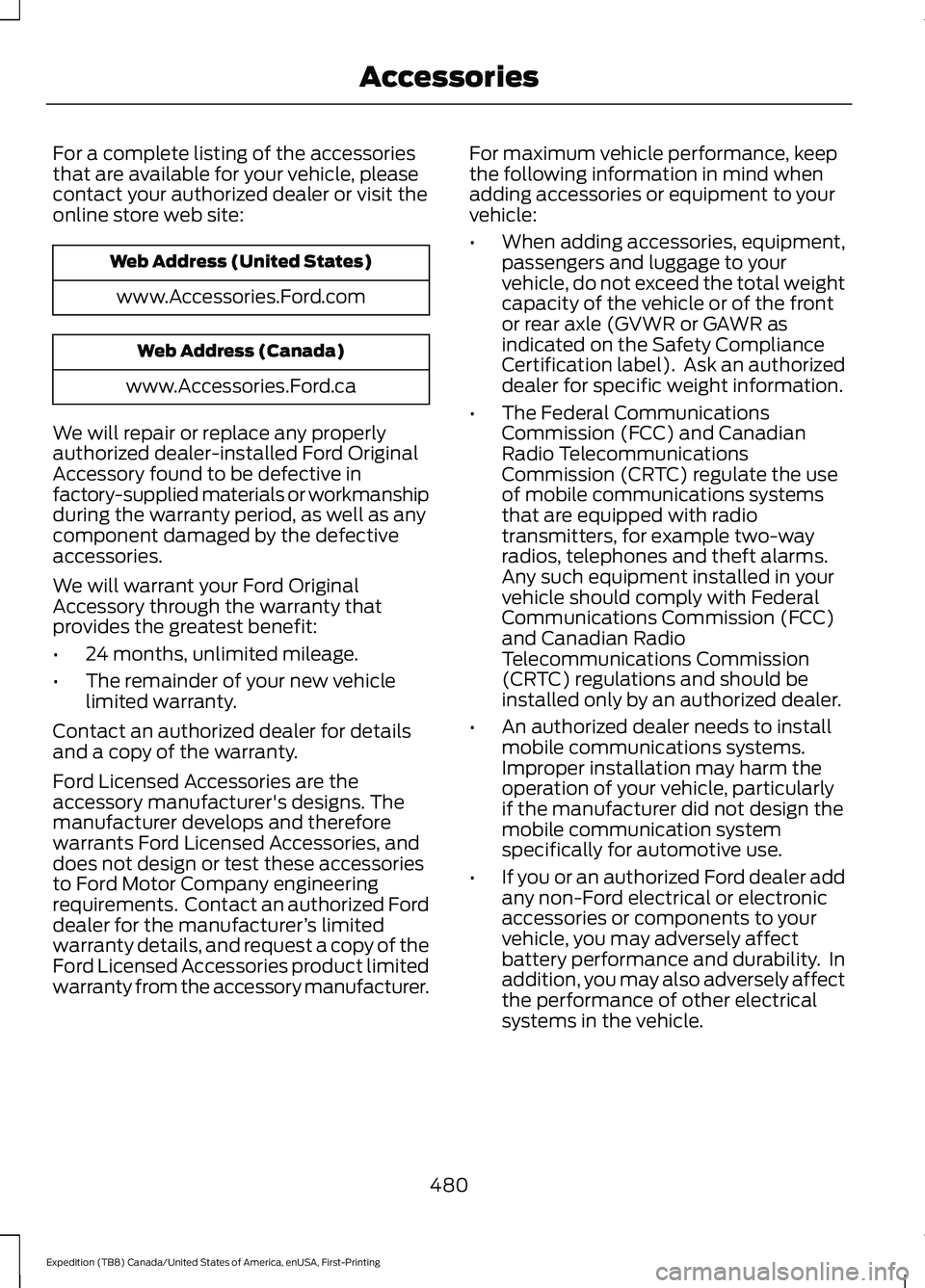
For a complete listing of the accessories
that are available for your vehicle, please
contact your authorized dealer or visit the
online store web site:
Web Address (United States)
www.Accessories.Ford.com Web Address (Canada)
www.Accessories.Ford.ca
We will repair or replace any properly
authorized dealer-installed Ford Original
Accessory found to be defective in
factory-supplied materials or workmanship
during the warranty period, as well as any
component damaged by the defective
accessories.
We will warrant your Ford Original
Accessory through the warranty that
provides the greatest benefit:
• 24 months, unlimited mileage.
• The remainder of your new vehicle
limited warranty.
Contact an authorized dealer for details
and a copy of the warranty.
Ford Licensed Accessories are the
accessory manufacturer's designs. The
manufacturer develops and therefore
warrants Ford Licensed Accessories, and
does not design or test these accessories
to Ford Motor Company engineering
requirements. Contact an authorized Ford
dealer for the manufacturer ’s limited
warranty details, and request a copy of the
Ford Licensed Accessories product limited
warranty from the accessory manufacturer. For maximum vehicle performance, keep
the following information in mind when
adding accessories or equipment to your
vehicle:
•
When adding accessories, equipment,
passengers and luggage to your
vehicle, do not exceed the total weight
capacity of the vehicle or of the front
or rear axle (GVWR or GAWR as
indicated on the Safety Compliance
Certification label). Ask an authorized
dealer for specific weight information.
• The Federal Communications
Commission (FCC) and Canadian
Radio Telecommunications
Commission (CRTC) regulate the use
of mobile communications systems
that are equipped with radio
transmitters, for example two-way
radios, telephones and theft alarms.
Any such equipment installed in your
vehicle should comply with Federal
Communications Commission (FCC)
and Canadian Radio
Telecommunications Commission
(CRTC) regulations and should be
installed only by an authorized dealer.
• An authorized dealer needs to install
mobile communications systems.
Improper installation may harm the
operation of your vehicle, particularly
if the manufacturer did not design the
mobile communication system
specifically for automotive use.
• If you or an authorized Ford dealer add
any non-Ford electrical or electronic
accessories or components to your
vehicle, you may adversely affect
battery performance and durability. In
addition, you may also adversely affect
the performance of other electrical
systems in the vehicle.
480
Expedition (TB8) Canada/United States of America, enUSA, First-Printing Accessories
Page 560 of 574
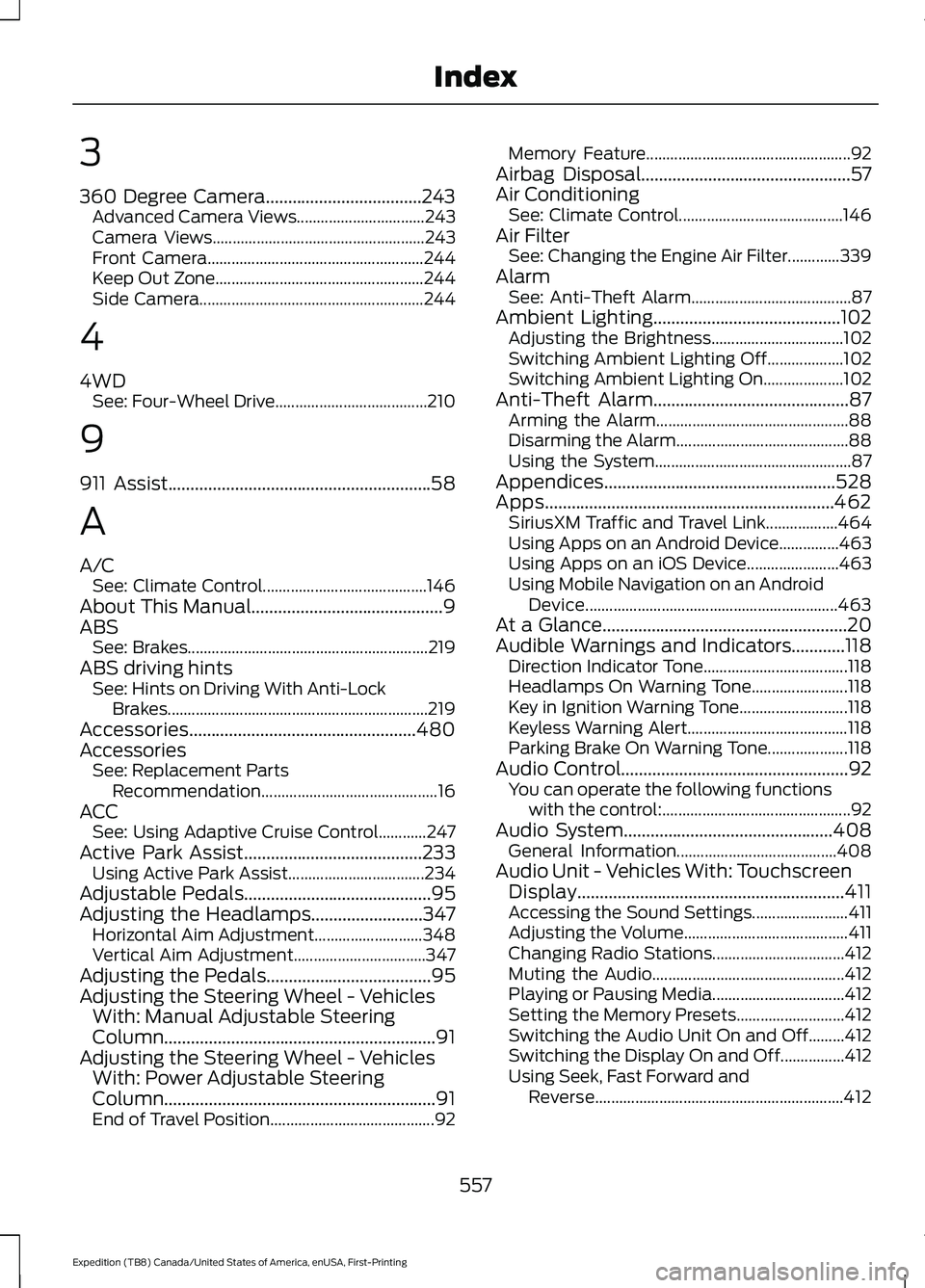
3
360 Degree Camera...................................243
Advanced Camera Views................................ 243
Camera Views..................................................... 243
Front Camera...................................................... 244
Keep Out Zone.................................................... 244
Side Camera........................................................ 244
4
4WD See: Four-Wheel Drive...................................... 210
9
911 Assist...........................................................58
A
A/C See: Climate Control......................................... 146
About This Manual...........................................9
ABS See: Brakes............................................................ 219
ABS driving hints See: Hints on Driving With Anti-Lock
Brakes................................................................. 219
Accessories...................................................480
Accessories See: Replacement Parts
Recommendation............................................ 16
ACC See: Using Adaptive Cruise Control............247
Active Park Assist........................................233
Using Active Park Assist.................................. 234
Adjustable Pedals
..........................................95
Adjusting the Headlamps.........................347
Horizontal Aim Adjustment........................... 348
Vertical Aim Adjustment................................. 347
Adjusting the Pedals.....................................95
Adjusting the Steering Wheel - Vehicles With: Manual Adjustable Steering
Column.............................................................91
Adjusting the Steering Wheel - Vehicles With: Power Adjustable Steering
Column.............................................................91
End of Travel Position......................................... 92Memory Feature...................................................
92
Airbag Disposal...............................................57
Air Conditioning See: Climate Control......................................... 146
Air Filter See: Changing the Engine Air Filter.............339
Alarm See: Anti-Theft Alarm........................................ 87
Ambient Lighting..........................................102 Adjusting the Brightness................................. 102
Switching Ambient Lighting Off................... 102
Switching Ambient Lighting On.................... 102
Anti-Theft Alarm............................................87 Arming the Alarm................................................ 88
Disarming the Alarm........................................... 88
Using the System................................................. 87
Appendices....................................................528
Apps.................................................................462 SiriusXM Traffic and Travel Link.................. 464
Using Apps on an Android Device...............463
Using Apps on an iOS Device....................... 463
Using Mobile Navigation on an Android Device............................................................... 463
At a Glance.......................................................20
Audible Warnings and Indicators
............118
Direction Indicator Tone.................................... 118
Headlamps On Warning Tone........................ 118
Key in Ignition Warning Tone........................... 118
Keyless Warning Alert........................................ 118
Parking Brake On Warning Tone.................... 118
Audio Control
...................................................92
You can operate the following functions
with the control:............................................... 92
Audio System
...............................................408
General Information........................................ 408
Audio Unit - Vehicles With: Touchscreen Display............................................................411
Accessing the Sound Settings........................ 411
Adjusting the Volume......................................... 411
Changing Radio Stations................................. 412
Muting the Audio................................................ 412
Playing or Pausing Media................................. 412
Setting the Memory Presets........................... 412
Switching the Audio Unit On and Off.........412
Switching the Display On and Off................412
Using Seek, Fast Forward and Reverse.............................................................. 412
557
Expedition (TB8) Canada/United States of America, enUSA, First-Printing Index
Page 566 of 574
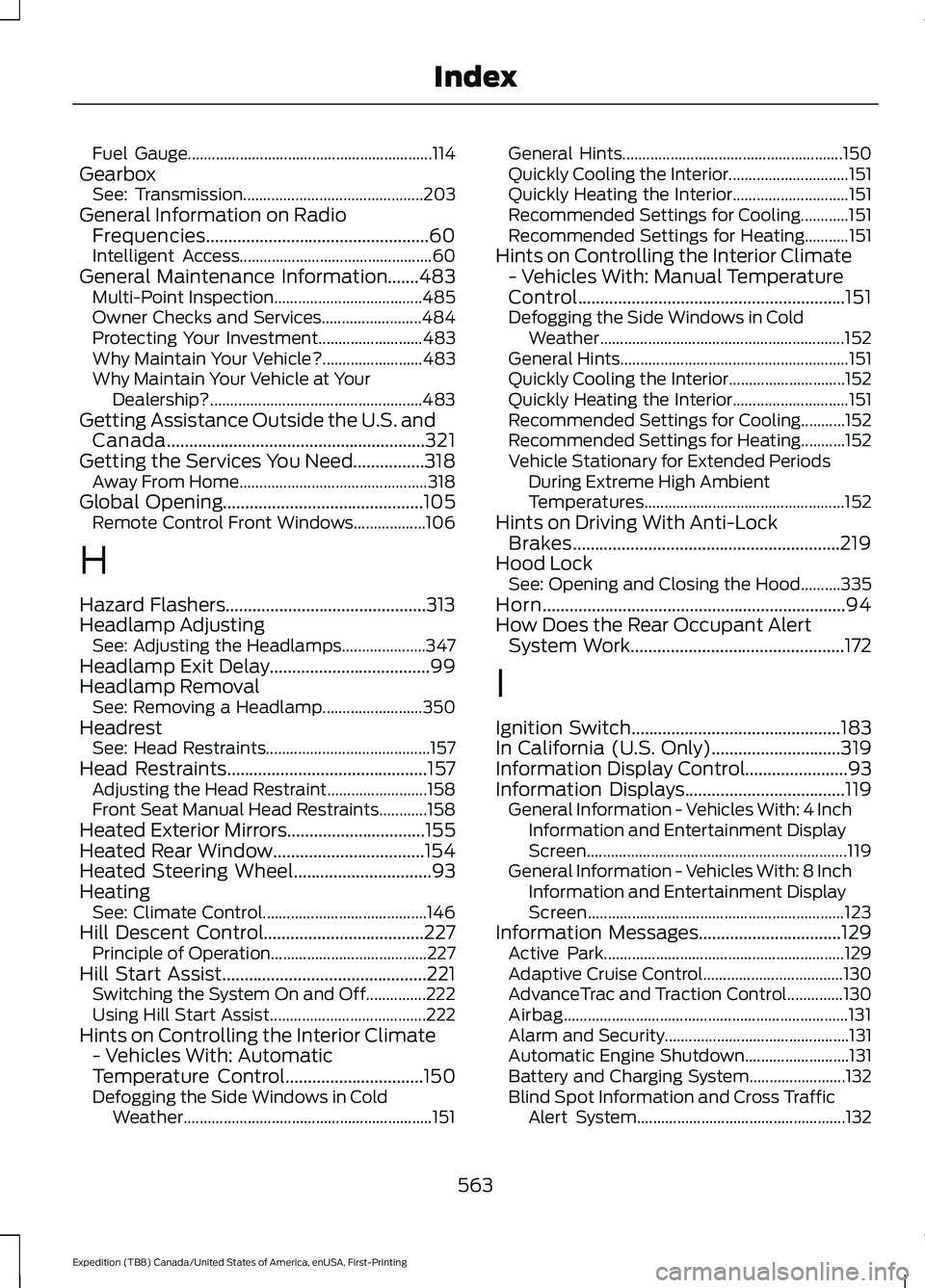
Fuel Gauge.............................................................
114
Gearbox See: Transmission............................................. 203
General Information on Radio Frequencies..................................................60
Intelligent Access................................................ 60
General Maintenance Information.......483
Multi-Point Inspection..................................... 485
Owner Checks and Services......................... 484
Protecting Your Investment.......................... 483
Why Maintain Your Vehicle?......................... 483
Why Maintain Your Vehicle at Your Dealership?..................................................... 483
Getting Assistance Outside the U.S. and Canada..........................................................321
Getting the Services You Need................318 Away From Home............................................... 318
Global Opening.............................................105 Remote Control Front Windows.................. 106
H
Hazard Flashers.............................................313
Headlamp Adjusting See: Adjusting the Headlamps..................... 347
Headlamp Exit Delay....................................99
Headlamp Removal See: Removing a Headlamp......................... 350
Headrest See: Head Restraints......................................... 157
Head Restraints.............................................157 Adjusting the Head Restraint......................... 158
Front Seat Manual Head Restraints............158
Heated Exterior Mirrors...............................155
Heated Rear Window..................................154
Heated Steering Wheel
...............................93
Heating See: Climate Control......................................... 146
Hill Descent Control
....................................227
Principle of Operation....................................... 227
Hill Start Assist..............................................221 Switching the System On and Off...............222
Using Hill Start Assist....................................... 222
Hints on Controlling the Interior Climate - Vehicles With: Automatic
Temperature Control
...............................150
Defogging the Side Windows in Cold
Weather.............................................................. 151General Hints.......................................................
150
Quickly Cooling the Interior.............................. 151
Quickly Heating the Interior............................. 151
Recommended Settings for Cooling............151
Recommended Settings for Heating...........151
Hints on Controlling the Interior Climate - Vehicles With: Manual Temperature
Control............................................................151
Defogging the Side Windows in Cold Weather............................................................. 152
General Hints......................................................... 151
Quickly Cooling the Interior............................. 152
Quickly Heating the Interior............................. 151
Recommended Settings for Cooling...........152
Recommended Settings for Heating...........152
Vehicle Stationary for Extended Periods During Extreme High Ambient
Temperatures.................................................. 152
Hints on Driving With Anti-Lock Brakes............................................................219
Hood Lock See: Opening and Closing the Hood..........335
Horn
....................................................................94
How Does the Rear Occupant Alert System Work
................................................172
I
Ignition Switch
...............................................183
In California (U.S. Only).............................319
Information Display Control.......................93
Information Displays
....................................119
General Information - Vehicles With: 4 Inch
Information and Entertainment Display
Screen................................................................. 119
General Information - Vehicles With: 8 Inch Information and Entertainment Display
Screen................................................................ 123
Information Messages
................................129
Active Park............................................................ 129
Adaptive Cruise Control................................... 130
AdvanceTrac and Traction Control..............130
Airbag....................................................................... 131
Alarm and Security.............................................. 131
Automatic Engine Shutdown.......................... 131
Battery and Charging System........................ 132
Blind Spot Information and Cross Traffic Alert System.................................................... 132
563
Expedition (TB8) Canada/United States of America, enUSA, First-Printing Index
Page 570 of 574
Rear Passenger Climate Controls -
Vehicles With: Automatic Temperature
Control...........................................................152
Directing Air to the Overhead Air Vents................................................................... 152
Directing Air to the Rear Footwell Air Vents................................................................... 152
Rear Climate Control Lock Indicator...........152
Setting the Rear Blower Motor Speed................................................................. 153
Setting the Rear Temperature....................... 153
Switching Rear Auto Mode On and Off........................................................................\
153
Switching the Rear Climate Control On and Off........................................................................\
153
Switching the Rear Heated Seats On and Off........................................................................\
153
Rear Passenger Climate Controls - Vehicles With: Manual Temperature
Control...........................................................153
Directing Air to the Overhead Air Vents................................................................... 153
Directing Air to the Rear Footwell Air Vents.................................................................. 154
Rear Climate Control Lock Indicator...........154
Setting the Rear Blower Motor Speed................................................................. 154
Setting the Rear Temperature....................... 154
Switching the Rear Climate Control On and Off....................................................................... 154
Switching the Rear Heated Seats On and Off....................................................................... 154
Rear Seats.......................................................165
Adjusting the Manual Second Row
Outermost Seats for Easy Entry..............166
Adjusting the Second Row Center Seat.................................................................... 168
Adjusting the Second Row Outermost Seats for Easy Exit......................................... 167
Folding the Power Rear Seats....................... 168
Folding the Second Row Center Seat ........................................................................\
....... 167
Folding the Second Row Outermost Seats ........................................................................\
...... 165
Reclining the Second Row Outermost Seat Backrest............................................................. 167Rear Under Floor Storage.........................275
Advanced System: Forward Divider, Cargo
Shelf and Rear Barrier (Bulkhead
Position)........................................................... 276
Cargo Management System.......................... 275
Rear View Camera......................................240 Camera Guidelines............................................. 241
Manual Zoom...................................................... 242
Obstacle Distance Indicator.......................... 242
Rear Camera Delay........................................... 242
Using the Rear View Camera System.............................................................. 240
Rear View Camera See: Rear View Camera.................................. 240
Rear Window Wiper and Washers...........97 Rear Window Washer......................................... 97
Rear Window Wiper Blade................................ 97
Recommended Towing Weights...........296
Reduced Engine Performance...............309
Refueling..........................................................195 Refueling System Overview........................... 195
Refueling System Warning.............................. 197
Refueling Your Vehicle...................................... 195
Remote Control
..............................................60
Car Finder................................................................ 65
Integrated Keyhead Transmitter.................... 60
Intelligent Access Key.......................................... 61
Remote Start......................................................... 65
Replacing the Battery......................................... 62
Sounding the Panic Alarm................................ 65
Using the Key Blade............................................ 62
Remote Start
..................................................155
Automatic Settings............................................ 155
Heated and Cooled Features......................... 155
Last Settings......................................................... 155
Removing a Headlamp.............................350
Repairing Minor Paint Damage..............358
Replacement Parts Recommendation........................................16
Collision Repairs.................................................... 16
Scheduled Maintenance and Mechanical Repairs................................................................. 16
Warranty on Replacement Parts.................... 16
Replacing a Lost Key or Remote Control.............................................................67
Replacing the Cabin Air Filter..................156
Reporting Safety Defects (Canada Only)..............................................................323
567
Expedition (TB8) Canada/United States of America, enUSA, First-Printing Index