check oil FORD EXPEDITION 2021 User Guide
[x] Cancel search | Manufacturer: FORD, Model Year: 2021, Model line: EXPEDITION, Model: FORD EXPEDITION 2021Pages: 574, PDF Size: 8.33 MB
Page 339 of 574
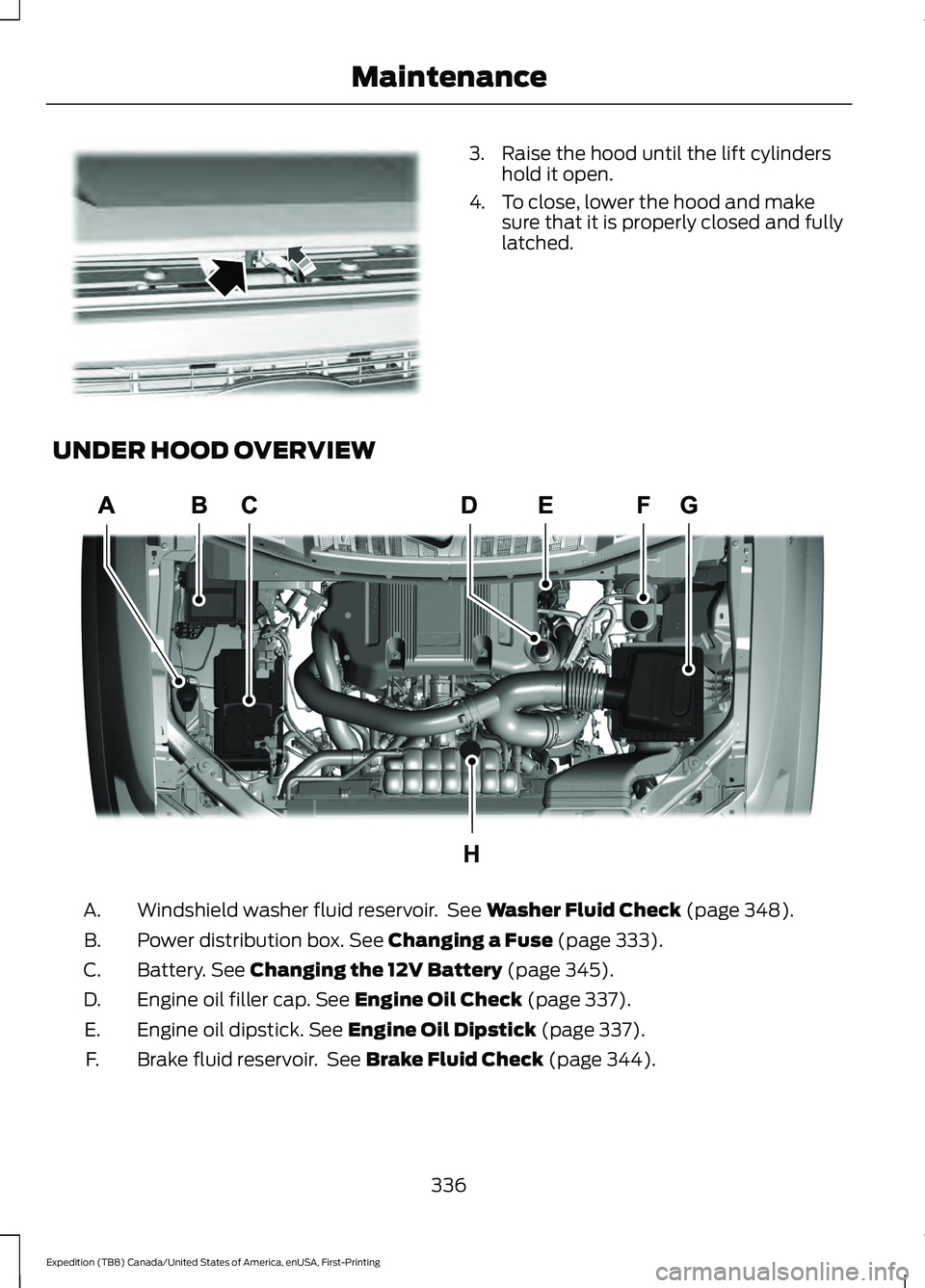
3. Raise the hood until the lift cylinders
hold it open.
4. To close, lower the hood and make sure that it is properly closed and fully
latched.
UNDER HOOD OVERVIEW Windshield washer fluid reservoir. See Washer Fluid Check (page 348).
A.
Power distribution box.
See Changing a Fuse (page 333).
B.
Battery.
See Changing the 12V Battery (page 345).
C.
Engine oil filler cap.
See Engine Oil Check (page 337).
D.
Engine oil dipstick.
See Engine Oil Dipstick (page 337).
E.
Brake fluid reservoir. See
Brake Fluid Check (page 344).
F.
336
Expedition (TB8) Canada/United States of America, enUSA, First-Printing MaintenanceE190266 E258054
Page 340 of 574
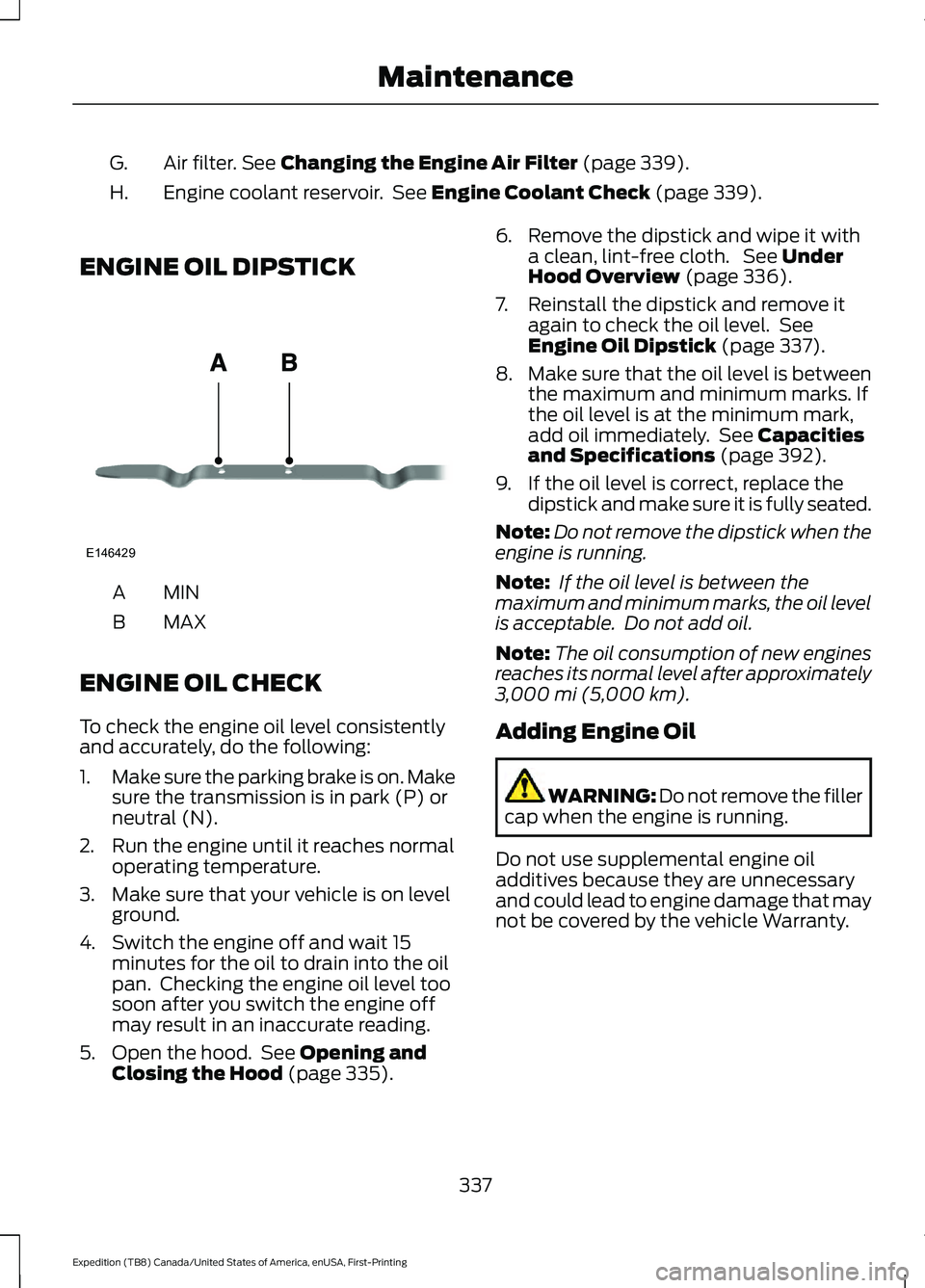
Air filter. See Changing the Engine Air Filter (page 339).
G.
Engine coolant reservoir. See
Engine Coolant Check (page 339).
H.
ENGINE OIL DIPSTICK MINA
MAX
B
ENGINE OIL CHECK
To check the engine oil level consistently
and accurately, do the following:
1. Make sure the parking brake is on. Make
sure the transmission is in park (P) or
neutral (N).
2. Run the engine until it reaches normal operating temperature.
3. Make sure that your vehicle is on level ground.
4. Switch the engine off and wait 15 minutes for the oil to drain into the oil
pan. Checking the engine oil level too
soon after you switch the engine off
may result in an inaccurate reading.
5. Open the hood. See
Opening and
Closing the Hood (page 335). 6. Remove the dipstick and wipe it with
a clean, lint-free cloth. See
Under
Hood Overview (page 336).
7. Reinstall the dipstick and remove it again to check the oil level. See
Engine Oil Dipstick
(page 337).
8. Make sure that the oil level is between
the maximum and minimum marks. If
the oil level is at the minimum mark,
add oil immediately. See
Capacities
and Specifications (page 392).
9. If the oil level is correct, replace the dipstick and make sure it is fully seated.
Note: Do not remove the dipstick when the
engine is running.
Note: If the oil level is between the
maximum and minimum marks, the oil level
is acceptable. Do not add oil.
Note: The oil consumption of new engines
reaches its normal level after approximately
3,000 mi (5,000 km)
.
Adding Engine Oil WARNING: Do not remove the filler
cap when the engine is running.
Do not use supplemental engine oil
additives because they are unnecessary
and could lead to engine damage that may
not be covered by the vehicle Warranty.
337
Expedition (TB8) Canada/United States of America, enUSA, First-Printing MaintenanceE146429
Page 341 of 574
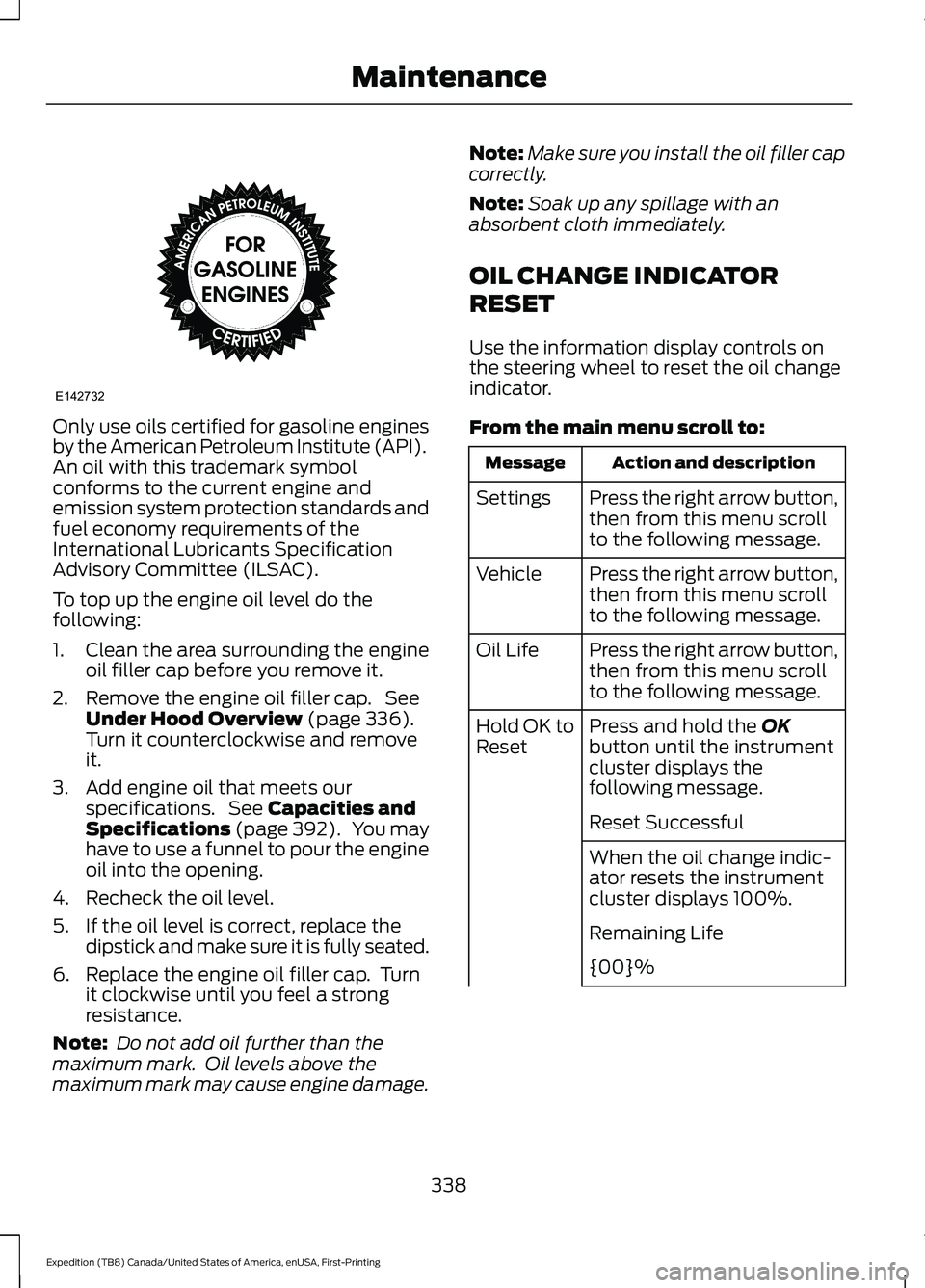
Only use oils certified for gasoline engines
by the American Petroleum Institute (API).
An oil with this trademark symbol
conforms to the current engine and
emission system protection standards and
fuel economy requirements of the
International Lubricants Specification
Advisory Committee (ILSAC).
To top up the engine oil level do the
following:
1. Clean the area surrounding the engine
oil filler cap before you remove it.
2. Remove the engine oil filler cap. See Under Hood Overview (page 336).
Turn it counterclockwise and remove
it.
3. Add engine oil that meets our specifications. See
Capacities and
Specifications (page 392). You may
have to use a funnel to pour the engine
oil into the opening.
4. Recheck the oil level.
5. If the oil level is correct, replace the dipstick and make sure it is fully seated.
6. Replace the engine oil filler cap. Turn it clockwise until you feel a strong
resistance.
Note: Do not add oil further than the
maximum mark. Oil levels above the
maximum mark may cause engine damage. Note:
Make sure you install the oil filler cap
correctly.
Note: Soak up any spillage with an
absorbent cloth immediately.
OIL CHANGE INDICATOR
RESET
Use the information display controls on
the steering wheel to reset the oil change
indicator.
From the main menu scroll to: Action and description
Message
Press the right arrow button,
then from this menu scroll
to the following message.
Settings
Press the right arrow button,
then from this menu scroll
to the following message.
Vehicle
Press the right arrow button,
then from this menu scroll
to the following message.
Oil Life
Press and hold the
OK
button until the instrument
cluster displays the
following message.
Hold OK to
Reset
Reset Successful
When the oil change indic-
ator resets the instrument
cluster displays 100%.
Remaining Life
{00}%
338
Expedition (TB8) Canada/United States of America, enUSA, First-Printing MaintenanceE142732
Page 362 of 574
Body
•
Wash your vehicle thoroughly to
remove dirt, grease, oil, tar or mud from
exterior surfaces, rear-wheel housing
and the underside of front fenders.
• Periodically wash your vehicle if it is
stored in exposed locations.
• Touch-up exposed or primed metal to
prevent rust.
• Cover chrome and stainless steel parts
with a thick coat of auto wax to prevent
discoloration. Re-wax as necessary
when you wash your vehicle.
• Lubricate all hood, door and luggage
compartment hinges and latches with
a light grade oil.
• Cover interior trim to prevent fading.
• Keep all rubber parts free from oil and
solvents.
Engine
• Change the engine oil and filter prior to
storage because used engine oil
contains contaminates which may
cause engine damage.
• Start the engine every 15 days for a
minimum of 15 minutes. Run at fast
idle with the climate controls set to
defrost until the engine reaches normal
operating temperature.
• With your foot on the brake, shift
through all the gears while the engine
is running.
• We recommend that you change the
engine oil before you use your vehicle
again.
Fuel system
• Fill the fuel tank with high-quality fuel
until the first automatic shutoff of the
fuel pump nozzle. Cooling system
•
Protect against freezing temperatures.
• When removing your vehicle from
storage, check coolant fluid level.
Confirm that there are no cooling
system leaks and that fluid is at the
recommended level.
Disconnecting Your 12 Volt Battery
• Check and recharge as necessary. Keep
connections clean.
• If storing your vehicle for more than 30
days without recharging the battery,
we recommend that you disconnect
the battery cables to maintain battery
charge for quick starting.
Note: It is necessary to reset memory
features if you disconnect the battery
cables.
Brakes
• Make sure the brakes and parking brake
release fully.
Tires
• Maintain recommended air pressure.
Miscellaneous
• Make sure all linkages, cables, levers
and pins under your vehicle are covered
with grease to prevent rust.
• Move vehicles at least 25 ft (7.5 m)
every 15 days to lubricate working parts
and prevent corrosion.
359
Expedition (TB8) Canada/United States of America, enUSA, First-Printing Vehicle Care
Page 363 of 574
Removing Vehicle From Storage
When your vehicle is ready to come out of
storage, do the following:
•
Wash your vehicle to remove any dirt
or grease film build-up on window
surfaces.
• Check windshield wipers for any
deterioration.
• Check under the hood for any foreign
material that may have collected
during storage such as mice or squirrel
nests.
• Check the exhaust for any foreign
material that may have collected
during storage.
• Check tire pressures and set tire
inflation per the Tire Label.
• Check brake pedal operation. Drive
your vehicle 15 ft (4.5 m) back and
forth to remove rust build-up.
• Check fluid levels (including coolant,
oil and gas) to make sure there are no
leaks, and fluids are at recommended
levels.
• If you remove the battery, clean the
battery cable ends and check for
damage.
Contact an authorized dealer if you have
any concerns or issues.
BODY STYLING KITS
The distance between the underside of
your vehicle and the ground is less than
that of other models. Drive with extreme
care to avoid damage to your vehicle.
360
Expedition (TB8) Canada/United States of America, enUSA, First-Printing Vehicle Care
Page 395 of 574
VEHICLE IDENTIFICATION
NUMBER
The vehicle identification number is
located on the left-hand side of the
instrument panel.
Please note that in the graphic, XXXX is
representative of your vehicle identification
number.
The Vehicle Identification Number contains
the following information: World manufacturer identifier
A
Brake system, Gross Vehicle
Weight Rating, Restraint Devices
and their locations
B
Make, vehicle line, series, body
type
C
Engine type
D
Check digit
E
Model year
F
Assembly plant
G
Production sequence number
H
CAPACITIES AND
SPECIFICATIONS
Use oil and fluid that meets the defined
specification and viscosity grade.
If you do not use oil and fluid that meets
the defined specification and viscosity
grade, it could result in:
• Component damage that your vehicle
warranty does not cover.
• Longer engine cranking periods.
• Increased emission levels.
• Reduced engine performance.
• Reduced fuel economy.
• Reduced brake performance.
392
Expedition (TB8) Canada/United States of America, enUSA, First-Printing Capacities and SpecificationsE142476 E142477
Page 487 of 574
When the oil change message appears in
the information display, it is time for an oil
change. Make sure you perform the oil
change within two weeks or 500 mi
(800 km) of the message appearing. Make
sure you reset the Intelligent Oil-Life
Monitor after each oil change. See
Oil
Change Indicator Reset (page 338).
If your information display resets
prematurely or becomes inoperative, you
should perform the oil change interval at
six months or
5,000 mi (8,000 km) from
your last oil change. Never exceed one year
or
10,000 mi (16,000 km) between oil
change intervals,
Your vehicle is very sophisticated and built
with multiple, complex, performance
systems. Every manufacturer develops
these systems using different
specifications and performance features.
That is why it is important to rely upon your
dealership to properly diagnose and repair
your vehicle.
We have recommended maintenance
intervals for various parts and component
systems based upon engineering testing.
We rely upon this testing to determine the
most appropriate mileage for replacement
of oils and fluids to protect your vehicle at
the lowest overall cost to you and
recommends against maintenance
schedules that deviate from the scheduled
maintenance information.
We strongly recommend the use of only
genuine Ford, Motorcraft or
Ford-authorized re-manufactured
replacement parts engineered for your
vehicle. Additives and Chemicals
This owner's manual and our Workshop
Manual list the recommended additives
and chemicals for your vehicle. We do not
recommend using chemicals or additives
not approved by us as part of your vehicle
’s
normal maintenance. Please consult your
warranty information.
Oils, Fluids and Flushing
In many cases, fluid discoloration is a
normal operating characteristic and, by
itself, does not necessarily indicate a
concern or that the fluid needs to be
changed. However, a qualified expert, such
as the factory-trained technicians at your
dealership, should inspect discolored fluids
that also show signs of overheating or
foreign material contamination
immediately.
Make sure to change your vehicle ’s oils and
fluids at the specified intervals or in
conjunction with a repair. Flushing is a
viable way to change fluid for many vehicle
sub-systems during scheduled
maintenance. It is critical that systems are
flushed only with new fluid that is the same
as that required to fill and operate the
system or using a Ford-approved flushing
chemical.
Owner Checks and Services
Make sure you perform the following basic
maintenance checks and inspections every
month or at six-month intervals. Check Every Month
Engine oil level.
Function of all interior and exterior lights.
Tires (including spare) for wear and proper pressure.
484
Expedition (TB8) Canada/United States of America, enUSA, First-Printing Scheduled Maintenance
Page 489 of 574
Multi-Point Inspection
Suspension components for leaks ordamage
Exhaust system
Steering and linkage
Exterior lamps operation
Tires (including spare) for wear and properpressure2
Fluid levels 1
; fill if necessary
Windshield for cracks, chips or pits
For oil and fluid leaks
Washer spray and wiper operation
Half-shaft dust boots
1 Brake, coolant recovery reservoir, automatic transmission and window washer.
2 If your vehicle comes with a temporary mobility kit, check the tire sealant expiration Use
By date on the canister. Replace as needed.
Be sure to ask your dealership service
advisor or technician about the multi-point
vehicle inspection. It is a comprehensive
way to perform a thorough inspection of
your vehicle. Your checklist gives you
immediate feedback on the overall
condition of your vehicle.
NORMAL SCHEDULED
MAINTENANCE
Intelligent Oil-Life Monitor
Your vehicle has an Intelligent Oil-Life
Monitor that determines when you should
change the engine oil based on how your
vehicle is used. By using several important
factors in its calculations, the monitor
helps reduce the cost of owning your
vehicle and reduces environmental waste
at the same time. This means you do not have to remember
to change the oil on a mileage-based
schedule. Your vehicle lets you know when
an oil change is due by displaying a
message in the information display.
The following table provides examples of
vehicle use and its impact on oil change
intervals. It is a guideline only. Actual oil
change intervals depend on several factors
and generally decrease with severity of
use.
When to expect the OIL CHANGE REQUIRED Message
Vehicle Use and Example
Interval
Normal
7,500– 10,000 mi
(12,000– 16,000 km)
Normal commuting with highway driving
486
Expedition (TB8) Canada/United States of America, enUSA, First-Printing Scheduled Maintenance
Page 494 of 574
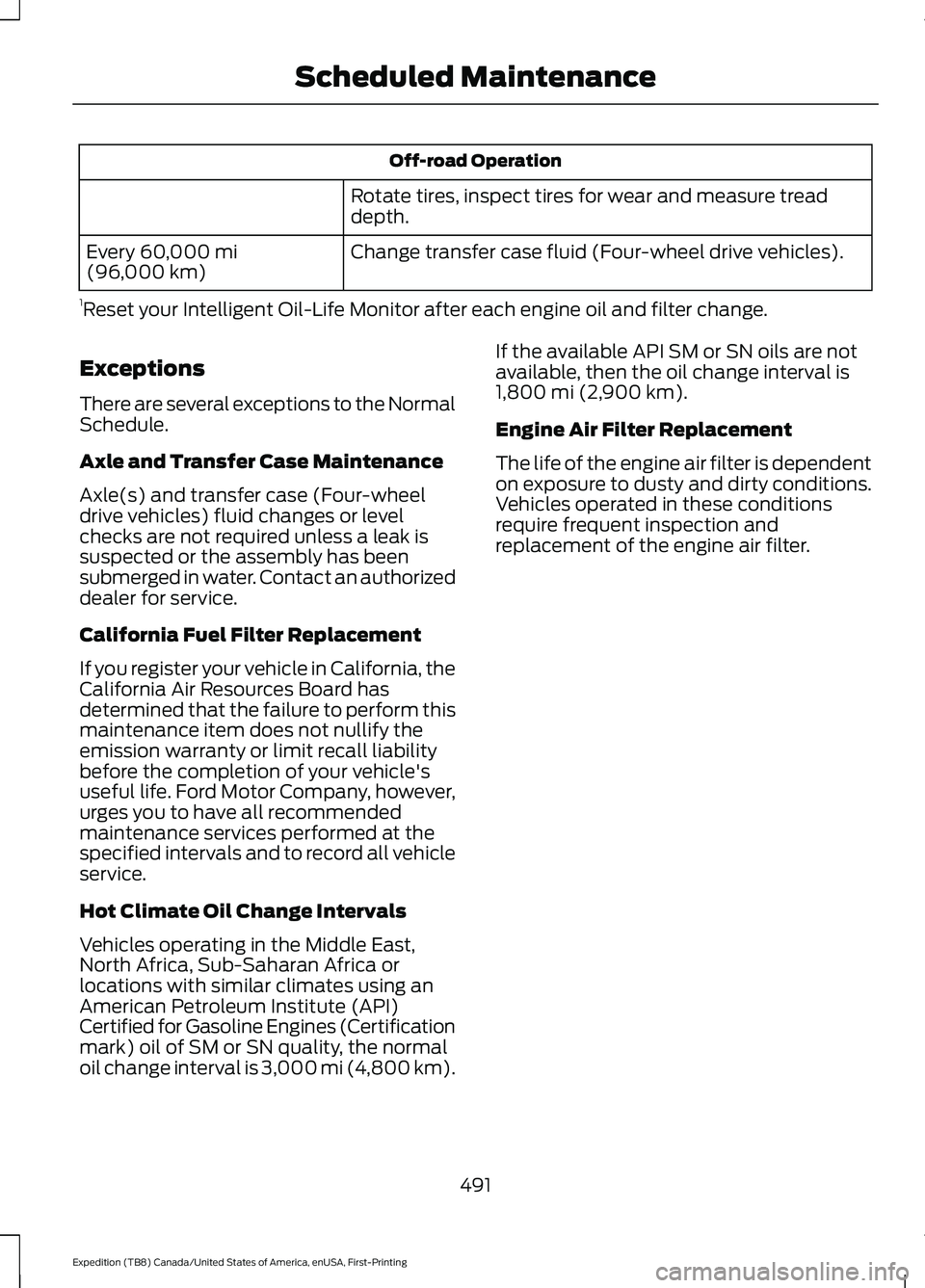
Off-road Operation
Rotate tires, inspect tires for wear and measure tread
depth.
Change transfer case fluid (Four-wheel drive vehicles).
Every 60,000 mi
(96,000 km)
1 Reset your Intelligent Oil-Life Monitor after each engine oil and filter change.
Exceptions
There are several exceptions to the Normal
Schedule.
Axle and Transfer Case Maintenance
Axle(s) and transfer case (Four-wheel
drive vehicles) fluid changes or level
checks are not required unless a leak is
suspected or the assembly has been
submerged in water. Contact an authorized
dealer for service.
California Fuel Filter Replacement
If you register your vehicle in California, the
California Air Resources Board has
determined that the failure to perform this
maintenance item does not nullify the
emission warranty or limit recall liability
before the completion of your vehicle's
useful life. Ford Motor Company, however,
urges you to have all recommended
maintenance services performed at the
specified intervals and to record all vehicle
service.
Hot Climate Oil Change Intervals
Vehicles operating in the Middle East,
North Africa, Sub-Saharan Africa or
locations with similar climates using an
American Petroleum Institute (API)
Certified for Gasoline Engines (Certification
mark) oil of SM or SN quality, the normal
oil change interval is 3,000 mi (4,800 km). If the available API SM or SN oils are not
available, then the oil change interval is
1,800 mi (2,900 km)
.
Engine Air Filter Replacement
The life of the engine air filter is dependent
on exposure to dusty and dirty conditions.
Vehicles operated in these conditions
require frequent inspection and
replacement of the engine air filter.
491
Expedition (TB8) Canada/United States of America, enUSA, First-Printing Scheduled Maintenance
Page 562 of 574
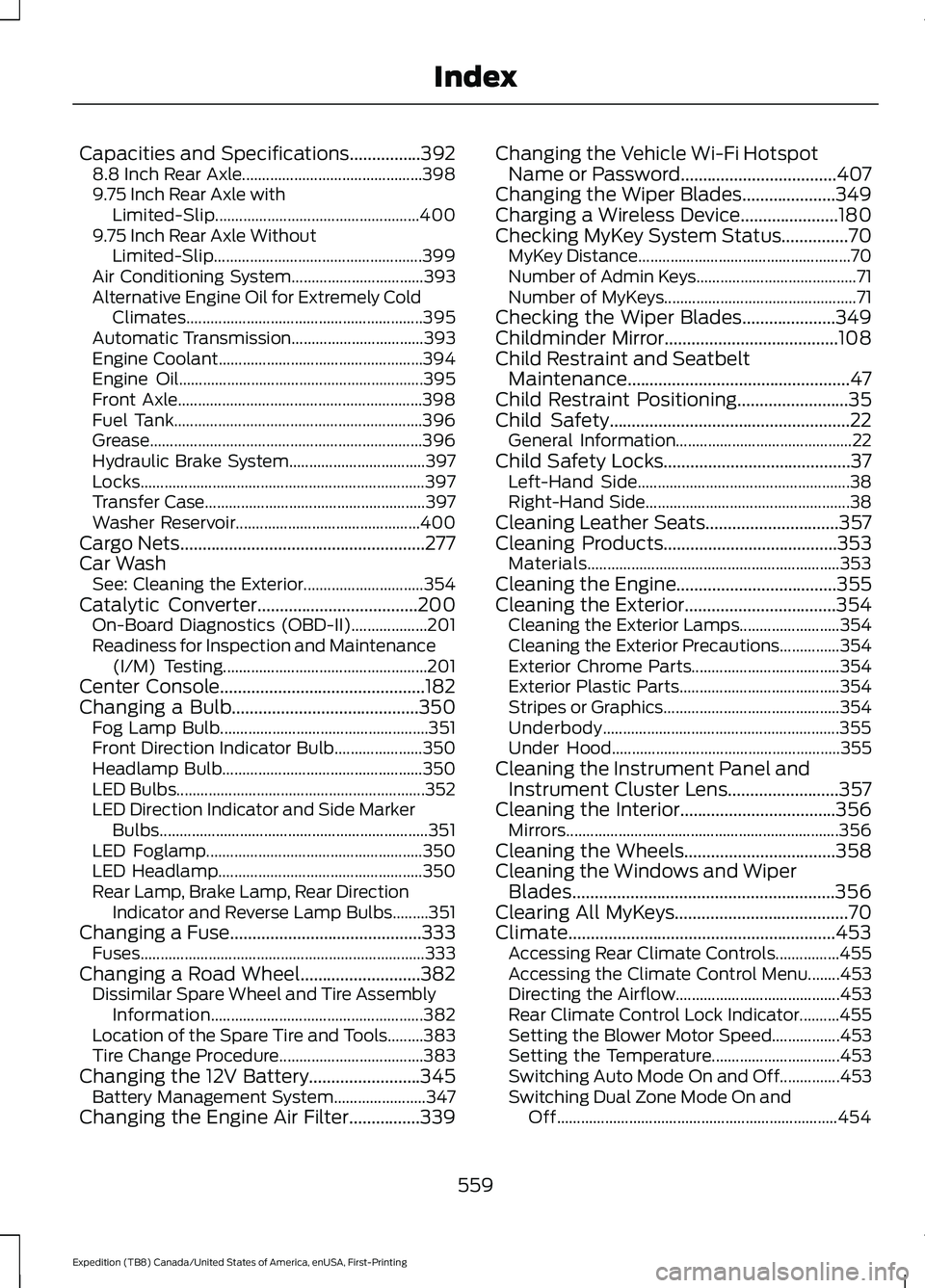
Capacities and Specifications................392
8.8 Inch Rear Axle............................................. 398
9.75 Inch Rear Axle with Limited-Slip................................................... 400
9.75 Inch Rear Axle Without Limited-Slip.................................................... 399
Air Conditioning System................................. 393
Alternative Engine Oil for Extremely Cold Climates........................................................... 395
Automatic Transmission................................. 393
Engine Coolant................................................... 394
Engine Oil............................................................. 395
Front Axle............................................................. 398
Fuel Tank.............................................................. 396
Grease.................................................................... 396
Hydraulic Brake System.................................. 397
Locks....................................................................... 397
Transfer Case....................................................... 397
Washer Reservoir.............................................. 400
Cargo Nets.......................................................277
Car Wash See: Cleaning the Exterior.............................. 354
Catalytic Converter....................................200 On-Board Diagnostics (OBD-II)................... 201
Readiness for Inspection and Maintenance (I/M) Testing................................................... 201
Center Console
..............................................182
Changing a Bulb..........................................350
Fog Lamp Bulb.................................................... 351
Front Direction Indicator Bulb...................... 350
Headlamp Bulb.................................................. 350
LED Bulbs.............................................................. 352
LED Direction Indicator and Side Marker Bulbs................................................................... 351
LED Foglamp...................................................... 350
LED Headlamp................................................... 350
Rear Lamp, Brake Lamp, Rear Direction Indicator and Reverse Lamp Bulbs.........351
Changing a Fuse
...........................................333
Fuses....................................................................... 333
Changing a Road Wheel
...........................382
Dissimilar Spare Wheel and Tire Assembly
Information..................................................... 382
Location of the Spare Tire and Tools.........383
Tire Change Procedure.................................... 383
Changing the 12V Battery
.........................345
Battery Management System....................... 347
Changing the Engine Air Filter................339 Changing the Vehicle Wi-Fi Hotspot
Name or Password
...................................407
Changing the Wiper Blades.....................349
Charging a Wireless Device......................180
Checking MyKey System Status...............70 MyKey Distance..................................................... 70
Number of Admin Keys........................................ 71
Number of MyKeys................................................ 71
Checking the Wiper Blades.....................349
Childminder Mirror.......................................108
Child Restraint and Seatbelt Maintenance..................................................47
Child Restraint Positioning.........................35
Child Safety
......................................................22
General Information............................................ 22
Child Safety Locks..........................................37 Left-Hand Side..................................................... 38
Right-Hand Side................................................... 38
Cleaning Leather Seats..............................357
Cleaning Products
.......................................353
Materials............................................................... 353
Cleaning the Engine....................................355
Cleaning the Exterior
..................................354
Cleaning the Exterior Lamps......................... 354
Cleaning the Exterior Precautions...............354
Exterior Chrome Parts..................................... 354
Exterior Plastic Parts........................................ 354
Stripes or Graphics............................................ 354
Underbody........................................................... 355
Under Hood......................................................... 355
Cleaning the Instrument Panel and Instrument Cluster Lens.........................357
Cleaning the Interior...................................356 Mirrors.................................................................... 356
Cleaning the Wheels..................................358
Cleaning the Windows and Wiper Blades...........................................................356
Clearing All MyKeys.......................................70
Climate............................................................453 Accessing Rear Climate Controls................455
Accessing the Climate Control Menu........453
Directing the Airflow......................................... 453
Rear Climate Control Lock Indicator..........455
Setting the Blower Motor Speed.................453
Setting the Temperature................................ 453
Switching Auto Mode On and Off...............453
Switching Dual Zone Mode On and Off...................................................................... 454
559
Expedition (TB8) Canada/United States of America, enUSA, First-Printing Index