manual transmission FORD EXPEDITION 2021 User Guide
[x] Cancel search | Manufacturer: FORD, Model Year: 2021, Model line: EXPEDITION, Model: FORD EXPEDITION 2021Pages: 574, PDF Size: 8.33 MB
Page 209 of 574
WARNING: When doing this
procedure, you need to take the
transmission out of park (P) which
means your vehicle can roll freely. To
avoid unwanted vehicle movement,
always fully apply the parking brake prior
to doing this procedure. Use wheels
chocks if appropriate.
1. Do not press the brake pedal. Press the
Start/Stop button.
2. Fully press down on the brake pedal. Keep the brakes applied through step
6.
3. Press the accelerator pedal to the floor
and hold through step 6.
4. Rotate transmission selector to Neutral
(N) and press the manual (M) button.
5. Press and release the push to start button, the transmission needs a
minimum of 2 seconds to exit park.
6. When neutral (N) displays, you can release the brake and accelerator
pedals.
To exit Stay in Neutral mode, select a
different gear.
A message appears in your information
display screen when your vehicle has
entered Stay in Neutral mode.
Drive (D)
Drive (D) is the normal driving position for
the best fuel economy. The overdrive
function allows automatic upshifts and
downshifts through gears one through ten. Manual (M)
With the transmission selector in manual
(M) or by placing the shifter column into
the manual position, you can change gears
up or down as preferred. By pushing the
manual (M) button, you have control of
selecting the gear you desire using the +
and - buttons on the transmission selector.
Tow/Haul Mode WARNING:
Do not use tow/haul
when the road surface is slippery. Failure
to follow this instruction could result in
the loss of control of your vehicle. With Column Shifter
To activate tow haul for the
column shifter, press the button
on the gearshift lever to cycle through the
available drive modes until you can select
tow haul mode.
See Drive Control (page
271). The tow haul indicator light
illuminates in the instrument cluster when
the system is active.
With Console Shifter
To activate tow haul, press the drive
modes button or rotate the dial, to cycle
through the available drive modes until you
can select tow haul mode.
See Drive
Control (page 271). The tow haul indicator
light illuminates in the instrument cluster
when the system is active.
206
Expedition (TB8) Canada/United States of America, enUSA, First-Printing TransmissionE246592
Page 211 of 574
With the transmission selector in drive (D),
push the – button to active PRS. The
available and selected gears show on the
instrument cluster.
All available gears display with the current
gear indicated. Push the – button again to
lock out gears beginning with the highest
gear. For example, push the – button twice
to lock out 10th and 9th gears. Only the
available gears display and the
transmission automatically shifts between
the available gears. Push the + button to
unlock gears and allow the transmission
to shift to higher gears. The transmission
shifts automatically within the gear range
you select.
Manual (M)
Pushing the manual (M) button on the
selector allows you to manually select the
gear you desire or by moving the shifter
column to the manual (M) position. Only
the current gear displays. Use the buttons
on the transmission selector to manually
select gears. Push the + button to upshift
or the – button to downshift. Once in
manual mode, press manual (M) again to
deactivate manual control, or place the
column in the preferred position.
SelectShift does not automatically upshift,
even if the engine is approaching the RPM
limit. Shift it manually by pushing the +
button.
Brake-Shift Interlock (Console
Shifter Only)
WARNING: When doing this
procedure, you need to take the
transmission out of park (P) which
means your vehicle can roll freely. To
avoid unwanted vehicle movement,
always fully apply the parking brake prior
to doing this procedure. Use wheels
chocks if appropriate. WARNING:
If the parking brake is
fully released, but the brake warning
lamp remains illuminated, the brakes
may not be working properly. Have your
vehicle checked as soon as possible.
Note: Do not drive your vehicle until you
verify that the brake lamps are working.
Note: See your authorized dealer as soon
as possible if you use this procedure.
Note: For some markets, this feature
disables.
Your vehicle comes with a brake-shift
interlock feature that prevents moving the
transmission from park (P) when the
ignition is in the on position and you have
not pressed the brake pedal.
If you cannot move the selector out of park
(P) with the ignition in the on position and
the brake pedal pressed, a malfunction
may have occurred. It is possible that a
fuse has blown, or your vehicle ’s brake
lamps are not operating properly. See Fuse
Specification Chart
(page 325).
If the fuse has not blown and the brake
lamps are working properly, the following
procedure allows you to move the gearshift
lever from park (P):
1. Apply the parking brake and start the engine before performing this
procedure.
2. Locate your brake-shift interlock access slot. The slot is in your center
console storage bin. The access slot
does not have a label.
208
Expedition (TB8) Canada/United States of America, enUSA, First-Printing Transmission
Page 223 of 574
Note:
If the system activates, the brake
pedal may pulse and may travel further.
Maintain pressure on the brake pedal. You
may also hear a noise from the system. This
is normal.
ELECTRIC PARKING BRAKE WARNING: Always fully apply the
parking brake and make sure you shift
into park (P). Failure to follow this
instruction could result in personal injury
or death. WARNING:
If you drive extended
distances with the parking brake applied,
you could cause damage to the brake
system. WARNING:
The electric parking
brake does not operate if the vehicle
battery is running out of charge.
Your vehicle has an electric parking brake.
You operate it with a switch instead of a
lever. The switch is on the center console
or to the left-hand side of the steering
wheel, on the lower part of the instrument
panel.
Note: The electric parking brake makes
noises during operation. This is normal.
Applying the Electric Parking
Brake Pull the switch upward.
The red warning lamp flashes
during operation and illuminates
when the parking brake is
applied. Note:
It remains illuminated for a short
period of time after you switch the ignition
off.
If it continues to flash or does not
illuminate, the system has malfunctioned.
Have your vehicle checked as soon as
possible.
Note: You can apply the electric parking
brake when the ignition is off.
Note: The electric parking brake could
automatically apply when you shift into park
(P). See
Transmission (page 203).
Applying the Electric Parking Brake in
an Emergency
Note: Do not apply the electric parking
brake when your vehicle is moving, except
in an emergency. If you repeatedly use the
electric parking brake to slow or stop your
vehicle, you could cause damage to the
brake system.
You can use the electric parking brake to
slow or stop your vehicle in an emergency. Pull the switch upward and hold
it.
The red warning lamp
illuminates, a tone sounds and
the stoplamps turn on.
The electric parking brake continues to
slow your vehicle down unless you release
the switch.
Manually Releasing the Electric
Parking Brake
Switch the ignition on.
Press and hold the brake pedal.
220
Expedition (TB8) Canada/United States of America, enUSA, First-Printing BrakesE267156 E270480 E267156 E270480
Page 245 of 574
Active guidelines are only shown with fixed
guidelines. To use active guidelines, turn
the steering wheel to point the guidelines
toward an intended path. If you change
the steering wheel position while reversing,
your vehicle might deviate from the original
intended path.
The fixed and active guidelines fade in and
out depending on the steering wheel
position. The active guidelines do not
display when the steering wheel position
is straight.
Always use caution while reversing.
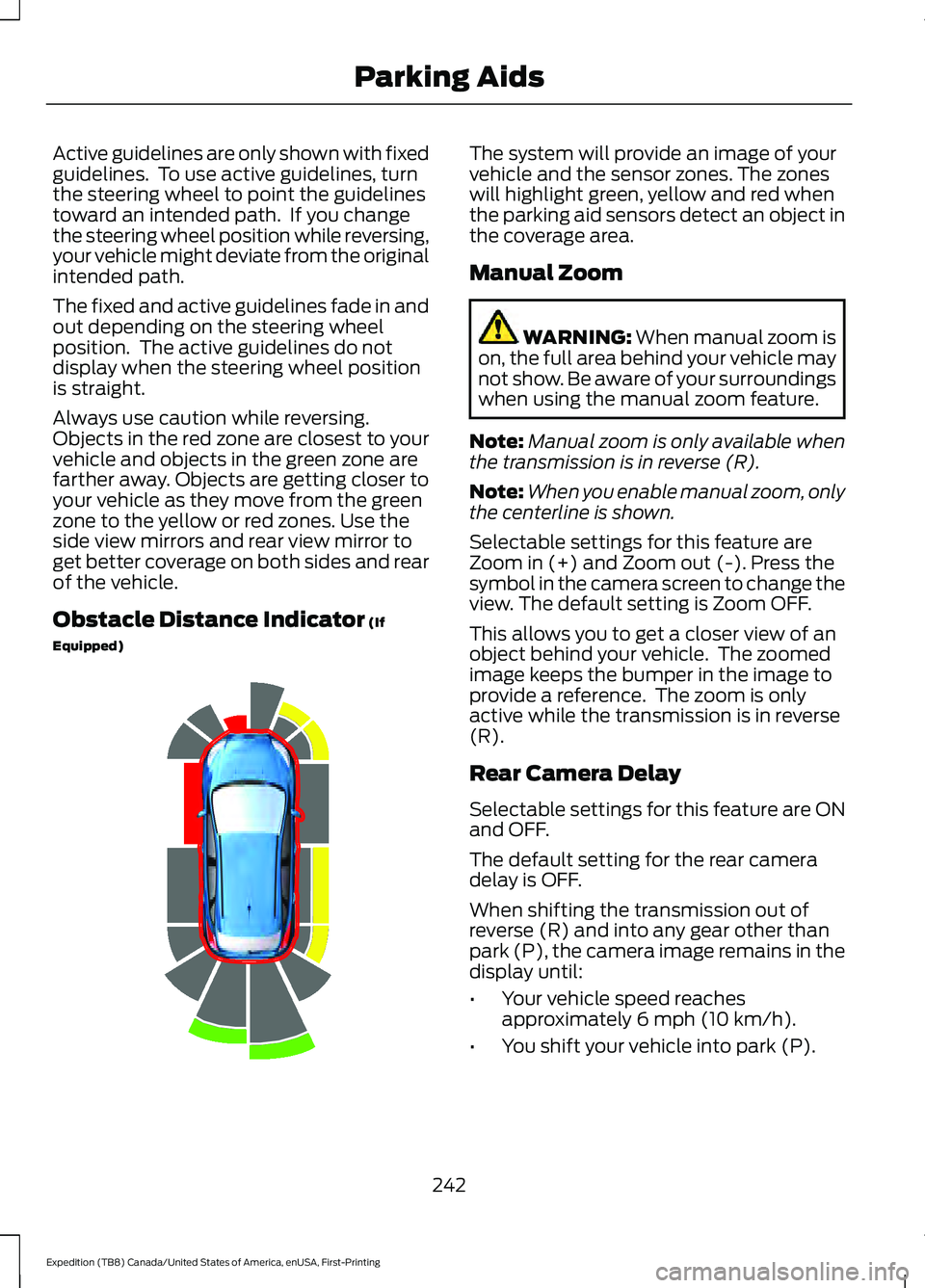
Objects in the red zone are closest to your
vehicle and objects in the green zone are
farther away. Objects are getting closer to
your vehicle as they move from the green
zone to the yellow or red zones. Use the
side view mirrors and rear view mirror to
get better coverage on both sides and rear
of the vehicle.
Obstacle Distance Indicator (If
Equipped) The system will provide an image of your
vehicle and the sensor zones. The zones
will highlight green, yellow and red when
the parking aid sensors detect an object in
the coverage area.
Manual Zoom
WARNING:
When manual zoom is
on, the full area behind your vehicle may
not show. Be aware of your surroundings
when using the manual zoom feature.
Note: Manual zoom is only available when
the transmission is in reverse (R).
Note: When you enable manual zoom, only
the centerline is shown.
Selectable settings for this feature are
Zoom in (+) and Zoom out (-). Press the
symbol in the camera screen to change the
view. The default setting is Zoom OFF.
This allows you to get a closer view of an
object behind your vehicle. The zoomed
image keeps the bumper in the image to
provide a reference. The zoom is only
active while the transmission is in reverse
(R).
Rear Camera Delay
Selectable settings for this feature are ON
and OFF.
The default setting for the rear camera
delay is OFF.
When shifting the transmission out of
reverse (R) and into any gear other than
park (P), the camera image remains in the
display until:
• Your vehicle speed reaches
approximately
6 mph (10 km/h).
• You shift your vehicle into park (P).
242
Expedition (TB8) Canada/United States of America, enUSA, First-Printing Parking AidsE190459
Page 288 of 574
TOWING A TRAILER
WARNING: Towing trailers
beyond the maximum
recommended gross trailer
weight exceeds the limit of your
vehicle and could result in engine
damage, transmission damage,
structural damage, loss of
vehicle control, vehicle rollover
and personal injury. WARNING:
Do not exceed
the GVWR or the GAWR
specified on the certification
label.
Your vehicle may have electrical
items, such as fuses or relays,
related to towing. See
Fuses
(page 325).
Some vehicles may have the
ability to modify trailer towing
features. See Towing (page
285).
Your vehicle's load capacity
designation is by weight, not by
volume, so you cannot necessarily
use all available space when
loading a vehicle or trailer.
Towing a trailer places an extra
load on your vehicle's engine,
transmission, axle, brakes, tires
and suspension. Inspect these
components periodically during,
and after, any towing operation. Load Placement
To help minimize how trailer
movement affects your vehicle
when driving:
•
Load the heaviest items closest
to the trailer floor.
• Load the heaviest items
centered between the left and
right side trailer tires.
• Load the heaviest items above
the trailer axles or just slightly
forward toward the trailer
tongue. Do not allow the final
trailer tongue weight to go
above or below 10-15% of the
loaded trailer weight.
• Select a ball mount with the
correct rise or drop and load
capacity. When both the
loaded vehicle and trailer are
connected, the trailer frame
should be level, or slightly
angled down toward your
vehicle, when viewed from the
side.
When driving with a trailer or
payload, a slight takeoff vibration
or shudder may be present due to
the increased payload weight.
Additional information regarding
proper trailer loading and setting
your vehicle up for towing is
located in another chapter of this
manual. See
Load Limit (page
279).
You can also find information in
the
RV & Trailer Towing Guide
available at your authorized
dealer, or online.
285
Expedition (TB8) Canada/United States of America, enUSA, First-Printing Towing
Page 320 of 574
We recommend the use of a wheel lift and
dollies or flatbed equipment to tow your
vehicle. Do not tow with a slingbelt. We do
not approve a slingbelt towing procedure.
If you tow your vehicle incorrectly, or by
any other means, vehicle damage may
occur.
We produce a towing manual for all
authorized tow truck operators. Have your
tow truck operator refer to this manual for
proper hook-up and towing procedures for
your vehicle.
We recommend towing a four-wheel drive
vehicle with all wheels off the ground, such
as using a wheel lift and dollies or flatbed
equipment.
We recommend towing a rear-wheel drive
vehicle with the rear wheels on a tow dolly
when towing your vehicle from the front
using wheel lift equipment. This prevents
damage to the transmission.
We recommend towing a rear-wheel drive
vehicle with the front wheels on a tow dolly
when towing your vehicle from the rear
using wheel lift equipment. This prevents
damage to the front fascia.
TOWING POINTS (IF EQUIPPED)
WARNING:
Using recovery hooks
is dangerous and should only be done by
a person familiar with proper vehicle
recovery safety practices. Improper use
of recovery hooks may cause hook failure
or separation from the vehicle and could
result in serious injury or death. WARNING:
Always slowly remove
the slack from the recovery strap prior
to pulling. Failure to do so can introduce
significantly higher loads which can
cause the recovery hooks to break off, or
the recovery strap to fail which can cause
serious injury or death. WARNING:
Never link two straps
together with a clevis pin. These heavy
metal objects could become projectiles
if the strap breaks and can cause serious
injury or death.
Your vehicle comes equipped with
frame-mounted front recovery hooks.
These hooks should never have a load
applied to them greater than the gross
vehicle weight rating of your vehicle.
Before using recovery hooks:
• Make sure all attaching points are
secure and capable of withstanding
the applied load.
• Never use chains, cables or tow straps
with metal hook ends.
• Only use recovery straps that have a
minimum breaking strength two to
three times the gross vehicle weight of
the stuck vehicle.
• Make sure the recovery strap is in good
condition and free of visible cuts, tears
or damage.
• Use a damper device such as a tarp,
heavy blanket or piece of carpet
draped over the recovery strap to help
absorb the energy in the event the
strap breaks.
• Make sure the stuck vehicle is not
loaded heavier than its gross vehicle
weight rating specified on the
certification label.
• Always align the tow vehicle and stuck
vehicle in a straight line (within 10
degrees).
• Keep bystanders to the
sides of the
vehicle, at a distance of at least twice
the length of the recovery strap. This
helps avoid injury from the hazard of a
recovery hook or strap breaking, or a
vehicle lurching into their path.
317
Expedition (TB8) Canada/United States of America, enUSA, First-Printing Roadside Emergencies
Page 425 of 574
USING SYNC™ WITH YOUR
PHONE
Hands-free calling is one of the main
features of SYNC. While the system
supports a variety of features, many are
dependent on your cellular phone's
functionality. At a minimum, most cellular
phones with Bluetooth wireless technology
support the following functions:
•
Answering an incoming call.
• Ending a call.
• Dialing a number.
• Redialing.
• Call waiting notification.
• Caller identification.
Other features, such as text messaging
using Bluetooth and automatic phonebook
download, are phone-dependent features.
Pairing a Phone
Wirelessly pairing your phone with SYNC
allows you to make and receive hands-free
calls.
Note: Make sure to switch on the ignition
and the radio. Shift the transmission into
park (P) for automatic transmission or
neutral (N) for manual transmission.
Using the Audio System
Note: To scroll through the menus, press
the up and down arrows on your audio
system.
1. Make sure to switch on your phone's Bluetooth feature before starting the
search. See your device's manual if
necessary.
2. Press the Settings button.
3. Select Bluetooth from the menu.
4. Press the
OK button.
5. Select the option to add. This starts the pairing process. 6. When a message to begin pairing
appears in the audio display, search for
SYNC on your device.
Depending on your phone's capability and
your market, the system may prompt you
with questions, such as setting the current
phone as the primary phone and
downloading your phonebook.
Using Voice Commands Make sure to switch on your
phone's Bluetooth feature
before starting the search. See
your device's manual if necessary.
Press the voice button and when
prompted say: Action and Descrip-
tion
Voice Command
Follow the instruc-
tions on the audio
display.
Pair Phone
Phone Voice Commands Press the voice button. You can
do things like place a phone call
and access text messages.
When prompted, say a command. See the
following table for examples of
commands. Voice Command
___ List of Commands
Help
Call ___
Dial ___
Text Messages
422
Expedition (TB8) Canada/United States of America, enUSA, First-Printing SYNC™
(If Equipped)E142599 E142599
Page 566 of 574
Fuel Gauge.............................................................
114
Gearbox See: Transmission............................................. 203
General Information on Radio Frequencies..................................................60
Intelligent Access................................................ 60
General Maintenance Information.......483
Multi-Point Inspection..................................... 485
Owner Checks and Services......................... 484
Protecting Your Investment.......................... 483
Why Maintain Your Vehicle?......................... 483
Why Maintain Your Vehicle at Your Dealership?..................................................... 483
Getting Assistance Outside the U.S. and Canada..........................................................321
Getting the Services You Need................318 Away From Home............................................... 318
Global Opening.............................................105 Remote Control Front Windows.................. 106
H
Hazard Flashers.............................................313
Headlamp Adjusting See: Adjusting the Headlamps..................... 347
Headlamp Exit Delay....................................99
Headlamp Removal See: Removing a Headlamp......................... 350
Headrest See: Head Restraints......................................... 157
Head Restraints.............................................157 Adjusting the Head Restraint......................... 158
Front Seat Manual Head Restraints............158
Heated Exterior Mirrors...............................155
Heated Rear Window..................................154
Heated Steering Wheel
...............................93
Heating See: Climate Control......................................... 146
Hill Descent Control
....................................227
Principle of Operation....................................... 227
Hill Start Assist..............................................221 Switching the System On and Off...............222
Using Hill Start Assist....................................... 222
Hints on Controlling the Interior Climate - Vehicles With: Automatic
Temperature Control
...............................150
Defogging the Side Windows in Cold
Weather.............................................................. 151General Hints.......................................................
150
Quickly Cooling the Interior.............................. 151
Quickly Heating the Interior............................. 151
Recommended Settings for Cooling............151
Recommended Settings for Heating...........151
Hints on Controlling the Interior Climate - Vehicles With: Manual Temperature
Control............................................................151
Defogging the Side Windows in Cold Weather............................................................. 152
General Hints......................................................... 151
Quickly Cooling the Interior............................. 152
Quickly Heating the Interior............................. 151
Recommended Settings for Cooling...........152
Recommended Settings for Heating...........152
Vehicle Stationary for Extended Periods During Extreme High Ambient
Temperatures.................................................. 152
Hints on Driving With Anti-Lock Brakes............................................................219
Hood Lock See: Opening and Closing the Hood..........335
Horn
....................................................................94
How Does the Rear Occupant Alert System Work
................................................172
I
Ignition Switch
...............................................183
In California (U.S. Only).............................319
Information Display Control.......................93
Information Displays
....................................119
General Information - Vehicles With: 4 Inch
Information and Entertainment Display
Screen................................................................. 119
General Information - Vehicles With: 8 Inch Information and Entertainment Display
Screen................................................................ 123
Information Messages
................................129
Active Park............................................................ 129
Adaptive Cruise Control................................... 130
AdvanceTrac and Traction Control..............130
Airbag....................................................................... 131
Alarm and Security.............................................. 131
Automatic Engine Shutdown.......................... 131
Battery and Charging System........................ 132
Blind Spot Information and Cross Traffic Alert System.................................................... 132
563
Expedition (TB8) Canada/United States of America, enUSA, First-Printing Index
Page 567 of 574
Doors and Locks..................................................
133
Driver Alert............................................................. 133
Drivetrain................................................................ 134
Engine..................................................................... 135
Four-Wheel Drive................................................ 135
Fuel........................................................................\
.. 136
Keys and Intelligent Access............................ 136
Lane Keeping System........................................ 137
Maintenance........................................................ 138
MyKey...................................................................... 138
Off Road................................................................. 139
Park Aid.................................................................. 140
Park Brake............................................................. 140
Power Steering..................................................... 141
Pre-Collision Assist............................................. 141
Pro Trailer Backup Assist™............................. 142
Remote Start........................................................ 143
Seats........................................................................\
143
Starting System .................................................. 143
Tire Pressure Monitoring System.................144
Trailer...................................................................... 144
Transmission........................................................ 145
Installing Child Restraints...........................24
Child Seats.............................................................. 24
Combining Seatbelt and LATCH Lower Anchors for Attaching Child Safety
Seats.................................................................... 30
Using Lap and Shoulder Belts......................... 24
Using Lower Anchors and Tethers for CHildren (LATCH)........................................... 29
Using Tether Straps............................................ 30
Instrument Cluster
.........................................111
Instrument Lighting Dimmer.....................99
Instrument Panel...........................................20
Interior Air Quality........................................156
Interior Lamps................................................101
Front Interior Lamp............................................. 101
Interior Lamp Function..................................... 102
Rear Interior Lamps........................................... 102
Switching All of the Interior Lamps Off........................................................................\
101
Switching All of the Interior Lamps On........................................................................\
. 101
Switching the Individual Map Lamps On and Off............................................................... 101
Interior Mirror
..................................................107
Automatic Dimming Mirror............................. 107
Manual Dimming Mirror.................................... 107Introduction........................................................9
J
Jump Starting the Vehicle
.........................314
Connecting the Jumper Cables..................... 314
Jump Starting....................................................... 315
Preparing Your Vehicle...................................... 314
Removing the Jumper Cables........................ 315
K
Keyless Entry
....................................................76
Displaying the Factory-Set Code................... 78
Locking and Unlocking....................................... 78
SECURICODE™ KEYLESS ENTRY KEYPAD............................................................... 76
Keyless Starting
............................................183
Ignition Modes..................................................... 184
Keys and Remote Controls........................60
L
Lane Keeping System................................255 Switching the System On and Off..............256
System Display.................................................... 257
System Settings................................................. 256
Troubleshooting................................................. 258
Liftgate..............................................................80
Liftgate Window...........................................109 Opening the Liftgate Window....................... 109
Lighting Control..............................................98 Flashing the Headlamp High Beam..............99
Headlamp High Beam....................................... 98
Lighting..............................................................98 General Information........................................... 98
Limited Slip Differential
.............................218
Locking Function................................................. 218
Spare Tire.............................................................. 218
Trailer Towing....................................................... 218
Load Carriers See: Roof Racks and Load Carriers.............278
Load Carrying
.................................................275
Load Limit.......................................................279 Special Loading Instructions for Owners of
Pick-up Trucks and Utility-type
Vehicles............................................................ 283
564
Expedition (TB8) Canada/United States of America, enUSA, First-Printing Index
Page 573 of 574
Trailer Reversing Aids.................................286
Principle of Operation...................................... 286
Pro Trailer Backup Assist™........................... 286
Setting Up Pro Trailer Backup Assist.........286
Troubleshooting.................................................. 291
Using Pro Trailer Backup Assist................... 290
Trailer Sway Control...................................295
Transfer Case Fluid Check.......................344
Transmission.................................................203
Transporting the Vehicle............................316
U
Under Hood Overview
...............................336
Unique Driving Characteristics................189
Universal Garage Door Opener................174 HomeLink Wireless Control System............174
USB Port
...........................................................417
Locating the USB Ports.................................... 418
Using Adaptive Cruise Control................247 Automatic Cancellation.................................. 250
Blocked Sensor................................................... 252
Canceling the Set Speed................................ 250
Changing the Set Speed................................. 250
Detection Issues.................................................. 251
Following a Vehicle........................................... 248
Following a Vehicle to a Complete Stop................................................................... 249
Hilly Condition Usage........................................ 251
Overriding the Set Speed............................... 250
Park Brake Application..................................... 251
Resuming the Set Speed................................ 250
Setting the Adaptive Cruise Speed............248
Setting the Adaptive Cruise Speed When Your Vehicle is Stationary.......................... 248
Setting the Gap Distance............................... 249
Switching Adaptive Cruise Control Off........................................................................\
251
Switching Adaptive Cruise Control On....................................................................... 248
Switching to Normal Cruise Control...........253
System Not Available....................................... 252
Using Four-Wheel Drive.............................210 4WD Switch Selections................................... 210
4X4 Indicator Lights.......................................... 210
Driving Off-Road With Truck and Utility Vehicles.............................................................. 213How Your Vehicle Differs From Other
Vehicles.............................................................. 212
Operating Four-Wheel Drive Vehicles With Spare or Mismatched Tires........................ 212
Using Hill Descent Control........................227 Hill Descent Modes............................................ 227
Using MyKey With Remote Start Systems............................................................71
Using Power Running Boards....................89 Automatic Power Deploy.................................. 89
Automatic Power Stow..................................... 89
Bounce-back......................................................... 90
Enabling and Disabling...................................... 89
Manual Power Deploy........................................ 89
Using Snow Chains
......................................377
Using Stability Control...............................225
Stability Control and Traction Control with
Roll Stability Control ™ (RSC™).............225
Using SYNC™ With Your Media Player............................................................425
Audio Voice Commands................................. 425
Media Sources.................................................... 425
Using SYNC™ With Your Phone............422 Accessing Features through the Phone
Menu.................................................................. 423
Pairing a Phone................................................... 422
Phone Controls................................................... 423
Phone Voice Commands................................ 422
Using Traction Control...............................223 Switching the System Off .............................. 223
System Indicator Lights and Messages......................................................... 223
Using Voice Recognition
...........................420
Audio Voice Commands.................................. 437
Climate Voice Commands............................. 438
Initiating a Voice Session................................ 420
Mobile App Voice Commands....................... 441
Navigation Voice Commands....................... 440
Phone Voice Commands................................ 438
SiriusXM Traffic and Travel Link Voice Commands..................................................... 442
System Interaction and Feedback...............421
Voice Settings Commands............................ 442
Utilizing the Mediation/Arbitration Program (Canada Only)..........................321
570
Expedition (TB8) Canada/United States of America, enUSA, First-Printing Index