steering FORD EXPEDITION 2021 Owner's Manual
[x] Cancel search | Manufacturer: FORD, Model Year: 2021, Model line: EXPEDITION, Model: FORD EXPEDITION 2021Pages: 574, PDF Size: 8.33 MB
Page 131 of 574
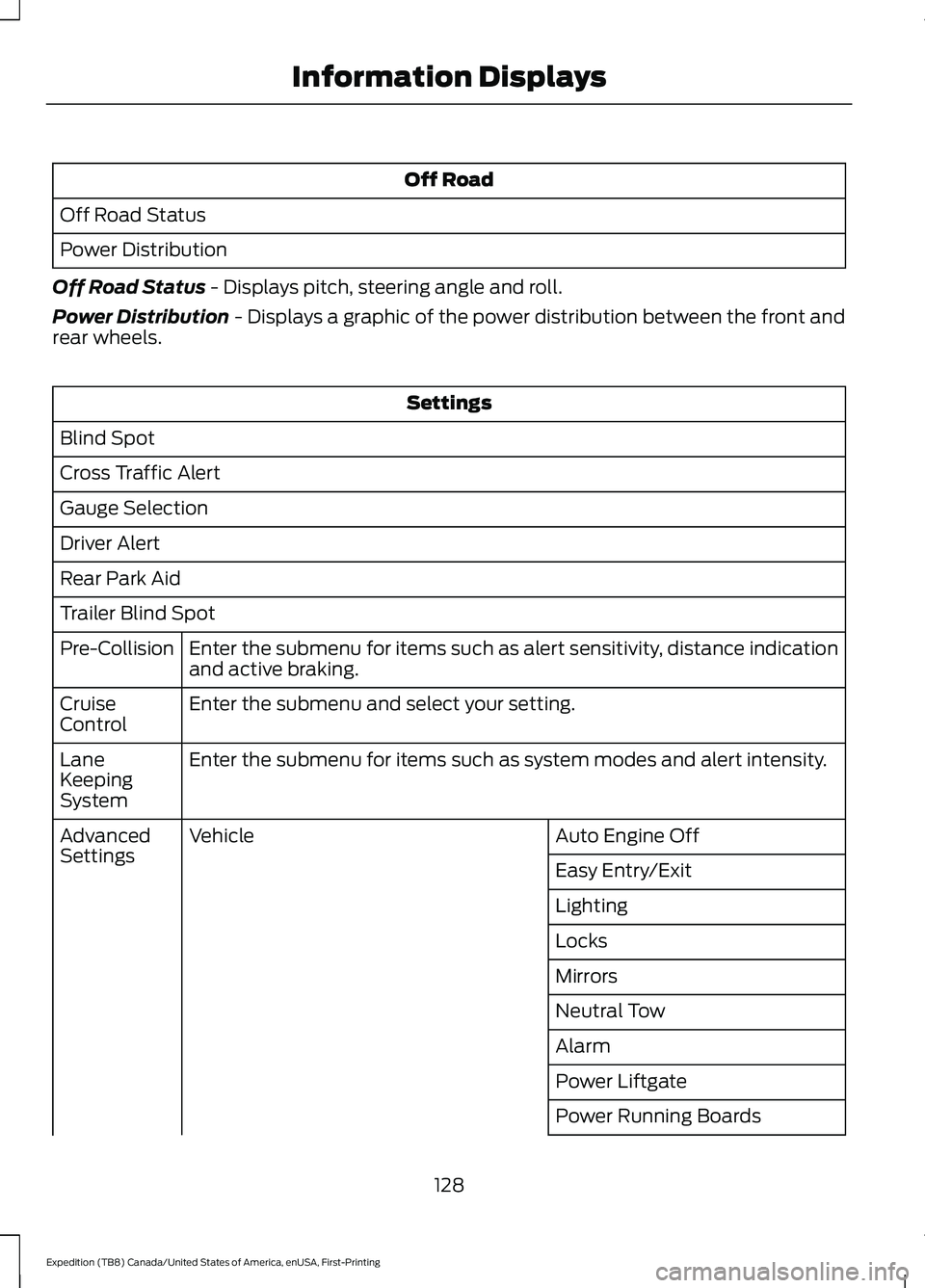
Off Road
Off Road Status
Power Distribution
Off Road Status - Displays pitch, steering angle and roll.
Power Distribution
- Displays a graphic of the power distribution between the front and
rear wheels. Settings
Blind Spot
Cross Traffic Alert
Gauge Selection
Driver Alert
Rear Park Aid
Trailer Blind Spot Enter the submenu for items such as alert sensitivity, distance indication
and active braking.
Pre-Collision
Enter the submenu and select your setting.
Cruise
Control
Enter the submenu for items such as system modes and alert intensity.
Lane
Keeping
System
Auto Engine Off
Vehicle
Advanced
Settings
Easy Entry/Exit
Lighting
Locks
Mirrors
Neutral Tow
Alarm
Power Liftgate
Power Running Boards
128
Expedition (TB8) Canada/United States of America, enUSA, First-Printing Information Displays
Page 140 of 574
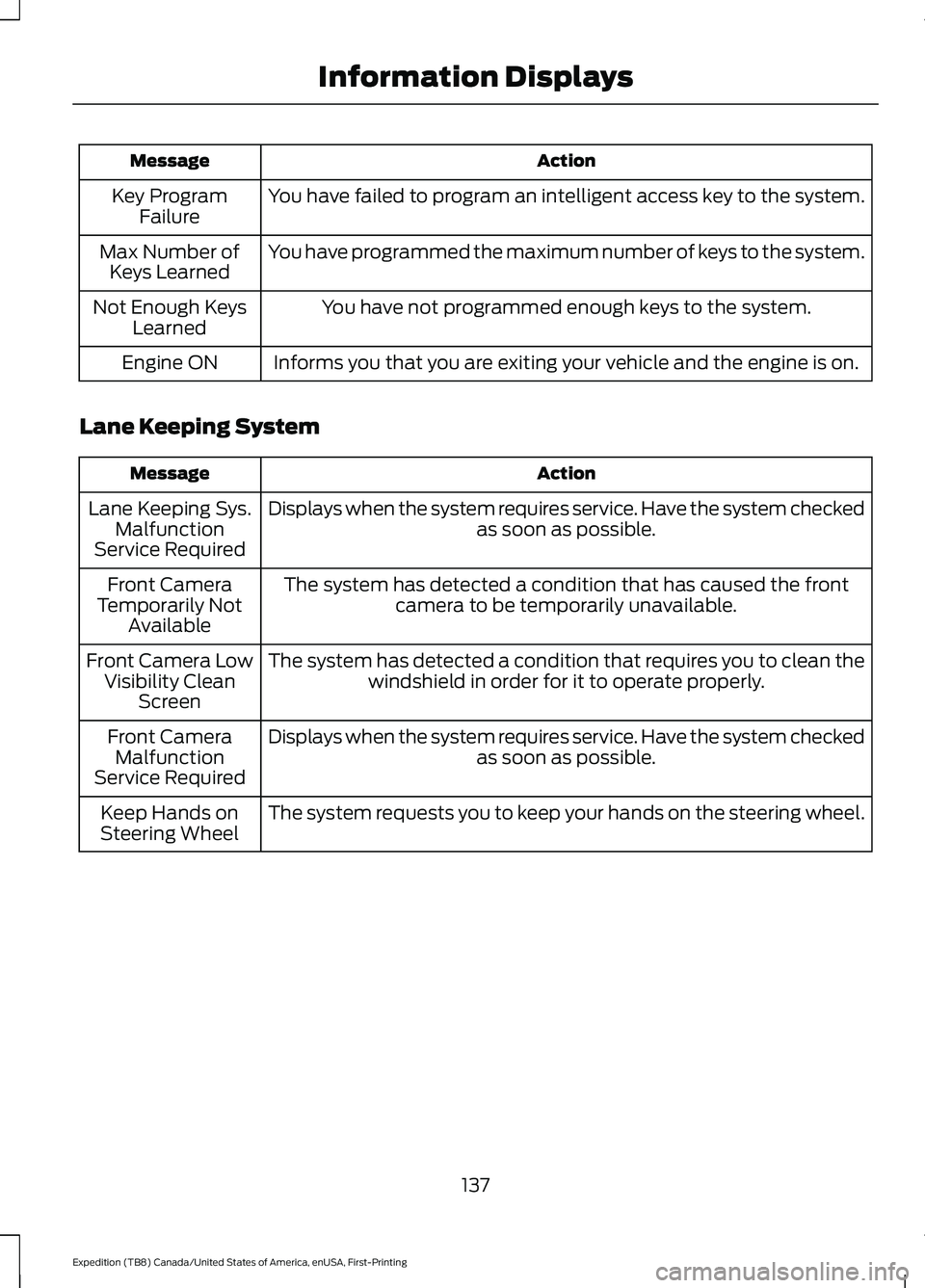
Action
Message
You have failed to program an intelligent access key to the system.
Key Program
Failure
You have programmed the maximum number of keys to the system.
Max Number of
Keys Learned
You have not programmed enough keys to the system.
Not Enough Keys
Learned
Informs you that you are exiting your vehicle and the engine is on.
Engine ON
Lane Keeping System Action
Message
Displays when the system requires service. Have the system checked as soon as possible.
Lane Keeping Sys.
Malfunction
Service Required
The system has detected a condition that has caused the frontcamera to be temporarily unavailable.
Front Camera
Temporarily Not Available
The system has detected a condition that requires you to clean thewindshield in order for it to operate properly.
Front Camera Low
Visibility Clean Screen
Displays when the system requires service. Have the system checked as soon as possible.
Front Camera
Malfunction
Service Required
The system requests you to keep your hands on the steering wheel.
Keep Hands on
Steering Wheel
137
Expedition (TB8) Canada/United States of America, enUSA, First-Printing Information Displays
Page 144 of 574
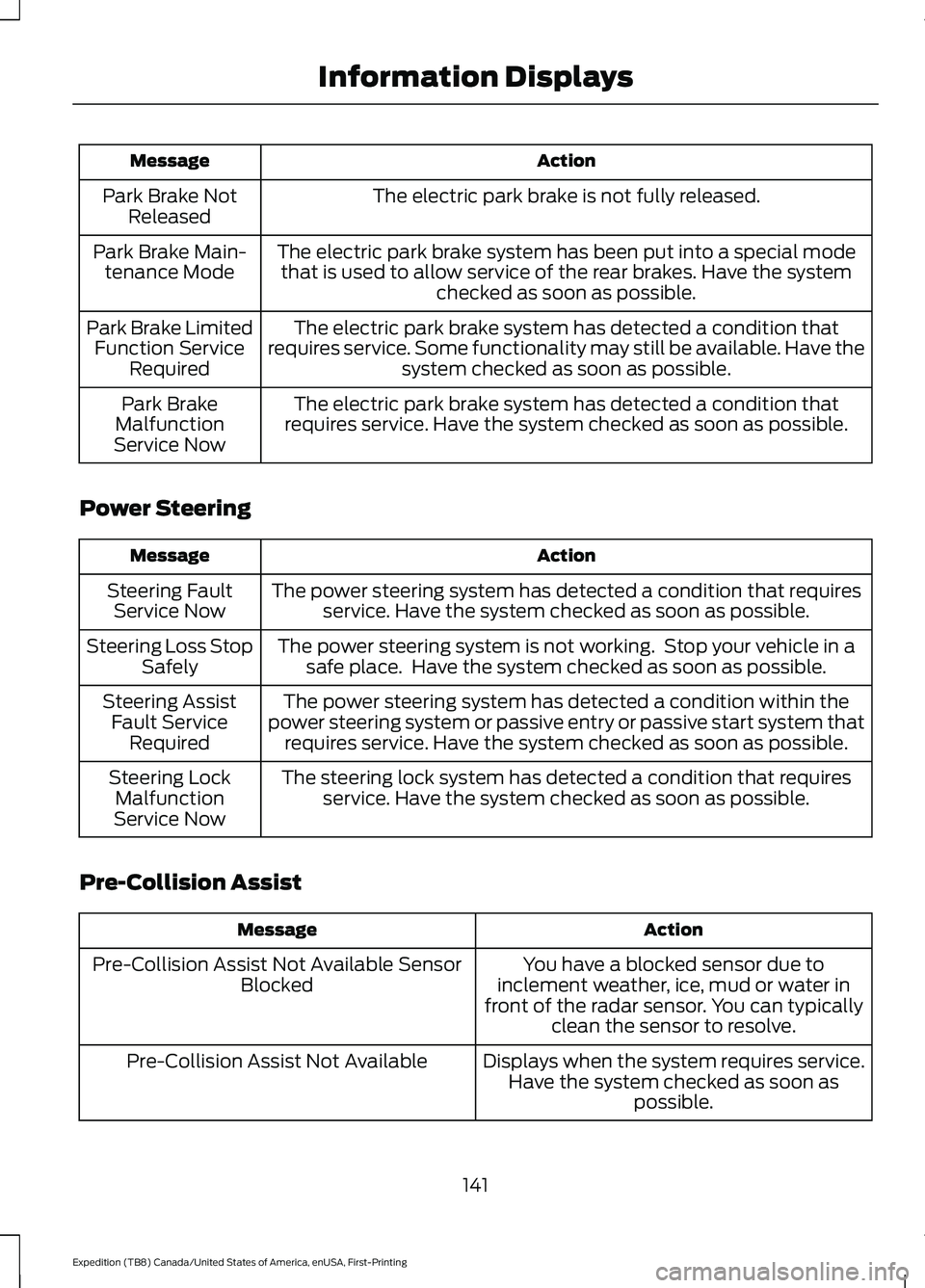
Action
Message
The electric park brake is not fully released.
Park Brake Not
Released
The electric park brake system has been put into a special modethat is used to allow service of the rear brakes. Have the system checked as soon as possible.
Park Brake Main-
tenance Mode
The electric park brake system has detected a condition that
requires service. Some functionality may still be available. Have the system checked as soon as possible.
Park Brake Limited
Function Service Required
The electric park brake system has detected a condition that
requires service. Have the system checked as soon as possible.
Park Brake
Malfunction
Service Now
Power Steering Action
Message
The power steering system has detected a condition that requiresservice. Have the system checked as soon as possible.
Steering Fault
Service Now
The power steering system is not working. Stop your vehicle in asafe place. Have the system checked as soon as possible.
Steering Loss Stop
Safely
The power steering system has detected a condition within the
power steering system or passive entry or passive start system that requires service. Have the system checked as soon as possible.
Steering Assist
Fault Service Required
The steering lock system has detected a condition that requiresservice. Have the system checked as soon as possible.
Steering Lock
Malfunction
Service Now
Pre-Collision Assist Action
Message
You have a blocked sensor due to
inclement weather, ice, mud or water in
front of the radar sensor. You can typically clean the sensor to resolve.
Pre-Collision Assist Not Available Sensor
Blocked
Displays when the system requires service.Have the system checked as soon as possible.
Pre-Collision Assist Not Available
141
Expedition (TB8) Canada/United States of America, enUSA, First-Printing Information Displays
Page 145 of 574
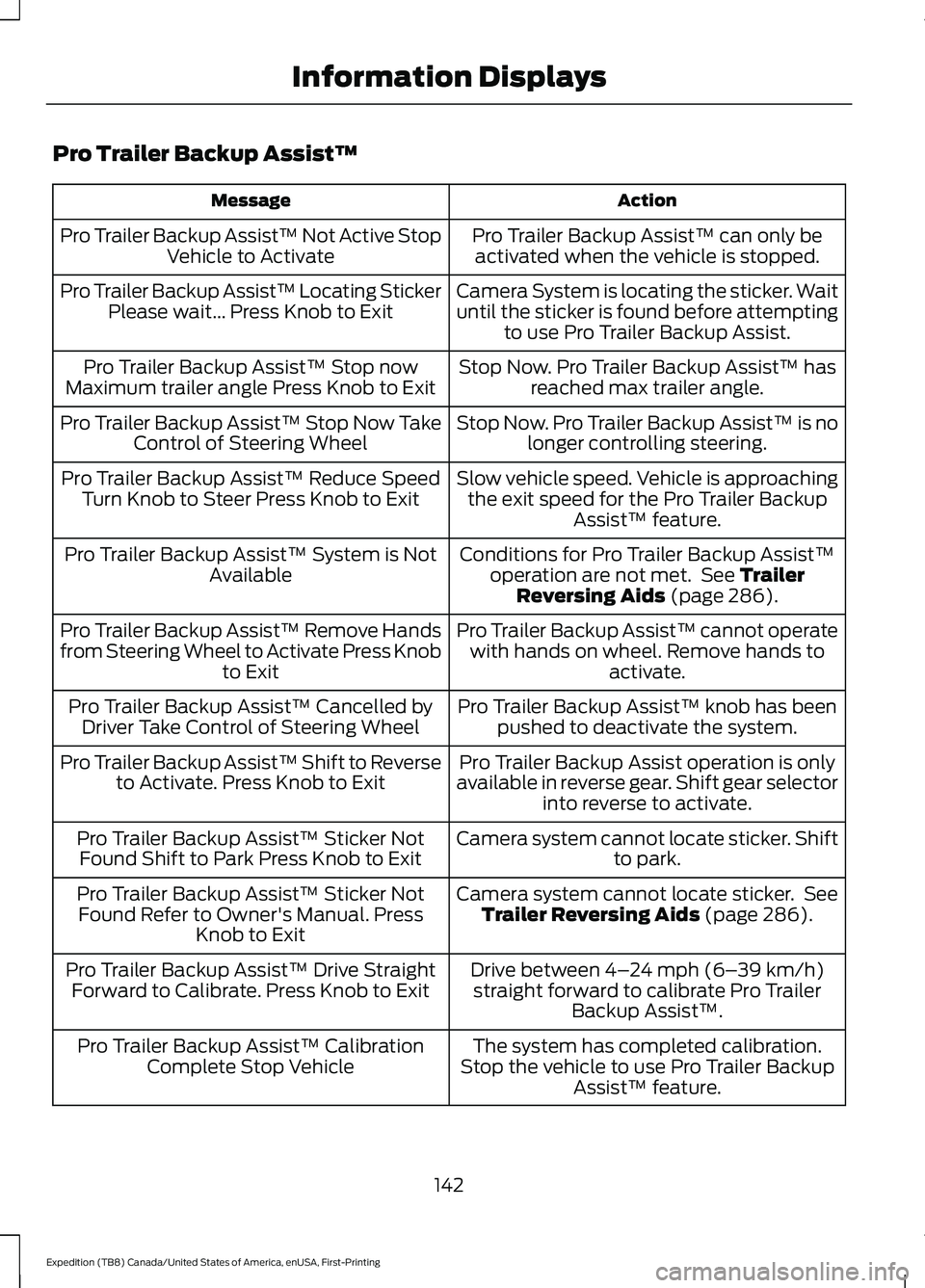
Pro Trailer Backup Assist™
Action
Message
Pro Trailer Backup Assist™ can only beactivated when the vehicle is stopped.
Pro Trailer Backup Assist™ Not Active Stop
Vehicle to Activate
Camera System is locating the sticker. Wait
until the sticker is found before attemptingto use Pro Trailer Backup Assist.
Pro Trailer Backup Assist™ Locating Sticker
Please wait... Press Knob to Exit
Stop Now. Pro Trailer Backup Assist™ hasreached max trailer angle.
Pro Trailer Backup Assist™ Stop now
Maximum trailer angle Press Knob to Exit
Stop Now. Pro Trailer Backup Assist™ is nolonger controlling steering.
Pro Trailer Backup Assist™ Stop Now Take
Control of Steering Wheel
Slow vehicle speed. Vehicle is approachingthe exit speed for the Pro Trailer Backup Assist™ feature.
Pro Trailer Backup Assist™ Reduce Speed
Turn Knob to Steer Press Knob to Exit
Conditions for Pro Trailer Backup Assist™operation are not met. See Trailer
Reversing Aids (page 286).
Pro Trailer Backup Assist™ System is Not
Available
Pro Trailer Backup Assist™ cannot operatewith hands on wheel. Remove hands to activate.
Pro Trailer Backup Assist™ Remove Hands
from Steering Wheel to Activate Press Knob
to Exit
Pro Trailer Backup Assist™ knob has beenpushed to deactivate the system.
Pro Trailer Backup Assist™ Cancelled by
Driver Take Control of Steering Wheel
Pro Trailer Backup Assist operation is only
available in reverse gear. Shift gear selector into reverse to activate.
Pro Trailer Backup Assist™ Shift to Reverse
to Activate. Press Knob to Exit
Camera system cannot locate sticker. Shiftto park.
Pro Trailer Backup Assist™ Sticker Not
Found Shift to Park Press Knob to Exit
Camera system cannot locate sticker. SeeTrailer Reversing Aids
(page 286).
Pro Trailer Backup Assist™ Sticker Not
Found Refer to Owner's Manual. Press Knob to Exit
Drive between
4–24 mph (6– 39 km/h)
straight forward to calibrate Pro Trailer Backup Assist™.
Pro Trailer Backup Assist™ Drive Straight
Forward to Calibrate. Press Knob to Exit
The system has completed calibration.
Stop the vehicle to use Pro Trailer Backup Assist™ feature.
Pro Trailer Backup Assist™ Calibration
Complete Stop Vehicle
142
Expedition (TB8) Canada/United States of America, enUSA, First-Printing Information Displays
Page 158 of 574
Note:
Do not use harsh chemicals, razor
blades or other sharp objects to clean or
remove decals from the inside of the heated
rear window. The vehicle warranty may not
cover damage to the heated rear window
grid lines.
HEATED EXTERIOR MIRRORS
When you switch the heated rear window
on, the heated exterior mirrors turn on.
Note: Do not remove ice from the mirrors
with a scraper or adjust the mirror glass
when it is frozen in place.
Note: Do not clean the mirror housing or
glass with harsh abrasives, fuel or other
petroleum-based cleaning products. The
vehicle warranty may not cover damage
caused to the mirror housing or glass.
REMOTE START (IF EQUIPPED)
You can switch this feature on or off and
adjust the settings using the information
display controls. See
Information
Displays (page 119).
The climate control system adjusts the
interior temperature during remote start.
You cannot adjust the climate control
setting during remote start operation.
Switch the ignition on to make
adjustments.
Based on your remote start settings, the
following vehicle-dependent features may
or may not remain on after remote starting
your vehicle:
• Climate controlled seats.
• Heated steering wheel.
• Heated mirrors.
• Heated rear window.
• Windshield wiper de-icer. Note:
For dual zone climate controlled
seats, the passenger seat setting defaults
to match the driver seat during remote start.
Automatic Settings
If
Auto is on, the system sets the interior
temperature to 72°F (22°C) and heats or
cools the vehicle interior as required to
achieve comfort.
Note: In cold weather, the heated rear
window and heated mirrors turn on.
Last Settings
If
Last Settings is on, the system uses the
settings last selected before you turned
off the vehicle.
Heated and Cooled Features
In Auto mode, certain heated features may
switch on during cold weather, and cooled
features during hot weather.
155
Expedition (TB8) Canada/United States of America, enUSA, First-Printing Climate Control
Page 160 of 574
SITTING IN THE CORRECT
POSITION
WARNING: Sitting improperly, out
of position or with the seatback reclined
too far can take weight off the seat
cushion and affect the decision of the
passenger sensing system, resulting in
serious injury or death in the event of a
crash. Always sit upright against your
seat back, with your feet on the floor. WARNING: Do not recline the seat
backrest too far as this can cause the
occupant to slide under the seatbelt,
resulting in personal injury in the event
of a crash. WARNING:
Do not place objects
higher than the top of the seat backrest.
Failure to follow this instruction could
result in personal injury or death in the
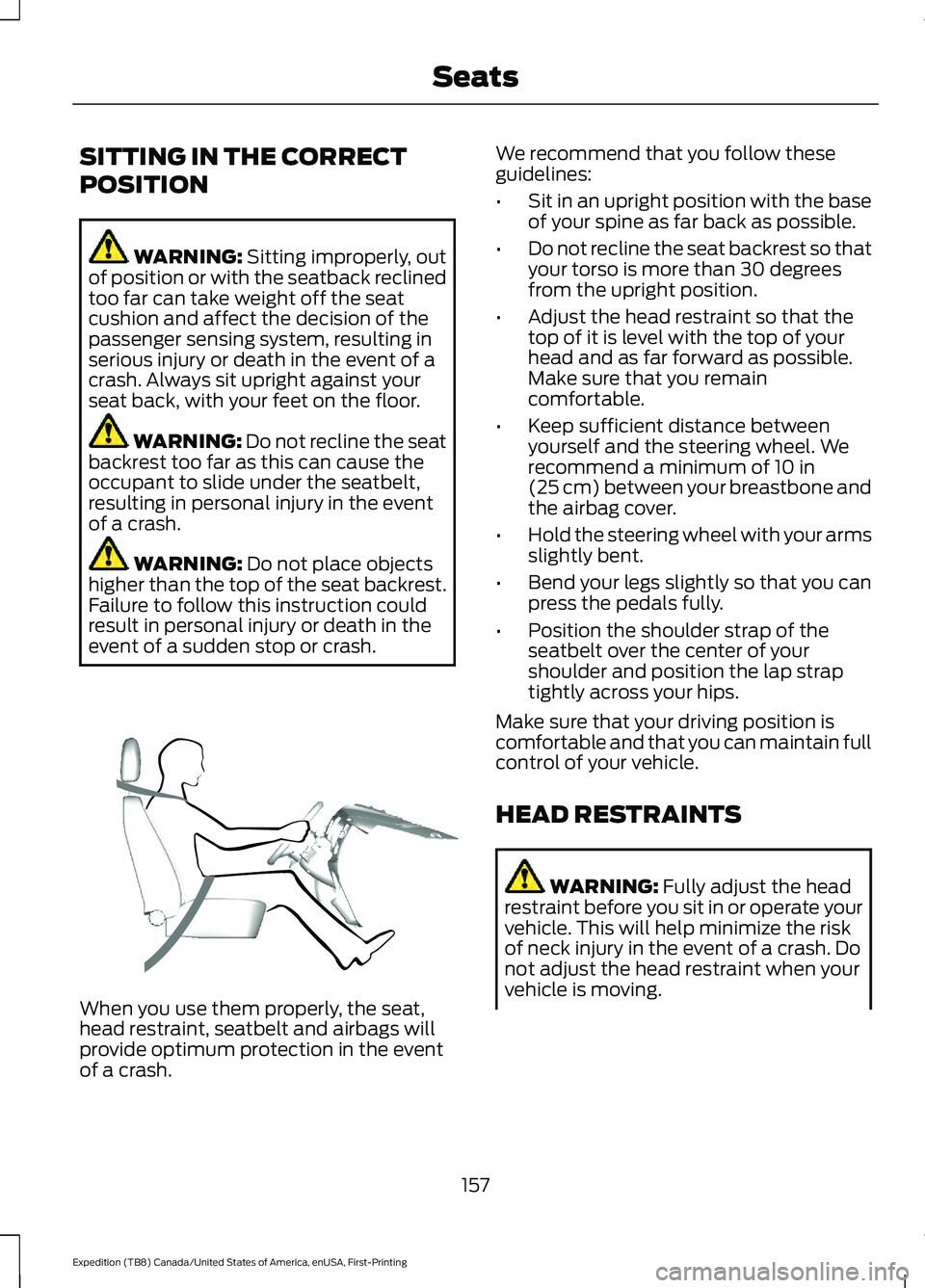
event of a sudden stop or crash. When you use them properly, the seat,
head restraint, seatbelt and airbags will
provide optimum protection in the event
of a crash. We recommend that you follow these
guidelines:
•
Sit in an upright position with the base
of your spine as far back as possible.
• Do not recline the seat backrest so that
your torso is more than 30 degrees
from the upright position.
• Adjust the head restraint so that the
top of it is level with the top of your
head and as far forward as possible.
Make sure that you remain
comfortable.
• Keep sufficient distance between
yourself and the steering wheel. We
recommend a minimum of
10 in
(25 cm) between your breastbone and
the airbag cover.
• Hold the steering wheel with your arms
slightly bent.
• Bend your legs slightly so that you can
press the pedals fully.
• Position the shoulder strap of the
seatbelt over the center of your
shoulder and position the lap strap
tightly across your hips.
Make sure that your driving position is
comfortable and that you can maintain full
control of your vehicle.
HEAD RESTRAINTS WARNING:
Fully adjust the head
restraint before you sit in or operate your
vehicle. This will help minimize the risk
of neck injury in the event of a crash. Do
not adjust the head restraint when your
vehicle is moving.
157
Expedition (TB8) Canada/United States of America, enUSA, First-Printing SeatsE68595
Page 163 of 574
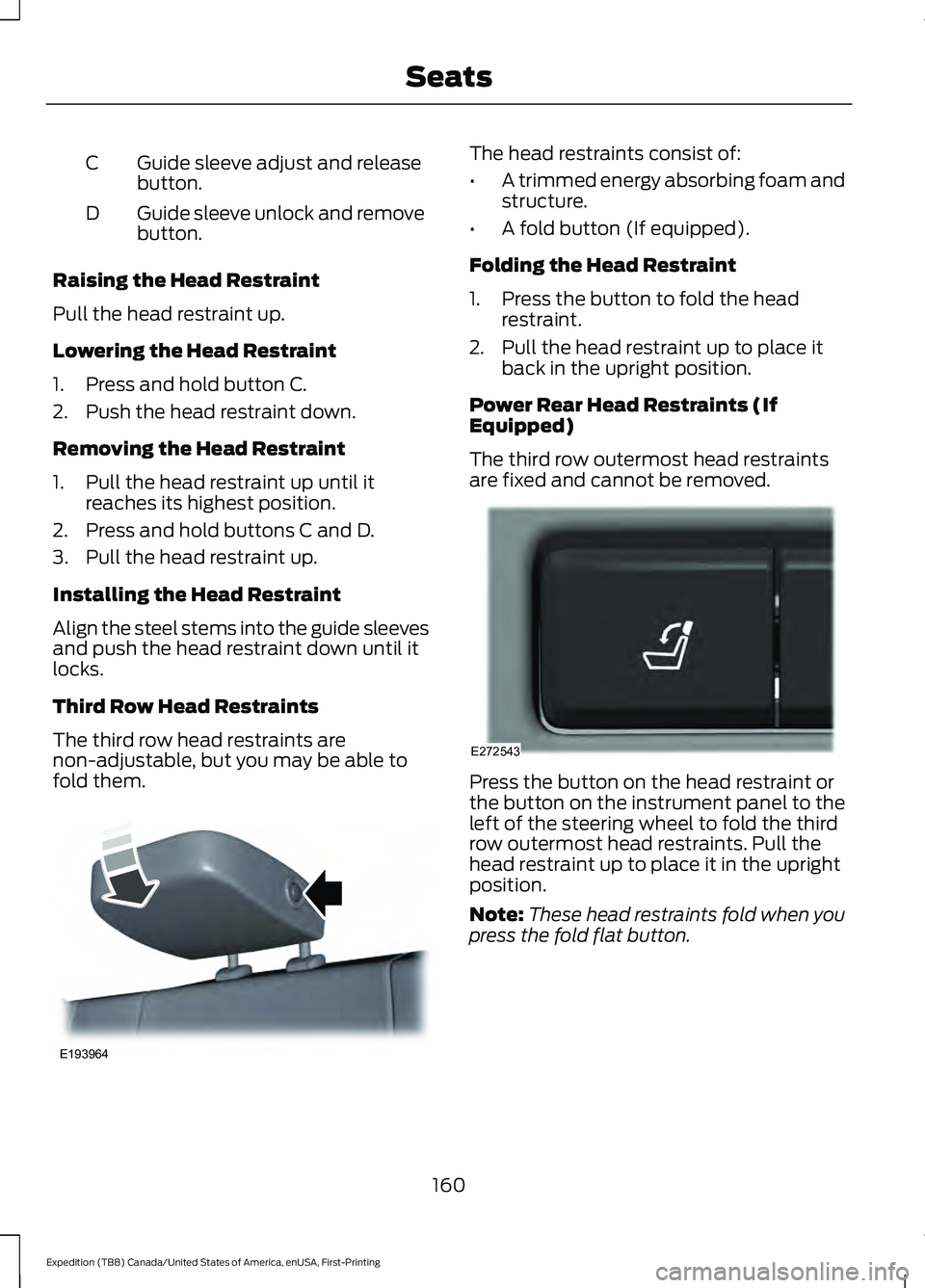
Guide sleeve adjust and release
button.
C
Guide sleeve unlock and remove
button.
D
Raising the Head Restraint
Pull the head restraint up.
Lowering the Head Restraint
1. Press and hold button C.
2. Push the head restraint down.
Removing the Head Restraint
1. Pull the head restraint up until it reaches its highest position.
2. Press and hold buttons C and D.
3. Pull the head restraint up.
Installing the Head Restraint
Align the steel stems into the guide sleeves
and push the head restraint down until it
locks.
Third Row Head Restraints
The third row head restraints are
non-adjustable, but you may be able to
fold them. The head restraints consist of:
•
A trimmed energy absorbing foam and
structure.
• A fold button (If equipped).
Folding the Head Restraint
1. Press the button to fold the head restraint.
2. Pull the head restraint up to place it back in the upright position.
Power Rear Head Restraints (If
Equipped)
The third row outermost head restraints
are fixed and cannot be removed. Press the button on the head restraint or
the button on the instrument panel to the
left of the steering wheel to fold the third
row outermost head restraints. Pull the
head restraint up to place it in the upright
position.
Note:
These head restraints fold when you
press the fold flat button.
160
Expedition (TB8) Canada/United States of America, enUSA, First-Printing SeatsE193964 E272543
Page 167 of 574
MEMORY FUNCTION (IF EQUIPPED)
WARNING:
Before activating the
memory seat, make sure that the area
immediately surrounding the seat is clear
of obstructions and that all occupants
are clear of moving parts. WARNING:
Do not use the memory
function when your vehicle is moving.
This feature automatically recalls the
position of the following:
• Driver seat.
• Power mirrors.
• Optional power adjustable foot pedals.
• Optional power adjustable steering
column.
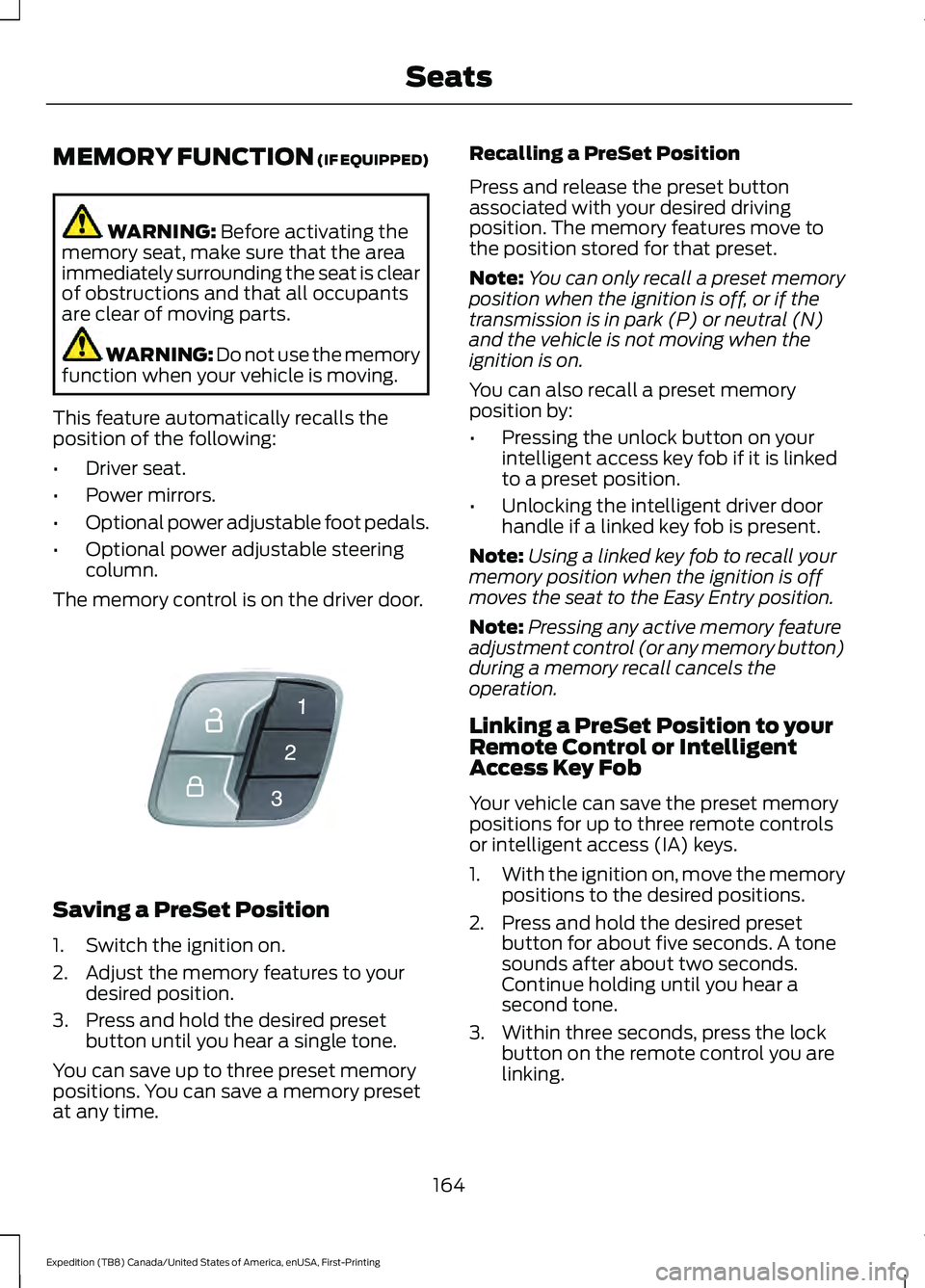
The memory control is on the driver door. Saving a PreSet Position
1. Switch the ignition on.
2. Adjust the memory features to your
desired position.
3. Press and hold the desired preset button until you hear a single tone.
You can save up to three preset memory
positions. You can save a memory preset
at any time. Recalling a PreSet Position
Press and release the preset button
associated with your desired driving
position. The memory features move to
the position stored for that preset.
Note:
You can only recall a preset memory
position when the ignition is off, or if the
transmission is in park (P) or neutral (N)
and the vehicle is not moving when the
ignition is on.
You can also recall a preset memory
position by:
• Pressing the unlock button on your
intelligent access key fob if it is linked
to a preset position.
• Unlocking the intelligent driver door
handle if a linked key fob is present.
Note: Using a linked key fob to recall your
memory position when the ignition is off
moves the seat to the Easy Entry position.
Note: Pressing any active memory feature
adjustment control (or any memory button)
during a memory recall cancels the
operation.
Linking a PreSet Position to your
Remote Control or Intelligent
Access Key Fob
Your vehicle can save the preset memory
positions for up to three remote controls
or intelligent access (IA) keys.
1. With the ignition on, move the memory
positions to the desired positions.
2. Press and hold the desired preset button for about five seconds. A tone
sounds after about two seconds.
Continue holding until you hear a
second tone.
3. Within three seconds, press the lock button on the remote control you are
linking.
164
Expedition (TB8) Canada/United States of America, enUSA, First-Printing SeatsE142554
Page 189 of 574
display showing a timer counting down. If
you do not intervene within 30 seconds,
your vehicle shuts down. Another message
appears in the information display to
inform you that your vehicle has shut down
to save fuel. Start your vehicle as normal.
Automatic Engine Shutdown Override
Note:
You cannot permanently switch off
the automatic shutdown feature. When you
switch it off temporarily, it turns on at the
next ignition cycle.
You can stop the shutdown, or reset the
timer, at any point before the 30-second
countdown has expired by doing any of the
following:
• You can reset the timer by interacting
with your vehicle, for example pressing
the brake or accelerator pedal.
• You can temporarily switch off the
shutdown feature any time the ignition
is on using the information display. See
Information Displays (page 119). The
feature only remains off for the current
ignition cycle.
• During the 30-second countdown, the
system prompts you to press OK or
RESET to temporarily switch the
feature off for the current ignition cycle
only.
Stopping the Engine When Your
Vehicle is Stationary
Vehicles with an Ignition Key
1. Shift into park (P).
2. Switch the ignition off.
3. Apply the parking brake.
Vehicles with Keyless Start
1. Shift into park (P).
2. Press the push button ignition switch.
3. Apply the parking brake. Note:
The ignition, all electrical circuits and
all warning lamps and indicators will be
turned off.
Note: If the engine is idling for 30 minutes,
the ignition and engine automatically shuts
down.
Stopping the Engine When Your
Vehicle is Moving WARNING: Switching off the
engine when your vehicle is still moving
results in a significant decrease in
braking assistance. Higher effort is
required to apply the brakes and to stop
your vehicle. A significant decrease in
steering assistance could also occur. The
steering does not lock, but higher effort
could be required to steer your vehicle.
When you switch the ignition off, some
electrical circuits, for example airbags,
also turn off. If you unintentionally switch
the ignition off, shift into neutral (N) and
restart the engine.
Vehicles with an Ignition Key
1. Shift into neutral and use the brakes to
bring your vehicle to a safe stop.
2. When your vehicle has stopped, shift into park (P) and switch the ignition
off.
3. Apply the parking brake.
Vehicles with Keyless Start
1. Shift into neutral and use the brakes to
bring your vehicle to a safe stop.
2. When your vehicle has stopped, shift into park (P).
3. Press and hold the push button ignition
switch, or press it three times within
two seconds.
4. Apply the parking brake.
186
Expedition (TB8) Canada/United States of America, enUSA, First-Printing Starting and Stopping the Engine
Page 192 of 574
AUTO-START-STOP
The system helps reduce fuel consumption
by automatically stopping and restarting
the engine when your vehicle has stopped.
The engine restarts automatically when
you release the brake pedal.
In some situations, your vehicle may restart
automatically, for example:
•
To maintain interior comfort.
• To recharge the battery.
Note: Power assist steering turns off when
the engine is off.
Note: If your vehicle is flex fuel capable,
Auto-Start-Stop will be inhibited for a short
time after a refuel event while the system
is verifying the fuel type being used. WARNING: Always fully apply the
parking brake. Make sure you shift into
park (P) for vehicles with an automatic
transmission. Switch the ignition off and
remove the key whenever you leave your
vehicle. WARNING:
Before opening the
hood or performing any maintenance,
fully apply the parking brake, shift into
park (P) or neutral (N) and switch the
ignition off. WARNING:
Always switch the
ignition off before leaving the vehicle. If
the ignition is switched on an automatic
restart may occur at any time. WARNING:
The system may
require the engine to automatically
restart when the auto-start-stop
indicator illuminates green or flashes
amber. Failure to follow this instruction
could result in personal injury. The Auto-Start-Stop system status is
available at a glance within the information
display. See Information Displays (page
119
).
Enabling Auto-Start-Stop
The system automatically enables every
time you start your vehicle if:
• You do not press the Auto-Start-Stop
button (not illuminated).
• Your vehicle exceeds an initial speed
of
3 mph (5 km/h) after you have
initially started your vehicle.
• You have stopped your vehicle.
• Your foot is on the brake pedal.
• The driver door is closed.
• There is adequate brake vacuum.
• The interior compartment has cooled
or warmed to an acceptable level.
• The front windshield defroster is off.
• You have not turned the steering wheel
rapidly or you do not have it at a sharp
angle.
• The vehicle is not on a steep road
grade.
• The battery is within optimal operating
conditions (battery state of charge and
temperature in range).
• The engine coolant is at operating
temperature.
• Elevation is below about
11,000 ft
(3,350 m).
• Ambient temperature is moderate.
• The trailer is not connected.
• If you select Normal, Eco, Snow/Wet
or Grass/Gravel/Snow modes.
• You are not in 4H or 4L.
• You have not selected Manual shift
mode.
189
Expedition (TB8) Canada/United States of America, enUSA, First-Printing Unique Driving Characteristics