four wheel drive FORD EXPEDITION 2021 Owners Manual
[x] Cancel search | Manufacturer: FORD, Model Year: 2021, Model line: EXPEDITION, Model: FORD EXPEDITION 2021Pages: 574, PDF Size: 8.33 MB
Page 7 of 574

Wireless Accessory Charger Precautions
........................................................................\
180
Locating the Wireless Accessory Charger ........................................................................\
180
Charging a Wireless Device .....................
180
Storage Compartments
Center Console .............................................
182
Overhead Console .......................................
182
Starting and Stopping the Engine
General Information ...................................
183
Ignition Switch ..............................................
183
Keyless Starting ...........................................
183
Starting a Gasoline Engine ......................
184
Engine Block Heater ...................................
187
Unique Driving Characteristics
Auto-Start-Stop ..........................................
189
Fuel and Refueling
Safety Precautions ......................................
192
Fuel Quality ....................................................
192
Fuel Filler Funnel Location .......................
193
Running Out of Fuel ...................................
193
Refueling .........................................................
195
Fuel Consumption .......................................
197
Engine Emission Control
Emission Law ................................................
199
Catalytic Converter ....................................
200
Transmission
Automatic Transmission .........................
203
Four-Wheel Drive
Using Four-Wheel Drive ............................
210Rear Axle
Limited Slip Differential
............................
218
Brakes
General Information ...................................
219
Hints on Driving With Anti-Lock Brakes ........................................................................\
.
219
Electric Parking Brake ...............................
220
Hill Start Assist .............................................
221
Traction Control
Principle of Operation ...............................
223
Using Traction Control ..............................
223
Stability Control
Principle of Operation ...............................
224
Using Stability Control ..............................
225
Hill Descent Control
Principle of Operation ................................
227
Using Hill Descent Control .......................
227
Parking Aids
Principle of Operation ...............................
228
Rear Parking Aid ..........................................
229
Front Parking Aid ........................................
230
Side Sensing System .................................
232
Active Park Assist .......................................
233
Rear View Camera .....................................
240
360 Degree Camera ..................................
243
Cruise Control
What Is Cruise Control ..............................
246
Switching Cruise Control On and Off ........................................................................\
246
Setting the Cruise Control Speed ........
246
Canceling the Set Speed .........................
247
Resuming the Set Speed .........................
247
Cruise Control Indicators ..........................
247
Using Adaptive Cruise Control ...............
247
4
Expedition (TB8) Canada/United States of America, enUSA, First-Printing Table of Contents
Page 8 of 574
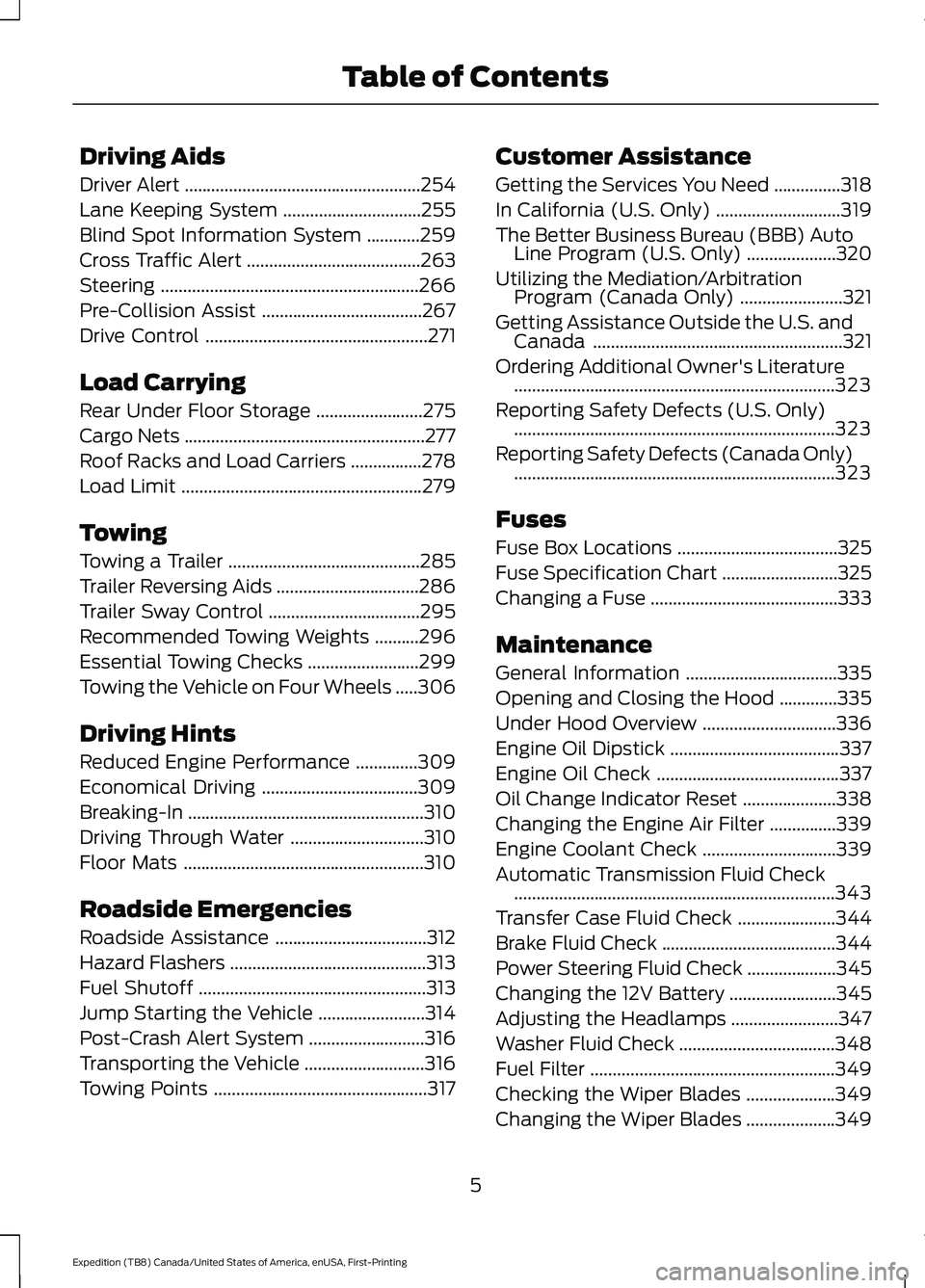
Driving Aids
Driver Alert
.....................................................254
Lane Keeping System ...............................
255
Blind Spot Information System ............
259
Cross Traffic Alert .......................................
263
Steering ..........................................................
266
Pre-Collision Assist ....................................
267
Drive Control ..................................................
271
Load Carrying
Rear Under Floor Storage ........................
275
Cargo Nets ......................................................
277
Roof Racks and Load Carriers ................
278
Load Limit ......................................................
279
Towing
Towing a Trailer ...........................................
285
Trailer Reversing Aids ................................
286
Trailer Sway Control ..................................
295
Recommended Towing Weights ..........
296
Essential Towing Checks .........................
299
Towing the Vehicle on Four Wheels .....
306
Driving Hints
Reduced Engine Performance ..............
309
Economical Driving ...................................
309
Breaking-In .....................................................
310
Driving Through Water ..............................
310
Floor Mats ......................................................
310
Roadside Emergencies
Roadside Assistance ..................................
312
Hazard Flashers ............................................
313
Fuel Shutoff ...................................................
313
Jump Starting the Vehicle ........................
314
Post-Crash Alert System ..........................
316
Transporting the Vehicle ...........................
316
Towing Points ................................................
317Customer Assistance
Getting the Services You Need
...............
318
In California (U.S. Only) ............................
319
The Better Business Bureau (BBB) Auto Line Program (U.S. Only) ....................
320
Utilizing the Mediation/Arbitration Program (Canada Only) .......................
321
Getting Assistance Outside the U.S. and Canada ........................................................
321
Ordering Additional Owner's Literature ........................................................................\
323
Reporting Safety Defects (U.S. Only) ........................................................................\
323
Reporting Safety Defects (Canada Only) ........................................................................\
323
Fuses
Fuse Box Locations ....................................
325
Fuse Specification Chart ..........................
325
Changing a Fuse ..........................................
333
Maintenance
General Information ..................................
335
Opening and Closing the Hood .............
335
Under Hood Overview ..............................
336
Engine Oil Dipstick ......................................
337
Engine Oil Check .........................................
337
Oil Change Indicator Reset .....................
338
Changing the Engine Air Filter ...............
339
Engine Coolant Check ..............................
339
Automatic Transmission Fluid Check ........................................................................\
343
Transfer Case Fluid Check ......................
344
Brake Fluid Check .......................................
344
Power Steering Fluid Check ....................
345
Changing the 12V Battery ........................
345
Adjusting the Headlamps ........................
347
Washer Fluid Check ...................................
348
Fuel Filter .......................................................
349
Checking the Wiper Blades ....................
349
Changing the Wiper Blades ....................
349
5
Expedition (TB8) Canada/United States of America, enUSA, First-Printing Table of Contents
Page 119 of 574
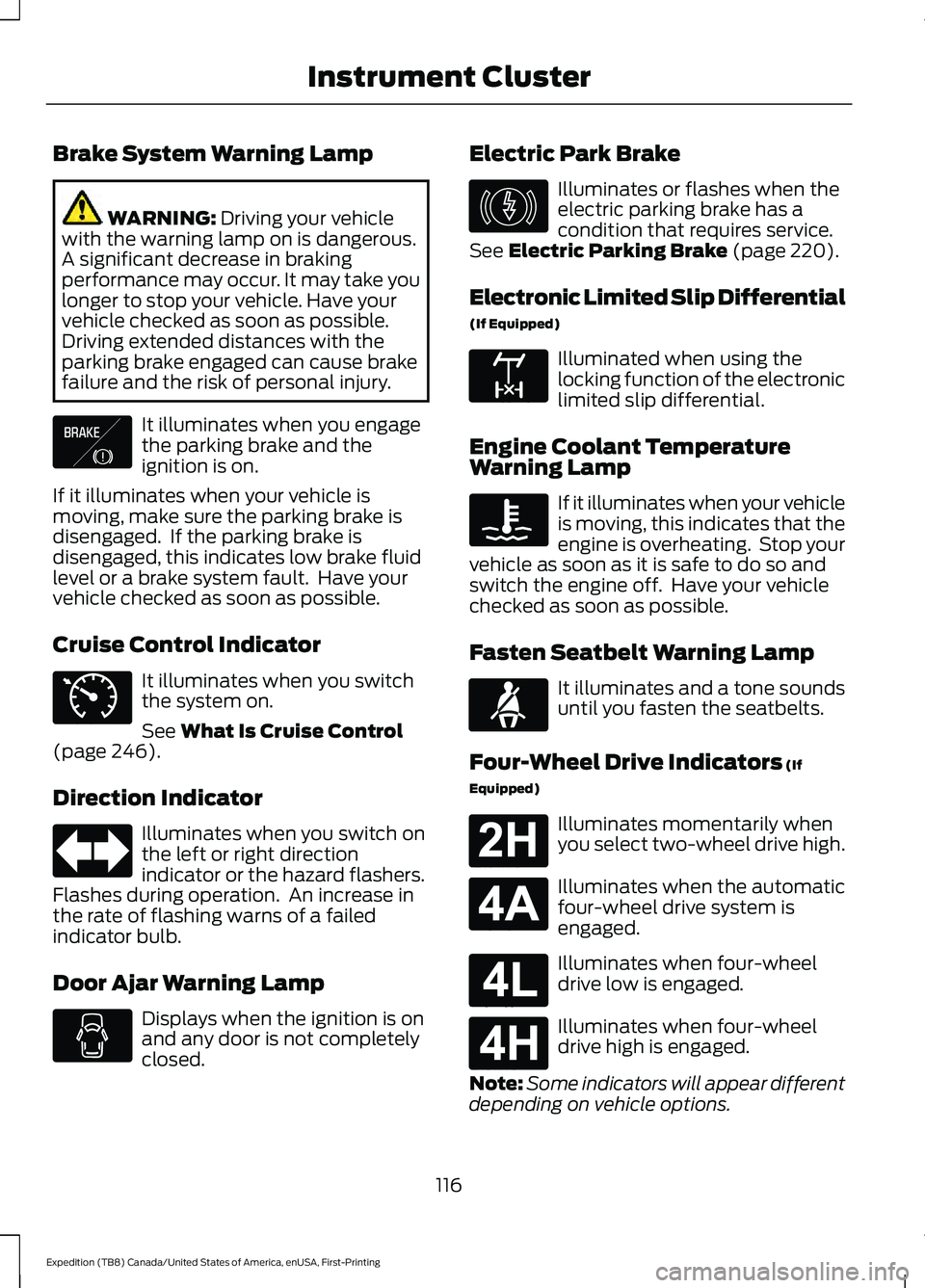
Brake System Warning Lamp
WARNING: Driving your vehicle
with the warning lamp on is dangerous.
A significant decrease in braking
performance may occur. It may take you
longer to stop your vehicle. Have your
vehicle checked as soon as possible.
Driving extended distances with the
parking brake engaged can cause brake
failure and the risk of personal injury. It illuminates when you engage
the parking brake and the
ignition is on.
If it illuminates when your vehicle is
moving, make sure the parking brake is
disengaged. If the parking brake is
disengaged, this indicates low brake fluid
level or a brake system fault. Have your
vehicle checked as soon as possible.
Cruise Control Indicator It illuminates when you switch
the system on.
See
What Is Cruise Control
(page 246).
Direction Indicator Illuminates when you switch on
the left or right direction
indicator or the hazard flashers.
Flashes during operation. An increase in
the rate of flashing warns of a failed
indicator bulb.
Door Ajar Warning Lamp Displays when the ignition is on
and any door is not completely
closed. Electric Park Brake Illuminates or flashes when the
electric parking brake has a
condition that requires service.
See
Electric Parking Brake (page 220).
Electronic Limited Slip Differential
(If Equipped) Illuminated when using the
locking function of the electronic
limited slip differential.
Engine Coolant Temperature
Warning Lamp If it illuminates when your vehicle
is moving, this indicates that the
engine is overheating. Stop your
vehicle as soon as it is safe to do so and
switch the engine off. Have your vehicle
checked as soon as possible.
Fasten Seatbelt Warning Lamp It illuminates and a tone sounds
until you fasten the seatbelts.
Four-Wheel Drive Indicators
(If
Equipped) Illuminates momentarily when
you select two-wheel drive high.
Illuminates when the automatic
four-wheel drive system is
engaged.
Illuminates when four-wheel
drive low is engaged.
Illuminates when four-wheel
drive high is engaged.
Note: Some indicators will appear different
depending on vehicle options.
116
Expedition (TB8) Canada/United States of America, enUSA, First-Printing Instrument ClusterE138644 E71340 E146190 E163170 E71880 E181778 E181781 E181780 E181779
Page 120 of 574
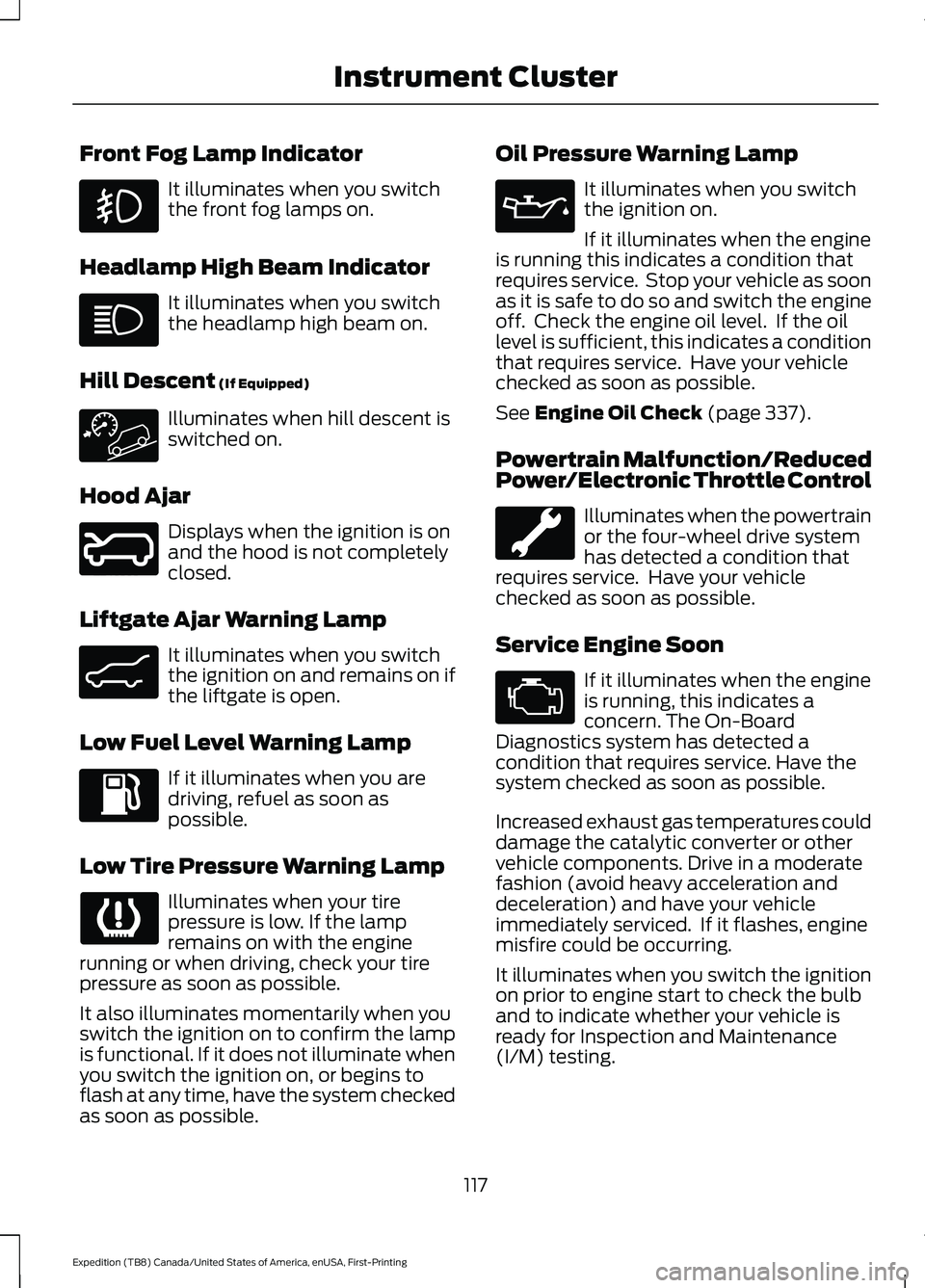
Front Fog Lamp Indicator
It illuminates when you switch
the front fog lamps on.
Headlamp High Beam Indicator It illuminates when you switch
the headlamp high beam on.
Hill Descent (If Equipped) Illuminates when hill descent is
switched on.
Hood Ajar Displays when the ignition is on
and the hood is not completely
closed.
Liftgate Ajar Warning Lamp It illuminates when you switch
the ignition on and remains on if
the liftgate is open.
Low Fuel Level Warning Lamp If it illuminates when you are
driving, refuel as soon as
possible.
Low Tire Pressure Warning Lamp Illuminates when your tire
pressure is low. If the lamp
remains on with the engine
running or when driving, check your tire
pressure as soon as possible.
It also illuminates momentarily when you
switch the ignition on to confirm the lamp
is functional. If it does not illuminate when
you switch the ignition on, or begins to
flash at any time, have the system checked
as soon as possible. Oil Pressure Warning Lamp It illuminates when you switch
the ignition on.
If it illuminates when the engine
is running this indicates a condition that
requires service. Stop your vehicle as soon
as it is safe to do so and switch the engine
off. Check the engine oil level. If the oil
level is sufficient, this indicates a condition
that requires service. Have your vehicle
checked as soon as possible.
See
Engine Oil Check (page 337).
Powertrain Malfunction/Reduced
Power/Electronic Throttle Control Illuminates when the powertrain
or the four-wheel drive system
has detected a condition that
requires service. Have your vehicle
checked as soon as possible.
Service Engine Soon If it illuminates when the engine
is running, this indicates a
concern. The On-Board
Diagnostics system has detected a
condition that requires service. Have the
system checked as soon as possible.
Increased exhaust gas temperatures could
damage the catalytic converter or other
vehicle components. Drive in a moderate
fashion (avoid heavy acceleration and
deceleration) and have your vehicle
immediately serviced. If it flashes, engine
misfire could be occurring.
It illuminates when you switch the ignition
on prior to engine start to check the bulb
and to indicate whether your vehicle is
ready for Inspection and Maintenance
(I/M) testing.
117
Expedition (TB8) Canada/United States of America, enUSA, First-Printing Instrument Cluster E246598 E162453
Page 137 of 574
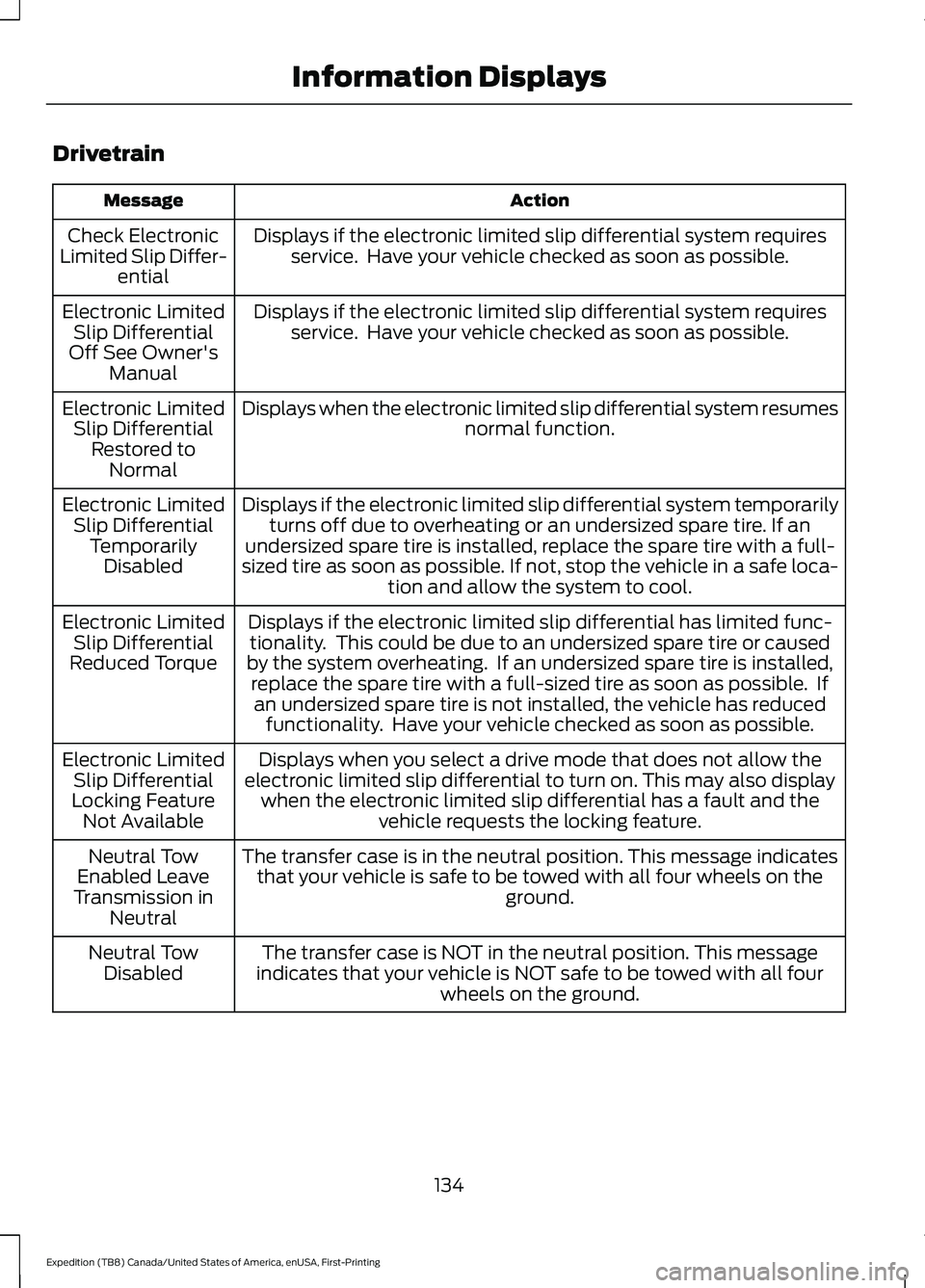
Drivetrain
Action
Message
Displays if the electronic limited slip differential system requiresservice. Have your vehicle checked as soon as possible.
Check Electronic
Limited Slip Differ- ential
Displays if the electronic limited slip differential system requiresservice. Have your vehicle checked as soon as possible.
Electronic Limited
Slip Differential
Off See Owner's Manual
Displays when the electronic limited slip differential system resumes normal function.
Electronic Limited
Slip Differential Restored to Normal
Displays if the electronic limited slip differential system temporarilyturns off due to overheating or an undersized spare tire. If an
undersized spare tire is installed, replace the spare tire with a full-
sized tire as soon as possible. If not, stop the vehicle in a safe loca- tion and allow the system to cool.
Electronic Limited
Slip Differential TemporarilyDisabled
Displays if the electronic limited slip differential has limited func-tionality. This could be due to an undersized spare tire or caused
by the system overheating. If an undersized spare tire is installed, replace the spare tire with a full-sized tire as soon as possible. Ifan undersized spare tire is not installed, the vehicle has reduced functionality. Have your vehicle checked as soon as possible.
Electronic Limited
Slip Differential
Reduced Torque
Displays when you select a drive mode that does not allow the
electronic limited slip differential to turn on. This may also display when the electronic limited slip differential has a fault and the vehicle requests the locking feature.
Electronic Limited
Slip Differential
Locking Feature Not Available
The transfer case is in the neutral position. This message indicatesthat your vehicle is safe to be towed with all four wheels on the ground.
Neutral Tow
Enabled Leave
Transmission in Neutral
The transfer case is NOT in the neutral position. This message
indicates that your vehicle is NOT safe to be towed with all four wheels on the ground.
Neutral Tow
Disabled
134
Expedition (TB8) Canada/United States of America, enUSA, First-Printing Information Displays
Page 138 of 574
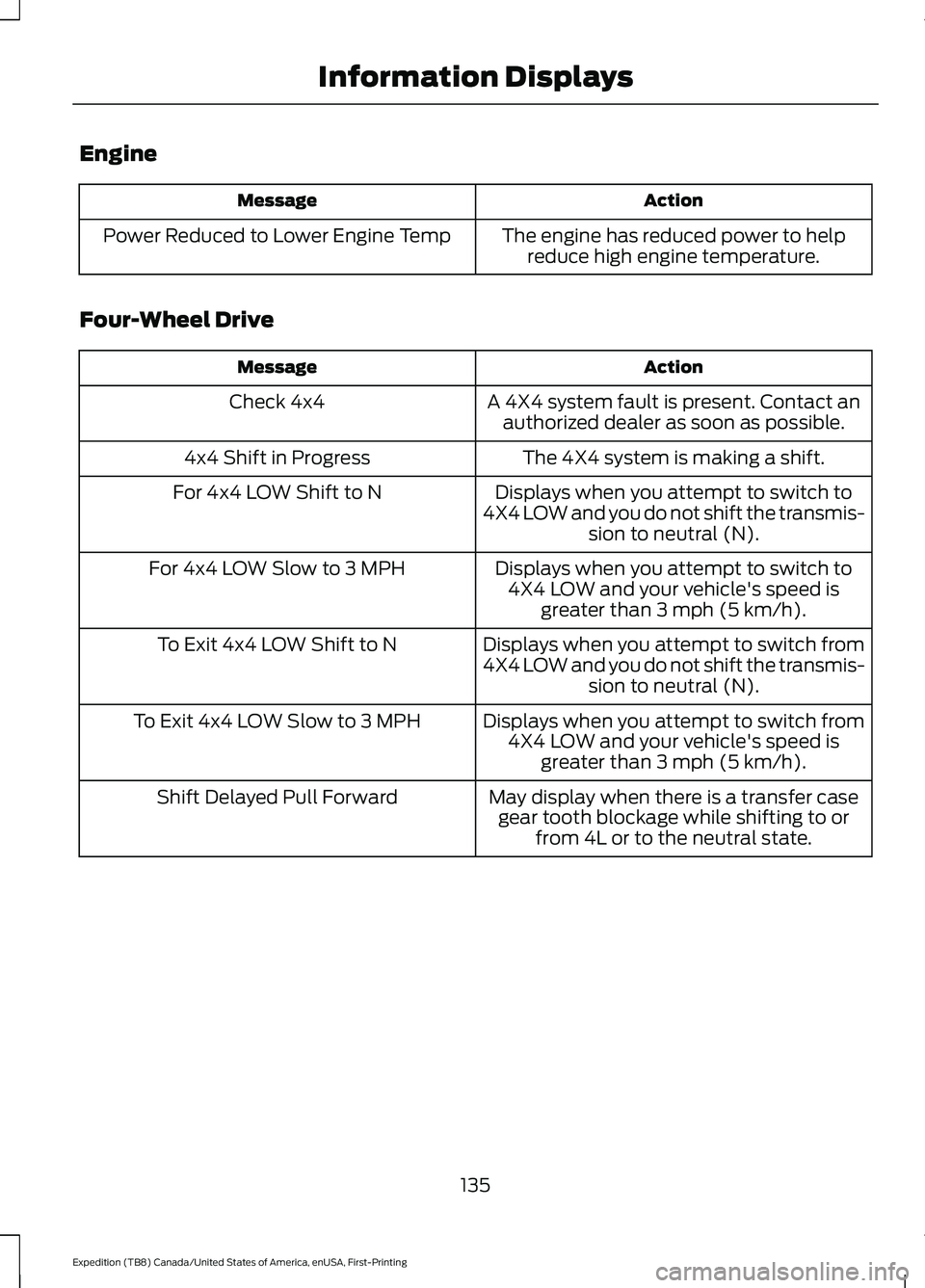
Engine
Action
Message
The engine has reduced power to helpreduce high engine temperature.
Power Reduced to Lower Engine Temp
Four-Wheel Drive Action
Message
A 4X4 system fault is present. Contact anauthorized dealer as soon as possible.
Check 4x4
The 4X4 system is making a shift.
4x4 Shift in Progress
Displays when you attempt to switch to
4X4 LOW and you do not shift the transmis- sion to neutral (N).
For 4x4 LOW Shift to N
Displays when you attempt to switch to4X4 LOW and your vehicle's speed is greater than 3 mph (5 km/h).
For 4x4 LOW Slow to 3 MPH
Displays when you attempt to switch from
4X4 LOW and you do not shift the transmis-sion to neutral (N).
To Exit 4x4 LOW Shift to N
Displays when you attempt to switch from4X4 LOW and your vehicle's speed is greater than
3 mph (5 km/h).
To Exit 4x4 LOW Slow to 3 MPH
May display when there is a transfer casegear tooth blockage while shifting to or from 4L or to the neutral state.
Shift Delayed Pull Forward
135
Expedition (TB8) Canada/United States of America, enUSA, First-Printing Information Displays
Page 213 of 574
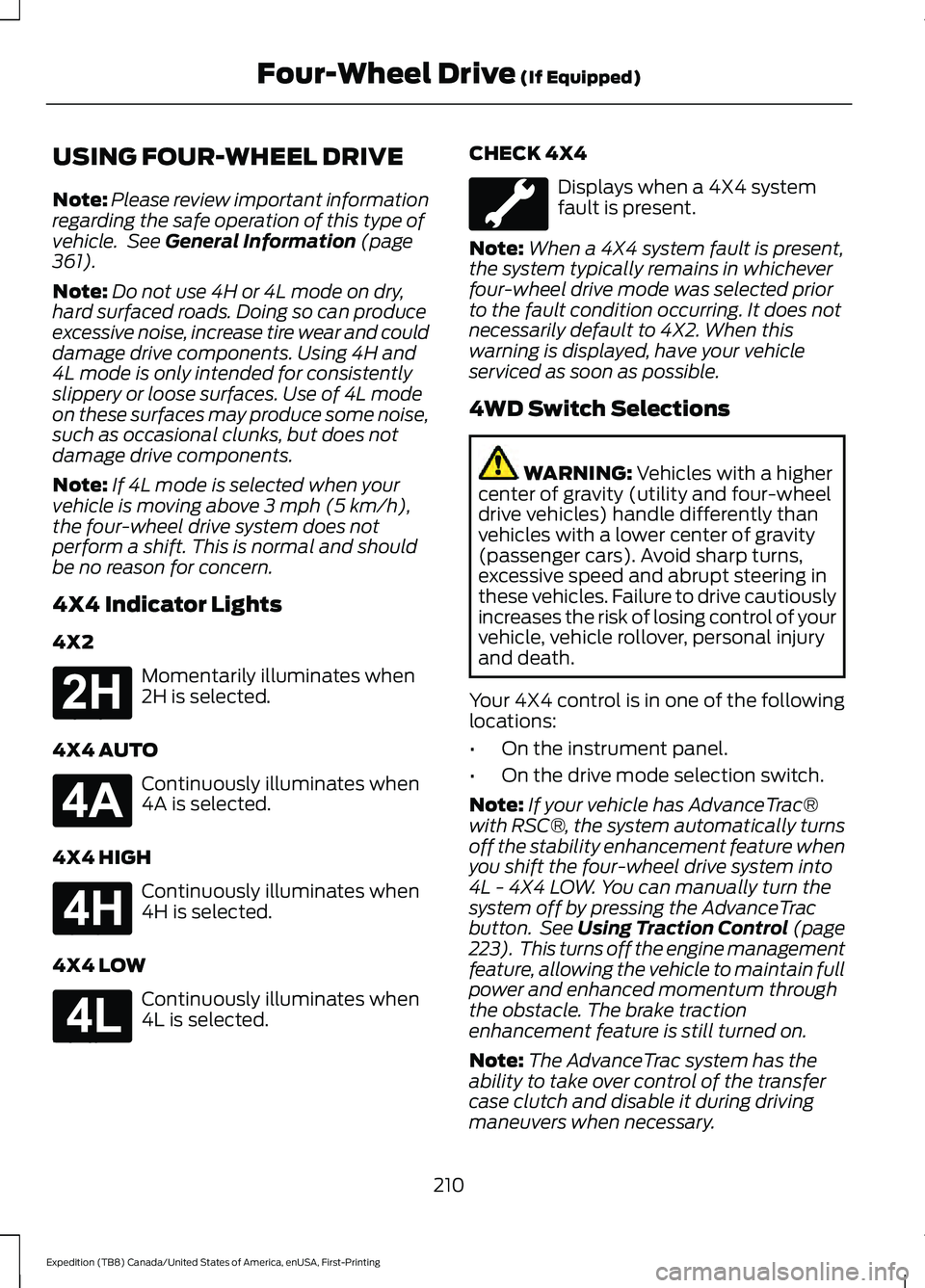
USING FOUR-WHEEL DRIVE
Note:
Please review important information
regarding the safe operation of this type of
vehicle. See General Information (page
361).
Note: Do not use 4H or 4L mode on dry,
hard surfaced roads. Doing so can produce
excessive noise, increase tire wear and could
damage drive components. Using 4H and
4L mode is only intended for consistently
slippery or loose surfaces. Use of 4L mode
on these surfaces may produce some noise,
such as occasional clunks, but does not
damage drive components.
Note: If 4L mode is selected when your
vehicle is moving above
3 mph (5 km/h),
the four-wheel drive system does not
perform a shift. This is normal and should
be no reason for concern.
4X4 Indicator Lights
4X2 Momentarily illuminates when
2H is selected.
4X4 AUTO Continuously illuminates when
4A is selected.
4X4 HIGH Continuously illuminates when
4H is selected.
4X4 LOW Continuously illuminates when
4L is selected. CHECK 4X4 Displays when a 4X4 system
fault is present.
Note: When a 4X4 system fault is present,
the system typically remains in whichever
four-wheel drive mode was selected prior
to the fault condition occurring. It does not
necessarily default to 4X2. When this
warning is displayed, have your vehicle
serviced as soon as possible.
4WD Switch Selections WARNING:
Vehicles with a higher
center of gravity (utility and four-wheel
drive vehicles) handle differently than
vehicles with a lower center of gravity
(passenger cars). Avoid sharp turns,
excessive speed and abrupt steering in
these vehicles. Failure to drive cautiously
increases the risk of losing control of your
vehicle, vehicle rollover, personal injury
and death.
Your 4X4 control is in one of the following
locations:
• On the instrument panel.
• On the drive mode selection switch.
Note: If your vehicle has AdvanceTrac®
with RSC®, the system automatically turns
off the stability enhancement feature when
you shift the four-wheel drive system into
4L - 4X4 LOW. You can manually turn the
system off by pressing the AdvanceTrac
button. See
Using Traction Control (page
223). This turns off the engine management
feature, allowing the vehicle to maintain full
power and enhanced momentum through
the obstacle. The brake traction
enhancement feature is still turned on.
Note: The AdvanceTrac system has the
ability to take over control of the transfer
case clutch and disable it during driving
maneuvers when necessary.
210
Expedition (TB8) Canada/United States of America, enUSA, First-Printing Four-Wheel Drive
(If Equipped)E181778 E181781 E181779 E181780
Page 214 of 574
Note:
Four-wheel drive mode availability
is based on drive mode selection. See Drive
Control (page 271).
Note: The information display may show
messages during four-wheel drive operation.
See
Information Messages (page 129).
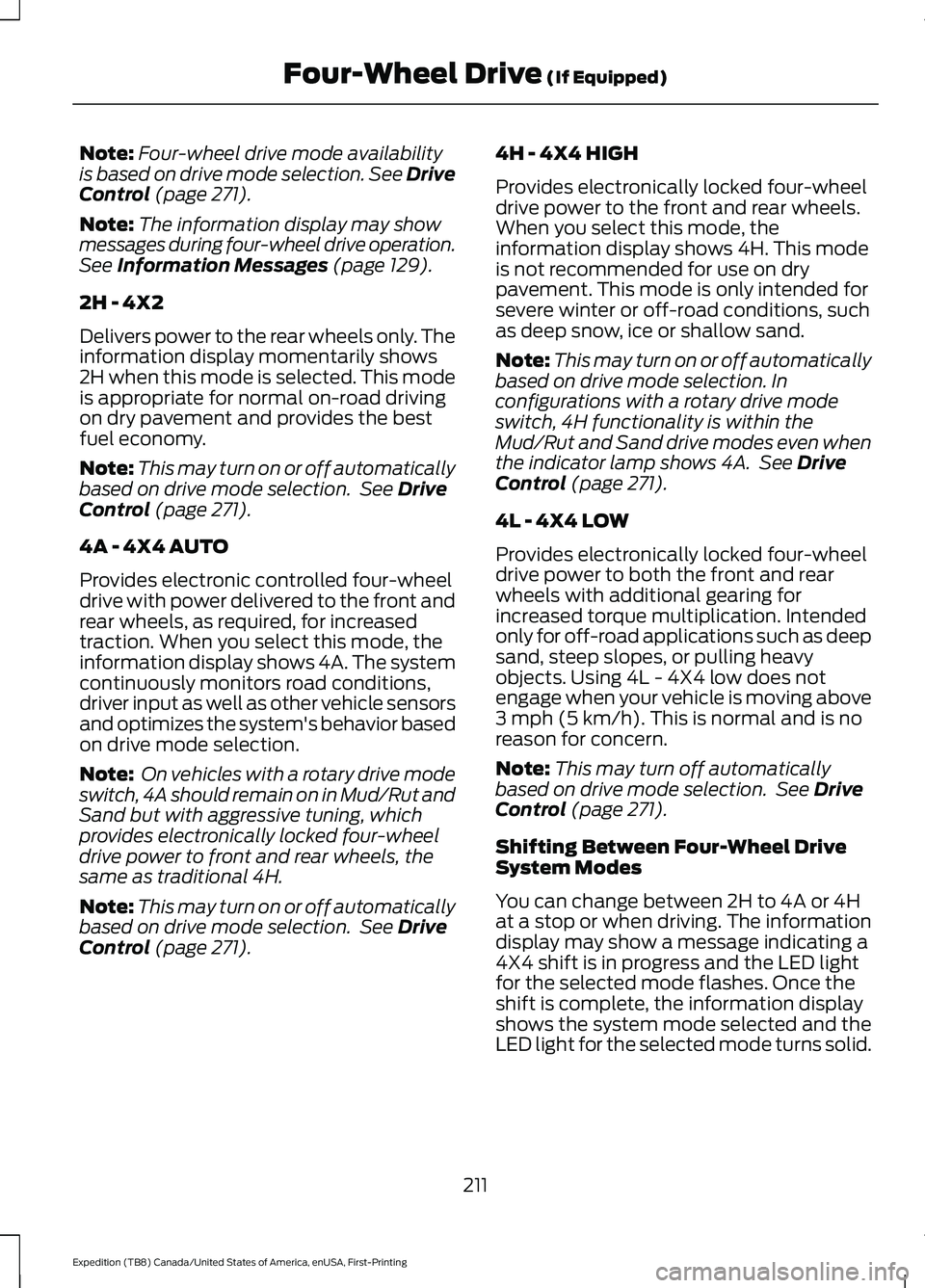
2H - 4X2
Delivers power to the rear wheels only. The
information display momentarily shows
2H when this mode is selected. This mode
is appropriate for normal on-road driving
on dry pavement and provides the best
fuel economy.
Note: This may turn on or off automatically
based on drive mode selection. See
Drive
Control (page 271).
4A - 4X4 AUTO
Provides electronic controlled four-wheel
drive with power delivered to the front and
rear wheels, as required, for increased
traction. When you select this mode, the
information display shows 4A. The system
continuously monitors road conditions,
driver input as well as other vehicle sensors
and optimizes the system's behavior based
on drive mode selection.
Note: On vehicles with a rotary drive mode
switch, 4A should remain on in Mud/Rut and
Sand but with aggressive tuning, which
provides electronically locked four-wheel
drive power to front and rear wheels, the
same as traditional 4H.
Note: This may turn on or off automatically
based on drive mode selection. See
Drive
Control (page 271). 4H - 4X4 HIGH
Provides electronically locked four-wheel
drive power to the front and rear wheels.
When you select this mode, the
information display shows 4H. This mode
is not recommended for use on dry
pavement. This mode is only intended for
severe winter or off-road conditions, such
as deep snow, ice or shallow sand.
Note:
This may turn on or off automatically
based on drive mode selection. In
configurations with a rotary drive mode
switch, 4H functionality is within the
Mud/Rut and Sand drive modes even when
the indicator lamp shows 4A. See
Drive
Control (page 271).
4L - 4X4 LOW
Provides electronically locked four-wheel
drive power to both the front and rear
wheels with additional gearing for
increased torque multiplication. Intended
only for off-road applications such as deep
sand, steep slopes, or pulling heavy
objects. Using 4L - 4X4 low does not
engage when your vehicle is moving above
3 mph (5 km/h)
. This is normal and is no
reason for concern.
Note: This may turn off automatically
based on drive mode selection. See
Drive
Control (page 271).
Shifting Between Four-Wheel Drive
System Modes
You can change between 2H to 4A or 4H
at a stop or when driving. The information
display may show a message indicating a
4X4 shift is in progress and the LED light
for the selected mode flashes. Once the
shift is complete, the information display
shows the system mode selected and the
LED light for the selected mode turns solid.
211
Expedition (TB8) Canada/United States of America, enUSA, First-Printing Four-Wheel Drive
(If Equipped)
Page 215 of 574
Note:
Momentarily releasing the accelerator
pedal when a shift in progress message
displays improves engagement and
disengagement performance.
Note: Do not perform this operation if the
rear wheels are slipping.
Note: Some noise may be heard as the
system shifts or engages. This is normal.
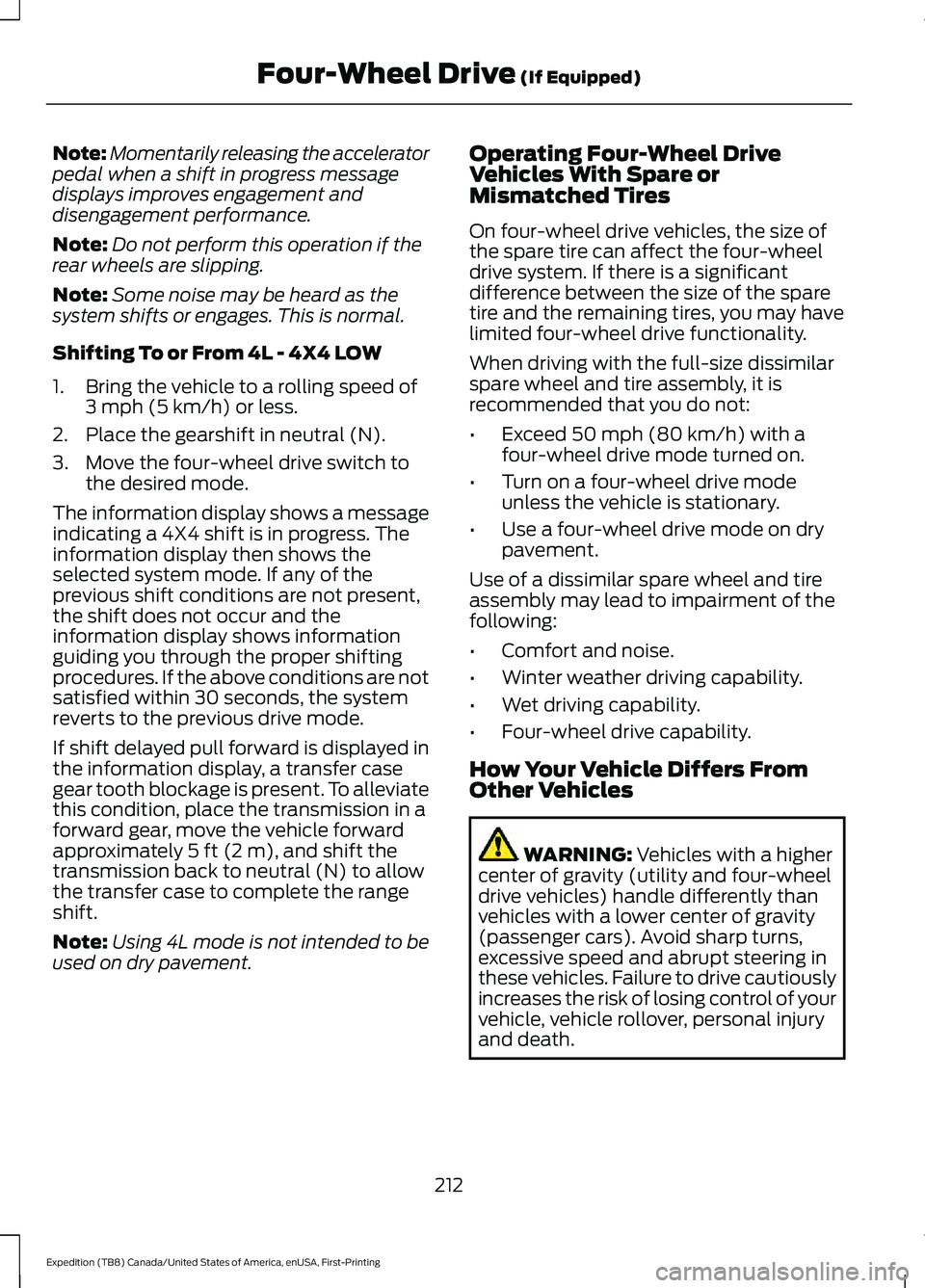
Shifting To or From 4L - 4X4 LOW
1. Bring the vehicle to a rolling speed of 3 mph (5 km/h) or less.
2. Place the gearshift in neutral (N).
3. Move the four-wheel drive switch to the desired mode.
The information display shows a message
indicating a 4X4 shift is in progress. The
information display then shows the
selected system mode. If any of the
previous shift conditions are not present,
the shift does not occur and the
information display shows information
guiding you through the proper shifting
procedures. If the above conditions are not
satisfied within 30 seconds, the system
reverts to the previous drive mode.
If shift delayed pull forward is displayed in
the information display, a transfer case
gear tooth blockage is present. To alleviate
this condition, place the transmission in a
forward gear, move the vehicle forward
approximately
5 ft (2 m), and shift the
transmission back to neutral (N) to allow
the transfer case to complete the range
shift.
Note: Using 4L mode is not intended to be
used on dry pavement. Operating Four-Wheel Drive
Vehicles With Spare or
Mismatched Tires
On four-wheel drive vehicles, the size of
the spare tire can affect the four-wheel
drive system. If there is a significant
difference between the size of the spare
tire and the remaining tires, you may have
limited four-wheel drive functionality.
When driving with the full-size dissimilar
spare wheel and tire assembly, it is
recommended that you do not:
•
Exceed
50 mph (80 km/h) with a
four-wheel drive mode turned on.
• Turn on a four-wheel drive mode
unless the vehicle is stationary.
• Use a four-wheel drive mode on dry
pavement.
Use of a dissimilar spare wheel and tire
assembly may lead to impairment of the
following:
• Comfort and noise.
• Winter weather driving capability.
• Wet driving capability.
• Four-wheel drive capability.
How Your Vehicle Differs From
Other Vehicles WARNING:
Vehicles with a higher
center of gravity (utility and four-wheel
drive vehicles) handle differently than
vehicles with a lower center of gravity
(passenger cars). Avoid sharp turns,
excessive speed and abrupt steering in
these vehicles. Failure to drive cautiously
increases the risk of losing control of your
vehicle, vehicle rollover, personal injury
and death.
212
Expedition (TB8) Canada/United States of America, enUSA, First-Printing Four-Wheel Drive
(If Equipped)
Page 216 of 574
Truck and utility vehicles can differ from
some other vehicles. Your vehicle may be
higher to allow it to travel over rough
terrain without getting hung up or
damaging underbody components.
The differences that make your vehicle so
versatile also make it handle differently
than an ordinary passenger car.
Always maintain steering wheel control,
especially in rough terrain. Since sudden
changes in terrain can result in abrupt
steering wheel motion, make sure you grip
the steering wheel from the outside. Do
not grip the spokes.
Drive cautiously to avoid vehicle damage
from concealed objects such as rocks and
stumps.
You should either know the terrain or
examine maps of the area before driving.
Map out your route before driving in the
area. To maintain steering and braking
control of your vehicle, you must have all
four wheels on the ground and they must
be rolling, not sliding or spinning.
Driving Off-Road With Truck and
Utility Vehicles
Four-wheel drive vehicles are specially
equipped for driving on sand, snow, mud
and rough terrain and have operating
characteristics that are different from
conventional vehicles, both on and off the
road.
The transfer case supples power to all four
wheels. On four-wheel drive vehicles, the
transfer case allows you to select different
four-wheel drive modes when necessary.
Four-wheel drive, when you select a 4X4
mode, uses all four wheels to power your
vehicle. This increases traction, enabling
you to drive over terrain and road
conditions that a conventional two-wheel
drive vehicle cannot.
Note:
On some models, the initial shift from
two-wheel drive to four-wheel drive when
your vehicle is moving can cause some
momentary clunk and ratcheting sounds.
This is the front drivetrain coming up to
speed and is not a cause for concern.
Note: Your vehicle may have a front air dam
that can become damaged, due to reduced
ground clearance, when taking your vehicle
off-road. You can remove this air dam by
removing the eight bolts that secure it.
Basic Operating Principles
• Drive slower in strong crosswinds which
can affect the normal steering
characteristics of your vehicle.
• Proceed with care when driving your
vehicle on surfaces made slippery by
loose sand, water, gravel, snow or ice.
• Do not use 4H or 4L on dry, hard
surfaced roads. Doing so can produce
excessive noise, increase tire wear and
may damage drive components. Use
4H or 4L modes only for consistently
slippery or loose surfaces.
If Your Vehicle leaves the Road
If your vehicle leaves the road, reduce your
vehicle speed and avoid severe braking.
When your vehicle speed decreases, ease
your vehicle back onto the road. Do not
turn the steering wheel sharply when
returning your vehicle to the road.
It may be safer to stay on the shoulder of
the road and slow down gradually before
returning to the road. You may lose control
if you do not slow down or if you turn the
steering wheel too sharply or abruptly.
213
Expedition (TB8) Canada/United States of America, enUSA, First-Printing Four-Wheel Drive (If Equipped)