oil dipstick FORD EXPEDITION 2021 Owners Manual
[x] Cancel search | Manufacturer: FORD, Model Year: 2021, Model line: EXPEDITION, Model: FORD EXPEDITION 2021Pages: 574, PDF Size: 8.33 MB
Page 8 of 574
Driving Aids
Driver Alert
.....................................................254
Lane Keeping System ...............................
255
Blind Spot Information System ............
259
Cross Traffic Alert .......................................
263
Steering ..........................................................
266
Pre-Collision Assist ....................................
267
Drive Control ..................................................
271
Load Carrying
Rear Under Floor Storage ........................
275
Cargo Nets ......................................................
277
Roof Racks and Load Carriers ................
278
Load Limit ......................................................
279
Towing
Towing a Trailer ...........................................
285
Trailer Reversing Aids ................................
286
Trailer Sway Control ..................................
295
Recommended Towing Weights ..........
296
Essential Towing Checks .........................
299
Towing the Vehicle on Four Wheels .....
306
Driving Hints
Reduced Engine Performance ..............
309
Economical Driving ...................................
309
Breaking-In .....................................................
310
Driving Through Water ..............................
310
Floor Mats ......................................................
310
Roadside Emergencies
Roadside Assistance ..................................
312
Hazard Flashers ............................................
313
Fuel Shutoff ...................................................
313
Jump Starting the Vehicle ........................
314
Post-Crash Alert System ..........................
316
Transporting the Vehicle ...........................
316
Towing Points ................................................
317Customer Assistance
Getting the Services You Need
...............
318
In California (U.S. Only) ............................
319
The Better Business Bureau (BBB) Auto Line Program (U.S. Only) ....................
320
Utilizing the Mediation/Arbitration Program (Canada Only) .......................
321
Getting Assistance Outside the U.S. and Canada ........................................................
321
Ordering Additional Owner's Literature ........................................................................\
323
Reporting Safety Defects (U.S. Only) ........................................................................\
323
Reporting Safety Defects (Canada Only) ........................................................................\
323
Fuses
Fuse Box Locations ....................................
325
Fuse Specification Chart ..........................
325
Changing a Fuse ..........................................
333
Maintenance
General Information ..................................
335
Opening and Closing the Hood .............
335
Under Hood Overview ..............................
336
Engine Oil Dipstick ......................................
337
Engine Oil Check .........................................
337
Oil Change Indicator Reset .....................
338
Changing the Engine Air Filter ...............
339
Engine Coolant Check ..............................
339
Automatic Transmission Fluid Check ........................................................................\
343
Transfer Case Fluid Check ......................
344
Brake Fluid Check .......................................
344
Power Steering Fluid Check ....................
345
Changing the 12V Battery ........................
345
Adjusting the Headlamps ........................
347
Washer Fluid Check ...................................
348
Fuel Filter .......................................................
349
Checking the Wiper Blades ....................
349
Changing the Wiper Blades ....................
349
5
Expedition (TB8) Canada/United States of America, enUSA, First-Printing Table of Contents
Page 339 of 574
3. Raise the hood until the lift cylinders
hold it open.
4. To close, lower the hood and make sure that it is properly closed and fully
latched.
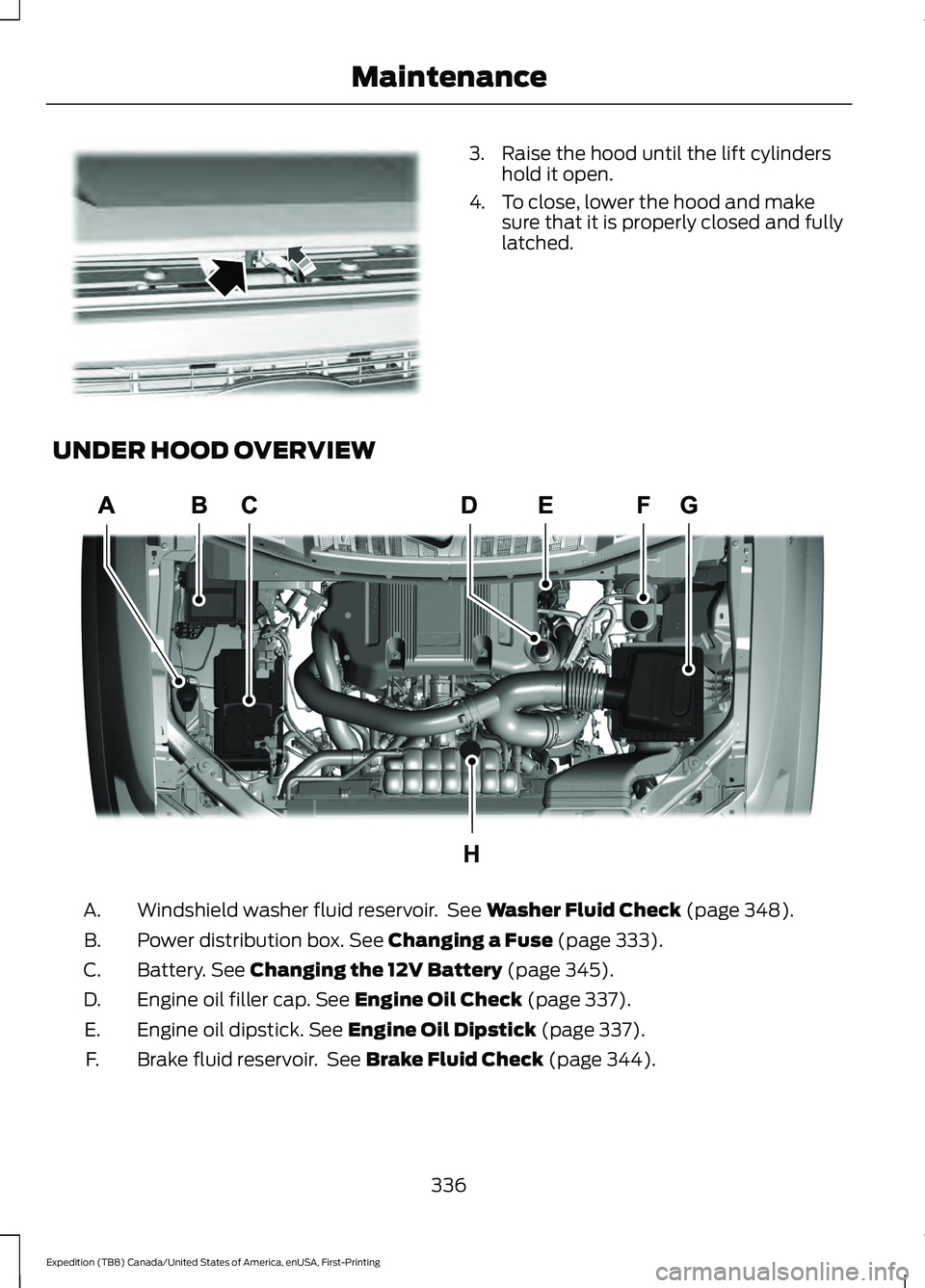
UNDER HOOD OVERVIEW Windshield washer fluid reservoir. See Washer Fluid Check (page 348).
A.
Power distribution box.
See Changing a Fuse (page 333).
B.
Battery.
See Changing the 12V Battery (page 345).
C.
Engine oil filler cap.
See Engine Oil Check (page 337).
D.
Engine oil dipstick.
See Engine Oil Dipstick (page 337).
E.
Brake fluid reservoir. See
Brake Fluid Check (page 344).
F.
336
Expedition (TB8) Canada/United States of America, enUSA, First-Printing MaintenanceE190266 E258054
Page 340 of 574
Air filter. See Changing the Engine Air Filter (page 339).
G.
Engine coolant reservoir. See
Engine Coolant Check (page 339).
H.
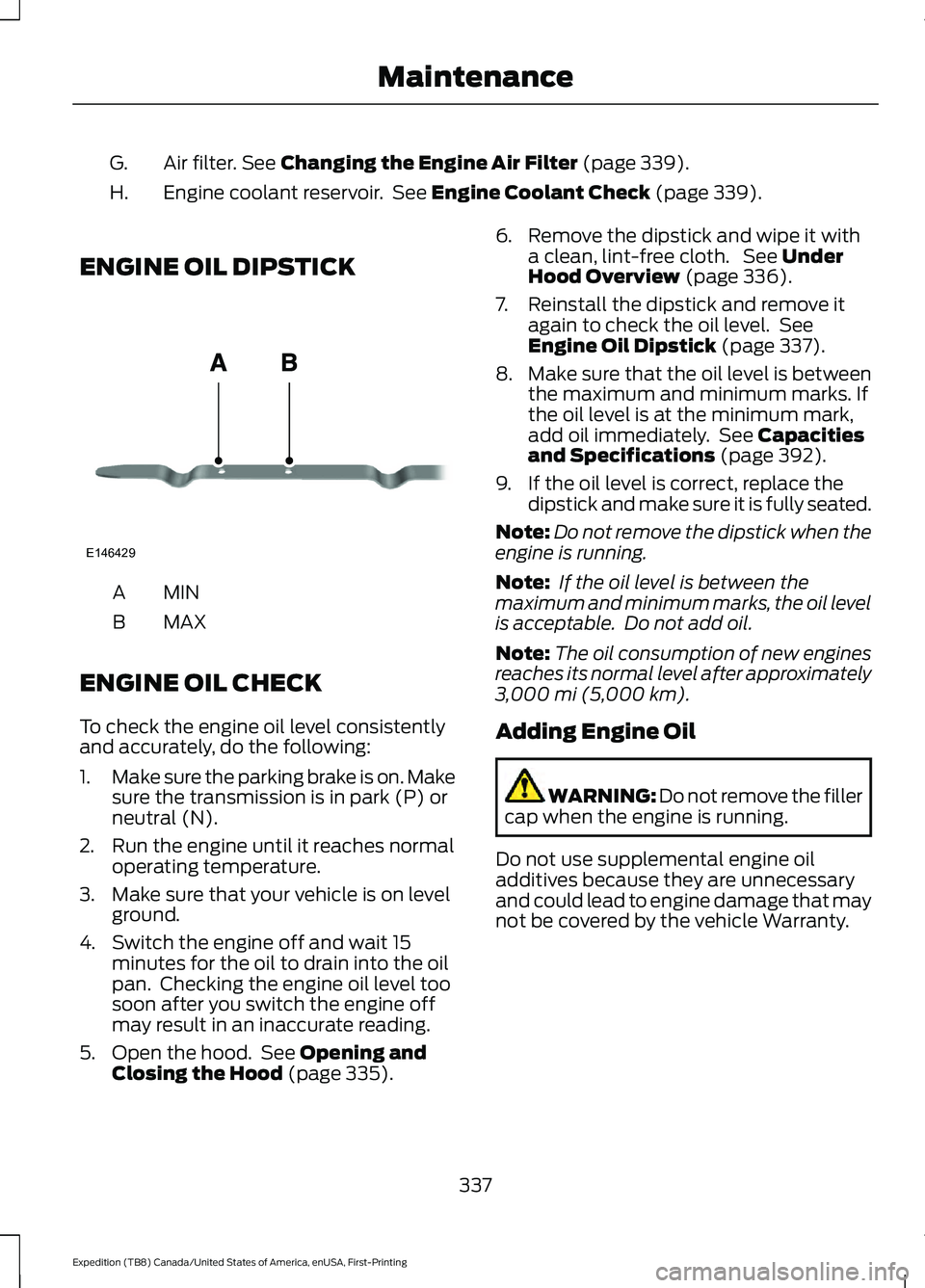
ENGINE OIL DIPSTICK MINA
MAX
B
ENGINE OIL CHECK
To check the engine oil level consistently
and accurately, do the following:
1. Make sure the parking brake is on. Make
sure the transmission is in park (P) or
neutral (N).
2. Run the engine until it reaches normal operating temperature.
3. Make sure that your vehicle is on level ground.
4. Switch the engine off and wait 15 minutes for the oil to drain into the oil
pan. Checking the engine oil level too
soon after you switch the engine off
may result in an inaccurate reading.
5. Open the hood. See
Opening and
Closing the Hood (page 335). 6. Remove the dipstick and wipe it with
a clean, lint-free cloth. See
Under
Hood Overview (page 336).
7. Reinstall the dipstick and remove it again to check the oil level. See
Engine Oil Dipstick
(page 337).
8. Make sure that the oil level is between
the maximum and minimum marks. If
the oil level is at the minimum mark,
add oil immediately. See
Capacities
and Specifications (page 392).
9. If the oil level is correct, replace the dipstick and make sure it is fully seated.
Note: Do not remove the dipstick when the
engine is running.
Note: If the oil level is between the
maximum and minimum marks, the oil level
is acceptable. Do not add oil.
Note: The oil consumption of new engines
reaches its normal level after approximately
3,000 mi (5,000 km)
.
Adding Engine Oil WARNING: Do not remove the filler
cap when the engine is running.
Do not use supplemental engine oil
additives because they are unnecessary
and could lead to engine damage that may
not be covered by the vehicle Warranty.
337
Expedition (TB8) Canada/United States of America, enUSA, First-Printing MaintenanceE146429
Page 341 of 574
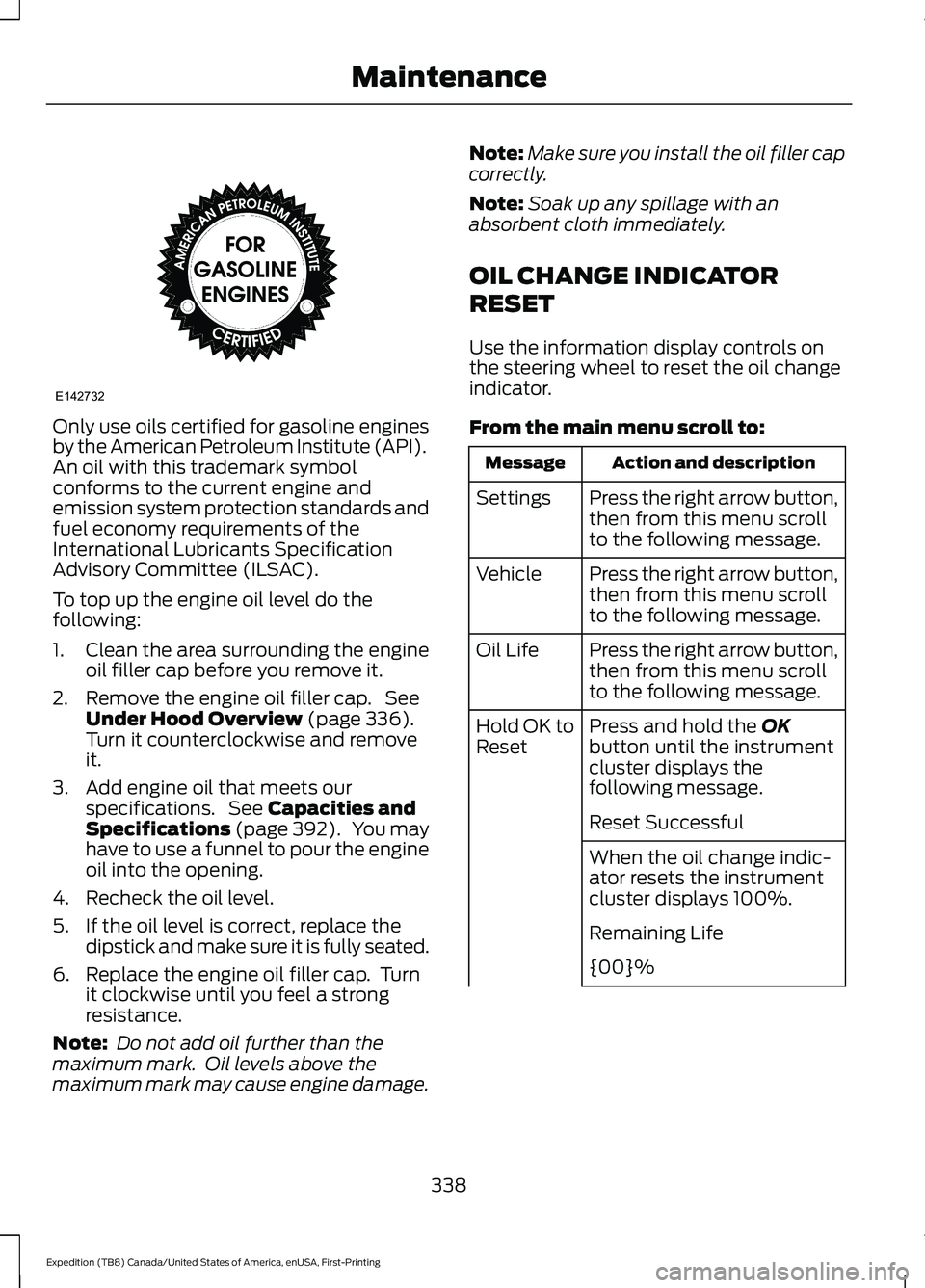
Only use oils certified for gasoline engines
by the American Petroleum Institute (API).
An oil with this trademark symbol
conforms to the current engine and
emission system protection standards and
fuel economy requirements of the
International Lubricants Specification
Advisory Committee (ILSAC).
To top up the engine oil level do the
following:
1. Clean the area surrounding the engine
oil filler cap before you remove it.
2. Remove the engine oil filler cap. See Under Hood Overview (page 336).
Turn it counterclockwise and remove
it.
3. Add engine oil that meets our specifications. See
Capacities and
Specifications (page 392). You may
have to use a funnel to pour the engine
oil into the opening.
4. Recheck the oil level.
5. If the oil level is correct, replace the dipstick and make sure it is fully seated.
6. Replace the engine oil filler cap. Turn it clockwise until you feel a strong
resistance.
Note: Do not add oil further than the
maximum mark. Oil levels above the
maximum mark may cause engine damage. Note:
Make sure you install the oil filler cap
correctly.
Note: Soak up any spillage with an
absorbent cloth immediately.
OIL CHANGE INDICATOR
RESET
Use the information display controls on
the steering wheel to reset the oil change
indicator.
From the main menu scroll to: Action and description
Message
Press the right arrow button,
then from this menu scroll
to the following message.
Settings
Press the right arrow button,
then from this menu scroll
to the following message.
Vehicle
Press the right arrow button,
then from this menu scroll
to the following message.
Oil Life
Press and hold the
OK
button until the instrument
cluster displays the
following message.
Hold OK to
Reset
Reset Successful
When the oil change indic-
ator resets the instrument
cluster displays 100%.
Remaining Life
{00}%
338
Expedition (TB8) Canada/United States of America, enUSA, First-Printing MaintenanceE142732
Page 490 of 574
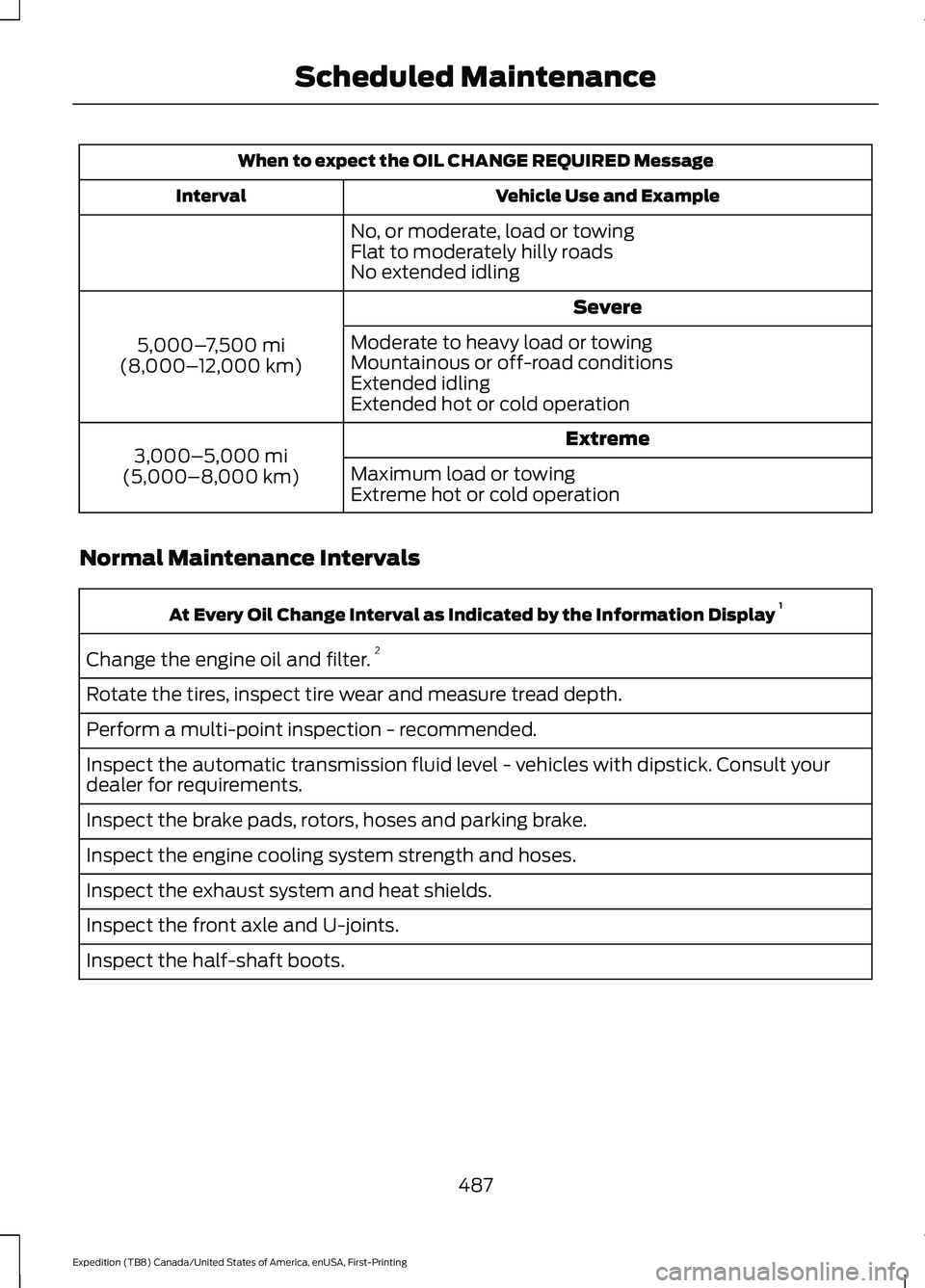
When to expect the OIL CHANGE REQUIRED Message
Vehicle Use and Example
Interval
No, or moderate, load or towing
Flat to moderately hilly roads
No extended idling Severe
5,000– 7,500 mi
(8,000– 12,000 km) Moderate to heavy load or towing
Mountainous or off-road conditions
Extended idling
Extended hot or cold operation
Extreme
3,000–5,000 mi
(5,000–8,000 km) Maximum load or towing
Extreme hot or cold operation
Normal Maintenance Intervals At Every Oil Change Interval as Indicated by the Information Display
1
Change the engine oil and filter. 2
Rotate the tires, inspect tire wear and measure tread depth.
Perform a multi-point inspection - recommended.
Inspect the automatic transmission fluid level - vehicles with dipstick. Consult your
dealer for requirements.
Inspect the brake pads, rotors, hoses and parking brake.
Inspect the engine cooling system strength and hoses.
Inspect the exhaust system and heat shields.
Inspect the front axle and U-joints.
Inspect the half-shaft boots.
487
Expedition (TB8) Canada/United States of America, enUSA, First-Printing Scheduled Maintenance
Page 564 of 574
Services That Third Parties Provide...............14
Services That We Provide..................................
14
Vehicles With a Modem...................................... 14
Vehicles With an Emergency Call System.................................................................. 15
Vehicles With SYNC............................................. 14
Daytime Running Lamps - Vehicles With: Configurable Daytime Running
Lamps...........................................................100
Daytime Running Lamps - Vehicles With: Daytime Running Lamps (DRL)..........100
Declaration of Conformity - Vehicles With: SYNC 3..............................................556
Radio Frequency Statement......................... 556
Digital Radio...................................................412
HD Radio Reception and Station
Troubleshooting............................................. 413
Direction Indicators
.......................................101
Doors and Locks..............................................73
Drive Control...................................................271 Selectable Drive Modes.................................... 271
Driver Alert
.....................................................254
Using Driver Alert............................................... 254
Driver and Passenger Airbags.....................51 Children and Airbags........................................... 52
Proper Driver and Front Passenger Seating Adjustment......................................................... 51
Driving Aids....................................................254
Driving Hints
..................................................309
Driving Through Water...............................310
DRL See: Daytime Running Lamps - Vehicles With:
Configurable Daytime Running
Lamps............................................................... 100
See: Daytime Running Lamps - Vehicles With: Daytime Running Lamps (DRL)..............100
E
Economical Driving....................................309
Electric Parking Brake................................220 Applying the Electric Parking Brake............220
Automatically Releasing the Electric
Parking Brake................................................... 221
Manually Releasing the Electric Parking Brake.................................................................. 220Releasing the Electric Parking Brake if the
Vehicle Battery is Running Out of
Charge................................................................ 221
Electromagnetic Compatibility
..............528
Emergency Call Limitations.......................59
Emergency Call Requirements.................58
Emission Law
.................................................199
Noise Emissions Warranty, Prohibited
Tampering Acts and
Maintenance.................................................. 200
Tampering With a Noise Control System.............................................................. 199
End User License Agreement...................531 VEHICLE SOFTWARE END USER LICENSE
AGREEMENT (EULA) .................................. 531
Engine Block Heater
....................................187
Using the Engine Block Heater...................... 188
Engine Coolant Check...............................339 Adding Coolant.................................................. 340
Coolant Change................................................. 342
Engine Coolant Temperature Management.................................................. 343
Fail-Safe Cooling............................................... 342
Recycled Coolant................................................ 341
Severe Climates.................................................. 341
Engine Emission Control...........................199
Engine Immobilizer See: Passive Anti-Theft System..................... 85
Engine Oil Check..........................................337 Adding Engine Oil............................................... 337
Engine Oil Dipstick.......................................337
Engine Specifications................................390 Drivebelt Routing.............................................. 390
Entertainment..............................................443 AM/FM Radio...................................................... 444
Apps........................................................................\
452
Bluetooth Stereo or USB................................. 451
CD........................................................................\
... 450
HD Radio ™ Information (If
Available)......................................................... 447
SiriusXM® Satellite Radio (If Activated)........................................................ 445
Sources.................................................................. 443
Supported Media Players, Formats and Metadata Information................................ 452
USB Ports............................................................. 452
Environment.....................................................19
561
Expedition (TB8) Canada/United States of America, enUSA, First-Printing Index