rear cargo panel FORD EXPEDITION 2021 Owners Manual
[x] Cancel search | Manufacturer: FORD, Model Year: 2021, Model line: EXPEDITION, Model: FORD EXPEDITION 2021Pages: 574, PDF Size: 8.33 MB
Page 172 of 574
Folds the right-hand third-row
seat.
C
Folds the left-hand second-row
seat.
D
Folds the second-row bench
center seat or both second-row
captain chair seats.
E
Folds the right-hand second-row
seat.
F
To return the second-row seat backrest to
the original position, rotate the seat
backrest up until it latches in the upright
position. The seat backrest clicks when it
is locked into position.
To return the third-row seat backrest to
the original position, press the
corresponding control again.
Note: If the third row seat does not
completely fold or unfold, press and hold
the seat button until the seat folds and
unfolds twice.
If the power rear seat is disabled after 10
minutes, you can enable the seat by:
• Opening any door.
• Pressing the unlock button on the key
fob.
• Pressing any keyless entry keypad
button.
• Switching the ignition on.
Folding Down the Rear Seats to the
Load Floor WARNING: To prevent possible
damage to the seat or seatbelts, make
sure that the seatbelts are not fastened
before folding the seatback. WARNING:
Do not place cargo or
any objects behind the seatback before
returning it to the original position. The third-row seats have obstacle
detection that prevents the seats from
folding or returning if they are obstructed.
Reclining the Third Row Power Seats
WARNING:
Do not recline a rear
seat on which a child restraint is
installed. Failure to follow this instruction
could reduce the effectiveness of the
child restraint.
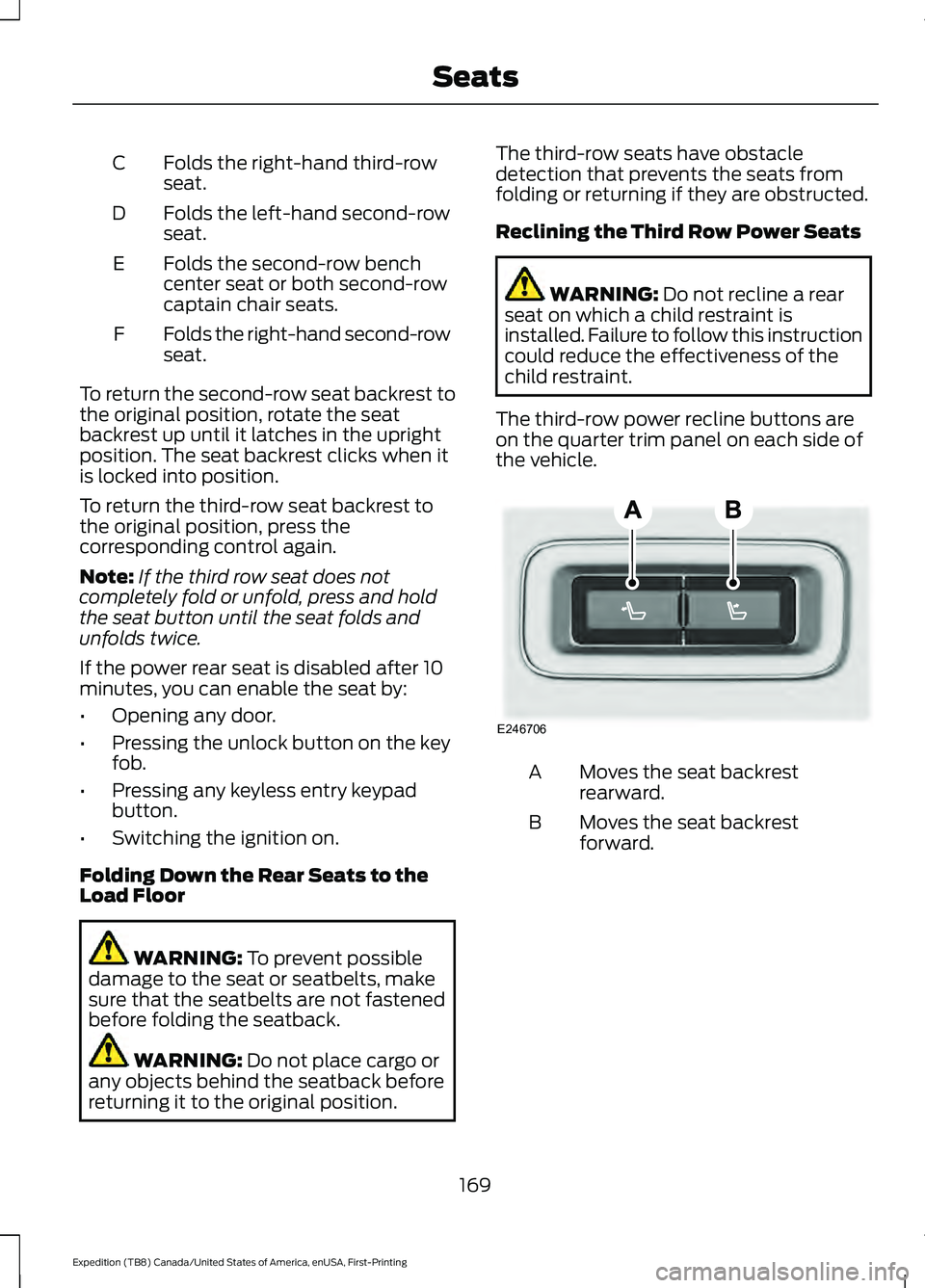
The third-row power recline buttons are
on the quarter trim panel on each side of
the vehicle. Moves the seat backrest
rearward.
A
Moves the seat backrest
forward.
B
169
Expedition (TB8) Canada/United States of America, enUSA, First-Printing SeatsE246706
Page 181 of 574
WHAT IS THE POWER OUTLET
The power outlet can power devices using
a 12 V outlet adapter.
POWER OUTLET
PRECAUTIONS
When you switch the vehicle on, you can
use the socket to power
12 V appliances
with a maximum current rating of 20 A. Do
not use the power point over the vehicle
capacity of
12 V DC 240 W or a fuse could
blow. Do not plug in any device that
supplies power to the vehicle through the
power points. This could result in damage
to vehicle systems. Do not hang any
accessory from the accessory plug. Always
keep the power point caps closed when
not in use. Do not insert objects other than
an accessory plug into the power point.
To prevent the battery from running out of
charge:
• Do not use the power point longer than
necessary when the vehicle is off.
• Do not leave devices plugged in
overnight or when you park your vehicle
for extended periods.
LOCATING THE POWER
OUTLET
Power outlets may be in the following
locations:
• On the lower instrument panel.
• Inside the center console.
• On the front of the center console.
• On the rear of the center console.
• In the cargo area.
• On the passenger side floor panel.
• 3rd row on the quarter trim panels.
178
Expedition (TB8) Canada/United States of America, enUSA, First-Printing Power Outlet - Vehicles With: 12V Power Outlet
Page 280 of 574
For the short wheel base system, it is
necessary for the second panel located
toward the front of the vehicle to be raised
up when the seats are folded down.
For the long wheel base system, it is
necessary for the second panel located
toward the front of the vehicle to be raised
up.
Note:
Before moving the board into the
shelf position, you may need to flip down
the hooks.
Note: Do not put more than 50 lb (22 kg)
on shelf.
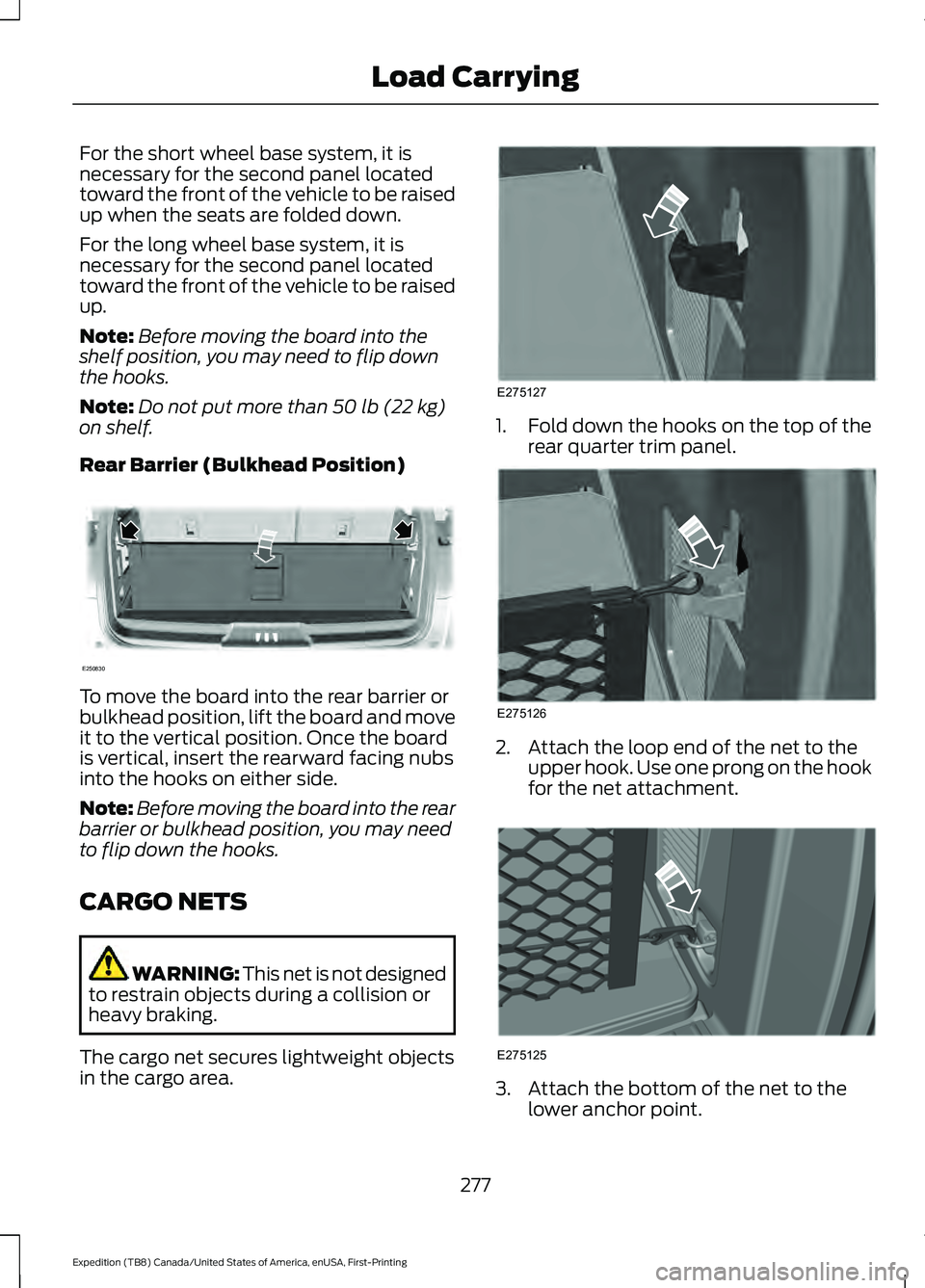
Rear Barrier (Bulkhead Position) To move the board into the rear barrier or
bulkhead position, lift the board and move
it to the vertical position. Once the board
is vertical, insert the rearward facing nubs
into the hooks on either side.
Note:
Before moving the board into the rear
barrier or bulkhead position, you may need
to flip down the hooks.
CARGO NETS WARNING:
This net is not designed
to restrain objects during a collision or
heavy braking.
The cargo net secures lightweight objects
in the cargo area. 1.
Fold down the hooks on the top of the
rear quarter trim panel. 2. Attach the loop end of the net to the
upper hook. Use one prong on the hook
for the net attachment. 3. Attach the bottom of the net to the
lower anchor point.
277
Expedition (TB8) Canada/United States of America, enUSA, First-Printing Load CarryingE250830 E275127 E275126 E275125
Page 386 of 574
When driving with the full-size dissimilar
spare wheel and tire assembly, do not:
•
Exceed 70 mph (113 km/h).
• Use more than one dissimilar spare
wheel and tire assembly at a time.
• Use snow chains on the end of the
vehicle with the dissimilar spare wheel
and tire assembly.
When driving with the full-size dissimilar
spare wheel and tire assembly, it is
recommended that you do not:
• Exceed
50 mph (80 km/h) in 4WD.
• Engage 4WD unless the vehicle is
stationary.
• Use 4WD on dry pavement.
The usage of a full-size dissimilar spare
wheel and tire assembly can lead to
impairment of the following:
• Handling, stability and braking
performance.
• Comfort and noise. •
Ground clearance and parking at curbs.
• Winter weather driving capability.
• Wet weather driving capability.
• Four-wheel driving capability.
When driving with the full-size dissimilar
spare wheel and tire assembly additional
caution should be given to:
• Towing a trailer.
• Driving vehicles equipped with a
camper body.
• Driving vehicles with a load on the
cargo rack.
Drive cautiously when using a full-size
dissimilar spare wheel and tire assembly
and seek service as soon as possible.
Location of the Spare Tire and
Tools
The spare tire is located under the vehicle,
just forward of the rear bumper. The jack,
swivel wrench and lug wrench are in the
following locations: Location
Item
Under the vehicle, just forward of the rearbumper
Spare tire
Under the access panel located in the floorcompartment behind the rear seat
Jack and tool kit bag
Tire Change Procedure WARNING:
Only use replacement
tires and wheels that are the same size,
load index, speed rating and type (such
as P-metric versus LT-metric or
all-season versus all-terrain) as those
originally provided by Ford. The
recommended tire and wheel size may
be found on either the Safety
Compliance Certification Label (affixed to either the door hinge pillar, door-latch
post, or the door edge that meets the
door-latch post, next to the driver's
seating position), or the Tire Label which
is located on the B-Pillar or edge of the
driver's door. If this information is not
found on these labels, then you should
contact your authorized dealer as soon
383
Expedition (TB8) Canada/United States of America, enUSA, First-Printing Wheels and Tires
Page 387 of 574
as possible. Use of any tire or wheel not
recommended by Ford can affect the
safety and performance of your vehicle,
which could result in an increased risk of
loss of vehicle control, vehicle rollover,
personal injury and death.
WARNING: To help prevent your
vehicle from moving when changing a
wheel, shift the transmission into park
(P), set the parking brake and use an
appropriate block or wheel chock to
secure the wheel diagonally opposite to
the wheel being changed. For example,
when changing the front left wheel,
place an appropriate block or wheel
chock on the right rear wheel. WARNING:
Do not attempt to
change a tire on the side of the vehicle
close to moving traffic. Pull far enough
off the road to avoid the danger of being
hit when operating the jack or changing
the wheel. WARNING:
Always use the jack
provided as original equipment with your
vehicle. If using a jack other than the one
provided, make sure the jack capacity is
adequate for the vehicle weight,
including any vehicle cargo or
modifications. If you are unsure if the jack
capacity is adequate, contact the
authorized dealer. WARNING:
Switch off the running
boards before jacking or placing any
object under your vehicle. Never place
your hand between the extended running
board and your vehicle. A moving running
board may cause injury. WARNING:
Only use the spare
wheel carrier to stow the wheel provided
with your vehicle. Other wheel sizes
could cause the spare wheel carrier to
fail if it does not fit securely or is too
heavy. 1. Park the vehicle on firm, level ground
and activate the hazard flashers.
2. Apply the parking brake, place the transmission in park (P) and switch the
ignition off.
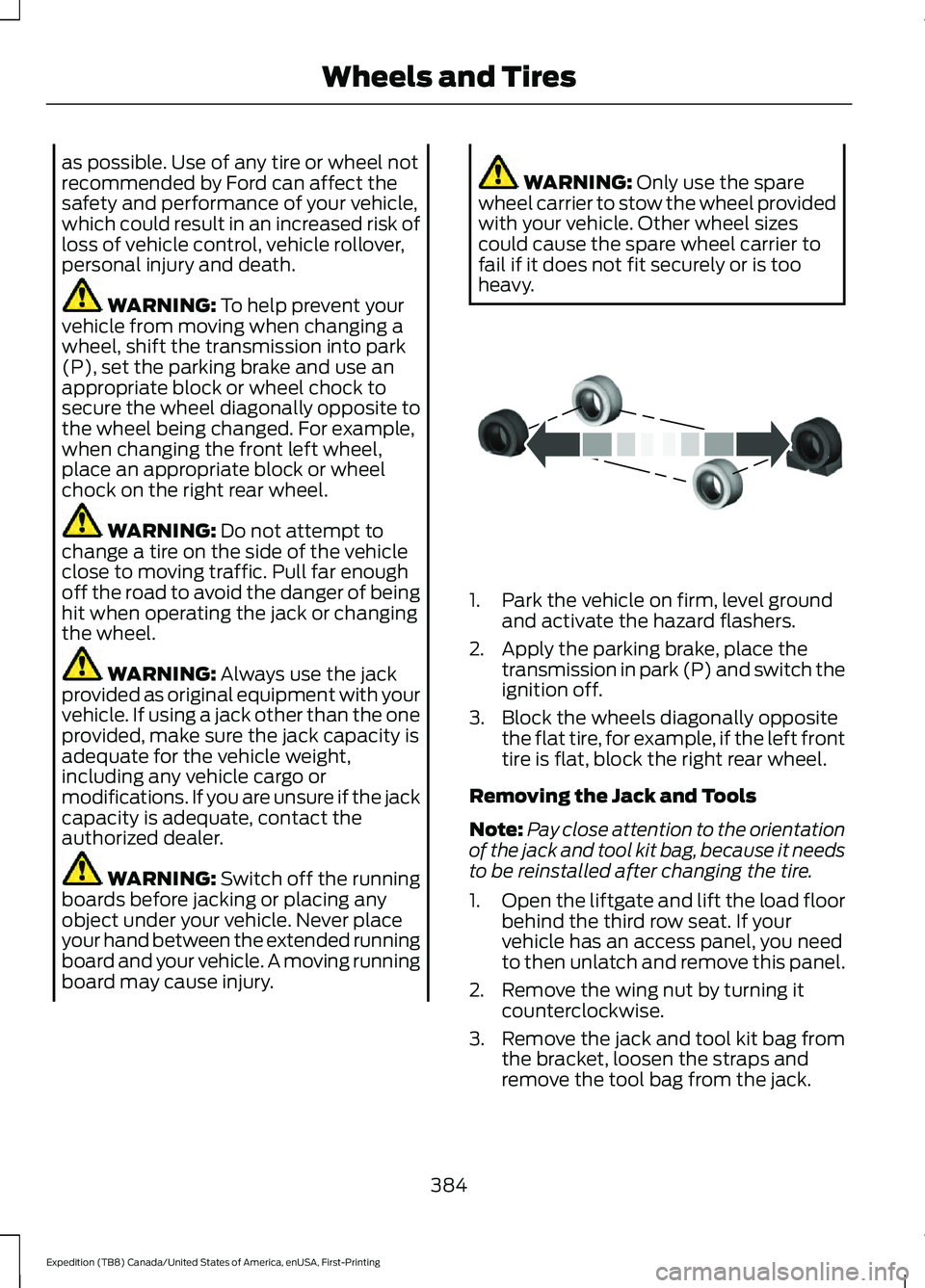
3. Block the wheels diagonally opposite the flat tire, for example, if the left front
tire is flat, block the right rear wheel.
Removing the Jack and Tools
Note: Pay close attention to the orientation
of the jack and tool kit bag, because it needs
to be reinstalled after changing the tire.
1. Open the liftgate and lift the load floor
behind the third row seat. If your
vehicle has an access panel, you need
to then unlatch and remove this panel.
2. Remove the wing nut by turning it counterclockwise.
3. Remove the jack and tool kit bag from the bracket, loosen the straps and
remove the tool bag from the jack.
384
Expedition (TB8) Canada/United States of America, enUSA, First-Printing Wheels and TiresE175447
Page 562 of 574
Capacities and Specifications................392
8.8 Inch Rear Axle............................................. 398
9.75 Inch Rear Axle with Limited-Slip................................................... 400
9.75 Inch Rear Axle Without Limited-Slip.................................................... 399
Air Conditioning System................................. 393
Alternative Engine Oil for Extremely Cold Climates........................................................... 395
Automatic Transmission................................. 393
Engine Coolant................................................... 394
Engine Oil............................................................. 395
Front Axle............................................................. 398
Fuel Tank.............................................................. 396
Grease.................................................................... 396
Hydraulic Brake System.................................. 397
Locks....................................................................... 397
Transfer Case....................................................... 397
Washer Reservoir.............................................. 400
Cargo Nets.......................................................277
Car Wash See: Cleaning the Exterior.............................. 354
Catalytic Converter....................................200 On-Board Diagnostics (OBD-II)................... 201
Readiness for Inspection and Maintenance (I/M) Testing................................................... 201
Center Console
..............................................182
Changing a Bulb..........................................350
Fog Lamp Bulb.................................................... 351
Front Direction Indicator Bulb...................... 350
Headlamp Bulb.................................................. 350
LED Bulbs.............................................................. 352
LED Direction Indicator and Side Marker Bulbs................................................................... 351
LED Foglamp...................................................... 350
LED Headlamp................................................... 350
Rear Lamp, Brake Lamp, Rear Direction Indicator and Reverse Lamp Bulbs.........351
Changing a Fuse
...........................................333
Fuses....................................................................... 333
Changing a Road Wheel
...........................382
Dissimilar Spare Wheel and Tire Assembly
Information..................................................... 382
Location of the Spare Tire and Tools.........383
Tire Change Procedure.................................... 383
Changing the 12V Battery
.........................345
Battery Management System....................... 347
Changing the Engine Air Filter................339 Changing the Vehicle Wi-Fi Hotspot
Name or Password
...................................407
Changing the Wiper Blades.....................349
Charging a Wireless Device......................180
Checking MyKey System Status...............70 MyKey Distance..................................................... 70
Number of Admin Keys........................................ 71
Number of MyKeys................................................ 71
Checking the Wiper Blades.....................349
Childminder Mirror.......................................108
Child Restraint and Seatbelt Maintenance..................................................47
Child Restraint Positioning.........................35
Child Safety
......................................................22
General Information............................................ 22
Child Safety Locks..........................................37 Left-Hand Side..................................................... 38
Right-Hand Side................................................... 38
Cleaning Leather Seats..............................357
Cleaning Products
.......................................353
Materials............................................................... 353
Cleaning the Engine....................................355
Cleaning the Exterior
..................................354
Cleaning the Exterior Lamps......................... 354
Cleaning the Exterior Precautions...............354
Exterior Chrome Parts..................................... 354
Exterior Plastic Parts........................................ 354
Stripes or Graphics............................................ 354
Underbody........................................................... 355
Under Hood......................................................... 355
Cleaning the Instrument Panel and Instrument Cluster Lens.........................357
Cleaning the Interior...................................356 Mirrors.................................................................... 356
Cleaning the Wheels..................................358
Cleaning the Windows and Wiper Blades...........................................................356
Clearing All MyKeys.......................................70
Climate............................................................453 Accessing Rear Climate Controls................455
Accessing the Climate Control Menu........453
Directing the Airflow......................................... 453
Rear Climate Control Lock Indicator..........455
Setting the Blower Motor Speed.................453
Setting the Temperature................................ 453
Switching Auto Mode On and Off...............453
Switching Dual Zone Mode On and Off...................................................................... 454
559
Expedition (TB8) Canada/United States of America, enUSA, First-Printing Index