lock FORD EXPEDITION EL 2009 Workshop Manual
[x] Cancel search | Manufacturer: FORD, Model Year: 2009, Model line: EXPEDITION EL, Model: FORD EXPEDITION EL 2009Pages: 415, PDF Size: 5.4 MB
Page 179 of 415
The following items may prevent the vehicle from starting:
• Large metallic objects
• Electronic devices on the key chain that can be used to purchase
gasoline or similar items
• A second key on the same key ring as the coded key
If any of these items are present, you need to keep these objects from
touching the coded key while starting the engine. These objects and
devices cannot damage the coded key, but can cause a momentary “no
start” condition if they are too close to the key during engine start. If a
problem occurs, turn ignition the off position and restart the engine with
all other objects on the key ring held away from the ignition key. Check
to make sure the coded key is an approved Ford coded key.
If your keys are lost or stolen you will need to do the following:
• Use your spare key to start the vehicle, or
• Have your vehicle towed to a authorized dealer or a locksmith. The
key codes will need to be erased from your vehicle and new key codes
will need to be re-coded.
Replacing coded keys can be very costly and you may want to store an
extra programmed key away from the vehicle in a safe place to prevent
an unforeseen inconvenience.
The correct coded key must be used for your vehicle. The use of the
wrong type of coded key may lead to a “no start” condition.
If an unprogrammed key is used in the ignition it will cause a “no
start” condition.
Programming spare keys
You can program your own Integrated Keyhead Transmitters or standard
SecuriLock™ coded keys to your vehicle. This procedure will program
both the engine immobilizer keycode and the remote entry transmitter
portion of the IKT to your vehicle. Note: A maximum of eight coded
keys can be programmed to your vehicle; only four of these eight can be
IKTs with remote entry functionality.
Tips:
• Only use Integrated Keyhead Transmitters (IKTs) or standard
SecuriLock™ keys.
• You must have two previously programmed coded keys (keys that
already operate your vehicle’s engine) and the new unprogrammed
key(s) readily accessible.
2009 Expedition (exd)
Owners Guide, 2nd Printing
USA (fus) Locks and Security
179
Page 180 of 415
• If two previously programmed coded keys are not available, you must
take your vehicle to your authorized dealer to have the spare key(s)
programmed.
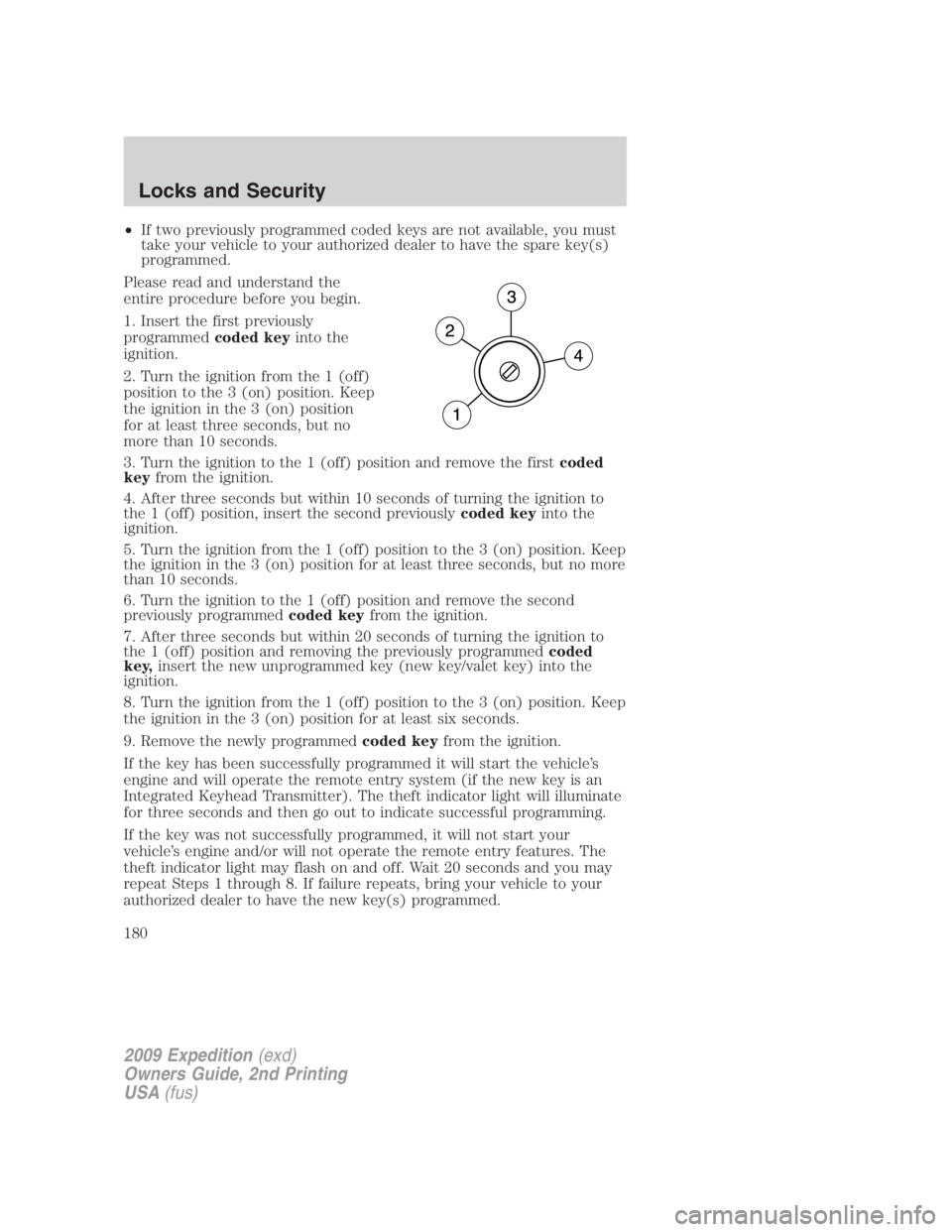
Please read and understand the
entire procedure before you begin.
1. Insert the first previously
programmed coded key into the
ignition.
2. Turn the ignition from the 1 (off)
position to the 3 (on) position. Keep
the ignition in the 3 (on) position
for at least three seconds, but no
more than 10 seconds.
3. Turn the ignition to the 1 (off) position and remove the first coded
key from the ignition.
4. After three seconds but within 10 seconds of turning the ignition to
the 1 (off) position, insert the second previously coded key into the
ignition.
5. Turn the ignition from the 1 (off) position to the 3 (on) position. Keep
the ignition in the 3 (on) position for at least three seconds, but no more
than 10 seconds.
6. Turn the ignition to the 1 (off) position and remove the second
previously programmed coded key from the ignition.
7. After three seconds but within 20 seconds of turning the ignition to
the 1 (off) position and removing the previously programmed coded
key, insert the new unprogrammed key (new key/valet key) into the
ignition.
8. Turn the ignition from the 1 (off) position to the 3 (on) position. Keep
the ignition in the 3 (on) position for at least six seconds.
9. Remove the newly programmed coded key from the ignition.
If the key has been successfully programmed it will start the vehicle’s
engine and will operate the remote entry system (if the new key is an
Integrated Keyhead Transmitter). The theft indicator light will illuminate
for three seconds and then go out to indicate successful programming.
If the key was not successfully programmed, it will not start your
vehicle’s engine and/or will not operate the remote entry features. The
theft indicator light may flash on and off. Wait 20 seconds and you may
repeat Steps 1 through 8. If failure repeats, bring your vehicle to your
authorized dealer to have the new key(s) programmed.
2009 Expedition (exd)
Owners Guide, 2nd Printing
USA (fus)Locks and Security
180
Page 181 of 415
To program additional new unprogrammed key(s), wait 20 seconds and
then repeat this procedure from Step 1.
PERIMETER ALARM SYSTEM (IF EQUIPPED)
The perimeter anti-theft system will help protect your vehicle from
unauthorized entry.
If there is any potential perimeter anti-theft problem with your vehicle,
ensure ALL Integrated Keyhead Transmitters are brought to the
authorized dealer to aid in troubleshooting.
Arming the system
When armed, this system will respond if unauthorized entry is
attempted. When unauthorized entry occurs, the system will flash the
turn signal lamps and will sound the horn.
The system is ready to arm whenever the key is in the off position, or is
removed from the ignition. Either of the following actions will prearm the
alarm system:
• Press the control on the remote entry transmitter portion of your
Integrated Keyhead Transmitter.
When you press the lock control twice within three seconds on the
remote entry transmitter portion of your IKT, the horn will chirp once
to let you know that all doors, the hood and the liftgate are closed. If
any of these are not closed, the horn will chirp twice to warn you that
a door, the hood or the liftgate is still open.
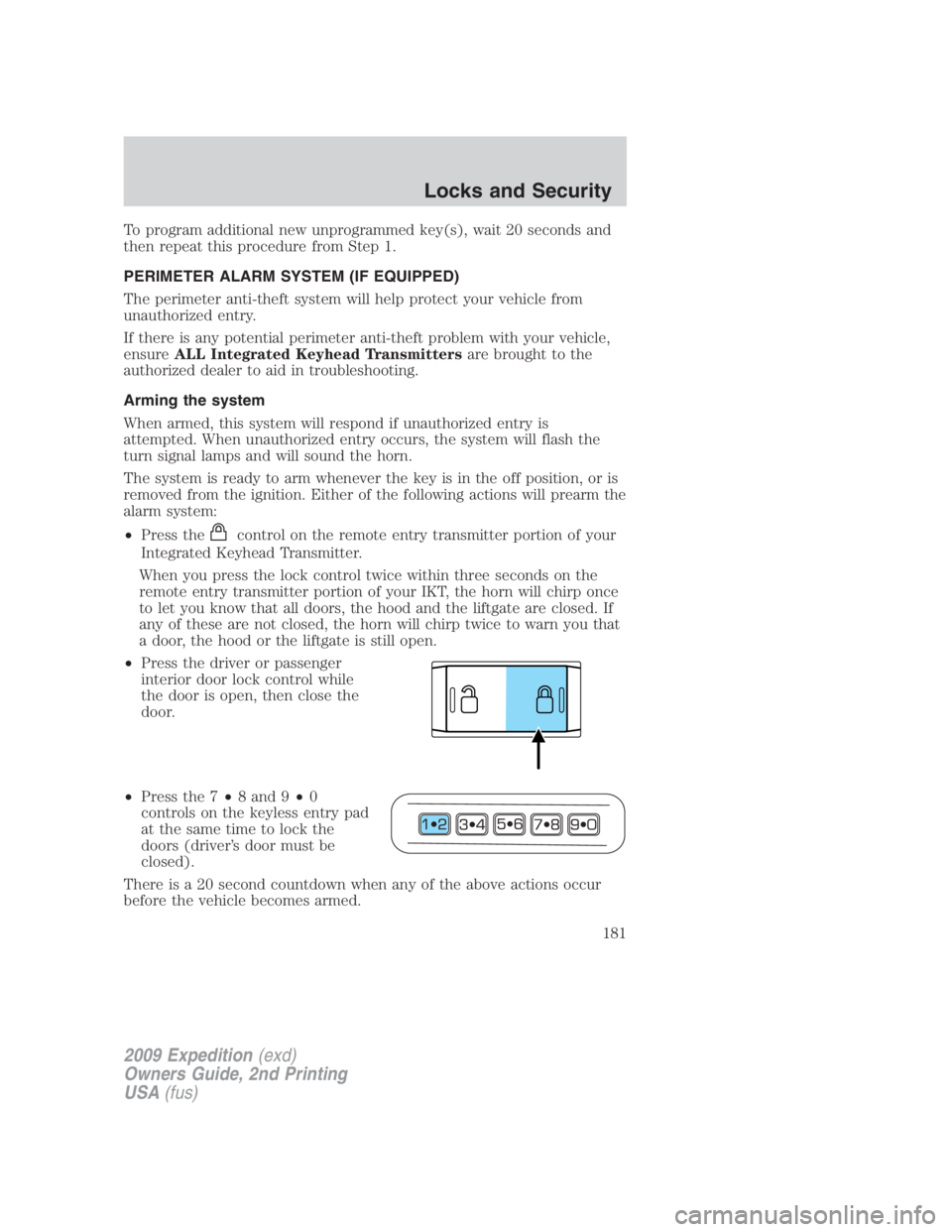
• Press the driver or passenger
interior door lock control while
the door is open, then close the
door.
• Press the 7 • 8 and 9 • 0
controls on the keyless entry pad
at the same time to lock the
doors (driver’s door must be
closed).
There is a 20 second countdown when any of the above actions occur
before the vehicle becomes armed.
2009 Expedition (exd)
Owners Guide, 2nd Printing
USA (fus) Locks and Security
181
Page 182 of 415
Each door, the hood, and the liftgate is armed individually, and if any are
open, they must be closed before the open entry point (door, hood, or
liftgate) can enter the 20 second countdown.
The turn signal lamps will flash once when all doors, the hood and the
liftgate are closed indicating the vehicle is locked and entering the
20 second countdown.
Disarming the system
You can disarm the system by any of the following actions:
• Unlock the doors by using the remote entry transmitter portion of
your Integrated Keyhead Transmitter.
• Unlock the doors by using your keyless entry pad.
• Turn ignition to the on position with a valid programmed SecuriLock™
key or Integrated Keyhead Transmitter (IKT).
• Press the panic control on the remote entry transmitter portion of
your IKT. This will only shut off the horn and turn lamps when the
alarm is sounding. The alarm system will still be armed.
• If using a key in the driver’s door to unlock the vehicle, a chime will
sound when you open the door and you will have 12 seconds to
disarm the alarm system using any of the actions above, otherwise the
alarm will trigger.
Pressing the power door unlock control within the 20 second prearmed
mode will return the vehicle to a disarmed state.
Triggering the anti-theft system
The armed system will be triggered if:
• Any door, the hood or the liftgate is opened without using the keypad
or the remote entry transmitter portion of your IKT.
• The ignition is turned to the on position with an invalid
unprogrammed SecuriLock™ key or IKT.
2009 Expedition (exd)
Owners Guide, 2nd Printing
USA (fus)Locks and Security
182
Page 183 of 415
SEATING
Adjustable head restraints
Your vehicle is equipped with front row outboard head restraints that are
vertically adjustable.
WARNING: To minimize the risk of neck injury in the event of a
crash, the driver and passenger occupants should not sit in
and/or operate the vehicle, until the head restraint is placed in its
proper position. The driver should never adjust the head restraint
while the vehicle is in motion.
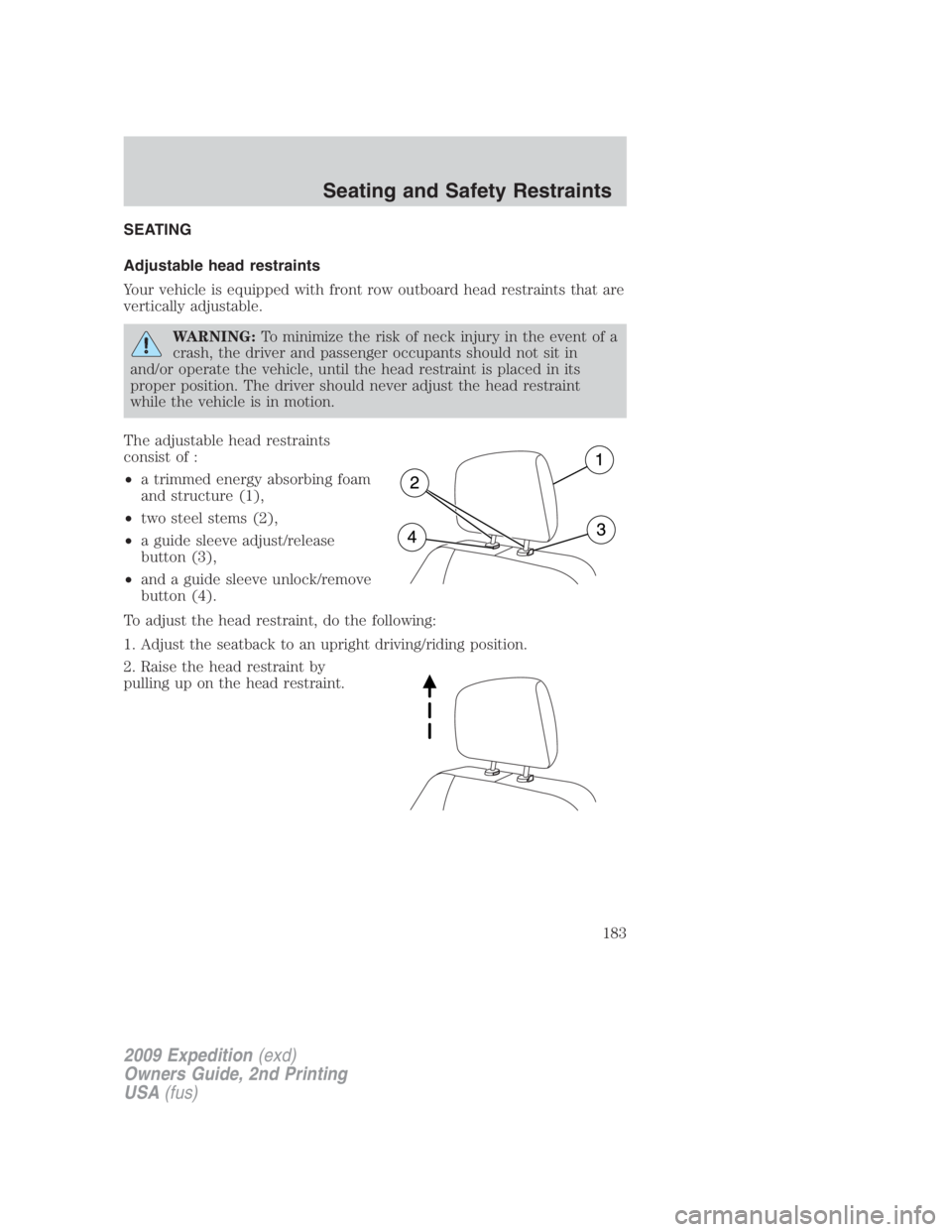
The adjustable head restraints
consist of :
• a trimmed energy absorbing foam
and structure (1),
• two steel stems (2),
• a guide sleeve adjust/release
button (3),
• and a guide sleeve unlock/remove
button (4).
To adjust the head restraint, do the following:
1. Adjust the seatback to an upright driving/riding position.
2. Raise the head restraint by
pulling up on the head restraint.
2009 Expedition (exd)
Owners Guide, 2nd Printing
USA (fus) Seating and Safety Restraints
183
Page 185 of 415
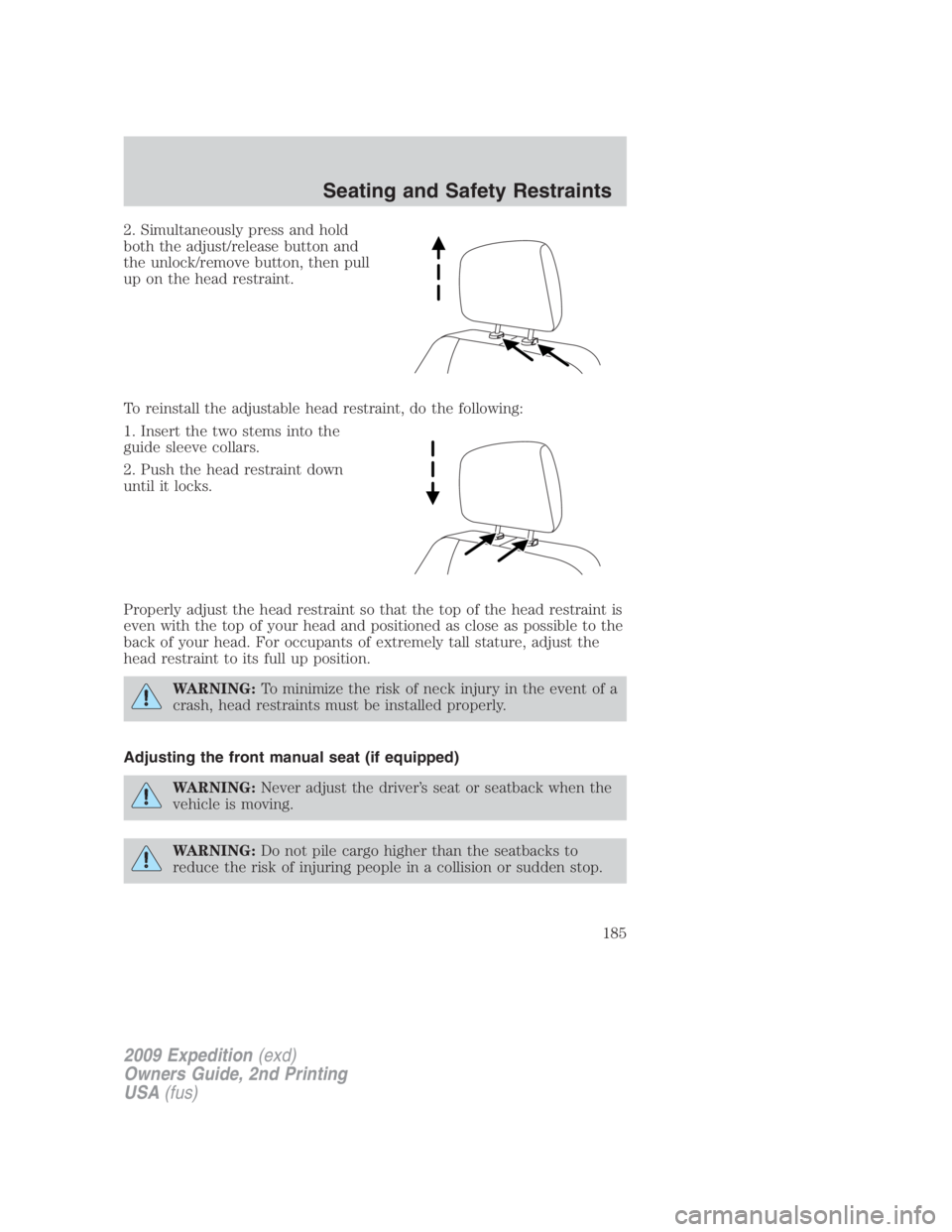
2. Simultaneously press and hold
both the adjust/release button and
the unlock/remove button, then pull
up on the head restraint.
To reinstall the adjustable head restraint, do the following:
1. Insert the two stems into the
guide sleeve collars.
2. Push the head restraint down
until it locks.
Properly adjust the head restraint so that the top of the head restraint is
even with the top of your head and positioned as close as possible to the
back of your head. For occupants of extremely tall stature, adjust the
head restraint to its full up position.
WARNING: To minimize the risk of neck injury in the event of a
crash, head restraints must be installed properly.
Adjusting the front manual seat (if equipped)
WARNING: Never adjust the driver’s seat or seatback when the
vehicle is moving.
WARNING: Do not pile cargo higher than the seatbacks to
reduce the risk of injuring people in a collision or sudden stop.
2009 Expedition (exd)
Owners Guide, 2nd Printing
USA (fus) Seating and Safety Restraints
185
Page 187 of 415
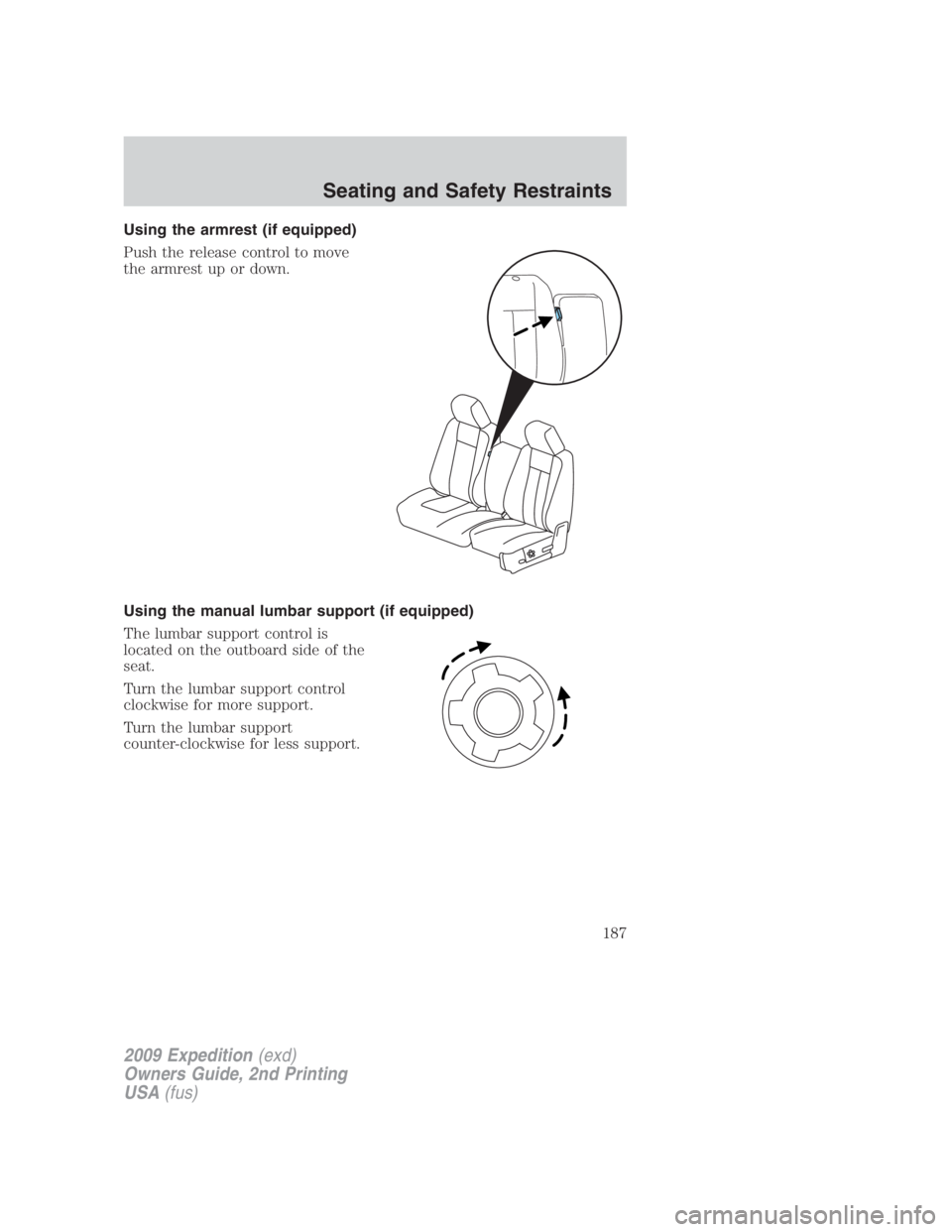
Using the armrest (if equipped)
Push the release control to move
the armrest up or down.
Using the manual lumbar support (if equipped)
The lumbar support control is
located on the outboard side of the
seat.
Turn the lumbar support control
clockwise for more support.
Turn the lumbar support
counter-clockwise for less support.
2009 Expedition (exd)
Owners Guide, 2nd Printing
USA (fus) Seating and Safety Restraints
187
Page 190 of 415
Memory seat/power mirrors/adjustable pedals (if equipped)
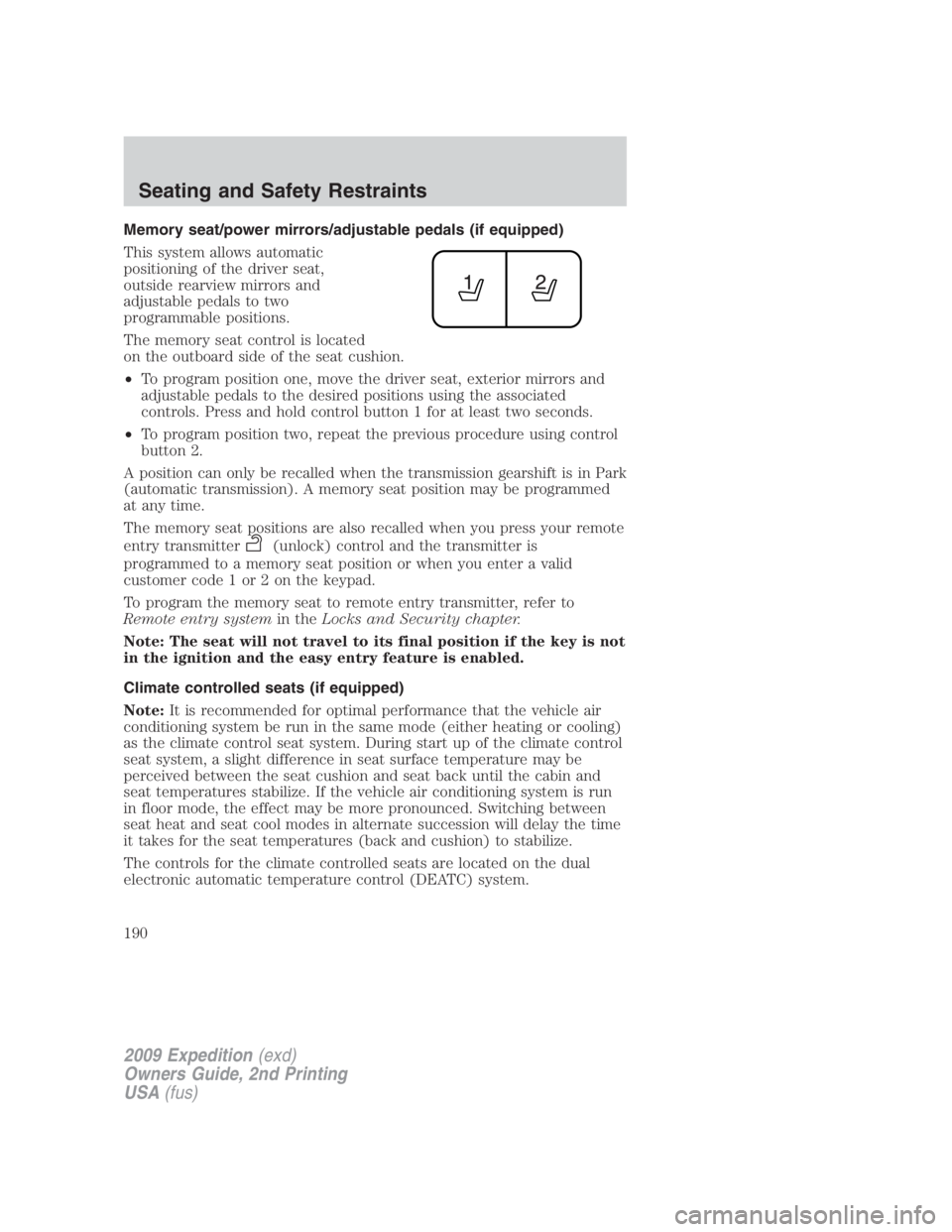
This system allows automatic
positioning of the driver seat,
outside rearview mirrors and
adjustable pedals to two
programmable positions.
The memory seat control is located
on the outboard side of the seat cushion.
• To program position one, move the driver seat, exterior mirrors and
adjustable pedals to the desired positions using the associated
controls. Press and hold control button 1 for at least two seconds.
• To program position two, repeat the previous procedure using control
button 2.
A position can only be recalled when the transmission gearshift is in Park
(automatic transmission). A memory seat position may be programmed
at any time.
The memory seat positions are also recalled when you press your remote
entry transmitter (unlock) control and the transmitter is
programmed to a memory seat position or when you enter a valid
customer code 1 or 2 on the keypad.
To program the memory seat to remote entry transmitter, refer to
Remote entry system in the Locks and Security chapter.
Note: The seat will not travel to its final position if the key is not
in the ignition and the easy entry feature is enabled.
Climate controlled seats (if equipped)
Note: It is recommended for optimal performance that the vehicle air
conditioning system be run in the same mode (either heating or cooling)
as the climate control seat system. During start up of the climate control
seat system, a slight difference in seat surface temperature may be
perceived between the seat cushion and seat back until the cabin and
seat temperatures stabilize. If the vehicle air conditioning system is run
in floor mode, the effect may be more pronounced. Switching between
seat heat and seat cool modes in alternate succession will delay the time
it takes for the seat temperatures (back and cushion) to stabilize.
The controls for the climate controlled seats are located on the dual
electronic automatic temperature control (DEATC) system.
2009 Expedition (exd)
Owners Guide, 2nd Printing
USA (fus)Seating and Safety Restraints
190
Page 194 of 415
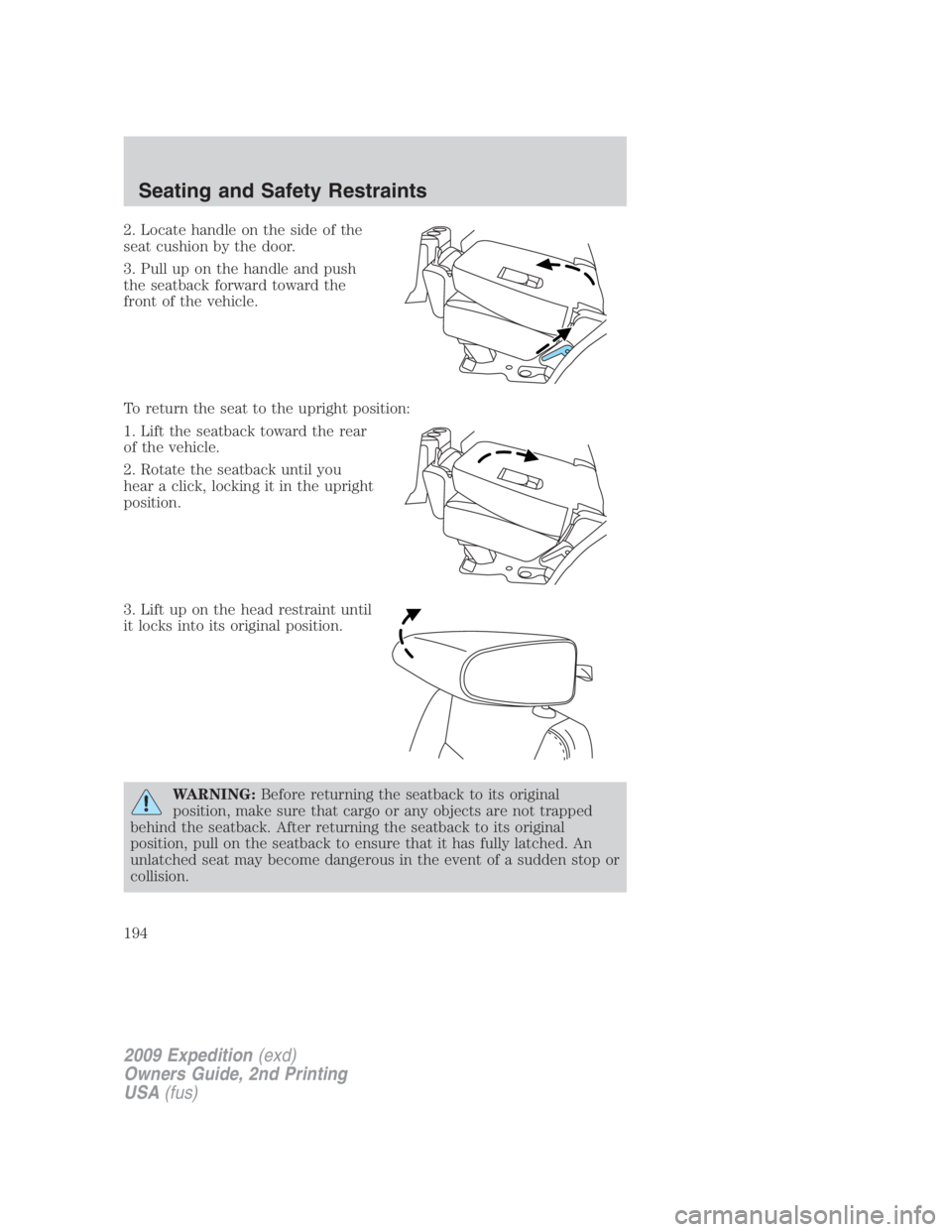
2. Locate handle on the side of the
seat cushion by the door.
3. Pull up on the handle and push
the seatback forward toward the
front of the vehicle.
To return the seat to the upright position:
1. Lift the seatback toward the rear
of the vehicle.
2. Rotate the seatback until you
hear a click, locking it in the upright
position.
3. Lift up on the head restraint until
it locks into its original position.
WARNING: Before returning the seatback to its original
position, make sure that cargo or any objects are not trapped
behind the seatback. After returning the seatback to its original
position, pull on the seatback to ensure that it has fully latched. An
unlatched seat may become dangerous in the event of a sudden stop or
collision.
2009 Expedition (exd)
Owners Guide, 2nd Printing
USA (fus)Seating and Safety Restraints
194
Page 197 of 415
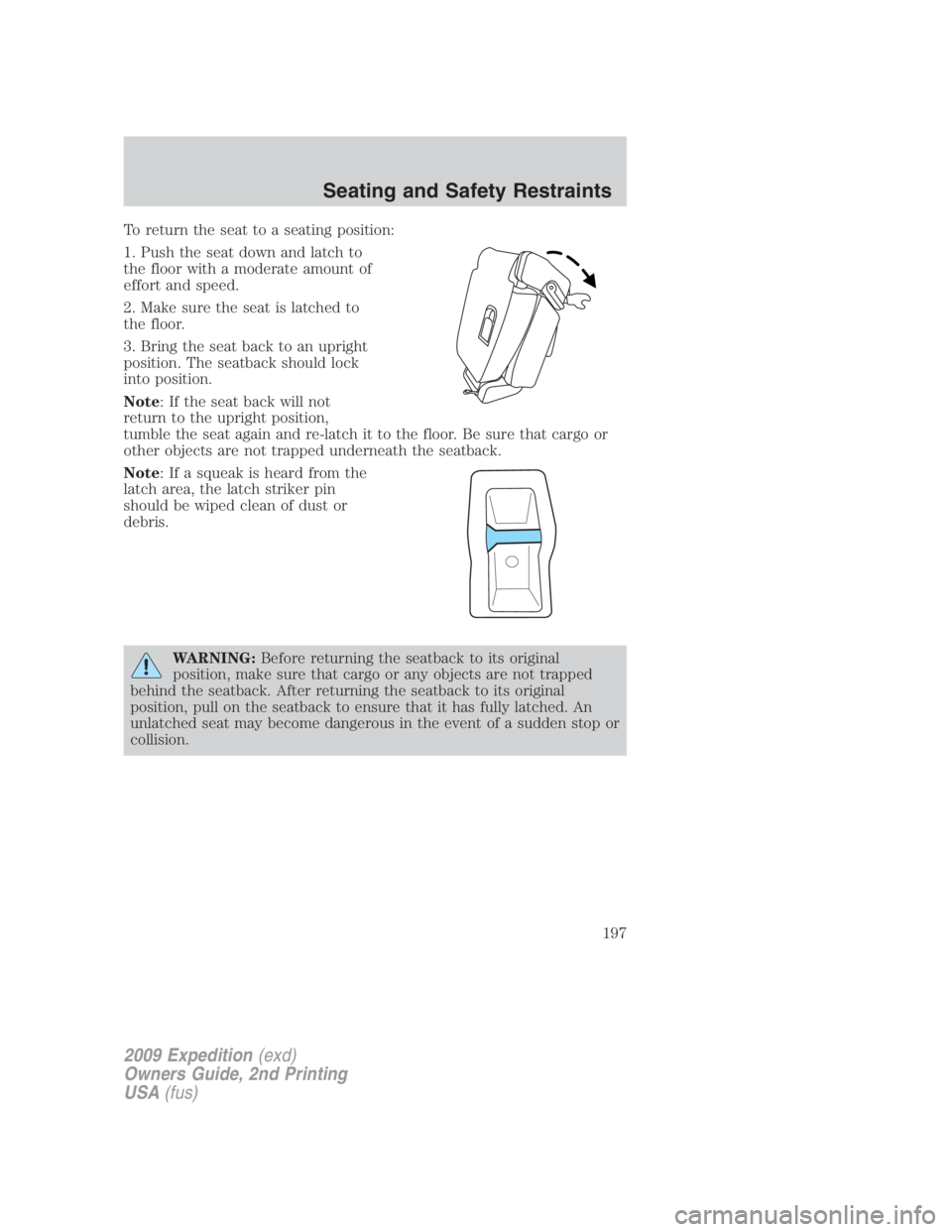
To return the seat to a seating position:
1. Push the seat down and latch to
the floor with a moderate amount of
effort and speed.
2. Make sure the seat is latched to
the floor.
3. Bring the seat back to an upright
position. The seatback should lock
into position.
Note : If the seat back will not
return to the upright position,
tumble the seat again and re-latch it to the floor. Be sure that cargo or
other objects are not trapped underneath the seatback.
Note : If a squeak is heard from the
latch area, the latch striker pin
should be wiped clean of dust or
debris.
WARNING: Before returning the seatback to its original
position, make sure that cargo or any objects are not trapped
behind the seatback. After returning the seatback to its original
position, pull on the seatback to ensure that it has fully latched. An
unlatched seat may become dangerous in the event of a sudden stop or
collision.
2009 Expedition (exd)
Owners Guide, 2nd Printing
USA (fus) Seating and Safety Restraints
197