engine FORD EXPEDITION EL 2016 User Guide
[x] Cancel search | Manufacturer: FORD, Model Year: 2016, Model line: EXPEDITION EL, Model: FORD EXPEDITION EL 2016Pages: 421, PDF Size: 7.39 MB
Page 50 of 421
•Various vehicle speed minders can beset. Once you select a speed, it will beshown in the display, followed by anaudible tone when the preselectedvehicle speed is exceeded.
•Audio system maximum volume of45%. A message will be shown in thedisplay when you attempt to exceedthe limited volume. Also, thespeed-sensitive or compensatedautomatic volume control will bedisabled.
•Always on setting. When this isselected, you will not be able to turnoff Advance Trac or traction control,911 Assist or Emergency Assistance, orDo Not Disturb (if your vehicle isequipped with these features).
CREATING A MYKEY
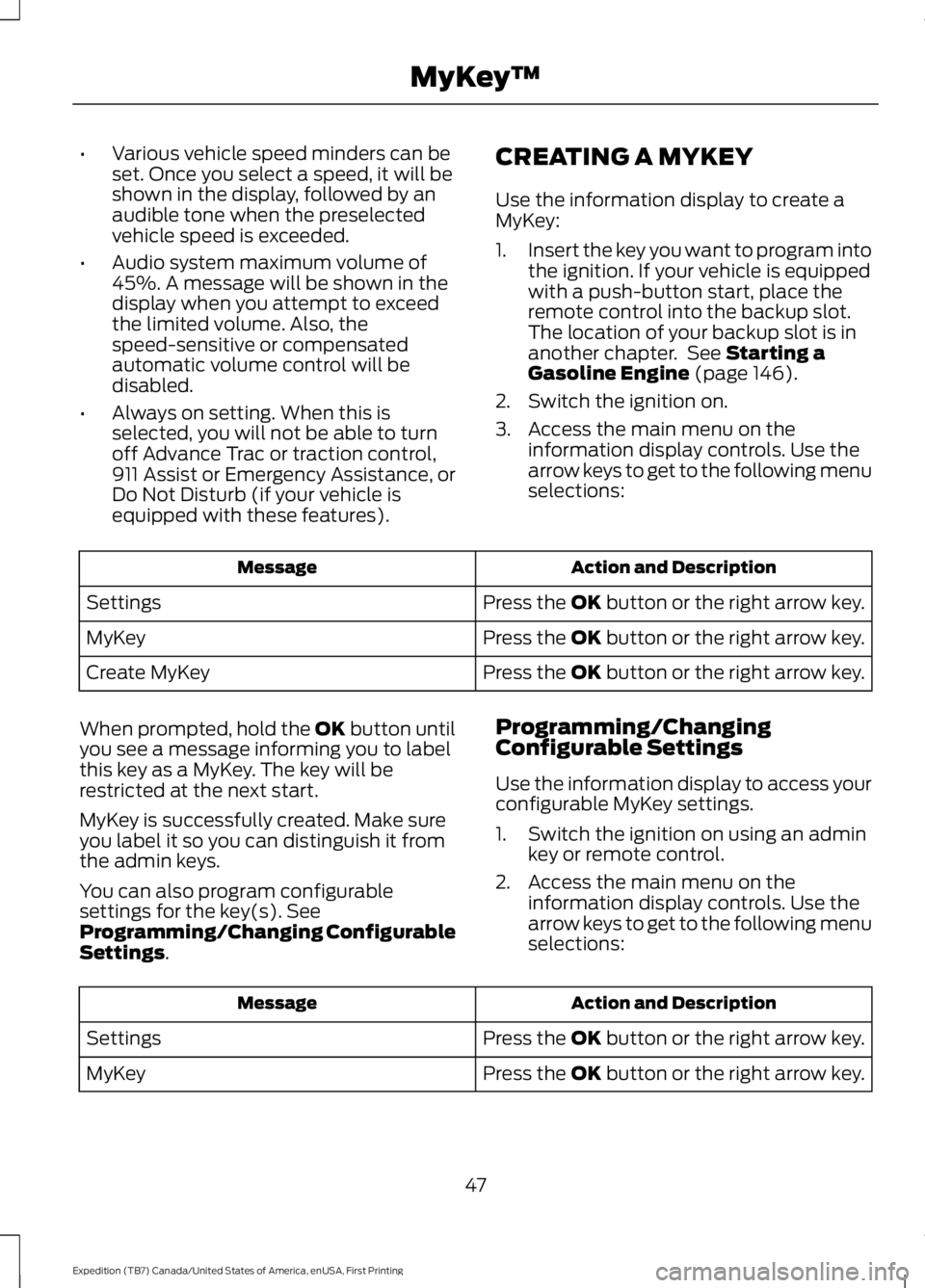
Use the information display to create aMyKey:
1.Insert the key you want to program intothe ignition. If your vehicle is equippedwith a push-button start, place theremote control into the backup slot.The location of your backup slot is inanother chapter. See Starting aGasoline Engine (page 146).
2. Switch the ignition on.
3. Access the main menu on theinformation display controls. Use thearrow keys to get to the following menuselections:
Action and DescriptionMessage
Press the OK button or the right arrow key.Settings
Press the OK button or the right arrow key.MyKey
Press the OK button or the right arrow key.Create MyKey
When prompted, hold the OK button untilyou see a message informing you to labelthis key as a MyKey. The key will berestricted at the next start.
MyKey is successfully created. Make sureyou label it so you can distinguish it fromthe admin keys.
You can also program configurablesettings for the key(s). SeeProgramming/Changing ConfigurableSettings.
Programming/ChangingConfigurable Settings
Use the information display to access yourconfigurable MyKey settings.
1. Switch the ignition on using an adminkey or remote control.
2. Access the main menu on theinformation display controls. Use thearrow keys to get to the following menuselections:
Action and DescriptionMessage
Press the OK button or the right arrow key.Settings
Press the OK button or the right arrow key.MyKey
47
Expedition (TB7) Canada/United States of America, enUSA, First Printing
MyKey™
Page 54 of 421
2. Start your vehicle using yournon-Ford-approved remote startsystem transmitter.
3. See Clearing All MyKeys (page 48).Follow Steps 1-3.
After clearing your MyKeys, you can createa new MyKey. See Creating a MyKey(page 47).
Note:With push-button start, you cannotprogram the remote start systemtransmitter as a MyKey. Always treat theremote start system transmitter as youwould any other admin key.
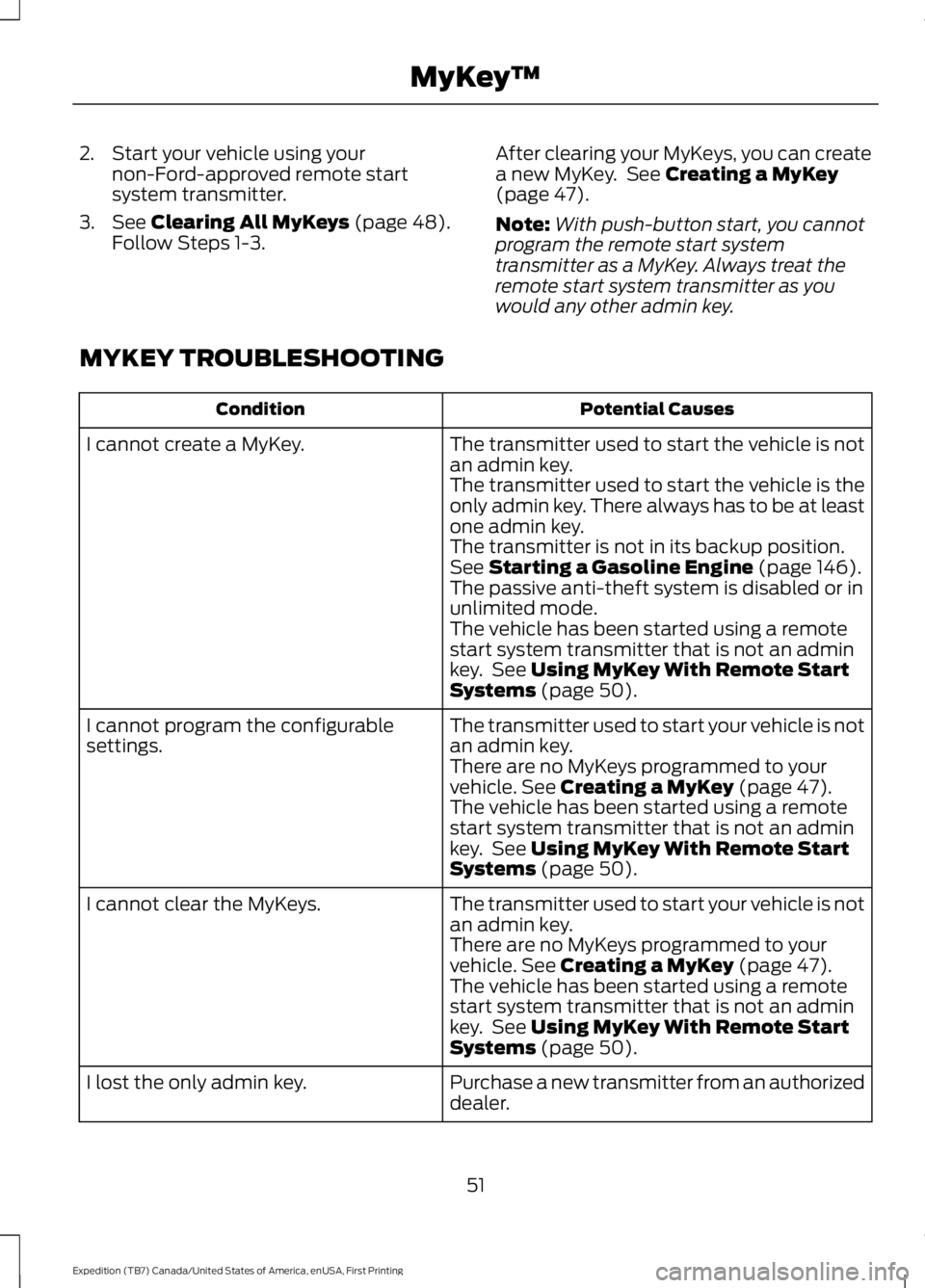
MYKEY TROUBLESHOOTING
Potential CausesCondition
The transmitter used to start the vehicle is notan admin key.I cannot create a MyKey.
The transmitter used to start the vehicle is theonly admin key. There always has to be at leastone admin key.The transmitter is not in its backup position.See Starting a Gasoline Engine (page 146).The passive anti-theft system is disabled or inunlimited mode.The vehicle has been started using a remotestart system transmitter that is not an adminkey. See Using MyKey With Remote StartSystems (page 50).
The transmitter used to start your vehicle is notan admin key.I cannot program the configurablesettings.There are no MyKeys programmed to yourvehicle. See Creating a MyKey (page 47).The vehicle has been started using a remotestart system transmitter that is not an adminkey. See Using MyKey With Remote StartSystems (page 50).
The transmitter used to start your vehicle is notan admin key.I cannot clear the MyKeys.
There are no MyKeys programmed to yourvehicle. See Creating a MyKey (page 47).The vehicle has been started using a remotestart system transmitter that is not an adminkey. See Using MyKey With Remote StartSystems (page 50).
Purchase a new transmitter from an authorizeddealer.I lost the only admin key.
51
Expedition (TB7) Canada/United States of America, enUSA, First Printing
MyKey™
Page 65 of 421
PASSIVE ANTI-THEFT
SYSTEM
Note:The system is not compatible withnon-Ford aftermarket remote start systems.Use of these systems may result in vehiclestarting problems and a loss of securityprotection.
Note:Metallic objects, electronic devicesor a second coded key on the same keychain may cause vehicle starting problemsif they are too close to the key when startingthe engine. Prevent these objects fromtouching the coded key while starting theengine. Switch the ignition off, move allobjects on the key chain away from thecoded key and restart the engine if aproblem occurs.
Note:Do not leave a duplicate coded keyin the vehicle. Always take your keys andlock all doors when leaving the vehicle.
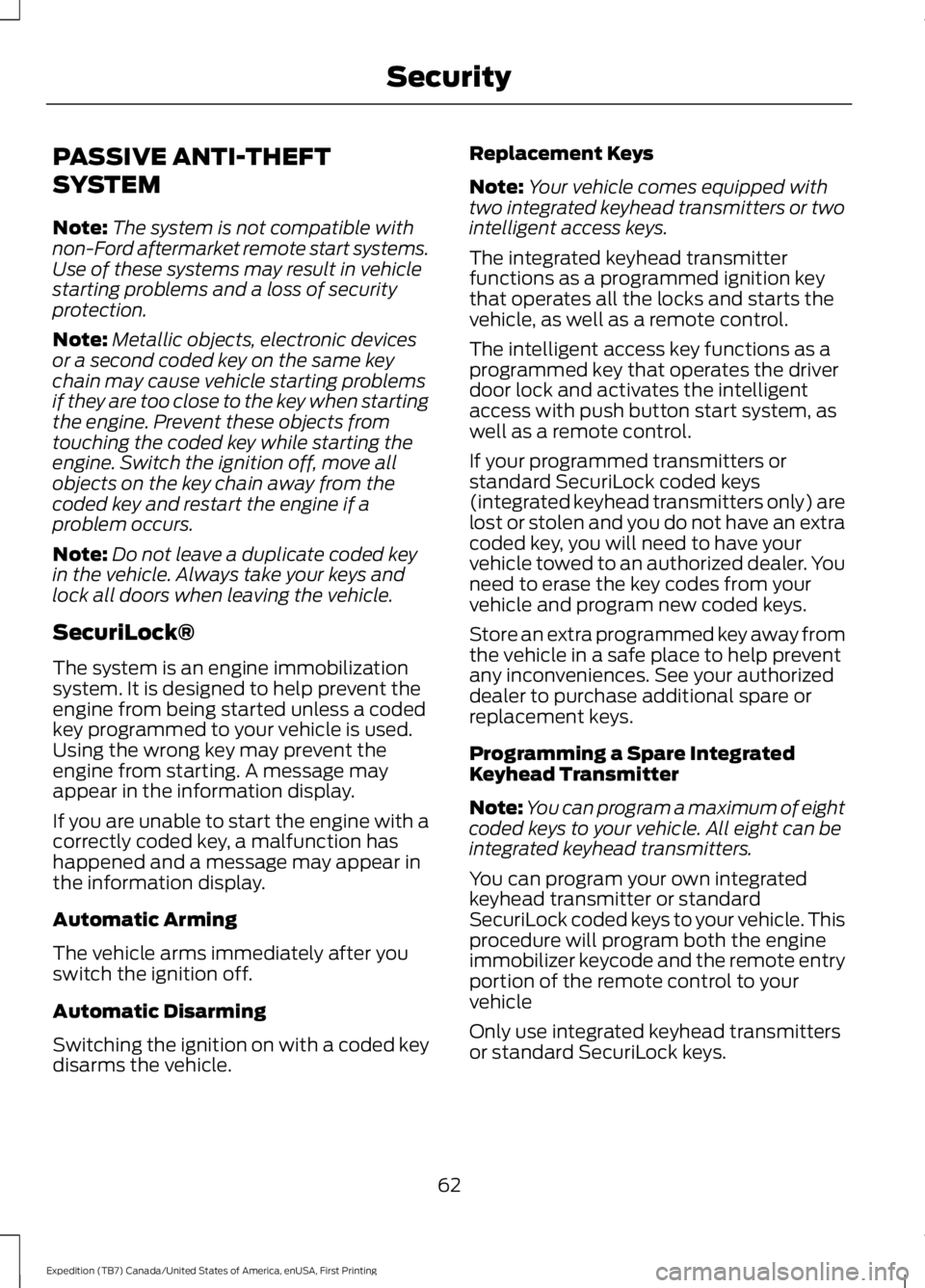
SecuriLock®
The system is an engine immobilizationsystem. It is designed to help prevent theengine from being started unless a codedkey programmed to your vehicle is used.Using the wrong key may prevent theengine from starting. A message mayappear in the information display.
If you are unable to start the engine with acorrectly coded key, a malfunction hashappened and a message may appear inthe information display.
Automatic Arming
The vehicle arms immediately after youswitch the ignition off.
Automatic Disarming
Switching the ignition on with a coded keydisarms the vehicle.
Replacement Keys
Note:Your vehicle comes equipped withtwo integrated keyhead transmitters or twointelligent access keys.
The integrated keyhead transmitterfunctions as a programmed ignition keythat operates all the locks and starts thevehicle, as well as a remote control.
The intelligent access key functions as aprogrammed key that operates the driverdoor lock and activates the intelligentaccess with push button start system, aswell as a remote control.
If your programmed transmitters orstandard SecuriLock coded keys(integrated keyhead transmitters only) arelost or stolen and you do not have an extracoded key, you will need to have yourvehicle towed to an authorized dealer. Youneed to erase the key codes from yourvehicle and program new coded keys.
Store an extra programmed key away fromthe vehicle in a safe place to help preventany inconveniences. See your authorizeddealer to purchase additional spare orreplacement keys.
Programming a Spare IntegratedKeyhead Transmitter
Note:You can program a maximum of eightcoded keys to your vehicle. All eight can beintegrated keyhead transmitters.
You can program your own integratedkeyhead transmitter or standardSecuriLock coded keys to your vehicle. Thisprocedure will program both the engineimmobilizer keycode and the remote entryportion of the remote control to yourvehicle
Only use integrated keyhead transmittersor standard SecuriLock keys.
62
Expedition (TB7) Canada/United States of America, enUSA, First Printing
Security
Page 66 of 421

You must have two previouslyprogrammed coded keys and the newunprogrammed key readily accessible. Seeyour authorized dealer to have the sparekey programmed if two previouslyprogrammed coded keys are not available.
Read and understand the entire procedurebefore you begin.
1.Insert the first previously programmedcoded key into the ignition.
2.Switch the ignition from off to on. Keepthe ignition on for at least threeseconds, but no more than 10 seconds.
3.Switch the ignition off and remove thefirst coded key from the ignition.
4. After three seconds but within 10seconds of switching the ignition off,insert the second previously coded keyinto the ignition.
5.Switch the ignition from off to on. Keepthe ignition on for at least threeseconds, but no more than 10 seconds.
6.Switch the ignition off and remove thesecond previously programmed codedkey from the ignition.
7. After three seconds but within 10seconds of switching the ignition offand removing the previouslyprogrammed coded key, insert the newunprogrammed key into the ignition.
8.Switch the ignition from off to on. Keepthe ignition on for at least six seconds.
9.Remove the newly programmed codedkey from the ignition.
If the key has been successfullyprogrammed it will start the engine andoperate the remote entry system (if thenew key is an integrated keyheadtransmitter).
If programming was not successful, wait10 seconds and repeat Steps 1 through 8.If you are still unsuccessful, take yourvehicle to your authorized dealer.
Programming a Spare IntelligentAccess Key
See your authorized dealer to haveadditional keys programmed to yourvehicle.
ANTI-THEFT ALARM
The system will warn you of anunauthorized entry to your vehicle. It willbe triggered if any door, the luggagecompartment or the hood is openedwithout using the key, remote control orkeyless entry keypad.
The direction indicators will flash and thehorn will sound if unauthorized entry isattempted while the alarm is armed.
Take all remote controls to an authorizeddealer if there is any potential alarmproblem with your vehicle.
Arming the Alarm
The alarm is ready to arm when there isnot a key in your vehicle. Electronically lockyour vehicle to arm the alarm.
Disarming the Alarm
Disarm the alarm by any of the followingactions:
•Unlock the doors or luggagecompartment with the remote controlor keyless entry keypad.
•Switch your vehicle on or start yourvehicle.
•Use a key in the driver door to unlockyour vehicle, then switch your vehicleon within 12 seconds.
Note:Pressing the panic button on theremote control will stop the horn and signalindicators, but will not disarm the system.
63
Expedition (TB7) Canada/United States of America, enUSA, First Printing
Security
Page 88 of 421
GAUGES
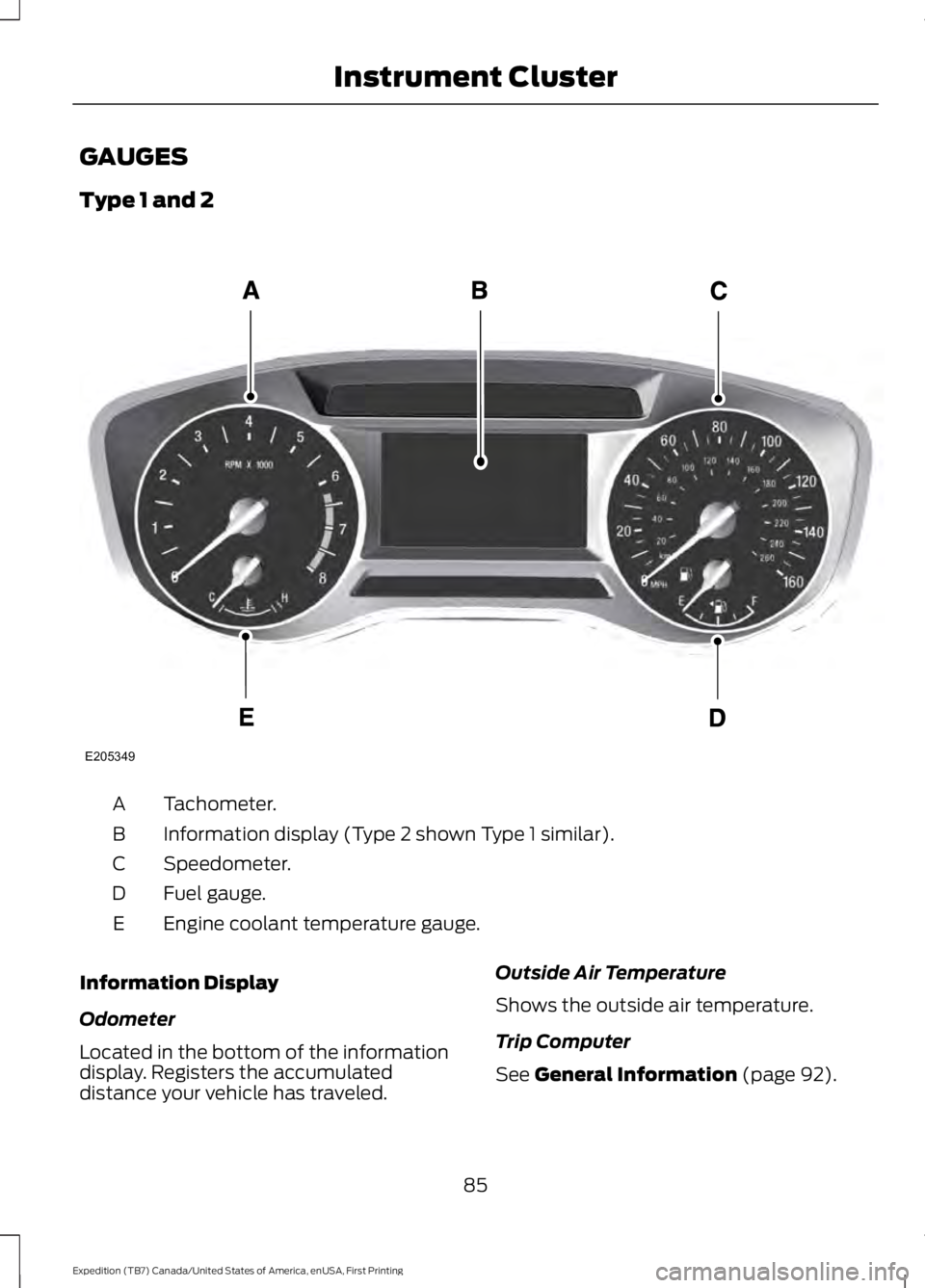
Type 1 and 2
Tachometer.A
Information display (Type 2 shown Type 1 similar).B
Speedometer.C
Fuel gauge.D
Engine coolant temperature gauge.E
Information Display
Odometer
Located in the bottom of the informationdisplay. Registers the accumulateddistance your vehicle has traveled.
Outside Air Temperature
Shows the outside air temperature.
Trip Computer
See General Information (page 92).
85
Expedition (TB7) Canada/United States of America, enUSA, First Printing
Instrument ClusterE205349
Page 89 of 421
Vehicle Settings and Personalization
See General Information (page 92).
Fuel Gauge
Note:The fuel gauge may vary slightlywhen your vehicle is moving or on a gradient.
Switch the ignition on. The fuel gaugeindicates approximately how much fuelremains in the fuel tank. The arrowadjacent to the fuel pump symbolindicates on which side of your vehicle thefuel filler door is located.
The needle should move toward F whenyou refuel your vehicle. If the needle pointsto E after adding fuel, this indicates yourvehicle needs service soon.
After refueling, the needle may not alwaysreturn to the exact same position. This isnormal.
Note:It may take a short time for theneedle to reach F after leaving the gasstation. This is normal and depends uponthe slope of pavement at the gas station.
Note:The fuel amount dispensed into thetank is a little less or more than the gaugeindicated. This is normal and depends uponthe slope of pavement at the gas station.
Note:If the gas station nozzle shuts offbefore the tank is full, try a different gaspump nozzle.
Note:There is a small reserve left in thetank when the fuel gauge reaches empty.
Low Fuel Reminder
A low reminder displays when the distanceto empty reaches 50 miles (80 km) toempty.
Note:The low fuel reminder can appear atdifferent fuel gauge positions depending onfuel economy conditions. This variation isnormal.
Engine Coolant Temperature Gauge
Shows the temperature of the enginecoolant. At normal operating temperature,the needle remains in the center section.If the needle enters the red section, theengine is overheating. Stop the engine,switch the ignition off and determine thecause once the engine has cooled down.
Note:Do not restart the engine until youconclude the cause of overheating.
WARNING
Never remove the coolant reservoircap while the engine is running or hot.The hot coolant is under pressureand may cause serious burns.
86
Expedition (TB7) Canada/United States of America, enUSA, First Printing
Instrument Cluster
Page 91 of 421
WARNING LAMPS AND
INDICATORS
The following warning lamps andindicators alert you to a vehicle conditionthat may become serious. Some lampsilluminate when you start your vehicle tomake sure they work. If any lamps remainon after starting your vehicle, refer to therespective system warning lamp for furtherinformation.
Note:Some warning indicators appear inthe information display and function thesame as a warning lamp but do not displaywhen you start your vehicle.
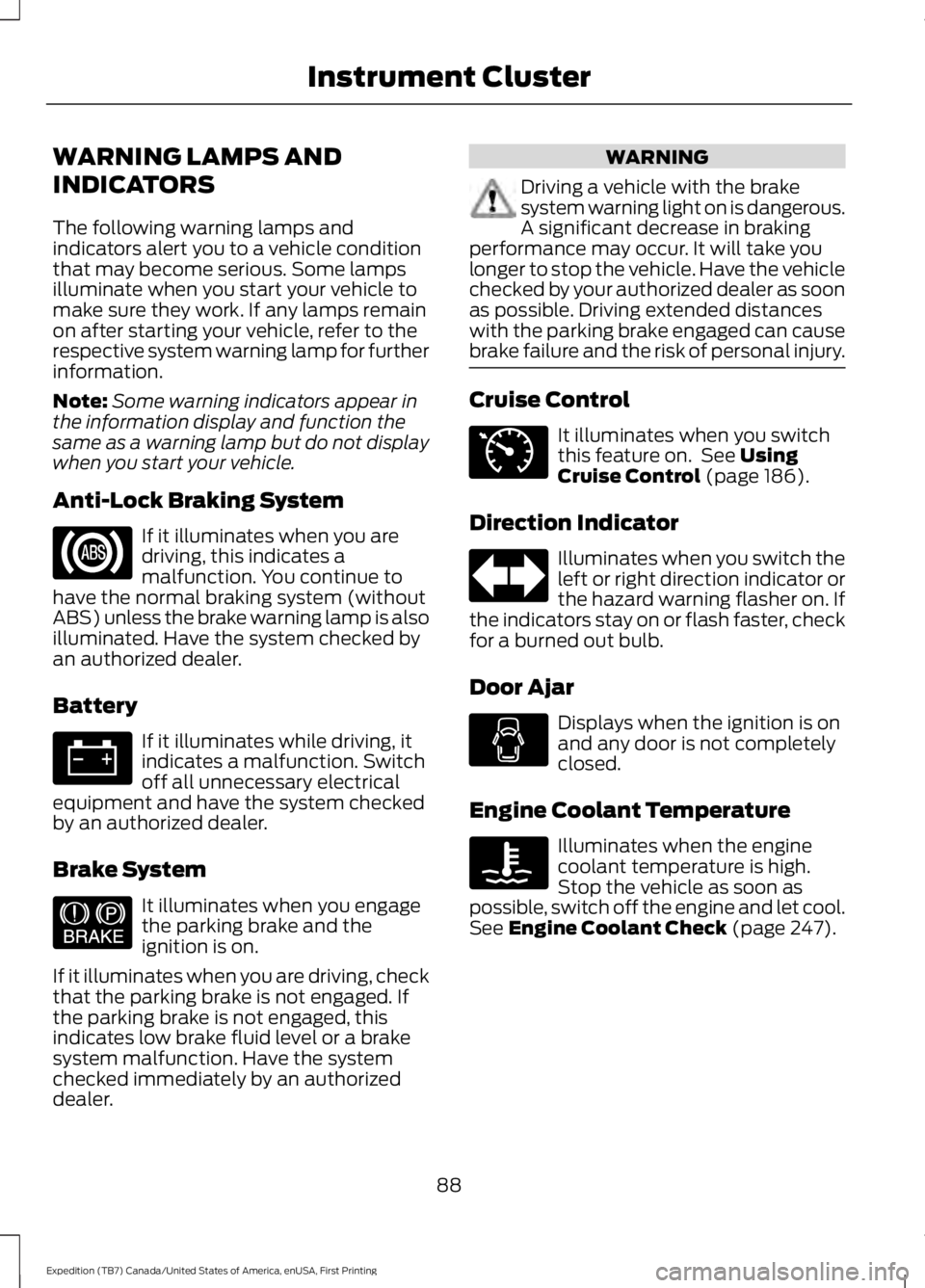
Anti-Lock Braking System
If it illuminates when you aredriving, this indicates amalfunction. You continue tohave the normal braking system (withoutABS) unless the brake warning lamp is alsoilluminated. Have the system checked byan authorized dealer.
Battery
If it illuminates while driving, itindicates a malfunction. Switchoff all unnecessary electricalequipment and have the system checkedby an authorized dealer.
Brake System
It illuminates when you engagethe parking brake and theignition is on.
If it illuminates when you are driving, checkthat the parking brake is not engaged. Ifthe parking brake is not engaged, thisindicates low brake fluid level or a brakesystem malfunction. Have the systemchecked immediately by an authorizeddealer.
WARNING
Driving a vehicle with the brakesystem warning light on is dangerous.A significant decrease in brakingperformance may occur. It will take youlonger to stop the vehicle. Have the vehiclechecked by your authorized dealer as soonas possible. Driving extended distanceswith the parking brake engaged can causebrake failure and the risk of personal injury.
Cruise Control
It illuminates when you switchthis feature on. See UsingCruise Control (page 186).
Direction Indicator
Illuminates when you switch theleft or right direction indicator orthe hazard warning flasher on. Ifthe indicators stay on or flash faster, checkfor a burned out bulb.
Door Ajar
Displays when the ignition is onand any door is not completelyclosed.
Engine Coolant Temperature
Illuminates when the enginecoolant temperature is high.Stop the vehicle as soon aspossible, switch off the engine and let cool.See Engine Coolant Check (page 247).
88
Expedition (TB7) Canada/United States of America, enUSA, First Printing
Instrument Cluster E144522 E71340
Page 92 of 421
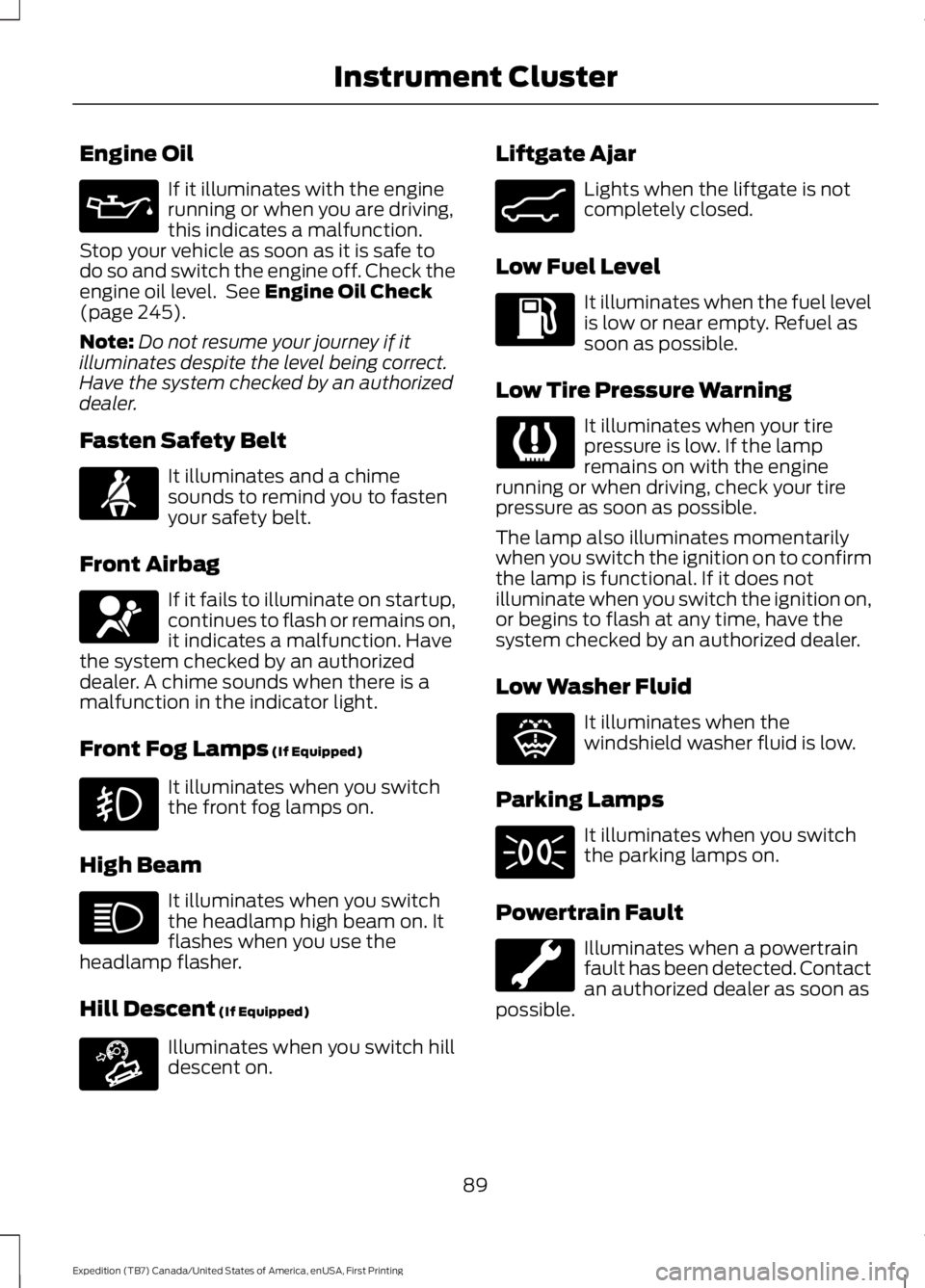
Engine Oil
If it illuminates with the enginerunning or when you are driving,this indicates a malfunction.Stop your vehicle as soon as it is safe todo so and switch the engine off. Check theengine oil level. See Engine Oil Check(page 245).
Note:Do not resume your journey if itilluminates despite the level being correct.Have the system checked by an authorizeddealer.
Fasten Safety Belt
It illuminates and a chimesounds to remind you to fastenyour safety belt.
Front Airbag
If it fails to illuminate on startup,continues to flash or remains on,it indicates a malfunction. Havethe system checked by an authorizeddealer. A chime sounds when there is amalfunction in the indicator light.
Front Fog Lamps (If Equipped)
It illuminates when you switchthe front fog lamps on.
High Beam
It illuminates when you switchthe headlamp high beam on. Itflashes when you use theheadlamp flasher.
Hill Descent (If Equipped)
Illuminates when you switch hilldescent on.
Liftgate Ajar
Lights when the liftgate is notcompletely closed.
Low Fuel Level
It illuminates when the fuel levelis low or near empty. Refuel assoon as possible.
Low Tire Pressure Warning
It illuminates when your tirepressure is low. If the lampremains on with the enginerunning or when driving, check your tirepressure as soon as possible.
The lamp also illuminates momentarilywhen you switch the ignition on to confirmthe lamp is functional. If it does notilluminate when you switch the ignition on,or begins to flash at any time, have thesystem checked by an authorized dealer.
Low Washer Fluid
It illuminates when thewindshield washer fluid is low.
Parking Lamps
It illuminates when you switchthe parking lamps on.
Powertrain Fault
Illuminates when a powertrainfault has been detected. Contactan authorized dealer as soon aspossible.
89
Expedition (TB7) Canada/United States of America, enUSA, First Printing
Instrument Cluster E163171 E162453 E132353
Page 93 of 421
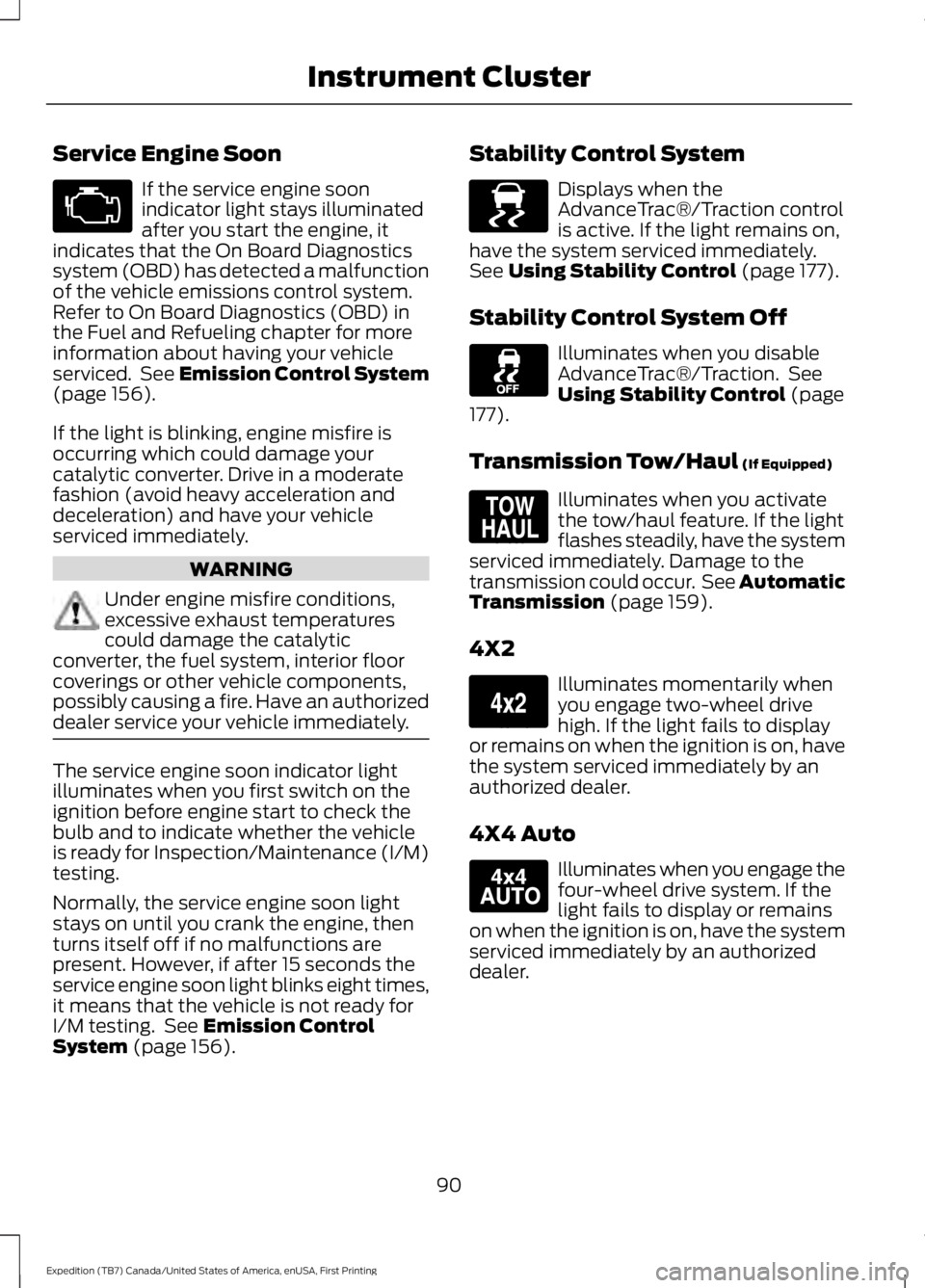
Service Engine Soon
If the service engine soonindicator light stays illuminatedafter you start the engine, itindicates that the On Board Diagnosticssystem (OBD) has detected a malfunctionof the vehicle emissions control system.Refer to On Board Diagnostics (OBD) inthe Fuel and Refueling chapter for moreinformation about having your vehicleserviced. See Emission Control System(page 156).
If the light is blinking, engine misfire isoccurring which could damage yourcatalytic converter. Drive in a moderatefashion (avoid heavy acceleration anddeceleration) and have your vehicleserviced immediately.
WARNING
Under engine misfire conditions,excessive exhaust temperaturescould damage the catalyticconverter, the fuel system, interior floorcoverings or other vehicle components,possibly causing a fire. Have an authorizeddealer service your vehicle immediately.
The service engine soon indicator lightilluminates when you first switch on theignition before engine start to check thebulb and to indicate whether the vehicleis ready for Inspection/Maintenance (I/M)testing.
Normally, the service engine soon lightstays on until you crank the engine, thenturns itself off if no malfunctions arepresent. However, if after 15 seconds theservice engine soon light blinks eight times,it means that the vehicle is not ready forI/M testing. See Emission ControlSystem (page 156).
Stability Control System
Displays when theAdvanceTrac®/Traction controlis active. If the light remains on,have the system serviced immediately.See Using Stability Control (page 177).
Stability Control System Off
Illuminates when you disableAdvanceTrac®/Traction. SeeUsing Stability Control (page177).
Transmission Tow/Haul (If Equipped)
Illuminates when you activatethe tow/haul feature. If the lightflashes steadily, have the systemserviced immediately. Damage to thetransmission could occur. See AutomaticTransmission (page 159).
4X2
Illuminates momentarily whenyou engage two-wheel drivehigh. If the light fails to displayor remains on when the ignition is on, havethe system serviced immediately by anauthorized dealer.
4X4 Auto
Illuminates when you engage thefour-wheel drive system. If thelight fails to display or remainson when the ignition is on, have the systemserviced immediately by an authorizeddealer.
90
Expedition (TB7) Canada/United States of America, enUSA, First Printing
Instrument Cluster E138639 E161509 E163173 E166922
Page 97 of 421
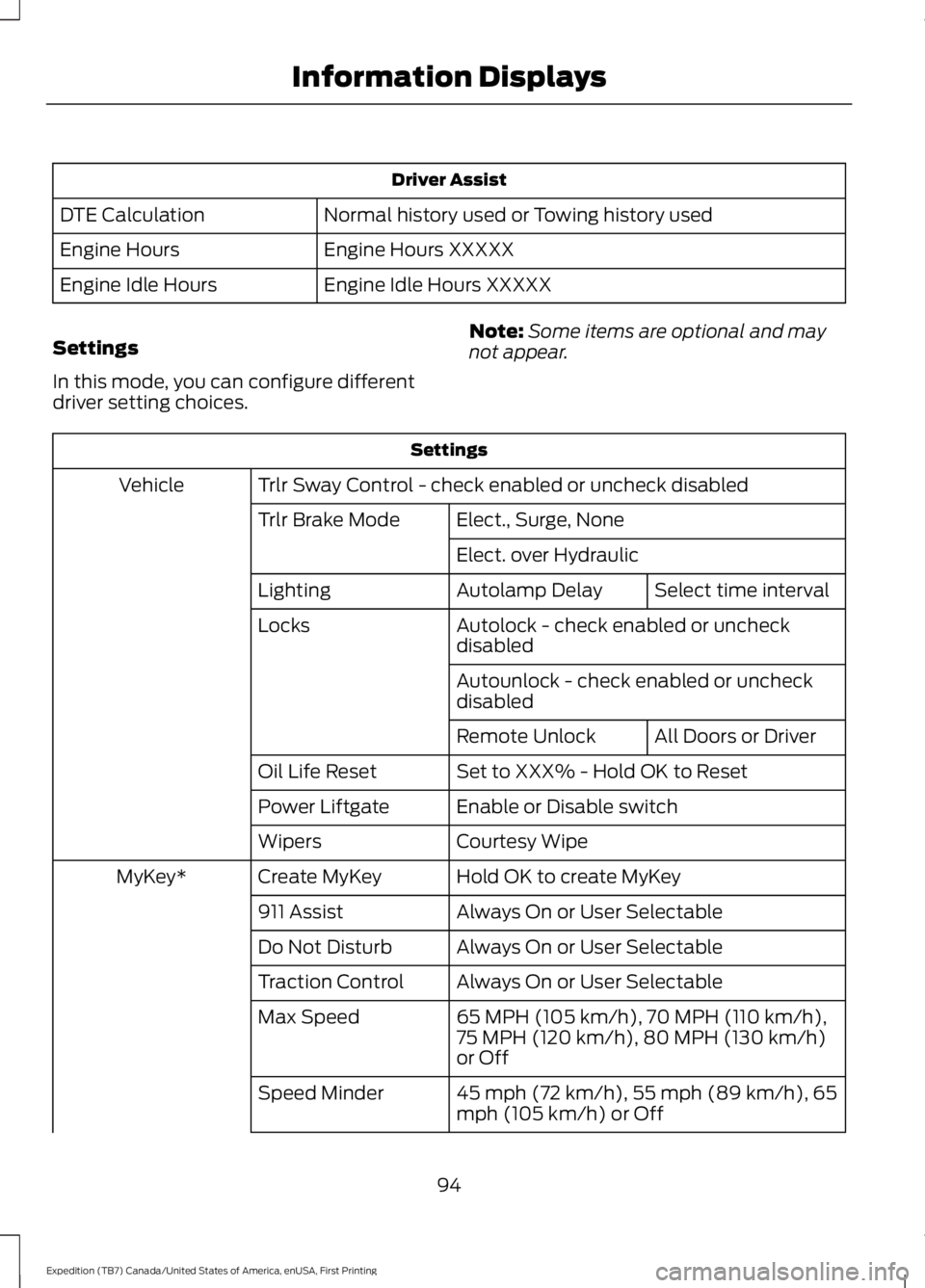
Driver Assist
Normal history used or Towing history usedDTE Calculation
Engine Hours XXXXXEngine Hours
Engine Idle Hours XXXXXEngine Idle Hours
Settings
In this mode, you can configure differentdriver setting choices.
Note:Some items are optional and maynot appear.
Settings
Trlr Sway Control - check enabled or uncheck disabledVehicle
Elect., Surge, NoneTrlr Brake Mode
Elect. over Hydraulic
Select time intervalAutolamp DelayLighting
Autolock - check enabled or uncheckdisabledLocks
Autounlock - check enabled or uncheckdisabled
All Doors or DriverRemote Unlock
Set to XXX% - Hold OK to ResetOil Life Reset
Enable or Disable switchPower Liftgate
Courtesy WipeWipers
Hold OK to create MyKeyCreate MyKeyMyKey*
Always On or User Selectable911 Assist
Always On or User SelectableDo Not Disturb
Always On or User SelectableTraction Control
65 MPH (105 km/h), 70 MPH (110 km/h),75 MPH (120 km/h), 80 MPH (130 km/h)or Off
Max Speed
45 mph (72 km/h), 55 mph (89 km/h), 65mph (105 km/h) or OffSpeed Minder
94
Expedition (TB7) Canada/United States of America, enUSA, First Printing
Information Displays