suspension FORD EXPEDITION EL 2017 User Guide
[x] Cancel search | Manufacturer: FORD, Model Year: 2017, Model line: EXPEDITION EL, Model: FORD EXPEDITION EL 2017Pages: 500, PDF Size: 6.13 MB
Page 211 of 500
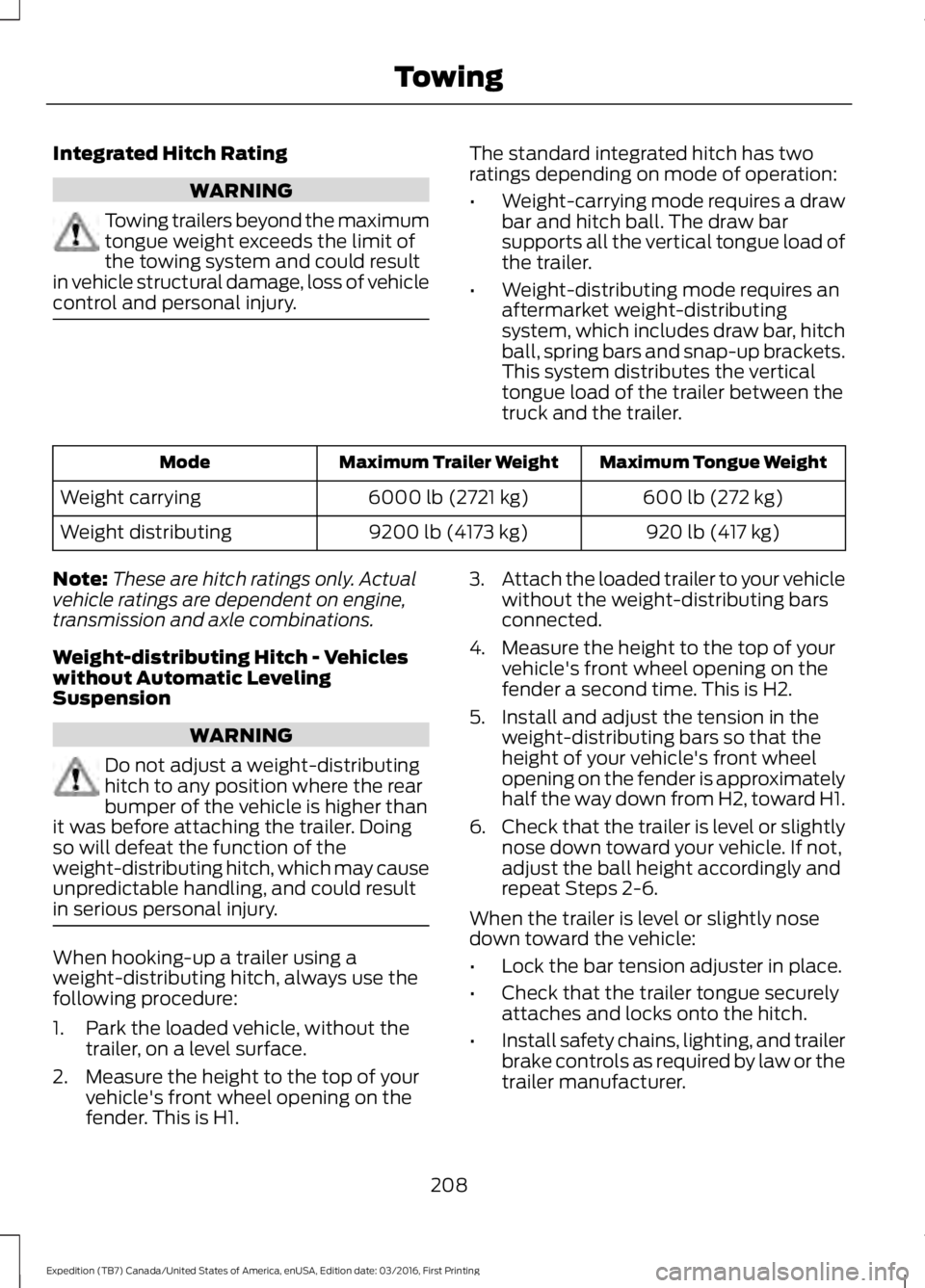
Integrated Hitch Rating
WARNING
Towing trailers beyond the maximumtongue weight exceeds the limit ofthe towing system and could resultin vehicle structural damage, loss of vehiclecontrol and personal injury.
The standard integrated hitch has tworatings depending on mode of operation:
•Weight-carrying mode requires a drawbar and hitch ball. The draw barsupports all the vertical tongue load ofthe trailer.
•Weight-distributing mode requires anaftermarket weight-distributingsystem, which includes draw bar, hitchball, spring bars and snap-up brackets.This system distributes the verticaltongue load of the trailer between thetruck and the trailer.
Maximum Tongue WeightMaximum Trailer WeightMode
600 lb (272 kg)6000 lb (2721 kg)Weight carrying
920 lb (417 kg)9200 lb (4173 kg)Weight distributing
Note:These are hitch ratings only. Actualvehicle ratings are dependent on engine,transmission and axle combinations.
Weight-distributing Hitch - Vehicleswithout Automatic LevelingSuspension
WARNING
Do not adjust a weight-distributinghitch to any position where the rearbumper of the vehicle is higher thanit was before attaching the trailer. Doingso will defeat the function of theweight-distributing hitch, which may causeunpredictable handling, and could resultin serious personal injury.
When hooking-up a trailer using aweight-distributing hitch, always use thefollowing procedure:
1. Park the loaded vehicle, without thetrailer, on a level surface.
2. Measure the height to the top of yourvehicle's front wheel opening on thefender. This is H1.
3.Attach the loaded trailer to your vehiclewithout the weight-distributing barsconnected.
4. Measure the height to the top of yourvehicle's front wheel opening on thefender a second time. This is H2.
5. Install and adjust the tension in theweight-distributing bars so that theheight of your vehicle's front wheelopening on the fender is approximatelyhalf the way down from H2, toward H1.
6.Check that the trailer is level or slightlynose down toward your vehicle. If not,adjust the ball height accordingly andrepeat Steps 2-6.
When the trailer is level or slightly nosedown toward the vehicle:
•Lock the bar tension adjuster in place.
•Check that the trailer tongue securelyattaches and locks onto the hitch.
•Install safety chains, lighting, and trailerbrake controls as required by law or thetrailer manufacturer.
208
Expedition (TB7) Canada/United States of America, enUSA, Edition date: 03/2016, First Printing
Towing
Page 212 of 500
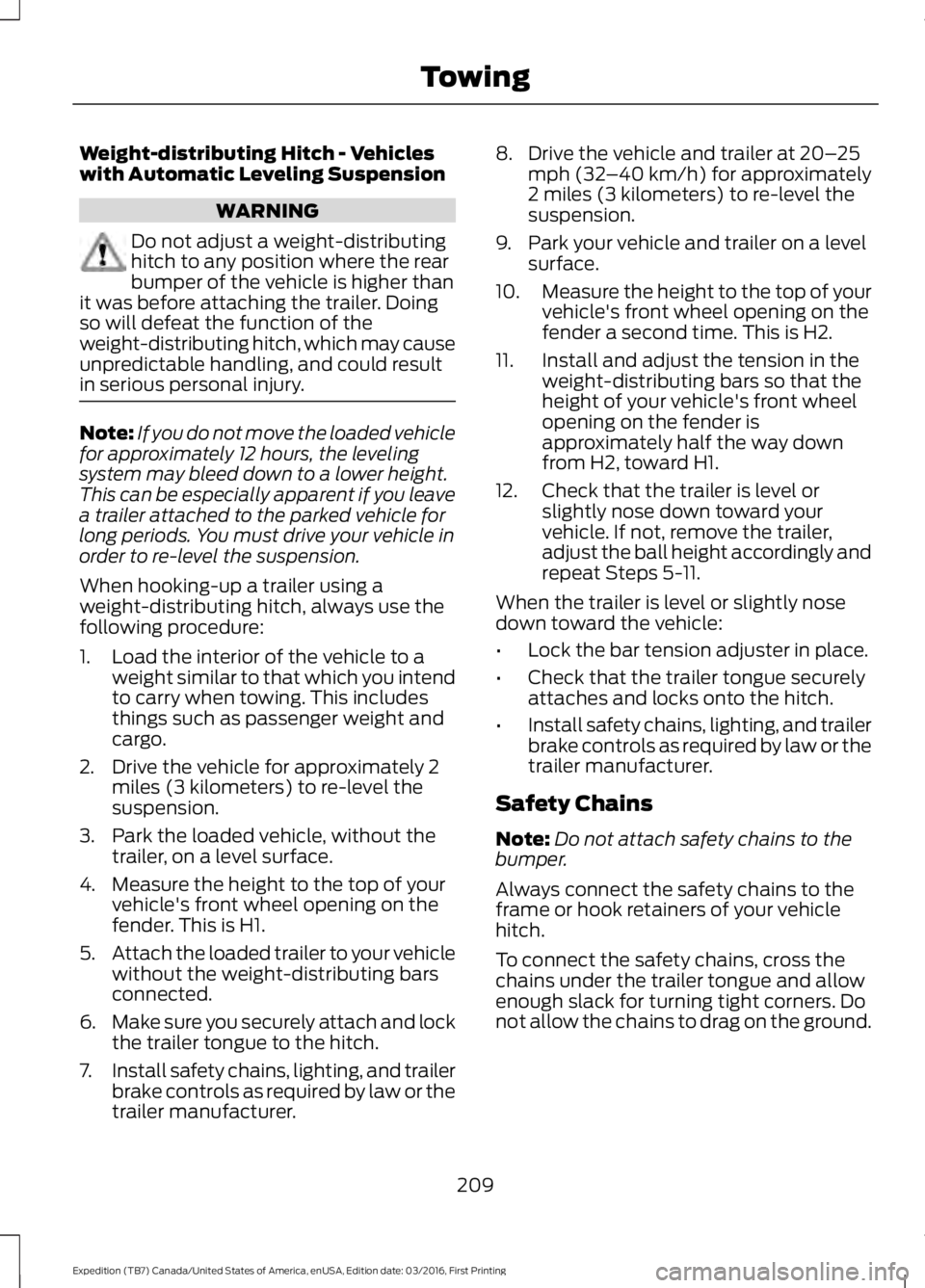
Weight-distributing Hitch - Vehicleswith Automatic Leveling Suspension
WARNING
Do not adjust a weight-distributinghitch to any position where the rearbumper of the vehicle is higher thanit was before attaching the trailer. Doingso will defeat the function of theweight-distributing hitch, which may causeunpredictable handling, and could resultin serious personal injury.
Note:If you do not move the loaded vehiclefor approximately 12 hours, the levelingsystem may bleed down to a lower height.This can be especially apparent if you leavea trailer attached to the parked vehicle forlong periods. You must drive your vehicle inorder to re-level the suspension.
When hooking-up a trailer using aweight-distributing hitch, always use thefollowing procedure:
1. Load the interior of the vehicle to aweight similar to that which you intendto carry when towing. This includesthings such as passenger weight andcargo.
2. Drive the vehicle for approximately 2miles (3 kilometers) to re-level thesuspension.
3. Park the loaded vehicle, without thetrailer, on a level surface.
4. Measure the height to the top of yourvehicle's front wheel opening on thefender. This is H1.
5.Attach the loaded trailer to your vehiclewithout the weight-distributing barsconnected.
6.Make sure you securely attach and lockthe trailer tongue to the hitch.
7.Install safety chains, lighting, and trailerbrake controls as required by law or thetrailer manufacturer.
8. Drive the vehicle and trailer at 20–25mph (32–40 km/h) for approximately2 miles (3 kilometers) to re-level thesuspension.
9. Park your vehicle and trailer on a levelsurface.
10.Measure the height to the top of yourvehicle's front wheel opening on thefender a second time. This is H2.
11. Install and adjust the tension in theweight-distributing bars so that theheight of your vehicle's front wheelopening on the fender isapproximately half the way downfrom H2, toward H1.
12. Check that the trailer is level orslightly nose down toward yourvehicle. If not, remove the trailer,adjust the ball height accordingly andrepeat Steps 5-11.
When the trailer is level or slightly nosedown toward the vehicle:
•Lock the bar tension adjuster in place.
•Check that the trailer tongue securelyattaches and locks onto the hitch.
•Install safety chains, lighting, and trailerbrake controls as required by law or thetrailer manufacturer.
Safety Chains
Note:Do not attach safety chains to thebumper.
Always connect the safety chains to theframe or hook retainers of your vehiclehitch.
To connect the safety chains, cross thechains under the trailer tongue and allowenough slack for turning tight corners. Donot allow the chains to drag on the ground.
209
Expedition (TB7) Canada/United States of America, enUSA, Edition date: 03/2016, First Printing
Towing
Page 243 of 500
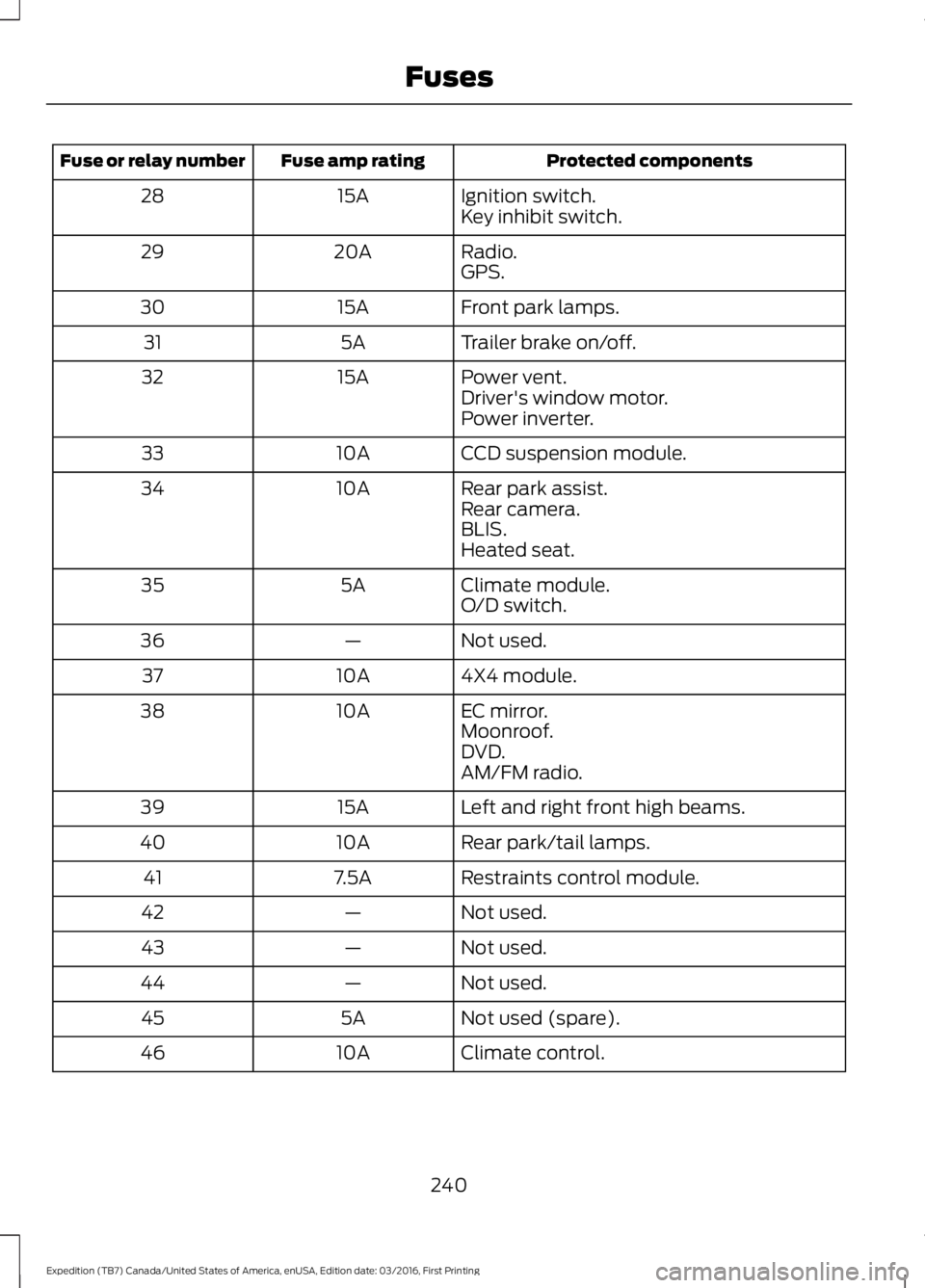
Protected componentsFuse amp ratingFuse or relay number
Ignition switch.15A28Key inhibit switch.
Radio.20A29GPS.
Front park lamps.15A30
Trailer brake on/off.5A31
Power vent.15A32Driver's window motor.Power inverter.
CCD suspension module.10A33
Rear park assist.10A34Rear camera.BLIS.Heated seat.
Climate module.5A35O/D switch.
Not used.—36
4X4 module.10A37
EC mirror.10A38Moonroof.DVD.AM/FM radio.
Left and right front high beams.15A39
Rear park/tail lamps.10A40
Restraints control module.7.5A41
Not used.—42
Not used.—43
Not used.—44
Not used (spare).5A45
Climate control.10A46
240
Expedition (TB7) Canada/United States of America, enUSA, Edition date: 03/2016, First Printing
Fuses
Page 292 of 500
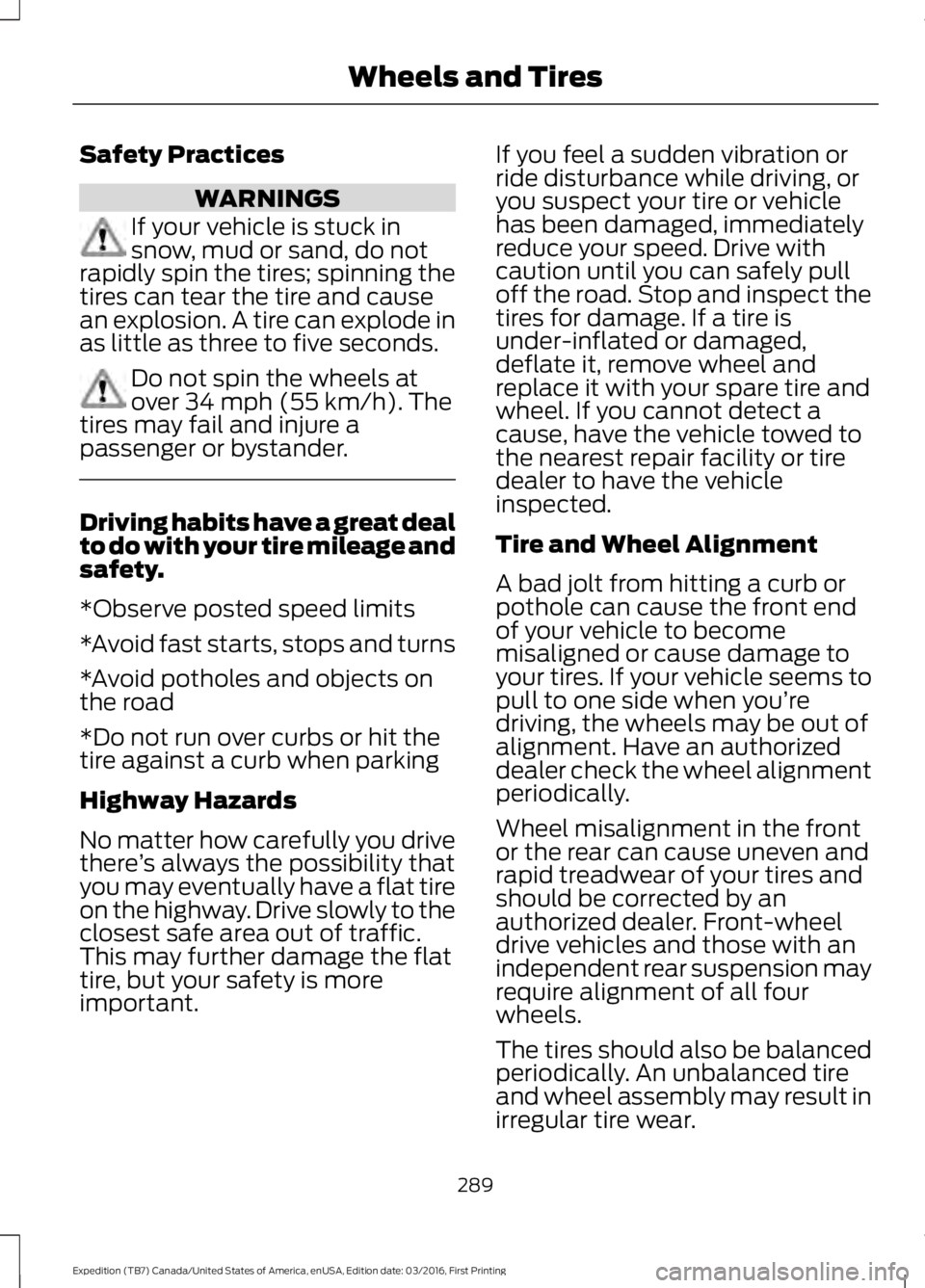
Safety Practices
WARNINGS
If your vehicle is stuck insnow, mud or sand, do notrapidly spin the tires; spinning thetires can tear the tire and causean explosion. A tire can explode inas little as three to five seconds.
Do not spin the wheels atover 34 mph (55 km/h). Thetires may fail and injure apassenger or bystander.
Driving habits have a great dealto do with your tire mileage andsafety.
*Observe posted speed limits
*Avoid fast starts, stops and turns
*Avoid potholes and objects onthe road
*Do not run over curbs or hit thetire against a curb when parking
Highway Hazards
No matter how carefully you drivethere’s always the possibility thatyou may eventually have a flat tireon the highway. Drive slowly to theclosest safe area out of traffic.This may further damage the flattire, but your safety is moreimportant.
If you feel a sudden vibration orride disturbance while driving, oryou suspect your tire or vehiclehas been damaged, immediatelyreduce your speed. Drive withcaution until you can safely pulloff the road. Stop and inspect thetires for damage. If a tire isunder-inflated or damaged,deflate it, remove wheel andreplace it with your spare tire andwheel. If you cannot detect acause, have the vehicle towed tothe nearest repair facility or tiredealer to have the vehicleinspected.
Tire and Wheel Alignment
A bad jolt from hitting a curb orpothole can cause the front endof your vehicle to become
misaligned or cause damage toyour tires. If your vehicle seems topull to one side when you’redriving, the wheels may be out ofalignment. Have an authorizeddealer check the wheel alignmentperiodically.
Wheel misalignment in the frontor the rear can cause uneven andrapid treadwear of your tires andshould be corrected by anauthorized dealer. Front-wheeldrive vehicles and those with anindependent rear suspension mayrequire alignment of all fourwheels.
The tires should also be balancedperiodically. An unbalanced tireand wheel assembly may result inirregular tire wear.
289
Expedition (TB7) Canada/United States of America, enUSA, Edition date: 03/2016, First Printing
Wheels and Tires
Page 294 of 500
USING SNOW CHAINS
WARNING
Snow tires must be the same size,load index and speed rating as thoseoriginally provided by Ford. Use ofany tire or wheel not recommended byFord can affect the safety andperformance of your vehicle, which couldresult in an increased risk of loss of control,vehicle rollover, personal injury and death.Additionally, the use of non-recommendedtires and wheels can cause steering,suspension, axle, transfer case or powertransfer unit failure. Follow the Fordrecommended tire inflation pressure foundon the Safety Compliance CertificationLabel (on the door hinge pillar, door latchpost or the door edge that meets the doorlatch post, next to the driver seat), or TireLabel on the B-Pillar or the edge of thedriver door. Failure to follow the tirepressure recommendations can causeuneven treadwear patterns and adverselyaffect the way your vehicle handles.
Note:The suspension insulation andbumpers will help prevent vehicle damage.Do not remove these components from yourvehicle when using snow tires and chains.
The tires on your vehicle have all-weathertreads to provide traction in rain and snow.However, in some climates, you may needto use snow tires and cables. If you needto use cables, it is recommended that steelwheels (of the same size andspecifications) be used, as cables may chipaluminum wheels.
Follow these guidelines when using snowtires and chains:
•If possible, avoid fully loading yourvehicle.
•Use only cable type chains or chainsoffered by Ford/Lincoln as anaccessory or equivalent. Otherconventional link type chains maycontact and cause damage to thevehicle's wheel house and/or body.
•Do not install chains on the front tiresas this may interfere with suspensioncomponents.
•Only certain snow cables or chainshave been approved by Ford/Lincolnas safe for use on your vehicle with thefollowing tires: 265/70R17 and275/65R18.
•You should install snow cables orchains that have been rated as SAEClass S.
•Install chains securely, verifying thatthe chains do not touch any wiring,brake lines, or fuel lines.
•Do not exceed 31 mph (50 km/h) orless if recommended by the chainmanufacturer while using snow chains.
•Drive cautiously. If you hear the chainsrub or bang against your vehicle, stopand retighten the chains. If this doesnot work, remove the chains to preventdamage to your vehicle.
•Remove the tire chains when they areno longer needed. Do not use tirechains on dry roads.
•Purchase chains or cables from amanufacturer that clearly labels bodyto tire dimension restrictions. The snowchains or cables must be mounted inpairs on the rear tires only.
If you have any questions regarding snowchains or cables, please contact yourauthorized dealer.
291
Expedition (TB7) Canada/United States of America, enUSA, Edition date: 03/2016, First Printing
Wheels and Tires
Page 302 of 500
Tire Change Procedure
WARNINGS
Only use replacement tires andwheels that are the same size, loadindex, speed rating and type (suchas P-metric versus LT-metric or all-seasonversus all-terrain) as those originallyprovided by Ford. The recommended tireand wheel size may be found on either theSafety Compliance Certification Label(affixed to either the door hinge pillar,door-latch post, or the door edge thatmeets the door-latch post, next to thedriver’s seating position) or the Tire Labelwhich is located on the B-Pillar or edge ofthe driver’s door. If this information is notfound on these labels then you shouldcontact your authorized dealer as soon aspossible. Use of any tire or wheel notrecommended by Ford can affect thesafety and performance of your vehicle,which could result in an increased risk ofloss of vehicle control, vehicle rollover,personal injury and death. Additionally theuse of non-recommended tires and wheelscould cause steering, suspension, axle,transfer case or power transfer unit failure.If you have questions regarding tirereplacement, contact your authorizeddealer as soon as possible.
When one of the front wheels is offthe ground, the transmission alonewill not prevent the vehicle frommoving or slipping off the jack.
To help prevent the vehicle frommoving when you change a tire, besure to place the transmission in park(P), set the parking brake and block (inboth directions) the wheel that isdiagonally opposite (other side and end ofthe vehicle) to the tire being changed.
Never get underneath a vehicle thatis supported only by a jack. If thevehicle slips off the jack, you orsomeone else could be seriously injured.
WARNINGS
Do not attempt to change a tire onthe side of the vehicle close tomoving traffic. Pull far enough off theroad to avoid the danger of being hit whenoperating the jack or changing the wheel.
Always use the jack provided asoriginal equipment with your vehicle.If using a jack other than the oneprovided as original equipment with yourvehicle, make sure the jack capacity isadequate for the vehicle weight, includingany vehicle cargo or modifications.
Disable the power running boardsbefore jacking, lifting, or placing anyobject under the vehicle. Never placeyour hand between the power runningboard and the vehicle as extended powerrunning boards will retract when the doorsare closed. Failure to follow theseinstructions may result in personal injury.
Failure to follow these instructionswhen using the spare tire carriercould cause loss of the wheel andtire and lead to personal injury: Only usethe spare tire carrier to stow the tire andwheel combination specified on the TireLabel or Safety Compliance CertificationLabel on the B-Pillar or the edge of thedriver door. Other tire and wheelcombinations could cause the carrier tofail if it does not fit securely or is too heavy.Do not use impact tools or power toolsoperating over 200 RPM, which may causewinch malfunction and prevent a securefit. Override the winch at least three times(there will be an audible click each time)to ensure a tight secure fit of the wheel andtire.
Note:Passengers should not remain in thevehicle when the vehicle is being jacked.
299
Expedition (TB7) Canada/United States of America, enUSA, Edition date: 03/2016, First Printing
Wheels and Tires
Page 449 of 500
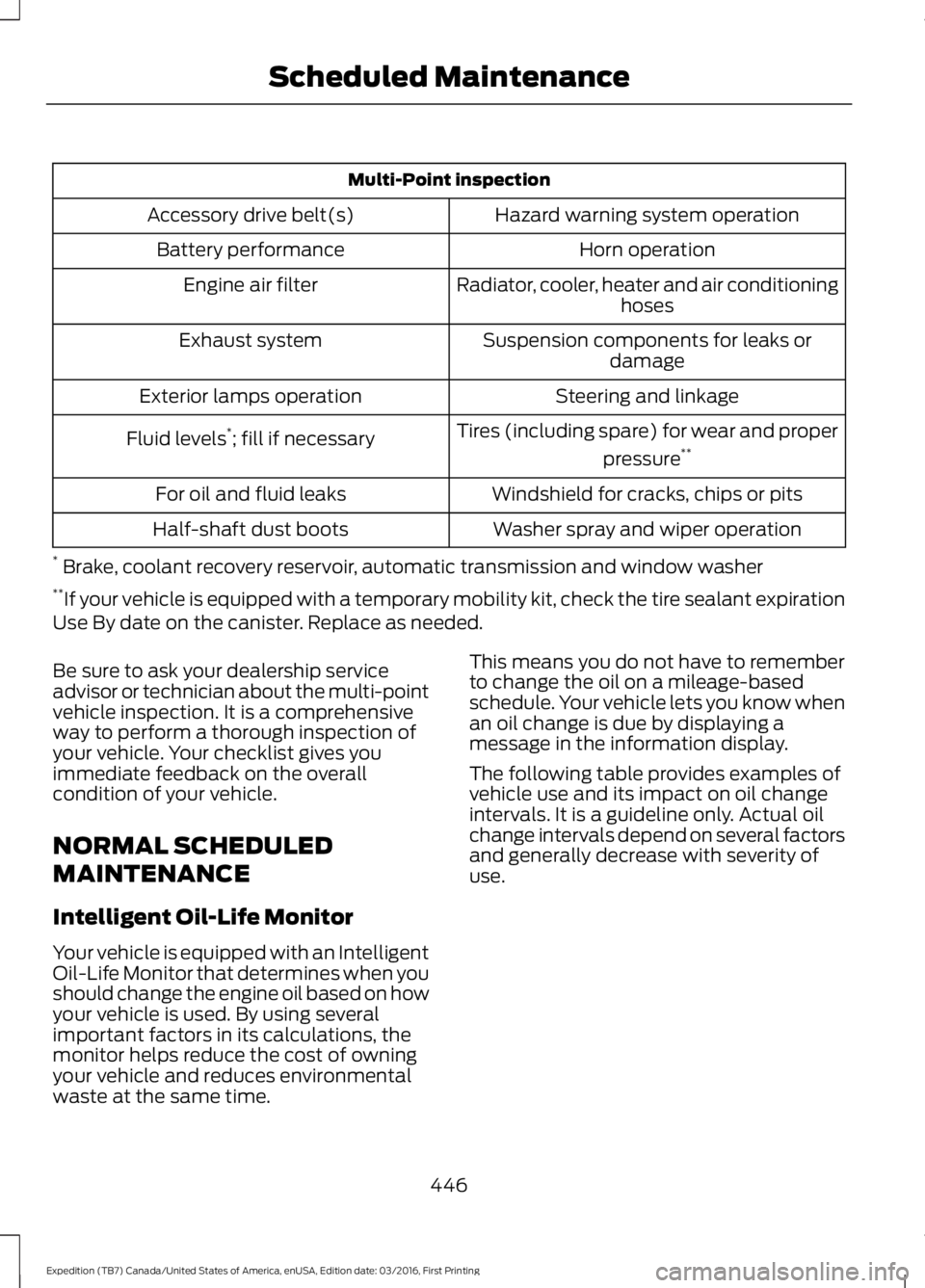
Multi-Point inspection
Hazard warning system operationAccessory drive belt(s)
Horn operationBattery performance
Radiator, cooler, heater and air conditioninghosesEngine air filter
Suspension components for leaks ordamageExhaust system
Steering and linkageExterior lamps operation
Tires (including spare) for wear and proper
pressure**Fluid levels*; fill if necessary
Windshield for cracks, chips or pitsFor oil and fluid leaks
Washer spray and wiper operationHalf-shaft dust boots
* Brake, coolant recovery reservoir, automatic transmission and window washer**If your vehicle is equipped with a temporary mobility kit, check the tire sealant expirationUse By date on the canister. Replace as needed.
Be sure to ask your dealership serviceadvisor or technician about the multi-pointvehicle inspection. It is a comprehensiveway to perform a thorough inspection ofyour vehicle. Your checklist gives youimmediate feedback on the overallcondition of your vehicle.
NORMAL SCHEDULED
MAINTENANCE
Intelligent Oil-Life Monitor
Your vehicle is equipped with an IntelligentOil-Life Monitor that determines when youshould change the engine oil based on howyour vehicle is used. By using severalimportant factors in its calculations, themonitor helps reduce the cost of owningyour vehicle and reduces environmentalwaste at the same time.
This means you do not have to rememberto change the oil on a mileage-basedschedule. Your vehicle lets you know whenan oil change is due by displaying amessage in the information display.
The following table provides examples ofvehicle use and its impact on oil changeintervals. It is a guideline only. Actual oilchange intervals depend on several factorsand generally decrease with severity ofuse.
446
Expedition (TB7) Canada/United States of America, enUSA, Edition date: 03/2016, First Printing
Scheduled Maintenance
Page 451 of 500
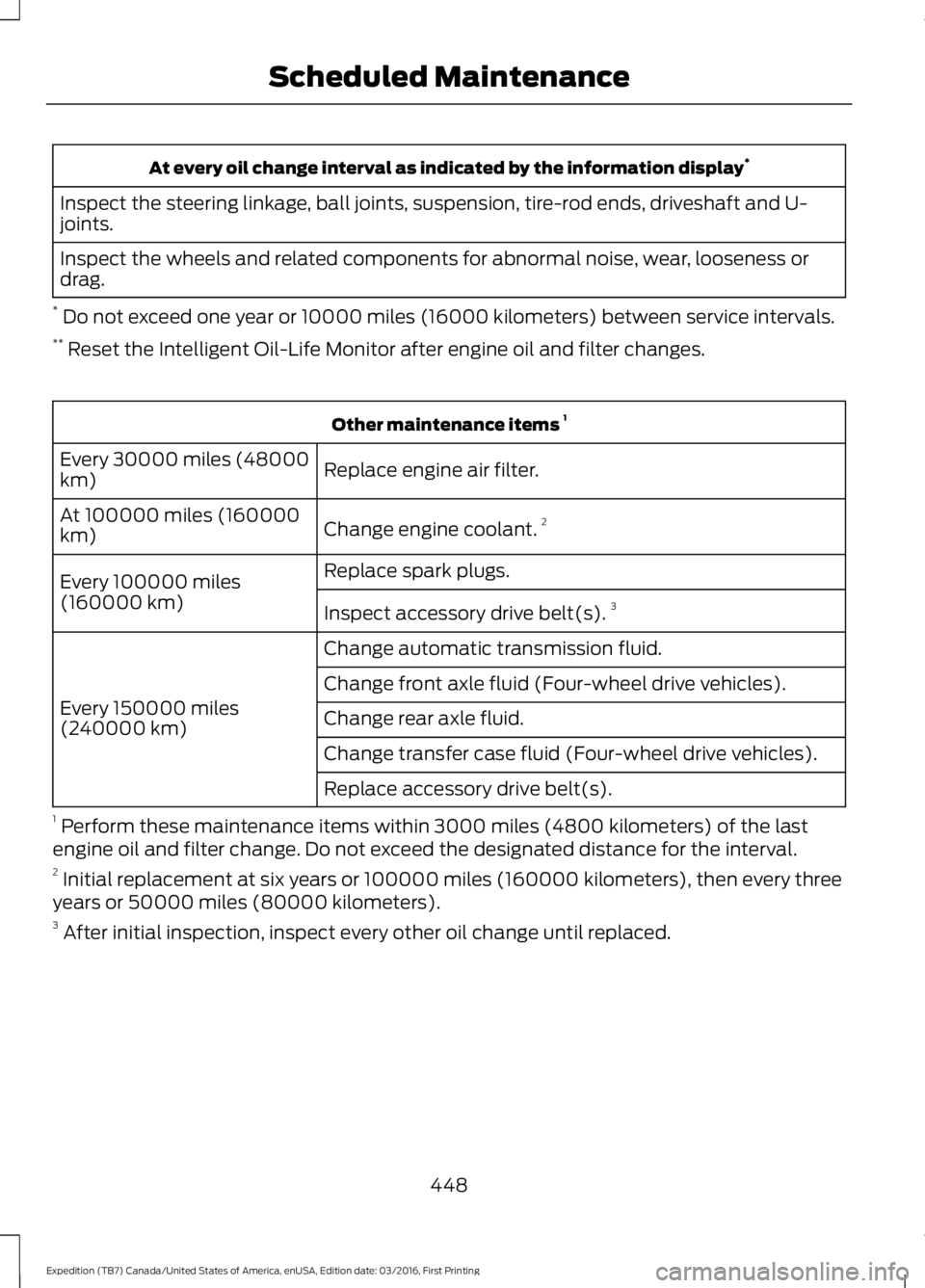
At every oil change interval as indicated by the information display*
Inspect the steering linkage, ball joints, suspension, tire-rod ends, driveshaft and U-joints.
Inspect the wheels and related components for abnormal noise, wear, looseness ordrag.
* Do not exceed one year or 10000 miles (16000 kilometers) between service intervals.** Reset the Intelligent Oil-Life Monitor after engine oil and filter changes.
Other maintenance items 1
Replace engine air filter.Every 30000 miles (48000km)
Change engine coolant.2At 100000 miles (160000km)
Replace spark plugs.Every 100000 miles(160000 km)Inspect accessory drive belt(s).3
Change automatic transmission fluid.
Every 150000 miles(240000 km)
Change front axle fluid (Four-wheel drive vehicles).
Change rear axle fluid.
Change transfer case fluid (Four-wheel drive vehicles).
Replace accessory drive belt(s).
1 Perform these maintenance items within 3000 miles (4800 kilometers) of the lastengine oil and filter change. Do not exceed the designated distance for the interval.2 Initial replacement at six years or 100000 miles (160000 kilometers), then every threeyears or 50000 miles (80000 kilometers).3 After initial inspection, inspect every other oil change until replaced.
448
Expedition (TB7) Canada/United States of America, enUSA, Edition date: 03/2016, First Printing
Scheduled Maintenance
Page 492 of 500
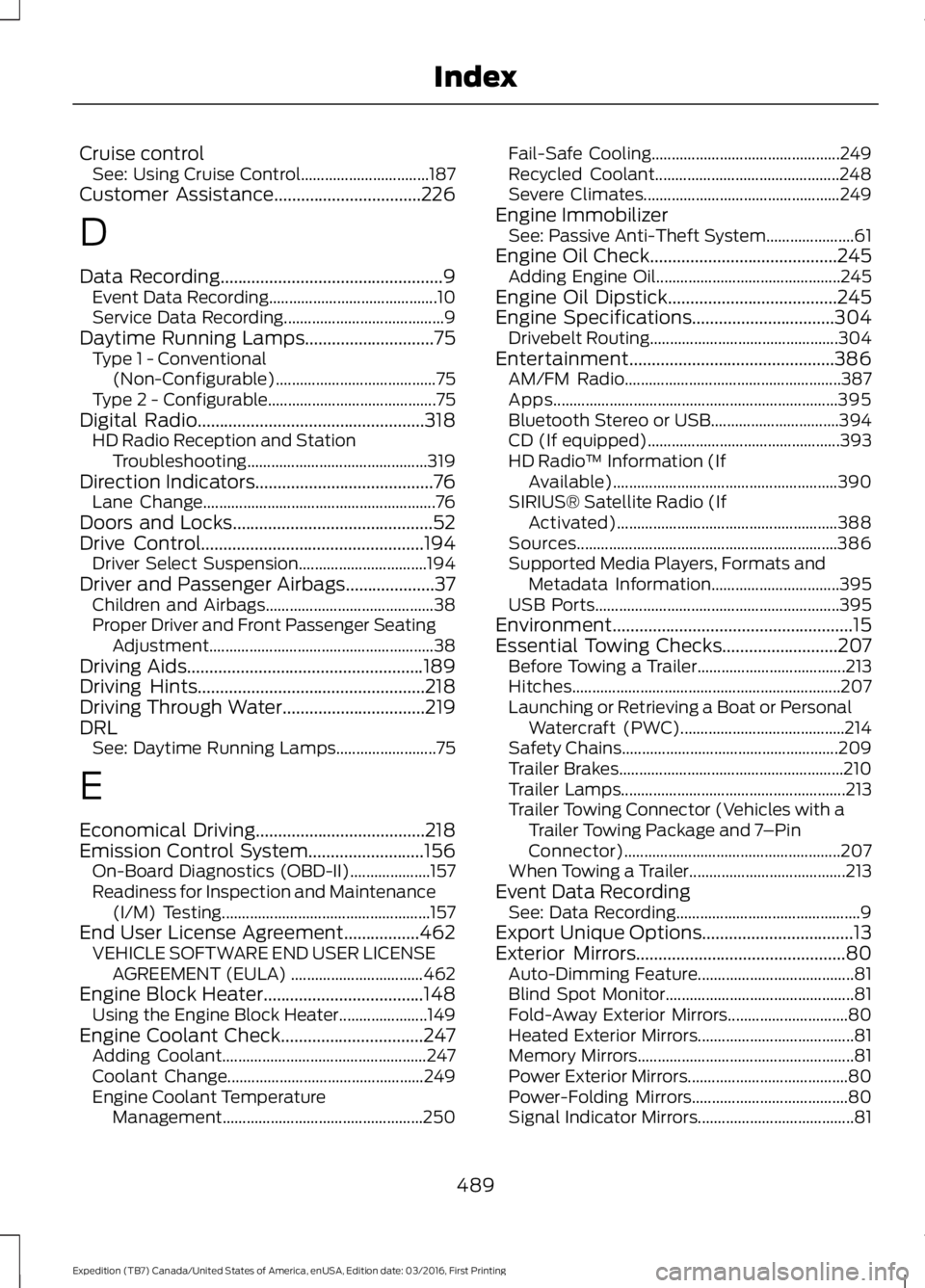
Cruise controlSee: Using Cruise Control................................187Customer Assistance.................................226
D
Data Recording..................................................9Event Data Recording..........................................10Service Data Recording........................................9Daytime Running Lamps.............................75Type 1 - Conventional(Non-Configurable)........................................75Type 2 - Configurable..........................................75Digital Radio...................................................318HD Radio Reception and StationTroubleshooting.............................................319Direction Indicators........................................76Lane Change..........................................................76Doors and Locks.............................................52Drive Control..................................................194Driver Select Suspension................................194Driver and Passenger Airbags....................37Children and Airbags..........................................38Proper Driver and Front Passenger SeatingAdjustment........................................................38Driving Aids.....................................................189Driving Hints...................................................218Driving Through Water................................219DRLSee: Daytime Running Lamps.........................75
E
Economical Driving......................................218Emission Control System..........................156On-Board Diagnostics (OBD-II)....................157Readiness for Inspection and Maintenance(I/M) Testing....................................................157End User License Agreement.................462VEHICLE SOFTWARE END USER LICENSEAGREEMENT (EULA) .................................462Engine Block Heater....................................148Using the Engine Block Heater......................149Engine Coolant Check................................247Adding Coolant...................................................247Coolant Change.................................................249Engine Coolant TemperatureManagement..................................................250
Fail-Safe Cooling...............................................249Recycled Coolant..............................................248Severe Climates.................................................249Engine ImmobilizerSee: Passive Anti-Theft System......................61Engine Oil Check..........................................245Adding Engine Oil..............................................245Engine Oil Dipstick......................................245Engine Specifications................................304Drivebelt Routing...............................................304Entertainment..............................................386AM/FM Radio......................................................387Apps.......................................................................395Bluetooth Stereo or USB................................394CD (If equipped)................................................393HD Radio™ Information (IfAvailable)........................................................390SIRIUS® Satellite Radio (IfActivated).......................................................388Sources.................................................................386Supported Media Players, Formats andMetadata Information................................395USB Ports.............................................................395Environment......................................................15Essential Towing Checks..........................207Before Towing a Trailer.....................................213Hitches...................................................................207Launching or Retrieving a Boat or PersonalWatercraft (PWC).........................................214Safety Chains......................................................209Trailer Brakes........................................................210Trailer Lamps........................................................213Trailer Towing Connector (Vehicles with aTrailer Towing Package and 7–PinConnector)......................................................207When Towing a Trailer.......................................213Event Data RecordingSee: Data Recording..............................................9Export Unique Options..................................13Exterior Mirrors...............................................80Auto-Dimming Feature.......................................81Blind Spot Monitor...............................................81Fold-Away Exterior Mirrors..............................80Heated Exterior Mirrors.......................................81Memory Mirrors......................................................81Power Exterior Mirrors........................................80Power-Folding Mirrors.......................................80Signal Indicator Mirrors.......................................81
489
Expedition (TB7) Canada/United States of America, enUSA, Edition date: 03/2016, First Printing
Index
Page 494 of 500
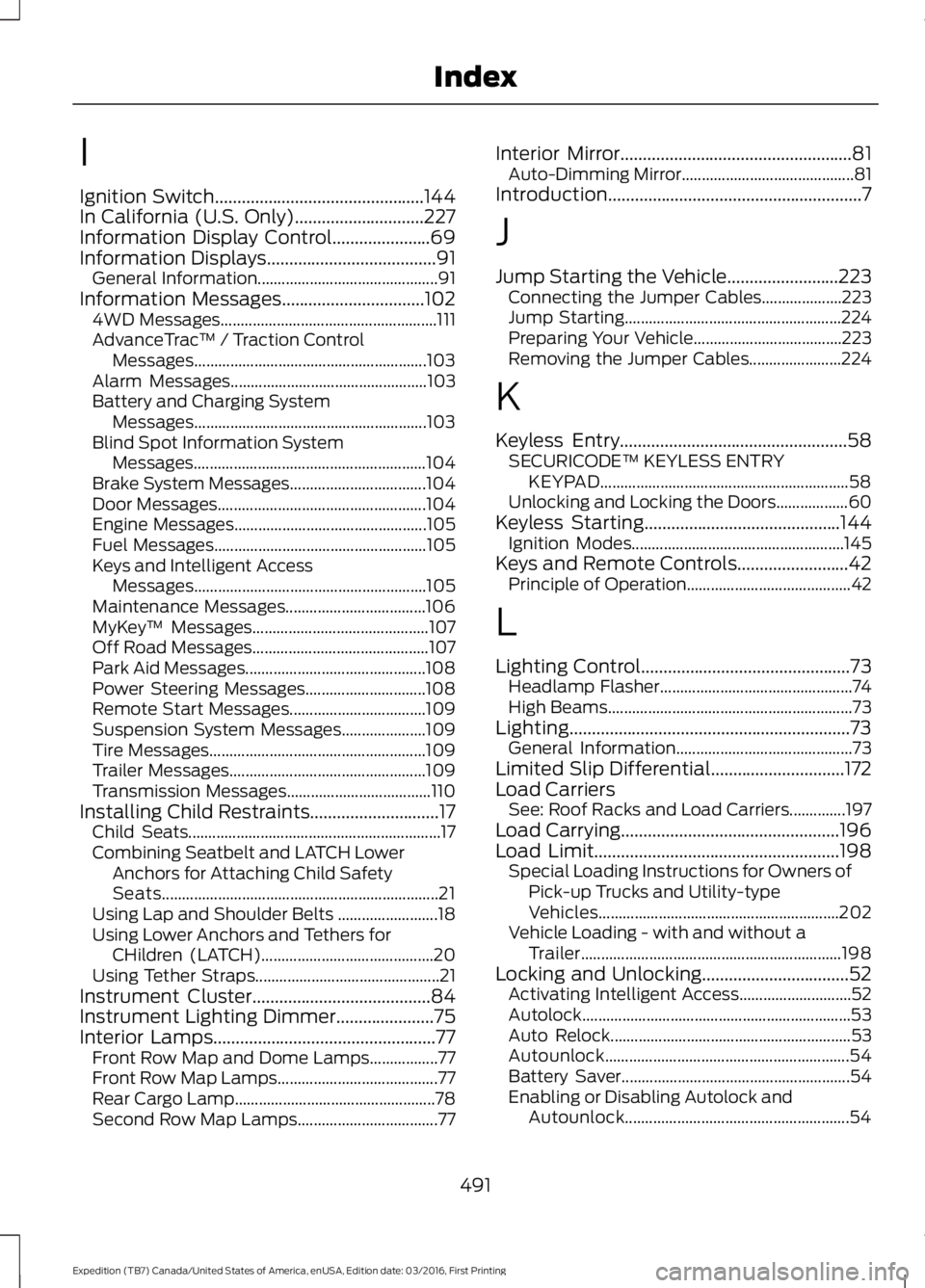
I
Ignition Switch...............................................144In California (U.S. Only).............................227Information Display Control......................69Information Displays......................................91General Information.............................................91Information Messages................................1024WD Messages......................................................111AdvanceTrac™ / Traction ControlMessages..........................................................103Alarm Messages.................................................103Battery and Charging SystemMessages..........................................................103Blind Spot Information SystemMessages..........................................................104Brake System Messages..................................104Door Messages....................................................104Engine Messages................................................105Fuel Messages.....................................................105Keys and Intelligent AccessMessages..........................................................105Maintenance Messages...................................106MyKey™ Messages............................................107Off Road Messages............................................107Park Aid Messages.............................................108Power Steering Messages..............................108Remote Start Messages..................................109Suspension System Messages.....................109Tire Messages......................................................109Trailer Messages.................................................109Transmission Messages....................................110Installing Child Restraints.............................17Child Seats...............................................................17Combining Seatbelt and LATCH LowerAnchors for Attaching Child SafetySeats.....................................................................21Using Lap and Shoulder Belts .........................18Using Lower Anchors and Tethers forCHildren (LATCH)...........................................20Using Tether Straps..............................................21Instrument Cluster........................................84Instrument Lighting Dimmer......................75Interior Lamps..................................................77Front Row Map and Dome Lamps.................77Front Row Map Lamps........................................77Rear Cargo Lamp..................................................78Second Row Map Lamps...................................77
Interior Mirror....................................................81Auto-Dimming Mirror...........................................81Introduction.........................................................7
J
Jump Starting the Vehicle.........................223Connecting the Jumper Cables....................223Jump Starting......................................................224Preparing Your Vehicle.....................................223Removing the Jumper Cables.......................224
K
Keyless Entry...................................................58SECURICODE™ KEYLESS ENTRYKEYPAD..............................................................58Unlocking and Locking the Doors..................60Keyless Starting............................................144Ignition Modes.....................................................145Keys and Remote Controls.........................42Principle of Operation.........................................42
L
Lighting Control...............................................73Headlamp Flasher................................................74High Beams.............................................................73Lighting...............................................................73General Information............................................73Limited Slip Differential..............................172Load CarriersSee: Roof Racks and Load Carriers..............197Load Carrying.................................................196Load Limit.......................................................198Special Loading Instructions for Owners ofPick-up Trucks and Utility-typeVehicles............................................................202Vehicle Loading - with and without aTrailer.................................................................198Locking and Unlocking.................................52Activating Intelligent Access............................52Autolock...................................................................53Auto Relock............................................................53Autounlock.............................................................54Battery Saver.........................................................54Enabling or Disabling Autolock andAutounlock........................................................54
491
Expedition (TB7) Canada/United States of America, enUSA, Edition date: 03/2016, First Printing
Index