lights FORD EXPEDITION EL 2017 Owner's Manual
[x] Cancel search | Manufacturer: FORD, Model Year: 2017, Model line: EXPEDITION EL, Model: FORD EXPEDITION EL 2017Pages: 500, PDF Size: 6.13 MB
Page 339 of 500
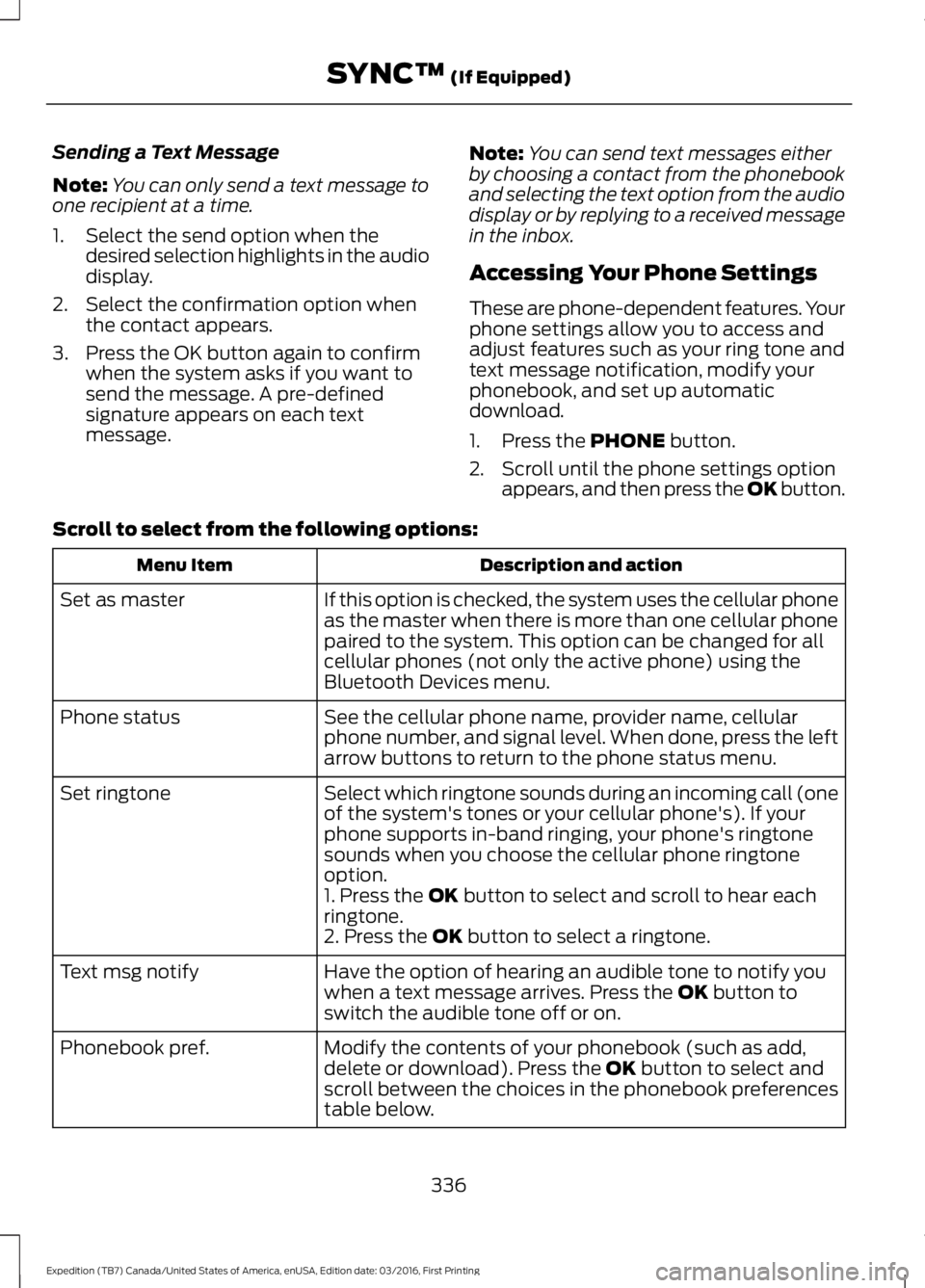
Sending a Text Message
Note:You can only send a text message toone recipient at a time.
1. Select the send option when thedesired selection highlights in the audiodisplay.
2. Select the confirmation option whenthe contact appears.
3. Press the OK button again to confirmwhen the system asks if you want tosend the message. A pre-definedsignature appears on each textmessage.
Note:You can send text messages eitherby choosing a contact from the phonebookand selecting the text option from the audiodisplay or by replying to a received messagein the inbox.
Accessing Your Phone Settings
These are phone-dependent features. Yourphone settings allow you to access andadjust features such as your ring tone andtext message notification, modify yourphonebook, and set up automaticdownload.
1. Press the PHONE button.
2. Scroll until the phone settings optionappears, and then press the OK button.
Scroll to select from the following options:
Description and actionMenu Item
If this option is checked, the system uses the cellular phoneas the master when there is more than one cellular phonepaired to the system. This option can be changed for allcellular phones (not only the active phone) using theBluetooth Devices menu.
Set as master
See the cellular phone name, provider name, cellularphone number, and signal level. When done, press the leftarrow buttons to return to the phone status menu.
Phone status
Select which ringtone sounds during an incoming call (oneof the system's tones or your cellular phone's). If yourphone supports in-band ringing, your phone's ringtonesounds when you choose the cellular phone ringtoneoption.
Set ringtone
1. Press the OK button to select and scroll to hear eachringtone.2. Press the OK button to select a ringtone.
Have the option of hearing an audible tone to notify youwhen a text message arrives. Press the OK button toswitch the audible tone off or on.
Text msg notify
Modify the contents of your phonebook (such as add,delete or download). Press the OK button to select andscroll between the choices in the phonebook preferencestable below.
Phonebook pref.
336
Expedition (TB7) Canada/United States of America, enUSA, Edition date: 03/2016, First Printing
SYNC™ (If Equipped)
Page 400 of 500
Note: The heated steering wheel may remain on after remote starting thevehicle, based on your remote start settings. The heated steering wheel mayalso turn on when you start your vehicle, if it was on when you switched yourvehicle off.
Note: For steering wheels with wood trim, the heating feature will not heat thewheel between the 10 and 2 o'clock positions.
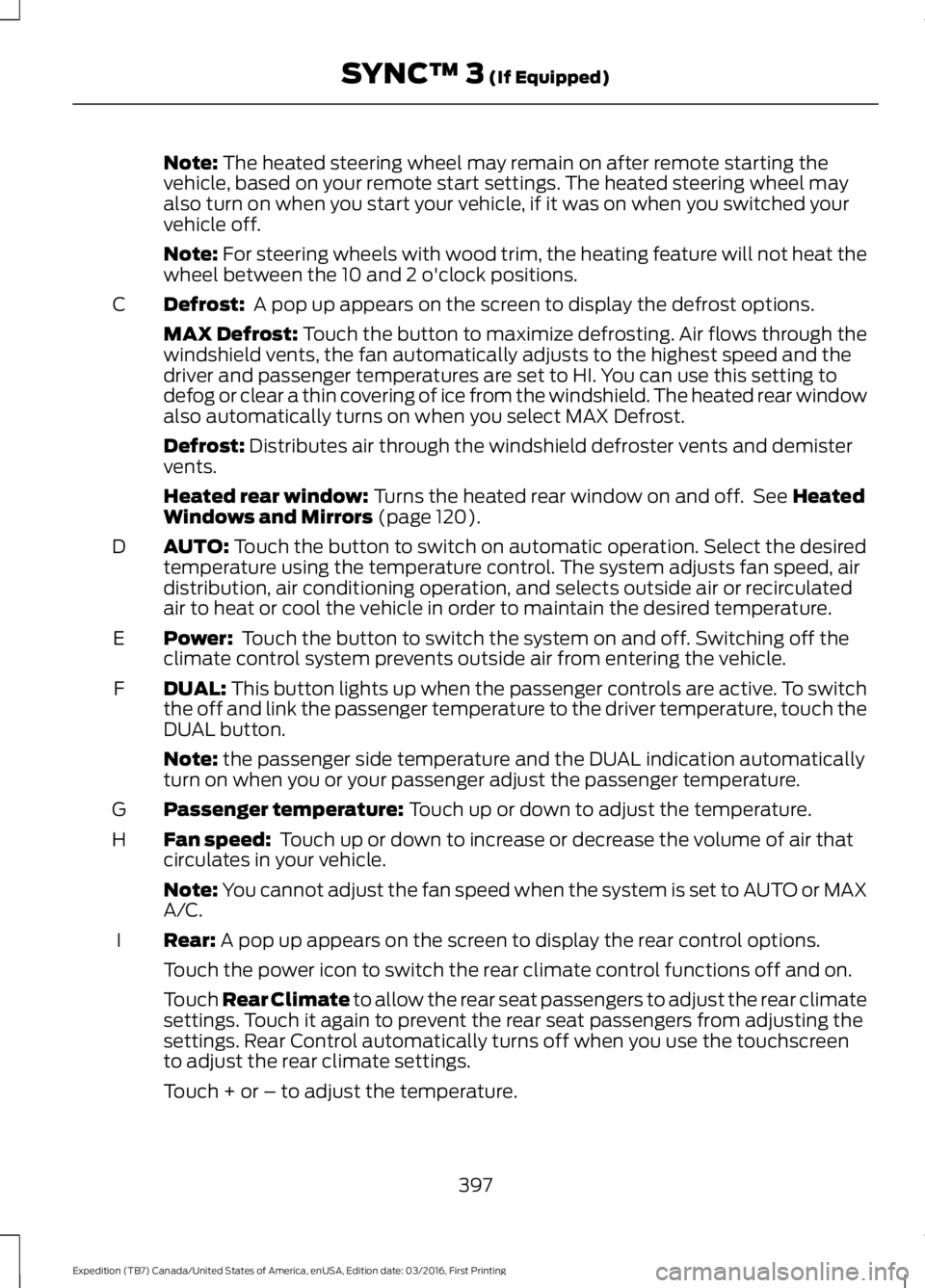
Defrost: A pop up appears on the screen to display the defrost options.C
MAX Defrost: Touch the button to maximize defrosting. Air flows through thewindshield vents, the fan automatically adjusts to the highest speed and thedriver and passenger temperatures are set to HI. You can use this setting todefog or clear a thin covering of ice from the windshield. The heated rear windowalso automatically turns on when you select MAX Defrost.
Defrost: Distributes air through the windshield defroster vents and demistervents.
Heated rear window: Turns the heated rear window on and off. See HeatedWindows and Mirrors (page 120).
AUTO: Touch the button to switch on automatic operation. Select the desiredtemperature using the temperature control. The system adjusts fan speed, airdistribution, air conditioning operation, and selects outside air or recirculatedair to heat or cool the vehicle in order to maintain the desired temperature.
D
Power: Touch the button to switch the system on and off. Switching off theclimate control system prevents outside air from entering the vehicle.E
DUAL: This button lights up when the passenger controls are active. To switchthe off and link the passenger temperature to the driver temperature, touch theDUAL button.
F
Note: the passenger side temperature and the DUAL indication automaticallyturn on when you or your passenger adjust the passenger temperature.
Passenger temperature: Touch up or down to adjust the temperature.G
Fan speed: Touch up or down to increase or decrease the volume of air thatcirculates in your vehicle.H
Note: You cannot adjust the fan speed when the system is set to AUTO or MAXA/C.
Rear: A pop up appears on the screen to display the rear control options.I
Touch the power icon to switch the rear climate control functions off and on.
Touch Rear Climate to allow the rear seat passengers to adjust the rear climatesettings. Touch it again to prevent the rear seat passengers from adjusting thesettings. Rear Control automatically turns off when you use the touchscreento adjust the rear climate settings.
Touch + or – to adjust the temperature.
397
Expedition (TB7) Canada/United States of America, enUSA, Edition date: 03/2016, First Printing
SYNC™ 3 (If Equipped)
Page 408 of 500
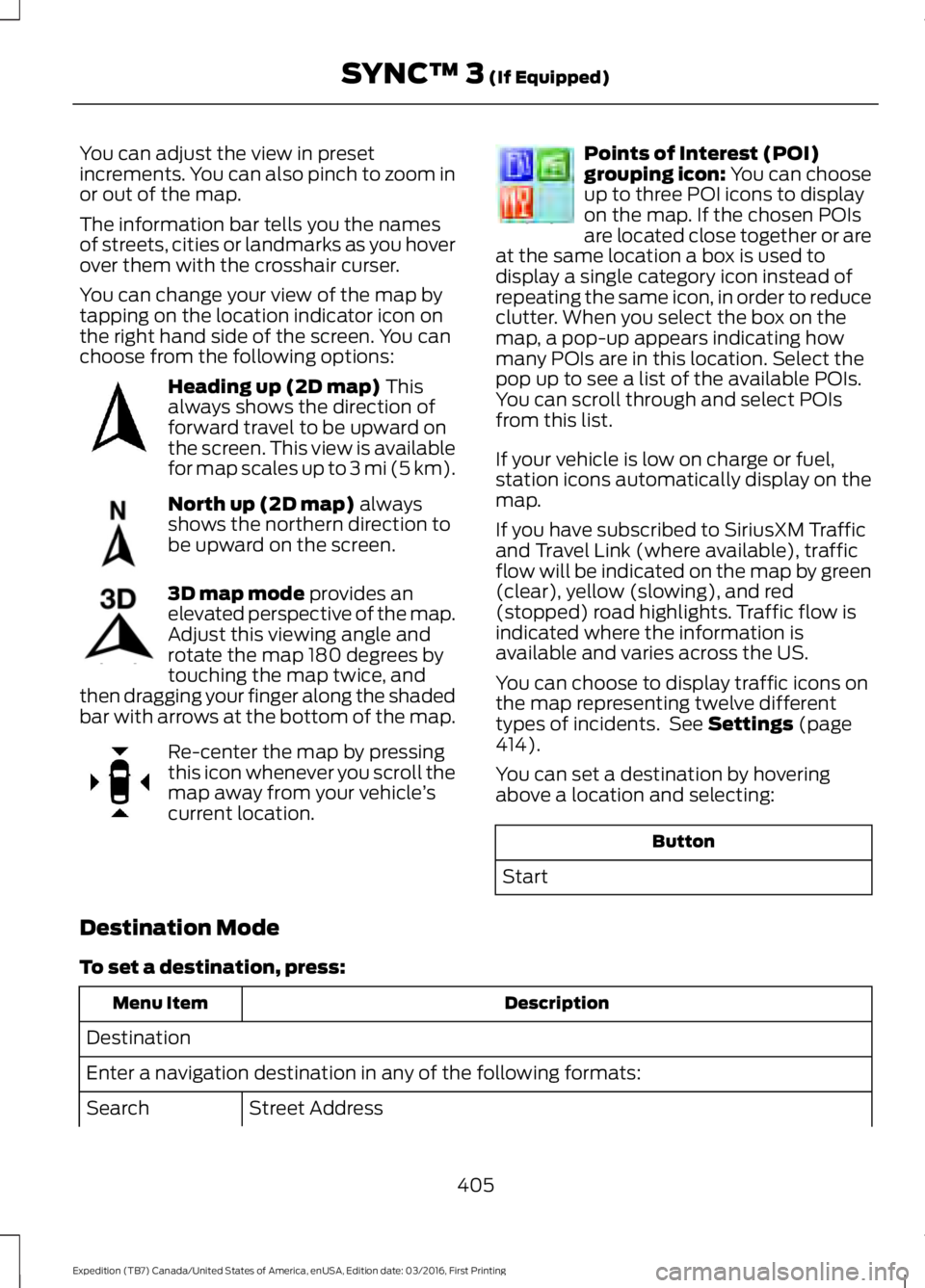
You can adjust the view in presetincrements. You can also pinch to zoom inor out of the map.
The information bar tells you the namesof streets, cities or landmarks as you hoverover them with the crosshair curser.
You can change your view of the map bytapping on the location indicator icon onthe right hand side of the screen. You canchoose from the following options:
Heading up (2D map) Thisalways shows the direction offorward travel to be upward onthe screen. This view is availablefor map scales up to 3 mi (5 km).
North up (2D map) alwaysshows the northern direction tobe upward on the screen.
3D map mode provides anelevated perspective of the map.Adjust this viewing angle androtate the map 180 degrees bytouching the map twice, andthen dragging your finger along the shadedbar with arrows at the bottom of the map.
Re-center the map by pressingthis icon whenever you scroll themap away from your vehicle’scurrent location.
Points of Interest (POI)grouping icon: You can chooseup to three POI icons to displayon the map. If the chosen POIsare located close together or areat the same location a box is used todisplay a single category icon instead ofrepeating the same icon, in order to reduceclutter. When you select the box on themap, a pop-up appears indicating howmany POIs are in this location. Select thepop up to see a list of the available POIs.You can scroll through and select POIsfrom this list.
If your vehicle is low on charge or fuel,station icons automatically display on themap.
If you have subscribed to SiriusXM Trafficand Travel Link (where available), trafficflow will be indicated on the map by green(clear), yellow (slowing), and red(stopped) road highlights. Traffic flow isindicated where the information isavailable and varies across the US.
You can choose to display traffic icons onthe map representing twelve differenttypes of incidents. See Settings (page414).
You can set a destination by hoveringabove a location and selecting:
Button
Start
Destination Mode
To set a destination, press:
DescriptionMenu Item
Destination
Enter a navigation destination in any of the following formats:
Street AddressSearch
405
Expedition (TB7) Canada/United States of America, enUSA, Edition date: 03/2016, First Printing
SYNC™ 3 (If Equipped)E207750 E207749 E207748 E207751 E207754
Page 448 of 500
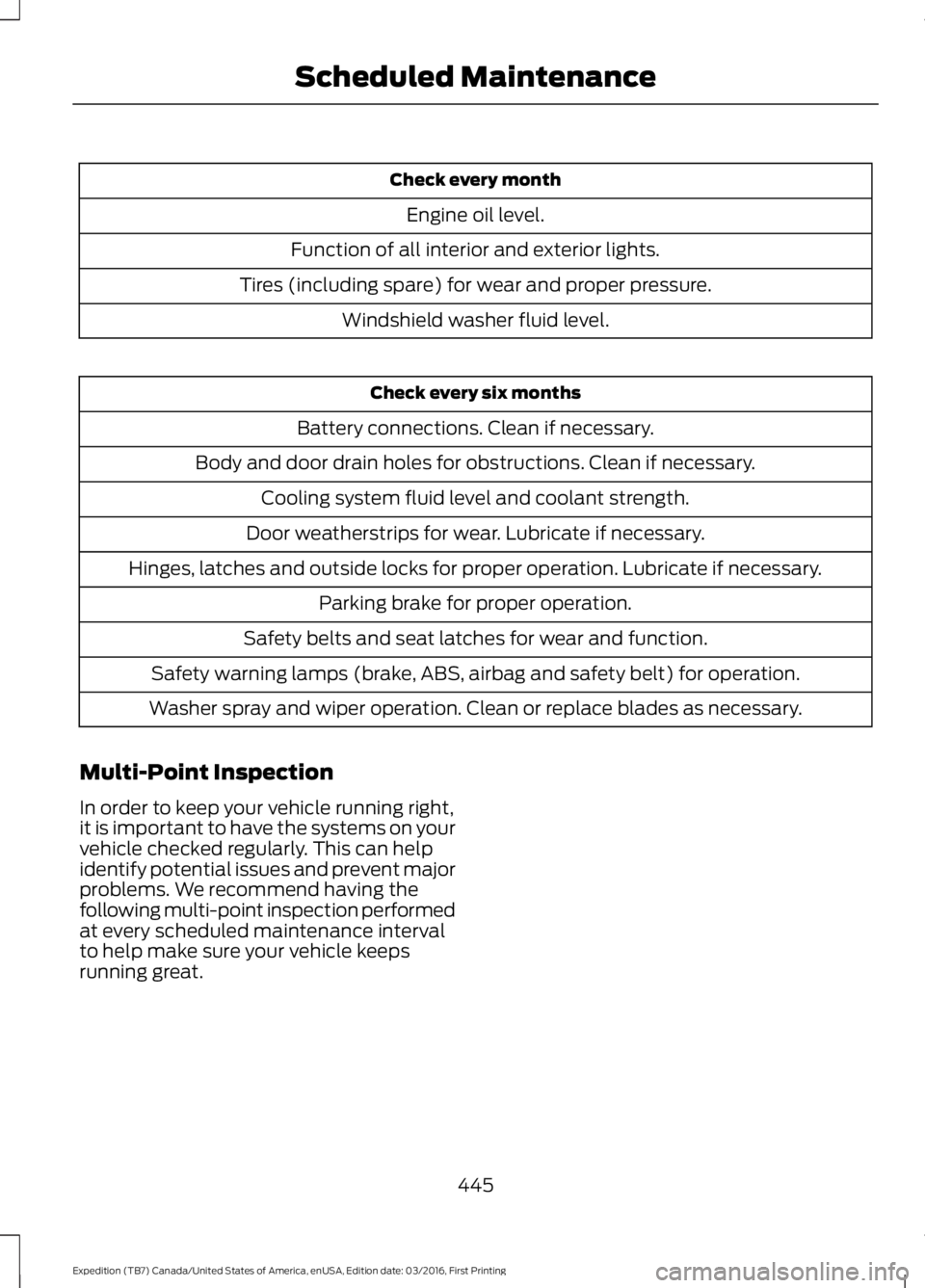
Check every month
Engine oil level.
Function of all interior and exterior lights.
Tires (including spare) for wear and proper pressure.
Windshield washer fluid level.
Check every six months
Battery connections. Clean if necessary.
Body and door drain holes for obstructions. Clean if necessary.
Cooling system fluid level and coolant strength.
Door weatherstrips for wear. Lubricate if necessary.
Hinges, latches and outside locks for proper operation. Lubricate if necessary.
Parking brake for proper operation.
Safety belts and seat latches for wear and function.
Safety warning lamps (brake, ABS, airbag and safety belt) for operation.
Washer spray and wiper operation. Clean or replace blades as necessary.
Multi-Point Inspection
In order to keep your vehicle running right,it is important to have the systems on yourvehicle checked regularly. This can helpidentify potential issues and prevent majorproblems. We recommend having thefollowing multi-point inspection performedat every scheduled maintenance intervalto help make sure your vehicle keepsrunning great.
445
Expedition (TB7) Canada/United States of America, enUSA, Edition date: 03/2016, First Printing
Scheduled Maintenance
Page 498 of 500
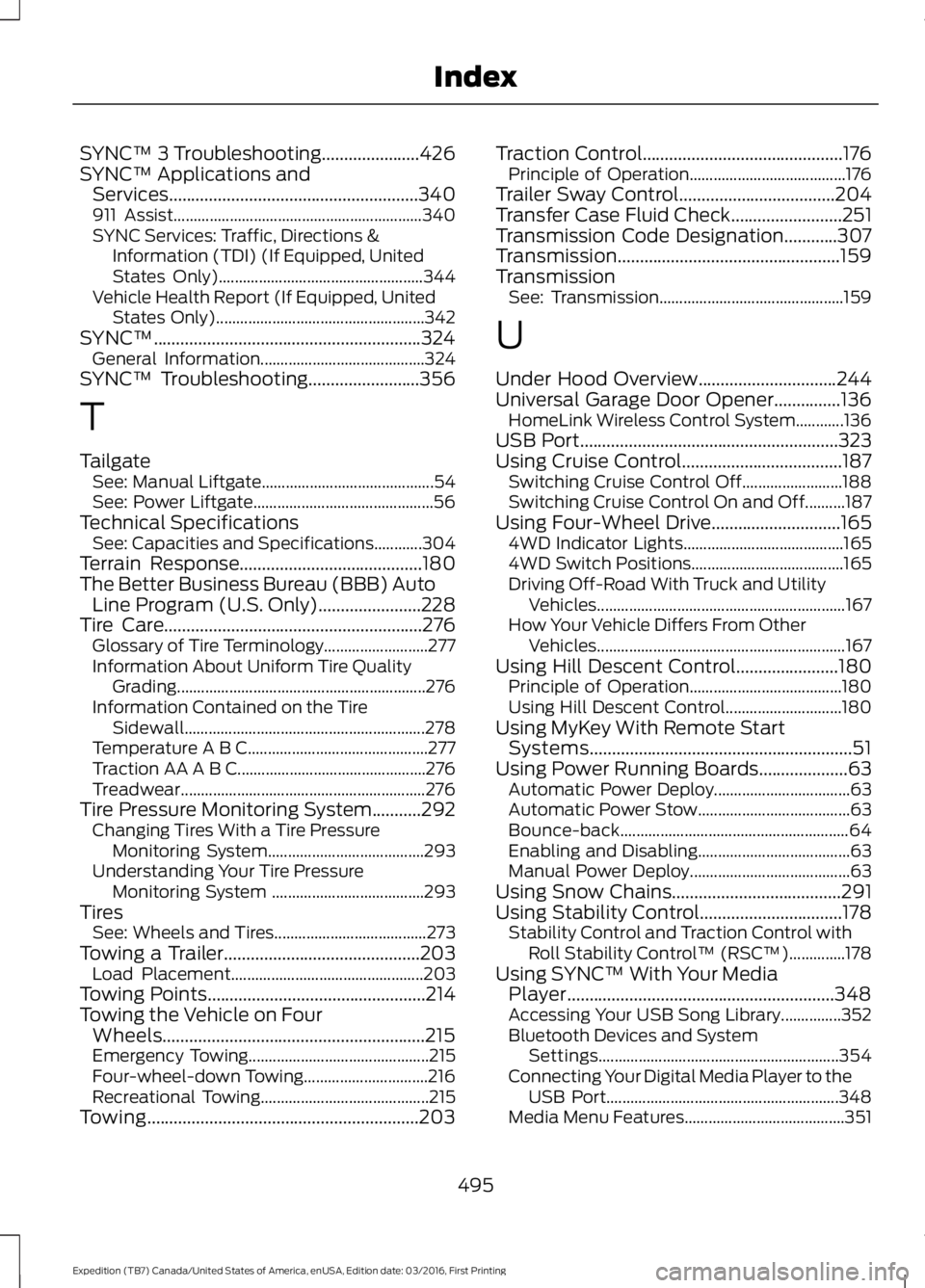
SYNC™ 3 Troubleshooting......................426SYNC™ Applications andServices........................................................340911 Assist..............................................................340SYNC Services: Traffic, Directions &Information (TDI) (If Equipped, UnitedStates Only)...................................................344Vehicle Health Report (If Equipped, UnitedStates Only)....................................................342SYNC™............................................................324General Information.........................................324SYNC™ Troubleshooting.........................356
T
TailgateSee: Manual Liftgate...........................................54See: Power Liftgate.............................................56Technical SpecificationsSee: Capacities and Specifications............304Terrain Response.........................................180The Better Business Bureau (BBB) AutoLine Program (U.S. Only).......................228Tire Care..........................................................276Glossary of Tire Terminology..........................277Information About Uniform Tire QualityGrading..............................................................276Information Contained on the TireSidewall............................................................278Temperature A B C.............................................277Traction AA A B C...............................................276Treadwear.............................................................276Tire Pressure Monitoring System...........292Changing Tires With a Tire PressureMonitoring System.......................................293Understanding Your Tire PressureMonitoring System ......................................293TiresSee: Wheels and Tires......................................273Towing a Trailer............................................203Load Placement................................................203Towing Points.................................................214Towing the Vehicle on FourWheels...........................................................215Emergency Towing.............................................215Four-wheel-down Towing...............................216Recreational Towing..........................................215Towing.............................................................203
Traction Control.............................................176Principle of Operation.......................................176Trailer Sway Control...................................204Transfer Case Fluid Check.........................251Transmission Code Designation............307Transmission..................................................159TransmissionSee: Transmission..............................................159
U
Under Hood Overview...............................244Universal Garage Door Opener...............136HomeLink Wireless Control System............136USB Port..........................................................323Using Cruise Control....................................187Switching Cruise Control Off.........................188Switching Cruise Control On and Off..........187Using Four-Wheel Drive.............................1654WD Indicator Lights........................................1654WD Switch Positions......................................165Driving Off-Road With Truck and UtilityVehicles..............................................................167How Your Vehicle Differs From OtherVehicles..............................................................167Using Hill Descent Control.......................180Principle of Operation......................................180Using Hill Descent Control.............................180Using MyKey With Remote StartSystems...........................................................51Using Power Running Boards....................63Automatic Power Deploy..................................63Automatic Power Stow......................................63Bounce-back.........................................................64Enabling and Disabling......................................63Manual Power Deploy........................................63Using Snow Chains......................................291Using Stability Control................................178Stability Control and Traction Control withRoll Stability Control™ (RSC™)..............178Using SYNC™ With Your MediaPlayer............................................................348Accessing Your USB Song Library...............352Bluetooth Devices and SystemSettings............................................................354Connecting Your Digital Media Player to theUSB Port..........................................................348Media Menu Features........................................351
495
Expedition (TB7) Canada/United States of America, enUSA, Edition date: 03/2016, First Printing
Index
Page 499 of 500
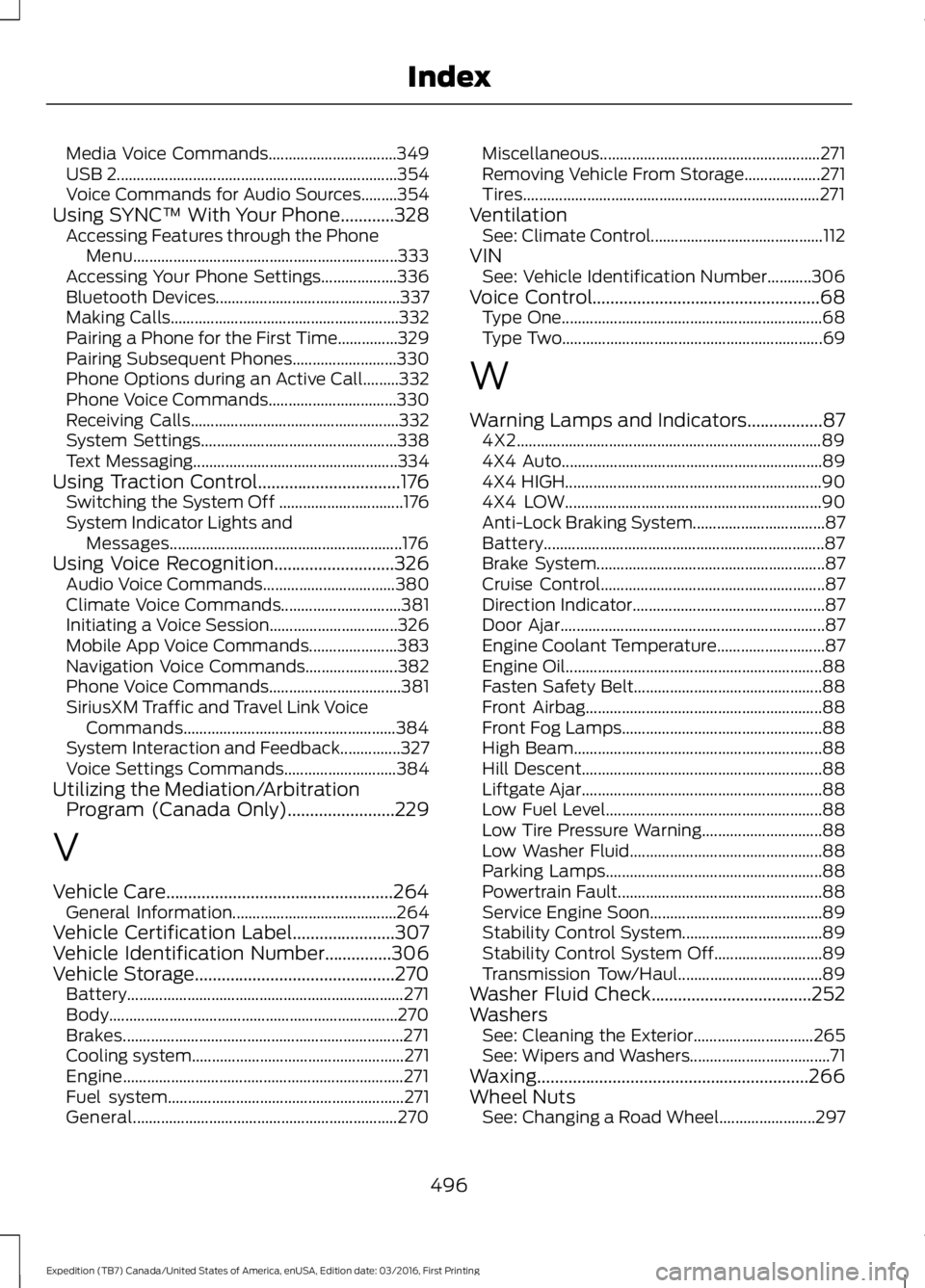
Media Voice Commands................................349USB 2......................................................................354Voice Commands for Audio Sources.........354Using SYNC™ With Your Phone............328Accessing Features through the PhoneMenu..................................................................333Accessing Your Phone Settings...................336Bluetooth Devices..............................................337Making Calls.........................................................332Pairing a Phone for the First Time...............329Pairing Subsequent Phones..........................330Phone Options during an Active Call.........332Phone Voice Commands................................330Receiving Calls....................................................332System Settings.................................................338Text Messaging...................................................334Using Traction Control................................176Switching the System Off ...............................176System Indicator Lights andMessages..........................................................176Using Voice Recognition...........................326Audio Voice Commands.................................380Climate Voice Commands..............................381Initiating a Voice Session................................326Mobile App Voice Commands......................383Navigation Voice Commands.......................382Phone Voice Commands.................................381SiriusXM Traffic and Travel Link VoiceCommands.....................................................384System Interaction and Feedback...............327Voice Settings Commands............................384Utilizing the Mediation/ArbitrationProgram (Canada Only)........................229
V
Vehicle Care...................................................264General Information.........................................264Vehicle Certification Label.......................307Vehicle Identification Number...............306Vehicle Storage.............................................270Battery.....................................................................271Body........................................................................270Brakes......................................................................271Cooling system.....................................................271Engine......................................................................271Fuel system...........................................................271General..................................................................270
Miscellaneous.......................................................271Removing Vehicle From Storage...................271Tires..........................................................................271VentilationSee: Climate Control...........................................112VINSee: Vehicle Identification Number...........306Voice Control...................................................68Type One.................................................................68Type Two.................................................................69
W
Warning Lamps and Indicators.................874X2............................................................................894X4 Auto.................................................................894X4 HIGH................................................................904X4 LOW................................................................90Anti-Lock Braking System.................................87Battery......................................................................87Brake System.........................................................87Cruise Control........................................................87Direction Indicator................................................87Door Ajar..................................................................87Engine Coolant Temperature...........................87Engine Oil................................................................88Fasten Safety Belt...............................................88Front Airbag...........................................................88Front Fog Lamps..................................................88High Beam..............................................................88Hill Descent............................................................88Liftgate Ajar............................................................88Low Fuel Level......................................................88Low Tire Pressure Warning..............................88Low Washer Fluid................................................88Parking Lamps......................................................88Powertrain Fault...................................................88Service Engine Soon...........................................89Stability Control System...................................89Stability Control System Off...........................89Transmission Tow/Haul....................................89Washer Fluid Check....................................252WashersSee: Cleaning the Exterior..............................265See: Wipers and Washers...................................71Waxing.............................................................266Wheel NutsSee: Changing a Road Wheel........................297
496
Expedition (TB7) Canada/United States of America, enUSA, Edition date: 03/2016, First Printing
Index