power steering FORD EXPEDITION EL 2017 Owner's Manual
[x] Cancel search | Manufacturer: FORD, Model Year: 2017, Model line: EXPEDITION EL, Model: FORD EXPEDITION EL 2017Pages: 500, PDF Size: 6.13 MB
Page 252 of 500
Severe Climates
If you drive in extremely cold climates:
•It may be necessary to increase thecoolant concentration above 50%.
•A coolant concentration of 60%provides improved freeze pointprotection. Coolant concentrationsabove 60% decrease the overheatprotection characteristics of thecoolant and may cause enginedamage.
If you drive in extremely hot climates:
•You can decrease the coolantconcentration to 40%.
•Coolant concentrations below 40%decrease the freeze and corrosionprotection characteristics of thecoolant and may cause enginedamage.
Vehicles driven year-round in non-extremeclimates should use prediluted coolant foroptimum cooling system and engineprotection.
Coolant Change
At specific mileage intervals, as listed inthe scheduled maintenance information,the coolant should be changed. Addprediluted coolant approved to the correctspecification. See Capacities andSpecifications (page 304).
Fail-Safe Cooling
Fail-safe cooling allows you to temporarilydrive your vehicle before any incrementalcomponent damage occurs. The fail-safedistance depends on ambienttemperature, vehicle load and terrain.
How Fail-Safe Cooling Works
If the engine begins to overheat, thecoolant temperature gauge moves towardthe red zone:
A warning lamp illuminates anda message may appear in theinformation display.
If the engine reaches a presetover-temperature condition, the engineautomatically switches to alternatingcylinder operation. Each disabled cylinderacts as an air pump and cools the engine.
When this occurs, your vehicle stilloperates, however:
•Engine power is limited.
•The air conditioning system turns off.
Continued operation increases the enginetemperature, causing the engine tocompletely shut down. Your steering andbraking effort increases in this situation.
When the engine temperature cools, youcan re-start the engine. Have your vehiclechecked as soon as possible to minimizeengine damage.
When Fail-Safe Mode Is Activated
WARNINGS
Fail-safe mode is for use duringemergencies only. Operate yourvehicle in fail-safe mode only as longas necessary to bring your vehicle to restin a safe location and seek immediaterepairs. When in fail-safe mode, yourvehicle will have limited power, will not beable to maintain high-speed operation, andmay completely shut down withoutwarning, potentially losing engine power,power steering assist, and power brakeassist, which may increase the possibilityof a crash resulting in serious injury.
Never remove the coolant reservoircap while the engine is running or hot.
249
Expedition (TB7) Canada/United States of America, enUSA, Edition date: 03/2016, First Printing
Maintenance
Page 257 of 500
If you see any corrosion on the battery orterminals, remove the cables from theterminals and clean with a wire brush. Youcan neutralize the acid with a solution ofbaking soda and water.
Because your vehicle’s engine iselectronically controlled by a computer,some control conditions are maintainedby power from the battery. When thebattery is disconnected or a new batteryis installed, the engine must relearn its idleand fuel trim strategy for optimumdriveability and performance. Flexible fuelvehicles (FFV) must also relearn theethanol content of the fuel for optimumdriveability and performance.
To restore the settings, do the following:
1. Apply the parking brake.
2. Shift into park (P) or neutral (N).
3. Switch off all accessories.
4. Press the brake pedal and start yourvehicle.
5. Run the engine until it reaches normaloperating temperature. While theengine is warming up, complete thefollowing: Reset the clock. See AudioSystem (page 313). Reset the powerwindows bounce-back feature. SeeWindows and Mirrors (page 79).Reset the radio station presets. SeeAudio System (page 313).
6.Allow the engine to idle for at least oneminute.
7.Drive the vehicle at least 10 mi (16 km)to completely relearn the idle trim andfuel trim strategy.
Note:If you do not allow the engine torelearn the idle and fuel trim strategy, theidle quality of your vehicle may be adverselyaffected until the engine computereventually relearns the idle trim and fueltrim strategy.
Note:For flexible fuel vehicles, if you areoperating on E85, you may experience poorstarts or an inability to start the engine anddriveability problems until the fuel trim andethanol content have been relearned.
Make sure that you dispose of old batteriesin an environmentally friendly way. Seekadvice from your local authority aboutrecycling old batteries.
If storing your vehicle for more than 30days without recharging the battery, werecommend that you disconnect thebattery cables to maintain battery chargefor quick starting.
Battery Management System (If
Equipped)
The battery management system monitorsbattery conditions and takes actions toextend battery life. If excessive batterydrain is detected, the system temporarilydisables some electrical systems toprotect the battery.
Systems included are:
•Heated rear window.
•Heated seats.
•Climate control.
•Heated steering wheel.
•Audio unit.
•Navigation system.
A message may appear in the informationdisplays to alert you that batteryprotection actions are active. Thesemessages are only for notification that anaction is taking place, and not intended toindicate an electrical problem or that thebattery requires replacement.
254
Expedition (TB7) Canada/United States of America, enUSA, Edition date: 03/2016, First Printing
Maintenance
Page 294 of 500
USING SNOW CHAINS
WARNING
Snow tires must be the same size,load index and speed rating as thoseoriginally provided by Ford. Use ofany tire or wheel not recommended byFord can affect the safety andperformance of your vehicle, which couldresult in an increased risk of loss of control,vehicle rollover, personal injury and death.Additionally, the use of non-recommendedtires and wheels can cause steering,suspension, axle, transfer case or powertransfer unit failure. Follow the Fordrecommended tire inflation pressure foundon the Safety Compliance CertificationLabel (on the door hinge pillar, door latchpost or the door edge that meets the doorlatch post, next to the driver seat), or TireLabel on the B-Pillar or the edge of thedriver door. Failure to follow the tirepressure recommendations can causeuneven treadwear patterns and adverselyaffect the way your vehicle handles.
Note:The suspension insulation andbumpers will help prevent vehicle damage.Do not remove these components from yourvehicle when using snow tires and chains.
The tires on your vehicle have all-weathertreads to provide traction in rain and snow.However, in some climates, you may needto use snow tires and cables. If you needto use cables, it is recommended that steelwheels (of the same size andspecifications) be used, as cables may chipaluminum wheels.
Follow these guidelines when using snowtires and chains:
•If possible, avoid fully loading yourvehicle.
•Use only cable type chains or chainsoffered by Ford/Lincoln as anaccessory or equivalent. Otherconventional link type chains maycontact and cause damage to thevehicle's wheel house and/or body.
•Do not install chains on the front tiresas this may interfere with suspensioncomponents.
•Only certain snow cables or chainshave been approved by Ford/Lincolnas safe for use on your vehicle with thefollowing tires: 265/70R17 and275/65R18.
•You should install snow cables orchains that have been rated as SAEClass S.
•Install chains securely, verifying thatthe chains do not touch any wiring,brake lines, or fuel lines.
•Do not exceed 31 mph (50 km/h) orless if recommended by the chainmanufacturer while using snow chains.
•Drive cautiously. If you hear the chainsrub or bang against your vehicle, stopand retighten the chains. If this doesnot work, remove the chains to preventdamage to your vehicle.
•Remove the tire chains when they areno longer needed. Do not use tirechains on dry roads.
•Purchase chains or cables from amanufacturer that clearly labels bodyto tire dimension restrictions. The snowchains or cables must be mounted inpairs on the rear tires only.
If you have any questions regarding snowchains or cables, please contact yourauthorized dealer.
291
Expedition (TB7) Canada/United States of America, enUSA, Edition date: 03/2016, First Printing
Wheels and Tires
Page 302 of 500
Tire Change Procedure
WARNINGS
Only use replacement tires andwheels that are the same size, loadindex, speed rating and type (suchas P-metric versus LT-metric or all-seasonversus all-terrain) as those originallyprovided by Ford. The recommended tireand wheel size may be found on either theSafety Compliance Certification Label(affixed to either the door hinge pillar,door-latch post, or the door edge thatmeets the door-latch post, next to thedriver’s seating position) or the Tire Labelwhich is located on the B-Pillar or edge ofthe driver’s door. If this information is notfound on these labels then you shouldcontact your authorized dealer as soon aspossible. Use of any tire or wheel notrecommended by Ford can affect thesafety and performance of your vehicle,which could result in an increased risk ofloss of vehicle control, vehicle rollover,personal injury and death. Additionally theuse of non-recommended tires and wheelscould cause steering, suspension, axle,transfer case or power transfer unit failure.If you have questions regarding tirereplacement, contact your authorizeddealer as soon as possible.
When one of the front wheels is offthe ground, the transmission alonewill not prevent the vehicle frommoving or slipping off the jack.
To help prevent the vehicle frommoving when you change a tire, besure to place the transmission in park(P), set the parking brake and block (inboth directions) the wheel that isdiagonally opposite (other side and end ofthe vehicle) to the tire being changed.
Never get underneath a vehicle thatis supported only by a jack. If thevehicle slips off the jack, you orsomeone else could be seriously injured.
WARNINGS
Do not attempt to change a tire onthe side of the vehicle close tomoving traffic. Pull far enough off theroad to avoid the danger of being hit whenoperating the jack or changing the wheel.
Always use the jack provided asoriginal equipment with your vehicle.If using a jack other than the oneprovided as original equipment with yourvehicle, make sure the jack capacity isadequate for the vehicle weight, includingany vehicle cargo or modifications.
Disable the power running boardsbefore jacking, lifting, or placing anyobject under the vehicle. Never placeyour hand between the power runningboard and the vehicle as extended powerrunning boards will retract when the doorsare closed. Failure to follow theseinstructions may result in personal injury.
Failure to follow these instructionswhen using the spare tire carriercould cause loss of the wheel andtire and lead to personal injury: Only usethe spare tire carrier to stow the tire andwheel combination specified on the TireLabel or Safety Compliance CertificationLabel on the B-Pillar or the edge of thedriver door. Other tire and wheelcombinations could cause the carrier tofail if it does not fit securely or is too heavy.Do not use impact tools or power toolsoperating over 200 RPM, which may causewinch malfunction and prevent a securefit. Override the winch at least three times(there will be an audible click each time)to ensure a tight secure fit of the wheel andtire.
Note:Passengers should not remain in thevehicle when the vehicle is being jacked.
299
Expedition (TB7) Canada/United States of America, enUSA, Edition date: 03/2016, First Printing
Wheels and Tires
Page 344 of 500
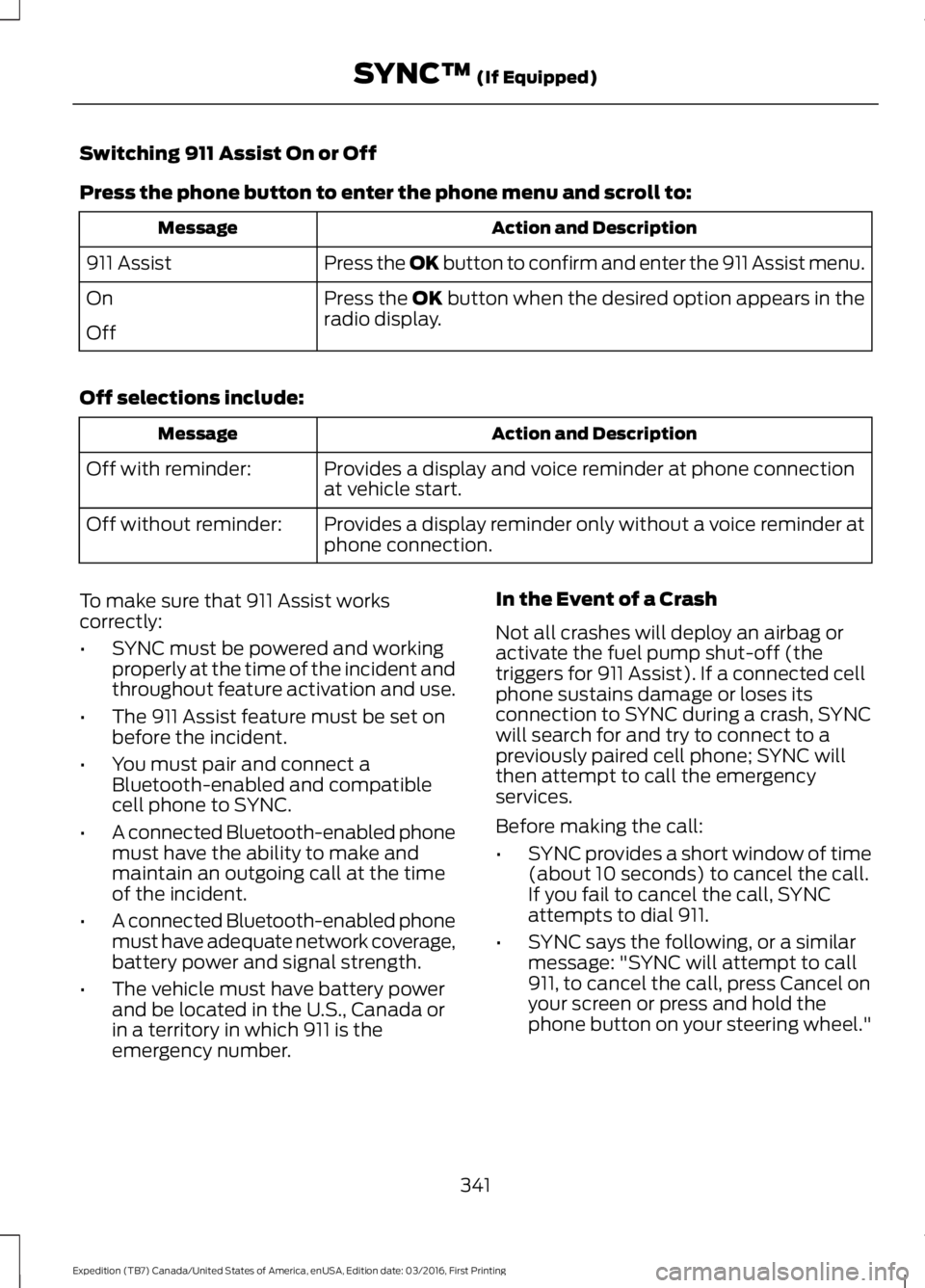
Switching 911 Assist On or Off
Press the phone button to enter the phone menu and scroll to:
Action and DescriptionMessage
Press the OK button to confirm and enter the 911 Assist menu.911 Assist
Press the OK button when the desired option appears in theradio display.On
Off
Off selections include:
Action and DescriptionMessage
Provides a display and voice reminder at phone connectionat vehicle start.Off with reminder:
Provides a display reminder only without a voice reminder atphone connection.Off without reminder:
To make sure that 911 Assist workscorrectly:
•SYNC must be powered and workingproperly at the time of the incident andthroughout feature activation and use.
•The 911 Assist feature must be set onbefore the incident.
•You must pair and connect aBluetooth-enabled and compatiblecell phone to SYNC.
•A connected Bluetooth-enabled phonemust have the ability to make andmaintain an outgoing call at the timeof the incident.
•A connected Bluetooth-enabled phonemust have adequate network coverage,battery power and signal strength.
•The vehicle must have battery powerand be located in the U.S., Canada orin a territory in which 911 is theemergency number.
In the Event of a Crash
Not all crashes will deploy an airbag oractivate the fuel pump shut-off (thetriggers for 911 Assist). If a connected cellphone sustains damage or loses itsconnection to SYNC during a crash, SYNCwill search for and try to connect to apreviously paired cell phone; SYNC willthen attempt to call the emergencyservices.
Before making the call:
•SYNC provides a short window of time(about 10 seconds) to cancel the call.If you fail to cancel the call, SYNCattempts to dial 911.
•SYNC says the following, or a similarmessage: "SYNC will attempt to call911, to cancel the call, press Cancel onyour screen or press and hold thephone button on your steering wheel."
341
Expedition (TB7) Canada/United States of America, enUSA, Edition date: 03/2016, First Printing
SYNC™ (If Equipped)
Page 376 of 500
![FORD EXPEDITION EL 2017 Owners Manual If a crash deploys an airbag (excludingknee airbags and rear inflatable safetybelts [if equipped]) or activates the fuelpump shut-off, your SYNC-equippedvehicle may be able to contact emergencyservice](/img/11/58755/w960_58755-375.png "FORD EXPEDITION EL 2017 Owners Manual If a crash deploys an airbag (excludingknee airbags and rear inflatable safetybelts [if equipped]) or activates the fuelpump shut-off, your SYNC-equippedvehicle may be able to contact emergencyservice")
If a crash deploys an airbag (excludingknee airbags and rear inflatable safetybelts [if equipped]) or activates the fuelpump shut-off, your SYNC-equippedvehicle may be able to contact emergencyservices by dialing 911 through a paired andconnected Bluetooth-enabled phone. Youcan learn more about the 911 Assistfeature, by visiting:
Website
owner.ford.comwww.syncmyride.cawww.syncmaroute.ca
For important information about airbagdeployment and the fuel pump shut-offplease see the Supplementary Restrainsand Roadside Emergencies sections ofyour owner manual.
To switch 911 Assist on and off please viewthe settings information. See Settings(page 414).
To make sure that 911 Assist workscorrectly:
•SYNC must be powered and workingproperly at the time of the incident andthroughout feature activation and use.
•The 911 Assist feature must be set onbefore the incident.
•You must pair and connect aBluetooth-enabled and compatiblecell phone to SYNC.
•A connected Bluetooth-enabled phonemust have the ability to make andmaintain an outgoing call at the timeof the incident.
•A connected Bluetooth-enabled phonemust have adequate network coverage,battery power and signal strength.
•The vehicle must have battery powerand be located in the U.S., Canada orin a territory in which 911 is theemergency number.
In the Event of a Crash
Not all crashes will deploy an airbag oractivate the fuel pump shut-off (thetriggers for 911 Assist). If a connected cellphone sustains damage or loses itsconnection to SYNC during a crash, SYNCwill search for and try to connect to apreviously paired cell phone; SYNC willthen attempt to call the emergencyservices.
Before making the call:
•SYNC provides a short window of time(about 10 seconds) to cancel the call.If you fail to cancel the call, SYNCattempts to dial 911.
•SYNC says the following, or a similarmessage: "SYNC will attempt to call911, to cancel the call, press Cancel onyour screen or press and hold thephone button on your steering wheel."
If you do not cancel the call, and SYNCmakes a successful call, a pre-recordedmessage plays for the 911 operator, andthen the occupant(s) in your vehicle is ableto talk with the operator. Be prepared toprovide your name, phone number andlocation immediately, because not all 911systems are capable of receiving thisinformation electronically.
911 Assist May Not Work If
•Your cellular phone or 911 Assisthardware sustains damage in a crash.
•The vehicle's battery or the SYNCsystem has no power.
•The phone(s) thrown from your vehicleare the ones paired and connected tothe system.
373
Expedition (TB7) Canada/United States of America, enUSA, Edition date: 03/2016, First Printing
SYNC™ 3 (If Equipped)
Page 400 of 500
Note: The heated steering wheel may remain on after remote starting thevehicle, based on your remote start settings. The heated steering wheel mayalso turn on when you start your vehicle, if it was on when you switched yourvehicle off.
Note: For steering wheels with wood trim, the heating feature will not heat thewheel between the 10 and 2 o'clock positions.
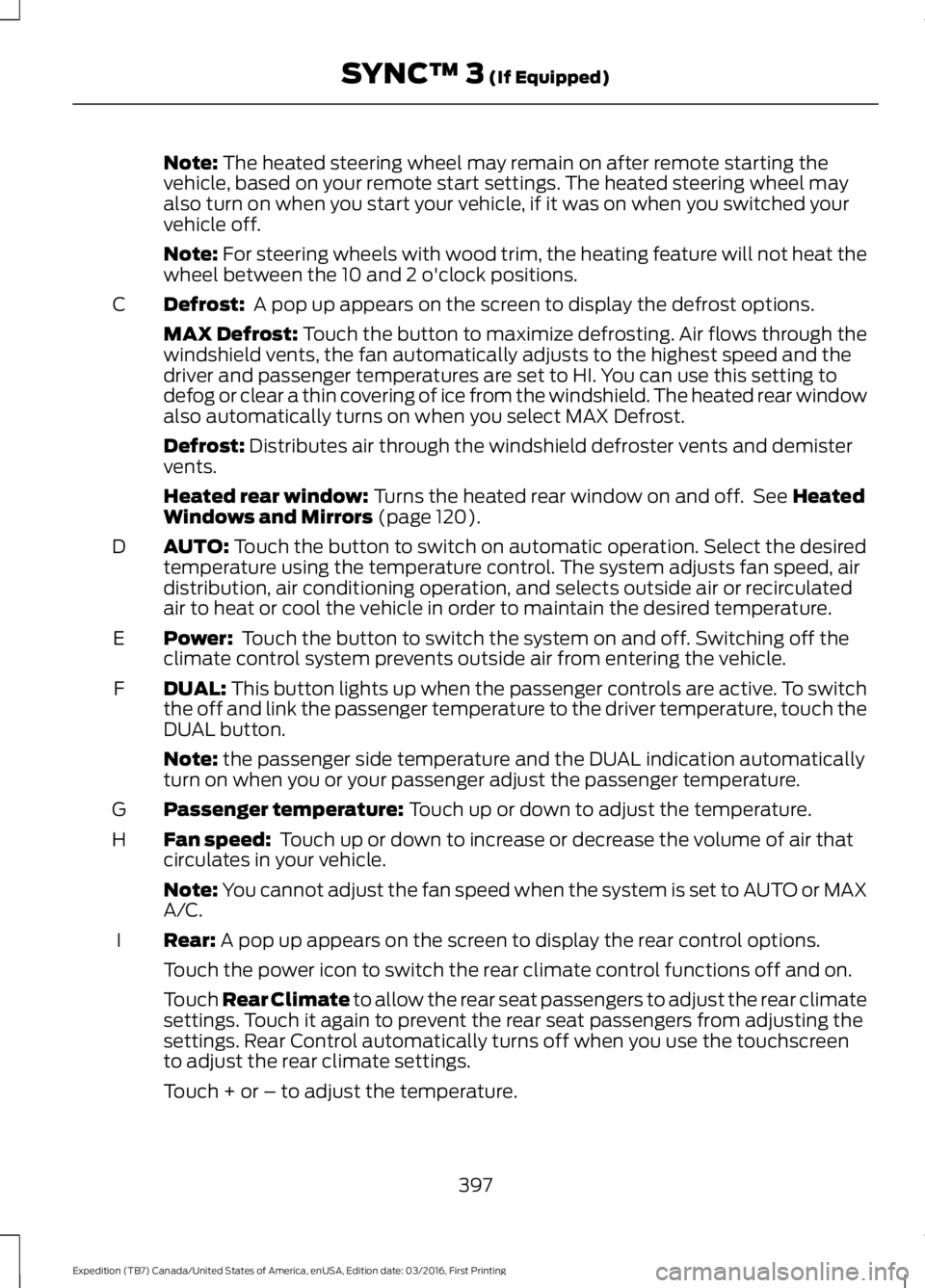
Defrost: A pop up appears on the screen to display the defrost options.C
MAX Defrost: Touch the button to maximize defrosting. Air flows through thewindshield vents, the fan automatically adjusts to the highest speed and thedriver and passenger temperatures are set to HI. You can use this setting todefog or clear a thin covering of ice from the windshield. The heated rear windowalso automatically turns on when you select MAX Defrost.
Defrost: Distributes air through the windshield defroster vents and demistervents.
Heated rear window: Turns the heated rear window on and off. See HeatedWindows and Mirrors (page 120).
AUTO: Touch the button to switch on automatic operation. Select the desiredtemperature using the temperature control. The system adjusts fan speed, airdistribution, air conditioning operation, and selects outside air or recirculatedair to heat or cool the vehicle in order to maintain the desired temperature.
D
Power: Touch the button to switch the system on and off. Switching off theclimate control system prevents outside air from entering the vehicle.E
DUAL: This button lights up when the passenger controls are active. To switchthe off and link the passenger temperature to the driver temperature, touch theDUAL button.
F
Note: the passenger side temperature and the DUAL indication automaticallyturn on when you or your passenger adjust the passenger temperature.
Passenger temperature: Touch up or down to adjust the temperature.G
Fan speed: Touch up or down to increase or decrease the volume of air thatcirculates in your vehicle.H
Note: You cannot adjust the fan speed when the system is set to AUTO or MAXA/C.
Rear: A pop up appears on the screen to display the rear control options.I
Touch the power icon to switch the rear climate control functions off and on.
Touch Rear Climate to allow the rear seat passengers to adjust the rear climatesettings. Touch it again to prevent the rear seat passengers from adjusting thesettings. Rear Control automatically turns off when you use the touchscreento adjust the rear climate settings.
Touch + or – to adjust the temperature.
397
Expedition (TB7) Canada/United States of America, enUSA, Edition date: 03/2016, First Printing
SYNC™ 3 (If Equipped)
Page 490 of 500
4
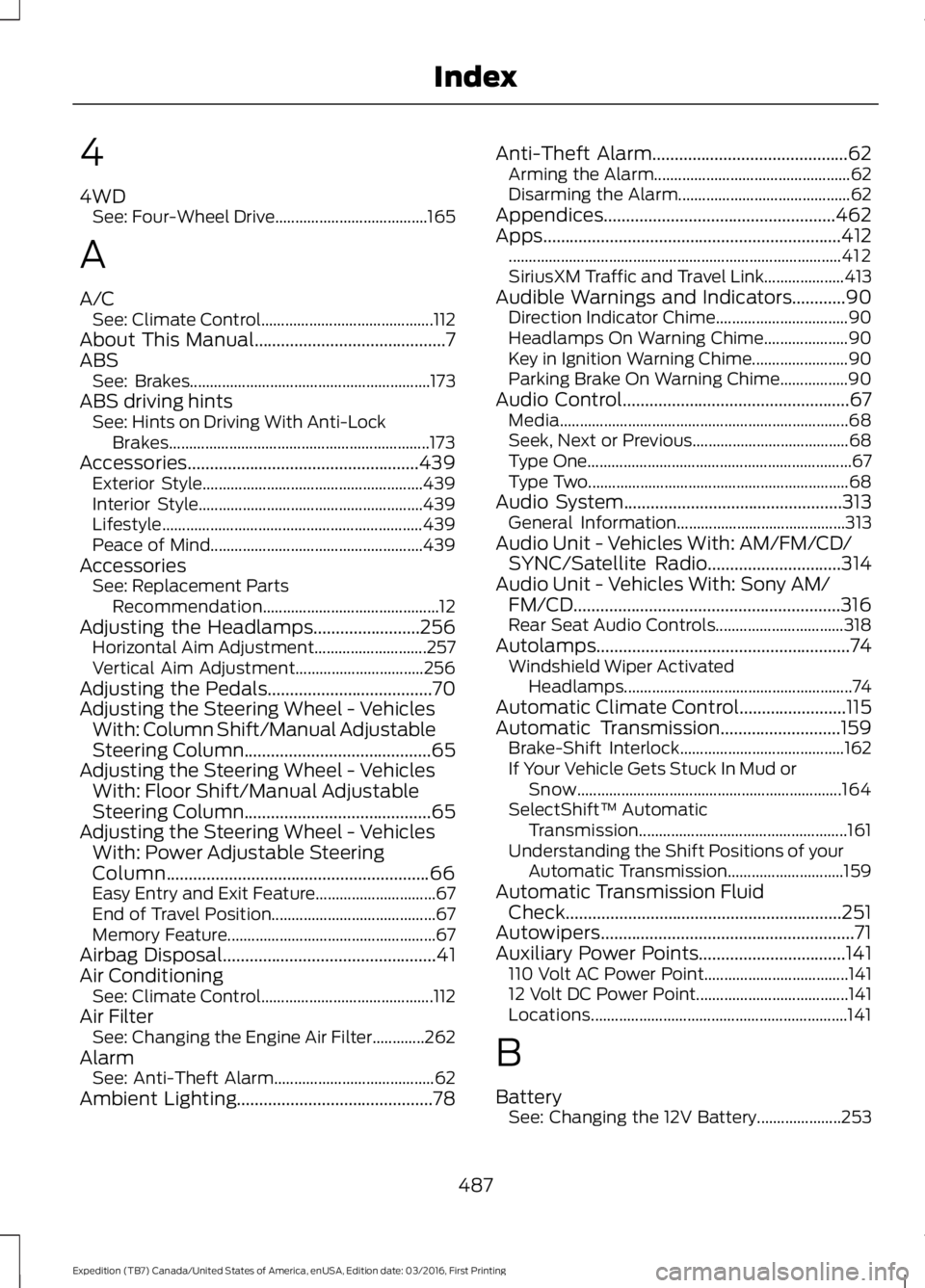
4WDSee: Four-Wheel Drive......................................165
A
A/CSee: Climate Control...........................................112About This Manual...........................................7ABSSee: Brakes............................................................173ABS driving hintsSee: Hints on Driving With Anti-LockBrakes.................................................................173Accessories....................................................439Exterior Style.......................................................439Interior Style........................................................439Lifestyle.................................................................439Peace of Mind.....................................................439AccessoriesSee: Replacement PartsRecommendation............................................12Adjusting the Headlamps........................256Horizontal Aim Adjustment............................257Vertical Aim Adjustment................................256Adjusting the Pedals.....................................70Adjusting the Steering Wheel - VehiclesWith: Column Shift/Manual AdjustableSteering Column..........................................65Adjusting the Steering Wheel - VehiclesWith: Floor Shift/Manual AdjustableSteering Column..........................................65Adjusting the Steering Wheel - VehiclesWith: Power Adjustable SteeringColumn...........................................................66Easy Entry and Exit Feature..............................67End of Travel Position.........................................67Memory Feature....................................................67Airbag Disposal................................................41Air ConditioningSee: Climate Control...........................................112Air FilterSee: Changing the Engine Air Filter.............262AlarmSee: Anti-Theft Alarm........................................62Ambient Lighting............................................78
Anti-Theft Alarm............................................62Arming the Alarm.................................................62Disarming the Alarm...........................................62Appendices....................................................462Apps...................................................................412...................................................................................412SiriusXM Traffic and Travel Link....................413Audible Warnings and Indicators............90Direction Indicator Chime.................................90Headlamps On Warning Chime.....................90Key in Ignition Warning Chime........................90Parking Brake On Warning Chime.................90Audio Control...................................................67Media........................................................................68Seek, Next or Previous.......................................68Type One..................................................................67Type Two.................................................................68Audio System.................................................313General Information..........................................313Audio Unit - Vehicles With: AM/FM/CD/SYNC/Satellite Radio..............................314Audio Unit - Vehicles With: Sony AM/FM/CD............................................................316Rear Seat Audio Controls................................318Autolamps.........................................................74Windshield Wiper ActivatedHeadlamps.........................................................74Automatic Climate Control........................115Automatic Transmission...........................159Brake-Shift Interlock.........................................162If Your Vehicle Gets Stuck In Mud orSnow..................................................................164SelectShift™ AutomaticTransmission....................................................161Understanding the Shift Positions of yourAutomatic Transmission.............................159Automatic Transmission FluidCheck..............................................................251Autowipers.........................................................71Auxiliary Power Points.................................141110 Volt AC Power Point....................................14112 Volt DC Power Point......................................141Locations................................................................141
B
BatterySee: Changing the 12V Battery.....................253
487
Expedition (TB7) Canada/United States of America, enUSA, Edition date: 03/2016, First Printing
Index
Page 493 of 500
F
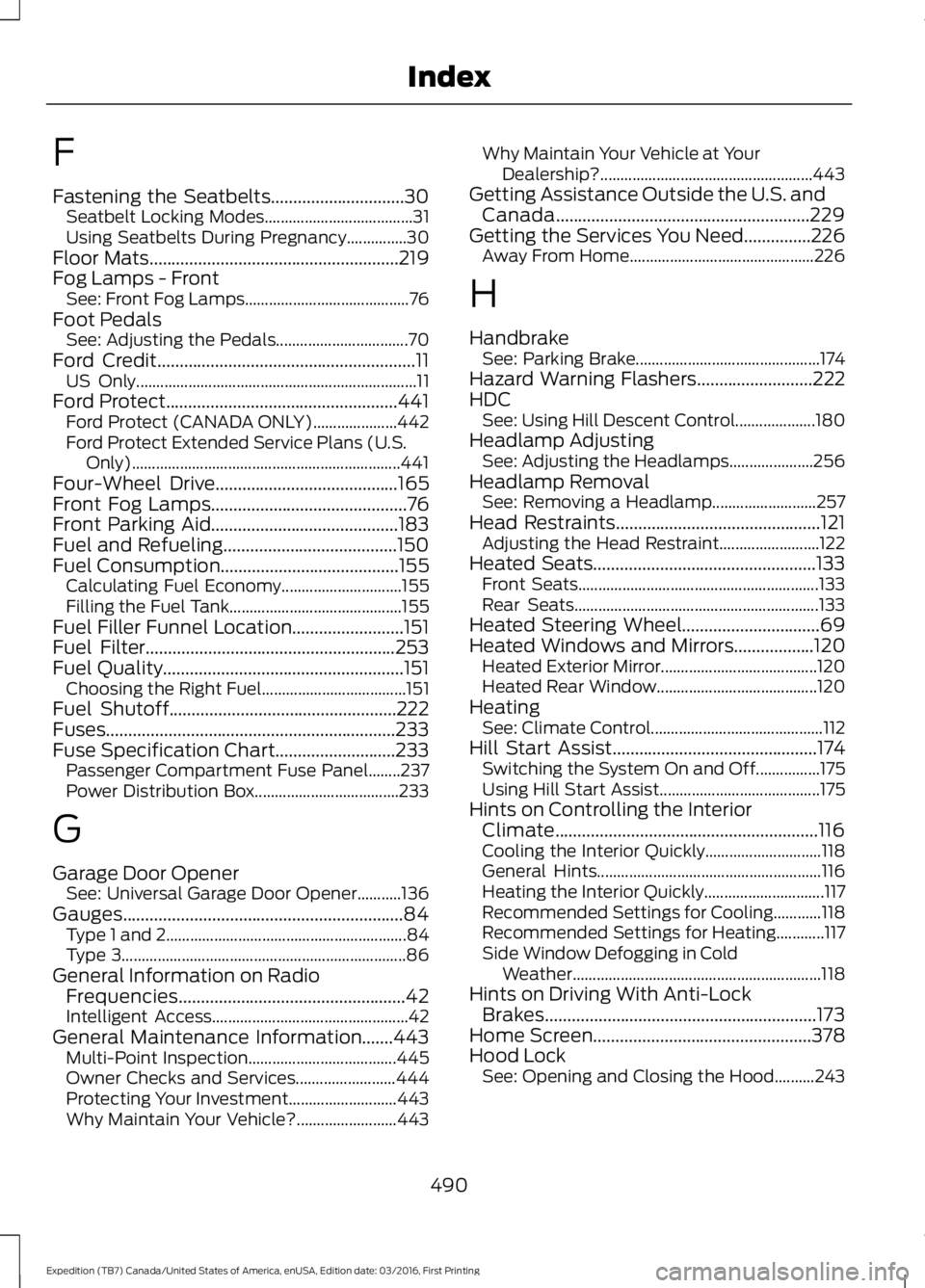
Fastening the Seatbelts..............................30Seatbelt Locking Modes.....................................31Using Seatbelts During Pregnancy...............30Floor Mats........................................................219Fog Lamps - FrontSee: Front Fog Lamps.........................................76Foot PedalsSee: Adjusting the Pedals.................................70Ford Credit..........................................................11US Only......................................................................11Ford Protect....................................................441Ford Protect (CANADA ONLY).....................442Ford Protect Extended Service Plans (U.S.Only)...................................................................441Four-Wheel Drive.........................................165Front Fog Lamps............................................76Front Parking Aid..........................................183Fuel and Refueling.......................................150Fuel Consumption........................................155Calculating Fuel Economy..............................155Filling the Fuel Tank...........................................155Fuel Filler Funnel Location.........................151Fuel Filter........................................................253Fuel Quality......................................................151Choosing the Right Fuel....................................151Fuel Shutoff...................................................222Fuses.................................................................233Fuse Specification Chart...........................233Passenger Compartment Fuse Panel........237Power Distribution Box....................................233
G
Garage Door OpenerSee: Universal Garage Door Opener...........136Gauges...............................................................84Type 1 and 2............................................................84Type 3.......................................................................86General Information on RadioFrequencies...................................................42Intelligent Access.................................................42General Maintenance Information.......443Multi-Point Inspection.....................................445Owner Checks and Services.........................444Protecting Your Investment...........................443Why Maintain Your Vehicle?.........................443
Why Maintain Your Vehicle at YourDealership?.....................................................443Getting Assistance Outside the U.S. andCanada.........................................................229Getting the Services You Need...............226Away From Home..............................................226
H
HandbrakeSee: Parking Brake..............................................174Hazard Warning Flashers..........................222HDCSee: Using Hill Descent Control....................180Headlamp AdjustingSee: Adjusting the Headlamps.....................256Headlamp RemovalSee: Removing a Headlamp..........................257Head Restraints..............................................121Adjusting the Head Restraint.........................122Heated Seats..................................................133Front Seats............................................................133Rear Seats.............................................................133Heated Steering Wheel...............................69Heated Windows and Mirrors..................120Heated Exterior Mirror.......................................120Heated Rear Window........................................120HeatingSee: Climate Control...........................................112Hill Start Assist..............................................174Switching the System On and Off................175Using Hill Start Assist........................................175Hints on Controlling the InteriorClimate...........................................................116Cooling the Interior Quickly.............................118General Hints........................................................116Heating the Interior Quickly..............................117Recommended Settings for Cooling............118Recommended Settings for Heating............117Side Window Defogging in ColdWeather..............................................................118Hints on Driving With Anti-LockBrakes.............................................................173Home Screen.................................................378Hood LockSee: Opening and Closing the Hood..........243
490
Expedition (TB7) Canada/United States of America, enUSA, Edition date: 03/2016, First Printing
Index
Page 494 of 500
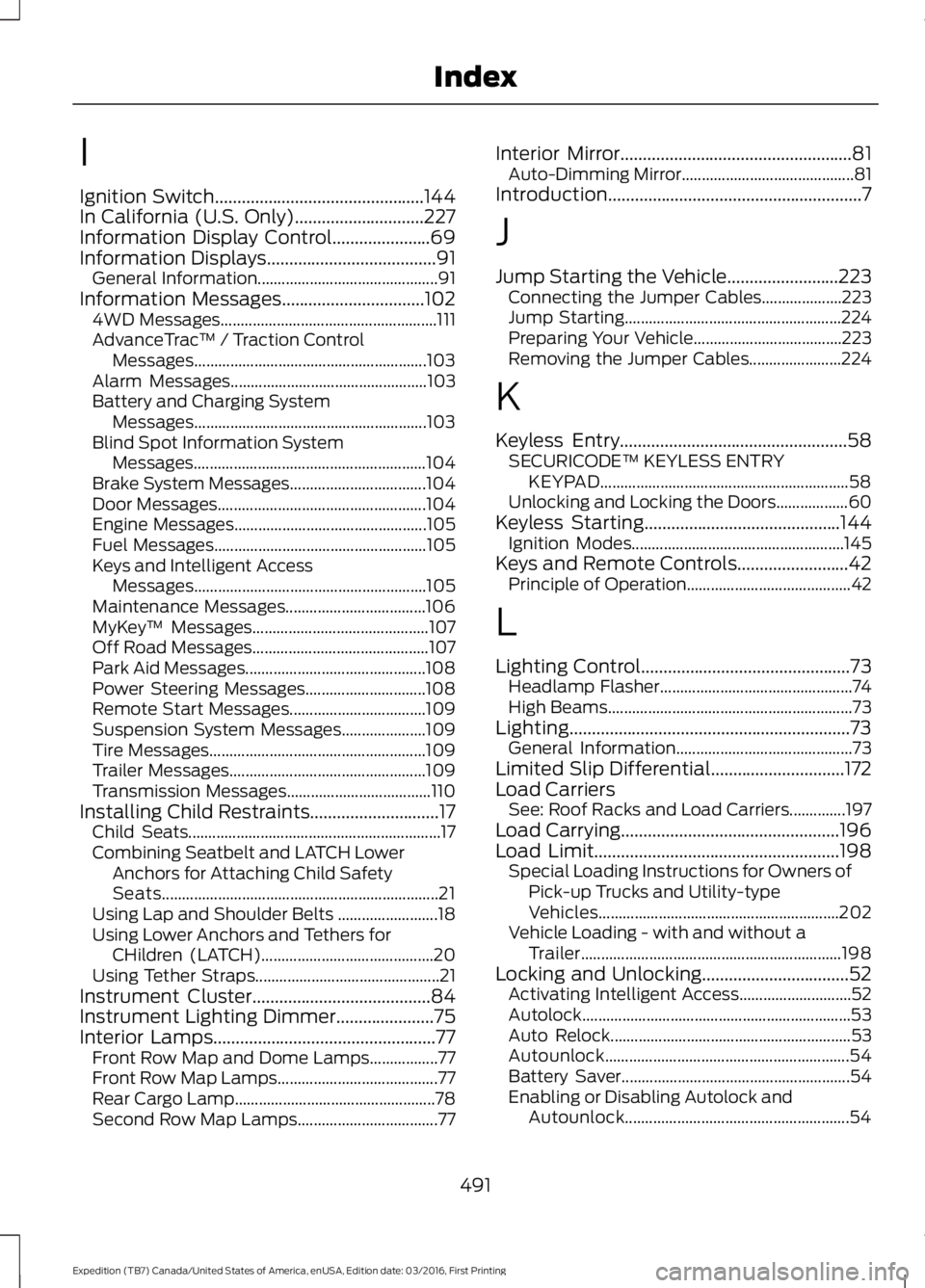
I
Ignition Switch...............................................144In California (U.S. Only).............................227Information Display Control......................69Information Displays......................................91General Information.............................................91Information Messages................................1024WD Messages......................................................111AdvanceTrac™ / Traction ControlMessages..........................................................103Alarm Messages.................................................103Battery and Charging SystemMessages..........................................................103Blind Spot Information SystemMessages..........................................................104Brake System Messages..................................104Door Messages....................................................104Engine Messages................................................105Fuel Messages.....................................................105Keys and Intelligent AccessMessages..........................................................105Maintenance Messages...................................106MyKey™ Messages............................................107Off Road Messages............................................107Park Aid Messages.............................................108Power Steering Messages..............................108Remote Start Messages..................................109Suspension System Messages.....................109Tire Messages......................................................109Trailer Messages.................................................109Transmission Messages....................................110Installing Child Restraints.............................17Child Seats...............................................................17Combining Seatbelt and LATCH LowerAnchors for Attaching Child SafetySeats.....................................................................21Using Lap and Shoulder Belts .........................18Using Lower Anchors and Tethers forCHildren (LATCH)...........................................20Using Tether Straps..............................................21Instrument Cluster........................................84Instrument Lighting Dimmer......................75Interior Lamps..................................................77Front Row Map and Dome Lamps.................77Front Row Map Lamps........................................77Rear Cargo Lamp..................................................78Second Row Map Lamps...................................77
Interior Mirror....................................................81Auto-Dimming Mirror...........................................81Introduction.........................................................7
J
Jump Starting the Vehicle.........................223Connecting the Jumper Cables....................223Jump Starting......................................................224Preparing Your Vehicle.....................................223Removing the Jumper Cables.......................224
K
Keyless Entry...................................................58SECURICODE™ KEYLESS ENTRYKEYPAD..............................................................58Unlocking and Locking the Doors..................60Keyless Starting............................................144Ignition Modes.....................................................145Keys and Remote Controls.........................42Principle of Operation.........................................42
L
Lighting Control...............................................73Headlamp Flasher................................................74High Beams.............................................................73Lighting...............................................................73General Information............................................73Limited Slip Differential..............................172Load CarriersSee: Roof Racks and Load Carriers..............197Load Carrying.................................................196Load Limit.......................................................198Special Loading Instructions for Owners ofPick-up Trucks and Utility-typeVehicles............................................................202Vehicle Loading - with and without aTrailer.................................................................198Locking and Unlocking.................................52Activating Intelligent Access............................52Autolock...................................................................53Auto Relock............................................................53Autounlock.............................................................54Battery Saver.........................................................54Enabling or Disabling Autolock andAutounlock........................................................54
491
Expedition (TB7) Canada/United States of America, enUSA, Edition date: 03/2016, First Printing
Index