sensor FORD EXPEDITION EL 2017 Owner's Manual
[x] Cancel search | Manufacturer: FORD, Model Year: 2017, Model line: EXPEDITION EL, Model: FORD EXPEDITION EL 2017Pages: 500, PDF Size: 6.13 MB
Page 193 of 500
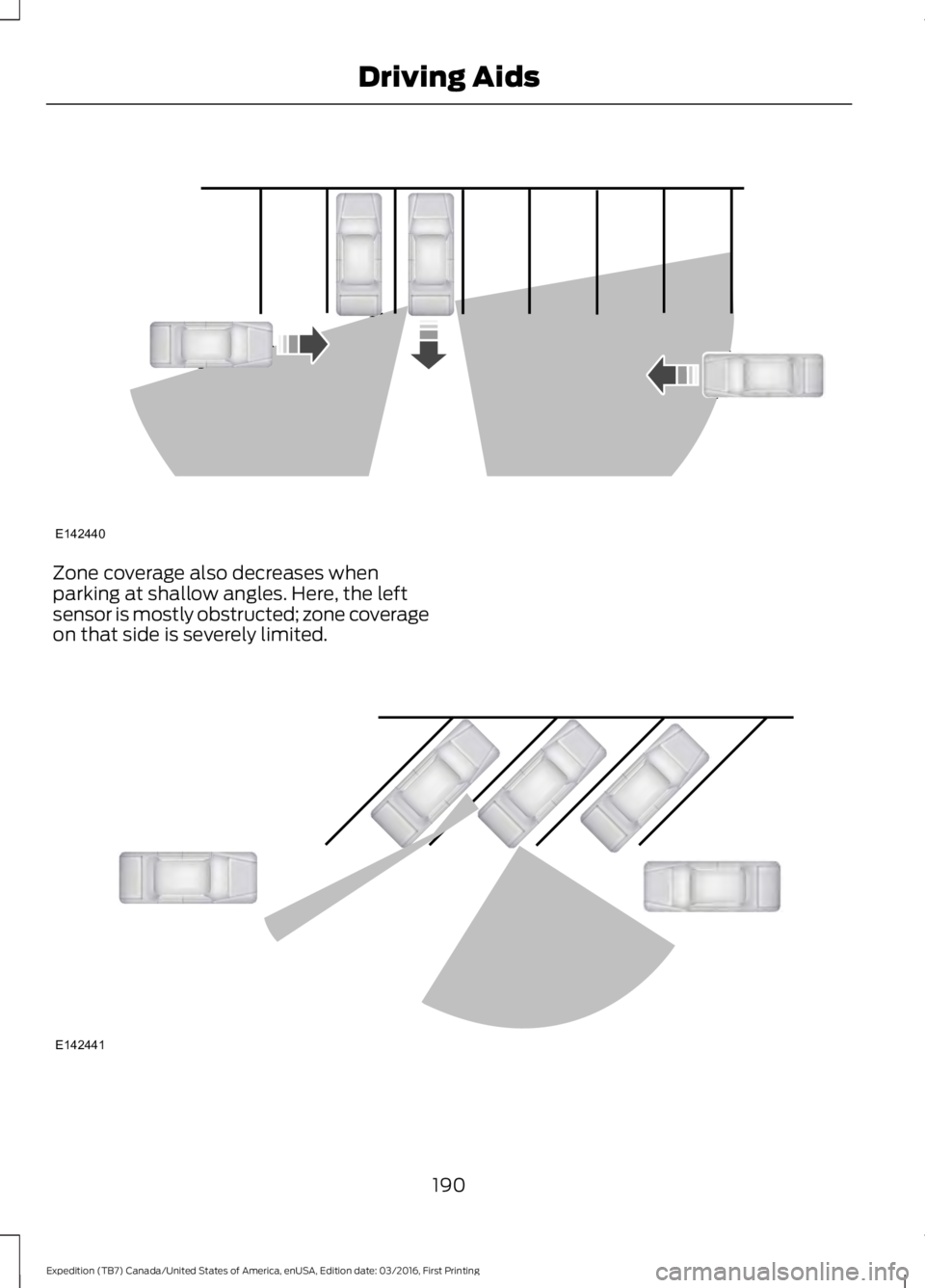
Zone coverage also decreases whenparking at shallow angles. Here, the leftsensor is mostly obstructed; zone coverageon that side is severely limited.
190
Expedition (TB7) Canada/United States of America, enUSA, Edition date: 03/2016, First Printing
Driving AidsE142440 E142441
Page 194 of 500
System Lights and Messages
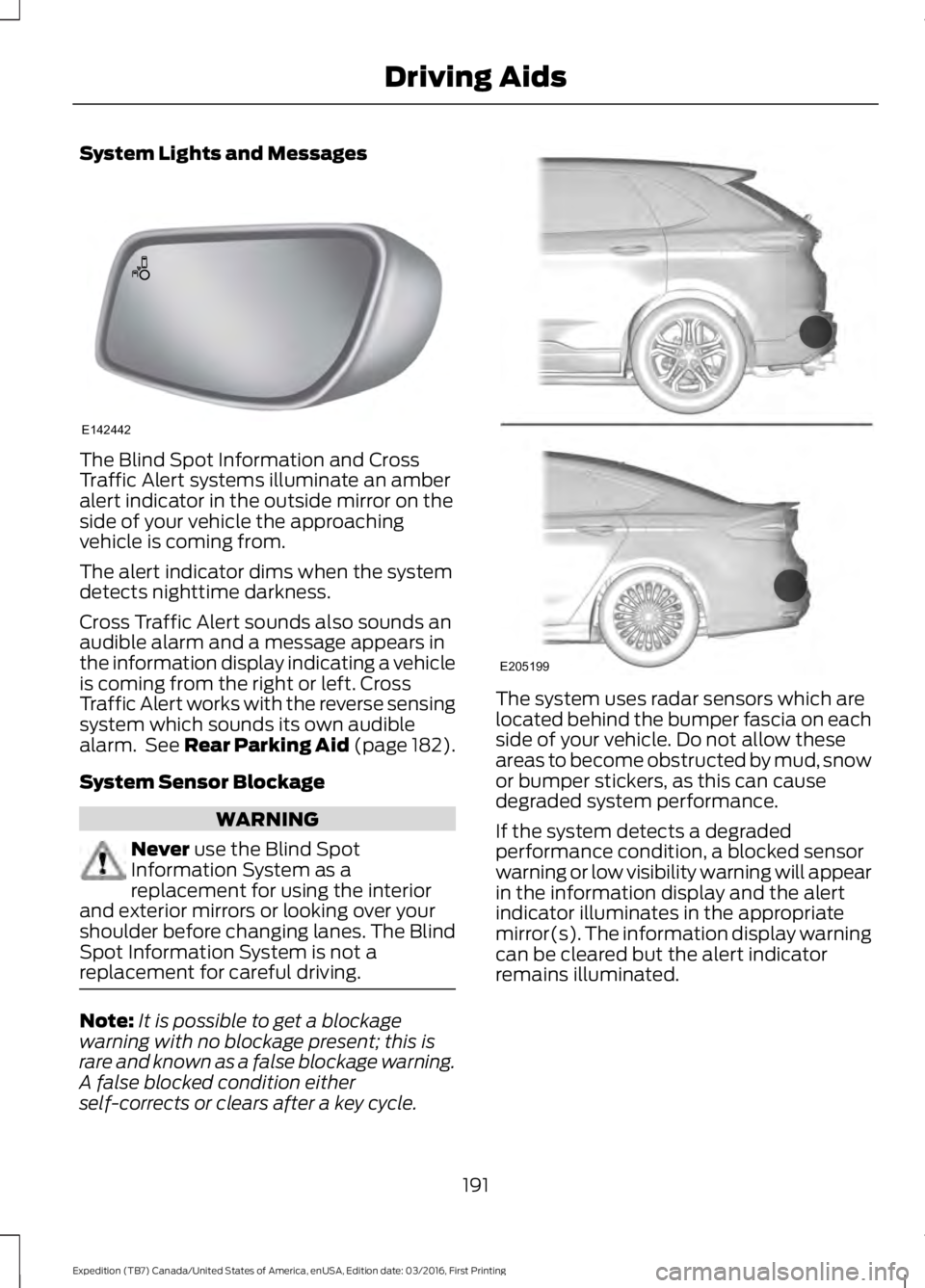
The Blind Spot Information and CrossTraffic Alert systems illuminate an amberalert indicator in the outside mirror on theside of your vehicle the approachingvehicle is coming from.
The alert indicator dims when the systemdetects nighttime darkness.
Cross Traffic Alert sounds also sounds anaudible alarm and a message appears inthe information display indicating a vehicleis coming from the right or left. CrossTraffic Alert works with the reverse sensingsystem which sounds its own audiblealarm. See Rear Parking Aid (page 182).
System Sensor Blockage
WARNING
Never use the Blind SpotInformation System as areplacement for using the interiorand exterior mirrors or looking over yourshoulder before changing lanes. The BlindSpot Information System is not areplacement for careful driving.
Note:It is possible to get a blockagewarning with no blockage present; this israre and known as a false blockage warning.A false blocked condition eitherself-corrects or clears after a key cycle.
The system uses radar sensors which arelocated behind the bumper fascia on eachside of your vehicle. Do not allow theseareas to become obstructed by mud, snowor bumper stickers, as this can causedegraded system performance.
If the system detects a degradedperformance condition, a blocked sensorwarning or low visibility warning will appearin the information display and the alertindicator illuminates in the appropriatemirror(s). The information display warningcan be cleared but the alert indicatorremains illuminated.
191
Expedition (TB7) Canada/United States of America, enUSA, Edition date: 03/2016, First Printing
Driving AidsE142442 E205199
Page 195 of 500
When the blockage is removed, the systemcan be reset in two ways: 1) when at leasttwo objects are detected while driving, or2) turn the ignition key from on to off, then
back on. If the blockage is still present afterthe key cycle, the system senses again thatit is blocked after driving in traffic.
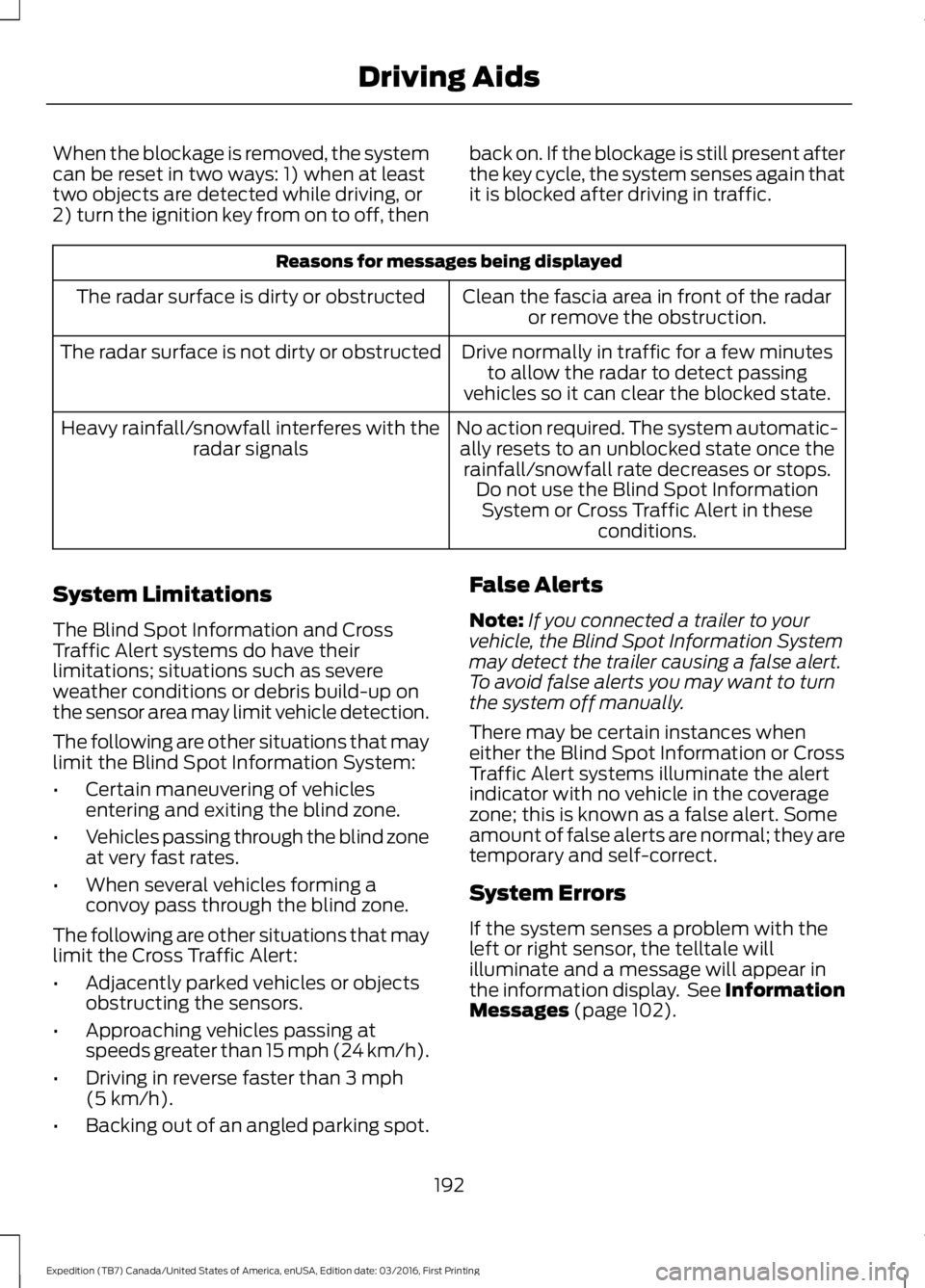
Reasons for messages being displayed
Clean the fascia area in front of the radaror remove the obstruction.The radar surface is dirty or obstructed
Drive normally in traffic for a few minutesto allow the radar to detect passingvehicles so it can clear the blocked state.
The radar surface is not dirty or obstructed
No action required. The system automatic-ally resets to an unblocked state once therainfall/snowfall rate decreases or stops.Do not use the Blind Spot InformationSystem or Cross Traffic Alert in theseconditions.
Heavy rainfall/snowfall interferes with theradar signals
System Limitations
The Blind Spot Information and CrossTraffic Alert systems do have theirlimitations; situations such as severeweather conditions or debris build-up onthe sensor area may limit vehicle detection.
The following are other situations that maylimit the Blind Spot Information System:
•Certain maneuvering of vehiclesentering and exiting the blind zone.
•Vehicles passing through the blind zoneat very fast rates.
•When several vehicles forming aconvoy pass through the blind zone.
The following are other situations that maylimit the Cross Traffic Alert:
•Adjacently parked vehicles or objectsobstructing the sensors.
•Approaching vehicles passing atspeeds greater than 15 mph (24 km/h).
•Driving in reverse faster than 3 mph(5 km/h).
•Backing out of an angled parking spot.
False Alerts
Note:If you connected a trailer to yourvehicle, the Blind Spot Information Systemmay detect the trailer causing a false alert.To avoid false alerts you may want to turnthe system off manually.
There may be certain instances wheneither the Blind Spot Information or CrossTraffic Alert systems illuminate the alertindicator with no vehicle in the coveragezone; this is known as a false alert. Someamount of false alerts are normal; they aretemporary and self-correct.
System Errors
If the system senses a problem with theleft or right sensor, the telltale willilluminate and a message will appear inthe information display. See InformationMessages (page 102).
192
Expedition (TB7) Canada/United States of America, enUSA, Edition date: 03/2016, First Printing
Driving Aids
Page 237 of 500
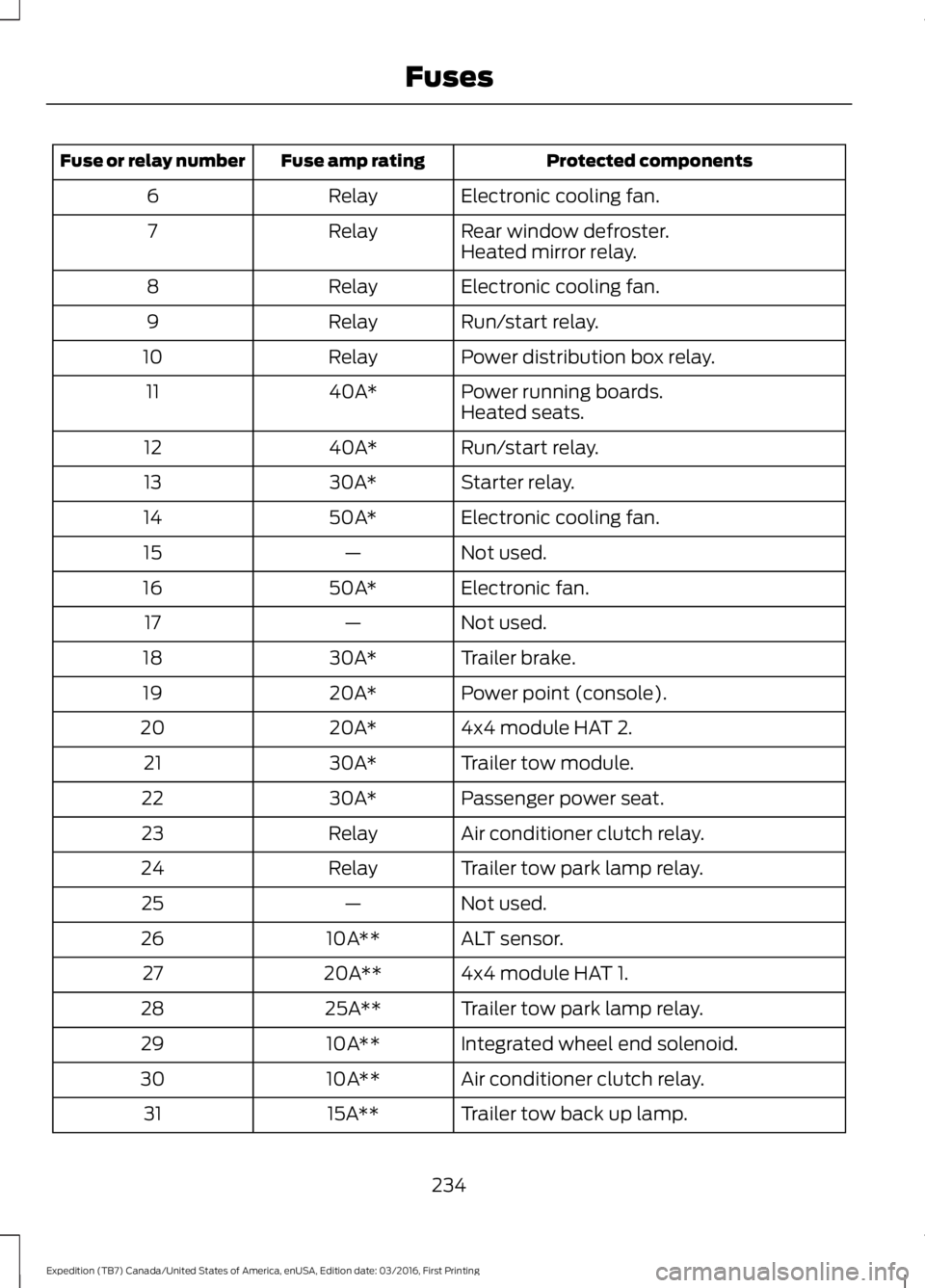
Protected componentsFuse amp ratingFuse or relay number
Electronic cooling fan.Relay6
Rear window defroster.Relay7Heated mirror relay.
Electronic cooling fan.Relay8
Run/start relay.Relay9
Power distribution box relay.Relay10
Power running boards.40A*11Heated seats.
Run/start relay.40A*12
Starter relay.30A*13
Electronic cooling fan.50A*14
Not used.—15
Electronic fan.50A*16
Not used.—17
Trailer brake.30A*18
Power point (console).20A*19
4x4 module HAT 2.20A*20
Trailer tow module.30A*21
Passenger power seat.30A*22
Air conditioner clutch relay.Relay23
Trailer tow park lamp relay.Relay24
Not used.—25
ALT sensor.10A**26
4x4 module HAT 1.20A**27
Trailer tow park lamp relay.25A**28
Integrated wheel end solenoid.10A**29
Air conditioner clutch relay.10A**30
Trailer tow back up lamp.15A**31
234
Expedition (TB7) Canada/United States of America, enUSA, Edition date: 03/2016, First Printing
Fuses
Page 240 of 500
Protected componentsFuse amp ratingFuse or relay number
Not used.—81
Rain sensor.5A**82
Not used.—83
Not used.—84
Wiper motor relay.Relay85
*Cartridge fuses.
**Mini fuses.
Passenger Compartment FusePanel
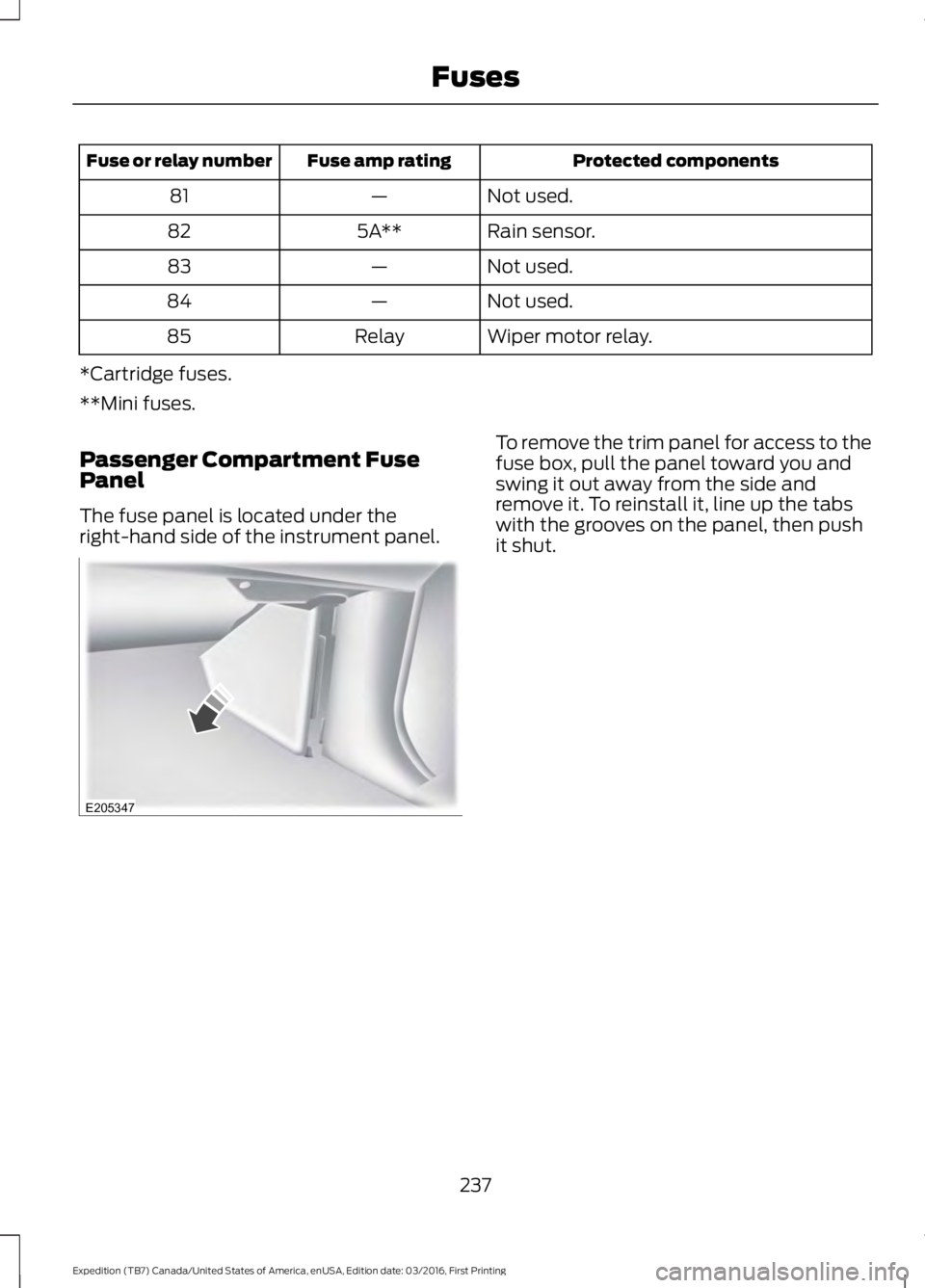
The fuse panel is located under theright-hand side of the instrument panel.
To remove the trim panel for access to thefuse box, pull the panel toward you andswing it out away from the side andremove it. To reinstall it, line up the tabswith the grooves on the panel, then pushit shut.
237
Expedition (TB7) Canada/United States of America, enUSA, Edition date: 03/2016, First Printing
FusesE205347
Page 265 of 500
CHANGING THE ENGINE AIR
FILTER
WARNING
To reduce the risk of vehicle damageand personal burn injuries, do notstart your engine with the air cleanerremoved and do not remove it while theengine is running.
Note: Failure to use the correct air filterelement may result in severe enginedamage. Resulting component damagemay not be covered by the vehicle Warranty.
When changing the air filter element, useonly the air filter element listed. SeeMotorcraft Parts (page 304).
Change the air filter element at the correctinterval. See Scheduled Maintenance(page 443).
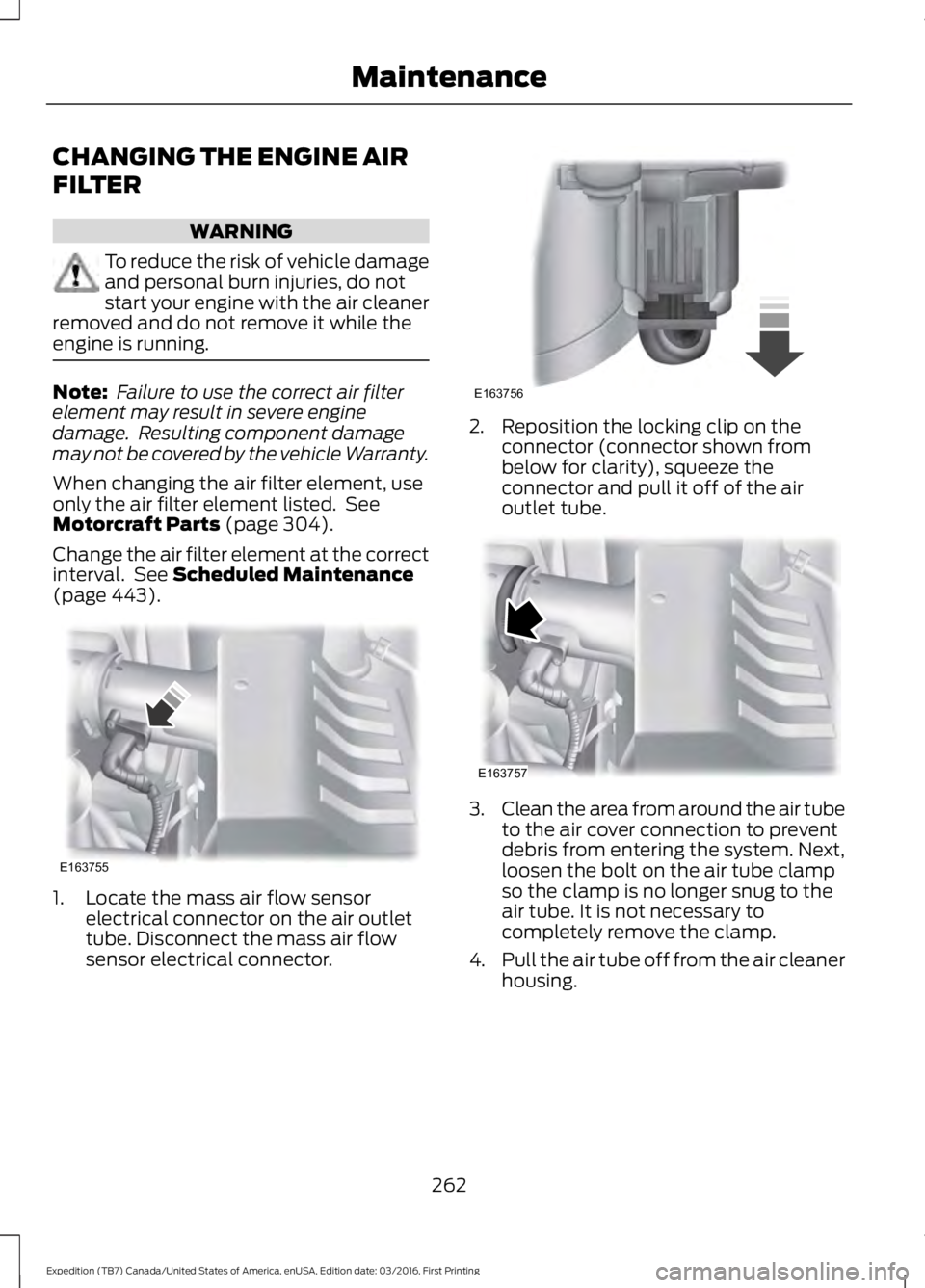
1. Locate the mass air flow sensorelectrical connector on the air outlettube. Disconnect the mass air flowsensor electrical connector.
2. Reposition the locking clip on theconnector (connector shown frombelow for clarity), squeeze theconnector and pull it off of the airoutlet tube.
3.Clean the area from around the air tubeto the air cover connection to preventdebris from entering the system. Next,loosen the bolt on the air tube clampso the clamp is no longer snug to theair tube. It is not necessary tocompletely remove the clamp.
4.Pull the air tube off from the air cleanerhousing.
262
Expedition (TB7) Canada/United States of America, enUSA, Edition date: 03/2016, First Printing
MaintenanceE163755 E163756 E163757
Page 266 of 500
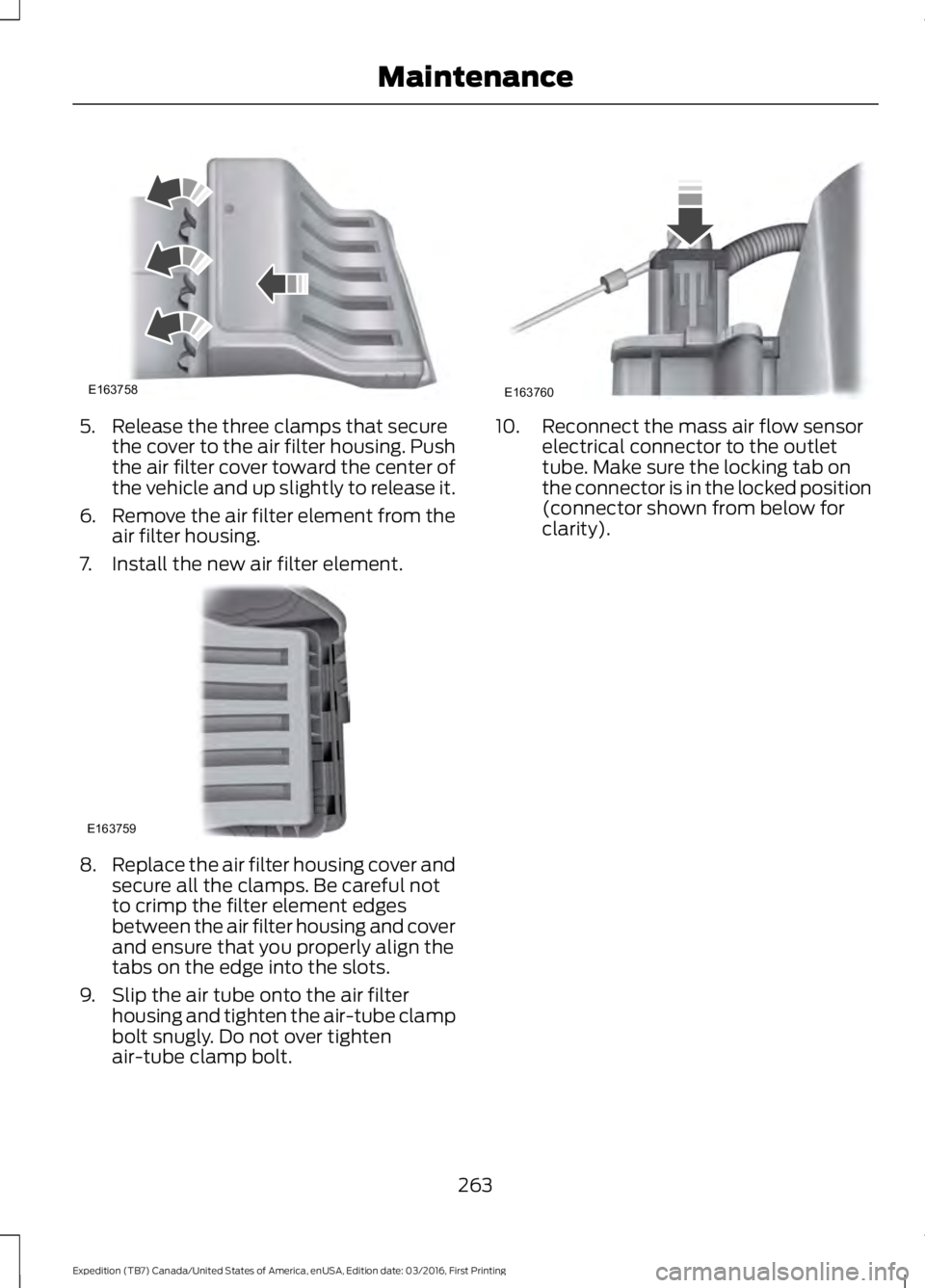
5. Release the three clamps that securethe cover to the air filter housing. Pushthe air filter cover toward the center ofthe vehicle and up slightly to release it.
6.Remove the air filter element from theair filter housing.
7. Install the new air filter element.
8.Replace the air filter housing cover andsecure all the clamps. Be careful notto crimp the filter element edgesbetween the air filter housing and coverand ensure that you properly align thetabs on the edge into the slots.
9. Slip the air tube onto the air filterhousing and tighten the air-tube clampbolt snugly. Do not over tightenair-tube clamp bolt.
10. Reconnect the mass air flow sensorelectrical connector to the outlettube. Make sure the locking tab onthe connector is in the locked position(connector shown from below forclarity).
263
Expedition (TB7) Canada/United States of America, enUSA, Edition date: 03/2016, First Printing
MaintenanceE163758 E163759 E163760
Page 291 of 500
WARNINGS
To reduce the risk of seriousinjury, when mountingreplacement tires and wheels, youshould not exceed the maximumpressure indicated on the sidewallof the tire to set the beads withoutadditional precautions listedbelow. If the beads do not seat atthe maximum pressure indicated,re-lubricate and try again.
When inflating the tire formounting pressures up to20 psi (1.38 bar) greater than themaximum pressure on the tiresidewall, the followingprecautions must be taken toprotect the person mounting thetire:
1. Make sure that you have thecorrect tire and wheel size.
2. Lubricate the tire bead andwheel bead seat area again.
3. Stand at a minimum of 12 ft(3.66 m) away from thewheel and tire assembly.
4. Use both eye and earprotection.
For a mounting pressuremore than 20 psi (1.38 bar)greater than the maximumpressure, a Ford dealer or othertire service professional should dothe mounting.
WARNINGS
Always inflate steel carcasstires with a remote air fill withthe person inflating standing at aminimum of 12 ft (3.66 m) awayfrom the wheel and tire assembly.
Important: Remember to replacethe wheel valve stems when theroad tires are replaced on yourvehicle.
The two front tires or two rear tiresshould generally be replaced as apair.
The tire pressure sensors mountedin the wheels are not designed tobe used in aftermarket wheels.
The use of wheels or tires notrecommended by Ford MotorCompany may affect theoperation of your tire pressuremonitoring system.
If the tire pressure monitoringsystem indicator is flashing, thesystem is malfunctioning. Yourreplacement tire might beincompatible with your tirepressure monitoring system, orsome component of the systemmay be damaged.
288
Expedition (TB7) Canada/United States of America, enUSA, Edition date: 03/2016, First Printing
Wheels and Tires
Page 293 of 500
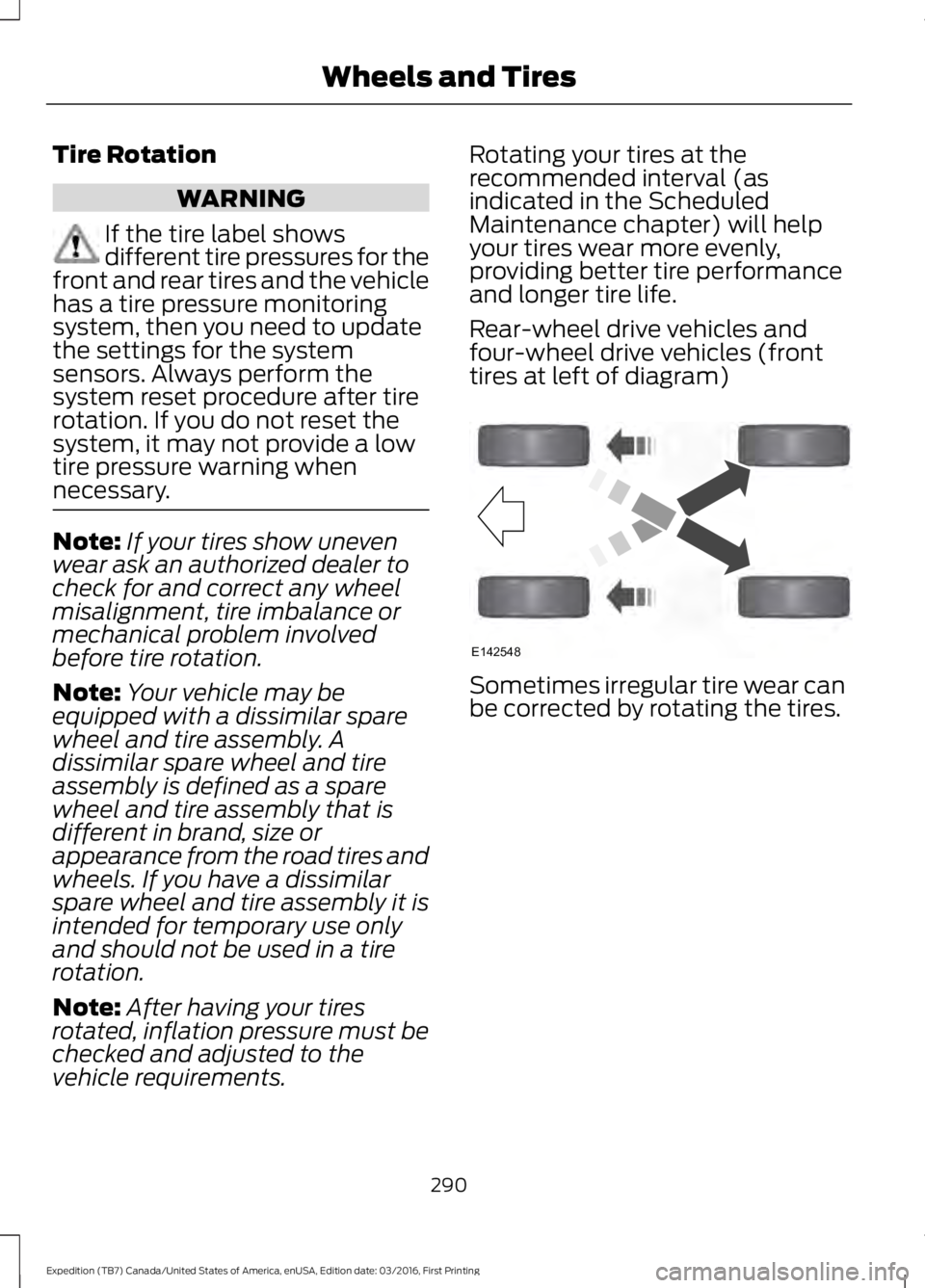
Tire Rotation
WARNING
If the tire label showsdifferent tire pressures for thefront and rear tires and the vehiclehas a tire pressure monitoringsystem, then you need to updatethe settings for the systemsensors. Always perform thesystem reset procedure after tirerotation. If you do not reset thesystem, it may not provide a lowtire pressure warning whennecessary.
Note:If your tires show unevenwear ask an authorized dealer tocheck for and correct any wheelmisalignment, tire imbalance ormechanical problem involvedbefore tire rotation.
Note:Your vehicle may beequipped with a dissimilar sparewheel and tire assembly. Adissimilar spare wheel and tireassembly is defined as a sparewheel and tire assembly that isdifferent in brand, size orappearance from the road tires andwheels. If you have a dissimilarspare wheel and tire assembly it isintended for temporary use onlyand should not be used in a tirerotation.
Note:After having your tiresrotated, inflation pressure must bechecked and adjusted to thevehicle requirements.
Rotating your tires at therecommended interval (asindicated in the ScheduledMaintenance chapter) will helpyour tires wear more evenly,providing better tire performanceand longer tire life.
Rear-wheel drive vehicles andfour-wheel drive vehicles (fronttires at left of diagram)
Sometimes irregular tire wear canbe corrected by rotating the tires.
290
Expedition (TB7) Canada/United States of America, enUSA, Edition date: 03/2016, First Printing
Wheels and TiresE142548
Page 296 of 500
This device complies with part 15 of theFCC Rules and with Licence exempt RSSStandards of Industry Canada. Operationis subject to the following two conditions:
•This device may not cause harmfulinterference.
•This device must accept anyinterference received, includinginterference that may cause undesiredoperation.
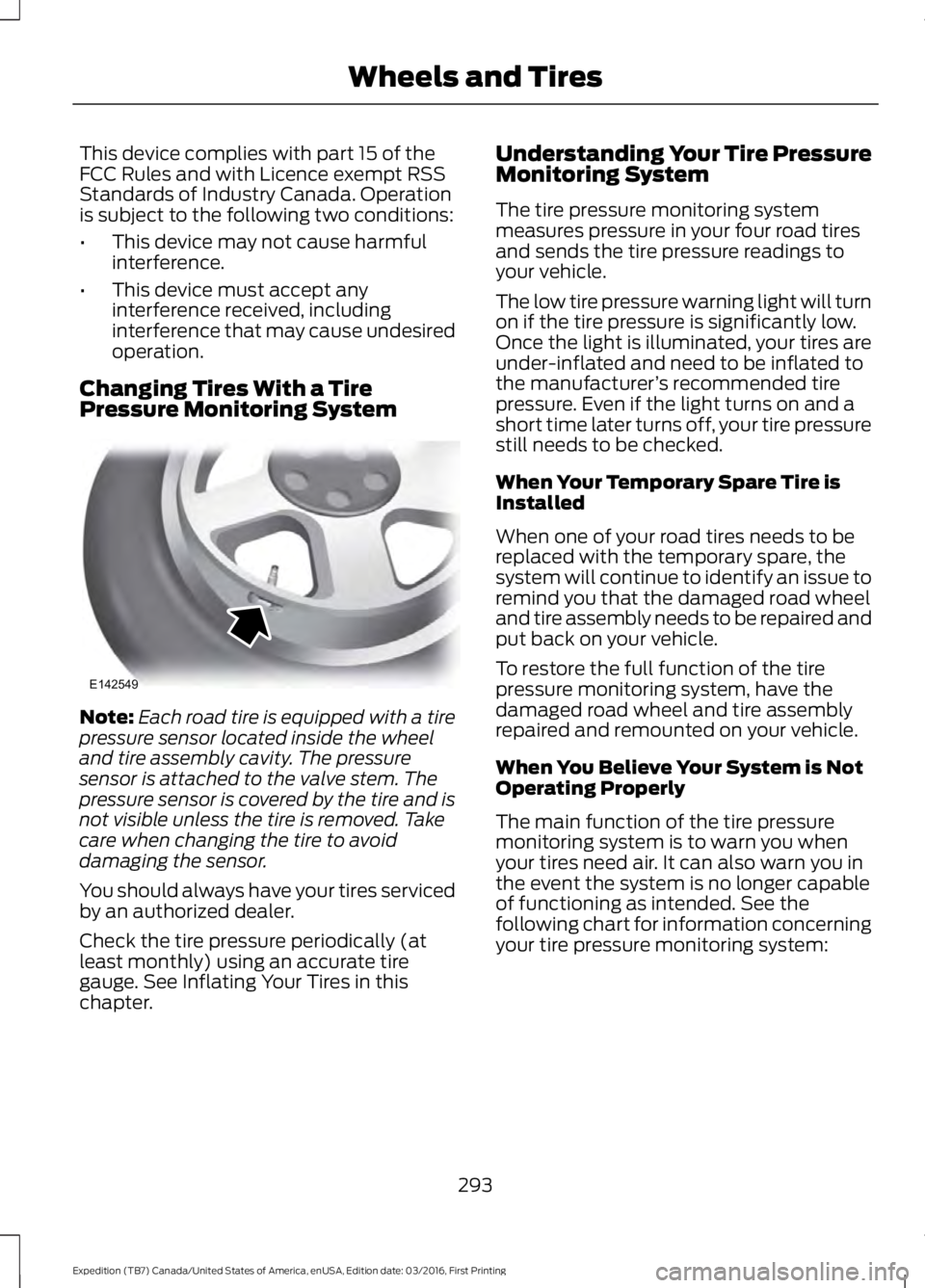
Changing Tires With a TirePressure Monitoring System
Note:Each road tire is equipped with a tirepressure sensor located inside the wheeland tire assembly cavity. The pressuresensor is attached to the valve stem. Thepressure sensor is covered by the tire and isnot visible unless the tire is removed. Takecare when changing the tire to avoiddamaging the sensor.
You should always have your tires servicedby an authorized dealer.
Check the tire pressure periodically (atleast monthly) using an accurate tiregauge. See Inflating Your Tires in thischapter.
Understanding Your Tire PressureMonitoring System
The tire pressure monitoring systemmeasures pressure in your four road tiresand sends the tire pressure readings toyour vehicle.
The low tire pressure warning light will turnon if the tire pressure is significantly low.Once the light is illuminated, your tires areunder-inflated and need to be inflated tothe manufacturer’s recommended tirepressure. Even if the light turns on and ashort time later turns off, your tire pressurestill needs to be checked.
When Your Temporary Spare Tire isInstalled
When one of your road tires needs to bereplaced with the temporary spare, thesystem will continue to identify an issue toremind you that the damaged road wheeland tire assembly needs to be repaired andput back on your vehicle.
To restore the full function of the tirepressure monitoring system, have thedamaged road wheel and tire assemblyrepaired and remounted on your vehicle.
When You Believe Your System is NotOperating Properly
The main function of the tire pressuremonitoring system is to warn you whenyour tires need air. It can also warn you inthe event the system is no longer capableof functioning as intended. See thefollowing chart for information concerningyour tire pressure monitoring system:
293
Expedition (TB7) Canada/United States of America, enUSA, Edition date: 03/2016, First Printing
Wheels and TiresE142549