AUX FORD EXPLORER 2008 4.G Owner's Manual
[x] Cancel search | Manufacturer: FORD, Model Year: 2008, Model line: EXPLORER, Model: FORD EXPLORER 2008 4.GPages: 384, PDF Size: 3.31 MB
Page 76 of 384
Do not operate video games or video equipment if the power cords
and/or cables are broken, split or damaged. Carefully place cords and/or
cables where they will not be stepped on or interfere with the operation
of seats and/or compartments.
Disconnect video games and video equipment power cords and/or cables
when not in use.
Avoid touching auxiliary input jacks with your fingers. Do not blow on
them or allow them to get wet or dirty.
Do not clean any part of the DVD player with benzene, paint thinner or
any other solvent.
Federal Communication Commission (FCC) Compliance
Changes or modifications not approved by Ford Lincoln-Mercury could
void user’s authority to operate the equipment. This equipment has been
tested and found to comply with the limits for a Class B digital device,
pursuant to Part 15 of the FCC Rules. These limits are designed to
provide reasonable protection against harmful interference in a
residential installation. This equipment generates, uses and can radiate
radio frequency energy and, if not installed and used in accordance with
the instructions, may cause harmful interference and radio
communications.
However, there is no guarantee that interference will not occur in a
particular installation. If this equipment does cause harmful interference
to radio or television reception, which can be determined by turning the
equipment off and on, the user is encouraged to consult the dealer or an
experienced radio/TV technician for help.
Care and service of the DVD player
Environmental extremes
DVD players which are subjected to harsh environmental conditions may
be damaged or perform at less than maximum capability. To avoid these
outcomes, whenever possible avoid exposing your DVD player to:
•extremely hot or cold temperatures.
•direct sunlight.
•high humidity.
•a dusty environment.
•locations where strong magnetic fields are generated.
2008 Explorer(exp)
Owners Guide (post-2002-fmt)
USA(fus)
Entertainment Systems
76
Page 78 of 384
While operating in Headphone Only Mode, the system will have limited
functionality.
•The system will only output audio to the headphones. It will not be
capable of providing audio to the speakers.
•The available sources in FES Headphone Only Mode are DVD-DISC
and DVD-AUX, regardless of headphone channel (A or B).
•When a disc is inserted into the FES while in Headphone Only Mode,
both headphone channels (A and B) will be connected to FES-DISC.
NAVIGATION SYSTEM (IF EQUIPPED)
Your vehicle may be equipped with a Navigation System. Refer to the
Navigation supplementfor further information.
SYNC SYSTEM (LATE AVAILABILITY — IF EQUIPPED)
Your vehicle may be equipped with SYNC, a multi-media system with
special phone and media features. Refer to yourSYNC supplementfor
further information.
2008 Explorer(exp)
Owners Guide (post-2002-fmt)
USA(fus)
Entertainment Systems
78
Page 82 of 384
6.:Distributes outside air through the windshield defroster vents.
7.
:Distributes outside air through the windshield defroster vents
and floor vents.Note:Some airflow will come out of the small vents
near the side windows.
8.
:Distributes air through the floor vents.Note:Some airflow will
come out of the small vents near the side windows.
9.
:Distributes air through the instrument panel vents and the floor
vents.
10.
:Distributes air through the instrument panel vents.
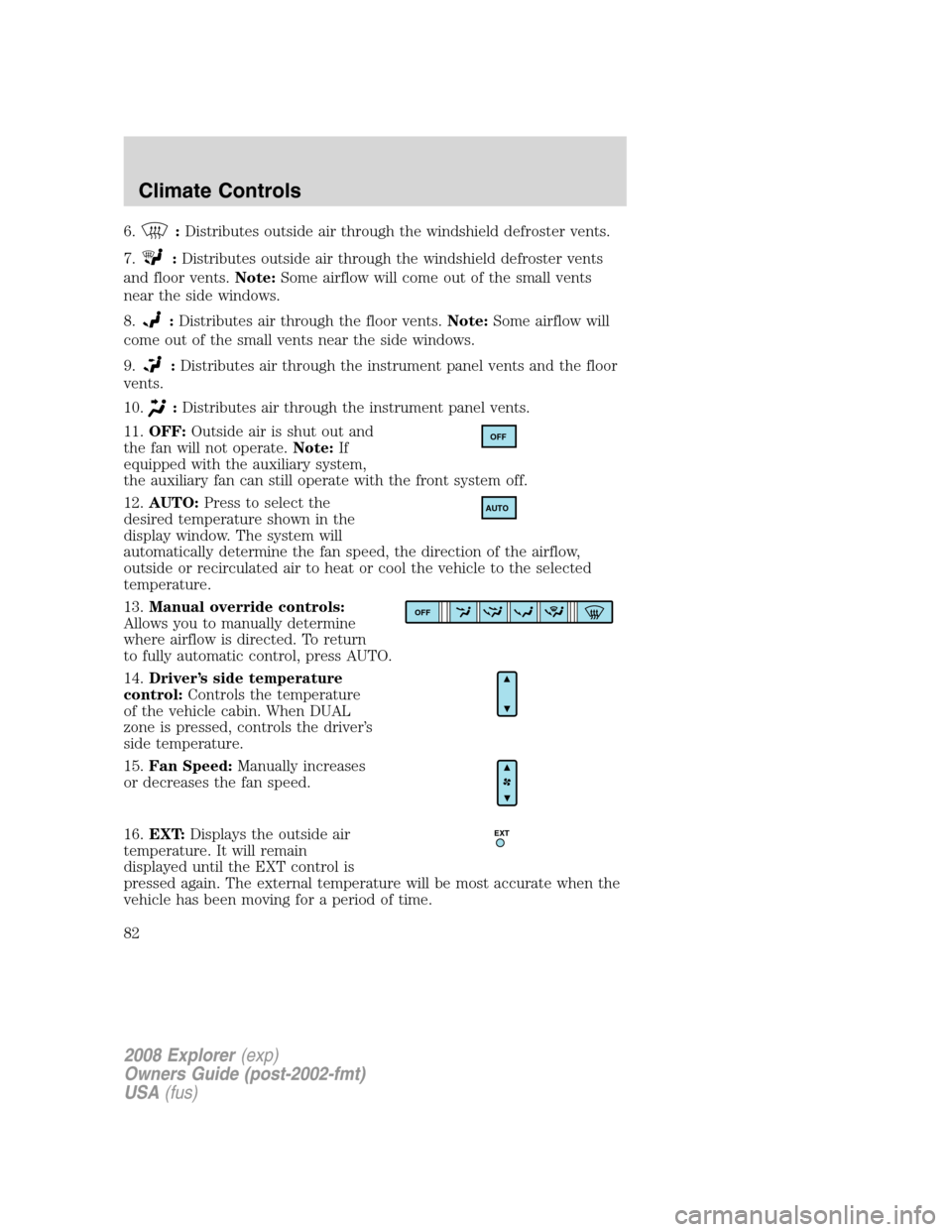
11.OFF:Outside air is shut out and
the fan will not operate.Note:If
equipped with the auxiliary system,
the auxiliary fan can still operate with the front system off.
12.AUTO:Press to select the
desired temperature shown in the
display window. The system will
automatically determine the fan speed, the direction of the airflow,
outside or recirculated air to heat or cool the vehicle to the selected
temperature.
13.Manual override controls:
Allows you to manually determine
where airflow is directed. To return
to fully automatic control, press AUTO.
14.Driver’s side temperature
control:Controls the temperature
of the vehicle cabin. When DUAL
zone is pressed, controls the driver’s
side temperature.
15.Fan Speed:Manually increases
or decreases the fan speed.
16.EXT:Displays the outside air
temperature. It will remain
displayed until the EXT control is
pressed again. The external temperature will be most accurate when the
vehicle has been moving for a period of time.
OFF
AUTO
OFF
EXT
2008 Explorer(exp)
Owners Guide (post-2002-fmt)
USA(fus)
Climate Controls
82
Page 84 of 384
Do not place objects on top of the instrument panel as these
objects may become projectiles in a collision or sudden stop.
AUXILIARY SYSTEM (IF EQUIPPED)
Your vehicle may be equipped with an auxiliary climate system. These
auxiliary controls, located in the overhead console, allow the front
passengers to control airflow direction, temperature and fan level of the
rear compartment to quickly heat or cool the entire vehicle.
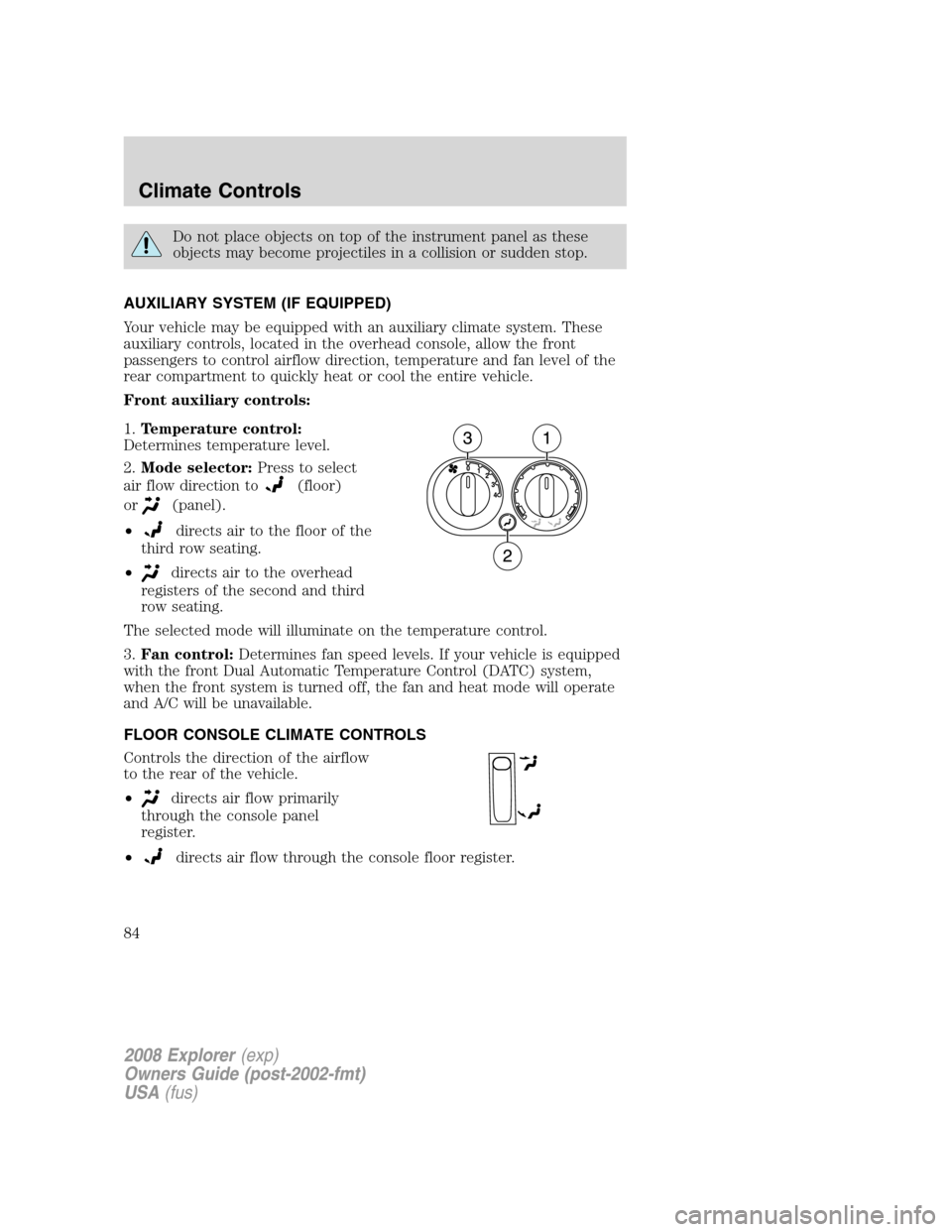
Front auxiliary controls:
1.Temperature control:
Determines temperature level.
2.Mode selector:Press to select
air flow direction to
(floor)
or
(panel).
•
directs air to the floor of the
third row seating.
•
directs air to the overhead
registers of the second and third
row seating.
The selected mode will illuminate on the temperature control.
3.Fan control:Determines fan speed levels. If your vehicle is equipped
with the front Dual Automatic Temperature Control (DATC) system,
when the front system is turned off, the fan and heat mode will operate
and A/C will be unavailable.
FLOOR CONSOLE CLIMATE CONTROLS
Controls the direction of the airflow
to the rear of the vehicle.
•
directs air flow primarily
through the console panel
register.
•
directs air flow through the console floor register.
2008 Explorer(exp)
Owners Guide (post-2002-fmt)
USA(fus)
Climate Controls
84
Page 101 of 384
Use only soft cups in the cupholder. Hard objects can injure you
in a collision.
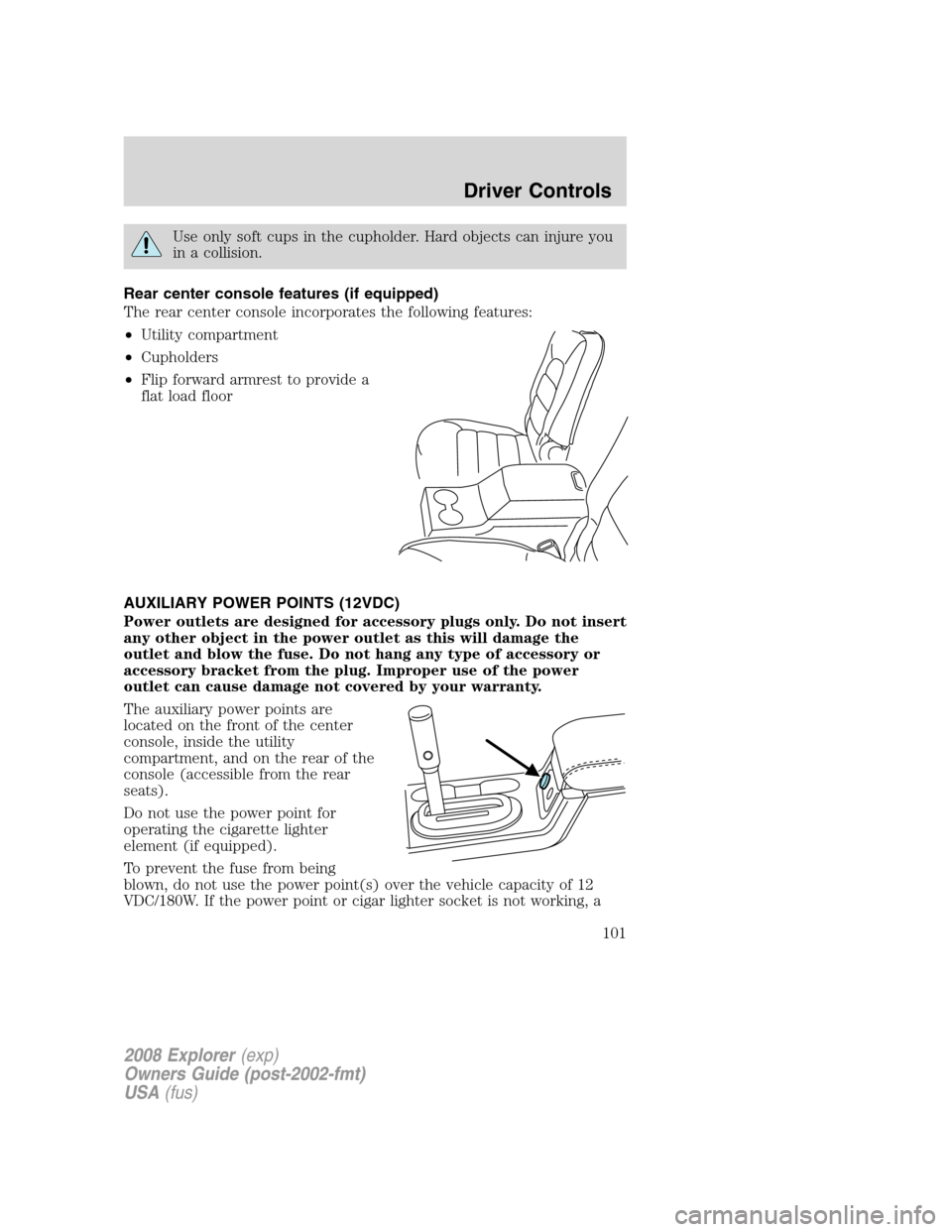
Rear center console features (if equipped)
The rear center console incorporates the following features:
•Utility compartment
•Cupholders
•Flip forward armrest to provide a
flat load floor
AUXILIARY POWER POINTS (12VDC)
Power outlets are designed for accessory plugs only. Do not insert
any other object in the power outlet as this will damage the
outlet and blow the fuse. Do not hang any type of accessory or
accessory bracket from the plug. Improper use of the power
outlet can cause damage not covered by your warranty.
The auxiliary power points are
located on the front of the center
console, inside the utility
compartment, and on the rear of the
console (accessible from the rear
seats).
Do not use the power point for
operating the cigarette lighter
element (if equipped).
To prevent the fuse from being
blown, do not use the power point(s) over the vehicle capacity of 12
VDC/180W. If the power point or cigar lighter socket is not working, a
2008 Explorer(exp)
Owners Guide (post-2002-fmt)
USA(fus)
Driver Controls
101
Page 108 of 384
Turning off speed control
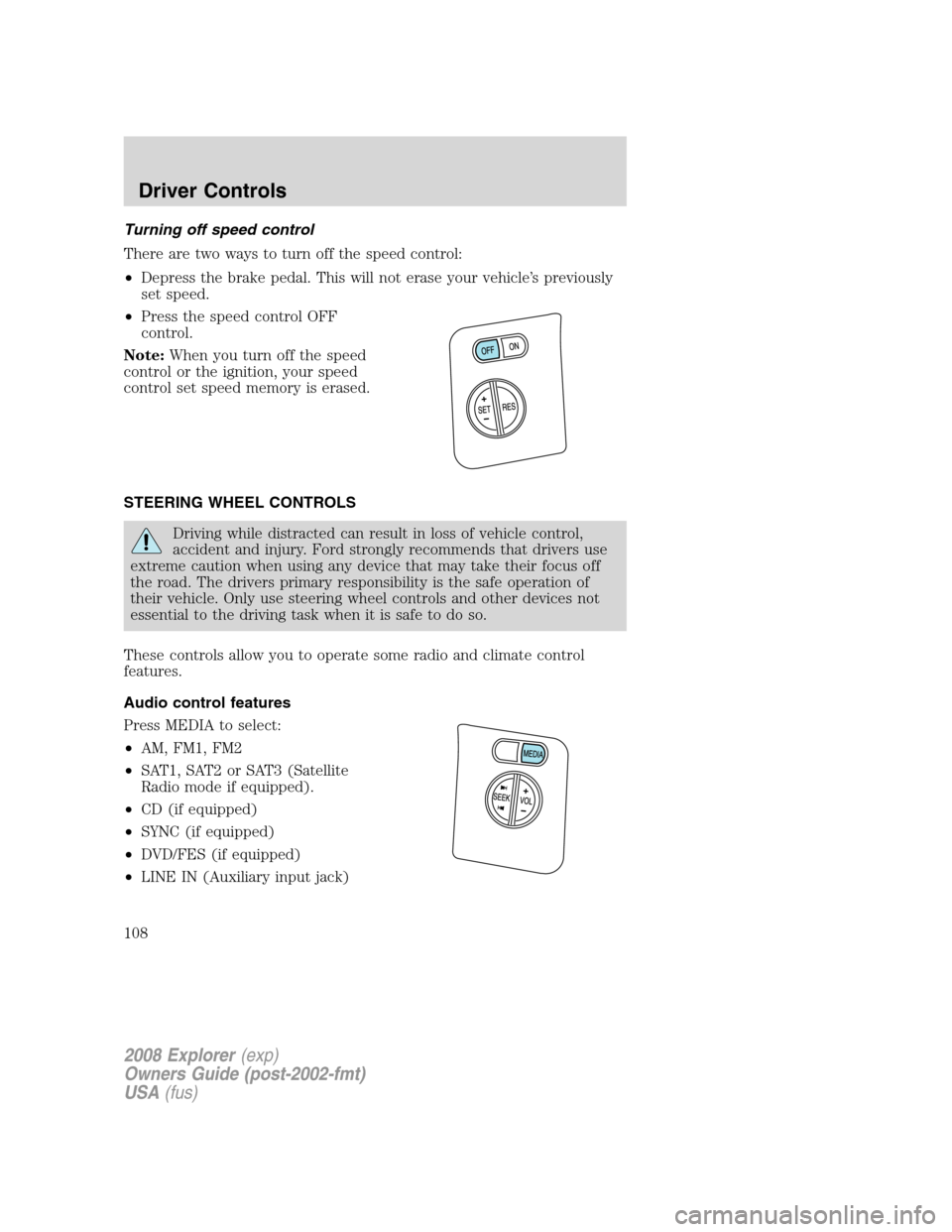
There are two ways to turn off the speed control:
•Depress the brake pedal. This will not erase your vehicle’s previously
set speed.
•Press the speed control OFF
control.
Note:When you turn off the speed
control or the ignition, your speed
control set speed memory is erased.
STEERING WHEEL CONTROLS
Driving while distracted can result in loss of vehicle control,
accident and injury. Ford strongly recommends that drivers use
extreme caution when using any device that may take their focus off
the road. The drivers primary responsibility is the safe operation of
their vehicle. Only use steering wheel controls and other devices not
essential to the driving task when it is safe to do so.
These controls allow you to operate some radio and climate control
features.
Audio control features
Press MEDIA to select:
•AM, FM1, FM2
•SAT1, SAT2 or SAT3 (Satellite
Radio mode if equipped).
•CD (if equipped)
•SYNC (if equipped)
•DVD/FES (if equipped)
•LINE IN (Auxiliary input jack)
2008 Explorer(exp)
Owners Guide (post-2002-fmt)
USA(fus)
Driver Controls
108
Page 295 of 384
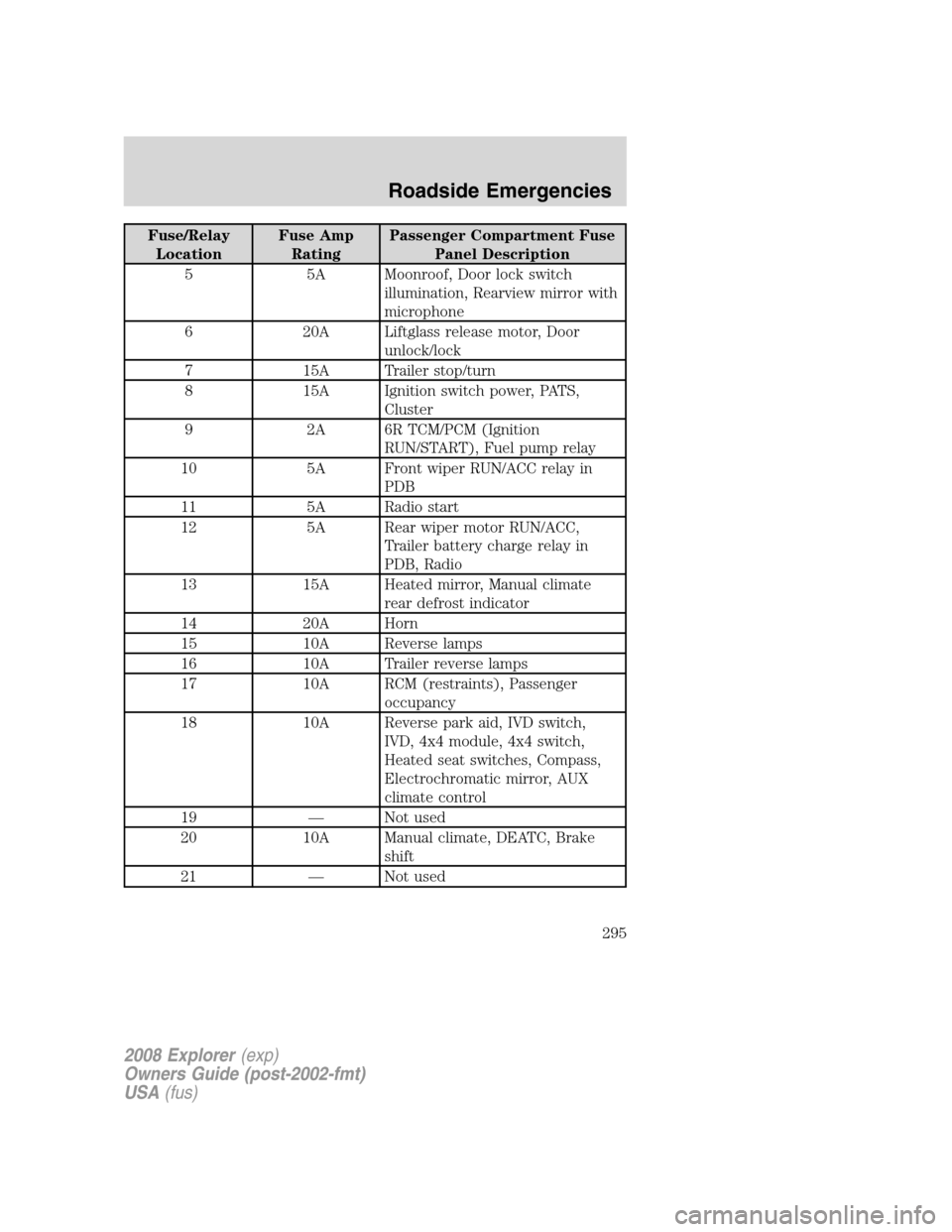
Fuse/Relay
LocationFuse Amp
RatingPassenger Compartment Fuse
Panel Description
5 5A Moonroof, Door lock switch
illumination, Rearview mirror with
microphone
6 20A Liftglass release motor, Door
unlock/lock
7 15A Trailer stop/turn
8 15A Ignition switch power, PATS,
Cluster
9 2A 6R TCM/PCM (Ignition
RUN/START), Fuel pump relay
10 5A Front wiper RUN/ACC relay in
PDB
11 5A Radio start
12 5A Rear wiper motor RUN/ACC,
Trailer battery charge relay in
PDB, Radio
13 15A Heated mirror, Manual climate
rear defrost indicator
14 20A Horn
15 10A Reverse lamps
16 10A Trailer reverse lamps
17 10A RCM (restraints), Passenger
occupancy
18 10A Reverse park aid, IVD switch,
IVD, 4x4 module, 4x4 switch,
Heated seat switches, Compass,
Electrochromatic mirror, AUX
climate control
19 — Not used
20 10A Manual climate, DEATC, Brake
shift
21 — Not used
2008 Explorer(exp)
Owners Guide (post-2002-fmt)
USA(fus)
Roadside Emergencies
295
Page 299 of 384
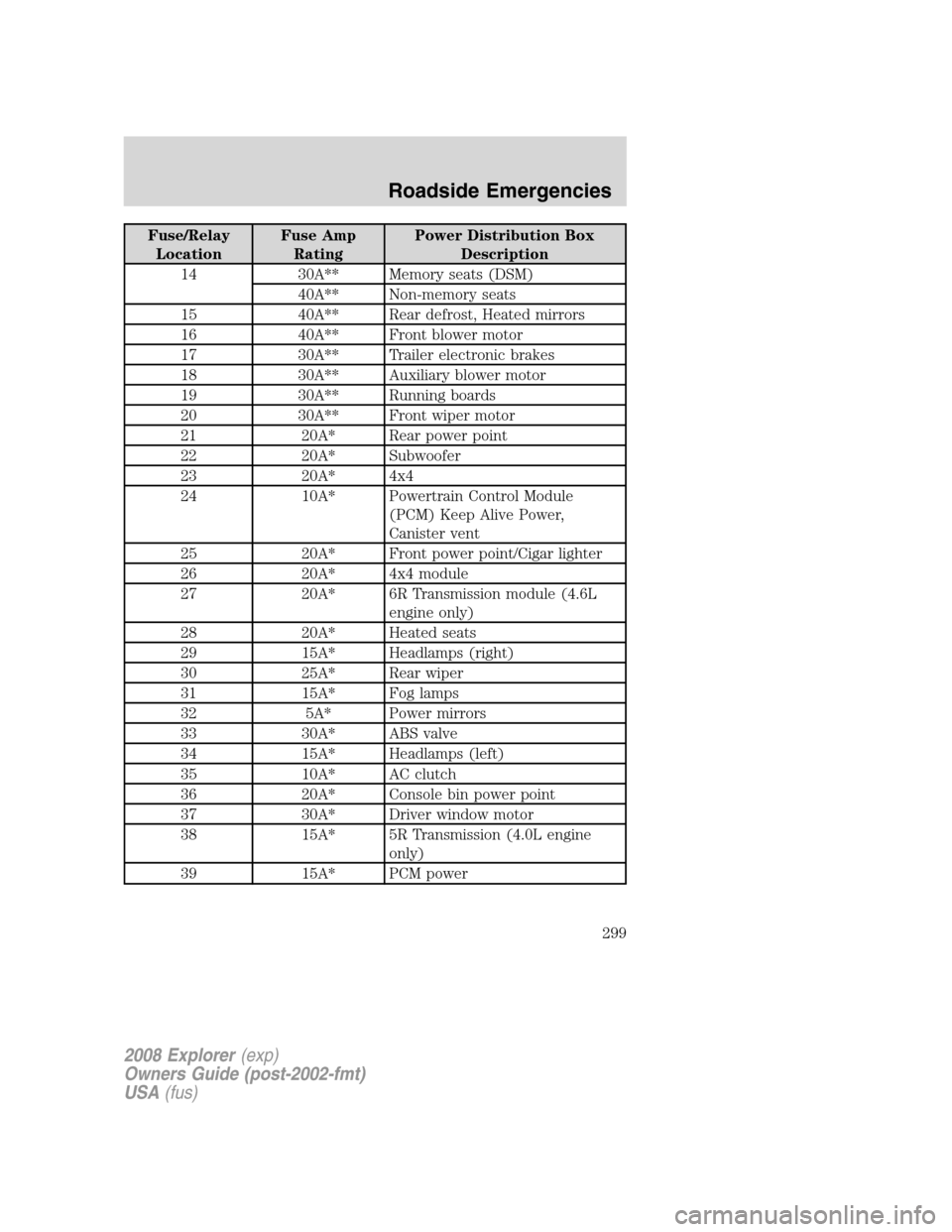
Fuse/Relay
LocationFuse Amp
RatingPower Distribution Box
Description
14 30A** Memory seats (DSM)
40A** Non-memory seats
15 40A** Rear defrost, Heated mirrors
16 40A** Front blower motor
17 30A** Trailer electronic brakes
18 30A** Auxiliary blower motor
19 30A** Running boards
20 30A** Front wiper motor
21 20A* Rear power point
22 20A* Subwoofer
23 20A* 4x4
24 10A* Powertrain Control Module
(PCM) Keep Alive Power,
Canister vent
25 20A* Front power point/Cigar lighter
26 20A* 4x4 module
27 20A* 6R Transmission module (4.6L
engine only)
28 20A* Heated seats
29 15A* Headlamps (right)
30 25A* Rear wiper
31 15A* Fog lamps
32 5A* Power mirrors
33 30A* ABS valve
34 15A* Headlamps (left)
35 10A* AC clutch
36 20A* Console bin power point
37 30A* Driver window motor
38 15A* 5R Transmission (4.0L engine
only)
39 15A* PCM power
2008 Explorer(exp)
Owners Guide (post-2002-fmt)
USA(fus)
Roadside Emergencies
299
Page 335 of 384
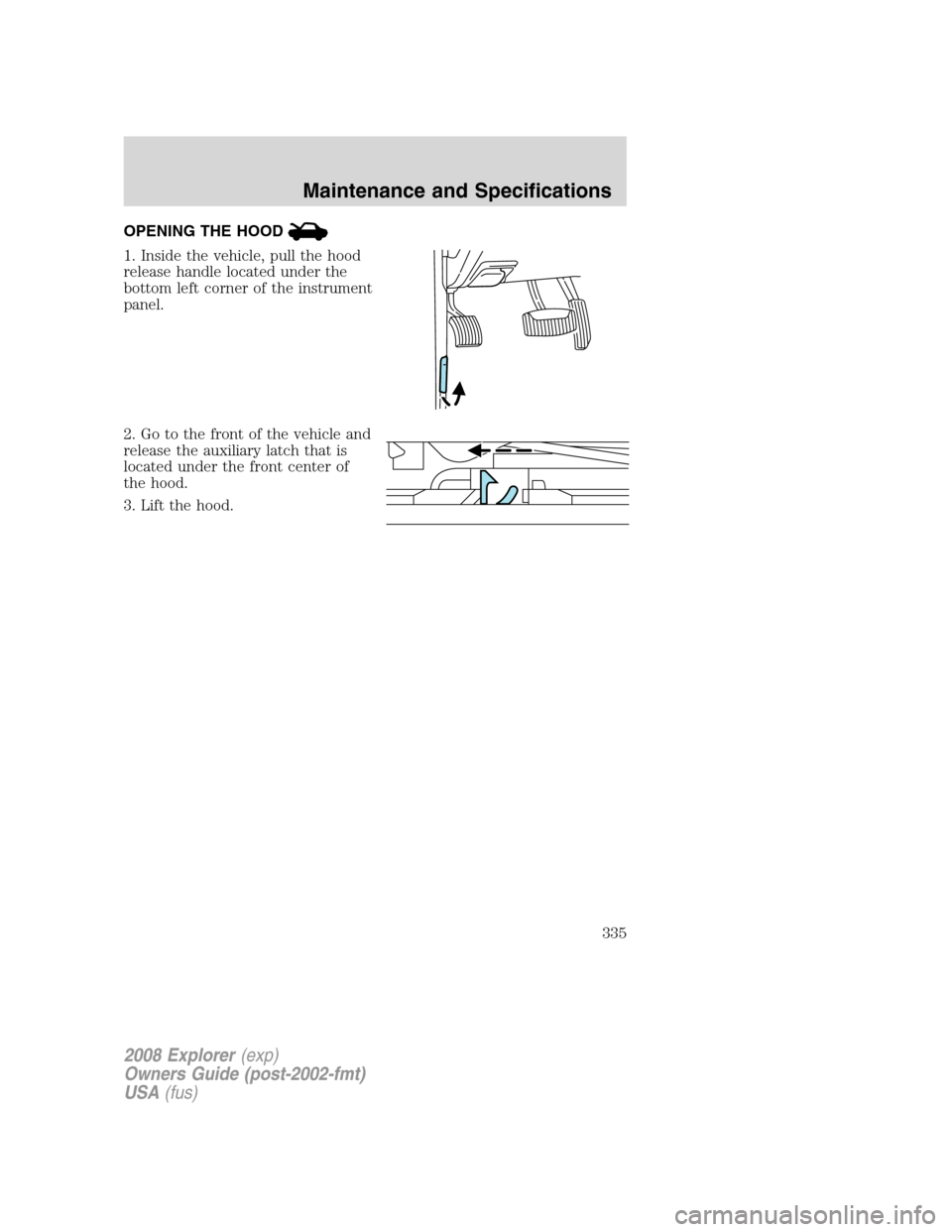
OPENING THE HOOD
1. Inside the vehicle, pull the hood
release handle located under the
bottom left corner of the instrument
panel.
2. Go to the front of the vehicle and
release the auxiliary latch that is
located under the front center of
the hood.
3. Lift the hood.
2008 Explorer(exp)
Owners Guide (post-2002-fmt)
USA(fus)
Maintenance and Specifications
335
Page 370 of 384
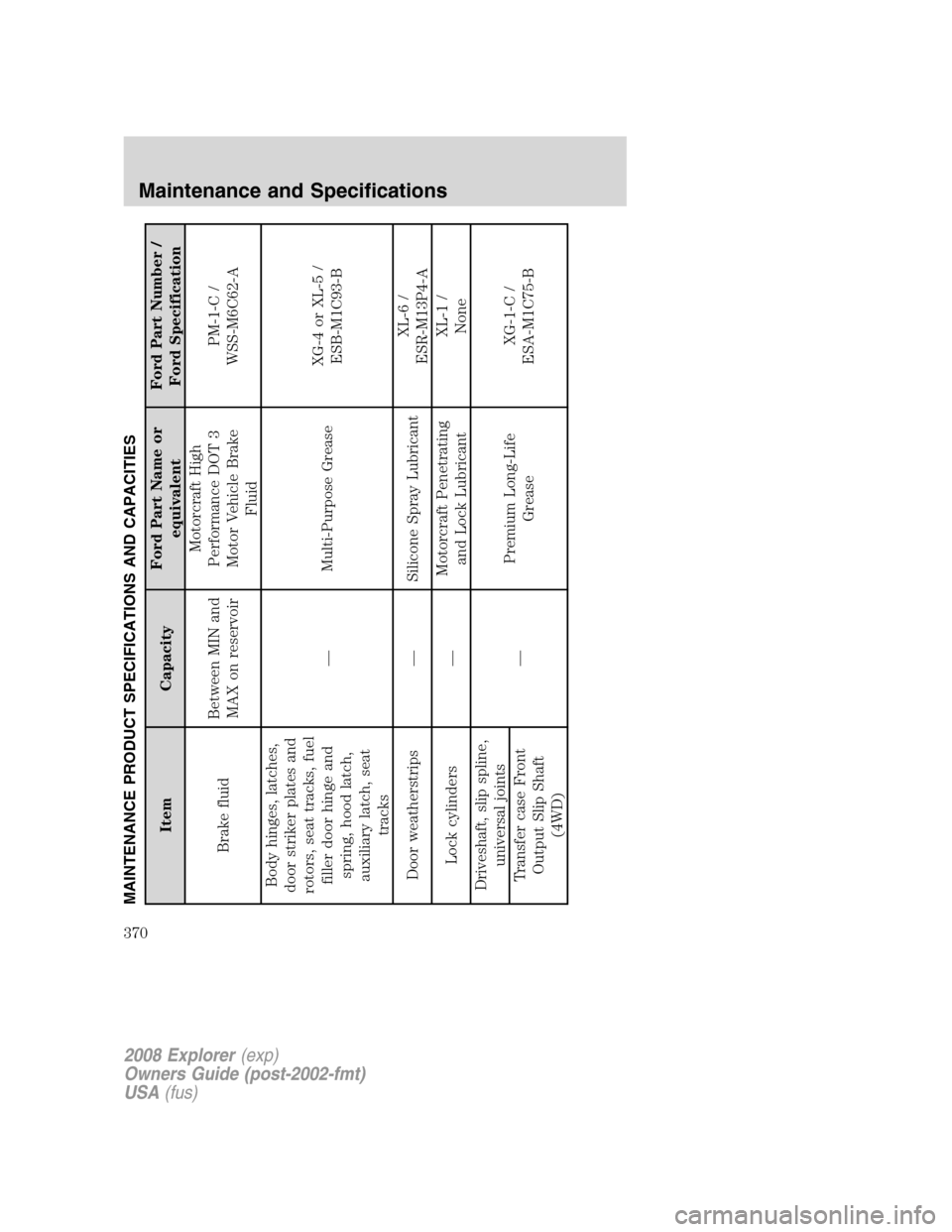
MAINTENANCE PRODUCT SPECIFICATIONS AND CAPACITIES
Item CapacityFord Part Name or
equivalentFord Part Number /
Ford Specification
Brake fluidBetween MIN and
MAX on reservoirMotorcraft High
Performance DOT 3
Motor Vehicle Brake
FluidPM-1-C /
WSS-M6C62-A
Body hinges, latches,
door striker plates and
rotors, seat tracks, fuel
filler door hinge and
spring, hood latch,
auxiliary latch, seat
tracks— Multi-Purpose GreaseXG-4 or XL-5 /
ESB-M1C93-B
Door weatherstrips — Silicone Spray LubricantXL-6 /
ESR-M13P4-A
Lock cylinders —Motorcraft Penetrating
and Lock LubricantXL-1 /
None
Driveshaft, slip spline,
universal joints
—Premium Long-Life
GreaseXG-1-C /
ESA-M1C75-B Transfer case Front
Output Slip Shaft
(4WD)
2008 Explorer(exp)
Owners Guide (post-2002-fmt)
USA(fus)
Maintenance and Specifications
370