oil FORD EXPLORER 2009 4.G User Guide
[x] Cancel search | Manufacturer: FORD, Model Year: 2009, Model line: EXPLORER, Model: FORD EXPLORER 2009 4.GPages: 407, PDF Size: 3.47 MB
Page 134 of 407
BRAKE FLUID LEVEL LOW— Indicates the brake fluid level is low
and the brake system should be inspected immediately. Refer toBrake
fluidin theMaintenance and Specificationschapter.
WASHER FLUID LEVEL LOW— Indicates the washer fluid reservoir
is less than one quarter full. Check the washer fluid level. Refer to
Windshield washer fluidin theMaintenance and Specifications
chapter.
OIL LIFE CHANGE SOON— Displayed when the engine oil life
reaches 5% or less of the Oil Life Start Value.
OIL CHANGE REQUIRED— Displayed when the engine oil life
remaining is 0%. An oil change is required whenever indicated by the
message center and according to the recommended maintenance
schedule. USE ONLY RECOMMENDED ENGINE OILS.
LIFTGATE / GLASS AJAR— Displayed when the liftgate or the
liftgate glass is not completely closed.
TRAILER SWAY REDUCE SPEED— Displayed when your trailer
starts to sway when towing. Refer toTrailer sway controlin the
Drivingchapter for more information.
FOR 4X4 LOW STOP VEHICLE(if equipped)— Displayed when 4X4
LOW is selected while the vehicle is moving. For more information, refer
toUsing the Control Trac 4WD systemin theDrivingchapter.
FOR 4X4 LOW SHIFT TO N(if equipped)— Displayed when 4X4
LOW is selected and the vehicle is stopped. For more information, refer
toUsing the Control Trac 4WD systemin theDrivingchapter.
TO EXIT 4X4 LOW STOP VEHICLE(if equipped)— Displayed when
2WD is selected while the vehicle is operating in 4X4 LOW. For more
information, refer toUsing the Control Trac 4WD systemin the
Drivingchapter.
TO EXIT 4X4 LOW SHIFT TO N(if equipped)— Displayed when
2WD is selected while the vehicle has been stopped in 4X4 LOW. For
more information, refer toUsing the Control Trac 4WD systemin the
Drivingchapter.
2009 Explorer(exp)
Owners Guide, 1st Printing
USA(fus)
Driver Controls
134
Page 139 of 407
•Easy Entry/Exit Seat (if equipped)
•Park Aid (if equipped)
•Trailer sway control
•Compass display
•Compass zone adjustment
•Compass calibration adjustment
•Oil Life Reset and Start Value
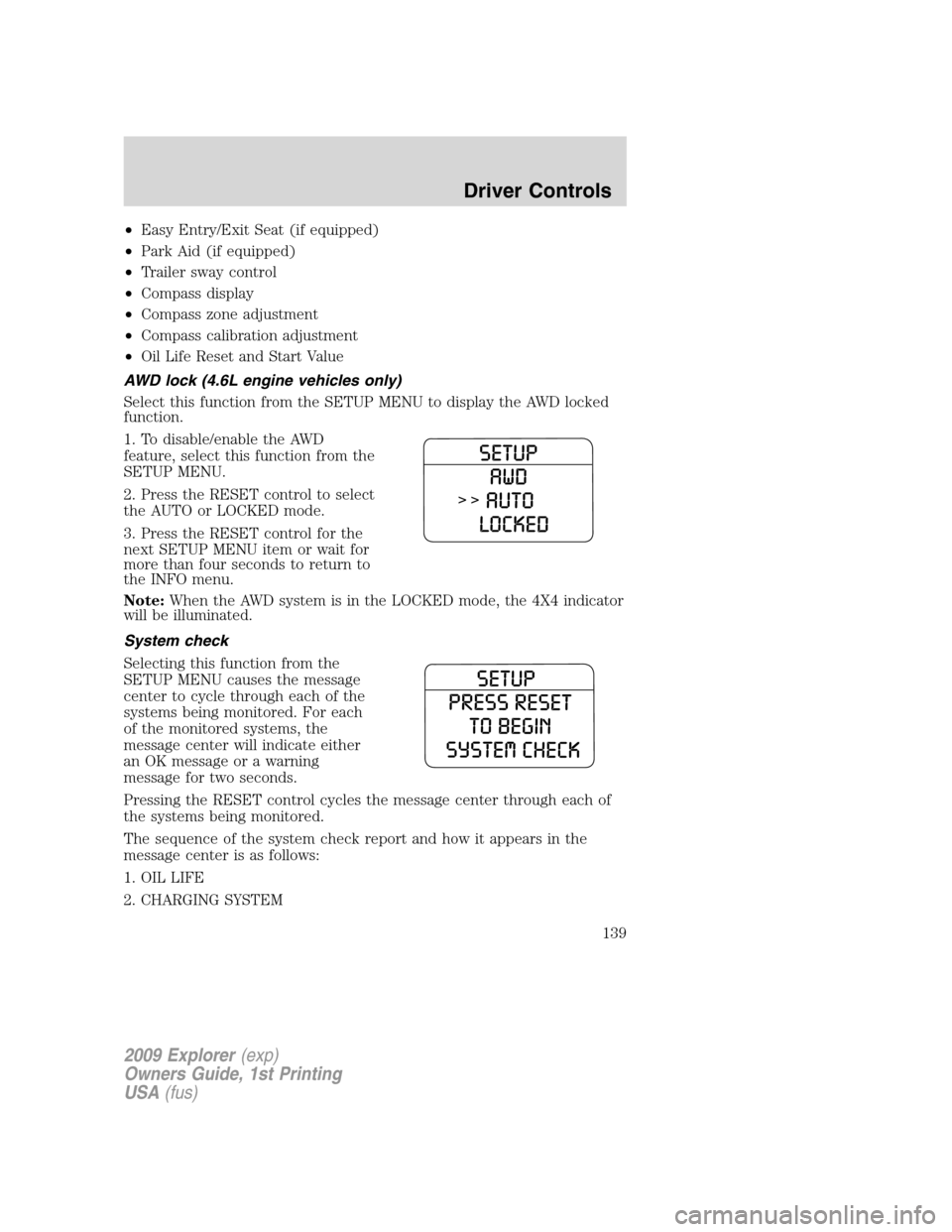
AWD lock (4.6L engine vehicles only)
Select this function from the SETUP MENU to display the AWD locked
function.
1. To disable/enable the AWD
feature, select this function from the
SETUP MENU.
2. Press the RESET control to select
the AUTO or LOCKED mode.
3. Press the RESET control for the
next SETUP MENU item or wait for
more than four seconds to return to
the INFO menu.
Note:When the AWD system is in the LOCKED mode, the 4X4 indicator
will be illuminated.
System check
Selecting this function from the
SETUP MENU causes the message
center to cycle through each of the
systems being monitored. For each
of the monitored systems, the
message center will indicate either
an OK message or a warning
message for two seconds.
Pressing the RESET control cycles the message center through each of
the systems being monitored.
The sequence of the system check report and how it appears in the
message center is as follows:
1. OIL LIFE
2. CHARGING SYSTEM
2009 Explorer(exp)
Owners Guide, 1st Printing
USA(fus)
Driver Controls
139
Page 145 of 407
Compass calibration adjustment
Perform compass calibration in an open area free from steel structures
and high voltage lines. For optimum calibration, turn off all electrical
accessories (heater/air conditioning, wipers, etc.) and make sure all
vehicle doors are shut.
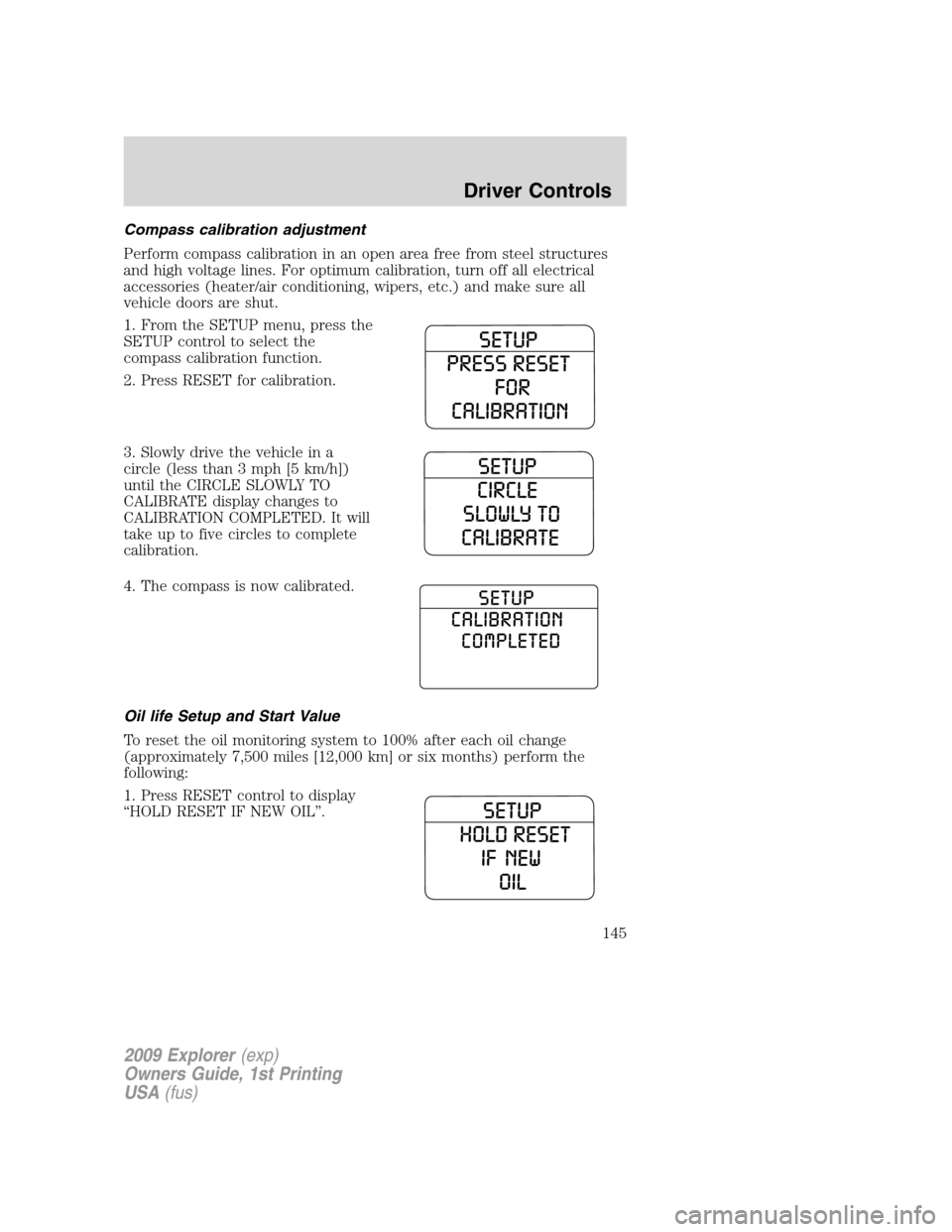
1. From the SETUP menu, press the
SETUP control to select the
compass calibration function.
2. Press RESET for calibration.
3. Slowly drive the vehicle in a
circle (less than 3 mph [5 km/h])
until the CIRCLE SLOWLY TO
CALIBRATE display changes to
CALIBRATION COMPLETED. It will
take up to five circles to complete
calibration.
4. The compass is now calibrated.
Oil life Setup and Start Value
To reset the oil monitoring system to 100% after each oil change
(approximately 7,500 miles [12,000 km] or six months) perform the
following:
1. Press RESET control to display
“HOLD RESET IF NEW OIL”.
2009 Explorer(exp)
Owners Guide, 1st Printing
USA(fus)
Driver Controls
145
Page 146 of 407
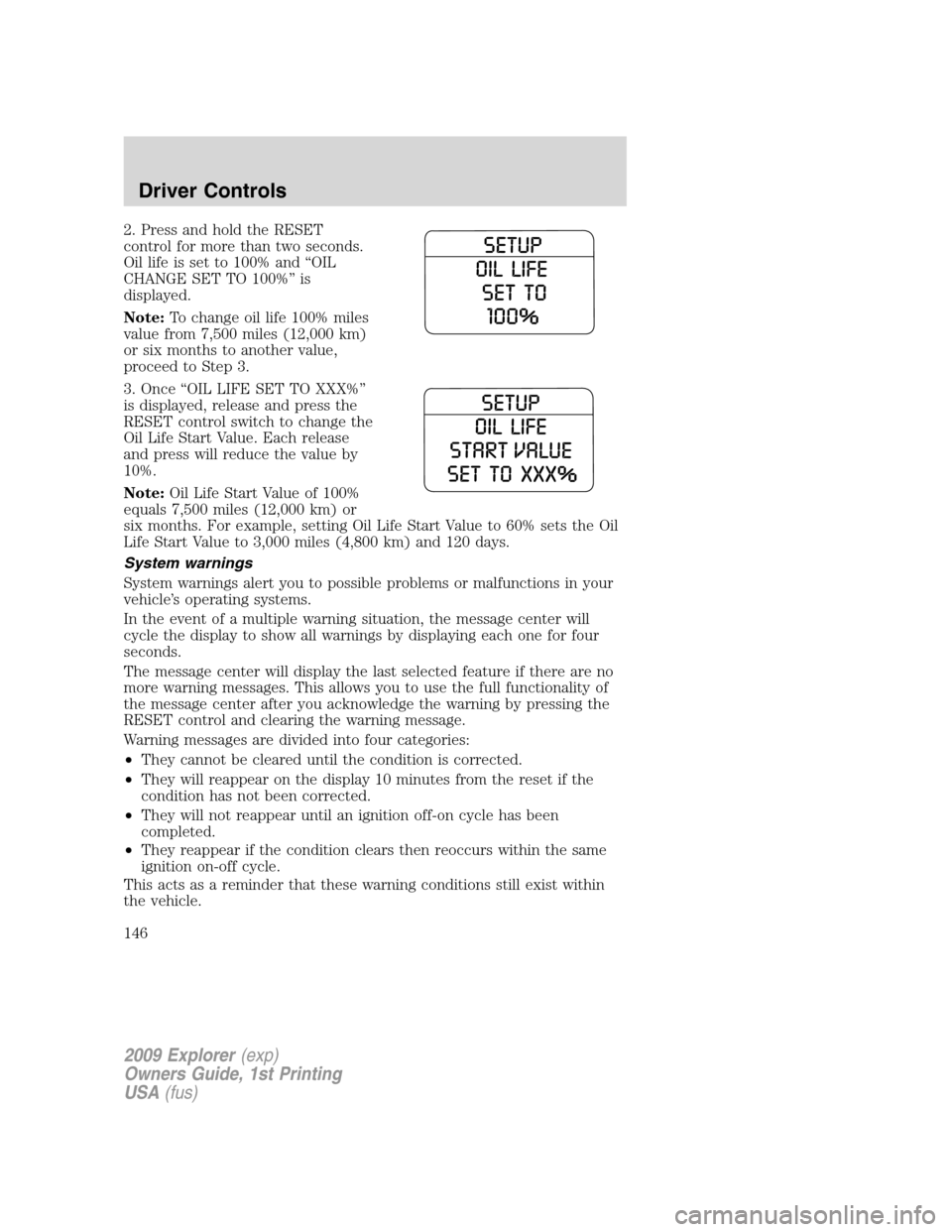
2. Press and hold the RESET
control for more than two seconds.
Oil life is set to 100% and “OIL
CHANGE SET TO 100%” is
displayed.
Note:To change oil life 100% miles
value from 7,500 miles (12,000 km)
or six months to another value,
proceed to Step 3.
3. Once “OIL LIFE SET TO XXX%”
is displayed, release and press the
RESET control switch to change the
Oil Life Start Value. Each release
and press will reduce the value by
10%.
Note:Oil Life Start Value of 100%
equals 7,500 miles (12,000 km) or
six months. For example, setting Oil Life Start Value to 60% sets the Oil
Life Start Value to 3,000 miles (4,800 km) and 120 days.
System warnings
System warnings alert you to possible problems or malfunctions in your
vehicle’s operating systems.
In the event of a multiple warning situation, the message center will
cycle the display to show all warnings by displaying each one for four
seconds.
The message center will display the last selected feature if there are no
more warning messages. This allows you to use the full functionality of
the message center after you acknowledge the warning by pressing the
RESET control and clearing the warning message.
Warning messages are divided into four categories:
•They cannot be cleared until the condition is corrected.
•They will reappear on the display 10 minutes from the reset if the
condition has not been corrected.
•They will not reappear until an ignition off-on cycle has been
completed.
•They reappear if the condition clears then reoccurs within the same
ignition on-off cycle.
This acts as a reminder that these warning conditions still exist within
the vehicle.
2009 Explorer(exp)
Owners Guide, 1st Printing
USA(fus)
Driver Controls
146
Page 147 of 407
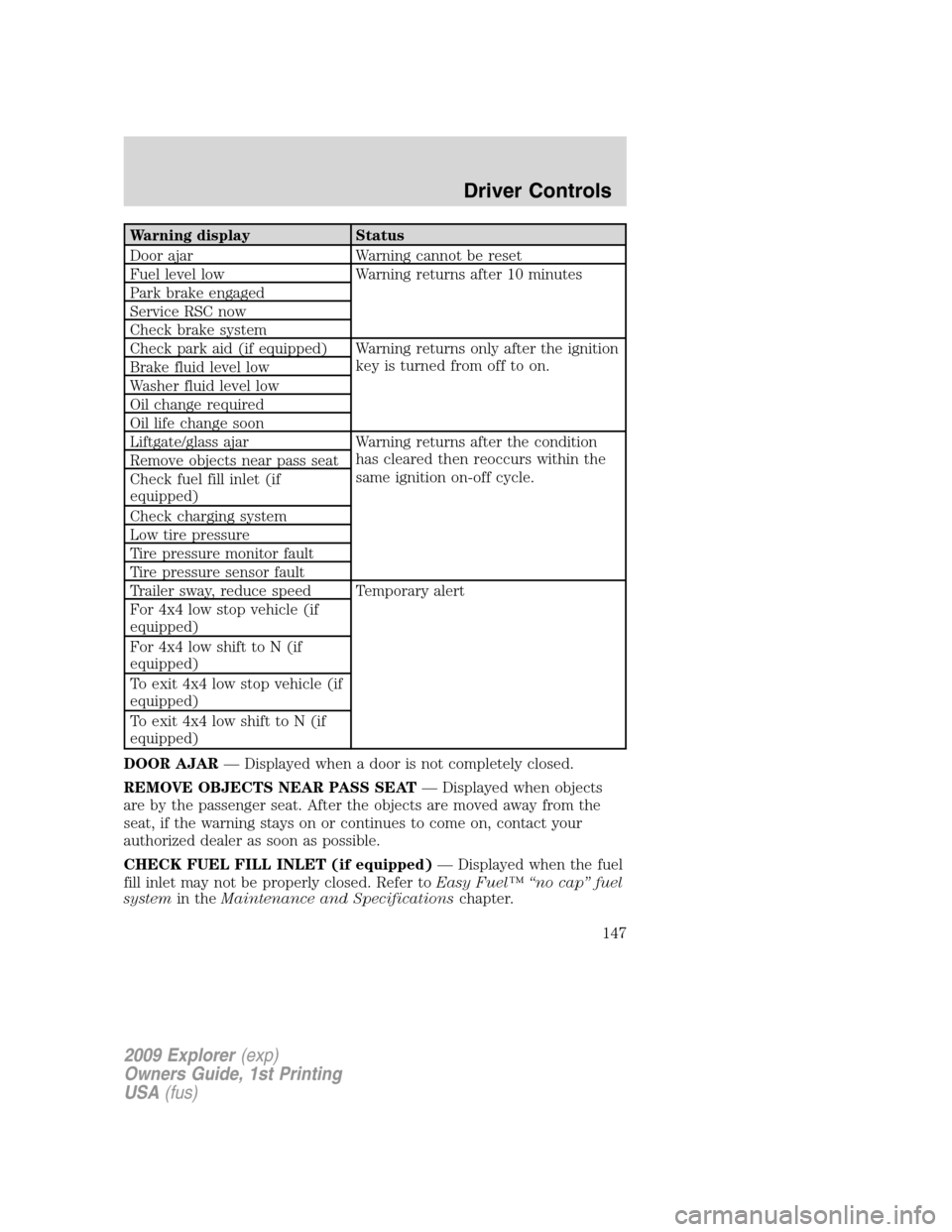
Warning display Status
Door ajar Warning cannot be reset
Fuel level low Warning returns after 10 minutes
Park brake engaged
Service RSC now
Check brake system
Check park aid (if equipped) Warning returns only after the ignition
key is turned from off to on.
Brake fluid level low
Washer fluid level low
Oil change required
Oil life change soon
Liftgate/glass ajar Warning returns after the condition
has cleared then reoccurs within the
same ignition on-off cycle. Remove objects near pass seat
Check fuel fill inlet (if
equipped)
Check charging system
Low tire pressure
Tire pressure monitor fault
Tire pressure sensor fault
Trailer sway, reduce speed Temporary alert
For 4x4 low stop vehicle (if
equipped)
For 4x4 low shift to N (if
equipped)
To exit 4x4 low stop vehicle (if
equipped)
To exit 4x4 low shift to N (if
equipped)
DOOR AJAR— Displayed when a door is not completely closed.
REMOVE OBJECTS NEAR PASS SEAT— Displayed when objects
are by the passenger seat. After the objects are moved away from the
seat, if the warning stays on or continues to come on, contact your
authorized dealer as soon as possible.
CHECK FUEL FILL INLET (if equipped)— Displayed when the fuel
fill inlet may not be properly closed. Refer toEasy Fuel™ “no cap” fuel
systemin theMaintenance and Specificationschapter.
2009 Explorer(exp)
Owners Guide, 1st Printing
USA(fus)
Driver Controls
147
Page 149 of 407
WASHER FLUID LEVEL LOW— Indicates the washer fluid reservoir
is less than one quarter full. Check the washer fluid level. Refer to
Windshield washer fluidin theMaintenance and Specifications
chapter.
OIL LIFE CHANGE SOON— Displayed when the engine oil life
reaches 5% or less of the Oil Life Start Value.
OIL CHANGE REQUIRED— Displayed when the engine oil life
remaining is 0%. An oil change is required whenever indicated by the
message center and according to the recommended maintenance
schedule. USE ONLY RECOMMENDED ENGINE OILS.
LIFTGATE / GLASS AJAR— Displayed when the liftgate or the
liftgate glass is not completely closed.
TRAILER SWAY REDUCE SPEED— Displayed when your trailer
starts to sway when towing. Refer toTrailer sway controlin the
Drivingchapter for more information.
FOR 4X4 LOW STOP VEHICLE (if equipped)— Displayed when
4X4 LOW is selected while the vehicle is moving. For more information,
refer toUsing the Control Trac 4WD systemin theDrivingchapter.
FOR 4X4 LOW SHIFT TO N (if equipped)— Displayed when 4X4
LOW is selected and the vehicle is stopped. For more information, refer
toUsing the Control Trac 4WD systemin theDrivingchapter.
TO EXIT 4X4 LOW STOP VEHICLE (if equipped)— Displayed
when 2WD is selected while the vehicle is operating in 4X4 LOW. For
more information, refer toUsing the Control Trac 4WD systemin the
Drivingchapter.
TO EXIT 4X4 LOW SHIFT TO N (if equipped)— Displayed when
2WD is selected while the vehicle has been stopped in 4X4 LOW. For
more information, refer toUsing the Control Trac 4WD systemin the
Drivingchapter.
2009 Explorer(exp)
Owners Guide, 1st Printing
USA(fus)
Driver Controls
149
Page 237 of 407
Move a child to a different seating location if the shoulder belt does not
stay positioned on the shoulder during use.
Follow all instructions provided by the manufacturer of the booster seat.
WARNING:Never place, or allow a child to place, the shoulder
belt under a child’s arm or behind the back because it reduces
the protection for the upper part of the body and may increase the risk
of injury or death in a collision.
Child restraint and safety belt maintenance
Inspect the vehicle safety belts and child safety seat systems periodically
to make sure they work properly and are not damaged. Inspect the
vehicle and child seat safety belts to make sure there are no nicks, tears
or cuts. Replace if necessary. All vehicle safety belt assemblies, including
retractors, buckles, front safety belt buckle assemblies, buckle support
assemblies (slide bar-if equipped), shoulder belt height adjusters (if
equipped), shoulder belt guide on seatback (if equipped), child safety
seat LATCH and tether anchors, and attaching hardware, should be
inspected after a collision. Refer to the child restraint manufacturer’s
instructions for additional inspection and maintenance information
specific to the child restraint. Ford Motor Company recommends that all
safety belt assemblies in use in vehicles involved in a collision be
replaced. However, if the collision was minor and an authorized dealer
finds that the belts do not show damage and continue to operate
properly, they do not need to be replaced. Safety belt assemblies not in
use during a collision should also be inspected and replaced if either
damage or improper operation is noted.
For proper care of soiled safety belts, refer toInteriorin theCleaning
chapter.
WARNING:Failure to inspect and if necessary replace the
safety belt assembly or child restraint system under the above
conditions could result in severe personal injuries in the event of a
collision.
2009 Explorer(exp)
Owners Guide, 1st Printing
USA(fus)
Seating and Safety Restraints
237
Page 320 of 407
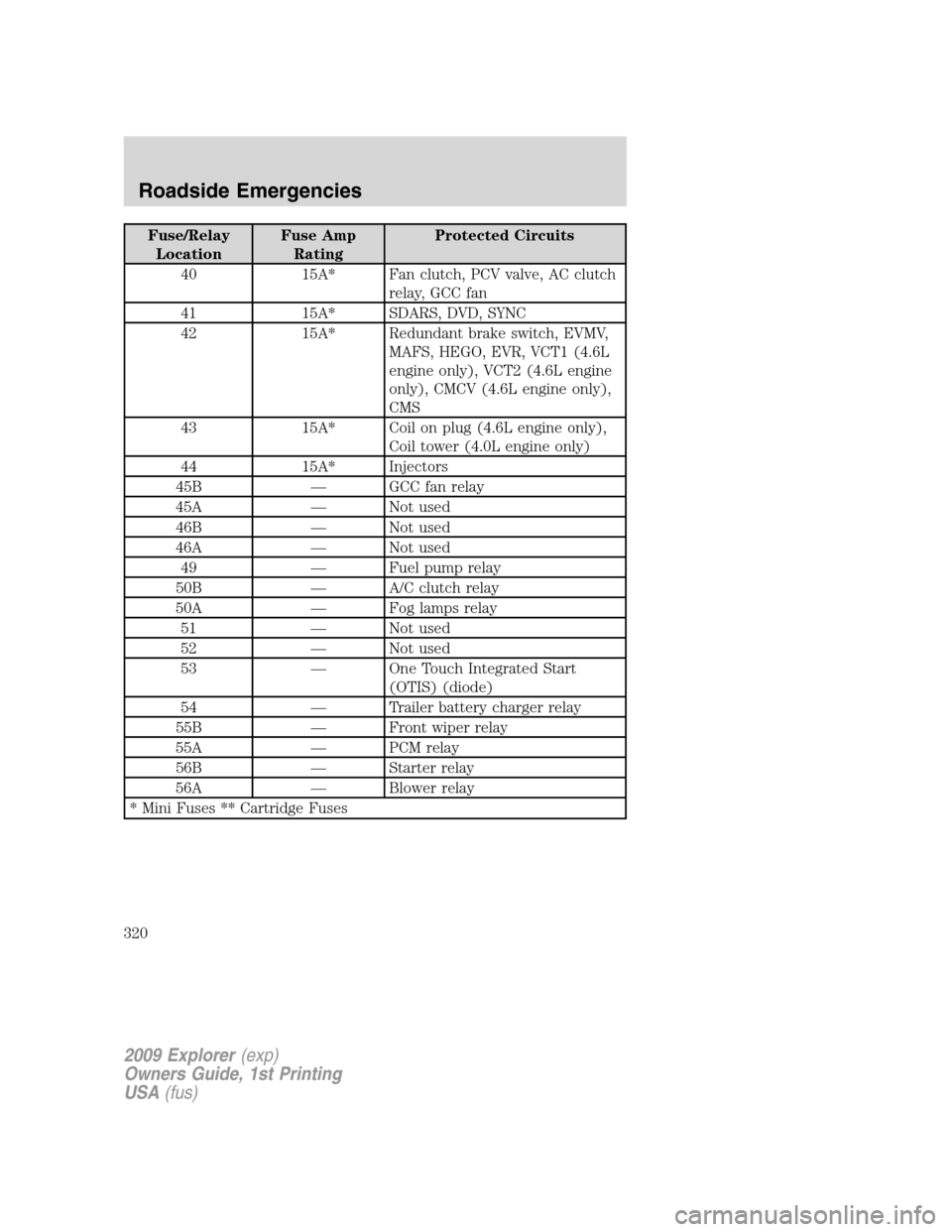
Fuse/Relay
LocationFuse Amp
RatingProtected Circuits
40 15A* Fan clutch, PCV valve, AC clutch
relay, GCC fan
41 15A* SDARS, DVD, SYNC
42 15A* Redundant brake switch, EVMV,
MAFS, HEGO, EVR, VCT1 (4.6L
engine only), VCT2 (4.6L engine
only), CMCV (4.6L engine only),
CMS
43 15A* Coil on plug (4.6L engine only),
Coil tower (4.0L engine only)
44 15A* Injectors
45B — GCC fan relay
45A — Not used
46B — Not used
46A — Not used
49 — Fuel pump relay
50B — A/C clutch relay
50A — Fog lamps relay
51 — Not used
52 — Not used
53 — One Touch Integrated Start
(OTIS) (diode)
54 — Trailer battery charger relay
55B — Front wiper relay
55A — PCM relay
56B — Starter relay
56A — Blower relay
* Mini Fuses ** Cartridge Fuses
2009 Explorer(exp)
Owners Guide, 1st Printing
USA(fus)
Roadside Emergencies
320
Page 352 of 407
![FORD EXPLORER 2009 4.G User Guide 2. Apply Motorcraft Deluxe Leather and Vinyl Cleaner (ZC-11-A) [In
Canada use Motorcraft Multi-Purpose Cleaner (CXC-101)] to the wiped
area and spread around evenly.
3. Apply more Motorcraft cleaner t](/img/11/4978/w960_4978-351.png "FORD EXPLORER 2009 4.G User Guide 2. Apply Motorcraft Deluxe Leather and Vinyl Cleaner (ZC-11-A) [In
Canada use Motorcraft Multi-Purpose Cleaner (CXC-101)] to the wiped
area and spread around evenly.
3. Apply more Motorcraft cleaner t")
2. Apply Motorcraft Deluxe Leather and Vinyl Cleaner (ZC-11-A) [In
Canada use Motorcraft Multi-Purpose Cleaner (CXC-101)] to the wiped
area and spread around evenly.
3. Apply more Motorcraft cleaner to a clean, white, cotton cloth and
press the cloth onto the soiled area–allow this to set at room
temperature for 30 minutes.
4. Remove the soaked cloth, and if it is not soiled badly, use this cloth to
clean the area by using a rubbing motion for 60 seconds.
5. Following this, wipe area dry with a clean, white, cotton cloth.
INTERIOR
For fabric, carpets, cloth seats, safety belts and seats equipped with side
airbags:
•Remove dust and loose dirt with a vacuum cleaner.
•Remove light stains and soil with Motorcraft Professional Strength
Carpet & Upholstery Cleaner (ZC-54).
•If grease or tar is present on the material, spot-clean the area first
with Motorcraft Spot and Stain Remover (ZC-14). In Canada, use
Motorcraft Multi-Purpose Cleaner (CXC-101).
•If a ring forms on the fabric after spot cleaning, clean the entire area
immediately (but do not oversaturate) or the ring will set.
•Do not use household cleaning products or glass cleaners, which can
stain and discolor the fabric and affect the flame retardant abilities of
the seat materials.
WARNING:Do not use cleaning solvents, bleach or dye on the
vehicle’s safety belts, as these actions may weaken the belt
webbing.
WARNING:On vehicles equipped with seat-mounted airbags, do
not use chemical solvents or strong detergents. Such products
could contaminate the side-airbag system and affect performance of
the side airbag in a collision.
LEATHER SEATS (IF EQUIPPED)
Your leather seating surfaces have a clear, protective coating over the
leather.
•To clean, use a soft cloth with Motorcraft Deluxe Leather and Vinyl
Cleaner (ZC-11-A). In Canada, use Motorcraft Vinyl Cleaner (CXC-93).
Dry the area with a soft cloth.
2009 Explorer(exp)
Owners Guide, 1st Printing
USA(fus)
Cleaning
352
Page 353 of 407
•To help maintain its resiliency and color, use the Motorcraft Deluxe
Leather Care Kit (ZC-11-D), available from your authorized dealer. In
Canada, use Motorcraft Vinyl Cleaner (CXC-93) or an equivalent
high–quality leather care product.
•Do not use household cleaning products, alcohol solutions, solvents or
cleaners intended for rubber, vinyl and plastics, or oil/petroleum-based
leather conditioners. These products may cause premature wearing of
the clear, protective coating.
Note:In some instances, color or dye transfer can occur when wet
clothing comes in contact with leather upholstery. If this occurs, the
leather should be cleaned immediately to avoid permanent staining.
UNDERBODY
Flush the complete underside of your vehicle frequently. Keep body and
door drain holes free from packed dirt.
FORD AND LINCOLN MERCURY CAR CARE PRODUCTS
Your Ford or Lincoln Mercury authorized dealer has many quality
products available to clean your vehicle and protect its finishes. These
quality products have been specifically engineered to fulfill your
automotive needs; they are custom designed to complement the style
and appearance of your vehicle. Each product is made from high quality
materials that meet or exceed rigid specifications. For best results, use
the following products or products of equivalent quality:
Motorcraft Bug and Tar Remover (ZC-42)
Motorcraft Car Wash (Canada only) (CXC-83)
Motorcraft Custom Bright Metal Cleaner (ZC-15)
Motorcraft Custom Clear Coat Polish (ZC-8-A)
Motorcraft Custom Vinyl Protectant (ZC-40-A)
Motorcraft Dash and Vinyl Cleaner (ZC-38-A)
Motorcraft Deluxe Leather and Vinyl Cleaner (U.S. only) (ZC-11-A)
Motorcraft Leather Care Kit (U.S. only) (ZC-11-D)
Motorcraft Detail Wash (ZC-3-A)
Motorcraft Dusting Cloth (ZC-24)
Motorcraft Engine Shampoo and Degreaser (U.S. only) (ZC-20)
Motorcraft Engine Shampoo (Canada only) (CXC-66-A)
Motorcraft Multi-Purpose Cleaner (Canada only) (CXC-101)
2009 Explorer(exp)
Owners Guide, 1st Printing
USA(fus)
Cleaning
353