key battery FORD EXPLORER 2012 5.G User Guide
[x] Cancel search | Manufacturer: FORD, Model Year: 2012, Model line: EXPLORER, Model: FORD EXPLORER 2012 5.GPages: 439, PDF Size: 3.63 MB
Page 268 of 439
Ignition modes
1. Off — press and release the START/STOP button without applying the
brake pedal when your vehicle is in on mode or when the engine is
running and there is no vehicle speed.
Note:In order to switch off the engine while the vehicle is in motion,
press and hold the START/STOP button for at least one second or press
the START/STOP button three times within two seconds. Then, shift to
neutral and use the brakes to bring the vehicle to a safe stop. After the
vehicle has stopped, turn the engine off and shift into park.
2. Accessory — press and release the START/STOP button without
applying the brake pedal. This allows electrical accessories such as the
radio to operate while the engine is not running. ACCESSORY POWER
ACTIVE and PRESS BRAKE TO START will be displayed in the message
center. Refer toMessage centerin theInstrument Clusterchapter for
more information.
3. On — press the START/STOP button two times without applying the
brake pedal. This will power your vehicle’s electrical system and the
warning lights in the instrument cluster will illuminate, but the engine
will remain off.Note:You can start the engine from any ignition mode.
4. Start — press the START/STOP button (for any length of time) while
applying the brake pedal.Note:The indicator light on the start button
will illuminate when the vehicle is in on mode and when the engine is
started.
There may be areas inside your vehicle where the IA key is not detected.
If the message NO KEY DETECTED appears on your message center
when you press the START/STOP button, it may be necessary to move
your IA key to another area within the vehicle. The IA key may not be
detected near the roof (between the driver or passenger sunvisor and
the roof, or in the overhead console area) or in the extreme corners of
the rear package tray, near your audio speakers. It is not recommended
that you stow the IA key in these locations. If you move the IA key to a
location where it has been detected before and you still see the NO KEY
DETECTED message, your IA key’s battery may be low or you may be in
an area with excessive radio frequency interference. If this occurs, you
can use the back-up method to start your vehicle (see below).
Back-up method of starting:Your IA key uses a radio frequency signal
to communicate with your vehicle and authorize your vehicle to start
when you press the START/STOP button and apply the brake pedal.
Driving
268
2012 Explorer(exp)
Owners Guide, 1st Printing
USA(fus)
Page 269 of 439
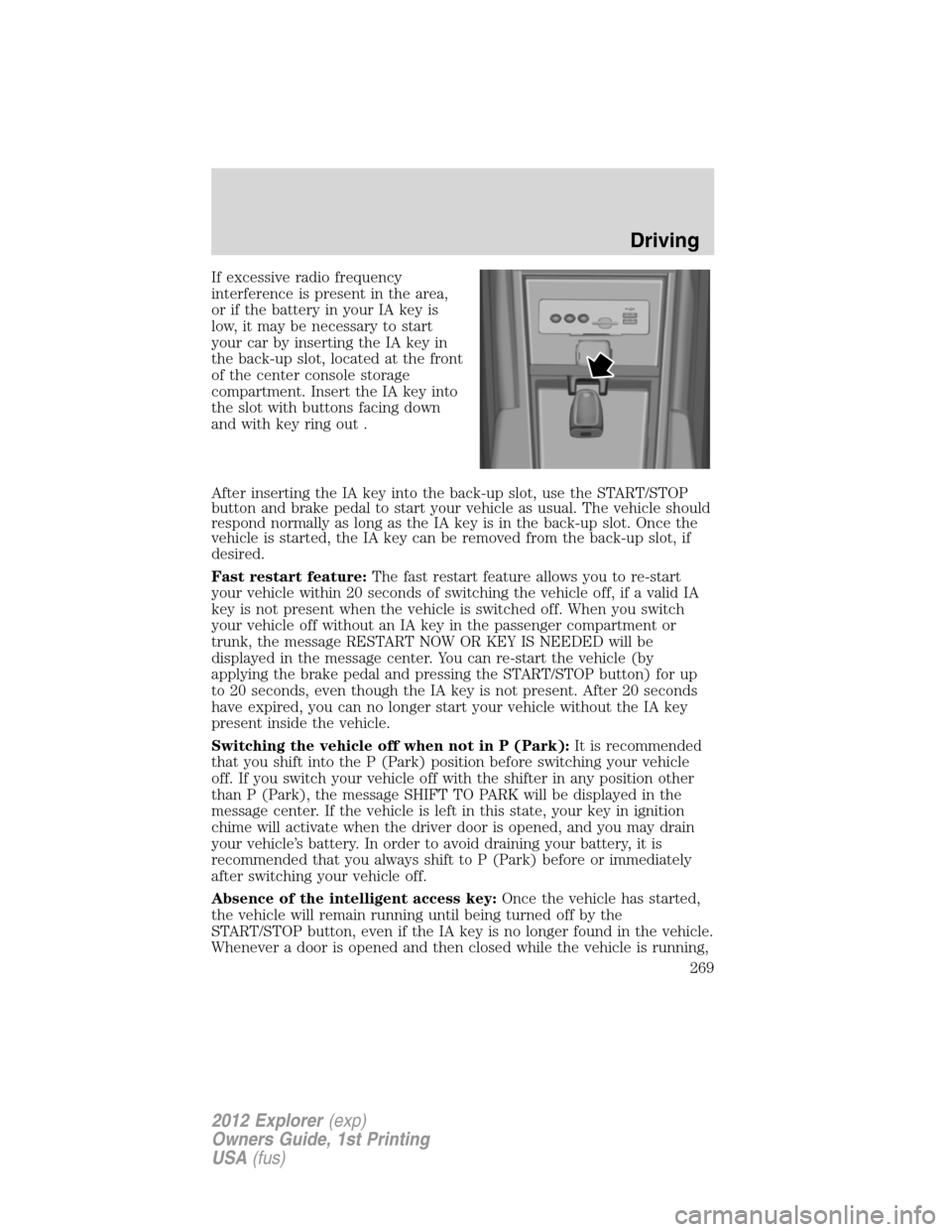
If excessive radio frequency
interference is present in the area,
or if the battery in your IA key is
low, it may be necessary to start
your car by inserting the IA key in
the back-up slot, located at the front
of the center console storage
compartment. Insert the IA key into
the slot with buttons facing down
and with key ring out .
After inserting the IA key into the back-up slot, use the START/STOP
button and brake pedal to start your vehicle as usual. The vehicle should
respond normally as long as the IA key is in the back-up slot. Once the
vehicle is started, the IA key can be removed from the back-up slot, if
desired.
Fast restart feature:The fast restart feature allows you to re-start
your vehicle within 20 seconds of switching the vehicle off, if a valid IA
key is not present when the vehicle is switched off. When you switch
your vehicle off without an IA key in the passenger compartment or
trunk, the message RESTART NOW OR KEY IS NEEDED will be
displayed in the message center. You can re-start the vehicle (by
applying the brake pedal and pressing the START/STOP button) for up
to 20 seconds, even though the IA key is not present. After 20 seconds
have expired, you can no longer start your vehicle without the IA key
present inside the vehicle.
Switching the vehicle off when not in P (Park):It is recommended
that you shift into the P (Park) position before switching your vehicle
off. If you switch your vehicle off with the shifter in any position other
than P (Park), the message SHIFT TO PARK will be displayed in the
message center. If the vehicle is left in this state, your key in ignition
chime will activate when the driver door is opened, and you may drain
your vehicle’s battery. In order to avoid draining your battery, it is
recommended that you always shift to P (Park) before or immediately
after switching your vehicle off.
Absence of the intelligent access key:Once the vehicle has started,
the vehicle will remain running until being turned off by the
START/STOP button, even if the IA key is no longer found in the vehicle.
Whenever a door is opened and then closed while the vehicle is running,
Driving
269
2012 Explorer(exp)
Owners Guide, 1st Printing
USA(fus)
Page 322 of 439
ROADSIDE ASSISTANCE
Vehicles sold in the U.S. : Getting roadside assistance
To fully assist you should you have a vehicle concern, Ford Motor
Company offers a complimentary roadside assistance program. This
program is separate from the New Vehicle Limited Warranty. The service
is available:
•24-hours, seven days a week
•for the coverage period listed on the Roadside Assistance Card
included in your Owner Guide portfolio.
Roadside assistance will cover:
•a flat tire change with a good spare (except vehicles that have been
supplied with a tire inflation kit)
•battery jump start
•lock-out assistance (key replacement cost is the customer’s
responsibility)
•fuel delivery – Independent Service Contractors, if not prohibited by
state, local or municipal law shall deliver up to 2.0 gallons (7.5L) of
gasoline or 5.0 gallons (18.9L) of diesel fuel to a disabled vehicle. Fuel
delivery service is limited to two no-charge occurrences within a
12-month period.
•winch out – available within 100 feet (30.5 meters) of a paved or
county maintained road, no recoveries.
•towing – Ford and Lincoln eligible vehicles towed to an authorized
dealer within 35 miles (56 km) of the disablement location or to the
nearest authorized dealer. If a member requests to be towed to an
authorized dealer more than 35 miles (56 km) from the disablement
location, the member shall be responsible for any mileage costs in
excess of 35 miles (56 km).
Trailers shall be covered up to $200 if the disabled eligible vehicle
requires service at the nearest authorized dealer. If the trailer is disabled,
but the towing vehicle is operational, the trailer does not qualify for any
roadside services.
Vehicles sold in the U.S. : Using roadside assistance
Complete the roadside assistance identification card and place it in your
wallet for quick reference. This card is found in the Owner’s Guide
portfolio in the glove compartment.
Roadside Emergencies
322
2012 Explorer(exp)
Owners Guide, 1st Printing
USA(fus)
Page 364 of 439
SERVICE RECOMMENDATIONS
•Use thescheduled maintenance informationto track routine
service.
•Use only recommended fuels, lubricants, fluids and service parts
conforming to specifications.
•Your authorized dealer can provide parts and service.
PRECAUTIONS WHEN SERVICING YOUR VEHICLE
•Do not work on a hot engine.
•Make sure that nothing gets caught in moving parts.
•Do not work on a vehicle with the engine running in an enclosed
space, unless you are sure you have enough ventilation.
•Keep all open flames and other burning material (such as cigarettes)
away from the battery and all fuel related parts.
Working with the engine off
1. Set the parking brake and ensure the gearshift is securely latched in P
(Park).
2. Turn off the engine and remove the key.
3. Block the wheels to prevent the vehicle from moving unexpectedly.
Working with the engine on
WARNING:To reduce the risk of vehicle damage and/or
personal burn injuries, do not start your engine with the air
cleaner removed and do not remove it while the engine is running.
1. Set the parking brake and shift to P (Park).
2. Block the wheels.
Maintenance and Specifications
364
2012 Explorer(exp)
Owners Guide, 1st Printing
USA(fus)
Page 376 of 439
Note:Electrical or electronic accessories added to the vehicle by the
dealer or the owner may adversely affect battery performance and
durability and may also affect the performance of other electrical
systems in the vehicle.
When a battery replacement is required, the battery should only be
replaced with a Ford recommended replacement battery that matches
the electrical requirements of the vehicle. After battery replacement, or
in some cases after charging the battery with an external charger, the
BMS requires eight hours of vehicle sleep time (key off with doors
closed) to relearn the new battery state of charge. Prior to relearning
state of charge, the BMS may disable electrical features (to protect the
battery) earlier than normal.
ENGINE COOLANT
Checking engine coolant
The concentration and level of engine coolant should be checked at the
intervals listed inscheduled maintenance information.The coolant
concentration should be maintained at 50/50 coolant and distilled water.
For best results, coolant concentration should be tested with a
refractometer such as Rotunda tool 300-ROB75240E available from your
dealer. Ford does not recommend the use of hydrometers or coolant test
strips for measuring coolant concentration. The level of coolant should
be maintained within the COLD FILL RANGE in the coolant reservoir. If
the level falls below, add coolant per the instructions in theAdding
engine coolantsection.
Your vehicle was factory-filled with a 50/50 engine coolant and water
concentration. If the concentration of coolant falls below 40% or above
60%, the engine parts could become damaged or not work properly.A
50/50 mixture of coolant and water provides the following:
•Improved freeze protection.
•Improved boiling protection.
•Protection against rust and other forms of corrosion.
•Enables calibrated gauges to work properly.
When the engine is cold, check the level of the engine coolant in the
reservoir.
Maintenance and Specifications
376
2012 Explorer(exp)
Owners Guide, 1st Printing
USA(fus)
Page 394 of 439
These temporary malfunctions can be corrected by filling the fuel tank
with good quality fuel, properly closing the fuel fill inlet or letting the
electrical system dry out. After three driving cycles without these or any
other temporary malfunctions present, the service engine soon
indicator should stay off the next time the engine is started. A driving
cycle consists of a cold engine startup followed by mixed city/highway
driving. No additional vehicle service is required.
If the service engine soon
indicator remains on, have your vehicle
serviced at the first available opportunity. Although some malfunctions
detected by the OBD-II may not have symptoms that are apparent,
continued driving with the service engine soon
indicator on can
result in increased emissions, lower fuel economy, reduced engine and
transmission smoothness, and lead to more costly repairs.
Readiness for Inspection/Maintenance (I/M) testing
Some state/provincial and local governments may have
Inspection/Maintenance (I/M) programs to inspect the emission control
equipment on your vehicle. Failure to pass this inspection could prevent
you from getting a vehicle registration. Your vehicle may not pass the I/M
test if the service engine soon
indicator is on or not working
properly (bulb is burned out), or if the OBD-II system has determined
that some of the emission control systems have not been properly
checked. In this case, the vehicle is considered not ready for I/M testing.
If the service engine soon
indicator is on or the bulb does not
work, the vehicle may need to be serviced. Refer toOn-board
diagnostics (OBD-II)in this chapter.
If the vehicle’s engine or transmission has just been serviced, or the
battery has recently run down or been replaced, the OBD-II system may
indicate that the vehicle is not ready for I/M testing. To determine if the
vehicle is ready for I/M testing, turn the ignition key to the on position
for 15 seconds without cranking the engine. If the service engine
soon
indicator blinks eight times, it means that the vehicle is not
ready for I/M testing; if the service engine soon
indicator stays on
solid, it means that the vehicle is ready for I/M testing.
The OBD-II system is designed to check the emission control system
during normal driving. A complete check may take several days. If the
vehicle is not ready for I/M testing, the following driving cycle consisting
of mixed city and highway driving may be performed:
15 minutes of steady driving on an expressway/highway followed by
20 minutes of stop-and-go driving with at least four 30-second idle
periods.
Maintenance and Specifications
394
2012 Explorer(exp)
Owners Guide, 1st Printing
USA(fus)
Page 409 of 439
Peace of mind
•Keyless entry keypad•Wheel locks
•Cargo shade•Remote start
•Vehicle security systems•Parking sensors*
•Locking gas plug for capless fuel system
*Ford Licensed Accessories (FLA) are warranted by the accessory
manufacturer’s warranty. Ford Licensed Accessories are fully designed
and developed by the accessory manufacturer and have not been
designed or tested to Ford Motor Company engineering requirements.
Contact your Ford dealer for details regarding the manufacturer’s limited
warranty and/or a copy of the FLA product limited warranty offered by
the accessory manufacturer.
For maximum vehicle performance, keep the following information in
mind when adding accessories or equipment to your vehicle:
•When adding accessories, equipment, passengers and luggage to your
vehicle, do not exceed the total weight capacity of the vehicle or of
the front or rear axle (GVWR or GAWR as indicated on the Safety
Compliance Certification label). Consult your authorized dealer for
specific weight information.
•The Federal Communications Commission (FCC) and Canadian Radio
Telecommunications Commission (CRTC) regulate the use of mobile
communications systems — such as two-way radios, telephones and
theft alarms - that are equipped with radio transmitters. Any such
equipment installed in your vehicle should comply with FCC or CRTC
regulations and should be installed only by a qualified service
technician.
•Mobile communications systems may harm the operation of your
vehicle, particularly if they are not properly designed for automotive
use.
•To avoid interference with other vehicle functions, such as anti-lock
braking systems, amateur radio users who install radios and antennas
onto their vehicle should not locate the Amateur Radio Antennas in
the area of the driver’s side hood.
•Any non-Ford custom electrical or electronic accessories or
components that are added to the vehicle by the authorized dealer or
the owner, may adversely affect battery performance and durability,
and may also adversely affect the performance of other electrical
systems in the vehicle.
Accessories
409
2012 Explorer(exp)
Owners Guide, 1st Printing
USA(fus)