park assist FORD EXPLORER 2012 5.G Owners Manual
[x] Cancel search | Manufacturer: FORD, Model Year: 2012, Model line: EXPLORER, Model: FORD EXPLORER 2012 5.GPages: 439, PDF Size: 3.63 MB
Page 24 of 439
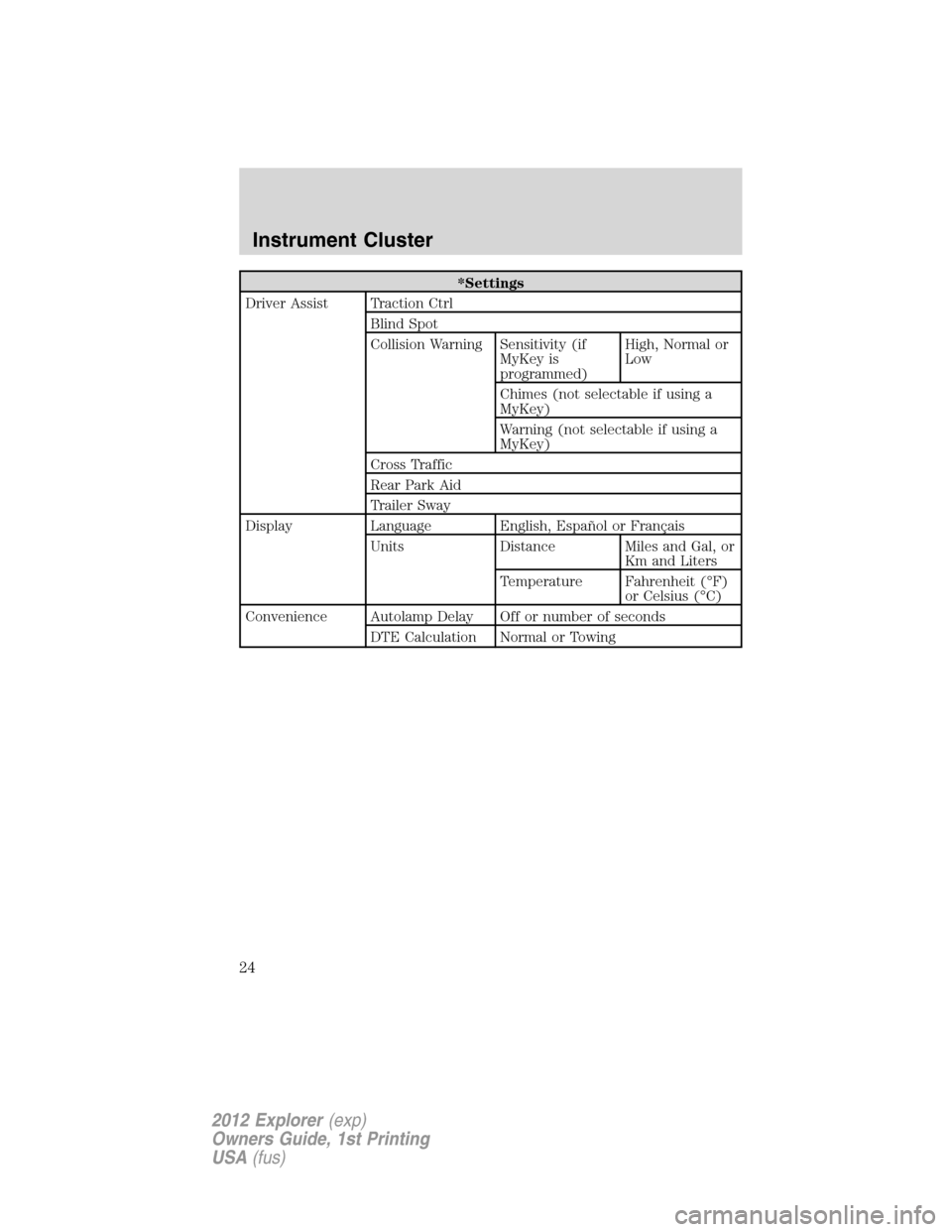
*Settings
Driver Assist Traction Ctrl
Blind Spot
Collision Warning Sensitivity (if
MyKey is
programmed)High, Normal or
Low
Chimes (not selectable if using a
MyKey)
Warning (not selectable if using a
MyKey)
Cross Traffic
Rear Park Aid
Trailer Sway
Display Language English, Español or Français
Units Distance Miles and Gal, or
Km and Liters
Temperature Fahrenheit (°F)
or Celsius (°C)
Convenience Autolamp Delay Off or number of seconds
DTE Calculation Normal or Towing
Instrument Cluster
24
2012 Explorer(exp)
Owners Guide, 1st Printing
USA(fus)
Page 33 of 439
It is important to reset fuel economy after setting the speed control to
get accurate highway fuel economy readings.
For more information refer toEssentials of good fuel economyin the
Maintenance and Specificationschapter.
Settings/Vehicle Settings
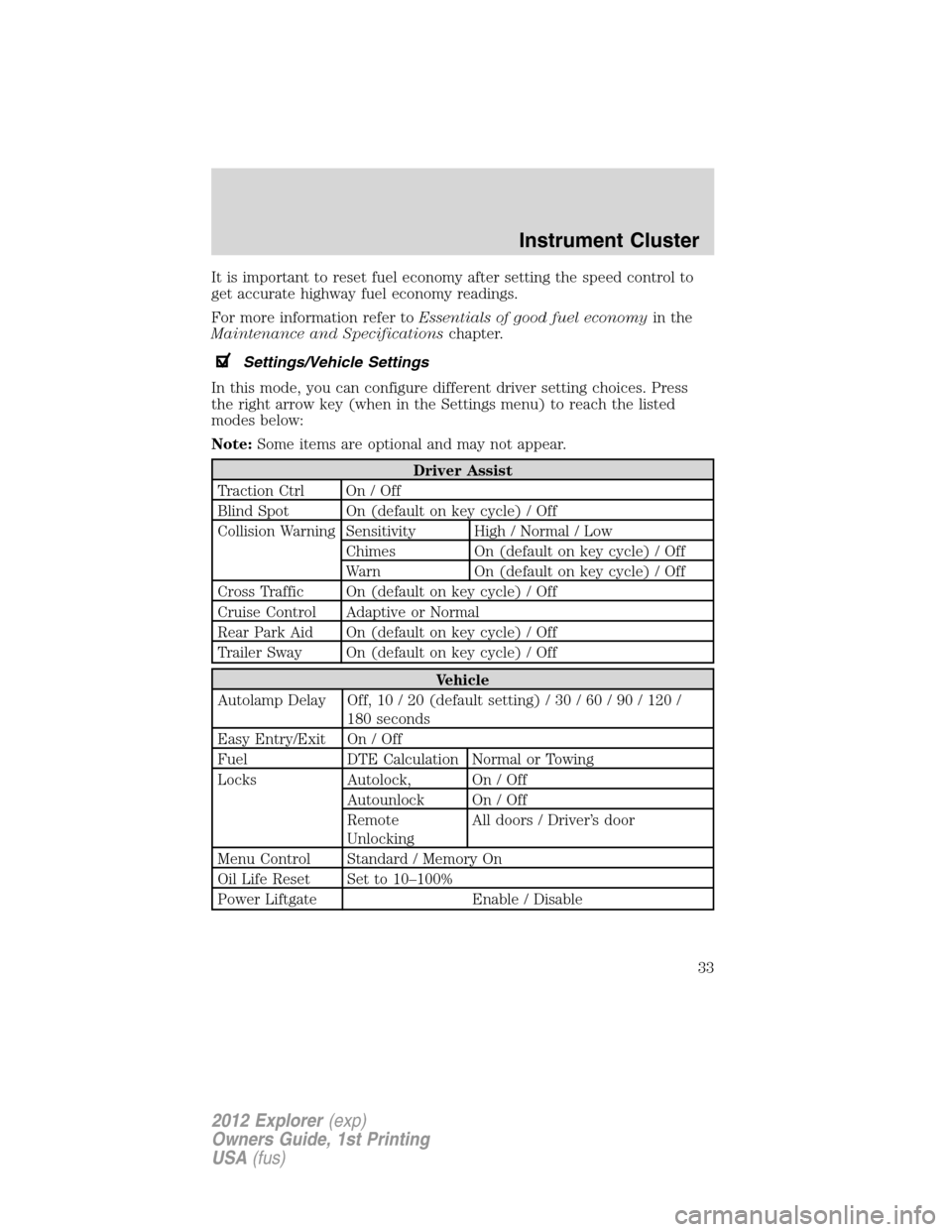
In this mode, you can configure different driver setting choices. Press
the right arrow key (when in the Settings menu) to reach the listed
modes below:
Note:Some items are optional and may not appear.
Driver Assist
Traction Ctrl On / Off
Blind Spot On (default on key cycle) / Off
Collision Warning Sensitivity High / Normal / Low
Chimes On (default on key cycle) / Off
Warn On (default on key cycle) / Off
Cross Traffic On (default on key cycle) / Off
Cruise Control Adaptive or Normal
Rear Park Aid On (default on key cycle) / Off
Trailer Sway On (default on key cycle) / Off
Vehicle
Autolamp Delay Off, 10 / 20 (default setting) / 30 / 60 / 90 / 120 /
180 seconds
Easy Entry/Exit On / Off
Fuel DTE Calculation Normal or Towing
Locks Autolock, On / Off
Autounlock On / Off
Remote
UnlockingAll doors / Driver’s door
Menu Control Standard / Memory On
Oil Life Reset Set to 10–100%
Power Liftgate Enable / Disable
Instrument Cluster
33
2012 Explorer(exp)
Owners Guide, 1st Printing
USA(fus)
Page 45 of 439
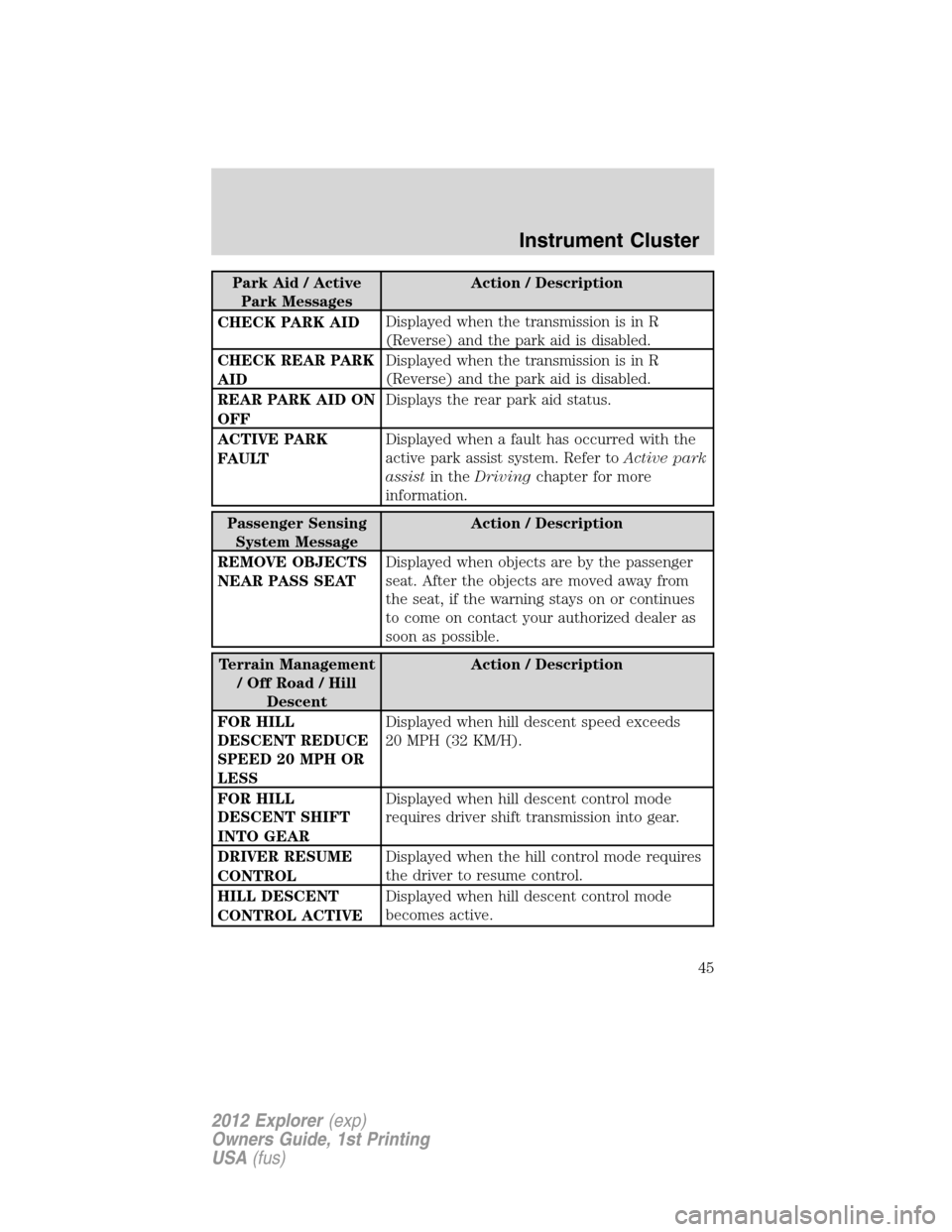
Park Aid / Active
Park MessagesAction / Description
CHECK PARK AIDDisplayed when the transmission is in R
(Reverse) and the park aid is disabled.
CHECK REAR PARK
AIDDisplayed when the transmission is in R
(Reverse) and the park aid is disabled.
REAR PARK AID ON
OFFDisplays the rear park aid status.
ACTIVE PARK
FAULTDisplayed when a fault has occurred with the
active park assist system. Refer toActive park
assistin theDrivingchapter for more
information.
Passenger Sensing
System MessageAction / Description
REMOVE OBJECTS
NEAR PASS SEATDisplayed when objects are by the passenger
seat. After the objects are moved away from
the seat, if the warning stays on or continues
to come on contact your authorized dealer as
soon as possible.
Terrain Management
/OffRoad/Hill
DescentAction / Description
FOR HILL
DESCENT REDUCE
SPEED 20 MPH OR
LESSDisplayed when hill descent speed exceeds
20 MPH (32 KM/H).
FOR HILL
DESCENT SHIFT
INTO GEARDisplayed when hill descent control mode
requires driver shift transmission into gear.
DRIVER RESUME
CONTROLDisplayed when the hill control mode requires
the driver to resume control.
HILL DESCENT
CONTROL ACTIVEDisplayed when hill descent control mode
becomes active.
Instrument Cluster
45
2012 Explorer(exp)
Owners Guide, 1st Printing
USA(fus)
Page 260 of 439
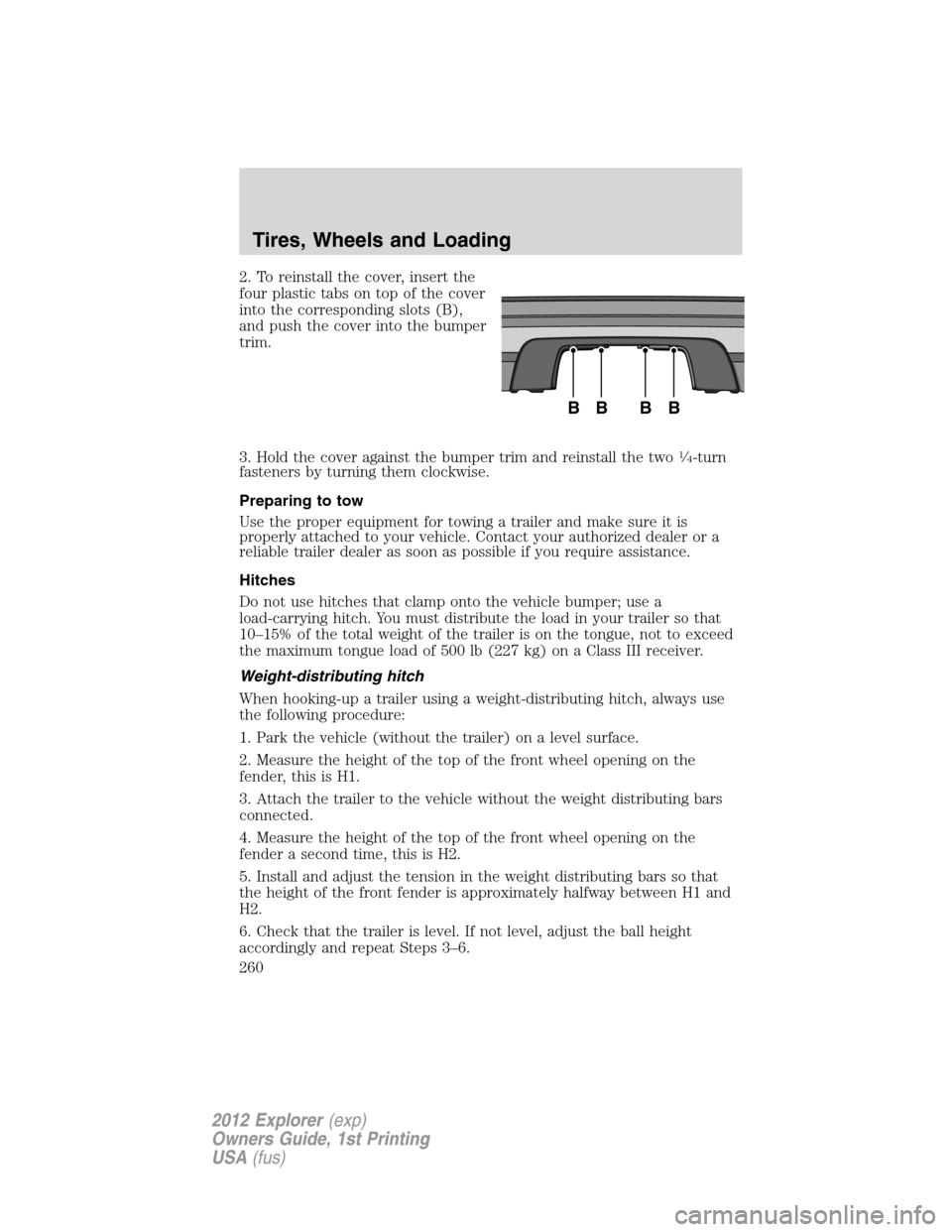
2. To reinstall the cover, insert the
four plastic tabs on top of the cover
into the corresponding slots (B),
and push the cover into the bumper
trim.
3. Hold the cover against the bumper trim and reinstall the two
14-turn
fasteners by turning them clockwise.
Preparing to tow
Use the proper equipment for towing a trailer and make sure it is
properly attached to your vehicle. Contact your authorized dealer or a
reliable trailer dealer as soon as possible if you require assistance.
Hitches
Do not use hitches that clamp onto the vehicle bumper; use a
load-carrying hitch. You must distribute the load in your trailer so that
10–15% of the total weight of the trailer is on the tongue, not to exceed
the maximum tongue load of 500 lb (227 kg) on a Class III receiver.
Weight-distributing hitch
When hooking-up a trailer using a weight-distributing hitch, always use
the following procedure:
1. Park the vehicle (without the trailer) on a level surface.
2. Measure the height of the top of the front wheel opening on the
fender, this is H1.
3. Attach the trailer to the vehicle without the weight distributing bars
connected.
4. Measure the height of the top of the front wheel opening on the
fender a second time, this is H2.
5. Install and adjust the tension in the weight distributing bars so that
the height of the front fender is approximately halfway between H1 and
H2.
6. Check that the trailer is level. If not level, adjust the ball height
accordingly and repeat Steps 3–6.
BBBB
Tires, Wheels and Loading
260
2012 Explorer(exp)
Owners Guide, 1st Printing
USA(fus)
Page 262 of 439
Driving while you tow
When towing a trailer:
•Do not drive faster than 70 mph (113 km/h) during the first 500 miles
(800 km) of trailer towing and don’t make full-throttle starts.
•Turn off the speed control. The speed control may shut off
automatically when you are towing on long, steep grades.
•Activate the tow/haul feature or the grade assist feature on your
transmission to eliminate excessive transmission shifting and assist in
transmission cooling. For additional information, refer toAutomatic
transmission operationin theDrivingchapter.
•Allow more distance for stopping with a trailer attached; anticipate
stops and brake gradually.
Trailer towing tips
•Practice turning, stopping and backing-up before starting on a trip to
get the feel of the vehicle-trailer combination. When turning, make
wider turns so the trailer wheels will clear curbs and other obstacles.
•To aid in engine/transmission cooling and A/C efficiency during hot
weather while stopped in traffic, place the gearshift lever in P (Park).
•After you have traveled 50 miles (80 km), thoroughly check your
hitch, electrical connections and trailer wheel lug nuts.
•If you are driving down a long or steep hill, shift to a lower gear. Do
not apply the brakes continuously, as they may overheat and become
less effective.
•Vehicles with trailers should not be parked on a grade. If you must
park on a grade, place wheel chocks under the trailer’s wheels.
RECREATIONAL TOWING
Follow these guidelines for your specific powertrain combination to tow
your vehicle for personal travel (such as behind a motor home or a
truck).
Note:Put your climate control system in recirculated air mode to
prevent exhaust fumes from entering the vehicle. Refer to theClimate
Controlschapter for more information.
In case of a roadside emergency with a disabled vehicle, please refer to
Wrecker towingin theRoadside Emergencieschapter.
These guidelines are designed to prevent damage to your vehicle after it
is hooked-up to the RV or tow dolly.
Tires, Wheels and Loading
262
2012 Explorer(exp)
Owners Guide, 1st Printing
USA(fus)
Page 267 of 439
Starting the engine
Note:If your vehicle is equipped with a push button start system, refer
toPush button start systemin this section for starting.
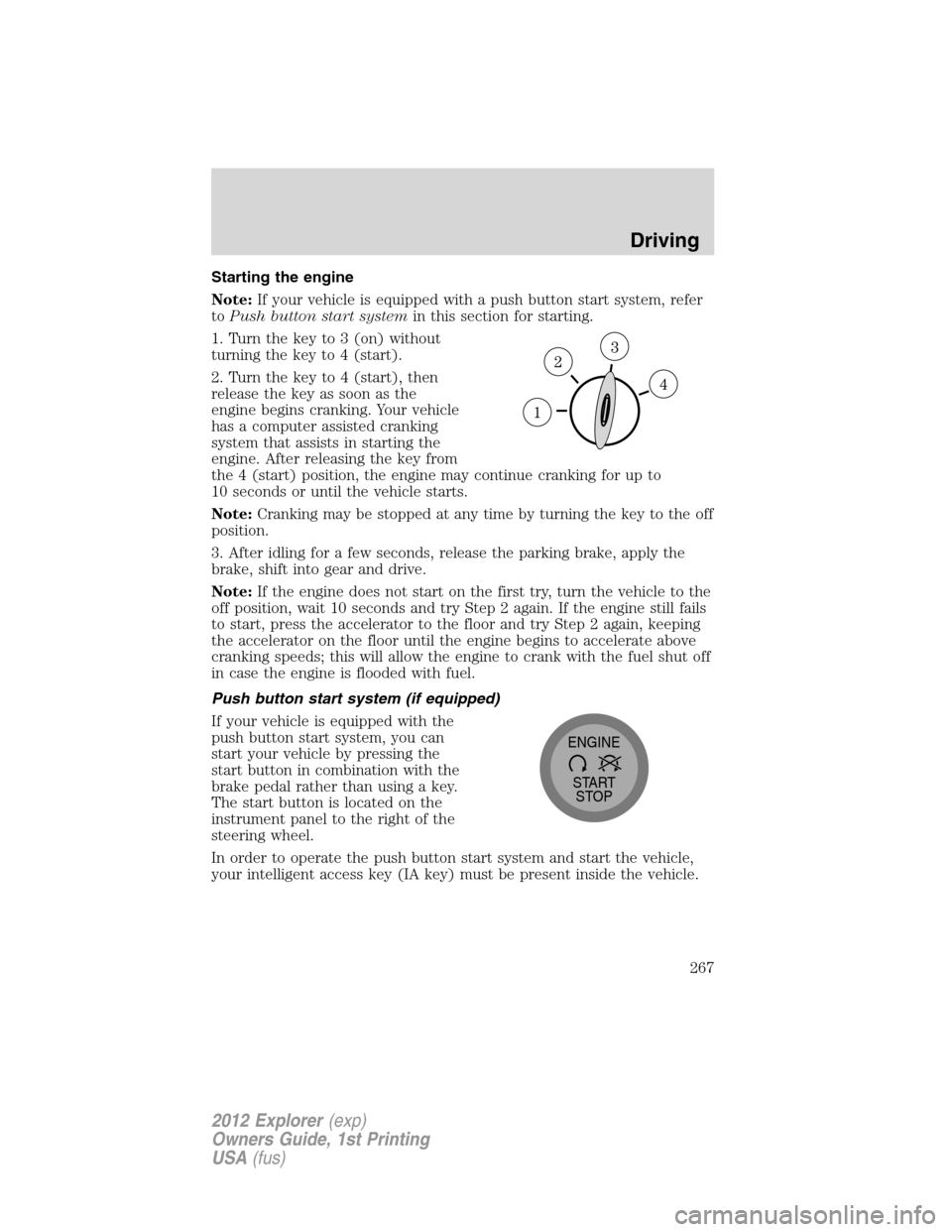
1. Turn the key to 3 (on) without
turning the key to 4 (start).
2. Turn the key to 4 (start), then
release the key as soon as the
engine begins cranking. Your vehicle
has a computer assisted cranking
system that assists in starting the
engine. After releasing the key from
the 4 (start) position, the engine may continue cranking for up to
10 seconds or until the vehicle starts.
Note:Cranking may be stopped at any time by turning the key to the off
position.
3. After idling for a few seconds, release the parking brake, apply the
brake, shift into gear and drive.
Note:If the engine does not start on the first try, turn the vehicle to the
off position, wait 10 seconds and try Step 2 again. If the engine still fails
to start, press the accelerator to the floor and try Step 2 again, keeping
the accelerator on the floor until the engine begins to accelerate above
cranking speeds; this will allow the engine to crank with the fuel shut off
in case the engine is flooded with fuel.
Push button start system (if equipped)
If your vehicle is equipped with the
push button start system, you can
start your vehicle by pressing the
start button in combination with the
brake pedal rather than using a key.
The start button is located on the
instrument panel to the right of the
steering wheel.
In order to operate the push button start system and start the vehicle,
your intelligent access key (IA key) must be present inside the vehicle.
START
STOP ENGINE
Driving
267
2012 Explorer(exp)
Owners Guide, 1st Printing
USA(fus)
Page 273 of 439
Brake assist
The brake assist system provides full braking force during panic braking
situations. It detects a rapid application of the brake pedal and uses the
ABS system to achieve maximum braking pressure. Once a panic brake
application is detected, the system will remain activated as long as the
brake pedal is pressed or ABS is engaged. The system is deactivated by
either releasing the brake pedal or coming to a complete stop. When the
system activates, noise from the ABS pump motor and brake pedal
pulsation may be observed; this is normal.
ABS warning lamp
The ABS lamp in the instrument
cluster momentarily illuminates
when the ignition is turned on. If
the light does not illuminate during
start up, remains on or flashes, the
ABS may be disabled and may need to be serviced.
Even when the ABS is disabled,
normal braking is still effective. If
your BRAKE warning lamp
illuminates with the parking brake
released, have your brake system
serviced immediately.
Brake over accelerator
This vehicle is equipped with a brake over accelerator feature. In the
event the accelerator pedal becomes stuck or entrapped, applying steady
and firm pressure to the brake pedal will both slow the vehicle and
reduce engine power. If you experience this condition, apply the brakes
and bring your vehicle to a safe stop. Turn the engine off, shift to P
(Park) and apply the parking brake, and then inspect the accelerator
pedal for any interferences. If none are found and the condition persists,
have your vehicle towed to the nearest authorized dealer.
ABS
P!
BRAKE
Driving
273
2012 Explorer(exp)
Owners Guide, 1st Printing
USA(fus)
Page 282 of 439
•At speeds above 20 mph (32 km/h): When the HDC button is pressed,
the HDC system will be enabled, the light on the button will be
illuminated, and FOR HILL CNTRL, 20 MPH OR LESS will be
displayed in the message center for several seconds.
•For HDC to enable, the vehicle must be in a drive gear or (R)
Reverse. If the vehicle is in P (Park) or N (Neutral) and the HDC
button is pressed, FOR HILL CNTRL, SELECT GEAR will be displayed
in the message center for several seconds.
Refer toMessage centerin theInstrument Clusterchapter for hill
descent control messages.
STEERING
Your vehicle is equipped with an electric power-assisted steering (EPAS)
system. There is no fluid reservoir to check or fill.
If your vehicle loses electrical power while you are driving (or if the
ignition is turned off), you can steer the vehicle manually, but it takes
more effort. Extreme continuous steering may increase the effort it takes
for you to steer. This occurs to prevent overheating and permanent
damage to your steering system. If this should occur, you will neither
lose the ability to steer the vehicle manually nor will it cause permanent
damage. Typical steering and driving maneuvers will allow the system to
cool and steering assist will return to normal.
The EPS system has diagnostic checks that continuously monitor the
EPS system to ensure proper operation. When a system error is
detected, the following message SERVICE POWER STEERING, SERVICE
POWER STEERING NOW or POWER STEERING ASSIST FAULT may
display in the message center. Refer to theMessage centerin the
Instrument Clusterchapter for more information.
WARNING:The EPS system has diagnostics checks that
continuously monitor the EPS system to ensure proper operation
of the electronic system. When an electronic error is detected, the
message POWER STEERING ASSIST FAULT will be displayed in the
message center. If this happens, stop the vehicle in a safe place, and
turn off the engine. After at least 10 seconds, reset the system by
restarting the engine, and watch the message center for POWER
STEERING ASSIST FAULT. If the message returns, or returns while
driving, take the vehicle to your dealer to have it checked. With the
message displayed, the steering assist is turned off, making the vehicle
harder to steer.
Driving
282
2012 Explorer(exp)
Owners Guide, 1st Printing
USA(fus)
Page 290 of 439
Hill start assist (HSA)
The hill start assist feature makes it easier to pull away when the vehicle
is on a slope without the need to use the parking brake. When the hill
start assist feature is active, the vehicle will remain stationary on the
slope for up to two seconds after you release the brake pedal. During
this time, you have time to move your foot from the brake to the
accelerator pedal and pull away. The brakes are released automatically
once the engine has developed sufficient drive to prevent the vehicle
from rolling down the slope. This is an advantage when pulling away on a
slope; for example from a car park ramp, traffic lights or when reversing
uphill into a parking space.
WARNING:The hill start assist feature does not replace the
parking brake. When you leave the vehicle, always apply the
parking brake and select first or reverse gear.
Using hill start assist
The hill start assist feature is activated automatically when the vehicle is
stopped on a slope greater than five degrees. The hill start assist feature
operates with the vehicle facing downhill if reverse gear is selected. The
hill start assist feature will not operate if the parking brake is activated.
WARNING:You must remain in the vehicle once you have
activated the hill start assist feature.
Activating hill start assist
1. Press the brake pedal to bring the vehicle to a complete standstill.
Keep the brake pedal pressed.
2. If the sensors detect that the vehicle is on a slope, the hill start assist
feature will be activated automatically.
3. When you remove your foot from the brake pedal, the vehicle will
remain on the slope without rolling away for approximately up to two
seconds. This hold time will automatically be extended if you are in the
process of driving off.
4. Drive off in the normal manner. The brakes will be released
automatically.
WARNING:If the engine is revved excessively, or if a
malfunction is detected when the hill start assist feature is
active, the hill start assist feature will be deactivated.
Driving
290
2012 Explorer(exp)
Owners Guide, 1st Printing
USA(fus)
Page 291 of 439
If your vehicle gets stuck in mud or snow
Note:Do not rock the vehicle if the engine is not at normal operating
temperature or damage to the transmission may occur.
Note:Do not rock the vehicle for more than a minute or damage to the
transmission and tires may occur, or the engine may overheat.
If your vehicle gets stuck in mud or snow, it may be rocked out by
shifting between forward and reverse gears, stopping between shifts in a
steady pattern. Press lightly on the accelerator in each gear.
REVERSE SENSING SYSTEM (IF EQUIPPED)
The reverse sensing system (RSS) sounds a tone to warn the driver of
obstacles near the rear bumper when the R (Reverse) gear is selected
and the vehicle is moving at speeds less than 3 mph (5 km/h). The
system is not effective at speeds above 3 mph (5 km/h) and may not
detect certain angular or moving objects.
WARNING:To help avoid personal injury, please read and
understand the limitations of the reverse sensing system as
contained in this section. Reverse sensing is only an aid for some
(generally large and fixed) objects when moving in reverse on a flat
surface at “parking speeds”. Inclement weather may also affect the
function of the RSS; this may include reduced performance or a false
activation.
WARNING:To help avoid personal injury, always use caution
when in R (Reverse) and when using the RSS.
WARNING:This system is not designed to prevent contact with
small or moving objects. The system is designed to provide a
warning to assist the driver in detecting large stationary objects to
avoid damaging the vehicle. The system may not detect smaller
objects, particularly those close to the ground.
WARNING:Certain add-on devices such as large trailer hitches,
bike or surfboard racks and any device that may block the
normal detection zone of the RSS system may create false beeps.
Driving
291
2012 Explorer(exp)
Owners Guide, 1st Printing
USA(fus)