steering FORD EXPLORER 2013 5.G Repair Manual
[x] Cancel search | Manufacturer: FORD, Model Year: 2013, Model line: EXPLORER, Model: FORD EXPLORER 2013 5.GPages: 576, PDF Size: 6.87 MB
Page 486 of 576
Some of the voice commands that are available while viewing this screen
are:
“INTERSECTION”
“Enter first street name”
“Change first street name”
“Enter second street name”
“Change second street name”
“Enter city”
“Change city”
“Enter state”
“Change state”
The dual mode feature is also available when the voice system displays a
list of items to pick from during a voice session, where you would be able
to touch the line item or say “Line 2”. If a command is not understood or
there are multiple options, the system returns a list for you to choose
from.
ENTERTAINMENT
Your system offers many media options. You can access these options
using the touchscreen or voice commands.
Browsing Device Content
When listening to any type of audio, you can browse through other
devices without having to change sources. For example, if you are
currently listening to the radio, you can browse all the artists that are
stored on your USB device.
Press the voice icon on the steering wheel. When prompted, you
can say:
“BROWSE” within Devices
“Browse”1
“Browse
“Browse
“Browse CD track list”
“Browse Sirius channel guide”2
“Browse SD card”
486MyFord Touch™
2013 Explorer(exp)
Owners Guide gf, 1st Printing
USA(fus)
Page 493 of 576
HD Radio™ Technology manufactured under license from iBiquity Digital
Corp. U.S. and foreign patents. HD Radio™ and the HD and HD Radio
logos are proprietary trademarks of iBiquity Digital Corp. Ford Motor
Company and iBiquity Digital Corp. are not responsible for the content
sent using HD Radio technology. Content may be changed, added or
deleted at any time at the station owner’s discretion.
Radio Voice Commands
If you are listening to the radio, press the voice button on the
steering wheel controls. When prompted, say any of the
commands in the following chart.
If you are not listening to the radio, press the voice button and, after the
tone, say “Radio”, then any of the commands in the following chart.
“RADIO”
“<87.9–107.9>” “FM autoset preset <#>”
“<87.9–107.9> HD”
1“FM preset <#>”
“<530–1710>” “FM1”
“AM” “FM 1 preset <#>”
“AM <530–1710>” “FM2”
“AM autoset” “FM 2 preset <#>”
“AM autoset preset <#>” “HD <#>”
1
“AM preset <#>” “Preset <#>”
“Browse”2“Radio off”
“FM” “Radio on”
“FM <87.9–107.9>” “Set PTY”
“FM <87.9-107.9> HD <#>”
1“Tune”3
“FM autoset” “Help”1If available2If you have said, “Browse”, refer toBrowsing device contentearlier
in this section.
3If you have said, “Tune”, refer to the following “Tune” chart.
MyFord Touch™493
2013 Explorer(exp)
Owners Guide gf, 1st Printing
USA(fus)
Page 497 of 576
SIRIUS Satellite Radio Voice Commands
If you are listening to SIRIUS satellite radio, press the voice
button on the steering wheel controls. When prompted, say any
of the commands in the following chart.
If you are not listening to SIRIUS satellite radio, press the voice button
and, after the tone, say “Sirius”, then any of the commands in the
following chart.
“SIRIUS”
“<0–233>” “SAT 3”
“
“Preset <#>” “SAT preset <#>”
“SAT” “Sirius off”
“SAT 1” “Sirius on”
“SAT 1 preset <#>” “Sports game”
1
“SAT 2” “Tune”2
“SAT 2 preset <#>” “Help”1Late availability:If you have said, “Sports game”, refer to the
following “Sports game” chart.
2If you have said, “Tune”, refer to the following “Tune” chart.
“SPORTS GAME”
“Tune to the
“Tune to the
“Tune to the
“Tune to the
“Help”
“TUNE”
“<0–233>”
“
“Preset <#>”
“SAT”
“SAT 1”
“SAT 1 preset <#>”
“SAT 2”
MyFord Touch™497
2013 Explorer(exp)
Owners Guide gf, 1st Printing
USA(fus)
Page 501 of 576
CD
Press the lower left corner of the touchscreen, then select the
CD tab. You can choose from Repeat, Shuffle, Scan and Options.
Options allows you to select additional sound settings:
When you select: You can:
Sound SettingsAdjust Bass, Treble, Midrange, Balance and
Fade, THX Deep Note Demo (if equipped),
DSP (if equipped), Occupancy Mode (if
equipped), and Speed Compensated Volume
settings.
Text Display settingsChoose how you would like the information to
display on-screen.
Compression settingsAccess compression settings.
You can also advance and reverse the current track or current folder (if
applicable).
CD Voice Commands
If you are listening to a CD, press the voice button on the
steering wheel controls. When prompted, say any of the
commands in the following chart.
If you are not listening to a CD, press the voice button and, after the
tone, say “CD”, then any of the commands in the following chart.
“CD”
“Pause” “Repeat off”
“Play” “Repeat track”
“Play next track” “Shuffle”
“Play previous track” “Shuffle CD”*
“Play track <1–512>” “Shuffle folder”*
“Repeat” “Shuffle off”
“Repeat folder”* “Help”
* WMA or MP3 only
MyFord Touch™501
2013 Explorer(exp)
Owners Guide gf, 1st Printing
USA(fus)
Page 505 of 576
To view song information such as Title, Artist, File, Folder, Album, and
Genre, touch the on-screen album art.
You can also pressWhat’s Playing?to hear how the system pronounces
the current band and song. This can be helpful when using voice
commands to make sure the system correctly plays your request.
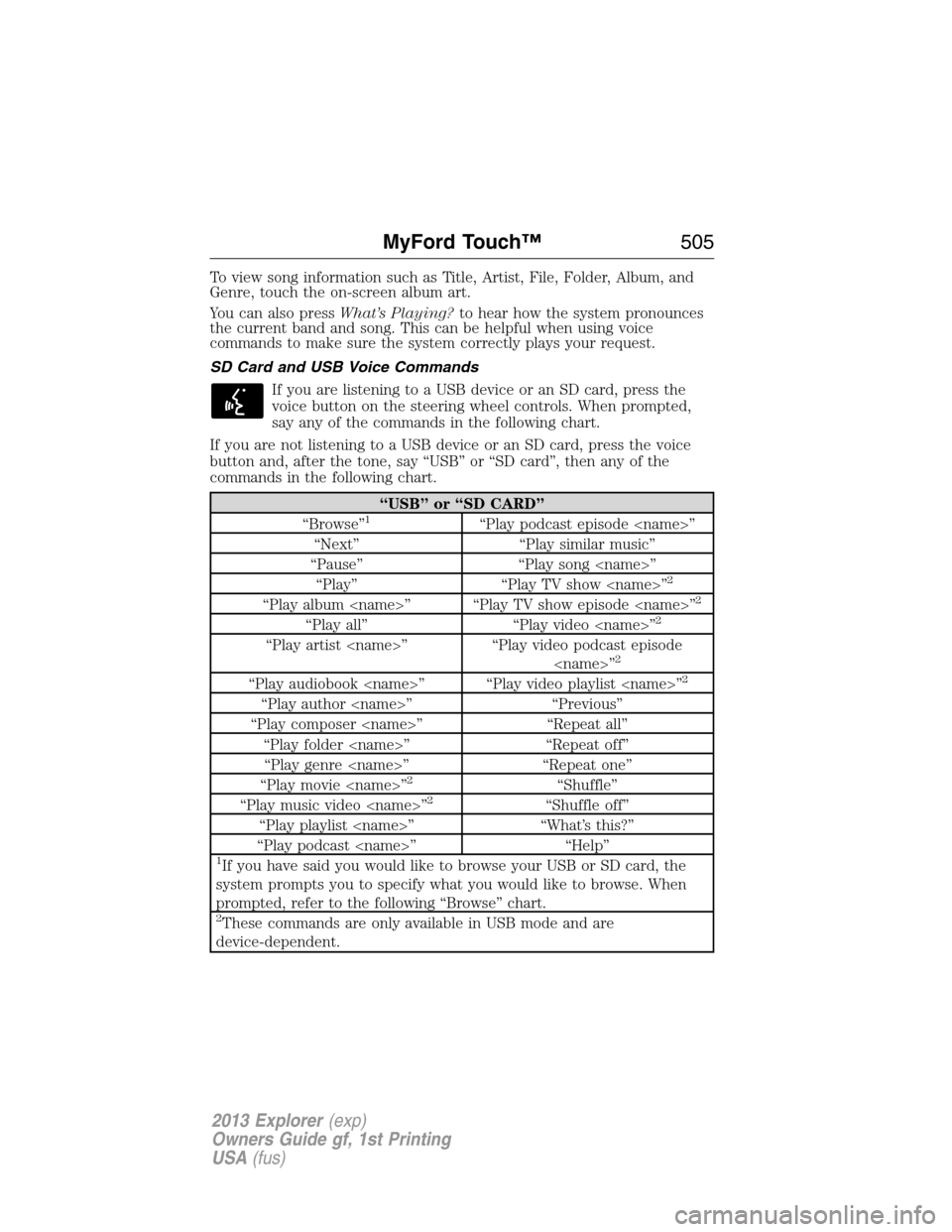
SD Card and USB Voice Commands
If you are listening to a USB device or an SD card, press the
voice button on the steering wheel controls. When prompted,
say any of the commands in the following chart.
If you are not listening to a USB device or an SD card, press the voice
button and, after the tone, say “USB” or “SD card”, then any of the
commands in the following chart.
“USB” or “SD CARD”
“Browse”1“Play podcast episode
“Next” “Play similar music”
“Pause” “Play song
“Play” “Play TV show
2
“Play album
“Play all” “Play video
“Play artist
“Play audiobook
“Play author
“Play composer
“Play folder
“Play genre
“Play movie
2“Shuffle”
“Play music video
“Play playlist
“Play podcast
1If you have said you would like to browse your USB or SD card, the
system prompts you to specify what you would like to browse. When
prompted, refer to the following “Browse” chart.
2These commands are only available in USB mode and are
device-dependent.
MyFord Touch™505
2013 Explorer(exp)
Owners Guide gf, 1st Printing
USA(fus)
Page 506 of 576
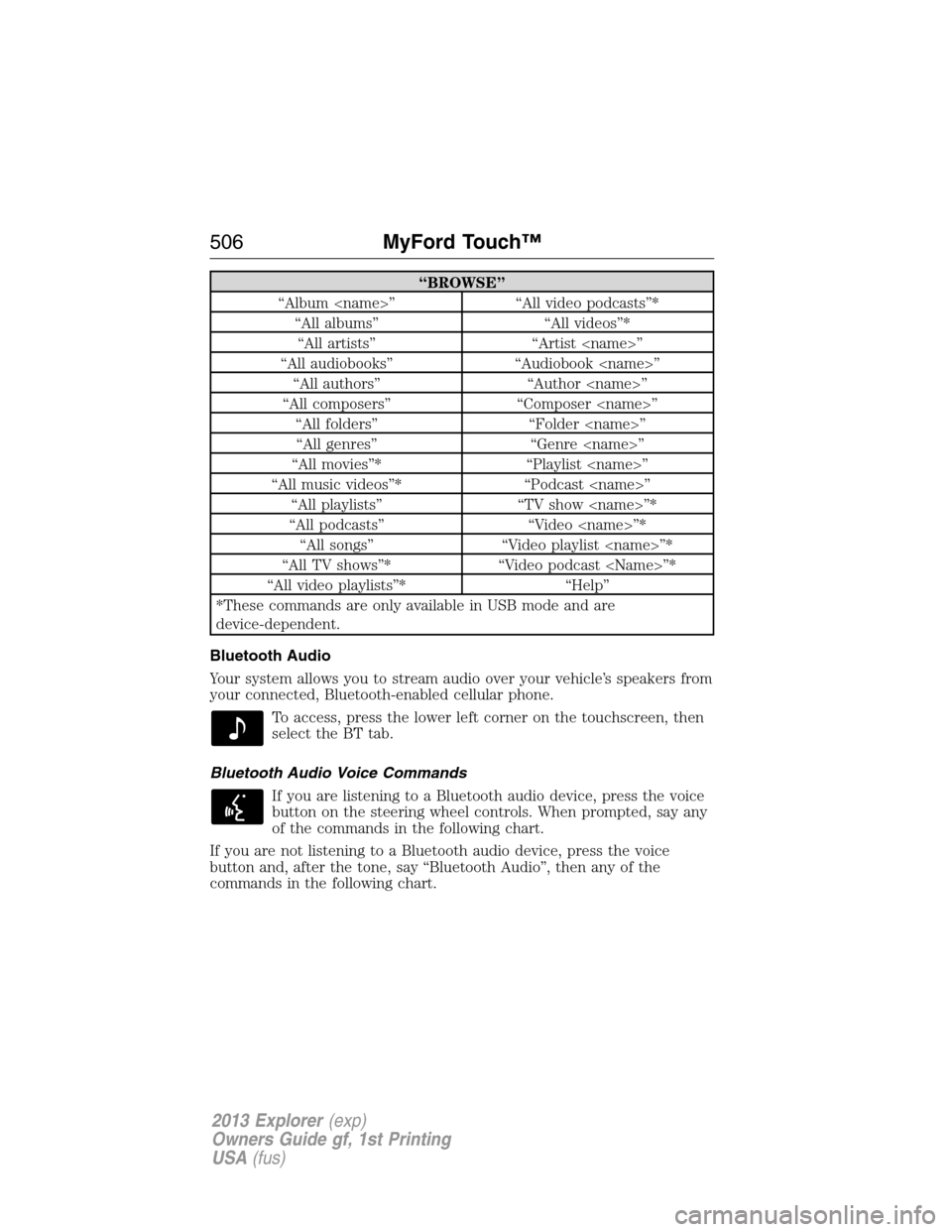
“BROWSE”
“Album
“All albums” “All videos”*
“All artists” “Artist
“All audiobooks” “Audiobook
“All authors” “Author
“All composers” “Composer
“All folders” “Folder
“All genres” “Genre
“All movies”* “Playlist
“All music videos”* “Podcast
“All playlists” “TV show
“All podcasts” “Video
“All songs” “Video playlist
“All TV shows”* “Video podcast
“All video playlists”* “Help”
*These commands are only available in USB mode and are
device-dependent.
Bluetooth Audio
Your system allows you to stream audio over your vehicle’s speakers from
your connected, Bluetooth-enabled cellular phone.
To access, press the lower left corner on the touchscreen, then
select the BT tab.
Bluetooth Audio Voice Commands
If you are listening to a Bluetooth audio device, press the voice
button on the steering wheel controls. When prompted, say any
of the commands in the following chart.
If you are not listening to a Bluetooth audio device, press the voice
button and, after the tone, say “Bluetooth Audio”, then any of the
commands in the following chart.
506MyFord Touch™
2013 Explorer(exp)
Owners Guide gf, 1st Printing
USA(fus)
Page 511 of 576
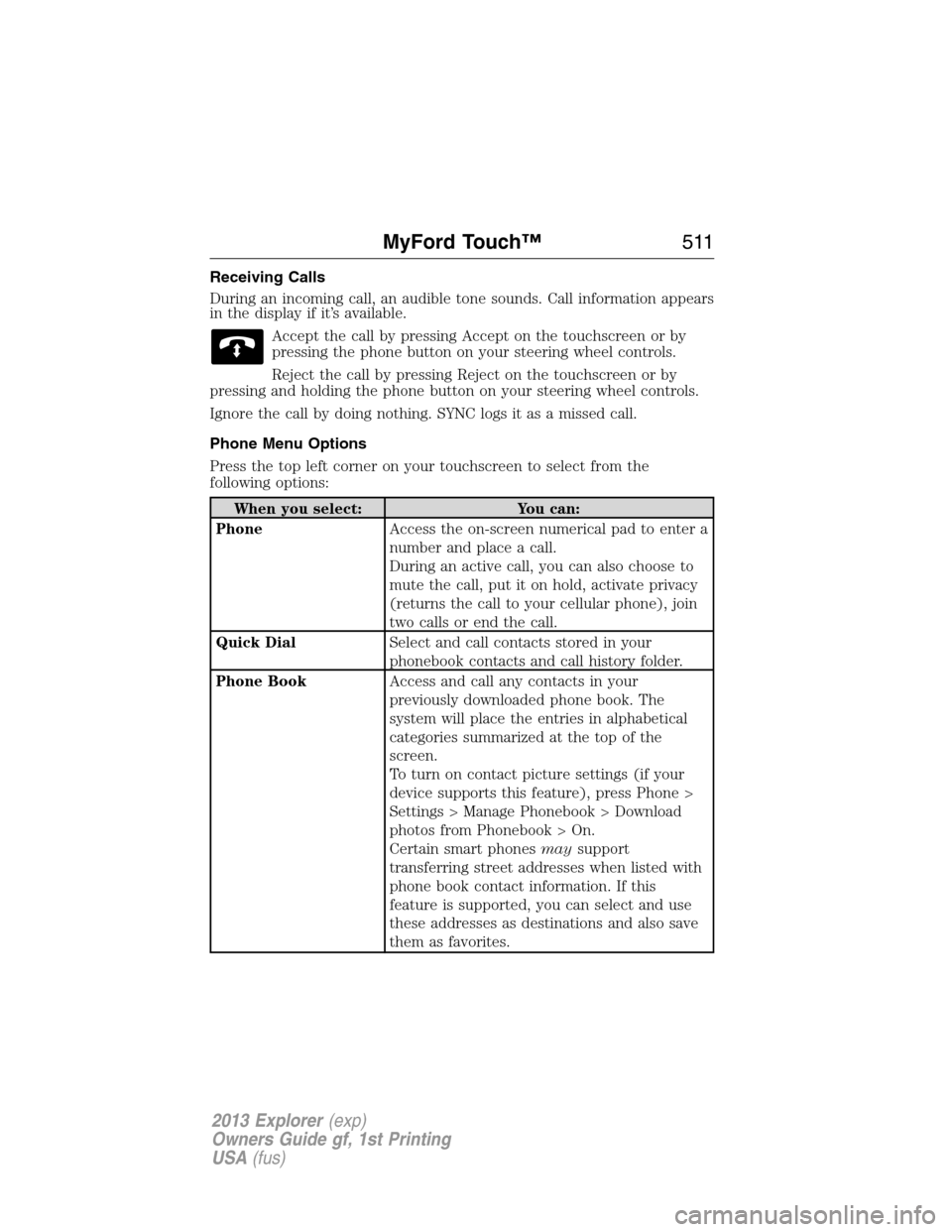
Receiving Calls
During an incoming call, an audible tone sounds. Call information appears
in the display if it’s available.
Accept the call by pressing Accept on the touchscreen or by
pressing the phone button on your steering wheel controls.
Reject the call by pressing Reject on the touchscreen or by
pressing and holding the phone button on your steering wheel controls.
Ignore the call by doing nothing. SYNC logs it as a missed call.
Phone Menu Options
Press the top left corner on your touchscreen to select from the
following options:
When you select: You can:
PhoneAccess the on-screen numerical pad to enter a
number and place a call.
During an active call, you can also choose to
mute the call, put it on hold, activate privacy
(returns the call to your cellular phone), join
two calls or end the call.
Quick DialSelect and call contacts stored in your
phonebook contacts and call history folder.
Phone BookAccess and call any contacts in your
previously downloaded phone book. The
system will place the entries in alphabetical
categories summarized at the top of the
screen.
To turn on contact picture settings (if your
device supports this feature), press Phone >
Settings > Manage Phonebook > Download
photos from Phonebook > On.
Certain smart phonesmaysupport
transferring street addresses when listed with
phone book contact information. If this
feature is supported, you can select and use
these addresses as destinations and also save
them as favorites.
MyFord Touch™511
2013 Explorer(exp)
Owners Guide gf, 1st Printing
USA(fus)
Page 515 of 576
If you select: You can:
Manage PhonebookAccess features such as automatic phonebook
download, re-download your phonebook, add
contacts from your phone as well as delete or
upload your phonebook.
Display call historyDisplay call history.
*If compatible
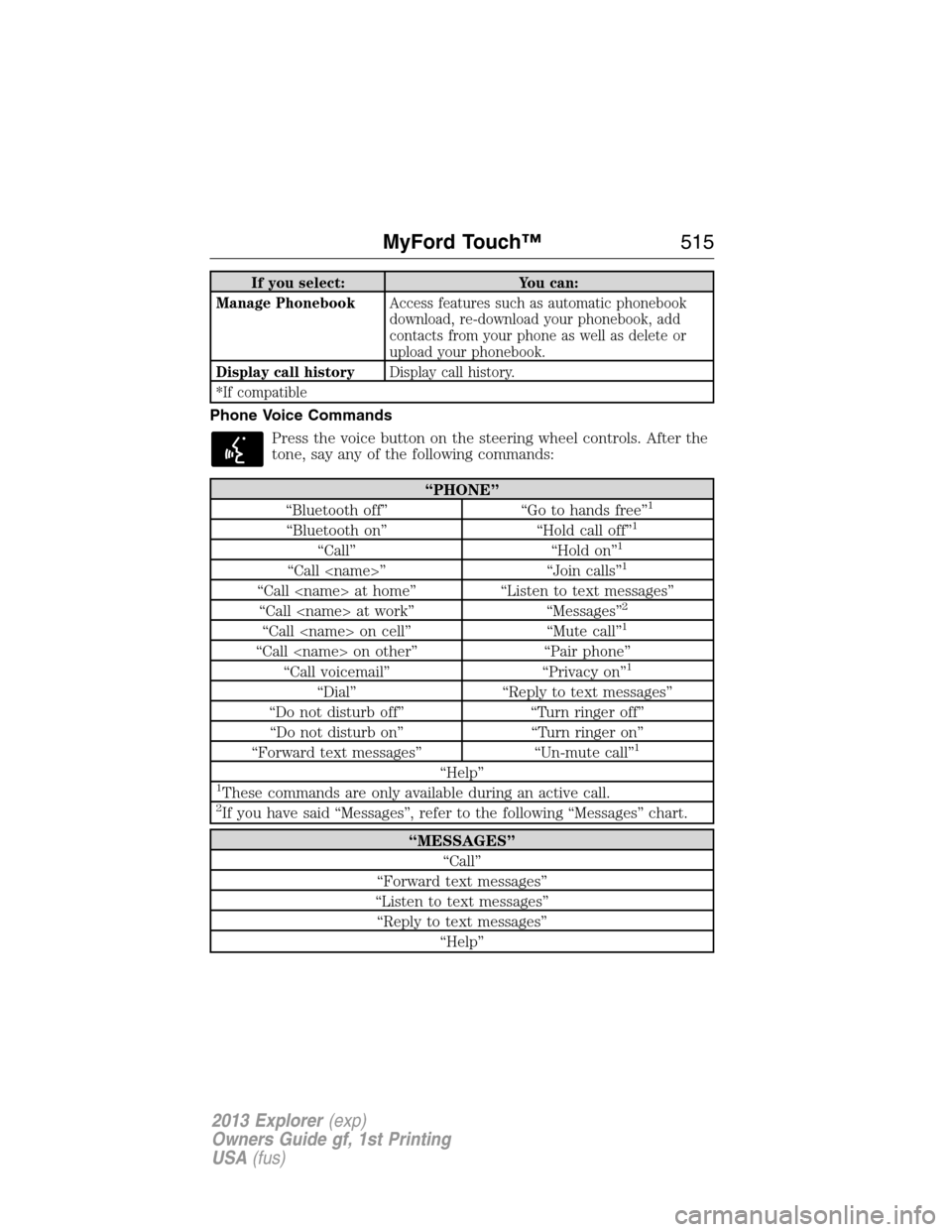
Phone Voice Commands
Press the voice button on the steering wheel controls. After the
tone, say any of the following commands:
“PHONE”
“Bluetooth off” “Go to hands free”1
“Bluetooth on” “Hold call off”1
“Call” “Hold on”1
“Call
“Call
“Call
“Call
“Call
“Call voicemail” “Privacy on”1
“Dial” “Reply to text messages”
“Do not disturb off” “Turn ringer off”
“Do not disturb on” “Turn ringer on”
“Forward text messages” “Un-mute call”
1
“Help”1These commands are only available during an active call.2If you have said “Messages”, refer to the following “Messages” chart.
“MESSAGES”
“Call”
“Forward text messages”
“Listen to text messages”
“Reply to text messages”
“Help”
MyFord Touch™515
2013 Explorer(exp)
Owners Guide gf, 1st Printing
USA(fus)
Page 519 of 576
Disconnecting from SYNC Services
1. Press and hold the phone button on the steering wheel.
2. Say “Goodbye” from the SYNC Services main menu.
TDI options
PersonalizingYou can personalize your services feature to
provide quicker access to your most used or
favorite information. You can save address points
such as, work or home. You can also save
favorite information like sports teams, such as
Detroit Lions, or a news category. To learn more,
log onto www.SYNCMyRide.com.
Push to interruptPress the voice button at any time (while you
are connected to SYNC TDI Services) to
interrupt a voice prompt or an audio clip (such
as a sports report) and say your voice command.
PortableYour subscription is associated with your
Bluetooth-enabled cellular phone number, not
your VIN (Vehicle Identification Number). You
can pair and connect your phone to any vehicle
equipped with Traffic, Directions and
Information and continue enjoying your
personalized services.
SYNC Services Voice Commands
When a route has been downloaded (non-navigation systems),
press the voice button on the steering wheel controls. When
prompted, say any of the following commands:
“SYNC SERVICES”
“Cancel route”
“Navigation voice off”
“Navigation voice on”
“Next turn”
“Route status”
“Route summary”
“Services”
“Update route”
“Help”
MyFord Touch™519
2013 Explorer(exp)
Owners Guide gf, 1st Printing
USA(fus)
Page 524 of 576
Setting 911 Assist On
Press the information button > SYNC Apps. > 911 Assist, then
select ON.
You can also access 911 Assist by:
•Pressing Menu > Settings> Phone > 911 Assist, or
•Pressing Menu > Help > 911 Assist.
To Ensure that 911 Assist Works Properly
•SYNC must be powered and working properly at the time of the
incident and throughout feature activation and use.
•SYNC 911 Assist feature must be set on prior to the incident.
•A Bluetooth-enabled and compatible phone has to be paired and
connected to SYNC.
•A connected Bluetooth-enabled phone must have the ability to make
and maintain an outgoing call at the time of the incident.
•A connected Bluetooth-enabled phone must have adequate network
coverage, battery power and signal strength.
•The vehicle must have battery power and be located in the U.S.,
Canada or in a territory in which 911 is the emergency number.
In the Event of a Crash
Not all crashes deploy an airbag or activate the fuel pump shut-off (which
would activate 911 Assist); however, if 911 Assist is triggered, SYNC tries
to contact emergency services. If a connected phone is damaged or loses
connection to SYNC, SYNC searches for, and tries to connect to, any
available previously paired phone and tries to make the call to 911.
Before making the call:
•SYNC provides a short window of time (about 10 seconds) to cancel
the call. Failure to cancel the call results in SYNC attempting to dial
911.
•SYNC says the following, or a similar message: “SYNC will attempt to
call 911, to cancel the call, press Cancel on your screen or press and
hold the phone button on your steering wheel.”
If the call is not cancelled and a successful call is made, a prerecorded
message is played for the 911 operator, then the occupant(s) in the
vehicle is able to talk with the operator. Be prepared to provide your
name, phone number and location immediately, because not all 911
systems are capable of receiving this information electronically.
524MyFord Touch™
2013 Explorer(exp)
Owners Guide gf, 1st Printing
USA(fus)