fuel FORD EXPLORER 2013 5.G Manual PDF
[x] Cancel search | Manufacturer: FORD, Model Year: 2013, Model line: EXPLORER, Model: FORD EXPLORER 2013 5.GPages: 576, PDF Size: 6.87 MB
Page 523 of 576
Calendar
Press the information button, then select Calendar. You can
view the current calendar by day, week or month.
911 Assist™ (If Equipped)
WARNING:Unless the 911 Assist setting is set on prior to a crash,
the system will not dial for help which could delay response time,
potentially increasing the risk of serious injury or death after a crash.
WARNING:Do not wait for 911 Assist to make an emergency call if
you can do it yourself. Dial emergency services immediately to avoid
delayed response time which could increase the risk of serious injury or
death after a crash. If you do not hear 911 Assist within five seconds of the
crash, the system or phone may be damaged or non-functional.
WARNING:Always place your phone in a secure location in the
vehicle so it does not become a projectile or get damaged in a
collision. Failure to do so may cause serious injury to someone or damage
the phone which could prevent 911 Assist from working properly.
Note:SYNC 911 Assist feature must be set on prior to the incident.
Note:Before setting this feature on, ensure that you read the 911 Assist
privacy notice later in this section for important information.
Note:If 911 Assist is turned on or off by any user, that setting applies
for all paired phones. If 911 Assist is turned off, a voice message plays
and/or a display message/icon comes on when the vehicle is started after
a previously paired phone connects.
Note:Every phone operates differently. While SYNC 911 Assist works
with most cellular phones, some may have trouble using this feature.
If a crash deploys an airbag or activates the fuel pump shut-off, your
SYNC-equipped vehicle may be able to contact emergency services by
dialing 911 through a paired and connected Bluetooth-enabled phone.
For more information about 911 Assist, visit www.SYNCMyRide.com or
www.syncmaroute.ca.
•For information on airbag deployment, refer to theSupplementary
Restraints Systemchapter.
•For information on the fuel pump shut-off, refer to theRoadside
Emergencieschapter.
MyFord Touch™523
2013 Explorer(exp)
Owners Guide gf, 1st Printing
USA(fus)
Page 524 of 576
Setting 911 Assist On
Press the information button > SYNC Apps. > 911 Assist, then
select ON.
You can also access 911 Assist by:
•Pressing Menu > Settings> Phone > 911 Assist, or
•Pressing Menu > Help > 911 Assist.
To Ensure that 911 Assist Works Properly
•SYNC must be powered and working properly at the time of the
incident and throughout feature activation and use.
•SYNC 911 Assist feature must be set on prior to the incident.
•A Bluetooth-enabled and compatible phone has to be paired and
connected to SYNC.
•A connected Bluetooth-enabled phone must have the ability to make
and maintain an outgoing call at the time of the incident.
•A connected Bluetooth-enabled phone must have adequate network
coverage, battery power and signal strength.
•The vehicle must have battery power and be located in the U.S.,
Canada or in a territory in which 911 is the emergency number.
In the Event of a Crash
Not all crashes deploy an airbag or activate the fuel pump shut-off (which
would activate 911 Assist); however, if 911 Assist is triggered, SYNC tries
to contact emergency services. If a connected phone is damaged or loses
connection to SYNC, SYNC searches for, and tries to connect to, any
available previously paired phone and tries to make the call to 911.
Before making the call:
•SYNC provides a short window of time (about 10 seconds) to cancel
the call. Failure to cancel the call results in SYNC attempting to dial
911.
•SYNC says the following, or a similar message: “SYNC will attempt to
call 911, to cancel the call, press Cancel on your screen or press and
hold the phone button on your steering wheel.”
If the call is not cancelled and a successful call is made, a prerecorded
message is played for the 911 operator, then the occupant(s) in the
vehicle is able to talk with the operator. Be prepared to provide your
name, phone number and location immediately, because not all 911
systems are capable of receiving this information electronically.
524MyFord Touch™
2013 Explorer(exp)
Owners Guide gf, 1st Printing
USA(fus)
Page 525 of 576
911 Assist May Not Work If
•Your cellular phone or 911 Assist™ hardware was damaged in a crash.
•The vehicle’s battery or SYNC system has no power.
•The phone(s) paired and connected to the system was thrown from
the vehicle.
911 Assist Privacy Notice
Once 911 Assist is set on, it may disclose to emergency services that the
vehicle has been in a crash involving the deployment of an airbag or
activation of the fuel pump shut-off. Certain versions or updates to 911
Assist may also be capable of electronically or verbally disclosing to 911
operators the vehicle location, and/or other details about the vehicle or
crash to assist 911 operators to provide the most appropriate emergency
services. If you do not want to disclose this information, do not turn the
feature on.
Vehicle Health Report (If Equipped, U.S. Only)
WARNING:Always follow scheduled maintenance instructions,
regularly inspect your vehicle, and seek repair for any damage or
problem you suspect. Vehicle Health Report supplements, but cannot
replace, normal maintenance and vehicle inspection. Vehicle Health
Report only monitors certain systems that are electronically monitored
by the vehicle and will not monitor or report the status of any other
system, (i.e., brake lining wear). Failure to perform scheduled
maintenance and regularly inspect your vehicle may result in vehicle
damage and serious injury.
Note:Your Vehicle Health Report feature requires activation prior to use.
Visit www.SYNCMyRide.com to register. There is no fee or subscription
associated with Vehicle Health Report, but you must register to use this
feature.
Note:This feature may not function properly if you have enabled caller
ID blocking on your mobile phone. Before running a report, review
Vehicle Health Report Privacy Notice.
Note:In order to allow a break-in period for your vehicle, you may not
be able to create a Vehicle Health Report until your vehicle odometer has
reached 200 miles.
Note:Cellular phone and SMS charges may apply when making a report.
MyFord Touch™525
2013 Explorer(exp)
Owners Guide gf, 1st Printing
USA(fus)
Page 540 of 576

Setting a Destination
Press the green corner of your touchscreen, then the Dest button when
it appears. Choose any of the following:
Destination selections
My Home Street Address
Favorites Intersection
Previous Destinations City Center
Point of Interest (POI) Map
Emergency Previous Starting Point
Freeway Entrance/Exit Latitude/Longitude
1. Enter the necessary information into the highlighted text fields (in
any order). For address destination entry, the Go! button appears
once all the necessary information has been entered. Pressing the Go!
button makes the address location to appear on the map. If you
choose Previous Destination, the last 20 destinations you have
selected appear.
2. Select Set as Dest to make this your destination. You can also choose
to set this as a waypoint (have the system route to this point on the
way to your current destination) or save it as a favorite. Any Avoid
Areas selections are also considered in route calculation.
3. Choose from up to three different types of routes, then select Start
Route.
•Fastest: Uses the fastest moving roads possible.
•Shortest: Uses the shortest distance possible.
•Eco (EcoRoute): Uses the most fuel efficient route.
You can cancel the route or have the system demo the route for you.
Select Route Prefs to set route preferences like avoiding freeways, toll
roads, ferries and car trains as well as to use or not use HOV lanes.
(HOV lanes are High Occupancy Vehicle Lanes also known as carpool or
diamond lanes. These lanes are reserved for people who ride in buses,
vanpools or carpools.)
Note:If Start Route button is not pressed and the vehicle is driven on a
recognized road, the system defaults to the fastest route option and
begins guidance.
During route guidance, the “talking bubble” icon that appears in the
upper right navigation corner (green bar) can be pressed if the user
wants the system to repeat a route guidance instruction. Instructions
decrease with each press.
540MyFord Touch™
2013 Explorer(exp)
Owners Guide gf, 1st Printing
USA(fus)
Page 571 of 576
D
Defrost ....................... 158, 160, 162
rear window ............................ 166
Dipstick
automatic transmission
fluid .................................. 333–334
engine oil ................................. 327
Display settings ......................... 527
Driver alert ................................ 262
Driving under special
conditions .................. 225, 229, 231
sand ......................................... 230
snow and ice ........................... 232
through water ................. 231, 297
Dual automatic temperature
control (DATC) ................. 160, 162
E
Electronic message center ....... 122
Electronic stability control ...... 238
Emergencies, roadside
jump-starting .......................... 302
running out of fuel ................. 213
Emergency brake
(see Parking brake) .................. 235
Emission control system .......... 217
End user license agreement .... 551
Engine ........................................ 392
cleaning ................................... 352
fail-safe cooling ....................... 332
idle speed control ................... 337
lubrication specifications ....... 393
refill capacities ........................ 393
service points .................. 325–326
Engine block heater ................. 208Engine oil
checking and adding .............. 327
dipstick .................................... 327
filter, specifications ................ 397
refill capacities ........................ 393
specifications .......................... 393
Event data recording .................. 12
Exhaust fumes .......................... 208
F
Fail safe cooling ........................ 332
Fleet MyKey programming ........ 69
Flexible Fuel Vehicle
(FFV) ......................................... 210
Floor mats ................................. 298
Fluid capacities ......................... 393
Fuel
cap ........................................... 215
capacity ................................... 393
choosing the right fuel ........... 211
filler funnel ............................. 213
filling your vehicle with fuel .. 215
filter, specifications ........ 336, 397
fuel pump shut-off .................. 302
octane rating ........................... 392
running out of fuel ................. 213
safety information relating to
automotive fuels ..................... 210
Fuel and distance computer .... 125
outside temperature
indicator .................................. 125
to empty indicator .................. 125
trip distance ............................ 125
trip/reset button ..................... 125
Fuel - flex fuel vehicle
(FFV) ................................. 210–211
Fuses .......................... 313–314, 319
Index571
2013 Explorer(exp)
Owners Guide gf, 1st Printing
USA(fus)
Page 572 of 576
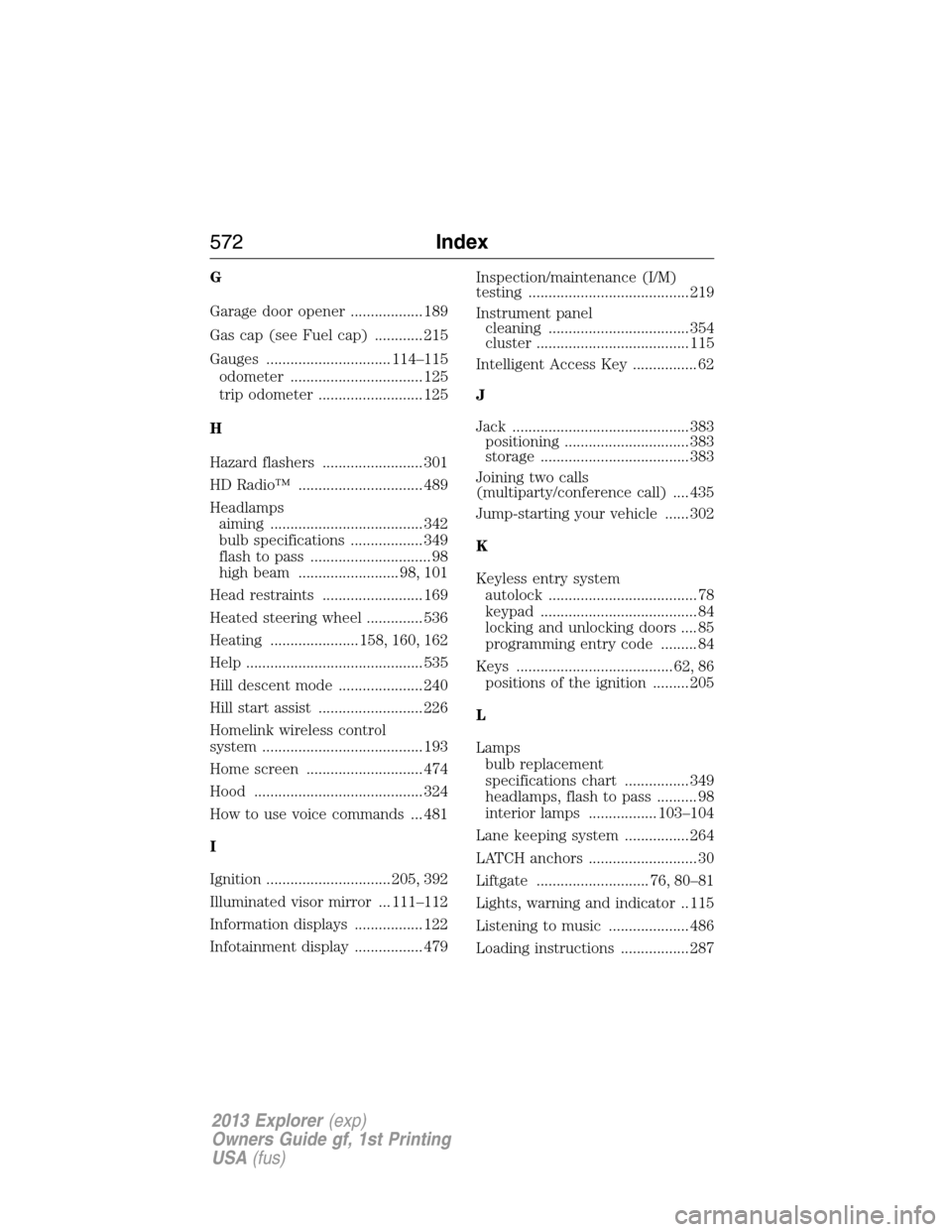
G
Garage door opener .................. 189
Gas cap (see Fuel cap) ............ 215
Gauges ............................... 114–115
odometer ................................. 125
trip odometer .......................... 125
H
Hazard flashers ......................... 301
HD Radio™ ............................... 489
Headlamps
aiming ...................................... 342
bulb specifications .................. 349
flash to pass .............................. 98
high beam ......................... 98, 101
Head restraints ......................... 169
Heated steering wheel .............. 536
Heating ...................... 158, 160, 162
Help ............................................ 535
Hill descent mode ..................... 240
Hill start assist .......................... 226
Homelink wireless control
system ........................................ 193
Home screen ............................. 474
Hood .......................................... 324
How to use voice commands ... 481
I
Ignition ............................... 205, 392
Illuminated visor mirror ... 111–112
Information displays ................. 122
Infotainment display ................. 479Inspection/maintenance (I/M)
testing ........................................ 219
Instrument panel
cleaning ................................... 354
cluster ...................................... 115
Intelligent Access Key ................ 62
J
Jack ............................................ 383
positioning ............................... 383
storage ..................................... 383
Joining two calls
(multiparty/conference call) .... 435
Jump-starting your vehicle ...... 302
K
Keyless entry system
autolock ..................................... 78
keypad ....................................... 84
locking and unlocking doors .... 85
programming entry code ......... 84
Keys ....................................... 62, 86
positions of the ignition ......... 205
L
Lamps
bulb replacement
specifications chart ................ 349
headlamps, flash to pass .......... 98
interior lamps ................. 103–104
Lane keeping system ................ 264
LATCH anchors ........................... 30
Liftgate ............................ 76, 80–81
Lights, warning and indicator .. 115
Listening to music .................... 486
Loading instructions ................. 287
572Index
2013 Explorer(exp)
Owners Guide gf, 1st Printing
USA(fus)