wheel FORD EXPLORER 2014 5.G Owners Manual
[x] Cancel search | Manufacturer: FORD, Model Year: 2014, Model line: EXPLORER, Model: FORD EXPLORER 2014 5.GPages: 586, PDF Size: 9.07 MB
Page 379 of 586
The usage of a full-size dissimilar spare tire and wheel assembly can lead
to impairment of the following:
•Handling, stability and braking performance
•Comfort and noise
•Ground clearance and parking at curbs
•Winter weather driving capability
•Wet weather driving capability
•All-wheel driving capability (if applicable)
•Load leveling adjustment (if applicable)
When driving with the full-size dissimilar spare tire and wheel assembly,
additional caution should be given to:
•towing a trailer.
•driving vehicles equipped with a camper body.
•driving vehicles with a load on the cargo rack.
Drive cautiously when using a full-size dissimilar spare tire and wheel,
and seek service as soon as possible.
Tire Change Procedure
WARNING:When one of the front wheels is off the ground, the
transmission alone will not prevent the vehicle from moving or
slipping off the jack, even if the transmission selector lever is in
positionP.
WARNING:To help prevent the vehicle from moving when you
change a tire, be sure to place the transmission selector lever in
positionP,set the parking brake and block (in both directions) the
wheel that is diagonally opposite (other side and end of the vehicle) to
the tire being changed.
WARNING:Never get underneath a vehicle that is supported
only by a jack. If the vehicle slips off the jack, you or someone
else could be seriously injured.
378Wheels and Tires
2014 Explorer(exp)
Owners Guide gf, 1st Printing, April 2013
USA(fus)
Page 380 of 586
WARNING:Do not attempt to change a tire on the side of the
vehicle close to moving traffic. Pull far enough off the road to
avoid the danger of being hit when operating the jack or changing the
wheel.
WARNING:Always use the jack provided as original equipment
with your vehicle. If using a jack other than the one provided as
original equipment with your vehicle, make sure the jack capacity is
adequate for the vehicle weight, including any vehicle cargo or
modifications.
Note:Passengers should not remain in the vehicle when the vehicle is
being jacked.
Note:If the third-row seat is stowed in the floor, you will need to
unstow it (raised position) to access the spare tire and jack. SeeRear
Seatsin theSeatschapter for this procedure.
1. Park on a level surface, set the parking brake and activate the hazard
flashers.
2. Place the transmission selector lever in positionPand turn the engine
off.
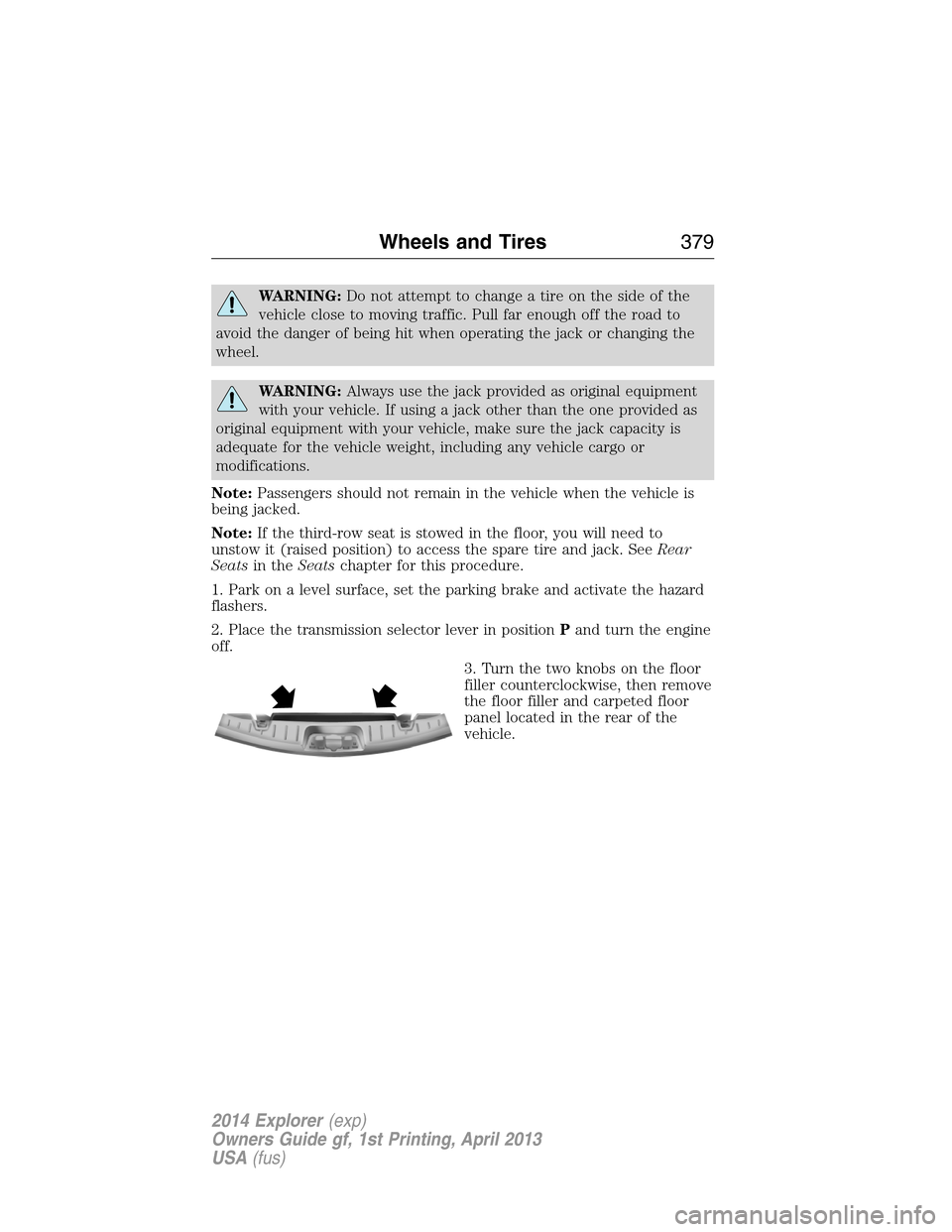
3. Turn the two knobs on the floor
filler counterclockwise, then remove
the floor filler and carpeted floor
panel located in the rear of the
vehicle.
Wheels and Tires379
2014 Explorer(exp)
Owners Guide gf, 1st Printing, April 2013
USA(fus)
Page 381 of 586
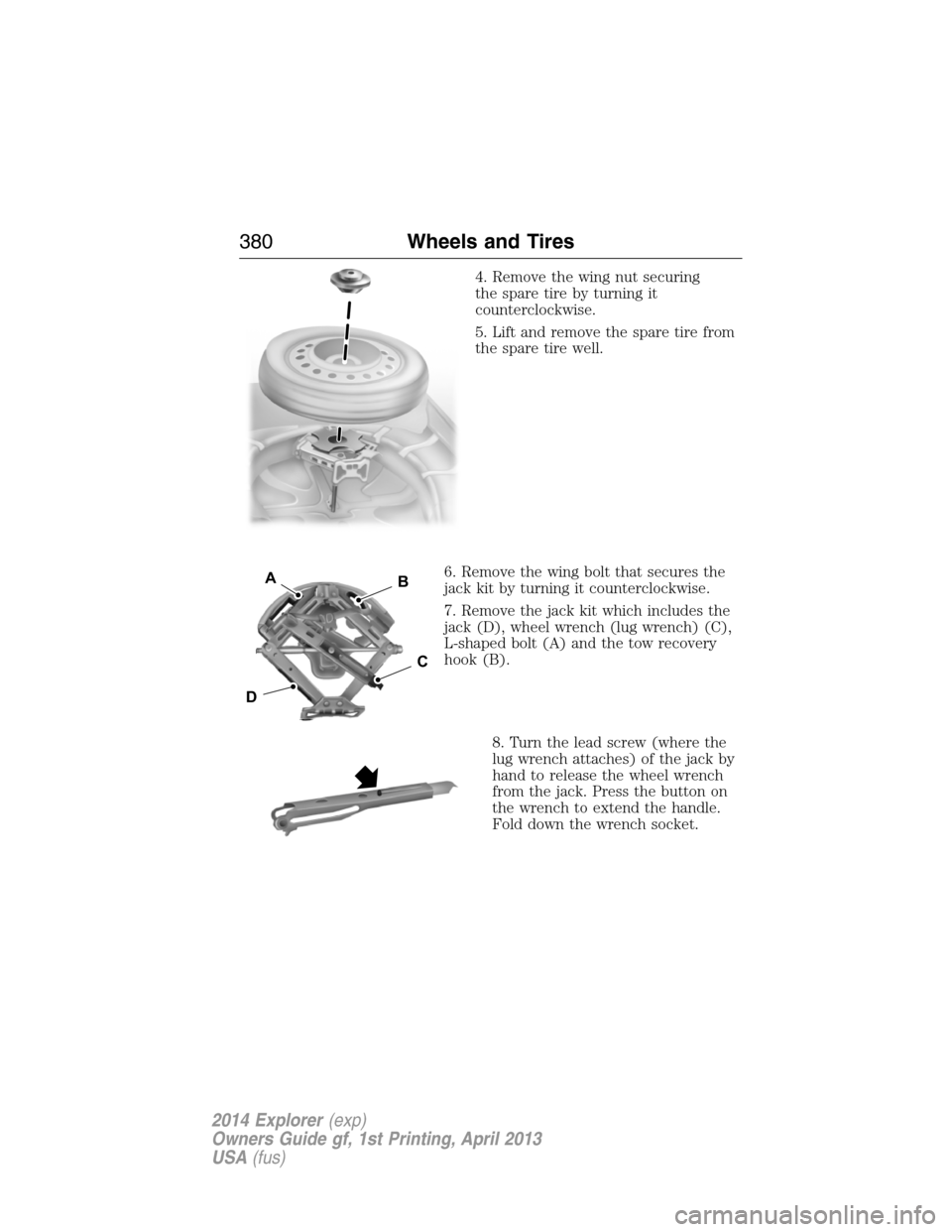
4. Remove the wing nut securing
the spare tire by turning it
counterclockwise.
5. Lift and remove the spare tire from
the spare tire well.
6. Remove the wing bolt that secures the
jack kit by turning it counterclockwise.
7. Remove the jack kit which includes the
jack (D), wheel wrench (lug wrench) (C),
L-shaped bolt (A) and the tow recovery
hook (B).
8. Turn the lead screw (where the
lug wrench attaches) of the jack by
hand to release the wheel wrench
from the jack. Press the button on
the wrench to extend the handle.
Fold down the wrench socket.
D
B
C
A
380Wheels and Tires
2014 Explorer(exp)
Owners Guide gf, 1st Printing, April 2013
USA(fus)
Page 382 of 586
Vehicle Jacking
1. Block the diagonally opposite
wheel.
2. Loosen each wheel lug nut
one-half turn counterclockwise but
do not remove them until the wheel
is raised off the ground.
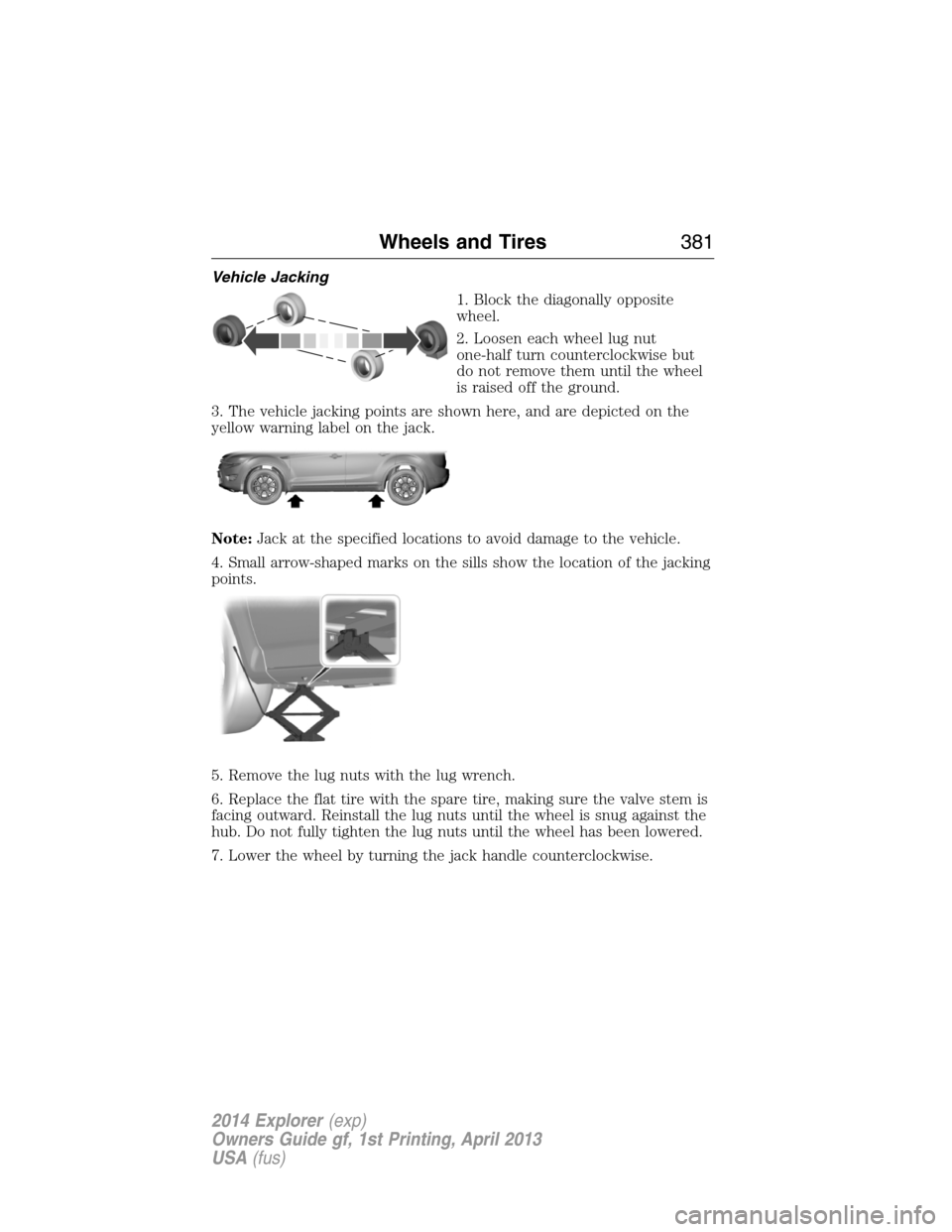
3. The vehicle jacking points are shown here, and are depicted on the
yellow warning label on the jack.
Note:Jack at the specified locations to avoid damage to the vehicle.
4. Small arrow-shaped marks on the sills show the location of the jacking
points.
5. Remove the lug nuts with the lug wrench.
6. Replace the flat tire with the spare tire, making sure the valve stem is
facing outward. Reinstall the lug nuts until the wheel is snug against the
hub. Do not fully tighten the lug nuts until the wheel has been lowered.
7. Lower the wheel by turning the jack handle counterclockwise.
Wheels and Tires381
2014 Explorer(exp)
Owners Guide gf, 1st Printing, April 2013
USA(fus)
Page 383 of 586
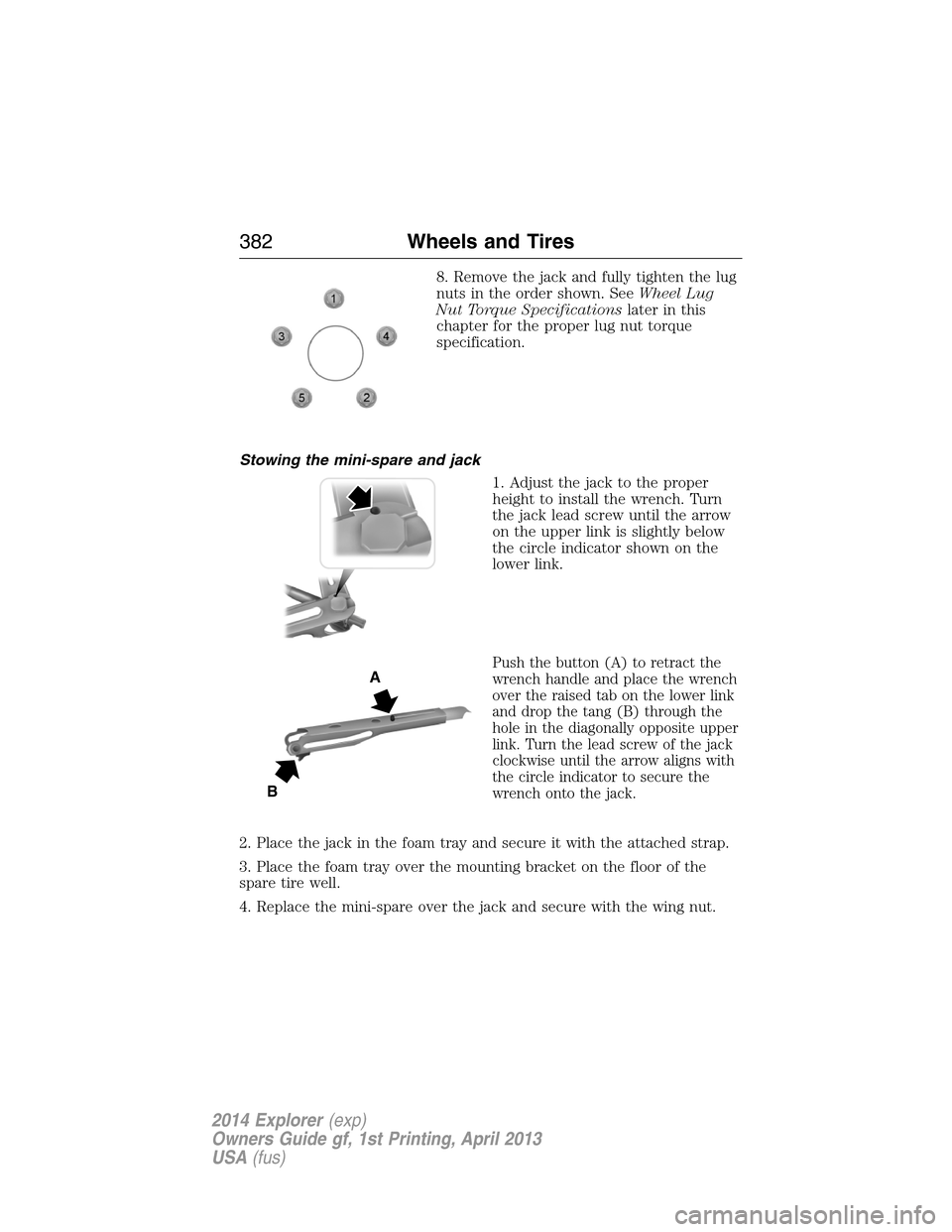
8. Remove the jack and fully tighten the lug
nuts in the order shown. SeeWheel Lug
Nut Torque Specificationslater in this
chapter for the proper lug nut torque
specification.
Stowing the mini-spare and jack
1. Adjust the jack to the proper
height to install the wrench. Turn
the jack lead screw until the arrow
on the upper link is slightly below
the circle indicator shown on the
lower link.
Push the button (A) to retract the
wrench handle and place the wrench
over the raised tab on the lower link
and drop the tang (B) through the
hole in the diagonally opposite upper
link. Turn the lead screw of the jack
clockwise until the arrow aligns with
the circle indicator to secure the
wrench onto the jack.
2. Place the jack in the foam tray and secure it with the attached strap.
3. Place the foam tray over the mounting bracket on the floor of the
spare tire well.
4. Replace the mini-spare over the jack and secure with the wing nut.
A
B
382Wheels and Tires
2014 Explorer(exp)
Owners Guide gf, 1st Printing, April 2013
USA(fus)
Page 384 of 586
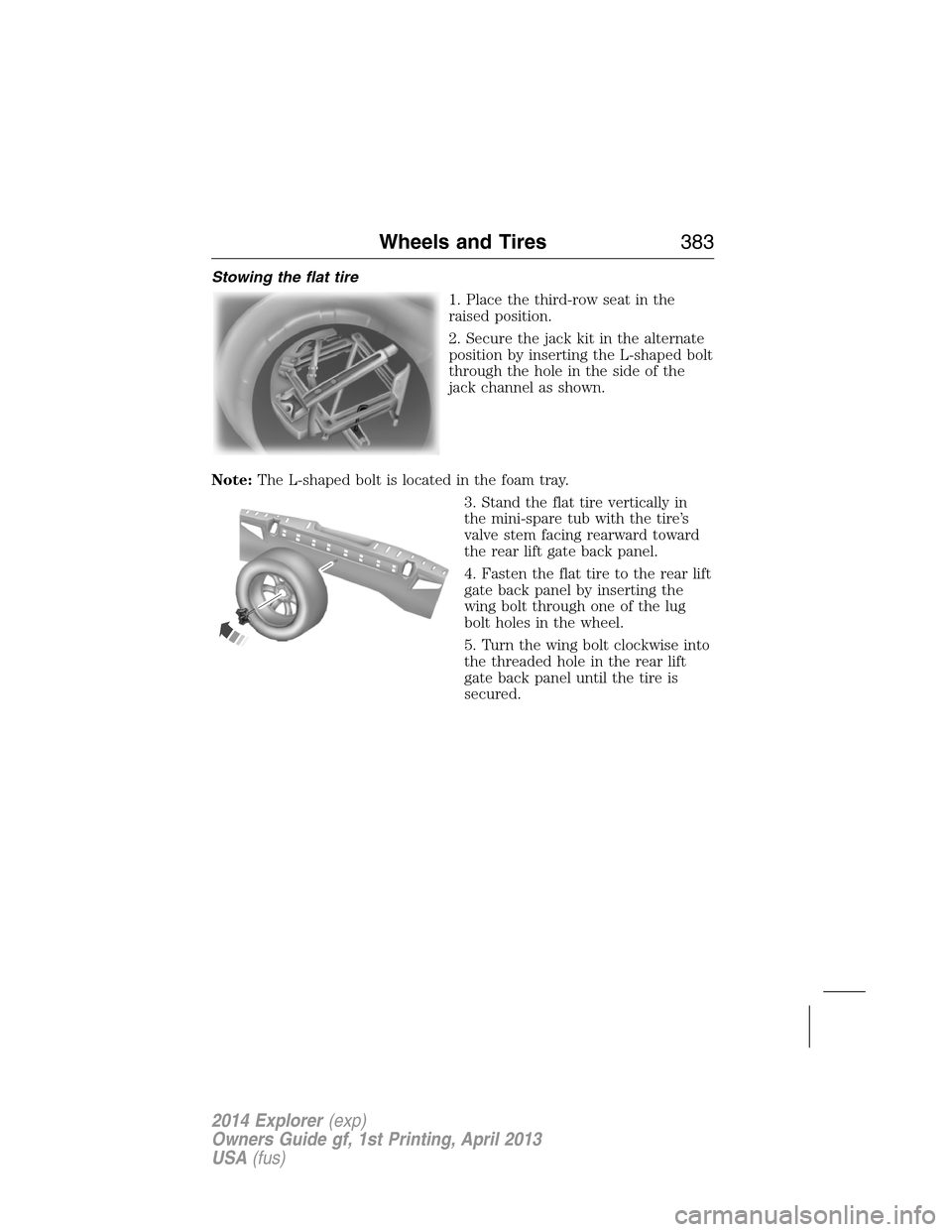
Stowing the flat tire
1. Place the third-row seat in the
raised position.
2. Secure the jack kit in the alternate
position by inserting the L-shaped bolt
through the hole in the side of the
jack channel as shown.
Note:The L-shaped bolt is located in the foam tray.
3. Stand the flat tire vertically in
the mini-spare tub with the tire’s
valve stem facing rearward toward
the rear lift gate back panel.
4. Fasten the flat tire to the rear lift
gate back panel by inserting the
wing bolt through one of the lug
bolt holes in the wheel.
5. Turn the wing bolt clockwise into
the threaded hole in the rear lift
gate back panel until the tire is
secured.
Wheels and Tires383
2014 Explorer(exp)
Owners Guide gf, 1st Printing, April 2013
USA(fus)
Page 385 of 586
TECHNICAL SPECIFICATIONS
Wheel Lug Nut Torque Specifications
WARNING:When a wheel is installed, always remove any
corrosion, dirt or foreign materials present on the mounting
surfaces of the wheel or the surface of the wheel hub, brake drum or
brake disc that contacts the wheel. Make sure that any fasteners that
attach the rotor to the hub are secured so they do not interfere with
the mounting surfaces of the wheel. Installing wheels without correct
metal-to-metal contact at the wheel mounting surfaces can cause the
wheel nuts to loosen and the wheel to come off while your vehicle is in
motion, resulting in loss of control.
Retighten the lug nuts to the specified torque within 100 miles
(160 kilometers) after any wheel disturbance (such as rotation, flat tire,
wheel removal).
Lug nut socket
size/Bolt sizeWheel lug nut torque*
ft-lb N•m
12x 20 100 135
* Torque specifications are for nut and bolt threads free of dirt and
rust. Use only Ford recommended replacement fasteners.
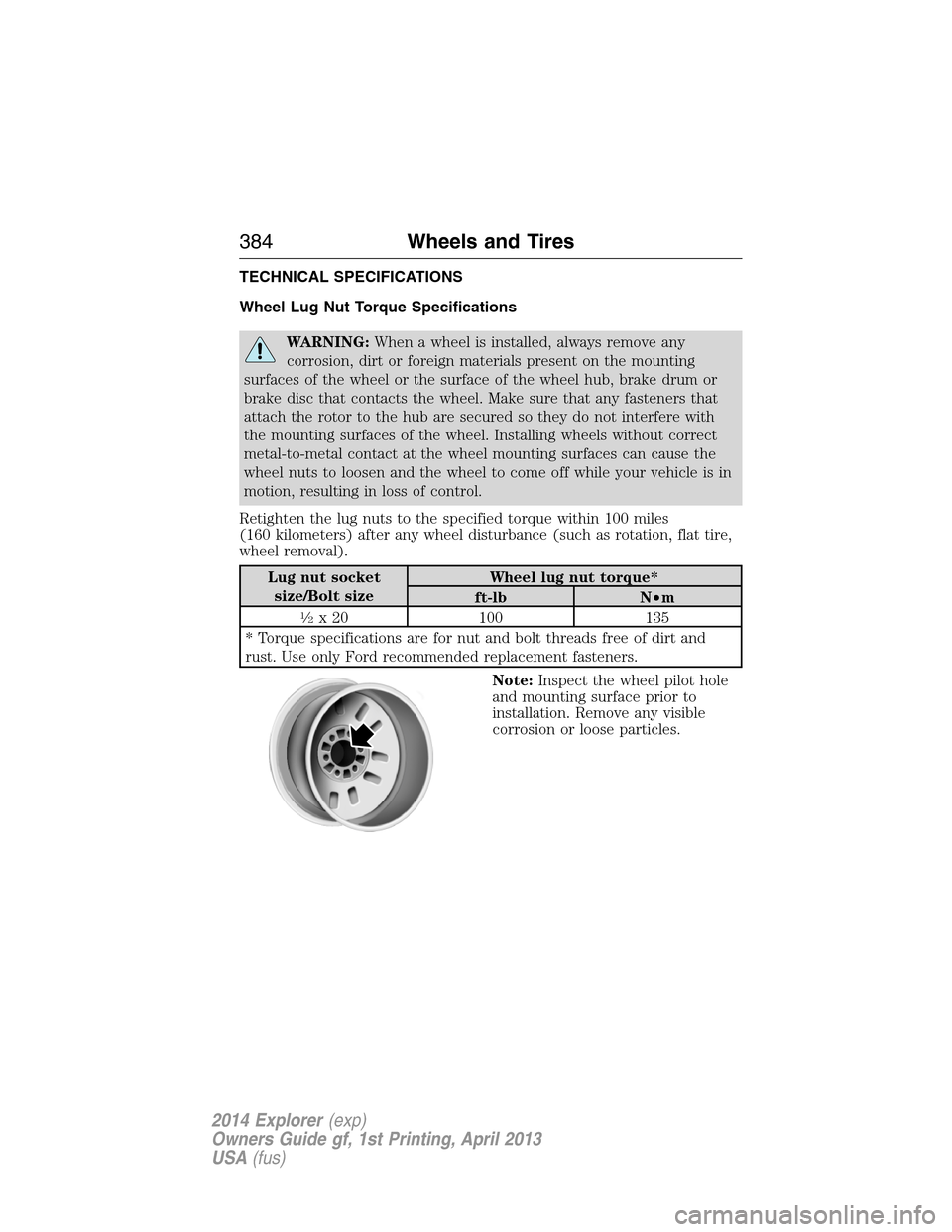
Note:Inspect the wheel pilot hole
and mounting surface prior to
installation. Remove any visible
corrosion or loose particles.
384Wheels and Tires
2014 Explorer(exp)
Owners Guide gf, 1st Printing, April 2013
USA(fus)
Page 388 of 586
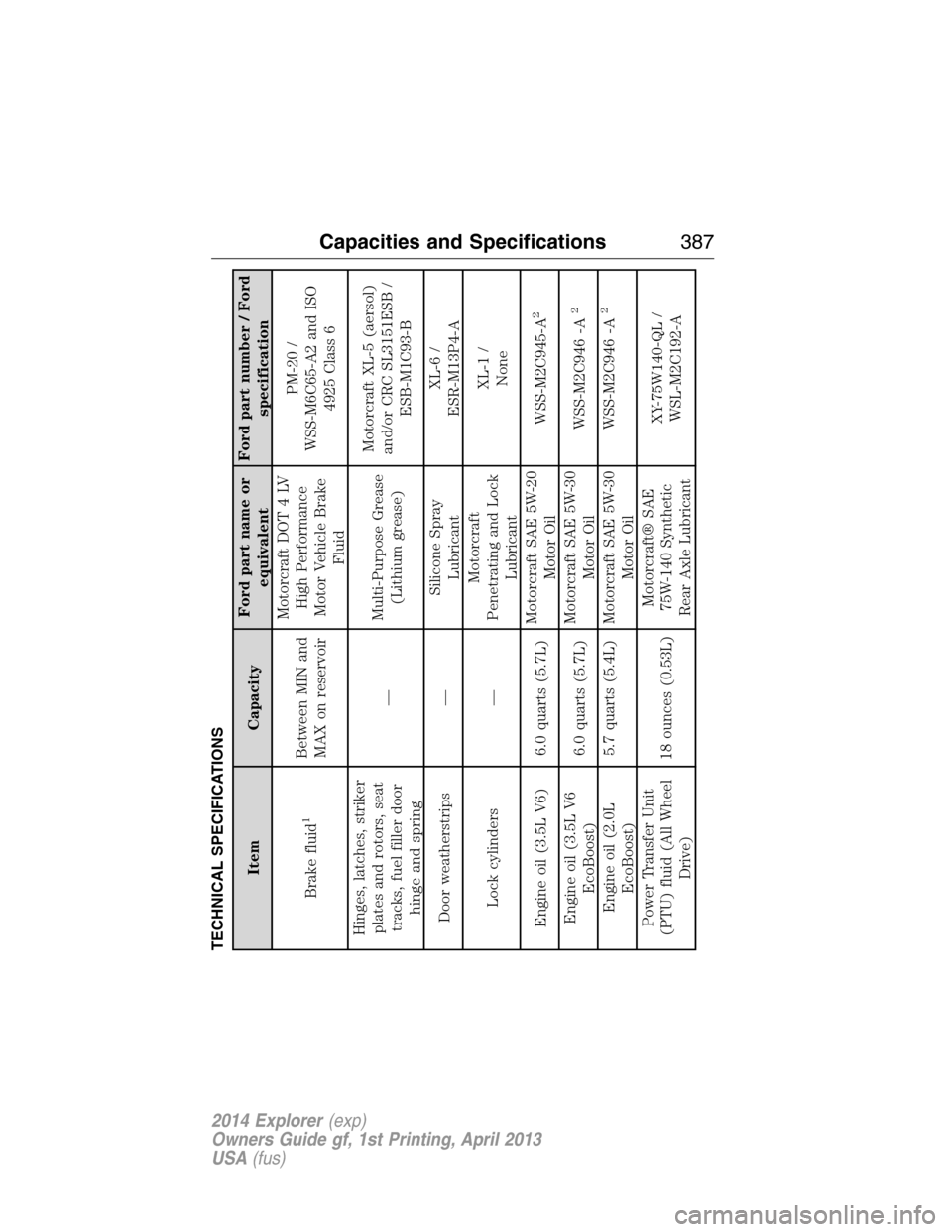
TECHNICAL SPECIFICATIONS
Item CapacityFord part name or
equivalentFord part number / Ford
specification
Brake fluid
1
Between MIN and
MAX on reservoirMotorcraft DOT 4 LV
High Performance
Motor Vehicle Brake
FluidPM-20 /
WSS-M6C65-A2 and ISO
4925 Class 6
Hinges, latches, striker
plates and rotors, seat
tracks, fuel filler door
hinge and spring—Multi-Purpose Grease
(Lithium grease)Motorcraft XL-5 (aersol)
and/or CRC SL3151ESB /
ESB-M1C93-B
Door weatherstrips —Silicone Spray
LubricantXL-6 /
ESR-M13P4-A
Lock cylinders —Motorcraft
Penetrating and Lock
LubricantXL-1 /
None
Engine oil (3.5L V6) 6.0 quarts (5.7L)Motorcraft SAE 5W-20
Motor OilWSS-M2C945-A
2
Engine oil (3.5L V6
EcoBoost)6.0 quarts (5.7L)Motorcraft SAE 5W-30
Motor OilWSS-M2C946 -A
2
Engine oil (2.0L
EcoBoost)5.7 quarts (5.4L) Motorcraft SAE 5W-30
Motor OilWSS-M2C946 -A
2
Power Transfer Unit
(PTU) fluid (All Wheel
Drive)18 ounces (0.53L)Motorcraft® SAE
75W-140 Synthetic
Rear Axle LubricantXY-75W140-QL /
WSL-M2C192-A
Capacities and Specifications387
2014 Explorer(exp)
Owners Guide gf, 1st Printing, April 2013
USA(fus)
Page 396 of 586
Peace of mind
•Keyless entry keypad
•Cargo shade
•Vehicle security systems
•Locking gas plug for capless fuel system
•Wheel locks
•Remote start
•Parking sensors*
*Ford Licensed Accessories (FLA) are warranted by the accessory
manufacturer’s warranty. Ford Licensed Accessories are fully designed
and developed by the accessory manufacturer and have not been
designed or tested to Ford Motor Company engineering requirements.
Contact your authorized Ford dealer for details regarding the
manufacturer’s limited warranty and/or a copy of the Ford Licensed
Accessories product limited warranty offered by the accessory
manufacturer.
For maximum vehicle performance, keep the following information in
mind when adding accessories or equipment to your vehicle:
•When adding accessories, equipment, passengers and luggage to your
vehicle, do not exceed the total weight capacity of the vehicle or of
the front or rear axle (GVWR or GAWR as indicated on the Safety
Compliance Certification label). Consult your authorized dealer for
specific weight information.
•
The Federal Communications Commission (FCC) and Canadian Radio
Telecommunications Commission (CRTC) regulate the use of mobile
communications systems — such as two-way radios, telephones and
theft alarms — that are equipped with radio transmitters. Any such
equipment installed in your vehicle should comply with Federal
Communications Commission (FCC) and Canadian Radio
Telecommunications Commission (CRTC) regulations and should
be installed only by a qualified service technician.
•Mobile communications systems may harm the operation of your vehicle,
particularly if they are not properly designed for automotive use.
Accessories395
2014 Explorer(exp)
Owners Guide gf, 1st Printing, April 2013
USA(fus)
Page 422 of 586
USING VOICE RECOGNITION
This system helps you control many features using voice commands. This
allows you to keep your hands on the wheel and focus on what is in
front of you.
Initiating a Voice Session
Push the voice icon; a tone sounds and Listening appears in the
display. Say any of the following:
Say: If you want to:
“Phone” Make calls.
“USB” Access the device connected to your USB
port.
“Bluetooth Audio” Stream audio from your phone.
“Line in” Access the device connected to the auxiliary
input jack.
“Cancel” Cancel the requested action.
“SYNC” Return to the main menu.
“Voice settings” Adjust the level of voice interaction and
feedback.
“Vehicle Health Report” Run a vehicle health report.
*
“Services” Access the SYNC Services portal.*
“Mobile apps” Access mobile applications.*
“Help” Hear a list of voice commands available in the
current mode.
*If equipped, U.S. only.
System Interaction and Feedback
The system provides feedback through audible tones, prompts, questions
and spoken confirmations depending on the situation and the chosen
level of interaction (voice settings). You can customize the voice
recognition system to provide more or less instruction and feedback.
The default setting is to a higher level of interaction in order to help you
learn to use the system. You can change these settings at any time.
SYNC®421
2014 Explorer(exp)
Owners Guide gf, 1st Printing, April 2013
USA(fus)