brake sensor FORD EXPLORER 2014 5.G User Guide
[x] Cancel search | Manufacturer: FORD, Model Year: 2014, Model line: EXPLORER, Model: FORD EXPLORER 2014 5.GPages: 586, PDF Size: 9.07 MB
Page 265 of 586
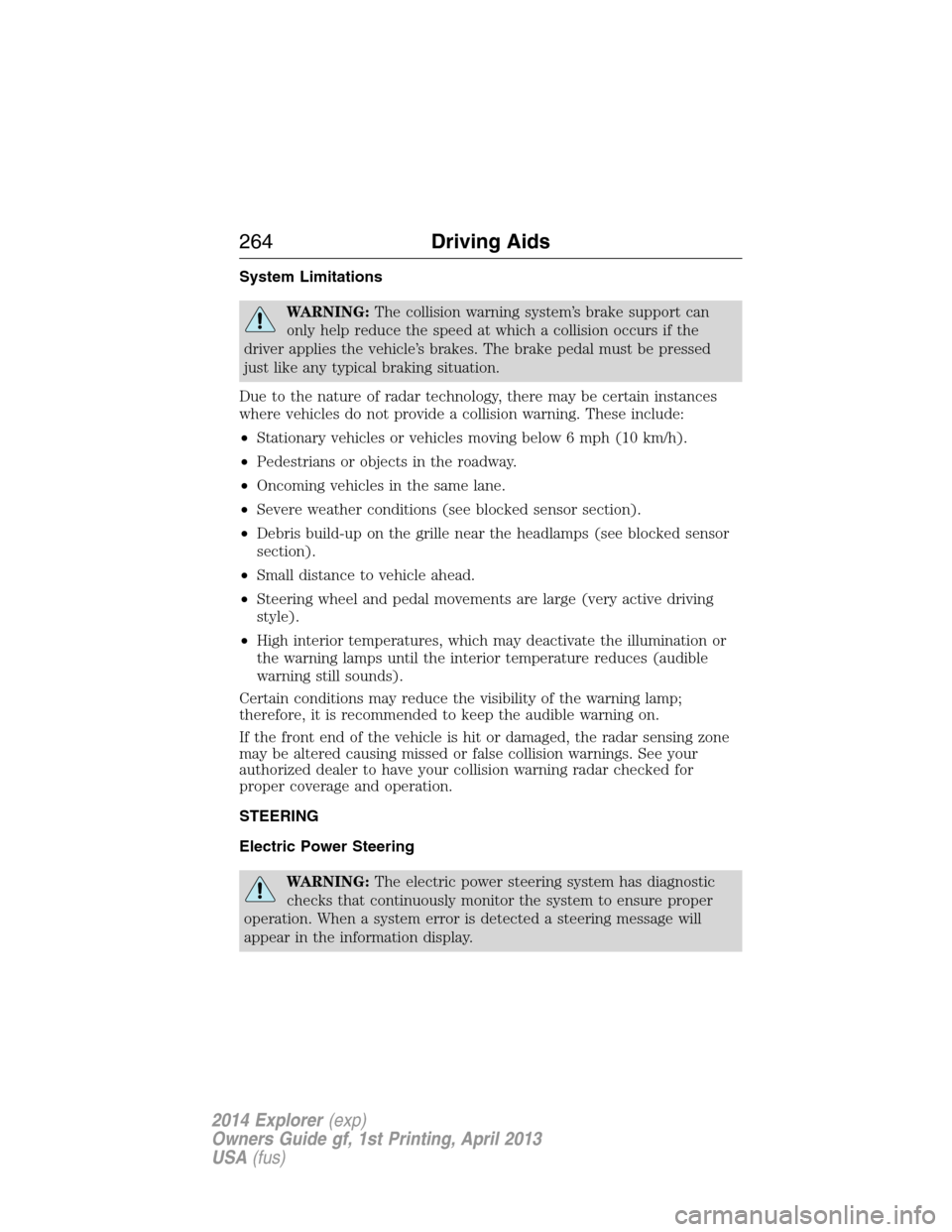
System Limitations
WARNING:The collision warning system’s brake support can
only help reduce the speed at which a collision occurs if the
driver applies the vehicle’s brakes. The brake pedal must be pressed
just like any typical braking situation.
Due to the nature of radar technology, there may be certain instances
where vehicles do not provide a collision warning. These include:
•Stationary vehicles or vehicles moving below 6 mph (10 km/h).
•Pedestrians or objects in the roadway.
•Oncoming vehicles in the same lane.
•Severe weather conditions (see blocked sensor section).
•Debris build-up on the grille near the headlamps (see blocked sensor
section).
•Small distance to vehicle ahead.
•Steering wheel and pedal movements are large (very active driving
style).
•High interior temperatures, which may deactivate the illumination or
the warning lamps until the interior temperature reduces (audible
warning still sounds).
Certain conditions may reduce the visibility of the warning lamp;
therefore, it is recommended to keep the audible warning on.
If the front end of the vehicle is hit or damaged, the radar sensing zone
may be altered causing missed or false collision warnings. See your
authorized dealer to have your collision warning radar checked for
proper coverage and operation.
STEERING
Electric Power Steering
WARNING:The electric power steering system has diagnostic
checks that continuously monitor the system to ensure proper
operation. When a system error is detected a steering message will
appear in the information display.
264Driving Aids
2014 Explorer(exp)
Owners Guide gf, 1st Printing, April 2013
USA(fus)
Page 306 of 586
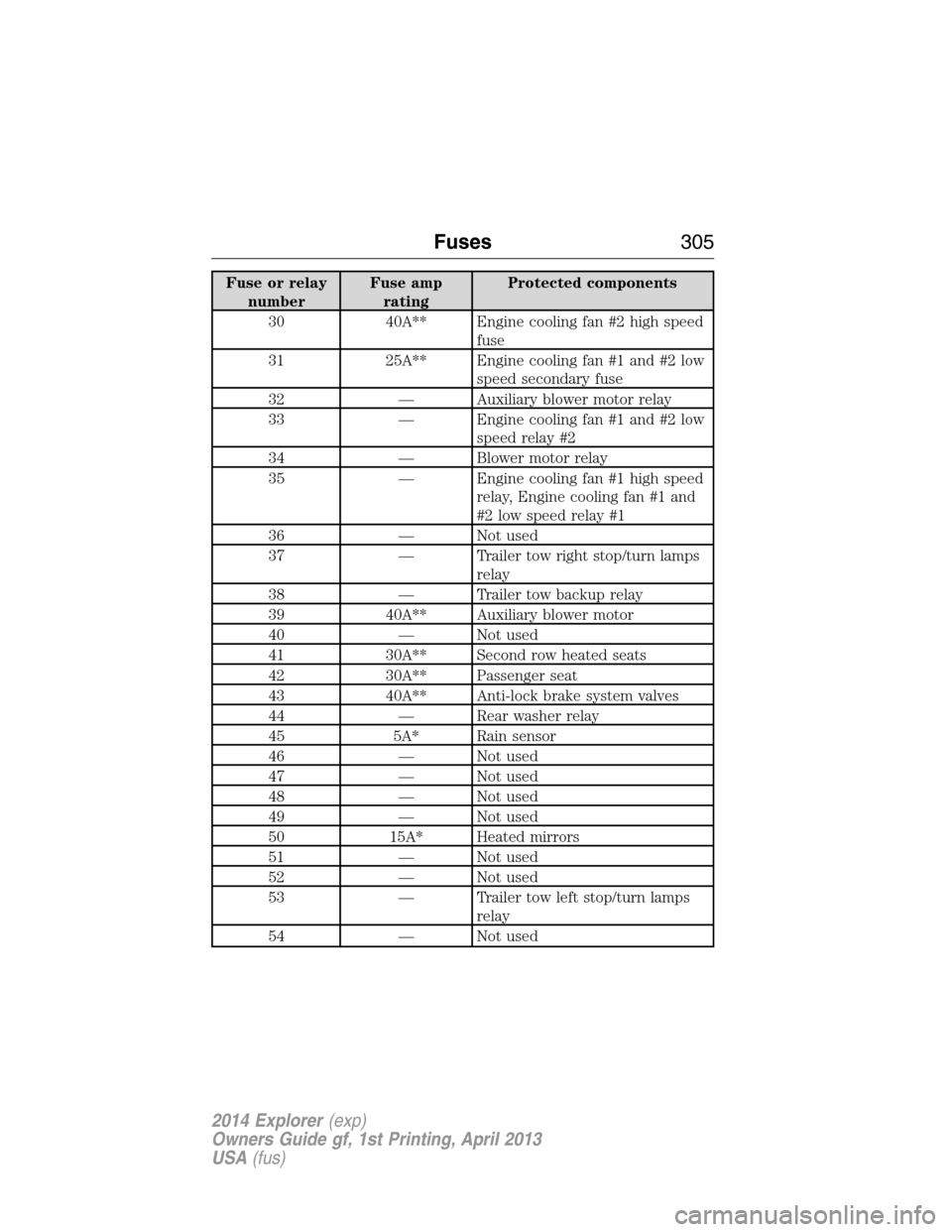
Fuse or relay
numberFuse amp
ratingProtected components
30 40A** Engine cooling fan #2 high speed
fuse
31 25A** Engine cooling fan #1 and #2 low
speed secondary fuse
32 — Auxiliary blower motor relay
33 — Engine cooling fan #1 and #2 low
speed relay #2
34 — Blower motor relay
35 — Engine cooling fan #1 high speed
relay, Engine cooling fan #1 and
#2 low speed relay #1
36 — Not used
37 — Trailer tow right stop/turn lamps
relay
38 — Trailer tow backup relay
39 40A** Auxiliary blower motor
40 — Not used
41 30A** Second row heated seats
42 30A** Passenger seat
43 40A** Anti-lock brake system valves
44 — Rear washer relay
45 5A* Rain sensor
46 — Not used
47 — Not used
48 — Not used
49 — Not used
50 15A* Heated mirrors
51 — Not used
52 — Not used
53 — Trailer tow left stop/turn lamps
relay
54 — Not used
Fuses305
2014 Explorer(exp)
Owners Guide gf, 1st Printing, April 2013
USA(fus)
Page 307 of 586
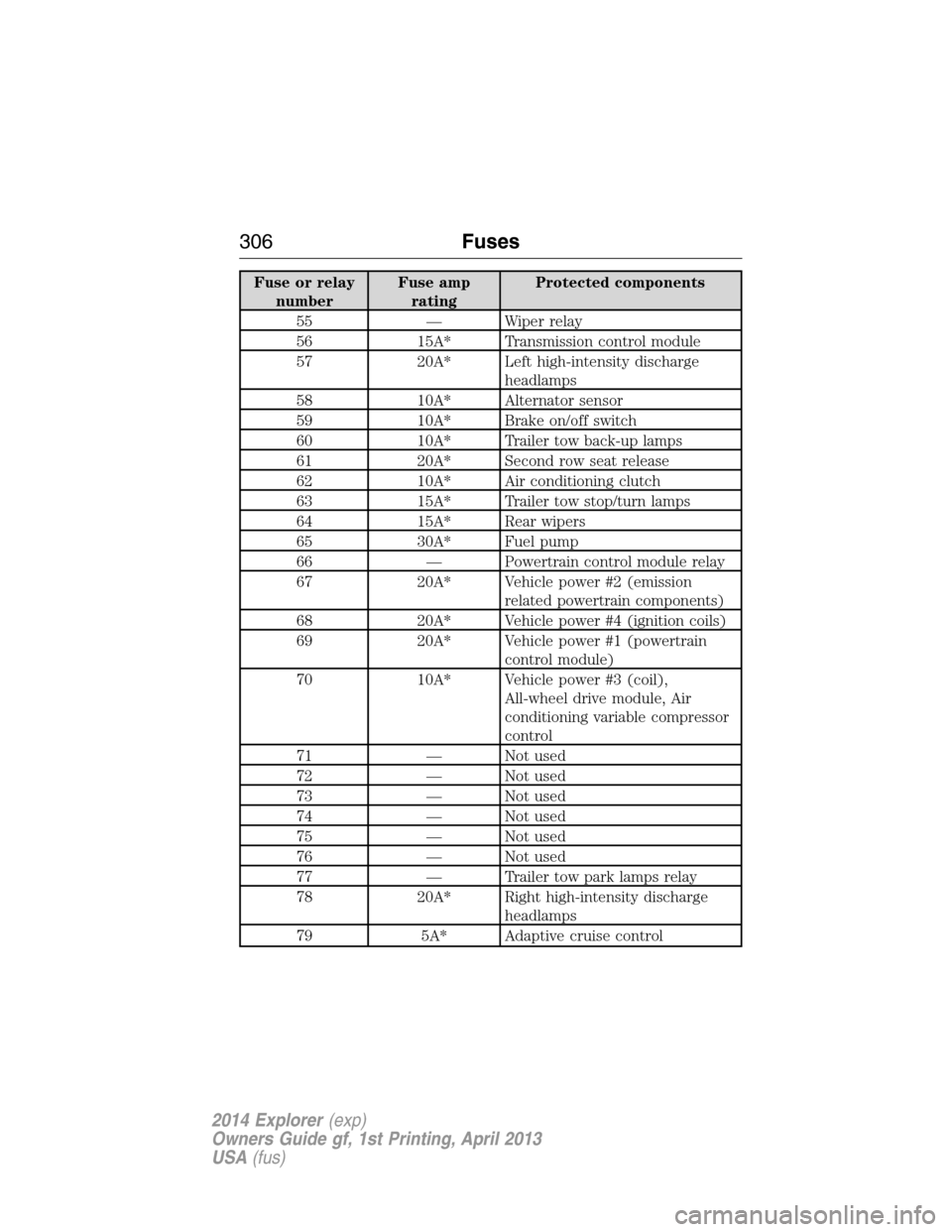
Fuse or relay
numberFuse amp
ratingProtected components
55 — Wiper relay
56 15A* Transmission control module
57 20A* Left high-intensity discharge
headlamps
58 10A* Alternator sensor
59 10A* Brake on/off switch
60 10A* Trailer tow back-up lamps
61 20A* Second row seat release
62 10A* Air conditioning clutch
63 15A* Trailer tow stop/turn lamps
64 15A* Rear wipers
65 30A* Fuel pump
66 — Powertrain control module relay
67 20A* Vehicle power #2 (emission
related powertrain components)
68 20A* Vehicle power #4 (ignition coils)
69 20A* Vehicle power #1 (powertrain
control module)
70 10A* Vehicle power #3 (coil),
All-wheel drive module, Air
conditioning variable compressor
control
71 — Not used
72 — Not used
73 — Not used
74 — Not used
75 — Not used
76 — Not used
77 — Trailer tow park lamps relay
78 20A* Right high-intensity discharge
headlamps
79 5A* Adaptive cruise control
306Fuses
2014 Explorer(exp)
Owners Guide gf, 1st Printing, April 2013
USA(fus)
Page 310 of 586
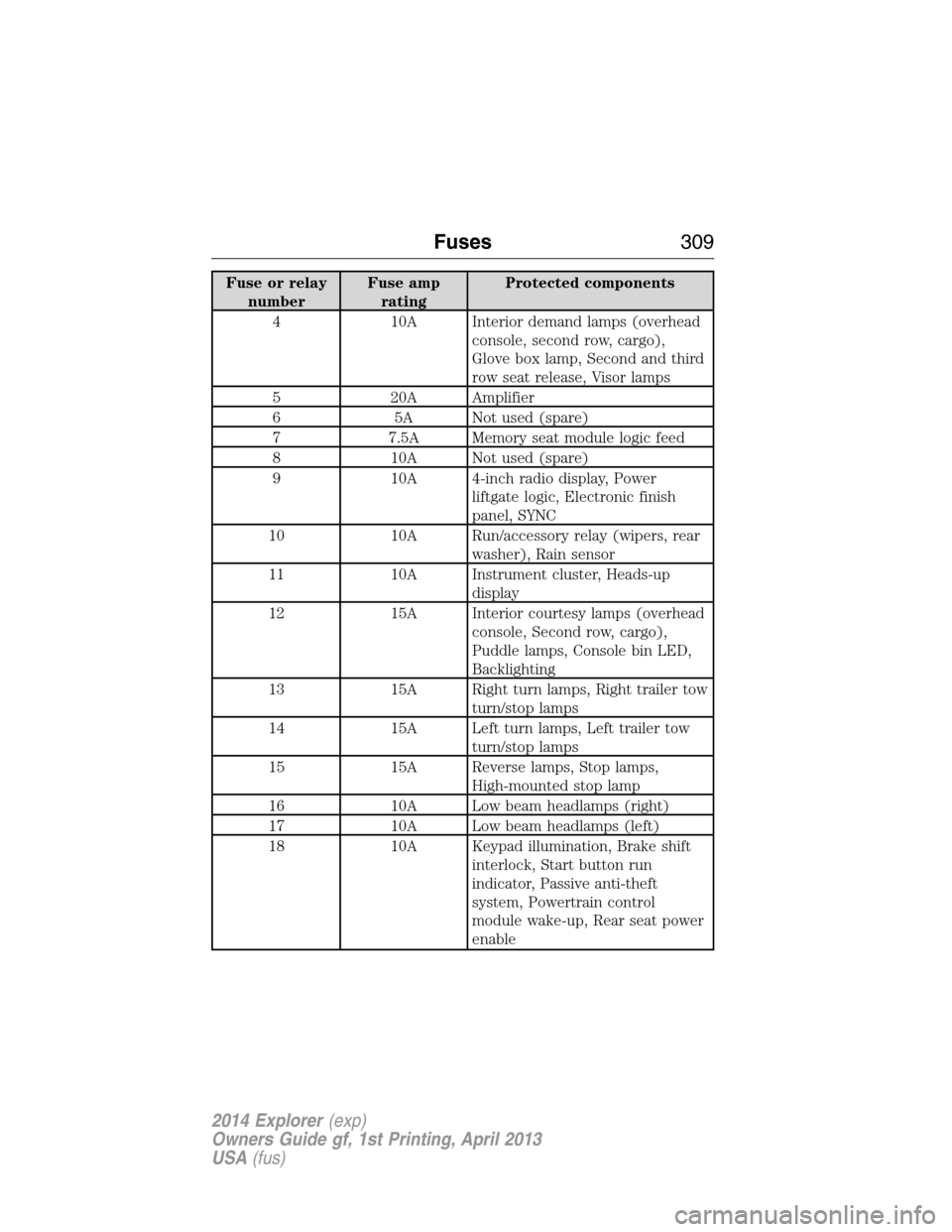
Fuse or relay
numberFuse amp
ratingProtected components
4 10A Interior demand lamps (overhead
console, second row, cargo),
Glove box lamp, Second and third
row seat release, Visor lamps
5 20A Amplifier
6 5A Not used (spare)
7 7.5A Memory seat module logic feed
8 10A Not used (spare)
9 10A 4-inch radio display, Power
liftgate logic, Electronic finish
panel, SYNC
10 10A Run/accessory relay (wipers, rear
washer), Rain sensor
11 10A Instrument cluster, Heads-up
display
12 15A Interior courtesy lamps (overhead
console, Second row, cargo),
Puddle lamps, Console bin LED,
Backlighting
13 15A Right turn lamps, Right trailer tow
turn/stop lamps
14 15A Left turn lamps, Left trailer tow
turn/stop lamps
15 15A Reverse lamps, Stop lamps,
High-mounted stop lamp
16 10A Low beam headlamps (right)
17 10A Low beam headlamps (left)
18 10A Keypad illumination, Brake shift
interlock, Start button run
indicator, Passive anti-theft
system, Powertrain control
module wake-up, Rear seat power
enable
Fuses309
2014 Explorer(exp)
Owners Guide gf, 1st Printing, April 2013
USA(fus)
Page 311 of 586
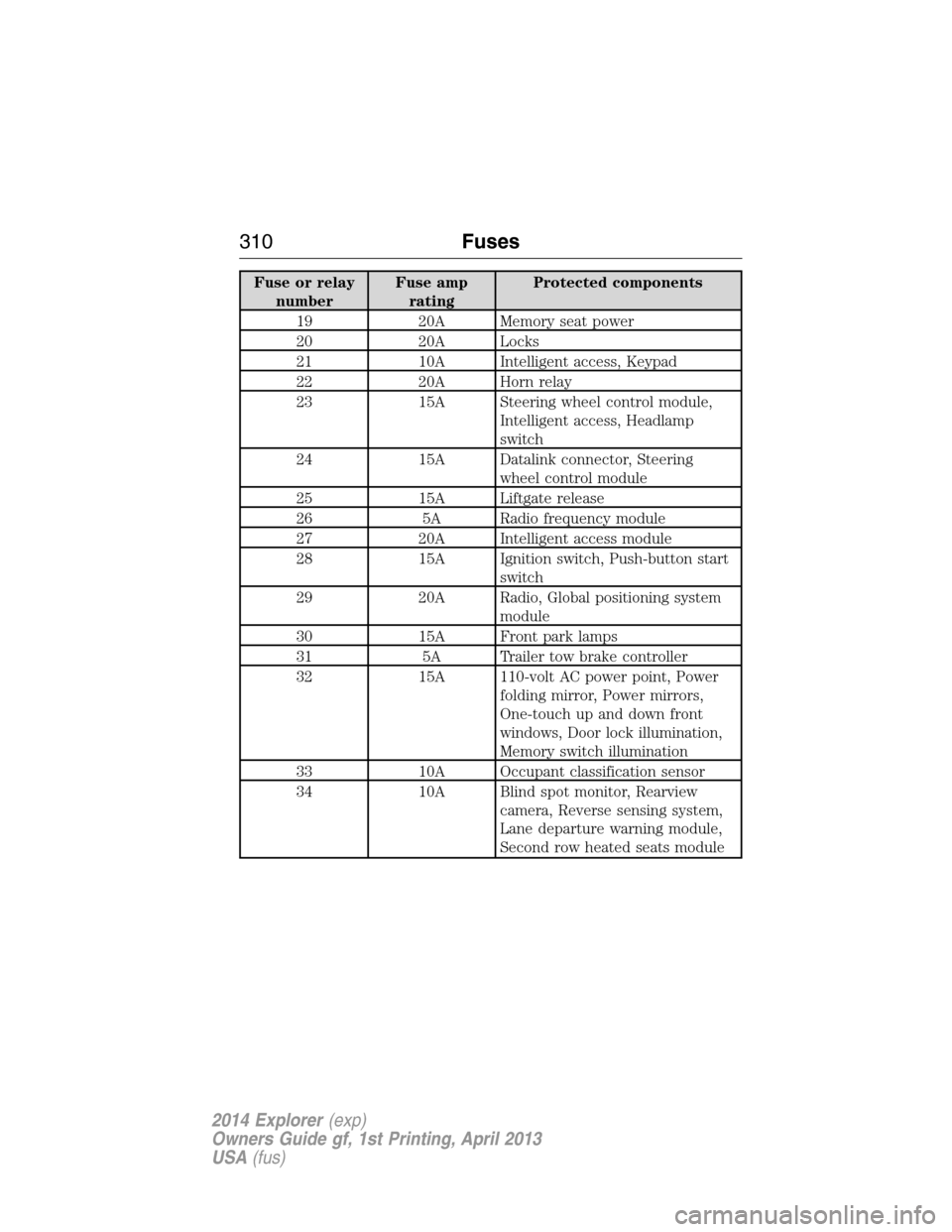
Fuse or relay
numberFuse amp
ratingProtected components
19 20A Memory seat power
20 20A Locks
21 10A Intelligent access, Keypad
22 20A Horn relay
23 15A Steering wheel control module,
Intelligent access, Headlamp
switch
24 15A Datalink connector, Steering
wheel control module
25 15A Liftgate release
26 5A Radio frequency module
27 20A Intelligent access module
28 15A Ignition switch, Push-button start
switch
29 20A Radio, Global positioning system
module
30 15A Front park lamps
31 5A Trailer tow brake controller
32 15A 110-volt AC power point, Power
folding mirror, Power mirrors,
One-touch up and down front
windows, Door lock illumination,
Memory switch illumination
33 10A Occupant classification sensor
34 10A Blind spot monitor, Rearview
camera, Reverse sensing system,
Lane departure warning module,
Second row heated seats module
310Fuses
2014 Explorer(exp)
Owners Guide gf, 1st Printing, April 2013
USA(fus)
Page 329 of 586
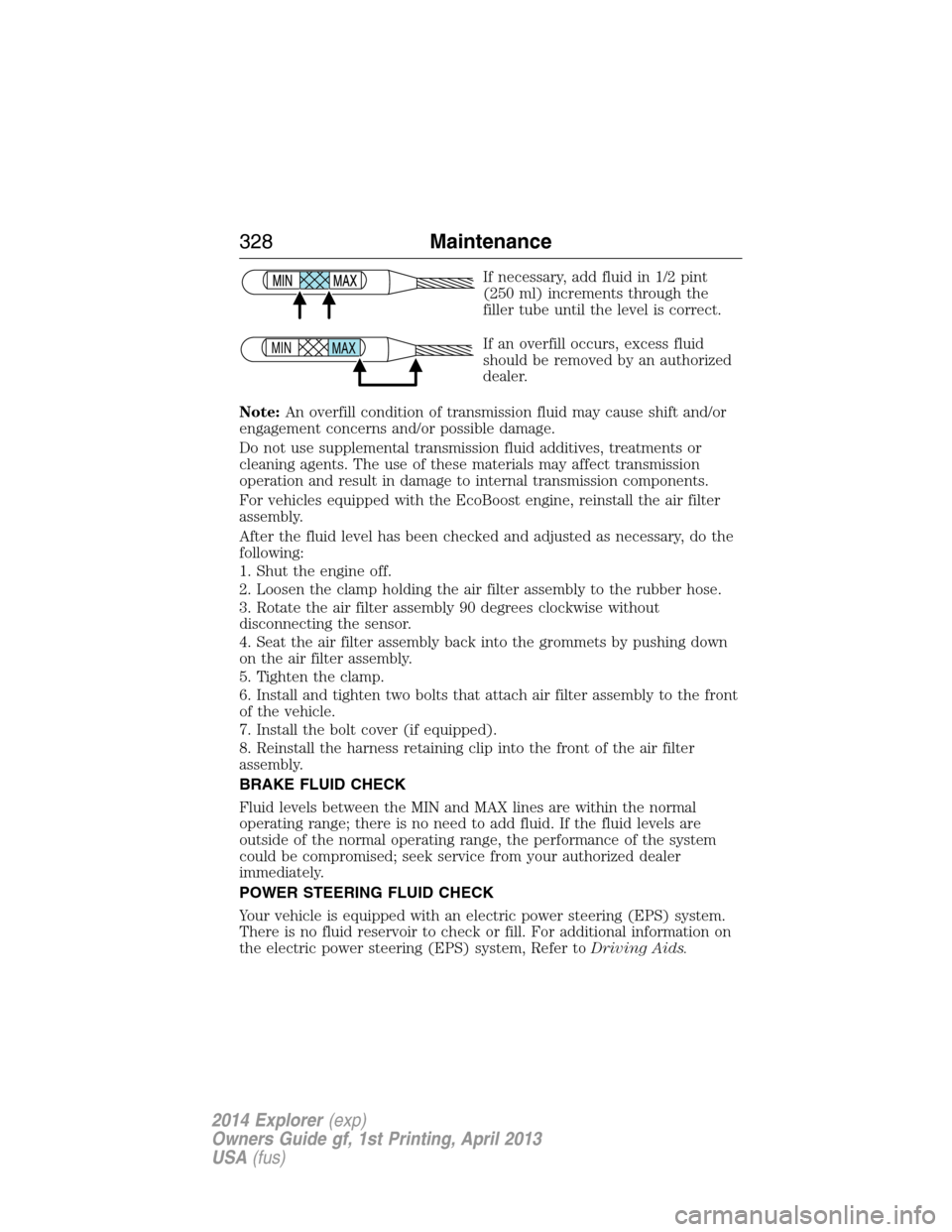
If necessary, add fluid in 1/2 pint
(250 ml) increments through the
filler tube until the level is correct.
If an overfill occurs, excess fluid
should be removed by an authorized
dealer.
Note:An overfill condition of transmission fluid may cause shift and/or
engagement concerns and/or possible damage.
Do not use supplemental transmission fluid additives, treatments or
cleaning agents. The use of these materials may affect transmission
operation and result in damage to internal transmission components.
For vehicles equipped with the EcoBoost engine, reinstall the air filter
assembly.
After the fluid level has been checked and adjusted as necessary, do the
following:
1. Shut the engine off.
2. Loosen the clamp holding the air filter assembly to the rubber hose.
3. Rotate the air filter assembly 90 degrees clockwise without
disconnecting the sensor.
4. Seat the air filter assembly back into the grommets by pushing down
on the air filter assembly.
5. Tighten the clamp.
6. Install and tighten two bolts that attach air filter assembly to the front
of the vehicle.
7. Install the bolt cover (if equipped).
8. Reinstall the harness retaining clip into the front of the air filter
assembly.
BRAKE FLUID CHECK
Fluid levels between the MIN and MAX lines are within the normal
operating range; there is no need to add fluid. If the fluid levels are
outside of the normal operating range, the performance of the system
could be compromised; seek service from your authorized dealer
immediately.
POWER STEERING FLUID CHECK
Your vehicle is equipped with an electric power steering (EPS) system.
There is no fluid reservoir to check or fill. For additional information on
the electric power steering (EPS) system, Refer toDriving Aids.
MAX MIN
328Maintenance
2014 Explorer(exp)
Owners Guide gf, 1st Printing, April 2013
USA(fus)
Page 377 of 586
CHANGING A ROAD WHEEL
WARNING:The use of tire sealants may damage your tire
pressure monitoring system and should not be used. However, if
you must use a sealant, the tire pressure monitoring system sensor and
valve stem on the wheel must be replaced by an authorized Ford
dealer.
WARNING:SeeTire Pressure Monitoring Systemin this
chapter for important information. If the tire pressure monitoring
sensor becomes damaged, it will no longer function.
Note:The tire pressure monitoring system indicator light will illuminate
when the spare tire is in use. To restore the full function of the
monitoring system, all road wheels equipped with tire pressure
monitoring sensors must be mounted on this vehicle.
If you get a flat tire while driving, do not apply the brake heavily.
Instead, gradually decrease your speed. Hold the steering wheel firmly
and slowly move to a safe place on the side of the road.
Have a flat serviced by an authorized dealer in order to prevent damage
to the system sensors. SeeTire Pressure Monitoring Systemearlier in
this chapter. Replace the spare tire with a road tire as soon as possible.
During repairing or replacing of the flat tire, have the authorized dealer
inspect the tire pressure monitoring system sensor for damage.
Dissimilar Spare Tire and Wheel Assembly Information
WARNING:Failure to follow these guidelines could result in an
increased risk of loss of vehicle control, injury or death.
If you have a dissimilar spare tire and wheel assembly, then it is intended
for temporary use only. This means that if you need to use it, you should
replace it as soon as possible with a road tire and wheel assembly that is
the same size and type as the road tires and wheels that were originally
provided by Ford. If the dissimilar spare tire or wheel is damaged, it
should be replaced rather than repaired.
A dissimilar spare tire and wheel assembly is defined as a spare tire or
wheel that is different in brand, size or appearance from the road tires
and wheels and can be one of three types:
1.T-type mini-spare:This spare tire begins with the letter T for tire
size and may have Temporary Use Only molded in the sidewall.
376Wheels and Tires
2014 Explorer(exp)
Owners Guide gf, 1st Printing, April 2013
USA(fus)
Page 583 of 586
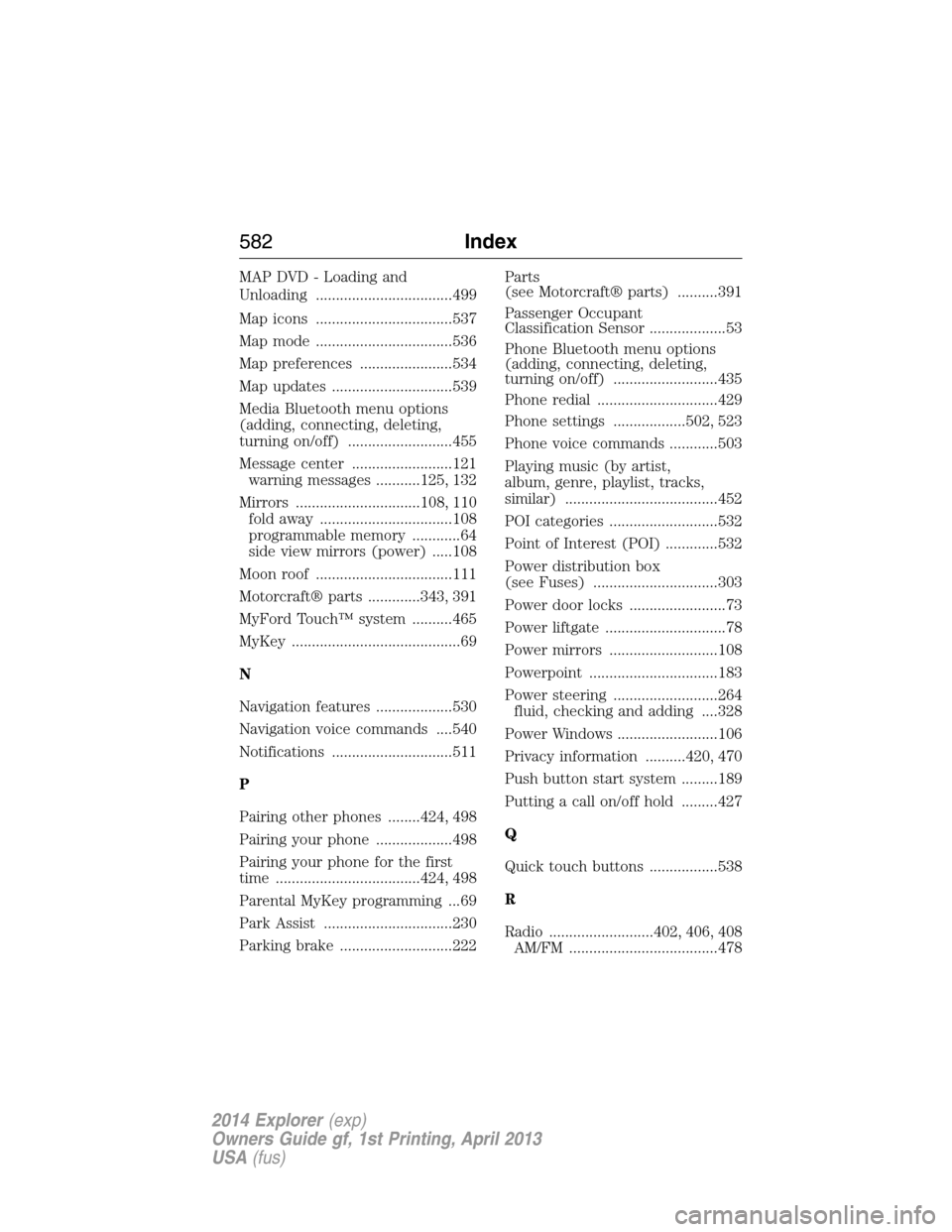
MAP DVD - Loading and
Unloading ..................................499
Map icons ..................................537
Map mode ..................................536
Map preferences .......................534
Map updates ..............................539
Media Bluetooth menu options
(adding, connecting, deleting,
turning on/off) ..........................455
Message center .........................121
warning messages ...........125, 132
Mirrors ...............................108, 110
fold away .................................108
programmable memory ............64
side view mirrors (power) .....108
Moon roof ..................................111
Motorcraft® parts .............343, 391
MyFord Touch™ system ..........465
MyKey ..........................................69
N
Navigation features ...................530
Navigation voice commands ....540
Notifications ..............................511
P
Pairing other phones ........424, 498
Pairing your phone ...................498
Pairing your phone for the first
time ....................................424, 498
Parental MyKey programming ...69
Park Assist ................................230
Parking brake ............................222Parts
(see Motorcraft® parts) ..........391
Passenger Occupant
Classification Sensor ...................53
Phone Bluetooth menu options
(adding, connecting, deleting,
turning on/off) ..........................435
Phone redial ..............................429
Phone settings ..................502, 523
Phone voice commands ............503
Playing music (by artist,
album, genre, playlist, tracks,
similar) ......................................452
POI categories ...........................532
Point of Interest (POI) .............532
Power distribution box
(see Fuses) ...............................303
Power door locks ........................73
Power liftgate ..............................78
Power mirrors ...........................108
Powerpoint ................................183
Power steering ..........................264
fluid, checking and adding ....328
Power Windows .........................106
Privacy information ..........420, 470
Push button start system .........189
Putting a call on/off hold .........427
Q
Quick touch buttons .................538
R
Radio ..........................402, 406, 408
AM/FM .....................................478
582Index
2014 Explorer(exp)
Owners Guide gf, 1st Printing, April 2013
USA(fus)