traction control FORD EXPLORER 2014 5.G User Guide
[x] Cancel search | Manufacturer: FORD, Model Year: 2014, Model line: EXPLORER, Model: FORD EXPLORER 2014 5.GPages: 586, PDF Size: 9.07 MB
Page 225 of 586
PRINCIPLES OF OPERATION
WARNING:Vehicle modifications involving braking system,
aftermarket roof racks, suspension, steering system, tire
construction and wheel or tire size may change the handling
characteristics of the vehicle and may adversely affect the performance
of the AdvanceTrac® system. In addition, installing any stereo
loudspeakers may interfere with and adversely affect the AdvanceTrac®
system. Install any aftermarket stereo loudspeaker as far as possible
from the front center console, the tunnel, and the front seats in order
to minimize the risk of interfering with the AdvanceTrac® sensors.
Reducing the effectiveness of the AdvanceTrac® system could lead to
an increased risk of loss of vehicle control, vehicle rollover, personal
injury and death.
WARNING:Remember that even advanced technology cannot
defy the laws of physics. It’s always possible to lose control of a
vehicle due to inappropriate driver input for the conditions. Aggressive
driving on any road condition can cause you to lose control of your
vehicle increasing the risk of personal injury or property damage.
Activation of the AdvanceTrac® system is an indication that at least
some of the tires have exceeded their ability to grip the road; this could
reduce the operator’s ability to control the vehicle potentially resulting
in a loss of vehicle control, vehicle rollover, personal injury and death. If
your AdvanceTrac® system activates, SLOW DOWN.
The AdvanceTrac® with Roll Stability Control™ system helps you keep
control of your vehicle when on a slippery surface. The electronic
stability control portion of the system helps avoid skids and lateral slides,
curve control assists in vehicle handling in following the road during
adverse maneuvering and roll stability control helps avoid a vehicle
rollover. The traction control system helps avoid drive wheel spin and
loss of traction. See theTraction Controlchapter for details on traction
control system operation.
224Stability Control
2014 Explorer(exp)
Owners Guide gf, 1st Printing, April 2013
USA(fus)
Page 226 of 586
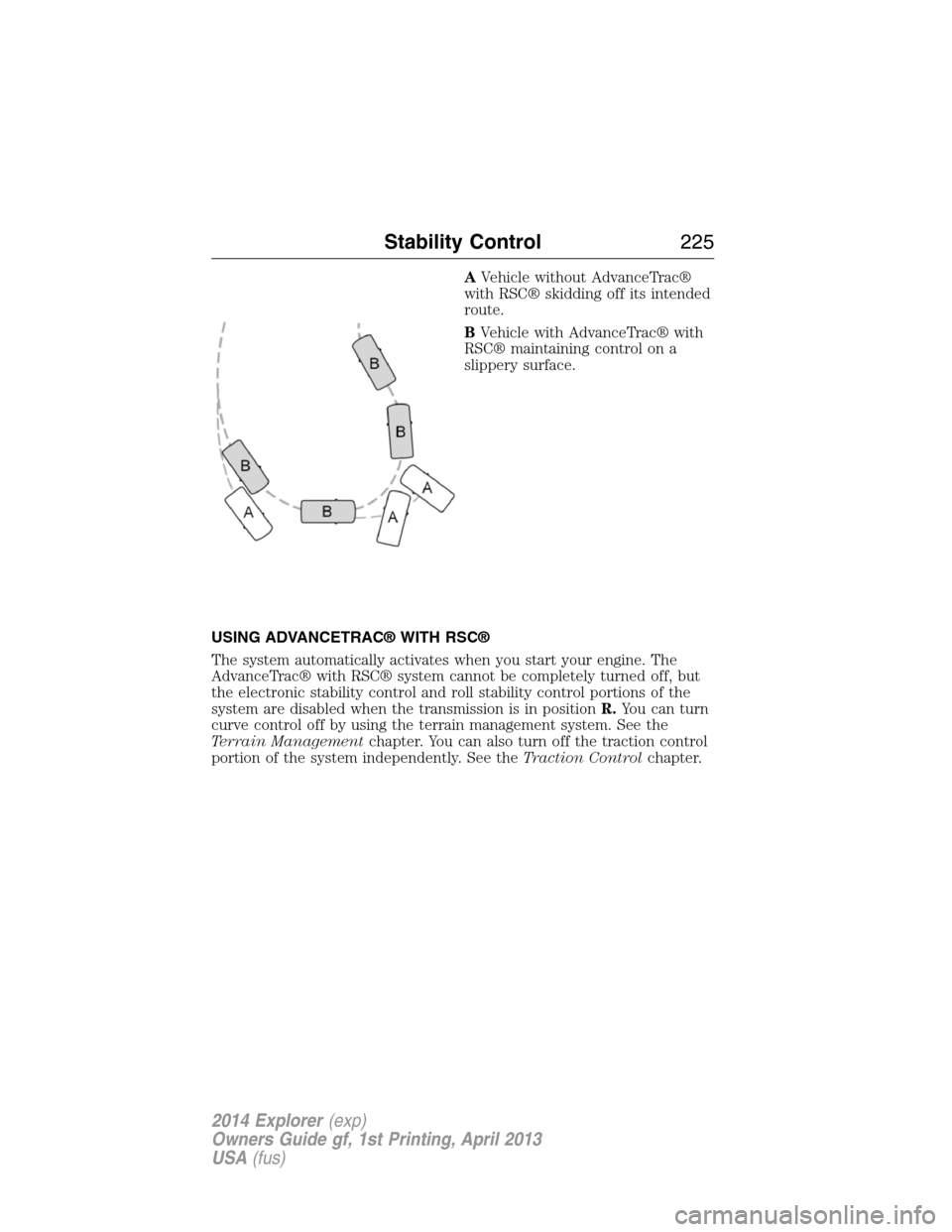
AVehicle without AdvanceTrac®
with RSC® skidding off its intended
route.
BVehicle with AdvanceTrac® with
RSC® maintaining control on a
slippery surface.
USING ADVANCETRAC® WITH RSC®
The system automatically activates when you start your engine. The
AdvanceTrac® with RSC® system cannot be completely turned off, but
the electronic stability control and roll stability control portions of the
system are disabled when the transmission is in positionR.You can turn
curve control off by using the terrain management system. See the
Terrain Managementchapter. You can also turn off the traction control
portion of the system independently. See theTraction Controlchapter.
Stability Control225
2014 Explorer(exp)
Owners Guide gf, 1st Printing, April 2013
USA(fus)
Page 227 of 586
TERRAIN MANAGEMENT (IF EQUIPPED)
This system optimizes drivability and comfort as well as maximizing
traction while operating on different types of terrain.
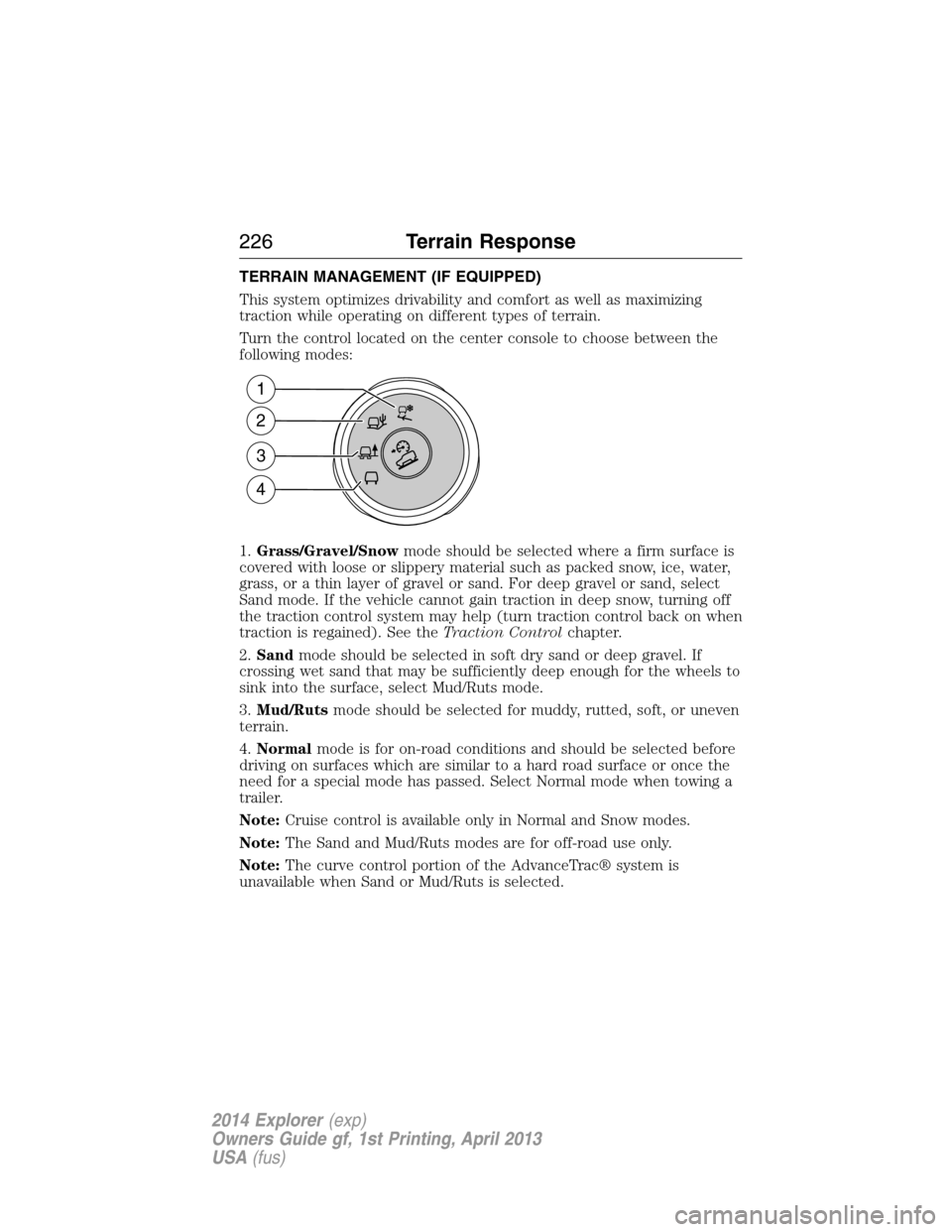
Turn the control located on the center console to choose between the
following modes:
1.Grass/Gravel/Snowmode should be selected where a firm surface is
covered with loose or slippery material such as packed snow, ice, water,
grass, or a thin layer of gravel or sand. For deep gravel or sand, select
Sand mode. If the vehicle cannot gain traction in deep snow, turning off
the traction control system may help (turn traction control back on when
traction is regained). See theTraction Controlchapter.
2.Sandmode should be selected in soft dry sand or deep gravel. If
crossing wet sand that may be sufficiently deep enough for the wheels to
sink into the surface, select Mud/Ruts mode.
3.Mud/Rutsmode should be selected for muddy, rutted, soft, or uneven
terrain.
4.Normalmode is for on-road conditions and should be selected before
driving on surfaces which are similar to a hard road surface or once the
need for a special mode has passed. Select Normal mode when towing a
trailer.
Note:Cruise control is available only in Normal and Snow modes.
Note:The Sand and Mud/Ruts modes are for off-road use only.
Note:The curve control portion of the AdvanceTrac® system is
unavailable when Sand or Mud/Ruts is selected.
1
2
3
4
226Terrain Response
2014 Explorer(exp)
Owners Guide gf, 1st Printing, April 2013
USA(fus)
Page 235 of 586
Deactivating the Park Assist Feature
The system can be deactivated manually by:
•pressing the active park assist button
•grabbing the steering wheel
•driving above approximately 20 mph (35 km/h) for 30 seconds during
an active park search
•driving above 6 mph (10 km/h) during automatic steering
•turning off the traction control system.
Certain vehicle conditions can also deactivate the system:
•Traction control has activated on a slippery or loose surface.
•Anti-lock brake system activation or failure.
•Any door (except the driver’s) opens.
•Something touches the steering wheel.
If a problem occurs with the system, a warning message is displayed,
followed by a chime. Occasional active park assist messages may occur in
normal operation. For recurring or frequent active park assist faults,
contact an authorized dealer to have your vehicle serviced.
Troubleshooting the System
The system does not look for a space
The traction control system may be off
Any door (except the driver’s) may not be completely closed
The system does not offer a particular space
Something may be contacting the front bumper or side sensors
There is not enough room on both sides of the vehicle in order to park
There is not enough space for the parking maneuver on the opposite
side of the parking space
The vehicle is farther than 5 ft (1.5 m) from the parking space
The vehicle is closer than 16 in. (40 cm) from neighboring parked
vehicles
The transmission is in R (Reverse); the vehicle must be moving
forward to detect a parking space
234Parking Aids
2014 Explorer(exp)
Owners Guide gf, 1st Printing, April 2013
USA(fus)
Page 357 of 586
Tire Quality Grades apply to new pneumatic passenger car tires.
They do not apply to deep tread, winter-type snow tires, space-saver or
temporary use spare tires, light truck or LT type tires, tires with nominal
rim diameters of 10 to 12 inches or limited production tires as defined in
Title 49 Code of Federal Regulations Part 575.104(c)(2).
U.S. Department of Transportation-Tire quality grades:The U.S.
Department of Transportation requires Ford Motor Company to give you
the following information about tire grades exactly as the government
has written it.
Treadwear
The treadwear grade is a comparative rating based on the wear rate of the
tire when tested under controlled conditions on a specified government
test course. For example, a tire graded 150 would wear 1
12times as well
on the government course as a tire graded 100. The relative performance
of tires depends upon the actual conditions of their use, however, and may
depart significantly from the norm due to variations in driving habits,
service practices, and differences in road characteristics and climate.
Traction AA A B C
WARNING:The traction grade assigned to this tire is based on
straight-ahead braking traction tests, and does not include
acceleration, cornering, hydroplaning or peak traction characteristics.
The traction grades, from highest to lowest are AA, A, B, and C. The
grades represent the tire’s ability to stop on wet pavement as measured
under controlled conditions on specified government test surfaces of
asphalt and concrete. A tire marked C may have poor traction
performance.
Temperature A B C
WARNING:The temperature grade for this tire is established for
a tire that is properly inflated and not overloaded. Excessive
speed, underinflation, or excessive loading, either separately or in
combination, can cause heat buildup and possible tire failure.
356Wheels and Tires
2014 Explorer(exp)
Owners Guide gf, 1st Printing, April 2013
USA(fus)
Page 361 of 586
H.U.S. DOT Tire Identification Number (TIN):This begins with the
letters DOT and indicates that the tire meets all federal standards. The
next two numbers or letters are the plant code designating where it was
manufactured, the next two are the tire size code and the last four
numbers represent the week and year the tire was built. For example,
the numbers 317 mean the 31st week of 1997. After 2000 the numbers
go to four digits. For example, 2501 means the 25th week of 2001. The
numbers in between are identification codes used for traceability. This
information is used to contact customers if a tire defect requires a recall.
I.M+S or M/S:Mud and Snow, or
AT:All Terrain, or
AS:All Season.
J.Tire Ply Composition and Material Used:Indicates the number of
plies or the number of layers of rubber-coated fabric in the tire tread and
sidewall. Tire manufacturers also must indicate the ply materials in the
tire and the sidewall, which include steel, nylon, polyester, and others.
K.Maximum Load:Indicates the maximum load in kilograms and
pounds that can be carried by the tire. See the Safety Compliance
Certification Label (affixed to either the door hinge pillar, door-latch
post, or the door edge that meets the door-latch post, next to the
driver’s seating position), for the correct tire pressure for your vehicle.
L.Treadwear, Traction and Temperature Grades
•Treadwear:The treadwear grade is a comparative rating based on the
wear rate of the tire when tested under controlled conditions on a
specified government test course. For example, a tire graded 150
would wear one and one-half (1
12) times as well on the government
course as a tire graded 100.
•Traction:The traction grades, from highest to lowest, are AA, A, B,
and C. The grades represent the tire’s ability to stop on wet pavement
as measured under controlled conditions on specified government test
surfaces of asphalt and concrete. A tire marked C may have poor
traction performance.
•Temperature:The temperature grades are A (the highest), B and C,
representing the tire’s resistance to the generation of heat and its
ability to dissipate heat when tested under controlled conditions on a
specified indoor laboratory test wheel.
360Wheels and Tires
2014 Explorer(exp)
Owners Guide gf, 1st Printing, April 2013
USA(fus)
Page 371 of 586
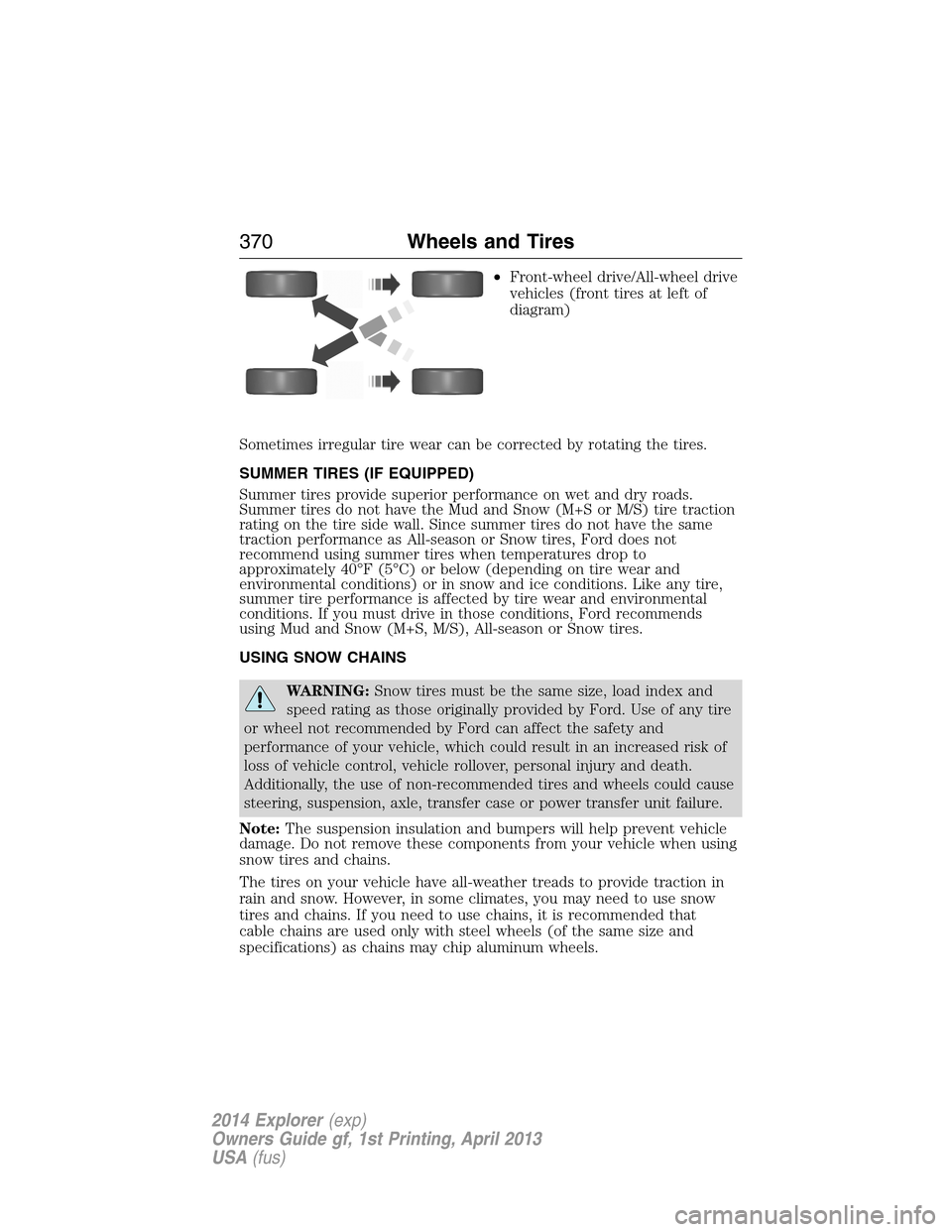
•Front-wheel drive/All-wheel drive
vehicles (front tires at left of
diagram)
Sometimes irregular tire wear can be corrected by rotating the tires.
SUMMER TIRES (IF EQUIPPED)
Summer tires provide superior performance on wet and dry roads.
Summer tires do not have the Mud and Snow (M+S or M/S) tire traction
rating on the tire side wall. Since summer tires do not have the same
traction performance as All-season or Snow tires, Ford does not
recommend using summer tires when temperatures drop to
approximately 40°F (5°C) or below (depending on tire wear and
environmental conditions) or in snow and ice conditions. Like any tire,
summer tire performance is affected by tire wear and environmental
conditions. If you must drive in those conditions, Ford recommends
using Mud and Snow (M+S, M/S), All-season or Snow tires.
USING SNOW CHAINS
WARNING:Snow tires must be the same size, load index and
speed rating as those originally provided by Ford. Use of any tire
or wheel not recommended by Ford can affect the safety and
performance of your vehicle, which could result in an increased risk of
loss of vehicle control, vehicle rollover, personal injury and death.
Additionally, the use of non-recommended tires and wheels could cause
steering, suspension, axle, transfer case or power transfer unit failure.
Note:The suspension insulation and bumpers will help prevent vehicle
damage. Do not remove these components from your vehicle when using
snow tires and chains.
The tires on your vehicle have all-weather treads to provide traction in
rain and snow. However, in some climates, you may need to use snow
tires and chains. If you need to use chains, it is recommended that
cable chains are used only with steel wheels (of the same size and
specifications) as chains may chip aluminum wheels.
370Wheels and Tires
2014 Explorer(exp)
Owners Guide gf, 1st Printing, April 2013
USA(fus)
Page 372 of 586
Follow these guidelines when using snow tires and cable chains:
•If possible, avoid fully loading your vehicle.
•Install cable chains only on the front wheels.
•Use cable chains only on vehicles equipped with either P245/65R17
tires or P245/60R18 tires.
•Do not use tire chains, cables or optional traction devices on vehicles
equipped with P255/50R20 or 265/45ZR20 tires.
•Drive cautiously. If you hear the cable chains rub or bang against your
vehicle, stop and retighten the cable chains. If this does not work,
remove the cable chains to prevent damage to your vehicle.
•Remove the tire cable chains when they are no longer needed. Do not
use tire cable chains on dry roads.
TIRE PRESSURE MONITORING SYSTEM
WARNING:The tire pressure monitoring system is NOT a
substitute for manually checking tire pressure. The tire pressure
should be checked periodically (at least monthly) using a tire gauge.
SeeInflating Your Tiresin this chapter. Failure to properly maintain
your tire pressure could increase the risk of tire failure, loss of control,
vehicle rollover and personal injury.
Each tire, including the spare (if provided), should be checked
monthly when cold and inflated to the inflation pressure
recommended by the vehicle manufacturer on the vehicle
placard or tire inflation pressure label. (If your vehicle has tires of a
different size than the size indicated on the vehicle placard or tire
inflation pressure label, you should determine the proper tire inflation
pressure for those tires.)
As an added safety feature, your vehicle has been equipped with a tire
pressure monitoring system (TPMS) that illuminates a low tire pressure
telltale when one or more of your tires is significantly under-inflated.
Accordingly, when the low tire pressure telltale illuminates, you should
stop and check your tires as soon as possible, and inflate them to the
proper pressure. Driving on a significantly under-inflated tire causes the
tire to overheat and can lead to tire failure. Under-inflation also reduces
fuel efficiency and tire tread life, and may affect the vehicle’s handling
and stopping ability.
Wheels and Tires371
2014 Explorer(exp)
Owners Guide gf, 1st Printing, April 2013
USA(fus)
Page 549 of 586
General operation
Voice Command Control
Functions within the Windows Automotive-based system may be
accomplished using only voice commands. Using voice commands while
driving allows you to operate the system without removing your hands
from the wheel.
Prolonged Views of Screen
Do not access any function requiring a prolonged view of the screen while
you are driving. Pull over in a safe and legal manner before attempting to
access a function of the system requiring prolonged attention. Even
occasional short scans to the screen may be hazardous if your attention has
been diverted away from your driving task at a critical time.
Volume Setting
Do not raise the volume excessively. Keep the volume at a level where
you can still hear outside traffic and emergency signals while driving.
Driving while unable to hear these sounds could cause an accident.
Use of Speech Recognition Functions
Speech recognition software is inherently a statistical process which is
subject to errors. It is your responsibility to monitor any speech
recognition functions included in the system and address any errors.
Navigation Features
Any navigation features included in the system are intended to provide
turn by turn instructions to get you to a desired destination. Please make
certain all persons using this system carefully read and follow
instructions and safety information fully.
Distraction Hazard
Any navigation features may require manual (non-verbal) setup.
Attempting to perform such set-up or insert data while driving can
seriously distract your attention and could cause an accident or other
serious consequences. Stop the vehicle in a safe and legal manner before
attempting these operations.
Let Your Judgment Prevail
Any navigation features are provided only as an aid. Make your driving
decisions based on your observations of local conditions and existing
traffic regulations. Any such feature is not a substitute for your personal
judgment. Any route suggestions made by this system should never
replace any local traffic regulations or your personal judgment or
knowledge of safe driving practices.
548Appendices
2014 Explorer(exp)
Owners Guide gf, 1st Printing, April 2013
USA(fus)
Page 585 of 586
Setting a destination ................530
Setting a destination by
voice ...........................................531
Settings ......................................516
Setting the clock ...............402, 516
Side air curtain ...........................57
Side-curtain airbags system .......57
SIRIUS® satellite radio ....402, 484
SIRIUS satellite radio voice
commands .................................486
SIRIUS Travel Link ...................508
SIRIUS Travel Link voice
commands .................................510
Snowplowing ...............................15
SOS Post Crash Alert .................50
Spark plugs,
specifications .....................385, 391
Special notice
ambulance conversions ............15
utility-type vehicles ..................15
Specification chart,
lubricants ...................................387
Stability system .........................225
Starting your vehicle ................190
jump starting ..........................291
push button start system .......189
Steering wheel ............................90
controls ......................................92
tilting .........................................90
Supplemental Restraint System
(SRS) (see airbags) ....................51
Supported media file types ......494
Supported player, media
formats and metadata
information ................................494SYNC® customer
support ..............................419, 468
SYNC® Services ................443, 505
System settings .........................519
T
Temperature control
(see Climate
control) ..............144, 146, 148, 527
Text messaging .................430, 500
Text messaging (sending,
downloading, deleting) .....431, 433
Third-row power fold seat .......176
Tilt steering wheel ......................90
Tires ...........................355–356, 376
alignment ................................369
care ..........................................354
changing ..........................376, 378
checking the pressure ............365
inflating ...................................363
label .........................................362
replacing ..................................367
rotating ....................................369
safety practices .......................368
sidewall information ...............358
snow tires and chains ............370
spare tire .................................376
terminology .............................357
tire grades ...............................356
treadwear ........................356, 365
Touchscreen features
(climate) ....................................527
Towing .......................275, 282–283
recreational towing .................283
trailer towing ..........................275
wrecker ....................................282
Traction control ........................223
584Index
2014 Explorer(exp)
Owners Guide gf, 1st Printing, April 2013
USA(fus)