seats FORD EXPLORER 2014 5.G Owner's Manual
[x] Cancel search | Manufacturer: FORD, Model Year: 2014, Model line: EXPLORER, Model: FORD EXPLORER 2014 5.GPages: 586, PDF Size: 9.07 MB
Page 56 of 586
After all occupants have adjusted their seats and put on safety belts, it is
very important that they continue to sit properly. Properly seated
occupants sit upright, lean against the seat back, and center themselves
on the seat cushion, with their feet comfortably extended on the floor.
Sitting improperly can increase the chance of injury in a crash event. For
example, if an occupant slouches, lies down, turns sideways, sits forward,
leans forward or sideways, or puts one or both feet up, the chance of
injury during a crash is greatly increased.
Make sure the front passenger sensing system is operating
properly. SeeCrash Sensors and Airbag Indicatorlater in this
chapter.
Do not attempt to repair or service the system; take your vehicle
immediately to an authorized dealer.
If it is necessary to modify an advanced front airbag system to
accommodate a person with disabilities, contact the Ford Customer
Relationship Center at the phone number shown in theGetting the
services you needsection of theCustomer Assistancechapter, or see
your authorized dealer.
SIDE AIRBAGS
WARNING:Do not place objects or mount equipment on or near
the airbag cover, on the side of the seat backs (of the front
seats), or in front seat areas that may come into contact with a
deploying airbag. Failure to follow these instructions may increase the
risk of personal injury in the event of a crash.
WARNING:Do not use accessory seat covers. The use of
accessory seat covers may prevent the deployment of the side
airbags and increase the risk of injury in an accident.
WARNING:Do not lean your head on the door. The side airbag
could injure you as it deploys from the side of the seat back.
Supplementary Restraints System55
2014 Explorer(exp)
Owners Guide gf, 1st Printing, April 2013
USA(fus)
Page 57 of 586
WARNING:Do not attempt to service, repair, or modify the
airbag, its fuses or the seat cover on a seat containing an airbag,
as you could be seriously injured or killed. Contact your authorized
dealer as soon as possible.
WARNING:If the side airbag has deployed, the airbag will not
function again. The side airbag system (including the seat) must
be inspected and serviced by an authorized dealer. If the airbag is not
replaced, the unrepaired area will increase the risk of injury in a crash.
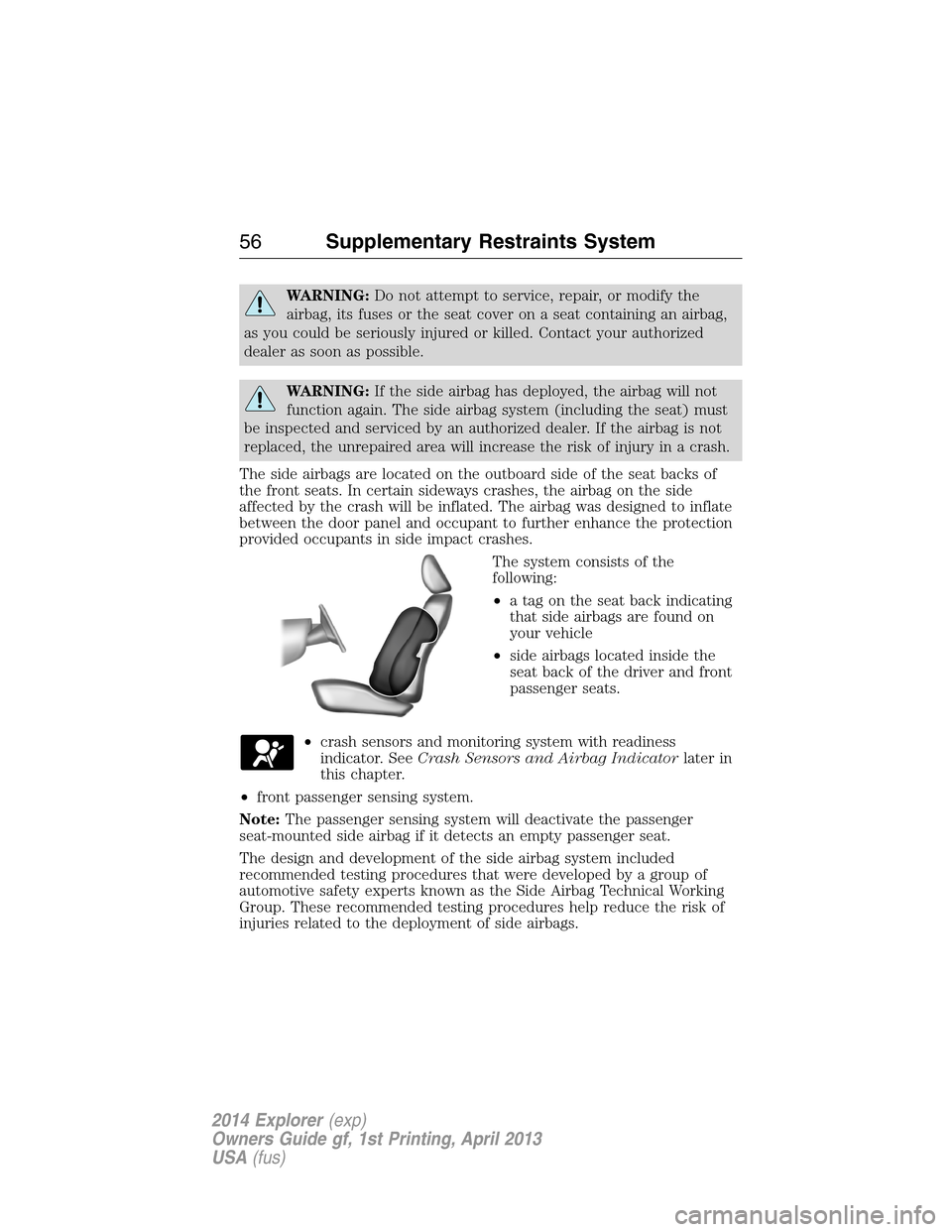
The side airbags are located on the outboard side of the seat backs of
the front seats. In certain sideways crashes, the airbag on the side
affected by the crash will be inflated. The airbag was designed to inflate
between the door panel and occupant to further enhance the protection
provided occupants in side impact crashes.
The system consists of the
following:
•a tag on the seat back indicating
that side airbags are found on
your vehicle
•side airbags located inside the
seat back of the driver and front
passenger seats.
•crash sensors and monitoring system with readiness
indicator. SeeCrash Sensors and Airbag Indicatorlater in
this chapter.
•front passenger sensing system.
Note:The passenger sensing system will deactivate the passenger
seat-mounted side airbag if it detects an empty passenger seat.
The design and development of the side airbag system included
recommended testing procedures that were developed by a group of
automotive safety experts known as the Side Airbag Technical Working
Group. These recommended testing procedures help reduce the risk of
injuries related to the deployment of side airbags.
56Supplementary Restraints System
2014 Explorer(exp)
Owners Guide gf, 1st Printing, April 2013
USA(fus)
Page 59 of 586
The Safety Canopy will deploy during significant side crashes or when a
certain likelihood of a rollover event is detected by the rollover sensor.
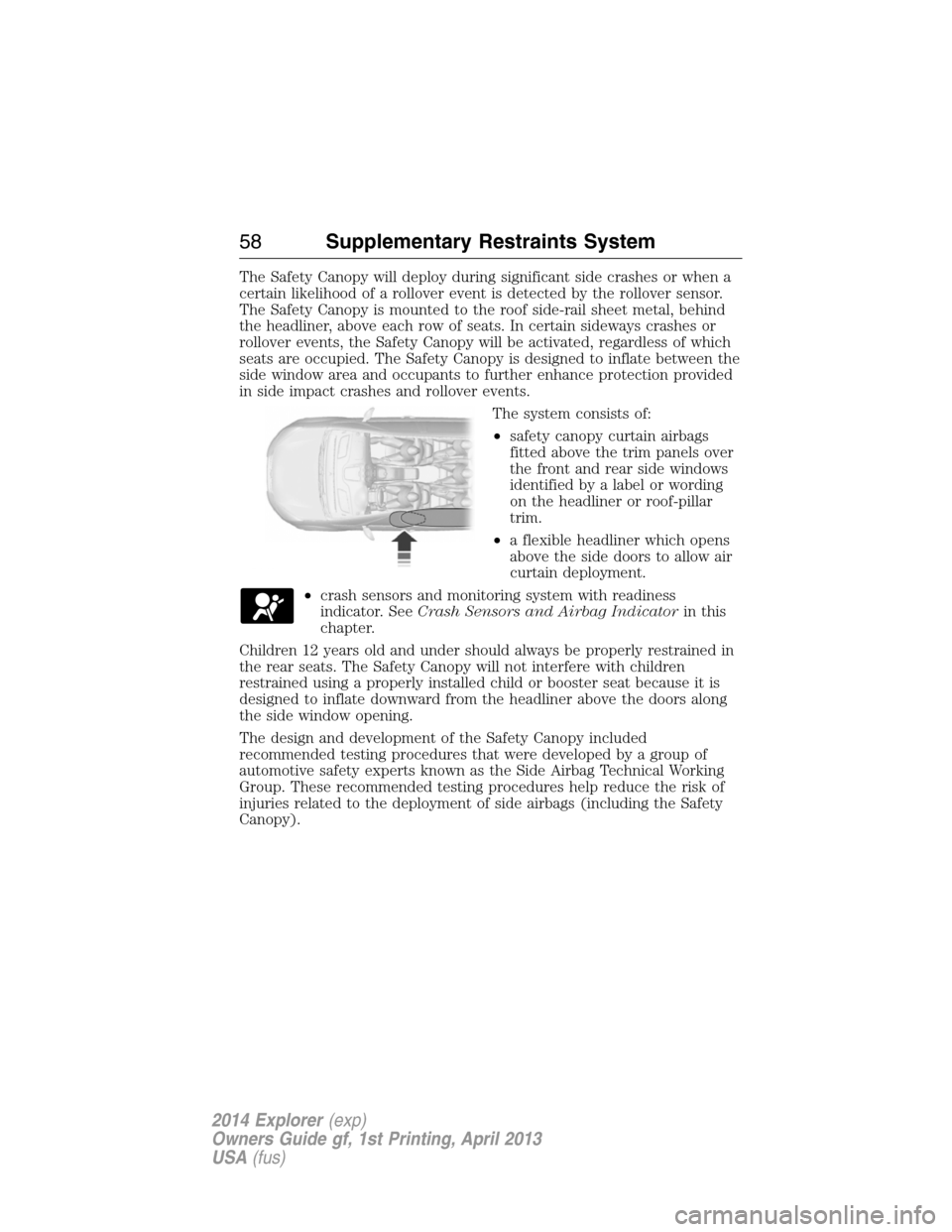
The Safety Canopy is mounted to the roof side-rail sheet metal, behind
the headliner, above each row of seats. In certain sideways crashes or
rollover events, the Safety Canopy will be activated, regardless of which
seats are occupied. The Safety Canopy is designed to inflate between the
side window area and occupants to further enhance protection provided
in side impact crashes and rollover events.
The system consists of:
•safety canopy curtain airbags
fitted above the trim panels over
the front and rear side windows
identified by a label or wording
on the headliner or roof-pillar
trim.
•a flexible headliner which opens
above the side doors to allow air
curtain deployment.
•crash sensors and monitoring system with readiness
indicator. SeeCrash Sensors and Airbag Indicatorin this
chapter.
Children 12 years old and under should always be properly restrained in
the rear seats. The Safety Canopy will not interfere with children
restrained using a properly installed child or booster seat because it is
designed to inflate downward from the headliner above the doors along
the side window opening.
The design and development of the Safety Canopy included
recommended testing procedures that were developed by a group of
automotive safety experts known as the Side Airbag Technical Working
Group. These recommended testing procedures help reduce the risk of
injuries related to the deployment of side airbags (including the Safety
Canopy).
58Supplementary Restraints System
2014 Explorer(exp)
Owners Guide gf, 1st Printing, April 2013
USA(fus)
Page 78 of 586
The system will turn off the lights if:
•you switch the ignition on
•you press the lock button on the remote control
•you lock your vehicle using the keyless entry keypad
•after 25 seconds of illumination.
The lights will not turn off if:
•you turn them on with the dimmer control
•any door is open.
Illuminated Exit
The interior lamps and select exterior lamps illuminate when all doors
are closed and you switch the ignition off and remove the key from the
ignition (integrated keyhead transmitter only).
The lamps turn off if all the doors remain closed and:
•25 seconds elapse
•you insert the key in the ignition (integrated keyhead transmitter
only)
•you press theSTART/STOPbutton (intelligent access key only).
Battery Saver
If you leave the courtesy lamps, dome lamps or headlamps on, the
battery saver shuts them off 10 minutes after you switch the ignition off.
Accessory Mode Battery Saver for Intelligent Access Keys
(If Equipped)
If you leave your vehicle in the run ignition state, it will shut off once it
detects a certain amount of battery drain or after 45 minutes.
LIFTGATE
WARNING:It is extremely dangerous to ride in a cargo area,
inside or outside of a vehicle. In a crash, people riding in these
areas are more likely to be seriously injured or killed. Do not allow
people to ride in any area of your vehicle that is not equipped with
seats and safety belts. Be sure everyone in your vehicle is in a seat and
using a safety belt properly.
Locks77
2014 Explorer(exp)
Owners Guide gf, 1st Printing, April 2013
USA(fus)
Page 91 of 586
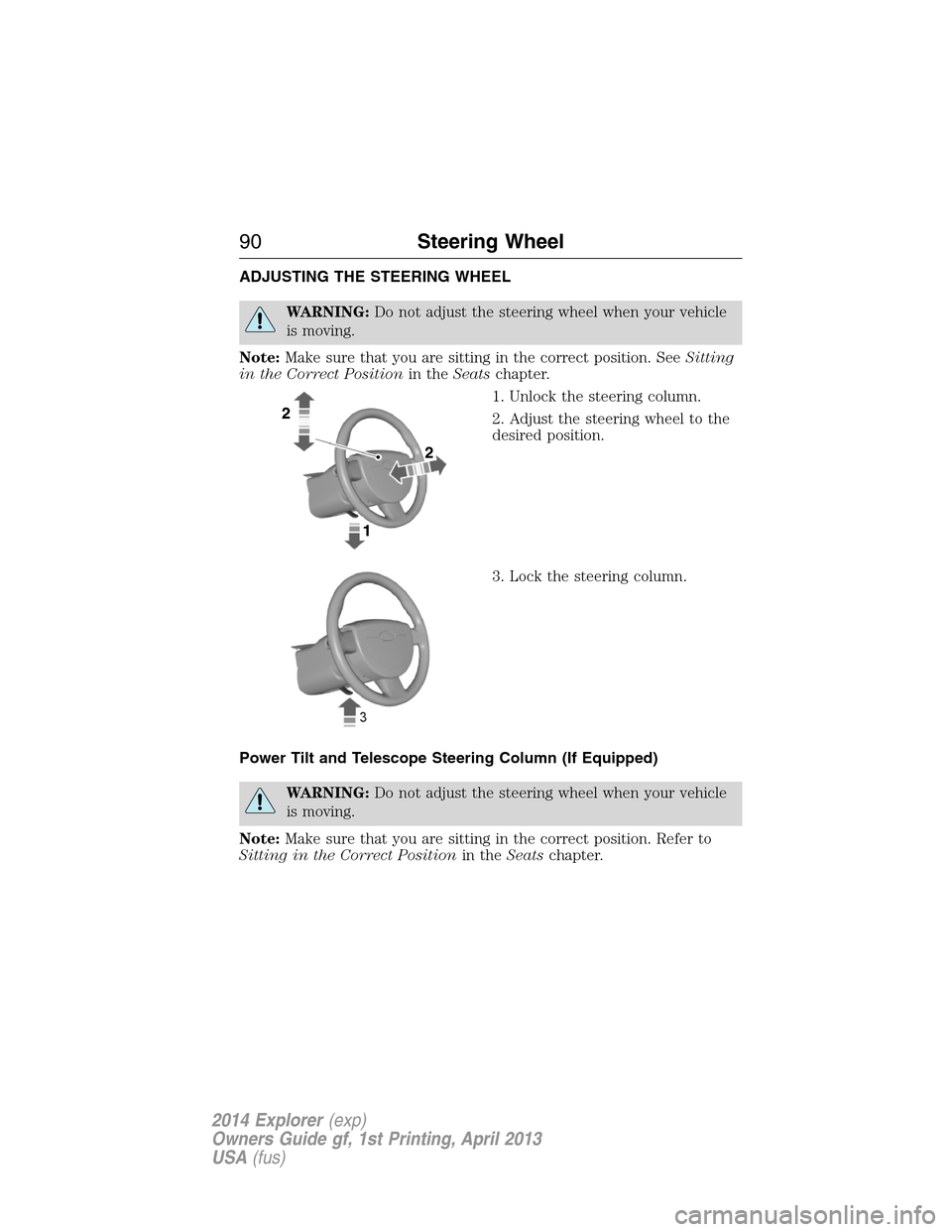
ADJUSTING THE STEERING WHEEL
WARNING:Do not adjust the steering wheel when your vehicle
is moving.
Note:Make sure that you are sitting in the correct position. SeeSitting
in the Correct Positionin theSeatschapter.
1. Unlock the steering column.
2. Adjust the steering wheel to the
desired position.
3. Lock the steering column.
Power Tilt and Telescope Steering Column (If Equipped)
WARNING:Do not adjust the steering wheel when your vehicle
is moving.
Note:Make sure that you are sitting in the correct position. Refer to
Sitting in the Correct Positionin theSeatschapter.
90Steering Wheel
2014 Explorer(exp)
Owners Guide gf, 1st Printing, April 2013
USA(fus)
Page 92 of 586
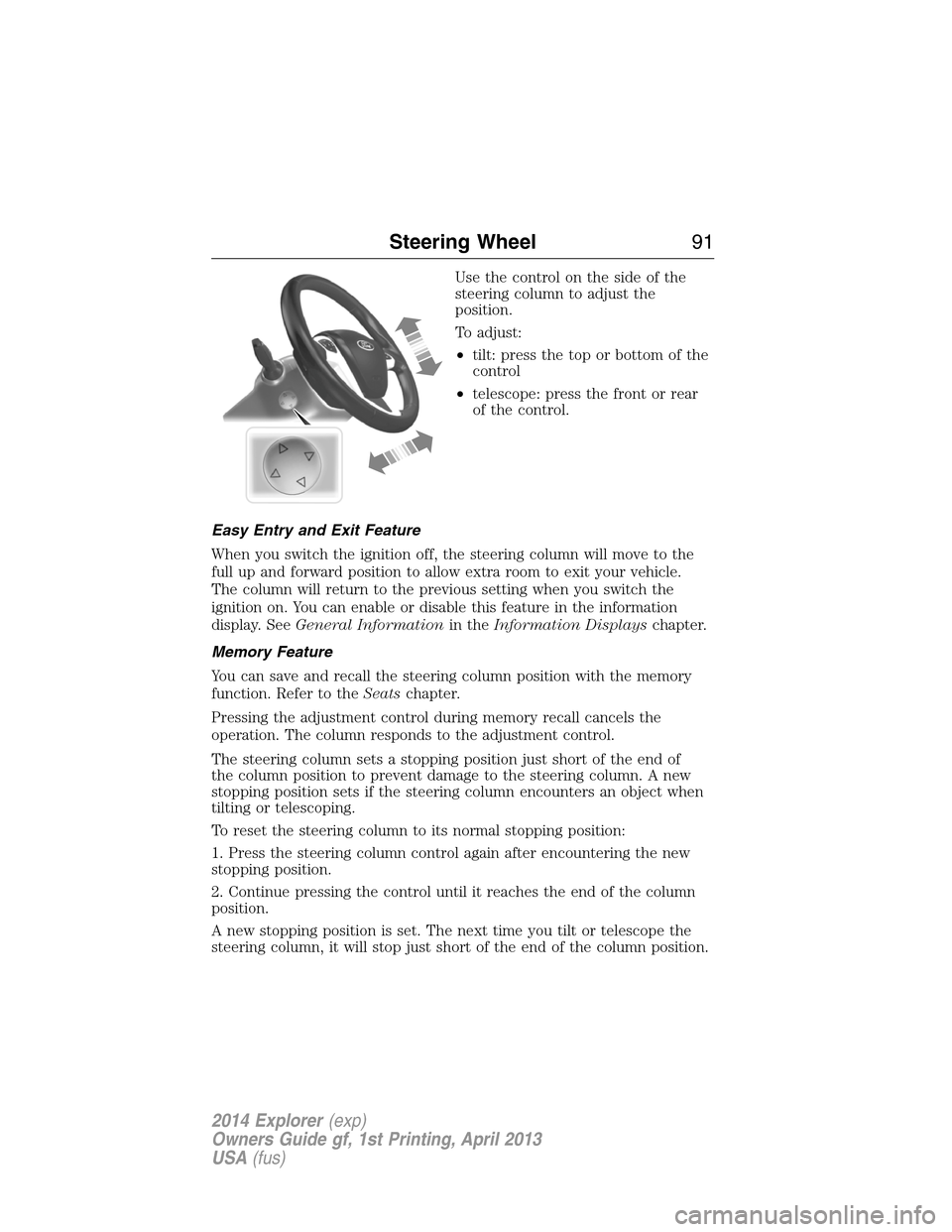
Use the control on the side of the
steering column to adjust the
position.
To adjust:
•tilt: press the top or bottom of the
control
•telescope: press the front or rear
of the control.
Easy Entry and Exit Feature
When you switch the ignition off, the steering column will move to the
full up and forward position to allow extra room to exit your vehicle.
The column will return to the previous setting when you switch the
ignition on. You can enable or disable this feature in the information
display. SeeGeneral Informationin theInformation Displayschapter.
Memory Feature
You can save and recall the steering column position with the memory
function. Refer to theSeatschapter.
Pressing the adjustment control during memory recall cancels the
operation. The column responds to the adjustment control.
The steering column sets a stopping position just short of the end of
the column position to prevent damage to the steering column. A new
stopping position sets if the steering column encounters an object when
tilting or telescoping.
To reset the steering column to its normal stopping position:
1. Press the steering column control again after encountering the new
stopping position.
2. Continue pressing the control until it reaches the end of the column
position.
A new stopping position is set. The next time you tilt or telescope the
steering column, it will stop just short of the end of the column position.
Steering Wheel91
2014 Explorer(exp)
Owners Guide gf, 1st Printing, April 2013
USA(fus)
Page 96 of 586
ADJUSTABLE PEDALS (IF EQUIPPED)
WARNING:Never adjust the accelerator and brake pedal with
feet on the pedals while the vehicle is moving.
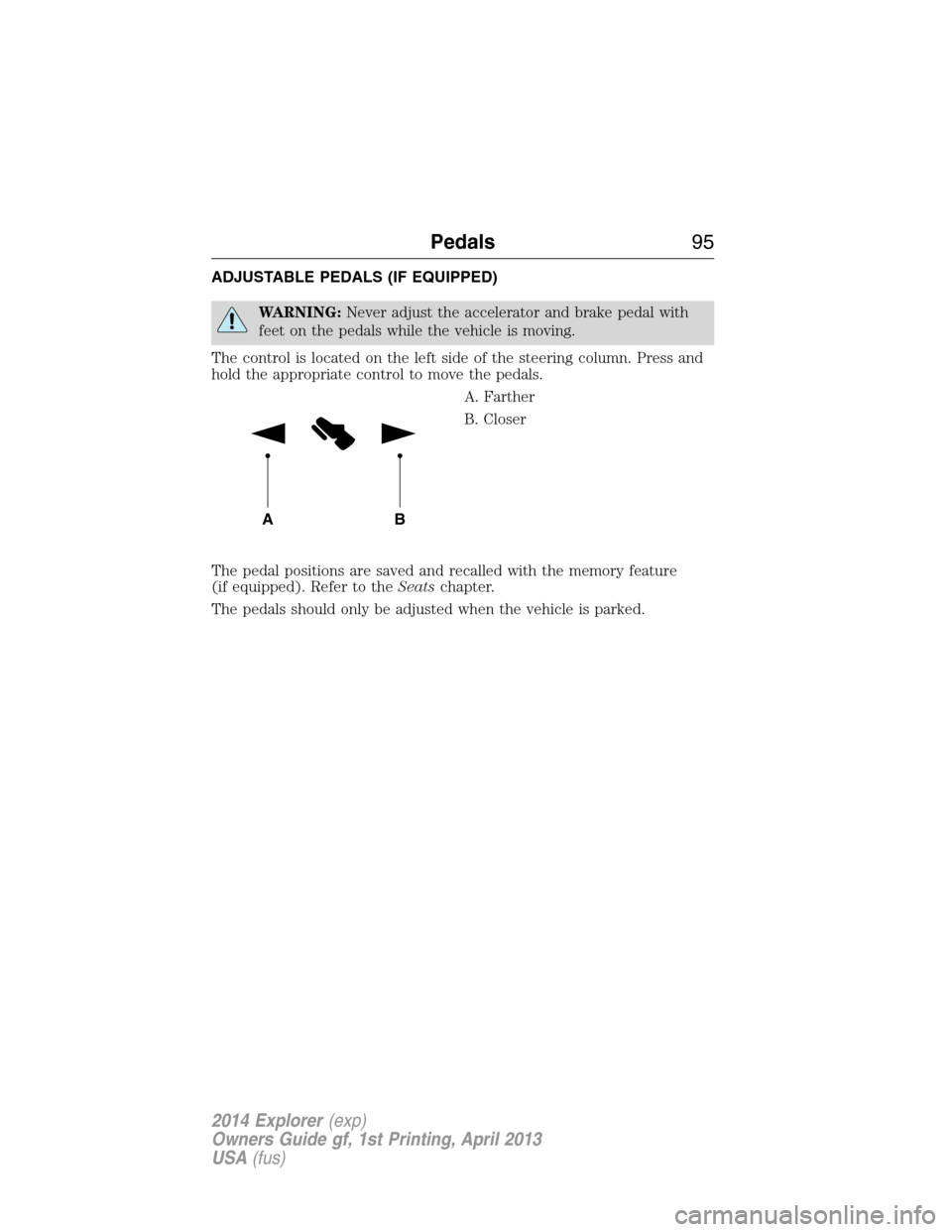
The control is located on the left side of the steering column. Press and
hold the appropriate control to move the pedals.
A. Farther
B. Closer
The pedal positions are saved and recalled with the memory feature
(if equipped). Refer to theSeatschapter.
The pedals should only be adjusted when the vehicle is parked.
AB
Pedals95
2014 Explorer(exp)
Owners Guide gf, 1st Printing, April 2013
USA(fus)
Page 110 of 586
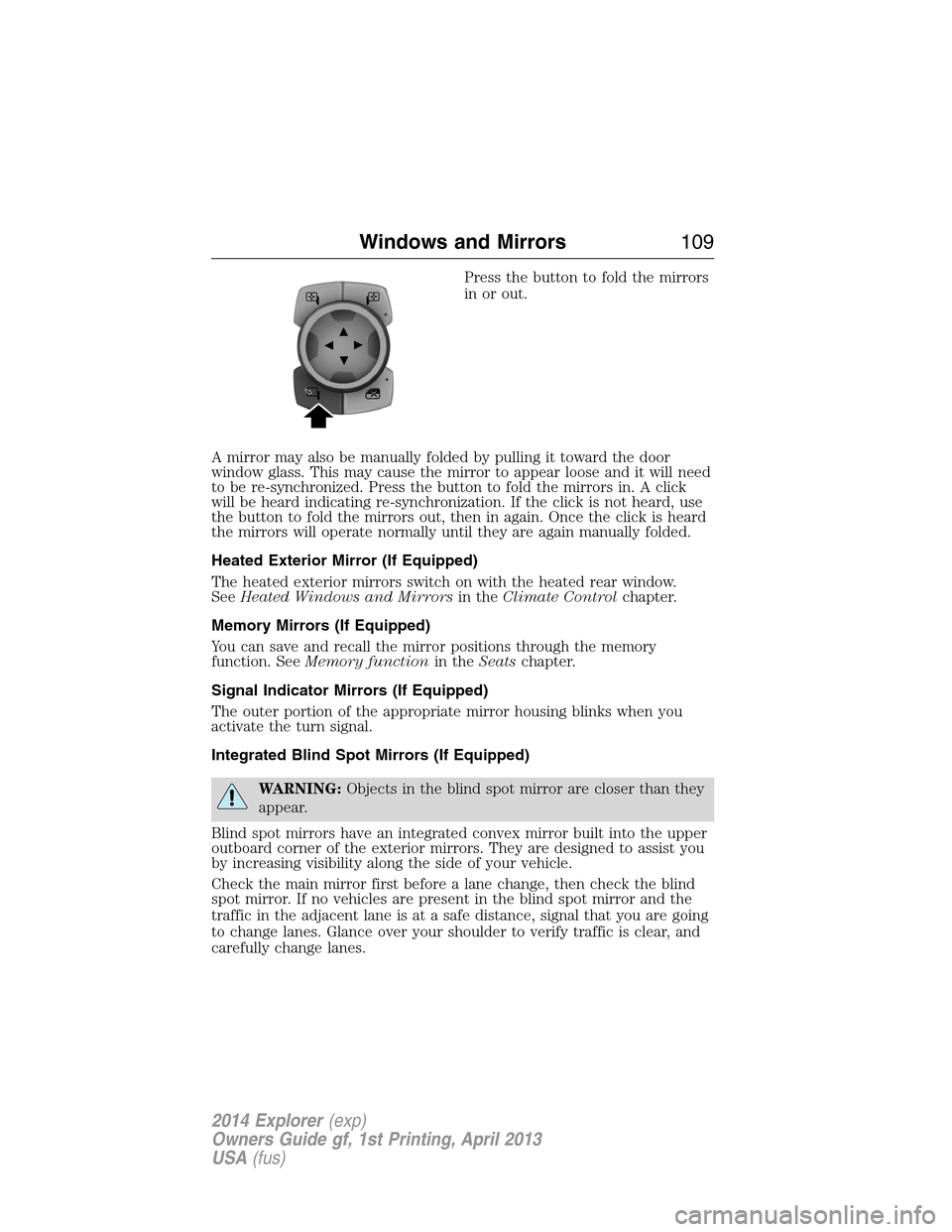
Press the button to fold the mirrors
in or out.
A mirror may also be manually folded by pulling it toward the door
window glass. This may cause the mirror to appear loose and it will need
to be re-synchronized. Press the button to fold the mirrors in. A click
will be heard indicating re-synchronization. If the click is not heard, use
the button to fold the mirrors out, then in again. Once the click is heard
the mirrors will operate normally until they are again manually folded.
Heated Exterior Mirror (If Equipped)
The heated exterior mirrors switch on with the heated rear window.
SeeHeated Windows and Mirrorsin theClimate Controlchapter.
Memory Mirrors (If Equipped)
You can save and recall the mirror positions through the memory
function. SeeMemory functionin theSeatschapter.
Signal Indicator Mirrors (If Equipped)
The outer portion of the appropriate mirror housing blinks when you
activate the turn signal.
Integrated Blind Spot Mirrors (If Equipped)
WARNING:Objects in the blind spot mirror are closer than they
appear.
Blind spot mirrors have an integrated convex mirror built into the upper
outboard corner of the exterior mirrors. They are designed to assist you
by increasing visibility along the side of your vehicle.
Check the main mirror first before a lane change, then check the blind
spot mirror. If no vehicles are present in the blind spot mirror and the
traffic in the adjacent lane is at a safe distance, signal that you are going
to change lanes. Glance over your shoulder to verify traffic is clear, and
carefully change lanes.
Windows and Mirrors109
2014 Explorer(exp)
Owners Guide gf, 1st Printing, April 2013
USA(fus)
Page 125 of 586
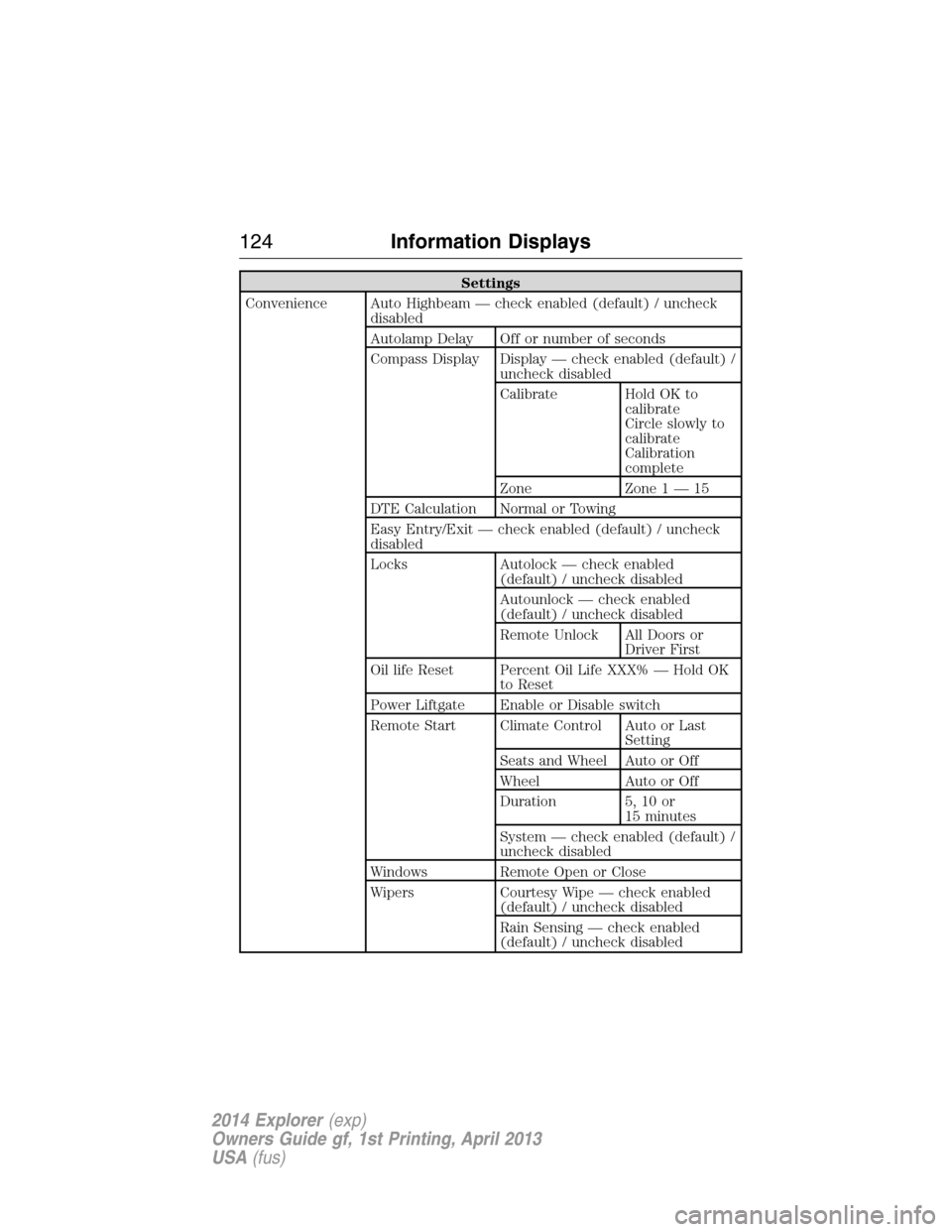
Settings
Convenience Auto Highbeam — check enabled (default) / uncheck
disabled
Autolamp Delay Off or number of seconds
Compass Display Display — check enabled (default) /
uncheck disabled
Calibrate Hold OK to
calibrate
Circle slowly to
calibrate
Calibration
complete
Zone Zone 1 — 15
DTE Calculation Normal or Towing
Easy Entry/Exit — check enabled (default) / uncheck
disabled
Locks Autolock — check enabled
(default) / uncheck disabled
Autounlock — check enabled
(default) / uncheck disabled
Remote Unlock All Doors or
Driver First
Oil life Reset Percent Oil Life XXX% — Hold OK
to Reset
Power Liftgate Enable or Disable switch
Remote Start Climate Control Auto or Last
Setting
Seats and Wheel Auto or Off
Wheel Auto or Off
Duration 5, 10 or
15 minutes
System — check enabled (default) /
uncheck disabled
Windows Remote Open or Close
Wipers Courtesy Wipe — check enabled
(default) / uncheck disabled
Rain Sensing — check enabled
(default) / uncheck disabled
124Information Displays
2014 Explorer(exp)
Owners Guide gf, 1st Printing, April 2013
USA(fus)
Page 131 of 586
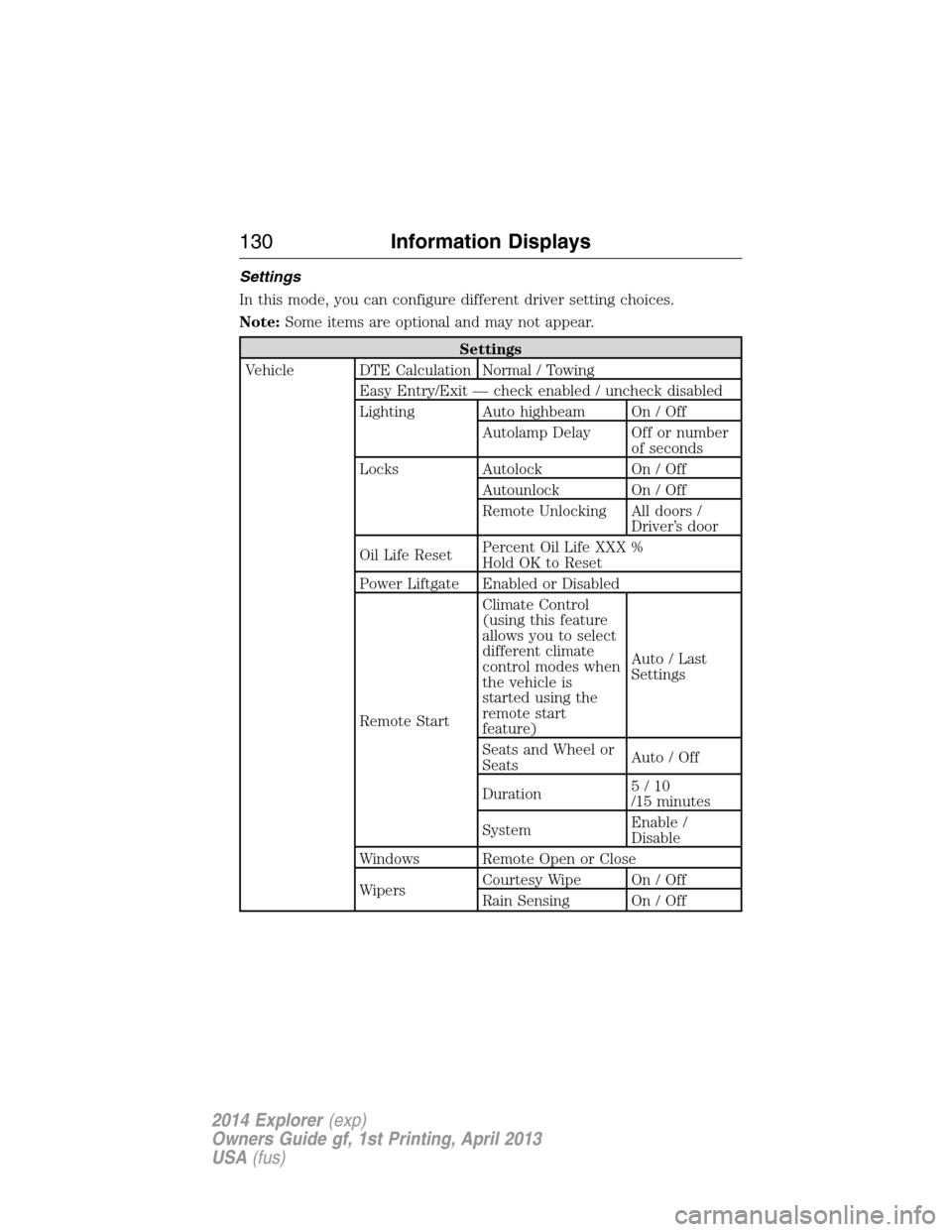
Settings
In this mode, you can configure different driver setting choices.
Note:Some items are optional and may not appear.
Settings
Vehicle DTE Calculation Normal / Towing
Easy Entry/Exit — check enabled / uncheck disabled
Lighting Auto highbeam On / Off
Autolamp Delay Off or number
of seconds
Locks Autolock On / Off
Autounlock On / Off
Remote Unlocking All doors /
Driver’s door
Oil Life ResetPercent Oil Life XXX %
Hold OK to Reset
Power Liftgate Enabled or Disabled
Remote StartClimate Control
(using this feature
allows you to select
different climate
control modes when
the vehicle is
started using the
remote start
feature)Auto / Last
Settings
Seats and Wheel or
SeatsAuto / Off
Duration5/10
/15 minutes
SystemEnable /
Disable
Windows Remote Open or Close
WipersCourtesy Wipe On / Off
Rain Sensing On / Off
130Information Displays
2014 Explorer(exp)
Owners Guide gf, 1st Printing, April 2013
USA(fus)