key FORD EXPLORER 2014 5.G Repair Manual
[x] Cancel search | Manufacturer: FORD, Model Year: 2014, Model line: EXPLORER, Model: FORD EXPLORER 2014 5.GPages: 586, PDF Size: 9.07 MB
Page 310 of 586
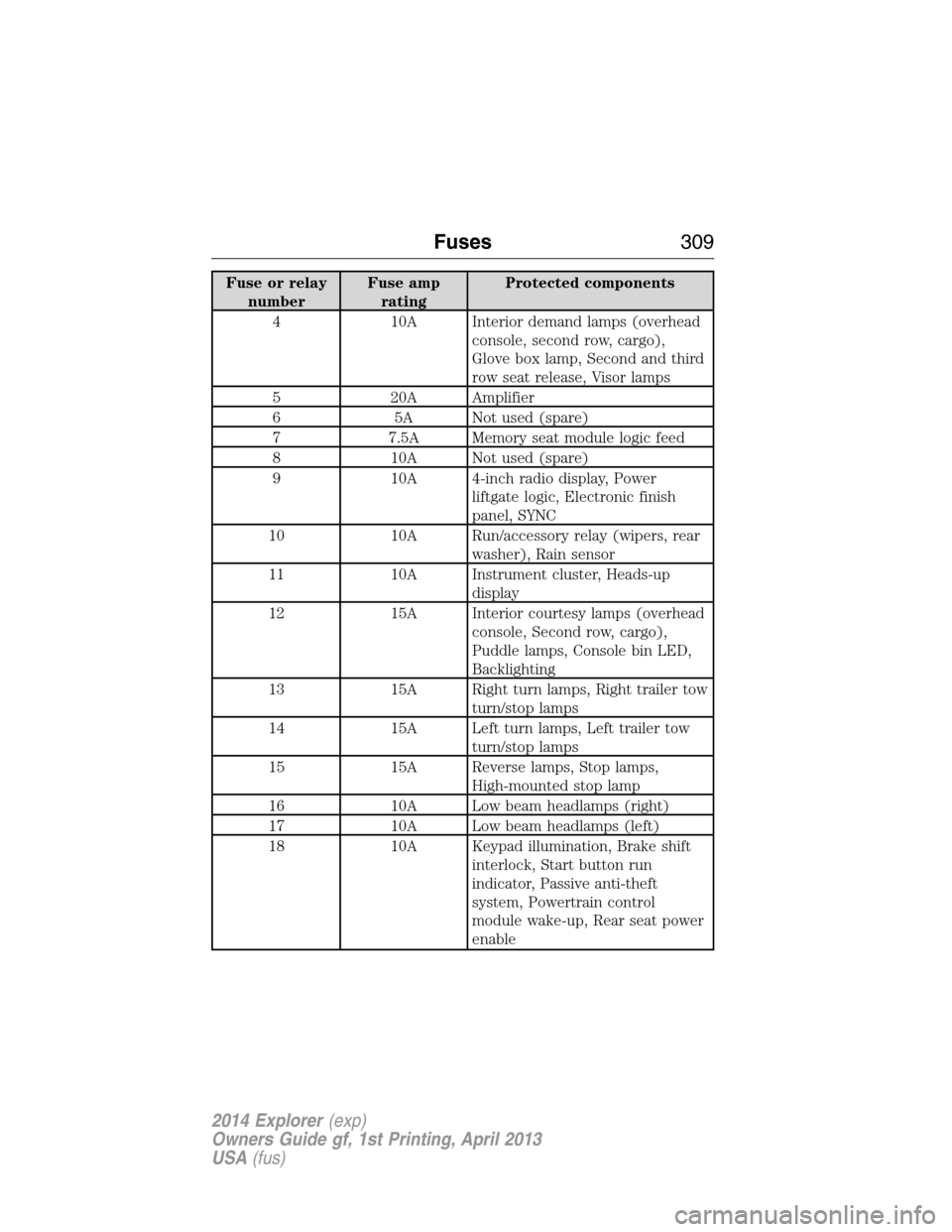
Fuse or relay
numberFuse amp
ratingProtected components
4 10A Interior demand lamps (overhead
console, second row, cargo),
Glove box lamp, Second and third
row seat release, Visor lamps
5 20A Amplifier
6 5A Not used (spare)
7 7.5A Memory seat module logic feed
8 10A Not used (spare)
9 10A 4-inch radio display, Power
liftgate logic, Electronic finish
panel, SYNC
10 10A Run/accessory relay (wipers, rear
washer), Rain sensor
11 10A Instrument cluster, Heads-up
display
12 15A Interior courtesy lamps (overhead
console, Second row, cargo),
Puddle lamps, Console bin LED,
Backlighting
13 15A Right turn lamps, Right trailer tow
turn/stop lamps
14 15A Left turn lamps, Left trailer tow
turn/stop lamps
15 15A Reverse lamps, Stop lamps,
High-mounted stop lamp
16 10A Low beam headlamps (right)
17 10A Low beam headlamps (left)
18 10A Keypad illumination, Brake shift
interlock, Start button run
indicator, Passive anti-theft
system, Powertrain control
module wake-up, Rear seat power
enable
Fuses309
2014 Explorer(exp)
Owners Guide gf, 1st Printing, April 2013
USA(fus)
Page 311 of 586
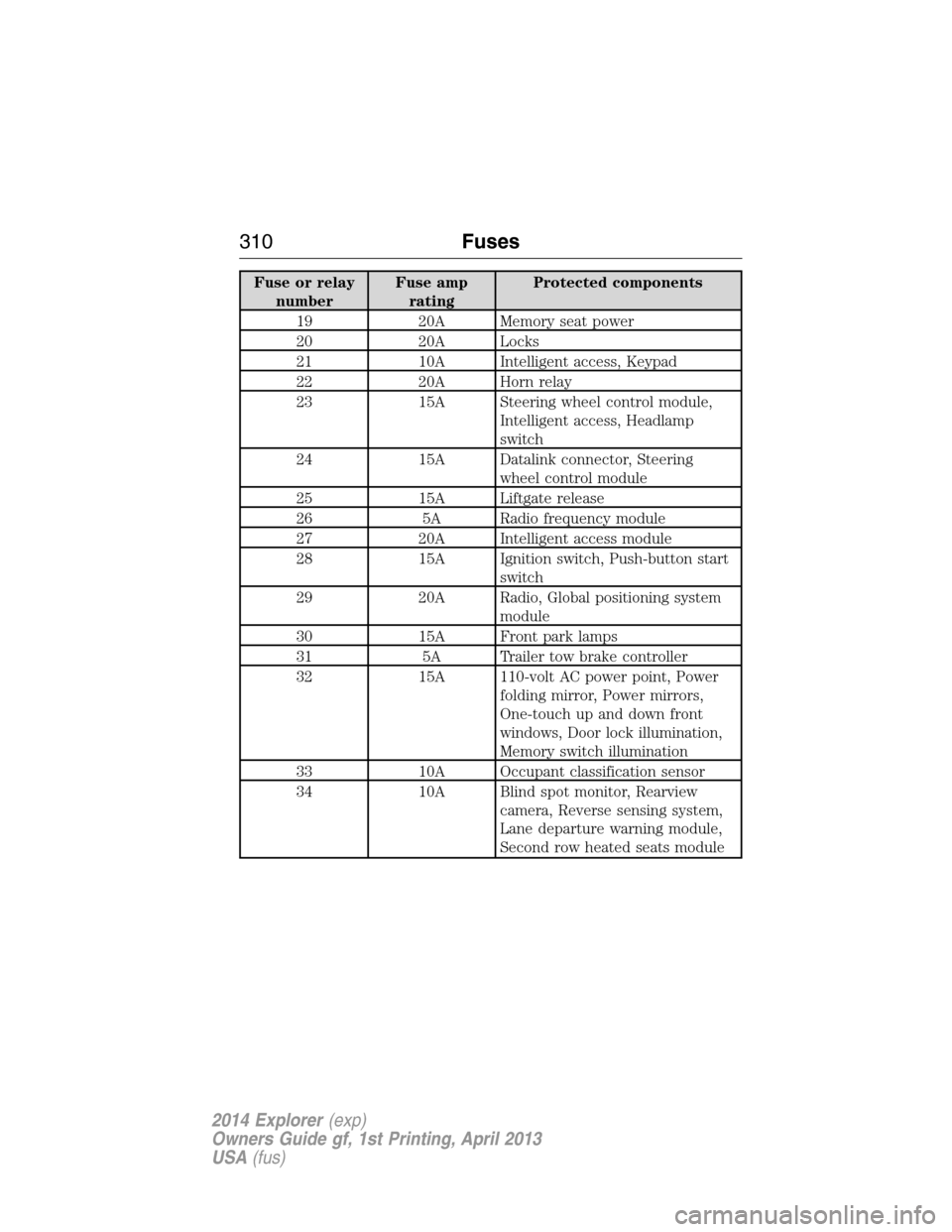
Fuse or relay
numberFuse amp
ratingProtected components
19 20A Memory seat power
20 20A Locks
21 10A Intelligent access, Keypad
22 20A Horn relay
23 15A Steering wheel control module,
Intelligent access, Headlamp
switch
24 15A Datalink connector, Steering
wheel control module
25 15A Liftgate release
26 5A Radio frequency module
27 20A Intelligent access module
28 15A Ignition switch, Push-button start
switch
29 20A Radio, Global positioning system
module
30 15A Front park lamps
31 5A Trailer tow brake controller
32 15A 110-volt AC power point, Power
folding mirror, Power mirrors,
One-touch up and down front
windows, Door lock illumination,
Memory switch illumination
33 10A Occupant classification sensor
34 10A Blind spot monitor, Rearview
camera, Reverse sensing system,
Lane departure warning module,
Second row heated seats module
310Fuses
2014 Explorer(exp)
Owners Guide gf, 1st Printing, April 2013
USA(fus)
Page 313 of 586
GENERAL INFORMATION
Have your vehicle serviced regularly to help maintain its roadworthiness
and resale value. There is a large network of Ford authorized dealers
who are there to help you with their professional servicing expertise.
We believe that their specially trained technicians are best qualified to
service your vehicle properly and expertly. They are supported by a wide
range of highly specialized tools developed specifically for servicing your
vehicle.
To help you service your vehicle, we provideScheduled Maintenance
Informationwhich makes tracking routine service easy.
If your vehicle requires professional service, your authorized dealer
can provide the necessary parts and service. Check your warranty
information to find out which parts and services are covered.
Use only recommended fuels, lubricants, fluids and service parts
conforming to specifications. Motorcraft® parts are designed and built to
provide the best performance in your vehicle.
Precautions
•Do not work on a hot engine.
•Make sure that nothing gets caught in moving parts.
•Do not work on a vehicle with the engine running in an enclosed
space, unless you are sure you have enough ventilation.
•Keep all open flames and other burning material (such as cigarettes)
away from the battery and all fuel related parts.
Working with the Engine Off
1. Set the parking brake and shift toP(Park).
2. Turn off the engine and remove the key (if equipped).
3. Block the wheels.
Working with the Engine On
WARNING:To reduce the risk of vehicle damage or personal
burn injuries, do not start your engine with the air cleaner
removed and do not remove it while the engine is running.
1. Set the parking brake and shift to positionP.
2. Block the wheels.
312Maintenance
2014 Explorer(exp)
Owners Guide gf, 1st Printing, April 2013
USA(fus)
Page 333 of 586
Note:Electrical or electronic accessories added to the vehicle by the
dealer or the owner may adversely affect battery performance and
durability and may also affect the performance of other electrical
systems in the vehicle.
When a battery replacement is required, the battery should be replaced
with a Ford recommended replacement battery that matches the
electrical requirements of the vehicle. After battery replacement, or in
some cases after charging the battery with an external charger, the BMS
requires eight hours of vehicle sleep time (key off with doors closed) to
relearn the new battery state of charge. Prior to relearning state of
charge, the BMS may disable electrical features (to protect the battery)
earlier than normal.
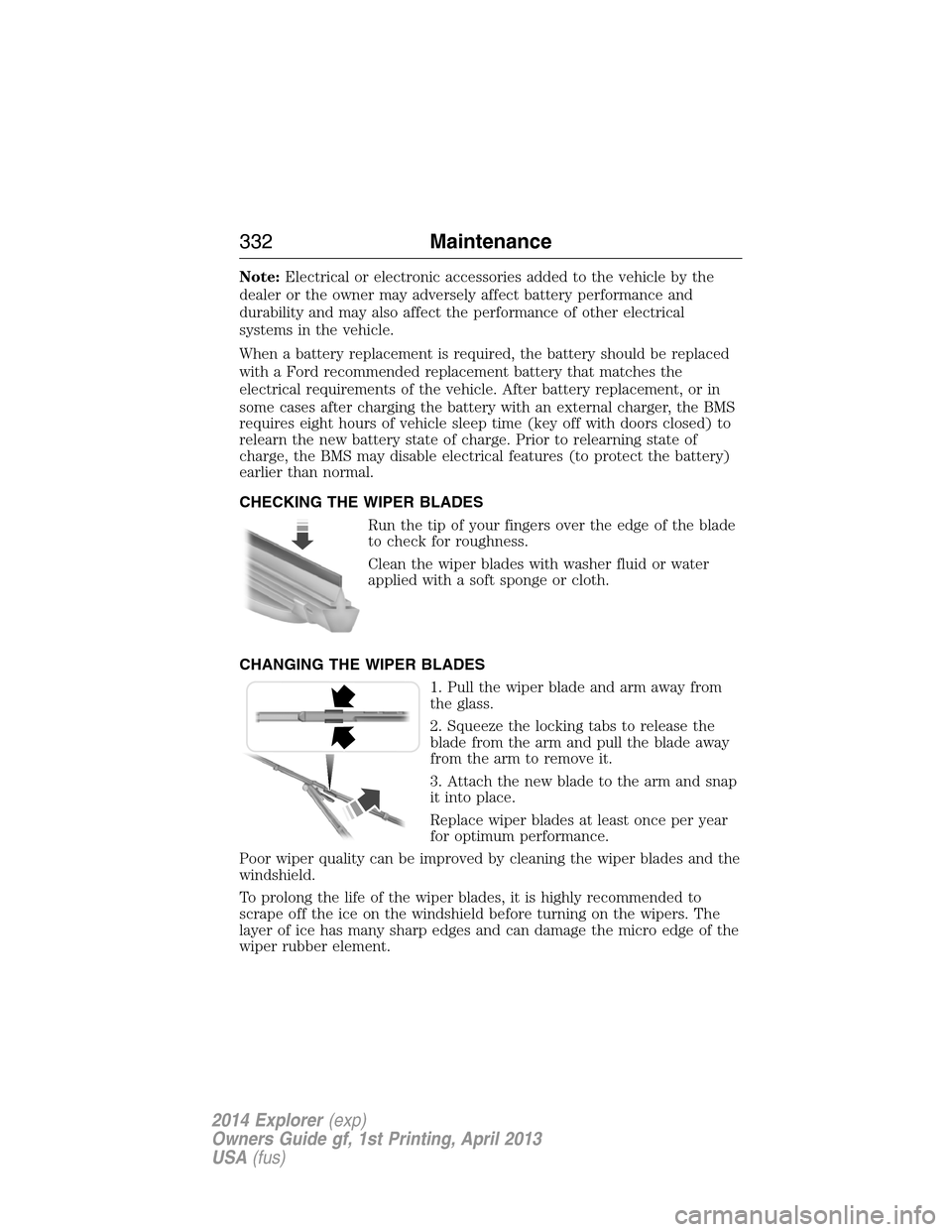
CHECKING THE WIPER BLADES
Run the tip of your fingers over the edge of the blade
to check for roughness.
Clean the wiper blades with washer fluid or water
applied with a soft sponge or cloth.
CHANGING THE WIPER BLADES
1. Pull the wiper blade and arm away from
the glass.
2. Squeeze the locking tabs to release the
blade from the arm and pull the blade away
from the arm to remove it.
3. Attach the new blade to the arm and snap
it into place.
Replace wiper blades at least once per year
for optimum performance.
Poor wiper quality can be improved by cleaning the wiper blades and the
windshield.
To prolong the life of the wiper blades, it is highly recommended to
scrape off the ice on the windshield before turning on the wipers. The
layer of ice has many sharp edges and can damage the micro edge of the
wiper rubber element.
332Maintenance
2014 Explorer(exp)
Owners Guide gf, 1st Printing, April 2013
USA(fus)
Page 396 of 586
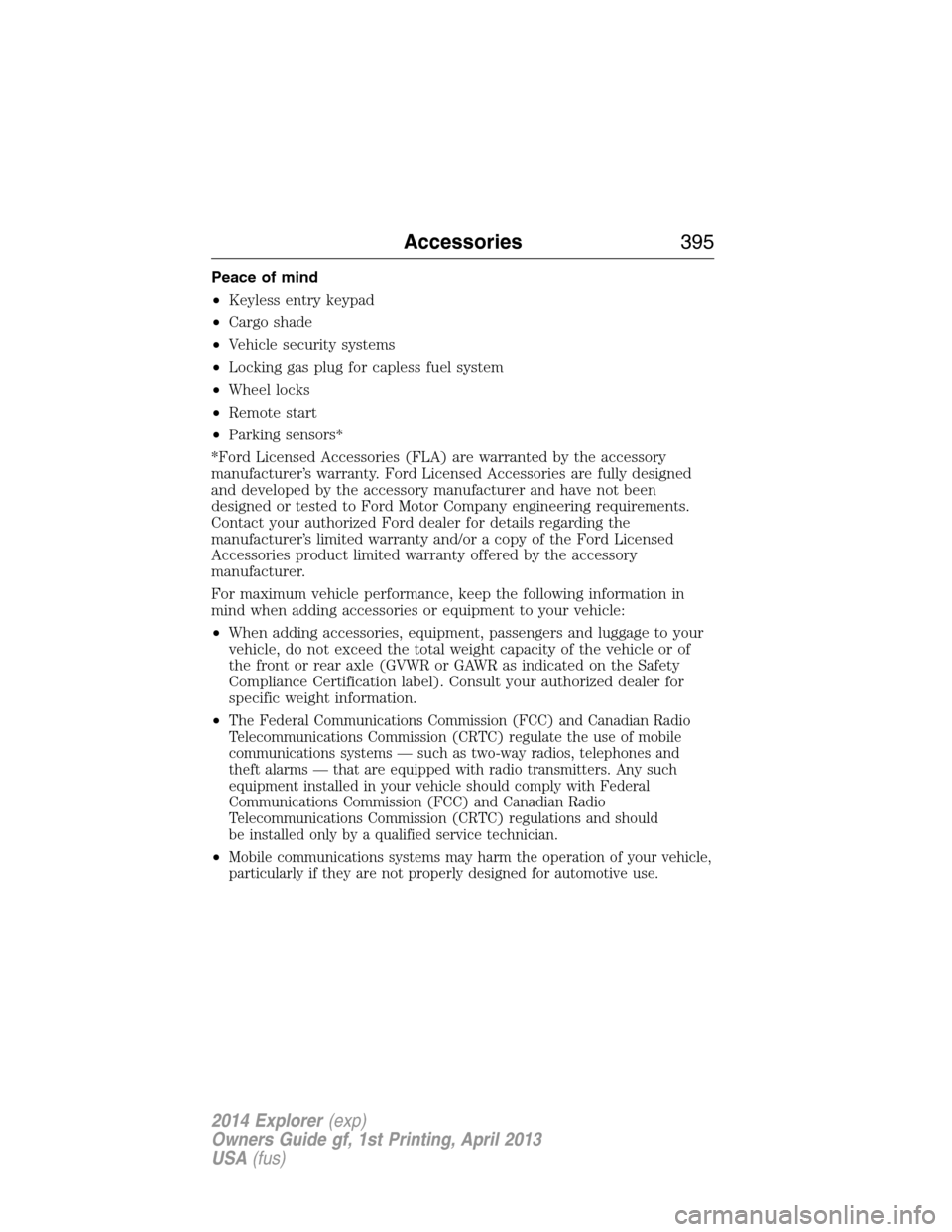
Peace of mind
•Keyless entry keypad
•Cargo shade
•Vehicle security systems
•Locking gas plug for capless fuel system
•Wheel locks
•Remote start
•Parking sensors*
*Ford Licensed Accessories (FLA) are warranted by the accessory
manufacturer’s warranty. Ford Licensed Accessories are fully designed
and developed by the accessory manufacturer and have not been
designed or tested to Ford Motor Company engineering requirements.
Contact your authorized Ford dealer for details regarding the
manufacturer’s limited warranty and/or a copy of the Ford Licensed
Accessories product limited warranty offered by the accessory
manufacturer.
For maximum vehicle performance, keep the following information in
mind when adding accessories or equipment to your vehicle:
•When adding accessories, equipment, passengers and luggage to your
vehicle, do not exceed the total weight capacity of the vehicle or of
the front or rear axle (GVWR or GAWR as indicated on the Safety
Compliance Certification label). Consult your authorized dealer for
specific weight information.
•
The Federal Communications Commission (FCC) and Canadian Radio
Telecommunications Commission (CRTC) regulate the use of mobile
communications systems — such as two-way radios, telephones and
theft alarms — that are equipped with radio transmitters. Any such
equipment installed in your vehicle should comply with Federal
Communications Commission (FCC) and Canadian Radio
Telecommunications Commission (CRTC) regulations and should
be installed only by a qualified service technician.
•Mobile communications systems may harm the operation of your vehicle,
particularly if they are not properly designed for automotive use.
Accessories395
2014 Explorer(exp)
Owners Guide gf, 1st Printing, April 2013
USA(fus)
Page 415 of 586
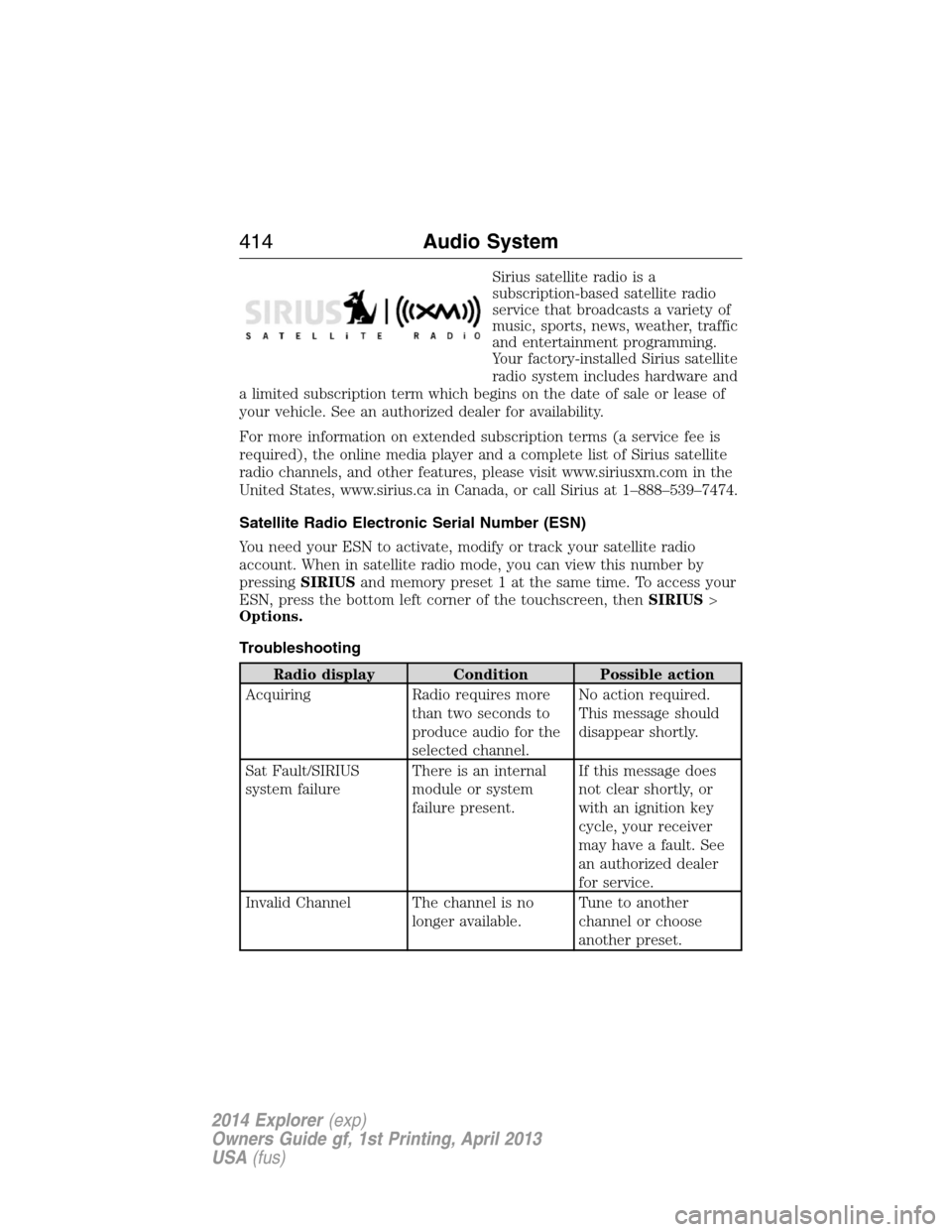
Sirius satellite radio is a
subscription-based satellite radio
service that broadcasts a variety of
music, sports, news, weather, traffic
and entertainment programming.
Your factory-installed Sirius satellite
radio system includes hardware and
a limited subscription term which begins on the date of sale or lease of
your vehicle. See an authorized dealer for availability.
For more information on extended subscription terms (a service fee is
required), the online media player and a complete list of Sirius satellite
radio channels, and other features, please visit www.siriusxm.com in the
United States, www.sirius.ca in Canada, or call Sirius at 1–888–539–7474.
Satellite Radio Electronic Serial Number (ESN)
You need your ESN to activate, modify or track your satellite radio
account. When in satellite radio mode, you can view this number by
pressingSIRIUSand memory preset 1 at the same time. To access your
ESN, press the bottom left corner of the touchscreen, thenSIRIUS>
Options.
Troubleshooting
Radio display Condition Possible action
Acquiring Radio requires more
than two seconds to
produce audio for the
selected channel.No action required.
This message should
disappear shortly.
Sat Fault/SIRIUS
system failureThere is an internal
module or system
failure present.If this message does
not clear shortly, or
with an ignition key
cycle, your receiver
may have a fault. See
an authorized dealer
for service.
Invalid Channel The channel is no
longer available.Tune to another
channel or choose
another preset.
414Audio System
2014 Explorer(exp)
Owners Guide gf, 1st Printing, April 2013
USA(fus)
Page 470 of 586
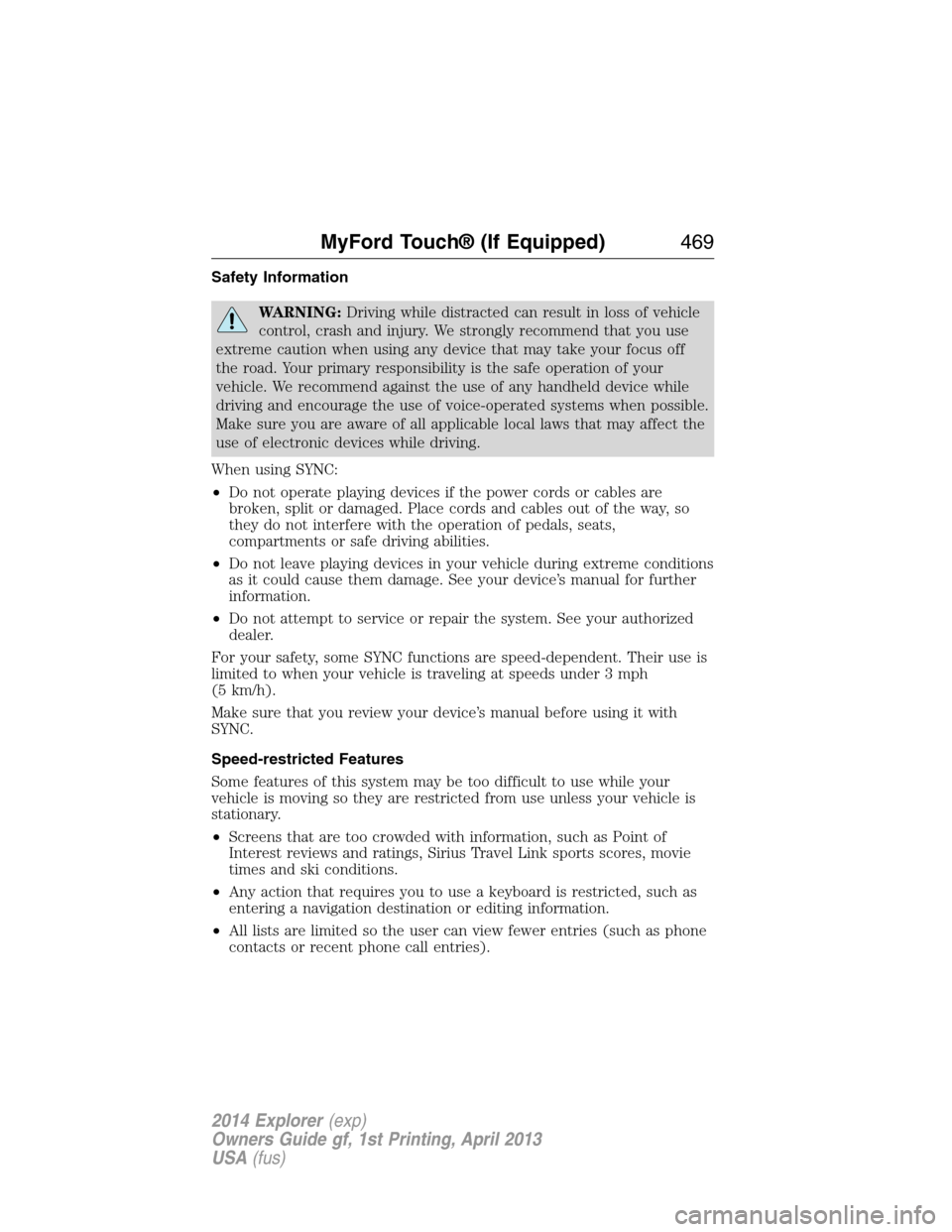
Safety Information
WARNING:Driving while distracted can result in loss of vehicle
control, crash and injury. We strongly recommend that you use
extreme caution when using any device that may take your focus off
the road. Your primary responsibility is the safe operation of your
vehicle. We recommend against the use of any handheld device while
driving and encourage the use of voice-operated systems when possible.
Make sure you are aware of all applicable local laws that may affect the
use of electronic devices while driving.
When using SYNC:
•Do not operate playing devices if the power cords or cables are
broken, split or damaged. Place cords and cables out of the way, so
they do not interfere with the operation of pedals, seats,
compartments or safe driving abilities.
•Do not leave playing devices in your vehicle during extreme conditions
as it could cause them damage. See your device’s manual for further
information.
•Do not attempt to service or repair the system. See your authorized
dealer.
For your safety, some SYNC functions are speed-dependent. Their use is
limited to when your vehicle is traveling at speeds under 3 mph
(5 km/h).
Make sure that you review your device’s manual before using it with
SYNC.
Speed-restricted Features
Some features of this system may be too difficult to use while your
vehicle is moving so they are restricted from use unless your vehicle is
stationary.
•Screens that are too crowded with information, such as Point of
Interest reviews and ratings, Sirius Travel Link sports scores, movie
times and ski conditions.
•Any action that requires you to use a keyboard is restricted, such as
entering a navigation destination or editing information.
•All lists are limited so the user can view fewer entries (such as phone
contacts or recent phone call entries).
MyFord Touch® (If Equipped)469
2014 Explorer(exp)
Owners Guide gf, 1st Printing, April 2013
USA(fus)
Page 471 of 586
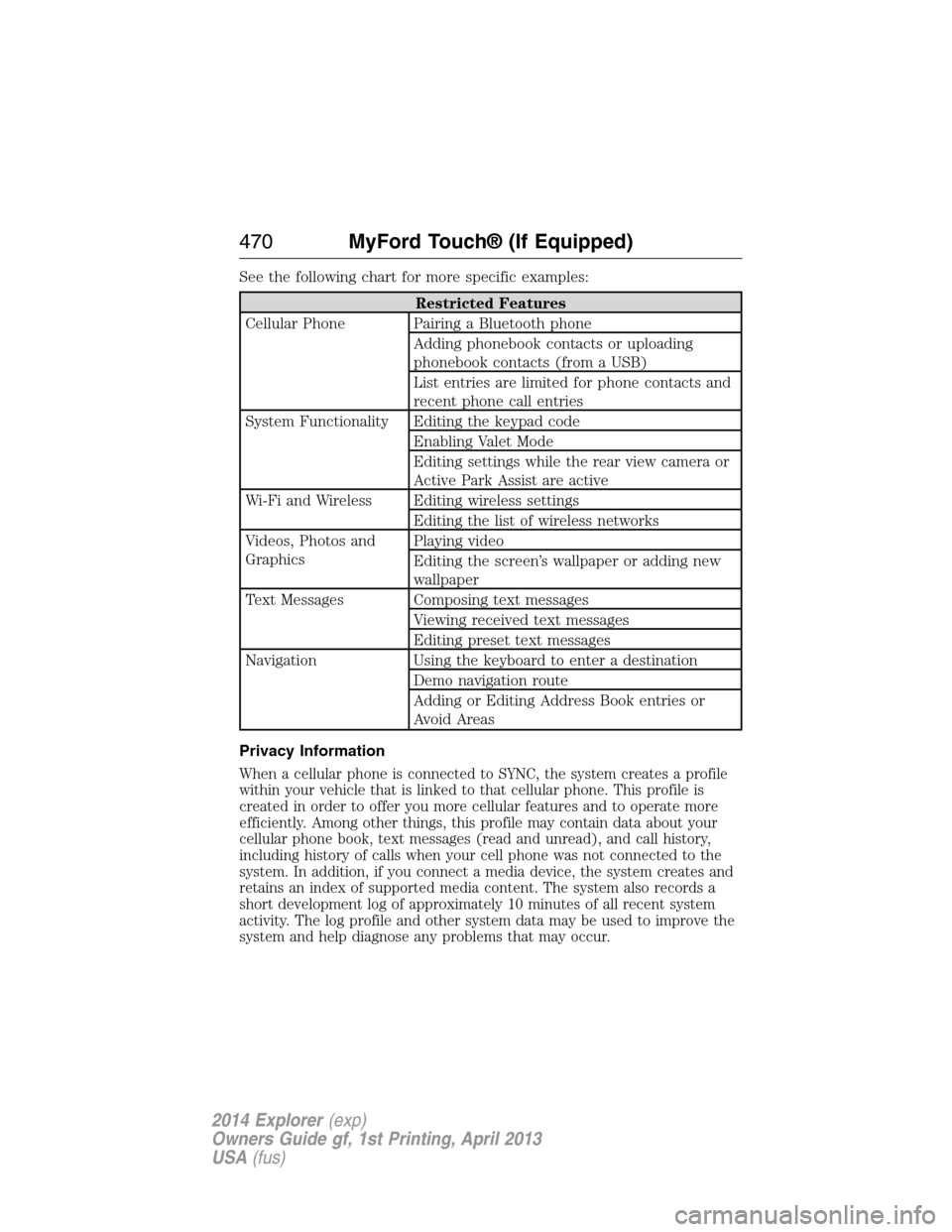
See the following chart for more specific examples:
Restricted Features
Cellular Phone Pairing a Bluetooth phone
Adding phonebook contacts or uploading
phonebook contacts (from a USB)
List entries are limited for phone contacts and
recent phone call entries
System Functionality Editing the keypad code
Enabling Valet Mode
Editing settings while the rear view camera or
Active Park Assist are active
Wi-Fi and Wireless Editing wireless settings
Editing the list of wireless networks
Videos, Photos and
GraphicsPlaying video
Editing the screen’s wallpaper or adding new
wallpaper
Text Messages Composing text messages
Viewing received text messages
Editing preset text messages
Navigation Using the keyboard to enter a destination
Demo navigation route
Adding or Editing Address Book entries or
Avoid Areas
Privacy Information
When a cellular phone is connected to SYNC, the system creates a profile
within your vehicle that is linked to that cellular phone. This profile is
created in order to offer you more cellular features and to operate more
efficiently. Among other things, this profile may contain data about your
cellular phone book, text messages (read and unread), and call history,
including history of calls when your cell phone was not connected to the
system. In addition, if you connect a media device, the system creates and
retains an index of supported media content. The system also records a
short development log of approximately 10 minutes of all recent system
activity. The log profile and other system data may be used to improve the
system and help diagnose any problems that may occur.
470MyFord Touch® (If Equipped)
2014 Explorer(exp)
Owners Guide gf, 1st Printing, April 2013
USA(fus)
Page 489 of 586
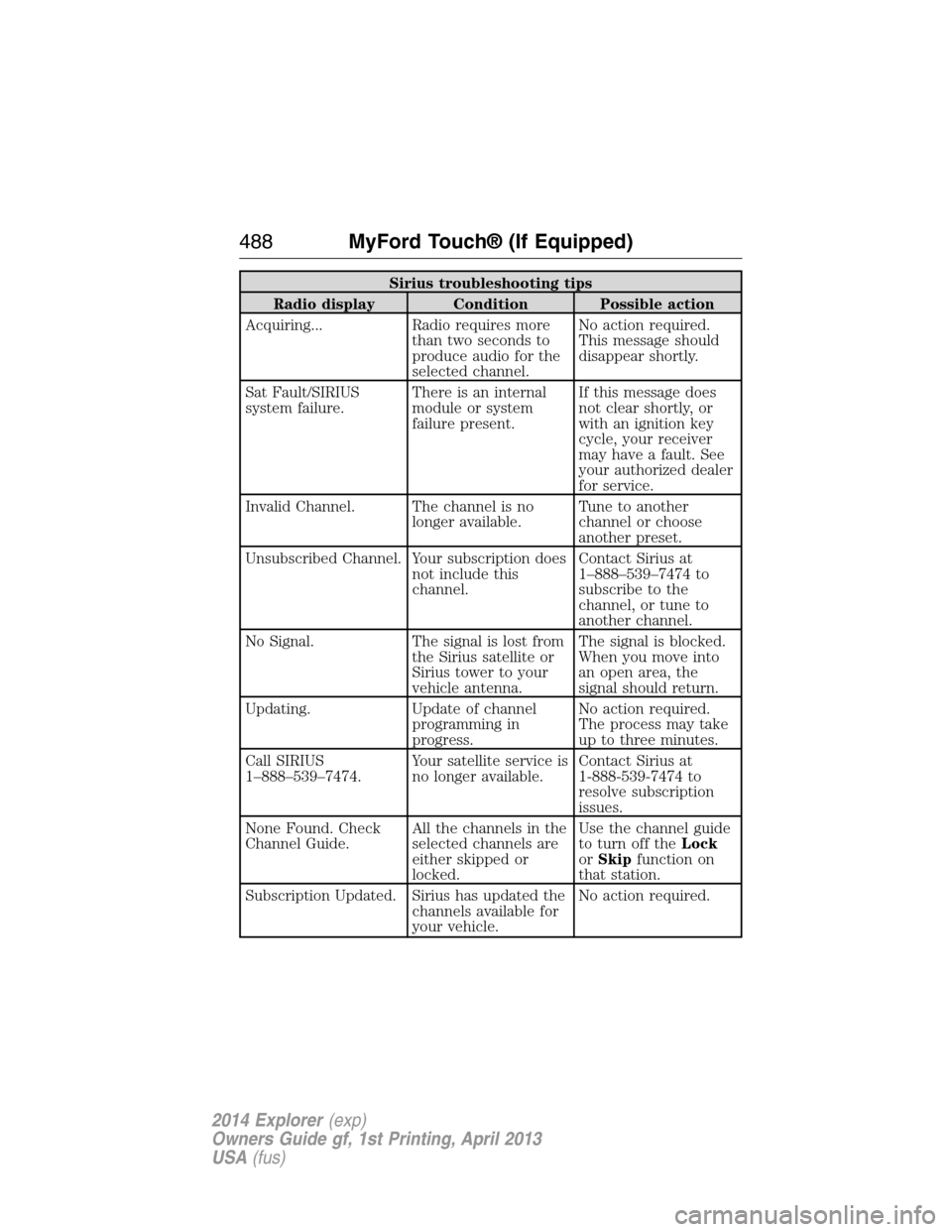
Sirius troubleshooting tips
Radio display Condition Possible action
Acquiring... Radio requires more
than two seconds to
produce audio for the
selected channel.No action required.
This message should
disappear shortly.
Sat Fault/SIRIUS
system failure.There is an internal
module or system
failure present.If this message does
not clear shortly, or
with an ignition key
cycle, your receiver
may have a fault. See
your authorized dealer
for service.
Invalid Channel. The channel is no
longer available.Tune to another
channel or choose
another preset.
Unsubscribed Channel. Your subscription does
not include this
channel.Contact Sirius at
1–888–539–7474 to
subscribe to the
channel, or tune to
another channel.
No Signal. The signal is lost from
the Sirius satellite or
Sirius tower to your
vehicle antenna.The signal is blocked.
When you move into
an open area, the
signal should return.
Updating. Update of channel
programming in
progress.No action required.
The process may take
up to three minutes.
Call SIRIUS
1–888–539–7474.Your satellite service is
no longer available.Contact Sirius at
1-888-539-7474 to
resolve subscription
issues.
None Found. Check
Channel Guide.All the channels in the
selected channels are
either skipped or
locked.Use the channel guide
to turn off theLock
orSkipfunction on
that station.
Subscription Updated. Sirius has updated the
channels available for
your vehicle.No action required.
488MyFord Touch® (If Equipped)
2014 Explorer(exp)
Owners Guide gf, 1st Printing, April 2013
USA(fus)
Page 519 of 586
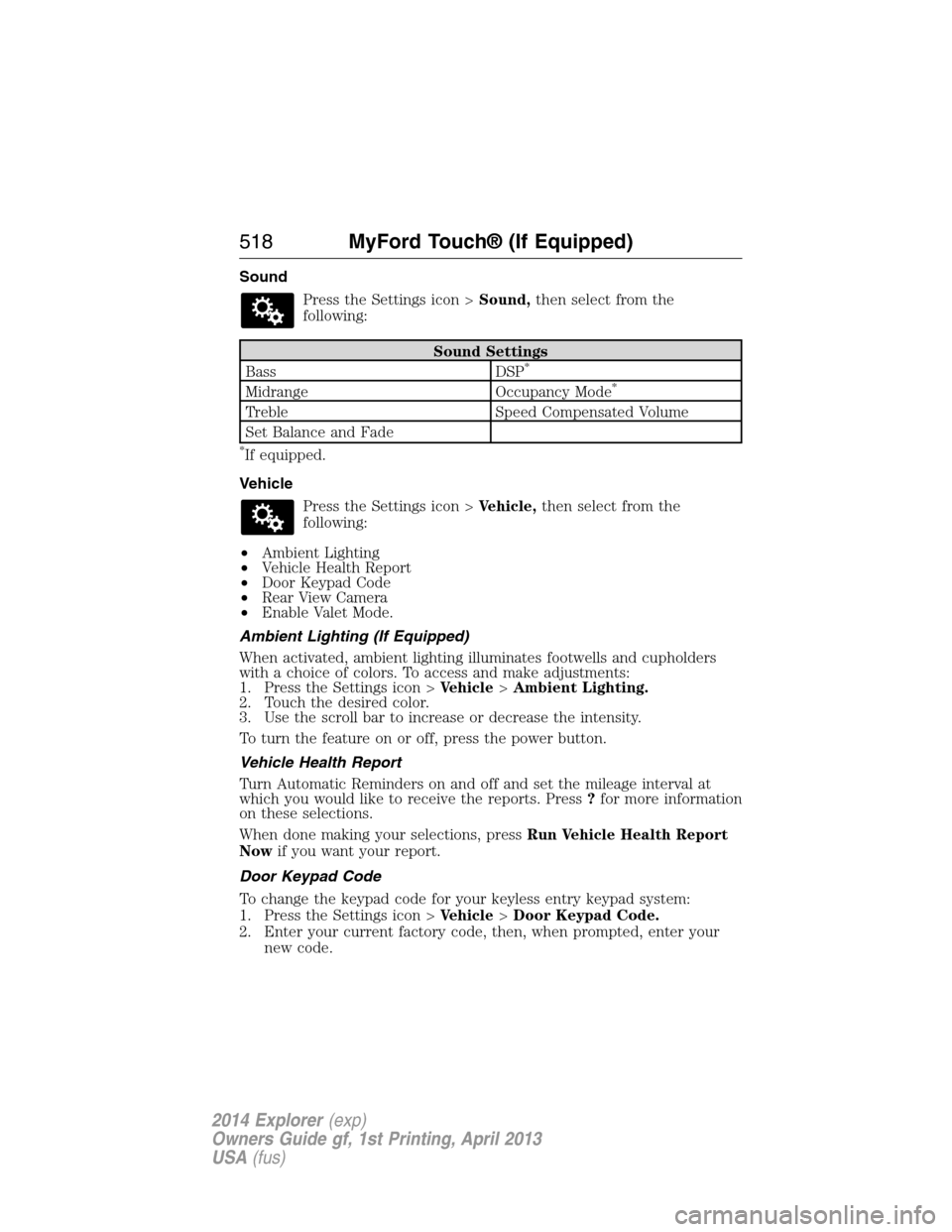
Sound
Press the Settings icon >Sound,then select from the
following:
Sound Settings
Bass DSP*
Midrange Occupancy Mode*
Treble Speed Compensated Volume
Set Balance and Fade
*If equipped.
Vehicle
Press the Settings icon >Vehicle,then select from the
following:
•Ambient Lighting
•Vehicle Health Report
•Door Keypad Code
•Rear View Camera
•Enable Valet Mode.
Ambient Lighting (If Equipped)
When activated, ambient lighting illuminates footwells and cupholders
with a choice of colors. To access and make adjustments:
1. Press the Settings icon >Vehicle>Ambient Lighting.
2. Touch the desired color.
3. Use the scroll bar to increase or decrease the intensity.
To turn the feature on or off, press the power button.
Vehicle Health Report
Turn Automatic Reminders on and off and set the mileage interval at
which you would like to receive the reports. Press?for more information
on these selections.
When done making your selections, pressRun Vehicle Health Report
Nowif you want your report.
Door Keypad Code
To change the keypad code for your keyless entry keypad system:
1. Press the Settings icon >Vehicle>Door Keypad Code.
2. Enter your current factory code, then, when prompted, enter your
new code.
518MyFord Touch® (If Equipped)
2014 Explorer(exp)
Owners Guide gf, 1st Printing, April 2013
USA(fus)