phone FORD EXPLORER 2014 5.G Manual Online
[x] Cancel search | Manufacturer: FORD, Model Year: 2014, Model line: EXPLORER, Model: FORD EXPLORER 2014 5.GPages: 586, PDF Size: 9.07 MB
Page 520 of 586
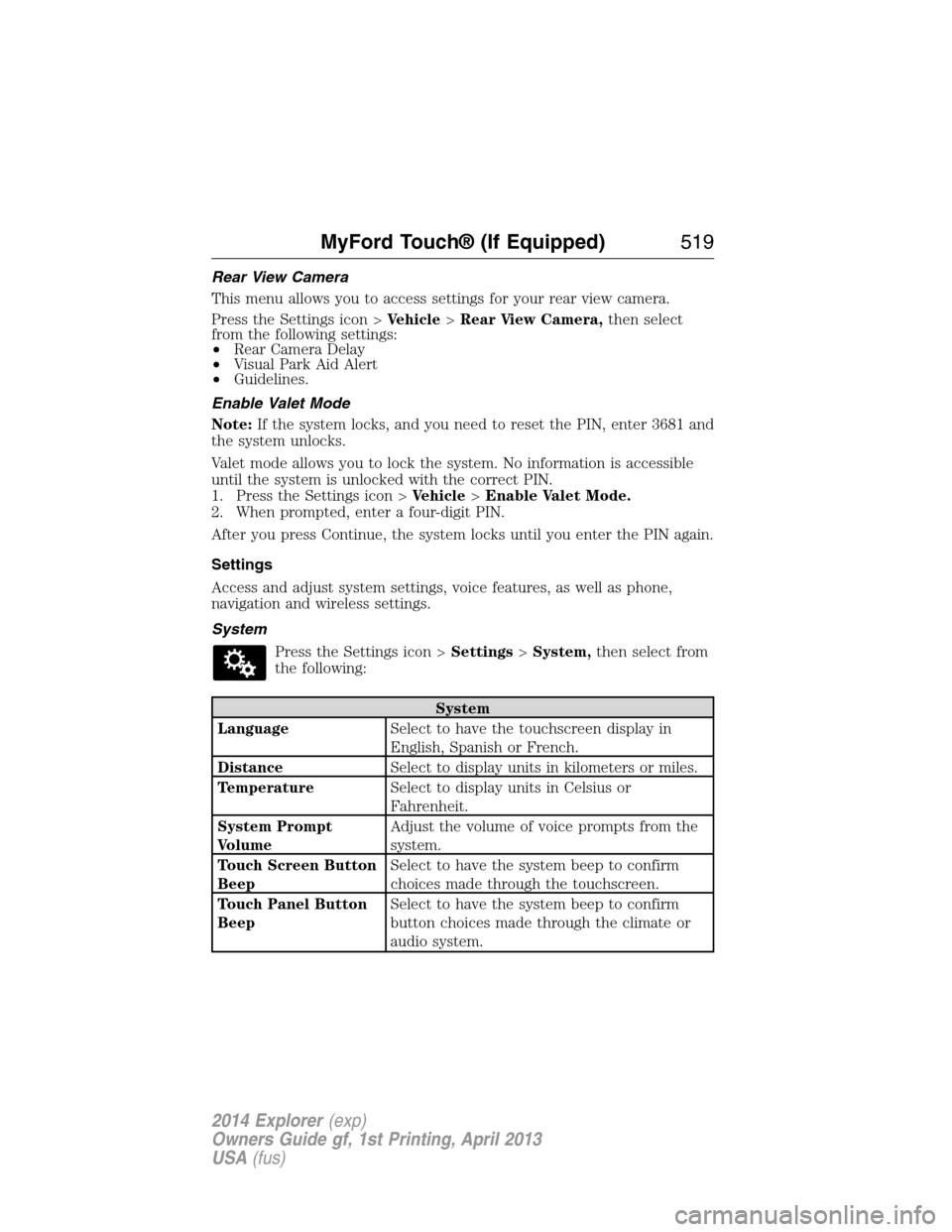
Rear View Camera
This menu allows you to access settings for your rear view camera.
Press the Settings icon >Vehicle>Rear View Camera,then select
from the following settings:
•Rear Camera Delay
•Visual Park Aid Alert
•Guidelines.
Enable Valet Mode
Note:If the system locks, and you need to reset the PIN, enter 3681 and
the system unlocks.
Valet mode allows you to lock the system. No information is accessible
until the system is unlocked with the correct PIN.
1. Press the Settings icon >Vehicle>Enable Valet Mode.
2. When prompted, enter a four-digit PIN.
After you press Continue, the system locks until you enter the PIN again.
Settings
Access and adjust system settings, voice features, as well as phone,
navigation and wireless settings.
System
Press the Settings icon >Settings>System,then select from
the following:
System
LanguageSelect to have the touchscreen display in
English, Spanish or French.
DistanceSelect to display units in kilometers or miles.
TemperatureSelect to display units in Celsius or
Fahrenheit.
System Prompt
VolumeAdjust the volume of voice prompts from the
system.
Touch Screen Button
BeepSelect to have the system beep to confirm
choices made through the touchscreen.
Touch Panel Button
BeepSelect to have the system beep to confirm
button choices made through the climate or
audio system.
MyFord Touch® (If Equipped)519
2014 Explorer(exp)
Owners Guide gf, 1st Printing, April 2013
USA(fus)
Page 521 of 586
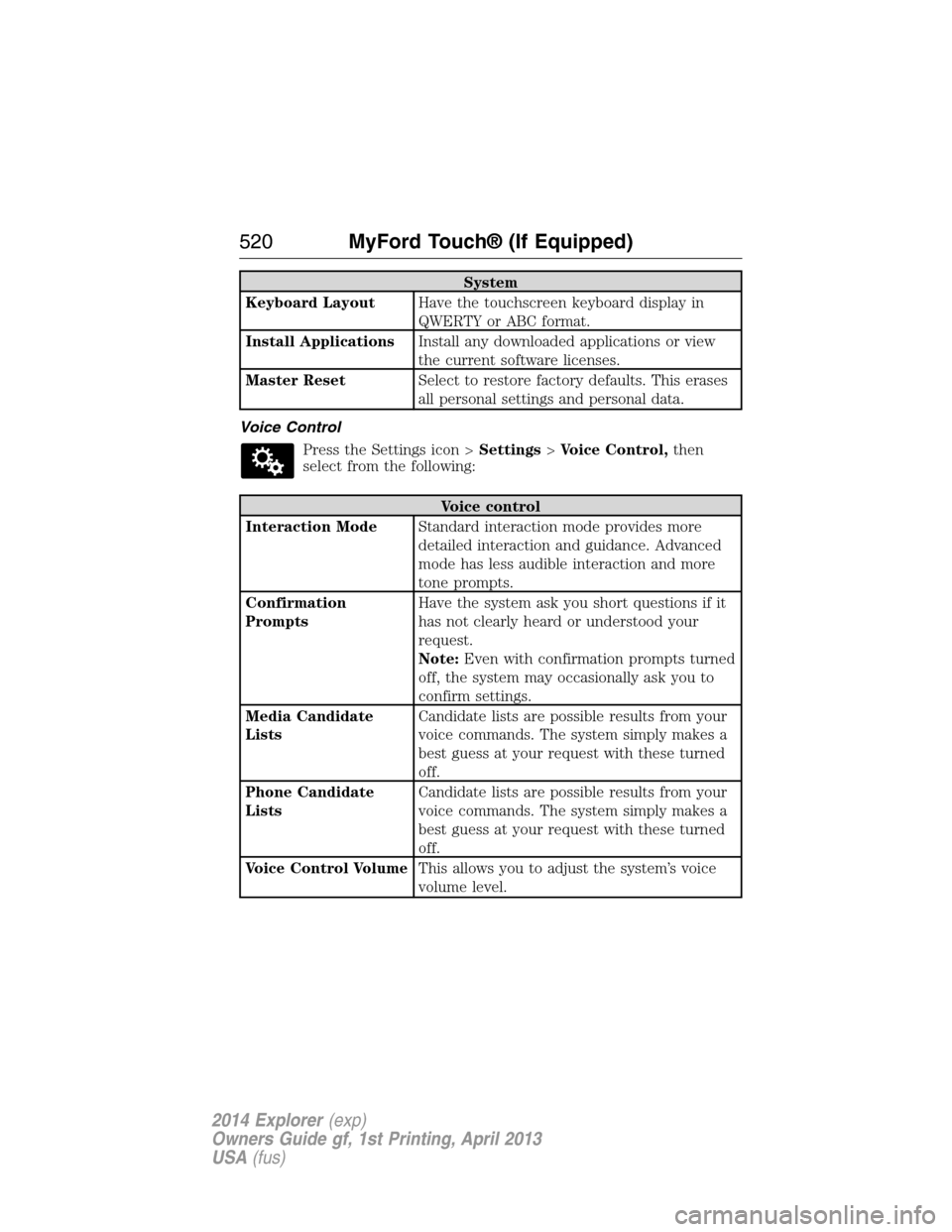
System
Keyboard LayoutHave the touchscreen keyboard display in
QWERTY or ABC format.
Install ApplicationsInstall any downloaded applications or view
the current software licenses.
Master ResetSelect to restore factory defaults. This erases
all personal settings and personal data.
Voice Control
Press the Settings icon >Settings>Voice Control,then
select from the following:
Voice control
Interaction ModeStandard interaction mode provides more
detailed interaction and guidance. Advanced
mode has less audible interaction and more
tone prompts.
Confirmation
PromptsHave the system ask you short questions if it
has not clearly heard or understood your
request.
Note:Even with confirmation prompts turned
off, the system may occasionally ask you to
confirm settings.
Media Candidate
ListsCandidate lists are possible results from your
voice commands. The system simply makes a
best guess at your request with these turned
off.
Phone Candidate
ListsCandidate lists are possible results from your
voice commands. The system simply makes a
best guess at your request with these turned
off.
Voice Control VolumeThis allows you to adjust the system’s voice
volume level.
520MyFord Touch® (If Equipped)
2014 Explorer(exp)
Owners Guide gf, 1st Printing, April 2013
USA(fus)
Page 524 of 586
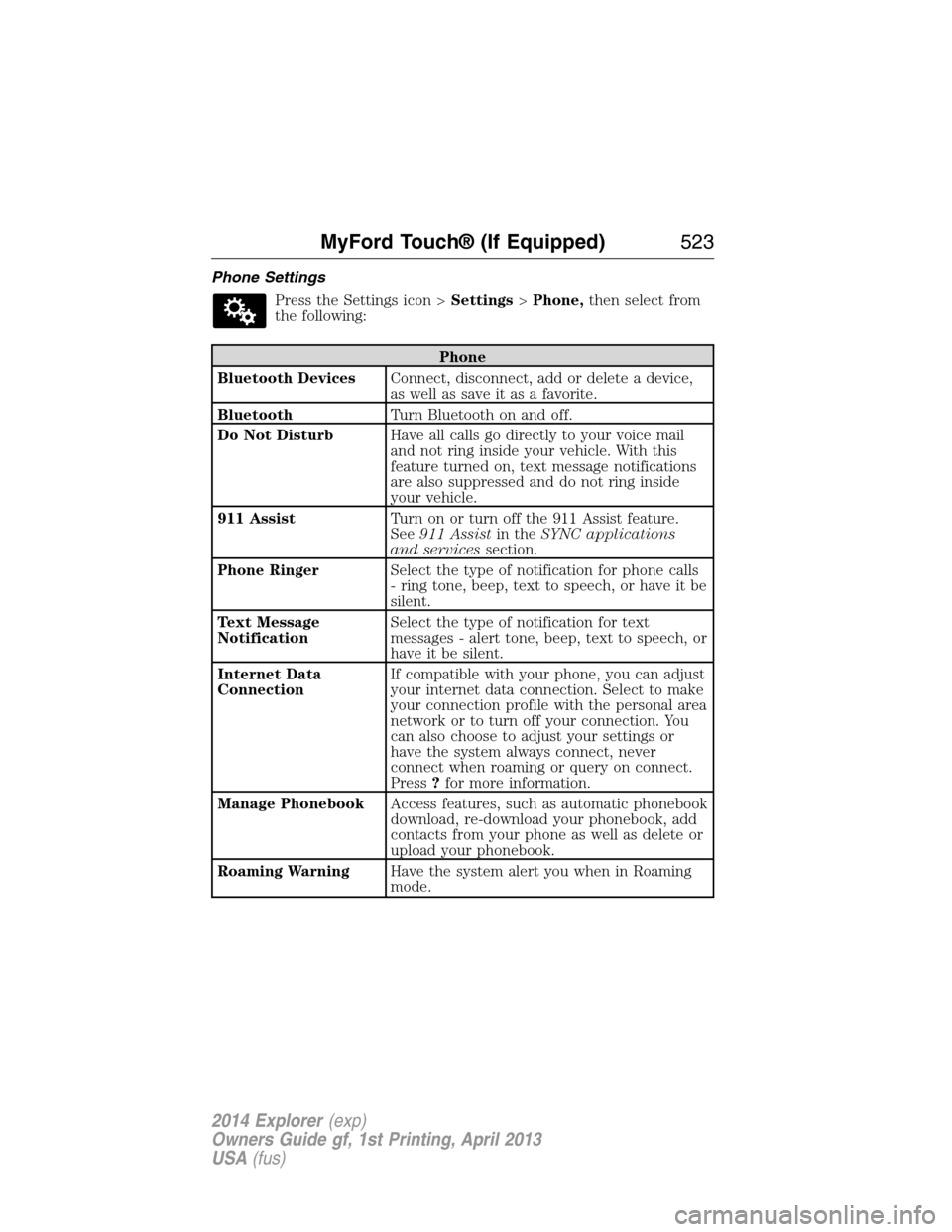
Phone Settings
Press the Settings icon >Settings>Phone,then select from
the following:
Phone
Bluetooth DevicesConnect, disconnect, add or delete a device,
as well as save it as a favorite.
BluetoothTurn Bluetooth on and off.
Do Not DisturbHave all calls go directly to your voice mail
and not ring inside your vehicle. With this
feature turned on, text message notifications
are also suppressed and do not ring inside
your vehicle.
911 AssistTurn on or turn off the 911 Assist feature.
See911 Assistin theSYNC applications
and servicessection.
Phone RingerSelect the type of notification for phone calls
- ring tone, beep, text to speech, or have it be
silent.
Text Message
NotificationSelect the type of notification for text
messages - alert tone, beep, text to speech, or
have it be silent.
Internet Data
ConnectionIf compatible with your phone, you can adjust
your internet data connection. Select to make
your connection profile with the personal area
network or to turn off your connection. You
can also choose to adjust your settings or
have the system always connect, never
connect when roaming or query on connect.
Press?for more information.
Manage PhonebookAccess features, such as automatic phonebook
download, re-download your phonebook, add
contacts from your phone as well as delete or
upload your phonebook.
Roaming WarningHave the system alert you when in Roaming
mode.
MyFord Touch® (If Equipped)523
2014 Explorer(exp)
Owners Guide gf, 1st Printing, April 2013
USA(fus)
Page 525 of 586
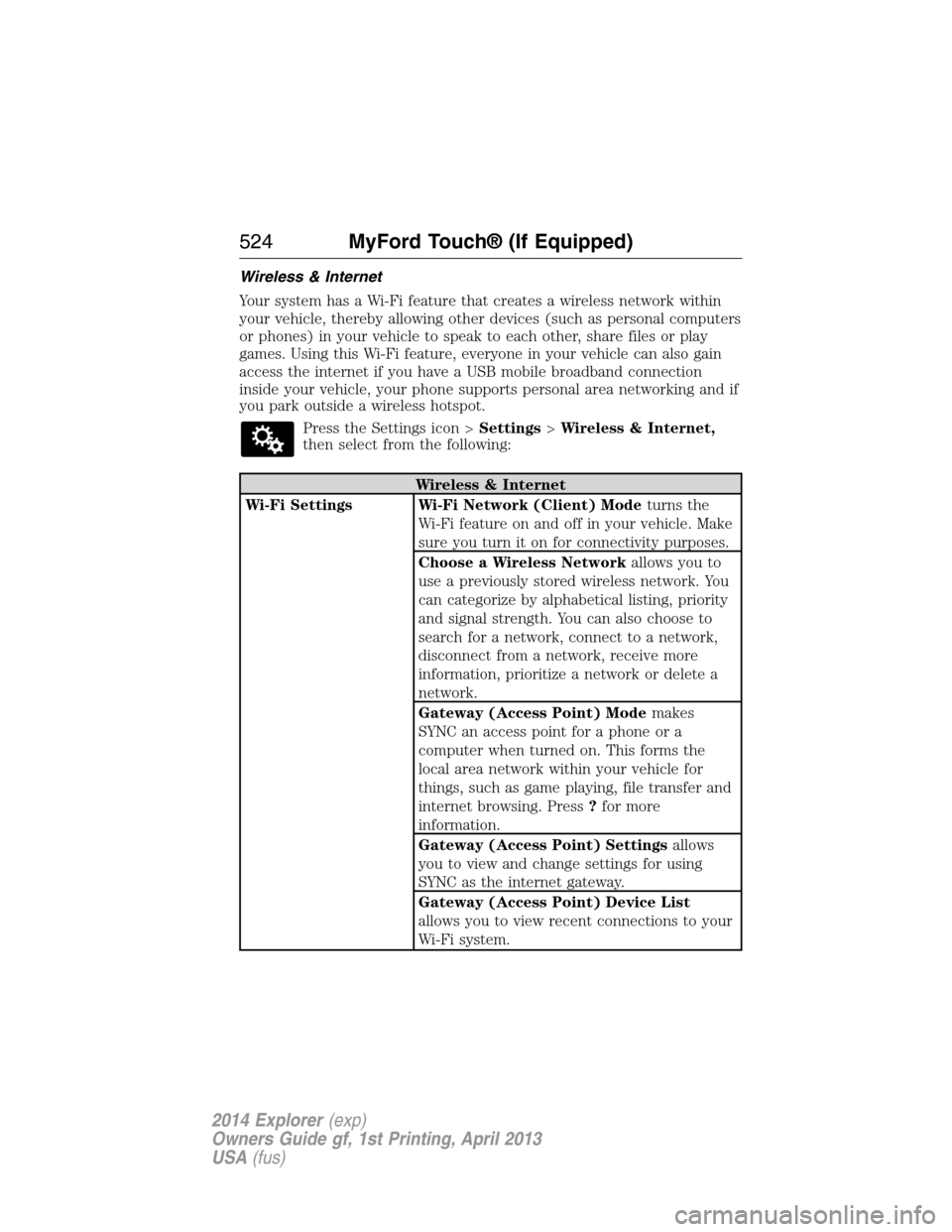
Wireless & Internet
Your system has a Wi-Fi feature that creates a wireless network within
your vehicle, thereby allowing other devices (such as personal computers
or phones) in your vehicle to speak to each other, share files or play
games. Using this Wi-Fi feature, everyone in your vehicle can also gain
access the internet if you have a USB mobile broadband connection
inside your vehicle, your phone supports personal area networking and if
you park outside a wireless hotspot.
Press the Settings icon >Settings>Wireless & Internet,
then select from the following:
Wireless & Internet
Wi-Fi Settings Wi-Fi Network (Client) Modeturns the
Wi-Fi feature on and off in your vehicle. Make
sure you turn it on for connectivity purposes.
Choose a Wireless Networkallows you to
use a previously stored wireless network. You
can categorize by alphabetical listing, priority
and signal strength. You can also choose to
search for a network, connect to a network,
disconnect from a network, receive more
information, prioritize a network or delete a
network.
Gateway (Access Point) Modemakes
SYNC an access point for a phone or a
computer when turned on. This forms the
local area network within your vehicle for
things, such as game playing, file transfer and
internet browsing. Press?for more
information.
Gateway (Access Point) Settingsallows
you to view and change settings for using
SYNC as the internet gateway.
Gateway (Access Point) Device List
allows you to view recent connections to your
Wi-Fi system.
524MyFord Touch® (If Equipped)
2014 Explorer(exp)
Owners Guide gf, 1st Printing, April 2013
USA(fus)
Page 526 of 586
Wireless & Internet
USB Mobile
BroadbandInstead of using Wi-Fi, your system can also
use a USB mobile broadband connection to
access the internet. (You must turn on your
mobile broadband device on your personal
computer before connecting it to the system.)
This screen allows you to set up what is your
typical area for your USB mobile broadband
connection. (USB mobile broadband settings
may not display if the device is already on.)
You can select the following: Country, Carrier,
Phone Number, User Name and Password.
Bluetooth SettingsShows you the currently paired devices as
well as giving you your typical Bluetooth
options to connect, disconnect, set as favorite,
delete and add device. Bluetooth is a
registered trademark of the Bluetooth SIG.
Prioritize
Connection MethodsChoose your connection methods and change
them as needed. You can select to Change
Order and have the system either always
attempt to connect using a USB mobile
broadband or using Wi-Fi.
The Wi-Fi CERTIFIED Logo is a
certification mark of the Wi-Fi Alliance.
MyFord Touch® (If Equipped)525
2014 Explorer(exp)
Owners Guide gf, 1st Printing, April 2013
USA(fus)
Page 527 of 586
Help
Press the Settings icon >Help,then select from the following:
Help
Where Am I?View your vehicle’s current location, if your
vehicle is equipped with navigation. If your
vehicle is not equipped with navigation,
nothing displays.
System InformationTouchscreen system serial number.
Your vehicle identification number (VIN).
Touchscreen system software version.
Navigation system version.
Map database version.
Sirius satellite radio electronic serial number
(ESN).
Gracenote Database Information and Library
version.
Software LicensesView the licenses for any software and
applications installed on your system.
Driving RestrictionsCertain features are not accessible when your
vehicle is moving.
911 AssistTurn on and turn off the 911 Assist feature.
See911 Assistin theSYNC applications
and servicessection.
In Case of Emergency (ICE) Speed Dial
allows you to save up to two numbers as ICE
contacts for quick access if there is an
emergency. SelectEditto access your
phonebook and then select the desired
contacts. The numbers then appear as options
on this screen for the ICE 1 and ICE 2
buttons. The ICE contacts you select appear
at the end of the 911 Assist call process.
Voice Command ListView categorized lists of voice commands.
To access Help using the voice commands, press the voice button, then,
after the tone, say “Help”. The system provides allowable voice
commands for the current mode.
526MyFord Touch® (If Equipped)
2014 Explorer(exp)
Owners Guide gf, 1st Printing, April 2013
USA(fus)
Page 534 of 586
cityseekr (If Available)
Note:cityseekr point of interest information is limited to approximately
912 cities (881 in the United States, 20 in Canada and 11 in Mexico).
cityseekr, when available, is a service that
provides more information about certain
points of interest such as restaurants,
hotels and attractions.
When you have selected a point of
interest, the location and information
appear, such as address and phone
number. If cityseekr lists the point of
interest, more information is available, such as a brief description, hotel
check-in and checkout times or restaurant hours.
PressMore Informationfor a longer review, a list of services and
facilities, the average room or meal price as well as the website link.
This screen displays either a facility photo (if available) or point of
interest icons, such as:
Hotel
Coffeehouse
Food & Drink
Nightlife
Attraction
MyFord Touch® (If Equipped)533
2014 Explorer(exp)
Owners Guide gf, 1st Printing, April 2013
USA(fus)
Page 556 of 586
TERMS AND CONDITIONS
License Limitations on Use:You agree that your license to use this
Data is limited to and conditioned on use for solely personal,
noncommercial purposes, and not for service bureau, timesharing or
other similar purposes. Except as otherwise set forth herein, you agree
not to otherwise reproduce, copy, modify, decompile, disassemble or
reverse engineer any portion of this Data, and may not transfer or
distribute it in any form, for any purpose, except to the extent permitted
by mandatory laws.
License Limitations on Transfer:Your limited license does not allow
transfer or resale of the Data, except on the condition that you may
transfer the Data and all accompanying materials on a permanent basis
if: (a) you retain no copies of the Data; (b) the recipient agrees to the
terms of this End User License Agreement; and (c) you transfer the Data
in the exact same form as you purchased it by physically transferring the
original media (e.g., the CD-ROM or DVD you purchased), all original
packaging, all Manuals and other documentation. Specifically, Multi-disc
sets may only be transferred or sold as a complete set as provided to you
and not as a subset thereof.
Additional License Limitations:Except where you have been
specifically licensed to do so by NT in a separate written agreement, and
without limiting the preceding paragraph, your license is conditioned on
use of the Data as prescribed in this agreement, and you may not (a) use
this Data with any products, systems, or applications installed or
otherwise connected to or in communication with vehicles capable of
vehicle navigation, positioning, dispatch, real time route guidance, fleet
management or similar applications; or (b) with, or in communication
with, including without limitation, cellular phones, palmtop and handheld
computers, pagers, and personal digital assistants or PDAs.
WARNING:This Data may contain inaccurate or incomplete
information due to the passage of time, changing circumstances,
sources used and the nature of collecting comprehensive geographic
Data, any of which may lead to incorrect results.
No Warranty:This Data is provided to you “as is”, and you agree to use
it at your own risk. NT and its licensors (and their licensors and
suppliers) make no guarantees, representations or warranties of any
kind, express or implied, arising by law or otherwise, including but not
limited to, content, quality, accuracy, completeness, effectiveness,
reliability, fitness for a particular purpose, usefulness, use or results to be
obtained from this Data, or that the Data or server will be uninterrupted
or error free.
Appendices555
2014 Explorer(exp)
Owners Guide gf, 1st Printing, April 2013
USA(fus)
Page 579 of 586
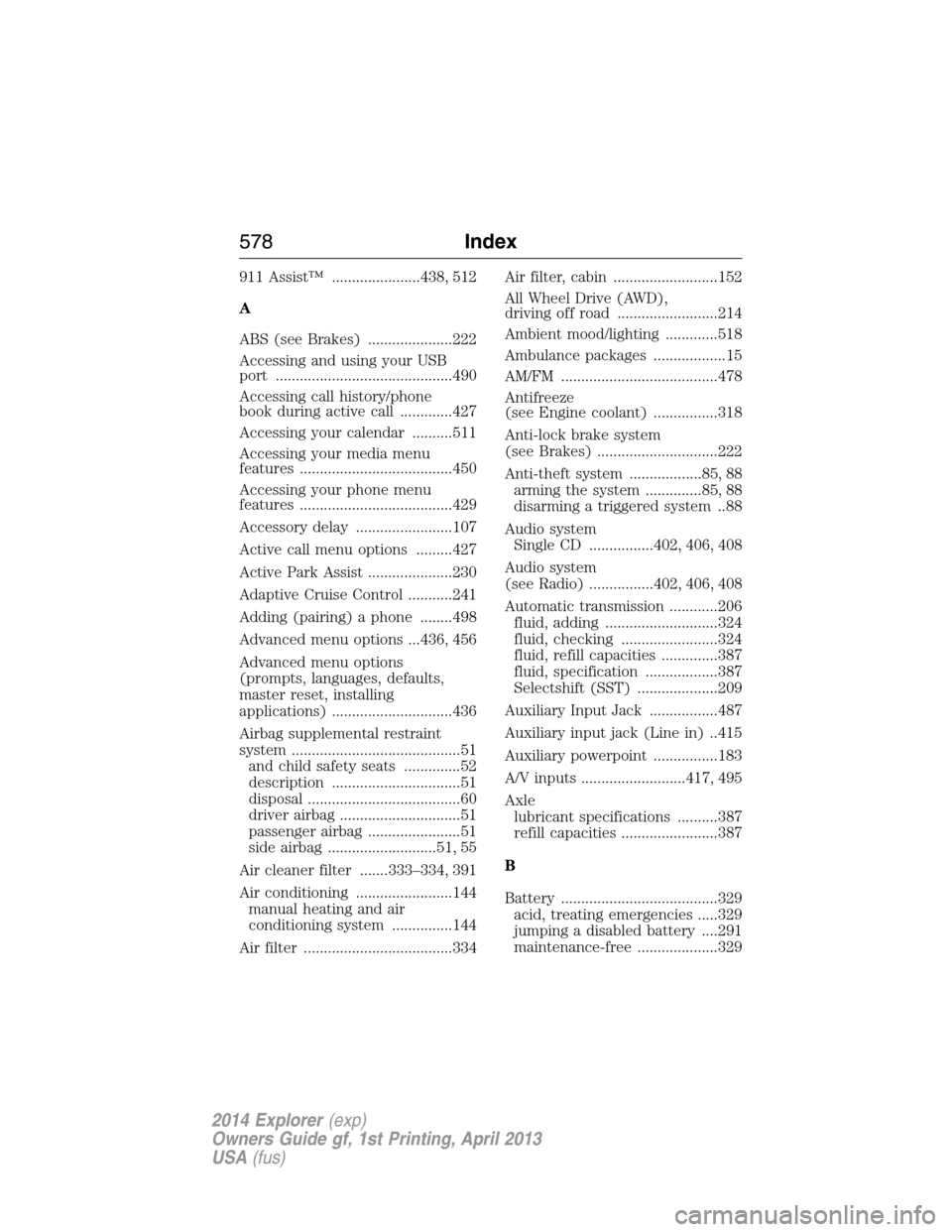
911 Assist™ ......................438, 512
A
ABS (see Brakes) .....................222
Accessing and using your USB
port ............................................490
Accessing call history/phone
book during active call .............427
Accessing your calendar ..........511
Accessing your media menu
features ......................................450
Accessing your phone menu
features ......................................429
Accessory delay ........................107
Active call menu options .........427
Active Park Assist .....................230
Adaptive Cruise Control ...........241
Adding (pairing) a phone ........498
Advanced menu options ...436, 456
Advanced menu options
(prompts, languages, defaults,
master reset, installing
applications) ..............................436
Airbag supplemental restraint
system ..........................................51
and child safety seats ..............52
description ................................51
disposal ......................................60
driver airbag ..............................51
passenger airbag .......................51
side airbag ...........................51, 55
Air cleaner filter .......333–334, 391
Air conditioning ........................144
manual heating and air
conditioning system ...............144
Air filter .....................................334Air filter, cabin ..........................152
All Wheel Drive (AWD),
driving off road .........................214
Ambient mood/lighting .............518
Ambulance packages ..................15
AM/FM .......................................478
Antifreeze
(see Engine coolant) ................318
Anti-lock brake system
(see Brakes) ..............................222
Anti-theft system ..................85, 88
arming the system ..............85, 88
disarming a triggered system ..88
Audio system
Single CD ................402, 406, 408
Audio system
(see Radio) ................402, 406, 408
Automatic transmission ............206
fluid, adding ............................324
fluid, checking ........................324
fluid, refill capacities ..............387
fluid, specification ..................387
Selectshift (SST) ....................209
Auxiliary Input Jack .................487
Auxiliary input jack (Line in) ..415
Auxiliary powerpoint ................183
A/V inputs ..........................417, 495
Axle
lubricant specifications ..........387
refill capacities ........................387
B
Battery .......................................329
acid, treating emergencies .....329
jumping a disabled battery ....291
maintenance-free ....................329
578Index
2014 Explorer(exp)
Owners Guide gf, 1st Printing, April 2013
USA(fus)
Page 580 of 586
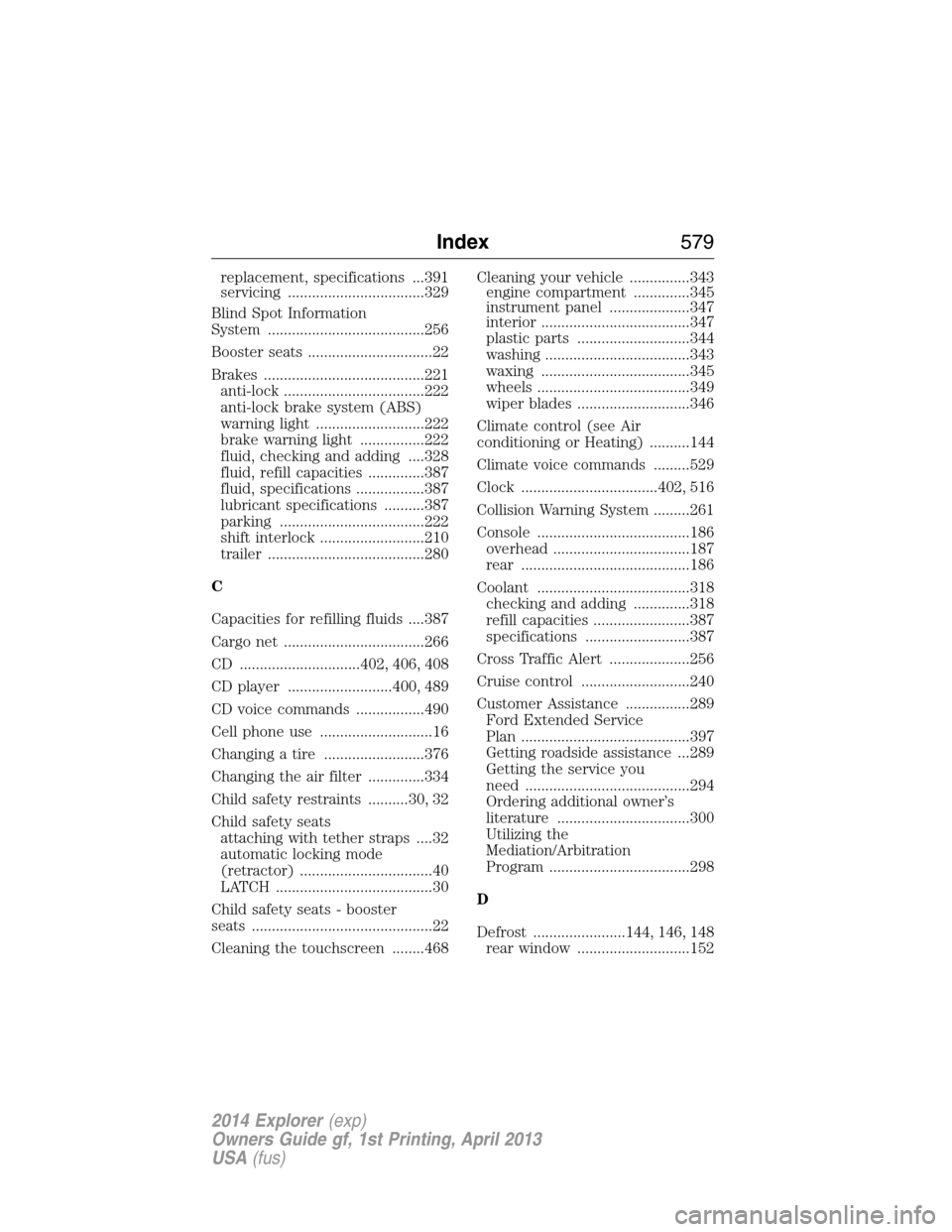
replacement, specifications ...391
servicing ..................................329
Blind Spot Information
System .......................................256
Booster seats ...............................22
Brakes ........................................221
anti-lock ...................................222
anti-lock brake system (ABS)
warning light ...........................222
brake warning light ................222
fluid, checking and adding ....328
fluid, refill capacities ..............387
fluid, specifications .................387
lubricant specifications ..........387
parking ....................................222
shift interlock ..........................210
trailer .......................................280
C
Capacities for refilling fluids ....387
Cargo net ...................................266
CD ..............................402, 406, 408
CD player ..........................400, 489
CD voice commands .................490
Cell phone use ............................16
Changing a tire .........................376
Changing the air filter ..............334
Child safety restraints ..........30, 32
Child safety seats
attaching with tether straps ....32
automatic locking mode
(retractor) .................................40
LATCH .......................................30
Child safety seats - booster
seats .............................................22
Cleaning the touchscreen ........468Cleaning your vehicle ...............343
engine compartment ..............345
instrument panel ....................347
interior .....................................347
plastic parts ............................344
washing ....................................343
waxing .....................................345
wheels ......................................349
wiper blades ............................346
Climate control (see Air
conditioning or Heating) ..........144
Climate voice commands .........529
Clock ..................................402, 516
Collision Warning System .........261
Console ......................................186
overhead ..................................187
rear ..........................................186
Coolant ......................................318
checking and adding ..............318
refill capacities ........................387
specifications ..........................387
Cross Traffic Alert ....................256
Cruise control ...........................240
Customer Assistance ................289
Ford Extended Service
Plan ..........................................397
Getting roadside assistance ...289
Getting the service you
need .........................................294
Ordering additional owner’s
literature .................................300
Utilizing the
Mediation/Arbitration
Program ...................................298
D
Defrost .......................144, 146, 148
rear window ............................152
Index579
2014 Explorer(exp)
Owners Guide gf, 1st Printing, April 2013
USA(fus)