cooling FORD EXPLORER 2016 5.G User Guide
[x] Cancel search | Manufacturer: FORD, Model Year: 2016, Model line: EXPLORER, Model: FORD EXPLORER 2016 5.GPages: 541, PDF Size: 6.51 MB
Page 270 of 541
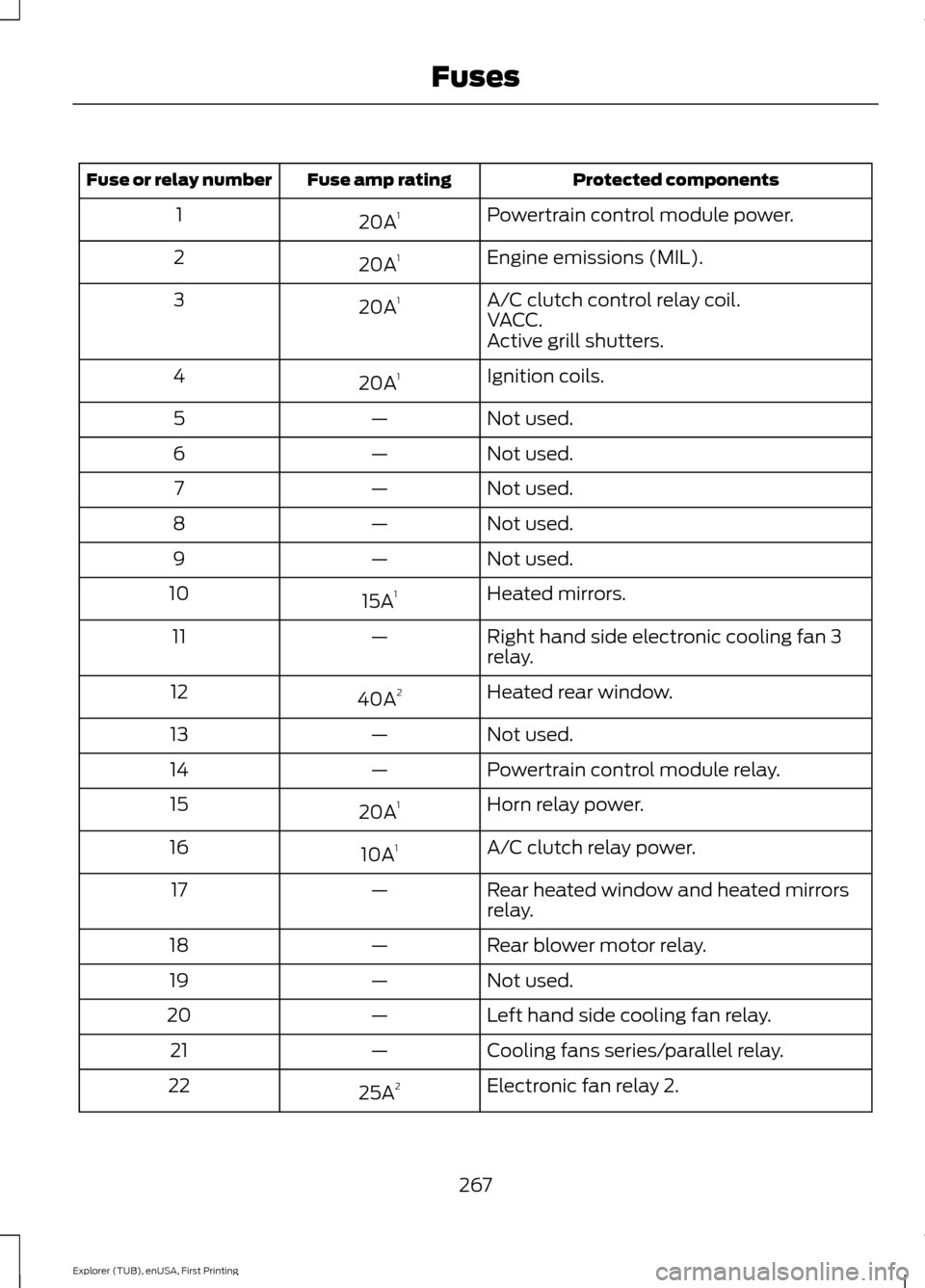
Protected components
Fuse amp rating
Fuse or relay number
Powertrain control module power.
20A 1
1
Engine emissions (MIL).
20A 1
2
A/C clutch control relay coil.
20A 1
3
VACC.
Active grill shutters.
Ignition coils.
20A 1
4
Not used.
—
5
Not used.
—
6
Not used.
—
7
Not used.
—
8
Not used.
—
9
Heated mirrors.
15A 1
10
Right hand side electronic cooling fan 3
relay.
—
11
Heated rear window.
40A 2
12
Not used.
—
13
Powertrain control module relay.
—
14
Horn relay power.
20A 1
15
A/C clutch relay power.
10A 1
16
Rear heated window and heated mirrors
relay.
—
17
Rear blower motor relay.
—
18
Not used.
—
19
Left hand side cooling fan relay.
—
20
Cooling fans series/parallel relay.
—
21
Electronic fan relay 2.
25A 2
22
267
Explorer (TUB), enUSA, First Printing Fuses
Page 285 of 541
1. Remove the filler cap.
2. If the engine oil level is not within the
normal range, add engine oil that
meets Ford specifications. See
Capacities and Specifications (page
334).
3. Remove the engine oil filler cap and use a funnel to pour the engine oil into
the opening.
4. Wipe off any spilled oil.
5. Replace the filler cap. Turn it until you feel a strong resistance.
OIL CHANGE INDICATOR
RESET
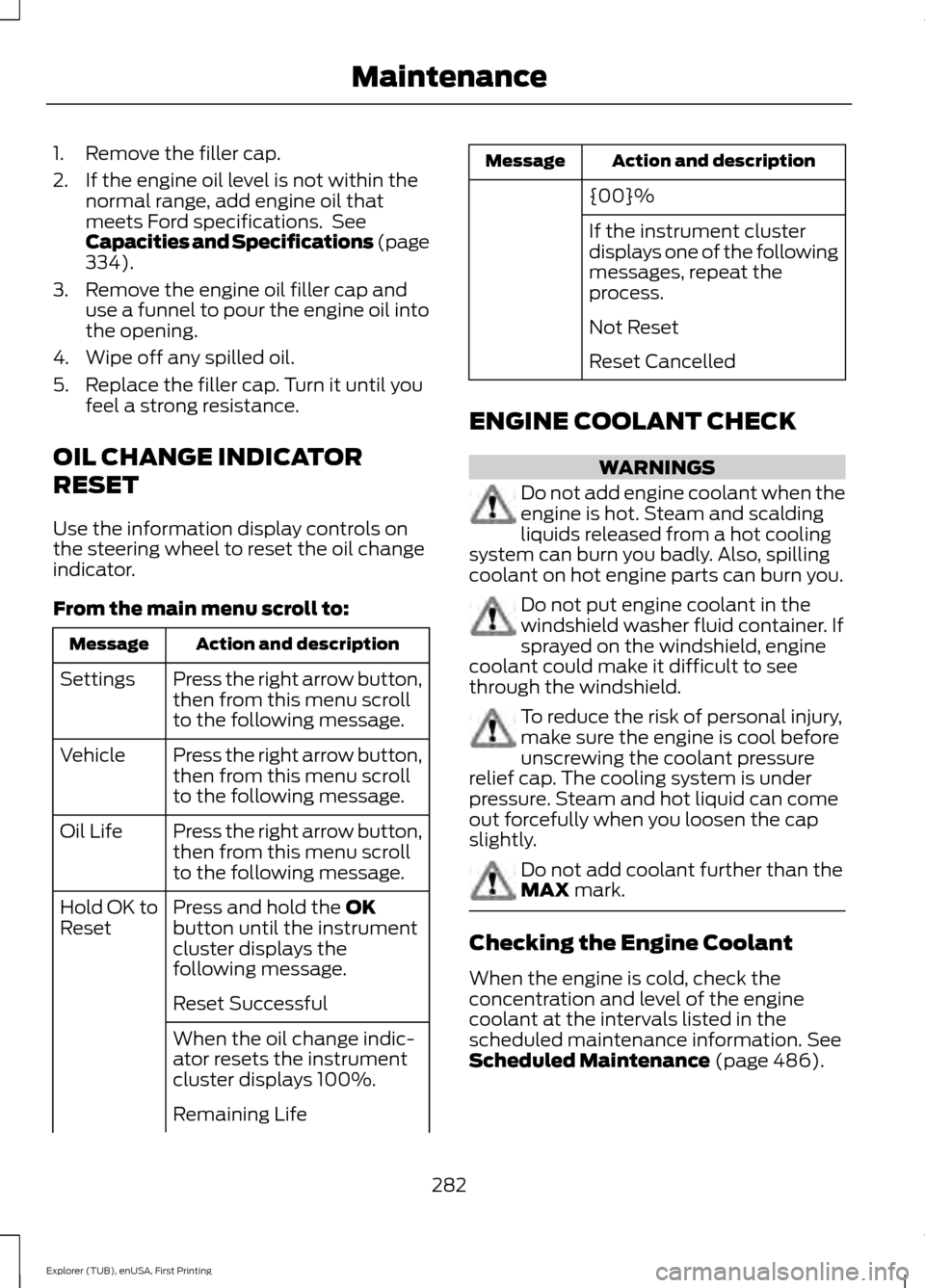
Use the information display controls on
the steering wheel to reset the oil change
indicator.
From the main menu scroll to: Action and description
Message
Press the right arrow button,
then from this menu scroll
to the following message.
Settings
Press the right arrow button,
then from this menu scroll
to the following message.
Vehicle
Press the right arrow button,
then from this menu scroll
to the following message.
Oil Life
Press and hold the
OK
button until the instrument
cluster displays the
following message.
Hold OK to
Reset
Reset Successful
When the oil change indic-
ator resets the instrument
cluster displays 100%.
Remaining Life Action and description
Message
{00}%
If the instrument cluster
displays one of the following
messages, repeat the
process.
Not Reset
Reset Cancelled
ENGINE COOLANT CHECK WARNINGS
Do not add engine coolant when the
engine is hot. Steam and scalding
liquids released from a hot cooling
system can burn you badly. Also, spilling
coolant on hot engine parts can burn you. Do not put engine coolant in the
windshield washer fluid container. If
sprayed on the windshield, engine
coolant could make it difficult to see
through the windshield. To reduce the risk of personal injury,
make sure the engine is cool before
unscrewing the coolant pressure
relief cap. The cooling system is under
pressure. Steam and hot liquid can come
out forcefully when you loosen the cap
slightly. Do not add coolant further than the
MAX mark.
Checking the Engine Coolant
When the engine is cold, check the
concentration and level of the engine
coolant at the intervals listed in the
scheduled maintenance information.
See
Scheduled Maintenance (page 486).
282
Explorer (TUB), enUSA, First Printing Maintenance
Page 286 of 541
Note:
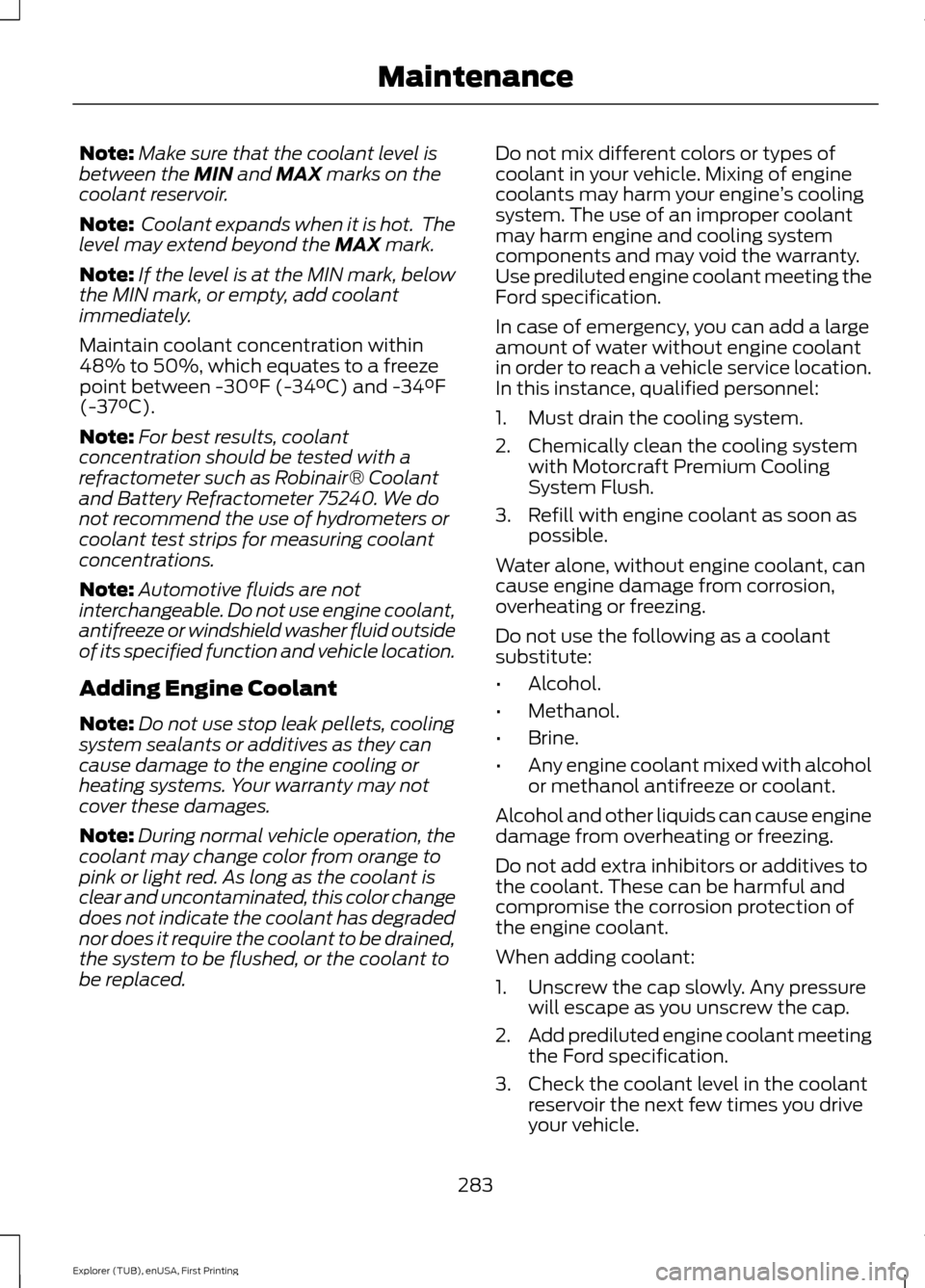
Make sure that the coolant level is
between the MIN and MAX marks on the
coolant reservoir.
Note: Coolant expands when it is hot. The
level may extend beyond the
MAX mark.
Note: If the level is at the MIN mark, below
the MIN mark, or empty, add coolant
immediately.
Maintain coolant concentration within
48% to 50%, which equates to a freeze
point between -30°F (-34°C) and -34°F
(-37°C).
Note: For best results, coolant
concentration should be tested with a
refractometer such as Robinair® Coolant
and Battery Refractometer 75240. We do
not recommend the use of hydrometers or
coolant test strips for measuring coolant
concentrations.
Note: Automotive fluids are not
interchangeable. Do not use engine coolant,
antifreeze or windshield washer fluid outside
of its specified function and vehicle location.
Adding Engine Coolant
Note: Do not use stop leak pellets, cooling
system sealants or additives as they can
cause damage to the engine cooling or
heating systems. Your warranty may not
cover these damages.
Note: During normal vehicle operation, the
coolant may change color from orange to
pink or light red. As long as the coolant is
clear and uncontaminated, this color change
does not indicate the coolant has degraded
nor does it require the coolant to be drained,
the system to be flushed, or the coolant to
be replaced. Do not mix different colors or types of
coolant in your vehicle. Mixing of engine
coolants may harm your engine
’s cooling
system. The use of an improper coolant
may harm engine and cooling system
components and may void the warranty.
Use prediluted engine coolant meeting the
Ford specification.
In case of emergency, you can add a large
amount of water without engine coolant
in order to reach a vehicle service location.
In this instance, qualified personnel:
1. Must drain the cooling system.
2. Chemically clean the cooling system with Motorcraft Premium Cooling
System Flush.
3. Refill with engine coolant as soon as possible.
Water alone, without engine coolant, can
cause engine damage from corrosion,
overheating or freezing.
Do not use the following as a coolant
substitute:
• Alcohol.
• Methanol.
• Brine.
• Any engine coolant mixed with alcohol
or methanol antifreeze or coolant.
Alcohol and other liquids can cause engine
damage from overheating or freezing.
Do not add extra inhibitors or additives to
the coolant. These can be harmful and
compromise the corrosion protection of
the engine coolant.
When adding coolant:
1. Unscrew the cap slowly. Any pressure will escape as you unscrew the cap.
2. Add prediluted engine coolant meeting
the Ford specification.
3. Check the coolant level in the coolant reservoir the next few times you drive
your vehicle.
283
Explorer (TUB), enUSA, First Printing Maintenance
Page 287 of 541
4. If necessary, add enough prediluted
engine coolant to bring the coolant
level to the proper level.
Recycled Engine Coolant
Ford Motor Company does not recommend
the use of recycled engine coolant since a
Ford-approved recycling process is not yet
available.
Used engine coolant should be disposed
of in an appropriate manner. Follow your
community ’s regulations and standards
for recycling and disposing of automotive
fluids.
Severe Climates
If you drive in extremely cold climates:
• It may be necessary to have a Ford
authorized dealer increase the coolant
concentration above 50%.
• A coolant concentration of 60%
provides improved freeze point
protection. Engine coolant
concentrations above 60% decrease
the overheat protection characteristics
of the engine coolant and may cause
engine damage.
If you drive in extremely hot climates:
• It may be necessary to have a Ford
authorized dealer decrease the coolant
concentration to 40%.
• A coolant concentration of 40%
provides improved overheat protection.
Engine coolant concentrations below
40% decrease the freeze and corrosion
protection characteristics of the engine
coolant and may cause engine
damage.
Vehicles driven year-round in non-extreme
climates should use prediluted engine
coolant for optimum cooling system and
engine protection. What You Should Know About Fail-
Safe Cooling
If you deplete the engine coolant supply,
fail-safe cooling allows you to temporarily
drive your vehicle before you incur
incremental component damage. The
fail-safe distance depends on ambient
temperatures, vehicle load and terrain.
How Fail-Safe Cooling Works
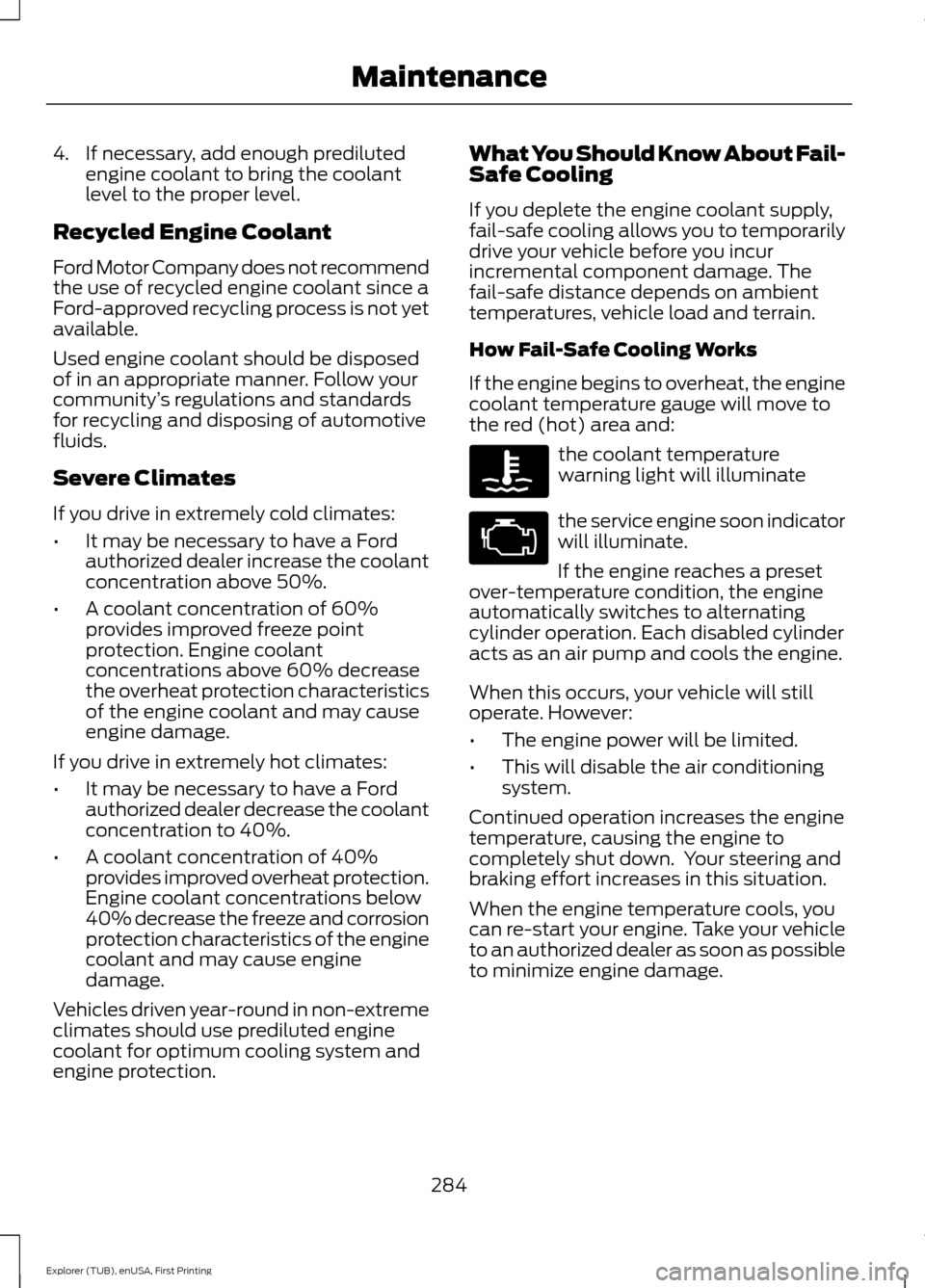
If the engine begins to overheat, the engine
coolant temperature gauge will move to
the red (hot) area and:
the coolant temperature
warning light will illuminate
the service engine soon indicator
will illuminate.
If the engine reaches a preset
over-temperature condition, the engine
automatically switches to alternating
cylinder operation. Each disabled cylinder
acts as an air pump and cools the engine.
When this occurs, your vehicle will still
operate. However:
• The engine power will be limited.
• This will disable the air conditioning
system.
Continued operation increases the engine
temperature, causing the engine to
completely shut down. Your steering and
braking effort increases in this situation.
When the engine temperature cools, you
can re-start your engine. Take your vehicle
to an authorized dealer as soon as possible
to minimize engine damage.
284
Explorer (TUB), enUSA, First Printing Maintenance
Page 289 of 541
If the engine coolant temperature gauge
moves fully into the red (hot) area, or if the
coolant temperature warning or service
engine soon messages appear in your
information display:
1. Pull off the road as soon as safely
possible and shift the transmission into
P.
2. Leave the engine running until the coolant temperature gauge needle
moves away from the red (hot) area.
After several minutes, if the
temperature does not drop, follow the
remaining steps.
3. Switch the engine off and wait for it to
cool before checking the coolant level.
4. If the coolant level is normal, restart your engine and continue.
5. If the coolant is low, add coolant, and restart the engine. See Adding Engine
Coolant
or How Fail-Safe Cooling
Works in this chapter for more
information.
AUTOMATIC TRANSMISSION
FLUID CHECK - 2.3L
ECOBOOST™
Note: Transmission fluid should be checked
by an authorized dealer. If required, fluid
should be added by an authorized dealer.
The automatic transmission does not have
a transmission fluid dipstick.
Have an authorized dealer check and
change the transmission fluid at the
correct service interval. See
Scheduled
Maintenance (page 486). Your
transmission does not consume fluid.
However, the fluid level should be checked
if the transmission is not working properly,
(i.e., if the transmission slips or shifts
slowly) or if you notice some sign of fluid
leakage. Do not use supplemental transmission
fluid additives, treatments or cleaning
agents. The use of these materials may
affect transmission operation and result
in damage to internal transmission
components.
AUTOMATIC TRANSMISSION
FLUID CHECK - 3.5L DURATEC/
3.5L ECOBOOST™
WARNING
Do not use supplemental
transmission fluid additives,
treatments or cleaning agents. The
use of these materials may affect
transmission operation and result in
damage to internal transmission
components. The transmission does not consume fluid.
However, if the transmission slips or shifts
slowly you should check the fluid level. If
you notice a sign of leaking fluid, contact
an authorized dealer.
Checking the Transmission Fluid
Level
WARNING
The dipstick and surrounding
components are hot. Use gloves
when moving components and
checking the transmission fluid level.
Failure to follow this warning could result
in serious personal injury. Only check the transmission fluid level
when the engine is at normal operating
temperature 179°F (82°C)-199°F (93°C).
Normal operating temperature is reached
after driving approximately 20 mi (30 km).
286
Explorer (TUB), enUSA, First Printing Maintenance
Page 308 of 541
General
•
Store all vehicles in a dry, ventilated
place.
• Protect from sunlight, if possible.
• If vehicles are stored outside, they
require regular maintenance to protect
against rust and damage.
Body
• Wash your vehicle thoroughly to
remove dirt, grease, oil, tar or mud from
exterior surfaces, rear-wheel housing
and the underside of front fenders.
• Periodically wash your vehicle if it is
stored in exposed locations.
• Touch-up exposed or primed metal to
prevent rust.
• Cover chrome and stainless steel parts
with a thick coat of auto wax to prevent
discoloration. Re-wax as necessary
when you wash your vehicle.
• Lubricate all hood, door and luggage
compartment hinges and latches with
a light grade oil.
• Cover interior trim to prevent fading.
• Keep all rubber parts free from oil and
solvents.
Engine
• Change the engine oil and filter prior to
storage because used engine oil
contains contaminates which may
cause engine damage.
• Start the engine every 15 days for a
minimum of 15 minutes. Run at fast idle
with the climate controls set to defrost
until the engine reaches normal
operating temperature. •
With your foot on the brake, shift
through all the gears while the engine
is running.
• We recommend that you change the
engine oil before you use your vehicle
again.
Fuel system
• Fill the fuel tank with high-quality fuel
until the first automatic shutoff of the
fuel pump nozzle.
Cooling system
• Protect against freezing temperatures.
• When removing your vehicle from
storage, check coolant fluid level.
Confirm that there are no cooling
system leaks and that fluid is at the
recommended level.
Battery
• Check and recharge as necessary. Keep
connections clean.
• If storing your vehicle for more than 30
days without recharging the battery,
we recommend that you disconnect
the battery cables to maintain battery
charge for quick starting.
Note: It is necessary to reset memory
features if battery cables are disconnected.
Brakes
• Make sure the brakes and parking brake
release fully.
Tires
• Maintain recommended air pressure.
305
Explorer (TUB), enUSA, First Printing Vehicle Care
Page 467 of 541
Touch Rear to allow the rear seat passengers to adjust the rear climate settings.
Touch it again to prevent the rear seat passengers from adjusting the settings.
Rear Control automatically turns off when you use the touchscreen to adjust
the rear climate settings.
Touch + or – to adjust the temperature.
To adjust fan speed, touch + or – next to the fan icon.
Touch
Rear again to close the rear controls. Closing the rear climate control
functions does not affect their current settings.
Recirculated air:
Touch the button to switch between outside air and
recirculated air. When you select recirculated air, the air currently in the
passenger compartment recirculates. This may reduce the time needed to cool
the interior (when used with
A/C) and may reduce unwanted odors from
entering your vehicle.
E
Note:
Recirculated air may turn off automatically (or be prevented from turning
on) in all airflow modes except Max A/C to reduce risk of fogging. Recirculated
air may also turn on and off automatically in Panel or Panel and Floor airflow
modes during hot weather in order to improve cooling efficiency.
Max A/C:
Touch the button to maximize cooling. Recirculated air flows through
the instrument panel vents, air conditioning automatically turns on, and the fan
automatically adjusts to the highest speed.
F
A/C:
Touch the button to switch air conditioning compressor on or off. Use air
conditioning with recirculated air to improve cooling performance and efficiency.
G
Note:
In certain conditions (such as when using Max Defrost), the air
conditioning compressor may continue to operate even after you switch off the
air conditioning with the
A/C button.
Auto:
Touch the button to switch on automatic operation. Select the desired
temperature using the temperature control. The system adjusts fan speed, air
distribution, air conditioning operation, and selects outside air or recirculated
air to heat or cool the vehicle in order to maintain the desired temperature. You
can also use the
Auto button to switch off dual zone operation by touching
and holding the button for more than two seconds.
H
Heated rear window:
Turns the heated rear window on and off. See Heated
Windows and Mirrors (page 138).
I
Max Defrost:
Touch the button to maximize defrosting. Outside air flows
through the windshield vents, fan automatically adjusts to the highest speed
and the temperature dial returns to the full heat position. You can use this
setting to defog or clear a thin covering of ice from the windshield. The heated
rear window also automatically turns on when you select Max Defrost.
J
Air distribution control:
Touch these buttons to switch airflow from the
windshield, instrument panel, or footwell vents on or off. The system can
distribute air through the following combinations: windshield, windshield/floor,
panel, panel/floor, and floor.
K
464
Explorer (TUB), enUSA, First Printing MyFord Touch
™
(If Equipped)
Page 491 of 541
Check every month
Engine oil level.
Function of all interior and exterior lights.
Tires (including spare) for wear and proper pressure. Windshield washer fluid level. Check every six months
Battery connections. Clean if necessary.
Body and door drain holes for obstructions. Clean if necessary. Cooling system fluid level and coolant strength.
Door weatherstrips for wear. Lubricate if necessary.
Hinges, latches and outside locks for proper operation. Lubricate if necessary. Parking brake for proper operation.
Safety belts and seat latches for wear and function.
Safety warning lamps (brake, ABS, airbag and safety belt) for operation.
Washer spray and wiper operation. Clean or replace blades as necessary.
Multi-Point Inspection
In order to keep your vehicle running right,
it is important to have the systems on your
vehicle checked regularly. This can help
identify potential issues and prevent major
problems. We recommend having the
following multi-point inspection performed
at every scheduled maintenance interval
to help make sure your vehicle keeps
running great.
488
Explorer (TUB), enUSA, First Printing Scheduled Maintenance
Page 493 of 541
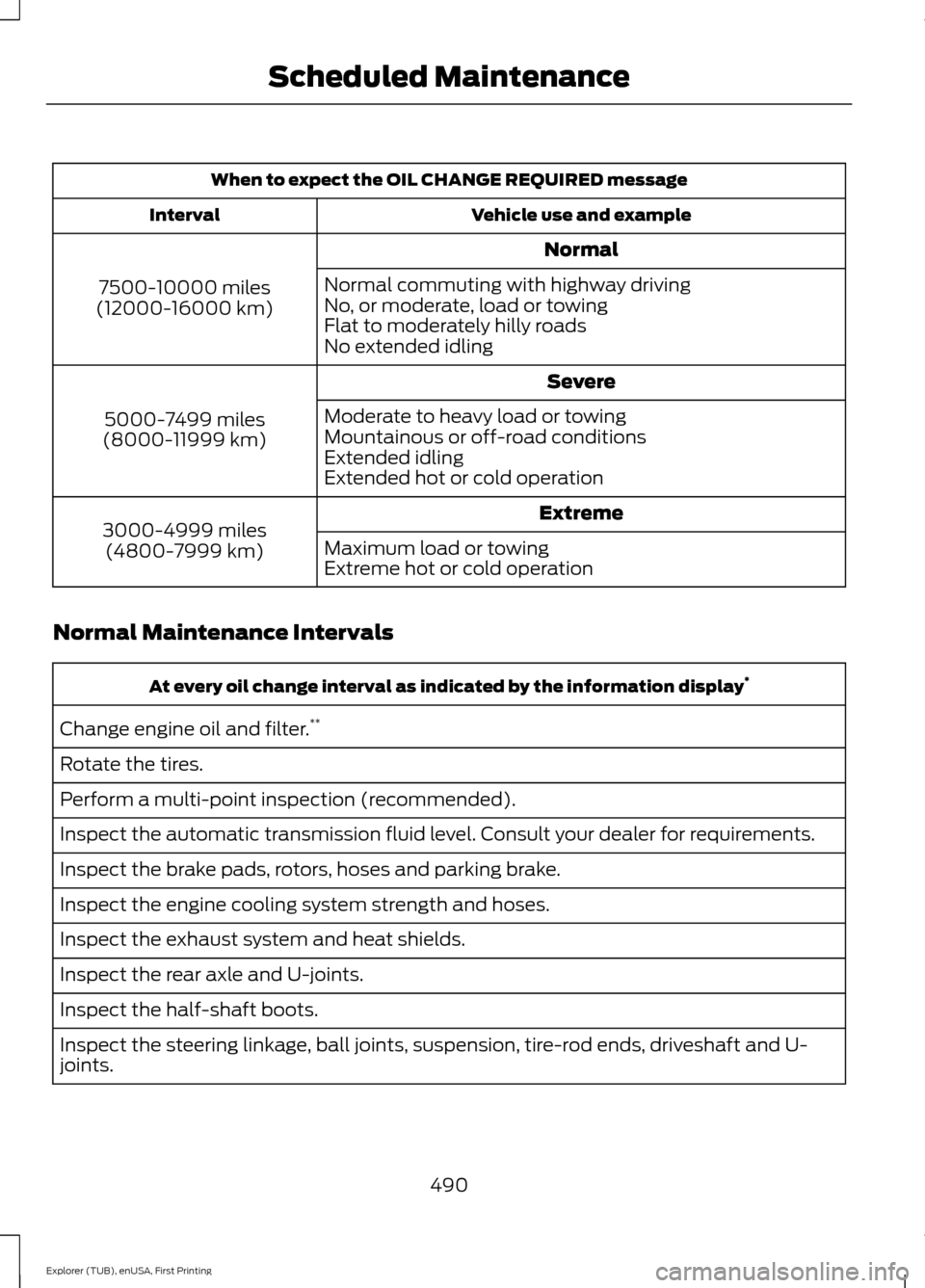
When to expect the OIL CHANGE REQUIRED message
Vehicle use and example
Interval
Normal
7500-10000 miles
(12000-16000 km) Normal commuting with highway driving
No, or moderate, load or towing
Flat to moderately hilly roads
No extended idling
Severe
5000-7499 miles
(8000-11999 km) Moderate to heavy load or towing
Mountainous or off-road conditions
Extended idling
Extended hot or cold operation
Extreme
3000-4999 miles
(4800-7999 km) Maximum load or towing
Extreme hot or cold operation
Normal Maintenance Intervals At every oil change interval as indicated by the information display
*
Change engine oil and filter. **
Rotate the tires.
Perform a multi-point inspection (recommended).
Inspect the automatic transmission fluid level. Consult your dealer for requirements.
Inspect the brake pads, rotors, hoses and parking brake.
Inspect the engine cooling system strength and hoses.
Inspect the exhaust system and heat shields.
Inspect the rear axle and U-joints.
Inspect the half-shaft boots.
Inspect the steering linkage, ball joints, suspension, tire-rod ends, driveshaft and U-
joints.
490
Explorer (TUB), enUSA, First Printing Scheduled Maintenance
Page 532 of 541
Cleaning the Interior...................................302
Cleaning the Windows and Wiper
Blades...........................................................302
Clearing All MyKeys.......................................56
Climate............................................................462 Climate Control Voice Commands.............465
Climate Control.............................................129
Climate Controlled Seats..........................155 Cooled Seats........................................................ 156
Coolant Check See: Engine Coolant Check............................ 282
Crash Sensors and Airbag Indicator.......46
Creating a MyKey
............................................55
Programming/Changing Configurable
Settings............................................................... 55
Cross Traffic Alert.........................................227 False Alerts........................................................... 229
Switching the System Off and On..............229
System Errors...................................................... 229
System Lights, Messages and Audible Alerts................................................................. 228
System Limitations........................................... 228
System Sensors.................................................. 228
Using the System............................................... 227
Cruise Control
..................................................74
Principle of Operation....................................... 213
Type 1........................................................................\
. 74
Type 2........................................................................\
74
Cruise control See: Using Cruise Control................................ 213
Customer Assistance................................260
D
Data Recording
..................................................9
Event Data Recording........................................... 9
Service Data Recording........................................ 9
Daytime Running Lamps
.............................82
Type 1 - Conventional
(Non-Configurable)....................................... 83
Type 2 - Configurable......................................... 83
Digital Radio
..................................................362
HD Radio Reception and Station
Troubleshooting............................................ 363
Direction Indicators
.......................................85
Driver Alert.....................................................220
PRINCIPLE OF OPERATION.......................... 220
USING DRIVER ALERT.................................... 220Driver and Passenger Airbags....................41
Children and Airbags............................................ 41
Proper Driver and Front Passenger Seating Adjustment......................................................... 41
Driving Aids
....................................................220
Driving Hints...................................................252
Driving Through Water...............................253
DRL See: Daytime Running Lamps......................... 82
E
Economical Driving
.....................................252
Emission Control System...........................177 On-Board Diagnostics (OBD-II).................... 178
Readiness for Inspection/Maintenance (I/M) Testing.................................................... 178
End User License Agreement
.................505
SYNC End User License Agreement
(EULA)............................................................. 505
Engine Block Heater....................................169 Using the Engine Block Heater...................... 170
Engine Coolant Check...............................282 Adding Engine Coolant.................................... 283
Checking the Engine Coolant........................ 282
Recycled Engine Coolant................................ 284
Severe Climates................................................. 284
What You Should Know About Fail-Safe Cooling............................................................. 284
Engine Immobilizer See: Passive Anti-Theft System..................... 70
Engine Oil Check...........................................281 Adding Engine Oil............................................... 281
Engine Oil Dipstick - 2.3L EcoBoost™..................................................281
Engine Oil Dipstick - 3.5L Duratec/3.5L Ecoboost™..................................................281
Engine Specifications - 2.3L EcoBoost™.................................................334
Drivebelt Routing............................................... 334
Engine Specifications - 3.5L Duratec.........................................................335
Drivebelt Routing............................................... 335
Engine Specifications - 3.5L Ecoboost™.................................................335
Drivebelt Routing............................................... 336
529
Explorer (TUB), enUSA, First Printing Index