keyless FORD EXPLORER 2016 5.G User Guide
[x] Cancel search | Manufacturer: FORD, Model Year: 2016, Model line: EXPLORER, Model: FORD EXPLORER 2016 5.GPages: 541, PDF Size: 6.51 MB
Page 103 of 541
AUDIBLE WARNINGS AND
INDICATORS
Key in Ignition Warning Chime
Sounds when you open the driver's door
and you have left the key in the ignition.
Engine On Warning Chime
A warning chime will sound when any door
is opened if the vehicle exceeds a relatively
low speed.
Keyless Warning Alert (If Equipped)
Sounds the horn twice when you exit the
vehicle and the keyless vehicle is in RUN,
indicating the vehicle is still on.
Headlamps On Warning Chime
Sounds when you remove the key from the
ignition and open the driver's door and you
have left the headlamps or parking lamps
on.
Parking Brake On Warning Chime
Sounds when you have left the parking
brake on and drive your vehicle. If the
warning chime remains on after you have
released the parking brake, have the
system checked by your authorized dealer
immediately.
Automatic Transmission Warning
Chime
Sounds when you have not moved the
transmission selector lever to position
P.
A message will be shown in the display.
100
Explorer (TUB), enUSA, First Printing Instrument Cluster
Page 125 of 541
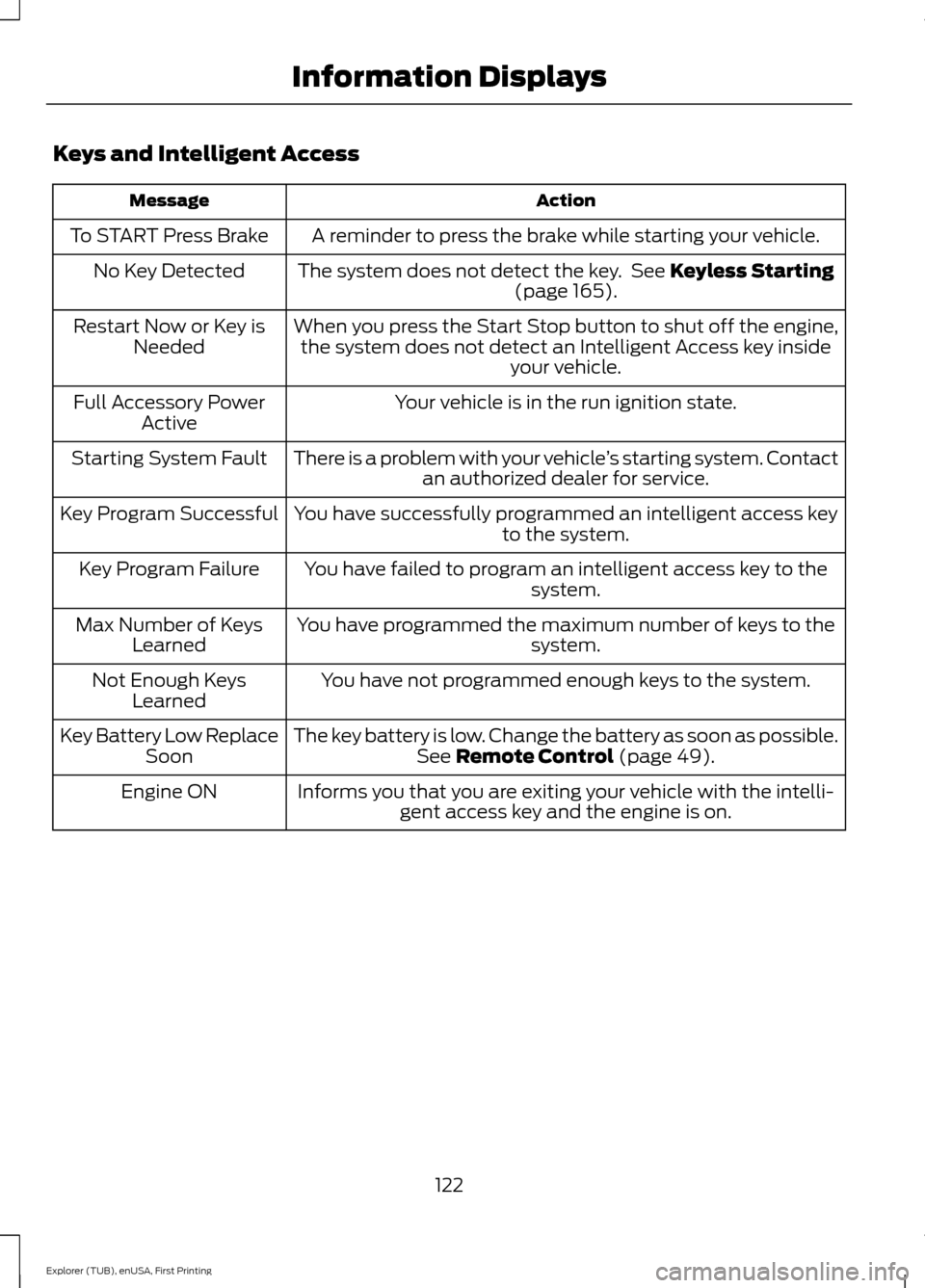
Keys and Intelligent Access
Action
Message
A reminder to press the brake while starting your vehicle.
To START Press Brake
The system does not detect the key. See Keyless Starting
(page 165).
No Key Detected
When you press the Start Stop button to shut off the engine,the system does not detect an Intelligent Access key inside your vehicle.
Restart Now or Key is
Needed
Your vehicle is in the run ignition state.
Full Accessory Power
Active
There is a problem with your vehicle ’s starting system. Contact
an authorized dealer for service.
Starting System Fault
You have successfully programmed an intelligent access keyto the system.
Key Program Successful
You have failed to program an intelligent access key to thesystem.
Key Program Failure
You have programmed the maximum number of keys to the system.
Max Number of Keys
Learned
You have not programmed enough keys to the system.
Not Enough Keys
Learned
The key battery is low. Change the battery as soon as possible.See
Remote Control (page 49).
Key Battery Low Replace
Soon
Informs you that you are exiting your vehicle with the intelli-gent access key and the engine is on.
Engine ON
122
Explorer (TUB), enUSA, First Printing Information Displays
Page 157 of 541
FOLD: Press to fold down the seatback.
C
RH / BOTH / LH: Press to select the normal, stow and fold modes to activate
the right-hand seat, the left-hand seat or both.
D
Note: The third row seat includes obstacle
detection that allows the seat to stop and
reverse direction if it hits an obstacle so that
the obstacle can be removed.
Note: Pressing a different button while the
power seat feature is already being
performed may cause the first selected seat
movement to be cancelled. Allow the first
seat movement to be completed before
pressing a button for another function.
Note: Make sure that there are no objects
such as books, purses or briefcases on the
load floor before unstowing the seat. Failure
to remove all objects from the top of the
load floor prior to unstowing it may cause
damage to the seat.
Note: In order to allow the seat to complete
the stowed position, do not place objects
under the seat before stowing. Remove all
objects from the seat and stowage tub.
Note: In the unlikely event that the third
row power seat stops prematurely or travels
to an unexpected position, press the FOLD
button (C) to reset the seat and return it to
a normal position.
These seats feature a power one-touch
operation that allows you fold and stow
the seats.
• The power fold seats work only when
the transmission is in park (P) and the
liftgate is open.
• If the ignition is off and the feature is
still running, the battery saver will turn
it off after 10 minutes. Press unlock on
the remote entry key transmitter to
reactivate the power seats or unlock it
with the keyless entry keypad. See
Remote Control (page 49). HEATED SEATS
(If Equipped)
Front Seats WARNING
People who are unable to feel pain
to their skin because of advanced
age, chronic illness, diabetes, spinal
cord injury, medication, alcohol use,
exhaustion or other physical conditions,
must exercise care when using the heated
seat. The heated seat may cause burns
even at low temperatures, especially if
used for long periods of time. Do not place
anything on the seat that insulates against
heat, such as a blanket or cushion. This
may cause the heated seat to overheat.
Do not puncture the seat with pins, needles
or other pointed objects. This may damage
the heating element which may cause the
heated seat to overheat. An overheated
seat may cause serious personal injury. Do not do the following:
•
Place heavy objects on the seat.
• Operate the heated seat if water or any
other liquid spills on the seat. Allow the
seat to dry thoroughly.
• Operate the heated seats unless the
engine is running. Doing so can cause
the battery to lose charge.
154
Explorer (TUB), enUSA, First Printing Seats
Page 168 of 541
GENERAL INFORMATION
WARNINGS
Extended idling at high engine
speeds can produce very high
temperatures in the engine and
exhaust system, creating the risk of fire or
other damage. Do not park, idle or drive your vehicle
on dry grass or other dry ground
cover. The emission system heats up
the engine compartment and exhaust
system, creating the risk of fire. Do not start the engine in a closed
garage or in other enclosed areas.
Exhaust fumes can be toxic. Always
open the garage door before you start the
engine. If you smell exhaust fumes inside
your vehicle, have your vehicle
checked by an authorized dealer
immediately. Do not drive your vehicle if
you smell exhaust fumes. If you disconnect the battery, your vehicle
may exhibit some unusual driving
characteristics for approximately 5 miles
(8 kilometers) after you reconnect it. This
is because the engine management system
must realign itself with the engine. You can
disregard any unusual driving
characteristics during this period.
The powertrain control system meets all
Canadian interference-causing equipment
standard requirements regulating the
impulse electrical field or radio noise.
When you start the engine, avoid pressing
the accelerator pedal before and during
operation. Only use the accelerator pedal
when you have difficulty starting the
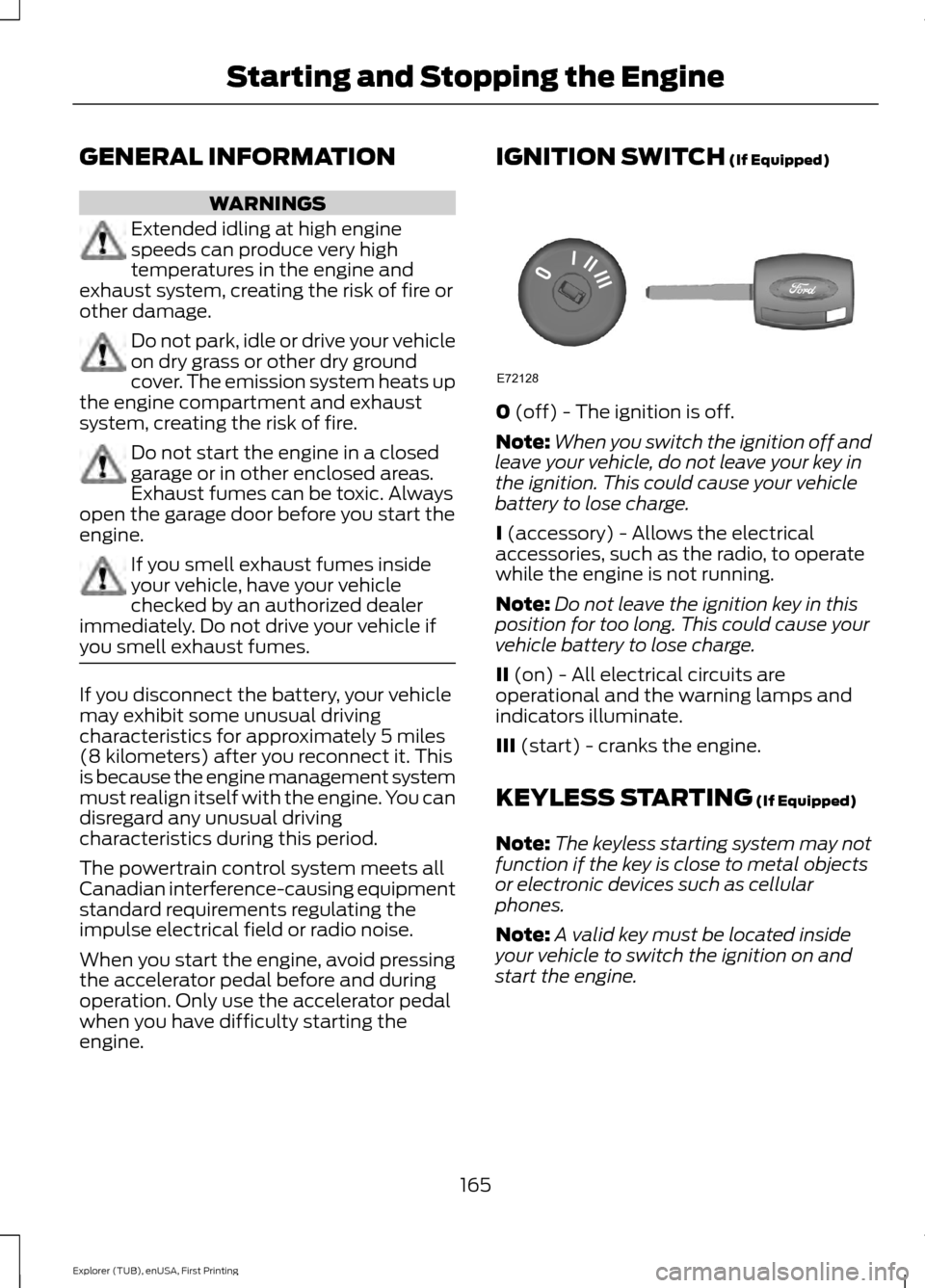
engine. IGNITION SWITCH (If Equipped)
0
(off) - The ignition is off.
Note: When you switch the ignition off and
leave your vehicle, do not leave your key in
the ignition. This could cause your vehicle
battery to lose charge.
I
(accessory) - Allows the electrical
accessories, such as the radio, to operate
while the engine is not running.
Note: Do not leave the ignition key in this
position for too long. This could cause your
vehicle battery to lose charge.
II
(on) - All electrical circuits are
operational and the warning lamps and
indicators illuminate.
III
(start) - cranks the engine.
KEYLESS STARTING
(If Equipped)
Note: The keyless starting system may not
function if the key is close to metal objects
or electronic devices such as cellular
phones.
Note: A valid key must be located inside
your vehicle to switch the ignition on and
start the engine.
165
Explorer (TUB), enUSA, First Printing Starting and Stopping the EngineE72128
Page 169 of 541
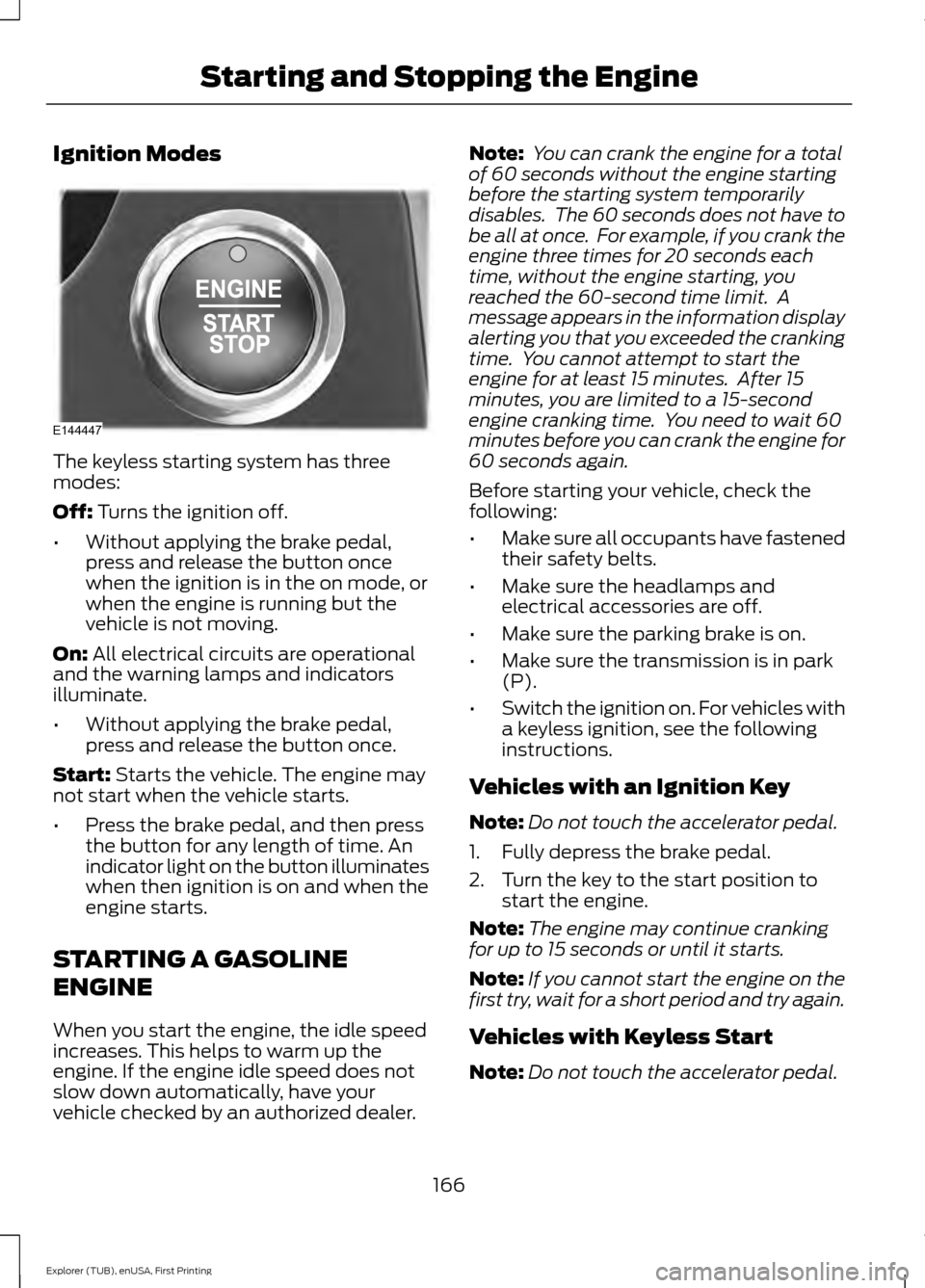
Ignition Modes
The keyless starting system has three
modes:
Off: Turns the ignition off.
• Without applying the brake pedal,
press and release the button once
when the ignition is in the on mode, or
when the engine is running but the
vehicle is not moving.
On:
All electrical circuits are operational
and the warning lamps and indicators
illuminate.
• Without applying the brake pedal,
press and release the button once.
Start:
Starts the vehicle. The engine may
not start when the vehicle starts.
• Press the brake pedal, and then press
the button for any length of time. An
indicator light on the button illuminates
when then ignition is on and when the
engine starts.
STARTING A GASOLINE
ENGINE
When you start the engine, the idle speed
increases. This helps to warm up the
engine. If the engine idle speed does not
slow down automatically, have your
vehicle checked by an authorized dealer. Note:
You can crank the engine for a total
of 60 seconds without the engine starting
before the starting system temporarily
disables. The 60 seconds does not have to
be all at once. For example, if you crank the
engine three times for 20 seconds each
time, without the engine starting, you
reached the 60-second time limit. A
message appears in the information display
alerting you that you exceeded the cranking
time. You cannot attempt to start the
engine for at least 15 minutes. After 15
minutes, you are limited to a 15-second
engine cranking time. You need to wait 60
minutes before you can crank the engine for
60 seconds again.
Before starting your vehicle, check the
following:
• Make sure all occupants have fastened
their safety belts.
• Make sure the headlamps and
electrical accessories are off.
• Make sure the parking brake is on.
• Make sure the transmission is in park
(P).
• Switch the ignition on. For vehicles with
a keyless ignition, see the following
instructions.
Vehicles with an Ignition Key
Note: Do not touch the accelerator pedal.
1. Fully depress the brake pedal.
2. Turn the key to the start position to start the engine.
Note: The engine may continue cranking
for up to 15 seconds or until it starts.
Note: If you cannot start the engine on the
first try, wait for a short period and try again.
Vehicles with Keyless Start
Note: Do not touch the accelerator pedal.
166
Explorer (TUB), enUSA, First Printing Starting and Stopping the EngineE144447
Page 171 of 541
Automatic Engine Shutdown
For vehicles with a keyless ignition, this
feature automatically shuts down the
engine if it has been idling for an extended
period. The ignition also turns off in order
to save battery power. Before your vehicle
shuts down, a message appears in the
information display showing a timer
counting down from 30 seconds. If you do
not intervene within 30 seconds, your
vehicle shuts down. Another message
appears in the information display to
inform you that your vehicle has shut down
to save fuel. Start your vehicle as you
normally do.
Automatic Engine Shutdown Override
Note:
You cannot permanently switch off
the automatic shutdown feature. When you
switch it off temporarily, it turns on at the
next ignition cycle.
You can stop the shutdown, or reset the
timer, at any point before the 30-second
countdown has expired by doing any of the
following:
• You can reset the timer by interacting
with your vehicle, for example pressing
the brake or accelerator pedal.
• You can temporarily switch off the
shutdown feature any time the ignition
is on using the information display. See
Information Displays (page 101). The
feature only remains off for the current
ignition cycle.
• During the 30-second countdown, the
system prompts you to press OK or
RESET to temporarily switch the
feature off for the current ignition cycle
only.
Stopping the Engine When Your
Vehicle is Stationary
Vehicles with an Ignition Key
1. Shift into park (P). 2. Switch the ignition off.
3. Apply the parking brake.
Vehicles with Keyless Start
1. Shift into park (P).
2. Press the push button ignition switch.
3. Apply the parking brake.
Note:
The ignition, all electrical circuits and
all warning lamps and indicators will be
turned off.
Note: If the engine is idling for 30 minutes,
the ignition and engine automatically shut
down.
Stopping the Engine When Your
Vehicle is Moving WARNING
Switching off the engine when the
vehicle is still moving will result in a
loss of brake and steering assistance.
The steering will not lock, but higher effort
will be required. When the ignition is
switched off, some electrical circuits,
including air bags, warning lamps and
indicators may also be off. If the ignition
was turned off accidentally, you can shift
into neutral (N) and re-start the engine. Vehicles with an Ignition Key
1.
Shift into neutral and use the brakes to
bring your vehicle to a safe stop.
2. When your vehicle has stopped, shift into park (P) and switch the ignition
off.
3. Apply the parking brake.
Vehicles with Keyless Start
1. Shift into neutral and use the brakes to
bring your vehicle to a safe stop.
2. When your vehicle has stopped, shift into park (P).
168
Explorer (TUB), enUSA, First Printing Starting and Stopping the Engine
Page 253 of 541
Front-wheel drive vehicles CANNOT be
flat-towed (all wheels on the ground) as
vehicle or transmission damage may occur.
You must place the front wheels on a
two-wheel tow dolly. If you are using a tow
dolly, follow the instructions specified by
the equipment provider.
Four-wheel drive vehicles
CANNOT be
flat-towed (all wheels on the ground), as
vehicle or transmission damage may occur.
It is recommended to tow your vehicle with
all four (4) wheels off the ground such as
when using a car-hauling trailer. Otherwise,
you cannot recreational tow your vehicle.
TOWING THE VEHICLE ON
FOUR WHEELS - 3.5L
DURATEC/3.5L ECOBOOST™
Emergency Towing
If your vehicle becomes inoperable
(without access to wheel dollies or vehicle
transport trailer), it can be flat-towed (all
wheels on the ground, regardless of the
powertrain and transmission
configuration) under the following
conditions:
• Your vehicle is facing forward for
towing in a forward direction.
• Place the transmission in neutral (N).
If you cannot move the transmission
into neutral (N), you may need to
override it. See
Transmission (page
180).
• Maximum speed is 35 mph (56 km/h).
• Maximum distance is
50 mi (80 km). WARNING
If your vehicle has a steering wheel
lock make sure the ignition is in the
accessory or on position when being
towed. Recreational Towing
Note:
Put your climate control system in
recirculated air mode to prevent exhaust
fumes from entering the vehicle. See
Climate Control
(page 129).
Follow these guidelines if you have a need
for recreational (RV) towing. An example
of recreational towing would be towing
your vehicle behind a motorhome. We
designed these guidelines to prevent
damage to your transmission.
You can tow your 3.5L EcoBoost or 3.7L
Duratec (6F50 or 6F55 transmission)
equipped vehicle with all four wheels on
the ground.
If you tow your vehicle with all four wheels
on the ground:
• Tow only in the forward direction.
• Release the parking brake.
Vehicles with Keyless Start
1. Start the vehicle by pressing the brake pedal, and then pressing the keyless
start button until the vehicle starts.
2. Press the brake pedal and shift the gearshift into neutral (N).
3. Turn the vehicle off by pressing the keyless start button once.
4. Disconnect the negative (black) cable from the battery. You need the door
key to lock and unlock doors when the
battery cable is disconnected. See
Changing the 12V Battery (page 289).
Note: The anti-theft system does not work
until you reconnect the battery cable.
Start the engine within 15 minutes of
reconnecting the battery cable.
Vehicles with an Ignition Key
1. Start the vehicle by pressing the brake pedal, and then turning the ignition key
until the vehicle starts.
250
Explorer (TUB), enUSA, First Printing Towing
Page 275 of 541
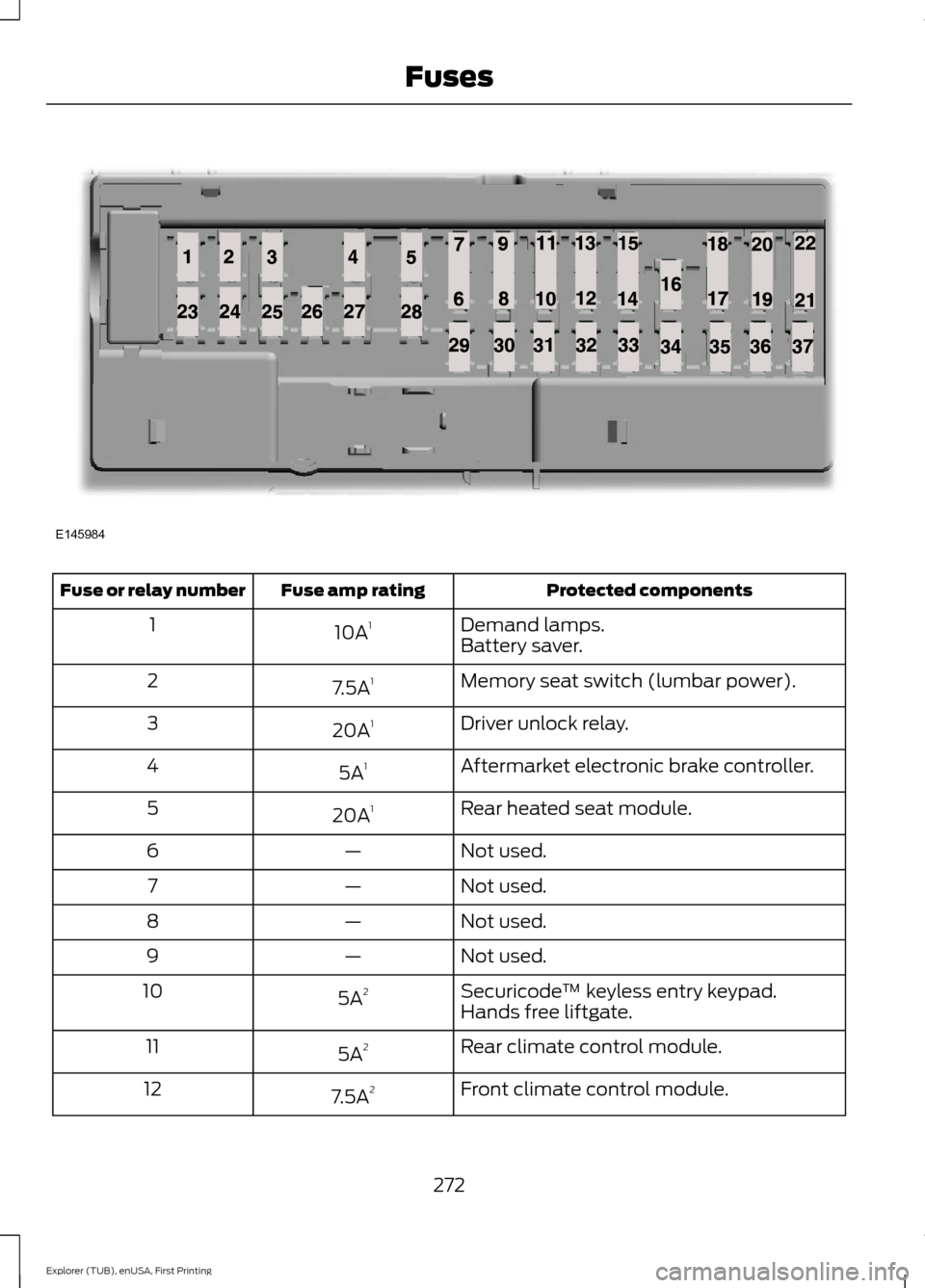
Protected components
Fuse amp rating
Fuse or relay number
Demand lamps.
10A 1
1
Battery saver.
Memory seat switch (lumbar power).
7.5A 1
2
Driver unlock relay.
20A 1
3
Aftermarket electronic brake controller.
5A 1
4
Rear heated seat module.
20A 1
5
Not used.
—
6
Not used.
—
7
Not used.
—
8
Not used.
—
9
Securicode™ keyless entry keypad.
5A 2
10
Hands free liftgate.
Rear climate control module.
5A 2
11
Front climate control module.
7.5A 2
12
272
Explorer (TUB), enUSA, First Printing FusesE145984
Page 485 of 541
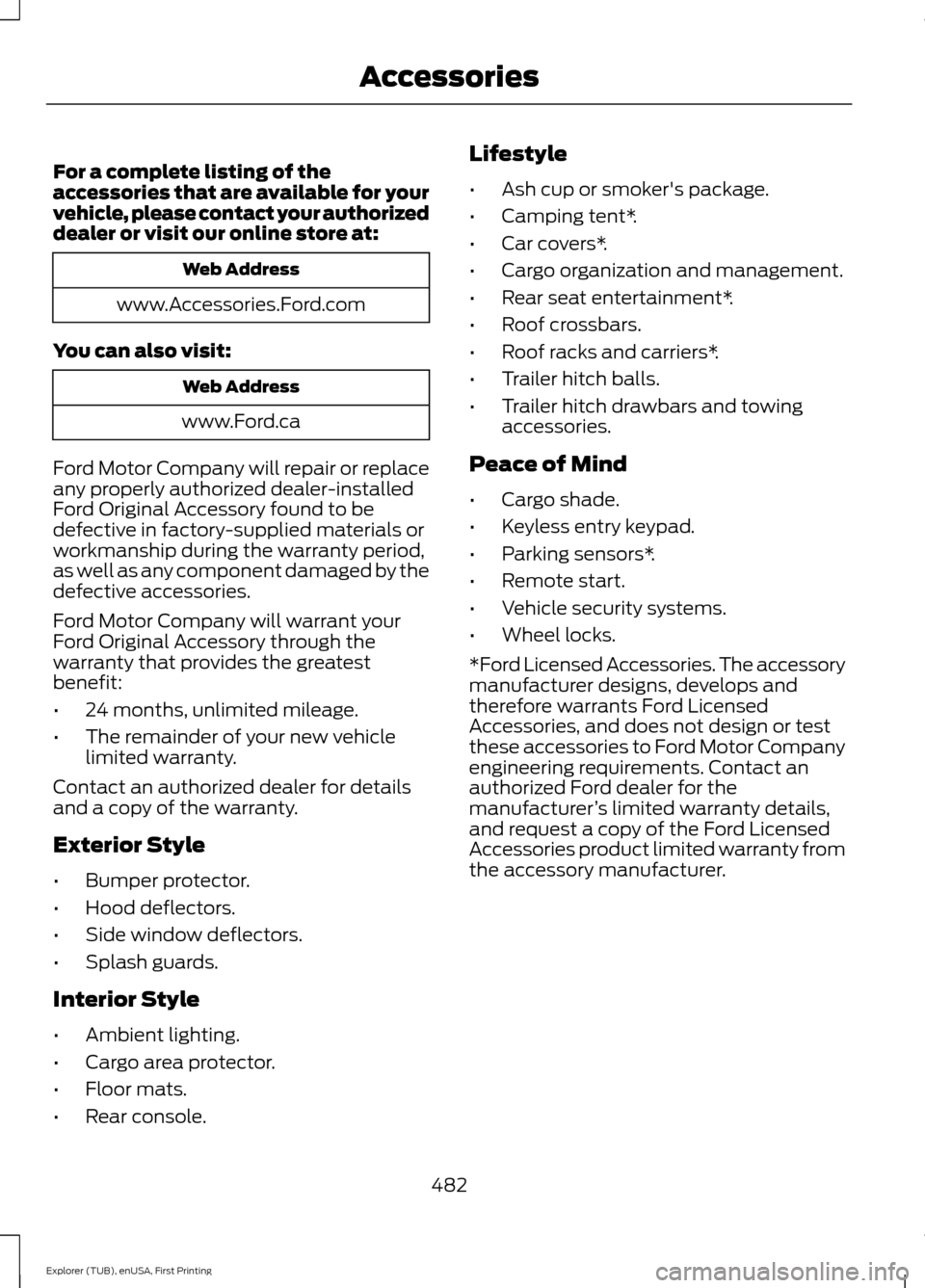
For a complete listing of the
accessories that are available for your
vehicle, please contact your authorized
dealer or visit our online store at:
Web Address
www.Accessories.Ford.com
You can also visit: Web Address
www.Ford.ca
Ford Motor Company will repair or replace
any properly authorized dealer-installed
Ford Original Accessory found to be
defective in factory-supplied materials or
workmanship during the warranty period,
as well as any component damaged by the
defective accessories.
Ford Motor Company will warrant your
Ford Original Accessory through the
warranty that provides the greatest
benefit:
• 24 months, unlimited mileage.
• The remainder of your new vehicle
limited warranty.
Contact an authorized dealer for details
and a copy of the warranty.
Exterior Style
• Bumper protector.
• Hood deflectors.
• Side window deflectors.
• Splash guards.
Interior Style
• Ambient lighting.
• Cargo area protector.
• Floor mats.
• Rear console. Lifestyle
•
Ash cup or smoker's package.
• Camping tent*.
• Car covers*.
• Cargo organization and management.
• Rear seat entertainment*.
• Roof crossbars.
• Roof racks and carriers*.
• Trailer hitch balls.
• Trailer hitch drawbars and towing
accessories.
Peace of Mind
• Cargo shade.
• Keyless entry keypad.
• Parking sensors*.
• Remote start.
• Vehicle security systems.
• Wheel locks.
*Ford Licensed Accessories. The accessory
manufacturer designs, develops and
therefore warrants Ford Licensed
Accessories, and does not design or test
these accessories to Ford Motor Company
engineering requirements. Contact an
authorized Ford dealer for the
manufacturer ’s limited warranty details,
and request a copy of the Ford Licensed
Accessories product limited warranty from
the accessory manufacturer.
482
Explorer (TUB), enUSA, First Printing Accessories
Page 530 of 541
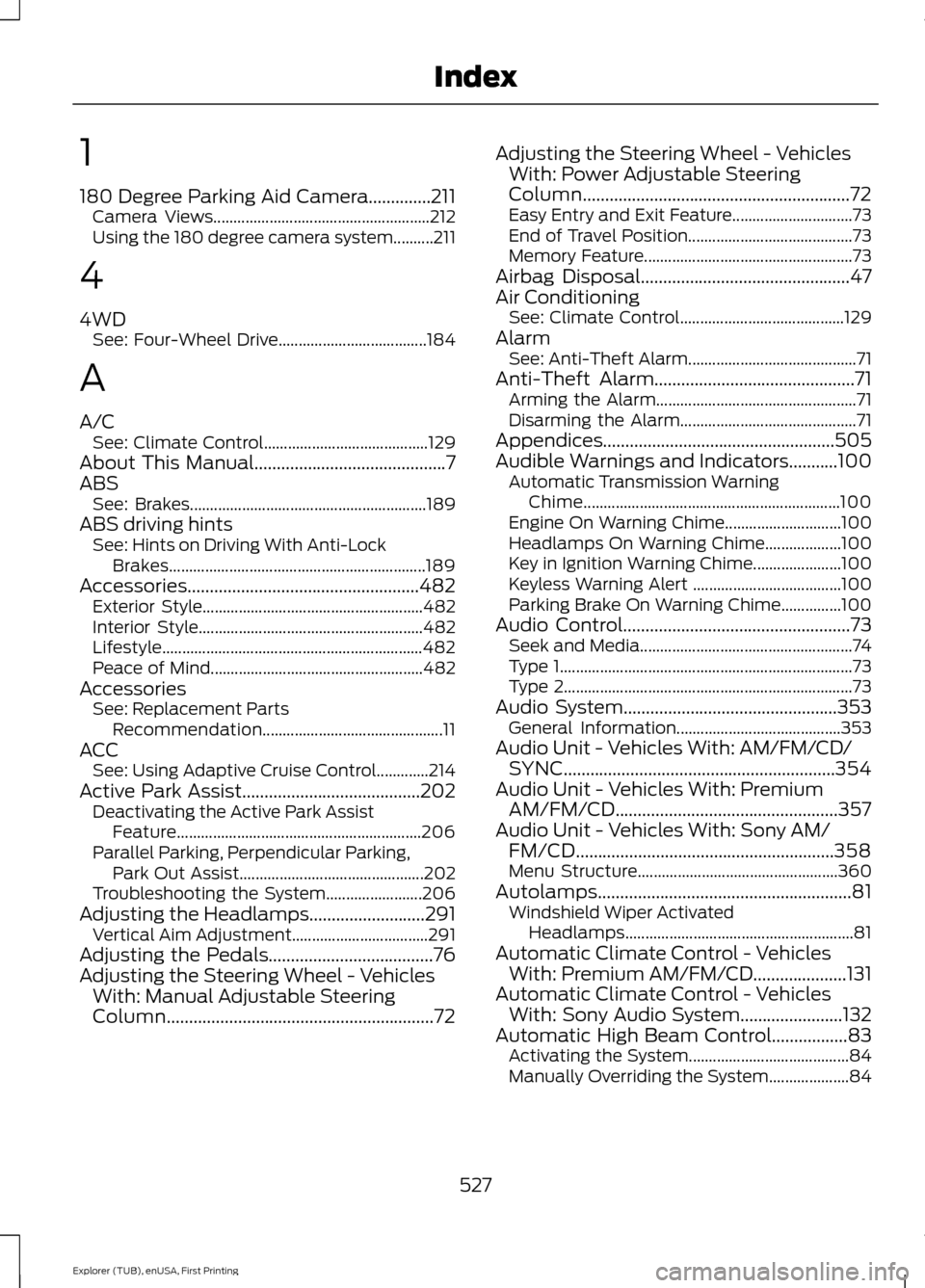
1
180 Degree Parking Aid Camera..............211
Camera Views...................................................... 212
Using the 180 degree camera system..........211
4
4WD See: Four-Wheel Drive..................................... 184
A
A/C See: Climate Control......................................... 129
About This Manual...........................................7
ABS See: Brakes........................................................... 189
ABS driving hints See: Hints on Driving With Anti-Lock
Brakes................................................................ 189
Accessories
....................................................482
Exterior Style....................................................... 482
Interior Style........................................................ 482
Lifestyle................................................................. 482
Peace of Mind..................................................... 482
Accessories See: Replacement Parts
Recommendation............................................. 11
ACC See: Using Adaptive Cruise Control.............214
Active Park Assist
........................................202
Deactivating the Active Park Assist
Feature............................................................. 206
Parallel Parking, Perpendicular Parking, Park Out Assist.............................................. 202
Troubleshooting the System........................ 206
Adjusting the Headlamps..........................291 Vertical Aim Adjustment.................................. 291
Adjusting the Pedals.....................................76
Adjusting the Steering Wheel - Vehicles With: Manual Adjustable Steering
Column
............................................................72 Adjusting the Steering Wheel - Vehicles
With: Power Adjustable Steering
Column
............................................................72
Easy Entry and Exit Feature.............................. 73
End of Travel Position......................................... 73
Memory Feature.................................................... 73
Airbag Disposal...............................................47
Air Conditioning See: Climate Control......................................... 129
Alarm See: Anti-Theft Alarm.......................................... 71
Anti-Theft Alarm.............................................71 Arming the Alarm.................................................. 71
Disarming the Alarm............................................ 71
Appendices....................................................505
Audible Warnings and Indicators
...........100
Automatic Transmission Warning
Chime................................................................ 100
Engine On Warning Chime............................. 100
Headlamps On Warning Chime................... 100
Key in Ignition Warning Chime...................... 100
Keyless Warning Alert ..................................... 100
Parking Brake On Warning Chime...............100
Audio Control
...................................................73
Seek and Media..................................................... 74
Type 1........................................................................\
. 73
Type 2........................................................................\
73
Audio System................................................353 General Information......................................... 353
Audio Unit - Vehicles With: AM/FM/CD/ SYNC
.............................................................354
Audio Unit - Vehicles With: Premium AM/FM/CD..................................................357
Audio Unit - Vehicles With: Sony AM/ FM/CD..........................................................358
Menu Structure.................................................. 360
Autolamps
.........................................................81
Windshield Wiper Activated
Headlamps......................................................... 81
Automatic Climate Control - Vehicles With: Premium AM/FM/CD.....................131
Automatic Climate Control - Vehicles With: Sony Audio System.......................132
Automatic High Beam Control.................83 Activating the System........................................ 84
Manually Overriding the System.................... 84
527
Explorer (TUB), enUSA, First Printing Index