ad blue FORD EXPLORER 2016 5.G Owner's Manual
[x] Cancel search | Manufacturer: FORD, Model Year: 2016, Model line: EXPLORER, Model: FORD EXPLORER 2016 5.GPages: 541, PDF Size: 6.51 MB
Page 426 of 541
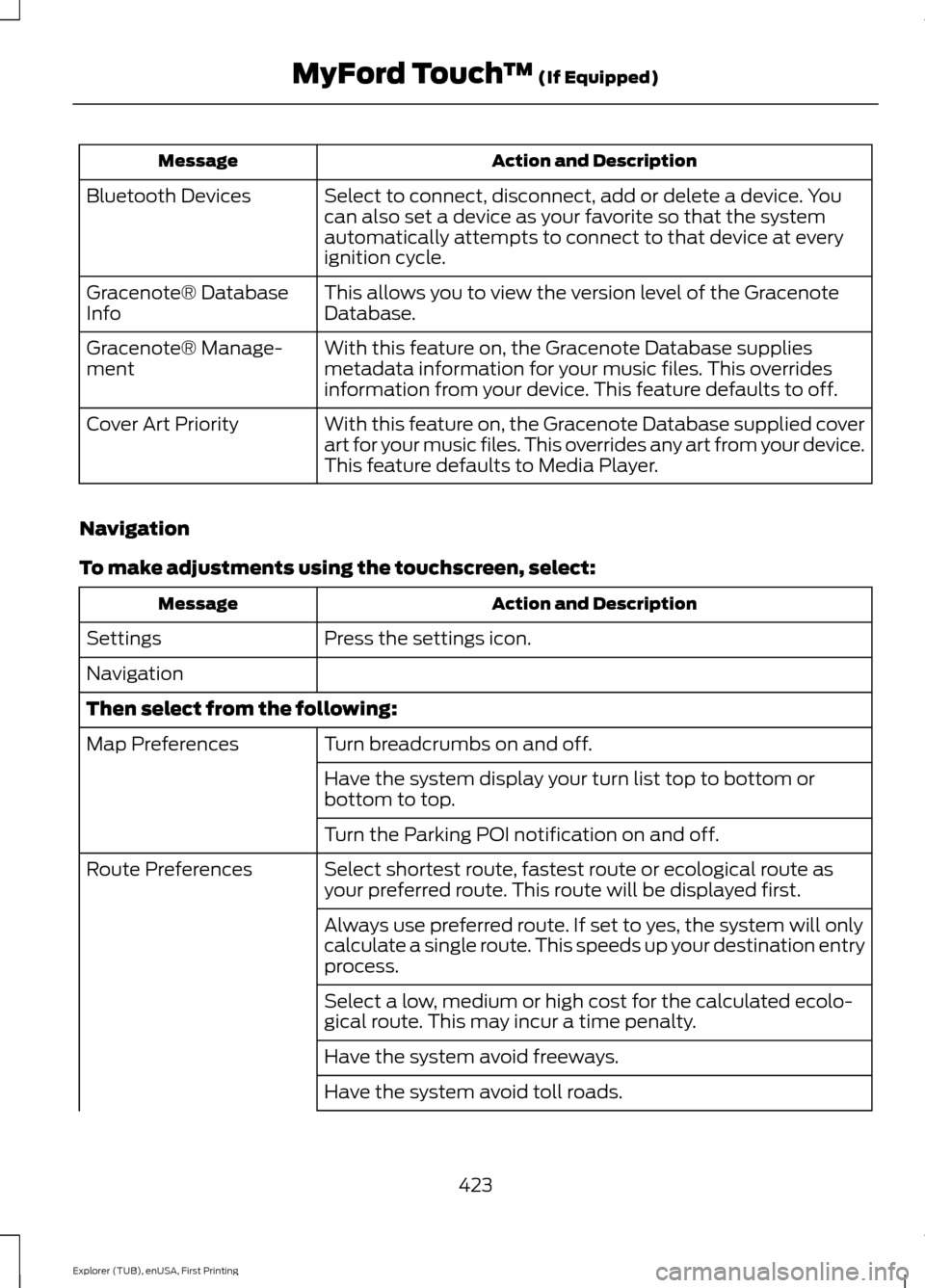
Action and Description
Message
Select to connect, disconnect, add or delete a device. You
can also set a device as your favorite so that the system
automatically attempts to connect to that device at every
ignition cycle.
Bluetooth Devices
This allows you to view the version level of the Gracenote
Database.
Gracenote® Database
Info
With this feature on, the Gracenote Database supplies
metadata information for your music files. This overrides
information from your device. This feature defaults to off.
Gracenote® Manage-
ment
With this feature on, the Gracenote Database supplied cover
art for your music files. This overrides any art from your device.
This feature defaults to Media Player.
Cover Art Priority
Navigation
To make adjustments using the touchscreen, select: Action and Description
Message
Press the settings icon.
Settings
Navigation
Then select from the following:
Turn breadcrumbs on and off.
Map Preferences
Have the system display your turn list top to bottom or
bottom to top.
Turn the Parking POI notification on and off.
Select shortest route, fastest route or ecological route as
your preferred route. This route will be displayed first.
Route Preferences
Always use preferred route. If set to yes, the system will only
calculate a single route. This speeds up your destination entry
process.
Select a low, medium or high cost for the calculated ecolo-
gical route. This may incur a time penalty.
Have the system avoid freeways.
Have the system avoid toll roads.
423
Explorer (TUB), enUSA, First Printing MyFord Touch
™ (If Equipped)
Page 428 of 541
Phone
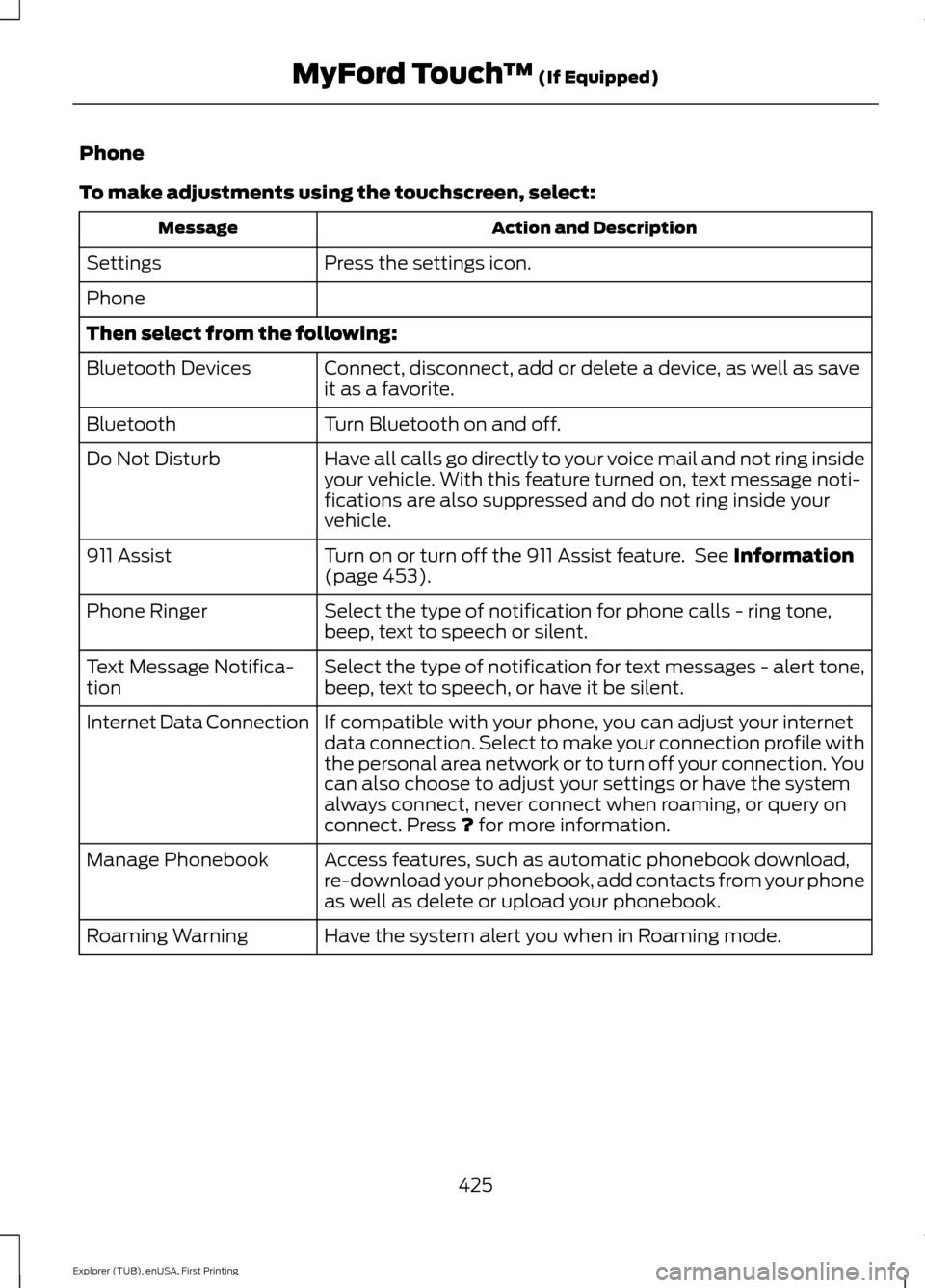
To make adjustments using the touchscreen, select:
Action and Description
Message
Press the settings icon.
Settings
Phone
Then select from the following:
Connect, disconnect, add or delete a device, as well as save
it as a favorite.
Bluetooth Devices
Turn Bluetooth on and off.
Bluetooth
Have all calls go directly to your voice mail and not ring inside
your vehicle. With this feature turned on, text message noti-
fications are also suppressed and do not ring inside your
vehicle.
Do Not Disturb
Turn on or turn off the 911 Assist feature. See Information
(page 453).
911 Assist
Select the type of notification for phone calls - ring tone,
beep, text to speech or silent.
Phone Ringer
Select the type of notification for text messages - alert tone,
beep, text to speech, or have it be silent.
Text Message Notifica-
tion
If compatible with your phone, you can adjust your internet
data connection. Select to make your connection profile with
the personal area network or to turn off your connection. You
can also choose to adjust your settings or have the system
always connect, never connect when roaming, or query on
connect. Press
? for more information.
Internet Data Connection
Access features, such as automatic phonebook download,
re-download your phonebook, add contacts from your phone
as well as delete or upload your phonebook.
Manage Phonebook
Have the system alert you when in Roaming mode.
Roaming Warning
425
Explorer (TUB), enUSA, First Printing MyFord Touch
™
(If Equipped)
Page 430 of 541
Action and Description
Menu Item
Instead of using Wi-Fi, your system can also use a USB mobile
broadband connection to access the internet. (You must
switch on your mobile broadband device on your personal
computer before connecting it to the system.) This screen
allows you to set up what is your typical area for your USB
mobile broadband connection. (USB mobile broadband
settings may not display if the device is already on.) You can
select the following:
USB Mobile Broadband
Country
Carrier
Phone Number
User Name
Password
Shows you the currently paired devices as well as giving you
your typical Bluetooth options to connect, disconnect, set as
favorite, delete and add device. Bluetooth is a registered
trademark of the Bluetooth SIG.
Bluetooth Settings
Choose your connection methods and change them as
needed. You can select to change order and have the system
either always attempt to connect using a USB, mobile
broadband, or using Wi-Fi.
Prioritize Connection
Methods The Wi-Fi CERTIFIED Logo is a certification
mark of the Wi-Fi Alliance.
427
Explorer (TUB), enUSA, First Printing MyFord Touch
™ (If Equipped)E142626
Page 448 of 541
Supported Media Players, Formats
and Metadata Information
SYNC is capable of hosting nearly any
digital media player, including iPod,
Zune
™, plays from device players, and
most USB drives. Supported audio formats
include MP3, WMA, WAV and AAC.
It is also able to organize your indexed
media from your playing device by
metadata tags. Metadata tags, which are
descriptive software identifiers embedded
in the media files, provide information
about the file.
If your indexed media files contain no
information embedded in these metadata
tags, SYNC may classify the empty
metadata tags as unknown. Bluetooth Audio The system allows you to stream
audio over your vehicle's
speakers from your connected,
Bluetooth-enabled cell phone.
To access, press the lower left corner
on the touchscreen, then select: Message
BT Stereo
Bluetooth Audio Voice Commands The voice system allows you to
control your media with a simple
voice command. For example to
change songs, press the voice button and
follow the system prompts.
PHONE 445
Explorer (TUB), enUSA, First Printing MyFord Touch
™ (If Equipped)E142611 E142599 A
B
C
D
E
F
E161968
Page 449 of 541
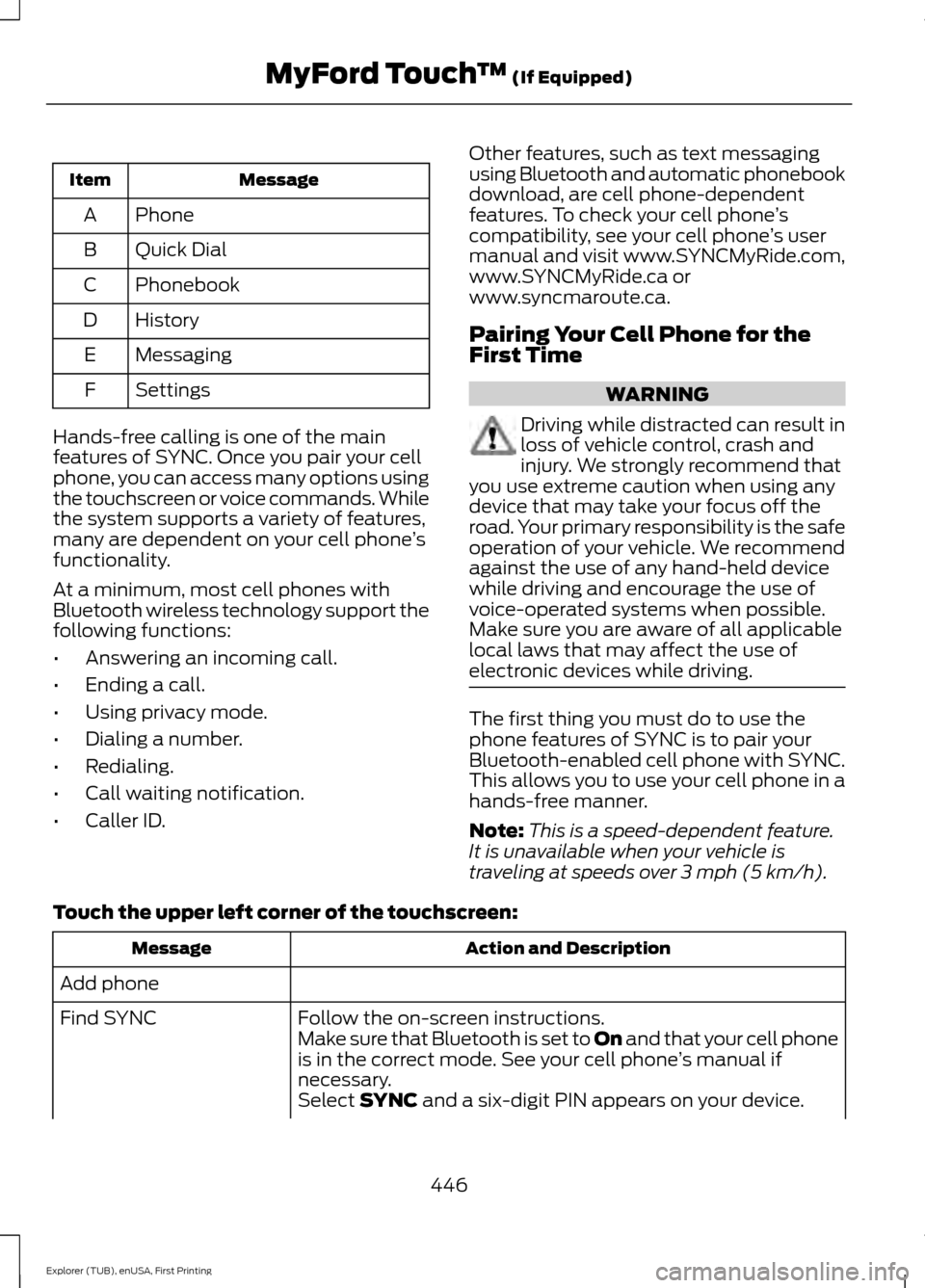
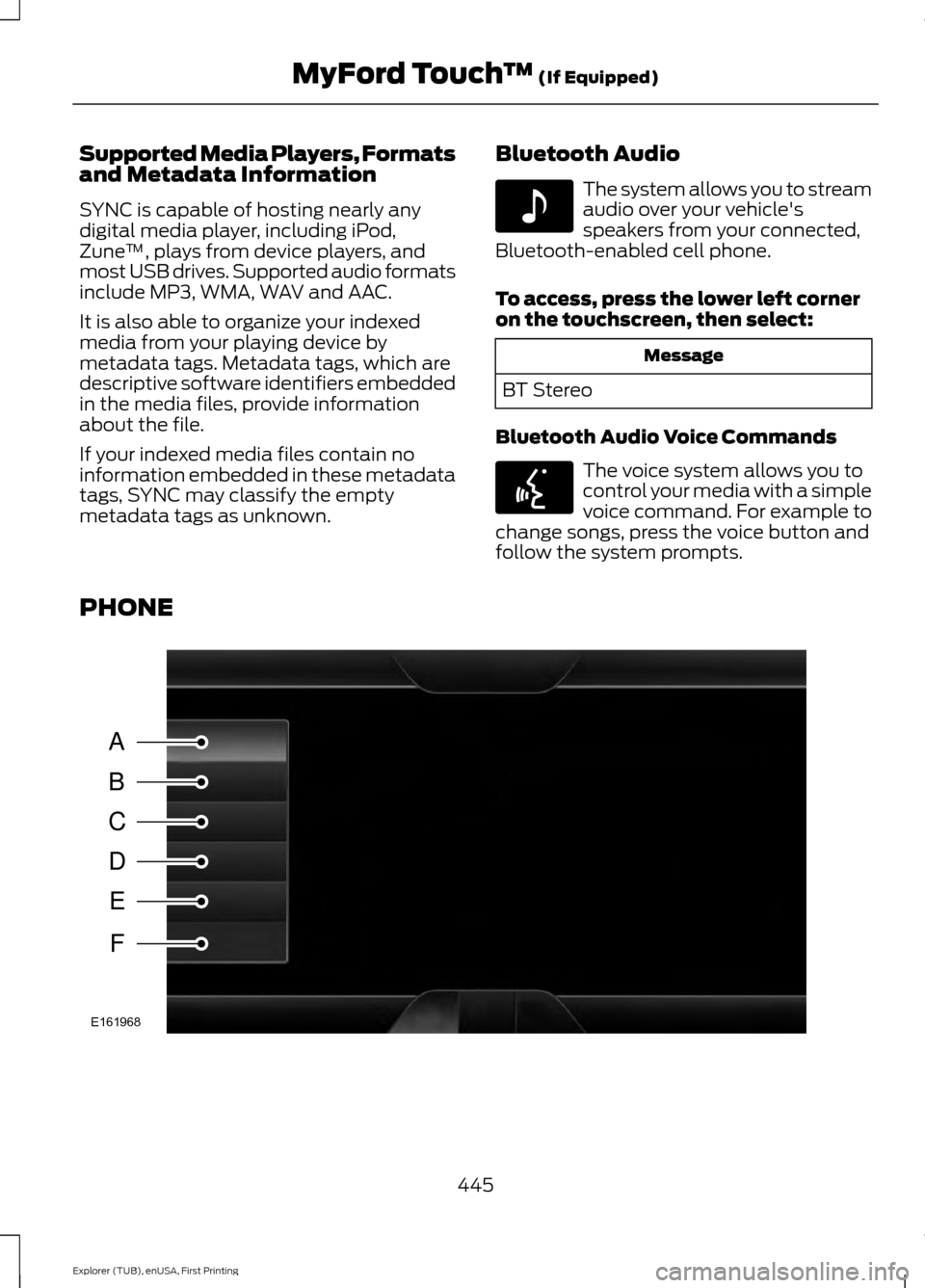
Message
Item
Phone
A
Quick Dial
B
Phonebook
C
History
D
Messaging
E
Settings
F
Hands-free calling is one of the main
features of SYNC. Once you pair your cell
phone, you can access many options using
the touchscreen or voice commands. While
the system supports a variety of features,
many are dependent on your cell phone ’s
functionality.
At a minimum, most cell phones with
Bluetooth wireless technology support the
following functions:
• Answering an incoming call.
• Ending a call.
• Using privacy mode.
• Dialing a number.
• Redialing.
• Call waiting notification.
• Caller ID. Other features, such as text messaging
using Bluetooth and automatic phonebook
download, are cell phone-dependent
features. To check your cell phone
’s
compatibility, see your cell phone ’s user
manual and visit www.SYNCMyRide.com,
www.SYNCMyRide.ca or
www.syncmaroute.ca.
Pairing Your Cell Phone for the
First Time WARNING
Driving while distracted can result in
loss of vehicle control, crash and
injury. We strongly recommend that
you use extreme caution when using any
device that may take your focus off the
road. Your primary responsibility is the safe
operation of your vehicle. We recommend
against the use of any hand-held device
while driving and encourage the use of
voice-operated systems when possible.
Make sure you are aware of all applicable
local laws that may affect the use of
electronic devices while driving. The first thing you must do to use the
phone features of SYNC is to pair your
Bluetooth-enabled cell phone with SYNC.
This allows you to use your cell phone in a
hands-free manner.
Note:
This is a speed-dependent feature.
It is unavailable when your vehicle is
traveling at speeds over 3 mph (5 km/h).
Touch the upper left corner of the touchscreen: Action and Description
Message
Add phone Follow the on-screen instructions.
Find SYNC
Make sure that Bluetooth is set to On
and that your cell phone
is in the correct mode. See your cell phone ’s manual if
necessary.
Select
SYNC and a six-digit PIN appears on your device.
446
Explorer (TUB), enUSA, First Printing MyFord Touch
™
(If Equipped)
Page 450 of 541
Action and Description
Message
If you are prompted to enter a PIN on your device, it does not
support Secure Simple Pairing. To pair, enter the PIN
displayed on the touchscreen. Skip the next step.
When prompted on your cell phone ’s display, confirm that
the PIN provided by SYNC matches the PIN displayed on your
cell phone.
The display indicates when the pairing is successful.
SYNC may prompt you with more cell phone options. For
more information on your cell phone's capability, see your
cell phone's manual and visit the website.
Pairing Subsequent Cell Phones
Note: This is a speed-dependent feature.
It is unavailable when your vehicle is
traveling at speeds over 3 mph (5 km/h). Make sure that Bluetooth is set to
On and
that your cell phone is in the correct mode.
See your device's manual if necessary.
To pair a subsequent cell phone, select: Action and Description
Menu Item
Phone
Settings
Bluetooth Devices
Add Device Follow the on-screen instructions.
Find SYNC
Make sure that Bluetooth is set to On
and that your cell phone
is in the correct mode. See your cell phone ’s manual if
necessary.
Select
SYNC and a six-digit PIN appears on your device.
If you are prompted to enter a PIN on your device, it does not
support Secure Simple Pairing. To pair, enter the PIN
displayed on the touchscreen. Skip the next step.
When prompted on your cell phone ’s display, confirm that
the PIN provided by SYNC matches the PIN displayed on your
cell phone.
The display indicates when the pairing is successful.
SYNC may prompt you with more cell phone options. For
more information on your cell phone's capability, see your
cell phone's manual and visit the website.
447
Explorer (TUB), enUSA, First Printing MyFord Touch
™
(If Equipped)
Page 452 of 541
Action and Description
Menu Item
Select to call stored contacts.
Quick Dial
Touch this button to access and call any contacts in your
previously downloaded phonebook. The system places the
entries in alphabetical categories summarized at the top of
the screen
Phonebook
To turn on contact picture settings, if your device supports this
feature, select:
Phone
Settings
Manage Phonebook
Display Photos from Phonebook
Certain smartphones may support transferring street addresses
when listed with phonebook contact information. If your cell
phone supports this feature, you can select and use these
addresses as destinations and save them as favorites.
Note: This is a cell phone-dependent feature. If your cell phone
does not support downloading call history using Bluetooth,
SYNC keeps track of calls made with the SYNC system.
Call History
After you connect your Bluetooth-enabled cell phone to SYNC,
you can access any previously dialed, received or missed calls.
You can also choose to save these to:Quick Dial
Favorites
Send text messages using the touchscreen. See Text
Messaging later in this section.
Messaging
Touch this button to access various phone settings, for
example turning Bluetooth on and off, managing your phone-
book and more. See
Phone Settings later in this section
Settings
Text Messaging
Note: Downloading and sending text
messages using Bluetooth are cell
phone-dependent features.
Note: Certain features in text messaging
are speed-dependent and not available
when your vehicle is traveling at speeds over
3 mph (5 km/h)
. Note:
SYNC does not download read text
messages from your cell phone.
You can send and receive text messages
using Bluetooth, read them aloud and
translate text messaging acronyms, for
example LOL.
449
Explorer (TUB), enUSA, First Printing MyFord Touch
™
(If Equipped)
Page 453 of 541
Touch the top left corner of the display,
then select:
Message
Phone
Messaging
Then any of the following:
Listen (speaker icon)
Dial Message
Send Text
View
Delete
Composing a Text Message
Note: This is a speed-dependent feature.
It is unavailable when your vehicle is
traveling at speeds over 3 mph (5 km/h).
Note: Downloading and sending text
messages using Bluetooth are cell
phone-dependent features.
To compose and send a text message, select: Action and Description
Message
Phone
Messaging Enter a cell phone number or choose from your phonebook.
Send Text
Allows you to customize the pre-defined message or create
a message on your own.
Edit Text
Sends the message as it is.
Send
You can then preview the message, verify
the recipient as well as update the
message list.
Text Message Options Message
I’ll call you back in a few minutes.
I just left, I’ll be there soon.
Can you give me a call?
I’m on my way.
I’m running a few minutes late. Message
I’m ahead of schedule, so I’ll be there
early.
I’m outside.
I’ll call you when I get there.
OK
Yes
No
Thanks
450
Explorer (TUB), enUSA, First Printing MyFord Touch
™
(If Equipped)
Page 454 of 541
Message
Stuck in traffic.
Call me later.
LOL
Receiving a Text Message
Note: If you select View and your vehicle is
traveling over 3 mph (5 km/h), the system
offers to read the message to you instead
of allowing you to view it while driving. When a new message arrives, an
audible tone sounds and the screen
displays a pop-up with the caller name
and ID, if supported by your cell phone.
You can select: Action and Description
Message
To view the text message.
View
For SYNC to read the
message to you.
Listen
To call the contact.
Dial
To exit the screen.
Ignore
Phone Settings
To enter the phone settings menu select: Action and Description
Message
Phone
Settings
Then any of the
following: Connect, disconnect, add or delete a device, as well as save
it as a favorite.
Bluetooth Devices
To turn Bluetooth off or on.
Bluetooth
If you want all calls to go directly to your voicemail and not
ring in the vehicle. When this feature is on, text message
notifications do not ring inside the cabin either.
Do Not Disturb
Turn the 911 Assist feature on and off. See
Information
(page 453).
911 Assist
Select the ring tone you want to hear when you receive a call.
Choose from possible system ring tones, your currently paired
cell phone’s ring tone, a beep, text-to-speech or a silent
notification.
Phone Ringer
Select a text message notification, if supported by your cell
phone. Choose from possible system alert tones, text-to-
speech or silent.
Text Message Notifica-
tion
451
Explorer (TUB), enUSA, First Printing MyFord Touch
™
(If Equipped)
Page 456 of 541
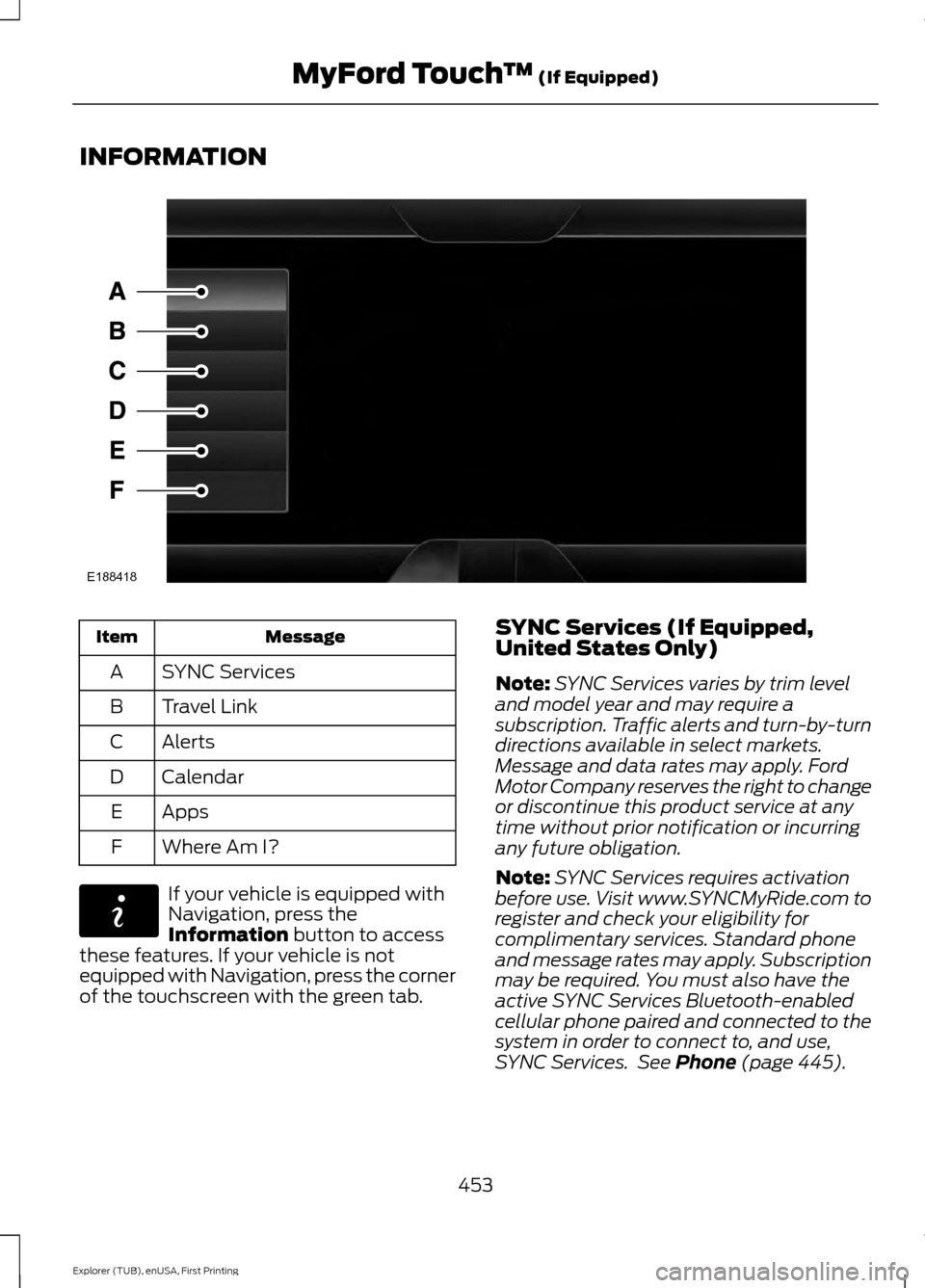
INFORMATION
Message
Item
SYNC Services
A
Travel Link
B
Alerts
C
Calendar
D
Apps
E
Where Am I?
F If your vehicle is equipped with
Navigation, press the
Information button to access
these features. If your vehicle is not
equipped with Navigation, press the corner
of the touchscreen with the green tab. SYNC Services (If Equipped,
United States Only)
Note:
SYNC Services varies by trim level
and model year and may require a
subscription. Traffic alerts and turn-by-turn
directions available in select markets.
Message and data rates may apply. Ford
Motor Company reserves the right to change
or discontinue this product service at any
time without prior notification or incurring
any future obligation.
Note: SYNC Services requires activation
before use. Visit www.SYNCMyRide.com to
register and check your eligibility for
complimentary services. Standard phone
and message rates may apply. Subscription
may be required. You must also have the
active SYNC Services Bluetooth-enabled
cellular phone paired and connected to the
system in order to connect to, and use,
SYNC Services. See
Phone (page 445).
453
Explorer (TUB), enUSA, First Printing MyFord Touch
™
(If Equipped)E188418 E142608