power steering FORD EXPLORER 2016 5.G Owners Manual
[x] Cancel search | Manufacturer: FORD, Model Year: 2016, Model line: EXPLORER, Model: FORD EXPLORER 2016 5.GPages: 541, PDF Size: 6.51 MB
Page 5 of 541
Steering Wheel
Adjusting the Steering Wheel - Vehicles
With: Manual Adjustable Steering
Column...........................................................72
Adjusting the Steering Wheel -
Vehicles
With: Power Adjustable Steering
Column...........................................................72
Audio Control...................................................73
Voice Control
....................................................74
Cruise Control
..................................................74
Information Display Control.......................75
Heated Steering Wheel................................75
Pedals
Adjusting the Pedals
.....................................76
Wipers and Washers
Windshield Wipers
.........................................77
Autowipers........................................................77
Windshield Washers
.....................................78
Rear Window Wiper and Washers...........78
Lighting
General Information
.....................................80
Lighting Control
..............................................80
Autolamps
.........................................................81
Instrument Lighting Dimmer.....................82
Headlamp Exit Delay
....................................82
Daytime Running Lamps
.............................82
Automatic High Beam Control.................83
Front Fog Lamps............................................84
Direction Indicators
.......................................85
Interior Lamps
.................................................85
Windows and Mirrors
Power Windows
..............................................87
Exterior Mirrors
................................................88
Interior Mirror...................................................90
Sun Visors
..........................................................91
Moonroof............................................................91 Instrument Cluster
Gauges...............................................................93
Warning Lamps and Indicators................96
Audible Warnings and Indicators
...........100
Information Displays
General Information.....................................101
Information Messages
.................................115
Climate Control
Manual Climate Control.............................129
Automatic Climate Control -
Vehicles
With: Premium AM/FM/CD...................131
Automatic Climate Control -
Vehicles
With: Sony Audio System......................132
Hints on Controlling the Interior Climate.........................................................134
Rear Passenger Climate Controls...........137
Heated Windows and Mirrors..................138
Cabin Air Filter
...............................................138
Remote Start.................................................139
Seats
Sitting in the Correct Position
.................140
Head Restraints............................................140
Manual Seats
.................................................143
Power Seats
...................................................144
Memory Function
.........................................146
Rear Seats
.......................................................147
Heated Seats.................................................154
Climate Controlled Seats..........................155
Universal Garage Door Opener
Universal Garage Door Opener................157
Auxiliary Power Points
Auxiliary Power Points................................162
2
Explorer (TUB), enUSA, First Printing Table of Contents
Page 7 of 541
Trailer Sway Control...................................244
Recommended Towing Weights...........244
Essential Towing Checks..........................246
Transporting the Vehicle
..........................248
Towing the Vehicle on Four Wheels - 2.3L EcoBoost™......................................249
Towing the Vehicle on Four Wheels - 3.5L Duratec/
3.5L Ecoboost™..........250
Driving Hints
Breaking-In.....................................................252
Economical Driving
.....................................252
Driving Through Water...............................253
Floor Mats
.......................................................253
Roadside Emergencies
Roadside Assistance..................................255
Hazard Warning Flashers.........................256
Fuel Shutoff...................................................256
Jump Starting the Vehicle.........................257
Post-Crash Alert System..........................259
Customer Assistance
Getting the Services You Need..............260
In California (U.S. Only).............................261
The Better Business Bureau (BBB) Auto Line Program (U.S. Only)......................262
Utilizing the Mediation/Arbitration Program (Canada Only).......................262
Getting Assistance Outside the U.S. and Canada........................................................263
Ordering Additional Owner's Literature....................................................264
Reporting Safety Defects (U.S. Only)............................................................264
Reporting Safety Defects (Canada Only)............................................................265
Fuses
Fuse Specification Chart..........................266
Changing a Fuse
...........................................274 Maintenance
General Information....................................275
Opening and Closing the Hood..............276
Under Hood Overview -
2.3L
EcoBoost™................................................278
Under Hood Overview -
3.5L
Duratec........................................................279
Under Hood Overview -
3.5L
Ecoboost™...............................................280
Engine Oil Dipstick -
2.3L
EcoBoost™.................................................281
Engine Oil Dipstick -
3.5L Duratec/3.5L
Ecoboost™.................................................281
Engine Oil Check...........................................281
Oil Change Indicator Reset......................282
Engine Coolant Check...............................282
Automatic Transmission Fluid Check - 2.3L EcoBoost™......................................286
Automatic Transmission Fluid Check - 3.5L Duratec/
3.5L Ecoboost™..........286
Brake Fluid Check........................................288
Power Steering Fluid Check....................288
Washer Fluid Check
....................................288
Fuel Filter
........................................................289
Changing the 12V Battery.........................289
Checking the Wiper Blades.....................290
Changing the Wiper Blades......................291
Adjusting the Headlamps..........................291
Removing a Headlamp..............................293
Changing a Bulb
...........................................293
Bulb Specification Chart...........................297
Changing the Engine Air Filter................299
Vehicle Care
General Information
..................................300
Cleaning Products
......................................300
Cleaning the Exterior
.................................300
Waxing
..............................................................301
Cleaning the Engine
....................................301
Cleaning the Windows and Wiper Blades..........................................................302
4
Explorer (TUB), enUSA, First Printing Table of Contents
Page 12 of 541
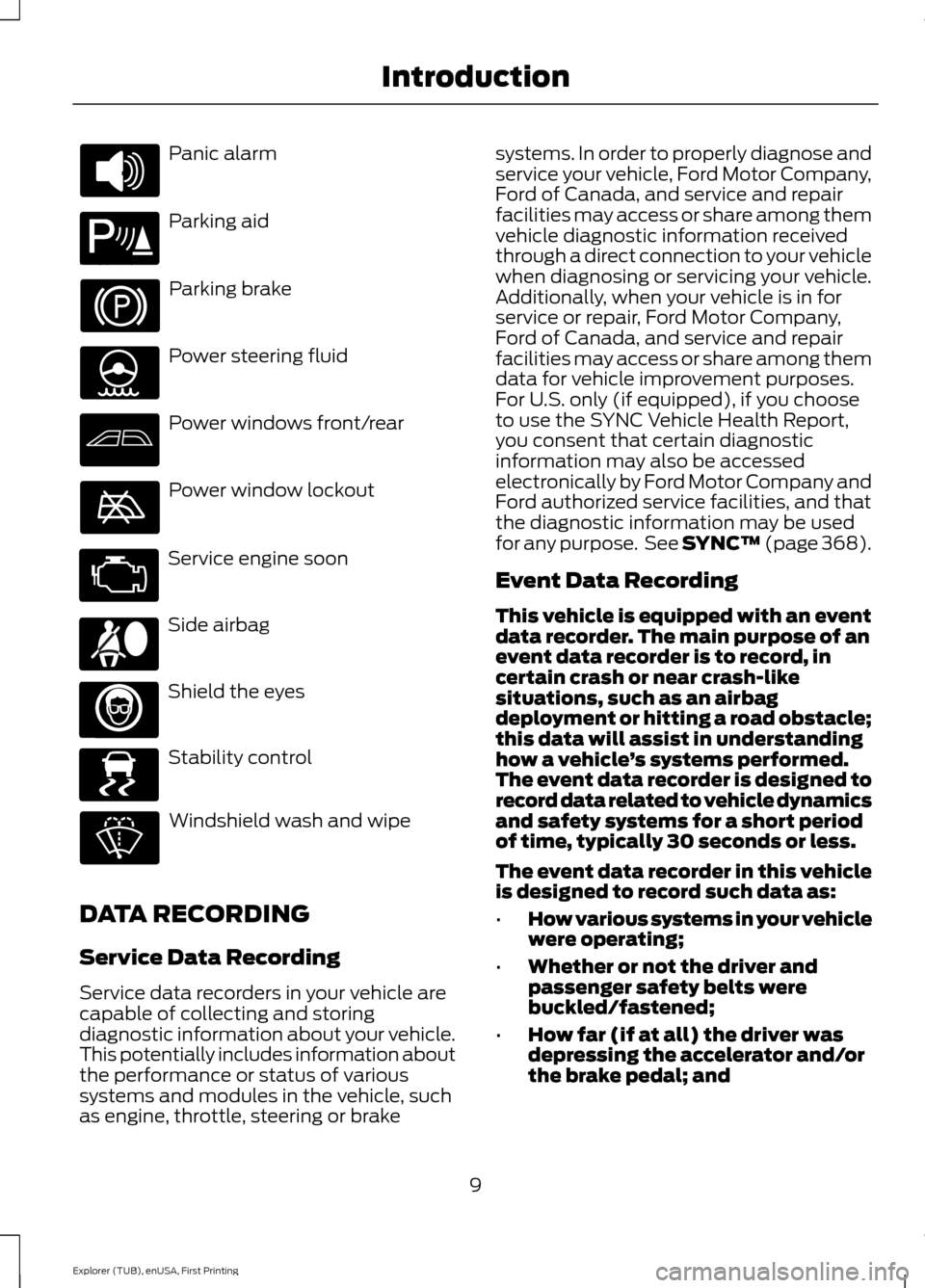
Panic alarm
Parking aid
Parking brake
Power steering fluid
Power windows front/rear
Power window lockout
Service engine soon
Side airbag
Shield the eyes
Stability control
Windshield wash and wipe
DATA RECORDING
Service Data Recording
Service data recorders in your vehicle are
capable of collecting and storing
diagnostic information about your vehicle.
This potentially includes information about
the performance or status of various
systems and modules in the vehicle, such
as engine, throttle, steering or brake systems. In order to properly diagnose and
service your vehicle, Ford Motor Company,
Ford of Canada, and service and repair
facilities may access or share among them
vehicle diagnostic information received
through a direct connection to your vehicle
when diagnosing or servicing your vehicle.
Additionally, when your vehicle is in for
service or repair, Ford Motor Company,
Ford of Canada, and service and repair
facilities may access or share among them
data for vehicle improvement purposes.
For U.S. only (if equipped), if you choose
to use the SYNC Vehicle Health Report,
you consent that certain diagnostic
information may also be accessed
electronically by Ford Motor Company and
Ford authorized service facilities, and that
the diagnostic information may be used
for any purpose. See SYNC™ (page 368).
Event Data Recording
This vehicle is equipped with an event
data recorder. The main purpose of an
event data recorder is to record, in
certain crash or near crash-like
situations, such as an airbag
deployment or hitting a road obstacle;
this data will assist in understanding
how a vehicle
’s systems performed.
The event data recorder is designed to
record data related to vehicle dynamics
and safety systems for a short period
of time, typically 30 seconds or less.
The event data recorder in this vehicle
is designed to record such data as:
• How various systems in your vehicle
were operating;
• Whether or not the driver and
passenger safety belts were
buckled/fastened;
• How far (if at all) the driver was
depressing the accelerator and/or
the brake pedal; and
9
Explorer (TUB), enUSA, First Printing Introduction E139213 E167012 E138639
Page 54 of 541
Note:
Do not touch the battery contacts or
the printed circuit board with the
screwdriver.
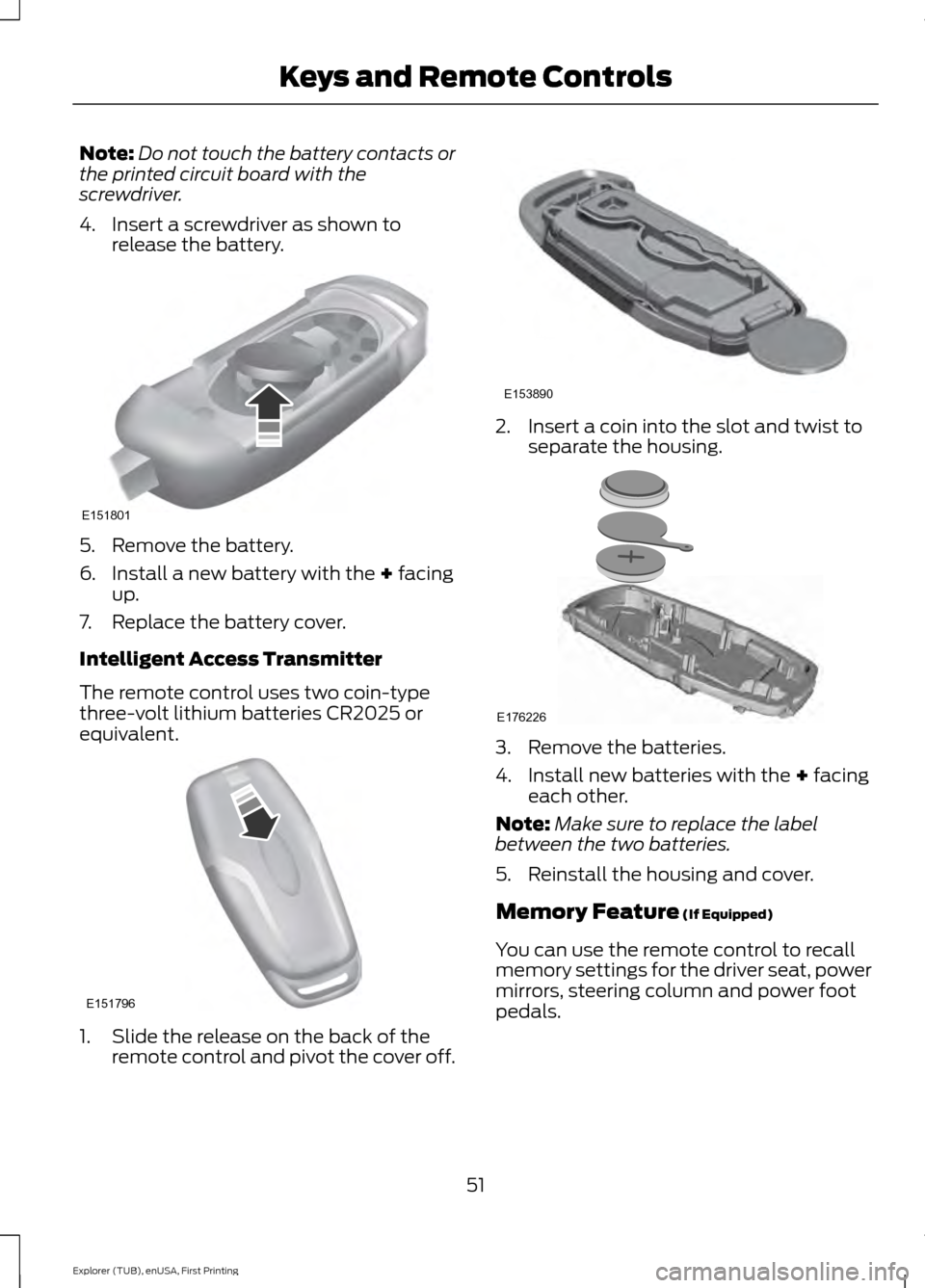
4. Insert a screwdriver as shown to release the battery. 5. Remove the battery.
6. Install a new battery with the + facing
up.
7. Replace the battery cover.
Intelligent Access Transmitter
The remote control uses two coin-type
three-volt lithium batteries CR2025 or
equivalent. 1. Slide the release on the back of the
remote control and pivot the cover off. 2. Insert a coin into the slot and twist to
separate the housing. 3. Remove the batteries.
4. Install new batteries with the
+ facing
each other.
Note: Make sure to replace the label
between the two batteries.
5. Reinstall the housing and cover.
Memory Feature
(If Equipped)
You can use the remote control to recall
memory settings for the driver seat, power
mirrors, steering column and power foot
pedals.
51
Explorer (TUB), enUSA, First Printing Keys and Remote ControlsE151801 E151796 E153890 E176226
Page 75 of 541
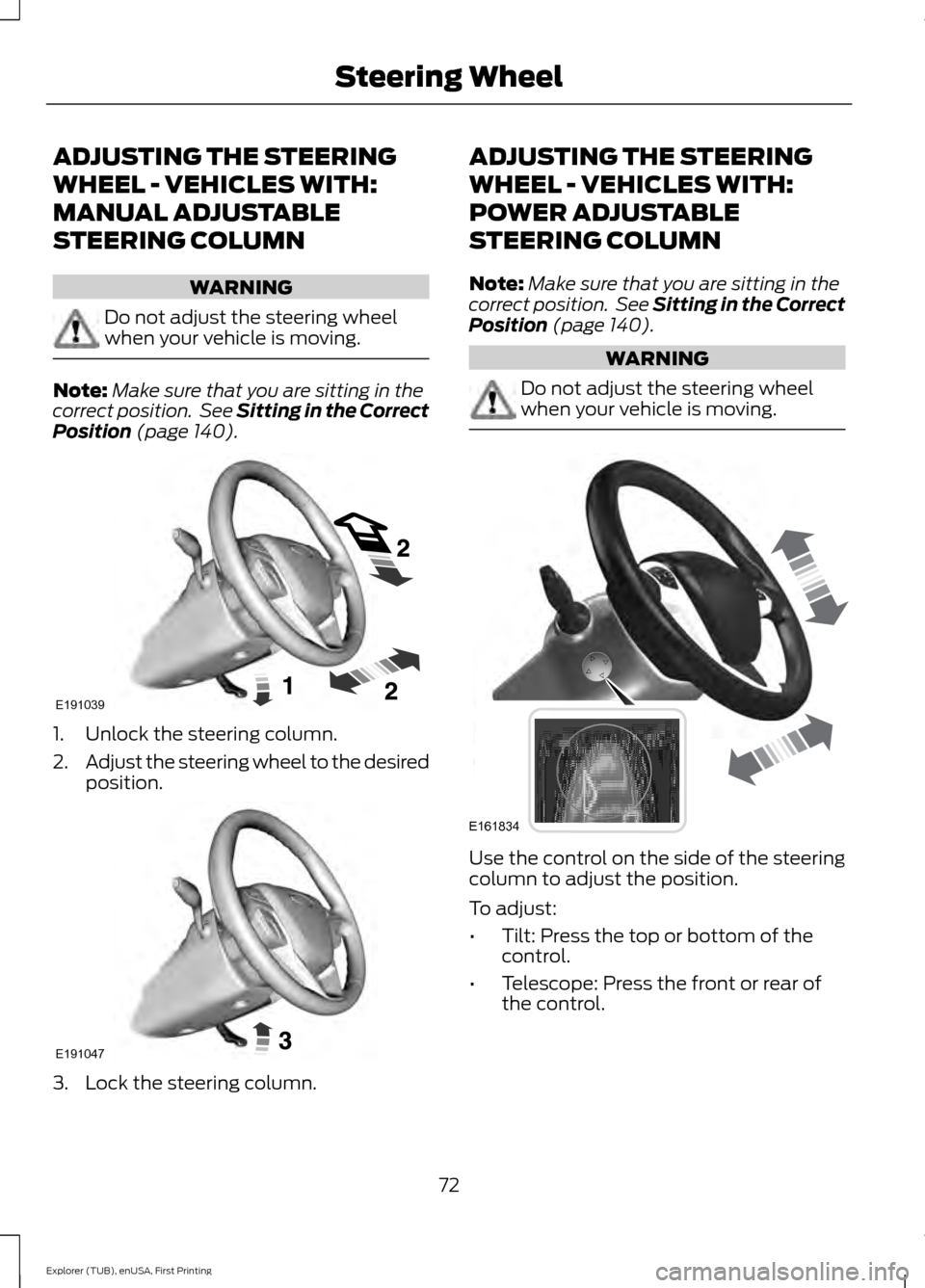
ADJUSTING THE STEERING
WHEEL - VEHICLES WITH:
MANUAL ADJUSTABLE
STEERING COLUMN
WARNING
Do not adjust the steering wheel
when your vehicle is moving.
Note:
Make sure that you are sitting in the
correct position. See Sitting in the Correct
Position (page 140). 1. Unlock the steering column.
2.
Adjust the steering wheel to the desired
position. 3. Lock the steering column. ADJUSTING THE STEERING
WHEEL - VEHICLES WITH:
POWER ADJUSTABLE
STEERING COLUMN
Note:
Make sure that you are sitting in the
correct position. See Sitting in the Correct
Position
(page 140). WARNING
Do not adjust the steering wheel
when your vehicle is moving.
Use the control on the side of the steering
column to adjust the position.
To adjust:
•
Tilt: Press the top or bottom of the
control.
• Telescope: Press the front or rear of
the control.
72
Explorer (TUB), enUSA, First Printing Steering WheelE191039 E191047 E161834
Page 128 of 541
Power Steering
Action
Message
The power steering system has detected a condition thatrequires service. Contact an authorized dealer.
Steering Malfunction
Service Now
The power steering system is not working. Stop your vehicleat a safe place. Contact an authorized dealer.
Service Power Steering
Now
The power steering system has detected a condition withinthe power steering system, or passive entry or passive start system requires service. Contact an authorized dealer.
Steering Assist Fault
You need to turn the steering wheel in order to disengage thesteering lock.
Steering column lock:
Remove and re-insert
key while turning wheel to unlock
Pre-Collision Warning System Action
Message
A fault with the system has occurred. Contact an authorized dealer.
Pre-Collision Warning
Malfunction
You have a blocked sensor due to bad weather, ice, mud or
water in front of the radar sensor. You can typically clean the sensor to resolve. See Pre-Collision Assist (page 230).
Pre-Collision Warning
Not Available SensorBlocked See Manual
A fault with the system has occurred. Contact an authorized dealer.
Pre-Collision Warning
Not Available
Remote Start Action
Message
A reminder to apply the brake and push the gearshift buttonto drive your vehicle after a remote start.
To Drive: Press Brake
and Gear Shift Button
125
Explorer (TUB), enUSA, First Printing Information Displays
Page 149 of 541
To access and make adjustments to the
massage setting:
1.
Press the Menu Settings icon > Vehicle
>Multi-contour Seat.
2. Choose the desired seat to adjust.
3. Press Off, Lo or Hi.
MEMORY FUNCTION (If Equipped) WARNINGS
Before activating the seat memory,
make sure that the area immediately
surrounding the seat is clear of
obstructions and that all occupants are
clear of moving parts. Do not use the memory function
when your vehicle is moving.
This feature automatically recalls the
position of the following:
•
Driver seat.
• Power mirrors.
• Optional power adjustable foot pedals.
• Optional steering column.
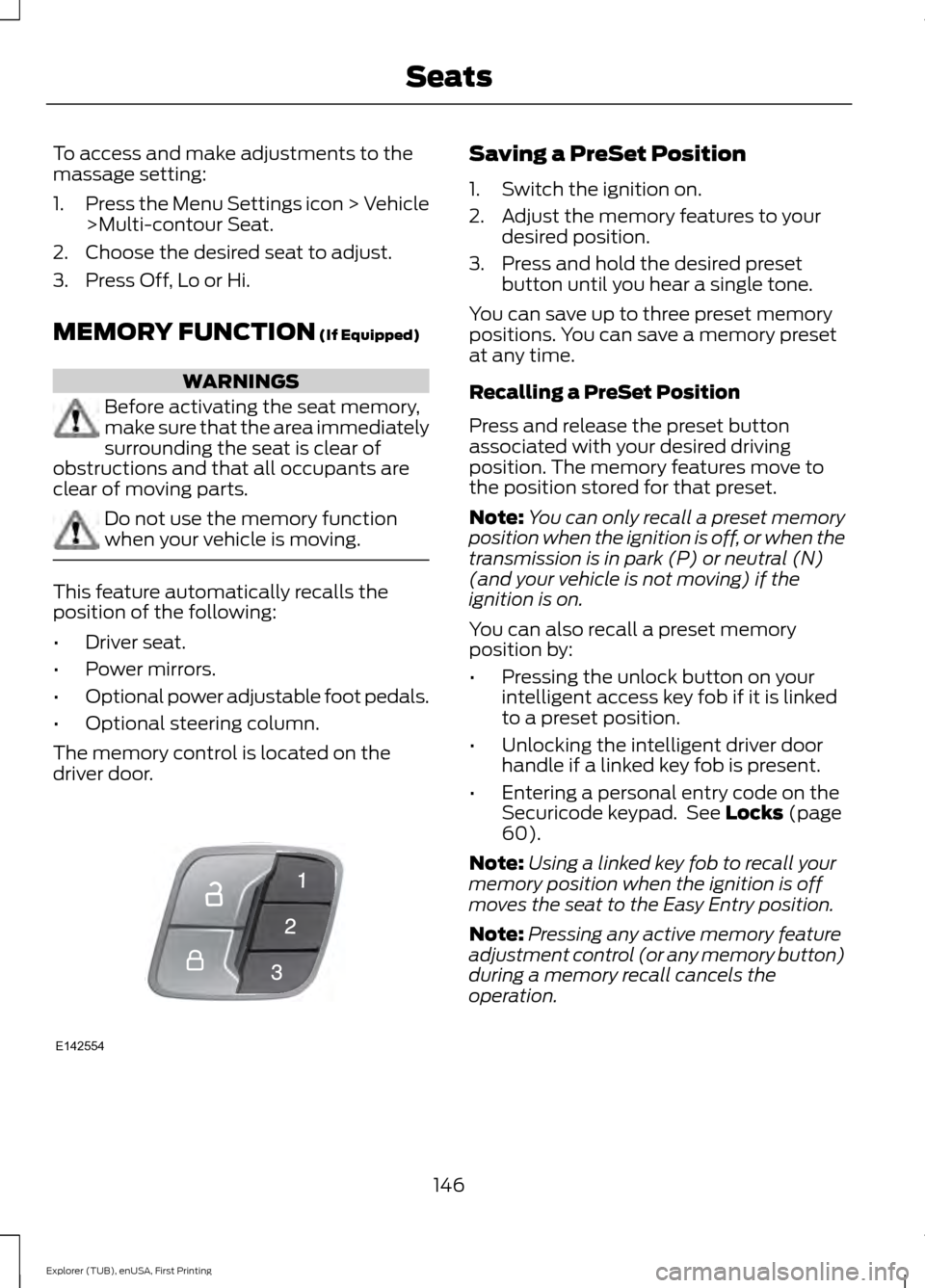
The memory control is located on the
driver door. Saving a PreSet Position
1. Switch the ignition on.
2. Adjust the memory features to your
desired position.
3. Press and hold the desired preset button until you hear a single tone.
You can save up to three preset memory
positions. You can save a memory preset
at any time.
Recalling a PreSet Position
Press and release the preset button
associated with your desired driving
position. The memory features move to
the position stored for that preset.
Note: You can only recall a preset memory
position when the ignition is off, or when the
transmission is in park (P) or neutral (N)
(and your vehicle is not moving) if the
ignition is on.
You can also recall a preset memory
position by:
• Pressing the unlock button on your
intelligent access key fob if it is linked
to a preset position.
• Unlocking the intelligent driver door
handle if a linked key fob is present.
• Entering a personal entry code on the
Securicode keypad. See
Locks (page
60).
Note: Using a linked key fob to recall your
memory position when the ignition is off
moves the seat to the Easy Entry position.
Note: Pressing any active memory feature
adjustment control (or any memory button)
during a memory recall cancels the
operation.
146
Explorer (TUB), enUSA, First Printing SeatsE142554
Page 171 of 541
Automatic Engine Shutdown
For vehicles with a keyless ignition, this
feature automatically shuts down the
engine if it has been idling for an extended
period. The ignition also turns off in order
to save battery power. Before your vehicle
shuts down, a message appears in the
information display showing a timer
counting down from 30 seconds. If you do
not intervene within 30 seconds, your
vehicle shuts down. Another message
appears in the information display to
inform you that your vehicle has shut down
to save fuel. Start your vehicle as you
normally do.
Automatic Engine Shutdown Override
Note:
You cannot permanently switch off
the automatic shutdown feature. When you
switch it off temporarily, it turns on at the
next ignition cycle.
You can stop the shutdown, or reset the
timer, at any point before the 30-second
countdown has expired by doing any of the
following:
• You can reset the timer by interacting
with your vehicle, for example pressing
the brake or accelerator pedal.
• You can temporarily switch off the
shutdown feature any time the ignition
is on using the information display. See
Information Displays (page 101). The
feature only remains off for the current
ignition cycle.
• During the 30-second countdown, the
system prompts you to press OK or
RESET to temporarily switch the
feature off for the current ignition cycle
only.
Stopping the Engine When Your
Vehicle is Stationary
Vehicles with an Ignition Key
1. Shift into park (P). 2. Switch the ignition off.
3. Apply the parking brake.
Vehicles with Keyless Start
1. Shift into park (P).
2. Press the push button ignition switch.
3. Apply the parking brake.
Note:
The ignition, all electrical circuits and
all warning lamps and indicators will be
turned off.
Note: If the engine is idling for 30 minutes,
the ignition and engine automatically shut
down.
Stopping the Engine When Your
Vehicle is Moving WARNING
Switching off the engine when the
vehicle is still moving will result in a
loss of brake and steering assistance.
The steering will not lock, but higher effort
will be required. When the ignition is
switched off, some electrical circuits,
including air bags, warning lamps and
indicators may also be off. If the ignition
was turned off accidentally, you can shift
into neutral (N) and re-start the engine. Vehicles with an Ignition Key
1.
Shift into neutral and use the brakes to
bring your vehicle to a safe stop.
2. When your vehicle has stopped, shift into park (P) and switch the ignition
off.
3. Apply the parking brake.
Vehicles with Keyless Start
1. Shift into neutral and use the brakes to
bring your vehicle to a safe stop.
2. When your vehicle has stopped, shift into park (P).
168
Explorer (TUB), enUSA, First Printing Starting and Stopping the Engine
Page 191 of 541
Driving on Snow and Ice
WARNING
If you are driving in slippery
conditions that require tire chains or
cables, then it is critical that you drive
cautiously. Keep speeds down, allow for
longer stopping distances and avoid
aggressive steering to reduce the chances
of a loss of vehicle control which can lead
to serious injury or death. If the rear end of
the vehicle slides while cornering, steer in
the direction of the slide until you regain
control of the vehicle. Note:
Excessive tire slippage can cause
driveline damage.
4WD vehicles have advantages over 2WD
vehicles in snow and ice but can skid like
any other vehicle.
Should you start to slide while driving on
snowy or icy roads, turn the steering wheel
in the direction of the slide until you regain
control.
Avoid sudden applications of power and
quick changes of direction on snow and
ice. Apply the accelerator slowly and
steadily when starting from a full stop.
Avoid sudden braking as well. Although an
4WD vehicle may accelerate better than
a two-wheel drive vehicle in snow and ice,
it won ’t stop any faster, because as in other
vehicles, braking occurs at all four wheels.
Do not become overconfident as to road
conditions.
Make sure you allow sufficient distance
between you and other vehicles for
stopping. Drive slower than usual and
consider using one of the lower gears. In
emergency stopping situations, apply the
brake steadily. Since your vehicle is
equipped with a four wheel (ABS), do not
“pump ” the brakes. See Hints on Driving
With Anti-Lock Brakes (page 189). Maintenance and Modifications
The suspension and steering systems on
your vehicle have been designed and
tested to provide predictable performance
whether loaded or empty and durable load
carrying capability. For this reason, Ford
Motor Company strongly recommends that
you do not make modifications such as
adding or removing parts (such as lowering
kits or stabilizer bars) or by using
replacement parts not equivalent to the
original factory equipment.
Any modifications to a vehicle that raise
the center of gravity can make it more likely
the vehicle will rollover as a result of a loss
of control. Ford Motor Company
recommends that caution be used with
any vehicle equipped with a high load or
device (such as ladder or luggage racks).
Failure to maintain your vehicle properly
may void the warranty, increase your repair
cost, reduce vehicle performance and
operational capabilities and adversely
affect driver and passenger safety.
Frequent inspection of vehicle chassis
components is recommended if the vehicle
is subjected to off-highway usage.
188
Explorer (TUB), enUSA, First Printing Four-Wheel Drive
(If Equipped)
Page 192 of 541
GENERAL INFORMATION
Note:
Occasional brake noise is normal. If
a metal-to-metal, continuous grinding or
continuous squeal sound is present, the
brake linings may be worn-out and an
authorized dealer should check them. If the
vehicle has continuous vibration or shudder
in the steering wheel while braking, an
authorized dealer should check your vehicle.
Note: Brake dust may accumulate on the
wheels, even under normal driving
conditions. Some dust is inevitable as the
brakes wear and does not contribute to
brake noise. See Cleaning the Alloy
Wheels (page 304). See
Warning Lamps and
Indicators (page 96).
Wet brakes result in reduced braking
efficiency. Gently press the brake pedal a
few times when driving from a car wash or
standing water to dry the brakes.
Brake Over Accelerator
In the event the accelerator pedal
becomes stuck or entrapped, apply steady
and firm pressure to the brake pedal to
slow the vehicle and reduce engine power.
If you experience this condition, apply the
brakes and bring your vehicle to a safe
stop. Switch the engine off, move the
transmission to park (P) and apply the
parking brake. Inspect the accelerator
pedal and the area around it for any items
or debris that may be obstructing its
movement. If none are found and the
condition persists, have your vehicle towed
to the nearest authorized dealer. Emergency Brake Assist
Emergency brake assist detects when you
brake heavily by measuring the rate at
which you press the brake pedal. It
provides maximum braking efficiency as
long as you press the pedal. Emergency
brake assist can reduce stopping distances
in critical situations.
Anti-lock Brake System
This system helps you maintain steering
control during emergency stops by keeping
the brakes from locking.
This lamp momentarily
illuminates when you switch the
ignition on. If the light does not
illuminate during start up, remains on or
flashes, the anti-lock braking system may
be disabled. Have the system checked by
an authorized dealer. If the anti-lock brake
system is disabled, normal braking is still
effective. If the brake warning lamp
illuminates with the parking
brake released, have your brake
system serviced immediately.
HINTS ON DRIVING WITH
ANTI-LOCK BRAKES
Note: When the system is operating, the
brake pedal will pulse and may travel
further. Maintain pressure on the brake
pedal. You may also hear a noise from the
system. This is normal.
The anti-lock braking system will not
eliminate the risks when:
• You drive too closely to the vehicle in
front of you.
• Your vehicle is hydroplaning.
• You take corners too fast.
• The road surface is poor.
189
Explorer (TUB), enUSA, First Printing BrakesE138644 E138644