air condition FORD EXPLORER 2017 5.G Service Manual
[x] Cancel search | Manufacturer: FORD, Model Year: 2017, Model line: EXPLORER, Model: FORD EXPLORER 2017 5.GPages: 541, PDF Size: 6.81 MB
Page 440 of 541
Note: The heated steering wheel may remain on after remote starting the
vehicle, based on your remote start settings. The heated steering wheel may
also turn on when you start your vehicle, if it was on when you switched your
vehicle off.
Note:
For steering wheels with wood trim, the heating feature will not heat the
wheel between the 10 and 2 o'clock positions.
Defrost:
A pop up appears on the screen to display the defrost options.
C
MAX Defrost: Touch the button to maximize defrosting. Air flows through the
windshield vents, the fan automatically adjusts to the highest speed and the
driver and passenger temperatures are set to HI. You can use this setting to
defog or clear a thin covering of ice from the windshield. The heated rear window
also automatically turns on when you select MAX Defrost.
Defrost:
Distributes air through the windshield defroster vents and demister
vents.
Heated rear window:
Turns the heated rear window on and off. See Heated
Windows and Mirrors (page 135).
AUTO:
Touch the button to switch on automatic operation. Select the desired
temperature using the temperature control. The system adjusts fan speed, air
distribution, air conditioning operation, and selects outside air or recirculated
air to heat or cool the vehicle in order to maintain the desired temperature.
D
Power:
Touch the button to switch the system on and off. Switching off the
climate control system prevents outside air from entering the vehicle.
E
DUAL:
This button lights up when the passenger controls are active. To switch
the off and link the passenger temperature to the driver temperature, touch the
DUAL button.
F
Note:
the passenger side temperature and the DUAL indication automatically
turn on when you or your passenger adjust the passenger temperature.
Passenger temperature:
Touch up or down to adjust the temperature.
G
Fan speed:
Touch up or down to increase or decrease the volume of air that
circulates in your vehicle.
H
Note:
You cannot adjust the fan speed when the system is set to AUTO or MAX
A/C.
Rear:
A pop up appears on the screen to display the rear control options.
I
Touch the power icon to switch the rear climate control functions off and on.
Touch Rear Control to allow the rear seat passengers to adjust the rear climate
settings. Touch it again to prevent the rear seat passengers from adjusting the
settings. Rear Control
automatically turns off when you use the touchscreen
to adjust the rear climate settings.
If your vehicle has automatic climate controls, select
Auto to connect the rear
climate settings to the Auto settings of the driver.
437
Explorer (TUB) Canada/United States of America, enUSA, Edition date: 03/2016, First Printing SYNC™ 3
Page 441 of 541
Touch the up and down arrows to adjust the temperature.
Manual airflow distribution controls: Select these controls individually,
together, or with Defrost to direct the air flow to the area you desire.
J
Panel:
Distributes air through the instrument panel vents.
Floor:
Distributes air through the demister vents, floor vents and rear seat floor
vents.
A/C:
A pop-up appears on the screen to display the air conditioning options.
K
MAX A/C: Touch the button to activate and maximize cooling. The driver and
passenger temperatures are set to LO, recirculated air flows through the
instrument panel vents, air conditioning automatically turns on and the fan
automatically adjusts to the highest speed.
A/C:
Touch to switch the air conditioning on or off. Use A/C with recirculated
air to improve cooling performance and efficiency.
Note:
In certain conditions (for example, Max Defrost), the air conditioning
compressor may continue to operate even when you switch the air conditioning
A/C button off.
Recirculated air:
Touch to switch the recirculated air on or off. When
recirculated air is on, it may reduce the amount of time needed to cool down
the interior (when used with A/C) and help reduce odors from reaching the
interior.
Note:
Recirculatied air may turn off automatically (or the system may preventit
from turning on) in all airflow modes except MAX A/C to reduce risk of fogging.
It may also turn on and off automatically in Panel or Panel/Floor airflow modes
during hot weather in order to improve cooling efficiency.
PHONE WARNING
Driving while distracted can result in
loss of vehicle control, crash and
injury. We strongly recommend that
you use extreme caution when using any
device that may take your focus off the
road. Your primary responsibility is the safe
operation of your vehicle. We recommend
against the use of any hand-held device
while driving and encourage the use of
voice-operated systems when possible.
Make sure you are aware of all applicable
local laws that may affect the use of
electronic devices while driving. Hands-free calling is one of the main
features of the system. Once you pair your
cell phone, you can access many options
using the touchscreen or voice commands.
While the system supports a variety of
features, many are dependent on your cell
phone
’s functionality.
Pairing Your Cell Phone for the
First Time
Pair your Bluetooth-enabled phone with
the system before using the functions in
hands-free mode.
Switch on Bluetooth on your device to
begin pairing. See your phone ’s manual if
necessary.
438
Explorer (TUB) Canada/United States of America, enUSA, Edition date: 03/2016, First Printing SYNC™ 3
Page 475 of 541
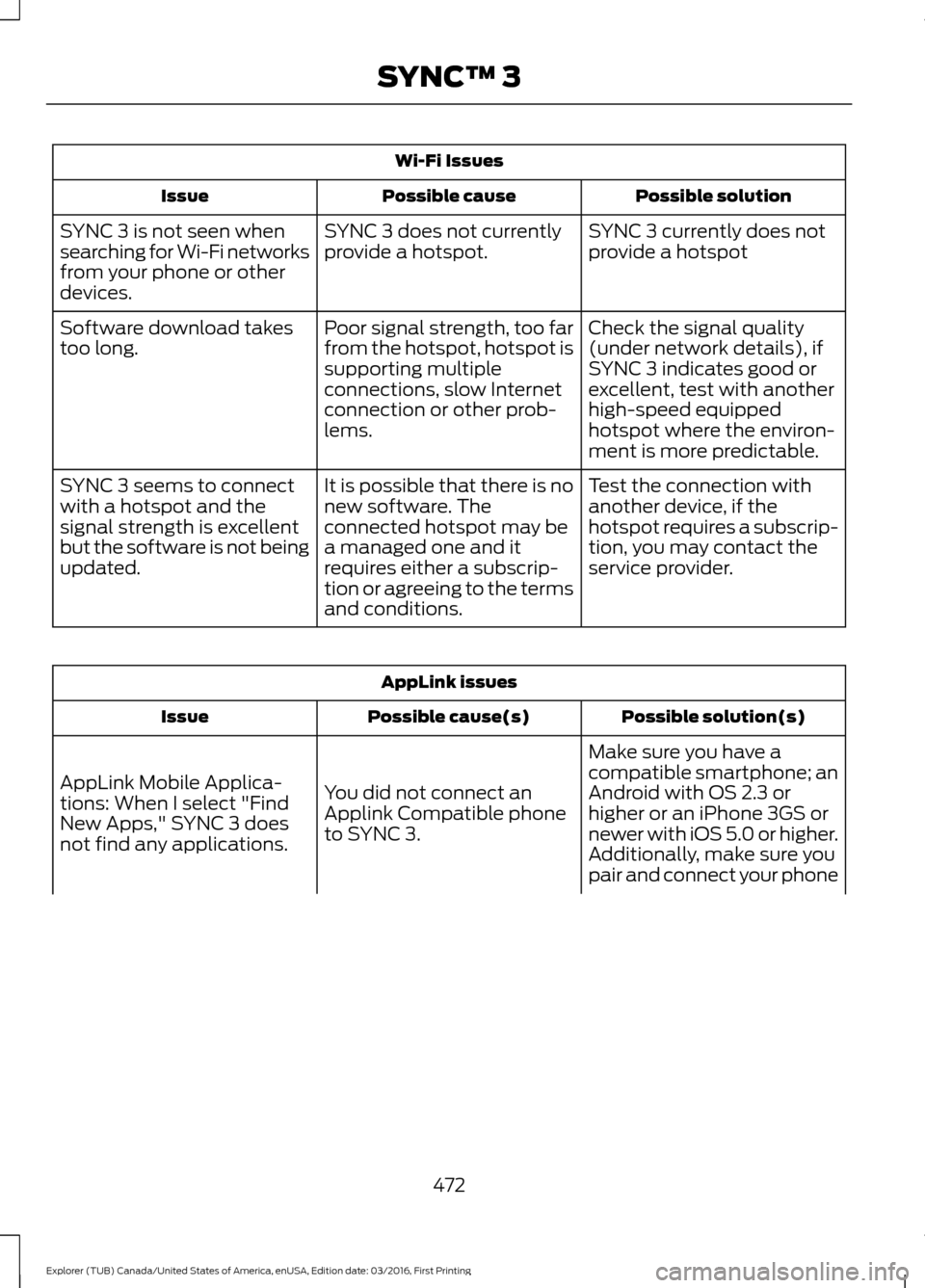
Wi-Fi Issues
Possible solution
Possible cause
Issue
SYNC 3 currently does not
provide a hotspot
SYNC 3 does not currently
provide a hotspot.
SYNC 3 is not seen when
searching for Wi-Fi networks
from your phone or other
devices.
Check the signal quality
(under network details), if
SYNC 3 indicates good or
excellent, test with another
high-speed equipped
hotspot where the environ-
ment is more predictable.
Poor signal strength, too far
from the hotspot, hotspot is
supporting multiple
connections, slow Internet
connection or other prob-
lems.
Software download takes
too long.
Test the connection with
another device, if the
hotspot requires a subscrip-
tion, you may contact the
service provider.
It is possible that there is no
new software. The
connected hotspot may be
a managed one and it
requires either a subscrip-
tion or agreeing to the terms
and conditions.
SYNC 3 seems to connect
with a hotspot and the
signal strength is excellent
but the software is not being
updated. AppLink issues
Possible solution(s)
Possible cause(s)
Issue
Make sure you have a
compatible smartphone; an
Android with OS 2.3 or
higher or an iPhone 3GS or
newer with iOS 5.0 or higher.
Additionally, make sure you
You did not connect an
Applink Compatible phone
to SYNC 3.
AppLink Mobile Applica-
tions: When I select "Find
New Apps," SYNC 3 does
not find any applications.
pair and connect your phone
472
Explorer (TUB) Canada/United States of America, enUSA, Edition date: 03/2016, First Printing SYNC™ 3
Page 489 of 541
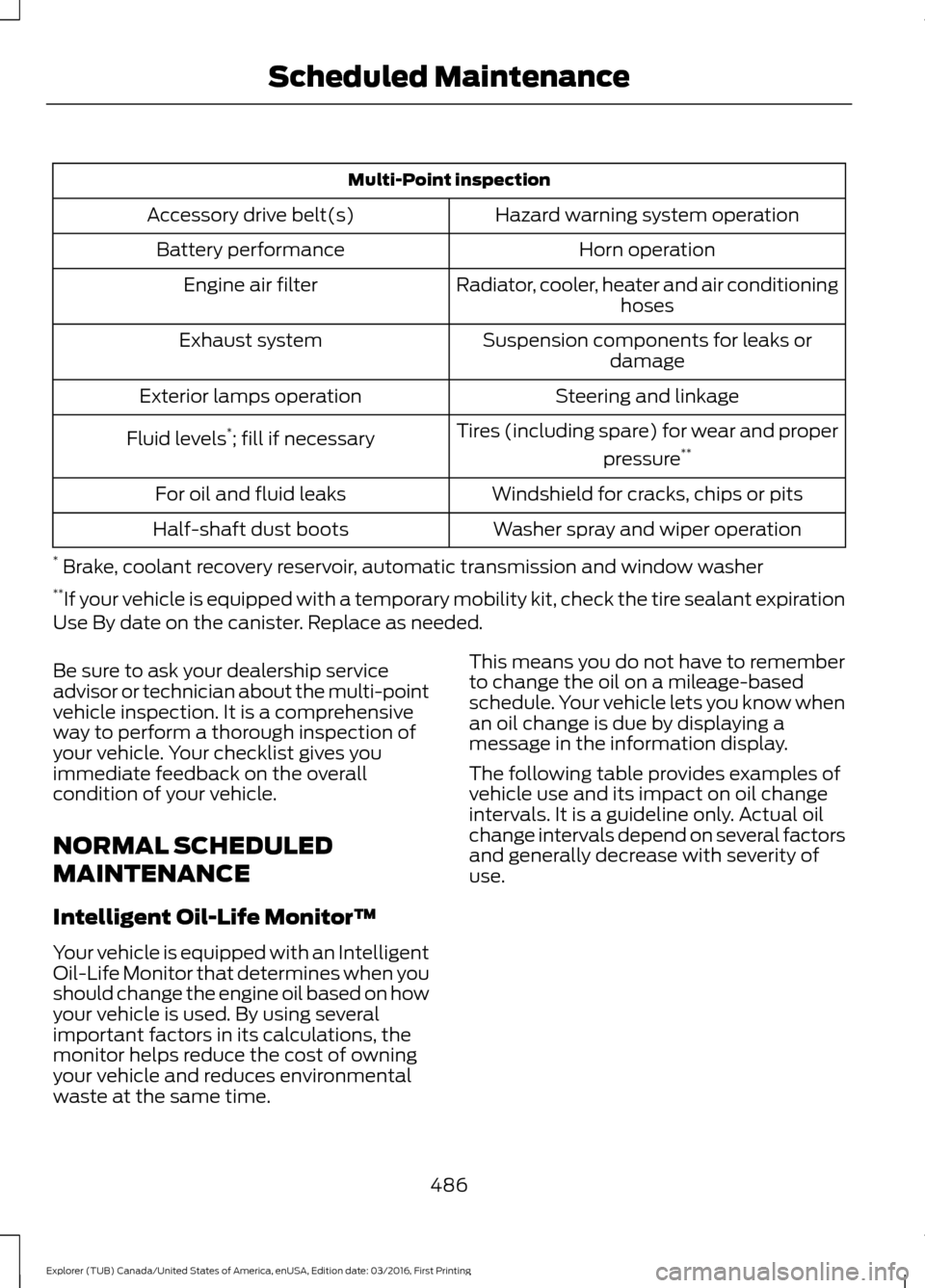
Multi-Point inspection
Hazard warning system operation
Accessory drive belt(s)
Horn operation
Battery performance
Radiator, cooler, heater and air conditioninghoses
Engine air filter
Suspension components for leaks ordamage
Exhaust system
Steering and linkage
Exterior lamps operation
Tires (including spare) for wear and properpressure**
Fluid levels *
; fill if necessary
Windshield for cracks, chips or pits
For oil and fluid leaks
Washer spray and wiper operation
Half-shaft dust boots
* Brake, coolant recovery reservoir, automatic transmission and window washer
** If your vehicle is equipped with a temporary mobility kit, check the tire sealant expiration
Use By date on the canister. Replace as needed.
Be sure to ask your dealership service
advisor or technician about the multi-point
vehicle inspection. It is a comprehensive
way to perform a thorough inspection of
your vehicle. Your checklist gives you
immediate feedback on the overall
condition of your vehicle.
NORMAL SCHEDULED
MAINTENANCE
Intelligent Oil-Life Monitor™
Your vehicle is equipped with an Intelligent
Oil-Life Monitor that determines when you
should change the engine oil based on how
your vehicle is used. By using several
important factors in its calculations, the
monitor helps reduce the cost of owning
your vehicle and reduces environmental
waste at the same time. This means you do not have to remember
to change the oil on a mileage-based
schedule. Your vehicle lets you know when
an oil change is due by displaying a
message in the information display.
The following table provides examples of
vehicle use and its impact on oil change
intervals. It is a guideline only. Actual oil
change intervals depend on several factors
and generally decrease with severity of
use.
486
Explorer (TUB) Canada/United States of America, enUSA, Edition date: 03/2016, First Printing Scheduled Maintenance
Page 492 of 541
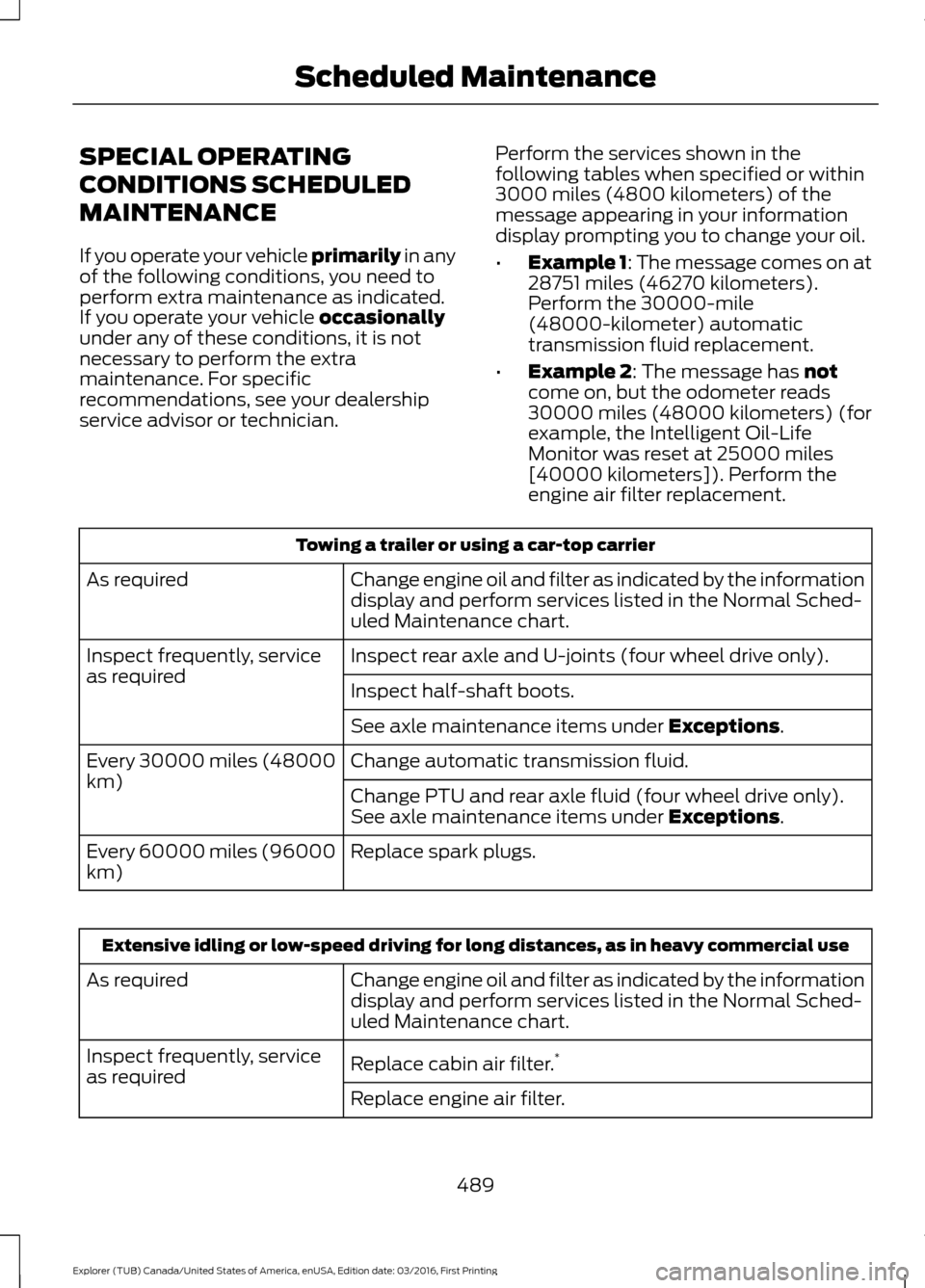
SPECIAL OPERATING
CONDITIONS SCHEDULED
MAINTENANCE
If you operate your vehicle primarily in any
of the following conditions, you need to
perform extra maintenance as indicated.
If you operate your vehicle
occasionally
under any of these conditions, it is not
necessary to perform the extra
maintenance. For specific
recommendations, see your dealership
service advisor or technician. Perform the services shown in the
following tables when specified or within
3000 miles (4800 kilometers) of the
message appearing in your information
display prompting you to change your oil.
•
Example 1: The message comes on at
28751 miles (46270 kilometers).
Perform the 30000-mile
(48000-kilometer) automatic
transmission fluid replacement.
• Example 2
: The message has not
come on, but the odometer reads
30000 miles (48000 kilometers) (for
example, the Intelligent Oil-Life
Monitor was reset at 25000 miles
[40000 kilometers]). Perform the
engine air filter replacement. Towing a trailer or using a car-top carrier
Change engine oil and filter as indicated by the information
display and perform services listed in the Normal Sched-
uled Maintenance chart.
As required
Inspect rear axle and U-joints (four wheel drive only).
Inspect frequently, service
as required
Inspect half-shaft boots.
See axle maintenance items under
Exceptions.
Change automatic transmission fluid.
Every 30000 miles (48000
km)
Change PTU and rear axle fluid (four wheel drive only).
See axle maintenance items under
Exceptions.
Replace spark plugs.
Every 60000 miles (96000
km) Extensive idling or low-speed driving for long distances, as in heavy commercial use
Change engine oil and filter as indicated by the information
display and perform services listed in the Normal Sched-
uled Maintenance chart.
As required
Replace cabin air filter.*
Inspect frequently, service
as required
Replace engine air filter.
489
Explorer (TUB) Canada/United States of America, enUSA, Edition date: 03/2016, First Printing Scheduled Maintenance
Page 493 of 541
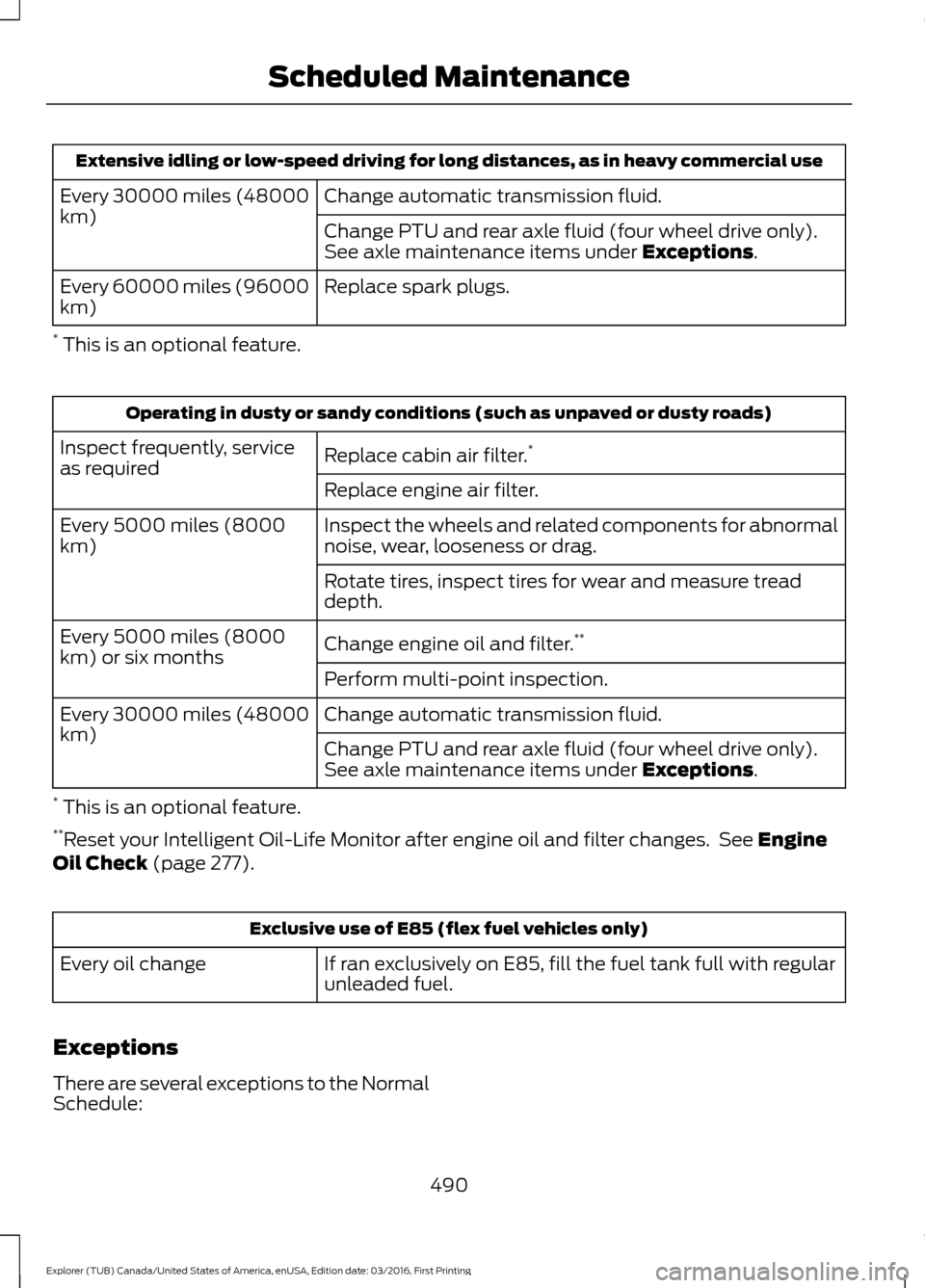
Extensive idling or low-speed driving for long distances, as in heavy commercial use
Change automatic transmission fluid.
Every 30000 miles (48000
km)
Change PTU and rear axle fluid (four wheel drive only).
See axle maintenance items under Exceptions.
Replace spark plugs.
Every 60000 miles (96000
km)
* This is an optional feature. Operating in dusty or sandy conditions (such as unpaved or dusty roads)
Replace cabin air filter. *
Inspect frequently, service
as required
Replace engine air filter.
Inspect the wheels and related components for abnormal
noise, wear, looseness or drag.
Every 5000 miles (8000
km)
Rotate tires, inspect tires for wear and measure tread
depth.
Change engine oil and filter.**
Every 5000 miles (8000
km) or six months
Perform multi-point inspection.
Change automatic transmission fluid.
Every 30000 miles (48000
km)
Change PTU and rear axle fluid (four wheel drive only).
See axle maintenance items under
Exceptions.
* This is an optional feature.
** Reset your Intelligent Oil-Life Monitor after engine oil and filter changes. See
Engine
Oil Check (page 277). Exclusive use of E85 (flex fuel vehicles only)
If ran exclusively on E85, fill the fuel tank full with regular
unleaded fuel.
Every oil change
Exceptions
There are several exceptions to the Normal
Schedule: 490
Explorer (TUB) Canada/United States of America, enUSA, Edition date: 03/2016, First Printing Scheduled Maintenance
Page 494 of 541
Axle and PTU maintenance: The Power
Transfer Unit (PTU) and rear axle (four
wheel drive only) in your vehicle does not
require any normal scheduled
maintenance. Vehicles are electronically
monitored and notify the driver required
service by displaying a message in the
information display. The PTU lubricant will
be more likely to require a change if the
vehicle has experienced extended periods
of extreme/severe duty cycle driving.
Changing or checking the PTU lubricant is
not necessary unless the unit has been
submerged in water, shows signs of
leakage or a message indicating required
service is displayed. Contact your
authorized dealer for service.
California fuel filter replacement: If you
register your vehicle in California, the
California Air Resources Board has
determined that the failure to perform this
maintenance item does not nullify the
emission warranty or limit recall liability before the completion of your vehicle's
useful life. Ford Motor Company, however,
urges you to have all recommended
maintenance services performed at the
specified intervals and to record all vehicle
service.
Hot climate oil change intervals
:
Vehicles operating in the Middle East,
North Africa, Sub-Saharan Africa or
locations with similar climates using an
American Petroleum Institute (API)
Certified for Gasoline Engines (Certification
mark) oil of SM or SN quality, the normal
oil change interval is 5000 miles (8000
kilometers).
If the available API SM or SN oils are not
available, then the oil change interval is
3,000 mi (4,800 km)
.
Engine air filter and cabin air filter
replacement
: The life of the engine air
filter and cabin air filter is dependent on
exposure to dusty and dirty conditions.
Vehicles operated in these conditions
require frequent inspection and
replacement of the engine air filter and
cabin air filter.
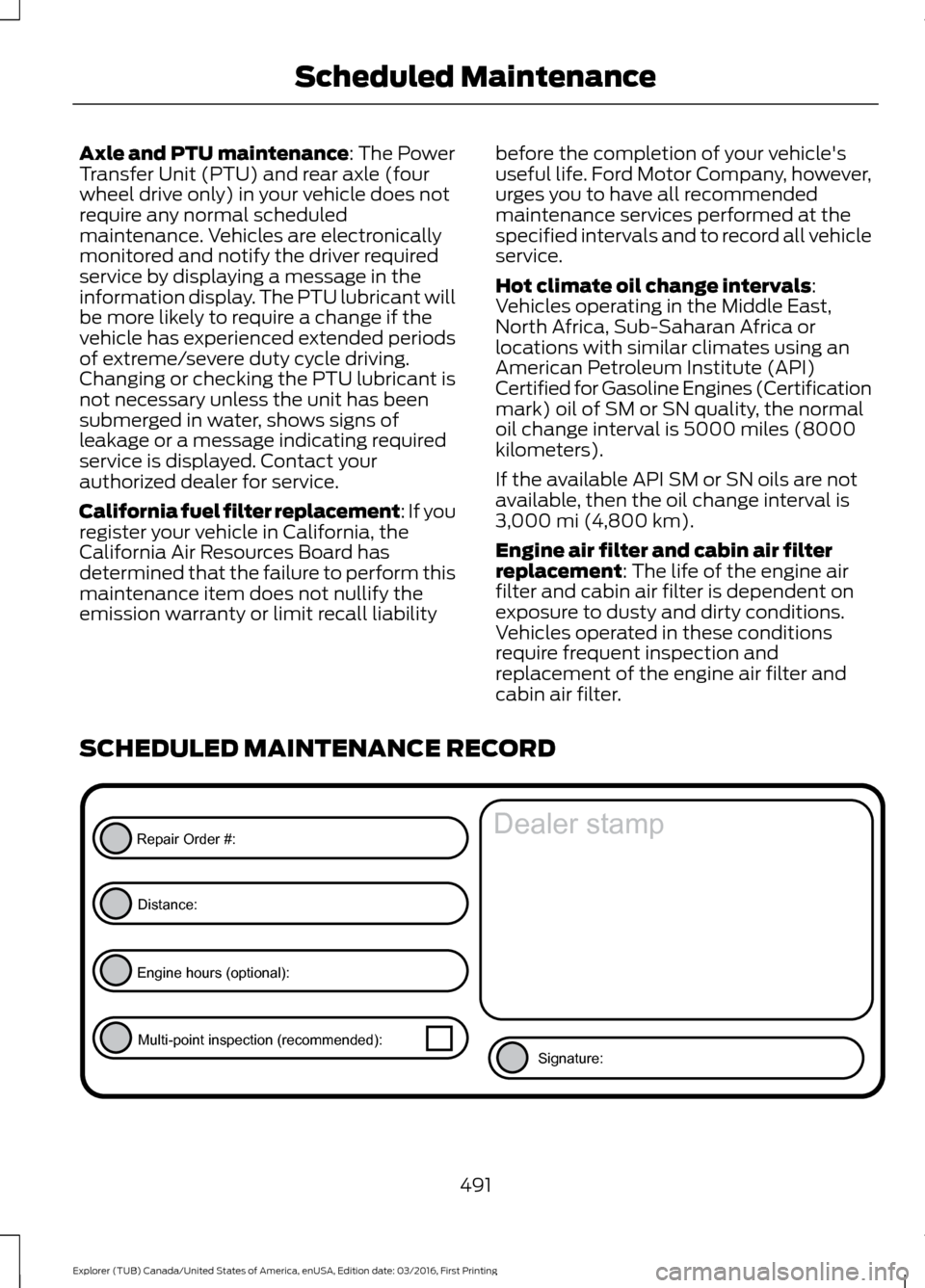
SCHEDULED MAINTENANCE RECORD 491
Explorer (TUB) Canada/United States of America, enUSA, Edition date: 03/2016, First Printing Scheduled MaintenanceE146852
Repair Order #:Distance:
Engine hours (optional): Multi-point inspection (recommended): Signature:
Dealer stamp
Page 510 of 541
Disclaimer of Warranty
YOU EXPRESSLY ACKNOWLEDGE AND
AGREE THAT USE OF THE DEVICES AND
SOFTWARE IS AT YOUR SOLE RISK AND
THAT THE ENTIRE RISK AS TO
SATISFACTORY QUALITY,
PERFORMANCE, COMPATIBILITY,
ACCURACY AND EFFORT IS WITH YOU.
TO THE MAXIMUM EXTENT PERMITTED
BY APPLICABLE LAW, THE SOFTWARE
AND ANY THIRD PARTY SOFTWARE OR
THIRD-PARTY SERVICES ARE PROVIDED
"AS IS" AND
“AS AVAILABLE” , WITH ALL
FAULTS AND WITHOUT WARRANTY OF
ANY KIND, AND FORD MOTOR COMPANY
HEREBY DISCLAIMS ALL WARRANTIES
AND CONDITIONS WITH RESPECT TO
THE SOFTWARE, THIRD PARTY
SOFTWARE, AND THIRD-PARTY
SERVICES, EITHER EXPRESS, IMPLIED OR
STATUTORY, INCLUDING, BUT NOT
LIMITED TO, THE IMPLIED WARRANTIES
AND/OR CONDITIONS OF
MERCHANTABILITY, OF SATISFACTORY
QUALITY, OF FITNESS FOR AN
ARTICULAR PURPOSE, OF ACCURACY,
OF QUIET ENJOYMENT, AND
NON-INFRINGEMENT OF THIRD-PARTY
RIGHTS. FORD MOTOR COMPANY DOES
NOT WARRANT (a) AGAINST
INTERFERENCE WITH YOUR ENJOYMENT
OF THE SOFTWARE, THIRD PARTY
SOFTWARE, OR THIRD-PARTY SERVICES,
(b) THAT THE SOFTWARE, THIRD PARTY
SOFTWARE, OR THIRD-PARTY SERVICES
WILL MEET YOUR REQUIREMENTS, (c)
THAT THE OPERATION OF THE
SOFTWARE, THIRD PARTY SOFTWARE,
OR THIRD-PARTY SERVICES WILL BE
UNINTERRUPTED OR ERROR-FREE, (d)
OR THAT DEFECTS IN THE SOFTWARE,
THIRD PARTY SOFTWARE, OR
THIRD-PARTY SERVICES WILL BE
CORRECTED. NO ORAL OR WRITTEN
INFORMATION OR ADVICE GIVEN BY
FORD MOTOR COMPANY OR ITS
AUTHORIZED REPRESENTATIVE SHALL CREATE A WARRANTY. SHOULD THE
SOFTWARE, THIRD PARTY SOFTWARE,
OR THIRD-PARTY SERVICES PROVE
DEFECTIVE, YOU ASSUME THE ENTIRE
COST OF ALL NECESSARY SERVICING,
REPAIR OR CORRECTION. SOME
JURISDICTIONS DO NOT ALLOW THE
DISCLAIMER OF IMPLIED WARRANTIES
OR LIMITATIONS ON APPLICABLE
STATUTORY RIGHTS OF A CONSUMER,
SO THE ABOVE DISCLAIMER MAY NOT
FULLY APPLY TO YOU. THE SOLE
WARRANTY PROVIDED BY FORD MOTOR
COMPANY SHALL BE FOUND IN THE
WARRANTY INFORMATION INCLUDING
WITH YOUR OWNER GUIDE. TO THE
EXTENT THAT THERE IS ANY CONFLICT
BETWEEN THE TERMS OF THIS SECTION
AND THE WARRANTY BOOKLET, THE
WARRANTY BOOKLET SHALL CONTROL.
Applicable Law, Venue, Jurisdiction
•
The laws of the State of Michigan
govern this EULA and Your use of the
SOFTWARE. Your use of the
SOFTWARE may also be subject to
other local, state, national, or
international laws. Any litigation arising
out of or related to this EULA shall be
brought and maintained exclusively in
a court of the State of Michigan
located in Wayne County or in the
United States District Court for the
Eastern District of Michigan. You hereby
consent to submit to the personal
jurisdiction of a court in the State of
Michigan located in Wayne County and
the United States District Court for the
Eastern District of Michigan for any
dispute arising out of or relating to this
EULA.
507
Explorer (TUB) Canada/United States of America, enUSA, Edition date: 03/2016, First Printing Appendices
Page 524 of 541
Product incorporates data which is ©
20XX Telstra Corporation Limited, GM
Holden Limited, Intelematics Australia
Pty Ltd and Continental Pty Ltd.
B. Third Party Notices for Australia. In
addition to the foregoing, the End-User
Terms for any Application containing
RDS-TMC Traffic Codes for Australia
shall contain the following notice:
“Product incorporates traffic location
codes which is © 20XX Telstra Corpora-
tion Limited and its licensors. ”
VII. China Territory
Personal Use Only
You agree to use this Data together with
[insert name of Client Application] for the
solely personal, non-commercial purposes
for which you were licensed, and not for
service bureau, time-sharing or other
similar purposes. Accordingly, but subject
to the restrictions set forth in the following
paragraphs, you may copy this Data only
as necessary for your personal use to (i)
view it, and (ii) save it, provided that you
do not remove any copyright notices that
appear and do not modify the Data in any
way. You agree not to otherwise reproduce,
copy, modify, decompile, disassemble or
reverse engineer any portion of this Data,
and may not transfer or distribute it in any
form, for any purpose, except to the extent
permitted by mandatory laws.
Restrictions
Except where you have been specifically
licensed to do so by NAV2 , and without
limiting the preceding paragraph, you may
not (a) use this Data with any products,
systems, or applications installed or
otherwise connected to or in
communication with vehicles, capable of
vehicle navigation, positioning, dispatch,
real time route guidance, fleet
management or similar applications; or (b) with or in communication with any
positioning devices or any mobile or
wireless-connected electronic or computer
devices, including without limitation
cellular phones, palmtop and handheld
computers, pagers, and personal digital
assistants or PDAs. You agree to cease
using this Data if you fail to comply with
these terms and conditions.
Limited Warranty
NAV2 warrants that (a) the Data will
perform substantially in accordance with
the accompanying written materials for a
period of ninety (90) days from the date
of receipt, and (b) any support services
provided by NAV2 shall be substantially as
described in applicable written materials
provided to you by NAV2, and NAV2’
s
support engineers will make commercially
reasonable efforts to solve any problem
issues.
rigCustomer Remedies
NAV2 and its suppliers’ entire liability and
your exclusive remedy shall be, at NAV2’ s
sole discretion, either (a) return of the price
paid, if any, or (b) repair or replacement of
the Data that do not meet NAV2’ s Limited
Warranty and that are returned to NAV2
with a copy of your receipt. This Limited
Warranty is void if failure of the Data has
resulted from accident, abuse, or
misapplication. Any replacement Data will
be warranted for the remainder of the
original warranty period or thirty (30) days,
whichever is longer. Neither these remedies
nor any product support services offered
by NAV2 are available without proof of
purchase from an authorized international
source.
521
Explorer (TUB) Canada/United States of America, enUSA, Edition date: 03/2016, First Printing Appendices
Page 530 of 541
1
180 Degree Camera...................................208
Camera Views.................................................... 208
Using the 180 degree camera system.............................................................. 208
4
4WD See: Four-Wheel Drive....................................... 181
A
A/C See: Climate Control.......................................... 127
About This Manual...........................................7
ABS See: Brakes........................................................... 186
ABS driving hints See: Hints on Driving With Anti-Lock
Brakes................................................................ 186
Accessories....................................................479 Exterior Style....................................................... 479
Interior Style......................................................... 479
Lifestyle................................................................. 479
Peace of Mind..................................................... 479
Accessories See: Replacement Parts
Recommendation............................................ 12
ACC See: Using Adaptive Cruise Control.............210
Active Park Assist.........................................199 Deactivating the Active Park Assist
Feature............................................................. 203
Parallel Parking, Perpendicular Parking, Parallel Park Out Assist.............................. 199
Troubleshooting the System......................... 203
Adjusting the Headlamps
........................288
Vertical Aim Adjustment................................ 288
Adjusting the Pedals.....................................74
Adjusting the Steering Wheel - Vehicles With: Manual Adjustable Steering
Column............................................................70
Adjusting the Steering Wheel - Vehicles With: Power Adjustable Steering
Column............................................................70
Easy Entry and Exit Feature............................... 71End of Travel Position..........................................
71
Memory Feature..................................................... 71
Airbag Disposal..............................................48
Air Conditioning See: Climate Control.......................................... 127
Air Filter See: Changing the Engine Air Filter............296
Alarm See: Anti-Theft Alarm........................................ 69
Anti-Theft Alarm............................................69 Arming the Alarm................................................ 69
Disarming the Alarm........................................... 69
Appendices....................................................502
Apps..................................................................452 ........................................................................\
.......... 452
SiriusXM Traffic and Travel Link................... 453
Audible Warnings and Indicators
.............98
Automatic Transmission Warning
Chime
.................................................................. 98
Engine On Warning Chime............................... 98
Headlamps On Warning Chime..................... 98
Key in Ignition Warning Chime........................ 98
Keyless Warning Alert ....................................... 98
Parking Brake On Warning Chime.................98
Audio Control....................................................71 Seek and Media..................................................... 72
Type 1........................................................................\
.. 71
Type 2........................................................................\
. 71
Audio System
.................................................351
General Information.......................................... 351
Audio Unit - Vehicles With: AM/FM/CD/ SYNC.............................................................352
Audio Unit - Vehicles With: Premium AM/FM/CD..................................................355
Audio Unit - Vehicles With: Sony AM/ FM/CD
...........................................................356
Menu Structure.................................................. 358
Autolamps........................................................79 Windshield Wiper Activated
Headlamps........................................................ 79
Automatic Climate Control - Vehicles With: Premium AM/FM/CD...................128
Automatic Climate Control - Vehicles With: Sony Audio System.......................130
Automatic High Beam Control..................81 Activating the System........................................ 82
Manually Overriding the System.................... 82
527
Explorer (TUB) Canada/United States of America, enUSA, Edition date: 03/2016, First Printing Index