warning light FORD EXPLORER 2017 5.G Repair Manual
[x] Cancel search | Manufacturer: FORD, Model Year: 2017, Model line: EXPLORER, Model: FORD EXPLORER 2017 5.GPages: 541, PDF Size: 6.81 MB
Page 316 of 541
*Traction: The traction grades,
from highest to lowest are AA, A,
B, and C. The grades represent the
tire's ability to stop on wet
pavement as measured under
controlled conditions on specified
government test surfaces of
asphalt and concrete. A tire
marked C may have poor traction
performance.
*
Temperature: The temperature
grades are A (the highest), B and
C, representing the tire's
resistance to the generation of
heat and its ability to dissipate
heat when tested under controlled
conditions on a specified indoor
laboratory test wheel.
M. Maximum Inflation
Pressure:
Indicates the tire
manufacturers' maximum
permissible pressure or the
pressure at which the maximum
load can be carried by the tire. This
pressure is normally higher than
the vehicle manufacturer's
recommended cold inflation
pressure which can be found on
the Safety Compliance
Certification Label (affixed to
either the door hinge pillar,
door-latch post, or the door edge
that meets the door-latch post,
next to the driver's seating
position), or Tire Label which is
located on the B-Pillar or the edge
of the driver ’s door. The cold
inflation pressure should never be
set lower than the recommended
pressure on the vehicle label. The tire suppliers may have
additional markings, notes or
warnings such as standard load
or radial tubeless.
Additional Information
Contained on the Tire Sidewall
for LT Type Tires
Note:
Tire Quality Grades do not
apply to this type of tire. LT type tires have some additional
information beyond those of P
type tires; these differences are
described below.
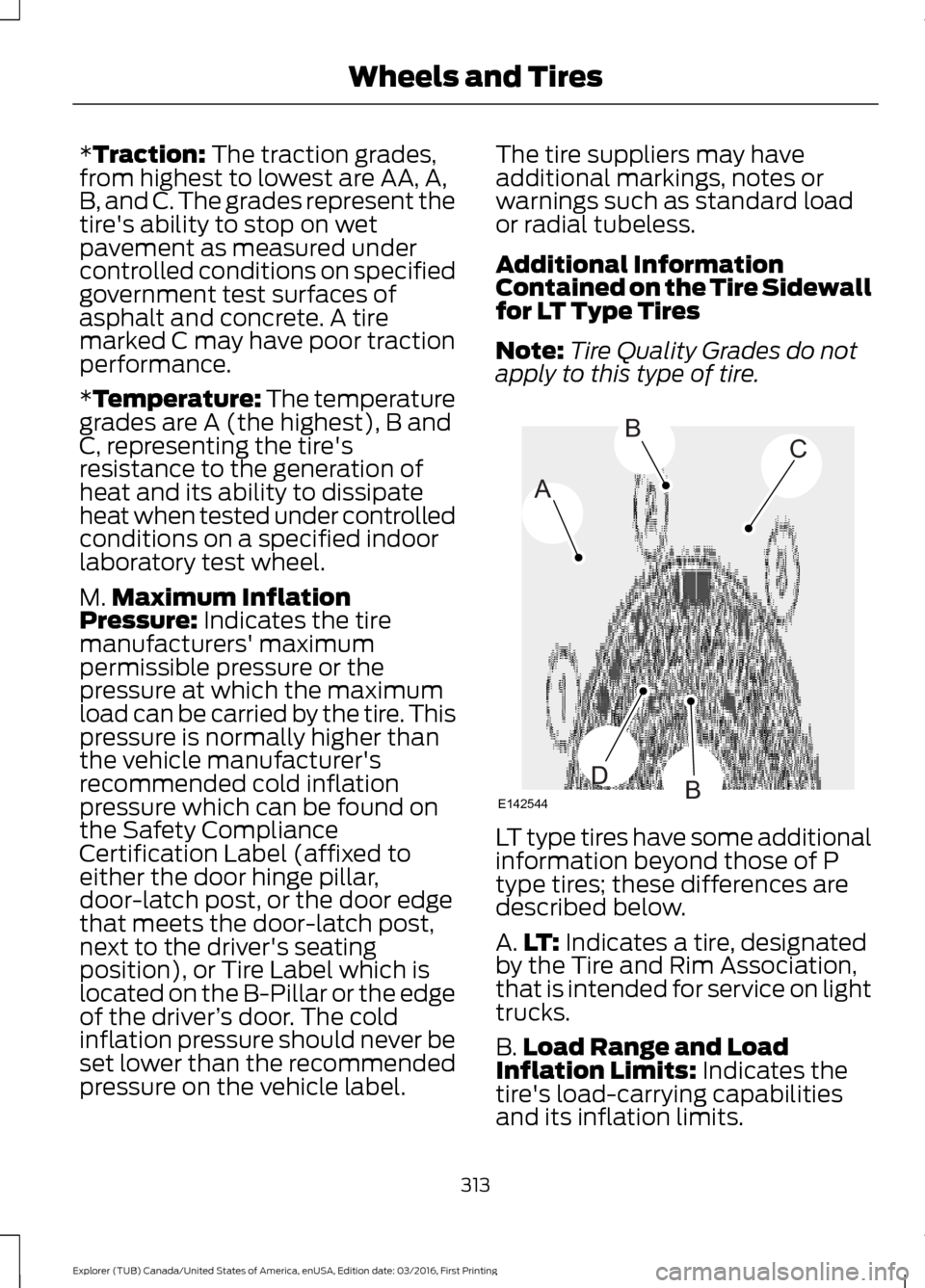
A.
LT:
Indicates a tire, designated
by the Tire and Rim Association,
that is intended for service on light
trucks.
B. Load Range and Load
Inflation Limits:
Indicates the
tire's load-carrying capabilities
and its inflation limits.
313
Explorer (TUB) Canada/United States of America, enUSA, Edition date: 03/2016, First Printing Wheels and TiresA
BC
BDE142544
Page 327 of 541
Understanding Your Tire Pressure
Monitoring System
The tire pressure monitoring system
measures pressure in your four road tires
and sends the tire pressure readings to
your vehicle. The low tire pressure warning
light will turn on if the tire pressure is
significantly low. Once the light is
illuminated, your tires are under-inflated
and need to be inflated to the
manufacturer
’s recommended tire
pressure. Even if the light turns on and a
short time later turns off, your tire pressure
still needs to be checked. When Your Temporary Spare Tire is
Installed
When one of your road tires needs to be
replaced with the temporary spare, the
system will continue to identify an issue to
remind you that the damaged road wheel
and tire assembly needs to be repaired and
put back on your vehicle.
To restore the full function of the tire
pressure monitoring system, have the
damaged road wheel and tire assembly
repaired and remounted on your vehicle.
When You Believe Your System is Not
Operating Properly
The main function of the tire pressure
monitoring system is to warn you when
your tires need air. It can also warn you in
the event the system is no longer capable
of functioning as intended. See the
following chart for information concerning
your tire pressure monitoring system:
324
Explorer (TUB) Canada/United States of America, enUSA, Edition date: 03/2016, First Printing Wheels and Tires
Page 328 of 541
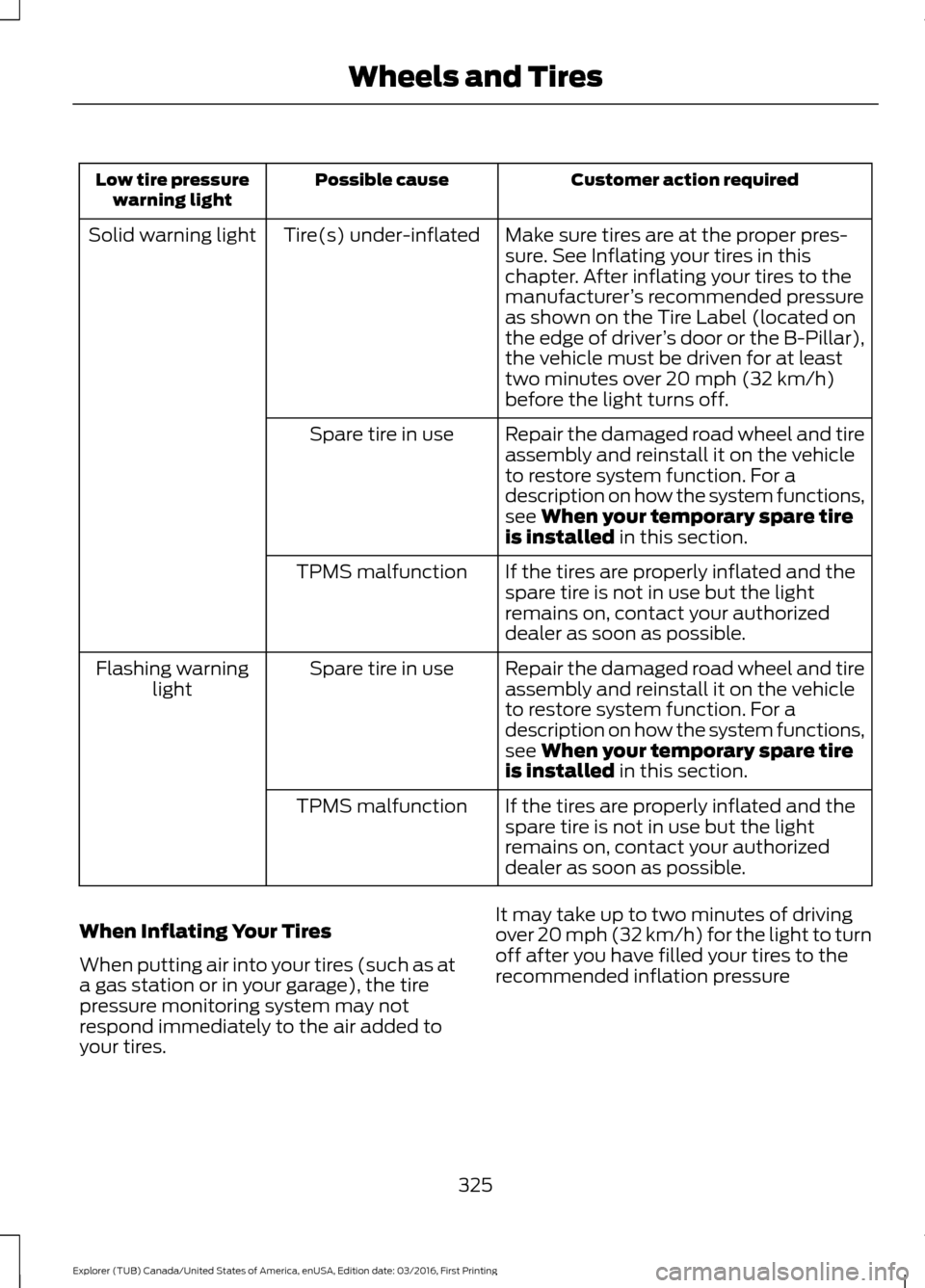
Customer action required
Possible cause
Low tire pressure
warning light
Make sure tires are at the proper pres-
sure. See Inflating your tires in this
chapter. After inflating your tires to the
manufacturer’s recommended pressure
as shown on the Tire Label (located on
the edge of driver ’s door or the B-Pillar),
the vehicle must be driven for at least
two minutes over 20 mph (32 km/h)
before the light turns off.
Tire(s) under-inflated
Solid warning light
Repair the damaged road wheel and tire
assembly and reinstall it on the vehicle
to restore system function. For a
description on how the system functions,
see When your temporary spare tire
is installed in this section.
Spare tire in use
If the tires are properly inflated and the
spare tire is not in use but the light
remains on, contact your authorized
dealer as soon as possible.
TPMS malfunction
Repair the damaged road wheel and tire
assembly and reinstall it on the vehicle
to restore system function. For a
description on how the system functions,
see
When your temporary spare tire
is installed in this section.
Spare tire in use
Flashing warning
light
If the tires are properly inflated and the
spare tire is not in use but the light
remains on, contact your authorized
dealer as soon as possible.
TPMS malfunction
When Inflating Your Tires
When putting air into your tires (such as at
a gas station or in your garage), the tire
pressure monitoring system may not
respond immediately to the air added to
your tires. It may take up to two minutes of driving
over 20 mph (32 km/h) for the light to turn
off after you have filled your tires to the
recommended inflation pressure
325
Explorer (TUB) Canada/United States of America, enUSA, Edition date: 03/2016, First Printing Wheels and Tires
Page 329 of 541
How Temperature Affects Your Tire
Pressure
The tire pressure monitoring system
monitors tire pressure in each pneumatic
tire. While driving in a normal manner, a
typical passenger tire inflation pressure
may increase about 2 to 4 psi (14 to 28
kPa) from a cold start situation. If the
vehicle is stationary overnight with the
outside temperature significantly lower
than the daytime temperature, the tire
pressure may decrease about 3 psi (21
kPa) for a drop of 30°F (17°C) in ambient
temperature. This lower pressure value
may be detected by the tire pressure
monitoring system as being significantly
lower than the recommended inflation
pressure and activate the system warning
light for low tire pressure. If the low tire
pressure warning light is on, visually check
each tire to verify that no tire is flat. If one
or more tires are flat, repair as necessary.
Check the air pressure in the road tires. If
any tire is under-inflated, carefully drive
the vehicle to the nearest location where
air can be added to the tires. Inflate all the
tires to the recommended inflation
pressure.
CHANGING A ROAD WHEEL
WARNINGS
Do not use tire sealants as they may
damage the tire pressure monitoring
system.
If the tire pressure monitor sensor
becomes damaged it may not
function.
Note:
The tire pressure monitoring system
indicator light will illuminate when the spare
tire is in use. To restore the full function of
the monitoring system, all road wheels
equipped with tire pressure monitoring
sensors must be mounted on the vehicle. If you get a flat tire while driving, do not
apply the brake heavily. Instead, gradually
decrease your speed. Hold the steering
wheel firmly and slowly move to a safe
place on the side of the road.
Have a flat serviced by an authorized
dealer in order to prevent damage to the
tire pressure monitoring system sensors.
See Tire Pressure Monitoring System
(page 322). Replace the spare tire with a
road tire as soon as possible. During
repairing or replacing of the flat tire, have
the authorized dealer inspect the tire
pressure monitoring system sensor for
damage.
Dissimilar Spare Wheel and Tire
Assembly Information WARNING
Failure to follow these guidelines
could result in an increased risk of
loss of vehicle control, injury or death.
If you have a dissimilar spare wheel and
tire, then it is intended for temporary use
only. This means that if you need to use it,
you should replace it as soon as possible
with a road wheel and tire assembly that
is the same size and type as the road tires
and wheels that were originally provided
by Ford. If the dissimilar spare tire or wheel
is damaged, it should be replaced rather
than repaired.
A dissimilar spare wheel and tire assembly
is defined as a spare wheel and tire
assembly that is different in brand, size or
appearance from the road tires and wheels
and can be one of three types:
1.
T-type mini-spare:
This spare tire
begins with the letter T for tire size and
may have Temporary Use Only molded in
the sidewall.
326
Explorer (TUB) Canada/United States of America, enUSA, Edition date: 03/2016, First Printing Wheels and Tires
Page 488 of 541
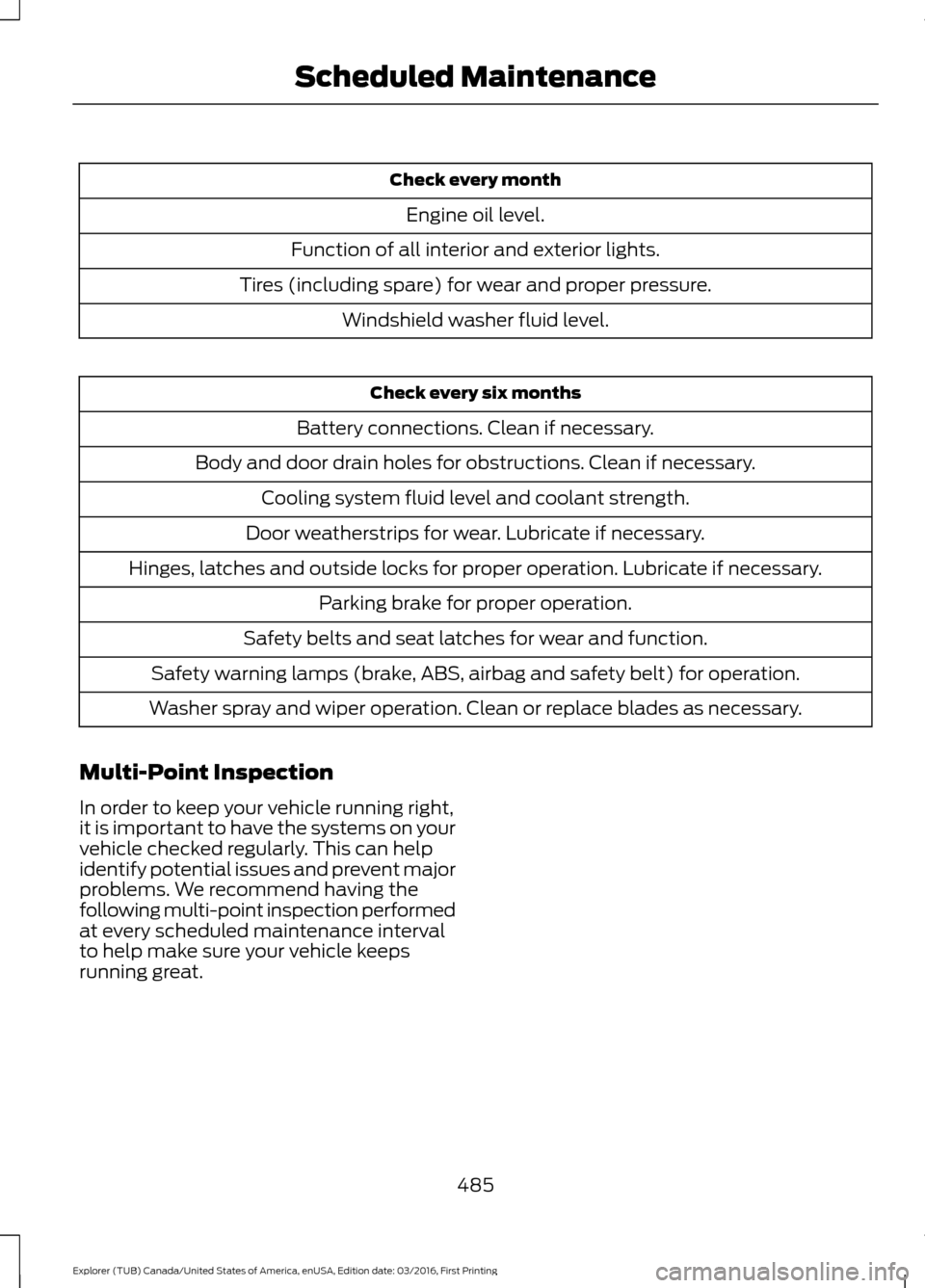
Check every month
Engine oil level.
Function of all interior and exterior lights.
Tires (including spare) for wear and proper pressure. Windshield washer fluid level. Check every six months
Battery connections. Clean if necessary.
Body and door drain holes for obstructions. Clean if necessary. Cooling system fluid level and coolant strength.
Door weatherstrips for wear. Lubricate if necessary.
Hinges, latches and outside locks for proper operation. Lubricate if necessary. Parking brake for proper operation.
Safety belts and seat latches for wear and function.
Safety warning lamps (brake, ABS, airbag and safety belt) for operation.
Washer spray and wiper operation. Clean or replace blades as necessary.
Multi-Point Inspection
In order to keep your vehicle running right,
it is important to have the systems on your
vehicle checked regularly. This can help
identify potential issues and prevent major
problems. We recommend having the
following multi-point inspection performed
at every scheduled maintenance interval
to help make sure your vehicle keeps
running great.
485
Explorer (TUB) Canada/United States of America, enUSA, Edition date: 03/2016, First Printing Scheduled Maintenance
Page 535 of 541
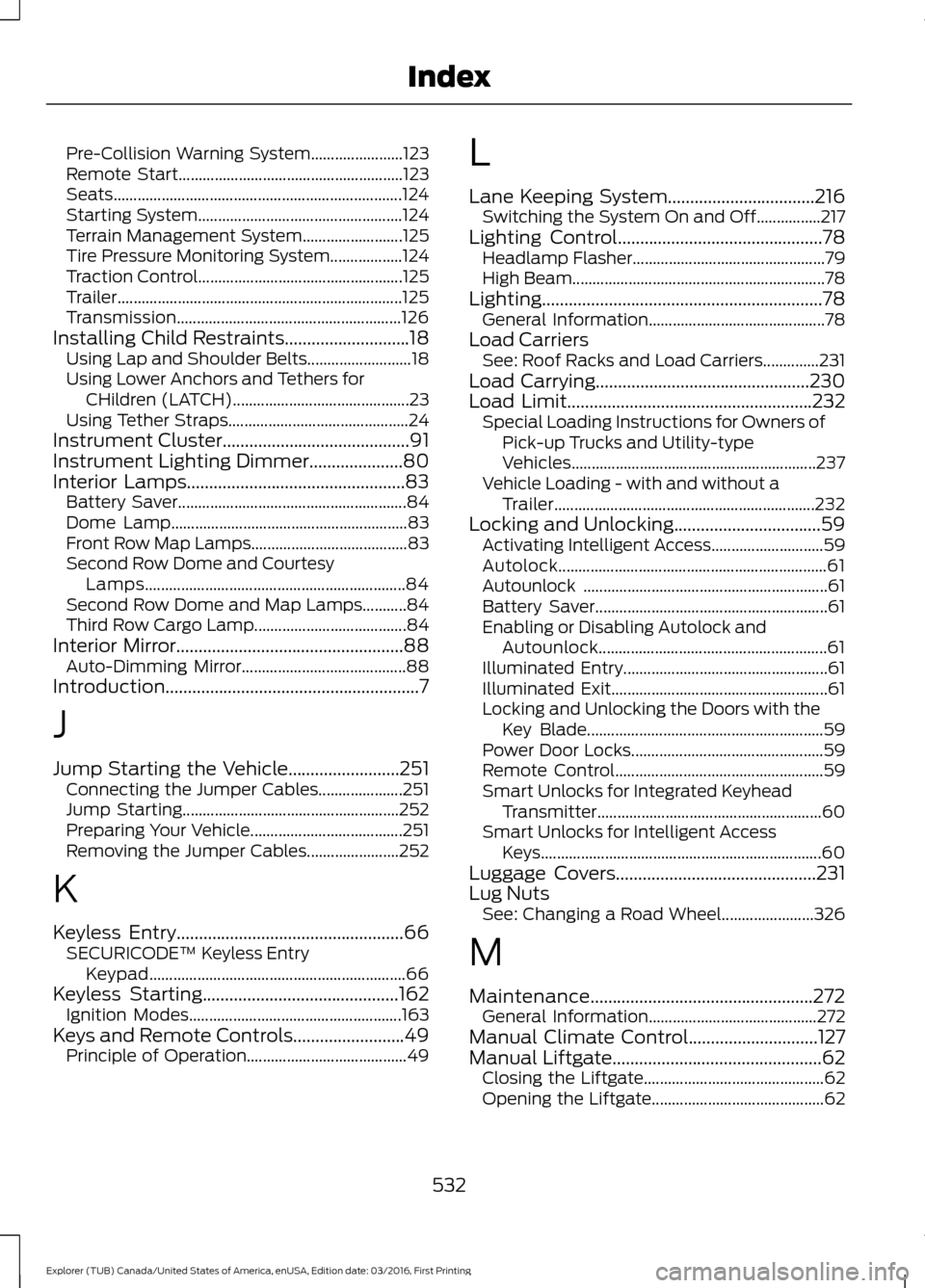
Pre-Collision Warning System.......................
123
Remote Start........................................................ 123
Seats........................................................................\
124
Starting System................................................... 124
Terrain Management System......................... 125
Tire Pressure Monitoring System.................. 124
Traction Control................................................... 125
Trailer....................................................................... 125
Transmission........................................................ 126
Installing Child Restraints............................18
Using Lap and Shoulder Belts.......................... 18
Using Lower Anchors and Tethers for CHildren (LATCH)............................................ 23
Using Tether Straps............................................. 24
Instrument Cluster
..........................................91
Instrument Lighting Dimmer.....................80
Interior Lamps
.................................................83
Battery Saver......................................................... 84
Dome Lamp........................................................... 83
Front Row Map Lamps....................................... 83
Second Row Dome and Courtesy Lamps................................................................. 84
Second Row Dome and Map Lamps...........84
Third Row Cargo Lamp...................................... 84
Interior Mirror...................................................88 Auto-Dimming Mirror......................................... 88
Introduction.........................................................7
J
Jump Starting the Vehicle.........................251 Connecting the Jumper Cables..................... 251
Jump Starting...................................................... 252
Preparing Your Vehicle...................................... 251
Removing the Jumper Cables....................... 252
K
Keyless Entry...................................................66 SECURICODE™ Keyless Entry
Keypad................................................................ 66
Keyless Starting
............................................162
Ignition Modes..................................................... 163
Keys and Remote Controls.........................49 Principle of Operation........................................ 49L
Lane Keeping System.................................216
Switching the System On and Off................217
Lighting Control
..............................................78
Headlamp Flasher................................................ 79
High Beam............................................................... 78
Lighting...............................................................78 General Information............................................ 78
Load Carriers See: Roof Racks and Load Carriers..............231
Load Carrying
................................................230
Load Limit.......................................................232
Special Loading Instructions for Owners of
Pick-up Trucks and Utility-type
Vehicles............................................................. 237
Vehicle Loading - with and without a Trailer................................................................. 232
Locking and Unlocking.................................59 Activating Intelligent Access............................ 59
Autolock................................................................... 61
Autounlock ............................................................. 61
Battery Saver.......................................................... 61
Enabling or Disabling Autolock and Autounlock......................................................... 61
Illuminated Entry................................................... 61
Illuminated Exit...................................................... 61
Locking and Unlocking the Doors with the Key Blade........................................................... 59
Power Door Locks................................................ 59
Remote Control.................................................... 59
Smart Unlocks for Integrated Keyhead Transmitter........................................................ 60
Smart Unlocks for Intelligent Access Keys...................................................................... 60
Luggage Covers
.............................................231
Lug Nuts See: Changing a Road Wheel....................... 326
M
Maintenance..................................................272 General Information.......................................... 272
Manual Climate Control
.............................127
Manual Liftgate...............................................62
Closing the Liftgate............................................. 62
Opening the Liftgate........................................... 62
532
Explorer (TUB) Canada/United States of America, enUSA, Edition date: 03/2016, First Printing Index
Page 538 of 541
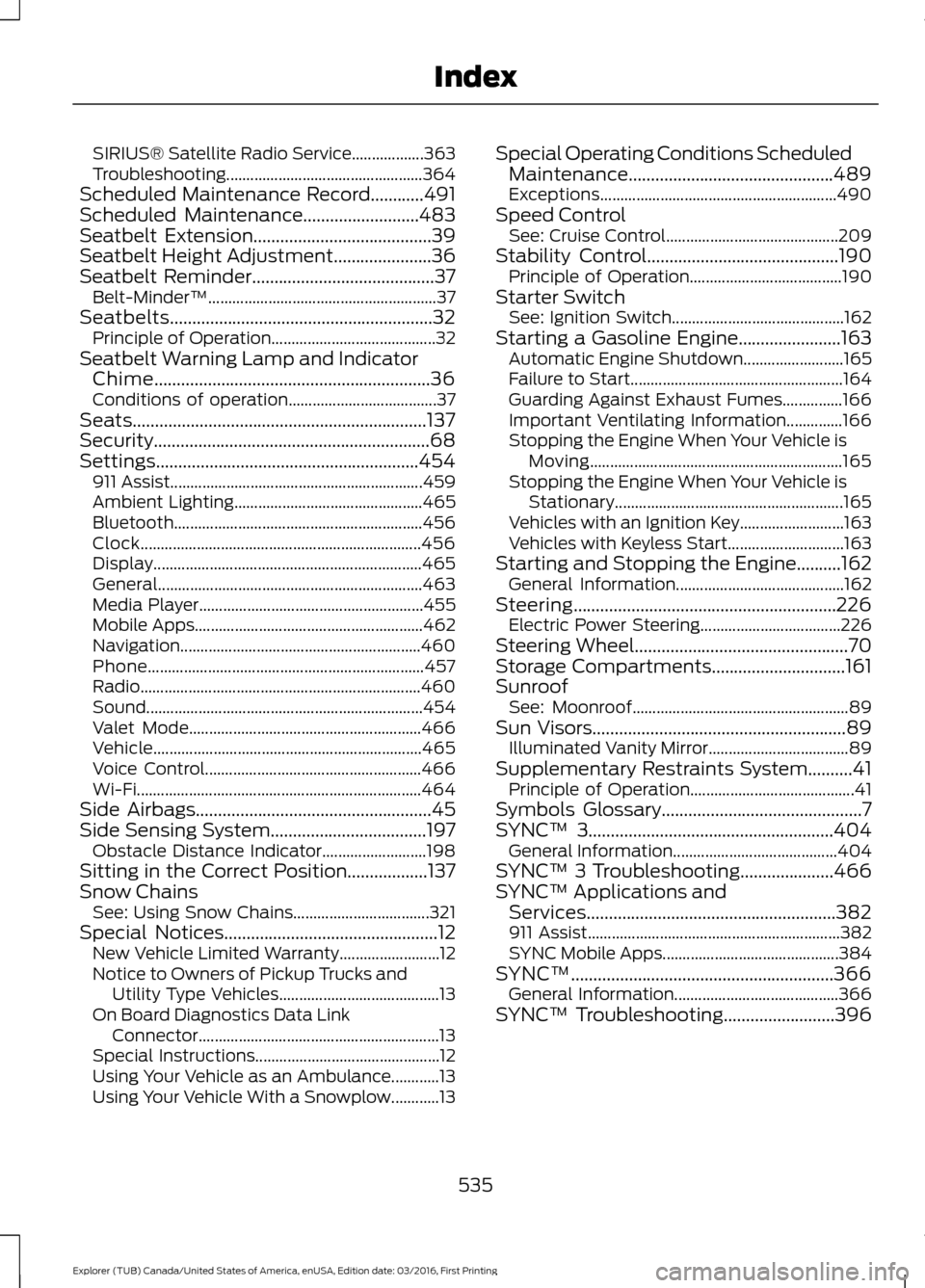
SIRIUS® Satellite Radio Service..................
363
Troubleshooting................................................. 364
Scheduled Maintenance Record............491
Scheduled Maintenance..........................483
Seatbelt Extension........................................39
Seatbelt Height Adjustment......................36
Seatbelt Reminder.........................................37 Belt-Minder™......................................................... 37
Seatbelts...........................................................32 Principle of Operation......................................... 32
Seatbelt Warning Lamp and Indicator Chime..............................................................36
Conditions of operation..................................... 37
Seats..................................................................137
Security..............................................................68
Settings...........................................................454 911 Assist............................................................... 459
Ambient Lighting............................................... 465
Bluetooth.............................................................. 456
Clock...................................................................... 456
Display................................................................... 465
General.................................................................. 463
Media Player........................................................ 455
Mobile Apps......................................................... 462
Navigation............................................................460
Phone..................................................................... 457
Radio...................................................................... 460
Sound..................................................................... 454
Valet Mode.......................................................... 466
Vehicle................................................................... 465
Voice Control...................................................... 466
Wi-Fi....................................................................... 464
Side Airbags
.....................................................45
Side Sensing System...................................197 Obstacle Distance Indicator.......................... 198
Sitting in the Correct Position..................137
Snow Chains See: Using Snow Chains.................................. 321
Special Notices................................................12 New Vehicle Limited Warranty......................... 12
Notice to Owners of Pickup Trucks and Utility Type Vehicles........................................ 13
On Board Diagnostics Data Link Connector............................................................ 13
Special Instructions.............................................. 12
Using Your Vehicle as an Ambulance............13
Using Your Vehicle With a Snowplow............13 Special Operating Conditions Scheduled
Maintenance..............................................489
Exceptions........................................................... 490
Speed Control See: Cruise Control........................................... 209
Stability Control...........................................190 Principle of Operation...................................... 190
Starter Switch See: Ignition Switch........................................... 162
Starting a Gasoline Engine.......................163 Automatic Engine Shutdown......................... 165
Failure to Start..................................................... 164
Guarding Against Exhaust Fumes...............166
Important Ventilating Information..............166
Stopping the Engine When Your Vehicle is Moving............................................................... 165
Stopping the Engine When Your Vehicle is Stationary......................................................... 165
Vehicles with an Ignition Key.......................... 163
Vehicles with Keyless Start............................. 163
Starting and Stopping the Engine..........162 General Information.......................................... 162
Steering...........................................................226 Electric Power Steering................................... 226
Steering Wheel................................................70
Storage Compartments..............................161
Sunroof See: Moonroof...................................................... 89
Sun Visors.........................................................89 Illuminated Vanity Mirror................................... 89
Supplementary Restraints System..........41 Principle of Operation......................................... 41
Symbols Glossary.............................................7
SYNC™ 3.......................................................404
General Information......................................... 404
SYNC™ 3 Troubleshooting.....................466
SYNC™ Applications and Services........................................................382
911 Assist............................................................... 382
SYNC Mobile Apps............................................ 384
SYNC™...........................................................366 General Information......................................... 366
SYNC™ Troubleshooting
.........................396
535
Explorer (TUB) Canada/United States of America, enUSA, Edition date: 03/2016, First Printing Index
Page 540 of 541
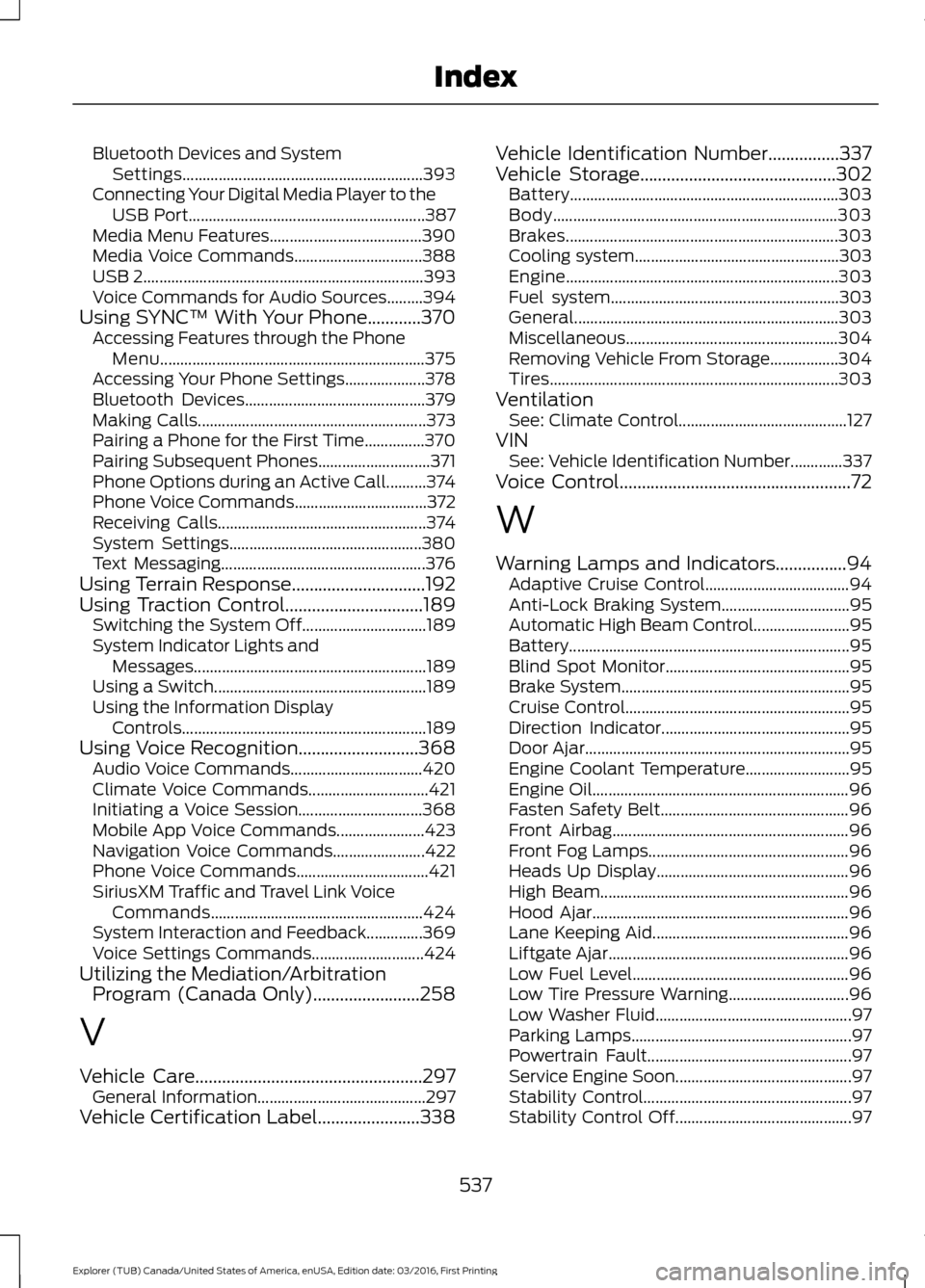
Bluetooth Devices and System
Settings............................................................ 393
Connecting Your Digital Media Player to the USB Port........................................................... 387
Media Menu Features...................................... 390
Media Voice Commands................................ 388
USB 2...................................................................... 393
Voice Commands for Audio Sources.........394
Using SYNC™ With Your Phone............370 Accessing Features through the Phone
Menu.................................................................. 375
Accessing Your Phone Settings.................... 378
Bluetooth Devices............................................. 379
Making Calls......................................................... 373
Pairing a Phone for the First Time...............370
Pairing Subsequent Phones............................ 371
Phone Options during an Active Call..........374
Phone Voice Commands................................. 372
Receiving Calls.................................................... 374
System Settings................................................ 380
Text Messaging................................................... 376
Using Terrain Response..............................192
Using Traction Control...............................189
Switching the System Off............................... 189
System Indicator Lights and Messages.......................................................... 189
Using a Switch..................................................... 189
Using the Information Display Controls............................................................. 189
Using Voice Recognition...........................368 Audio Voice Commands................................. 420
Climate Voice Commands.............................. 421
Initiating a Voice Session............................... 368
Mobile App Voice Commands...................... 423
Navigation Voice Commands....................... 422
Phone Voice Commands................................. 421
SiriusXM Traffic and Travel Link Voice Commands..................................................... 424
System Interaction and Feedback..............369
Voice Settings Commands............................ 424
Utilizing the Mediation/Arbitration Program (Canada Only)........................258
V
Vehicle Care
...................................................297
General Information.......................................... 297
Vehicle Certification Label.......................338 Vehicle Identification Number
................337
Vehicle Storage............................................302
Battery................................................................... 303
Body....................................................................... 303
Brakes.................................................................... 303
Cooling system................................................... 303
Engine.................................................................... 303
Fuel system......................................................... 303
General.................................................................. 303
Miscellaneous..................................................... 304
Removing Vehicle From Storage.................304
Tires........................................................................\
303
Ventilation See: Climate Control.......................................... 127
VIN See: Vehicle Identification Number.............337
Voice Control
....................................................72
W
Warning Lamps and Indicators................94 Adaptive Cruise Control.................................... 94
Anti-Lock Braking System................................ 95
Automatic High Beam Control........................ 95
Battery...................................................................... 95
Blind Spot Monitor.............................................. 95
Brake System......................................................... 95
Cruise Control........................................................ 95
Direction Indicator............................................... 95
Door Ajar.................................................................. 95
Engine Coolant Temperature.......................... 95
Engine Oil................................................................ 96
Fasten Safety Belt............................................... 96
Front Airbag........................................................... 96
Front Fog Lamps.................................................. 96
Heads Up Display................................................ 96
High Beam.............................................................. 96
Hood Ajar................................................................ 96
Lane Keeping Aid................................................. 96
Liftgate Ajar............................................................ 96
Low Fuel Level...................................................... 96
Low Tire Pressure Warning.............................. 96
Low Washer Fluid................................................. 97
Parking Lamps....................................................... 97
Powertrain Fault................................................... 97
Service Engine Soon............................................ 97
Stability Control.................................................... 97
Stability Control Off............................................ 97
537
Explorer (TUB) Canada/United States of America, enUSA, Edition date: 03/2016, First Printing Index