window FORD EXPLORER 2017 5.G Owners Manual
[x] Cancel search | Manufacturer: FORD, Model Year: 2017, Model line: EXPLORER, Model: FORD EXPLORER 2017 5.GPages: 541, PDF Size: 6.81 MB
Page 5 of 541
Steering Wheel
Adjusting the Steering Wheel - Vehicles
With: Manual Adjustable Steering
Column...........................................................70
Adjusting the Steering Wheel - Vehicles With: Power Adjustable Steering
Column...........................................................70
Audio Control....................................................71
Voice Control
....................................................72
Cruise Control
..................................................72
Information Display Control
.......................73
Heated Steering Wheel
................................73
Pedals
Adjusting the Pedals
.....................................74
Wipers and Washers
Windshield Wipers
.........................................75
Autowipers........................................................75
Windshield Washers
.....................................76
Rear Window Wiper and Washers...........76
Lighting
General Information......................................78
Lighting Control
..............................................78
Autolamps........................................................79
Instrument Lighting Dimmer.....................80
Headlamp Exit Delay
...................................80
Daytime Running Lamps............................80
Automatic High Beam Control..................81
Front Fog Lamps
............................................82
Direction Indicators.......................................83
Interior Lamps
.................................................83
Windows and Mirrors
Power Windows.............................................85
Global Opening..............................................86
Exterior Mirrors................................................86
Interior Mirror...................................................88
Sun Visors.........................................................89 Moonroof..........................................................89
Instrument Cluster
Gauges................................................................91
Warning Lamps and Indicators................94
Audible Warnings and Indicators
.............98
Information Displays
General Information.....................................99
Information Messages
.................................113
Climate Control
Manual Climate Control
.............................127
Automatic Climate Control - Vehicles With: Premium AM/FM/CD..................128
Automatic Climate Control - Vehicles With: Sony Audio System.....................130
Hints on Controlling the Interior Climate.........................................................132
Rear Passenger Climate Controls..........134
Heated Windows and Mirrors..................135
Cabin Air Filter................................................135
Remote Start.................................................136
Seats
Sitting in the Correct Position..................137
Head Restraints
.............................................137
Manual Seats
.................................................140
Power Seats
.....................................................141
Memory Function.........................................143
Rear Seats
.......................................................144
Heated Seats...................................................151
Climate Controlled Seats
..........................152
Universal Garage Door Opener
Universal Garage Door Opener...............154
Auxiliary Power Points
Auxiliary Power Points................................159
2
Explorer (TUB) Canada/United States of America, enUSA, Edition date: 03/2016, First Printing Table of Contents
Page 7 of 541
Trailer Sway Control...................................239
Recommended Towing Weights...........239
Essential Towing Checks...........................241
Towing the Vehicle on Four Wheels - 2.3L EcoBoost™
......................................243
Towing the Vehicle on Four Wheels - 3.5L Duratec/3.5L Ecoboost™..........244
Driving Hints
Breaking-In.....................................................246
Economical Driving
.....................................246
Driving Through Water
...............................247
Floor Mats
.......................................................247
Roadside Emergencies
Roadside Assistance..................................249
Hazard Warning Flashers
.........................250
Fuel Shutoff
..................................................250
Jump Starting the Vehicle.........................251
Post-Crash Alert System..........................253
Transporting the Vehicle
...........................253
Customer Assistance
Getting the Services You Need...............255
In California (U.S. Only)............................256
The Better Business Bureau (BBB) Auto Line Program (U.S. Only)
......................257
Utilizing the Mediation/Arbitration Program (Canada Only)
.......................258
Getting Assistance Outside the U.S. and Canada........................................................258
Ordering Additional Owner's Literature....................................................259
Reporting Safety Defects (U.S. Only)............................................................260
Reporting Safety Defects (Canada Only)............................................................260
Fuses
Fuse Specification Chart..........................262
Changing a Fuse...........................................270 Maintenance
General Information
....................................272
Opening and Closing the Hood...............272
Under Hood Overview - 2.3L EcoBoost™................................................274
Under Hood Overview - 3.5L Ecoboost™................................................275
Under Hood Overview - 3.5L Duratec........................................................276
Engine Oil Dipstick - 2.3L EcoBoost™.................................................277
Engine Oil Dipstick - 3.5L Duratec/3.5L Ecoboost™.................................................277
Engine Oil Check...........................................277
Oil Change Indicator Reset......................278
Engine Coolant Check................................279
Automatic Transmission Fluid Check - 2.3L EcoBoost™
......................................283
Automatic Transmission Fluid Check - 3.5L Duratec/3.5L Ecoboost™
...........283
Brake Fluid Check........................................285
Power Steering Fluid Check....................285
Washer Fluid Check....................................285
Changing the 12V Battery.........................286
Checking the Wiper Blades......................287
Changing the Wiper Blades.....................287
Adjusting the Headlamps
........................288
Removing a Headlamp.............................290
Changing a Bulb..........................................290
Bulb Specification Chart..........................294
Changing the Engine Air Filter................296
Vehicle Care
General Information
...................................297
Cleaning Products
.......................................297
Cleaning the Exterior..................................298
Waxing
.............................................................299
Cleaning the Engine
...................................299
Cleaning the Windows and Wiper Blades.........................................................300
Cleaning the Interior
..................................300
4
Explorer (TUB) Canada/United States of America, enUSA, Edition date: 03/2016, First Printing Table of Contents
Page 11 of 541
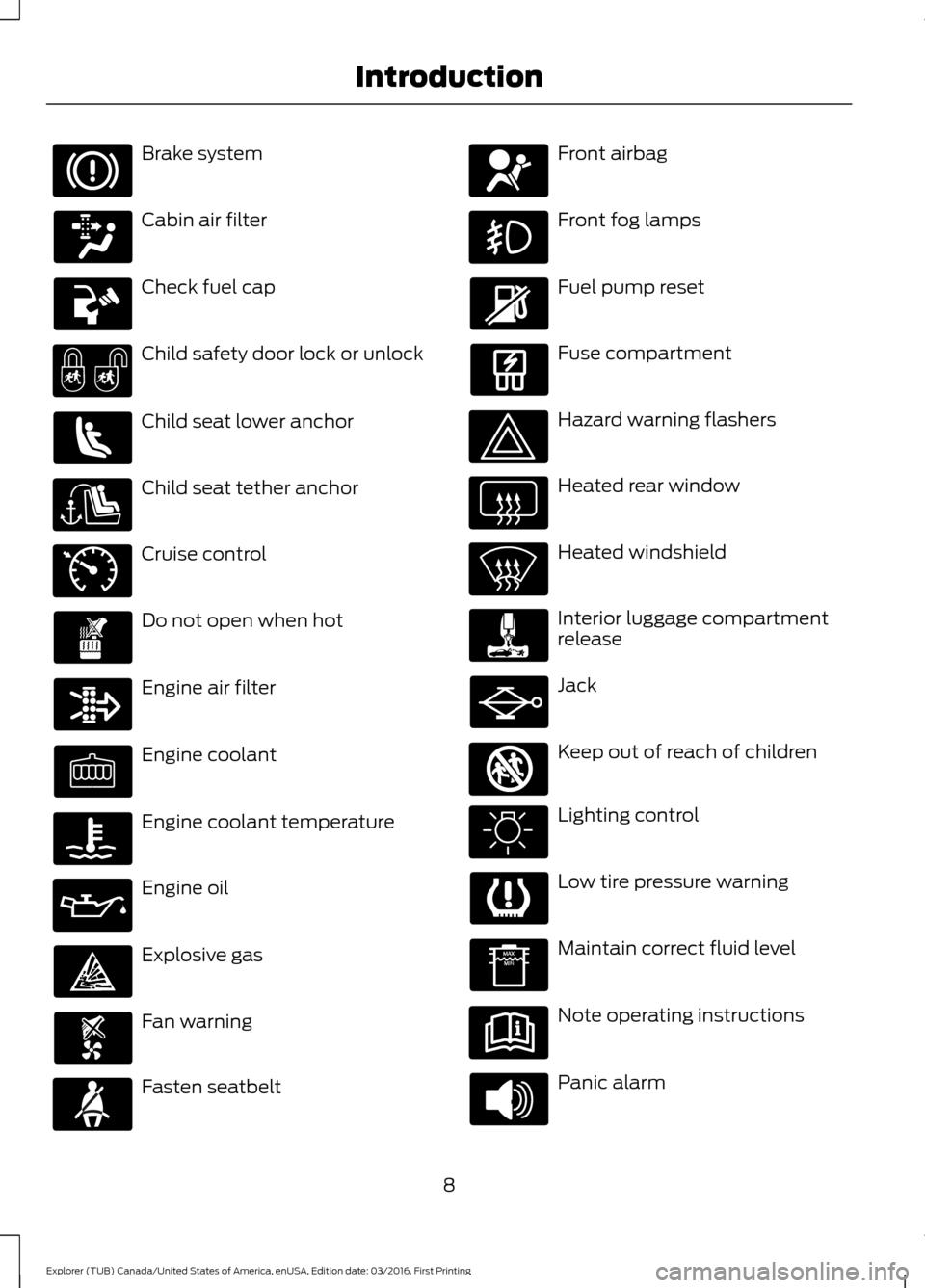
Brake system
Cabin air filter
Check fuel cap
Child safety door lock or unlock
Child seat lower anchor
Child seat tether anchor
Cruise control
Do not open when hot
Engine air filter
Engine coolant
Engine coolant temperature
Engine oil
Explosive gas
Fan warning
Fasten seatbelt Front airbag
Front fog lamps
Fuel pump reset
Fuse compartment
Hazard warning flashers
Heated rear window
Heated windshield
Interior luggage compartment
release
Jack
Keep out of reach of children
Lighting control
Low tire pressure warning
Maintain correct fluid level
Note operating instructions
Panic alarm
8
Explorer (TUB) Canada/United States of America, enUSA, Edition date: 03/2016, First Printing Introduction E71340 E161353
Page 12 of 541
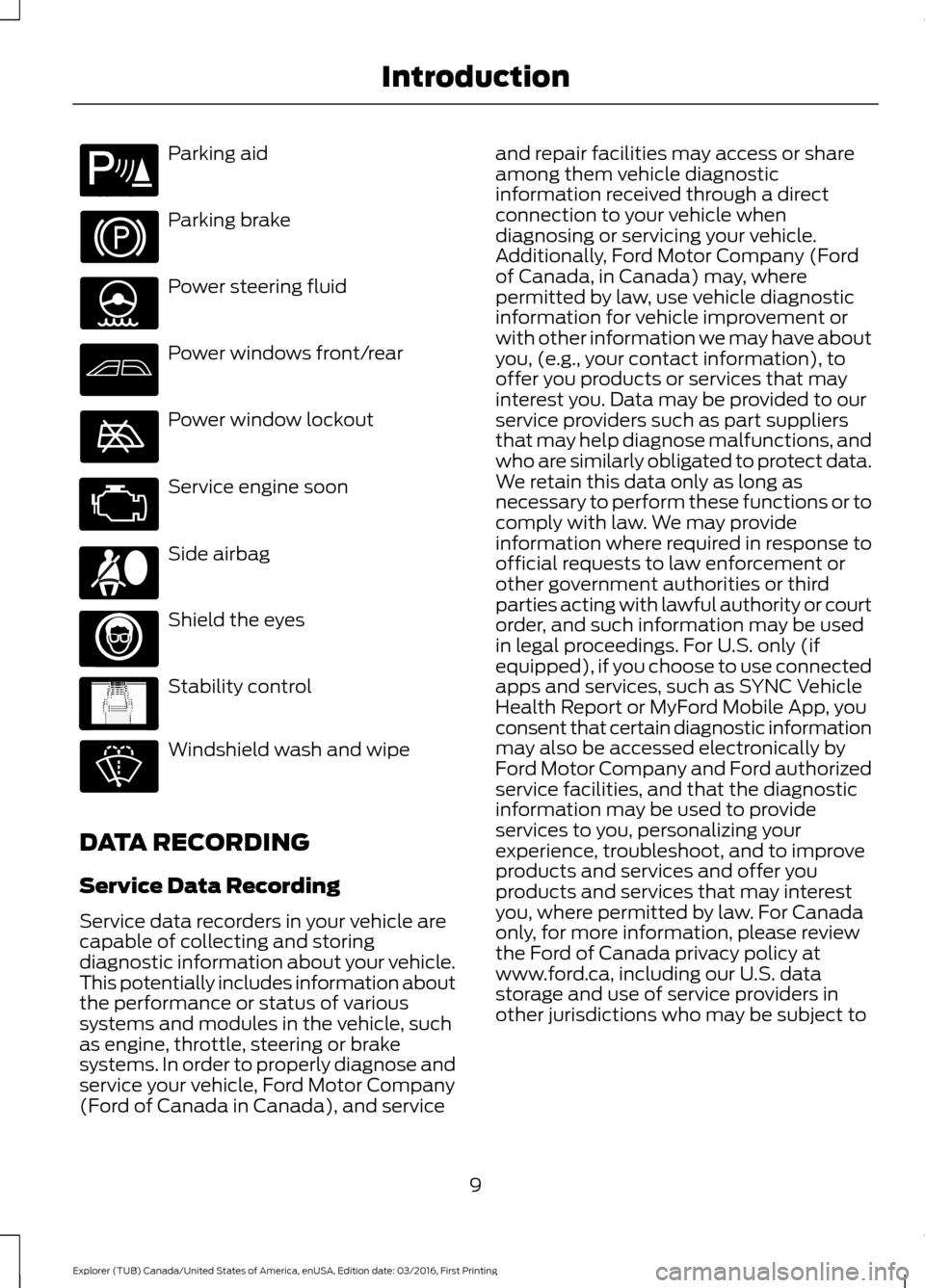
Parking aid
Parking brake
Power steering fluid
Power windows front/rear
Power window lockout
Service engine soon
Side airbag
Shield the eyes
Stability control
Windshield wash and wipe
DATA RECORDING
Service Data Recording
Service data recorders in your vehicle are
capable of collecting and storing
diagnostic information about your vehicle.
This potentially includes information about
the performance or status of various
systems and modules in the vehicle, such
as engine, throttle, steering or brake
systems. In order to properly diagnose and
service your vehicle, Ford Motor Company
(Ford of Canada in Canada), and service and repair facilities may access or share
among them vehicle diagnostic
information received through a direct
connection to your vehicle when
diagnosing or servicing your vehicle.
Additionally, Ford Motor Company (Ford
of Canada, in Canada) may, where
permitted by law, use vehicle diagnostic
information for vehicle improvement or
with other information we may have about
you, (e.g., your contact information), to
offer you products or services that may
interest you. Data may be provided to our
service providers such as part suppliers
that may help diagnose malfunctions, and
who are similarly obligated to protect data.
We retain this data only as long as
necessary to perform these functions or to
comply with law. We may provide
information where required in response to
official requests to law enforcement or
other government authorities or third
parties acting with lawful authority or court
order, and such information may be used
in legal proceedings. For U.S. only (if
equipped), if you choose to use connected
apps and services, such as SYNC Vehicle
Health Report or MyFord Mobile App, you
consent that certain diagnostic information
may also be accessed electronically by
Ford Motor Company and Ford authorized
service facilities, and that the diagnostic
information may be used to provide
services to you, personalizing your
experience, troubleshoot, and to improve
products and services and offer you
products and services that may interest
you, where permitted by law. For Canada
only, for more information, please review
the Ford of Canada privacy policy at
www.ford.ca, including our U.S. data
storage and use of service providers in
other jurisdictions who may be subject to
9
Explorer (TUB) Canada/United States of America, enUSA, Edition date: 03/2016, First Printing IntroductionE139213 E167012 E138639
Page 50 of 541
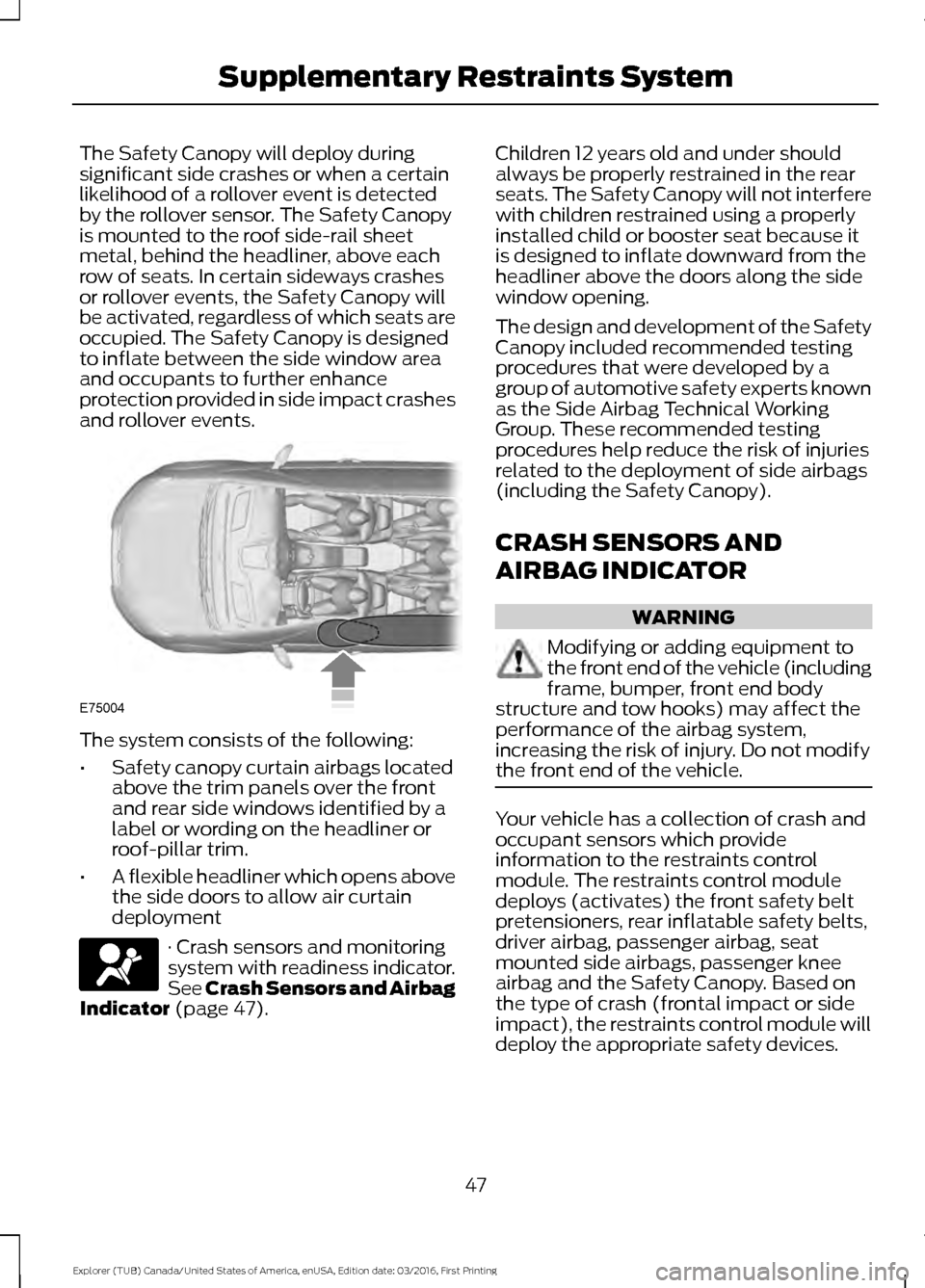
The Safety Canopy will deploy during
significant side crashes or when a certain
likelihood of a rollover event is detected
by the rollover sensor. The Safety Canopy
is mounted to the roof side-rail sheet
metal, behind the headliner, above each
row of seats. In certain sideways crashes
or rollover events, the Safety Canopy will
be activated, regardless of which seats are
occupied. The Safety Canopy is designed
to inflate between the side window area
and occupants to further enhance
protection provided in side impact crashes
and rollover events.
The system consists of the following:
•
Safety canopy curtain airbags located
above the trim panels over the front
and rear side windows identified by a
label or wording on the headliner or
roof-pillar trim.
• A flexible headliner which opens above
the side doors to allow air curtain
deployment · Crash sensors and monitoring
system with readiness indicator.
See Crash Sensors and Airbag
Indicator (page 47). Children 12 years old and under should
always be properly restrained in the rear
seats. The Safety Canopy will not interfere
with children restrained using a properly
installed child or booster seat because it
is designed to inflate downward from the
headliner above the doors along the side
window opening.
The design and development of the Safety
Canopy included recommended testing
procedures that were developed by a
group of automotive safety experts known
as the Side Airbag Technical Working
Group. These recommended testing
procedures help reduce the risk of injuries
related to the deployment of side airbags
(including the Safety Canopy).
CRASH SENSORS AND
AIRBAG INDICATOR
WARNING
Modifying or adding equipment to
the front end of the vehicle (including
frame, bumper, front end body
structure and tow hooks) may affect the
performance of the airbag system,
increasing the risk of injury. Do not modify
the front end of the vehicle. Your vehicle has a collection of crash and
occupant sensors which provide
information to the restraints control
module. The restraints control module
deploys (activates) the front safety belt
pretensioners, rear inflatable safety belts,
driver airbag, passenger airbag, seat
mounted side airbags, passenger knee
airbag and the Safety Canopy. Based on
the type of crash (frontal impact or side
impact), the restraints control module will
deploy the appropriate safety devices.
47
Explorer (TUB) Canada/United States of America, enUSA, Edition date: 03/2016, First Printing Supplementary Restraints SystemE75004
Page 57 of 541
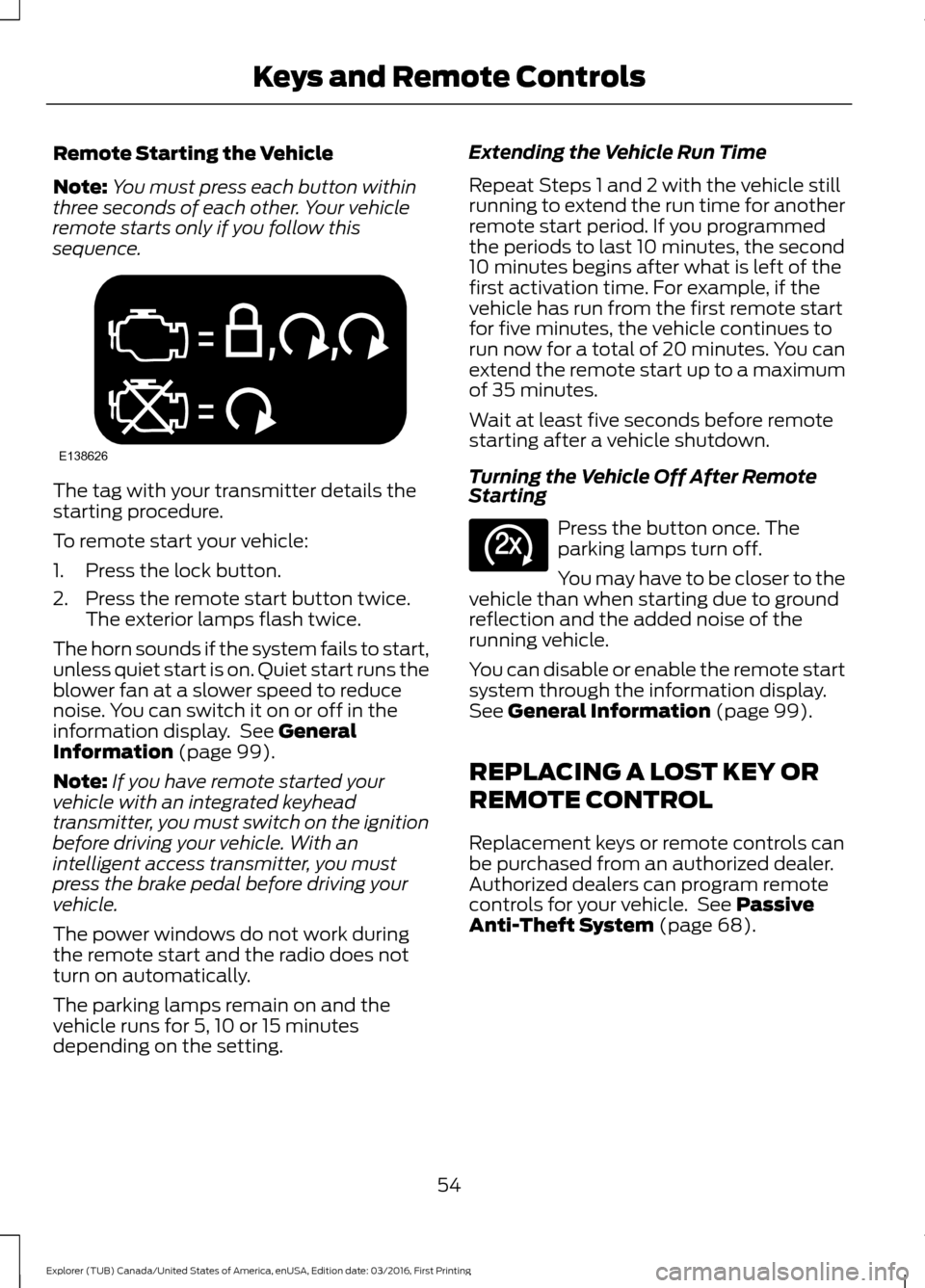
Remote Starting the Vehicle
Note:
You must press each button within
three seconds of each other. Your vehicle
remote starts only if you follow this
sequence. The tag with your transmitter details the
starting procedure.
To remote start your vehicle:
1. Press the lock button.
2. Press the remote start button twice.
The exterior lamps flash twice.
The horn sounds if the system fails to start,
unless quiet start is on. Quiet start runs the
blower fan at a slower speed to reduce
noise. You can switch it on or off in the
information display. See General
Information (page 99).
Note: If you have remote started your
vehicle with an integrated keyhead
transmitter, you must switch on the ignition
before driving your vehicle. With an
intelligent access transmitter, you must
press the brake pedal before driving your
vehicle.
The power windows do not work during
the remote start and the radio does not
turn on automatically.
The parking lamps remain on and the
vehicle runs for 5, 10 or 15 minutes
depending on the setting. Extending the Vehicle Run Time
Repeat Steps 1 and 2 with the vehicle still
running to extend the run time for another
remote start period. If you programmed
the periods to last 10 minutes, the second
10 minutes begins after what is left of the
first activation time. For example, if the
vehicle has run from the first remote start
for five minutes, the vehicle continues to
run now for a total of 20 minutes. You can
extend the remote start up to a maximum
of 35 minutes.
Wait at least five seconds before remote
starting after a vehicle shutdown.
Turning the Vehicle Off After Remote
Starting
Press the button once. The
parking lamps turn off.
You may have to be closer to the
vehicle than when starting due to ground
reflection and the added noise of the
running vehicle.
You can disable or enable the remote start
system through the information display.
See
General Information (page 99).
REPLACING A LOST KEY OR
REMOTE CONTROL
Replacement keys or remote controls can
be purchased from an authorized dealer.
Authorized dealers can program remote
controls for your vehicle. See
Passive
Anti-Theft System (page 68).
54
Explorer (TUB) Canada/United States of America, enUSA, Edition date: 03/2016, First Printing Keys and Remote ControlsE138626 E138625
Page 65 of 541
MANUAL LIFTGATE (If Equipped)
WARNINGS
It is extremely dangerous to ride in a
cargo area, inside or outside of a
vehicle. In a crash, people riding in
these areas are more likely to be seriously
injured or killed. Do not allow people to ride
in any area of your vehicle that is not
equipped with seats and safety belts. Be
sure everyone in your vehicle is in a seat
and using a safety belt properly. Failure to
follow this warning could result in serious
personal injury or death. Make sure to close and latch the
liftgate to prevent drawing exhaust
fumes into your vehicle. This will also
prevent passengers and cargo from falling
out. If you must drive with the liftgate open,
keep the vents or windows open so outside
air comes into your vehicle. Failure to
follow this warning could result in serious
personal injury. Note:
Be careful when opening or closing
the liftgate in a garage or other enclosed
area to avoid damaging the liftgate.
Note: Do not hang anything, for example
a bike rack, from the glass or liftgate. This
could damage the liftgate and its
components.
Note: Do not leave the liftgate open while
driving. This could damage the liftgate and
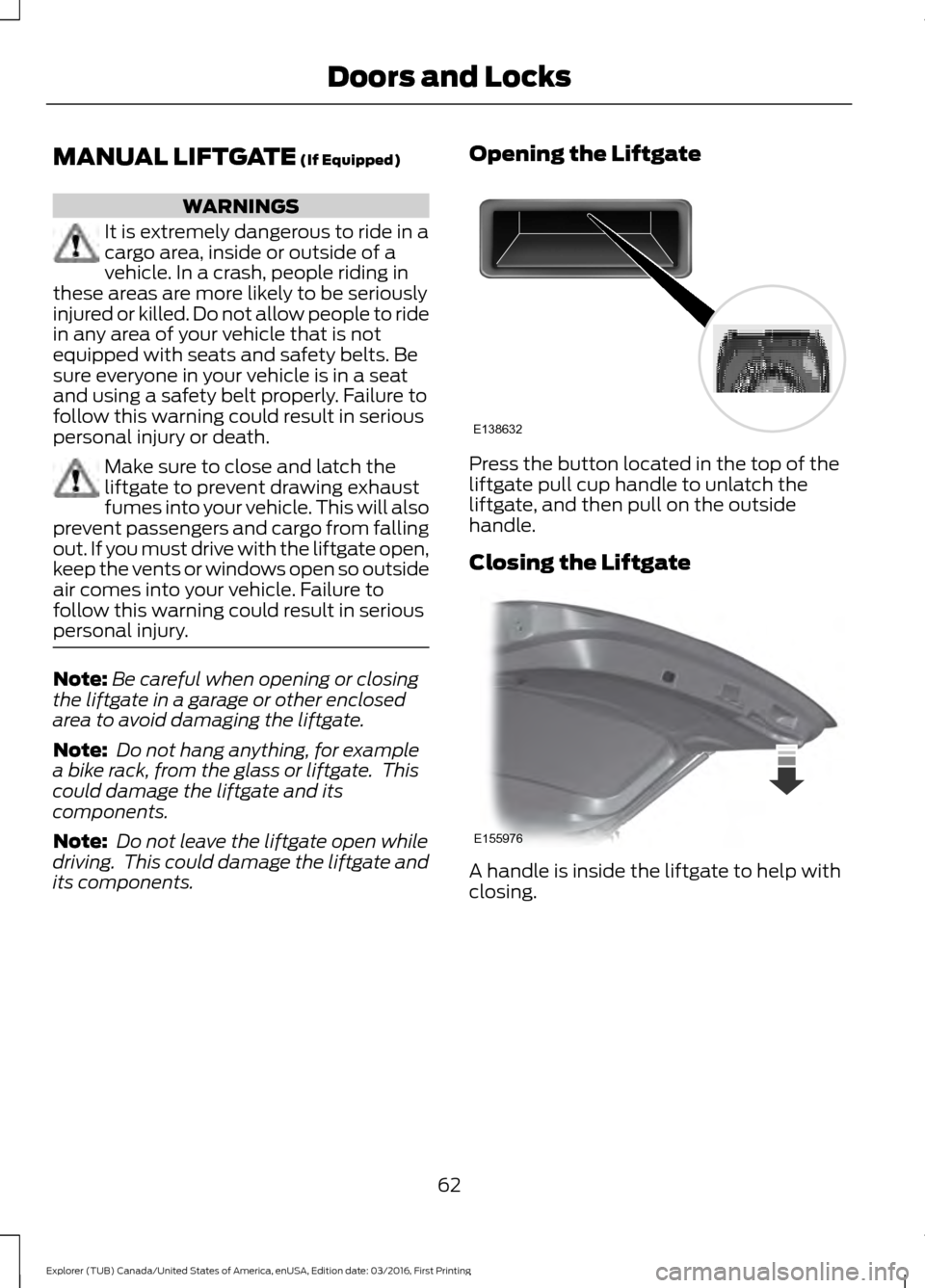
its components. Opening the Liftgate Press the button located in the top of the
liftgate pull cup handle to unlatch the
liftgate, and then pull on the outside
handle.
Closing the Liftgate
A handle is inside the liftgate to help with
closing.
62
Explorer (TUB) Canada/United States of America, enUSA, Edition date: 03/2016, First Printing Doors and LocksE138632 E155976
Page 66 of 541
POWER LIFTGATE (If Equipped)
WARNINGS
It is extremely dangerous to ride in a
cargo area, inside or outside of a
vehicle. In a crash, people riding in
these areas are more likely to be seriously
injured or killed. Do not allow people to ride
in any area of your vehicle that is not
equipped with seats and seatbelts. Make
sure everyone in your vehicle is in a seat
and properly using a seatbelt. Failure to
follow this warning could result in serious
personal injury or death. Make sure to close and latch the
liftgate to prevent drawing exhaust
fumes into your vehicle. This will also
prevent passengers and cargo from falling
out. If you must drive with the liftgate open,
keep the vents or windows open so outside
air comes into your vehicle. Failure to
follow this warning could result in serious
personal injury. Keep keys out of reach of children.
Do not allow children to operate or
play near an open or moving power
liftgate. You should supervise the
operation of the power liftgate at all times. Note:
Make sure that you close the liftgate
before operating or moving your vehicle,
especially in an enclosure, like a garage or
a parking structure. This could damage the
liftgate and its components.
Note: Do not hang anything, for example
a bike rack, from the glass or liftgate. This
could damage the liftgate and its
components.
The liftgate only operates with the
transmission in park (P).
If there is a problem with the open or close
request, a tone will sound for one of the
following reasons: •
The ignition is on and the transmission
is not in park (P).
• The battery voltage is below the
minimum operating voltage.
• The liftgate is not fully closed and your
vehicle speed is at or above
3 mph
(5 km/h).
If the liftgate starts to close after it has
fully opened, this indicates there may be
excessive weight on the liftgate or a
possible strut failure. A repetitive tone
sounds and the liftgate closes under
control. Remove any excessive weight from
the liftgate. If the liftgate continues to
close after opening, have the system
checked by an authorized dealer.
Opening and Closing the Liftgate WARNING
Make sure all persons are clear of the
power liftgate area before using the
power liftgate control.
Note:
Make sure the area behind your
vehicle is free from obstruction and that
there is enough room for you to operate the
liftgate. Objects too close to your vehicle,
for example a wall, garage door or another
vehicle may come into contact with the
moving liftgate. This could damage the
liftgate and its components.
Note: Be careful when opening or closing
the liftgate in a garage or other enclosed
area to avoid damaging the liftgate.
Note: Do not leave the liftgate open while
driving. This could damage the liftgate and
its components.
From the Instrument Panel Press the button on the
instrument panel.
63
Explorer (TUB) Canada/United States of America, enUSA, Edition date: 03/2016, First Printing Doors and LocksE138633
Page 69 of 541
Note:
Allow the power system to open the
liftgate. Manually pushing or pulling the
liftgate may activate the system ’s obstacle
detection feature and stop the power
operation or reverse its direction. Manually
interfering with the liftgate motion may also
replicate a strut failure.
Note: Splashing water may cause the
hands-free liftgate to open. Keep the
intelligent access key away from the rear
bumper detection area when washing your
vehicle.
KEYLESS ENTRY
SECURICODE™ Keyless Entry
Keypad
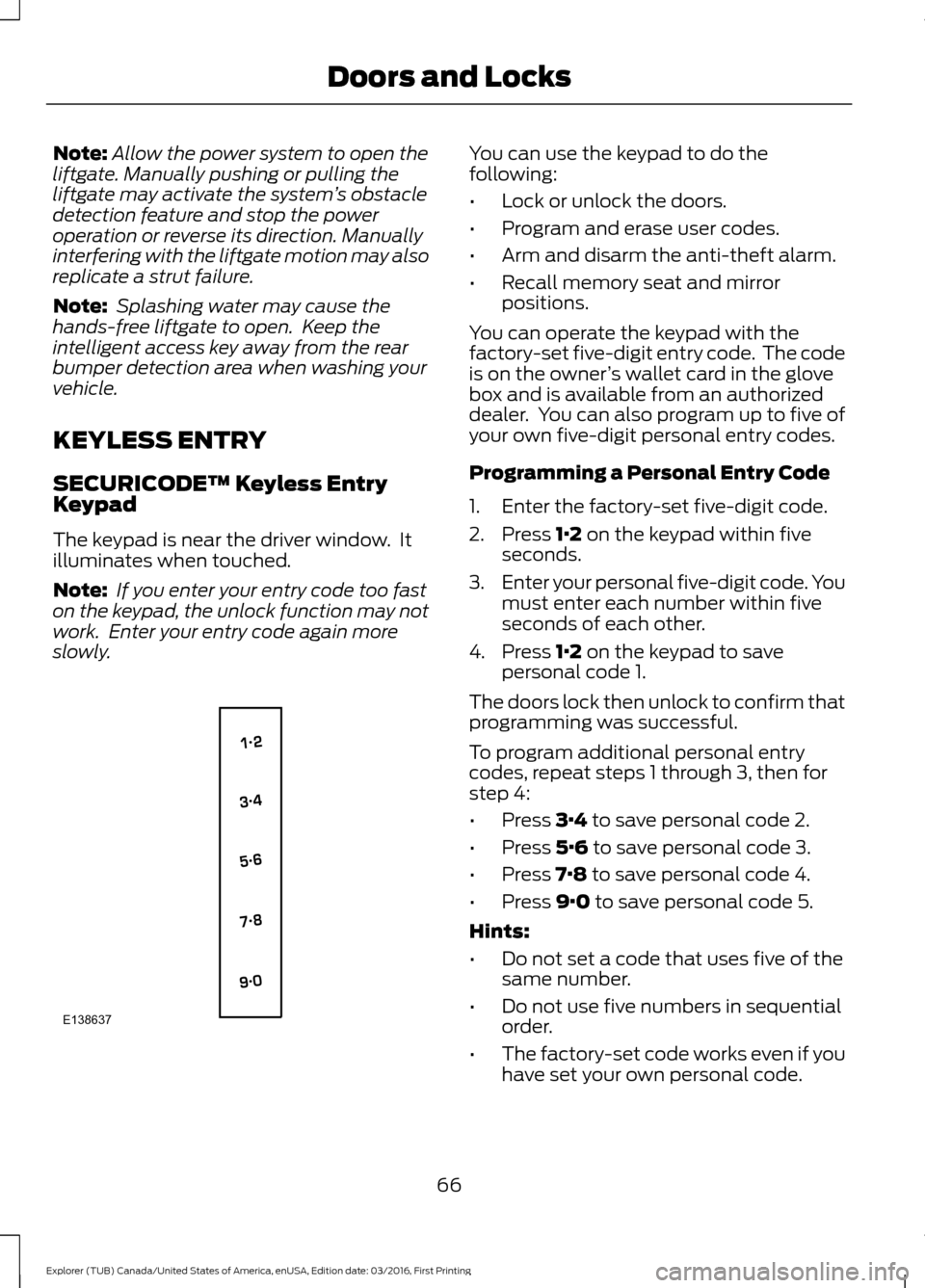
The keypad is near the driver window. It
illuminates when touched.
Note: If you enter your entry code too fast
on the keypad, the unlock function may not
work. Enter your entry code again more
slowly. You can use the keypad to do the
following:
•
Lock or unlock the doors.
• Program and erase user codes.
• Arm and disarm the anti-theft alarm.
• Recall memory seat and mirror
positions.
You can operate the keypad with the
factory-set five-digit entry code. The code
is on the owner ’s wallet card in the glove
box and is available from an authorized
dealer. You can also program up to five of
your own five-digit personal entry codes.
Programming a Personal Entry Code
1. Enter the factory-set five-digit code.
2. Press 1·2 on the keypad within five
seconds.
3. Enter your personal five-digit code. You
must enter each number within five
seconds of each other.
4. Press
1·2 on the keypad to save
personal code 1.
The doors lock then unlock to confirm that
programming was successful.
To program additional personal entry
codes, repeat steps 1 through 3, then for
step 4:
• Press
3·4 to save personal code 2.
• Press
5·6 to save personal code 3.
• Press
7·8 to save personal code 4.
• Press
9·0 to save personal code 5.
Hints:
• Do not set a code that uses five of the
same number.
• Do not use five numbers in sequential
order.
• The factory-set code works even if you
have set your own personal code.
66
Explorer (TUB) Canada/United States of America, enUSA, Edition date: 03/2016, First Printing Doors and LocksE138637
Page 79 of 541
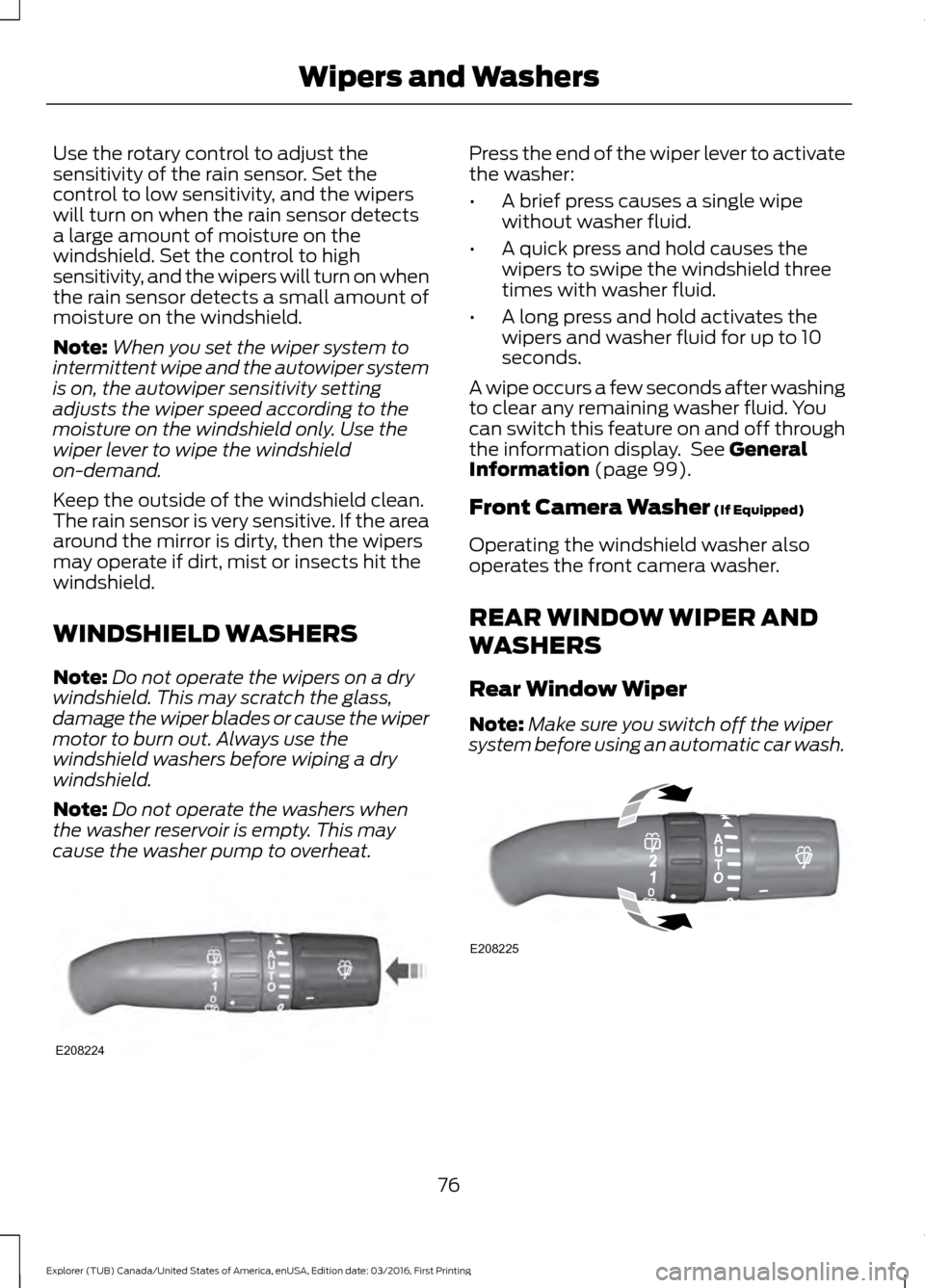
Use the rotary control to adjust the
sensitivity of the rain sensor. Set the
control to low sensitivity, and the wipers
will turn on when the rain sensor detects
a large amount of moisture on the
windshield. Set the control to high
sensitivity, and the wipers will turn on when
the rain sensor detects a small amount of
moisture on the windshield.
Note:
When you set the wiper system to
intermittent wipe and the autowiper system
is on, the autowiper sensitivity setting
adjusts the wiper speed according to the
moisture on the windshield only. Use the
wiper lever to wipe the windshield
on-demand.
Keep the outside of the windshield clean.
The rain sensor is very sensitive. If the area
around the mirror is dirty, then the wipers
may operate if dirt, mist or insects hit the
windshield.
WINDSHIELD WASHERS
Note: Do not operate the wipers on a dry
windshield. This may scratch the glass,
damage the wiper blades or cause the wiper
motor to burn out. Always use the
windshield washers before wiping a dry
windshield.
Note: Do not operate the washers when
the washer reservoir is empty. This may
cause the washer pump to overheat. Press the end of the wiper lever to activate
the washer:
•
A brief press causes a single wipe
without washer fluid.
• A quick press and hold causes the
wipers to swipe the windshield three
times with washer fluid.
• A long press and hold activates the
wipers and washer fluid for up to 10
seconds.
A wipe occurs a few seconds after washing
to clear any remaining washer fluid. You
can switch this feature on and off through
the information display. See General
Information (page 99).
Front Camera Washer
(If Equipped)
Operating the windshield washer also
operates the front camera washer.
REAR WINDOW WIPER AND
WASHERS
Rear Window Wiper
Note: Make sure you switch off the wiper
system before using an automatic car wash. 76
Explorer (TUB) Canada/United States of America, enUSA, Edition date: 03/2016, First Printing Wipers and WashersE208224 E208225