brake FORD EXPLORER 2018 User Guide
[x] Cancel search | Manufacturer: FORD, Model Year: 2018, Model line: EXPLORER, Model: FORD EXPLORER 2018Pages: 571, PDF Size: 7.3 MB
Page 88 of 571
Press repeatedly or press and hold until
you reach the desired level.
HEADLAMP EXIT DELAY
Set the delay time to keep the headlamps
on for up to three minutes after switching
off the ignition.
Follow the steps below to change the
delay time:
Note:
Complete steps 1 through 6 within 10
seconds.
1. Switch the ignition off.
2. Select the autolamp position on the lighting control.
3. Switch the lighting control to the off position.
4. Switch the ignition on.
5. Switch the ignition off.
6. Select the autolamp position on the lighting control. The headlamps and
parking lamps turn on.
7. Switch the lighting control to the off position when reaching the required
delay time. The headlamps and parking
lamps turn off.
Set the headlamp exit delay to one of the
following settings:
• Off.
• 10 seconds.
• 20 seconds.
• 120 seconds.
Note: Adjust the time delay using the
display controls in the information display.
See Information Displays (page 105). DAYTIME RUNNING LAMPS
(If
Equipped) WARNING:
The daytime running
lamps system does not activate the rear
lamps and may not provide adequate
lighting during low visibility driving
conditions. Make sure you switch the
headlamps on, as appropriate, during all
low visibility conditions. Failure to do so
may result in a crash.
Type One - Conventional (Non-
Configurable)
The daytime running lamps turn on when:
1. Switching the ignition on.
2. The transmission is not in park (P) for vehicles with automatic transmissions,
or releasing the parking brake for
vehicles with manual transmissions.
3. The lighting control is in the off, parking
lamp or autolamps positions.
4. The headlamps are off.
Type Two - Configurable
Switch the daytime running lamps on or
off using the information display. See
Information Displays
(page 105).
The daytime running lamps turn on when:
1. The lamps are on in the information display.
2. Switching the ignition on.
3. The transmission is not in park (P) for vehicles with automatic transmissions,
or releasing the parking brake for
vehicles with manual transmissions.
4. The lighting control is in the autolamps
position.
5. The headlamps are off.
85
Explorer (TUB) Canada/United States of America, enUSA, Edition date: 201711, Fourth-Printing Lighting
Page 103 of 571
Engine Coolant Temperature
Gauge
Shows the temperature of the engine
coolant. At normal operating temperature,
the needle remains in the center section.
If the needle enters the red section, the
engine is overheating. Stop the engine,
switch the ignition off and determine the
cause once the engine has cooled down.
Note:
Do not restart the engine until the
cause of the overheating has been resolved. WARNING: Do not remove the
coolant reservoir cap when the cooling
system is hot. Wait 10 minutes for the
cooling system to cool down. Cover the
coolant reservoir cap with a thick cloth to
prevent the possibility of scalding and
slowly remove the cap. Failure to follow
this instruction could result in personal
injury.
Fuel Gauge
The fuel gauge indicates about how much
fuel is in the fuel tank.
The arrow adjacent to the fuel pump
symbol indicates on which side of your
vehicle the fuel filler door is located.
Note: The fuel gauge may vary slightly
when your vehicle is moving or on a slope.
Low Fuel Reminder
A low fuel level reminder displays and
sounds when the distance to empty
reaches
75 mi (120 km) to empty for
MyKey, and at 50 mi (80 km), 25 mi
(40 km), 10 mi (20 km) and 0 mi (0 km)
for all vehicle keys.
Note: The low fuel reminder can appear at
different fuel gauge positions depending on
fuel economy conditions. This variation is
normal. WARNING LAMPS AND
INDICATORS
The following warning lamps and
indicators alert you to a vehicle condition
that may become serious. Some lamps
illuminate when you start your vehicle to
make sure they work. If any lamps remain
on after starting your vehicle, refer to the
respective system warning lamp for further
information.
Note:
Some warning indicators appear in
the information display and function the
same as a warning lamp, but do not display
when you start your vehicle.
Adaptive Cruise Control
(If Equipped) The speed control system
indicator light changes color to
indicate what mode the system
is in. See Using Adaptive Cruise Control
(page
221).
On (white light): Illuminates when you
switch on the adaptive cruise control
system. Turns off when the speed control
system is turned off.
Engaged (green light): Illuminates when
you engage the adaptive cruise control
system. Turns off when you disengage the
speed control system.
Anti-Lock Braking System If it illuminates when you are
driving, this indicates a
malfunction. You continue to
have the normal braking system (without
ABS) unless the brake system warning
lamp is also illuminated. Have the system
checked by an authorized dealer.
100
Explorer (TUB) Canada/United States of America, enUSA, Edition date: 201711, Fourth-Printing Instrument ClusterE144524
Page 104 of 571
Automatic High Beam Control (If
Equipped) It illuminates when this feature
is on. See
Automatic High
Beam Control (page 86).
Battery If it illuminates while driving, it
indicates a malfunction. Switch
off all unnecessary electrical
equipment and have the system checked
by an authorized dealer immediately.
Blind Spot Monitor
(If Equipped) It illuminates when you switch
this feature off or in conjunction
with a message. See Blind Spot
Information System
(page 232).
Brake System It illuminates when you engage
the parking brake with the
ignition on.
If it illuminates when you are driving, check
that the parking brake is not engaged. If
the parking brake is not engaged, this
indicates low brake fluid level or a brake
system malfunction. Have the system
checked immediately by an authorized
dealer. WARNING: Driving your vehicle with
the warning lamp on is dangerous. A
significant decrease in braking
performance may occur. It may take you
longer to stop your vehicle. Have your
vehicle checked as soon as possible.
Driving extended distances with the
parking brake engaged can cause brake
failure and the risk of personal injury. Cruise Control
(If Equipped) It illuminates when you switch
this feature on.
Direction Indicator Illuminates when you switch on
the left or right direction
indicator or the hazard warning
flasher. If the indicators stay on or flash
faster, check for a burned out bulb. See
Changing a Bulb
(page 303).
Door Ajar Displays when the ignition is on
and any door is not completely
closed.
Engine Coolant Temperature Illuminates when the engine
coolant temperature is high.
Stop the vehicle as soon as
possible, switch off the engine and let cool.
See
Engine Coolant Check (page 291).
Engine Oil If it illuminates with the engine
running or when you are driving,
this indicates a malfunction.
Stop your vehicle as soon as it is safe to
do so and switch the engine off. Check the
engine oil level. See
Engine Oil Check
(page 289).
Note: Do not resume your journey if it
illuminates despite the level being correct.
Have the system checked by an authorized
dealer immediately.
101
Explorer (TUB) Canada/United States of America, enUSA, Edition date: 201711, Fourth-Printing Instrument Cluster E151262 E144522 E71340
Page 106 of 571
Service Engine Soon
If it illuminates when the engine
is running this indicates a
malfunction. The On Board
Diagnostics system has detected a
malfunction of the vehicle emission control
system.
If it flashes, engine misfire may be
occurring. Increased exhaust gas
temperatures could damage the catalytic
converter or other vehicle components.
Drive in a moderate fashion (avoid heavy
acceleration and deceleration) and have
your vehicle immediately serviced.
It illuminates when you switch the ignition
on prior to engine start to check the bulb
and to indicate whether your vehicle is
ready for Inspection and Maintenance
(I/M) testing.
Normally, it illuminates until the engine is
cranked and automatically turns off if no
malfunctions are present. However, if after
15 seconds it flashes eight times, this
indicates that your vehicle is not ready for
Inspection and Maintenance (I/M) testing.
See Catalytic Converter (page 184).
Stability Control It flashes when the system is
active. If it remains illuminated
or does not illuminate when you
switch the ignition on, this indicates a
malfunction. During a malfunction the
system switches off. Have the system
checked by an authorized dealer
immediately. See
Using Stability
Control (page 201).
Stability Control Off It illuminates when you switch
the system off. It goes out when
you switch the system back on
or when you switch the ignition off. See
Using Stability Control
(page 201). Transmission Tow/Haul
(If Equipped) Illuminates when you activate
the tow/haul feature. If the light
flashes steadily, have the system
serviced immediately. Damage to the
transmission could occur. See
Automatic
Transmission (page 187).
AUDIBLE WARNINGS AND
INDICATORS
Key in Ignition Warning Chime
(If
Equipped)
Sounds when you open the driver's door
and you have left the key in the ignition.
Engine On Warning Chime
A warning chime will sound when any door
is opened if the vehicle exceeds a relatively
low speed.
Keyless Warning Alert
(If Equipped)
Sounds the horn twice when you exit the
vehicle and the keyless vehicle is in RUN,
indicating the vehicle is still on.
Headlamps On Warning Chime
Sounds when you remove the key from the
ignition and open the driver's door and you
have left the headlamps or parking lamps
on.
Parking Brake On Warning Chime
Sounds when you have left the parking
brake on and drive your vehicle. If the
warning chime remains on after you have
released the parking brake, have the
system checked by your authorized dealer
immediately.
103
Explorer (TUB) Canada/United States of America, enUSA, Edition date: 201711, Fourth-Printing Instrument Cluster E138639 E130458 E161509
Page 126 of 571
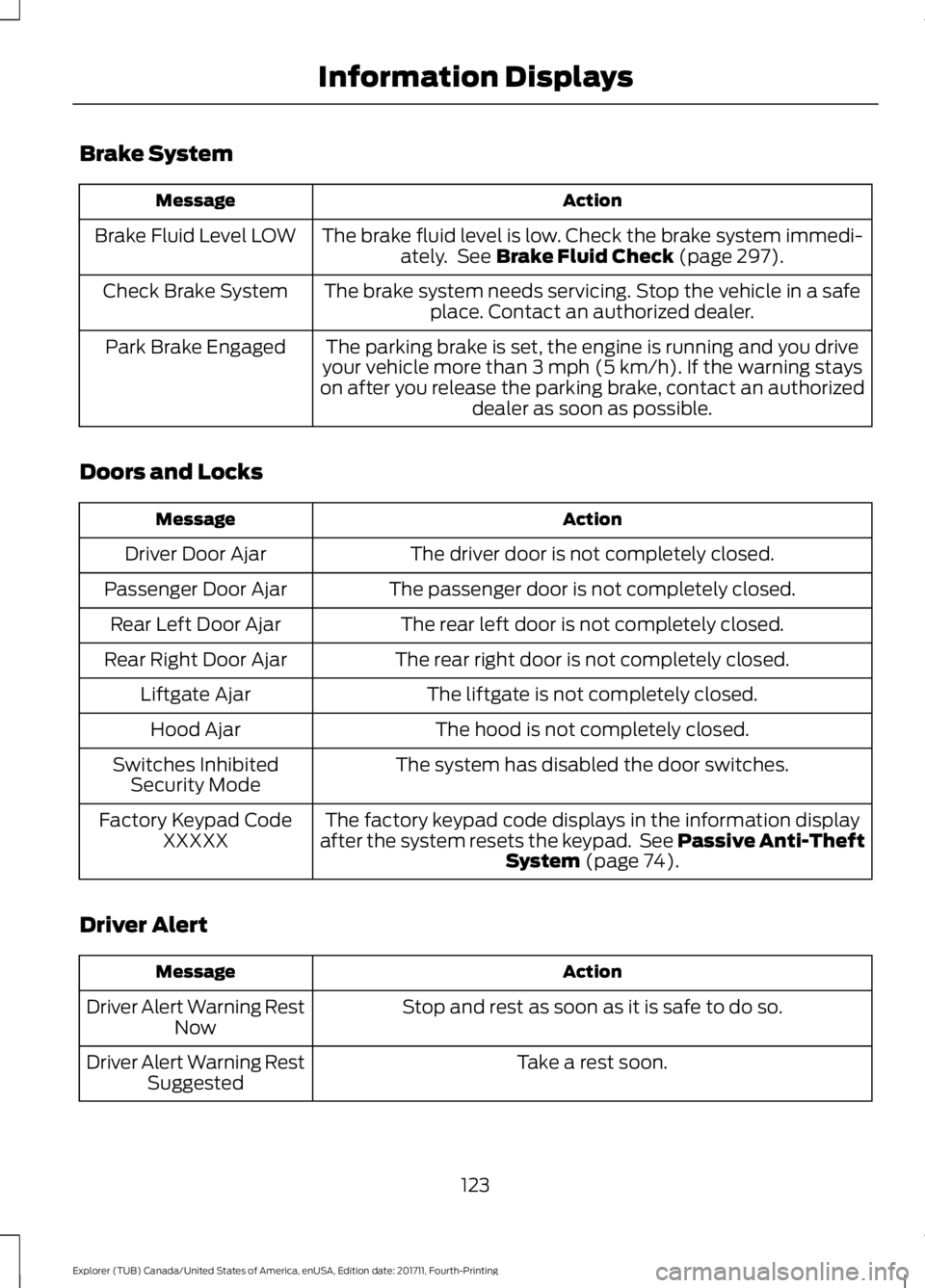
Brake System
Action
Message
The brake fluid level is low. Check the brake system immedi-ately. See Brake Fluid Check (page 297).
Brake Fluid Level LOW
The brake system needs servicing. Stop the vehicle in a safeplace. Contact an authorized dealer.
Check Brake System
The parking brake is set, the engine is running and you drive
your vehicle more than 3 mph (5 km/h). If the warning stays
on after you release the parking brake, contact an authorized dealer as soon as possible.
Park Brake Engaged
Doors and Locks Action
Message
The driver door is not completely closed.
Driver Door Ajar
The passenger door is not completely closed.
Passenger Door Ajar
The rear left door is not completely closed.
Rear Left Door Ajar
The rear right door is not completely closed.
Rear Right Door Ajar
The liftgate is not completely closed.
Liftgate Ajar
The hood is not completely closed.
Hood Ajar
The system has disabled the door switches.
Switches Inhibited
Security Mode
The factory keypad code displays in the information display
after the system resets the keypad. See Passive Anti-Theft System
(page 74).
Factory Keypad Code
XXXXX
Driver Alert Action
Message
Stop and rest as soon as it is safe to do so.
Driver Alert Warning Rest
Now
Take a rest soon.
Driver Alert Warning Rest
Suggested
123
Explorer (TUB) Canada/United States of America, enUSA, Edition date: 201711, Fourth-Printing Information Displays
Page 128 of 571
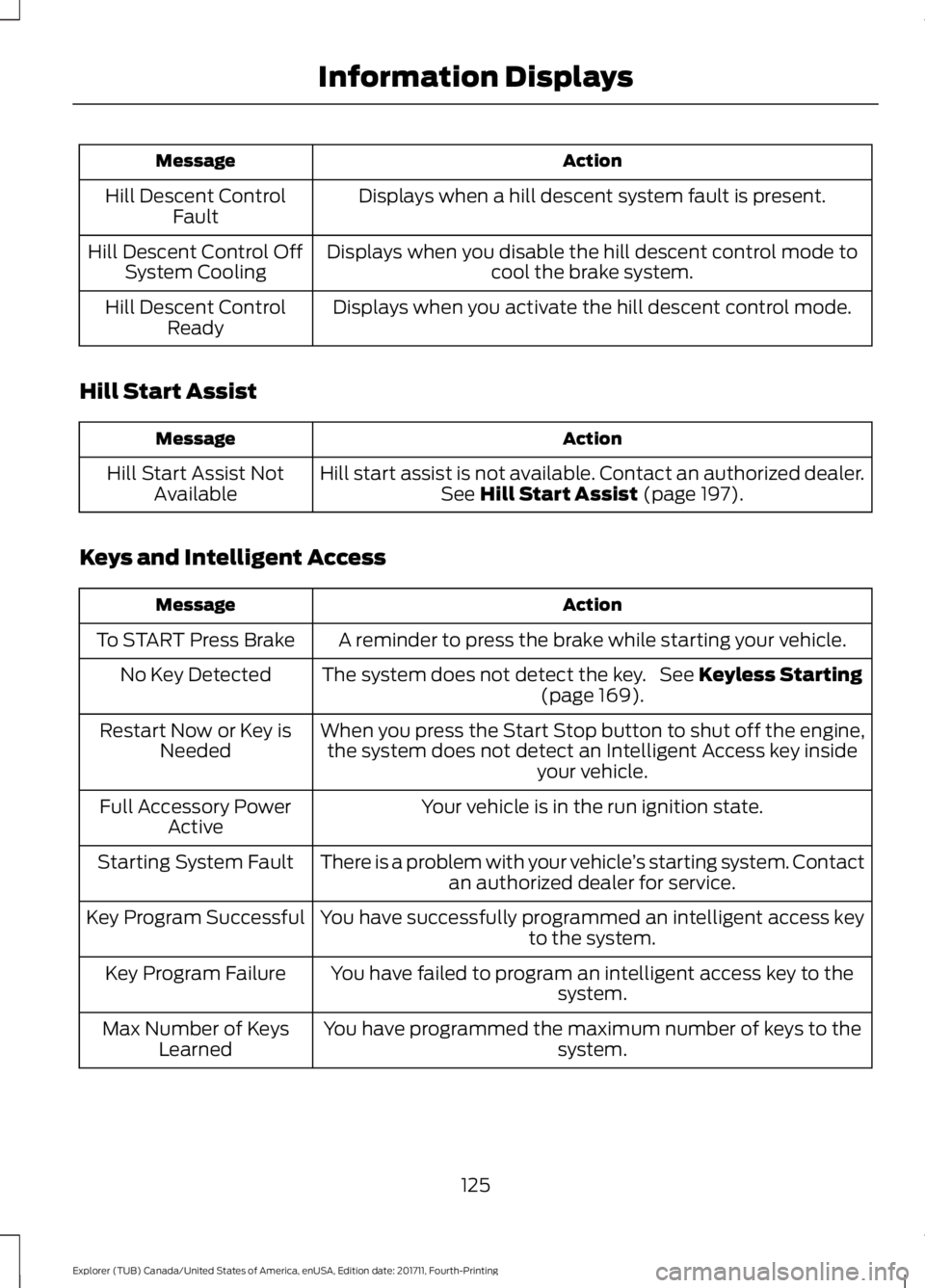
Action
Message
Displays when a hill descent system fault is present.
Hill Descent Control
Fault
Displays when you disable the hill descent control mode to cool the brake system.
Hill Descent Control Off
System Cooling
Displays when you activate the hill descent control mode.
Hill Descent Control
Ready
Hill Start Assist Action
Message
Hill start assist is not available. Contact an authorized dealer.See Hill Start Assist (page 197).
Hill Start Assist Not
Available
Keys and Intelligent Access Action
Message
A reminder to press the brake while starting your vehicle.
To START Press Brake
The system does not detect the key. See
Keyless Starting
(page 169).
No Key Detected
When you press the Start Stop button to shut off the engine,the system does not detect an Intelligent Access key inside your vehicle.
Restart Now or Key is
Needed
Your vehicle is in the run ignition state.
Full Accessory Power
Active
There is a problem with your vehicle ’s starting system. Contact
an authorized dealer for service.
Starting System Fault
You have successfully programmed an intelligent access keyto the system.
Key Program Successful
You have failed to program an intelligent access key to thesystem.
Key Program Failure
You have programmed the maximum number of keys to the system.
Max Number of Keys
Learned
125
Explorer (TUB) Canada/United States of America, enUSA, Edition date: 201711, Fourth-Printing Information Displays
Page 131 of 571
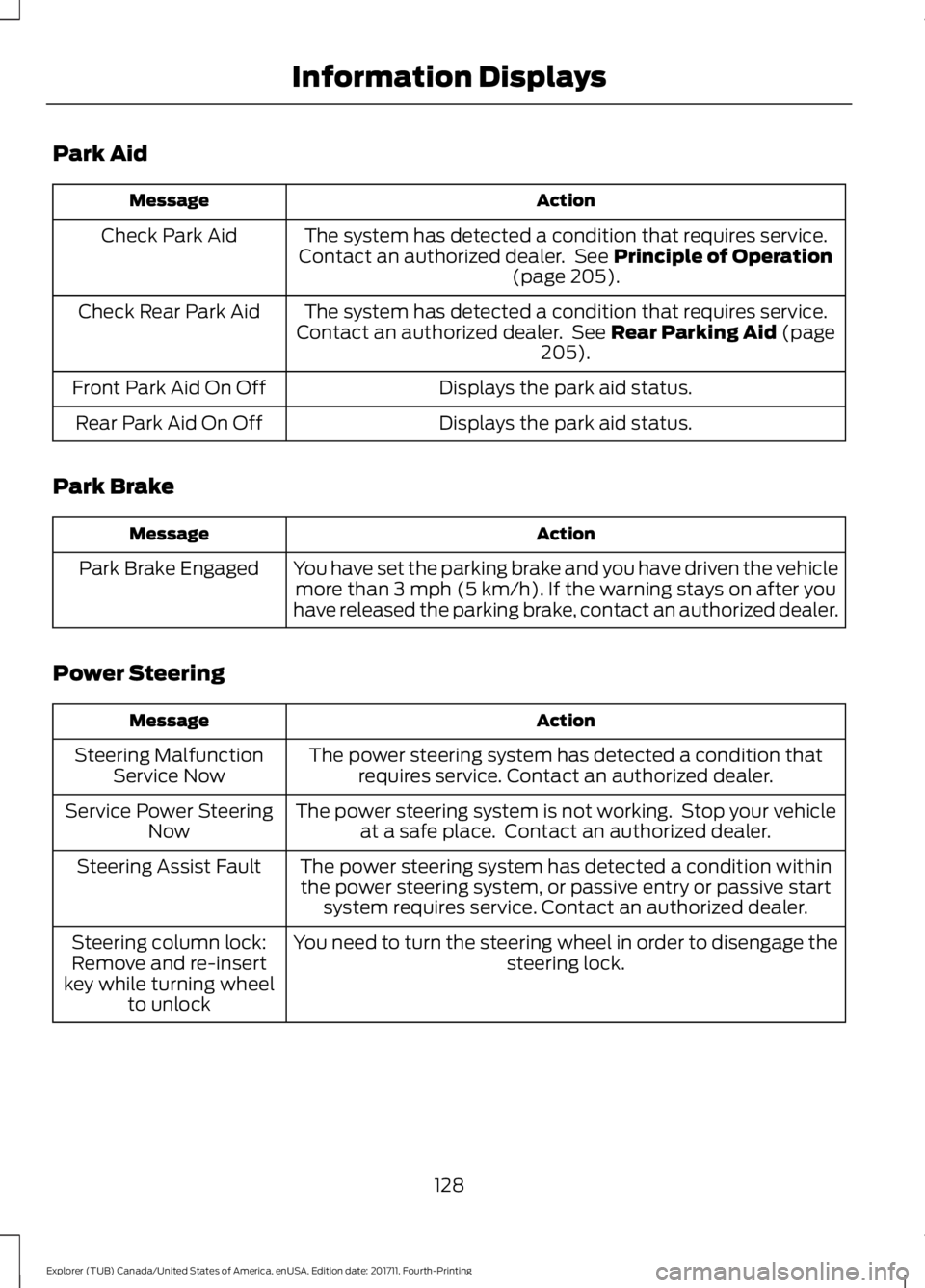
Park Aid
Action
Message
The system has detected a condition that requires service.
Contact an authorized dealer. See Principle of Operation
(page 205).
Check Park Aid
The system has detected a condition that requires service.
Contact an authorized dealer. See
Rear Parking Aid (page
205).
Check Rear Park Aid
Displays the park aid status.
Front Park Aid On Off
Displays the park aid status.
Rear Park Aid On Off
Park Brake Action
Message
You have set the parking brake and you have driven the vehiclemore than 3 mph (5 km/h). If the warning stays on after you
have released the parking brake, contact an authorized dealer.
Park Brake Engaged
Power Steering Action
Message
The power steering system has detected a condition thatrequires service. Contact an authorized dealer.
Steering Malfunction
Service Now
The power steering system is not working. Stop your vehicleat a safe place. Contact an authorized dealer.
Service Power Steering
Now
The power steering system has detected a condition withinthe power steering system, or passive entry or passive start system requires service. Contact an authorized dealer.
Steering Assist Fault
You need to turn the steering wheel in order to disengage thesteering lock.
Steering column lock:
Remove and re-insert
key while turning wheel to unlock
128
Explorer (TUB) Canada/United States of America, enUSA, Edition date: 201711, Fourth-Printing Information Displays
Page 132 of 571
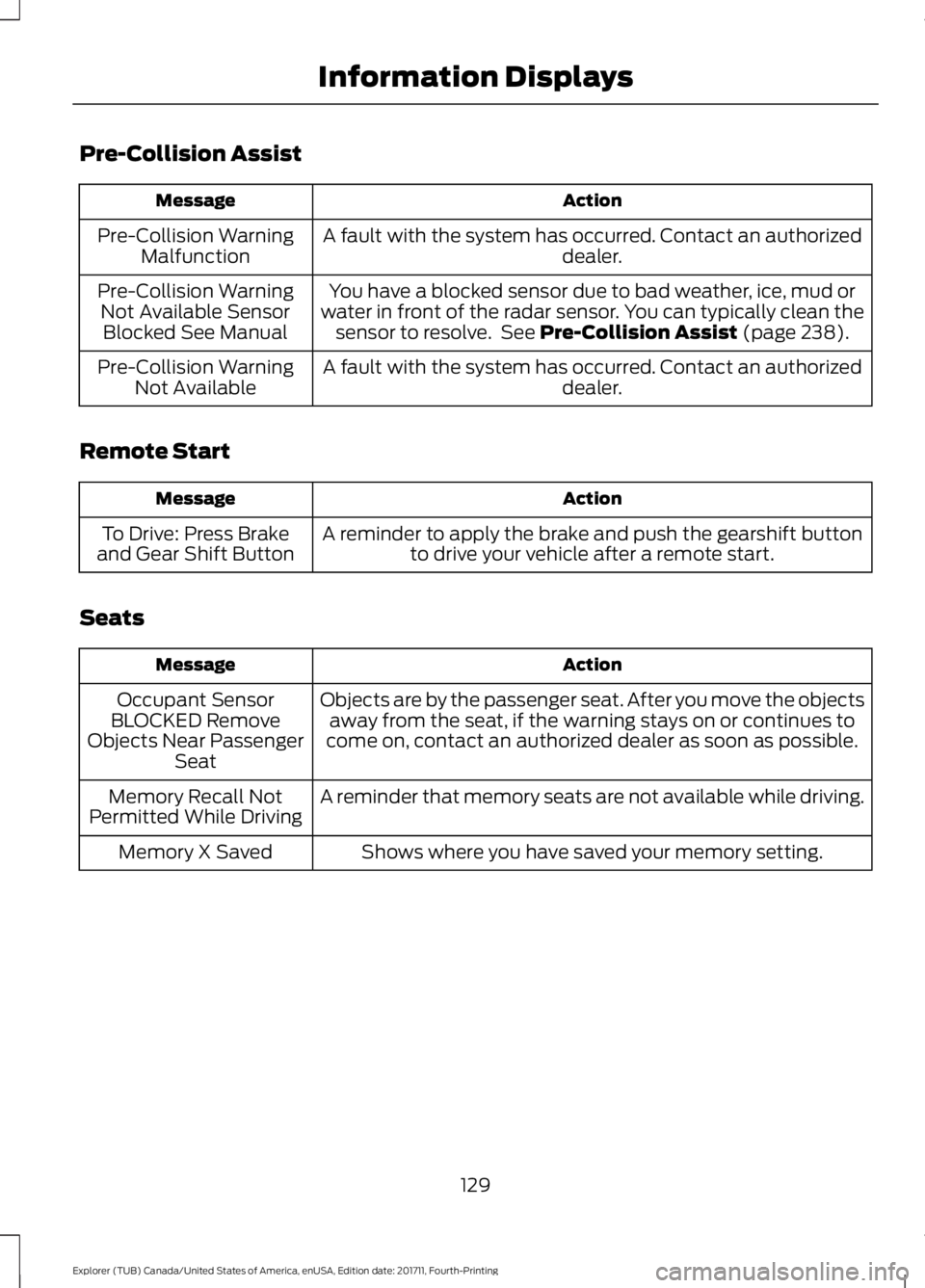
Pre-Collision Assist
Action
Message
A fault with the system has occurred. Contact an authorized dealer.
Pre-Collision Warning
Malfunction
You have a blocked sensor due to bad weather, ice, mud or
water in front of the radar sensor. You can typically clean the sensor to resolve. See Pre-Collision Assist (page 238).
Pre-Collision Warning
Not Available SensorBlocked See Manual
A fault with the system has occurred. Contact an authorized dealer.
Pre-Collision Warning
Not Available
Remote Start Action
Message
A reminder to apply the brake and push the gearshift buttonto drive your vehicle after a remote start.
To Drive: Press Brake
and Gear Shift Button
Seats Action
Message
Objects are by the passenger seat. After you move the objectsaway from the seat, if the warning stays on or continues to
come on, contact an authorized dealer as soon as possible.
Occupant Sensor
BLOCKED Remove
Objects Near Passenger Seat
A reminder that memory seats are not available while driving.
Memory Recall Not
Permitted While Driving
Shows where you have saved your memory setting.
Memory X Saved
129
Explorer (TUB) Canada/United States of America, enUSA, Edition date: 201711, Fourth-Printing Information Displays
Page 133 of 571
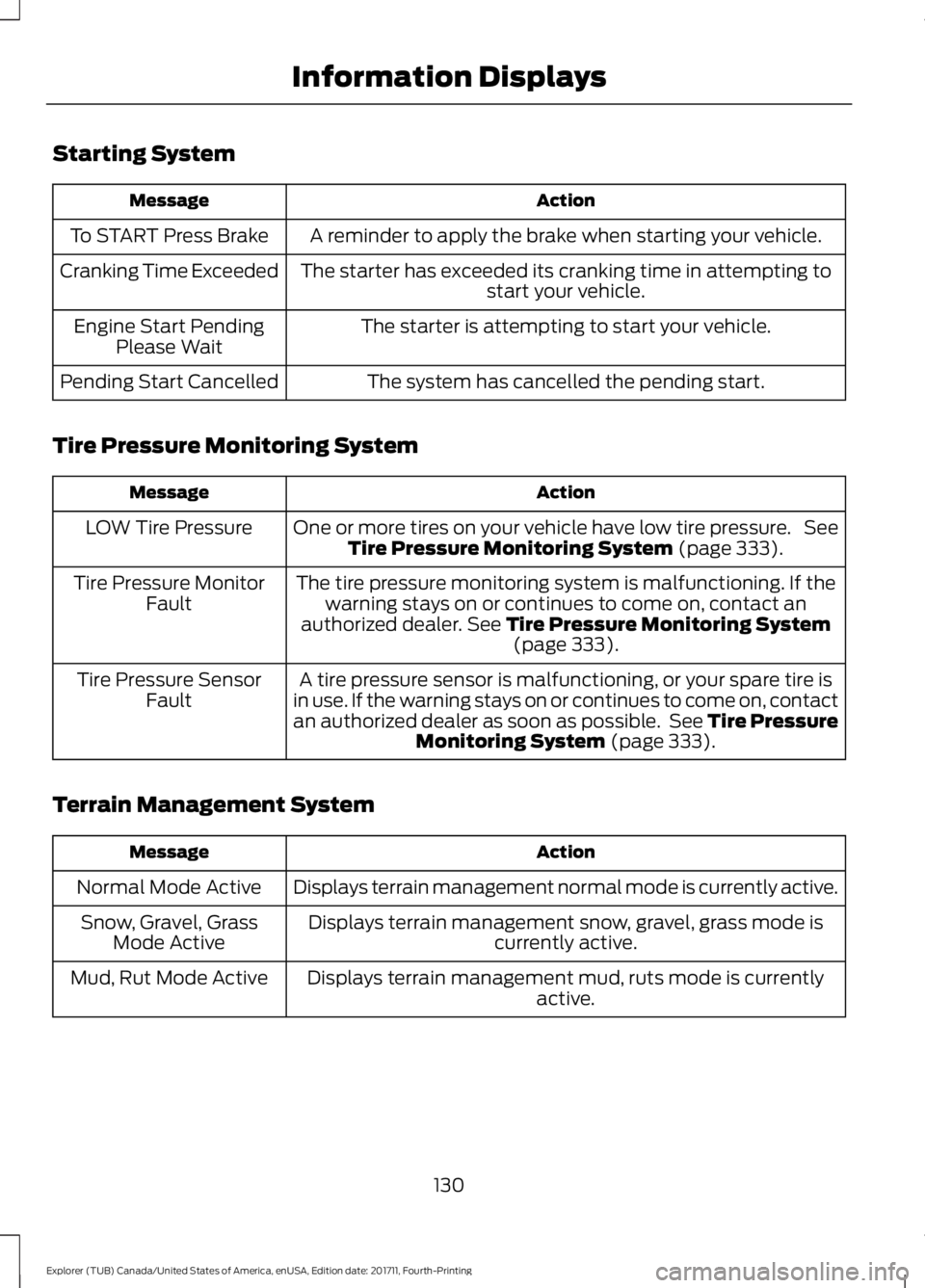
Starting System
Action
Message
A reminder to apply the brake when starting your vehicle.
To START Press Brake
The starter has exceeded its cranking time in attempting tostart your vehicle.
Cranking Time Exceeded
The starter is attempting to start your vehicle.
Engine Start Pending
Please Wait
The system has cancelled the pending start.
Pending Start Cancelled
Tire Pressure Monitoring System Action
Message
One or more tires on your vehicle have low tire pressure. SeeTire Pressure Monitoring System (page 333).
LOW Tire Pressure
The tire pressure monitoring system is malfunctioning. If thewarning stays on or continues to come on, contact an
authorized dealer.
See Tire Pressure Monitoring System (page 333).
Tire Pressure Monitor
Fault
A tire pressure sensor is malfunctioning, or your spare tire is
in use. If the warning stays on or continues to come on, contact
an authorized dealer as soon as possible. See Tire Pressure Monitoring System
(page 333).
Tire Pressure Sensor
Fault
Terrain Management System Action
Message
Displays terrain management normal mode is currently active.
Normal Mode Active
Displays terrain management snow, gravel, grass mode iscurrently active.
Snow, Gravel, Grass
Mode Active
Displays terrain management mud, ruts mode is currently active.
Mud, Rut Mode Active
130
Explorer (TUB) Canada/United States of America, enUSA, Edition date: 201711, Fourth-Printing Information Displays
Page 134 of 571
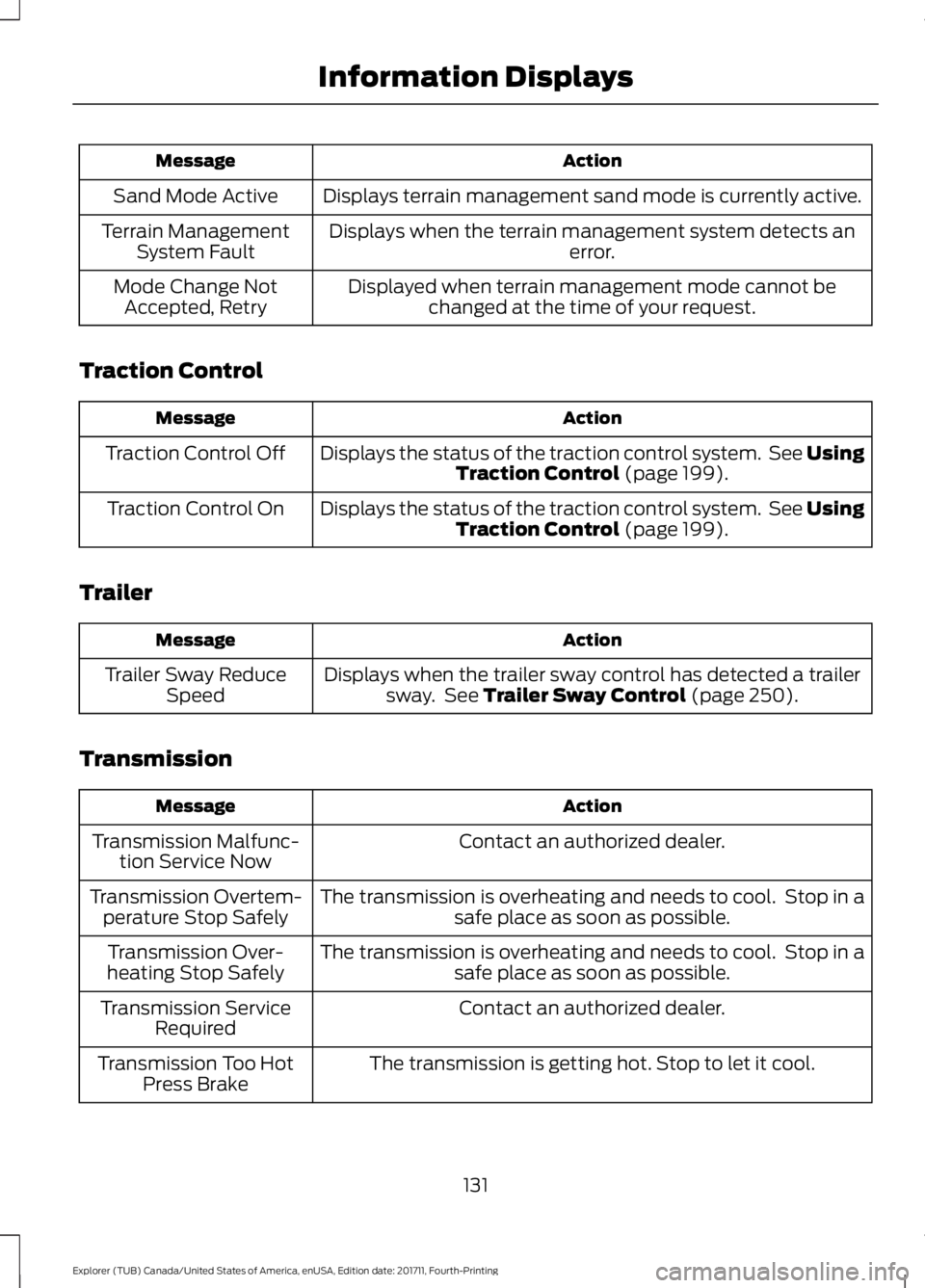
Action
Message
Displays terrain management sand mode is currently active.
Sand Mode Active
Displays when the terrain management system detects an error.
Terrain Management
System Fault
Displayed when terrain management mode cannot bechanged at the time of your request.
Mode Change Not
Accepted, Retry
Traction Control Action
Message
Displays the status of the traction control system. See UsingTraction Control (page 199).
Traction Control Off
Displays the status of the traction control system. See UsingTraction Control
(page 199).
Traction Control On
Trailer Action
Message
Displays when the trailer sway control has detected a trailersway. See
Trailer Sway Control (page 250).
Trailer Sway Reduce
Speed
Transmission Action
Message
Contact an authorized dealer.
Transmission Malfunc-
tion Service Now
The transmission is overheating and needs to cool. Stop in asafe place as soon as possible.
Transmission Overtem-
perature Stop Safely
The transmission is overheating and needs to cool. Stop in asafe place as soon as possible.
Transmission Over-
heating Stop Safely
Contact an authorized dealer.
Transmission Service
Required
The transmission is getting hot. Stop to let it cool.
Transmission Too Hot
Press Brake
131
Explorer (TUB) Canada/United States of America, enUSA, Edition date: 201711, Fourth-Printing Information Displays