control module FORD EXPLORER 2018 User Guide
[x] Cancel search | Manufacturer: FORD, Model Year: 2018, Model line: EXPLORER, Model: FORD EXPLORER 2018Pages: 571, PDF Size: 7.3 MB
Page 281 of 571
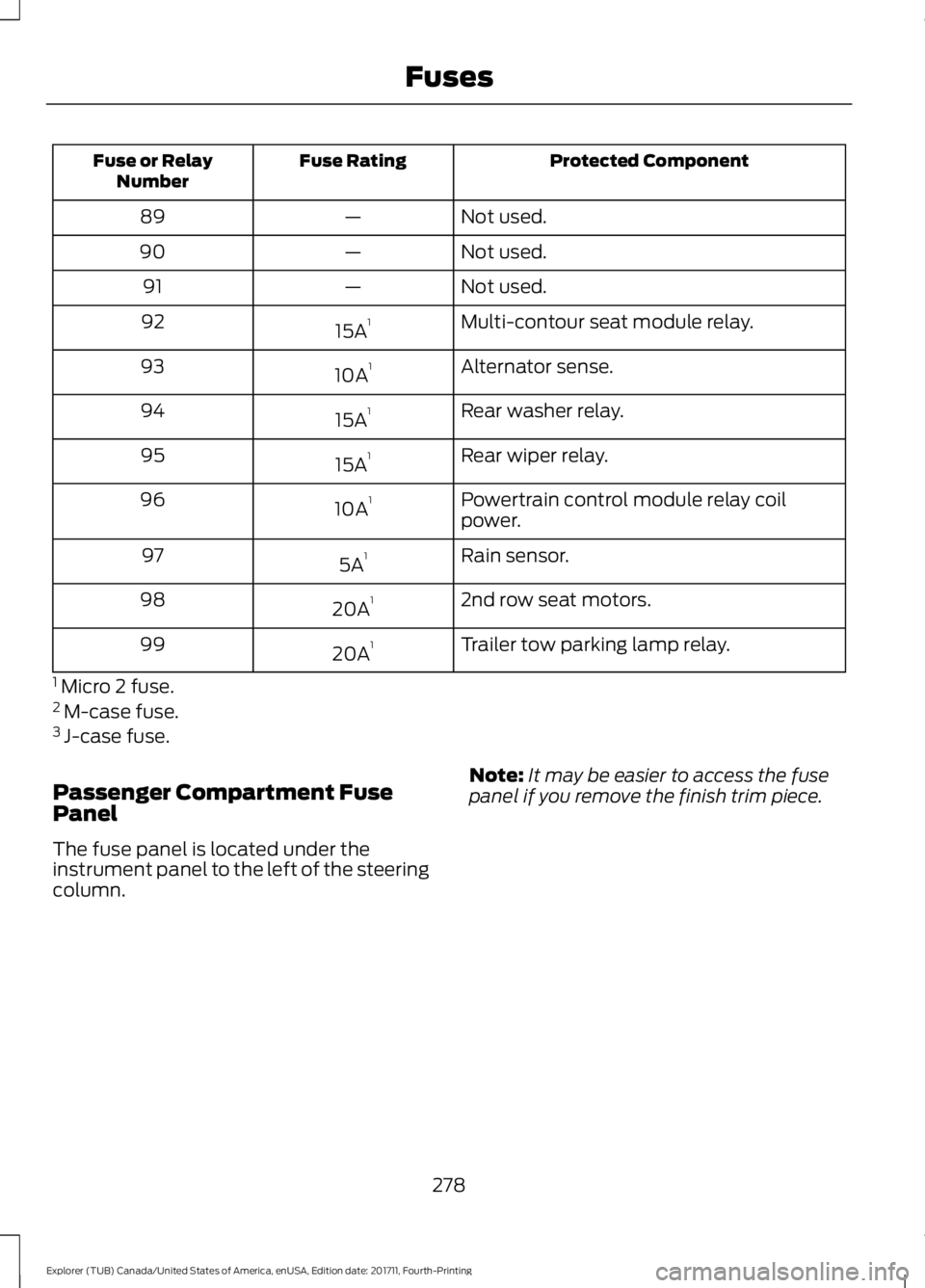
Protected Component
Fuse Rating
Fuse or Relay
Number
Not used.
—
89
Not used.
—
90
Not used.
—
91
Multi-contour seat module relay.
15A 1
92
Alternator sense.
10A 1
93
Rear washer relay.
15A 1
94
Rear wiper relay.
15A 1
95
Powertrain control module relay coil
power.
10A 1
96
Rain sensor.
5A 1
97
2nd row seat motors.
20A 1
98
Trailer tow parking lamp relay.
20A 1
99
1 Micro 2 fuse.
2 M-case fuse.
3 J-case fuse.
Passenger Compartment Fuse
Panel
The fuse panel is located under the
instrument panel to the left of the steering
column. Note:
It may be easier to access the fuse
panel if you remove the finish trim piece.
278
Explorer (TUB) Canada/United States of America, enUSA, Edition date: 201711, Fourth-Printing Fuses
Page 282 of 571
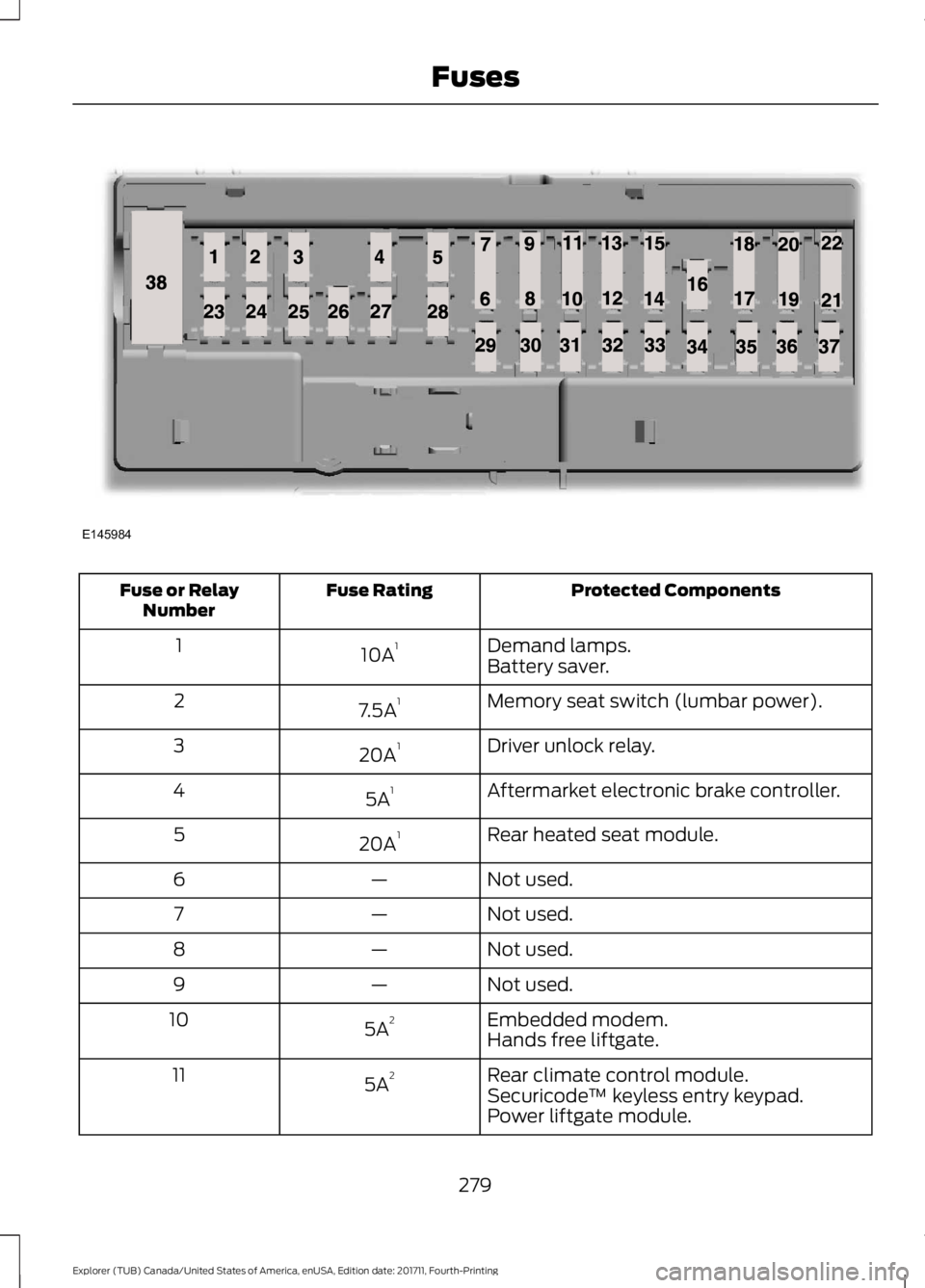
Protected Components
Fuse Rating
Fuse or Relay
Number
Demand lamps.
10A 1
1
Battery saver.
Memory seat switch (lumbar power).
7.5A 1
2
Driver unlock relay.
20A 1
3
Aftermarket electronic brake controller.
5A 1
4
Rear heated seat module.
20A 1
5
Not used.
—
6
Not used.
—
7
Not used.
—
8
Not used.
—
9
Embedded modem.
5A 2
10
Hands free liftgate.
Rear climate control module.
5A 2
11
Securicode™ keyless entry keypad.
Power liftgate module.
279
Explorer (TUB) Canada/United States of America, enUSA, Edition date: 201711, Fourth-Printing FusesE145984
Page 283 of 571
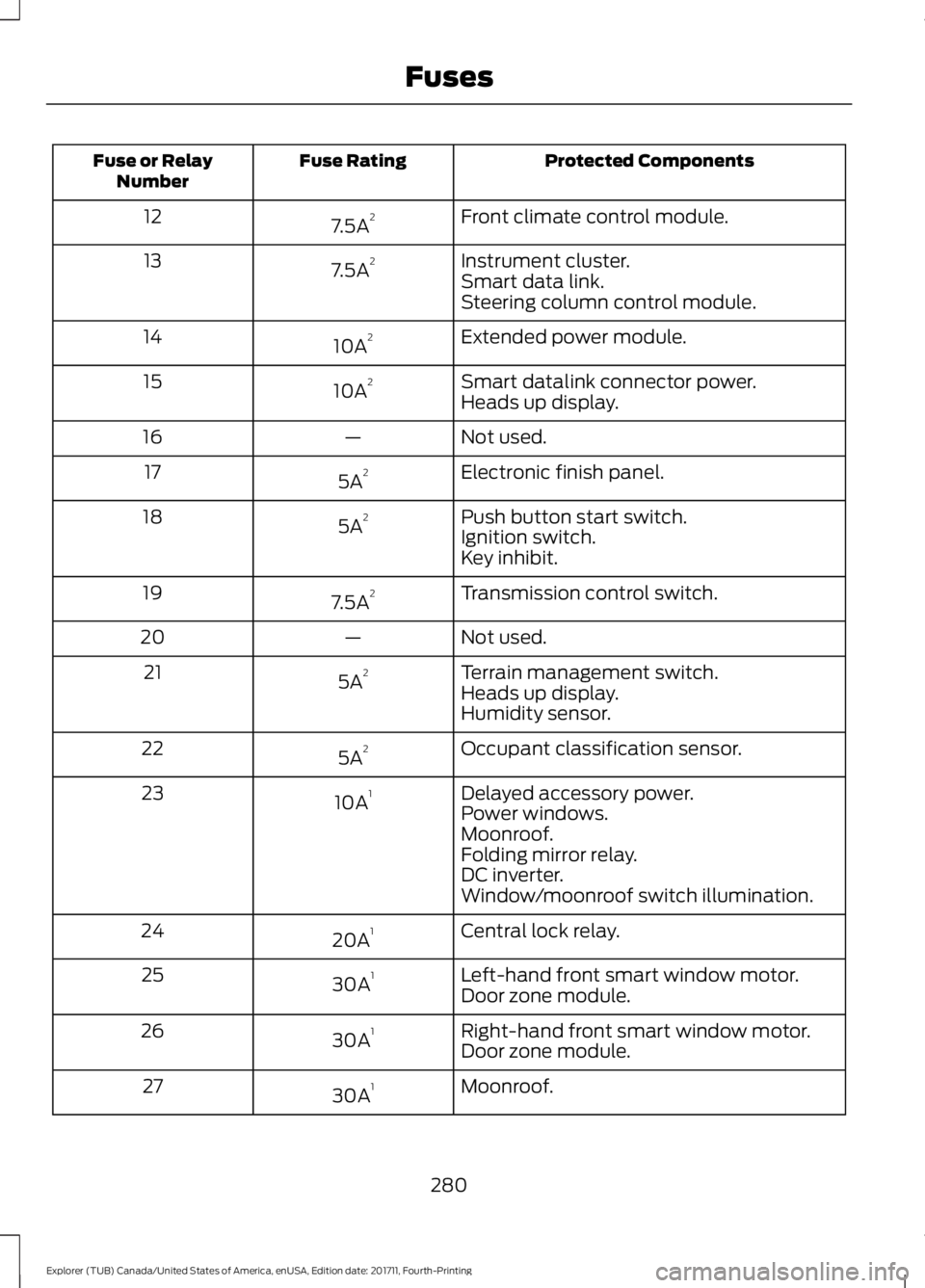
Protected Components
Fuse Rating
Fuse or Relay
Number
Front climate control module.
7.5A 2
12
Instrument cluster.
7.5A 2
13
Smart data link.
Steering column control module.
Extended power module.
10A 2
14
Smart datalink connector power.
10A 2
15
Heads up display.
Not used.
—
16
Electronic finish panel.
5A 2
17
Push button start switch.
5A 2
18
Ignition switch.
Key inhibit.
Transmission control switch.
7.5A 2
19
Not used.
—
20
Terrain management switch.
5A 2
21
Heads up display.
Humidity sensor.
Occupant classification sensor.
5A 2
22
Delayed accessory power.
10A 1
23
Power windows.
Moonroof.
Folding mirror relay.
DC inverter.
Window/moonroof switch illumination.
Central lock relay.
20A 1
24
Left-hand front smart window motor.
30A 1
25
Door zone module.
Right-hand front smart window motor.
30A 1
26
Door zone module.
Moonroof.
30A 1
27
280
Explorer (TUB) Canada/United States of America, enUSA, Edition date: 201711, Fourth-Printing Fuses
Page 284 of 571
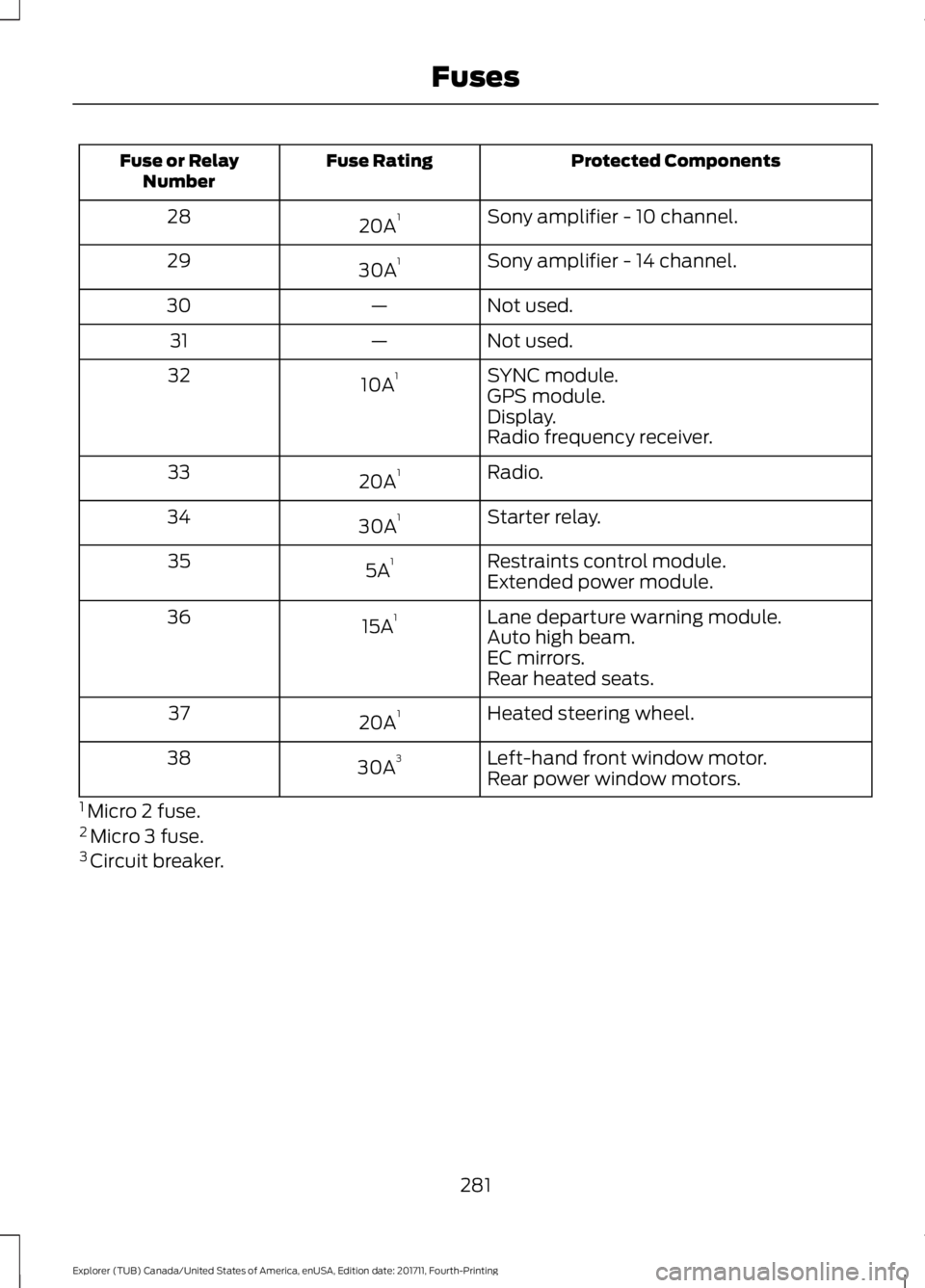
Protected Components
Fuse Rating
Fuse or Relay
Number
Sony amplifier - 10 channel.
20A 1
28
Sony amplifier - 14 channel.
30A 1
29
Not used.
—
30
Not used.
—
31
SYNC module.
10A 1
32
GPS module.
Display.
Radio frequency receiver.
Radio.
20A 1
33
Starter relay.
30A 1
34
Restraints control module.
5A 1
35
Extended power module.
Lane departure warning module.
15A 1
36
Auto high beam.
EC mirrors.
Rear heated seats.
Heated steering wheel.
20A 1
37
Left-hand front window motor.
30A 3
38
Rear power window motors.
1 Micro 2 fuse.
2 Micro 3 fuse.
3 Circuit breaker.
281
Explorer (TUB) Canada/United States of America, enUSA, Edition date: 201711, Fourth-Printing Fuses
Page 383 of 571
System data cannot be accessed without
special equipment and access to the
vehicle's SYNC module. Ford Motor
Company and Ford of Canada will not
access the system data for any purpose
other than as described absent consent, a
court order, or where required by law
enforcement, other government
authorities, or other third parties acting
with lawful authority. Other parties may
seek to access the information
independently of Ford Motor Company and
Ford of Canada. For further privacy
information, see the section on 911 Assist.
See SYNC™ Applications and Services
(page 394). USING VOICE RECOGNITION
This system helps you control many
features using voice commands. This
allows you to keep your hands on the
wheel and focus on what is around you.
Initiating a Voice Session Press the voice button. A list of
available voice commands
appears in the display.
Global Voice Commands
These voice commands are always
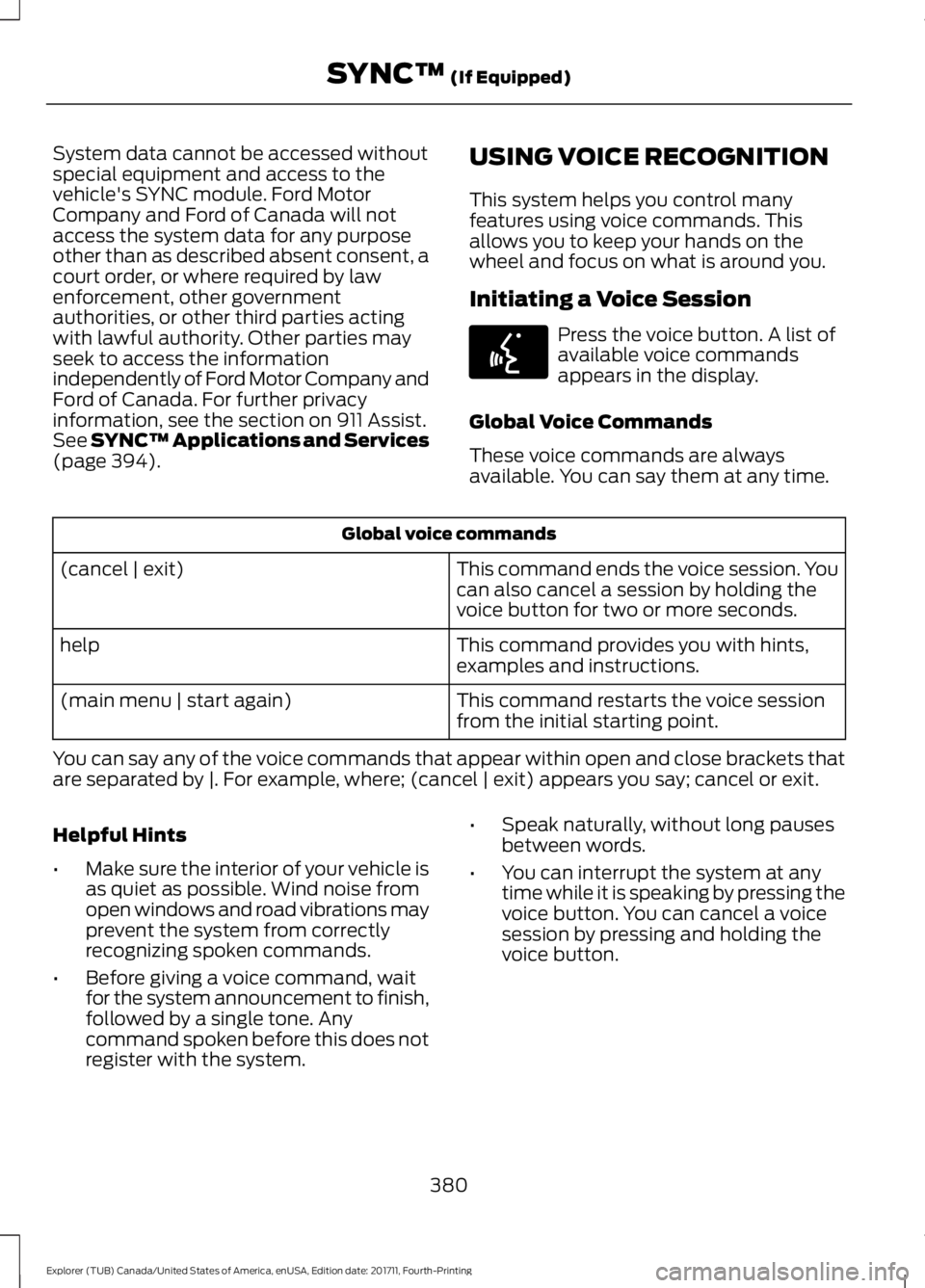
available. You can say them at any time. Global voice commands
This command ends the voice session. You
can also cancel a session by holding the
voice button for two or more seconds.
(cancel | exit)
This command provides you with hints,
examples and instructions.
help
This command restarts the voice session
from the initial starting point.
(main menu | start again)
You can say any of the voice commands that appear within open and close brackets that
are separated by |. For example, where; (cancel | exit) appears you say; cancel or exit.
Helpful Hints
• Make sure the interior of your vehicle is
as quiet as possible. Wind noise from
open windows and road vibrations may
prevent the system from correctly
recognizing spoken commands.
• Before giving a voice command, wait
for the system announcement to finish,
followed by a single tone. Any
command spoken before this does not
register with the system. •
Speak naturally, without long pauses
between words.
• You can interrupt the system at any
time while it is speaking by pressing the
voice button. You can cancel a voice
session by pressing and holding the
voice button.
380
Explorer (TUB) Canada/United States of America, enUSA, Edition date: 201711, Fourth-Printing SYNC™
(If Equipped)E142599
Page 478 of 571
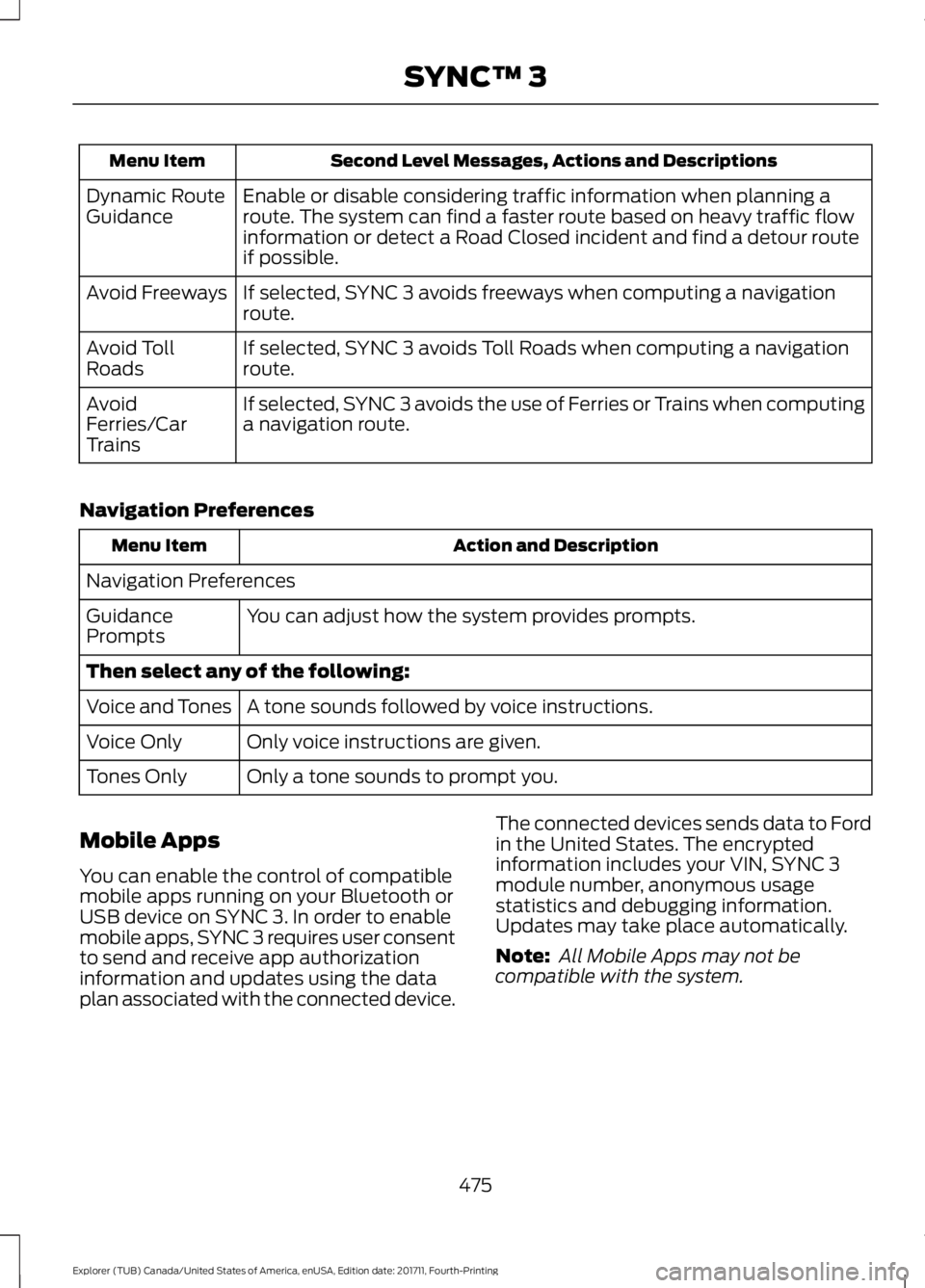
Second Level Messages, Actions and Descriptions
Menu Item
Enable or disable considering traffic information when planning a
route. The system can find a faster route based on heavy traffic flow
information or detect a Road Closed incident and find a detour route
if possible.
Dynamic Route
Guidance
If selected, SYNC 3 avoids freeways when computing a navigation
route.
Avoid Freeways
If selected, SYNC 3 avoids Toll Roads when computing a navigation
route.
Avoid Toll
Roads
If selected, SYNC 3 avoids the use of Ferries or Trains when computing
a navigation route.
Avoid
Ferries/Car
Trains
Navigation Preferences Action and Description
Menu Item
Navigation Preferences You can adjust how the system provides prompts.
Guidance
Prompts
Then select any of the following:
A tone sounds followed by voice instructions.
Voice and Tones
Only voice instructions are given.
Voice Only
Only a tone sounds to prompt you.
Tones Only
Mobile Apps
You can enable the control of compatible
mobile apps running on your Bluetooth or
USB device on SYNC 3. In order to enable
mobile apps, SYNC 3 requires user consent
to send and receive app authorization
information and updates using the data
plan associated with the connected device. The connected devices sends data to Ford
in the United States. The encrypted
information includes your VIN, SYNC 3
module number, anonymous usage
statistics and debugging information.
Updates may take place automatically.
Note:
All Mobile Apps may not be
compatible with the system.
475
Explorer (TUB) Canada/United States of America, enUSA, Edition date: 201711, Fourth-Printing SYNC™ 3
Page 497 of 571
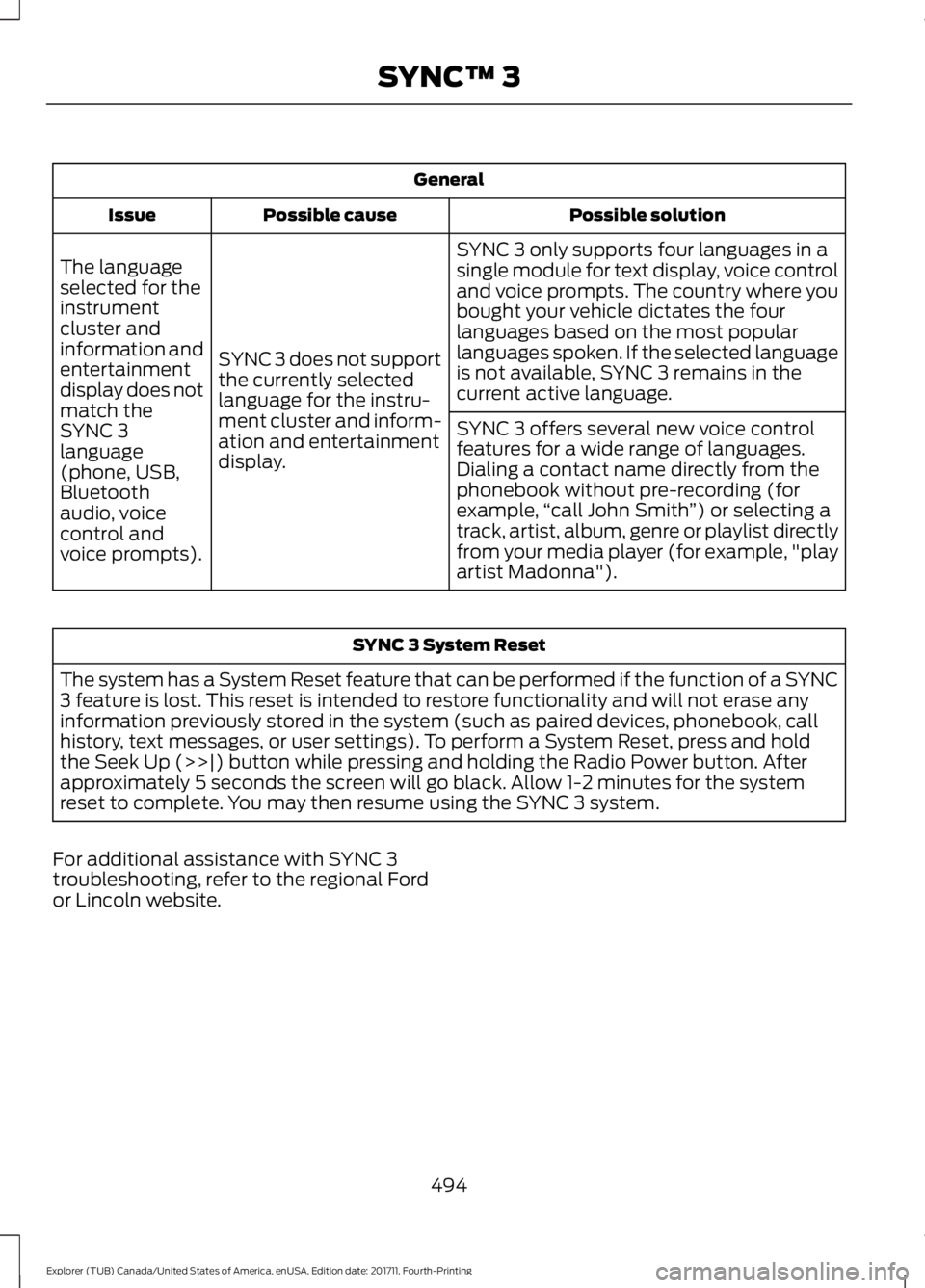
General
Possible solution
Possible cause
Issue
SYNC 3 only supports four languages in a
single module for text display, voice control
and voice prompts. The country where you
bought your vehicle dictates the four
languages based on the most popular
languages spoken. If the selected language
is not available, SYNC 3 remains in the
current active language.
SYNC 3 does not support
the currently selected
language for the instru-
ment cluster and inform-
ation and entertainment
display.
The language
selected for the
instrument
cluster and
information and
entertainment
display does not
match the
SYNC 3
SYNC 3 offers several new voice control
features for a wide range of languages.
Dialing a contact name directly from the
phonebook without pre-recording (for
example,
“call John Smith ”) or selecting a
track, artist, album, genre or playlist directly
from your media player (for example, "play
artist Madonna").
language
(phone, USB,
Bluetooth
audio, voice
control and
voice prompts). SYNC 3 System Reset
The system has a System Reset feature that can be performed if the function of a SYNC
3 feature is lost. This reset is intended to restore functionality and will not erase any
information previously stored in the system (such as paired devices, phonebook, call
history, text messages, or user settings). To perform a System Reset, press and hold
the Seek Up (>>|) button while pressing and holding the Radio Power button. After
approximately 5 seconds the screen will go black. Allow 1-2 minutes for the system
reset to complete. You may then resume using the SYNC 3 system.
For additional assistance with SYNC 3
troubleshooting, refer to the regional Ford
or Lincoln website.
494
Explorer (TUB) Canada/United States of America, enUSA, Edition date: 201711, Fourth-Printing SYNC™ 3
Page 523 of 571
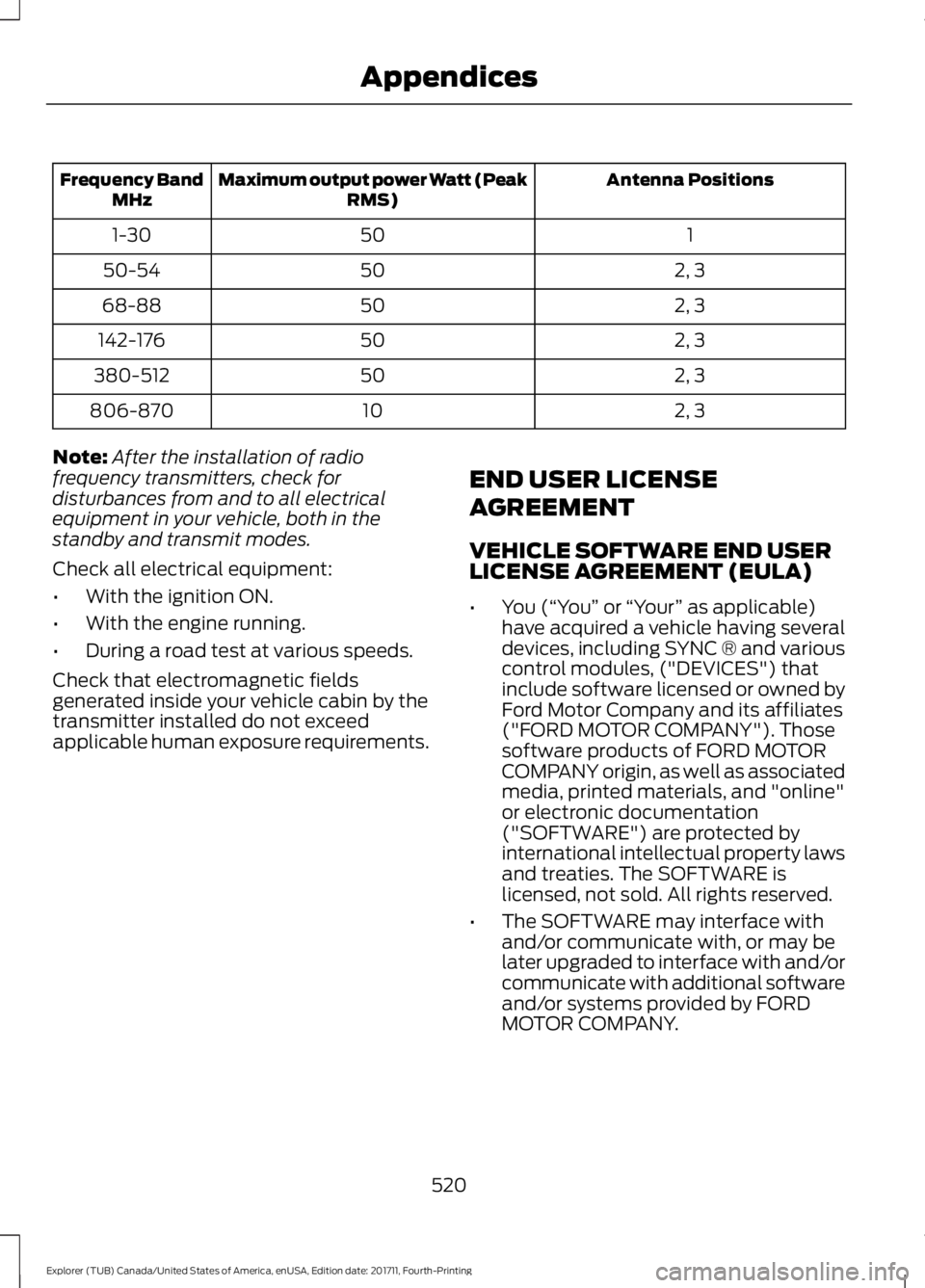
Antenna Positions
Maximum output power Watt (Peak
RMS)
Frequency Band
MHz
1
50
1-30
2, 3
50
50-54
2, 3
50
68-88
2, 3
50
142-176
2, 3
50
380-512
2, 3
10
806-870
Note: After the installation of radio
frequency transmitters, check for
disturbances from and to all electrical
equipment in your vehicle, both in the
standby and transmit modes.
Check all electrical equipment:
• With the ignition ON.
• With the engine running.
• During a road test at various speeds.
Check that electromagnetic fields
generated inside your vehicle cabin by the
transmitter installed do not exceed
applicable human exposure requirements. END USER LICENSE
AGREEMENT
VEHICLE SOFTWARE END USER
LICENSE AGREEMENT (EULA)
•
You (“You” or “Your ” as applicable)
have acquired a vehicle having several
devices, including SYNC ® and various
control modules, ("DEVICES") that
include software licensed or owned by
Ford Motor Company and its affiliates
("FORD MOTOR COMPANY"). Those
software products of FORD MOTOR
COMPANY origin, as well as associated
media, printed materials, and "online"
or electronic documentation
("SOFTWARE") are protected by
international intellectual property laws
and treaties. The SOFTWARE is
licensed, not sold. All rights reserved.
• The SOFTWARE may interface with
and/or communicate with, or may be
later upgraded to interface with and/or
communicate with additional software
and/or systems provided by FORD
MOTOR COMPANY.
520
Explorer (TUB) Canada/United States of America, enUSA, Edition date: 201711, Fourth-Printing Appendices
Page 569 of 571
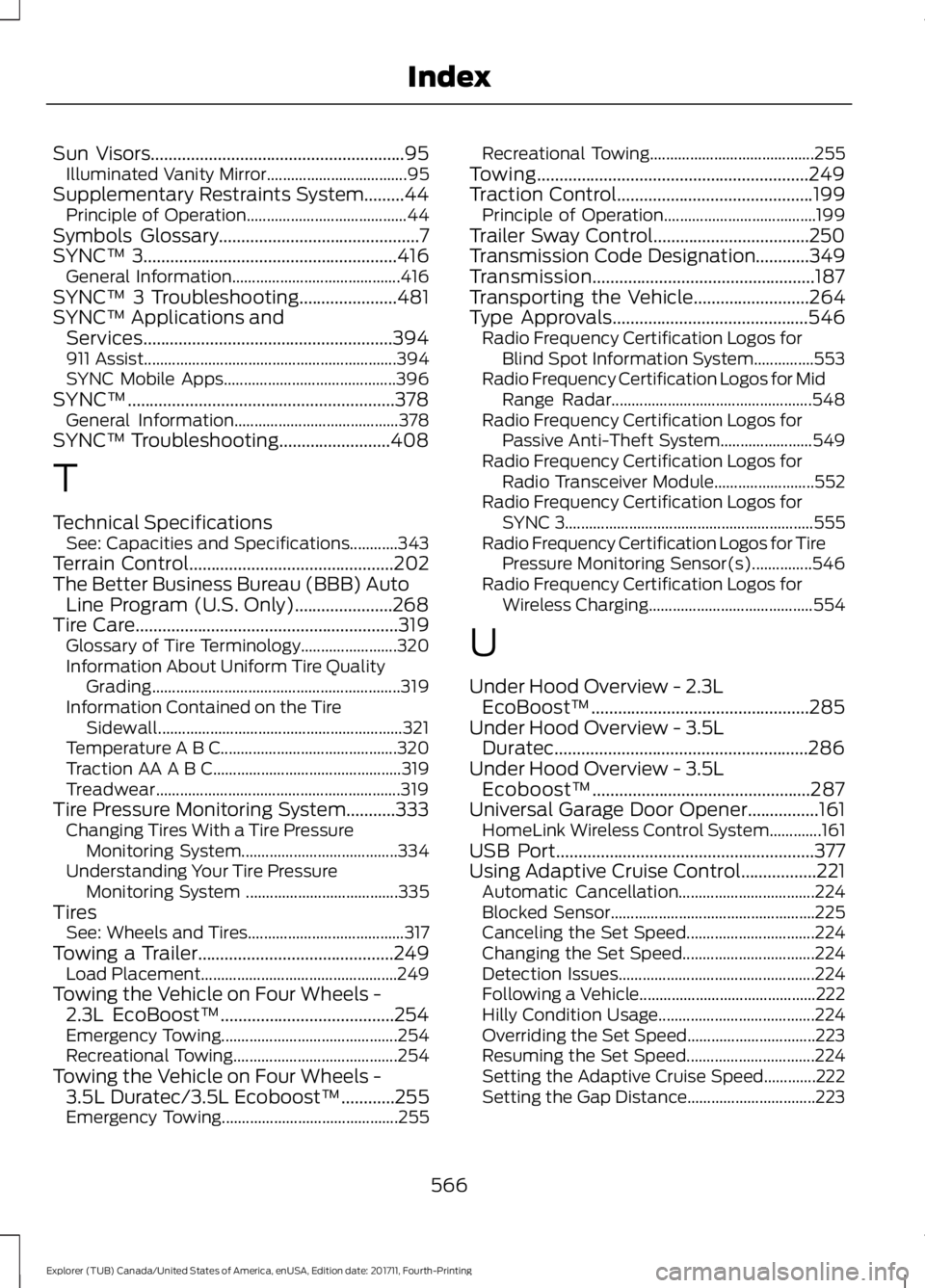
Sun Visors.........................................................95
Illuminated Vanity Mirror................................... 95
Supplementary Restraints System.........44 Principle of Operation........................................ 44
Symbols Glossary.............................................7
SYNC™ 3.........................................................416 General Information.......................................... 416
SYNC™ 3 Troubleshooting
......................481
SYNC™ Applications and Services
........................................................394
911 Assist............................................................... 394
SYNC Mobile Apps........................................... 396
SYNC™............................................................378 General Information......................................... 378
SYNC™ Troubleshooting.........................408
T
Technical Specifications See: Capacities and Specifications............343
Terrain Control
..............................................202
The Better Business Bureau (BBB) Auto Line Program (U.S. Only)......................268
Tire Care...........................................................319 Glossary of Tire Terminology........................ 320
Information About Uniform Tire Quality Grading.............................................................. 319
Information Contained on the Tire Sidewall............................................................. 321
Temperature A B C............................................ 320
Traction AA A B C............................................... 319
Treadwear............................................................. 319
Tire Pressure Monitoring System...........333 Changing Tires With a Tire Pressure
Monitoring System....................................... 334
Understanding Your Tire Pressure Monitoring System ...................................... 335
Tires See: Wheels and Tires....................................... 317
Towing a Trailer
............................................249
Load Placement................................................. 249
Towing the Vehicle on Four Wheels - 2.3L EcoBoost™.......................................254
Emergency Towing............................................ 254
Recreational Towing......................................... 254
Towing the Vehicle on Four Wheels - 3.5L Duratec/3.5L Ecoboost™
............255
Emergency Towing............................................ 255Recreational Towing.........................................
255
Towing.............................................................249
Traction Control
............................................199
Principle of Operation...................................... 199
Trailer Sway Control...................................250
Transmission Code Designation
............349
Transmission..................................................187
Transporting the Vehicle
..........................264
Type Approvals............................................546
Radio Frequency Certification Logos for
Blind Spot Information System...............553
Radio Frequency Certification Logos for Mid Range Radar.................................................. 548
Radio Frequency Certification Logos for Passive Anti-Theft System....................... 549
Radio Frequency Certification Logos for Radio Transceiver Module......................... 552
Radio Frequency Certification Logos for SYNC 3.............................................................. 555
Radio Frequency Certification Logos for Tire Pressure Monitoring Sensor(s)...............546
Radio Frequency Certification Logos for Wireless Charging......................................... 554
U
Under Hood Overview - 2.3L EcoBoost™.................................................285
Under Hood Overview - 3.5L Duratec.........................................................286
Under Hood Overview - 3.5L Ecoboost™.................................................287
Universal Garage Door Opener
................161
HomeLink Wireless Control System.............161
USB Port..........................................................377
Using Adaptive Cruise Control.................221 Automatic Cancellation.................................. 224
Blocked Sensor................................................... 225
Canceling the Set Speed................................ 224
Changing the Set Speed................................. 224
Detection Issues................................................. 224
Following a Vehicle............................................ 222
Hilly Condition Usage....................................... 224
Overriding the Set Speed................................ 223
Resuming the Set Speed................................ 224
Setting the Adaptive Cruise Speed.............222
Setting the Gap Distance................................ 223
566
Explorer (TUB) Canada/United States of America, enUSA, Edition date: 201711, Fourth-Printing Index