ECO mode FORD EXPLORER 2018 Workshop Manual
[x] Cancel search | Manufacturer: FORD, Model Year: 2018, Model line: EXPLORER, Model: FORD EXPLORER 2018Pages: 571, PDF Size: 7.3 MB
Page 463 of 571
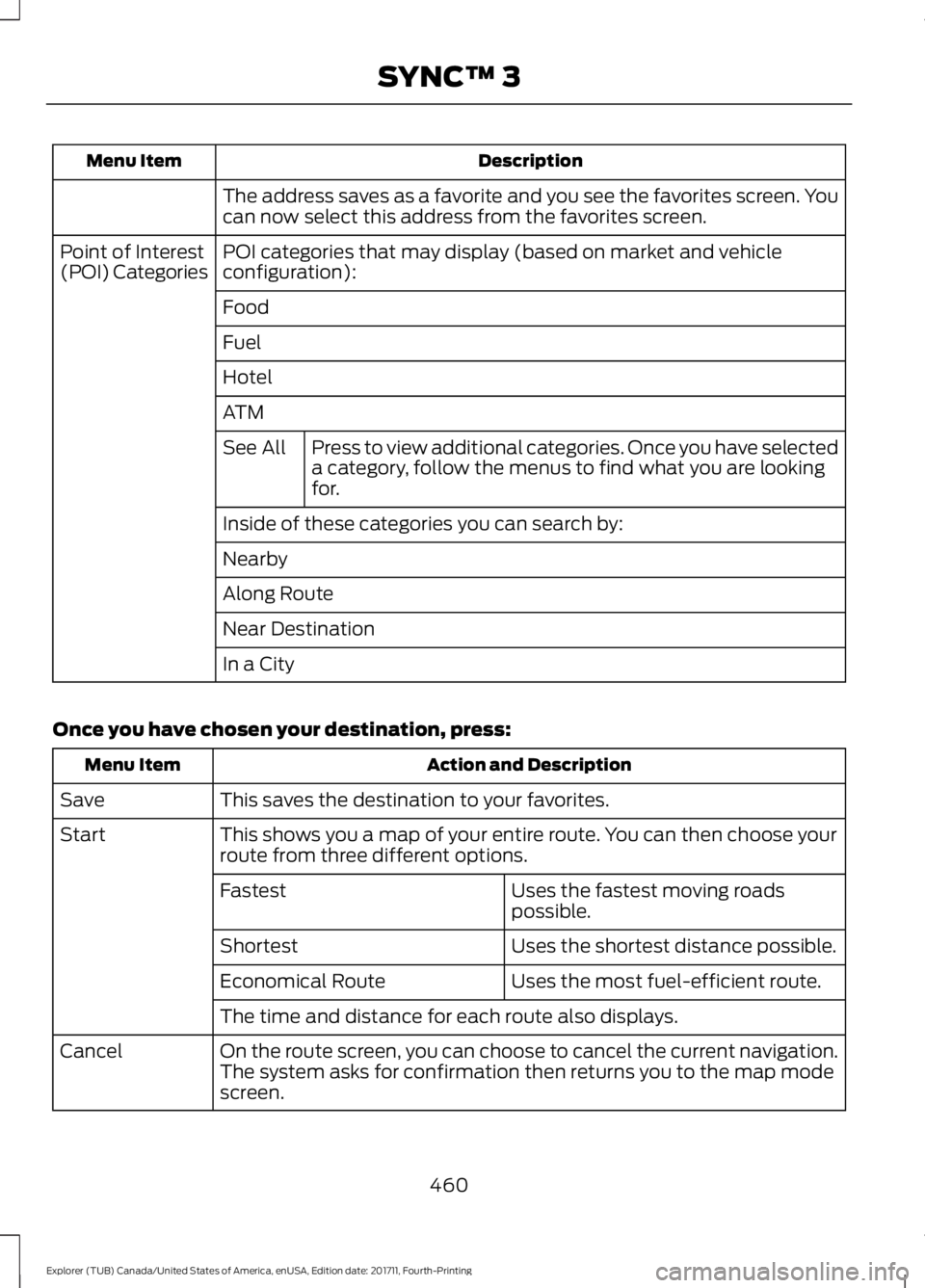
Description
Menu Item
The address saves as a favorite and you see the favorites screen. You
can now select this address from the favorites screen.
POI categories that may display (based on market and vehicle
configuration):
Point of Interest
(POI) Categories
Food
Fuel
Hotel
ATMPress to view additional categories. Once you have selected
a category, follow the menus to find what you are looking
for.
See All
Inside of these categories you can search by:
Nearby
Along Route
Near Destination
In a City
Once you have chosen your destination, press: Action and Description
Menu Item
This saves the destination to your favorites.
Save
This shows you a map of your entire route. You can then choose your
route from three different options.
Start
Uses the fastest moving roads
possible.
Fastest
Uses the shortest distance possible.
Shortest
Uses the most fuel-efficient route.
Economical Route
The time and distance for each route also displays.
On the route screen, you can choose to cancel the current navigation.
The system asks for confirmation then returns you to the map mode
screen.
Cancel
460
Explorer (TUB) Canada/United States of America, enUSA, Edition date: 201711, Fourth-Printing SYNC™ 3
Page 477 of 571
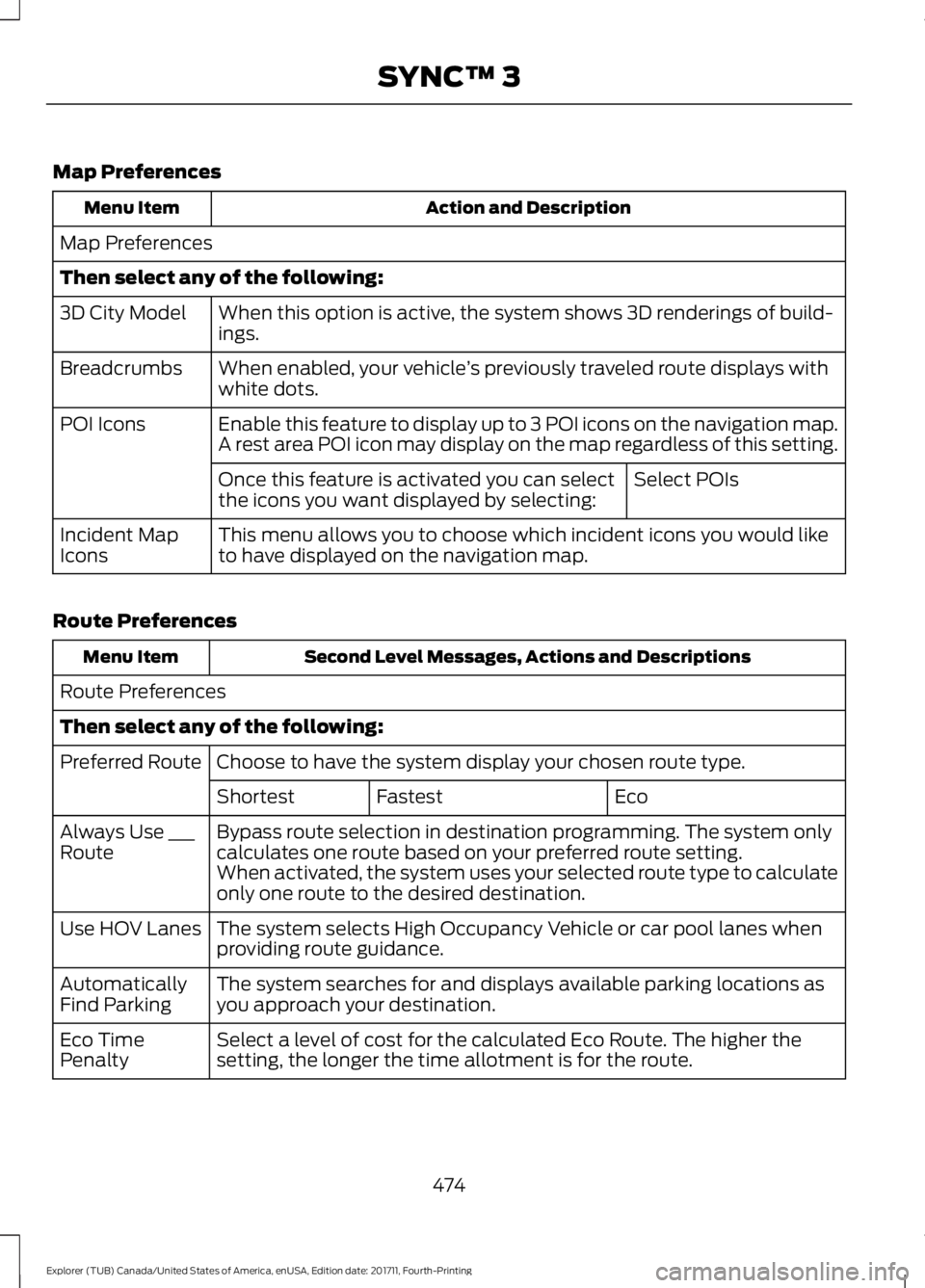
Map Preferences
Action and Description
Menu Item
Map Preferences
Then select any of the following: When this option is active, the system shows 3D renderings of build-
ings.
3D City Model
When enabled, your vehicle ’s previously traveled route displays with
white dots.
Breadcrumbs
Enable this feature to display up to 3 POI icons on the navigation map.
POI Icons
A rest area POI icon may display on the map regardless of this setting.
Select POIs
Once this feature is activated you can select
the icons you want displayed by selecting:
This menu allows you to choose which incident icons you would like
to have displayed on the navigation map.
Incident Map
Icons
Route Preferences Second Level Messages, Actions and Descriptions
Menu Item
Route Preferences
Then select any of the following: Choose to have the system display your chosen route type.
Preferred Route
Eco
Fastest
Shortest
Bypass route selection in destination programming. The system only
calculates one route based on your preferred route setting.
Always Use ___
Route
When activated, the system uses your selected route type to calculate
only one route to the desired destination.
The system selects High Occupancy Vehicle or car pool lanes when
providing route guidance.
Use HOV Lanes
The system searches for and displays available parking locations as
you approach your destination.
Automatically
Find Parking
Select a level of cost for the calculated Eco Route. The higher the
setting, the longer the time allotment is for the route.
Eco Time
Penalty
474
Explorer (TUB) Canada/United States of America, enUSA, Edition date: 201711, Fourth-Printing SYNC™ 3
Page 484 of 571
Valet Mode
Valet mode allows you to lock the system.
No information is accessible until the
system is unlocked with the correct PIN.
When you select valet mode a pop up
appears informing you that a four digit
code must be entered to enable and
disable valet mode. You can use any PIN
you chose but you must use the same PIN
to disable valet mode. The system asks
you to input the code.
Note:
If the system is locked and you
cannot remember the PIN, please contact
the Customer Relationship Center.
United States: 1-800-392-3673
Canada: 1-800-565-3673 To enable valet mode, enter your chosen
PIN. The system then asks to confirm your
PIN by reentering it. The system then locks.
To unlock the system, enter the same pin
number. The system reconnects to your
phone and all of your options are available
again.
SYNC™ 3 TROUBLESHOOTING
Your SYNC 3 system is easy to use.
However, should questions arise, please
refer to the tables below.
To check your cell phone's compatibility,
refer to the regional Ford or Lincoln
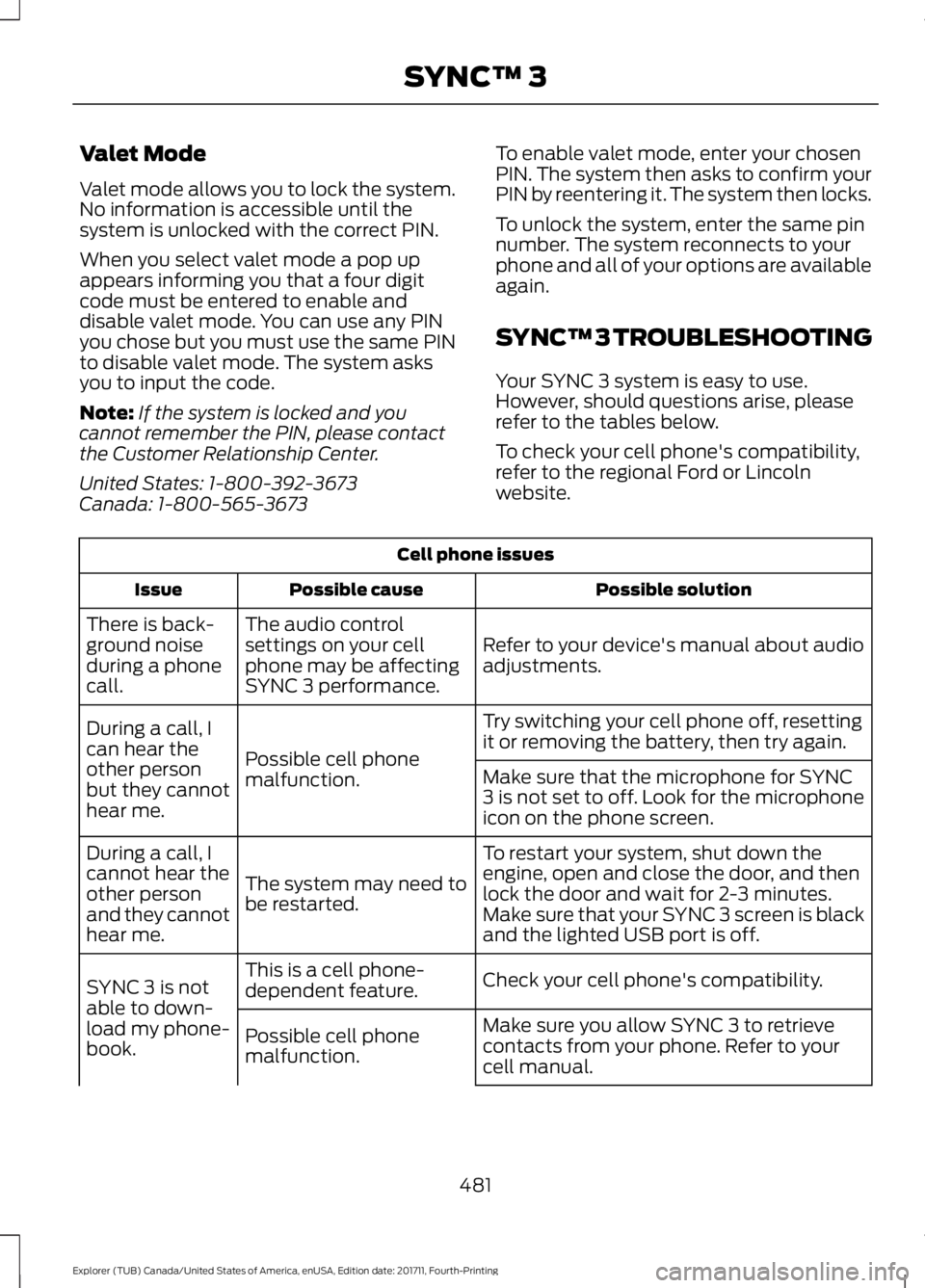
website.Cell phone issues
Possible solution
Possible cause
Issue
Refer to your device's manual about audio
adjustments.
The audio control
settings on your cell
phone may be affecting
SYNC 3 performance.
There is back-
ground noise
during a phone
call.
Try switching your cell phone off, resetting
it or removing the battery, then try again.
Possible cell phone
malfunction.
During a call, I
can hear the
other person
but they cannot
hear me.
Make sure that the microphone for SYNC
3 is not set to off. Look for the microphone
icon on the phone screen.
To restart your system, shut down the
engine, open and close the door, and then
lock the door and wait for 2-3 minutes.
Make sure that your SYNC 3 screen is black
and the lighted USB port is off.
The system may need to
be restarted.
During a call, I
cannot hear the
other person
and they cannot
hear me.
Check your cell phone's compatibility.
This is a cell phone-
dependent feature.
SYNC 3 is not
able to down-
load my phone-
book. Make sure you allow SYNC 3 to retrieve
contacts from your phone. Refer to your
cell manual.
Possible cell phone
malfunction.
481
Explorer (TUB) Canada/United States of America, enUSA, Edition date: 201711, Fourth-Printing SYNC™ 3
Page 486 of 571
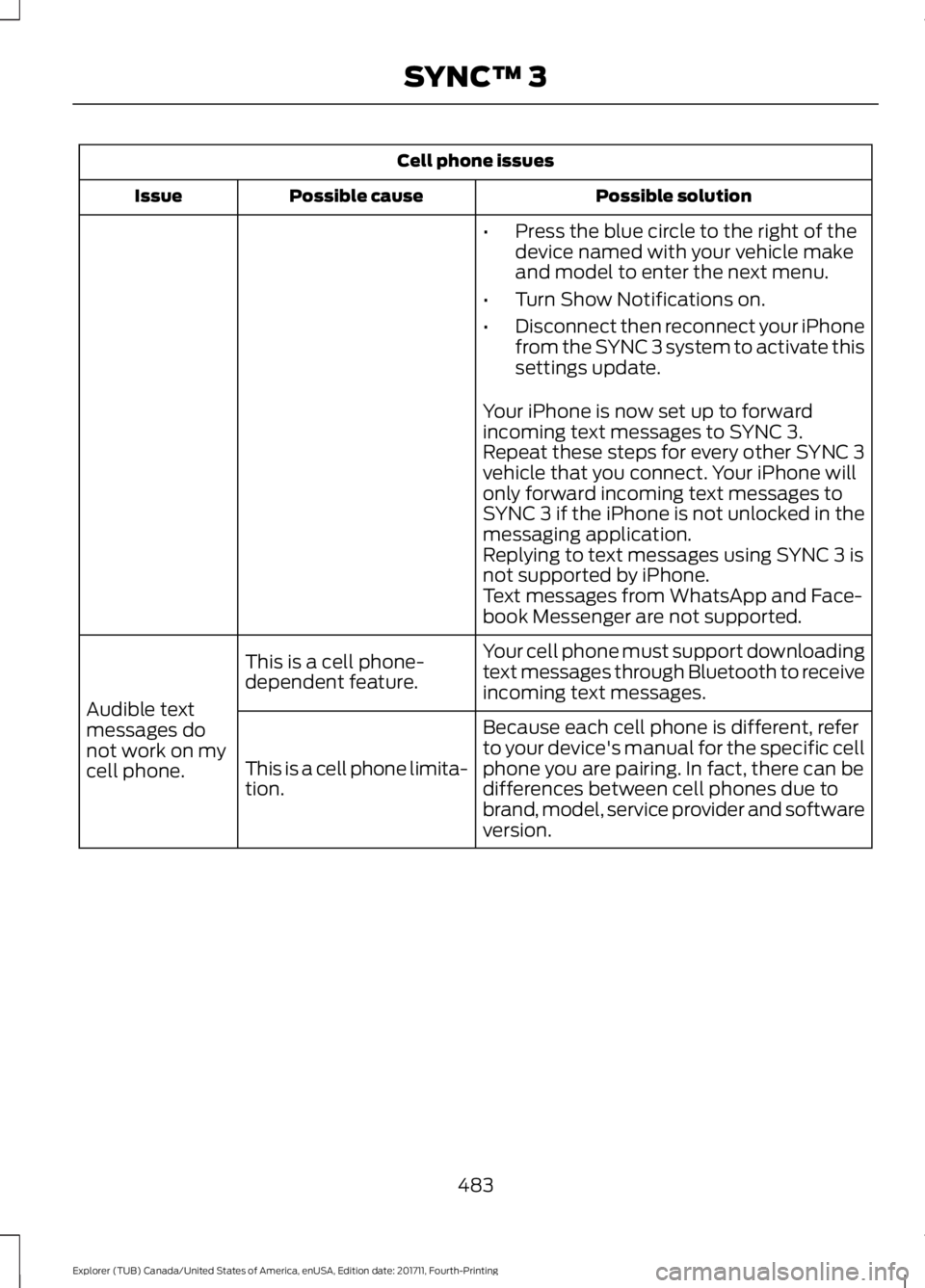
Cell phone issues
Possible solution
Possible cause
Issue
•Press the blue circle to the right of the
device named with your vehicle make
and model to enter the next menu.
• Turn Show Notifications on.
• Disconnect then reconnect your iPhone
from the SYNC 3 system to activate this
settings update.
Your iPhone is now set up to forward
incoming text messages to SYNC 3.
Repeat these steps for every other SYNC 3
vehicle that you connect. Your iPhone will
only forward incoming text messages to
SYNC 3 if the iPhone is not unlocked in the
messaging application.
Replying to text messages using SYNC 3 is
not supported by iPhone.
Text messages from WhatsApp and Face-
book Messenger are not supported.
Your cell phone must support downloading
text messages through Bluetooth to receive
incoming text messages.
This is a cell phone-
dependent feature.
Audible text
messages do
not work on my
cell phone. Because each cell phone is different, refer
to your device's manual for the specific cell
phone you are pairing. In fact, there can be
differences between cell phones due to
brand, model, service provider and software
version.
This is a cell phone limita-
tion.
483
Explorer (TUB) Canada/United States of America, enUSA, Edition date: 201711, Fourth-Printing SYNC™ 3
Page 506 of 571
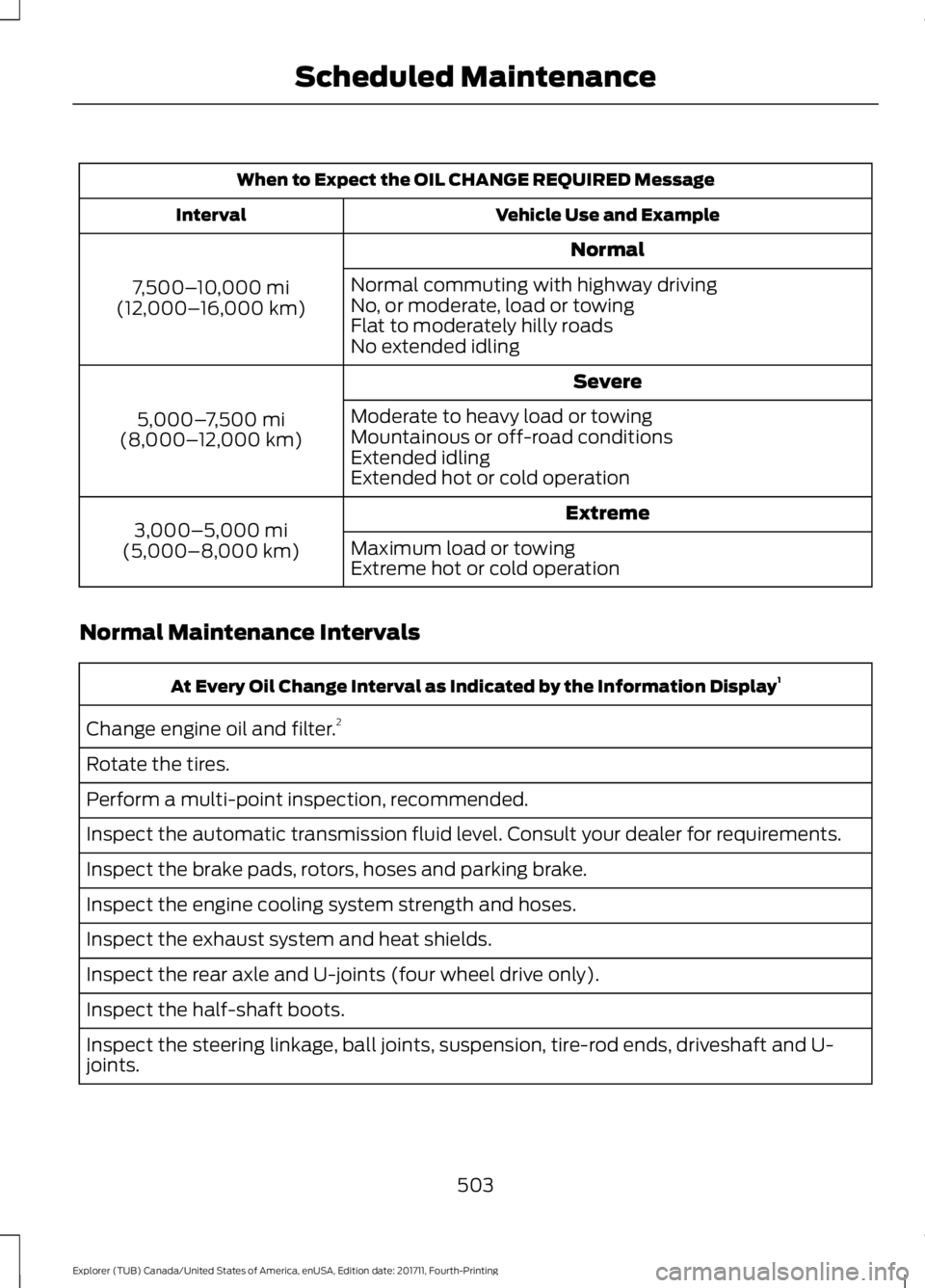
When to Expect the OIL CHANGE REQUIRED Message
Vehicle Use and Example
Interval
Normal
7,500– 10,000 mi
(12,000– 16,000 km) Normal commuting with highway driving
No, or moderate, load or towing
Flat to moderately hilly roads
No extended idling
Severe
5,000– 7,500 mi
(8,000– 12,000 km) Moderate to heavy load or towing
Mountainous or off-road conditions
Extended idling
Extended hot or cold operation
Extreme
3,000–5,000 mi
(5,000–8,000 km) Maximum load or towing
Extreme hot or cold operation
Normal Maintenance Intervals At Every Oil Change Interval as Indicated by the Information Display
1
Change engine oil and filter. 2
Rotate the tires.
Perform a multi-point inspection, recommended.
Inspect the automatic transmission fluid level. Consult your dealer for requirements.
Inspect the brake pads, rotors, hoses and parking brake.
Inspect the engine cooling system strength and hoses.
Inspect the exhaust system and heat shields.
Inspect the rear axle and U-joints (four wheel drive only).
Inspect the half-shaft boots.
Inspect the steering linkage, ball joints, suspension, tire-rod ends, driveshaft and U-
joints.
503
Explorer (TUB) Canada/United States of America, enUSA, Edition date: 201711, Fourth-Printing Scheduled Maintenance
Page 547 of 571
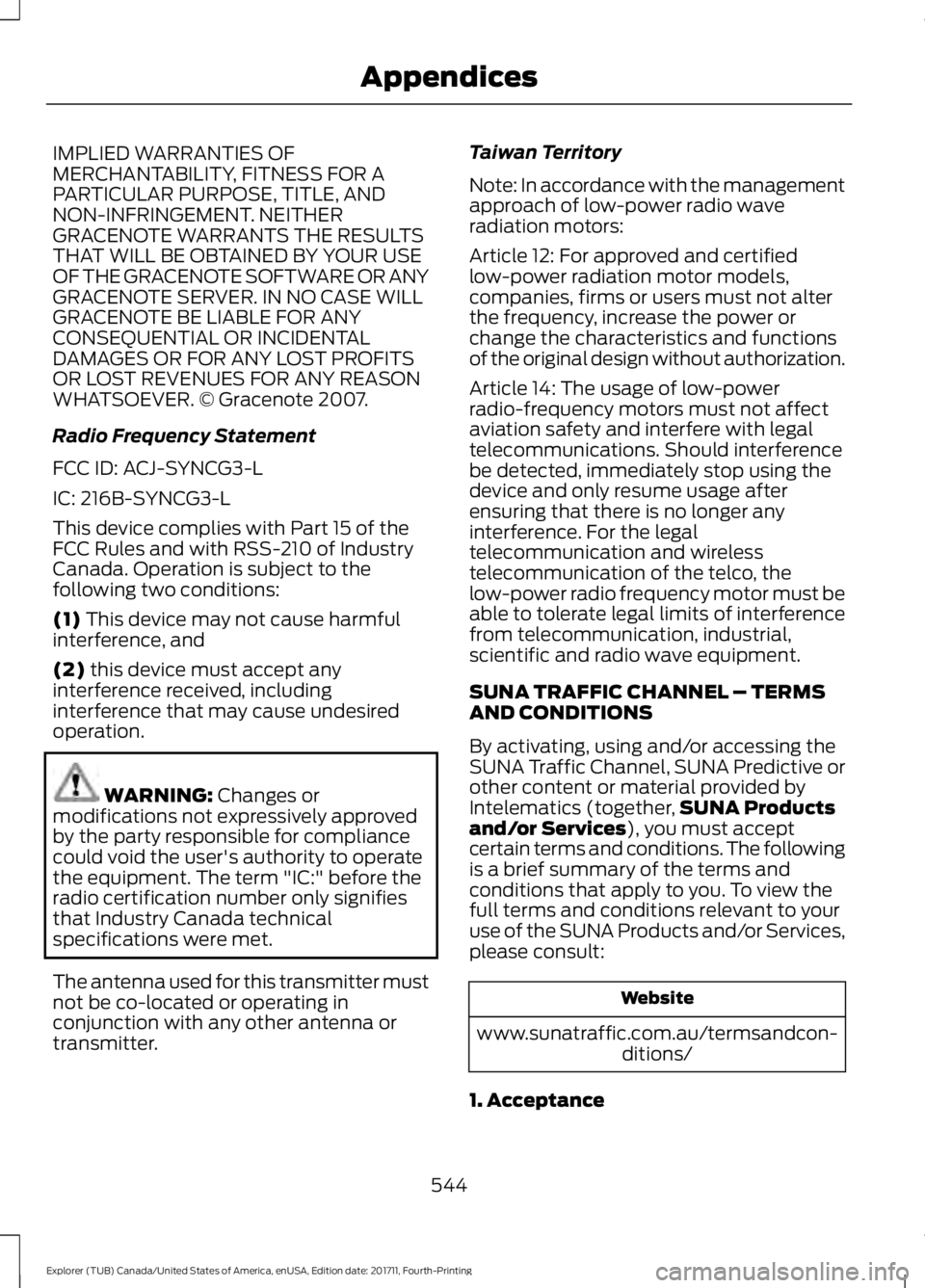
IMPLIED WARRANTIES OF
MERCHANTABILITY, FITNESS FOR A
PARTICULAR PURPOSE, TITLE, AND
NON-INFRINGEMENT. NEITHER
GRACENOTE WARRANTS THE RESULTS
THAT WILL BE OBTAINED BY YOUR USE
OF THE GRACENOTE SOFTWARE OR ANY
GRACENOTE SERVER. IN NO CASE WILL
GRACENOTE BE LIABLE FOR ANY
CONSEQUENTIAL OR INCIDENTAL
DAMAGES OR FOR ANY LOST PROFITS
OR LOST REVENUES FOR ANY REASON
WHATSOEVER. © Gracenote 2007.
Radio Frequency Statement
FCC ID: ACJ-SYNCG3-L
IC: 216B-SYNCG3-L
This device complies with Part 15 of the
FCC Rules and with RSS-210 of Industry
Canada. Operation is subject to the
following two conditions:
(1) This device may not cause harmful
interference, and
(2)
this device must accept any
interference received, including
interference that may cause undesired
operation. WARNING:
Changes or
modifications not expressively approved
by the party responsible for compliance
could void the user's authority to operate
the equipment. The term "IC:" before the
radio certification number only signifies
that Industry Canada technical
specifications were met.
The antenna used for this transmitter must
not be co-located or operating in
conjunction with any other antenna or
transmitter. Taiwan Territory
Note: In accordance with the management
approach of low-power radio wave
radiation motors:
Article 12: For approved and certified
low-power radiation motor models,
companies, firms or users must not alter
the frequency, increase the power or
change the characteristics and functions
of the original design without authorization.
Article 14: The usage of low-power
radio-frequency motors must not affect
aviation safety and interfere with legal
telecommunications. Should interference
be detected, immediately stop using the
device and only resume usage after
ensuring that there is no longer any
interference. For the legal
telecommunication and wireless
telecommunication of the telco, the
low-power radio frequency motor must be
able to tolerate legal limits of interference
from telecommunication, industrial,
scientific and radio wave equipment.
SUNA TRAFFIC CHANNEL – TERMS
AND CONDITIONS
By activating, using and/or accessing the
SUNA Traffic Channel, SUNA Predictive or
other content or material provided by
Intelematics (together,
SUNA Products
and/or Services
), you must accept
certain terms and conditions. The following
is a brief summary of the terms and
conditions that apply to you. To view the
full terms and conditions relevant to your
use of the SUNA Products and/or Services,
please consult: Website
www.sunatraffic.com.au/termsandcon- ditions/
1. Acceptance
544
Explorer (TUB) Canada/United States of America, enUSA, Edition date: 201711, Fourth-Printing Appendices
Page 563 of 571
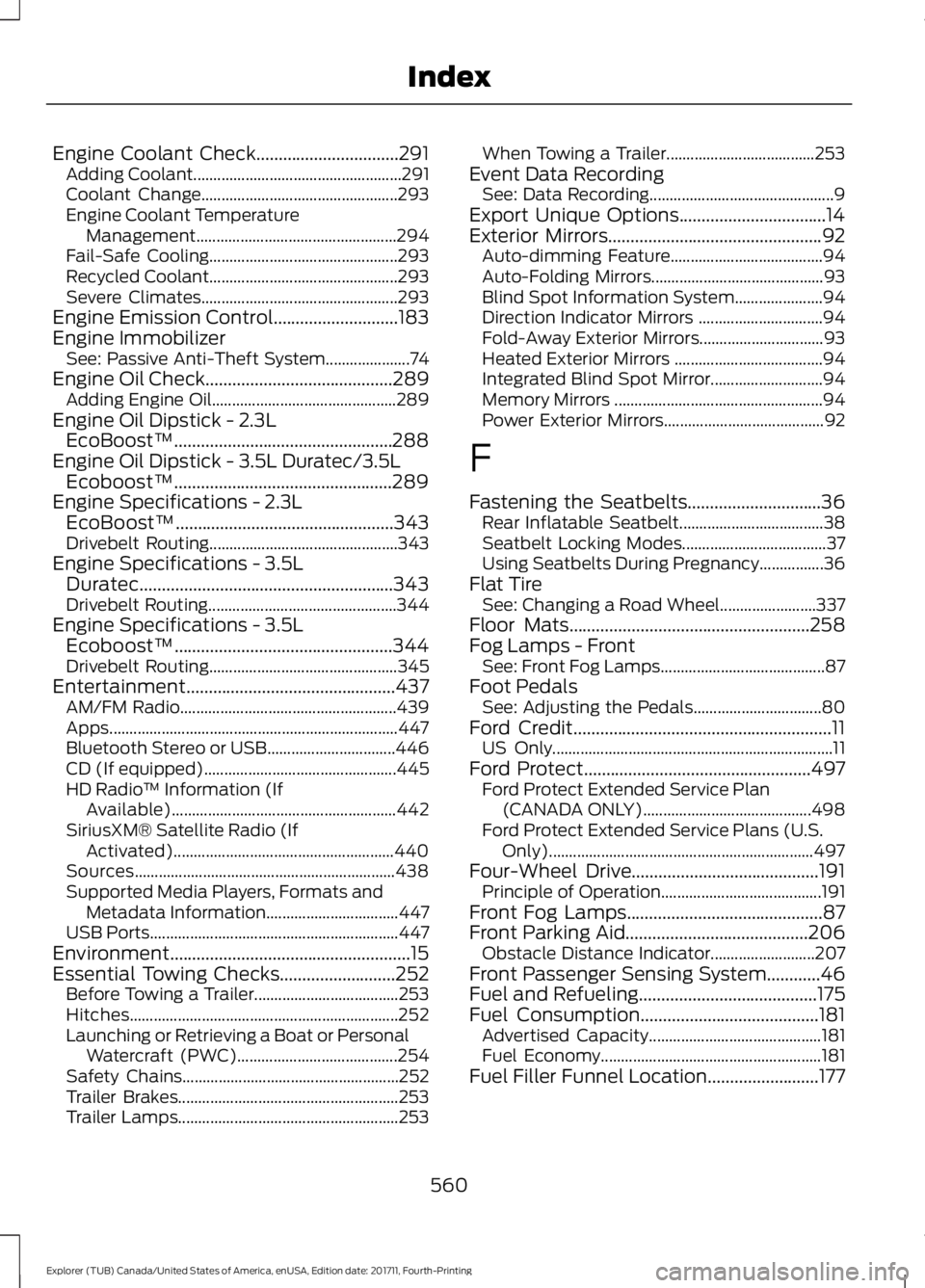
Engine Coolant Check................................291
Adding Coolant.................................................... 291
Coolant Change................................................. 293
Engine Coolant Temperature Management.................................................. 294
Fail-Safe Cooling............................................... 293
Recycled Coolant............................................... 293
Severe Climates................................................. 293
Engine Emission Control............................183
Engine Immobilizer See: Passive Anti-Theft System..................... 74
Engine Oil Check..........................................289
Adding Engine Oil.............................................. 289
Engine Oil Dipstick - 2.3L EcoBoost™.................................................288
Engine Oil Dipstick - 3.5L Duratec/3.5L Ecoboost™.................................................289
Engine Specifications - 2.3L EcoBoost™.................................................343
Drivebelt Routing............................................... 343
Engine Specifications - 3.5L Duratec.........................................................343
Drivebelt Routing............................................... 344
Engine Specifications - 3.5L Ecoboost™.................................................344
Drivebelt Routing............................................... 345
Entertainment...............................................437 AM/FM Radio...................................................... 439
Apps........................................................................\
447
Bluetooth Stereo or USB................................ 446
CD (If equipped)................................................ 445
HD Radio ™ Information (If
Available)........................................................ 442
SiriusXM® Satellite Radio (If Activated)....................................................... 440
Sources................................................................. 438
Supported Media Players, Formats and Metadata Information................................. 447
USB Ports.............................................................. 447
Environment
......................................................15
Essential Towing Checks..........................252
Before Towing a Trailer.................................... 253
Hitches................................................................... 252
Launching or Retrieving a Boat or Personal Watercraft (PWC)........................................ 254
Safety Chains...................................................... 252
Trailer Brakes....................................................... 253
Trailer Lamps....................................................... 253When Towing a Trailer.....................................
253
Event Data Recording See: Data Recording.............................................. 9
Export Unique Options.................................14
Exterior Mirrors
................................................92
Auto-dimming Feature...................................... 94
Auto-Folding Mirrors........................................... 93
Blind Spot Information System...................... 94
Direction Indicator Mirrors ............................... 94
Fold-Away Exterior Mirrors............................... 93
Heated Exterior Mirrors ..................................... 94
Integrated Blind Spot Mirror............................ 94
Memory Mirrors .................................................... 94
Power Exterior Mirrors........................................ 92
F
Fastening the Seatbelts..............................36 Rear Inflatable Seatbelt.................................... 38
Seatbelt Locking Modes.................................... 37
Using Seatbelts During Pregnancy................36
Flat Tire See: Changing a Road Wheel........................ 337
Floor Mats......................................................258
Fog Lamps - Front See: Front Fog Lamps......................................... 87
Foot Pedals See: Adjusting the Pedals................................ 80
Ford Credit
..........................................................11
US Only...................................................................... 11
Ford Protect
...................................................497
Ford Protect Extended Service Plan
(CANADA ONLY).......................................... 498
Ford Protect Extended Service Plans (U.S. Only).................................................................. 497
Four-Wheel Drive..........................................191 Principle of Operation........................................ 191
Front Fog Lamps
............................................87
Front Parking Aid.........................................206
Obstacle Distance Indicator.......................... 207
Front Passenger Sensing System............46
Fuel and Refueling
........................................175
Fuel Consumption........................................181
Advertised Capacity........................................... 181
Fuel Economy....................................................... 181
Fuel Filler Funnel Location.........................177
560
Explorer (TUB) Canada/United States of America, enUSA, Edition date: 201711, Fourth-Printing Index
Page 566 of 571
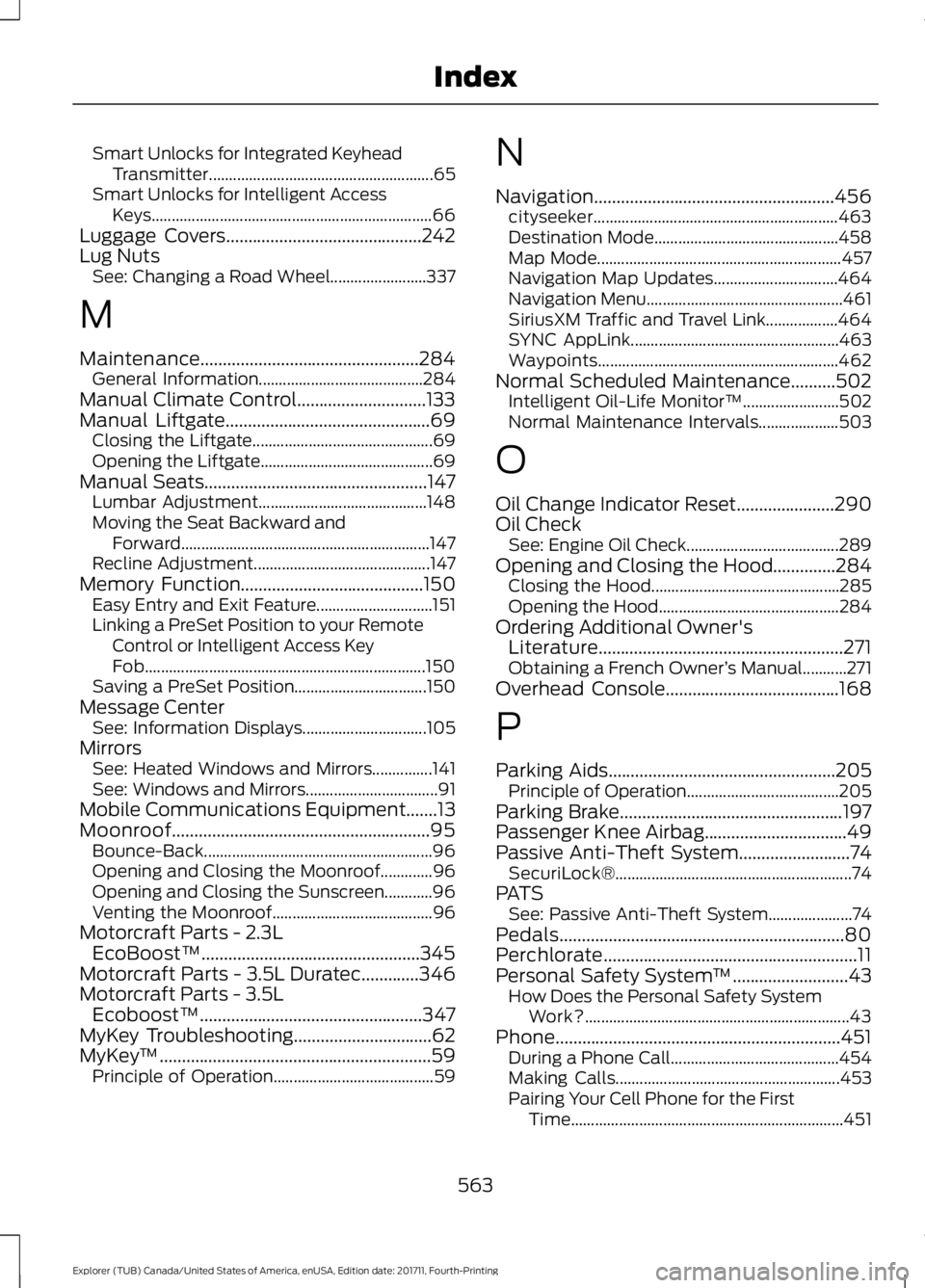
Smart Unlocks for Integrated Keyhead
Transmitter........................................................ 65
Smart Unlocks for Intelligent Access Keys...................................................................... 66
Luggage Covers............................................242
Lug Nuts See: Changing a Road Wheel........................ 337
M
Maintenance
.................................................284
General Information......................................... 284
Manual Climate Control.............................133
Manual Liftgate
..............................................69
Closing the Liftgate............................................. 69
Opening the Liftgate........................................... 69
Manual Seats
..................................................147
Lumbar Adjustment.......................................... 148
Moving the Seat Backward and Forward.............................................................. 147
Recline Adjustment............................................ 147
Memory Function.........................................150 Easy Entry and Exit Feature............................. 151
Linking a PreSet Position to your Remote Control or Intelligent Access Key
Fob...................................................................... 150
Saving a PreSet Position................................. 150
Message Center See: Information Displays............................... 105
Mirrors See: Heated Windows and Mirrors...............141
See: Windows and Mirrors................................. 91
Mobile Communications Equipment.......13
Moonroof..........................................................95 Bounce-Back......................................................... 96
Opening and Closing the Moonroof.............96
Opening and Closing the Sunscreen............96
Venting the Moonroof........................................ 96
Motorcraft Parts - 2.3L EcoBoost™.................................................345
Motorcraft Parts - 3.5L Duratec.............346
Motorcraft Parts - 3.5L Ecoboost™..................................................347
MyKey Troubleshooting
...............................62
MyKey ™.............................................................59
Principle of Operation........................................ 59N
Navigation......................................................456
cityseeker............................................................. 463
Destination Mode.............................................. 458
Map Mode............................................................. 457
Navigation Map Updates............................... 464
Navigation Menu................................................. 461
SiriusXM Traffic and Travel Link.................. 464
SYNC AppLink.................................................... 463
Waypoints............................................................ 462
Normal Scheduled Maintenance..........502 Intelligent Oil-Life Monitor™........................ 502
Normal Maintenance Intervals.................... 503
O
Oil Change Indicator Reset......................290
Oil Check See: Engine Oil Check...................................... 289
Opening and Closing the Hood..............284 Closing the Hood............................................... 285
Opening the Hood............................................. 284
Ordering Additional Owner's Literature.......................................................271
Obtaining a French Owner ’s Manual...........271
Overhead Console
.......................................168
P
Parking Aids
...................................................205
Principle of Operation...................................... 205
Parking Brake
..................................................197
Passenger Knee Airbag................................49
Passive Anti-Theft System
.........................74
SecuriLock®........................................................... 74
PATS See: Passive Anti-Theft System..................... 74
Pedals................................................................80
Perchlorate.........................................................11
Personal Safety System ™
..........................43
How Does the Personal Safety System
Work?.................................................................. 43
Phone................................................................451 During a Phone Call.......................................... 454
Making Calls........................................................ 453
Pairing Your Cell Phone for the First Time.................................................................... 451
563
Explorer (TUB) Canada/United States of America, enUSA, Edition date: 201711, Fourth-Printing Index
Page 568 of 571
Roof Racks and Load Carriers.................242
Adjusting the Crossbar.................................... 243
Thumbwheel Kit................................................. 242
Running-In See: Breaking-In.................................................. 257
Running Out of Fuel......................................177
Adding Fuel From a Portable Fuel
Container........................................................... 178
Filling a Portable Fuel Container................... 178
S
Safety Canopy ™
............................................49
Safety Precautions.......................................175
Satellite Radio...............................................375
Satellite Radio Electronic Serial Number
(ESN)................................................................. 376
Satellite Radio Reception Factors...............375
SiriusXM Satellite Radio Service.................. 375
Troubleshooting................................................. 376
Scheduled Maintenance Record...........507
Scheduled Maintenance
..........................499
Seatbelt Extension........................................42
Seatbelt Height Adjustment......................39
Seatbelt Reminder
........................................40
Belt-Minder™....................................................... 40
Seatbelts...........................................................35 Principle of Operation......................................... 35
Seatbelt Warning Lamp and Indicator Chime..............................................................40
Conditions of operation.................................... 40
Seats.................................................................144
Security...............................................................74
Settings...........................................................467 911 Assist................................................................ 472
Ambient Lighting............................................... 479
Bluetooth............................................................. 469
Clock...................................................................... 469
Display
.................................................................. 480
General................................................................... 477
Media Player....................................................... 468
Mobile Apps......................................................... 475
Navigation............................................................. 473
Phone
.................................................................... 469
Radio....................................................................... 472
Sound..................................................................... 467
Valet Mode............................................................ 481
Vehicle .................................................................... 479Voice Control......................................................
480
Wi-Fi & Hotspot.................................................. 477
Side Airbags
.....................................................48
Side Sensing System..................................207 Obstacle Distance Indicator......................... 208
Sitting in the Correct Position
..................144
Snow Chains See: Using Snow Chains................................. 332
Spare Wheel See: Changing a Road Wheel........................ 337
Special Notices................................................12 New Vehicle Limited Warranty......................... 12
Notice to Owners of Pickup Trucks and Utility Type Vehicles........................................ 13
On Board Diagnostics Data Link Connector............................................................ 13
Special Instructions.............................................. 12
Using Your Vehicle as an Ambulance............13
Using Your Vehicle With a Snowplow............13
Special Operating Conditions Scheduled Maintenance..............................................505
Exceptions........................................................... 506
Speed Control See: Cruise Control........................................... 220
Stability Control
..........................................200
Principle of Operation..................................... 200
Starter Switch See: Ignition Switch........................................... 169
Starting a Gasoline Engine........................170 Automatic Engine Shutdown......................... 172
Failure to Start....................................................... 171
Guarding Against Exhaust Fumes................173
Important Ventilating Information...............173
Stopping the Engine When Your Vehicle is Moving................................................................ 172
Stopping the Engine When Your Vehicle is Stationary.......................................................... 172
Vehicles with an Ignition Key.......................... 170
Vehicles with Keyless Start............................. 170
Starting and Stopping the Engine.........169 General Information.......................................... 169
Steering............................................................237 Electric Power Steering.................................... 237
Steering Wheel
................................................76
Storage Compartments.............................167
Sunroof See: Moonroof....................................................... 95
565
Explorer (TUB) Canada/United States of America, enUSA, Edition date: 201711, Fourth-Printing Index