Window washer line FORD EXPLORER 2018 Owners Manual
[x] Cancel search | Manufacturer: FORD, Model Year: 2018, Model line: EXPLORER, Model: FORD EXPLORER 2018Pages: 571, PDF Size: 7.3 MB
Page 219 of 571
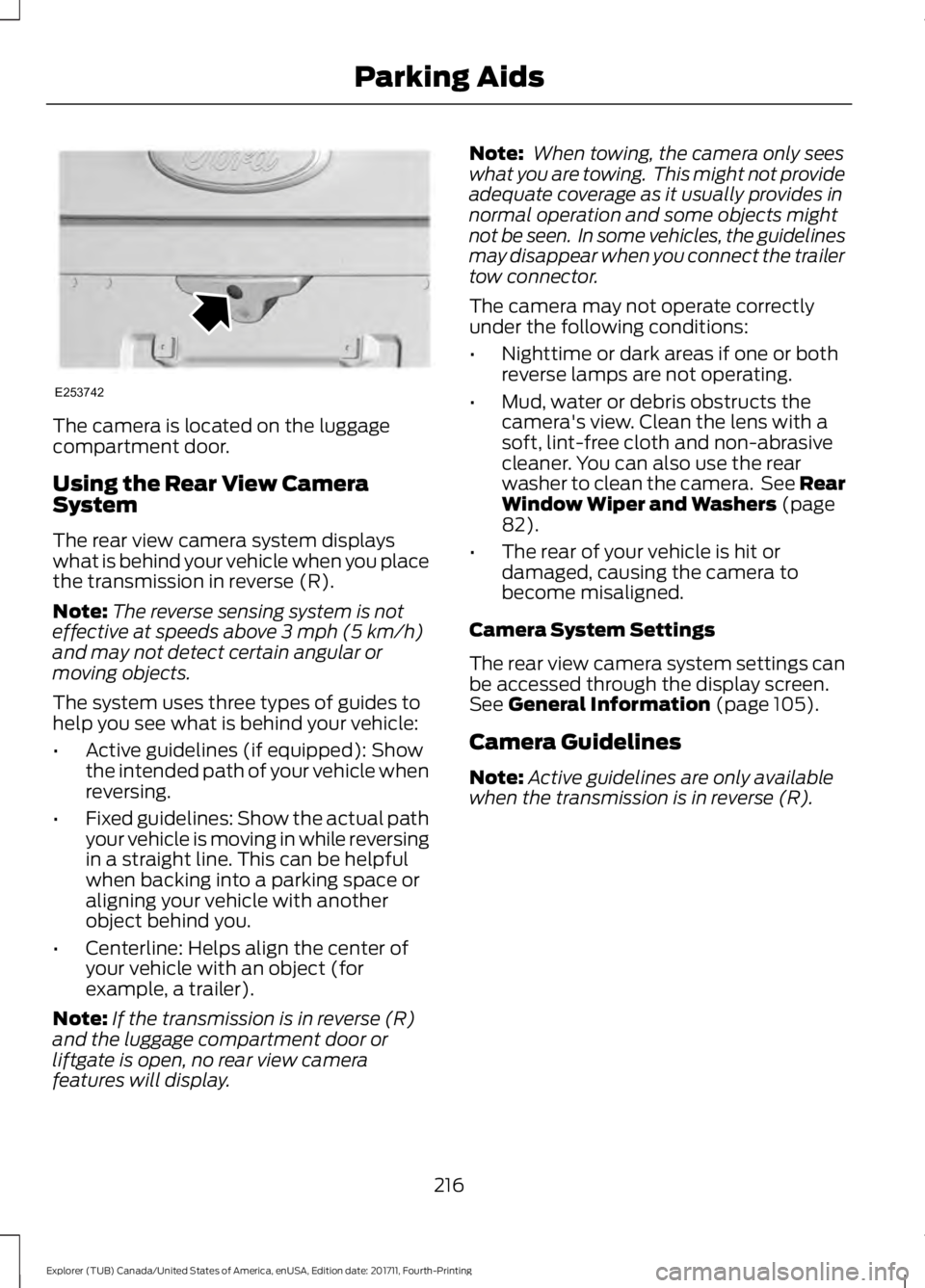
The camera is located on the luggage
compartment door.
Using the Rear View Camera
System
The rear view camera system displays
what is behind your vehicle when you place
the transmission in reverse (R).
Note:
The reverse sensing system is not
effective at speeds above 3 mph (5 km/h)
and may not detect certain angular or
moving objects.
The system uses three types of guides to
help you see what is behind your vehicle:
• Active guidelines (if equipped): Show
the intended path of your vehicle when
reversing.
• Fixed guidelines: Show the actual path
your vehicle is moving in while reversing
in a straight line. This can be helpful
when backing into a parking space or
aligning your vehicle with another
object behind you.
• Centerline: Helps align the center of
your vehicle with an object (for
example, a trailer).
Note: If the transmission is in reverse (R)
and the luggage compartment door or
liftgate is open, no rear view camera
features will display. Note:
When towing, the camera only sees
what you are towing. This might not provide
adequate coverage as it usually provides in
normal operation and some objects might
not be seen. In some vehicles, the guidelines
may disappear when you connect the trailer
tow connector.
The camera may not operate correctly
under the following conditions:
• Nighttime or dark areas if one or both
reverse lamps are not operating.
• Mud, water or debris obstructs the
camera's view. Clean the lens with a
soft, lint-free cloth and non-abrasive
cleaner. You can also use the rear
washer to clean the camera. See Rear
Window Wiper and Washers
(page
82).
• The rear of your vehicle is hit or
damaged, causing the camera to
become misaligned.
Camera System Settings
The rear view camera system settings can
be accessed through the display screen.
See
General Information (page 105).
Camera Guidelines
Note: Active guidelines are only available
when the transmission is in reverse (R).
216
Explorer (TUB) Canada/United States of America, enUSA, Edition date: 201711, Fourth-Printing Parking AidsE253742
Page 315 of 571
To clean the windshield and wiper blades:
•
Clean the windshield with a
non-abrasive glass cleaner. When
cleaning the interior of the windshield,
avoid getting any glass cleaner on the
instrument panel or door panels. Wipe
any glass cleaner off these surfaces
immediately.
• For windshields contaminated with
tree sap, chemicals, wax or bugs, clean
the entire windshield using steel wool
(no greater than 0000 grade) in a
circular motion and rinse with water.
• Clean the wiper blades with isopropyl
rubbing alcohol or windshield washer
concentrate.
Note: Do not use razor blades or other
sharp objects to clean or remove decals
from the inside of the heated rear window.
The vehicle warranty does not cover
damage caused to the heated rear window
grid lines.
CLEANING THE INTERIOR WARNING: Do not use cleaning
solvents, bleach or dye on the vehicle's
seatbelts, as these actions may weaken
the belt webbing. WARNING:
On vehicles equipped
with seat-mounted airbags, do not use
chemical solvents or strong detergents.
Such products could contaminate the side
airbag system and affect performance of
the side airbag in a crash. For fabric, carpets, cloth seats and seats
equipped with side airbags:
•
Remove dust and loose dirt with a
vacuum cleaner.
• Remove light stains and soil with
Motorcraft Professional Strength
Carpet & Upholstery Cleaner.
• If grease or tar is present on the
material, spot-clean the area first with
Motorcraft Spot and Stain Remover. In
Canada, use Motorcraft Multi-Purpose
Cleaner.
• If a ring forms on the fabric after spot
cleaning, clean the entire area
immediately (but do not oversaturate)
or the ring will set.
• Do not use household cleaning
products or glass cleaners, which can
stain and discolor the fabric and affect
the flame retardant abilities of the seat
materials.
CLEANING THE INSTRUMENT
PANEL AND INSTRUMENT
CLUSTER LENS WARNING:
Do not use chemical
solvents or strong detergents when
cleaning the steering wheel or instrument
panel to avoid contamination of the airbag
system.
Note: Follow the same procedure as
cleaning leather seats for cleaning leather
instrument panels and leather interior trim
surfaces. See
Cleaning Leather Seats
(page 313).
Clean the instrument panel and cluster
lens with a clean, damp and soft cloth,
then use a clean, dry and soft cloth to dry
these areas.
312
Explorer (TUB) Canada/United States of America, enUSA, Edition date: 201711, Fourth-Printing Vehicle Care
Page 505 of 571
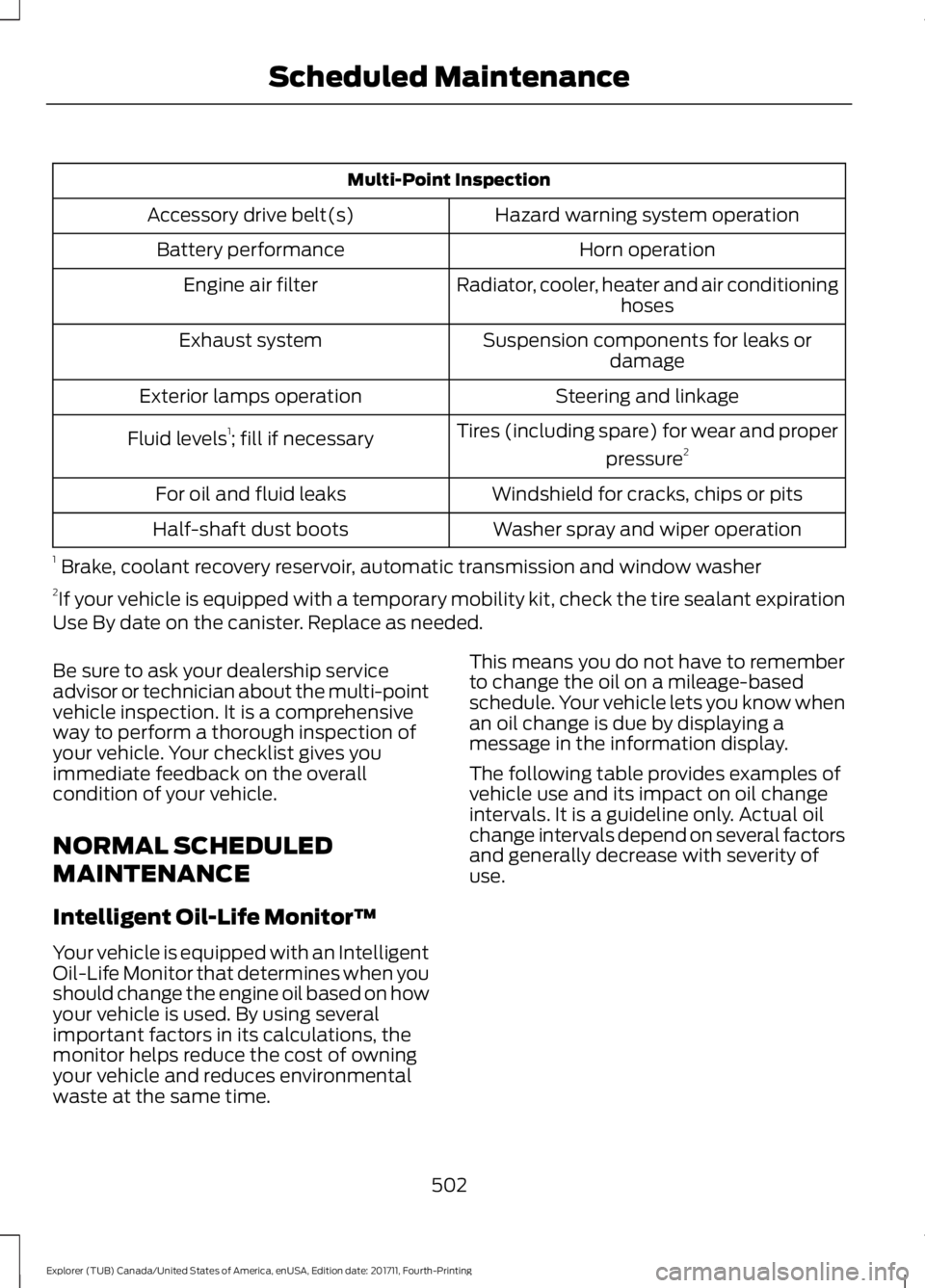
Multi-Point Inspection
Hazard warning system operation
Accessory drive belt(s)
Horn operation
Battery performance
Radiator, cooler, heater and air conditioninghoses
Engine air filter
Suspension components for leaks ordamage
Exhaust system
Steering and linkage
Exterior lamps operation
Tires (including spare) for wear and properpressure2
Fluid levels 1
; fill if necessary
Windshield for cracks, chips or pits
For oil and fluid leaks
Washer spray and wiper operation
Half-shaft dust boots
1 Brake, coolant recovery reservoir, automatic transmission and window washer
2 If your vehicle is equipped with a temporary mobility kit, check the tire sealant expiration
Use By date on the canister. Replace as needed.
Be sure to ask your dealership service
advisor or technician about the multi-point
vehicle inspection. It is a comprehensive
way to perform a thorough inspection of
your vehicle. Your checklist gives you
immediate feedback on the overall
condition of your vehicle.
NORMAL SCHEDULED
MAINTENANCE
Intelligent Oil-Life Monitor™
Your vehicle is equipped with an Intelligent
Oil-Life Monitor that determines when you
should change the engine oil based on how
your vehicle is used. By using several
important factors in its calculations, the
monitor helps reduce the cost of owning
your vehicle and reduces environmental
waste at the same time. This means you do not have to remember
to change the oil on a mileage-based
schedule. Your vehicle lets you know when
an oil change is due by displaying a
message in the information display.
The following table provides examples of
vehicle use and its impact on oil change
intervals. It is a guideline only. Actual oil
change intervals depend on several factors
and generally decrease with severity of
use.
502
Explorer (TUB) Canada/United States of America, enUSA, Edition date: 201711, Fourth-Printing Scheduled Maintenance
Page 567 of 571
Phone Menu.........................................................
452
Receiving Calls................................................... 454
Smartphone Connectivity.............................. 455
Text Messaging................................................... 455
Post-Crash Alert System..........................264
Power Door Locks See: Locking and Unlocking............................. 64
Power Liftgate.................................................70 Hands-Free Feature............................................. 72
Obstacle Detection.............................................. 72
Opening and Closing the Liftgate.................. 70
Setting the Liftgate Open Height.................... 71
Stopping the Liftgate Movement.................... 71
Power Seats
...................................................148
Adjusting the Lumbar Support..................... 149
Adjusting the Multi-Contour Front Seats With Active Motion ...................................... 149
Power Steering Fluid Check....................298
Power Windows...............................................91 Accessory Delay.................................................... 92
Bounce-Back.......................................................... 91
One-Touch Down.................................................. 91
One-Touch Up........................................................ 91
Window Lock......................................................... 92
Pre-Collision Assist
.....................................238
Using the Pre-Collision Assist
System.............................................................. 238
Protecting the Environment........................15
Puncture See: Changing a Road Wheel........................ 337
R
Rear Parking Aid...........................................205 Obstacle Distance Indicator......................... 206
Rear Passenger Climate Controls..........140
Rear Seats........................................................151 Adjusting the Rear Seats.................................. 151
Rear Under Floor Storage..........................241 Adjustable Load Floor....................................... 241
Cargo Management System........................... 241
Rear View Camera
........................................215
Camera Guidelines............................................. 216
Manual Zoom....................................................... 218
Obstacle Distance Indicator............................ 217
Rear Camera Delay............................................ 218
Using the Rear View Camera System.........216 Rear View Camera
See: Rear View Camera.................................... 215
Rear Window Wiper and Washers...........82 Rear Camera Washer.......................................... 82
Rear Window Washer......................................... 82
Rear Window Wiper Blade............................... 82
Recommended Towing Weights...........250
Refueling..........................................................179 Refueling System Overview............................ 179
Refueling System Warning.............................. 181
Refueling Your Vehicle...................................... 179
Remote Control..............................................53 Car Finder................................................................ 57
Integrated Keyhead Transmitter..................... 53
Intelligent Access Key......................................... 53
Memory Feature................................................... 56
Remote Start.......................................................... 57
Replacing the Battery......................................... 54
Sounding the Panic Alarm................................ 57
Remote Start
..................................................142
Automatic Settings............................................ 142
Removing a Headlamp
.............................303
Repairing Minor Paint Damage...............314
Replacement Parts Recommendation........................................12
Collision Repairs.................................................... 12
Scheduled Maintenance and Mechanical Repairs.................................................................. 12
Warranty on Replacement Parts..................... 12
Replacing a Lost Key or Remote Control............................................................58
Reporting Safety Defects (Canada Only)...............................................................271
Reporting Safety Defects (U.S. Only)...............................................................271
Roadside Assistance
.................................260
Vehicles Sold in Canada: Getting Roadside
Assistance........................................................ 261
Vehicles Sold in Canada: Roadside Assistance Program Coverage.................. 261
Vehicles Sold in Canada: Using Roadside Assistance........................................................ 261
Vehicles Sold in the United States: Getting Roadside Assistance................................... 260
Vehicles Sold in the United States: Using Roadside Assistance................................... 260
Roadside Emergencies
.............................260
564
Explorer (TUB) Canada/United States of America, enUSA, Edition date: 201711, Fourth-Printing Index