brake replacement FORD EXPLORER 2018 Owners Manual
[x] Cancel search | Manufacturer: FORD, Model Year: 2018, Model line: EXPLORER, Model: FORD EXPLORER 2018Pages: 571, PDF Size: 7.3 MB
Page 61 of 571
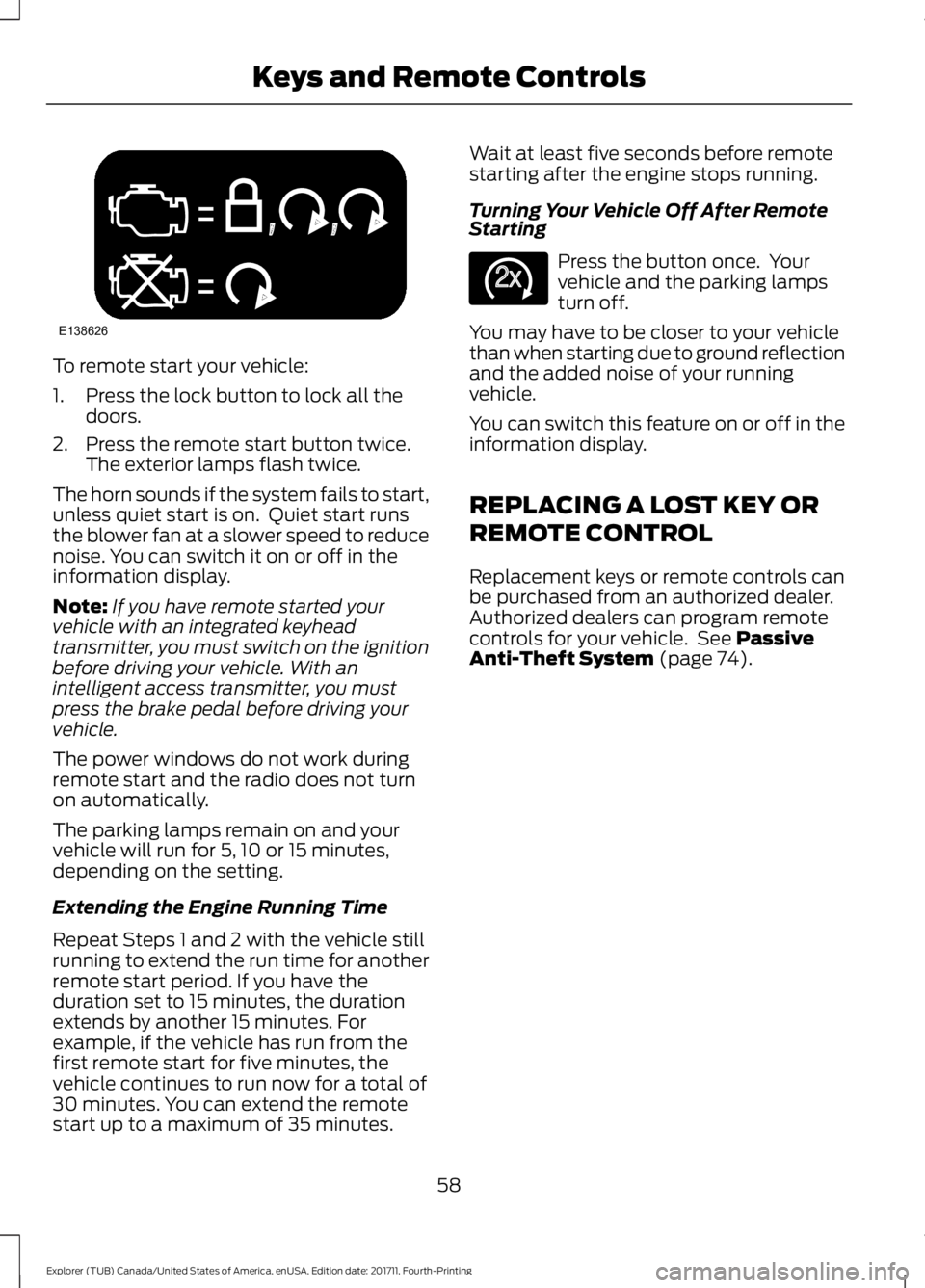
To remote start your vehicle:
1. Press the lock button to lock all the
doors.
2. Press the remote start button twice. The exterior lamps flash twice.
The horn sounds if the system fails to start,
unless quiet start is on. Quiet start runs
the blower fan at a slower speed to reduce
noise. You can switch it on or off in the
information display.
Note: If you have remote started your
vehicle with an integrated keyhead
transmitter, you must switch on the ignition
before driving your vehicle. With an
intelligent access transmitter, you must
press the brake pedal before driving your
vehicle.
The power windows do not work during
remote start and the radio does not turn
on automatically.
The parking lamps remain on and your
vehicle will run for 5, 10 or 15 minutes,
depending on the setting.
Extending the Engine Running Time
Repeat Steps 1 and 2 with the vehicle still
running to extend the run time for another
remote start period. If you have the
duration set to 15 minutes, the duration
extends by another 15 minutes. For
example, if the vehicle has run from the
first remote start for five minutes, the
vehicle continues to run now for a total of
30 minutes. You can extend the remote
start up to a maximum of 35 minutes. Wait at least five seconds before remote
starting after the engine stops running.
Turning Your Vehicle Off After Remote
Starting
Press the button once. Your
vehicle and the parking lamps
turn off.
You may have to be closer to your vehicle
than when starting due to ground reflection
and the added noise of your running
vehicle.
You can switch this feature on or off in the
information display.
REPLACING A LOST KEY OR
REMOTE CONTROL
Replacement keys or remote controls can
be purchased from an authorized dealer.
Authorized dealers can program remote
controls for your vehicle. See Passive
Anti-Theft System (page 74).
58
Explorer (TUB) Canada/United States of America, enUSA, Edition date: 201711, Fourth-Printing Keys and Remote ControlsE138626 E138625
Page 198 of 571
Driving on Snow and Ice
WARNING: If you are driving in
slippery conditions that require tire chains
or cables, then it is critical that you drive
cautiously. Keep speeds down, allow for
longer stopping distances and avoid
aggressive steering to reduce the chances
of a loss of vehicle control which can lead
to serious injury or death. If the rear end of
the vehicle slides while cornering, steer in
the direction of the slide until you regain
control of the vehicle.
Note: Excessive tire slippage can cause
driveline damage.
4WD vehicles have advantages over 2WD
vehicles in snow and ice but can skid like
any other vehicle.
Should you start to slide while driving on
snowy or icy roads, turn the steering wheel
in the direction of the slide until you regain
control.
Avoid sudden applications of power and
quick changes of direction on snow and
ice. Apply the accelerator slowly and
steadily when starting from a full stop.
Avoid sudden braking as well. Although an
4WD vehicle may accelerate better than
a two-wheel drive vehicle in snow and ice,
it won ’t stop any faster, because as in other
vehicles, braking occurs at all four wheels.
Do not become overconfident as to road
conditions.
Make sure you allow sufficient distance
between you and other vehicles for
stopping. Drive slower than usual and
consider using one of the lower gears. In
emergency stopping situations, apply the
brake steadily. Since your vehicle is
equipped with a four wheel (ABS), do not
“pump ” the brakes. See Hints on Driving
With Anti-Lock Brakes
(page 197). Maintenance and Modifications
The suspension and steering systems on
your vehicle have been designed and
tested to provide predictable performance
whether loaded or empty and durable load
carrying capability. For this reason, Ford
Motor Company strongly recommends that
you do not make modifications such as
adding or removing parts (such as lowering
kits or stabilizer bars) or by using
replacement parts not equivalent to the
original factory equipment.
Any modifications to a vehicle that raise
the center of gravity can make it more likely
the vehicle will rollover as a result of a loss
of control. Ford Motor Company
recommends that caution be used with
any vehicle equipped with a high load or
device (such as ladder or luggage racks).
Failure to maintain your vehicle properly
may void the warranty, increase your repair
cost, reduce vehicle performance and
operational capabilities and adversely
affect driver and passenger safety.
Frequent inspection of vehicle chassis
components is recommended if the vehicle
is subjected to off-highway usage.
195
Explorer (TUB) Canada/United States of America, enUSA, Edition date: 201711, Fourth-Printing Four-Wheel Drive
(If Equipped)
Page 249 of 571
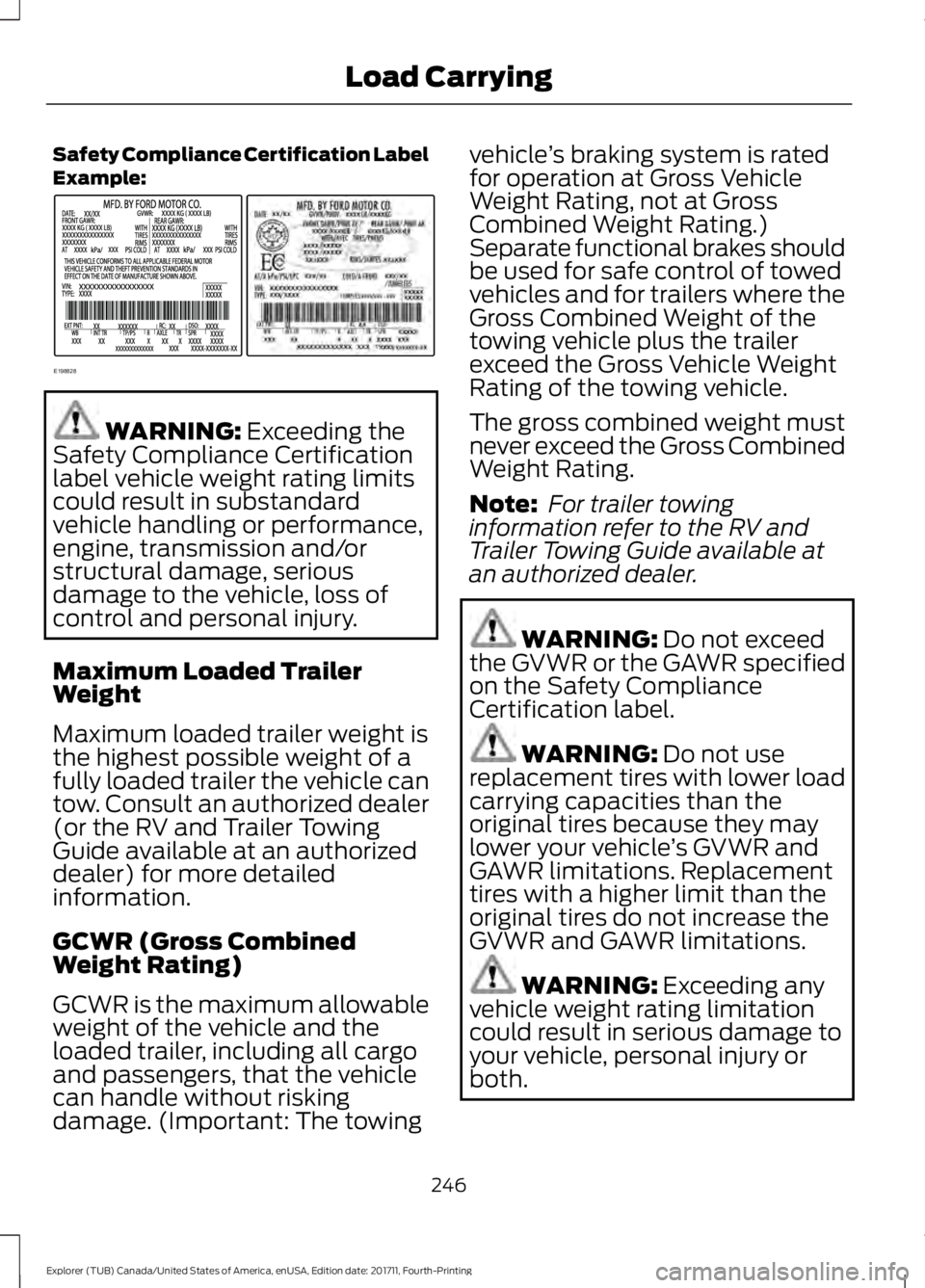
Safety Compliance Certification Label
Example:
WARNING: Exceeding the
Safety Compliance Certification
label vehicle weight rating limits
could result in substandard
vehicle handling or performance,
engine, transmission and/or
structural damage, serious
damage to the vehicle, loss of
control and personal injury.
Maximum Loaded Trailer
Weight
Maximum loaded trailer weight is
the highest possible weight of a
fully loaded trailer the vehicle can
tow. Consult an authorized dealer
(or the RV and Trailer Towing
Guide available at an authorized
dealer) for more detailed
information.
GCWR (Gross Combined
Weight Rating)
GCWR is the maximum allowable
weight of the vehicle and the
loaded trailer, including all cargo
and passengers, that the vehicle
can handle without risking
damage. (Important: The towing vehicle
’s braking system is rated
for operation at Gross Vehicle
Weight Rating, not at Gross
Combined Weight Rating.)
Separate functional brakes should
be used for safe control of towed
vehicles and for trailers where the
Gross Combined Weight of the
towing vehicle plus the trailer
exceed the Gross Vehicle Weight
Rating of the towing vehicle.
The gross combined weight must
never exceed the Gross Combined
Weight Rating.
Note: For trailer towing
information refer to the RV and
Trailer Towing Guide available at
an authorized dealer. WARNING:
Do not exceed
the GVWR or the GAWR specified
on the Safety Compliance
Certification label. WARNING:
Do not use
replacement tires with lower load
carrying capacities than the
original tires because they may
lower your vehicle ’s GVWR and
GAWR limitations. Replacement
tires with a higher limit than the
original tires do not increase the
GVWR and GAWR limitations. WARNING:
Exceeding any
vehicle weight rating limitation
could result in serious damage to
your vehicle, personal injury or
both.
246
Explorer (TUB) Canada/United States of America, enUSA, Edition date: 201711, Fourth-Printing Load CarryingE198828
Page 302 of 571
Note:
See an authorized dealer for low
voltage battery access, testing, or
replacement.
When a low voltage battery replacement
is necessary, see an authorized dealer to
replace the low voltage battery with a Ford
recommended replacement low voltage
battery that matches the electrical
requirements of the vehicle.
To ensure proper operation of the battery
management system (BMS), do not allow
a technician to connect any electrical
device ground connection directly to the
low voltage battery negative post. A
connection at the low voltage battery
negative post can cause inaccurate
measurements of the battery condition
and potential incorrect system operation.
Note: If a person adds electrical or
electronic accessories or components to the
vehicle, the accessories or components may
adversely affect the low voltage battery
performance and durability and may also
affect the performance of other electrical
systems in the vehicle.
For longer, trouble-free operation, keep the
top of the battery clean and dry. Also,
make certain the battery cables are always
tightly fastened to the battery terminals.
If you see any corrosion on the battery or
terminals, remove the cables from the
terminals and clean with a wire brush. You
can neutralize the acid with a solution of
baking soda and water.
When a battery replacement is required,
the battery should only be replaced with
a Ford recommended replacement battery
that matches the electrical requirements
of the vehicle.
Because your vehicle ’s engine is
electronically-controlled by a computer,
some engine control settings are
maintained by power from the low voltage
battery. Some engine computer settings,
like the idle trim and fuel trim strategy, optimize the driveability and performance
of the engine. Some other computer
settings, like the clock and radio station
presets, are also maintained in memory by
power from the low voltage battery. When
a technician disconnects and connects the
low voltage battery, these settings are
erased. Complete the following procedure
in order to restore the settings:
1. With the vehicle at a complete stop,
set the parking brake.
2. Shift the transmission into park (P).
3. Switch off all accessories.
4. Fully press the brake pedal and start the vehicle.
5. Run the engine until it reaches normal operating temperature. While the
engine is warming up, complete the
following: Reset the clock. See Audio
System (page 364). Reset the power
windows bounce-back feature. See
Windows and Mirrors
(page 91).
Reset the radio station presets. See
Audio System
(page 364).
6. Allow the engine to idle for at least one
minute. If the engine turns off, press
the accelerator pedal to start the
engine.
7. While the engine is running, press the brake pedal and shift into neutral (N).
8. Allow the engine to run for at least one
minute by pressing on the accelerator
pedal.
9. Drive the vehicle at least 12 mi (20 km)
to completely relearn the idle and fuel
trim strategy.
Note: If you do not allow the engine to
relearn the idle and fuel trim strategy, the
idle quality of your vehicle may be adversely
affected until the engine computer
eventually relearns the idle trim and fuel
trim strategy.
299
Explorer (TUB) Canada/United States of America, enUSA, Edition date: 201711, Fourth-Printing Maintenance
Page 309 of 571
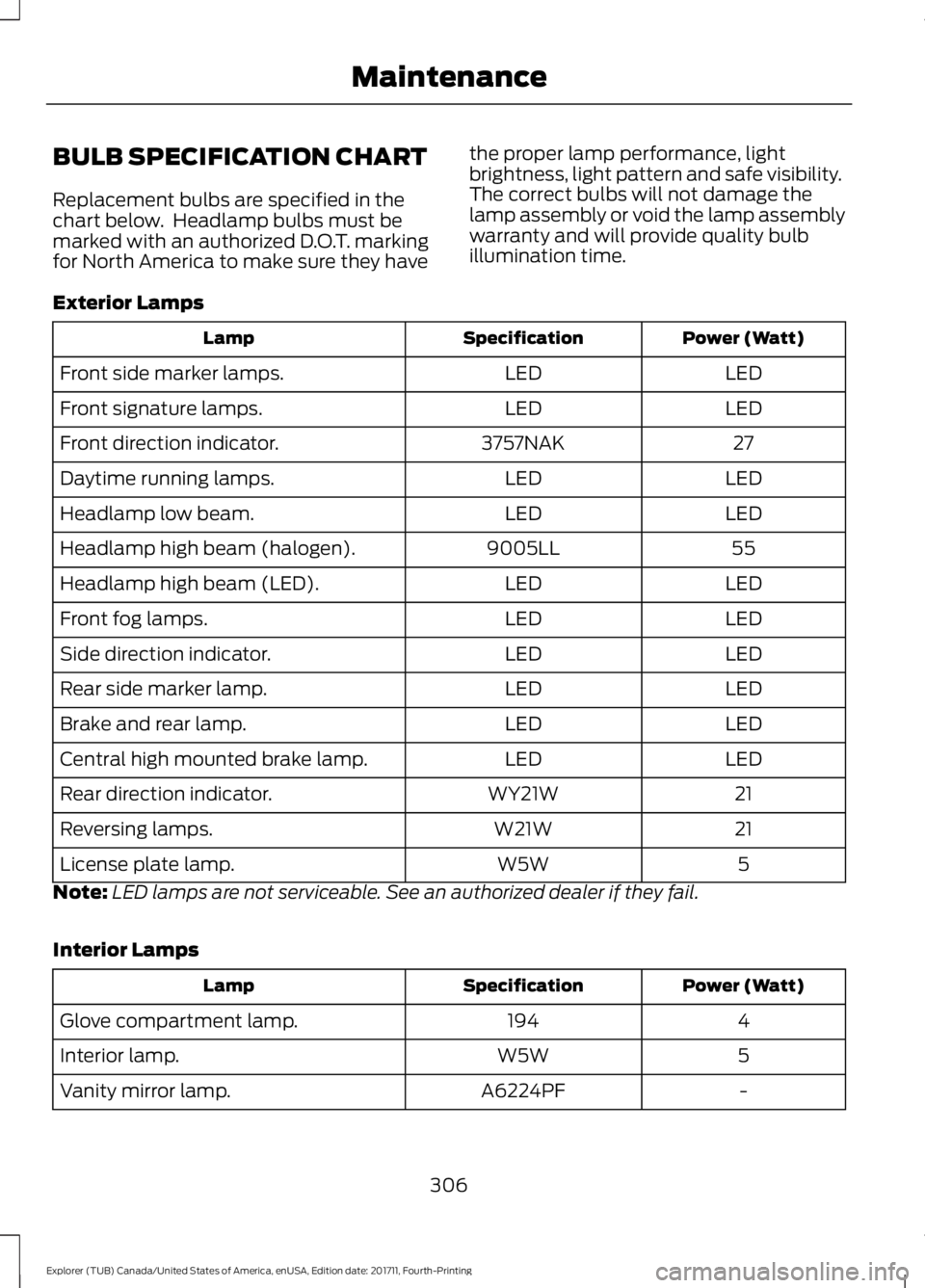
BULB SPECIFICATION CHART
Replacement bulbs are specified in the
chart below. Headlamp bulbs must be
marked with an authorized D.O.T. marking
for North America to make sure they have
the proper lamp performance, light
brightness, light pattern and safe visibility.
The correct bulbs will not damage the
lamp assembly or void the lamp assembly
warranty and will provide quality bulb
illumination time.
Exterior Lamps Power (Watt)
Specification
Lamp
LED
LED
Front side marker lamps.
LED
LED
Front signature lamps.
27
3757NAK
Front direction indicator.
LED
LED
Daytime running lamps.
LED
LED
Headlamp low beam.
55
9005LL
Headlamp high beam (halogen).
LED
LED
Headlamp high beam (LED).
LED
LED
Front fog lamps.
LED
LED
Side direction indicator.
LED
LED
Rear side marker lamp.
LED
LED
Brake and rear lamp.
LED
LED
Central high mounted brake lamp.
21
WY21W
Rear direction indicator.
21
W21W
Reversing lamps.
5
W5W
License plate lamp.
Note: LED lamps are not serviceable. See an authorized dealer if they fail.
Interior Lamps Power (Watt)
Specification
Lamp
4
194
Glove compartment lamp.
5
W5W
Interior lamp.
-
A6224PF
Vanity mirror lamp.
306
Explorer (TUB) Canada/United States of America, enUSA, Edition date: 201711, Fourth-Printing Maintenance
Page 344 of 571
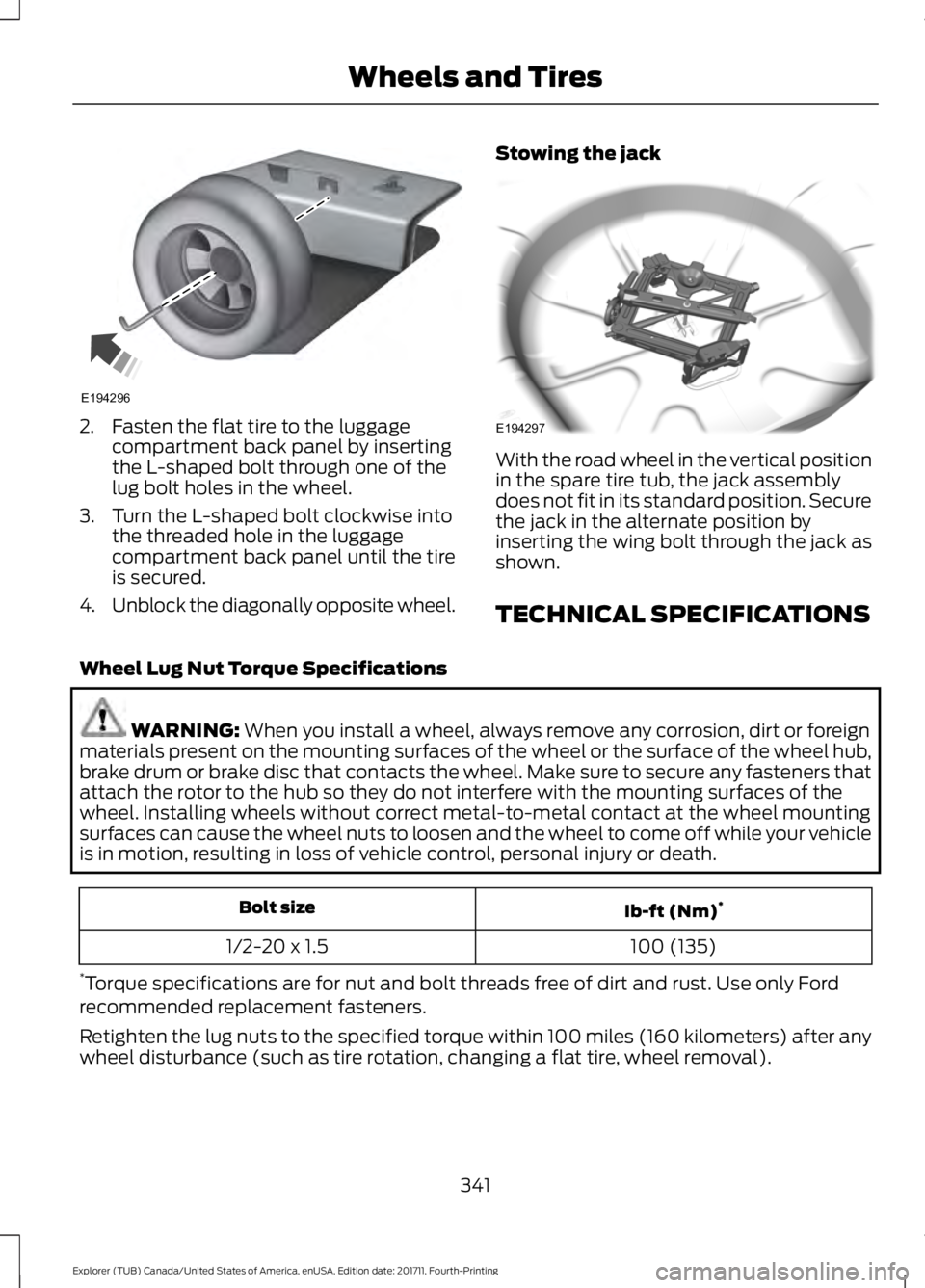
2. Fasten the flat tire to the luggage
compartment back panel by inserting
the L-shaped bolt through one of the
lug bolt holes in the wheel.
3. Turn the L-shaped bolt clockwise into the threaded hole in the luggage
compartment back panel until the tire
is secured.
4. Unblock the diagonally opposite wheel. Stowing the jack With the road wheel in the vertical position
in the spare tire tub, the jack assembly
does not fit in its standard position. Secure
the jack in the alternate position by
inserting the wing bolt through the jack as
shown.
TECHNICAL SPECIFICATIONS
Wheel Lug Nut Torque Specifications WARNING: When you install a wheel, always remove any corrosion, dirt or foreign
materials present on the mounting surfaces of the wheel or the surface of the wheel hub,
brake drum or brake disc that contacts the wheel. Make sure to secure any fasteners that
attach the rotor to the hub so they do not interfere with the mounting surfaces of the
wheel. Installing wheels without correct metal-to-metal contact at the wheel mounting
surfaces can cause the wheel nuts to loosen and the wheel to come off while your vehicle
is in motion, resulting in loss of vehicle control, personal injury or death. Ib-ft (Nm)
*
Bolt size
100 (135)
1/2-20 x 1.5
* Torque specifications are for nut and bolt threads free of dirt and rust. Use only Ford
recommended replacement fasteners.
Retighten the lug nuts to the specified torque within 100 miles (160 kilometers) after any
wheel disturbance (such as tire rotation, changing a flat tire, wheel removal).
341
Explorer (TUB) Canada/United States of America, enUSA, Edition date: 201711, Fourth-Printing Wheels and TiresE194296 E194297
Page 501 of 571
Less Cost to Properly Maintain Your
Vehicle
Ford Protect extended service plan also
offers a Premium Maintenance Plan that
covers all scheduled maintenance, and
selected wear items. The coverage is
prepaid, so you never have to worry about
the cost of your vehicle
’s maintenance.
Covered maintenance includes:
• Windshield wiper blades.
• Spark plugs.
• The clutch disc (if equipped).
• Brake pads and linings.
• Shock absorbers.
• Struts.
• Engine Belts.
• Engine coolant hoses, clamps and
o-rings.
• Diesel exhaust fluid replenishment (if
equipped).
• Cabin air filter replacement every
20,000 mi (32,000 km) (electric
vehicles only).
Interest Free Finance Options
Just a 10% down payment will provide you
with an affordable, no interest, no fee
payment program allowing you all the
security and benefits Ford Protect
extended service plan has to offer while
paying over time. You are pre-approved
with no credit check or hassles. To learn
more, call our Ford Protect extended
service plan specialists at 800-367-3377.
Ford Protect Extended Service Plan
P.O. Box 321067
Detroit, MI 48232 Ford Protect Extended Service
Plan (CANADA ONLY)
You can get more protection for your
vehicle by purchasing a Ford Protect
extended service plan. Ford Protect
extended service plan is the only service
contract backed by Ford Motor Company
of Canada, Limited. Depending on the plan
you purchase, Ford Protect extended
service plan provides benefits such as:
•
Rental reimbursement.
• Coverage for certain maintenance and
wear items.
• Protection against repair costs after
your New Vehicle Limited Warranty
Coverage expires.
• Roadside Assistance benefits.
There are several Ford Protect extended
service plans available in various time,
distance and deductible combinations.
Each plan is tailored to fit your own driving
needs, including reimbursement for towing
and rental. When you purchase Ford
Protect extended service plan, you receive
added peace-of-mind protection
throughout Canada, the United States and
Mexico, provided by a network of
participating authorized Ford Motor
Company dealers.
Note: Repairs performed outside of
Canada, the United States and Mexico are
not eligible for Ford Protect extended
service plan coverage.
This information is subject to change. For
more information; visit your local Ford of
Canada dealer or www.ford.ca to find the
Ford Protect extended service plan that is
right for you.
498
Explorer (TUB) Canada/United States of America, enUSA, Edition date: 201711, Fourth-Printing Ford Protect
Page 507 of 571
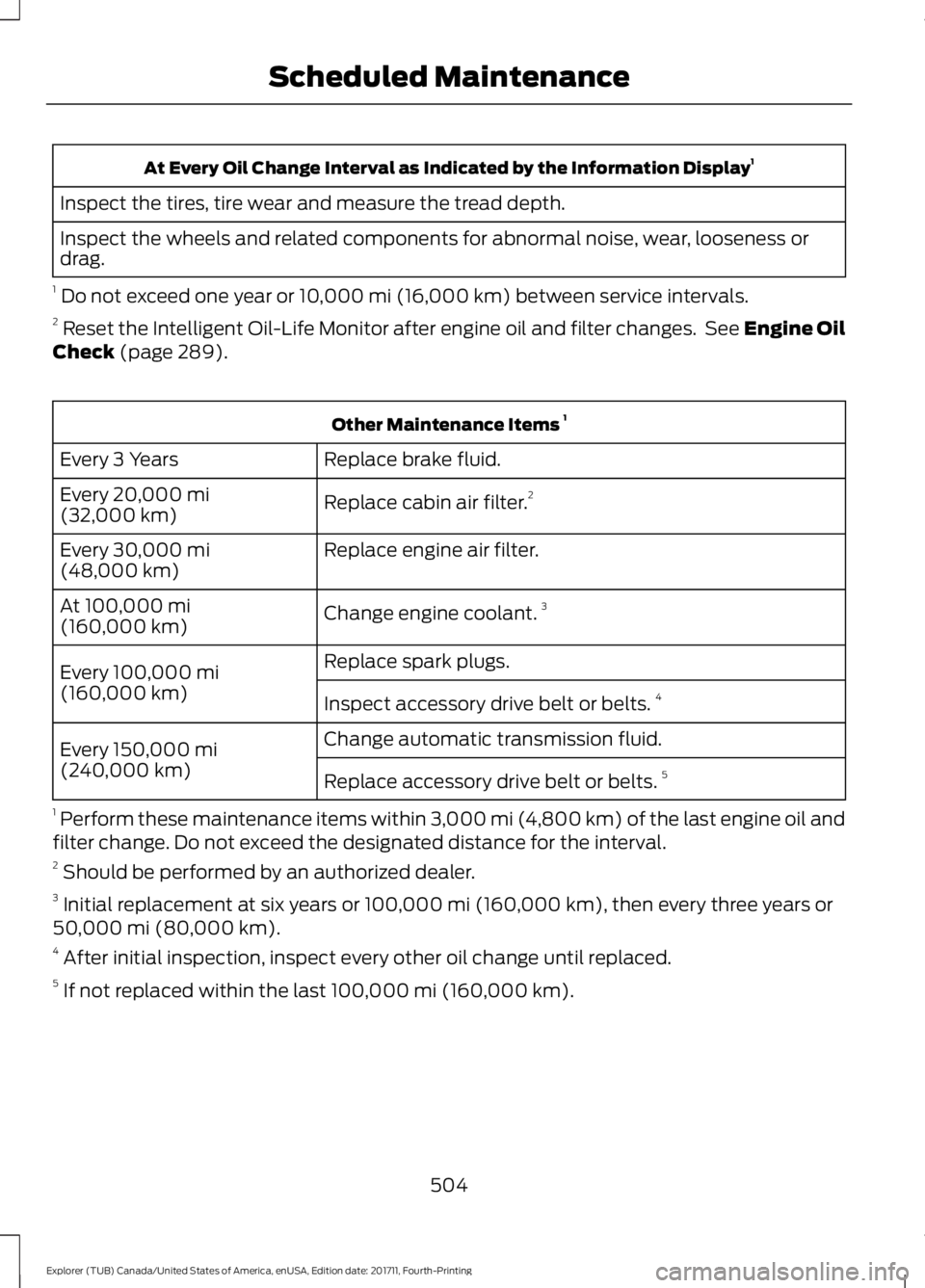
At Every Oil Change Interval as Indicated by the Information Display
1
Inspect the tires, tire wear and measure the tread depth.
Inspect the wheels and related components for abnormal noise, wear, looseness or
drag.
1 Do not exceed one year or 10,000 mi (16,000 km) between service intervals.
2 Reset the Intelligent Oil-Life Monitor after engine oil and filter changes. See
Engine Oil
Check (page 289). Other Maintenance Items
1
Replace brake fluid.
Every 3 Years
Replace cabin air filter.2
Every
20,000 mi
(32,000 km)
Replace engine air filter.
Every
30,000 mi
(48,000 km)
Change engine coolant.3
At
100,000 mi
(160,000 km)
Replace spark plugs.
Every
100,000 mi
(160,000 km) Inspect accessory drive belt or belts. 4
Change automatic transmission fluid.
Every
150,000 mi
(240,000 km) Replace accessory drive belt or belts. 5
1 Perform these maintenance items within 3,000 mi (4,800 km) of the last engine oil and
filter change. Do not exceed the designated distance for the interval.
2 Should be performed by an authorized dealer.
3 Initial replacement at six years or
100,000 mi (160,000 km), then every three years or
50,000 mi (80,000 km).
4 After initial inspection, inspect every other oil change until replaced.
5 If not replaced within the last
100,000 mi (160,000 km).
504
Explorer (TUB) Canada/United States of America, enUSA, Edition date: 201711, Fourth-Printing Scheduled Maintenance
Page 560 of 571
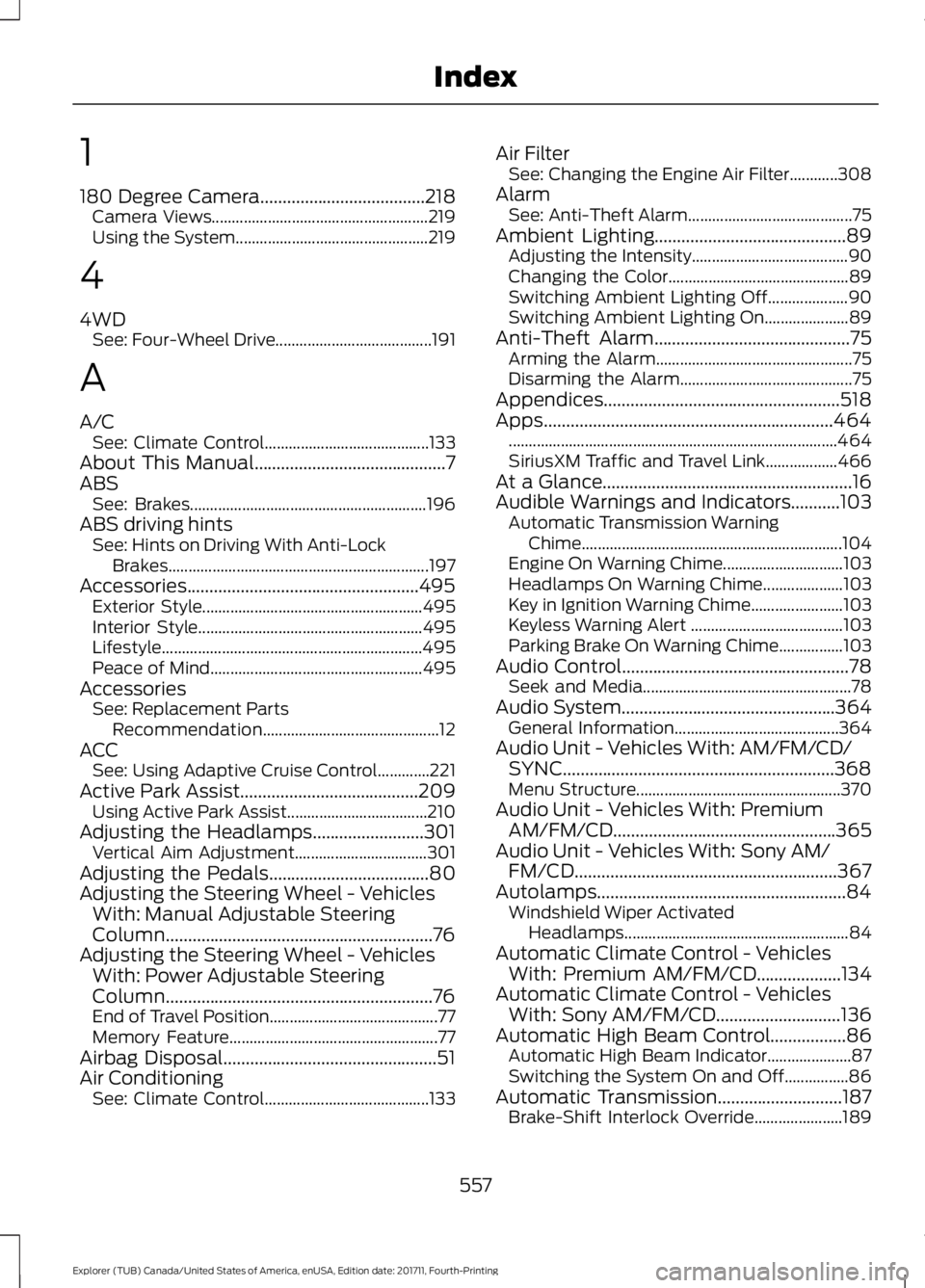
1
180 Degree Camera.....................................218
Camera Views...................................................... 219
Using the System................................................ 219
4
4WD See: Four-Wheel Drive....................................... 191
A
A/C See: Climate Control......................................... 133
About This Manual
...........................................7
ABS See: Brakes........................................................... 196
ABS driving hints See: Hints on Driving With Anti-Lock
Brakes................................................................. 197
Accessories....................................................495 Exterior Style....................................................... 495
Interior Style........................................................ 495
Lifestyle................................................................. 495
Peace of Mind..................................................... 495
Accessories See: Replacement Parts
Recommendation............................................ 12
ACC See: Using Adaptive Cruise Control.............221
Active Park Assist
........................................209
Using Active Park Assist................................... 210
Adjusting the Headlamps.........................301 Vertical Aim Adjustment................................. 301
Adjusting the Pedals....................................80
Adjusting the Steering Wheel - Vehicles With: Manual Adjustable Steering
Column............................................................76
Adjusting the Steering Wheel - Vehicles With: Power Adjustable Steering
Column............................................................76
End of Travel Position.......................................... 77
Memory Feature.................................................... 77
Airbag Disposal................................................51
Air Conditioning See: Climate Control......................................... 133Air Filter
See: Changing the Engine Air Filter............308
Alarm See: Anti-Theft Alarm......................................... 75
Ambient Lighting...........................................89 Adjusting the Intensity....................................... 90
Changing the Color............................................. 89
Switching Ambient Lighting Off.................... 90
Switching Ambient Lighting On..................... 89
Anti-Theft Alarm............................................75 Arming the Alarm................................................. 75
Disarming the Alarm........................................... 75
Appendices.....................................................518
Apps.................................................................464 ........................................................................\
.......... 464
SiriusXM Traffic and Travel Link.................. 466
At a Glance........................................................16
Audible Warnings and Indicators...........103 Automatic Transmission Warning
Chime................................................................. 104
Engine On Warning Chime.............................. 103
Headlamps On Warning Chime.................... 103
Key in Ignition Warning Chime....................... 103
Keyless Warning Alert ...................................... 103
Parking Brake On Warning Chime................103
Audio Control...................................................78 Seek and Media.................................................... 78
Audio System
................................................364
General Information......................................... 364
Audio Unit - Vehicles With: AM/FM/CD/ SYNC.............................................................368
Menu Structure................................................... 370
Audio Unit - Vehicles With: Premium AM/FM/CD..................................................365
Audio Unit - Vehicles With: Sony AM/ FM/CD...........................................................367
Autolamps........................................................84 Windshield Wiper Activated
Headlamps........................................................ 84
Automatic Climate Control - Vehicles With: Premium AM/FM/CD...................134
Automatic Climate Control - Vehicles With: Sony AM/FM/CD
............................136
Automatic High Beam Control.................86 Automatic High Beam Indicator..................... 87
Switching the System On and Off................86
Automatic Transmission
............................187
Brake-Shift Interlock Override...................... 189
557
Explorer (TUB) Canada/United States of America, enUSA, Edition date: 201711, Fourth-Printing Index