clock FORD EXPLORER 2019 User Guide
[x] Cancel search | Manufacturer: FORD, Model Year: 2019, Model line: EXPLORER, Model: FORD EXPLORER 2019Pages: 571, PDF Size: 6.8 MB
Page 306 of 571
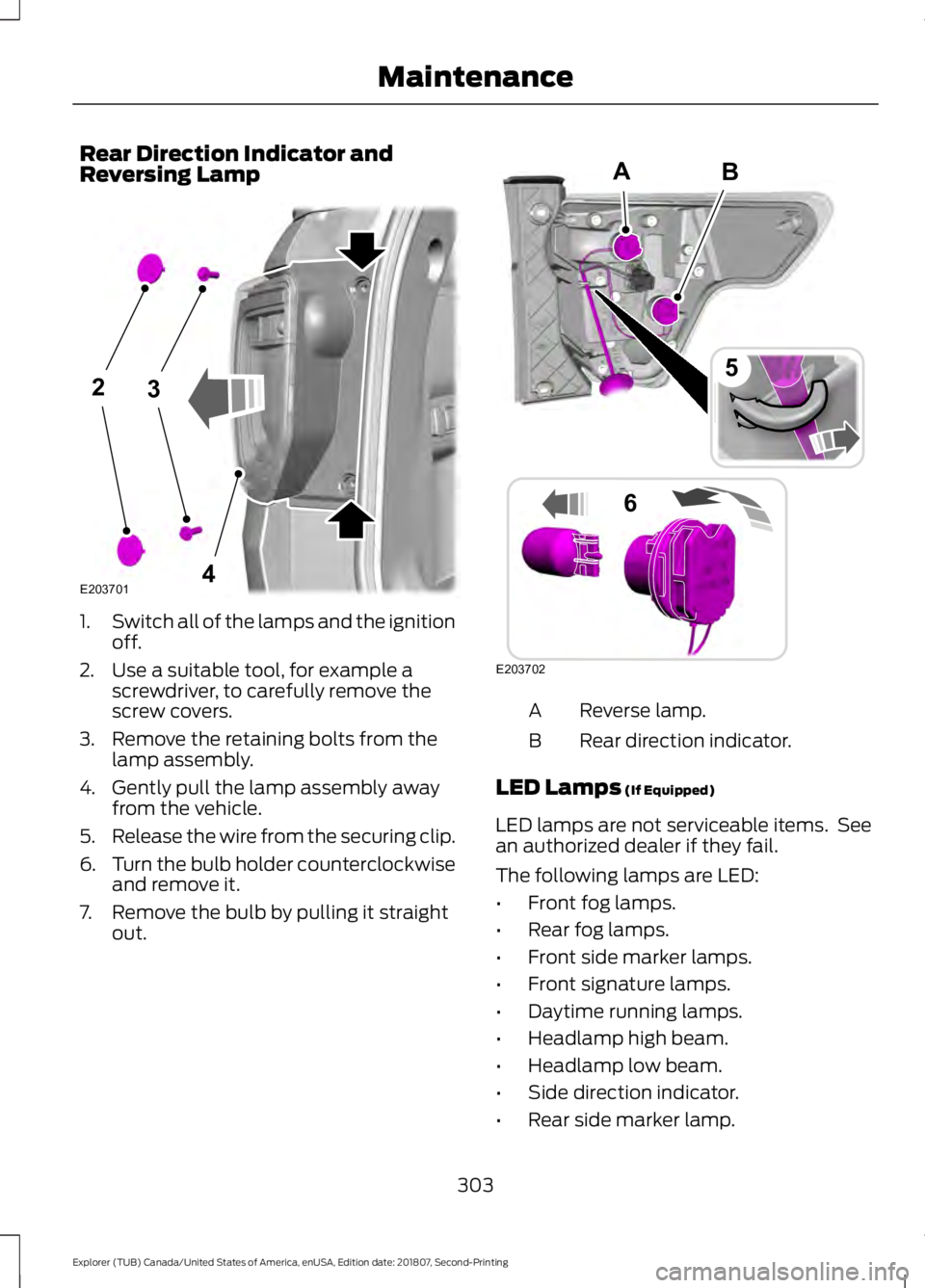
Rear Direction Indicator and
Reversing Lamp
1.
Switch all of the lamps and the ignition
off.
2. Use a suitable tool, for example a screwdriver, to carefully remove the
screw covers.
3. Remove the retaining bolts from the lamp assembly.
4. Gently pull the lamp assembly away from the vehicle.
5. Release the wire from the securing clip.
6. Turn the bulb holder counterclockwise
and remove it.
7. Remove the bulb by pulling it straight out. Reverse lamp.
A
Rear direction indicator.
B
LED Lamps (If Equipped)
LED lamps are not serviceable items. See
an authorized dealer if they fail.
The following lamps are LED:
• Front fog lamps.
• Rear fog lamps.
• Front side marker lamps.
• Front signature lamps.
• Daytime running lamps.
• Headlamp high beam.
• Headlamp low beam.
• Side direction indicator.
• Rear side marker lamp.
303
Explorer (TUB) Canada/United States of America, enUSA, Edition date: 201807, Second-Printing Maintenance23
4E203701 B
E203702
5
6
A
Page 307 of 571
•
Brake and rear lamp.
• Central high mounted brake lamp.
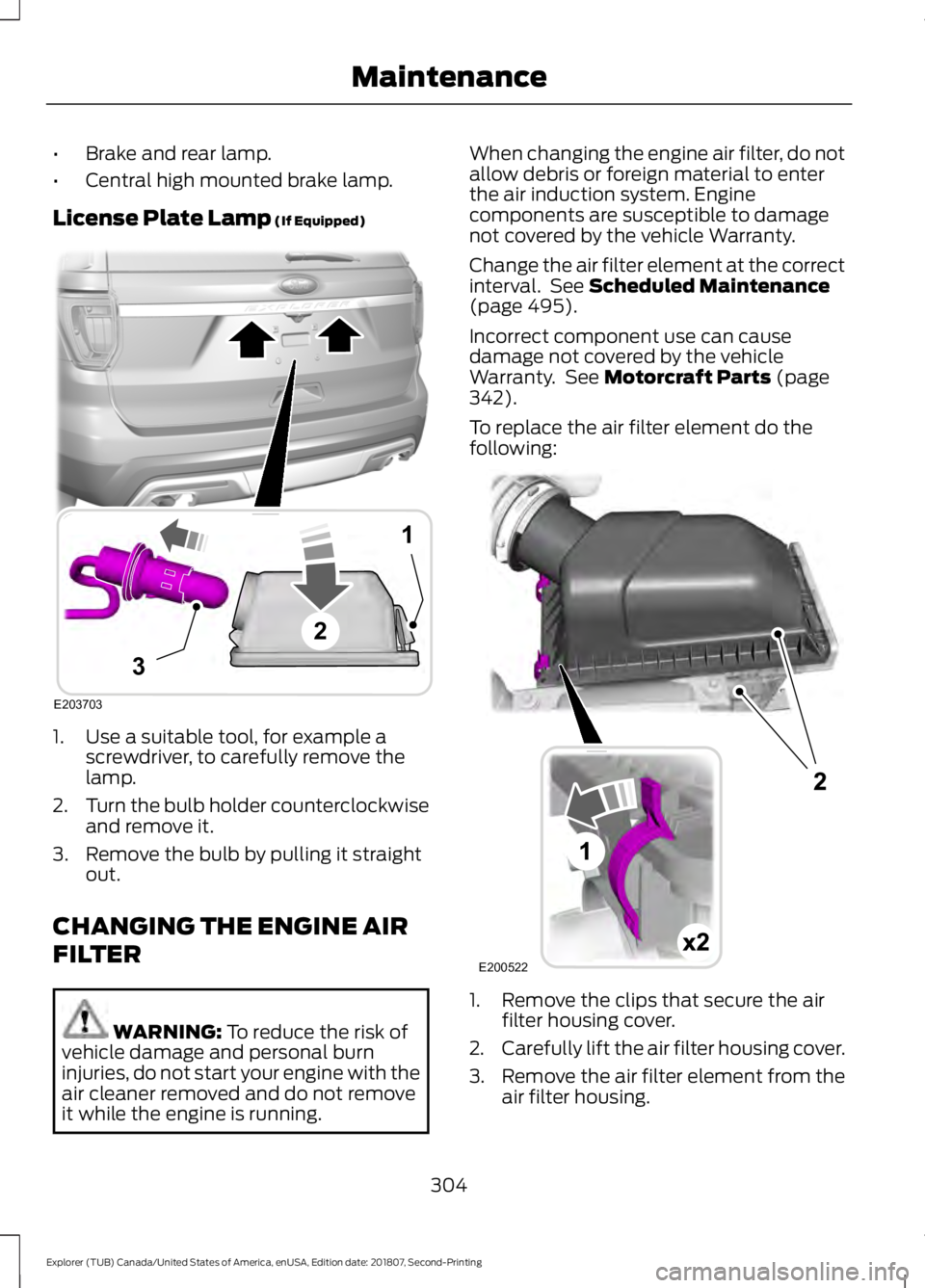
License Plate Lamp (If Equipped) 1. Use a suitable tool, for example a
screwdriver, to carefully remove the
lamp.
2. Turn the bulb holder counterclockwise
and remove it.
3. Remove the bulb by pulling it straight out.
CHANGING THE ENGINE AIR
FILTER WARNING:
To reduce the risk of
vehicle damage and personal burn
injuries, do not start your engine with the
air cleaner removed and do not remove
it while the engine is running. When changing the engine air filter, do not
allow debris or foreign material to enter
the air induction system. Engine
components are susceptible to damage
not covered by the vehicle Warranty.
Change the air filter element at the correct
interval. See
Scheduled Maintenance
(page 495).
Incorrect component use can cause
damage not covered by the vehicle
Warranty. See
Motorcraft Parts (page
342).
To replace the air filter element do the
following: 1. Remove the clips that secure the air
filter housing cover.
2. Carefully lift the air filter housing cover.
3. Remove the air filter element from the
air filter housing.
304
Explorer (TUB) Canada/United States of America, enUSA, Edition date: 201807, Second-Printing MaintenanceE203703
1
3
2 E200522
Page 339 of 571
WARNING: Do not work on your
vehicle when the jack is the only support.
If the vehicle slips off the jack, you or
someone else could be seriously injured. WARNING:
Do not attempt to
change a tire on the side of the vehicle
close to moving traffic. Pull far enough
off the road to avoid the danger of being
hit when operating the jack or changing
the wheel. WARNING:
Always use the jack
provided as original equipment with your
vehicle. If using a jack other than the one
provided, make sure the jack capacity is
adequate for the vehicle weight,
including any vehicle cargo or
modifications. If you are unsure if the jack
capacity is adequate, contact the
authorized dealer.
Note: Passengers should not remain in your
vehicle when the vehicle is being jacked.
Note: Jack at the specified locations to
avoid damage to the vehicle.
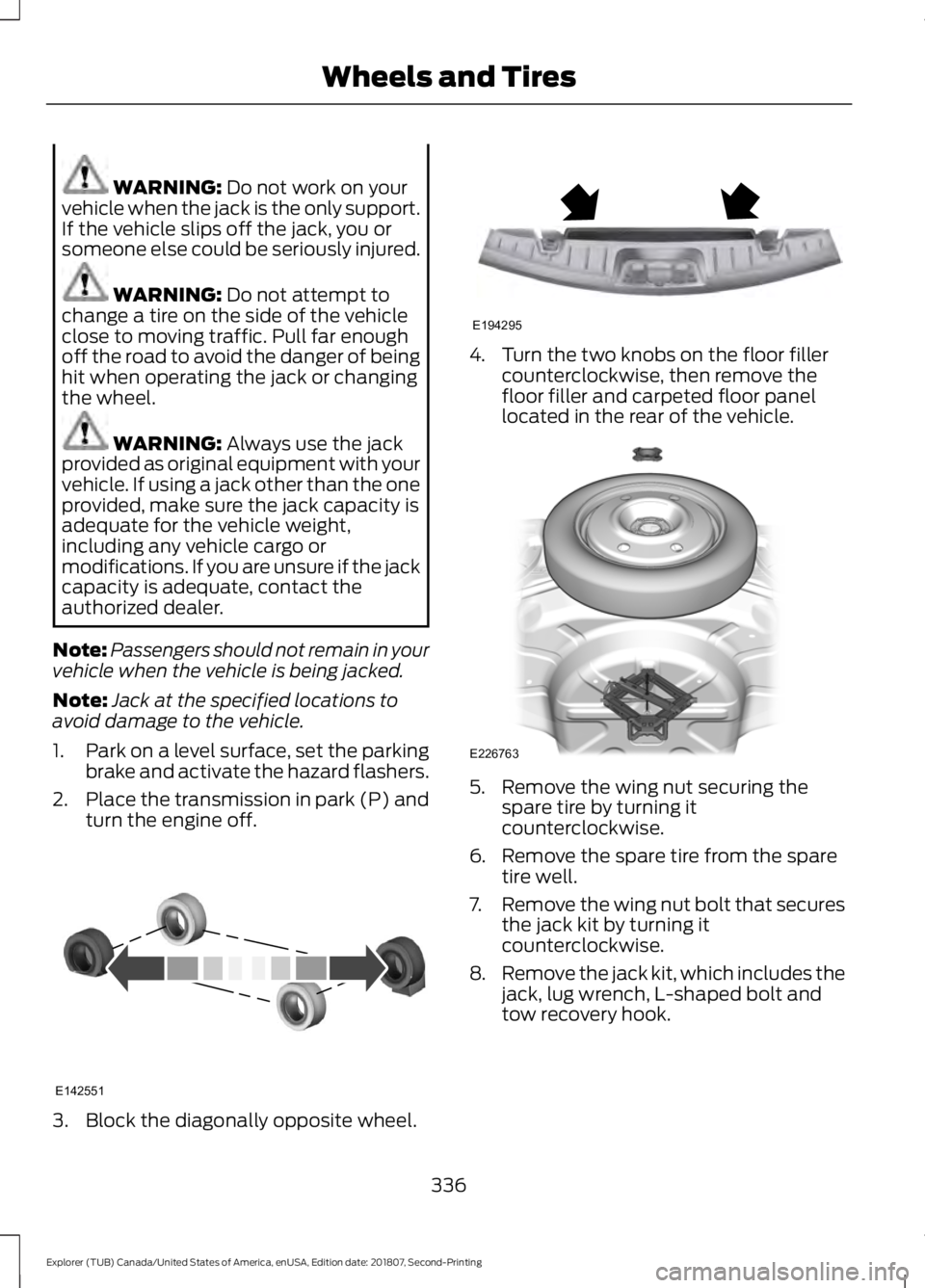
1. Park on a level surface, set the parking
brake and activate the hazard flashers.
2. Place the transmission in park (P) and
turn the engine off. 3. Block the diagonally opposite wheel. 4. Turn the two knobs on the floor filler
counterclockwise, then remove the
floor filler and carpeted floor panel
located in the rear of the vehicle. 5. Remove the wing nut securing the
spare tire by turning it
counterclockwise.
6. Remove the spare tire from the spare tire well.
7. Remove the wing nut bolt that secures
the jack kit by turning it
counterclockwise.
8. Remove the jack kit, which includes the
jack, lug wrench, L-shaped bolt and
tow recovery hook.
336
Explorer (TUB) Canada/United States of America, enUSA, Edition date: 201807, Second-Printing Wheels and TiresE142551 E194295 E226763
Page 340 of 571
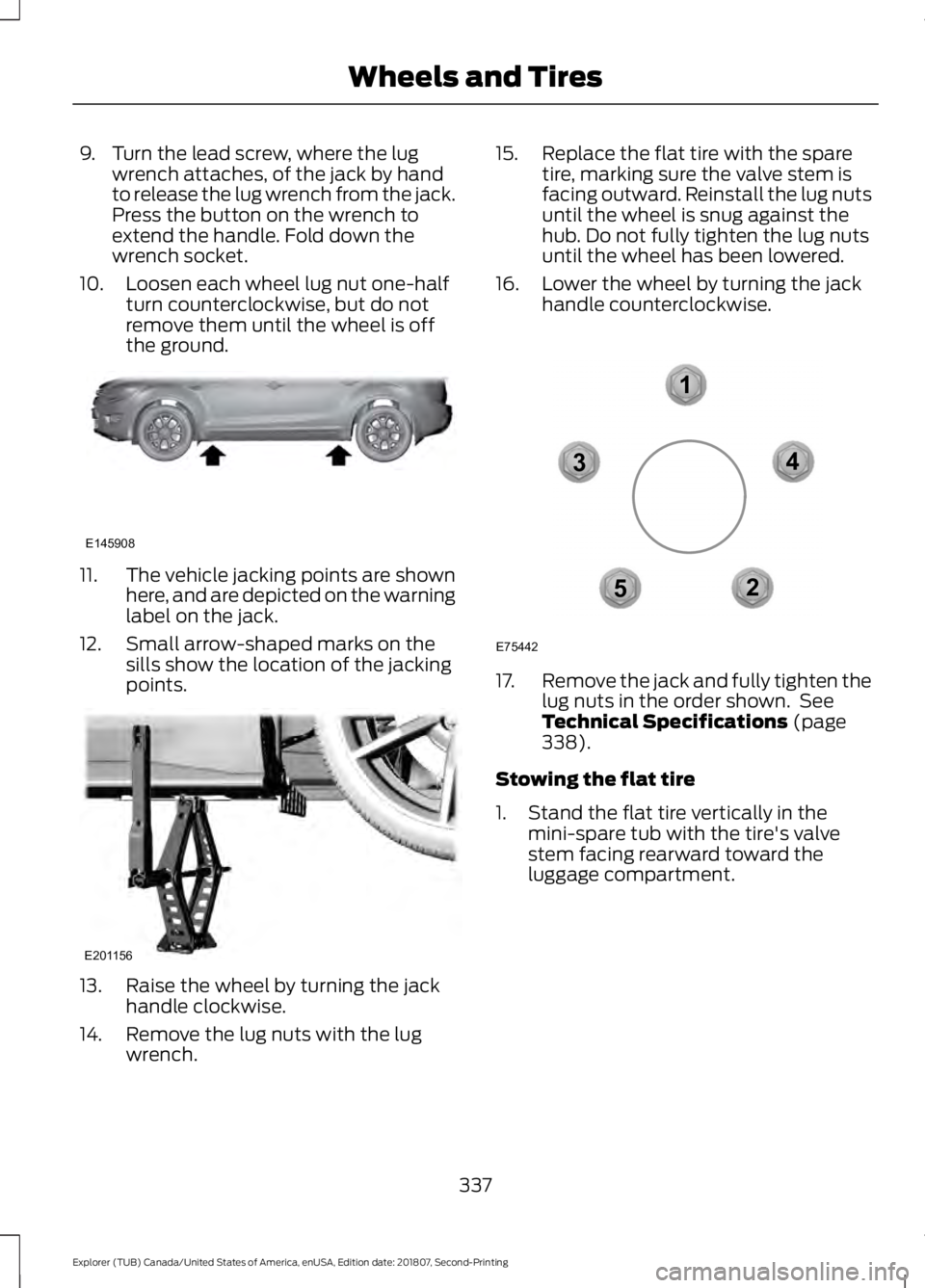
9. Turn the lead screw, where the lug
wrench attaches, of the jack by hand
to release the lug wrench from the jack.
Press the button on the wrench to
extend the handle. Fold down the
wrench socket.
10. Loosen each wheel lug nut one-half turn counterclockwise, but do not
remove them until the wheel is off
the ground. 11.
The vehicle jacking points are shown
here, and are depicted on the warning
label on the jack.
12. Small arrow-shaped marks on the sills show the location of the jacking
points. 13. Raise the wheel by turning the jack
handle clockwise.
14. Remove the lug nuts with the lug wrench. 15. Replace the flat tire with the spare
tire, marking sure the valve stem is
facing outward. Reinstall the lug nuts
until the wheel is snug against the
hub. Do not fully tighten the lug nuts
until the wheel has been lowered.
16. Lower the wheel by turning the jack handle counterclockwise. 17.
Remove the jack and fully tighten the
lug nuts in the order shown. See
Technical Specifications (page
338).
Stowing the flat tire
1. Stand the flat tire vertically in the mini-spare tub with the tire's valve
stem facing rearward toward the
luggage compartment.
337
Explorer (TUB) Canada/United States of America, enUSA, Edition date: 201807, Second-Printing Wheels and TiresE145908 E201156 12
3
4
5
E75442
Page 341 of 571
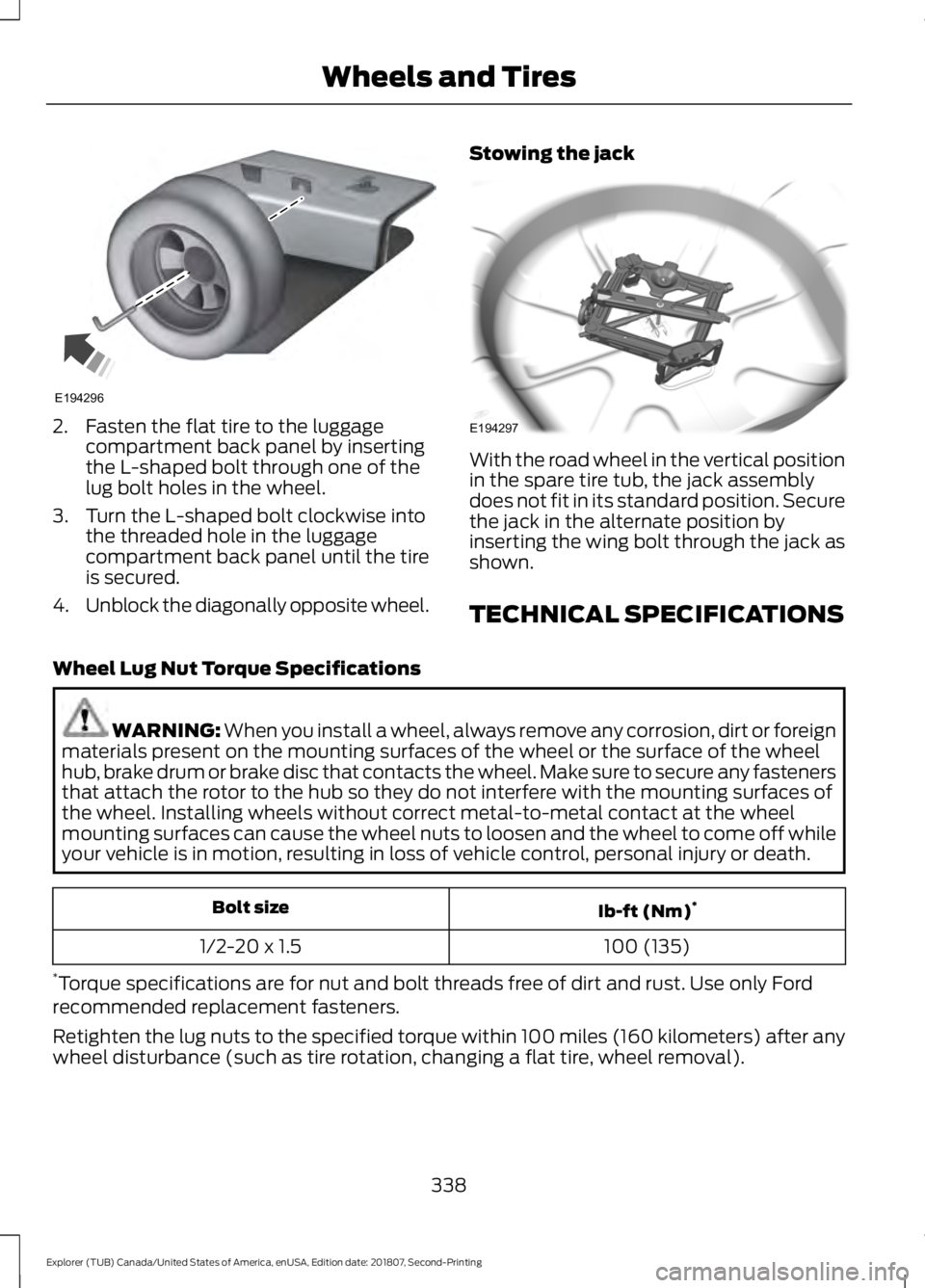
2. Fasten the flat tire to the luggage
compartment back panel by inserting
the L-shaped bolt through one of the
lug bolt holes in the wheel.
3. Turn the L-shaped bolt clockwise into the threaded hole in the luggage
compartment back panel until the tire
is secured.
4. Unblock the diagonally opposite wheel. Stowing the jack With the road wheel in the vertical position
in the spare tire tub, the jack assembly
does not fit in its standard position. Secure
the jack in the alternate position by
inserting the wing bolt through the jack as
shown.
TECHNICAL SPECIFICATIONS
Wheel Lug Nut Torque Specifications WARNING: When you install a wheel, always remove any corrosion, dirt or foreign
materials present on the mounting surfaces of the wheel or the surface of the wheel
hub, brake drum or brake disc that contacts the wheel. Make sure to secure any fasteners
that attach the rotor to the hub so they do not interfere with the mounting surfaces of
the wheel. Installing wheels without correct metal-to-metal contact at the wheel
mounting surfaces can cause the wheel nuts to loosen and the wheel to come off while
your vehicle is in motion, resulting in loss of vehicle control, personal injury or death. Ib-ft (Nm)
*
Bolt size
100 (135)
1/2-20 x 1.5
* Torque specifications are for nut and bolt threads free of dirt and rust. Use only Ford
recommended replacement fasteners.
Retighten the lug nuts to the specified torque within 100 miles (160 kilometers) after any
wheel disturbance (such as tire rotation, changing a flat tire, wheel removal).
338
Explorer (TUB) Canada/United States of America, enUSA, Edition date: 201807, Second-Printing Wheels and TiresE194296 E194297
Page 369 of 571
AUDIO UNIT - VEHICLES WITH:
AM/FM/CD/SYNC
WARNING: Driving while
distracted can result in loss of vehicle
control, crash and injury. We strongly
recommend that you use extreme
caution when using any device that may
take your focus off the road. Your
primary responsibility is the safe
operation of your vehicle. We
recommend against the use of any
hand-held device while driving and
encourage the use of voice-operated
systems when possible. Make sure you
are aware of all applicable local laws
that may affect the use of electronic
devices while driving.
Accessing the Clock Settings Press and release the button to
access the clock setting.
Use the center arrow controls to
change the hours and minutes.
Accessing the Media Source Menu Press and release the button to
open the media source menu.
You can press this multiple times to
change to a SYNC-Media device or scroll
through the media sources using the arrow
buttons. Press
OK to select a source.
Accessing the Menu Press and release the button to
access different audio system
features. Accessing the Phone Features Press and release the button to
access the phone features of the
SYNC system. See your SYNC
information.
Accessing the Sound Settings Press and release the button to
access settings for Treble,
Midrange, Bass, Fade and
Balance.
Use the up and down arrow buttons to
select the various settings. Press
OK to
confirm a selection, press the left and right
arrow buttons to change the settings.
Press OK to set or press MENU to exit. You
can set sound settings for each audio
source independently.
Adjusting the Volume Turn to adjust the volume.
366
Explorer (TUB) Canada/United States of America, enUSA, Edition date: 201807, Second-Printing Audio SystemE265036 E265035 E265038 E265037 E142611 E265373
Page 373 of 571
CD Settings
Select to scan all disc selections.
Scan All
Select to scan all music in the current MP3 folder.
Scan Folder
Select to bring soft and loud passages together for a more
consistent listening level.
CD Compression Clock Settings
Select to set the time and calendar date.
Set Date and Time
Select to view clock time in a 12-hour mode or 24-hour
mode.
24 Hour Display Settings
Select to change display brightness.
Brightness
Select to display the language in English, French or
Spanish.
Language
Select to display the outside temperature in Fahrenheit
or Celsius.
Temp. Setting
DIGITAL RADIO (IF EQUIPPED)
Note: HD Radio broadcasts are not
available in all markets.
HD Radio technology is the digital
evolution of analog AM/FM radio. Your
system has a special receiver that allows
it to receive digital broadcasts (where
available) in addition to the analog
broadcasts, it already receives. Digital
broadcasts provide a better sound quality
than analog broadcasts with free,
crystal-clear audio and no static or
distortion. For more information, and a
guide to available stations and
programming, please visit
www.hdradio.com. When HD Radio is on and you tune to a
station broadcasting HD Radio technology,
you may notice the HD Radio logo on your
screen. When this logo is available, you
may also see Title and Artist fields
on-screen.
The multicast indicator appears in FM
mode (only) if the current station is
broadcasting multiple digital broadcasts.
The highlighted numbers signify available
digital channels where new or different
content is available. HD1 signifies the main
programming status and is available in
analog and digital broadcasts. Other
multicast stations (HD2 through HD7) are
only available digitally.
370
Explorer (TUB) Canada/United States of America, enUSA, Edition date: 201807, Second-Printing Audio System
Page 418 of 571
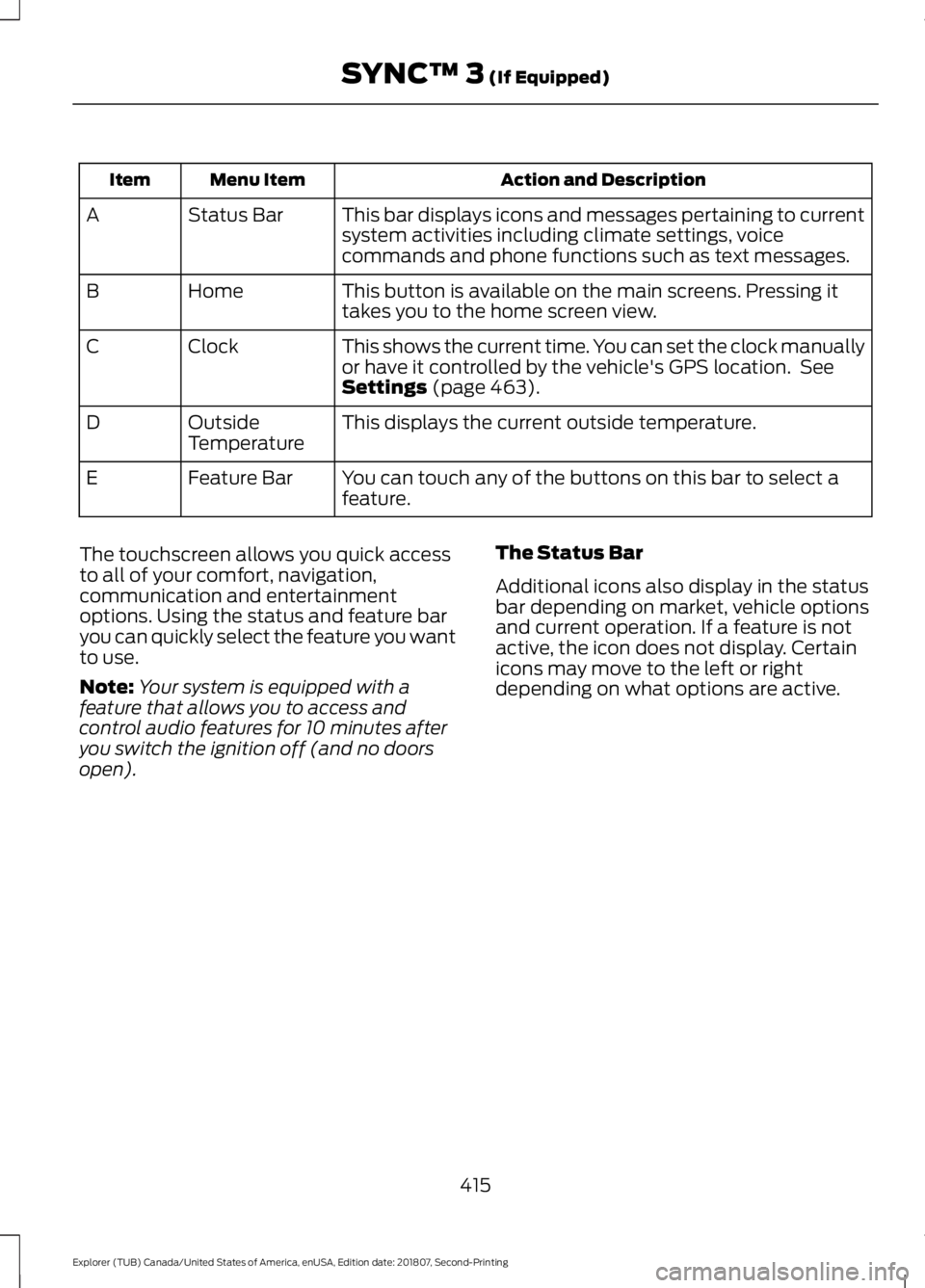
Action and Description
Menu Item
Item
This bar displays icons and messages pertaining to current
system activities including climate settings, voice
commands and phone functions such as text messages.
Status Bar
A
This button is available on the main screens. Pressing it
takes you to the home screen view.
Home
B
This shows the current time. You can set the clock manually
or have it controlled by the vehicle's GPS location. See
Settings (page 463).
Clock
C
This displays the current outside temperature.
Outside
Temperature
D
You can touch any of the buttons on this bar to select a
feature.
Feature Bar
E
The touchscreen allows you quick access
to all of your comfort, navigation,
communication and entertainment
options. Using the status and feature bar
you can quickly select the feature you want
to use.
Note: Your system is equipped with a
feature that allows you to access and
control audio features for 10 minutes after
you switch the ignition off (and no doors
open). The Status Bar
Additional icons also display in the status
bar depending on market, vehicle options
and current operation. If a feature is not
active, the icon does not display. Certain
icons may move to the left or right
depending on what options are active.
415
Explorer (TUB) Canada/United States of America, enUSA, Edition date: 201807, Second-Printing SYNC™ 3
(If Equipped)
Page 468 of 571
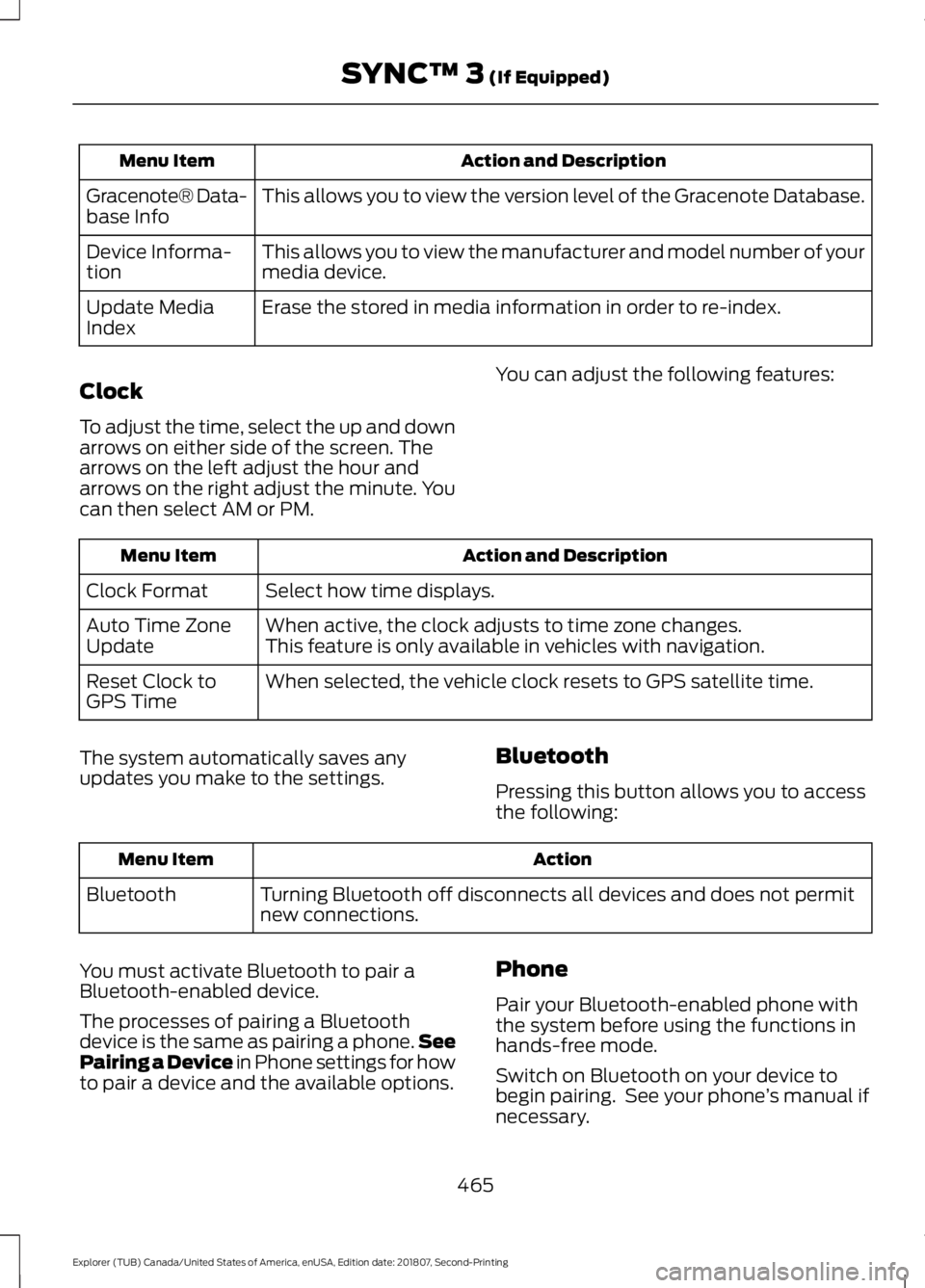
Action and Description
Menu Item
This allows you to view the version level of the Gracenote Database.
Gracenote® Data-
base Info
This allows you to view the manufacturer and model number of your
media device.
Device Informa-
tion
Erase the stored in media information in order to re-index.
Update Media
Index
Clock
To adjust the time, select the up and down
arrows on either side of the screen. The
arrows on the left adjust the hour and
arrows on the right adjust the minute. You
can then select AM or PM. You can adjust the following features: Action and Description
Menu Item
Select how time displays.
Clock Format
When active, the clock adjusts to time zone changes.
Auto Time Zone
Update This feature is only available in vehicles with navigation.
When selected, the vehicle clock resets to GPS satellite time.
Reset Clock to
GPS Time
The system automatically saves any
updates you make to the settings. Bluetooth
Pressing this button allows you to access
the following: Action
Menu Item
Turning Bluetooth off disconnects all devices and does not permit
new connections.
Bluetooth
You must activate Bluetooth to pair a
Bluetooth-enabled device.
The processes of pairing a Bluetooth
device is the same as pairing a phone. See
Pairing a Device in Phone settings for how
to pair a device and the available options. Phone
Pair your Bluetooth-enabled phone with
the system before using the functions in
hands-free mode.
Switch on Bluetooth on your device to
begin pairing. See your phone
’s manual if
necessary.
465
Explorer (TUB) Canada/United States of America, enUSA, Edition date: 201807, Second-Printing SYNC™ 3 (If Equipped)
Page 558 of 571
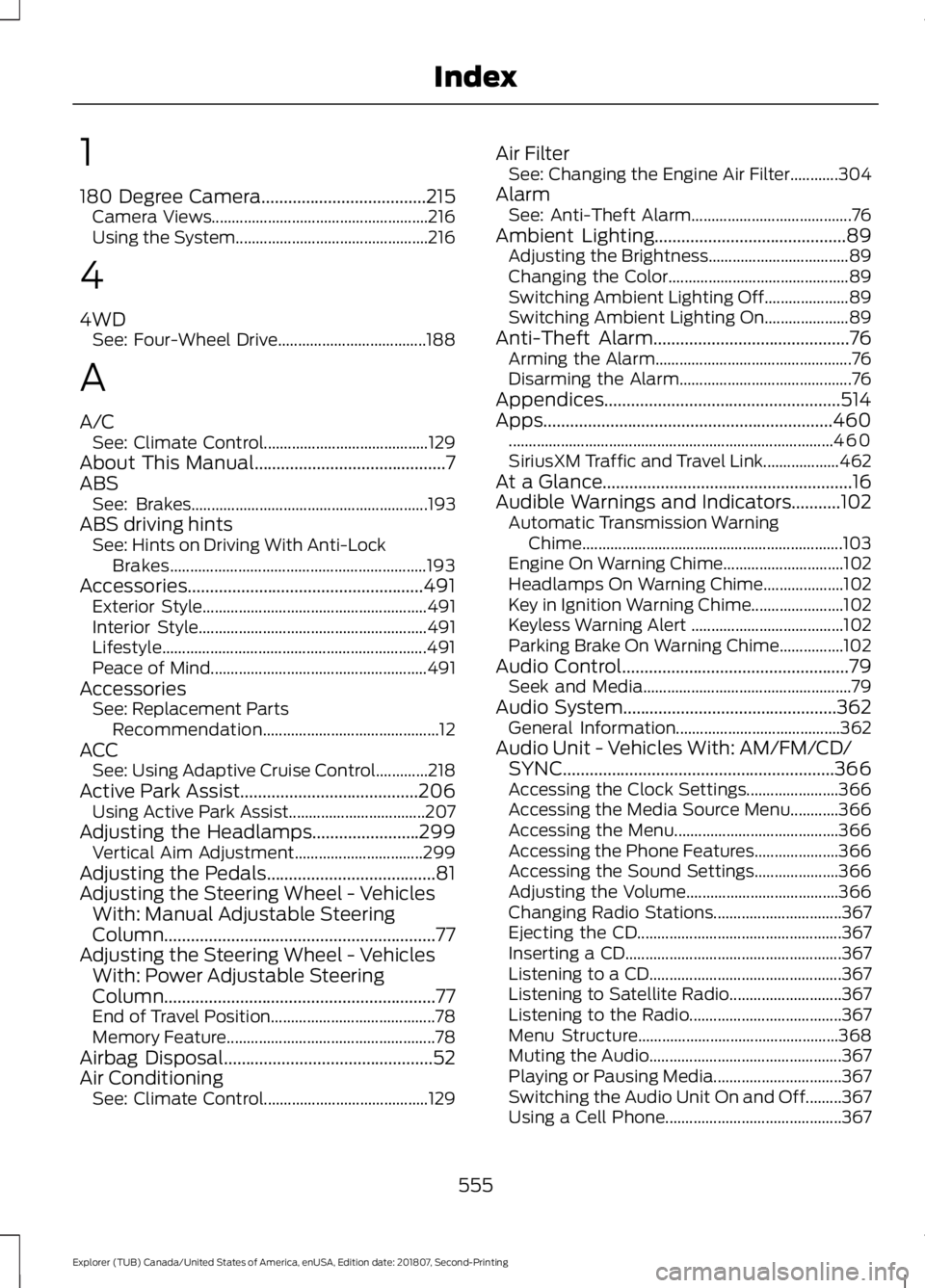
1
180 Degree Camera.....................................215
Camera Views...................................................... 216
Using the System................................................ 216
4
4WD See: Four-Wheel Drive..................................... 188
A
A/C See: Climate Control......................................... 129
About This Manual...........................................7
ABS See: Brakes........................................................... 193
ABS driving hints See: Hints on Driving With Anti-Lock
Brakes................................................................ 193
Accessories.....................................................491 Exterior Style........................................................ 491
Interior Style......................................................... 491
Lifestyle.................................................................. 491
Peace of Mind...................................................... 491
Accessories See: Replacement Parts
Recommendation............................................ 12
ACC See: Using Adaptive Cruise Control.............218
Active Park Assist........................................206 Using Active Park Assist.................................. 207
Adjusting the Headlamps
........................299
Vertical Aim Adjustment................................ 299
Adjusting the Pedals......................................81
Adjusting the Steering Wheel - Vehicles With: Manual Adjustable Steering
Column .............................................................
77
Adjusting the Steering Wheel - Vehicles With: Power Adjustable Steering
Column .............................................................
77
End of Travel Position......................................... 78
Memory Feature.................................................... 78
Airbag Disposal
...............................................52
Air Conditioning See: Climate Control......................................... 129Air Filter
See: Changing the Engine Air Filter............304
Alarm See: Anti-Theft Alarm........................................ 76
Ambient Lighting...........................................89 Adjusting the Brightness................................... 89
Changing the Color............................................. 89
Switching Ambient Lighting Off..................... 89
Switching Ambient Lighting On..................... 89
Anti-Theft Alarm
............................................76
Arming the Alarm................................................. 76
Disarming the Alarm........................................... 76
Appendices.....................................................514
Apps.................................................................460 ........................................................................\
......... 460
SiriusXM Traffic and Travel Link................... 462
At a Glance........................................................16
Audible Warnings and Indicators...........102 Automatic Transmission Warning
Chime................................................................. 103
Engine On Warning Chime.............................. 102
Headlamps On Warning Chime.................... 102
Key in Ignition Warning Chime....................... 102
Keyless Warning Alert ...................................... 102
Parking Brake On Warning Chime................102
Audio Control
...................................................79
Seek and Media.................................................... 79
Audio System................................................362 General Information......................................... 362
Audio Unit - Vehicles With: AM/FM/CD/ SYNC.............................................................366
Accessing the Clock Settings....................... 366
Accessing the Media Source Menu............366
Accessing the Menu......................................... 366
Accessing the Phone Features..................... 366
Accessing the Sound Settings..................... 366
Adjusting the Volume...................................... 366
Changing Radio Stations................................ 367
Ejecting the CD................................................... 367
Inserting a CD...................................................... 367
Listening to a CD................................................ 367
Listening to Satellite Radio............................ 367
Listening to the Radio...................................... 367
Menu Structure.................................................. 368
Muting the Audio................................................ 367
Playing or Pausing Media................................ 367
Switching the Audio Unit On and Off.........367
Using a Cell Phone............................................ 367
555
Explorer (TUB) Canada/United States of America, enUSA, Edition date: 201807, Second-Printing Index