headlamp FORD EXPLORER 2020 User Guide
[x] Cancel search | Manufacturer: FORD, Model Year: 2020, Model line: EXPLORER, Model: FORD EXPLORER 2020Pages: 555, PDF Size: 8.16 MB
Page 112 of 555
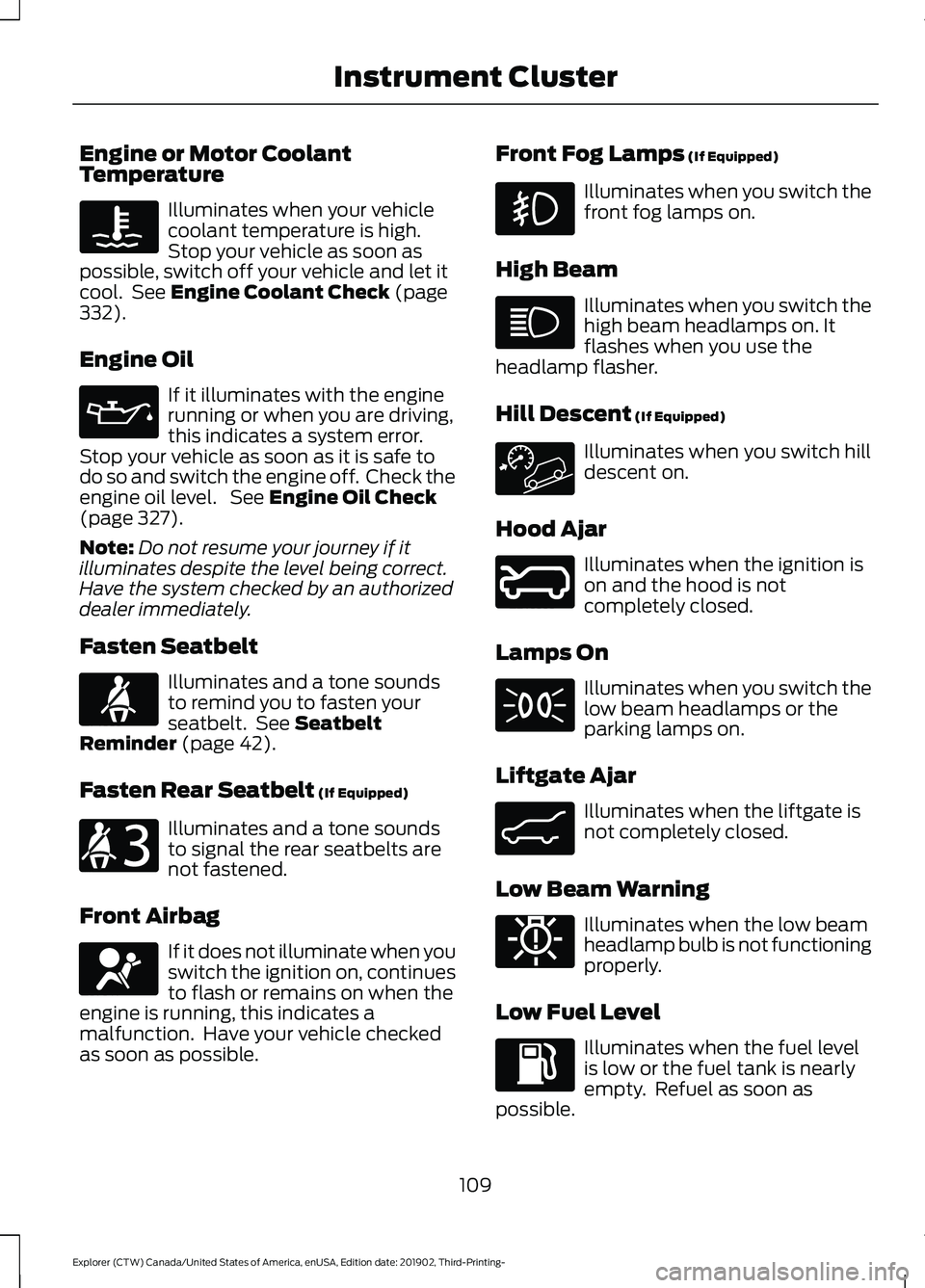
Engine or Motor Coolant
Temperature
Illuminates when your vehicle
coolant temperature is high.
Stop your vehicle as soon as
possible, switch off your vehicle and let it
cool. See Engine Coolant Check (page
332).
Engine Oil If it illuminates with the engine
running or when you are driving,
this indicates a system error.
Stop your vehicle as soon as it is safe to
do so and switch the engine off. Check the
engine oil level. See
Engine Oil Check
(page 327).
Note: Do not resume your journey if it
illuminates despite the level being correct.
Have the system checked by an authorized
dealer immediately.
Fasten Seatbelt Illuminates and a tone sounds
to remind you to fasten your
seatbelt. See
Seatbelt
Reminder (page 42).
Fasten Rear Seatbelt
(If Equipped) Illuminates and a tone sounds
to signal the rear seatbelts are
not fastened.
Front Airbag If it does not illuminate when you
switch the ignition on, continues
to flash or remains on when the
engine is running, this indicates a
malfunction. Have your vehicle checked
as soon as possible. Front Fog Lamps
(If Equipped) Illuminates when you switch the
front fog lamps on.
High Beam Illuminates when you switch the
high beam headlamps on. It
flashes when you use the
headlamp flasher.
Hill Descent
(If Equipped) Illuminates when you switch hill
descent on.
Hood Ajar Illuminates when the ignition is
on and the hood is not
completely closed.
Lamps On Illuminates when you switch the
low beam headlamps or the
parking lamps on.
Liftgate Ajar Illuminates when the liftgate is
not completely closed.
Low Beam Warning Illuminates when the low beam
headlamp bulb is not functioning
properly.
Low Fuel Level Illuminates when the fuel level
is low or the fuel tank is nearly
empty. Refuel as soon as
possible.
109
Explorer (CTW) Canada/United States of America, enUSA, Edition date: 201902, Third-Printing- Instrument Cluster E71880 E206718 E67017 E246598 E162453 E181350
Page 114 of 555
AUDIBLE WARNINGS AND
INDICATORS
Key in Ignition Warning Chime
Sounds when you open the driver's door
and you have left the key in the ignition.
Keyless Warning Alert (If Equipped)
Sounds the horn twice when you exit your
vehicle with the intelligent access key, after
the last door is closed and your keyless
vehicle is in RUN, indicating your vehicle is
still on.
Headlamps On Warning Chime
Sounds when you remove the key from the
ignition and open the driver's door and you
have left the headlamps or parking lamps
on.
Parking Brake On Warning Chime
Sounds when you have left the parking
brake on and drive your vehicle. If the
warning chime remains on after you have
released the parking brake, have the
system checked by an authorized dealer
immediately.
111
Explorer (CTW) Canada/United States of America, enUSA, Edition date: 201902, Third-Printing- Instrument Cluster
Page 124 of 555
Active Park
Action
Message
The system requires service. Have the system checked by an authorized dealer.
Active Park Fault
Adaptive Cruise Control Action
Message
A radar malfunction is preventing the adaptive cruise from
engaging. See How Does Adaptive Cruise Control With
Stop and Go Work (page 246).
Adaptive Cruise
Malfunction
Front Sensor Not Aligned Conditions exist such that the adaptive cruise cannot functionproperly. See
How Does Adaptive Cruise Control With
Stop and Go Work (page 246).
Adaptive Cruise Not
Available
The radar is blocked because of poor radar visibility due tobad weather or ice/mud/water in front of radar. Driver can typically clean the sensor to resolve. See
How Does
Adaptive Cruise Control With Stop and Go Work (page
246).
Adaptive Cruise Not
Available Sensor
Blocked See Manual
Displayed when the automatic braking has been disabled.
Normal Cruise Active
Adaptive Braking Off
Displayed when the adaptive cruise has reinstated controlsto the driver.
Adaptive Cruise - Driver
Resume Control
Displays when the vehicle speed is too slow to activate theadaptive cruise.
Adaptive Cruise Speed
Too Low to Activate
Adaptive Headlamps Action
Message
Displays when a system error has occurred. Contact anauthorized dealer as soon as possible.
Check Headlamp
System See Manual
121
Explorer (CTW) Canada/United States of America, enUSA, Edition date: 201902, Third-Printing- Information Displays
Page 176 of 555
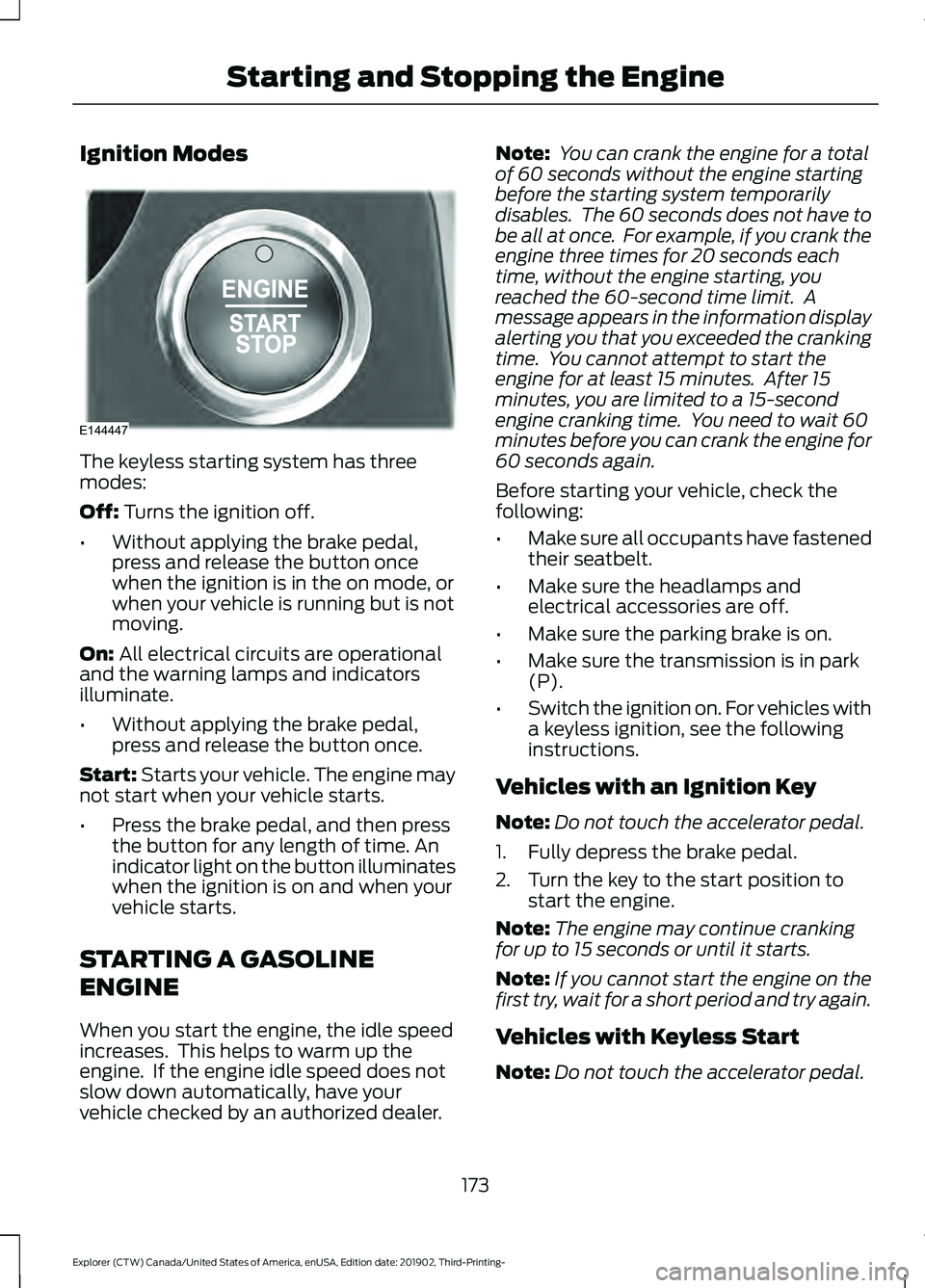
Ignition Modes
The keyless starting system has three
modes:
Off: Turns the ignition off.
• Without applying the brake pedal,
press and release the button once
when the ignition is in the on mode, or
when your vehicle is running but is not
moving.
On:
All electrical circuits are operational
and the warning lamps and indicators
illuminate.
• Without applying the brake pedal,
press and release the button once.
Start:
Starts your vehicle. The engine may
not start when your vehicle starts.
• Press the brake pedal, and then press
the button for any length of time. An
indicator light on the button illuminates
when the ignition is on and when your
vehicle starts.
STARTING A GASOLINE
ENGINE
When you start the engine, the idle speed
increases. This helps to warm up the
engine. If the engine idle speed does not
slow down automatically, have your
vehicle checked by an authorized dealer. Note:
You can crank the engine for a total
of 60 seconds without the engine starting
before the starting system temporarily
disables. The 60 seconds does not have to
be all at once. For example, if you crank the
engine three times for 20 seconds each
time, without the engine starting, you
reached the 60-second time limit. A
message appears in the information display
alerting you that you exceeded the cranking
time. You cannot attempt to start the
engine for at least 15 minutes. After 15
minutes, you are limited to a 15-second
engine cranking time. You need to wait 60
minutes before you can crank the engine for
60 seconds again.
Before starting your vehicle, check the
following:
• Make sure all occupants have fastened
their seatbelt.
• Make sure the headlamps and
electrical accessories are off.
• Make sure the parking brake is on.
• Make sure the transmission is in park
(P).
• Switch the ignition on. For vehicles with
a keyless ignition, see the following
instructions.
Vehicles with an Ignition Key
Note: Do not touch the accelerator pedal.
1. Fully depress the brake pedal.
2. Turn the key to the start position to start the engine.
Note: The engine may continue cranking
for up to 15 seconds or until it starts.
Note: If you cannot start the engine on the
first try, wait for a short period and try again.
Vehicles with Keyless Start
Note: Do not touch the accelerator pedal.
173
Explorer (CTW) Canada/United States of America, enUSA, Edition date: 201902, Third-Printing- Starting and Stopping the EngineE144447
Page 179 of 555
Guarding Against Exhaust Fumes
WARNING: Exhaust leaks may
result in entry of harmful and potentially
lethal fumes into the passenger
compartment. If you smell exhaust
fumes inside your vehicle, have your
vehicle inspected immediately. Do not
drive if you smell exhaust fumes.
Important Ventilating Information
If you stop your vehicle and then leave the
engine idling for long periods, we
recommend that you do one of the
following:
• Open the windows at least 1 in (3 cm).
• Set your climate control to outside air.
STARTING A HYBRID
ELECTRIC VEHICLE SYSTEM
Before starting your vehicle, check the
following:
• Make sure all occupants fasten their
seatbelt.
• Make sure the headlamps and
electrical accessories are off.
• Make sure the parking brake is on.
• Make sure the transmission is in park
(P).
Note: Do not touch the accelerator pedal.
1. Fully press the brake pedal.
2. Press the push button ignition switch.
Note: The green ready indicator illuminates
letting you know that your vehicle is ready
for driving. Since your vehicle comes with a
silent key start, the engine may not start
when your vehicle starts. See
Hybrid
Vehicle Operation (page 182). When the engine starts for the first time
on your drive, the idle speed increases, this
helps to warm up the engine. If the engine
idle speed does not slow down, have your
vehicle checked by an authorized dealer.
The system does not function if:
•
The passive key frequencies are
jammed.
• The key battery has no charge.
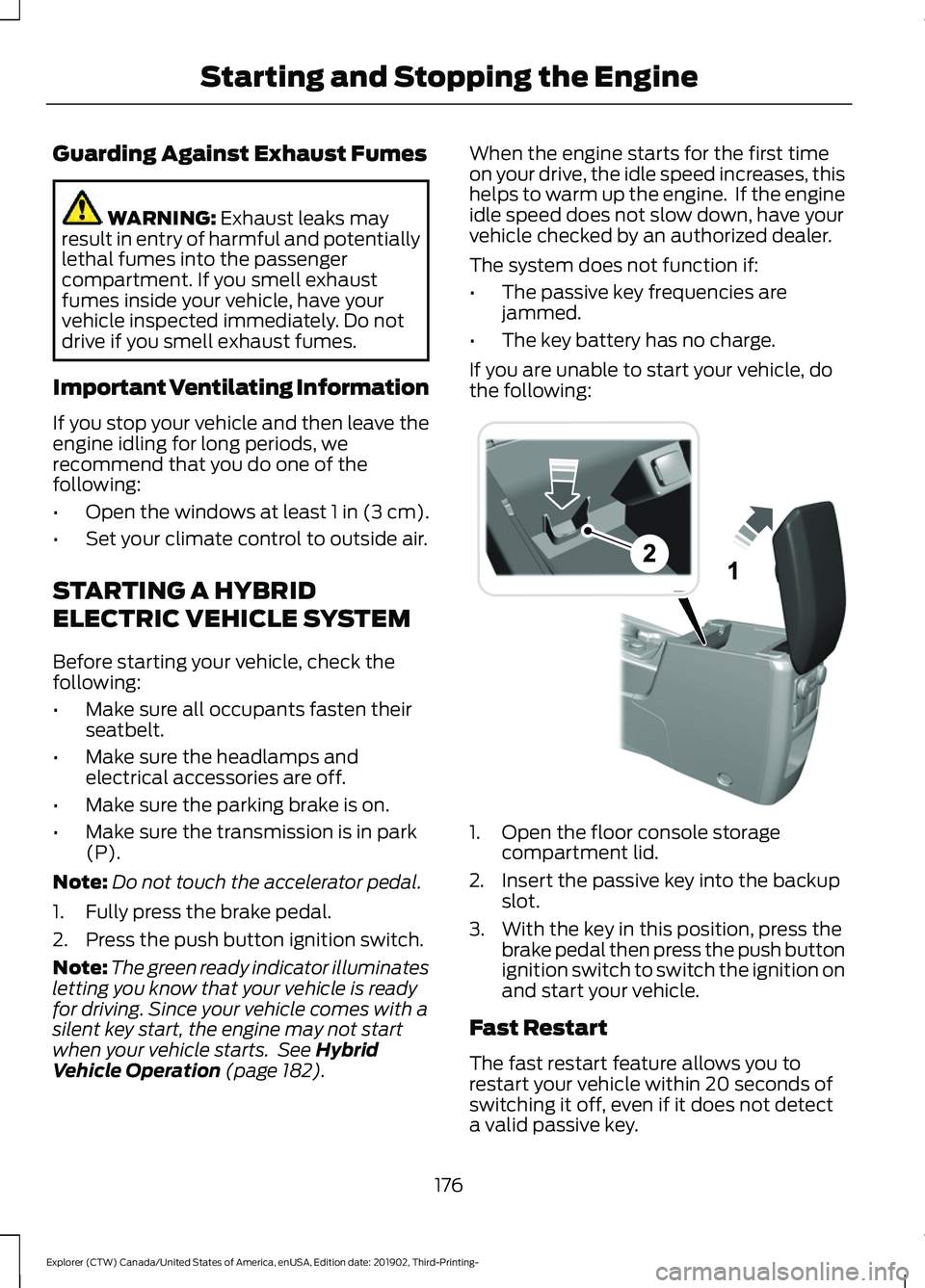
If you are unable to start your vehicle, do
the following: 1. Open the floor console storage
compartment lid.
2. Insert the passive key into the backup slot.
3. With the key in this position, press the brake pedal then press the push button
ignition switch to switch the ignition on
and start your vehicle.
Fast Restart
The fast restart feature allows you to
restart your vehicle within 20 seconds of
switching it off, even if it does not detect
a valid passive key.
176
Explorer (CTW) Canada/United States of America, enUSA, Edition date: 201902, Third-Printing- Starting and Stopping the EngineE297184
Page 266 of 555
•
Your vehicle is under the activation
speed.
• The direction indicator is active.
• Your vehicle is in a dynamic maneuver.
• The road has no or poor lane markings
in the camera field-of-view.
• The camera is obscured or unable to
detect the lane markings due to
environmental, traffic or vehicle
conditions. For example, significant sun
angles, shadows, snow, heavy rain or
fog, following a large vehicle that is
blocking or shadowing the lane or poor
headlamp illumination.
See Troubleshooting for additional
information.
White: Indicates that the system is
available or ready to provide a warning or
intervention on the indicated side. Note:
If your vehicle has lane centering
assist and the system is active, the walls
appear green instead of white.
Yellow: Indicates that the system is
providing or has just provided a lane
keeping aid intervention.
Red: Indicates that the system is providing
or has just provided a lane keeping alert
warning.
The system can be temporarily suppressed
at any time by the following:
• Quick braking.
• Fast acceleration.
• Using the direction indicator.
• Evasive steering maneuver.
• Driving too close to the lane markings.
Troubleshooting Why is the feature not available (line markings are gray) when I can see the lane markings
on the road?
Your vehicle speed is outside the operational range of the feature.
The sun is shining directly into the camera lens.
A quick intentional lane change has occurred.
Your vehicle stays too close to the lane markings.
Driving at high speeds in curves.
The last alert warning or aid intervention occurred a short time ago.
Ambiguous lane markings, for example in construction zones.
Rapid transition from light to dark, or from dark to light.
Sudden offset in lane markings.
ABS or AdvanceTrac ™ is active.
There is a camera blockage due to dirt, grime, fog, frost or water on the windshield.
You are driving too close to the vehicle in front of you.
263
Explorer (CTW) Canada/United States of America, enUSA, Edition date: 201902, Third-Printing- Driving Aids
Page 275 of 555
TRAFFIC SIGN RECOGNITION
(IF EQUIPPED)
Principle of Operation
WARNING: You are responsible for
controlling your vehicle at all times. The
system is designed to be an aid and does
not relieve you of your responsibility to
drive with due care and attention. Failure
to follow this instruction could result in
the loss of control of your vehicle,
personal injury or death. WARNING: The system may not
function if the sensor is blocked.
Note: In cold and severe weather conditions
the system may not function. Rain, snow,
spray and large contrasts in lighting can all
prevent the sensor from functioning
correctly.
Note: Do not carry out windshield repairs
in the immediate area surrounding the
sensor.
Note: If your vehicle has a suspension kit
not approved by us, the system may not
correctly function.
Note: Always fit Ford original parts when
replacing headlamp bulbs. Other bulbs may
reduce system performance.
Note: The system may not detect all traffic
signs and may incorrectly read signs.
Note: Keep the windshield free from
obstructions for example bird droppings,
insects and snow or ice.
Note: The system is designed to detect
traffic signs meeting the Vienna convention.
Note: Traffic sign data provided by the
navigation system contains information
integrated to the data carrier release. The sensor is behind the interior rear view
mirror. It continuously monitors road signs
to inform you of the current maximum
speed limit and overtaking regulations.
The system detects recognizable traffic
signs, for example:
•
Speed limit signs.
• No overtaking signs.
• Speed limit cancellation signs.
• No overtaking cancellation signs.
Using Traffic Sign Recognition
Setting the System Speed Warning
The system has a number of speed
warning levels that you can set using the
information display. See
General
Information (page 112).
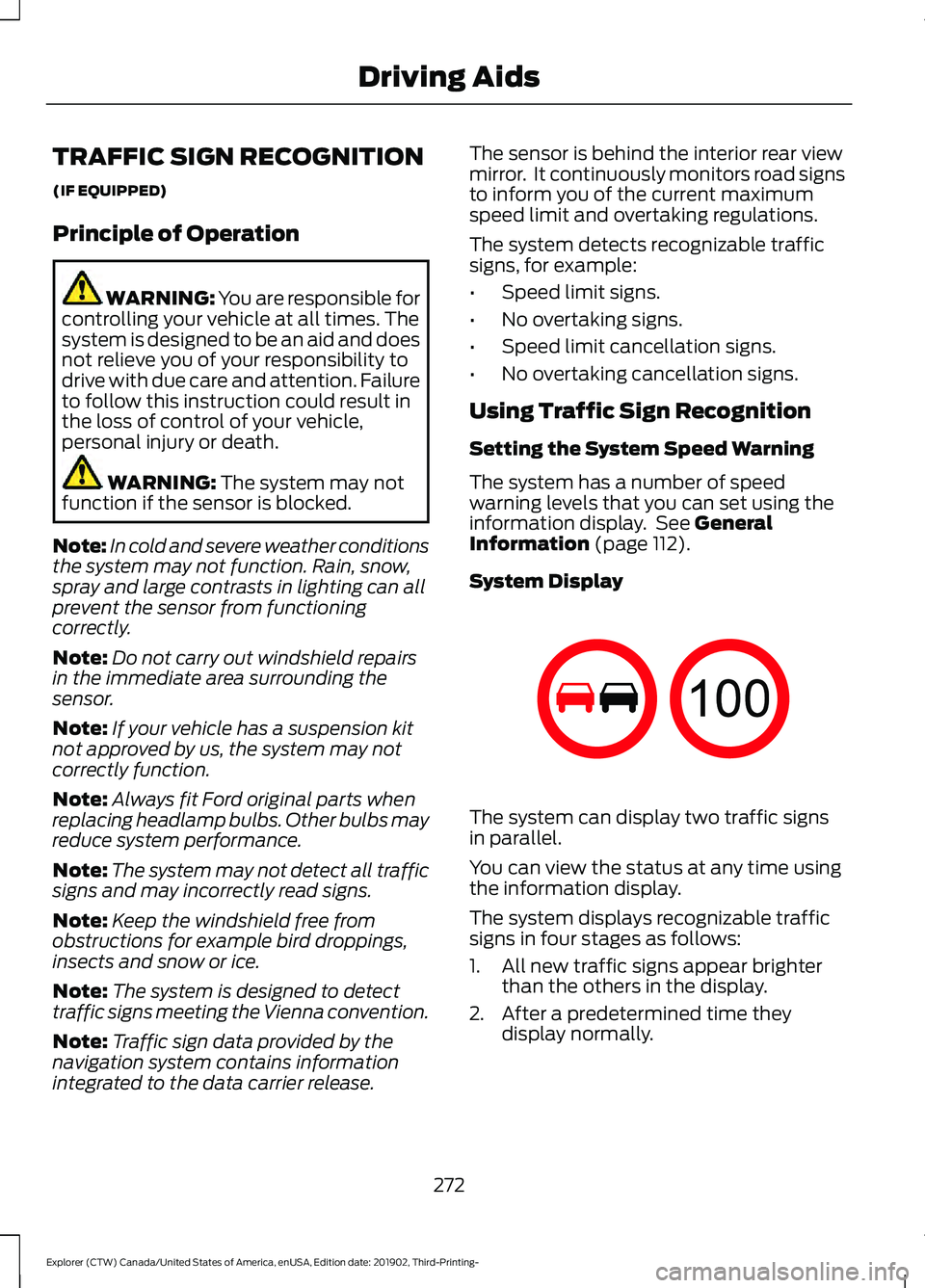
System Display The system can display two traffic signs
in parallel.
You can view the status at any time using
the information display.
The system displays recognizable traffic
signs in four stages as follows:
1. All new traffic signs appear brighter
than the others in the display.
2. After a predetermined time they display normally.
272
Explorer (CTW) Canada/United States of America, enUSA, Edition date: 201902, Third-Printing- Driving Aids E132994
Page 318 of 555
Protected Component
Fuse Rating
Fuse or Relay
Number
Windshield and rear window washer pump
relay power.
15A
16
Charge status indicator (hybrid electric
vehicle).
5A
17
Starter motor.
30A
18
Headlamp leveling motors.
10A
21
Adaptive headlamps.
Electric power assisted steering module.
10A
22
Anti-lock brake system module with
integrated park brake.
10A
23
Powertrain control module.
10A
24
Hybrid powertrain control module.
Air quality sensor.
10A
25
360 camera with park aid.
Rear view camera.
Blind spot information system.
Adaptive cruise control module.
Transmission control module.
15A
26
Anti-lock brake system valves with integ-
rated park brake.
40A
28
Anti-lock brake system pump with integ-
rated park brake.
60A
29
Driver seat module.
30A
30
Passenger seat motor.
30A
31
Front media bin power point.
20A
32
Rear cargo area power point.
20A
33
Console end cap power point.
20A
34
Power point 4.
20A
35
Power inverter.
40A
36
Climate controlled seat module.
30A
38
Power liftgate module.
30A
41
315
Explorer (CTW) Canada/United States of America, enUSA, Edition date: 201902, Third-Printing- Fuses
Page 319 of 555
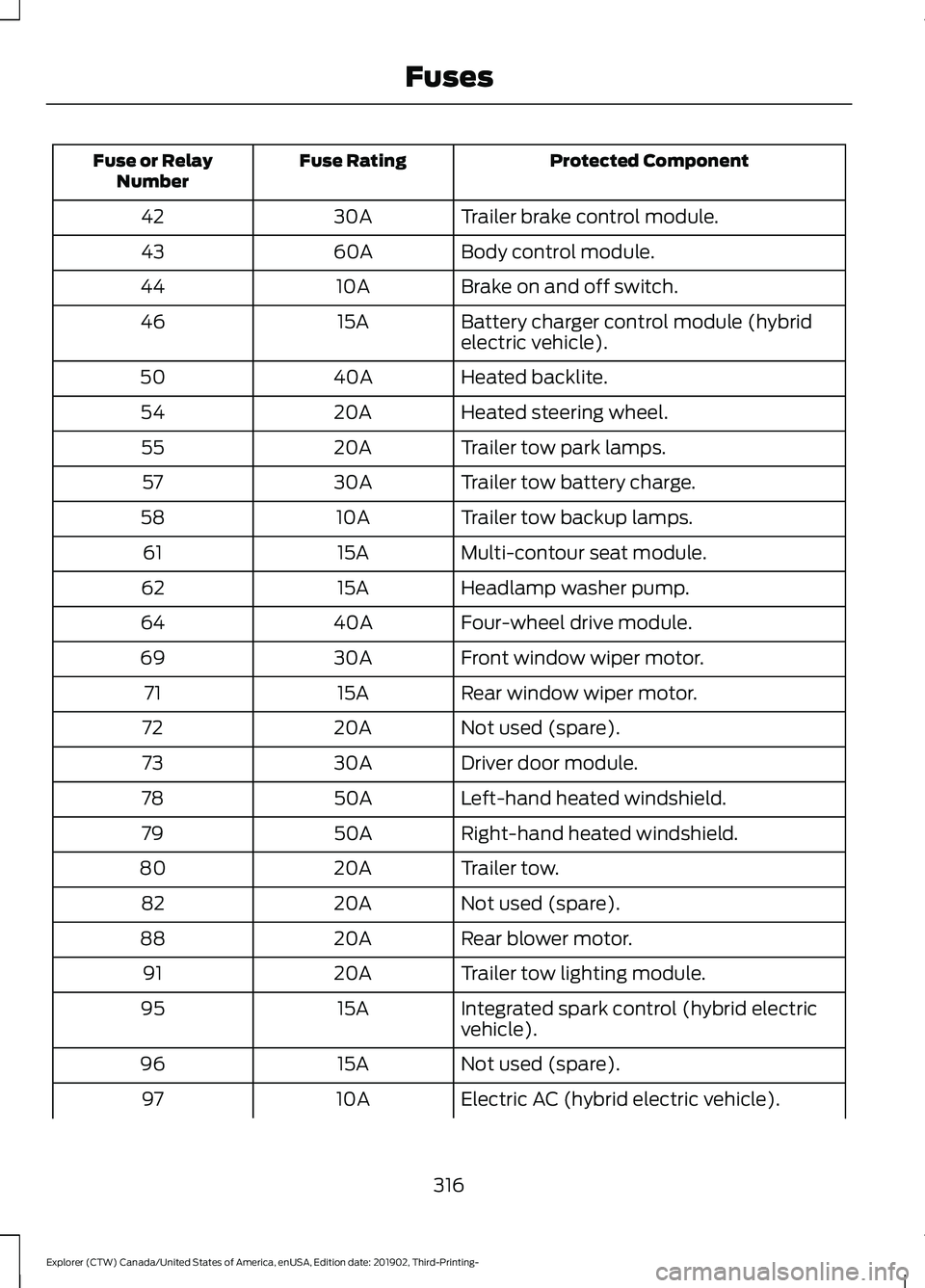
Protected Component
Fuse Rating
Fuse or Relay
Number
Trailer brake control module.
30A
42
Body control module.
60A
43
Brake on and off switch.
10A
44
Battery charger control module (hybrid
electric vehicle).
15A
46
Heated backlite.
40A
50
Heated steering wheel.
20A
54
Trailer tow park lamps.
20A
55
Trailer tow battery charge.
30A
57
Trailer tow backup lamps.
10A
58
Multi-contour seat module.
15A
61
Headlamp washer pump.
15A
62
Four-wheel drive module.
40A
64
Front window wiper motor.
30A
69
Rear window wiper motor.
15A
71
Not used (spare).
20A
72
Driver door module.
30A
73
Left-hand heated windshield.
50A
78
Right-hand heated windshield.
50A
79
Trailer tow.
20A
80
Not used (spare).
20A
82
Rear blower motor.
20A
88
Trailer tow lighting module.
20A
91
Integrated spark control (hybrid electric
vehicle).
15A
95
Not used (spare).
15A
96
Electric AC (hybrid electric vehicle).
10A
97
316
Explorer (CTW) Canada/United States of America, enUSA, Edition date: 201902, Third-Printing- Fuses
Page 321 of 555
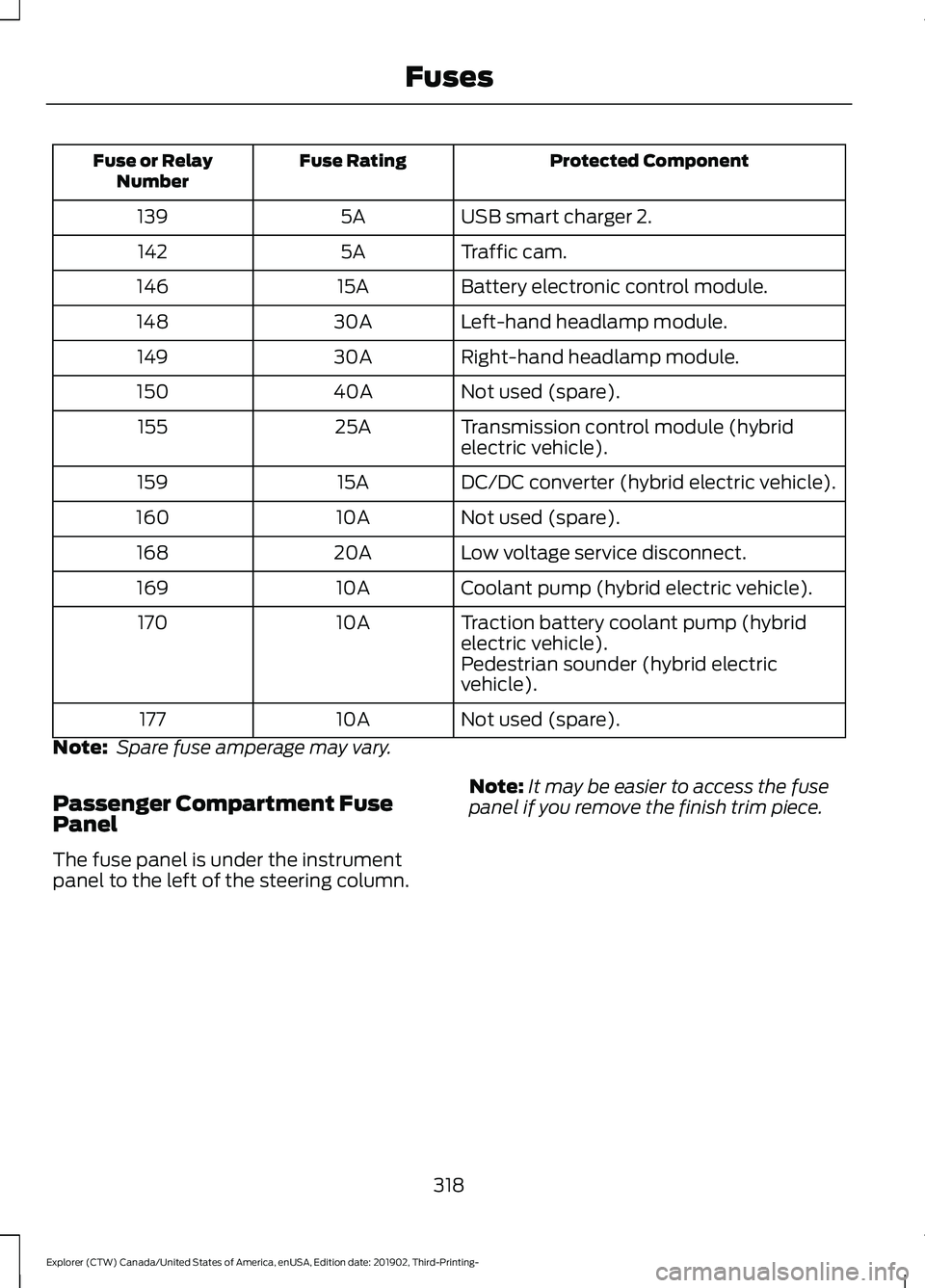
Protected Component
Fuse Rating
Fuse or Relay
Number
USB smart charger 2.
5A
139
Traffic cam.
5A
142
Battery electronic control module.
15A
146
Left-hand headlamp module.
30A
148
Right-hand headlamp module.
30A
149
Not used (spare).
40A
150
Transmission control module (hybrid
electric vehicle).
25A
155
DC/DC converter (hybrid electric vehicle).
15A
159
Not used (spare).
10A
160
Low voltage service disconnect.
20A
168
Coolant pump (hybrid electric vehicle).
10A
169
Traction battery coolant pump (hybrid
electric vehicle).
10A
170
Pedestrian sounder (hybrid electric
vehicle).
Not used (spare).
10A
177
Note: Spare fuse amperage may vary.
Passenger Compartment Fuse
Panel
The fuse panel is under the instrument
panel to the left of the steering column. Note:
It may be easier to access the fuse
panel if you remove the finish trim piece.
318
Explorer (CTW) Canada/United States of America, enUSA, Edition date: 201902, Third-Printing- Fuses