parking sensors FORD EXPLORER 2020 User Guide
[x] Cancel search | Manufacturer: FORD, Model Year: 2020, Model line: EXPLORER, Model: FORD EXPLORER 2020Pages: 555, PDF Size: 8.16 MB
Page 240 of 555
4. Release the steering wheel and shift
into neutral (N).
5. Release the parking brake.
6. Press and hold the active park assist button.
7. Release the brake pedal to allow the vehicle to move.
Note: You can slow down your vehicle at
any time by pressing the brake pedal.
Note: After the system drives your vehicle
to a position where you can exit the parking
space in a forward movement, a message
appears instructing you to take full control
of your vehicle. Canceling Active Park Assist
To cancel parking assistance at any time,
shift out of neutral (N).
Note:
If you turn the steering wheel or open
the driver door the parking assistance also
cancels.
Pausing Active Park Assist
To pause parking assistance at any time,
release the active park assist button.
The vehicle stops moving until you press
and hold the active park assist button
again.
Note: If you open the passenger or rear
doors the parking assistance also pauses.
Active Park Assist Troubleshooting Possible Cause
Symptom
The system is unable to detect a vehicle, curb or object
to park next to, or in-between.
The system does not correctly
operate.
You may have switched traction control off.
The system does not search for
a parking space.
The transmission is in reverse (R). Your vehicle must
be moving forward to be able to detect a parking space.
The sensors may be blocked. For example, snow, ice
or large accumulations of dirt. Blocked sensors can
affect how the system functions.
The system does not offer a
parking space.
The sensors in the front or rear bumper could be
damaged.
There is not enough room in the parking space for your
vehicle to safely park.
There is not enough space for the parking maneuver on
the opposite side of the parking space.
The parking space is more than 5 ft (1.5 m) or less than
2 ft (0.5 m) away.
The vehicle speed is greater than
22 mph (35 km/h)
for parallel parking or greater than 19 mph (30 km/h)
for perpendicular parking.
237
Explorer (CTW) Canada/United States of America, enUSA, Edition date: 201902, Third-Printing- Parking Aids
Page 243 of 555
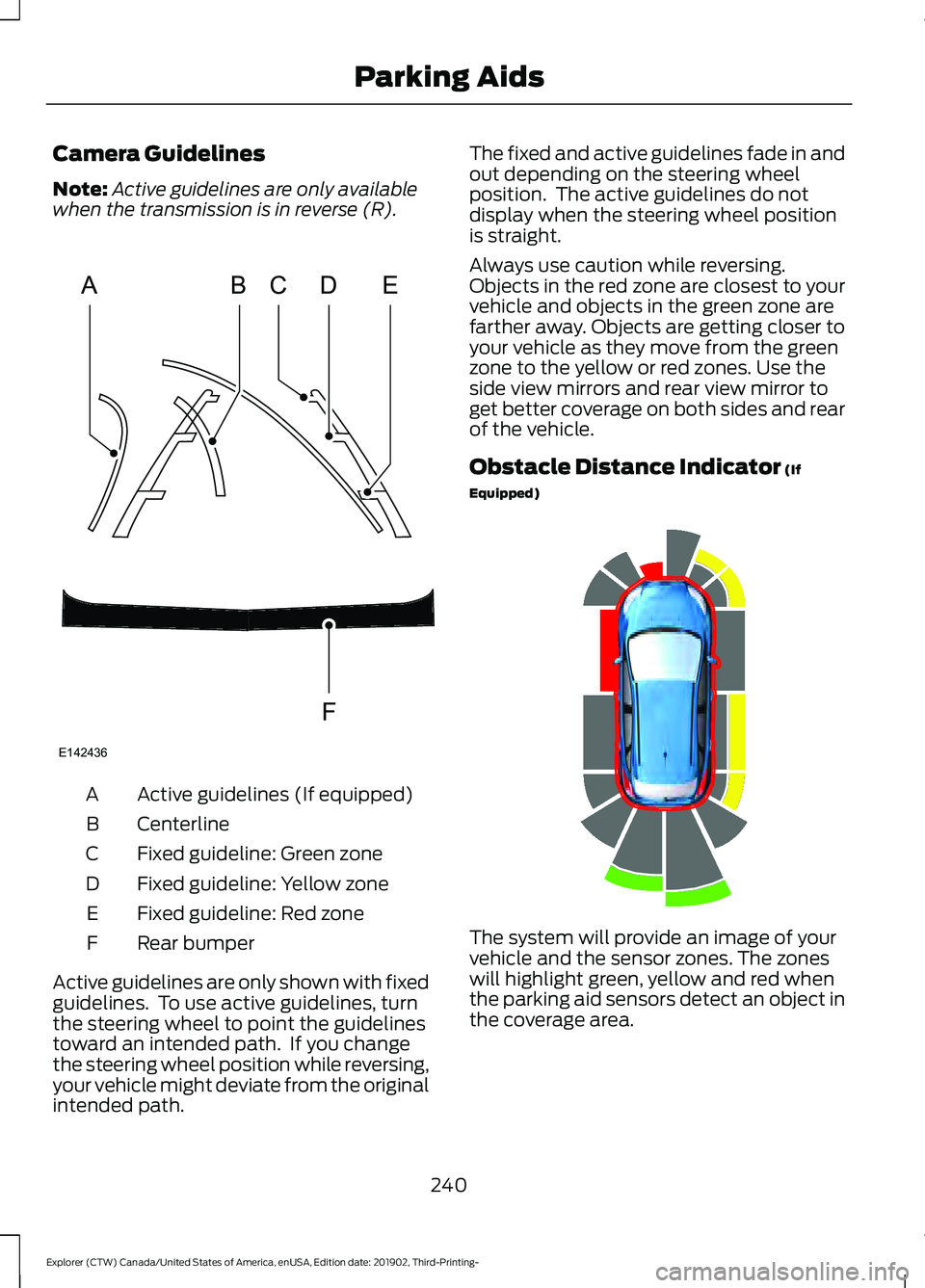
Camera Guidelines
Note:
Active guidelines are only available
when the transmission is in reverse (R). Active guidelines (If equipped)
A
Centerline
B
Fixed guideline: Green zone
C
Fixed guideline: Yellow zone
D
Fixed guideline: Red zone
E
Rear bumper
F
Active guidelines are only shown with fixed
guidelines. To use active guidelines, turn
the steering wheel to point the guidelines
toward an intended path. If you change
the steering wheel position while reversing,
your vehicle might deviate from the original
intended path. The fixed and active guidelines fade in and
out depending on the steering wheel
position. The active guidelines do not
display when the steering wheel position
is straight.
Always use caution while reversing.
Objects in the red zone are closest to your
vehicle and objects in the green zone are
farther away. Objects are getting closer to
your vehicle as they move from the green
zone to the yellow or red zones. Use the
side view mirrors and rear view mirror to
get better coverage on both sides and rear
of the vehicle.
Obstacle Distance Indicator (If
Equipped) The system will provide an image of your
vehicle and the sensor zones. The zones
will highlight green, yellow and red when
the parking aid sensors detect an object in
the coverage area.
240
Explorer (CTW) Canada/United States of America, enUSA, Edition date: 201902, Third-Printing- Parking AidsABCD
F
E
E142436 E190459
Page 273 of 555

Zone coverage also decreases when
parking at narrow angles. The sensor on
the left-hand side is mostly obstructed and
zone coverage on that side is severely
reduced.
Cross Traffic Alert System Sensors
The sensors are behind the rear bumper
on both sides of your vehicle.
Note:
Keep the sensors free from snow, ice
and large accumulations of dirt.
Note: Do not cover the sensors with bumper
stickers, repair compound or other objects.
Note: Blocked sensors could affect system
performance. If the sensors are blocked, a message may
appear in the information display when
you shift into reverse (R).
Cross Traffic Alert System
Limitations
The system may not correctly operate
when any of the following occur:
•
The sensors are blocked.
• Adjacently parked vehicles or objects
are obstructing the sensors.
• Vehicles approach at speeds less than
4 mph (6 km/h) or greater than 37 mph
(60 km/h).
• The vehicle speed is greater than 7 mph
(12 km/h)
.
• You reverse out of an angled parking
space.
270
Explorer (CTW) Canada/United States of America, enUSA, Edition date: 201902, Third-Printing- Driving AidsE142441 E205199
Page 369 of 555
•
Stand at a minimum of 12 ft
(3.66 m) away from the wheel
and tire assembly.
• Use both eye and ear
protection.
Important: Remember to replace
the wheel valve stems when the
road tires are replaced on your
vehicle.
It is recommended that the two
front tires or two rear tires
generally be replaced as a pair if
the worn tires still have usable
depth.
To avoid potential Four-Wheel
Drive (4WD) malfunction or
(4WD) system damage, it is
recommended to replace all four
tires rather than mixing
significantly worn tires with new
tires.
The tire pressure sensors mounted
in the wheels (originally installed
on your vehicle) are not designed
to be used in aftermarket wheels.
The use of wheels or tires not
recommended may affect the
operation of your tire pressure
monitoring system.
If the tire pressure monitoring
system indicator is flashing, your
system is malfunctioning. Your
replacement tire might be
incompatible with your tire
pressure monitoring system, or
some component of the system
may be damaged. Safety Practices WARNING:
If your vehicle
is stuck in snow, mud or sand, do
not rapidly spin the tires;
spinning the tires can tear the
tire and cause an explosion. A
tire can explode in as little as
three to five seconds. WARNING:
Do not spin the
wheels at over 34 mph
(55 km/h). The tires may fail and
injure a passenger or bystander.
Driving habits have a great deal
to do with your tire mileage and
safety.
*Observe posted speed limits
*Avoid fast starts, stops and turns
*Avoid potholes and objects on
the road
*Do not run over curbs or hit the
tire against a curb when parking
Highway Hazards
No matter how carefully you drive,
there is always the possibility that
you may eventually have a flat tire
on the highway. Drive slowly to the
closest safe area out of traffic.
This may further damage the flat
tire, but your safety is more
important.
366
Explorer (CTW) Canada/United States of America, enUSA, Edition date: 201902, Third-Printing- Wheels and Tires
Page 550 of 555

Switching the Power Liftgate On or
Off........................................................................\
. 76
Power Seats...................................................148
Adjusting the Lumbar Support..................... 149
Adjusting the Multi-Contour Front Seats With Active Motion ...................................... 149
Power Steering Fluid Check....................338
Power Windows
..............................................97
Accessory Delay................................................... 98
Bounce-Back.......................................................... 97
One-Touch Down................................................. 97
One-Touch Up....................................................... 97
Window Lock......................................................... 97
Pre-Collision Assist
.....................................274
Adjusting the Pre-Collision Assist
Settings............................................................. 276
Blocked Sensors................................................. 277
Distance Indication and Alert........................ 275
Evasive Steering Assist.................................... 276
Using the Pre-Collision Assist System............................................................... 274
Protecting the Environment
........................19
Puncture See: Changing a Road Wheel........................ 376
R
Rear Occupant Alert System Audible Warnings........................................................161
Rear Occupant Alert System Indicators.......................................................161
Rear Occupant Alert System Limitations...................................................160
Rear Occupant Alert System Precautions.................................................160
Rear Occupant Alert System...................160
Rear Parking Aid...........................................230 Object Distance Indicator............................... 232
Rear Passenger Climate Controls..........140 Directing Air to the Overhead Air
Vents.................................................................... 141
Directing Air to the Rear Footwell Air Vents.................................................................... 141
Rear Climate Control Lock Indicator............141
Setting the Rear Blower Motor Speed.........141
Setting the Rear Temperature........................ 141
Switching the Rear Climate Control On and Off........................................................................\
. 141Switching the Rear Heated Seats On and
Off........................................................................\
. 141
Rear Seats
.......................................................152
Adjusting the Second Row Rear
Seats................................................................... 152
Adjusting the Third Row Power Seats.................................................................. 156
Rear Under Floor Storage..........................281 Adjustable Load Floor....................................... 281
Spare Tire Cover.................................................. 281
Rear View Camera.......................................238 Camera Guidelines........................................... 240
Manual Zoom....................................................... 241
Obstacle Distance Indicator.......................... 240
Rear Camera Delay............................................ 241
Using the Rear View Camera System........239
Rear View Camera See: Rear View Camera................................... 238
Rear Window Wiper and Washers...........87 Rear Camera Washer.......................................... 87
Rear Window Washer......................................... 87
Rear Window Wiper............................................. 87
Rear Wiper Blades See: Changing the Rear Wiper Blades.......342
Recommended Towing Weights
...........290
Reduced Engine Performance...............296
Refueling - Excluding: Hybrid Electric Vehicle (HEV)
.............................................190
Refueling System Overview........................... 190
Refueling System Warning.............................. 192
Refueling Your Vehicle....................................... 191
Refueling - Hybrid Electric Vehicle (HEV).............................................................193
Fuel Filler Door Manual Override Lever................................................................... 195
System Warnings............................................... 194
Remote Control
...............................................57
Car Finder................................................................ 62
Integrated Keyhead Transmitter..................... 57
Intelligent Access Key........................................ 58
Memory Feature.................................................... 61
Remote Start......................................................... 62
Replacing the Battery......................................... 59
Sounding the Panic Alarm................................ 62
Remote Start
..................................................142
Automatic Settings............................................ 142
Heated and Cooled Features......................... 142
Last Settings......................................................... 142
547
Explorer (CTW) Canada/United States of America, enUSA, Edition date: 201902, Third-Printing- Index