key battery FORD EXPLORER 2020 Owner's Manual
[x] Cancel search | Manufacturer: FORD, Model Year: 2020, Model line: EXPLORER, Model: FORD EXPLORER 2020Pages: 555, PDF Size: 8.16 MB
Page 209 of 555
WARNING: If the parking brake is
fully released, but the brake warning
lamp remains illuminated, the brakes
may not be working properly. Have your
vehicle checked as soon as possible. WARNING:
Do not drive your
vehicle until you verify that the
stoplamps are working.
Use the manual park release to move your
transmission from the park (P) position in
the event of an electrical malfunction or
emergency.
Activating the Manual Park Release
Cable 1.
Apply the parking brake. See Electric
Parking Brake
(page 215).
Note: If the vehicle battery is dead, for
example, no electrical power is available,
you require an external power to apply the
parking brake.
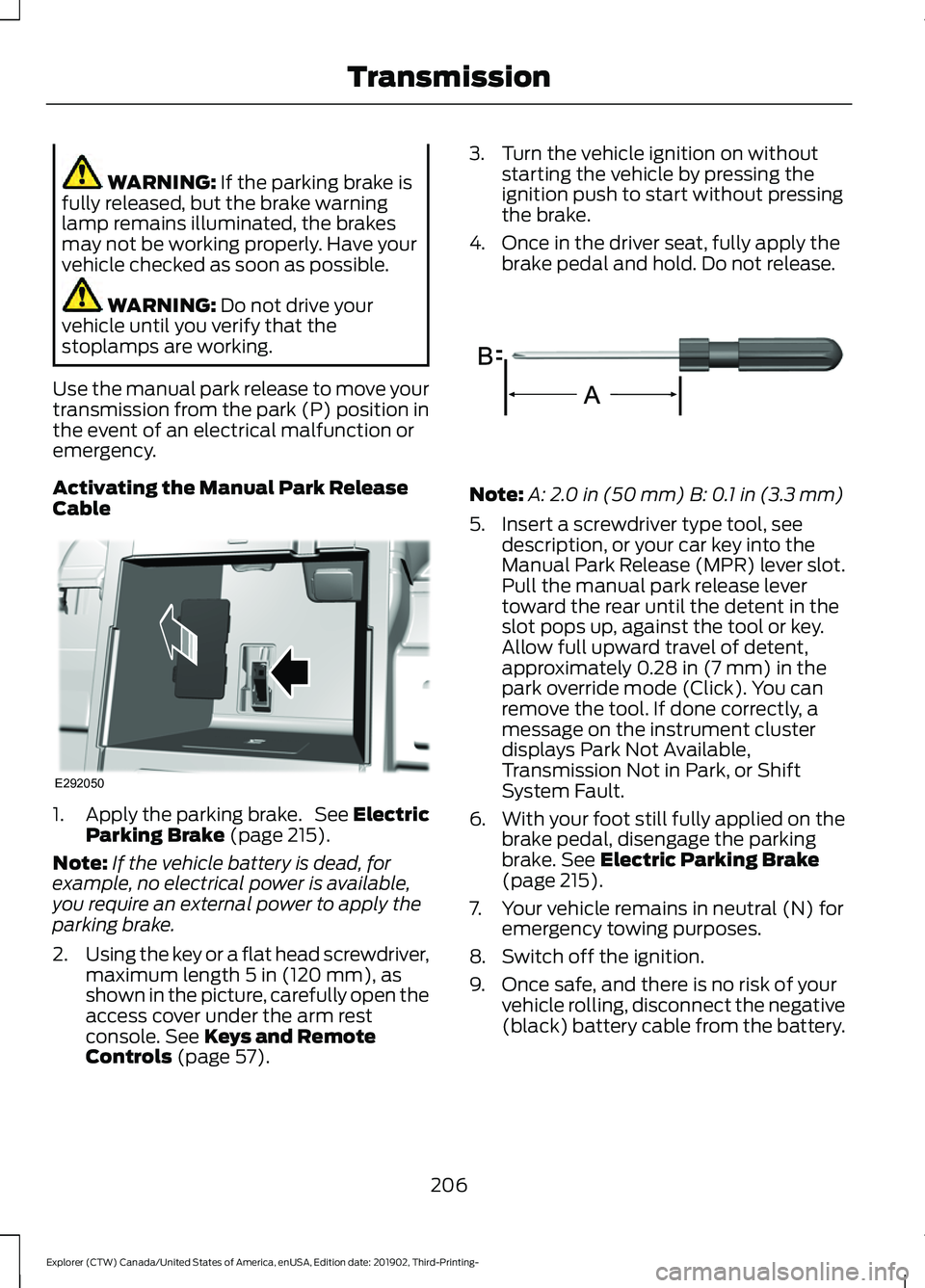
2. Using the key or a flat head screwdriver,
maximum length
5 in (120 mm), as
shown in the picture, carefully open the
access cover under the arm rest
console.
See Keys and Remote
Controls (page 57). 3. Turn the vehicle ignition on without
starting the vehicle by pressing the
ignition push to start without pressing
the brake.
4. Once in the driver seat, fully apply the brake pedal and hold. Do not release. Note:
A:
2.0 in (50 mm) B: 0.1 in (3.3 mm)
5. Insert a screwdriver type tool, see description, or your car key into the
Manual Park Release (MPR) lever slot.
Pull the manual park release lever
toward the rear until the detent in the
slot pops up, against the tool or key.
Allow full upward travel of detent,
approximately
0.28 in (7 mm) in the
park override mode (Click). You can
remove the tool. If done correctly, a
message on the instrument cluster
displays Park Not Available,
Transmission Not in Park, or Shift
System Fault.
6. With your foot still fully applied on the
brake pedal, disengage the parking
brake.
See Electric Parking Brake
(page 215).
7. Your vehicle remains in neutral (N) for emergency towing purposes.
8. Switch off the ignition.
9. Once safe, and there is no risk of your vehicle rolling, disconnect the negative
(black) battery cable from the battery.
206
Explorer (CTW) Canada/United States of America, enUSA, Edition date: 201902, Third-Printing- TransmissionE292050 E317360
Page 210 of 555
Returning Your Vehicle to Normal
Mode
1.
Reconnect the negative (black) battery
cable to the battery.
2. Apply the parking brake. See Electric
Parking Brake (page 215).
Note: If the vehicle battery is dead, for
example, no electrical power is available,
you require an external power to apply the
parking brake.
3. Fully apply the brake pedal and hold, do not release.
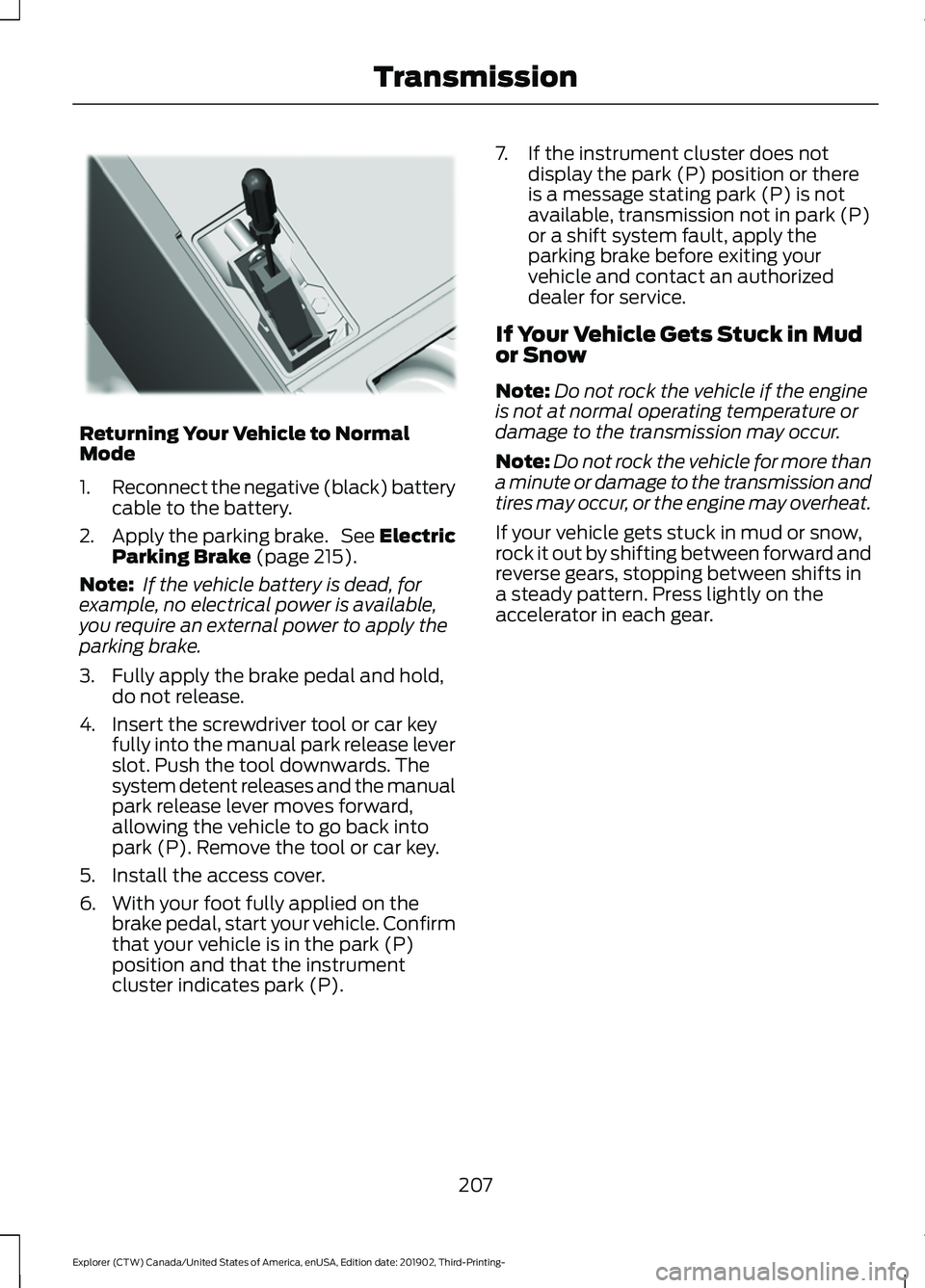
4. Insert the screwdriver tool or car key fully into the manual park release lever
slot. Push the tool downwards. The
system detent releases and the manual
park release lever moves forward,
allowing the vehicle to go back into
park (P). Remove the tool or car key.
5. Install the access cover.
6. With your foot fully applied on the brake pedal, start your vehicle. Confirm
that your vehicle is in the park (P)
position and that the instrument
cluster indicates park (P). 7. If the instrument cluster does not
display the park (P) position or there
is a message stating park (P) is not
available, transmission not in park (P)
or a shift system fault, apply the
parking brake before exiting your
vehicle and contact an authorized
dealer for service.
If Your Vehicle Gets Stuck in Mud
or Snow
Note: Do not rock the vehicle if the engine
is not at normal operating temperature or
damage to the transmission may occur.
Note: Do not rock the vehicle for more than
a minute or damage to the transmission and
tires may occur, or the engine may overheat.
If your vehicle gets stuck in mud or snow,
rock it out by shifting between forward and
reverse gears, stopping between shifts in
a steady pattern. Press lightly on the
accelerator in each gear.
207
Explorer (CTW) Canada/United States of America, enUSA, Edition date: 201902, Third-Printing- TransmissionE297270
Page 302 of 555
ROADSIDE ASSISTANCE
Vehicles Sold in the United States:
Getting Roadside Assistance
To fully assist you should you have a
vehicle concern, Ford Motor Company
offers a complimentary roadside
assistance program. This program is
separate from the New Vehicle Limited
Warranty.
The service is available:
•
24 hours a day, seven days a week.
• For the coverage period supplied with
your vehicle.
Roadside Assistance covers:
• A flat tire change with a good spare
(except vehicles supplied with a tire
inflation kit).
• Battery jump start.
• Lock-out assistance (key replacement
cost is the customer's responsibility).
• Fuel delivery — independent service
contractors, if not prohibited by state,
local or municipal law, shall deliver up
to 2 gal (8 L) of gasoline or 5 gal (20 L)
of diesel fuel to a disabled vehicle.
Roadside Assistance limits fuel delivery
service to two no-charge occurrences
within a 12-month period.
• Winch out — available within 100 ft
(30 m) of a paved or county
maintained road, no recoveries. •
Towing — independent service
contractors, if not prohibited by state,
local or municipal law, shall tow Ford
eligible vehicles to an authorized dealer
within
35 mi (56 km) of the
disablement location or to the nearest
authorized dealer. If a member
requests a tow to an authorized dealer
that is more than
35 mi (56 km) from
the disablement location, the member
shall be responsible for any mileage
costs in excess of
35 mi (56 km).
• Roadside Assistance includes up to
$200 for a towed trailer if the disabled
eligible vehicle requires service at the
nearest authorized dealer. If the towing
vehicle is operational but the trailer is
not, then the trailer does not qualify for
any roadside services.
Vehicles Sold in the United States:
Using Roadside Assistance
Complete the roadside assistance
identification card and place it in your
wallet for quick reference. This card is in
the Owner's Manual kit.
United States vehicle customers who
require Roadside Assistance, call
1-800-241-3673.
If you need to arrange roadside assistance
for yourself, Ford Motor Company
reimburses a reasonable amount for
towing to the nearest dealership within
35 mi (56 km)
. To obtain reimbursement
information, United States vehicle
customers call 1-800-241-3673.
Customers need to submit their original
receipts.
299
Explorer (CTW) Canada/United States of America, enUSA, Edition date: 201902, Third-Printing- Roadside Emergencies
Page 303 of 555
Vehicles Sold in Canada: Getting
Roadside Assistance
To fully assist you should you have a
vehicle concern, Ford Motor Company of
Canada, Limited offers a complimentary
roadside assistance program. This program
is eligible within Canada or the continental
United States.
The service is available 24 hours a day,
seven days a week.
This program is separate from the New
Vehicle Limited Warranty, but the coverage
is concurrent with the powertrain coverage
period of your vehicle. Canadian roadside
coverage and benefits may differ from the
U.S. coverage.
If you require more information, please call
us in Canada at 1-800-665-2006, or visit
our website at www.ford.ca.
HAZARD FLASHERS
Note:
The hazard flashers operate when
the ignition is in any position, or if the key is
not in the ignition. If used when the vehicle
is not running, the battery loses charge. As
a result, there may be insufficient power to
restart your vehicle. The flasher control is on the
instrument panel. Use your
hazard flashers when your
vehicle is creating a safety hazard for other
motorists.
• Press the flasher control and all front
and rear direction indicators flash.
• Press the button again to switch them
off. FUEL SHUTOFF WARNING: If your vehicle has been
involved in a crash, have the fuel system
checked. Failure to follow this instruction
could result in fire, personal injury or
death.
Note: When you try to restart your vehicle
after a fuel shutoff, the vehicle makes sure
that various systems are safe to restart.
Once the vehicle determines the systems
are safe, then the vehicle allows you to
restart.
Note: In the event that your vehicle does
not restart after your third attempt, contact
a qualified technician.
The fuel pump shutoff stops the flow of
fuel to the engine in the event of a
moderate to severe crash. Not every
impact causes a shutoff.
Should your vehicle shut off after a crash,
you may restart your vehicle.
If your vehicle has a key system:
1. Switch off the ignition.
2. Switch to start position.
3. Switch off the ignition.
4. Switch on the ignition to re-enable the
fuel pump.
5. If the vehicle does not start, repeat steps 1 through 4.
If your vehicle has a push button start
system:
1. Press START/STOP to switch off your
vehicle.
2. Press the brake pedal and START/STOP
to switch on your
vehicle.
3. Remove your foot from the brake pedal
and press
START/STOP to switch off
your vehicle.
300
Explorer (CTW) Canada/United States of America, enUSA, Edition date: 201902, Third-Printing- Roadside Emergencies
Page 306 of 555
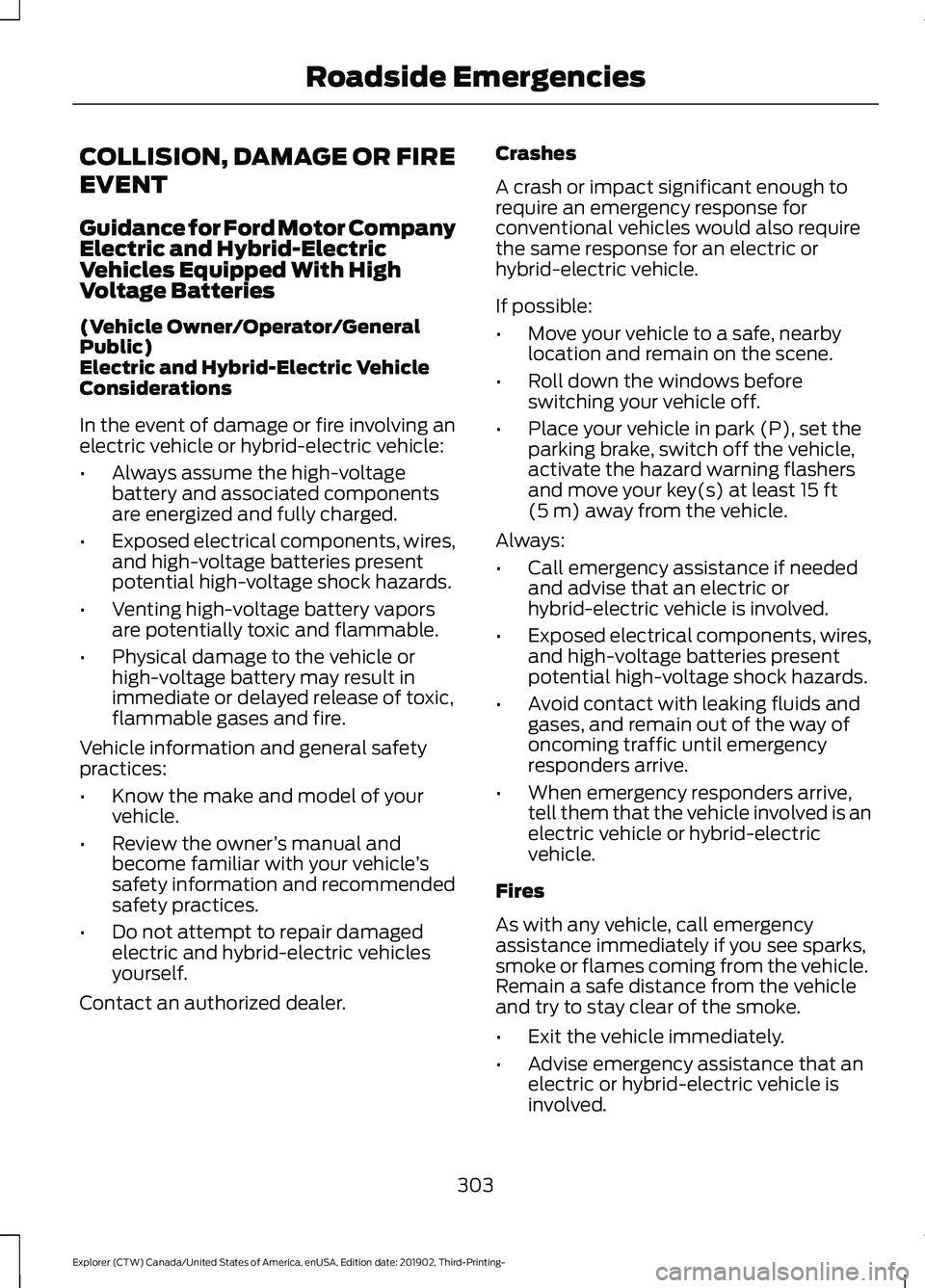
COLLISION, DAMAGE OR FIRE
EVENT
Guidance for Ford Motor Company
Electric and Hybrid-Electric
Vehicles Equipped With High
Voltage Batteries
(Vehicle Owner/Operator/General
Public)
Electric and Hybrid-Electric Vehicle
Considerations
In the event of damage or fire involving an
electric vehicle or hybrid-electric vehicle:
•
Always assume the high-voltage
battery and associated components
are energized and fully charged.
• Exposed electrical components, wires,
and high-voltage batteries present
potential high-voltage shock hazards.
• Venting high-voltage battery vapors
are potentially toxic and flammable.
• Physical damage to the vehicle or
high-voltage battery may result in
immediate or delayed release of toxic,
flammable gases and fire.
Vehicle information and general safety
practices:
• Know the make and model of your
vehicle.
• Review the owner ’s manual and
become familiar with your vehicle ’s
safety information and recommended
safety practices.
• Do not attempt to repair damaged
electric and hybrid-electric vehicles
yourself.
Contact an authorized dealer. Crashes
A crash or impact significant enough to
require an emergency response for
conventional vehicles would also require
the same response for an electric or
hybrid-electric vehicle.
If possible:
•
Move your vehicle to a safe, nearby
location and remain on the scene.
• Roll down the windows before
switching your vehicle off.
• Place your vehicle in park (P), set the
parking brake, switch off the vehicle,
activate the hazard warning flashers
and move your key(s) at least 15 ft
(5 m) away from the vehicle.
Always:
• Call emergency assistance if needed
and advise that an electric or
hybrid-electric vehicle is involved.
• Exposed electrical components, wires,
and high-voltage batteries present
potential high-voltage shock hazards.
• Avoid contact with leaking fluids and
gases, and remain out of the way of
oncoming traffic until emergency
responders arrive.
• When emergency responders arrive,
tell them that the vehicle involved is an
electric vehicle or hybrid-electric
vehicle.
Fires
As with any vehicle, call emergency
assistance immediately if you see sparks,
smoke or flames coming from the vehicle.
Remain a safe distance from the vehicle
and try to stay clear of the smoke.
• Exit the vehicle immediately.
• Advise emergency assistance that an
electric or hybrid-electric vehicle is
involved.
303
Explorer (CTW) Canada/United States of America, enUSA, Edition date: 201902, Third-Printing- Roadside Emergencies
Page 541 of 555
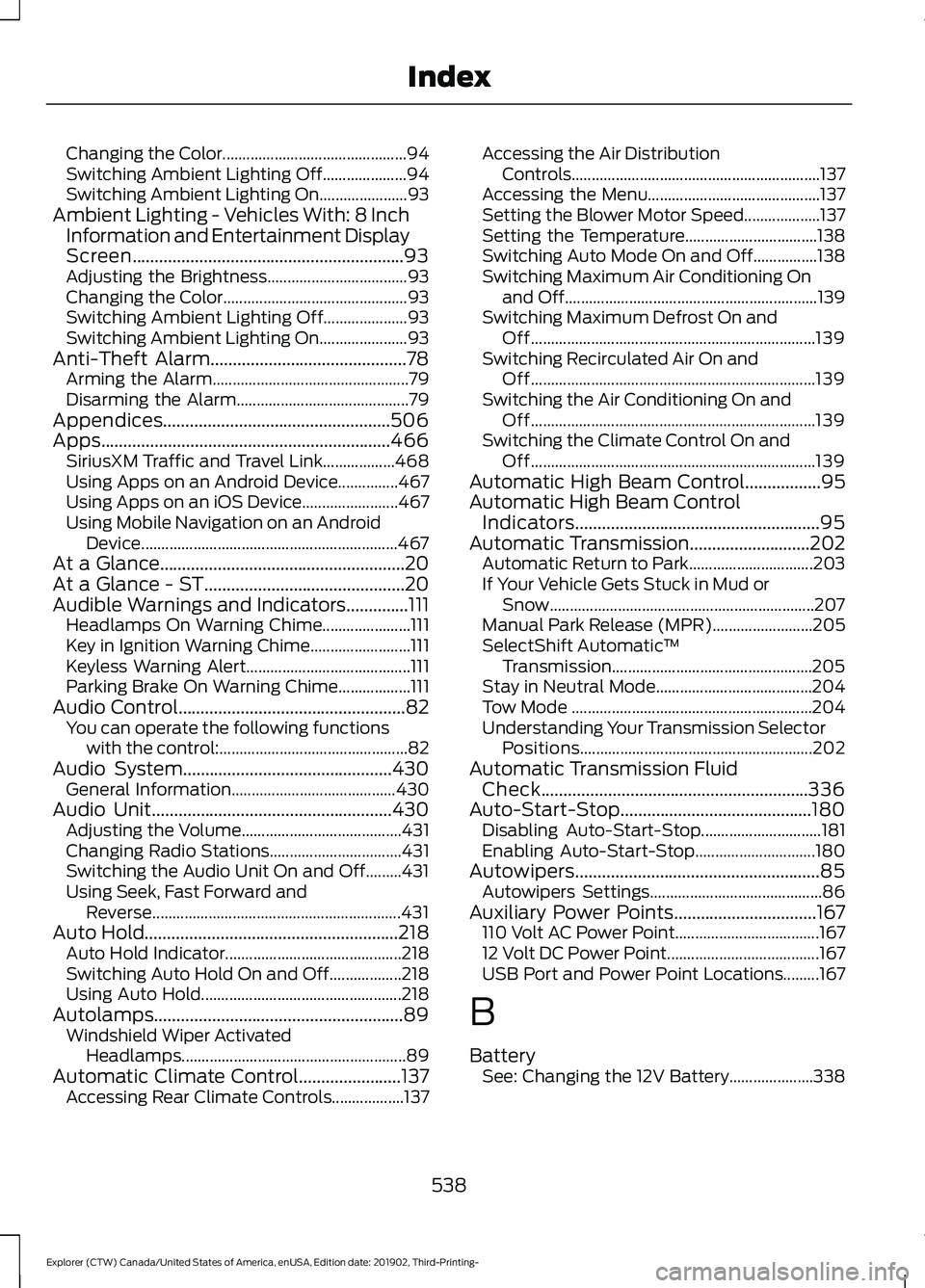
Changing the Color..............................................
94
Switching Ambient Lighting Off..................... 94
Switching Ambient Lighting On...................... 93
Ambient Lighting - Vehicles With: 8 Inch Information and Entertainment Display
Screen.............................................................93
Adjusting the Brightness................................... 93
Changing the Color.............................................. 93
Switching Ambient Lighting Off..................... 93
Switching Ambient Lighting On...................... 93
Anti-Theft Alarm............................................78 Arming the Alarm................................................. 79
Disarming the Alarm........................................... 79
Appendices...................................................506
Apps.................................................................466 SiriusXM Traffic and Travel Link.................. 468
Using Apps on an Android Device...............467
Using Apps on an iOS Device........................ 467
Using Mobile Navigation on an Android Device................................................................ 467
At a Glance.......................................................20
At a Glance - ST.............................................20
Audible Warnings and Indicators..............111
Headlamps On Warning Chime...................... 111
Key in Ignition Warning Chime......................... 111
Keyless Warning Alert......................................... 111
Parking Brake On Warning Chime.................. 111
Audio Control...................................................82 You can operate the following functions
with the control:............................................... 82
Audio System
...............................................430
General Information......................................... 430
Audio Unit
......................................................430
Adjusting the Volume........................................ 431
Changing Radio Stations................................. 431
Switching the Audio Unit On and Off.........431
Using Seek, Fast Forward and Reverse.............................................................. 431
Auto Hold
.........................................................218
Auto Hold Indicator............................................ 218
Switching Auto Hold On and Off.................. 218
Using Auto Hold.................................................. 218
Autolamps........................................................89 Windshield Wiper Activated
Headlamps........................................................ 89
Automatic Climate Control
.......................137
Accessing Rear Climate Controls.................. 137Accessing the Air Distribution
Controls.............................................................. 137
Accessing the Menu........................................... 137
Setting the Blower Motor Speed................... 137
Setting the Temperature................................. 138
Switching Auto Mode On and Off................138
Switching Maximum Air Conditioning On and Off............................................................... 139
Switching Maximum Defrost On and Off....................................................................... 139
Switching Recirculated Air On and Off....................................................................... 139
Switching the Air Conditioning On and Off....................................................................... 139
Switching the Climate Control On and Off....................................................................... 139
Automatic High Beam Control.................95
Automatic High Beam Control Indicators.......................................................95
Automatic Transmission
...........................202
Automatic Return to Park............................... 203
If Your Vehicle Gets Stuck in Mud or Snow.................................................................. 207
Manual Park Release (MPR)......................... 205
SelectShift Automatic ™
Transmission.................................................. 205
Stay in Neutral Mode....................................... 204
Tow Mode ............................................................ 204
Understanding Your Transmission Selector Positions.......................................................... 202
Automatic Transmission Fluid Check............................................................336
Auto-Start-Stop...........................................180 Disabling Auto-Start-Stop.............................. 181
Enabling Auto-Start-Stop.............................. 180
Autowipers.......................................................85 Autowipers Settings........................................... 86
Auxiliary Power Points
................................167
110 Volt AC Power Point.................................... 167
12 Volt DC Power Point...................................... 167
USB Port and Power Point Locations.........167
B
Battery See: Changing the 12V Battery..................... 338
538
Explorer (CTW) Canada/United States of America, enUSA, Edition date: 201902, Third-Printing- Index
Page 543 of 555
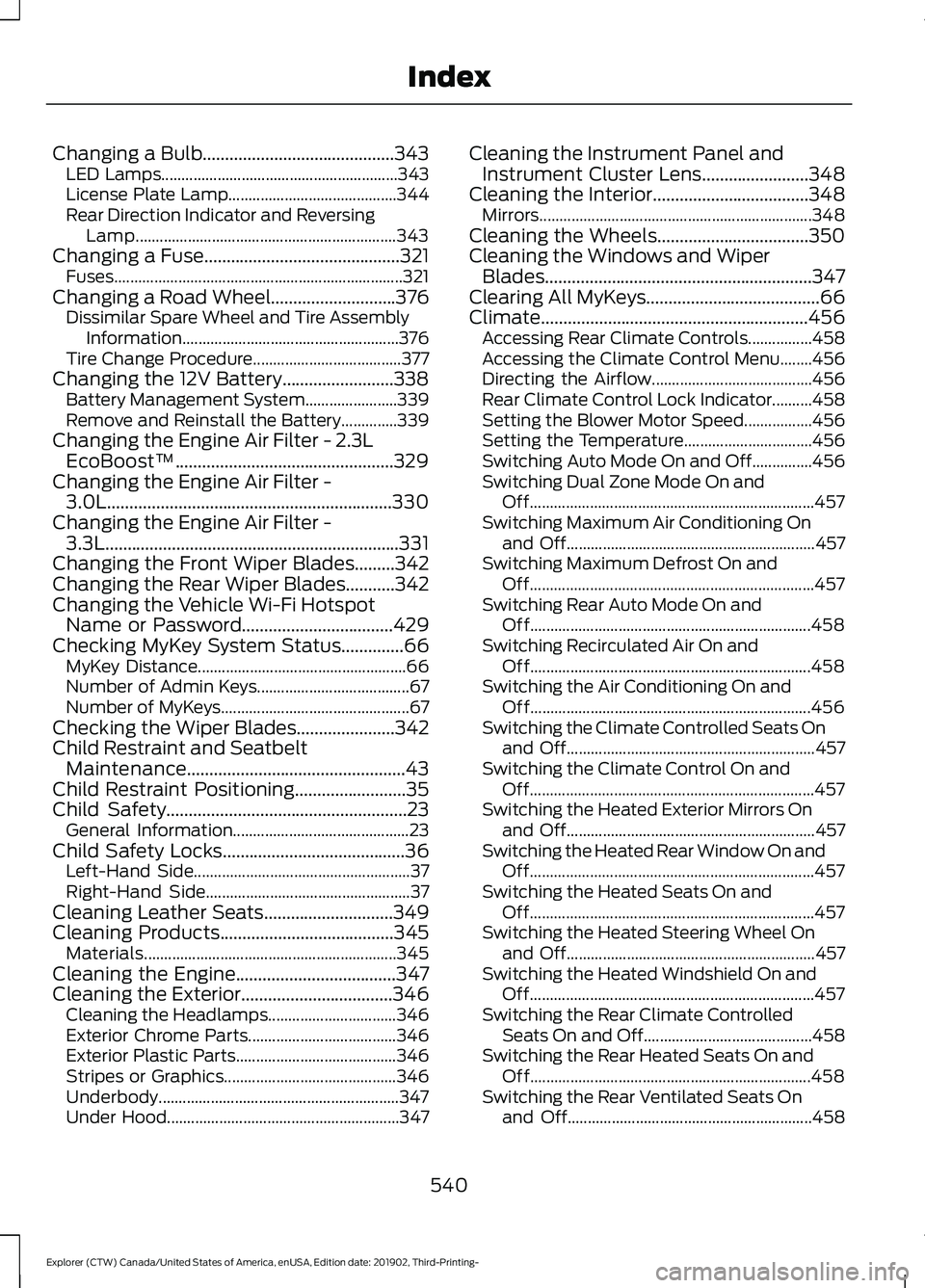
Changing a Bulb...........................................343
LED Lamps........................................................... 343
License Plate Lamp.......................................... 344
Rear Direction Indicator and Reversing Lamp................................................................. 343
Changing a Fuse............................................321
Fuses........................................................................\
321
Changing a Road Wheel
............................376
Dissimilar Spare Wheel and Tire Assembly
Information...................................................... 376
Tire Change Procedure..................................... 377
Changing the 12V Battery.........................338 Battery Management System....................... 339
Remove and Reinstall the Battery..............339
Changing the Engine Air Filter - 2.3L EcoBoost™.................................................329
Changing the Engine Air Filter - 3.0L................................................................330
Changing the Engine Air Filter - 3.3L..................................................................331
Changing the Front Wiper Blades.........342
Changing the Rear Wiper Blades...........342
Changing the Vehicle Wi-Fi Hotspot Name or Password
..................................429
Checking MyKey System Status..............66 MyKey Distance.................................................... 66
Number of Admin Keys...................................... 67
Number of MyKeys............................................... 67
Checking the Wiper Blades......................342
Child Restraint and Seatbelt Maintenance.................................................43
Child Restraint Positioning.........................35
Child Safety......................................................23 General Information............................................ 23
Child Safety Locks.........................................36 Left-Hand Side...................................................... 37
Right-Hand Side................................................... 37
Cleaning Leather Seats
.............................349
Cleaning Products.......................................345 Materials............................................................... 345
Cleaning the Engine
....................................347
Cleaning the Exterior..................................346 Cleaning the Headlamps................................ 346
Exterior Chrome Parts..................................... 346
Exterior Plastic Parts........................................ 346
Stripes or Graphics........................................... 346
Underbody............................................................ 347
Under Hood.......................................................... 347Cleaning the Instrument Panel and
Instrument Cluster Lens........................348
Cleaning the Interior...................................348 Mirrors.................................................................... 348
Cleaning the Wheels..................................350
Cleaning the Windows and Wiper Blades............................................................347
Clearing All MyKeys.......................................66
Climate............................................................456 Accessing Rear Climate Controls................458
Accessing the Climate Control Menu........456
Directing the Airflow........................................ 456
Rear Climate Control Lock Indicator..........458
Setting the Blower Motor Speed.................456
Setting the Temperature................................ 456
Switching Auto Mode On and Off...............456
Switching Dual Zone Mode On and Off....................................................................... 457
Switching Maximum Air Conditioning On and Off.............................................................. 457
Switching Maximum Defrost On and Off....................................................................... 457
Switching Rear Auto Mode On and Off...................................................................... 458
Switching Recirculated Air On and Off...................................................................... 458
Switching the Air Conditioning On and Off...................................................................... 456
Switching the Climate Controlled Seats On and Off.............................................................. 457
Switching the Climate Control On and Off....................................................................... 457
Switching the Heated Exterior Mirrors On and Off.............................................................. 457
Switching the Heated Rear Window On and Off....................................................................... 457
Switching the Heated Seats On and Off....................................................................... 457
Switching the Heated Steering Wheel On and Off.............................................................. 457
Switching the Heated Windshield On and Off....................................................................... 457
Switching the Rear Climate Controlled Seats On and Off.......................................... 458
Switching the Rear Heated Seats On and Off...................................................................... 458
Switching the Rear Ventilated Seats On and Off............................................................. 458
540
Explorer (CTW) Canada/United States of America, enUSA, Edition date: 201902, Third-Printing- Index
Page 547 of 555
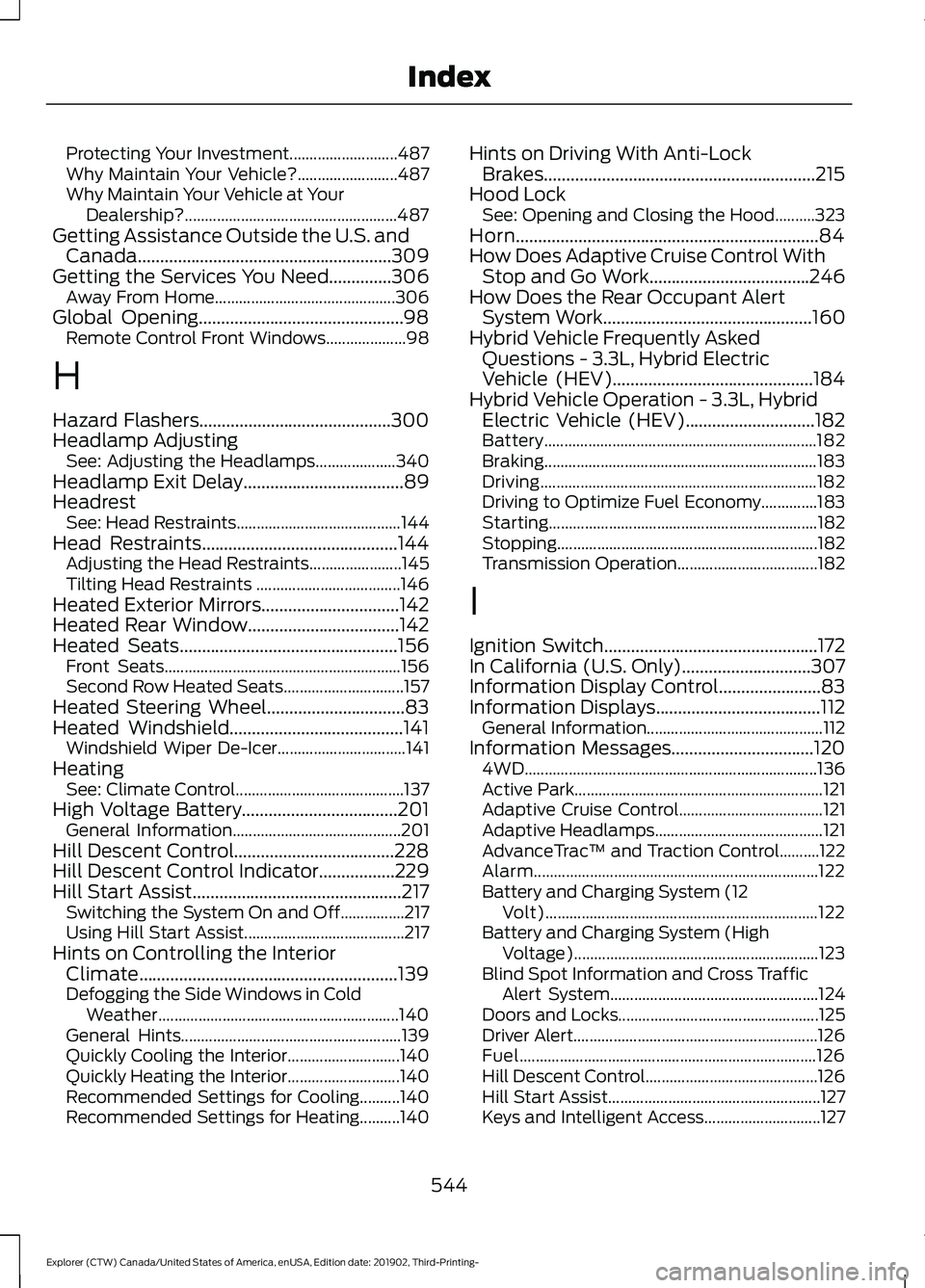
Protecting Your Investment...........................
487
Why Maintain Your Vehicle?......................... 487
Why Maintain Your Vehicle at Your Dealership?..................................................... 487
Getting Assistance Outside the U.S. and Canada.........................................................309
Getting the Services You Need..............306 Away From Home............................................. 306
Global Opening..............................................98 Remote Control Front Windows.................... 98
H
Hazard Flashers...........................................300
Headlamp Adjusting See: Adjusting the Headlamps.................... 340
Headlamp Exit Delay
....................................89
Headrest See: Head Restraints......................................... 144
Head Restraints
............................................144
Adjusting the Head Restraints....................... 145
Tilting Head Restraints .................................... 146
Heated Exterior Mirrors...............................142
Heated Rear Window..................................142
Heated Seats
.................................................156
Front Seats........................................................... 156
Second Row Heated Seats.............................. 157
Heated Steering Wheel...............................83
Heated Windshield
.......................................141
Windshield Wiper De-Icer................................ 141
Heating See: Climate Control.......................................... 137
High Voltage Battery...................................201 General Information.......................................... 201
Hill Descent Control....................................228
Hill Descent Control Indicator
.................229
Hill Start Assist...............................................217 Switching the System On and Off................217
Using Hill Start Assist........................................ 217
Hints on Controlling the Interior Climate
..........................................................139
Defogging the Side Windows in Cold
Weather............................................................ 140
General Hints....................................................... 139
Quickly Cooling the Interior............................ 140
Quickly Heating the Interior............................ 140
Recommended Settings for Cooling..........140
Recommended Settings for Heating..........140 Hints on Driving With Anti-Lock
Brakes.............................................................215
Hood Lock See: Opening and Closing the Hood..........323
Horn....................................................................84
How Does Adaptive Cruise Control With Stop and Go Work....................................246
How Does the Rear Occupant Alert System Work
...............................................160
Hybrid Vehicle Frequently Asked Questions - 3.3L, Hybrid Electric
Vehicle (HEV).............................................184
Hybrid Vehicle Operation - 3.3L, Hybrid Electric Vehicle (HEV)
.............................182
Battery.................................................................... 182
Braking.................................................................... 183
Driving..................................................................... 182
Driving to Optimize Fuel Economy..............183
Starting................................................................... 182
Stopping................................................................. 182
Transmission Operation................................... 182
I
Ignition Switch................................................172
In California (U.S. Only).............................307
Information Display Control
.......................83
Information Displays.....................................112
General Information............................................ 112
Information Messages................................120 4WD........................................................................\
. 136
Active Park.............................................................. 121
Adaptive Cruise Control.................................... 121
Adaptive Headlamps.......................................... 121
AdvanceTrac ™ and Traction Control..........122
Alarm....................................................................... 122
Battery and Charging System (12 Volt).................................................................... 122
Battery and Charging System (High Voltage)............................................................. 123
Blind Spot Information and Cross Traffic Alert System.................................................... 124
Doors and Locks.................................................. 125
Driver Alert............................................................. 126
Fuel........................................................................\
.. 126
Hill Descent Control........................................... 126
Hill Start Assist..................................................... 127
Keys and Intelligent Access............................. 127
544
Explorer (CTW) Canada/United States of America, enUSA, Edition date: 201902, Third-Printing- Index
Page 548 of 555
Lane Keeping System.......................................
128
Maintenance......................................................... 128
MyKey...................................................................... 129
Park Aid.................................................................. 130
Park Brake............................................................... 131
Power Steering..................................................... 132
Pre-Collision Assist............................................ 132
Remote Start........................................................ 132
Seats........................................................................\
133
Starting System................................................... 133
Tire Pressure Monitoring System.................. 133
Trailer....................................................................... 134
Transmission........................................................ 134
Installing Child Restraints...........................25
Child Seats.............................................................. 25
Using Lap and Shoulder Belts......................... 25
Using Lower Anchors and Tethers for CHildren (LATCH)........................................... 28
Using Tether Straps............................................. 29
Instrument Cluster.......................................104
Instrument Lighting Dimmer
.....................89
Instrument Panel.............................................21
Interior Air Quality.........................................143
Interior Lamps
.................................................92
Front Interior Lamp.............................................. 92
Rear Interior Lamps............................................. 92
Interior Mirror
...................................................101
Automatic Dimming Mirror.............................. 101
Manual Dimming Mirror.................................... 101
Introduction........................................................9
J
Jump Starting the Vehicle.........................301 Connecting the Jumper Cables..................... 301
Jump Starting...................................................... 302
Locating the Jump Starting Connection Points................................................................. 301
Preparing Your Vehicle..................................... 301
Removing the Jumper Cables....................... 302
K
Keyless Entry
....................................................72
SECURICODE™ Keyless Entry Keypad........72
Keyless Starting
.............................................172
Ignition Modes...................................................... 173
Keys and Remote Controls.........................57 L
Lane Keeping System
................................260
Switching the System On and Off...............261
Liftgate...............................................................74
Lighting Control
..............................................88
Flashing High Beam Headlamps................... 89
Lighting Control Selections............................. 88
Switching High Beam Headlamps On and Off........................................................................\
. 88
Lighting..............................................................88 General Information........................................... 88
Load Carriers See: Roof Racks and Load Carriers.............282
Load Carrying.................................................281
Load Limit.......................................................283 Special Loading Instructions for Owners of
Pick-up Trucks and Utility-type
Vehicles............................................................. 287
Vehicle Loading - with and without a Trailer................................................................. 283
Locating the Cabin Air Filter.....................143
Locking and Unlocking................................69 Activating Intelligent Access............................ 70
Autolock.................................................................... 71
Battery Saver.......................................................... 72
Illuminated Entry.................................................... 71
Illuminated Exit...................................................... 72
Locking and Unlocking the Doors with the Key Blade........................................................... 69
Power Door Locks................................................ 69
Remote Control.................................................... 69
Smart Unlocks for Integrated Keyhead Remote Control................................................ 70
Smart Unlocks for Intelligent Access Keys........................................................................\
71
Luggage Covers
............................................282
Lug Nuts See: Changing a Road Wheel........................ 376
M
Maintenance..................................................323 General Information.......................................... 323
Manual Seats
..................................................147
Adjusting the Seat Backrest........................... 147
Moving the Seat Backward and Forward.............................................................. 147
545
Explorer (CTW) Canada/United States of America, enUSA, Edition date: 201902, Third-Printing- Index
Page 550 of 555

Switching the Power Liftgate On or
Off........................................................................\
. 76
Power Seats...................................................148
Adjusting the Lumbar Support..................... 149
Adjusting the Multi-Contour Front Seats With Active Motion ...................................... 149
Power Steering Fluid Check....................338
Power Windows
..............................................97
Accessory Delay................................................... 98
Bounce-Back.......................................................... 97
One-Touch Down................................................. 97
One-Touch Up....................................................... 97
Window Lock......................................................... 97
Pre-Collision Assist
.....................................274
Adjusting the Pre-Collision Assist
Settings............................................................. 276
Blocked Sensors................................................. 277
Distance Indication and Alert........................ 275
Evasive Steering Assist.................................... 276
Using the Pre-Collision Assist System............................................................... 274
Protecting the Environment
........................19
Puncture See: Changing a Road Wheel........................ 376
R
Rear Occupant Alert System Audible Warnings........................................................161
Rear Occupant Alert System Indicators.......................................................161
Rear Occupant Alert System Limitations...................................................160
Rear Occupant Alert System Precautions.................................................160
Rear Occupant Alert System...................160
Rear Parking Aid...........................................230 Object Distance Indicator............................... 232
Rear Passenger Climate Controls..........140 Directing Air to the Overhead Air
Vents.................................................................... 141
Directing Air to the Rear Footwell Air Vents.................................................................... 141
Rear Climate Control Lock Indicator............141
Setting the Rear Blower Motor Speed.........141
Setting the Rear Temperature........................ 141
Switching the Rear Climate Control On and Off........................................................................\
. 141Switching the Rear Heated Seats On and
Off........................................................................\
. 141
Rear Seats
.......................................................152
Adjusting the Second Row Rear
Seats................................................................... 152
Adjusting the Third Row Power Seats.................................................................. 156
Rear Under Floor Storage..........................281 Adjustable Load Floor....................................... 281
Spare Tire Cover.................................................. 281
Rear View Camera.......................................238 Camera Guidelines........................................... 240
Manual Zoom....................................................... 241
Obstacle Distance Indicator.......................... 240
Rear Camera Delay............................................ 241
Using the Rear View Camera System........239
Rear View Camera See: Rear View Camera................................... 238
Rear Window Wiper and Washers...........87 Rear Camera Washer.......................................... 87
Rear Window Washer......................................... 87
Rear Window Wiper............................................. 87
Rear Wiper Blades See: Changing the Rear Wiper Blades.......342
Recommended Towing Weights
...........290
Reduced Engine Performance...............296
Refueling - Excluding: Hybrid Electric Vehicle (HEV)
.............................................190
Refueling System Overview........................... 190
Refueling System Warning.............................. 192
Refueling Your Vehicle....................................... 191
Refueling - Hybrid Electric Vehicle (HEV).............................................................193
Fuel Filler Door Manual Override Lever................................................................... 195
System Warnings............................................... 194
Remote Control
...............................................57
Car Finder................................................................ 62
Integrated Keyhead Transmitter..................... 57
Intelligent Access Key........................................ 58
Memory Feature.................................................... 61
Remote Start......................................................... 62
Replacing the Battery......................................... 59
Sounding the Panic Alarm................................ 62
Remote Start
..................................................142
Automatic Settings............................................ 142
Heated and Cooled Features......................... 142
Last Settings......................................................... 142
547
Explorer (CTW) Canada/United States of America, enUSA, Edition date: 201902, Third-Printing- Index